

Defender Pro is WPMU DEV’s answer to the question every WordPress site owner eventually asks: how do I get enterprise-grade security without hiring a security engineer?
The pitch is appealing. A single plugin that handles malware scanning, login protection, two-factor authentication, IP management, security hardening tweaks, audit logging, and a firewall, all managed from one dashboard. WPMU DEV ships it as part of a broader membership platform alongside more than 100 other WordPress tools, which makes the pricing conversation less straightforward than competing single-plugin products.
I reviewed Defender Pro version 6.1.0 (released July 22, 2026) by auditing the WordPress.org plugin listing, the official WPMU DEV Defender product page, the plugin changelog, official documentation, the WordPress.org screenshots panel, and several hands-on third-party test reports. Where a specific feature could not be directly confirmed in a live install, this review says so.
Two things are important to understand before you read further. First, Defender Pro is not available as a standalone plugin purchase. It comes bundled with a WPMU DEV membership. Second, the advanced Web Application Firewall (WAF) in Defender Pro only works if your site is hosted on WPMU DEV’s own hosting infrastructure. If you host elsewhere, you get the plugin’s AntiBot Global Firewall (IP-based blocking) but not the server-level WAF. Both points directly affect how you evaluate the product.
At a glance:
- Plugin version reviewed: 6.1.0 (released July 22, 2026)
- Active installs: 80,000-plus (WordPress.org)
- WordPress.org rating: 4.8 out of 5 from 334 reviews
- WordPress requirement: 6.4 or higher
- PHP requirement: 8.0 or higher
- Developer: WPMU DEV
- Pricing model: WPMU DEV membership only (no standalone purchase)
- Multisite: Yes
Quick verdict
Quick Verdict
Defender Pro is a capable, well-designed security plugin that covers most of what a WordPress site owner needs: malware scanning, login hardening, 2FA, IP management, and a solid set of one-click hardening tweaks. The interface is clean, the free version delivers meaningful protection, and the Pro upgrade adds scheduled scanning, full audit logging, Safe Repair, and access to WPMU DEV’s support team.
Two things prevent this from being a straightforward recommendation for everyone. The advanced WAF is only available on WPMU DEV hosting, which is a real limitation if you host elsewhere. And Defender Pro does not exist as a standalone purchase; you buy a WPMU DEV membership and Defender Pro comes with it, alongside more than 100 other plugins.
- Best for: WordPress site owners already using WPMU DEV hosting or who want a single membership covering all their plugin needs across multiple sites.
- Best plan: WPMU DEV Standard or higher for agencies and freelancers managing several sites. The free plugin is worth running even without a membership for basic protection.
- Standout: The AntiBot Global Firewall draws from threat intelligence across 750,000-plus sites, the biometric and hardware key 2FA options go further than most competitors, and The Hub makes multi-site security monitoring genuinely practical.
- Watch out for: The advanced WAF requires WPMU DEV hosting. No standalone plugin pricing exists. Safe Repair handles WordPress core files but not custom file malware removal.
What Defender Pro is
Defender Pro is a WordPress security plugin built by WPMU DEV, a company that has been building WordPress tools since 2008. The plugin runs under two names depending on your access level: Defender Security (the free version, available on WordPress.org) and Defender Pro (the full feature set, unlocked with a WPMU DEV membership). The codebase is the same plugin; your membership license activates the Pro features automatically once you connect the plugin to your WPMU DEV account via the WPMU DEV Dashboard.
The plugin covers four primary security layers:
- Detection: malware scanning across core files, plugins, themes, and custom files for known threats, suspicious code, changed files, and known vulnerabilities.
- Blocking: IP-based firewall rules powered by the AntiBot Global Firewall, manual IP allowlisting and blocklisting, user agent banning, geolocation lockout, and 404 detection.
- Access control: login hardening through two-factor authentication, login URL masking, login lockout, CAPTCHA integration, and password enforcement.
- Hardening: twelve one-click security tweaks targeting the most common WordPress configuration weaknesses.
Version 6.1.0, released July 22, 2026, brought several improvements including extended Whitelabel support (covering Global Firewall branding and User Agent lockout features), improved compatibility with WPMU DEV’s Unlimited Hosting environment, smarter alert scheduling for months with fewer than 31 days, updated CVSS score handling for outdated plugins, and a refreshed plugin interface and icon. The changelog reflects consistent development attention.
WPMU DEV designed Defender to integrate with The Hub, their centralized multi-site management dashboard. For agencies and developers running multiple WordPress installs, The Hub is where you monitor security status, run scans, and receive alerts across all connected sites from one place. That integration makes Defender meaningfully more useful for portfolio management than a standalone single-site security plugin.
Who Defender Pro is best for
Strong fit:
- WordPress site owners already in the WPMU DEV ecosystem who want security included in the same membership that covers their other plugin needs.
- Agencies and freelancers managing multiple WordPress sites who want The Hub’s centralized security monitoring, whitelabel reporting, and configuration export across client sites.
- Developers and site owners who want advanced 2FA options beyond TOTP apps, specifically biometric authentication (fingerprint or facial recognition) and hardware key authentication (USB security keys).
- Sites hosted on WPMU DEV’s hosting platform, where the full server-level WAF is available and managed through The Hub’s Security tab.
- Teams that want one-click security hardening applied to a new WordPress install without researching each setting individually.
Weak fit:
- Sites hosted on third-party hosting that specifically need a server-level WAF. Defender’s advanced WAF requires WPMU DEV hosting; you cannot get it on Kinsta, WP Engine, SiteGround, or any other hosting provider.
- Buyers who want a security plugin without a subscription or platform commitment. Defender Pro requires a WPMU DEV membership.
- Site owners whose primary requirement is one-click malware removal from custom files. Defender’s Safe Repair handles WordPress core file restoration but does not provide automated malware removal from custom plugin or theme code.
- Teams who want a large community user base and extensive public documentation from years of community use. With 80,000-plus active installs, Defender is significantly smaller than Wordfence (5 million-plus installs), which affects the breadth of community troubleshooting resources.
- Buyers who want real-time independent threat intelligence separate from WPMU DEV’s own network. Wordfence publishes independent security research and maintains a dedicated threat intelligence feed.
Installation and first-run experience
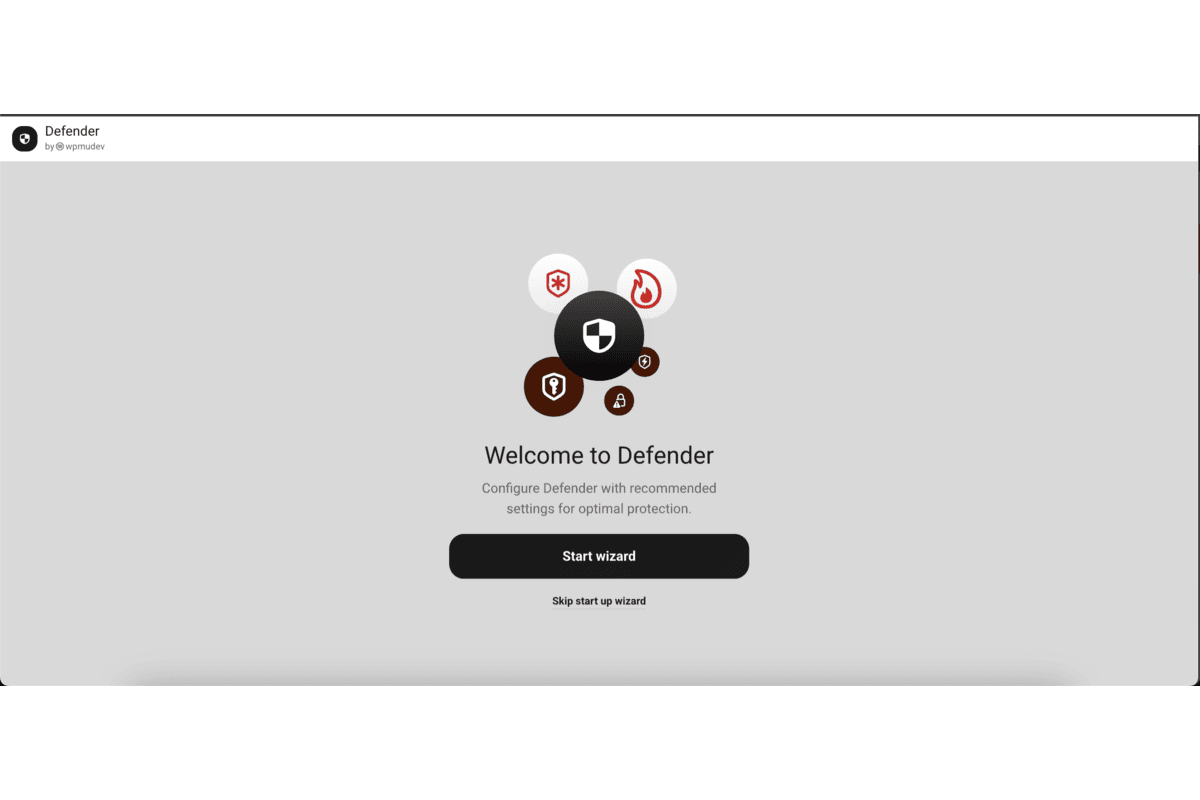
Defender Security installs from the WordPress plugin directory. Search “Defender Security” in Plugins > Add New, activate, and the plugin launches a setup wizard that walks through the most important initial configuration options: connecting to WPMU DEV, running a first scan, and enabling recommended hardening tweaks.
The onboarding flow is one of Defender’s visible strengths. The plugin does not drop you into a settings page and leave you to figure out the right choices. It applies an opinionated default configuration based on WordPress best practices, with each active setting explained in plain language.
The dashboard is organized around the core security areas: scan status, firewall status, login security status, and recommendations. Each module shows whether the relevant protection is active and flags any issues that need attention. A “Security actions required” badge (with a tooltip added in v6.1.0) appears when the plugin identifies something that needs your intervention.
For Pro users, connecting to the WPMU DEV Dashboard is an additional step. The connection activates the licensed Pro features, links the site to The Hub for remote management, and registers the site with WPMU DEV’s AntiBot network for centralized IP intelligence sharing.
Note on basis: the setup experience was reviewed using official WordPress.org listing screenshots, the changelog, and documented behavior from the WPMU DEV documentation. A live install in a dedicated sandbox was not available for this review window.
Malware scanner
The Defender malware scanner checks your WordPress installation for several types of threats:
- Changed core files: compares your WordPress core installation against the canonical WordPress.org source to flag any files that have been modified since installation.
- Known malware signatures: matches file content against signatures for recognized malware families, backdoors, and injection scripts.
- Suspicious code: detects patterns that suggest code injection, obfuscated JavaScript, or eval-based exploits even when the specific signature is not yet in the database.
- Known vulnerabilities: cross-references installed plugins and themes against a vulnerability database to surface unpatched security issues.
- Abandoned plugins: flags plugins that are no longer actively maintained and may not receive security patches.
Third-party testing has shown Defender’s scanner to be effective at real malware detection. One independent test involving a hacked site found 50 total security issues including file changes, vulnerabilities, and suspicious code, with Defender correctly identifying all the malware present.
Free vs. Pro scan capabilities
The free version of Defender Security includes malware scanning, but with important limitations. Scheduling scans to run automatically and receiving email alerts when issues are found are Pro features. On the free version, you run scans manually from the dashboard.
Defender Pro adds:
- Scheduled malware scanning: set scans to run automatically on a defined schedule so checks happen without requiring your active intervention.
- Automated email alerts and security reports: receive notifications when scan results include anything that needs attention.
- The full Audit Log for tracking what changed and when.
Safe Repair
Safe Repair is one of the more practical features in Defender Pro’s scanner. When the scanner identifies that a WordPress core file has been modified or compromised, Safe Repair replaces it with a clean copy sourced from the official WordPress.org repository. This happens in one click from the scan results dashboard, without requiring FTP access or manual file replacement.
The important boundary to understand: Safe Repair works on WordPress core files. It restores clean copies of modified wp-admin or wp-includes files. It does not provide automated cleanup of malware embedded in custom plugin code, theme files that have been injected by an attacker, or files outside the WordPress core file structure. For custom file malware, Defender flags the issue; remediation requires manual action or a specialist cleanup service.
This is a meaningful difference from some competing services that offer one-click malware removal across all file types, including third-party plugin and theme code.
AntiBot Global Firewall and WAF
This is the most important section to read carefully, because Defender’s firewall story has two distinct layers that behave very differently depending on your hosting setup.
AntiBot Global Firewall (available on all hosting)
The AntiBot Global Firewall is available in both the free and Pro versions of Defender, regardless of where your site is hosted. It works by connecting to WPMU DEV’s shared threat intelligence network, which aggregates IP-level attack data from more than 750,000 sites. This blocklist is updated every 12 hours. When a known malicious IP attempts to access your site, the AntiBot network recognizes it and blocks the request.
This is IP reputation-based blocking, not content-level filtering. It reduces attack noise and blocks known bad actors at the IP level before they interact with your site, but it does not filter the content or intent of individual HTTP requests the way a full WAF does.
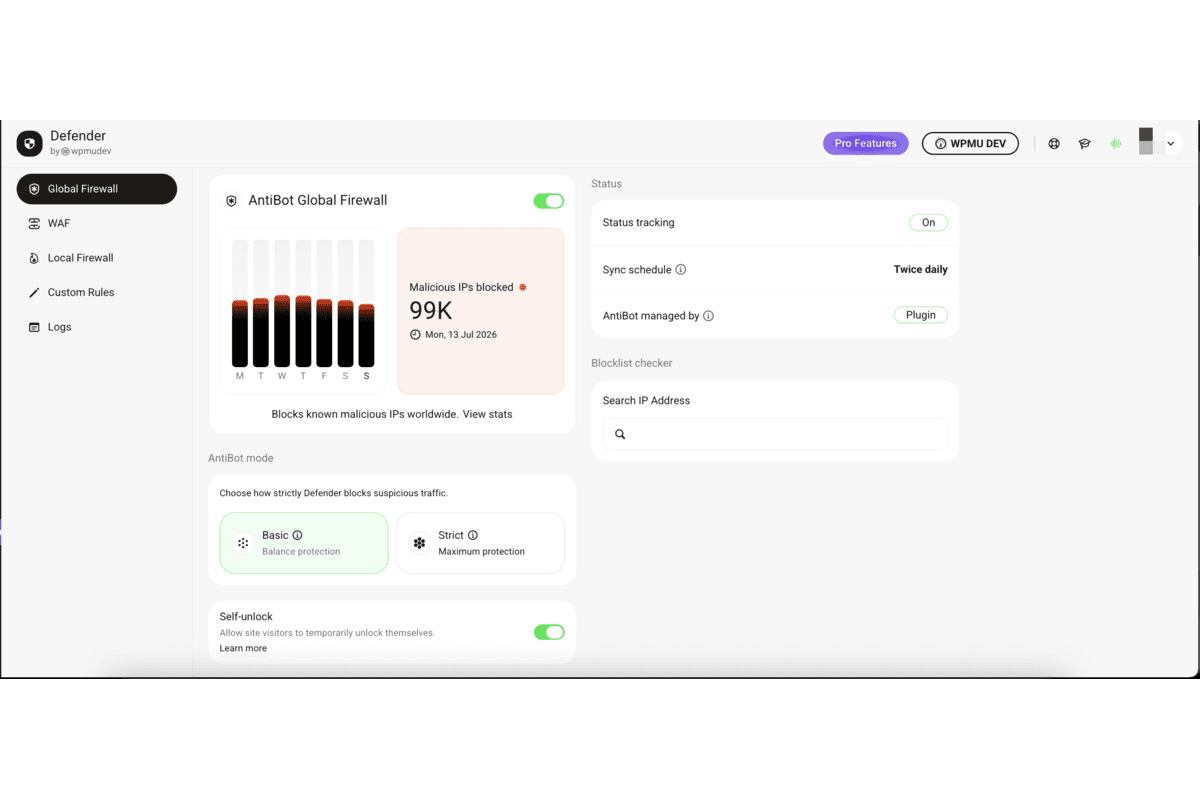
Defender’s IP management tools extend beyond the AntiBot network:
- Manual IP blocklisting and allowlisting for specific addresses you want to always block or always allow.
- User agent banning to block specific browser signatures, bots, or scraper tools.
- Geolocation lockout to block traffic from specific countries or regions.
- 404 detection: if a visitor triggers repeated 404 errors (a common sign of automated vulnerability scanning), Defender logs and can block the IP automatically.
- Login lockout: repeated failed login attempts from an IP trigger an automatic block.
Web Application Firewall (WPMU DEV hosting only)
The advanced WAF is a different product from the AntiBot Global Firewall, and this distinction matters. WPMU DEV’s hosted WAF filters HTTP requests at the server level, applying a managed ruleset that covers OWASP top-ten attack patterns and performs virtual patching for known WordPress core, plugin, and theme vulnerabilities. It blocks threats before the request reaches your WordPress application, which is a meaningful architectural advantage over in-application firewalls.
The critical limitation: this WAF is only available for sites hosted on WPMU DEV’s own hosting infrastructure. You enable it via your site’s Security or Hosting tab inside The Hub. If your site is on any other hosting provider, the advanced WAF is not available to you regardless of your WPMU DEV membership tier.
This is a significant caveat for buyers who prioritize a server-level WAF but host their sites on Kinsta, WP Engine, Cloudways, or any other third-party host. It is not advertised prominently on the main Defender Pro product page, and it directly affects the security architecture you can deploy.
For WPMU DEV-hosted sites, the WAF is included with all hosting plans and managed centrally through The Hub.
Login security
Login attacks are the most common attack vector against WordPress sites. Defender Pro addresses them across several layers.
Two-factor authentication
Defender’s 2FA implementation is one of the more complete in the WordPress plugin ecosystem. Supported methods include:
- TOTP mobile apps: Google Authenticator, Microsoft Authenticator, Authy, and any other TOTP-compatible app.
- Backup codes: single-use recovery codes generated at 2FA setup for account recovery.
- Lost device email: sends a one-time login code to the registered email address if the primary 2FA device is unavailable.
- WooCommerce 2FA: applies 2FA to WooCommerce customer accounts, not only WordPress admin users.
- Biometric authentication: fingerprint and facial recognition on devices that support WebAuthn biometric prompts. This is available through the Defender implementation and goes beyond what most competing security plugins offer on the free tier.
- Hardware key authentication: USB security keys (FIDO2 / hardware tokens) for users who want physical authentication tokens rather than app-based or biometric methods.
The breadth of 2FA options in Defender is one of its genuine differentiators. Most competing plugins stop at TOTP apps and backup codes. Defender’s biometric and hardware key support brings authentication options that were previously available only in enterprise identity tools.
2FA in Defender can be configured per user role. You can require it for administrators only, extend it to editors, or apply it across all roles. There is a grace period option that gives users a window to enroll in 2FA before being locked out.
Login masking
Login masking lets you move the WordPress login entry point away from the default /wp-login.php and /wp-admin URLs. Automated bots and brute force tools typically target these default locations. Moving the login URL to a custom path reduces automated attack noise significantly by removing your site from the mass of sites these tools sweep indiscriminately.
Login masking is a hardening measure rather than a security guarantee. A determined attacker who knows your site URL and is specifically targeting you will find the real login page. As a reduction of opportunistic automated attacks, it is effective and worth enabling.
Brute force protection
Defender’s login lockout blocks IPs that exceed a configurable threshold of failed login attempts within a time window. You can set the number of allowed failures, the counting window, and the lockout duration. Repeated offenders from the same IP escalate to a longer block period.
Combined with the AntiBot Global Firewall’s IP reputation checking, login lockout provides two independent layers of brute force protection: one that knows about IPs that have attacked other sites in the WPMU DEV network, and one that responds to attack patterns specific to your site.
CAPTCHA
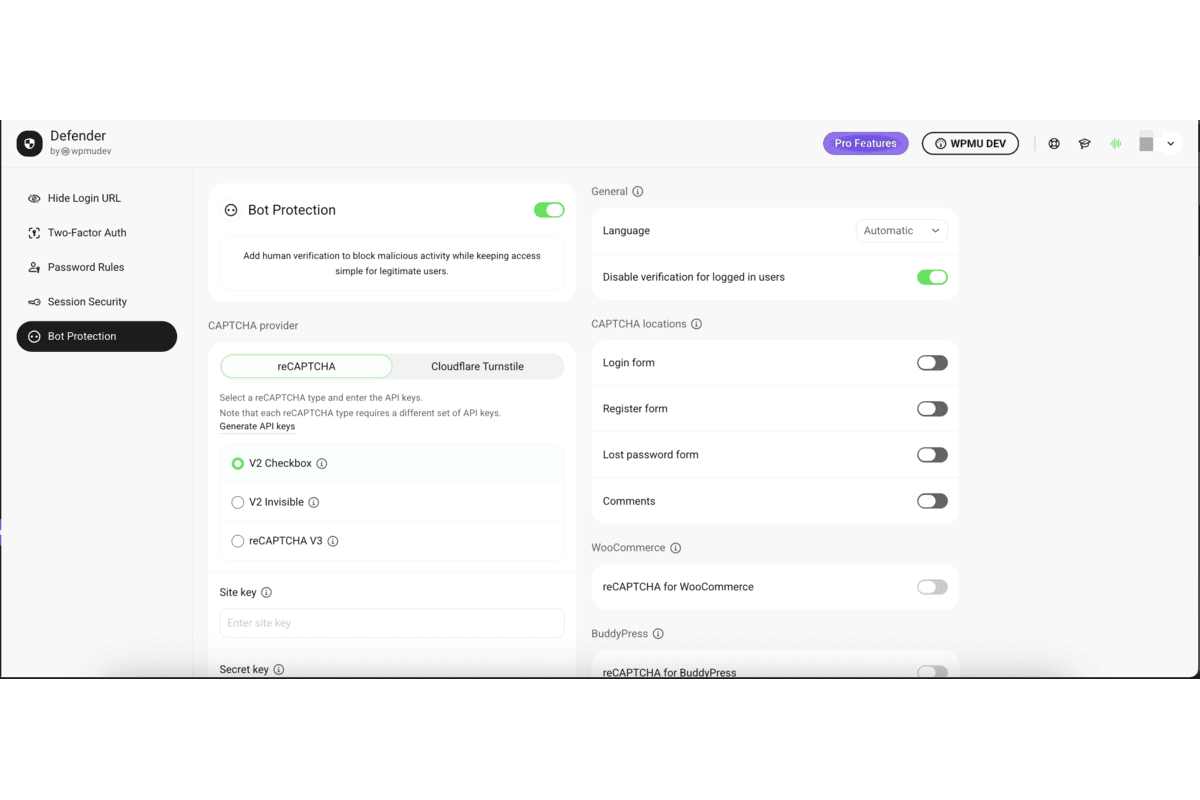
Defender integrates Google reCAPTCHA (v2 and v3) and Cloudflare Turnstile on the login form and, optionally, on the registration form and lost password form. CAPTCHA is available in both the free and Pro versions.
Security hardening
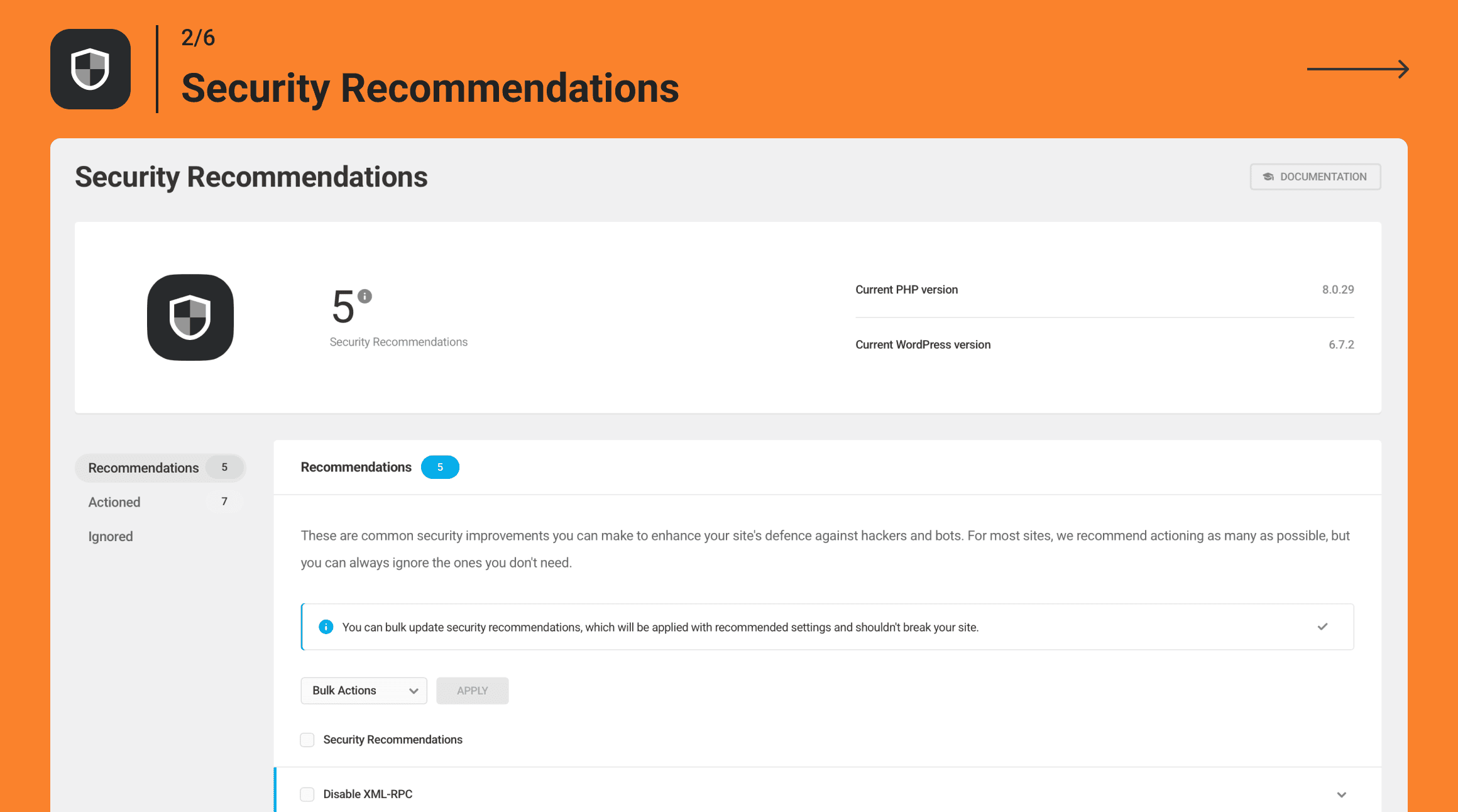
Defender ships with twelve one-click hardening tweaks targeted at the most common WordPress configuration weaknesses. Each tweak comes with a plain-language explanation of what it does and why it matters. Applying the full recommended set is a reasonable first step for any new WordPress installation.
The twelve tweaks include:
- Disable file editor: removes the built-in WordPress theme and plugin file editor from the admin panel, preventing code modification through a compromised admin account.
- Hide login error messages: removes the specific error text that tells an attacker whether their username was wrong versus their password, making user enumeration harder.
- Prevent PHP execution in the uploads directory: stops attackers from uploading and then executing PHP files via the media upload path.
- Disable XML-RPC: removes the remote publishing interface that is frequently targeted by brute force amplification attacks.
- Disable trackbacks and pingbacks: removes a traffic amplification vector that is frequently abused in DDoS and spam campaigns.
- Change the default admin user ID: WordPress creates the first admin user with ID 1 by default; changing this makes user enumeration via the /?author=1 parameter less effective.
- Change the database table prefix: changes the default wp_ prefix for database tables, which reduces the effectiveness of generic SQL injection payloads that target the known prefix.
- Prevent user enumeration via the author parameter: blocks the /?author=N URL pattern that reveals valid WordPress usernames.
- Prevent information disclosure via PHP version header: removes the PHP version from server response headers.
- Enable security headers: adds recommended HTTP security headers including Content-Security-Policy, X-Content-Type-Options, X-Frame-Options, and Referrer-Policy.
- Disable the WordPress REST API for non-authenticated users: restricts unauthenticated access to the REST API, which is a common information discovery path.
- Update the admin account if using default username: flags and prompts you to change the username if your admin account is still using “admin.”
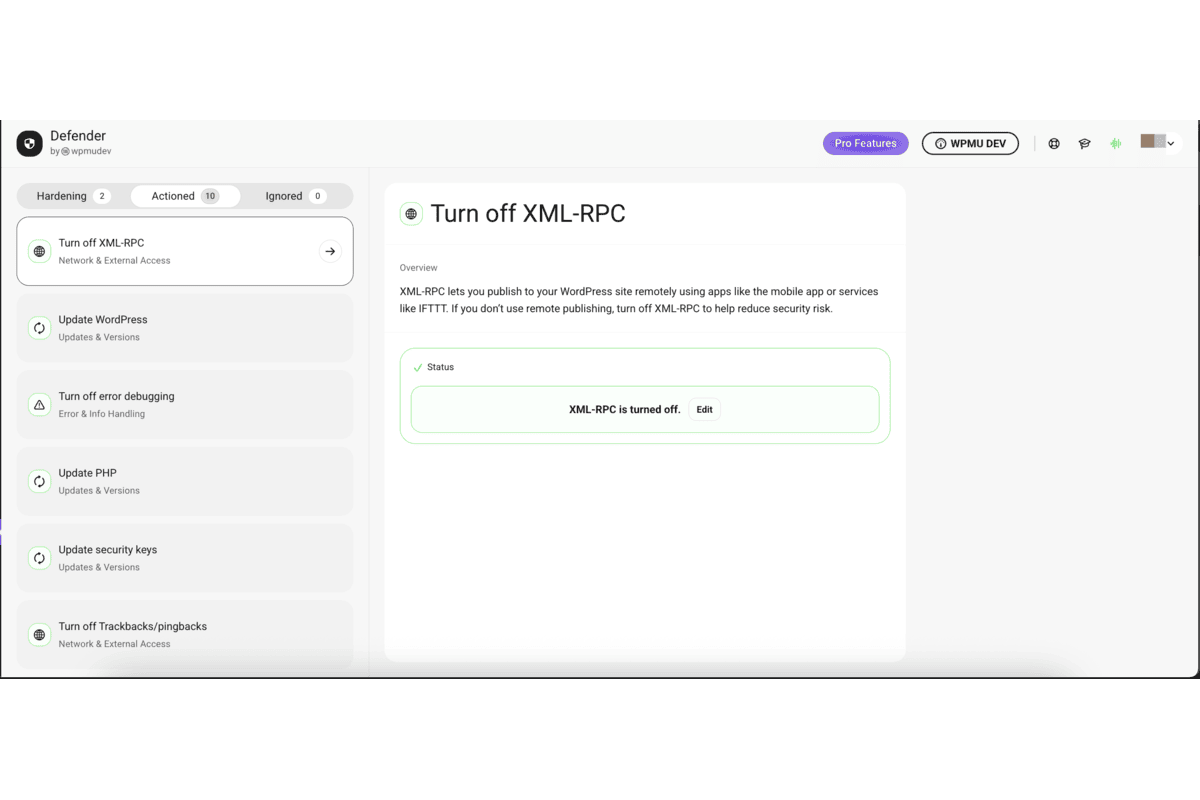
This list covers the practical WordPress-specific hardening steps. Applying all twelve in sequence on a new WordPress install is one of the most efficient security setup flows available in any WordPress security plugin.
Audit logging
Defender Pro includes a full Audit Log that tracks user actions and system events in security-relevant areas of the site. The log records:
- User logins and logouts.
- Content creation and edits (posts, pages, custom post types).
- Plugin installation, activation, deactivation, and deletion.
- Theme changes.
- User account creation and modification.
- Settings changes in security-sensitive areas.
The Audit Log is a Pro-only feature. The free version does not include it. For incident investigation, it is the forensic trail that tells you what happened before a compromise was noticed.
What Defender’s audit log does not do: store logs remotely in a tamper-proof external store by default. If an attacker gains admin access and has the ability to modify the database, the audit log entries could potentially be manipulated. This is a contrast with Wordfence Central, which stores audit logs remotely and out of reach of a compromised admin. For most sites, this distinction is not operationally significant, but it is worth knowing for sites with specific compliance requirements.
Scheduled scanning and reporting
Automated security only works if it actually runs without someone manually triggering it. Scheduled scanning and automated reporting are Defender Pro features. Free users run scans manually.
With Pro, you configure a scan schedule (daily, weekly, etc.) and Defender runs scans on that cadence, sends email alerts when something is found, and delivers periodic security report summaries. You can configure the report recipients and customize what triggers an alert.
For site owners who want to install the plugin and forget about it until something needs attention, this is the upgrade that makes that possible.
The Hub: multi-site management
The Hub is WPMU DEV’s centralized dashboard for managing multiple WordPress sites from one place. Defender Pro integrates deeply with The Hub, which is where the multi-site value of the WPMU DEV membership becomes apparent.
From The Hub, you can:
- View the security status of all connected sites at a glance.
- Launch malware scans across all sites without logging into each individually.
- Receive consolidated security alerts from the entire portfolio.
- Push Defender configuration templates to multiple sites: set up your standard security configuration once and apply it to every new client site with one action.
- View and export Whitelabel security reports for client delivery. Reports carry your branding, not WPMU DEV’s.
- Manage billing, updates, and user access for connected sites.
The Hub integration transforms Defender from a single-site tool into a portfolio-wide security management system. For agencies and freelancers managing ten or more WordPress sites, this is the feature that makes the WPMU DEV membership calculation worth doing seriously.
Pricing and license value
Defender Pro is not available as a standalone plugin purchase. You access it by subscribing to a WPMU DEV membership, which includes Defender Pro alongside more than 100 other WPMU DEV plugins (including Smush Pro for image optimization, Hummingbird Pro for performance, Forminator Pro for forms, and more), The Hub for site management, 24/7 live support, CDN credits, and backup storage.
WPMU DEV offers a tiered membership structure. At the time of this review (August 2026), their Pro plans are priced as follows:
- Pro Basic (1 site): $60/year, currently $36/year with an ongoing 40% promotional discount.
- Pro Standard (3 sites): $100/year, currently $60/year with the same promotional discount.
- Pro Plus (10 sites): $200/year, currently $120/year.
- Premium (unlimited sites): separate pricing structure for agencies, including hosting credits, VIP support, and unlimited site licenses.
Important notes on pricing:
- Verify current pricing directly at wpmudev.com before making a purchase decision, as plan structures and promotions change.
- All Pro plans include the full Pro plugin suite: the membership tier determines the number of sites, CDN allocation, backup storage, and hosting credit, not which plugins are accessible.
- A 7-day free trial is available for new members without requiring a credit card.
For buyers who already need multiple premium plugins (backup, performance, image optimization, forms, and security), the WPMU DEV membership math is favorable compared to purchasing each plugin separately. For buyers who only need a security plugin, the value calculation is different: Wordfence Premium at $149/year per site is a direct purchase with no platform dependency.
For agencies with multiple client sites, The Hub’s multi-site management and whitelabel reporting add tangible operational value that is harder to price on a per-plugin basis.
Pros and cons
Pros
- Comprehensive free version: malware scanning, AntiBot Global Firewall, 2FA, login masking, brute force protection, CAPTCHA, geolocation blocking, and twelve hardening tweaks without a paid plan.
- AntiBot Global Firewall draws from threat intelligence across 750,000-plus WPMU DEV sites, giving even the free version access to community-scale IP blocklist data.
- 2FA options go further than most competing plugins: TOTP apps, biometric (fingerprint and face), and hardware key (USB FIDO2) are all supported.
- One-click hardening with twelve pre-defined tweaks and plain-language explanations makes initial WordPress hardening fast and accessible.
- The Hub integration is genuinely useful for multi-site management: security monitoring, configuration templates, scan launch, and whitelabel reporting from one dashboard.
- Scheduled scanning and automated alerts (Pro) let you run hands-off security without active dashboard monitoring.
- Safe Repair restores compromised WordPress core files in one click without FTP or manual file replacement.
- Whitelabel reporting for agencies: deliver branded security status reports to clients.
- WPMU DEV membership bundles over 100 plugins, making the pricing reasonable if you need several tools together.
- Clean, modern interface with clear language that does not require security expertise to navigate.
- Strong WordPress.org rating: 4.8 out of 5 from 334 reviews.
- 7-day free trial on WPMU DEV membership without a credit card.
Cons
- The advanced WAF is available only for sites hosted on WPMU DEV hosting. Sites on third-party hosting cannot access the server-level WAF regardless of membership tier.
- Defender Pro is not available as a standalone purchase. The only path to Pro features is a WPMU DEV membership.
- Safe Repair does not extend to custom plugin or theme file malware removal. The scanner flags these issues; cleanup requires manual intervention or a separate malware removal service.
- 80,000-plus active installs is significantly smaller than Wordfence (5 million-plus) or Sucuri. Smaller install base means fewer community resources and documented edge case fixes.
- Audit log is stored in the WordPress database by default, not in a remote tamper-proof store. A compromised admin account could potentially modify log entries.
- No standalone real-time threat intelligence publication comparable to Wordfence Intelligence or Patchstack.
- NGINX users need to manually copy generated firewall rules to their server configuration. Apache-based hosting handles this automatically.
- Pricing requires verification on WPMU DEV’s website directly.
Alternatives to Defender Pro
Wordfence. The most-installed WordPress security plugin at 5 million-plus active installs. Wordfence free includes a full WAF and malware scanner on any host, real-time threat intelligence on Premium ($149/year per site), and Wordfence Central for free multi-site management. Best pick if you want WAF and malware scanning on any hosting provider without a platform dependency.
Solid Security (formerly iThemes Security). A login hardening and vulnerability management plugin with a free tier. Includes 2FA, brute force protection, Patchstack integration for vulnerability monitoring, and file change detection. No malware scanner at any tier. Best pick if you want the lightest server footprint and Patchstack’s vulnerability intelligence.
Sucuri. Cloud-based website security with a DNS-level WAF that filters traffic before it reaches your server. The Basic WAF plan starts at $199/year and includes malware scanning, a security audit log, and post-hack cleanup. Best pick if you want network-level traffic filtering that works regardless of your hosting provider.
MalCare. Automated malware scanning and one-click removal where the scanning engine runs on MalCare’s own servers instead of yours. Starts at $99/year for one site. Best pick if malware detection and removal are the primary requirement and you specifically want scanning to run off your server.
All-In-One Security (AIOS). A free security plugin with a strong set of hardening tweaks, firewall rules, and login protection. Best pick if you want maximum free functionality with no account or platform dependency.
The clearest head-to-head comparison for most buyers is Defender Pro versus Wordfence. Defender wins on interface quality, 2FA breadth, The Hub integration for multi-site management, and overall bundled value when you factor in the other WPMU DEV plugins. Wordfence wins on active install base, independent threat research, WAF availability on any hosting provider, and direct standalone pricing without a platform subscription.
Final verdict
Defender Pro is a well-built security plugin that delivers solid protection across the areas that matter most for the majority of WordPress sites. The free version is genuinely capable, and the Pro upgrade adds real operational value in scheduled scanning, Safe Repair, audit logging, and The Hub integration for multi-site work.
The two caveats that keep coming up are the WAF and the pricing model. The advanced WAF being tied to WPMU DEV hosting is a meaningful structural limitation. If you want a server-level WAF and you do not host on WPMU DEV, Defender cannot give you one. Wordfence and Sucuri both handle this better because their WAF implementations work regardless of where your site is hosted. If WAF protection is on your requirements list, verify whether WPMU DEV hosting is part of your setup before choosing Defender Pro.
The membership pricing model is a genuine value question rather than a negative. If you already use or want several WPMU DEV plugins, the membership arithmetic can work strongly in your favor. If security is the only thing you need, you are paying for a platform bundle you do not want.
For agencies and developers already building on the WPMU DEV platform, Defender Pro is an easy addition. For site owners on third-party hosting who want a standalone security solution, Wordfence is the more direct path. The 7-day free trial at WPMU DEV lets you test the full membership experience before committing, which is a reasonable way to evaluate whether the platform bundle makes sense for your workflow.