


WP Activity Log has been tracking what happens inside WordPress admin panels since 2012. Today it sits on over 300,000 active installations, carries a 4.7-star rating from 482 reviews on WordPress.org, and is maintained by Melapress, the company behind several other WordPress security utilities. That combination of install volume and long track record earns attention.
This review is built on the current version 5.6.5 released July 21, 2026, the official WordPress.org plugin page, the Melapress documentation and feature pages, the public changelog through all 2025-2026 releases, and hands-on inspection of the plugin’s admin interface. It covers the free edition in full, explains what each paid tier adds, and lays out the pricing structure clearly so you can evaluate whether the upgrade cost is justified for your site.
At a glance
Plugin name: WP Activity Log
WordPress.org slug: wp-security-audit-log
Company: Melapress
Version reviewed: 5.6.5 (released July 21, 2026)
Active installs: 300,000+
WordPress.org rating: 4.7/5 from 482 reviews
WordPress requirement: 5.5 or higher; tested up to 7.0.4
PHP requirement: 7.4 or higher
Free edition: Unlimited logging, free-text search, event enable/disable controls, forum support
Premium (1 site): $139/year, adds reports, email/SMS/Slack alerts, session management
Enterprise (1 site): $189/year, adds external database storage, SIEM integrations, priority support
Money-back guarantee: 30 days on paid plans
Quick verdict
Best for: WordPress site owners, agencies, and compliance-driven organizations who need a detailed, verifiable record of every admin action, user change, and content modification.
Standout free feature: The depth of event tracking is unmatched at zero cost. WooCommerce, Gravity Forms, Yoast, and LearnDash are all covered in the free edition.
Standout paid feature: Enterprise plan log mirroring to external databases and SIEM tools makes the audit trail tamper-resistant and compliance-ready.
Watch out for: The free edition’s logs are stored in your WordPress database and can be deleted by anyone with database access. No notifications are included in the free tier.
Verdict: The best free audit log plugin available. The paid tiers are priced reasonably for what they add, but most small sites will find the free edition sufficient for daily monitoring.
What WP Activity Log is
WP Activity Log started as WP Security Audit Log in 2012, built by a security researcher who needed a detailed event log for WordPress compliance work. Melapress, the company that now owns and develops the plugin, rebranded it to WP Activity Log to reflect a broader focus: not just security events, but all meaningful activity on a WordPress site.
The plugin keeps a running log of user actions and system changes. Every time someone logs in, edits a post, installs a plugin, changes a setting, or modifies a user account, the plugin captures that event, records who did it, when, from which IP address, and what exactly changed. The result is a searchable audit trail that answers the question “who changed what, and when.”
That audit trail serves several distinct use cases. Compliance teams at organizations subject to GDPR, HIPAA, PCI-DSS, or SOX regulations need documented evidence of data access and system changes. Security-focused teams need a record of failed logins, user account modifications, and suspicious behavior. Development agencies managing client sites need a way to explain what happened when something breaks. Individual site owners need a way to catch unauthorized admin activity before it causes damage.
The plugin currently exists in three tiers: Free, Premium, and Enterprise. All tiers include the core logging engine, which is the most important part of the product. The paid tiers layer on notifications, session management, reporting, and external log storage.
Who WP Activity Log is best for
Strong fit:
- Site owners who need a historical record of every admin action. If you are ever asked “who changed this setting” or “which user deleted that post,” the plugin provides the answer.
- Agencies managing client WordPress sites who need accountability and an auditable record of their own team’s actions.
- WooCommerce store operators who need to track order edits, product changes, coupon modifications, and billing setting changes by admin users.
- Organizations with compliance requirements (GDPR, HIPAA, PCI-DSS). The Enterprise plan’s external log storage and SIEM integration are specifically designed for this use case.
- Multisite network administrators who need to monitor activity across all network sites from a single dashboard view.
- Development teams who want a cleaner debugging path. The event log shows exactly what changed on the site before a bug appeared.
- Sites with multiple admin or editor users where accountability matters.
Weak fit:
- Sites with a single admin user and no compliance requirements. The free edition delivers real value here, but the paid tiers add little for a solo-operator blog.
- Site owners who want a malware scanner or firewall alongside their activity log. WP Activity Log does not do either. It records what happened; it does not block threats. For combined monitoring and active protection, pair it with a dedicated security plugin.
- Sites where lightweight performance impact is a primary concern. The plugin adds database writes for every logged event. The impact is minimal on standard hosting, but high-traffic sites running extremely lean stacks may want to review the documentation on event exclusions.
Installation and initial setup
I tested the free edition in a clean WordPress sandbox. The setup is genuinely frictionless. Install from Plugins > Add New, search for “WP Activity Log,” activate, and the plugin immediately starts logging. No account registration, no API key, no configuration step required.
After activation, a new “WP Activity Log” menu item appears in the left sidebar. The default view shows the activity log viewer, which on a fresh install already contains entries for the plugin’s own activation event. On any active site, the log viewer fills up quickly because the plugin captures a wide range of events by default.
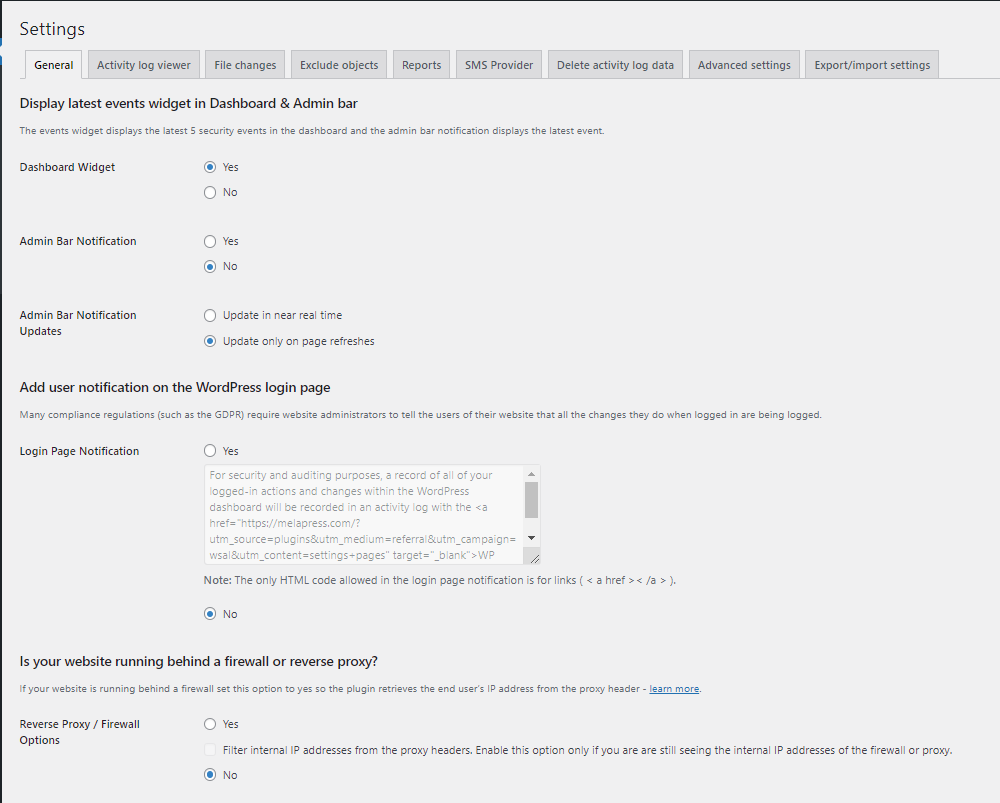
The settings panel is more involved. You can set the timestamp display format, enable reverse proxy support, configure data retention (auto-purge after N days or N months), and control which user roles can view and manage the log. These are all optional. The defaults work fine for most sites.
The one configuration step I would recommend immediately: visit the Enable/Disable Events screen and review what is turned on. By default, the plugin logs a broad range of events. On sites with heavy automated processes (scheduled posts, external API integrations, WooCommerce order processing), reviewing the default event list helps you avoid filling the log with noise that obscures the signals you actually care about.
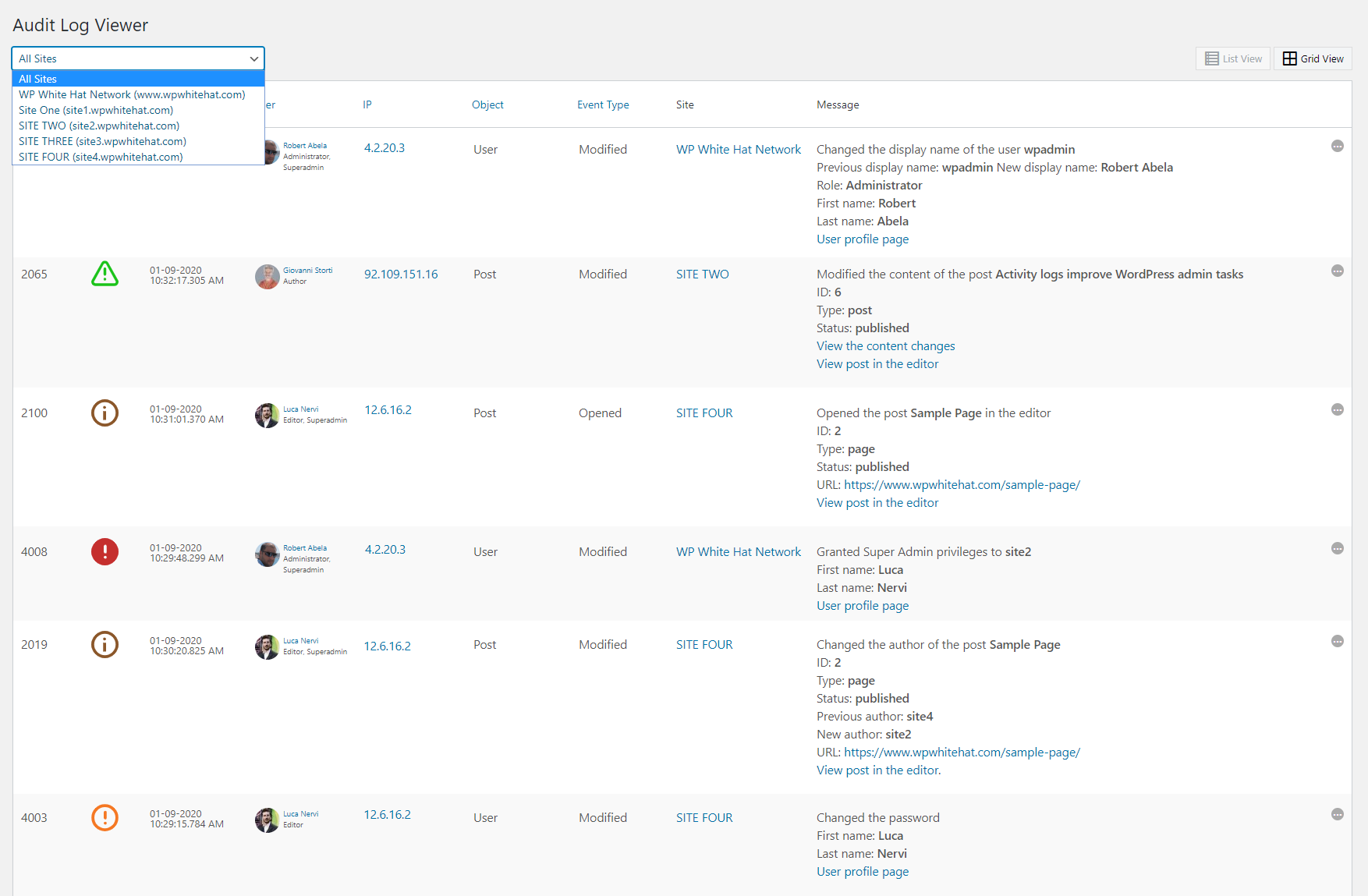
The activity log viewer
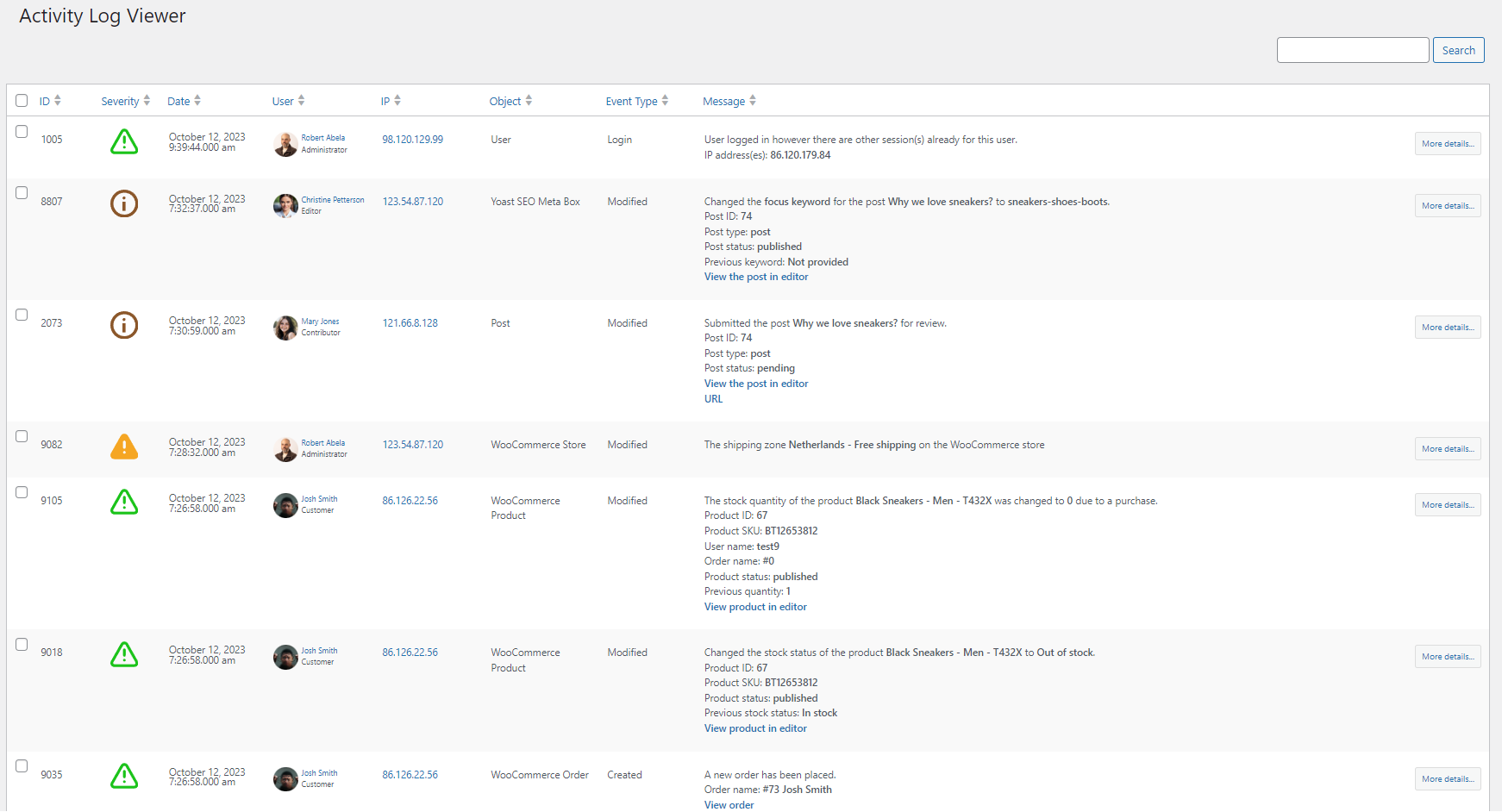
The log viewer is the plugin’s central interface. It shows a paginated, chronological list of events with columns for the event time, the user who triggered it, their IP address, the event ID code, and a plain-language description of what happened.
Each event description is human-readable. Instead of showing database field names, the plugin writes sentences: “User Emily changed the permalink of page Contact Us from /contact-us/ to /contact/.” That level of detail is what distinguishes WP Activity Log from minimal logging tools that just record timestamps and user IDs.
The free edition includes free-text search across the log. Type a username, an IP address, a post title, or a keyword and the log filters in real time. Free-text search covers most daily-monitoring use cases without any premium features. The limitations appear when you need to filter by event type, date range, or multiple criteria simultaneously. Those filters require the Premium edition.
Event inspector
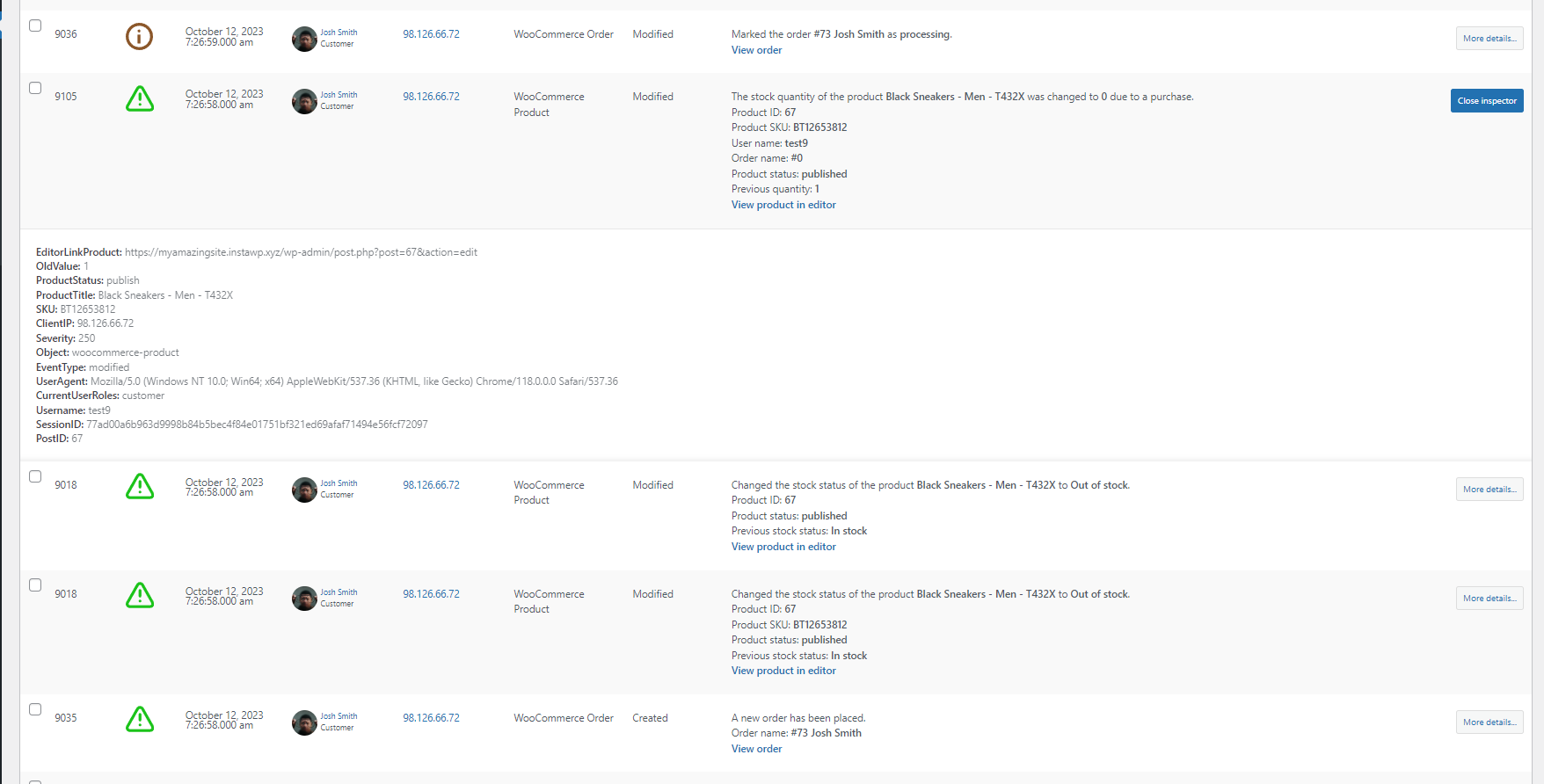
Each event in the log is expandable via an Event Inspector panel. Clicking opens a detailed view with additional metadata that does not fit in the main log columns: the session ID, the user agent string, the object type and ID that was modified, and in some cases before/after values showing exactly what changed.
The inspector is where the revision integration becomes visible. For supported content types, the inspector links directly to the WordPress revision comparison view, which shows a side-by-side diff of the before and after content. That integration means the activity log entry “User John edited post XYZ” is not just a label: you can click through and see exactly which paragraphs changed.
This before/after capability is available in the free edition for post and page edits. For custom post types and metadata changes, the depth of the inspector data depends on the event type.
Third-party plugin tracking
The breadth of third-party plugin coverage is the feature that most separates WP Activity Log from its alternatives.
The free edition tracks activity in: WooCommerce (orders, products, coupons, billing settings, tax settings), Yoast SEO (metadata changes, SEO configuration), ACF (Advanced Custom Fields), Redirection, MemberPress, TablePress, WPForms, LearnDash (added in version 5.6.0, January 2026), bbPress, WP 2FA, Rank Math SEO, Termly, and Paid Memberships Pro.
Version 5.6.4 (June 2, 2026) added tracking for WordPress AI Connectors, capturing four new event IDs for AI-related activity in the admin. That is a response to the new AI features in WordPress 7.0 and reflects active development that tracks the WordPress platform rather than just maintaining existing functionality.
The practical value of this coverage: if a WooCommerce coupon is modified and you do not know when or by whom, the activity log answers that without requiring any custom development. The same is true for Yoast settings changes, ACF field modifications, and LearnDash course updates.
Multisite network support
In a WordPress Multisite installation, the plugin’s network-level view shows activity across all sites from a single admin screen. The super admin can see all events network-wide, filter by individual site, and export logs per site.
Version 5.6.1 (March 2026) addressed multisite performance specifically, with improvements to how the network viewer queries and paginates events. Version 5.6.5 added the ability to exclude specific subsites from log mirroring in the Enterprise edition, which is useful for large networks where certain sites generate high log volume that should not be forwarded to external SIEM tools.
Enable/Disable events
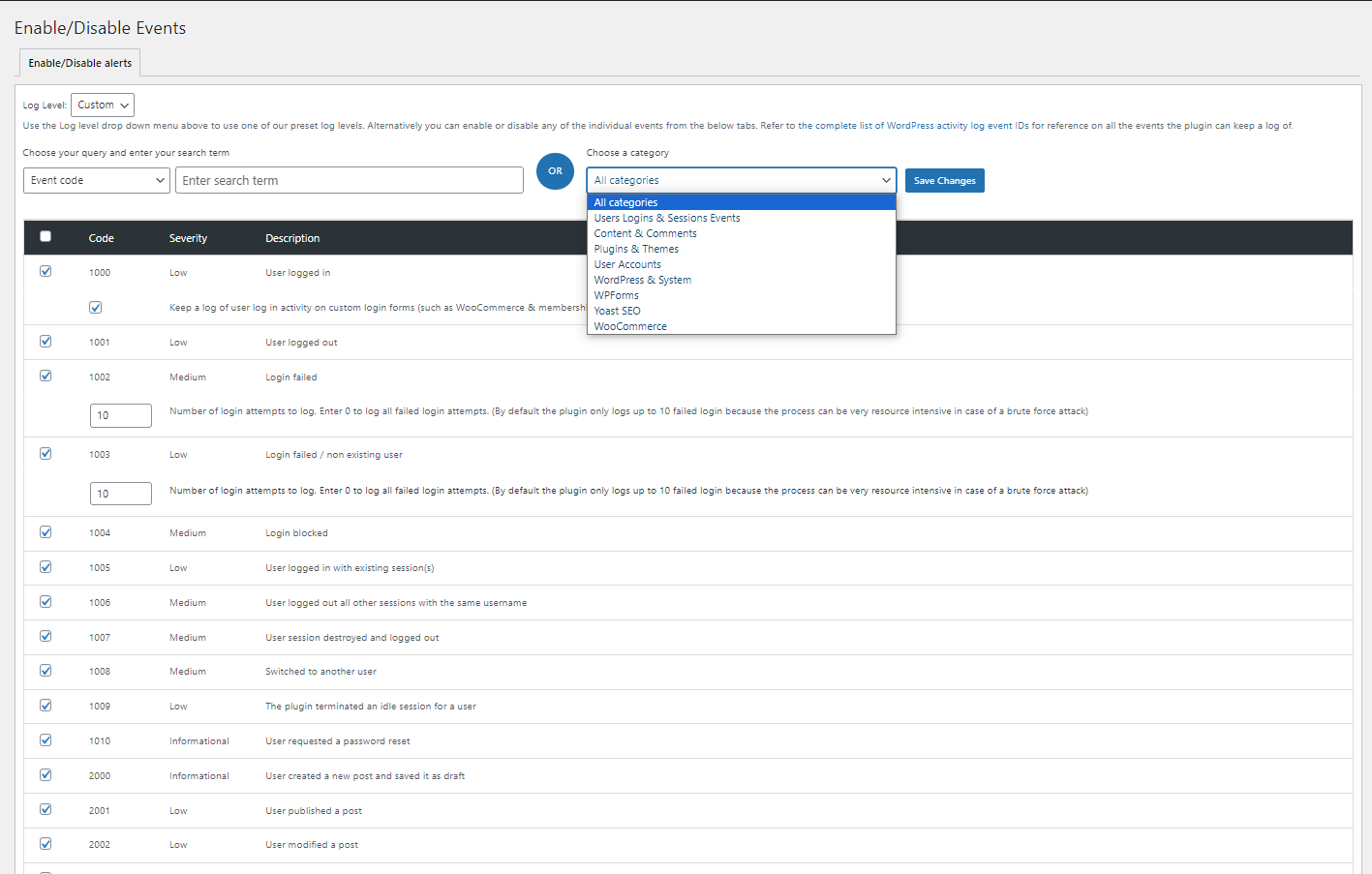
The plugin ships with a large default event set, but the Enable/Disable Events screen gives full granular control over what gets logged. Each event type is listed with its event ID and description, and you can toggle individual events on or off.
This is an important feature for busy sites. High-volume sites running WooCommerce, for example, generate large numbers of order-processing events that can dominate the log. Disabling the specific event IDs that are irrelevant to your monitoring goals keeps the log readable and reduces database growth.
The event ID system also makes documentation straightforward. Melapress maintains a public list of all event IDs with their descriptions, which is useful when configuring custom notifications in the Premium edition to trigger only on specific event types.
Search and filtering
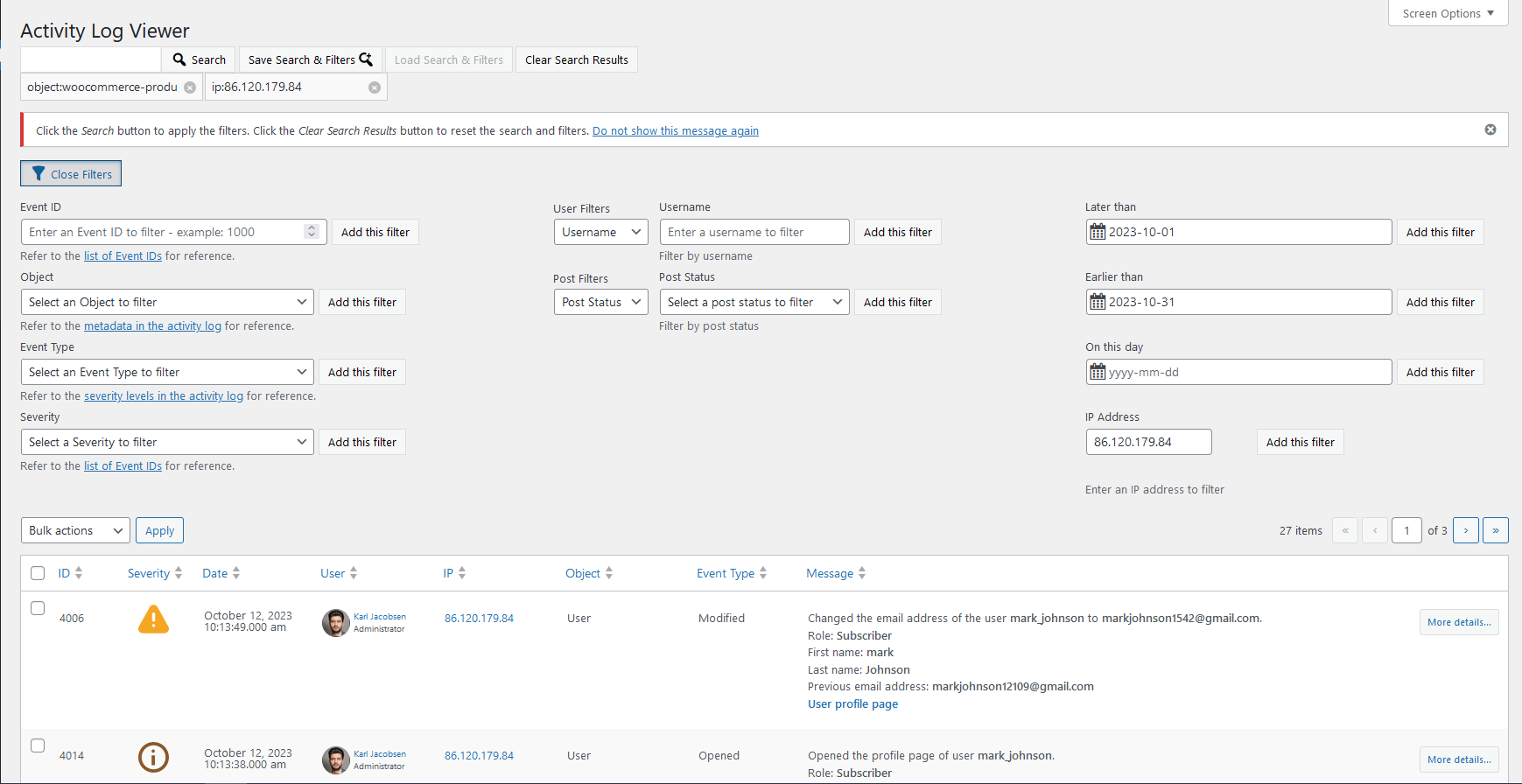
The free edition’s free-text search handles most monitoring tasks. The Premium edition adds a structured filter panel with the ability to combine multiple criteria simultaneously: filter by user, date range, IP address, event ID, object type, and source site (in Multisite).
For compliance use cases where you need to produce a log for a specific user, date range, and action type for an auditor, the Premium filter panel is necessary. The free-text search cannot reliably reproduce those results in a reproducible, exportable format.
Session management (Premium)
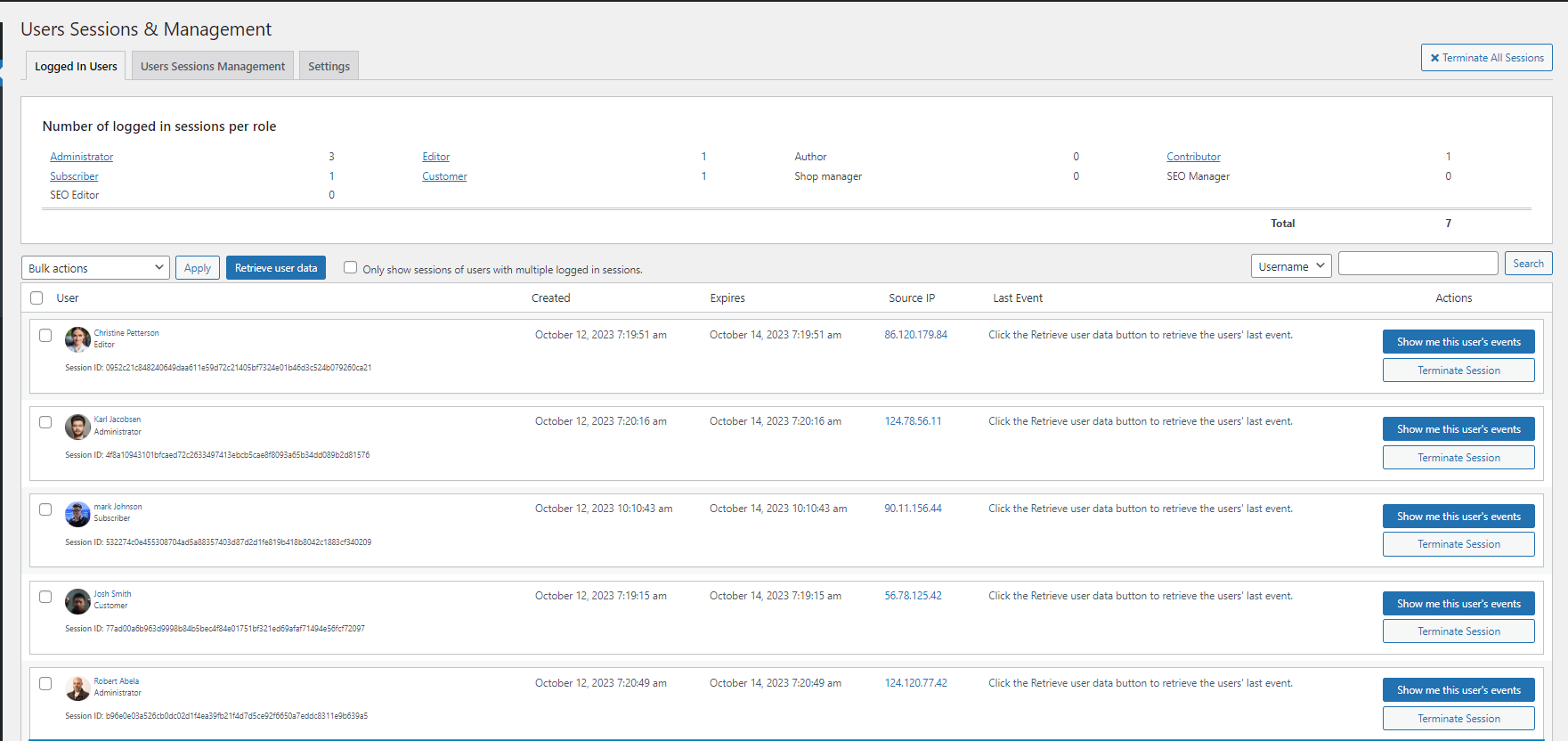
The Premium edition adds a live sessions panel that shows every currently logged-in user with their IP address, browser, start time, and last active timestamp. From this panel, an admin can terminate any session instantly, terminate all sessions for a specific user, or bulk-terminate all sessions.
Beyond live session control, the Premium edition adds three automated session management tools:
- Idle session timeout: automatically log out users who have been inactive for a configurable period. Useful for shared computers and compliance environments where unattended sessions are a risk.
- Simultaneous session limit: block a user from logging in from more than one location at a time. Prevents credential sharing in team environments.
- Block specific users: prevent a compromised or departed user from logging in without deleting their account.
These are features you would otherwise need a separate plugin for. Having them inside the same tool that logs the session events means the log viewer and the session management share the same data.
Notifications and alerts (Premium)
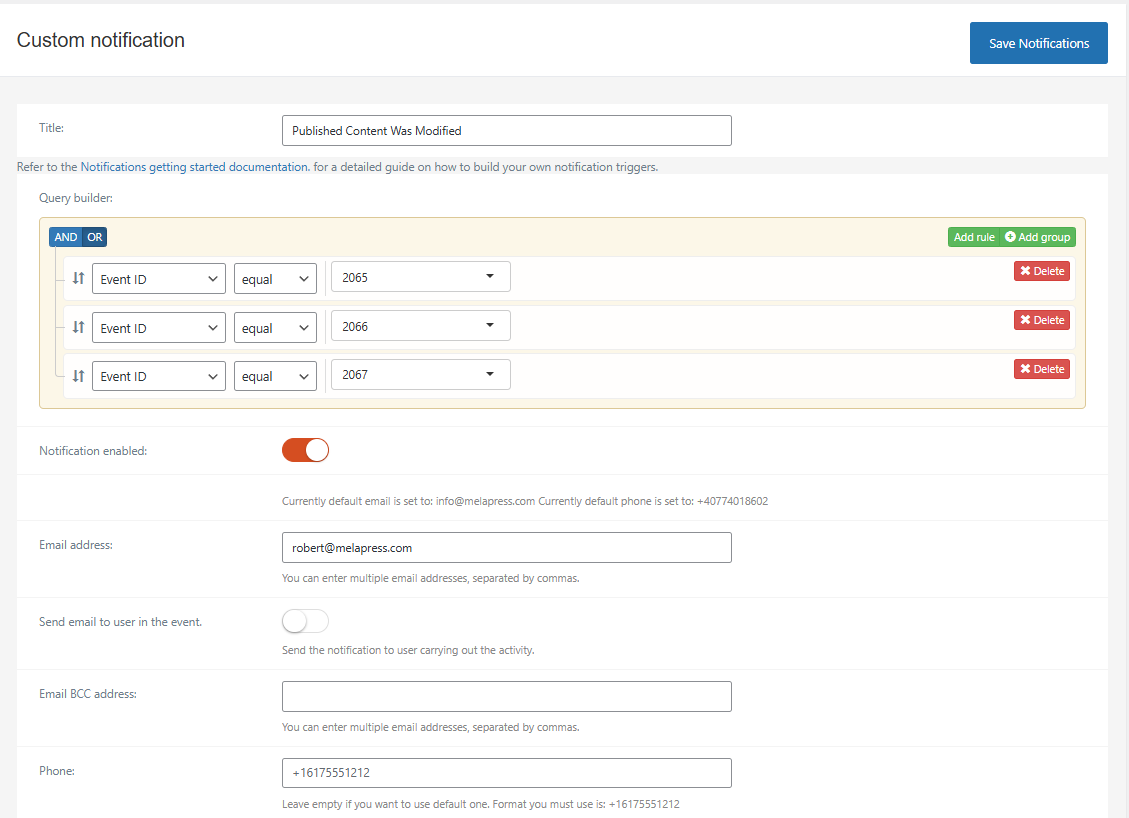
The Premium edition adds a configurable notification system with three channels: email, SMS, and Slack.
Notifications can be triggered by any combination of event types. The default set of pre-built notification templates covers the most common high-priority alerts: user login from a new IP, failed login attempts exceeding a threshold, plugin or theme installations, user role changes, and administrator email address changes (a new event type added in 5.6.5).
Custom notification rules can be built from any event ID, user, IP, or combination of criteria. The Slack integration sends alerts to a configured channel, which works well for teams that monitor via Slack rather than email.
SMS notifications require an account with a supported SMS provider. The plugin integrates with Twilio and similar services. This is a useful feature for critical alerts on high-value sites, though the cost of SMS messages and the external service dependency are worth factoring in.
Version 5.6.5 added AI Connector events to the High severity classification, which means those events will trigger high-severity notification rules automatically if you have them configured. That is a practical improvement for teams monitoring WordPress AI feature activity.
Reports (Premium)
The Premium edition includes two reporting modes.
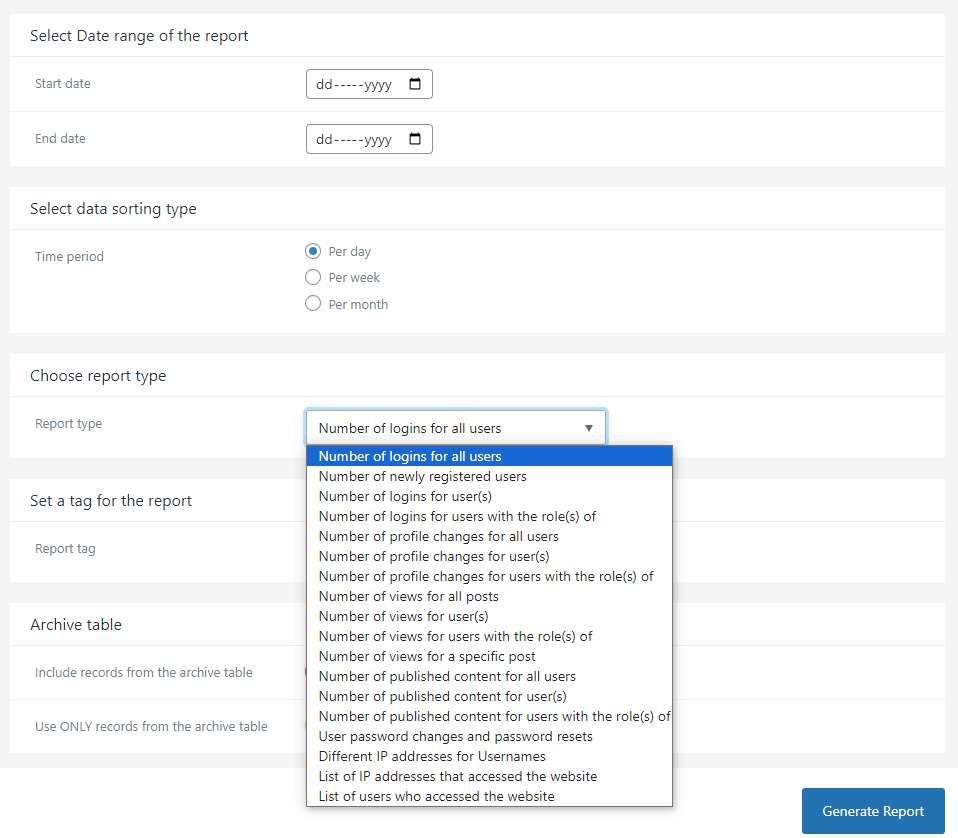
The first is ad-hoc reports: apply filters in the log viewer, then export the filtered results to HTML or CSV. The HTML export produces a formatted report suitable for sending to a client or an auditor. The CSV export is for data analysis.
The second is scheduled reports: configure a recurring report (daily, weekly, monthly) that runs automatically and sends the results by email to specified recipients. Scheduled reports support the same filters as the ad-hoc system, so you can set up a weekly login summary or a monthly plugin change report without any manual work.
Melapress offers white-label customization of HTML reports for agencies, allowing you to add your own logo and branding to reports sent to clients. That is a genuinely useful agency feature that most WordPress audit tools do not provide.
External database storage and SIEM integration (Enterprise)
The Enterprise plan’s defining feature is log mirroring to external systems. Instead of storing logs only in the WordPress database, the Enterprise edition can simultaneously write events to one or more of the following destinations:
- External MySQL database
- Syslog server (RFC 3164 / RFC 5424)
- AWS CloudWatch
- Papertrail
- Loggly
- Log file output on the server
The security case for this is straightforward: logs stored only in the WordPress database can be deleted by any attacker who gains database access. A mirrored log in an external system the attacker cannot reach provides a trustworthy record that survives a breach. For organizations with HIPAA, PCI-DSS, or SOX compliance requirements, an externally stored, tamper-resistant log is often a specific audit requirement.
Version 5.6.5 added per-subsite exclusion controls for Multisite log mirroring, which is practical for large networks where some subsites generate noise that should not be forwarded to SIEM tools.
The Enterprise plan also includes priority support with a guaranteed response within 6 working hours.
Pricing
Verify all prices against melapress.com before purchasing. Prices shown were accurate as of August 2026 following Melapress’s simplified pricing restructure.
Free edition
The free edition is available on WordPress.org with no account required. It includes unlimited logging, free-text search, event enable/disable controls, configurable data retention, revision tracking integration, all third-party plugin sensors, Multisite support, and forum-based community support.
Premium plans
| Sites | Price per year |
|---|---|
| 1 site | $139 |
| 10 sites | $249 |
| 25+ sites | Contact Melapress |
Premium adds: advanced search filters, scheduled and ad-hoc HTML/CSV reports, email/SMS/Slack notifications, user session management (live view, terminate, idle timeout, simultaneous login limit), selective data deletion by user/IP/date, import/export, and 1-on-1 email support.
Enterprise plans
| Sites | Price per year |
|---|---|
| 1 site | $189 |
| 10 sites | $299 |
| 25+ sites | Contact Melapress |
Enterprise adds all Premium features, plus: external database storage, SIEM integrations (AWS CloudWatch, Papertrail, Loggly, Syslog), log file output, archive mode for moving older events to a separate database, and priority support with 6-hour response guarantee.
All plans include automatic renewal, which can be cancelled at any time from the account dashboard. A 30-day money-back guarantee applies to all paid plans.
Pros and cons
Pros
- The free edition logs more event types than any comparable alternative without payment. WooCommerce, Yoast SEO, ACF, LearnDash, and a dozen other integrations are included at no cost.
- Free-text search in the free edition handles most daily monitoring tasks without requiring a paid upgrade.
- The event inspector shows before/after change details and links to the WordPress revision diff for supported content types, giving real context to each log entry.
- The plugin has been actively developed since 2012 and ships updates that track the WordPress platform, including recent AI Connector events in version 5.6.4.
- The Enable/Disable Events system gives full control over what gets logged, which keeps the log focused on what matters for each site.
- The Enterprise plan’s external log mirroring to SIEM tools makes the audit trail tamper-resistant and meets the external logging requirements of HIPAA, PCI-DSS, and SOX.
- White-label HTML reports in the Premium edition are a practical agency feature.
- The 300,000+ active install base and 4.7/5 rating reflect a product with broad real-world validation.
Cons
- The free edition stores logs only in the WordPress database. If an attacker gains database access, the logs can be deleted. Tamper-resistant logging requires the Enterprise plan.
- No notifications in the free edition. You cannot be alerted to a suspicious login or a plugin installation without upgrading to Premium at $139/year.
- The Premium plan at $139/year for one site is a meaningful cost for a personal site or a simple brochure site where the risk profile does not justify it.
- Session management is Premium-only. There is no free option for viewing currently logged-in users or terminating sessions.
- There is no built-in firewall or malware scanner. WP Activity Log records what happened; it does not prevent threats. Pair it with a security plugin for active protection.
- The log can fill up quickly on high-traffic WooCommerce stores or sites with heavy automation. Reviewing and adjusting the default event set is necessary to keep the log usable.
- SMS notifications require an external provider account and an ongoing per-message cost on top of the plugin subscription.
Alternatives
Simple History: The primary free alternative and the best choice if you want zero-configuration activity logging with a lighter footprint. Simple History covers core WordPress actions (posts, users, plugins, settings) and has a clean, readable log interface. It does not match WP Activity Log’s depth in third-party plugin coverage, session management, or SIEM integration. For solo sites or simple installations, Simple History is sufficient. For WooCommerce sites, multisite networks, or compliance use cases, WP Activity Log covers more ground.
Stream: Stream is a free WordPress activity log plugin with WooCommerce tracking and a clean admin interface. It covers the basics well and integrates with WP CLI for log management via the command line. Stream lacks session management, SIEM integration, and advanced reporting, but it is a capable free option for teams comfortable with technical tools.
Sucuri Security: Sucuri’s free plugin includes an audit log stored on Sucuri’s remote servers rather than in the WordPress database, which makes it tamper-resistant at zero cost. However, Sucuri’s audit log covers a narrower event set than WP Activity Log and is focused on security events rather than content and admin activity. If tamper-resistant logging is the primary requirement and SIEM integration is not needed, Sucuri’s remote audit log is worth considering as a complement to or alternative to WP Activity Log.
WP Cerber Security: WP Cerber includes activity logging alongside firewall, login protection, and malware scanning features. If you want a single plugin that covers both security monitoring and an activity log, WP Cerber is worth evaluating. The activity log is less detailed than WP Activity Log’s and lacks third-party plugin sensors, but the combined package is efficient for sites that do not need the full audit trail depth.
Logify WP: A newer entrant in this space that emphasizes before/after diff views for all log entries and a clean modern interface. Logify is growing its sensor library and is worth watching, though its third-party plugin coverage and enterprise integration options are not as developed as WP Activity Log’s.
ManageWP / MainWP: If you are already using a WordPress management platform, check whether it includes its own activity log. MainWP in particular integrates with WP Activity Log’s six dedicated MainWP event IDs. WP Activity Log remains the better dedicated tool, but management platform logs may be sufficient for simpler agency monitoring workflows.
Final verdict
WP Activity Log earns its position as the dominant WordPress audit trail plugin. The free edition’s event coverage is genuinely comprehensive: it tracks content changes, user account modifications, plugin and theme changes, WooCommerce activity, Yoast SEO settings, LearnDash course activity, and much more without requiring any payment or configuration. No direct alternative matches that breadth at zero cost.
The paid tiers are priced at a level that makes sense for the use cases they serve. The Premium plan at $139/year for one site is justified for any WooCommerce store, membership site, or multi-editor site where accountability and alerting matter. The Enterprise plan at $189/year for one site is the right choice for organizations with external logging compliance requirements or a serious need for tamper-resistant audit trails.
The limitations to be clear about: the free edition’s database-stored logs are not tamper-resistant, and there are no notifications in the free tier. These are real gaps for anyone using the plugin as a security tool rather than an administrative record. Pair the free edition with a security plugin that covers active threat monitoring (Wordfence, Solid Security, or Sucuri) rather than relying on WP Activity Log alone for site protection.
For WordPress site owners, agencies, and compliance teams who need a clear, detailed, and searchable record of what happens on their sites, WP Activity Log is the most capable option available. Its combination of free depth and affordable premium tiers makes it a strong fit across a wide range of site types and budgets.
You can find more reviews like this in the WordPress plugin reviews category.