


Most WordPress security plugins work inside WordPress. That means when a malicious request hits your site, WordPress loads first, plugins initialize, and only then does the security tool get a chance to intervene. NinjaFirewall takes a different approach: it hooks into PHP before WordPress even starts, intercepting threats at the server layer before any WordPress code runs.
That architecture is the central claim behind NinjaFirewall, and it is the starting point for this review. I worked through the official site, pricing page, documentation, WordPress.org listing (version 4.9, last updated August 16, 2026), the full changelog, and public user reviews to give you an honest picture of what the free WP Edition delivers, what the paid WP+ Edition adds, and where the plugin falls short.
At a glance
- Audited on: nintechnet.com features and pricing pages, WordPress.org plugin listing (version 4.9, updated August 16, 2026), changelog, and public user reviews. Pricing checked in August 2026.
- Free tier: full WAF engine running before WordPress loads, brute-force protection, File Guard real-time monitoring, File Check integrity scanning, live event log, and automatic security rule updates.
- WP+ Edition: Sensei advanced filtering engine, geolocation and IP access controls, rate-limiting, centralized logging, Syslog/Fail2Ban support, comment and registration antispam, multisite support, and priority support.
- Bottom line: a technically distinctive WordPress WAF with an outstanding free tier and a 4.9-star rating on WordPress.org — the best-rated standalone firewall in its class.
Quick verdict
NinjaFirewall’s free WP Edition is one of the most capable free WordPress security plugins available. The core firewall runs as a true pre-WordPress WAF: it processes incoming HTTP requests before WordPress initializes, which means it can stop threats that other plugin-based firewalls see too late. The free version includes a full WAF engine with automatically updated security rules, brute-force login protection, real-time file modification detection (File Guard), file integrity monitoring (File Check), a live event log, and email notifications — all at no cost.
The WP+ Edition upgrade is worth considering for sites that need geolocation-based access control, rate-limiting to stop scraper bots, Fail2Ban integration, multisite support, or the Sensei advanced filtering engine that adds request normalization and obfuscation detection on top of the standard rule set.
The honest limitations: NinjaFirewall is Linux/Unix only (Windows hosting is not supported), the free event log caps at 1,500 lines with no export, and multisite networks require a paid license. It also focuses narrowly on request filtering and file integrity — it is not a full malware scanner in the style of Wordfence.
Quick verdict summary
- Best for: security-conscious site owners and developers who want a lightweight pre-WordPress WAF with a proven free tier, strong WordPress.org ratings, and minimal performance overhead.
- Best plan for individual sites: the free WP Edition covers most single sites completely. Upgrade to WP+ Plan 1 ($89/year) when you need geolocation blocking, rate-limiting, or Fail2Ban integration.
- Best plan for agencies: WP+ Plan 3 or Plan 4 ($64-$56 per domain/year) for volume discounts across 6-15 or 15+ domains.
- Standout: the pre-WordPress WAF architecture; 4.9-star rating with 220 reviews on WordPress.org; GDPR-compliant on-server processing with no data sent to third-party cloud services; zero performance impact on the free tier.
- Watch out for: no Windows hosting support; multisite requires a paid WP+ license; the free event log is capped at 1,500 lines; no cloud CDN protection path like Sucuri; not a full malware scanner.
What NinjaFirewall is
NinjaFirewall is a Web Application Firewall plugin for WordPress, built and maintained by NinTechNet, a security-focused development team. Unlike most WordPress security plugins that operate within the WordPress execution stack, NinjaFirewall installs as a must-use plugin and hooks into PHP before WordPress initializes — placing it between the web server and WordPress core.
The request flow NinTechNet publishes illustrates the difference clearly:
Visitor > HTTP server > PHP > NinjaFirewall > WordPress > NinjaFirewall > Plugins and Themes > NinjaFirewall
The plugin intercepts at multiple points in the PHP execution lifecycle, not just at the plugin layer where standard WordPress security tools sit. This means NinjaFirewall can protect all PHP scripts running on the account, not only those that WordPress itself processes.
NinjaFirewall has been on WordPress.org since March 2013. It has 100,000+ active installations, a 4.9-out-of-5-star rating across 220 reviews (210 five-star, 2 four-star, 1 three-star, 1 two-star, 6 one-star), and a support resolution rate of 9 out of 12 recent issues. That rating puts it among the highest-rated dedicated firewall plugins in the WordPress ecosystem. The developer, NinTechNet, releases updates frequently: version 4.9 (the current release at the time of this review) was published August 16, 2026, and versions 4.8.4 through 4.9 all shipped within a focused development window.
NinjaFirewall comes in two editions: the free WP Edition on WordPress.org, and the paid WP+ Edition sold directly through nintechnet.com.
Who NinjaFirewall is best for
Strong fit
- Site owners and developers who want a firewall that runs before WordPress, not inside it. If your concern is PHP-level threats, backdoors, and obfuscated attack scripts, the pre-WordPress position matters.
- Sites running on resource-constrained shared hosting where a heavy security plugin causes performance issues. NinjaFirewall’s impact on server load is minimal — third-party benchmarks report a TTFB overhead of around 9ms or less on activation.
- Developers and agencies managing sites on Linux/Apache, Nginx, LiteSpeed, or OpenLiteSpeed hosting. NinjaFirewall supports all four common stacks.
- Sites with GDPR obligations or data residency concerns. NinjaFirewall processes all traffic on your own server. No request data is sent to NinTechNet’s cloud or any third party for analysis.
- Sites that want automatic daily security rule updates without a paid subscription. Rule updates are included in the free WP Edition.
- Agencies managing 6 or more sites who want a volume-priced WAF premium tier. WP+ pricing drops to $64 per domain for 6-15 sites and $56 for 15+.
- Sites running alongside encoded PHP (ionCube, ZendGuard, SourceGuardian) — NinjaFirewall works correctly with encoded scripts that some other security plugins misread.
Weak fit
- Windows hosting accounts. NinjaFirewall requires a Unix-like operating system (Linux, BSD). It will not activate on Windows-based hosting.
- WordPress Multisite networks on the free version. Multisite support requires a WP+ Edition license.
- Sites looking for a comprehensive malware scanning and removal service. NinjaFirewall is a WAF and file integrity monitor; it does not include Wordfence-style malware signature scanning or automated file cleanup.
- Sites that need a cloud-based WAF to absorb DDoS traffic before it reaches the server. NinjaFirewall is a server-side tool; cloud DDoS mitigation requires a service like Sucuri’s cloud WAF or Cloudflare.
- Buyers who need a single all-in-one security plugin with hardening checklists, two-factor authentication, user account management, and database scans. NinjaFirewall focuses on request filtering and file integrity. For hardening and 2FA, you would need an additional plugin.
Setting up NinjaFirewall
NinjaFirewall installs from the WordPress admin at Plugins > Add New. The plugin’s WordPress.org listing is the first or second result for “NinjaFirewall.” After activation, a NinjaFirewall menu item appears in the left nav.
The initial activation step is worth understanding: NinjaFirewall configures itself as a WordPress must-use plugin (mu-plugin) to ensure it loads before the standard plugin stack. During first activation, the plugin writes its bootstrap loader to the mu-plugins directory, which is the mechanism that gives it the pre-WordPress execution position. This step requires that the mu-plugins directory is writable by PHP, which it is on most standard hosting configurations.
No root access is required. The plugin works on shared hosting accounts where you only have FTP or cPanel access.
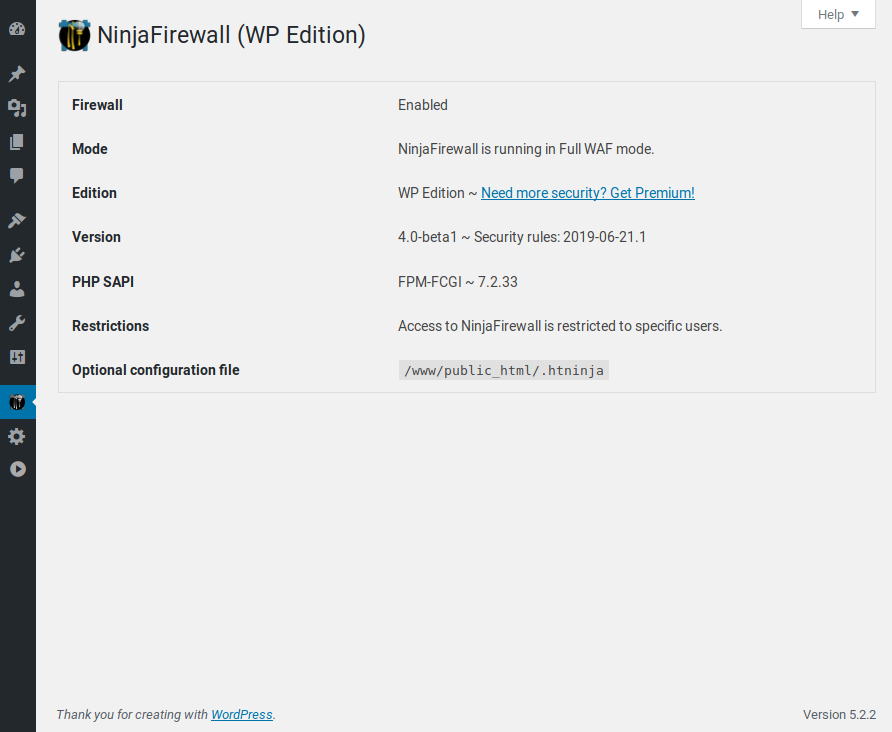
After activation, the NinjaFirewall dashboard shows the firewall status, current rule version, and recent event summary. The main navigation tabs cover: Firewall, Event Log, File Guard, File Check, Login Protection, and WP+ (for premium features).
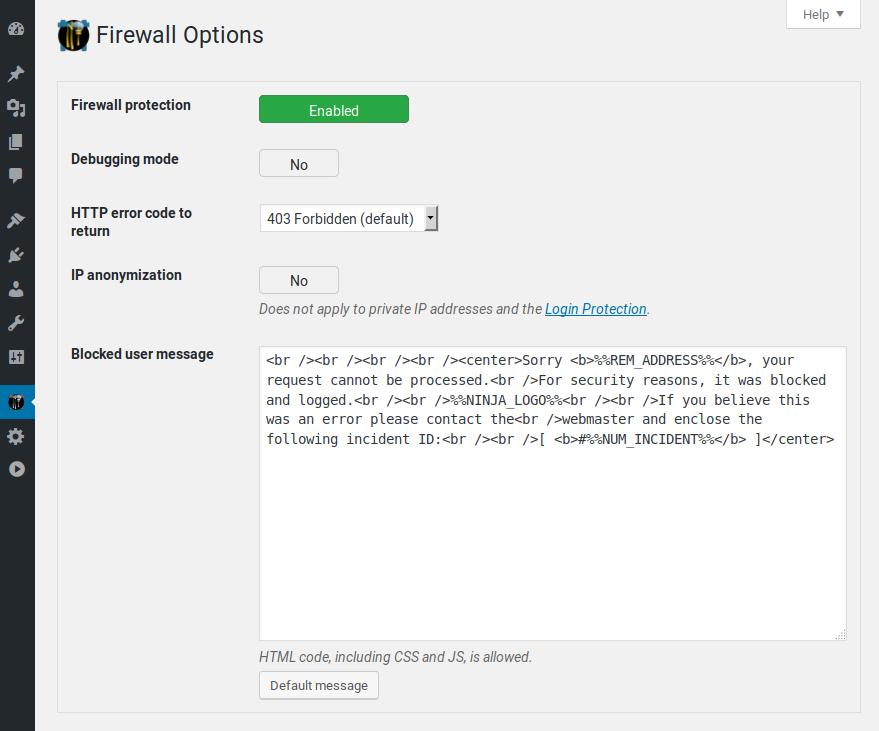
The Firewall settings tab is where you configure the core WAF policies: which HTTP variables to inspect (GET, POST, cookies, HTTP headers), how to handle suspicious encoded data, file upload restrictions, and what action to take on a detected threat (block with a 403 error, return a 403 with a custom page, redirect, or log only). The default configuration is conservative and well-chosen for most sites.
The WAF engine: pre-WordPress request filtering
The WAF engine is NinjaFirewall’s defining feature. It filters every incoming HTTP request at the PHP level before WordPress boots, which has two practical consequences.
First, WordPress itself is not loaded when the filtering happens. That means none of your plugins, themes, or WordPress hooks are involved in the decision to allow or deny a request. The firewall runs clean, with no WordPress code in memory that an attacker could target during the filtering process.
Second, the firewall covers all PHP scripts on the account, not just WordPress entry points. If a malicious PHP file has been dropped on your server via a different vulnerability, NinjaFirewall can block requests to that file even if WordPress would never route traffic to it.
The engine inspects and sanitizes data from GET variables, POST variables, cookies, and HTTP headers. For each incoming request, it runs the data through its security rule set. On match, the request is blocked. The blocked request never reaches WordPress.
The free version’s security rules update automatically once per day from NinTechNet’s rule servers, keeping the filtering engine current against newly discovered attack patterns. Rule updates happen in the background without requiring a WordPress admin action.
The WAF engine handles request normalization: it decodes URL encoding, handles double encoding, and normalizes character sequences before running rules. This addresses a class of bypass techniques where attackers encode payloads to evade simple string-match firewalls.
Sensei filtering engine (WP+ only)
The WP+ Edition adds Sensei v1.0, described by NinTechNet as an advanced firewall engine that normalizes and transforms incoming HTTP request data to detect evasion and obfuscation tactics. The Sensei engine extends what the standard WAF engine inspects, adding a second analysis pass aimed specifically at polymorphic payloads and encoded attack scripts.
For most sites under standard threat conditions, the free WAF engine’s rule coverage is sufficient. Sensei is the choice for sites that have faced sophisticated bypass attempts or where the attack surface warrants the extra analysis overhead.
Security rules and updates
NinjaFirewall ships with a set of core security rules covering common attack categories: SQL injection, cross-site scripting (XSS), remote file inclusion, local file inclusion, PHP code injection, shell command injection, and file upload exploits. The rule set applies to every request the plugin processes.
Rule updates ship automatically in the free WP Edition once per day. The update notification system (improved in version 4.9) alerts the admin when a new rule version is deployed, so you have a record of when the rule set changed.
I checked the changelog from version 4.8.4 through 4.9 and found regular security rule refreshes alongside the feature and stability updates, which is the pattern you want from a firewall vendor: shipping rule changes as new threats emerge rather than waiting for major plugin versions.
File Guard: real-time modification detection
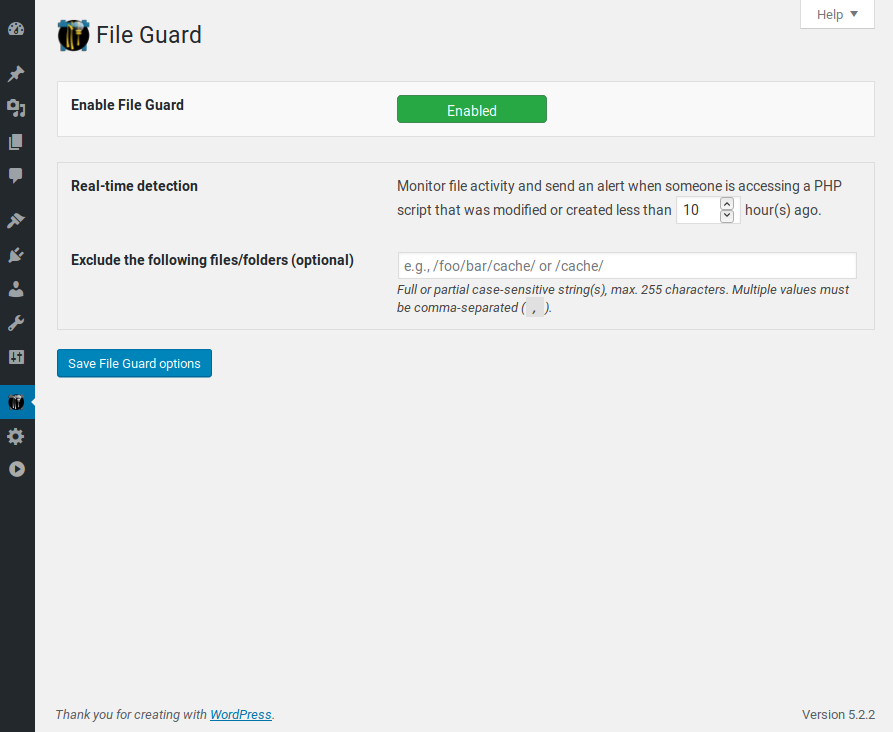
File Guard monitors your WordPress installation for unauthorized file changes in real time. When a PHP, JavaScript, or other monitored file is modified or created, File Guard detects the change and sends an email alert to the administrator.
This is meaningfully different from scheduled integrity scans. File Guard detects changes as they happen, not on the next scan run. If an attacker manages to drop a PHP backdoor or modify a theme file, File Guard triggers an alert immediately.
The monitored scope covers WordPress core files, plugin files, theme files, and the uploads directory (for uploaded PHP files). You can configure which directories to monitor and set exclusions for directories where frequent legitimate file changes are expected.
File Guard is included in the free WP Edition. It is one of the most practically useful features in the plugin because it gives you immediate visibility into unauthorized file changes, which is often the first symptom of a compromised site.
File Check: integrity monitoring
File Check is a scheduled integrity scan that compares your WordPress core files against known-good checksums. It detects modified, added, or missing files and reports the differences in the WordPress admin, with an email summary when the scan is complete.
Where File Guard watches for changes in real time, File Check audits the current state of the WordPress installation against expected baselines. It catches changes that happened between File Guard monitoring sessions, or on files that File Guard was not configured to watch.
Running both File Guard and File Check together gives you real-time change detection plus periodic verification against known-good file signatures.
File Check is included in the free WP Edition and runs on a schedule you configure: daily, weekly, or on demand.
Login protection and brute-force defense
NinjaFirewall’s Login Protection feature sits in front of the WordPress login form (wp-login.php) and applies rate-limiting and lockout rules before WordPress processes the login attempt.
The protection blocks rapid credential-stuffing attempts and distributed brute-force attacks. You can configure:
- Maximum login attempts per IP per time window
- Lockout duration after the limit is reached
- Whether to block access to wp-login.php entirely from specific IP ranges
- CAPTCHA support for the login form (WP+ Edition)
Because NinjaFirewall operates before WordPress, login protection applies even if an attacker bypasses the normal WordPress login flow and sends POST requests directly to the login endpoint. The firewall intercepts those requests before WordPress processes them.
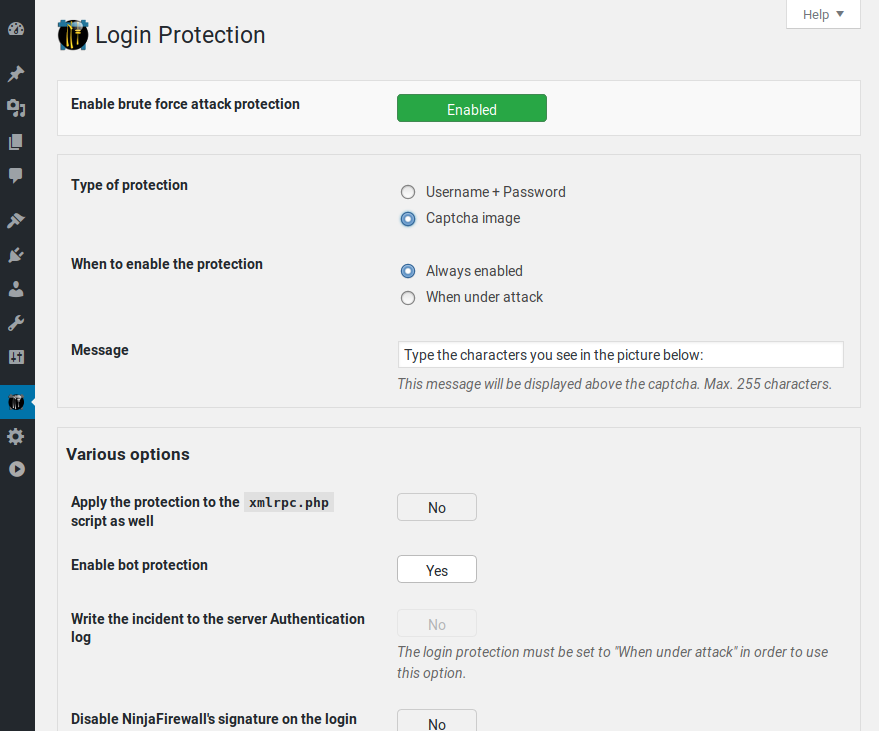
The login protection feature handles XML-RPC attacks as well. XML-RPC brute-force (where attackers use the system.multicall method to test thousands of credentials in a single request) is a common attack vector that NinjaFirewall blocks independently of WordPress’s own XML-RPC handling.
Event log and monitoring
The NinjaFirewall event log records every blocked request, including the rule that triggered the block, the originating IP, the HTTP method, the target URL, the payload that matched, and a timestamp.
The live log view in the WordPress admin shows the most recent events in real time. You can filter by rule type, IP address, or date range from the admin panel.
The free version’s event log retains the last 1,500 lines. This is the most-cited limitation in the free version’s user reviews: sites under active bot attacks can fill 1,500 lines quickly, and the current version does not offer log export or external log routing from the free edition. If you need to retain a complete attack history or analyze the full log volume during an incident, the WP+ Edition’s centralized logging and Syslog routing are the relevant upgrade.
The WP+ Edition routes logs to Syslog or an external log management system, and it integrates with Fail2Ban to automatically add attacking IPs to the system-level block list. For sites running on VPS or dedicated servers with system-level access, Fail2Ban integration turns each WAF block event into a server-level firewall rule, stopping repeat attackers at the network layer before they even reach PHP.
WP+ Edition: what the paid upgrade adds
The WP+ Edition is the premium version, sold directly through nintechnet.com. Beyond the features available in the free WP Edition, the WP+ adds:
- Sensei filtering engine. Advanced HTTP request normalization and obfuscation detection. Runs as an additional analysis pass after the standard rule set.
- IP and network access control. Block or allow requests by IP address, IP range, or AS number (Autonomous System). Useful for blocking entire IP ranges associated with known malicious hosting providers, or whitelisting a trusted office network.
- Geolocation (country) blocking. Block all requests from specific countries. For sites that only serve traffic from certain regions, geolocation blocking reduces the attack surface from IP ranges in regions with high bot traffic.
- URL access control. Restrict or allow access to specific URL paths. Block direct access to certain PHP files or directories beyond the standard protection.
- Role-based access control. Restrict dashboard or plugin access based on WordPress user roles.
- Rate-limiting. Throttle request rates per IP. Blocks scraper bots and distributed crawlers that consume server resources through high request volume.
- Bot filtering. Block specific user agents or bot categories. Pairs with rate-limiting to stop automated traffic that bypasses rule-based filtering.
- Comment and registration antispam. Applies filtering to comment submissions and new user registrations to block spam bots without requiring a CAPTCHA service.
- Centralized logging. Logs all events to a central store with higher retention than the 1,500-line free log. Can be routed to Syslog for integration with external log management systems.
- Fail2Ban integration. Routes block events to Fail2Ban, which converts them to system-level IP bans.
- WP-CLI support. Import, export, and restore NinjaFirewall configuration from the command line (added in version 4.8.5).
- Multisite support. Network-wide activation and management across a WordPress Multisite installation.
- Priority help desk support. Ticket-based support with faster response times than the free WordPress.org forum.
Pricing and license value
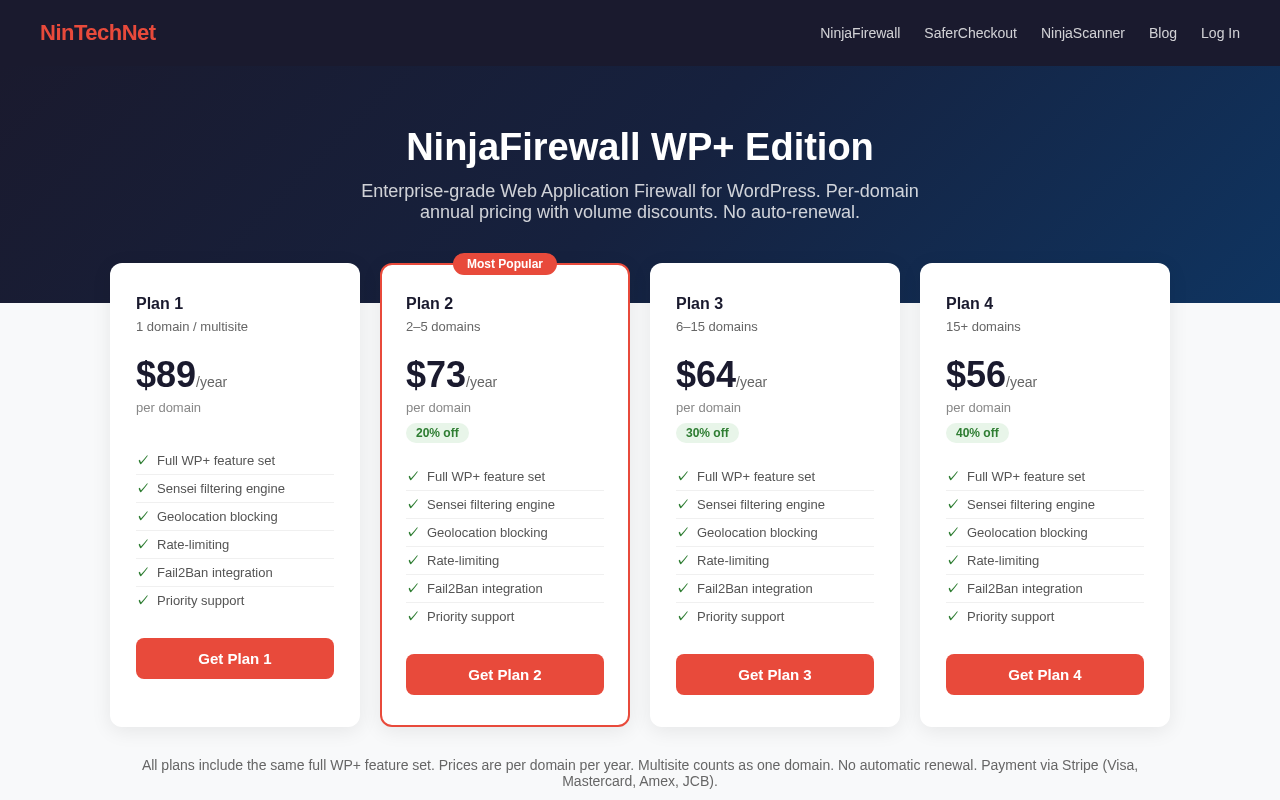
NinjaFirewall WP+ Edition is sold as an annual per-domain license from nintechnet.com. There are four pricing tiers based on volume, with no automatic renewal.
Prices observed on nintechnet.com in August 2026:
- Plan 1: $89 per domain per year. Covers 1 domain or a multisite installation. All WP+ features included.
- Plan 2: $73 per domain per year (20% volume discount). Covers 2-5 domains.
- Plan 3: $64 per domain per year (30% volume discount). Covers 6-15 domains.
- Plan 4: $56 per domain per year (40% volume discount). Covers 15+ domains.
Notes on the license model:
- Multisite counts as one domain. A multisite installation with 20 subsites requires one license.
- No auto-renewal. Licenses expire at the end of the period without an automatic charge. You renew manually.
- Payment via Stripe (Visa, Mastercard, American Express, JCB), PCI-compliant with 3D Secure.
- Account credits allow you to pre-purchase licenses and create them later, useful for agencies that want to lock in pricing before assigning licenses to client sites.
The page does not list a money-back guarantee. I recommend confirming the refund policy directly with NinTechNet before purchasing.
Pricing in context:
- The free WP Edition is a genuine free tier, not a crippled trial. Most single sites will not need to upgrade.
- For a single business site that needs geolocation blocking or Fail2Ban integration, Plan 1 at $89/year is the relevant comparison. Wordfence Premium starts at $149/year for one site. Sucuri’s Website Security Platform starts at $199.99/year for one site (with cloud WAF). NinjaFirewall WP+ is priced below both.
- For agencies at 15+ domains, the $56/year per-domain pricing is competitive against any comparable WAF-focused tool in the market.
Pros and cons
Pros
- Pre-WordPress WAF architecture. The firewall runs before WordPress loads, intercepting threats at the PHP layer. Requests that match the firewall rules never reach WordPress core, plugins, or themes.
- 4.9-star rating on WordPress.org. 210 of 220 reviews are five-star, with a support resolution rate of 9/12 recent issues. Among the highest community ratings for a dedicated security plugin.
- Powerful free tier. The free WP Edition includes the full WAF engine, auto-updating security rules, File Guard, File Check, login protection, and the event log. Most sites do not need to pay anything.
- Minimal performance overhead. The pre-WordPress interception adds approximately 9ms or less to TTFB in independent benchmarks. Lighter than competing plugins that load the full WordPress stack before filtering.
- GDPR-compliant on-server processing. All traffic analysis happens on your own server. No request data or visitor information is sent to NinTechNet’s servers.
- Automatic daily security rule updates (free). The rule set updates once per day in the background without requiring a paid subscription.
- Broad web server compatibility. Works on Apache, Nginx, LiteSpeed, and OpenLiteSpeed.
- Compatible with encoded PHP. Works correctly alongside sites using ionCube, ZendGuard, or SourceGuardian encoded scripts.
- No auto-renewal. You control when you pay; no surprise charges when a license expires.
- Multisite counts as one domain (WP+ only). A multisite network of any size uses one license rather than one per subsite.
- WP-CLI configuration management (WP+). Import/export NinjaFirewall configuration from the command line for deployment and automation workflows.
Cons
- Linux/Unix only. Windows hosting is not supported. Sites on Windows Server hosting cannot use NinjaFirewall.
- Multisite support is WP+ only. Free WP Edition does not activate correctly on WordPress Multisite networks.
- Event log capped at 1,500 lines (free). Sites under active attacks fill the log quickly. No export function and no external log routing in the free version.
- Not a full malware scanner. NinjaFirewall does not perform the deep signature-based malware scanning that Wordfence or MalCare offer. It detects file modifications and filters incoming requests, but it will not scan existing file content for known malware signatures.
- No cloud DDoS mitigation. NinjaFirewall is server-side. For DDoS protection, a cloud WAF like Sucuri or Cloudflare is necessary in front of the server.
- No built-in hardening checklist. Security hardening tasks (disabling file editing, enforcing SSL, 2FA) are not covered. An additional plugin is needed for those.
- No refund policy published on the pricing page. Confirm the policy before purchasing.
- $89/year per domain for Plan 1 is not cheap for a single-site WAF upgrade, though it is below Wordfence Premium and Sucuri’s entry price.
Alternatives to NinjaFirewall
- Wordfence. The most-installed WordPress security plugin (5+ million active installs). Runs inside WordPress (not pre-WordPress), but includes the WAF engine, a comprehensive malware scanner with signature-based file scanning, a vulnerability scanner, live traffic monitoring, brute-force protection, two-factor authentication, and a large threat intelligence network. Wordfence free is a full product; Premium starts at $149/year and adds real-time firewall rule updates. Choose Wordfence if you want a comprehensive all-in-one security platform with malware scanning and a large community backing it. Choose NinjaFirewall if you want a cleaner pre-WordPress WAF with minimal performance overhead and a focus on request filtering rather than full security management.
- Sucuri Security. The free Sucuri plugin on WordPress.org offers basic hardening and malware scanning but is primarily a marketing lead for the paid Sucuri cloud WAF platform. Sucuri’s Website Security Platform ($199.99+/year) routes your site’s traffic through Sucuri’s cloud servers, blocking threats before they touch your hosting account and offering DDoS mitigation. Choose Sucuri if cloud-based protection and DDoS absorption matter; choose NinjaFirewall if on-server processing and data residency are priorities.
- Solid Security (formerly iThemes Security). Broad WordPress security hardening: brute-force protection, file change detection, two-factor authentication, database backups, and a security dashboard. The free version is solid for hardening. The Pro version ($99/year for 1 site, $199/year for 10 sites) adds scheduled malware scanning. Solid Security covers ground NinjaFirewall does not (2FA, hardening checklists, dashboard) but its WAF is less focused than NinjaFirewall’s pre-WordPress engine. Use both together for layered coverage.
- Shield Security. Bot detection, WAF, login protection, and a traffic audit trail in both free and paid tiers. The ShieldPRO plan starts at $99/year. Shield’s bot detection is notably strong for stopping automated scraping and credential attacks.
- MalCare Security. A managed security service that performs deep malware scanning via MalCare’s cloud. Good for agencies and managed hosting clients who want automatic malware detection and one-click cleanup. Plans start at $149/year for one site.
For most sites choosing between these options, the practical question is whether you want a focused, lightweight pre-WordPress WAF (NinjaFirewall) or a broader all-in-one security platform with malware scanning and hardening tools (Wordfence, Solid Security). NinjaFirewall and Wordfence are not mutually exclusive — some security-conscious site owners run both, using NinjaFirewall for pre-WordPress filtering and Wordfence for malware scanning.
Final verdict
NinjaFirewall earns its 4.9-star rating. The pre-WordPress WAF architecture is not a marketing claim — it is a real technical distinction that places the firewall at the PHP layer before WordPress runs, and the practical result is a lightweight, stable security layer that does not conflict with plugins or themes, does not noticeably affect performance, and does not rely on WordPress itself being functional to filter threats.
The free WP Edition is genuinely good. Automatic daily rule updates, File Guard real-time monitoring, File Check integrity scanning, brute-force login protection, and the full WAF engine at no cost represents strong value compared to any other free firewall plugin I reviewed. The 4.9-star rating across 220 reviews with only 6 one-star ratings tells a story of consistent real-world reliability that is rare in the security plugin category.
For most small to mid-size WordPress sites, the free version is all you need. Install it, confirm the mu-plugin bootstrap activated correctly, run through the Firewall settings to verify the inspection scope matches your site’s needs, and let it run.
The paid WP+ Edition makes sense for three specific situations: multisite networks (which require a WP+ license), sites that need geolocation-based access control or rate-limiting for bot management, and organizations with server-level access who want Fail2Ban integration to convert WAF block events into system-level firewall rules. At $89/year for one site, the WP+ is priced below Wordfence Premium and Sucuri’s platform, which helps the upgrade case.
The limitations are real but focused: this is not an all-in-one security plugin. If you also need a malware scanner, 2FA, a security hardening checklist, or cloud-level DDoS mitigation, NinjaFirewall does not cover those areas. It does one thing — WAF-level request filtering and file integrity monitoring — and it does it very well.
FAQ
Is NinjaFirewall free?
Yes. The NinjaFirewall WP Edition is a free plugin published on WordPress.org. It includes the full WAF engine, automatic daily security rule updates, brute-force login protection, File Guard (real-time file modification detection), File Check (file integrity monitoring), the event log, and email notifications. The WP+ Edition is the paid premium version, sold directly from nintechnet.com, which adds geolocation blocking, rate-limiting, centralized logging, Syslog/Fail2Ban integration, antispam, multisite support, and the Sensei advanced filtering engine.
What makes NinjaFirewall different from other WordPress security plugins?
NinjaFirewall runs before WordPress. It installs as a must-use plugin (mu-plugin) and hooks into PHP at the start of request processing, before WordPress core initializes. This means the WAF engine intercepts and filters incoming HTTP requests before any WordPress code, plugin, or theme runs. Most other WordPress security plugins (including the Wordfence free firewall) run inside the WordPress execution stack, after WordPress has loaded. NinjaFirewall’s position allows it to block threats without involving WordPress at all, and it protects all PHP scripts on the hosting account, not only WordPress entry points.
Does NinjaFirewall work on Windows hosting?
No. NinjaFirewall requires a Unix-like operating system: Linux or BSD. It is not compatible with Windows-based hosting environments. This is a hard requirement, not a configuration option.
Does NinjaFirewall support WordPress Multisite?
WordPress Multisite support requires the WP+ Edition (paid). The free WP Edition is not designed for Multisite network installations. The WP+ Edition requires one license per multisite network (regardless of how many subsites are in the network), not one license per subsite.
How does NinjaFirewall handle security rule updates?
Security rules update automatically once per day from NinTechNet’s rule servers. The update runs in the background without requiring any admin action. Version 4.9 improved the rule update notification system so admins receive an email or dashboard notice when a new rule version is deployed. Rule updates are included in the free WP Edition.
What is File Guard and how is it different from File Check?
File Guard is real-time file modification detection. When a monitored PHP or other file is created or modified on the server, File Guard detects the change immediately and sends an email alert. File Check is a scheduled integrity scan that compares WordPress core files against known-good checksums and reports any discrepancies. File Guard catches changes as they happen; File Check audits the current file state against a baseline. Both features are included in the free WP Edition.
What is the Sensei engine in WP+?
Sensei v1.0 is an advanced request filtering engine exclusive to the WP+ Edition. It normalizes and transforms incoming HTTP request data to detect evasion and obfuscation tactics that standard rule sets may miss. Polymorphic payloads, multi-encoded attack strings, and obfuscated PHP injection attempts are the primary threats Sensei targets. It runs as an additional analysis pass layered on top of the standard WAF rule set, not as a replacement.
Does NinjaFirewall slow down my site?
Independent benchmarks report a TTFB (Time to First Byte) overhead of approximately 9ms or less when NinjaFirewall is active. Because the firewall runs before WordPress loads, it does not add to the WordPress execution time the way a standard plugin would — it adds a fixed processing step at the PHP level that is lighter than loading the full WordPress stack.
Can I use NinjaFirewall behind Cloudflare or another CDN?
Yes. NinjaFirewall includes an optional configuration to handle CDN or proxy environments where the incoming IP address is the CDN’s IP rather than the visitor’s real IP. The configuration tells NinjaFirewall which HTTP header to read for the real visitor IP (typically X-Forwarded-For or CF-Connecting-IP for Cloudflare). The WP+ Edition includes more advanced options for custom IP source configuration with multiple CDN providers.
How does NinjaFirewall pricing work?
NinjaFirewall WP+ is priced per domain per year, with volume discounts: $89 for 1 domain, $73/domain for 2-5, $64/domain for 6-15, and $56/domain for 15+. There is no automatic renewal — licenses expire at the end of the year unless you manually renew. A multisite network counts as one domain regardless of subsite count. Payment is through Stripe with major credit and debit cards.
What are the system requirements for NinjaFirewall?
WordPress 4.9 or newer, PHP 7.1 or newer, MySQL or MariaDB with the MySQLi extension, and a Unix-like operating system (Linux or BSD). Compatible web servers include Apache, Nginx, LiteSpeed, and OpenLiteSpeed. The plugin requires the WordPress admin user to have both manage_options and unfiltered_html capabilities. No root access is required — NinjaFirewall works on shared hosting accounts.
How does NinjaFirewall compare to Wordfence?
NinjaFirewall and Wordfence approach WordPress security differently. NinjaFirewall is a focused pre-WordPress WAF: lightweight, with a small feature set that covers request filtering and file integrity. Wordfence is a comprehensive security platform: WAF, malware scanner, vulnerability scanner, two-factor authentication, live traffic monitoring, and a large community threat feed. Wordfence runs inside the WordPress stack; NinjaFirewall runs before it. Wordfence free includes a malware scanner that NinjaFirewall does not have at any tier. NinjaFirewall WP+ ($89/year for 1 site) is less expensive than Wordfence Premium ($149/year for 1 site). Many technically confident site owners run both: NinjaFirewall for the pre-WordPress WAF layer and Wordfence for the malware scanner and vulnerability alerts.