

W3 Total Cache has been in the WordPress plugin directory since July 2009. That is nearly seventeen years of continuous development, countless server stacks tested, and roughly 900,000 sites currently running it. For most of that time it was the default answer to the question “which caching plugin should I use?”
That question has more competition in 2026. WP Rocket became the dominant paid choice. LiteSpeed Cache claimed server-level speed on matching hosting. Several simpler free plugins carved out space for users who found W3TC’s settings interface overwhelming. Yet W3 Total Cache remains in the conversation, and it is not there by inertia alone. It still offers the most complete free caching feature set of any plugin in the WordPress directory, covering page caching, database caching, object caching, browser caching, CDN integration, and full HTML/CSS/JS minification, all without a paid licence.
This review is based on a documentation and changelog audit of W3 Total Cache version 2.10.5 (released August 18, 2026), WordPress.org plugin data, and official BoldGrid documentation. Where I inspected live settings panels, I say so. Where I relied on documentation, I say that too.
At a glance
- Plugin: W3 Total Cache
- Developer: BoldGrid
- Version reviewed: 2.10.5
- Last updated: August 18, 2026
- Active installs: 900,000+
- WordPress.org rating: 4.4 out of 5 stars (5,420 reviews)
- Price: Free plugin; W3TC Pro from $99 per year
- PHP requirement: 7.4 or higher
- WordPress requirement: 6.0 or higher
Quick verdict
W3 Total Cache gives you the widest free caching feature set of any WordPress plugin. On any web server, without a paid licence, you get page caching, database caching, object caching, browser caching, opcode caching, CDN integration, and CSS/JS/HTML minification in a single plugin. That breadth is genuinely impressive and largely unmatched at the free tier.
The cost is complexity. W3TC’s settings interface spans many tabs and sub-options, and the defaults are cautious rather than optimized. A site owner who enables minification and CDN without understanding how each setting interacts can end up with a broken layout and an afternoon of debugging. For developers who know what they are configuring, that same depth is the plugin’s strength.
Quick verdict card
- Best for: Developers, technical WordPress administrators, and agencies who want maximum caching control without paying for a premium plugin
- Not the best choice if: you want an install-and-go solution with smart defaults or minimal configuration required
- Standout: broadest free caching feature set available in 2026, including object cache with Redis and Memcached support, ten-plus CDN integrations, and a full minification suite
- Watch out for: steep settings complexity, a security-patch-heavy 2.10.x release cycle (all patched in the current version), and known compatibility issues when minification is enabled without per-site testing

What W3 Total Cache is
W3 Total Cache, commonly shortened to W3TC, is a WordPress performance optimization plugin published by BoldGrid. It has been in the WordPress plugin directory since July 29, 2009, making it one of the oldest actively maintained WordPress plugins in existence. The plugin describes itself as “the only web host agnostic Web Performance Optimization (WPO) framework for WordPress,” and that web-host-agnostic part matters: unlike LiteSpeed Cache, W3TC delivers its full caching capability on any web server, Apache, NGINX, LiteSpeed, or otherwise.
The plugin is structured as a framework rather than a single-purpose caching tool. It treats page caching, database caching, object caching, browser caching, minification, and CDN as separate modules, each independently configurable, each supporting multiple backends. That architecture gives experienced administrators the control to tailor the plugin to their exact hosting environment. It also means there is more to configure before you see optimal results.
W3 Total Cache is free. A paid extension called W3TC Pro adds fragment caching, REST API caching, advanced image optimization, Delay Scripts, Remove CSS/JS, and a full statistics dashboard. The free version handles the core caching suite that most sites need.
Version 2.10.5 was released August 18, 2026. The 2.10.x release series was dominated by security hardening: authorization checks, input validation, XSS prevention, injection protections, SSRF mitigation, and at-rest credential encryption all arrived in 2.10.0, followed by a series of compatibility fixes as the new encryption implementation was refined across Redis, Memcached, and CDN credential storage (patches 2.10.1 through 2.10.5).
Who W3 Total Cache is best for
Strong fit:
- Developers and technical WordPress administrators who understand caching concepts and want granular control over each caching layer
- Agencies managing multiple client sites on varied hosting stacks that need one plugin working everywhere without a server-type restriction
- Sites with Redis or Memcached available on the server that want those backends without paying for a premium plugin
- WordPress Multisite networks that want a free caching solution with network-level compatibility
- High-traffic sites that need full database and object caching alongside page caching, without a premium subscription cost
- Sites that want CDN integration across a wide range of providers without being locked into one service
- Developers who want WP-CLI caching control as part of a deploy or automation workflow
Weak fit:
- Site owners who want install-and-done simplicity with sensible defaults that work without manual configuration (WP Rocket is the cleaner fit)
- Non-technical users who may not know which tabs to configure or what a minification-caused layout break looks like when it appears
- Sites on managed WordPress hosting that already includes server-level caching and blocks or makes redundant third-party caching plugins
- Buyers who want an integrated image optimization pipeline built into the plugin (LiteSpeed Cache with QUIC.cloud handles this more smoothly)
Installation and setup
W3 Total Cache installs from Plugins > Add New in the WordPress admin. Search “W3 Total Cache,” install, and activate. A Setup Wizard launches on first activation. The wizard walks through six steps: choosing whether to enable immediately or preview first, selecting a page caching method, picking a minification mode (manual or auto), choosing database and object cache backends, and optionally connecting a CDN.
The setup wizard is helpful as a first-pass configuration. Where it underdelivers is that its defaults are conservative, and the real performance gains come from the full settings panel, which the wizard does not expose. Most developers close the wizard and open Performance > General Settings directly.
General Settings is the top-level toggle panel for every module. Each module also has its own dedicated settings page: Page Cache, Minify, Database Cache, Object Cache, Browser Cache, User Agent Groups, Referrer Groups, Cookie Groups, CDN, Reverse Proxy, Google PageSpeed, Extensions, and Support. That scope explains both the plugin’s power and why new users can feel lost navigating it.
Page caching: the foundation
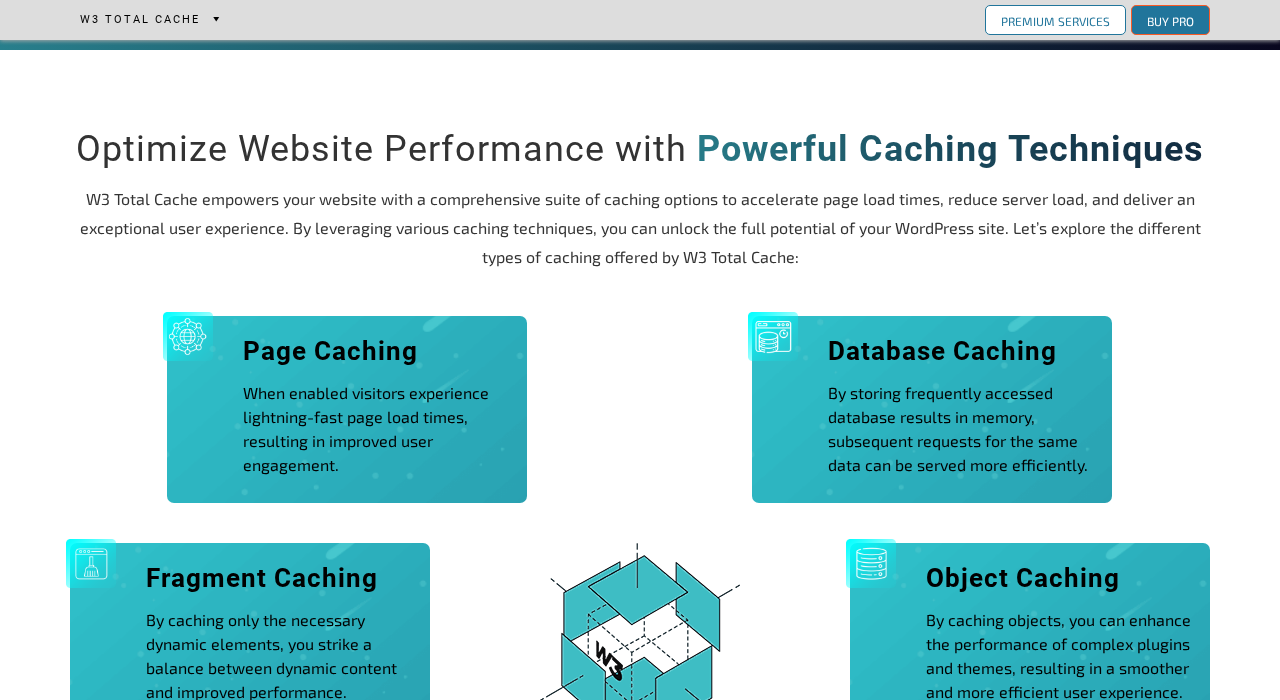
Page caching is the most important caching type for most WordPress sites. When page caching is active, W3TC stores the fully rendered HTML of each page to disk or memory, and serves that stored copy to subsequent visitors without re-running PHP and database queries. The result is dramatically faster response times and significantly lower server resource consumption.
W3TC supports multiple page cache backends:
- Disk: Basic. Stores cached HTML files on disk. PHP handles the request rewrite to serve the cached file. Works on any server.
- Disk: Enhanced. Stores cached HTML on disk and bypasses PHP entirely using server-level rewrite rules (.htaccess for Apache, nginx.conf include for NGINX). This is the fastest disk-based option and the one most sites on shared hosting and standard VPS should use.
- Memcached. Stores cached pages in Memcached, an in-memory data store. Requires Memcached installed and accessible on the server.
- Redis. Stores cached pages in Redis. Requires Redis available on the server.
- APC/APCu. Uses PHP opcode cache for page storage. Less common but available.
For most shared hosting environments, Disk: Enhanced is the correct choice. For VPS and dedicated servers with Memcached or Redis available, the memory-based backends are faster and reduce disk I/O significantly.
Page cache exclusion controls let you exclude specific URLs, URL substrings, user agents, request methods, or cookies from caching. W3TC automatically excludes logged-in users, wp-admin, and pages that set specific cookies (WooCommerce cart cookies, for example). Custom exclusion patterns can be added for any plugin or use case that requires uncached responses.
The cache TTL defaults to 3,600 seconds (one hour). A built-in sitemap crawler preloads the cache after a purge event, visiting each URL from your sitemap and rebuilding cached copies before visitors arrive.
Database and object caching
Database caching stores the results of frequently repeated MySQL queries to a cache backend (Memcached, Redis, APC, or disk). This is most valuable for sites running complex queries repeatedly across many page views, such as WooCommerce category pages querying the same product set for every visitor. The TTL controls how long cached results live before the plugin re-runs the query. Aggressive TTLs can cause stale results on sites where data changes frequently.
Object caching stores WordPress object cache calls, the data WordPress caches internally using wp_cache_set() and related functions. By default, WordPress discards the object cache at the end of each page load. W3TC can persist that cache to a backend (Memcached, Redis, APC, or disk), which is most valuable on sites with complex themes, WooCommerce, or plugins that make many repeated data calls within a single page request.
Both caching types benefit most from a persistent memory backend. Disk-based database and object caching exists as an option but is generally less effective, because the disk I/O overhead can outweigh the query savings on typical shared hosting hardware.
Redis and Memcached support for both database and object cache is included in the free version. This is a meaningful distinction from some premium alternatives. You need the relevant service installed and accessible on your server.
Minification: CSS, JS, and HTML
Minification reduces page weight by removing whitespace, comments, and redundant characters from CSS, JavaScript, and HTML files before they reach the browser.
HTML minification strips whitespace and comments from the HTML source. This is safe on almost all sites and rarely causes compatibility problems.
CSS minification removes whitespace and comments from CSS files. W3TC can minify embedded, inline, and third-party CSS. The combine option merges multiple CSS files into fewer requests, which reduces HTTP/2 overhead but can break selectors that rely on a specific load order.
JavaScript minification follows the same pattern: inline, embedded, and third-party JS can be minified and optionally combined into groups. Deferring JS allows non-critical scripts to load after initial page rendering, which can improve First Input Delay and Total Blocking Time metrics.
The minification auto-discovery mode scans the page and groups files automatically. Manual mode gives you complete control over which files go into which groups. Both modes have edge cases: auto-discovery is more likely to produce layout breaks if scripts have strict load-order dependencies; manual mode requires identifying each file yourself.
The consistent advice from BoldGrid’s documentation and the WordPress.org support forum: test minification in a staging environment before enabling on production, and enable features one at a time. Turning on all CSS and JS combination and minification simultaneously is the most common cause of blank pages and broken layout reports in the W3TC community.
Browser caching
Browser caching adds HTTP cache-control headers to static files (CSS, JS, images, fonts) so that returning visitors load those files from their local browser cache instead of downloading them again. W3TC sets Expires and Cache-Control headers for each file type based on the TTL you configure.
The default configuration sets CSS, JS, images, and fonts to cache for one year and HTML for zero seconds (forcing a fresh page request each time). These defaults match the recommended values for Core Web Vitals compliance and are safe without modification on most sites.
W3TC handles cache-busting correctly for versioned files: assets with version query strings or filename hashes receive appropriate cache headers without premature invalidation.
CDN integration
W3TC has the widest CDN integration list of any free WordPress caching plugin. Supported providers include BunnyCDN (official partnership), Amazon CloudFront, Amazon S3, Cloudflare, StackPath, Rackspace Cloud Files, MaxCDN, and KeyCDN.
The integration rewrites static asset URLs in the page HTML to point to a CDN subdomain. When a visitor loads a page, all CSS, JS, image, and font references are served from the CDN URL rather than the origin server.
BunnyCDN is W3TC’s listed partner CDN. The integration includes an API key field so W3TC can automatically purge the BunnyCDN cache whenever it purges its own cache, keeping both layers in sync without manual intervention.
Cloudflare integration includes HTTP API purging and correct behavior when the site sits behind the Cloudflare proxy. W3TC correctly identifies Cloudflare IP ranges for visitor IP logging when proxied.
W3TC Pro: what the paid tier adds
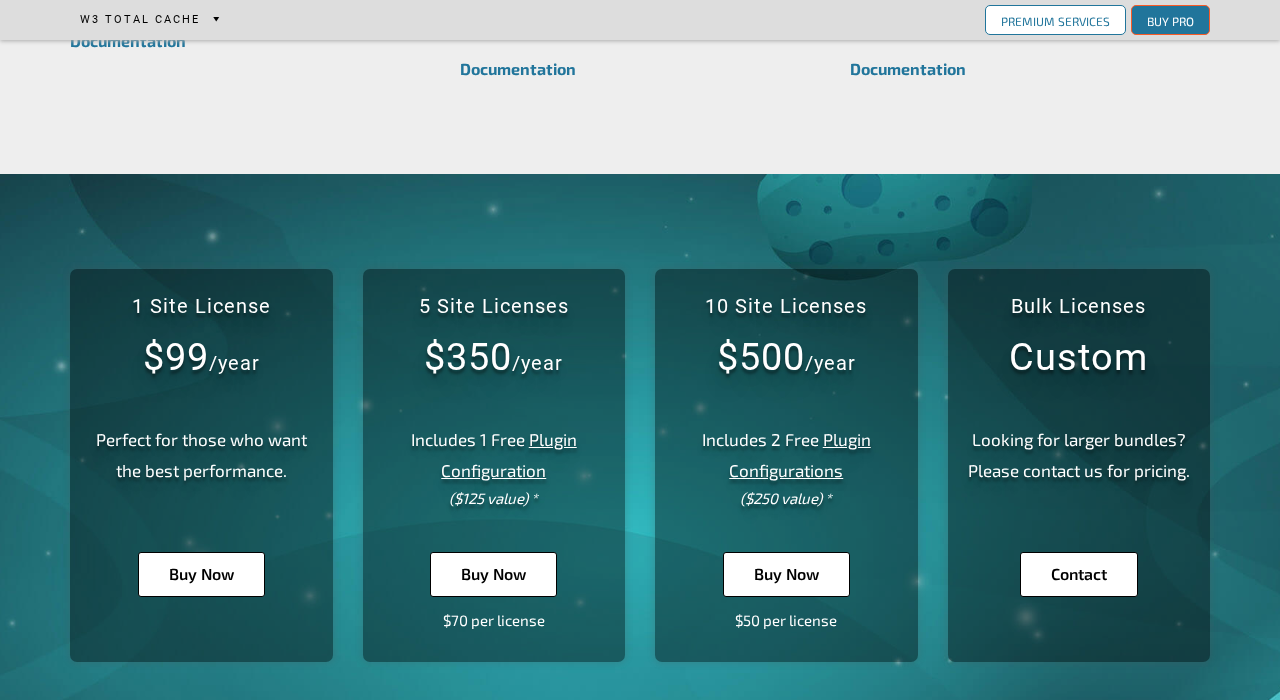
W3 Total Cache Pro costs $99 per year for a single site, $350 per year for five sites, and $500 per year for ten sites. All plans include a 30-day money-back guarantee.
The Pro tier adds capabilities not available in the free version:
Fragment Cache is the most significant Pro-only feature for dynamic sites. It lets you cache individual sections of a page independently, each with its own TTL. A sidebar widget that queries the database can be cached separately from the main content. A header element can remain cached while a WooCommerce mini-cart stays dynamic. This is the functionality LiteSpeed Cache calls ESI, implemented at the PHP level rather than requiring a specific web server.
REST API Caching caches WordPress REST API responses, reducing backend load on sites that expose JSON endpoints for JavaScript frontends, headless WordPress setups, or API-heavy integrations.
Delay Scripts holds JavaScript execution until user interaction, similar to WP Rocket’s Delay JavaScript feature. This reduces initial page load blocking and can improve First Input Delay and Total Blocking Time scores in Core Web Vitals testing.
Remove CSS and JS lets you strip specific assets from specific pages, useful for eliminating globally-loaded plugin files that are only needed on certain page types.
Caching Statistics provides a dashboard showing cache hit rates, bandwidth savings, and performance metrics over time. The free version has no built-in reporting on caching effectiveness.
WebP and AVIF image conversion are extended in Pro. Version 2.9.0 introduced AVIF support for Pro users, producing smaller file sizes than WebP on supporting browsers.
At $99 per year for one site, W3TC Pro costs more than WP Rocket’s Single plan ($59 per year), which delivers a more polished interface and comparable caching performance. The Pro tier makes the most sense for users already comfortable with W3TC’s configuration who specifically need fragment caching or the statistics dashboard, or for agencies where the five-site or ten-site tier brings the per-site cost into competitive range.
Pros and cons
Pros
- The most complete free WordPress caching feature set in 2026: page caching, database caching, object caching, browser caching, opcode caching, and full HTML/CSS/JS minification all included at no cost
- Truly web-host-agnostic: full caching capability on Apache, NGINX, LiteSpeed, or any other stack without a server-requirement caveat
- Widest CDN integration list of any free caching plugin, including CloudFront, Cloudflare, BunnyCDN, KeyCDN, and more
- Redis and Memcached supported for page cache, database cache, and object cache in the free version
- WP-CLI integration for scripted cache management in deploy and automation workflows
- WordPress Multisite compatible
- 17 years of active development and 900,000+ active installs mean broad community knowledge, hosting-specific documentation, and plugin compatibility context
- Actively maintained: version 2.10.5 released August 18, 2026, with a strong 2.10.x security hardening cycle
Cons
- Very steep configuration complexity: multiple settings tabs, sub-options, and backend selectors require significant reading before producing reliable results
- Enabling minification and CDN without careful per-site testing is the most common cause of broken layouts and plugin conflicts
- The 2.9.x and 2.10.x release series included multiple security patches covering XSS, SSRF, access control, and credential encryption issues, all resolved in the current version but underscoring the importance of keeping the plugin updated
- At-rest credential encryption introduced in 2.10.0 broke Redis, Memcached, and CDN connections on update, requiring follow-up patches through 2.10.5
- W3TC Pro pricing at $99/year for one site is higher than comparable premium alternatives with better user experience
- No integrated image optimization pipeline in the free version
- No built-in performance statistics or cache hit rate reporting without Pro
- Community-only support for the free version; no paid support desk
Alternatives
WP Rocket ($59 per year for one site) is the most natural paid comparison. It delivers comparable page caching and minification performance with a significantly cleaner interface, smart defaults that work on most sites without manual tuning, and dedicated support. For site owners who value ease of use over granular control, WP Rocket is the better choice, and at $59 it costs less than W3TC Pro. It does not match W3TC’s breadth on database and object caching, and it does not support Redis or Memcached for page caching.
LiteSpeed Cache (free) is the strongest free alternative for sites on LiteSpeed or OpenLiteSpeed hosting. Its server-level page cache outperforms W3TC’s PHP-based disk cache on matching hosting. On Apache or NGINX, that server-level advantage disappears and W3TC’s broader CDN and object cache support is more useful. Choose LiteSpeed Cache if your host runs LiteSpeed; choose W3TC if your stack is Apache or NGINX.
WP Super Cache (free, by Automattic) is the simpler alternative. It handles page caching only, with no minification, no database or object cache, and a much smaller settings surface. Choose it if you want basic page caching on Apache hosting with minimal configuration and zero risk of misconfiguring a database cache setting.
WP Fastest Cache (free core, paid premium) sits between WP Super Cache and W3TC in complexity. Its free tier covers page caching, minification, browser caching, and Cloudflare integration with a more approachable interface. It is a reasonable alternative for site owners who find W3TC overwhelming but want more than WP Super Cache provides.
Autoptimize (free) focuses on CSS, JS, and HTML optimization rather than page caching. Some developers use W3TC’s caching layer alongside Autoptimize’s minification deliberately, keeping each concern in the plugin best suited to it.
Final verdict
W3 Total Cache remains the most feature-complete free caching plugin in the WordPress directory in 2026. If you know what you are configuring, you get page caching, database caching, object caching, browser caching, CDN integration, and full minification on any web server, at no cost. No other free plugin matches that combination.
The honest advice for most site owners: read before you click. Set the page cache backend and method first, test for a day, then enable minification one layer at a time with testing between each step, and add CDN last. Enabling everything simultaneously and debugging afterwards is a harder path.
For developers managing multiple WordPress installs on varied hosting environments, W3TC’s web-host-agnostic design and depth of control make it a defensible choice over LiteSpeed Cache (which requires a matching server) and over paying for WP Rocket on every site. For solo site owners who want caching working in fifteen minutes without reading documentation, WP Rocket’s $59 price and clean interface represent better value per hour of setup time.
The 2.10.x security hardening is worth acknowledging. The 2.10.0 release addressed authorization, injection, XSS, and SSRF issues that were present in earlier versions, and the subsequent patch series resolved a credential encryption regression. The plugin is patched and current. Keeping W3TC updated is not optional: an outdated version, given the plugin’s filesystem and caching privileges, is a real security risk. Enable automatic minor updates or monitor the changelog.
FAQ
Read more reviews in the Reviews category.