

Six thousand active installs. A 3.6-star rating split almost evenly between fans and frustrated users. A free plugin that is genuinely capable and a paid tier that promises to make Core Web Vitals optimization nearly automatic. Swift Performance sits in an unusual spot inside the WordPress caching category: technically ambitious, opinionated in its design, and less talked-about than WP Rocket or LiteSpeed Cache despite being around since before those two dominated roundups.
This Swift Performance review covers the version you can actually install today without spending a dollar (Swift Performance Lite), what the paid AI tier adds and whether it is worth the price, how setup works from first activation through a working cache, where the plugin earns genuine praise, and where it has real documented weaknesses that a buyer should understand before committing.
A note on the basis of this review. This writeup is built on a detailed audit of the swiftperformance.io homepage, pricing page, and features page; the official documentation at docs.swiftperformance.io; the WordPress.org plugin listing for Swift Performance Lite (version 2.3.7.3, last updated late 2024); the WordPress.org support forum; and a review of published third-party configuration guides, comparison articles, and user feedback from August 2026. The settings panel was inspected through vendor-published screenshots and published setup tutorials. A paid Swift Performance AI license was not activated during this review window; where a feature is described from documentation and official materials rather than direct hands-on testing, the relevant section says so.
At a glance:
- Free version (Swift Performance Lite): genuinely capable caching plugin with page cache, preloading, CSS and JavaScript optimization, LazyLoad, Plugin Organizer, and database tools.
- Paid version (Swift Performance AI): adds image optimization, AI-automated configuration, dynamic WooCommerce fragments, and intelligent LCP preloading from $49.99 per year for one site.
- Install count: 6,000+ active installs (WordPress.org).
- Star rating: 3.6 out of 5 across 125 reviews (76 five-star, 34 one-star).
- Bottom line: a technically solid free caching plugin with a useful paid upgrade, but support inconsistency and a polarized user base are facts worth understanding before choosing it for a client site.
Quick verdict
Swift Performance is worth your attention if you are an intermediate-to-advanced WordPress user who wants a free caching plugin that goes beyond basic page caching. The Lite version gives you real CSS and JavaScript optimization tools, a cache prebuild system, and the Plugin Organizer, which no comparable free plugin includes. The paid AI upgrade adds image optimization and automated tuning at $49.99 per year, which undercuts WP Rocket’s entry price.
The honest qualifier: Swift Performance has a polarized track record. Its 3.6-star average on WordPress.org breaks down as 76 five-star reviews and 34 one-star reviews. Users who configure it well report strong results. Users who run into compatibility conflicts or billing disputes have a harder time getting resolution. If you are managing a client site where uptime risk needs to be minimal and support response times need to be fast, that track record matters.
Quick verdict card:
- Best for: performance-focused site owners and developers who want a free WordPress caching plugin with real CSS and JavaScript optimization depth, or who want a paid performance plugin that costs less than WP Rocket.
- Best plan for most individual sites: Swift Performance Lite (free) for a personal or developer site where you have time to configure it. Swift Performance AI Single ($49.99/year) for a business site where you want image optimization included and automated setup.
- Best plan for agencies: Swift Performance AI Multi ($99.99/year for five sites) or the Must-Have Pack ($59.99/month for unlimited sites bundled with five other plugins).
- Standout: the Plugin Organizer, which lets you disable specific WordPress plugins on selected pages, is a genuine differentiator that no major competing caching plugin includes.
- Watch out for: a polarized user rating, below-average WordPress.org support forum engagement from the developer, some reports of billing disputes, and fewer active installs (6,000+) than any major competitor in this category.
What Swift Performance is
Swift Performance is a WordPress caching and site optimization plugin developed by SwiftPerformance.io. It exists in two forms: Swift Performance Lite, the free version available from WordPress.org, and Swift Performance AI, the paid upgrade sold directly from swiftperformance.io. A third companion plugin, Swift Performance Extra, extends the Lite version with additional capabilities when users register their site for a free license key.
The plugin was built with a specific thesis: that combining caching with asset optimization, image optimization, and a unique Plugin Organizer in one tool produces better results than stacking three or four separate free plugins. That thesis holds up reasonably well in practice, particularly for the Lite version, which includes more optimization depth than most free caching plugins at the same price point (free).
The paid tier, Swift Performance AI, shifts the positioning. Its “AI” label refers to automated configuration: the plugin scans your site and applies settings without requiring you to understand the difference between critical CSS and render-blocking JavaScript. For buyers who want results without a configuration session, that is the pitch.
A note on branding. The naming has evolved over time. The original paid version was called “Swift Performance Pro.” The current paid product is “Swift Performance AI.” Some third-party articles still reference “Pro” because the rebrand is relatively recent. When you see pricing pages or comparison articles mentioning both names, they refer to the same paid tier.
Who Swift Performance is best for
Strong fit:
- Intermediate-to-advanced WordPress users who want a free caching plugin with real CSS and JavaScript optimization tools and do not mind spending time on configuration.
- Developers who need to selectively disable plugins on specific pages to isolate conflicts or reduce per-page load. The Plugin Organizer is the most compelling reason to choose Swift Performance Lite over comparable free alternatives.
- Site owners on shared hosting who want to keep server-side resource usage low. Swift Performance Lite’s Compute API option (available after free registration) offloads intensive CSS and JavaScript processing to Swift’s external servers rather than your host.
- Buyers evaluating paid WordPress caching plugins who want the paid tier to include image optimization without purchasing a separate image plugin. Swift Performance AI includes unlimited image optimization; WP Rocket requires the separate Imagify service for the same result.
- WooCommerce store operators who want dynamic fragment caching for cart and checkout pages. This is a paid feature in Swift Performance AI.
Weak fit:
- Site owners who want excellent vendor support on a free plugin. The WordPress.org forum for Swift Performance Lite has 21-plus pages of support threads, with many showing zero or one reply from the developer. If you run into a conflict you cannot resolve yourself, getting a response can take a long time.
- Client-site managers who cannot afford unexpected downtime. Some users have reported site failures after enabling aggressive optimization settings (redirect loops, broken font loading). These are usually configuration issues rather than bugs, but they require debugging experience to resolve.
- Teams on strict LiteSpeed-powered hosting who want maximum free performance. LiteSpeed Cache is the better free choice in that environment because it hooks directly into the server-level cache layer.
- Buyers who prioritize plug-and-play simplicity. WP Rocket activates and works well on most sites with minimal configuration. Swift Performance Lite requires more deliberate setup to get comparable results.
- Sites where billing predictability is a high priority. There are documented user complaints about unexpected charges and difficulty resolving billing disputes with the Swift Performance team. Verify the terms carefully before purchasing any paid plan.
Installing and setting up Swift Performance Lite
Installing the Lite version is straightforward. Search “Swift Performance” in Plugins > Add New, click Install Now, and activate. The plugin adds a Swift Performance menu item in the WordPress admin immediately after activation.
What is distinctive about Swift Performance compared with most caching plugins is the four setup paths it offers at first launch:
- Manual Configuration: direct access to all settings, for users who know exactly what they want to configure.
- Import Settings: load a configuration from another Swift Performance installation, useful for agencies deploying the same config across multiple sites.
- Use Preset: choose from five optimization levels, ranging from Simple Caching through Maximum Optimization. This is the quickest starting point for most new users.
- Autoconfig: the plugin scans your server environment and applies a configuration it considers appropriate for your specific hosting setup.
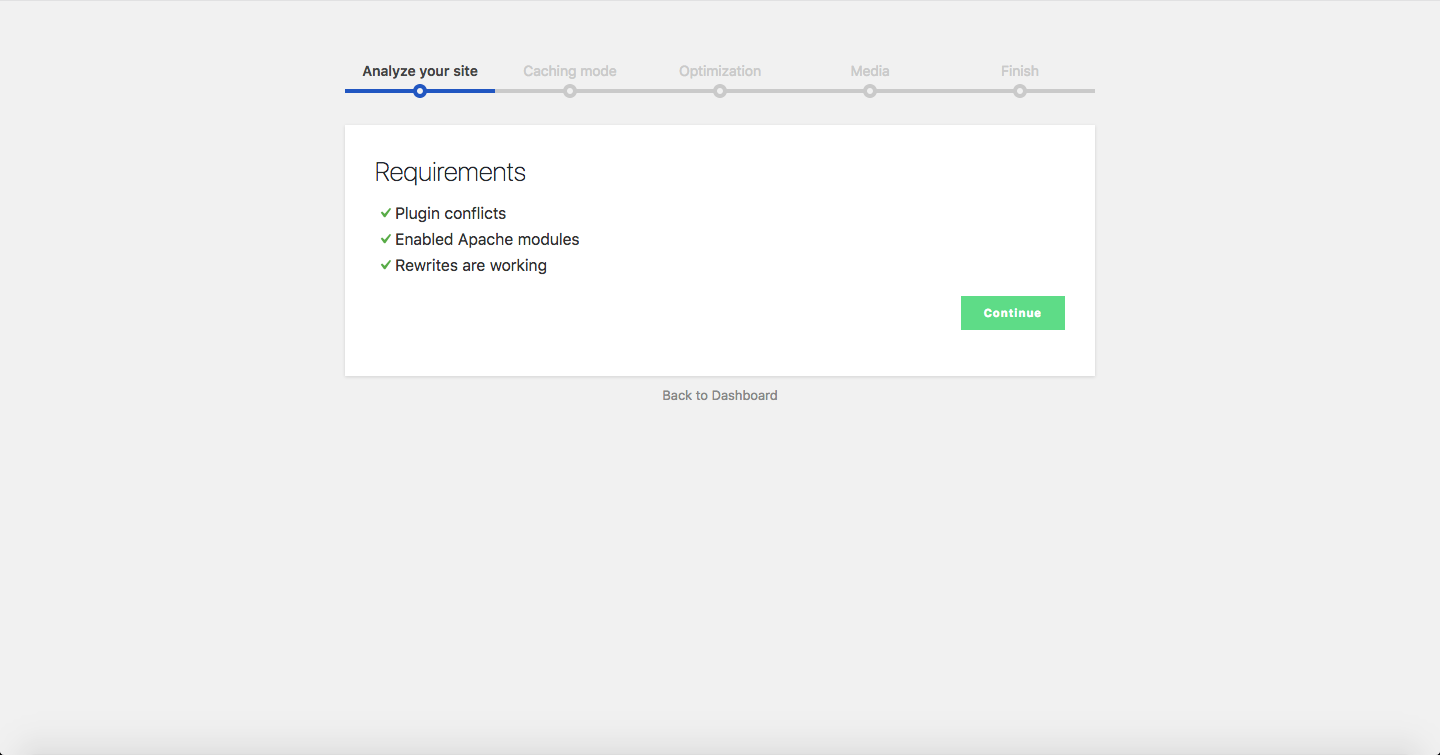
I checked this setup flow against the official documentation and published setup guides. The Autoconfig path is the most beginner-friendly entry point, but it does not guarantee conflict-free results. Sites with many active plugins, custom JavaScript from page builders, or complex WooCommerce configurations sometimes need manual exceptions after the initial autoconfig run.
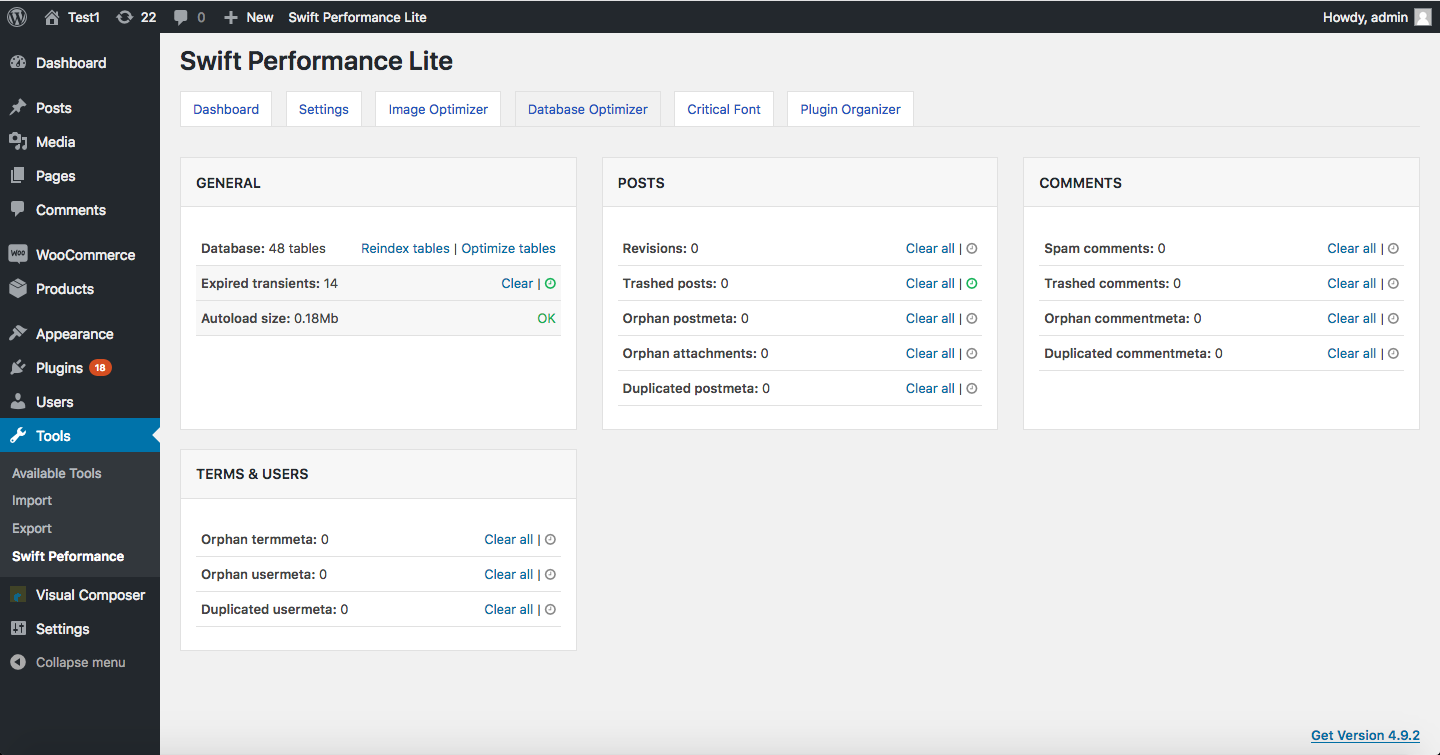
After the initial setup, the settings panel organizes into five main tabs:
- Dashboard: shows cache status, rewrite rule status, system logs, and a warmup table for manually triggering cache prebuild.
- Settings: the main configuration area, organized into six sub-sections (General, Media Optimization, Optimization, Caching, Exceptions, and Warmup).
- Image Optimizer: available in the paid AI version; one-click optimization of all uploaded images.
- Database Optimizer: cleanup for orphaned metadata, post revisions, transients, and spam comments.
- Plugin Organizer: the standout feature, described in detail below.
One practical note from the third-party configuration guides I reviewed: enabling merging of scripts and styles (combining all CSS or JS files into one) often produces worse results on modern WordPress sites rather than better ones. The more reliable path for most sites is to use the critical CSS generation and defer JavaScript, and let a CDN like Cloudflare or BunnyCDN handle asset minification at the network edge. This is configuration knowledge that is not surfaced clearly in the plugin’s own documentation, and new users who enable everything from the Optimization tab sometimes create broken layouts or slow initial page loads.
Page caching
Page caching is the core function, and Swift Performance Lite’s approach is solid. The plugin generates static HTML files from WordPress pages and serves those files directly to visitors without running PHP on each request.
The recommended cache mode is “Disk Cache with Rewrites.” In this mode, the server rewrites request URLs to the cached static files using server-level rules (typically via .htaccess on Apache hosts or equivalent Nginx config). This is the fastest serving method because the PHP process is not involved at all. On shared hosting without the ability to modify server configs, the plugin falls back to a PHP-based serving mode that still improves performance but is slower than the rewrite method.
Cache prebuild is included in the free version. After the cache is cleared (by a post update, a plugin update, or a manual clear), Swift Performance automatically visits the site’s URLs to rebuild the cache in advance. This means the first real visitor after a clear does not pay the cold-cache cost. The prebuild speed and URL priority can be configured in the Warmup sub-section of Settings.
Cache expiry is configurable either by action (clear cache when a post is updated, when a plugin is updated, etc.) or by time interval. Most sites do well with action-based expiry; time-based expiry makes more sense for very high-traffic sites where the cache is almost always warm.
WooCommerce is supported in the free version at a basic level: cart, checkout, and account pages are automatically excluded from page caching to prevent cart data from leaking between users. Dynamic fragment caching for AJAX-driven cart updates and multi-currency switching is a paid Swift Performance AI feature.
CSS and JavaScript optimization
This is where Swift Performance differentiates itself most clearly from simpler free alternatives. The plugin’s CSS and JavaScript handling goes well beyond basic minification.
In the free Lite version:
- Critical CSS generation: Swift Performance generates critical CSS for each page (the CSS needed to render above-the-fold content without waiting for the full stylesheet to load). This is a meaningful Core Web Vitals win. The critical CSS is generated per page type, not once for the whole site, which makes it more accurate than plugins that generate one global critical CSS file.
- JavaScript merging and minification: the plugin can combine and minify JavaScript files. This includes inline scripts, not just external files. Combined files can be deferred to load after the initial render.
- CSS merging and minification: similar to the JS handling, the plugin can combine stylesheets and minify the output.
After registering for a free license key and installing Swift Performance Extra, the Compute API becomes available. This shifts the heavy computation for critical CSS and JavaScript processing from your server to Swift’s own API servers. For shared hosting where server CPU limits are a constraint, that offloading is genuinely useful.
The important caveat is that aggressive JavaScript and CSS merging on complex themes or page-builder sites can break things. Elements fail to render, scripts execute in the wrong order, or fonts load incorrectly. Users who have reported site issues on WordPress.org forums almost always ran into problems in the optimization settings rather than in basic caching. I recommend enabling one feature at a time and testing between changes rather than switching everything on at once.
Plugin Organizer: the standout free feature
The Plugin Organizer is the feature I find most interesting in Swift Performance Lite, and the one I have not seen replicated in any major caching or performance plugin competitor.
The concept is simple: certain WordPress plugins are only needed on certain pages. A contact form plugin is needed on the Contact page but is dead weight on the homepage. A WooCommerce plugin is needed on shop pages but does not need to load on your blog. The Plugin Organizer lets you specify which plugins should be disabled on which URLs, page types, or device types.
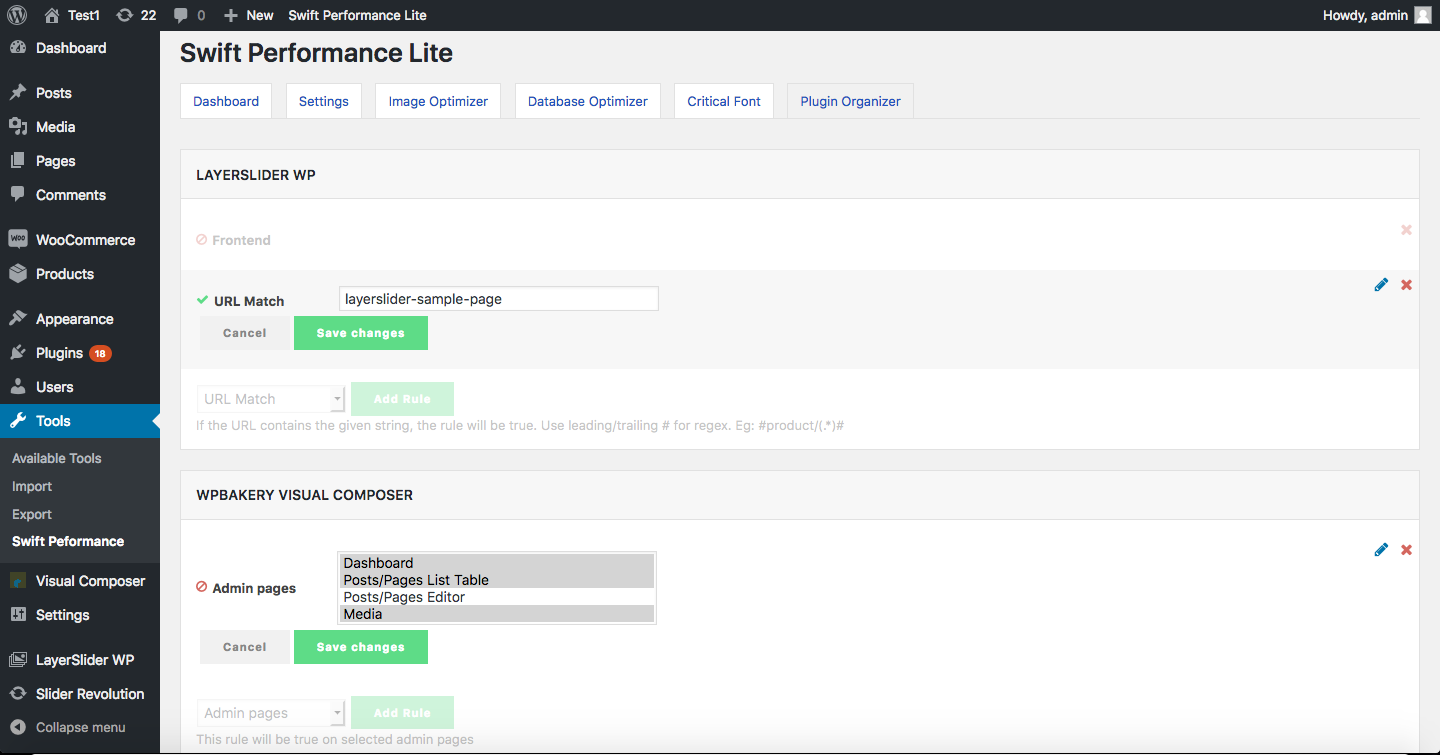
The performance impact can be meaningful on sites with many plugins. Every active plugin adds at least some PHP execution time and potentially some front-end asset loading. Disabling five plugins on the homepage that only matter on the shop or account pages can cut measurable time from the initial render.
The Plugin Organizer is free and included in Swift Performance Lite. No other mainstream caching plugin includes equivalent functionality. WP Rocket, LiteSpeed Cache, W3 Total Cache, and most free alternatives do not offer per-page plugin disabling at the plugin level. There are standalone plugins that do this, but having it built into the caching plugin is a convenience that removes one more tool from the stack.
Media optimization and LazyLoad
LazyLoad is included in the free version and covers images, iframes, YouTube and Vimeo embeds, and Google Maps embeds. Images are replaced with placeholders and load only when they scroll into the viewport. This reduces the initial page weight and improves Largest Contentful Paint when the LCP element is below the fold.
The free version also supports WebP serving when WebP versions of images exist on the server, using the picture element method. However, image optimization itself (converting existing JPGs and PNGs to WebP) is a paid feature. In the free version, you either need WebP files to already be on your server or you need a separate image optimization plugin to generate them.
Swift Performance AI (paid) adds unlimited image optimization: it converts existing images to WebP, applies lossless or lossy compression, and serves adaptively sized images without requiring a CDN. Intelligent preloading for LCP images is also a paid feature. The plugin identifies which image on each page is likely to be the Largest Contentful Paint element and preloads that image early in the document, directly improving the LCP score.
Database optimizer
The Database Optimizer tab in Swift Performance Lite handles the standard cleanup tasks: delete post revisions, auto-drafts, and trashed posts; remove transients; clean up orphaned metadata from deleted plugins; optimize database tables. These are the same tasks handled by standalone plugins like WP-Optimize or the database cleanup tabs in other caching plugins.
The Swift Performance database optimizer works, but it is more basic than dedicated database tools. Third-party configuration guides recommend using WP-Optimize alongside Swift Performance if you need granular control over post revision retention limits, because Swift does not let you specify “keep the last five revisions” rather than “delete all revisions.” For most sites, Swift’s optimizer is sufficient for a regular cleanup run.
Paid upgrade: Swift Performance AI
The paid tier is called Swift Performance AI and adds the following on top of Lite:
- AI-automated configuration: the plugin analyzes your site and configures settings automatically, targeting Core Web Vitals improvements without requiring manual tuning.
- Unlimited image optimization: compress and convert all uploaded images to WebP, with adaptive sizing and background image optimization included.
- Intelligent LCP preloading: the plugin identifies the Largest Contentful Paint element on each page and injects a preload hint so the browser fetches that image before parsing the rest of the document.
- Dynamic Fragments: AJAX-based caching for non-cacheable page sections. The classic use case is WooCommerce: the main page is served from cache while the cart count, mini-cart, and pricing (in stores with multi-currency plugins) are loaded dynamically. This prevents logged-in users or users with items in their cart from seeing stale page content.
- Multi-currency WooCommerce support: the Dynamic Fragments system handles WooCommerce multi-currency configurations that would normally prevent caching.
- Premium support: access to the vendor’s ticketed support system rather than the community forum.
The AI configuration feature is the clearest upgrade pitch. The Lite version’s setup requires careful manual work to get CSS, JavaScript, and image optimization all working without conflicts. The AI tier is designed to do that work automatically. Based on user reports and marketing claims, results vary: some users report immediate score improvements with zero manual tuning; others report the automated configuration breaking elements that they then need to fix manually. This is not unusual for automated performance tools, but it is worth setting expectations before purchase.
Pricing and license value
Swift Performance AI pricing as verified on swiftperformance.io in August 2026:
| Plan | Price | Sites | Key additions vs Lite |
|---|---|---|---|
| Swift Performance Lite | Free | Unlimited (self-hosted) | All core features |
| Swift Performance AI Single | $49.99/year | 1 | Image optimization, AI config, premium support |
| Swift Performance AI Multi | $99.99/year | 5 | Same as Single |
| Must-Have Pack | $59.99/month | Unlimited | 6 plugins bundled |
All paid plans include a 14-day money-back guarantee. There is no separate free trial. The Lite plugin is effectively the trial: it runs on your actual site in your actual hosting environment before you spend anything.
Pricing context:
- Swift Performance AI Single ($49.99/year) is cheaper than WP Rocket Single ($59/year) for a comparable feature set that also includes image optimization.
- Swift Performance AI Multi ($99.99/year) covers five sites; WP Rocket’s Plus tier ($119/year) covers three sites, and Multi ($299/year) covers unlimited.
- For agencies managing many sites, the Must-Have Pack at $59.99/month is the relevant comparison with NitroPack or managed performance service pricing.
One practical note on billing: multiple published sources (independent configuration guides, user reviews, and forum threads) mention concerns about unexpected charges and difficulty disputing or canceling subscriptions with Swift Performance. I am flagging this because it is a documented pattern across sources, not a single complaint. Read the subscription terms before purchasing and verify how auto-renewal cancellation works for your billing country before entering payment details.
Pros and cons
Pros
- Free Lite includes critical CSS per page, JavaScript optimization, Plugin Organizer, LazyLoad, and database cleanup
- Plugin Organizer is unique: disable plugins per URL or page type
- Swift Performance Extra (free with registration) unlocks Compute API for better CSS/JS results
- Four setup paths give beginners a starting point and experts full control
- Paid AI tier includes unlimited image optimization natively
- Swift Performance AI is priced below WP Rocket on a per-site basis
- Must-Have Pack bundles six tools at reasonable agency pricing
- Critical CSS per page type is more accurate than whole-site approaches
- WooCommerce Dynamic Fragments (paid) for conflict-free caching with cart/checkout
- 14-day money-back guarantee on all paid plans
Cons
- WordPress.org support forum has 21+ pages of threads with many showing no developer response
- Polarized rating: 76 five-star and 34 one-star out of 125 reviews
- Aggressive optimization can break sites, particularly on page-builder themes
- Only 6,000+ active installs vs 1,000,000+ for major competitors
- No substantial plugin update since late 2024 (version 2.3.7.3 as of August 2026)
- Multiple sources document billing complaints and auto-renewal disputes
- AI auto-configuration may still produce conflicts on complex themes
- Documentation does not clearly distinguish free vs. Extra vs. paid features
Alternatives to Swift Performance
- WP Rocket. The market-leading paid WordPress caching plugin from WP Media. Choose WP Rocket if you want a larger active user base, better theme compatibility, faster official support, and a plugin with over a million active users. WP Rocket does not include image optimization natively (it integrates with Imagify as a separate service). Swift Performance AI is cheaper and includes images; WP Rocket has the better track record and support.
- LiteSpeed Cache. The best free caching option for WordPress sites on LiteSpeed-powered hosting. LiteSpeed Cache connects to the server’s own caching layer and has 6,000,000+ active installs. Swift Performance Lite is the stronger choice for non-LiteSpeed hosts.
- W3 Total Cache. A free caching plugin with the deepest configuration options available at no cost. Choose it if you want maximum control over database caching, object caching, and browser caching. It has 1,000,000+ active installs but higher setup complexity than Swift Performance Lite.
- NitroPack. A cloud-based performance service. NitroPack does all optimization server-side through its CDN. Results are strong, but subscriptions start around $21/month and all traffic routes through NitroPack’s infrastructure. Choose it if you want hands-off performance management.
- Autoptimize. A focused free CSS and JavaScript optimization plugin without page caching. Pairs well with basic caching plugins that lack good asset optimization. Swift Performance Lite handles both in one install.
- Hummingbird (WPMU DEV). Free and paid tiers from WPMU DEV. Choose it if you are already a WPMU DEV subscriber who wants consolidated tooling, not as a standalone purchase against Swift Performance AI pricing.
For site owners comparing only free options: Swift Performance Lite wins on Plugin Organizer, critical CSS per page, and a simpler settings structure than W3 Total Cache. LiteSpeed Cache wins on LiteSpeed hosting. W3 Total Cache wins on flexibility and community resources.
For site owners comparing paid options at entry price, Swift Performance AI Single ($49.99/year with image optimization) against WP Rocket Single ($59/year without image optimization) is a genuine decision. Swift Performance costs less and includes more. WP Rocket is safer on compatibility and support quality. The right answer depends on whether you are comfortable debugging the occasional conflict.
Final verdict
Swift Performance is a technically capable WordPress optimization plugin that occupies an unusual market position: more powerful in the free tier than most free alternatives, competitively priced against WP Rocket in the paid tier, and notably less visible in mainstream hosting recommendations than its feature set probably deserves.
The Plugin Organizer alone makes Swift Performance Lite worth evaluating for any WordPress developer who manages plugin-heavy sites. The ability to disable plugins per URL is a practical performance tool that simply does not exist in most competing plugins. The critical CSS generation per page type, the prebuild cache system, and the Compute API offloading (after free registration) give the Lite version more optimization depth than W3 Total Cache or WP Super Cache for most non-LiteSpeed use cases.
Where I would be cautious: if you are choosing a performance plugin for client sites where you cannot spend time debugging conflicts, and where your client will contact you the moment something looks broken, Swift Performance is not the lowest-risk option. WP Rocket has a better compatibility track record and better first-line support documentation. LiteSpeed Cache has a larger install base and more active forum coverage. Swift Performance’s 3.6-star rating and the documented support forum response pattern are signals that the user experience is inconsistent in a way that WP Rocket’s is not.
For a developer’s own site, a test environment, or a site where you have the time and skill to configure carefully, Swift Performance Lite is worth installing and running through the Preset or Autoconfig path before dismissing it. If it works cleanly on your site’s stack, the results hold up.
For buyers evaluating the paid AI tier: $49.99/year for one site with image optimization included is a reasonable value compared with paying $59/year for WP Rocket plus a separate image service. The AI auto-configuration is a real feature. Read the subscription terms before purchasing and keep the 14-day refund window in mind as your evaluation period.
FAQ
Is Swift Performance free?
Yes. Swift Performance Lite is the free version and is available from the WordPress.org plugin directory. It includes page caching, cache preloading, CSS and JavaScript optimization, critical CSS generation, LazyLoad, Plugin Organizer, database cleanup, and CDN support with no time limit or feature expiry. Swift Performance Extra, a companion plugin that unlocks additional features through the Compute API, is also free after registering for a license key on swiftperformance.io. Swift Performance AI is the paid upgrade, starting at $49.99 per year for one site.
What is Swift Performance Lite?
Swift Performance Lite is the official free version of Swift Performance, published on WordPress.org. It handles page caching, CSS and JavaScript optimization, critical CSS generation, lazy loading, Plugin Organizer (disabling plugins per page or URL), database cleanup, and CDN compatibility. It is the starting point for all Swift Performance users and serves as the free evaluation layer before buying a paid plan.
What is Swift Performance Extra?
Swift Performance Extra is a separate free companion plugin that extends the Lite version after users register their site with Swift Performance and receive a free license key. Extra unlocks Compute API processing, which offloads intensive critical CSS and JavaScript computation from your server to Swift Performance’s own API servers. This is particularly useful on shared hosting with CPU limits. It makes additional Pro-tier features available in the Lite install without requiring a paid subscription.
How much does Swift Performance cost?
Swift Performance Lite is free. The paid tier, Swift Performance AI, costs $49.99 per year for one site and $99.99 per year for five sites. The Must-Have Pack, which bundles Swift Performance with five other plugins from the same developer, costs $59.99 per month for unlimited sites. All paid plans include a 14-day money-back guarantee. Prices were verified on swiftperformance.io in August 2026; verify current pricing before purchasing.
How does Swift Performance compare to WP Rocket?
Swift Performance Lite is free; WP Rocket has no free tier. Swift Performance AI Single costs $49.99 per year and includes image optimization natively. WP Rocket Single costs $59 per year and does not include image optimization, which is provided by the separate Imagify service. Swift Performance includes the Plugin Organizer, which lets you disable plugins per page; WP Rocket does not. WP Rocket has over one million active installs and a stronger compatibility track record with popular themes and plugins. If support quality and compatibility predictability are priorities, WP Rocket is the lower-risk choice. If price and features per dollar matter more, Swift Performance AI is the stronger value.
What does the Swift Performance Plugin Organizer do?
The Plugin Organizer is a tab inside Swift Performance Lite that lets you disable specific WordPress plugins on selected pages, post types, URLs, or device types. Plugins that are disabled on a given page do not load their PHP or assets for that page’s request. This reduces page-level resource usage and can improve load time on sites with many active plugins. The Plugin Organizer is a free feature included in Swift Performance Lite with no paid upgrade required.
Does Swift Performance work with WooCommerce?
Yes, but with some important distinctions. The free Lite version automatically excludes cart, checkout, and account pages from page caching to prevent cart data from being served from a static cache to the wrong user. Basic WooCommerce compatibility is included free. WooCommerce Dynamic Fragments, which use AJAX to load the cart count and mini-cart content separately from the main cached page, are a paid Swift Performance AI feature. Multi-currency support in WooCommerce stores also requires the paid Dynamic Fragments system.
What is the Swift Performance star rating on WordPress.org?
Swift Performance Lite has a 3.6 out of 5 stars rating on WordPress.org based on 125 reviews as of August 2026. The distribution is polarized: 76 five-star reviews and 34 one-star reviews, with relatively few two, three, or four-star reviews in between. Users who configure the plugin successfully report strong results. Users who encounter conflicts, broken layouts from aggressive optimization, or support issues typically leave one-star reviews. The polarized distribution is worth factoring into the decision alongside the overall average.
Is Swift Performance still actively maintained?
Based on the WordPress.org listing audited in August 2026, Swift Performance Lite was on version 2.3.7.3, with the most recent update listed as approximately six months before this review. That update addressed minor security and compatibility fixes. The changelog does not reflect active feature development in recent months. The paid Swift Performance AI product receives separate updates; buyers of the AI tier should check the current update cadence on swiftperformance.io before purchasing.
Does Swift Performance have a free trial?
No. There is no time-limited free trial for Swift Performance AI. The equivalent is Swift Performance Lite: the free plugin installs on your actual site, gives you a real performance baseline to evaluate, and shows you how the settings panel and configuration flow work before you spend anything. If you decide to buy, all paid plans include a 14-day money-back guarantee, which functions as the paid evaluation window.