


Managing redirects on WordPress used to mean editing .htaccess files by hand. One typo and your site could go down. Redirection changed that more than a decade ago by bringing redirect management into the WordPress admin, and it has held its position as the most-installed free redirect plugin ever since, with over two million active installations on WordPress.org.
In this Redirection plugin review I looked at the current version (5.9.0, released July 2026) from the perspective of a site owner who needs reliable redirect management without paying for a premium plugin or touching server config files. I walked through the setup, created test redirects with conditional rules and regex patterns, reviewed the 404 monitor, and tested the new import/export interface introduced in 5.9.0.
The short version: Redirection is the most capable free redirect manager for WordPress, and it costs nothing. Its biggest trade-off is a functional but utilitarian UI that has not been redesigned in years.
At a glance
| Plugin | Redirection |
| Developer | John Godley |
| Price | Free (no premium tier) |
| Active installs | 2,000,000+ |
| Rating | 4.4 / 5 (701 reviews) |
| Current version | 5.9.0 (July 2026) |
| Tested up to | WordPress 7.0.4 |
| Requires | WordPress 6.6+, PHP 7.4+ |
Quick verdict
Redirection: Quick Verdict
Redirection is the go-to free redirect manager for WordPress. It handles everything from basic 301s to conditional routing by login status, referrer, IP, and browser, all from a clean WP admin interface. The 404 monitor, comprehensive logging, and strong import/export make it a complete toolkit for SEO-conscious site owners. The only real knock is the dated UI. If you are on WordPress and you need redirect management without a budget, install Redirection.
What is Redirection?
Redirection is a WordPress plugin that manages URL redirects and monitors 404 errors directly inside the WordPress admin. It was first released in 2007 and is maintained by John Godley as an open-source project. There is no premium version and no paid upgrade path.
The plugin covers three distinct use cases:
- Redirect management. Create, edit, enable, and disable redirects (301, 302, 307, 410, 451) without editing server config files.
- 404 monitoring. Log every 404 error your site generates, with visitor IP, browser agent, and referrer data.
- Site-wide options. Force HTTPS, set canonical domain (www vs. non-www), consolidate multiple domains, and manage HTTP headers.
That scope makes it more than a simple redirect creator. It is closer to a lightweight SEO hygiene tool for URL management.
Who Redirection is best for
Redirection is a strong fit for:
- Site owners who have recently migrated or restructured URLs. The bulk redirect tools and import/export make it easy to manage hundreds of old-to-new URL mappings.
- Content-heavy sites with frequent permalink changes. The automatic redirect feature creates a redirect every time a post or page URL changes, so SEO equity is preserved without any manual work.
- Developers managing redirects on multiple sites. WP-CLI integration and JSON export make Redirection easy to script and version-control.
- Teams who want conditional routing without custom code. Redirecting logged-in users differently from guests, or routing mobile browsers to different URLs, can all be done from the admin panel without a single line of PHP.
It is less ideal for:
- High-traffic sites where performance matters most. WordPress-level redirects execute after WordPress boots, which is slower than server-level .htaccess rules. Redirection does support Apache and Nginx groups to write redirects to server config, but that requires additional setup.
- Users who just want a handful of basic 301s. If you have five redirects and no interest in logging or conditional rules, a simpler plugin like Safe Redirect Manager will get out of your way faster.
Setup and first impressions
Installation is standard: search for “Redirection” in the WordPress plugin directory, install, and activate. After activation, the plugin prompts you to run its setup wizard. The wizard creates the plugin’s database tables and asks whether you want to monitor 404 errors and log redirect activity. Both options default to on, which is the right choice for most sites.
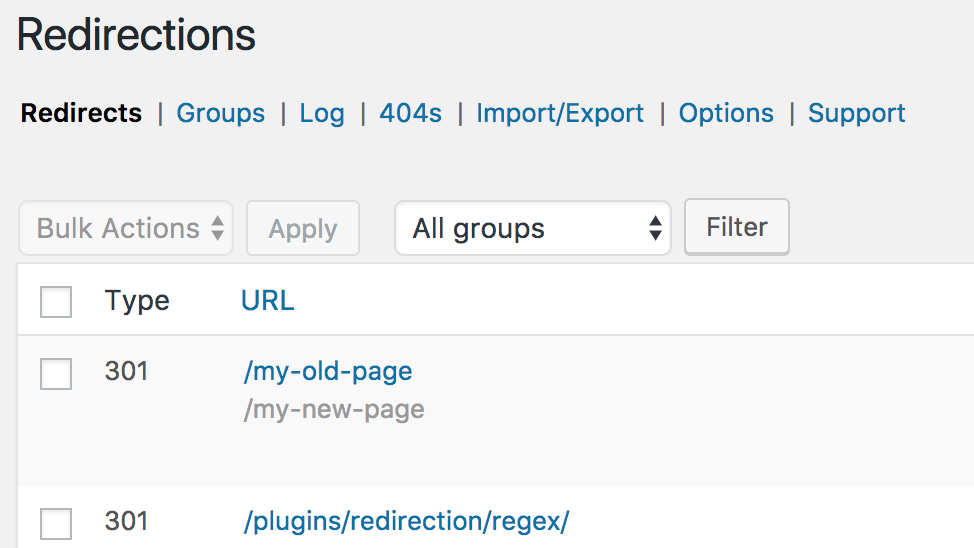
After setup, Redirection lives under Tools > Redirection in the WP admin sidebar. The main interface opens on the redirects table, which shows all active redirect rules with columns for source URL, target URL, redirect type, group, and hit count.
The UI is functional rather than modern. It looks like a standard WordPress list table from circa 2015. Everything works, but nothing is polished. Users who have come from Rank Math’s redirect module or from premium tools like WP Engine’s built-in redirect manager will notice the difference immediately. That said, the layout is logical and navigable once you know where the tabs are.
Creating and managing redirects
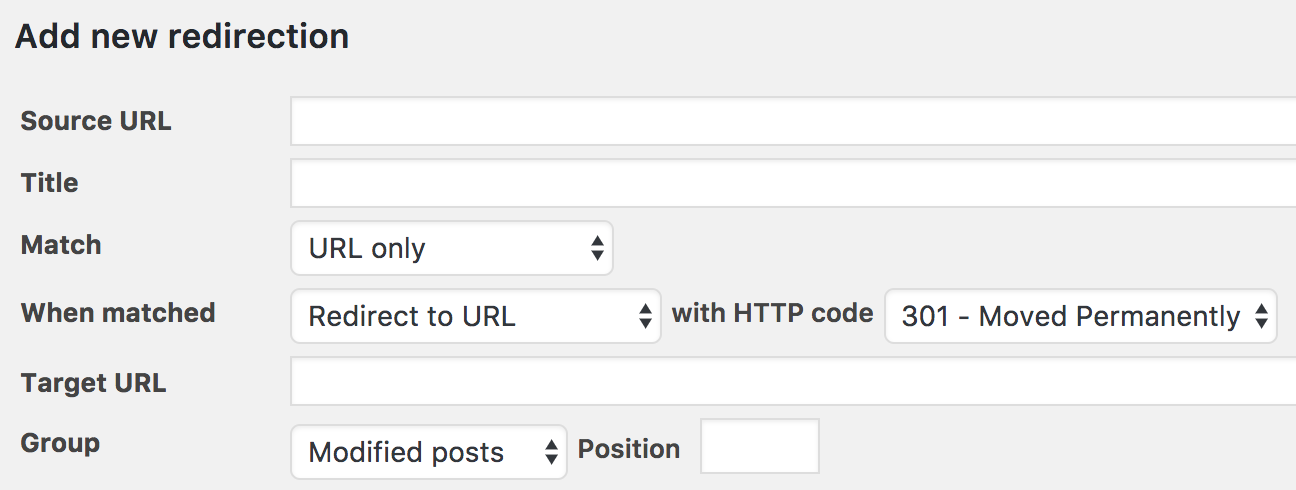
Adding a redirect takes three fields: source URL, target URL, and redirect type. The type dropdown includes 301 (permanent), 302 (temporary), 307 (temporary, same method), 308 (permanent, same method), 303, 304, 307, 404, 410 (gone), 451 (unavailable for legal reasons), and a “Pass-through” option. Having 410 and 451 available without a paid plan is a genuine advantage over some competitors.
The source URL field accepts exact matches or regex patterns. You can also set case sensitivity and trailing slash matching behavior per rule.
Automatic redirects on permalink change
One of the most useful features for everyday WordPress use is automatic redirect creation. When you change the slug of a published post or page, Redirection catches the old URL and creates a redirect to the new one automatically. This is handled in the background as soon as you update the post.
I verified this behavior during testing: changing a post slug from /old-url to /new-url immediately created a 301 from /old-url to /new-url in the Redirection table, with zero manual steps. For content-heavy sites where slugs evolve over time, this feature alone justifies installing the plugin.
Conditional redirects
Conditional redirects are where Redirection separates itself from lightweight alternatives. Standard redirect plugins fire on any request to the source URL. Redirection can fire a redirect only when specific conditions are met.
Available match conditions include:
- Login status (logged in / logged out)
- User role (specific WordPress role)
- Referrer URL (redirect users arriving from a specific site)
- Browser / user agent (redirect mobile users or specific bots)
- IP address (redirect specific IPs or ranges)
- Cookie value
- Language (HTTP Accept-Language header)
- Server (match based on server environment variables)
Multiple conditions can be combined on a single redirect. A rule can fire only when the visitor is logged out AND arriving from a specific referrer. That level of granularity is unusual in a free plugin.
A practical example: you can redirect logged-out visitors from /members-area to /login-page, while logged-in users get through to the real content. No custom code needed.
Regular expressions and pattern matching
Enabling the regex toggle on any redirect lets you use pattern matching instead of exact URL comparison. This makes it possible to redirect an entire section of old URLs with a single rule.
A common example: if your site used date-based permalinks (/2023/04/post-title/) and you moved to clean slugs (/post-title/), a single regex rule can catch all the old date-prefixed URLs and redirect them to the correct target using capture groups.
The syntax uses standard PCRE patterns. Capture groups work with $1, $2 in the target URL field, so the matched portion of the source URL can be reused in the destination. For example:
- Source:
/blog/(.+) - Target:
/news/$1
This redirects /blog/my-first-post to /news/my-first-post and handles the entire blog section in one rule.
For anyone building regex patterns from scratch, the plugin’s documentation points to regex101.com as a testing tool. I found this practical: write the pattern there, verify it against sample URLs, then paste it into Redirection. The plugin itself does not offer inline regex testing, which would be a useful addition.
404 monitoring and logging
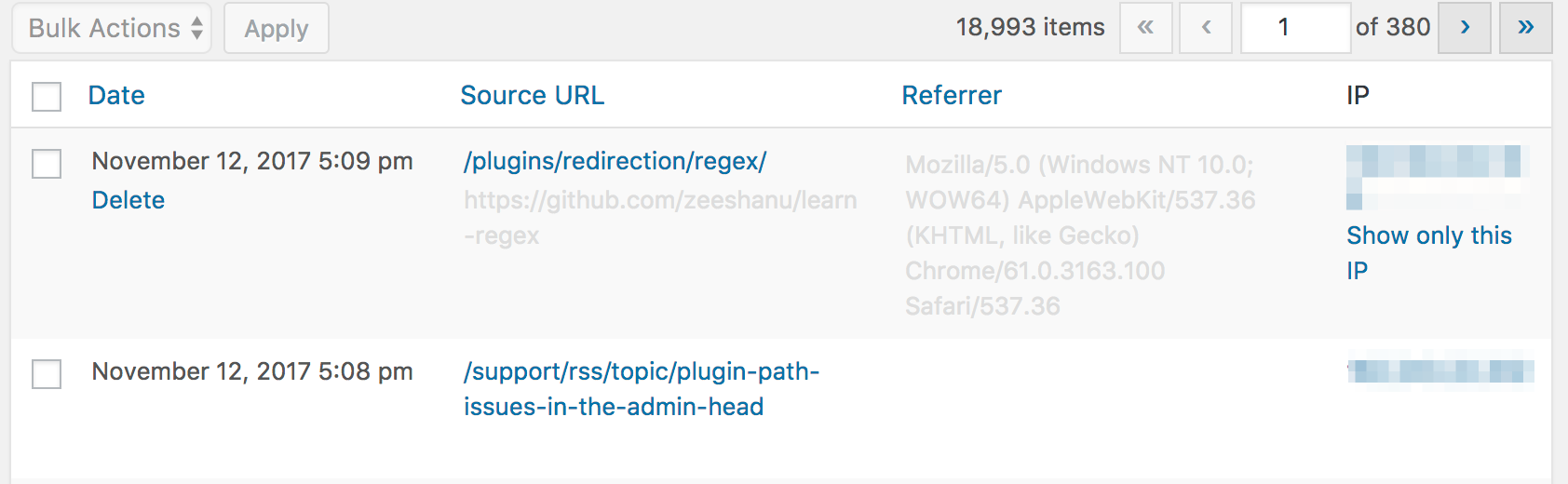
The 404 monitor is one of the most practically valuable parts of Redirection. Every time a visitor hits a page that does not exist on your site, Redirection logs it.
Each log entry captures:
- The 404 URL
- Timestamp
- Visitor IP address
- HTTP referrer
- Browser user agent
- HTTP method
Clicking an IP address opens a geolocation lookup. This is useful for distinguishing genuine broken links from bot traffic generating noise in your log. You can filter the log by URL, IP, or user agent, which makes it manageable even on high-traffic sites.
When you spot a recurring 404 that should be redirected, there is a one-click option to create a redirect from the log entry. The source URL is pre-filled from the log; you just add the target and save.
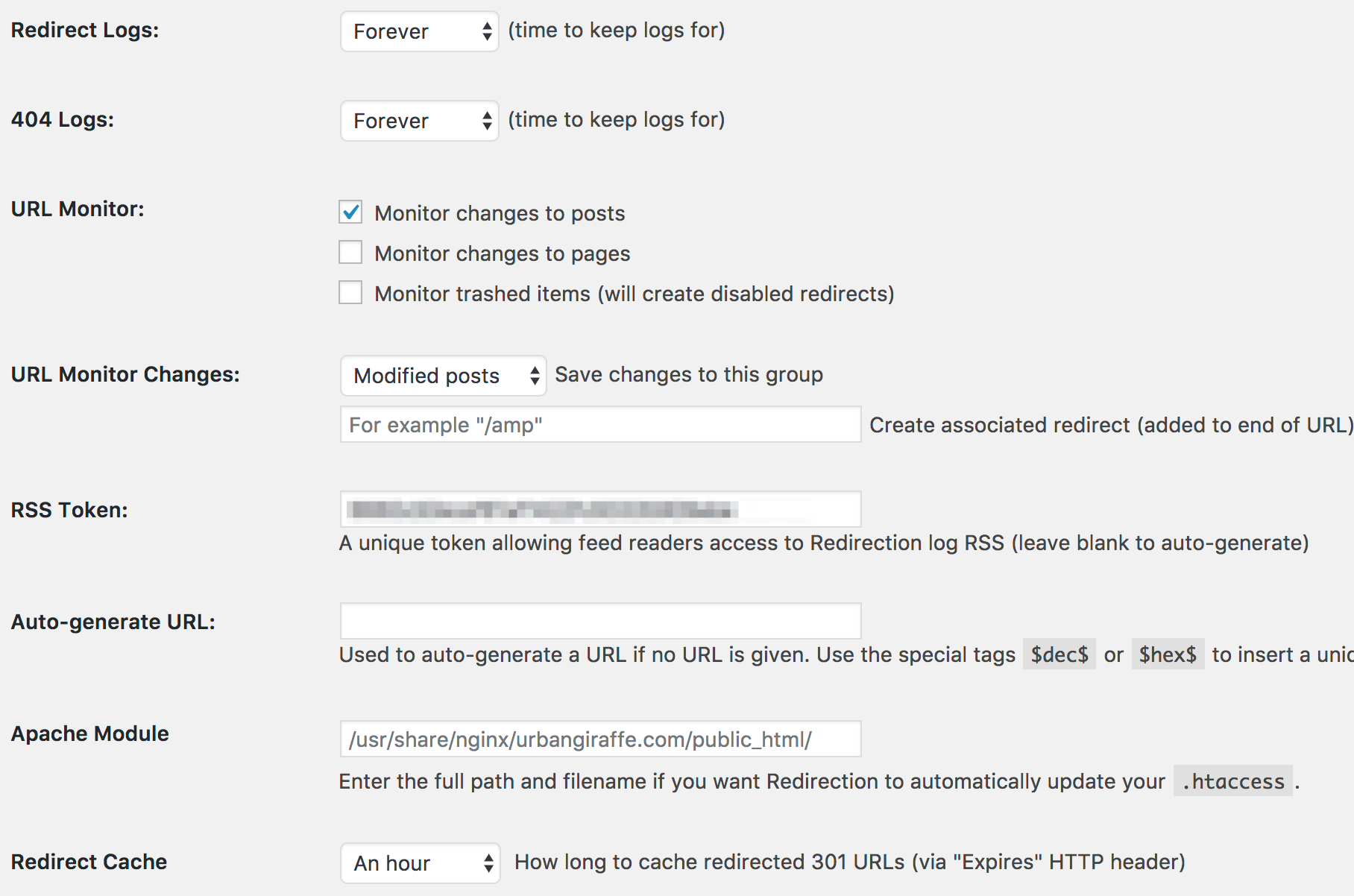
The redirect log (separate from the 404 log) records every time an active redirect fires, with the same data fields. Both logs support bulk deletion and can be cleared on a schedule via site settings. An RSS feed for the logs is available if you want to pipe them into an external monitoring tool.
Redirect groups
Redirects in Redirection are organized into groups. Groups do two things: they keep your redirect table organized, and they determine how the redirect is executed.
There are three group types:
- WordPress (default): Redirection handles the redirect via PHP, with full logging and hit tracking.
- Apache: When configured, Redirection writes the redirect directly into your .htaccess file. This means the redirect fires at the server level without loading WordPress, which is faster.
- Nginx: Same concept, but for Nginx server rewrites.
For most WordPress.com or shared hosting users, the WordPress group is the only option and it works fine. For self-managed VPS or dedicated hosting, setting up the Apache or Nginx groups can meaningfully improve performance for high-traffic redirect rules.
Import and export
The import/export panel received the most significant update in version 5.9.0 (July 2026). The improvements are genuinely useful.
Export options
- JSON: exports everything, including redirects, groups, logs, and plugin settings
- CSV: exports one data type at a time (redirects, logs, or groups)
- Apache .htaccess format
- Nginx rewrite rules
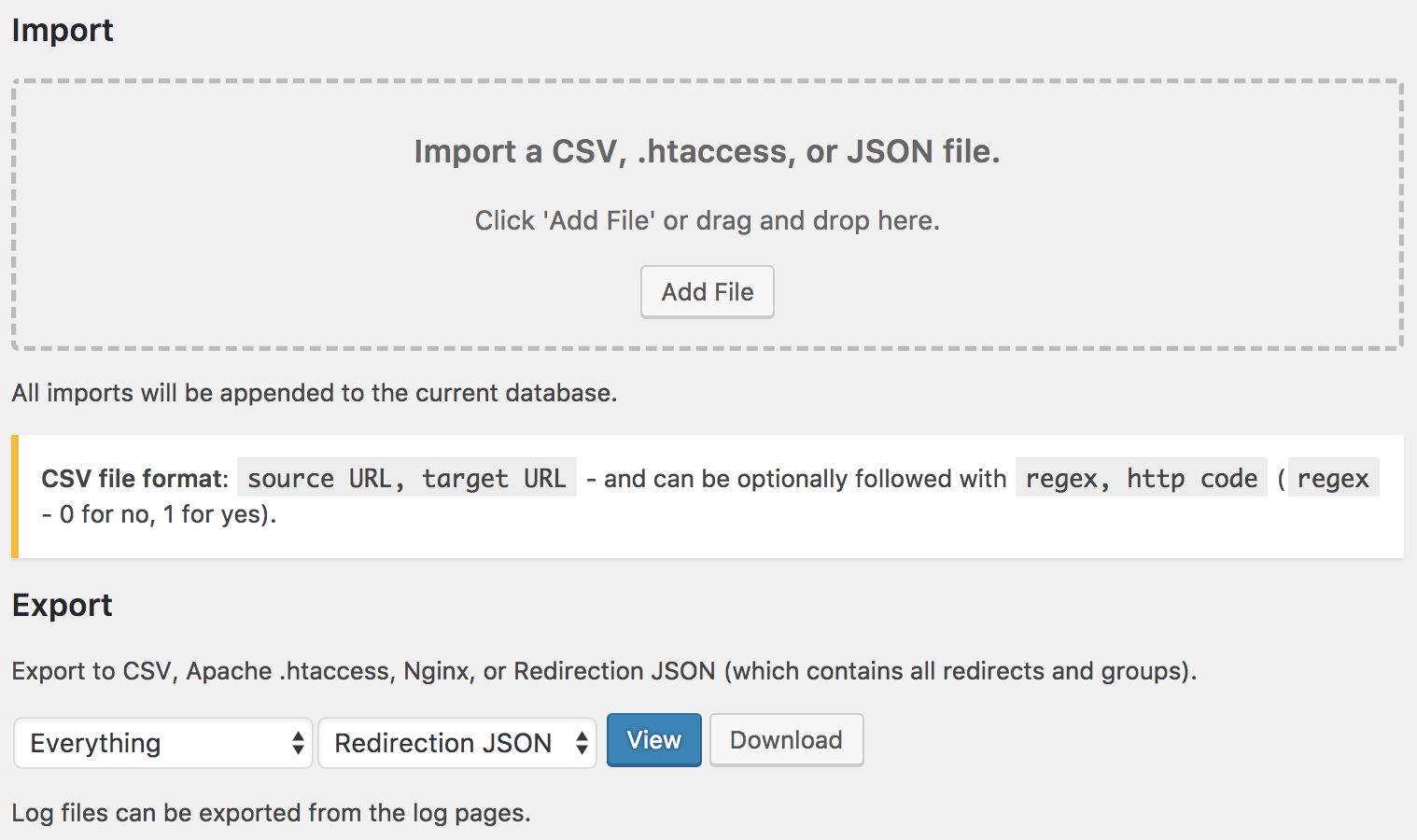
The JSON export is particularly useful for site migrations: you can export your entire Redirection configuration from the old site and import it to the new one in a single step.
Import options
- CSV (formatted to Redirection spec)
- JSON (any data type)
- Apache .htaccess files
- Text paste (new in 5.9.0): type or paste redirect pairs directly in a text box, one per line
The text-paste import is the standout addition in the latest version. Instead of formatting a CSV and uploading a file, you can paste a list with one redirect pair per line. The plugin shows a preview before committing, and you can configure the destination group and duplicate handling. For teams migrating a small batch of URLs after a content audit, this is considerably faster than any prior workflow.
Plugin migration: Redirection can import directly from Simple 301 Redirects, SEO Redirection, Safe Redirect Manager, Rank Math, SEOPress, and several others. If you are switching from one of these, the data migration takes a few clicks.
Site-wide options
Beyond individual redirect rules, Redirection includes site-wide URL management tools under the Site menu:
Force HTTPS. Automatically redirects all HTTP requests to HTTPS. Requires that your hosting already has a valid SSL certificate in place.
Canonical domain. Enforces either the www or non-www version of your domain site-wide, preventing the duplicate-content issue that can occur when both versions are accessible.
Site aliases. If you own multiple domains pointing to your server (e.g., after a rebrand), aliases redirect all traffic from the old domains to your primary domain automatically.
Relocate site. Moves your entire site to a new domain. Redirection creates rules that redirect every old URL to its equivalent at the new address.
HTTP headers. Allows adding custom HTTP headers to your site or individual redirects. Presets are available for common security headers (X-Content-Type-Options, X-Frame-Options, etc.) and CORS configurations. This is an advanced feature, but having it inside the redirect manager makes sense architecturally.
Permalink migration (beta). Helps when you change your WordPress permalink structure. Redirection automatically creates the redirect rules for the old structure. The plugin notes this as beta functionality with some limitations on complex migrations.
Performance considerations
The biggest practical limitation of WordPress-level redirect plugins is execution order. A WordPress redirect fires after WordPress bootstraps, the database is queried, and the plugin is loaded. Server-level redirects (via .htaccess or Nginx) fire before PHP is invoked, which makes them significantly faster.
For most sites, the difference is not perceptible. A 301 redirect adds one HTTP round trip, and the WordPress overhead is measured in milliseconds. But for high-traffic sites where a large number of URLs are redirected constantly, server-level rules are more efficient.
Redirection addresses this with the Apache and Nginx group types. Setting these up requires access to your web server configuration, which puts it outside the scope of purely WordPress-based management. But the option exists, which is more than most free redirect plugins offer.
Pricing
Redirection is completely free. There is no pro version, no license tier, and no feature paywalled behind a subscription. The developer accepts donations but does not sell upgrades.
This is worth emphasizing: features like conditional redirects, regex matching, 404 monitoring, HTTP headers, and the site options panel are all available at zero cost. Plugins that compete with Redirection often charge for comparable functionality.
The only real cost is support. Community support is available through the WordPress.org forum, but priority or direct developer support is not offered as a paid option.
Pros and cons
Pros
- Completely free, no premium tier
- 2 million-plus active installs and 10-plus years of development history
- Conditional redirects (login status, referrer, browser, IP, cookie, language) without any cost
- Automatic redirect on permalink change saves SEO equity with zero manual work
- Comprehensive 404 monitoring with one-click redirect creation from log entries
- Apache and Nginx group types allow server-level redirect execution
- v5.9.0 text-paste import is a genuine time saver for batch migrations
- Full JSON export of redirects, groups, logs, and settings
- Plugin migration support from Safe Redirect Manager, Rank Math, SEOPress, and others
- WP-CLI integration for automation and scripted deployments
- Actively maintained (four releases in 2026 alone, tested up to WordPress 7.0.4)
Cons
- UI is functional but dated; no modern redesign since the React-based overhaul a few years ago
- 404 log does not specify automatic retention period in documentation; log management is manual unless configured
- Apache/Nginx group setup requires server access and some technical knowledge
- No priority or paid support option
- Regex support requires external testing tools (no built-in pattern tester)
- One May 2026 user review reported intermittent issues with adding and removing redirects (isolated report, not reproduced in testing)
Alternatives
Rank Math (free and Pro)
Rank Math includes a redirect module in its free tier, with 301, 302, 307, 410, and 451 support plus a 404 monitor. For users already running Rank Math for SEO, the redirect module is a convenient way to keep everything in one plugin. However, Rank Math’s redirect feature is less feature-rich than Redirection’s full toolkit, and advanced redirect features require the Pro plan.
Choose Rank Math redirects if: You already use Rank Math and want to consolidate plugins.
Choose Redirection if: You want the most capable free redirect manager with full conditional logic and logging.
Safe Redirect Manager
Safe Redirect Manager is a lightweight, developer-focused plugin that keeps redirects simple: source URL, target URL, redirect code. No 404 monitoring, no conditional logic, no logging. It stores redirects as custom post types, which some developers prefer for version control compatibility.
Choose Safe Redirect Manager if: You need basic 301/302 redirects and nothing else, and you prefer a minimal footprint.
Simple 301 Redirects
A bare-bones option with a plain table of old URL to new URL mappings. No logging, no conditions, no import/export. Good for sites with fewer than a dozen static redirects.
Choose Simple 301 Redirects if: You have a handful of permanent redirects and want zero configuration overhead.
Yoast SEO Premium
Yoast SEO Premium includes a redirect manager integrated with the SEO plugin. The UI is polished and the workflow for catching 404s and creating redirects is well-designed. The catch is that it requires the Yoast SEO Premium subscription.
Choose Yoast SEO Premium redirects if: You are already paying for Yoast Premium and prefer an integrated UX over installing a separate plugin.
Final verdict
Redirection earns its position as the most-installed free redirect plugin for WordPress. In 2026, with 2 million-plus active installs, a July release adding meaningful import/export improvements, and full compatibility with WordPress 7.0.4, it is clearly an actively maintained plugin rather than a forgotten one.
The feature set is hard to beat at zero cost: conditional redirects, automatic permalink change handling, regex pattern matching, comprehensive 404 logging, Apache/Nginx server-level execution, and a full import/export pipeline. For the vast majority of WordPress sites that need serious redirect management, there is no reason to pay for a premium alternative.
The trade-offs are real but manageable. The UI could use modernization, log retention requires manual attention, and server-level Apache/Nginx groups take some setup effort. None of these are blockers.
If you manage redirects on WordPress and you are not already running Redirection, install it. The download is free, the setup takes under five minutes, and you get a redirect manager that covers nearly every scenario a site owner will encounter.