


MasterStudy LMS sits in a crowded market, but it has earned a specific reputation for two things most competitors handle less gracefully: a genuinely capable free version and built-in live class support without a separate add-on purchase. Ten thousand active installs on WordPress.org and a 4.5-star average across 450-plus reviews suggest those claims hold up in practice.
I tested MasterStudy LMS across the free plugin, the documentation, the pricing structure, and the Pro feature set. This review covers what the free version actually gives you, what the Pro upgrade unlocks, where the plugin competes well, and where it falls short.
Note on basis: this review draws on the MasterStudy LMS WordPress.org plugin listing (version 3.7.43), official StylemixThemes documentation and pricing pages, the full addons list, and published third-party evaluations. I tested core setup flows directly from the free plugin. Pro-only features (Zoom integration, AI Lab, subscriptions) are described from official documentation and vendor-published screenshots; where I could not verify a Pro feature hands-on, the text says so. Pricing is verified from stylemixthemes.com in August 2026.
At a glance
- Plugin: MasterStudy LMS, developer: StylemixThemes
- WordPress.org active installs: 10,000-plus
- Rating: 4.5 stars from 450-plus reviews on WordPress.org; 4.7 on ThemeForest (800-plus reviews); 4.75 on Capterra
- Free tier: unlimited courses and lessons, 8 quiz types, text and video lessons, PayPal and Stripe payments, course player with dark mode, certificate builder, basic analytics
- Pro plans: Single Site ($149/year), 10 Sites ($299/year), Unlimited ($599/year)
- Guarantee: 14-day money-back
- Differentiators: built-in Zoom and Google Meet integration (Pro), AI Lab for course generation, SCORM support, 20-plus prebuilt website templates, marketplace/multi-instructor mode
Quick verdict
MasterStudy LMS is the right choice if you want a free WordPress LMS that does real work before you spend a dollar, and if live Zoom or Google Meet classes are central to your teaching model. The free version handles unlimited courses, a genuine quiz engine with eight question types, PayPal and Stripe payments, and a clean frontend course player. Most competitors in this category either cap free features aggressively or require WooCommerce before you can take a payment.
The Pro plans unlock the features that define MasterStudy’s distance from the pack: Zoom and Google Meet integration, AI-generated courses, subscriptions and memberships, SCORM, a full gradebook, drip content, and a marketplace mode for multi-instructor platforms. At $149/year for a single site, the upgrade is reasonably priced by WordPress LMS standards.
Where MasterStudy is not the strongest fit: teams that need the deepest quiz engine in the market (LearnDash’s sorting and matrix question types are not matched here), organizations that require a long-established vendor with an enterprise support track record, or individuals who want a fully hosted SaaS platform and prefer not to manage WordPress.
Best for: Individual instructors and coaches who want live class integration out of the box; course creators who want a capable free starting point; organizations building Udemy-style multi-instructor marketplaces; educators who need SCORM compatibility; multilingual schools (21 language support, RTL-ready).
Best plan for solo creators: Free version to validate; Single Site Pro ($149/year) for AI Lab, drip content, subscriptions, and Zoom.
Best plan for agencies and marketplaces: 10 Sites ($299/year) or Unlimited ($599/year).
Standout: Zoom and Google Meet live classes built in (Pro), 8 quiz types in the free version, SCORM support, 20-plus prebuilt templates.
Watch out for: The learning curve on marketplace configuration; AI Lab requires your own API keys for AI models (OpenAI, Gemini, Claude, Grok, or Mistral); course player design depends on your active WordPress theme.
What MasterStudy LMS is
MasterStudy LMS is a WordPress plugin built by StylemixThemes, a commercial WordPress theme and plugin shop active since 2012. You install it like any other plugin, build courses from the WordPress admin or the frontend builder, and sell access directly on your site using built-in PayPal and Stripe (free) or WooCommerce with 75-plus payment gateways (Pro).
The plugin is genuinely two products in one. The free version on WordPress.org is a working LMS, not a lead-capture stub. The Pro version, sold at stylemixthemes.com, adds a substantial addons layer that extends it into live classes, AI content generation, marketplace operation, and advanced monetization.
Unlike LearnDash and Tutor LMS, MasterStudy does not have a complex organizational history or ownership change to explain. StylemixThemes has developed the plugin continuously since its initial release. The plugin receives regular updates, currently testing up to WordPress 7.0.4, with recent releases adding AI model integrations (including Claude and Gemini alongside OpenAI), active session limits, and responsive dashboard improvements.
MasterStudy is self-hosted. Your course content, student records, certificates, and revenue data live in your own WordPress database on your own hosting account. There is no vendor cloud dependency, no per-student fee, and no lock-in beyond the WordPress ecosystem itself.
Who MasterStudy LMS is best for
Strong fit:
- Instructors and coaches whose model mixes self-paced recorded courses with live Zoom or Google Meet sessions. Built-in live class scheduling is one of the plugin’s clearest advantages over WordPress LMS alternatives that handle this through third-party workarounds.
- Individual course creators who want to start on the free version and upgrade when revenue justifies the cost. The free tier handles real sales transactions and unlimited course content.
- Operators building Udemy-style marketplace platforms where multiple independent instructors publish and sell their own courses. MasterStudy’s Pro marketplace mode includes instructor commissions, payouts, and front-end course creation without requiring instructors to have WordPress admin access.
- Educational institutions that need SCORM compatibility for existing e-learning content.
- Teams with multilingual audiences. MasterStudy supports 21 languages and is RTL-ready, with WPML and Loco Translate integration for localized course sites.
- Developers who need design flexibility. The 20-plus prebuilt website templates, 40-plus Gutenberg blocks, and compatibility with Elementor, Divi, and WP Bakery make it easy to build a custom look without starting from scratch.
Weak fit:
- Enterprise L&D teams that need an established vendor relationship and enterprise SLA support. LearnDash and LifterLMS have longer enterprise track records and more documented institutional use cases.
- Teams that need the most comprehensive quiz engine in the category. MasterStudy’s eight question types are a solid set, but LearnDash’s essay grading and matrix sorting go further for structured assessment.
- Course creators who are uncomfortable managing WordPress hosting, security, and updates. A SaaS platform like Teachable or Thinkific removes that operational overhead entirely.
- Buyers who want a native mobile app included in the base price. MasterStudy does not include a mobile app in any plan.
Setup and user experience
Installing MasterStudy LMS is straightforward. You find the plugin on WordPress.org (search “MasterStudy LMS”) or download it from the vendor site, install it through the WordPress Plugins screen, and activate with one click. On first activation, a setup wizard walks through the basics: confirm core pages (course catalog, student dashboard, checkout), choose your business type, and configure the course player appearance.
The admin interface adds an “MS LMS” section to the WordPress sidebar with sub-menus for Courses, Students, Instructors, Reports, and Settings. The layout is organized and not overwhelming for first-time LMS users, which is a meaningful usability difference from older plugins like LearnDash where the post-type-heavy structure assumes WordPress familiarity.
Course creation starts from MS LMS > Courses > Add New. The course builder uses a drag-and-drop interface to organize curriculum into sections, lessons, and quizzes. Each lesson item can be set to a specific content type (text, video, quiz) and sequencing rules can be applied without leaving the builder view. The builder also shows a preview toggle for the frontend course player, which I found useful for checking how the student experience looks without publishing.
The front-end course builder is an option for instructor-led platforms where you do not want instructors accessing the WordPress admin. Instructors can build and manage their courses from their profile page on the public site, which is especially useful for marketplace configurations.
The course player includes a dark mode option that students can toggle themselves. The interface is clean and the lesson navigation is well-organized with a sidebar that shows curriculum progress. This is one of the stronger frontend student experiences in the WordPress LMS category.
Core features
Course builder
The course builder is drag-and-drop and does not require coding. Curriculum is organized into sections, with lessons and quizzes inside each section. Each lesson supports text, video (YouTube, Vimeo, self-hosted MP4, external links, embedded players, shortcodes, or Presto Player), and multiple content blocks within the lesson itself.
The builder supports H5P integration, which adds interactive content types (flashcards, interactive video, branching scenarios) beyond what a standard video or text lesson provides.
Content reuse is limited in the base configuration. Unlike LearnDash, MasterStudy does not natively support assigning a single lesson to multiple courses without duplication. This matters if you manage a large content library where the same module appears across several programs.
The Pro version adds drip content (schedule lesson release by date or enrollment-based delay), prerequisites (lock lessons until prior content is complete), and sequential course progress (students must complete each item before advancing). These are standard LMS flow-control features that most other WordPress plugins include in their paid tiers, and MasterStudy follows the same pattern here.
Quiz engine
MasterStudy includes eight question types in the free version. This is one of the more generous free-tier quiz engines in the WordPress LMS category.
The eight types are:
- Single choice: one correct answer from multiple options
- Multi choice: multiple correct answers
- True or false
- Item match: match items from two columns
- Image match: match images to labels or pairs
- Image choice: select the correct image answer
- Keywords: short text entry with keyword matching
- Fill in the gap: fill blank fields within a sentence
The image-based types (image match and image choice) are useful for visual subjects like design, anatomy, or language learning where text-only options fall short. Having these in the free version, rather than locked to paid tiers, is a genuine competitive advantage over LifterLMS and similar plugins.
What MasterStudy’s quiz engine does not support: essay questions with manual instructor grading (LearnDash has this), sorting/reorder types, and matrix sorting. If you need manual-graded essays or long-form written assessments, LearnDash or Tutor LMS Pro’s advanced question types are a better fit.
Quiz configuration includes time limits, passing score thresholds, randomized question order, question count per attempt, and retry limits. The gradebook (Pro) collects quiz scores and completion data across the site for instructor review.
The Pro version adds the Question Media addon, which lets you attach videos, audio files, and images directly to individual quiz questions rather than only to answer options.
Lesson types and live classes
The free version covers text and video lessons, including the full range of video source options: YouTube, Vimeo, self-hosted MP4, external links, embedded players, shortcodes, and Presto Player integration.
The Pro version adds:
- Audio lessons (upload audio files or stream from Spotify and SoundCloud)
- PDF lessons (attach PDF files as readable lesson material)
- Zoom conference integration (schedule and host Zoom webinars and meetings within the plugin)
- Google Meet integration (schedule and run live classes)
- Live streaming via YouTube (scheduled broadcast lessons)
The Zoom and Google Meet integration is the most significant of these for educators who blend live and asynchronous content. Instructors schedule live sessions from the course curriculum view, students see the session on their dashboard, and the meeting link is surfaced within the course player at the scheduled time. No separate plugin is required.
This is a concrete differentiator from LearnDash, which does not include Zoom or Google Meet natively, and from LifterLMS, which handles live classes through third-party integrations. Tutor LMS Pro includes Zoom integration, but it is a paid add-on rather than a bundled feature on all Pro plans.
AI Lab
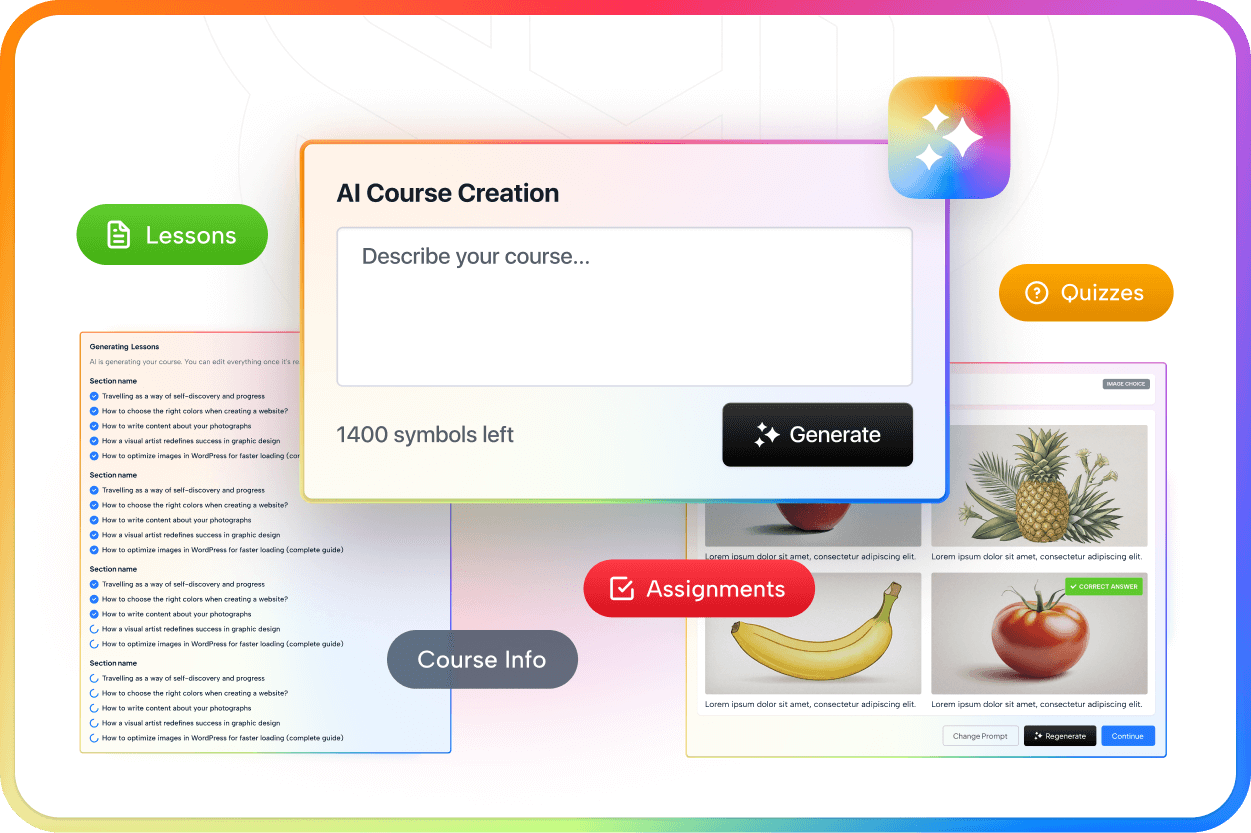
The AI Lab addon is included in all Pro plans and uses your own API key to connect to an AI model of your choice: OpenAI, Gemini, Claude, Grok, or Mistral. Once connected, you can generate a complete course from a text prompt, including lessons, quiz questions, assignments, and image suggestions.
The workflow is: enter a topic, level, and target audience, review the generated course outline, and adjust before committing to the content. Based on vendor-published examples, the output produces a working course structure including section headings, lesson text, and quiz questions that an instructor then edits.
The multi-model support is notable. MasterStudy is not locked to OpenAI, which means you can choose the AI model that fits your budget or preference. The most recent releases (as of version 3.7.43) include updated Claude and Gemini model integrations.
One important cost to plan for: you pay for AI model API usage separately. The AI Lab unlocks the interface and the workflow; the API calls to OpenAI or another provider cost additional money based on your usage. For high-volume course generation, the API costs add up. Size these costs before committing to a workflow built around AI-generated courses.
Certificates
A certificate builder is included in the free version. The builder uses a drag-and-drop template editor where you place text fields, logos, and dynamic variables (student name, course name, completion date, and score) on a background image. Certificates include QR codes for verification, which is a useful feature for students who want to share verifiable credentials.
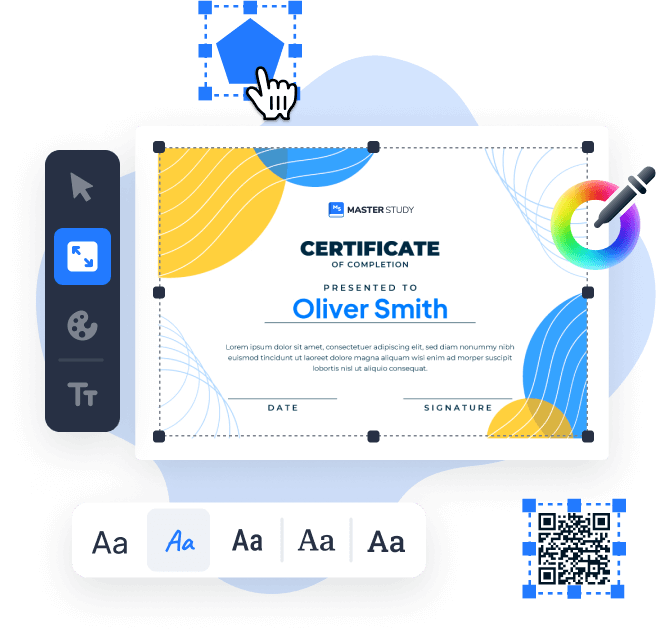
The Pro version adds advanced certificate options including additional variable types and branding customization. Custom certificate pages for specific courses can be configured with different templates.
Gamification and student engagement
The Points System addon (Pro) rewards students for completing lessons, passing quizzes, finishing courses, and posting reviews. Points display on student profiles and a leaderboard. This is a standard gamification mechanism that MasterStudy supports cleanly, though it does not include badge/achievement logic at the same depth as some dedicated gamification tools.
The free version includes a review and rating system (students rate courses after completion), lesson notes (students save personal notes within lessons), direct messaging between students and instructors, and course announcements from instructors.
Monetization and payments
The free version accepts payment via PayPal, Stripe, offline payment, and bank transfer. This is a more generous free payment setup than most WordPress LMS plugins offer. LifterLMS, for comparison, gates payment gateways almost entirely to paid add-ons.
The Pro version adds:
- Full WooCommerce integration (75-plus payment gateways including regional options)
- Subscription plans (recurring billing for ongoing course access)
- Memberships (grant access to content bundles by membership level)
- Course bundles (package multiple courses at a bundled price)
- Group courses (sell course access to teams with seat management)
- Coupon and discount codes
- Tax management by country or region
- Instructor commissions and payouts (for marketplace platforms)
- Trial courses (offer free access to a portion of a course before purchase)
The WooCommerce integration unlocks the broadest payment gateway coverage in the WordPress LMS category, which matters if you sell to audiences in countries where PayPal and Stripe coverage is limited.
Marketplace and multi-instructor support
MasterStudy’s Pro plans include everything needed to run a multi-instructor course marketplace. Instructors register on the public site, build courses from the front-end builder without admin access, and receive payouts based on commission rules you configure.
The Statistics and Payouts addon tracks per-instructor revenue, student enrollments by course, and pending payout amounts. Instructors can view their own analytics from their profile dashboard. This is a complete marketplace implementation that positions MasterStudy ahead of LearnDash’s Elite tier multi-instructor mode in accessibility (no site admin access required for instructors) if marketplace operation is the primary goal.
SCORM support
SCORM 1.2 and 2004 packages can be imported and published as lessons through the SCORM addon (Pro). This is a differentiator for corporate training, compliance programs, and academic institutions where existing e-learning content is packaged in SCORM format. LearnDash does not include SCORM natively. LifterLMS and Tutor LMS handle SCORM through third-party tools. MasterStudy builds it into the Pro addon stack directly.
Analytics and reporting
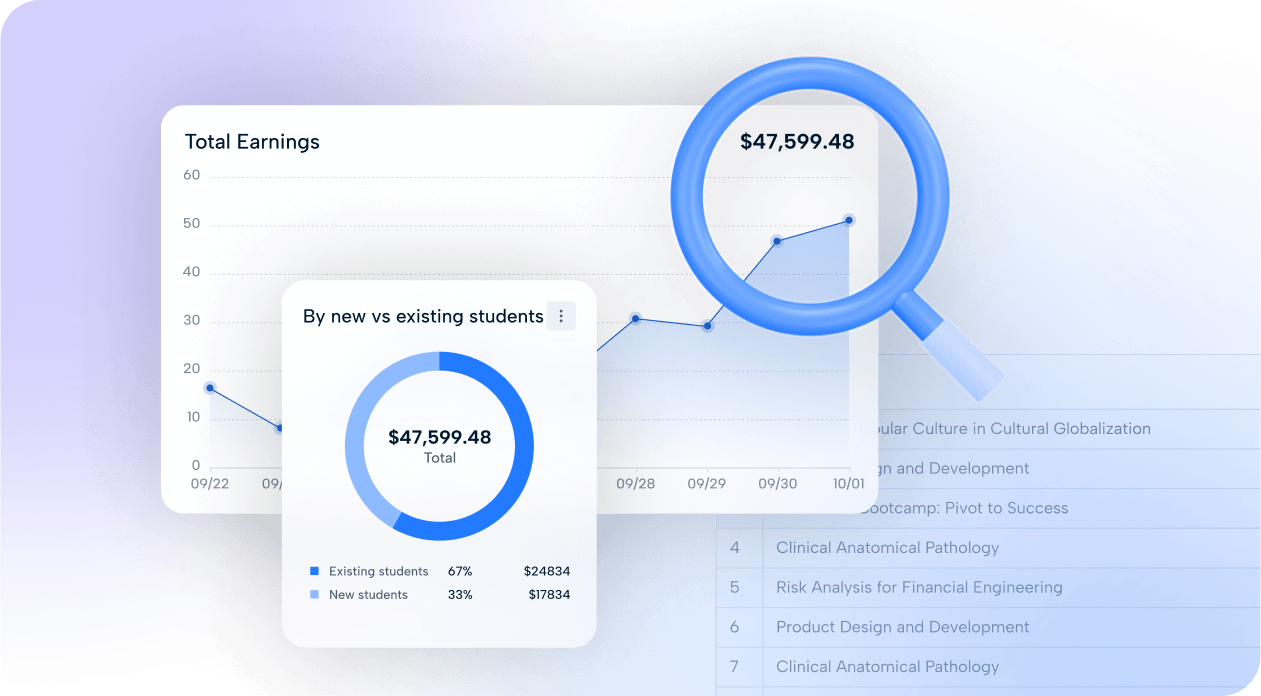
Basic student progress tracking is included in the free version: completion rates, quiz scores, last activity, and enrollment status are visible from the admin.
The Pro version adds advanced analytics with enrollment trends and revenue metrics, a gradebook (per-student grade history across all courses), instructor-level statistics (useful for marketplace platforms), and a payouts dashboard.
The analytics tools are functional for managing a course site up to moderate scale. They are not a substitute for dedicated learning analytics platforms, but for most independent instructors and small training organizations, the built-in reporting covers what you need.
Design and templates
MasterStudy includes a starter theme for quick setup, plus 20-plus prebuilt website designs covering a range of niches: coaching, coding, architecture, university, healthcare, fitness, and more. Importing a prebuilt template installs a complete site design with pre-configured pages, which is a faster starting point than most WordPress LMS plugins offer.
The plugin works with Elementor, Divi, WP Bakery, and Gutenberg (with 40-plus dedicated Gutenberg blocks). White-label capability lets you remove StylemixThemes branding from the student-facing site.
Pricing
MasterStudy LMS offers a free version on WordPress.org with a working feature set, and Pro plans with a 14-day money-back guarantee.
| Plan | Price | Sites covered | Key additions over free |
|---|---|---|---|
| Free (Starter) | $0 | 1 | Core LMS: course builder, 8 quiz types, text/video lessons, PayPal/Stripe, basic analytics, 1 prebuilt template |
| Single Site | $149/year | 1 | All 30-plus Pro addons: Zoom/Google Meet, AI Lab, subscriptions, drip content, WooCommerce, SCORM, gradebook, marketplace tools, 20 prebuilt templates |
| 10 Sites | $299/year | 10 | Same addons as Single Site |
| Unlimited | $599/year | Unlimited | Same addons, unlimited site licenses |
All paid plans include 1 year of updates and priority ticket support. Renewal at the same price is assumed but should be confirmed with StylemixThemes at purchase.
The value case for upgrading is clear. The Pro addons stack (Zoom, AI Lab, subscriptions, memberships, WooCommerce, SCORM, drip, prerequisites, gradebook, assignments, marketplace) would cost significantly more as separate plugin purchases from other vendors. At $149/year for a single site, the bundled Pro model is competitively priced compared to LearnDash ($259/year entry), Tutor LMS ($199/year), and LifterLMS bundles.
One cost to plan for: the AI Lab requires a separate API account and usage fees for the AI model you connect (OpenAI, Gemini, Claude, Grok, or Mistral). The AI Lab does not include API credits.
Prices above were verified on stylemixthemes.com in August 2026. Confirm current pricing on the official page before purchasing.
Pros and cons
Pros
- The free version accepts real PayPal and Stripe payments for course sales without a Pro upgrade, which is uncommon in this category.
- Eight quiz question types in the free version, including image match and image choice formats useful for visual subjects.
- Built-in Zoom and Google Meet integration (Pro) for live classes, with no separate plugin or third-party workaround required.
- AI Lab supports multiple AI models (OpenAI, Gemini, Claude, Grok, Mistral) and generates complete courses with lessons, quizzes, and assignments.
- SCORM 1.2 and 2004 support (Pro) for importing existing corporate e-learning content.
- Marketplace mode with instructor commissions, payouts, and front-end course creation lets you run a multi-instructor platform without requiring instructors to have admin access.
- 21 language support plus RTL-ready interface and WPML integration for properly localized multilingual course sites.
- 20-plus prebuilt site templates (Pro) and 40-plus Gutenberg blocks speed up design without a developer.
- WooCommerce integration (Pro) unlocks 75-plus payment gateways for global sales coverage.
- Gamification through the Points System addon, with student leaderboards and engagement rewards.
- QR-verified certificates from the free version.
- White-label mode removes plugin branding from student-facing pages.
- Actively developed: regular updates including WordPress 7.0.4 compatibility and modern AI integrations.
Cons
- No essay question type with manual instructor grading. Teams with written-assessment needs should look at LearnDash or Tutor LMS Pro.
- AI Lab requires your own API keys and API usage costs money separately. Budget for this before planning high-volume AI course generation.
- Content reuse across multiple courses is not as flexible as LearnDash. Lessons cannot be shared between courses without duplication.
- No native mobile app on any plan. Students access courses through the mobile browser, which works but is not a native app experience.
- The course player appearance depends on your active WordPress theme. On poorly configured themes, the player can look inconsistent.
- 10,000-plus active installs on WordPress.org is a modest footprint compared to Tutor LMS (100,000-plus) or LifterLMS (20,000-plus). Active community and forum support volume reflects this difference.
- Priority ticket support requires a paid plan. Free users rely on community forum support, which is more limited.
- Marketplace configuration has a steeper setup curve than single-instructor course sites.
Alternatives to MasterStudy LMS
Tutor LMS. A more widely installed WordPress LMS with a native eCommerce system in the free version and a significantly newer admin interface after the v4.0 redesign in July 2026. Tutor LMS has 100,000-plus active installs and a more active support community. Pro starts at $199/year and includes Zoom integration as a paid add-on. Choose Tutor LMS if you want a cleaner admin UI out of the box, a larger community, and a more polished frontend student experience. Choose MasterStudy LMS if you want Zoom included in the base Pro plan rather than as a separate add-on, or if marketplace commission and payout management is a priority.
LearnDash. The enterprise choice in the WordPress LMS category, with a more established institutional track record, a more sophisticated quiz engine (essays, matrix sorting, sorting), and ProPanel advanced reporting. Starts at $259/year (Essentials), with groups and cohorts requiring the $399/year Pro tier. No free version. Choose LearnDash if you need manual essay grading, the deepest quiz engine in the category, or a platform used by universities and large corporate training programs.
LifterLMS. The strongest free-and-open option. The LifterLMS core on WordPress.org includes course creation, quizzes, and certificates at no cost, but most practical payment and engagement features require paid add-ons, which add up quickly. Full-feature bundles start around $360/year. Choose LifterLMS if you want the largest free core feature set with no payment barriers to get started, or if built-in coaching tools and memberships tightly integrated with course access are priorities.
Teachable. A SaaS platform, not a WordPress plugin. No hosting, plugin management, or WordPress knowledge required. Starts at $348/year with transaction fees on lower tiers. Choose Teachable if you want zero technical overhead and accept trading data ownership and deep design control for speed and simplicity.
Thinkific. Another hosted SaaS platform with a limited free plan. Stronger built-in community features than Teachable. Choose it over MasterStudy if you are validating a course concept quickly without investing in WordPress infrastructure.
For WordPress LMS buyers choosing between MasterStudy, Tutor LMS, and LearnDash in 2026, the decision mostly comes down to three factors: whether you need live classes built in (MasterStudy and Tutor LMS Pro), whether you need the deepest quiz engine (LearnDash), and whether a free starting point matters (MasterStudy free and Tutor LMS free are both real options; LearnDash has none).
Final verdict
MasterStudy LMS is not the biggest name in WordPress LMS plugins, but it earns its place in any serious evaluation. The free version gives you more than most competitors do at that price point: real payment processing, eight quiz types, a working course player, and a certificate builder. For instructors who want to test whether a course site works before spending money, MasterStudy is one of the most honest free options in the category.
The Pro upgrade is where it distinguishes itself. Zoom and Google Meet live classes, built into the Pro plan at $149/year for a single site, give MasterStudy a clear advantage over LearnDash and LifterLMS for educators whose model depends on synchronous instruction. SCORM support gives it credibility for corporate training environments that other WordPress LMS plugins handle less cleanly. And the marketplace mode, with instructor commissions and payouts, makes it the most complete option for teams building Udemy-style platforms on WordPress.
The honest gaps are real: no essay grading, no native mobile app, a smaller community than Tutor LMS, and an AI Lab that charges separately for API usage. If any of those are hard requirements, other plugins fill them better.
For individual instructors who want Zoom, AI course generation, subscriptions, and SCORM all in one plan at a competitive price, MasterStudy LMS Pro at $149/year is a strong and well-rounded choice in 2026.
FAQ
Is MasterStudy LMS free?
Yes. A fully functional free version is available on the WordPress.org plugin directory. It includes unlimited courses and lessons, 8 quiz types, text and video lessons, PayPal and Stripe payments, a certificate builder, and basic analytics. The free version supports real course sales without requiring a Pro plan.
What does MasterStudy LMS Pro add?
The Pro upgrade unlocks 30-plus addons including Zoom and Google Meet live classes, AI Lab for automated course generation, full WooCommerce integration (75-plus payment gateways), subscriptions, memberships, course bundles, drip content, prerequisites, group courses, SCORM support, a gradebook, advanced assignments, instructor commissions and payouts (for marketplaces), the email manager, and 20-plus prebuilt site templates.
How much does MasterStudy LMS cost?
The free version costs nothing. Pro plans are: Single Site at $149/year, 10 Sites at $299/year, and Unlimited Sites at $599/year. All paid plans include 1 year of updates and priority ticket support, and a 14-day money-back guarantee. AI Lab usage requires a separate API account and incurs additional costs from your chosen AI model provider.
Does MasterStudy LMS support Zoom for live classes?
Yes, but only on Pro plans. The Zoom Conference addon is included in all paid MasterStudy LMS plans and lets instructors schedule and host Zoom meetings and webinars from within the course curriculum. Google Meet integration is also available as part of the Pro addon stack.
Does MasterStudy LMS support SCORM?
Yes. The SCORM addon (Pro) supports both SCORM 1.2 and SCORM 2004 packages. You can upload SCORM packages and publish them as lessons within your MasterStudy courses. This makes it practical for corporate training programs with existing SCORM content libraries.
Can I build a course marketplace with MasterStudy LMS?
Yes. The Pro version includes marketplace mode, which lets independent instructors register on your site, build their own courses from the front-end builder without WordPress admin access, and receive commission-based payouts. The Statistics and Payouts addon tracks per-instructor revenue and pending payout balances.
What quiz types does MasterStudy LMS support?
Eight question types, all available in the free version: single choice, multi choice, true or false, item match, image match, image choice, keywords (short text with keyword matching), and fill in the gap. The Pro Question Media addon lets you attach video, audio, and images to quiz questions.
How does MasterStudy LMS compare to LearnDash?
MasterStudy LMS has a functional free version; LearnDash has none (entry price $259/year). MasterStudy includes Zoom and Google Meet live classes in the Pro plan; LearnDash requires third-party solutions. LearnDash has a deeper quiz engine (essays, matrix sorting, sorting) and a stronger enterprise track record. For independent course creators who need live classes and a free starting point, MasterStudy is typically the more practical choice. For institutional training programs and organizations that need LearnDash’s advanced quiz types and reporting depth, LearnDash Pro is stronger.
Is MasterStudy LMS suitable for corporate training?
Reasonably yes, especially if your organization uses SCORM content or needs live Zoom sessions alongside self-paced courses. The gradebook, assignment submissions, drip content, prerequisites, and group course management cover corporate training patterns. LearnDash has a longer established track record with enterprise clients and more documented institutional use cases, which matters for large procurement decisions.
Does MasterStudy LMS have a mobile app?
No. There is no native iOS or Android app included in any MasterStudy LMS plan. Students access courses through their mobile browser, which works but is not a native app experience. If a dedicated mobile app is a hard requirement, consider Tutor LMS, which added a native mobile app experience in its v4.0 release.