

Running a job board on WordPress sits between two very different jobs. On one side it is a content site: listings, taxonomies, filters, SEO. On the other side it is a small SaaS: employer accounts, frontend submissions, applications, alerts, sometimes paid listings and resumes. The plugins below are the WordPress plugins that try to handle both sides without forcing you onto a hosted job board service.
For this roundup I focused on plugins built specifically around the job board use case: posting jobs, listing them on the site, accepting applications, and (where relevant) supporting employer profiles, paid listings, alerts, and resume/CV uploads. I cross-checked every plugin against its WordPress.org listing on 2026-06-04 for active installs, rating, last update, “tested up to” tag, and current free vs paid scope. I excluded generic directory plugins, generic listing plugins, and ATS tools that only embed a hosted widget on a WordPress page, because those are a different category from a real on-site job board.
Quick answer: WP Job Manager is the safest default WordPress job board plugin, with a deep first-party add-on ecosystem. WP Job Openings (HireZoot) is the strongest free pick for an in-house careers page with applications inside wp-admin. WP Job Portal is the most feature-loaded free option for a multi-employer board.
How I chose these WordPress job board plugins
I shortlisted plugins that solve at least one core job board job well, instead of bundling “jobs” as a small feature inside a much larger directory or membership product. The shortlist favors plugins with:
- A real job listings post type or custom listing flow, not just a generic listing template
- Frontend submission for employers or admins, where relevant
- A usable free version that can run a small careers page or a starter job board
- Clear behaviour for the four moving parts that matter most on a job board: applications, filters, alerts, and (where relevant) resumes or company profiles
- Active maintenance, recent updates, and a current “tested up to” tag
- Enough install and review volume to trust on a live site, or a clear standout reason if smaller
I kept the intent narrow on purpose. This is a job board roundup, not a directory, marketplace, or membership roundup. Plugins like Ultimate Member and GeoDirectory show up in WordPress.org searches for “job board” because of their generic listing capabilities, but they are not job-board-first products and are not ranked here.
Quick comparison table
| Plugin | Best for | Free version | Standout feature | Main limitation |
|---|---|---|---|---|
| WP Job Manager | The default WordPress job board | Yes | Mature core plus a deep add-on ecosystem (resumes, applications, alerts, paid listings) | Most useful features sit in paid add-ons |
| WP Job Openings (HireZoot) | A clean in-house careers page | Yes | Built-in application management inside wp-admin in the free tier | Single-site careers page focus, not a multi-employer marketplace |
| Simple Job Board | A small careers page on a brochure site | Yes | Drag-and-drop application form builder in the free tier | Light on employer accounts and filters; Pro for advanced features |
| JobBoardWP | A free frontend-submission job board | Yes | Frontend job submission and frontend dashboard in the free tier | Smaller install base, fewer integrations than the giants |
| WP Job Portal | A full-featured multi-employer job board | Yes | Employers, candidates, resumes, packages, paid listings all included | The “complete” feature surface comes with a steeper learning curve |
| easy.jobs | An ATS plus careers page hybrid | Yes (with account) | SaaS-style hiring pipeline connected to a WordPress careers page | Core hiring features live in the easy.jobs account, not only in WP |
| JobWP | A modern, lightweight job board | Yes | Frontend submission, employer dashboard, and Stripe-ready paid listings | Newer plugin, smaller install footprint |
| HivePress + Jobs extension | A marketplace-style job board | Yes | Two-sided marketplace UX with vendor accounts and listing packages | Requires the Jobs extension on top of HivePress core |
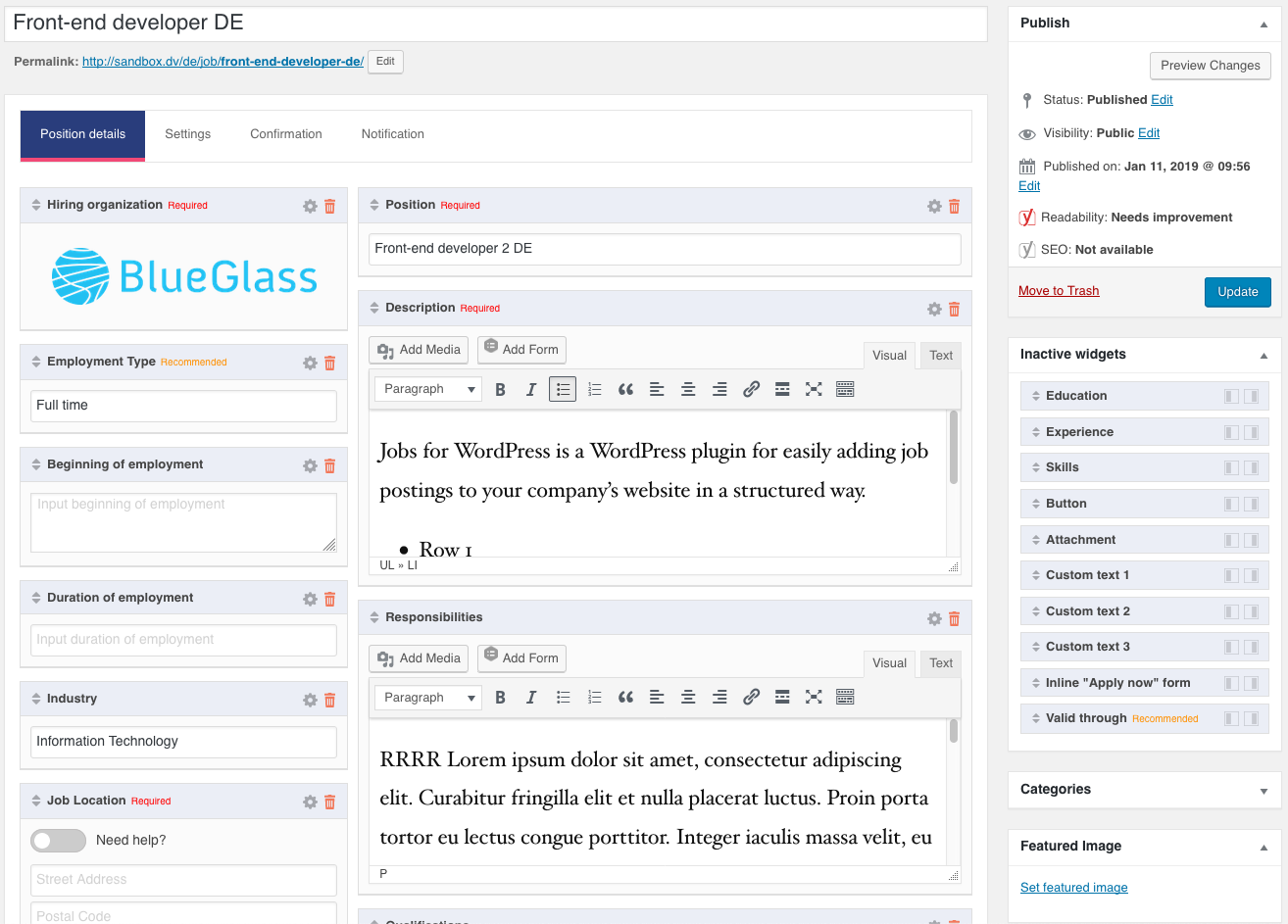
| Job Postings (BlueGlass) | Lightweight job listings with Google for Jobs schema | Yes | Built-in JobPosting structured data for Google for Jobs eligibility | No frontend submission or employer accounts |
| ApplyOnline | The applications layer on top of any job listing setup | Yes | Per-listing application forms, candidate management, status workflow | Application management plugin, not a full job board |
1. WP Job Manager: best WordPress job board plugin overall
WP Job Manager, maintained by Automattic, is the plugin most existing WordPress job boards already run on. The free core gives you a job listings custom post type, frontend job submission with a shortcode form, a [jobs] listings page with filters, location-aware permalinks, expiry handling, and a clean per-listing template. The add-on ecosystem on wpjobmanager.com then layers on resumes, applications, alerts, paid listings, WC Paid Listings, and bookmarks.
Verdict: The default WordPress job board plugin and the safest first install. The free core ships a usable job listings post type, frontend submission, and a listings page with filters; the deep first-party add-on ecosystem from Automattic then layers on applications, resumes, alerts, and paid listings as you grow. Budget for add-ons if you want the full stack.
Best for: WordPress site owners building a real job board, agencies launching a careers cluster for a client, and teams that want a free open-source core with the option to grow into paid listings, resumes, and applications later through first-party add-ons.
Key features:
- Job listings custom post type with categories, types, and locations
- Frontend job submission form with employer fields
- Listings page with keyword and location filters and AJAX pagination
- Listing expiry, preview, and edit flow
- Add-ons for applications, resumes, job alerts, bookmarks, paid listings, WC Paid Listings, and Stripe payments
- Developer-friendly hooks and templates for theme overrides
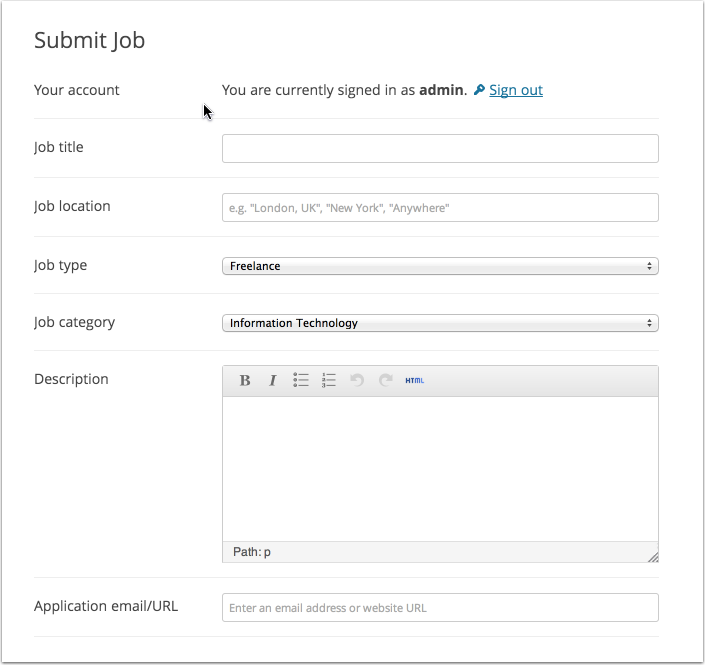
Setup and feature notes: WP Job Manager keeps its admin surface small and predictable. The Jobs menu adds a custom post type with the same WordPress write screen most editors already know, so onboarding for a non-technical admin is short. The frontend submission shortcode ([submit_job_form]) walks an employer through company, job type, location, description, and category, and the listings page shortcode ([jobs]) gives you keyword, location, category, and type filters out of the box. The real depth shows up once you turn on the Applications and Resume Manager add-ons, which is also where the cost starts to add up if you need the full stack.
Pricing / free-plan note: WP Job Manager core is free on WordPress.org. Paid add-ons (Applications, Resume Manager, Job Alerts, Bookmarks, Paid Listings, WC Paid Listings, and several others) are sold on wpjobmanager.com on individual licences or bundles. Theme integration is available through compatible job board themes.
Pros
- Most established WordPress job board plugin, with a deep theme and add-on ecosystem
- Free core is genuinely usable as a starter job board
- Clean custom post type and template hierarchy that themes can override
- Mature frontend submission flow with preview and edit
- Active maintenance by Automattic with a current “tested up to” tag
Cons
- Applications, resumes, alerts, and paid listings each cost extra
- The free admin is intentionally minimal; some buyers expect more in the box
- Theme integration quality varies; a job board theme tuned for WP Job Manager often outperforms a generic theme
2. WP Job Openings (HireZoot): best WordPress job board plugin for a careers page
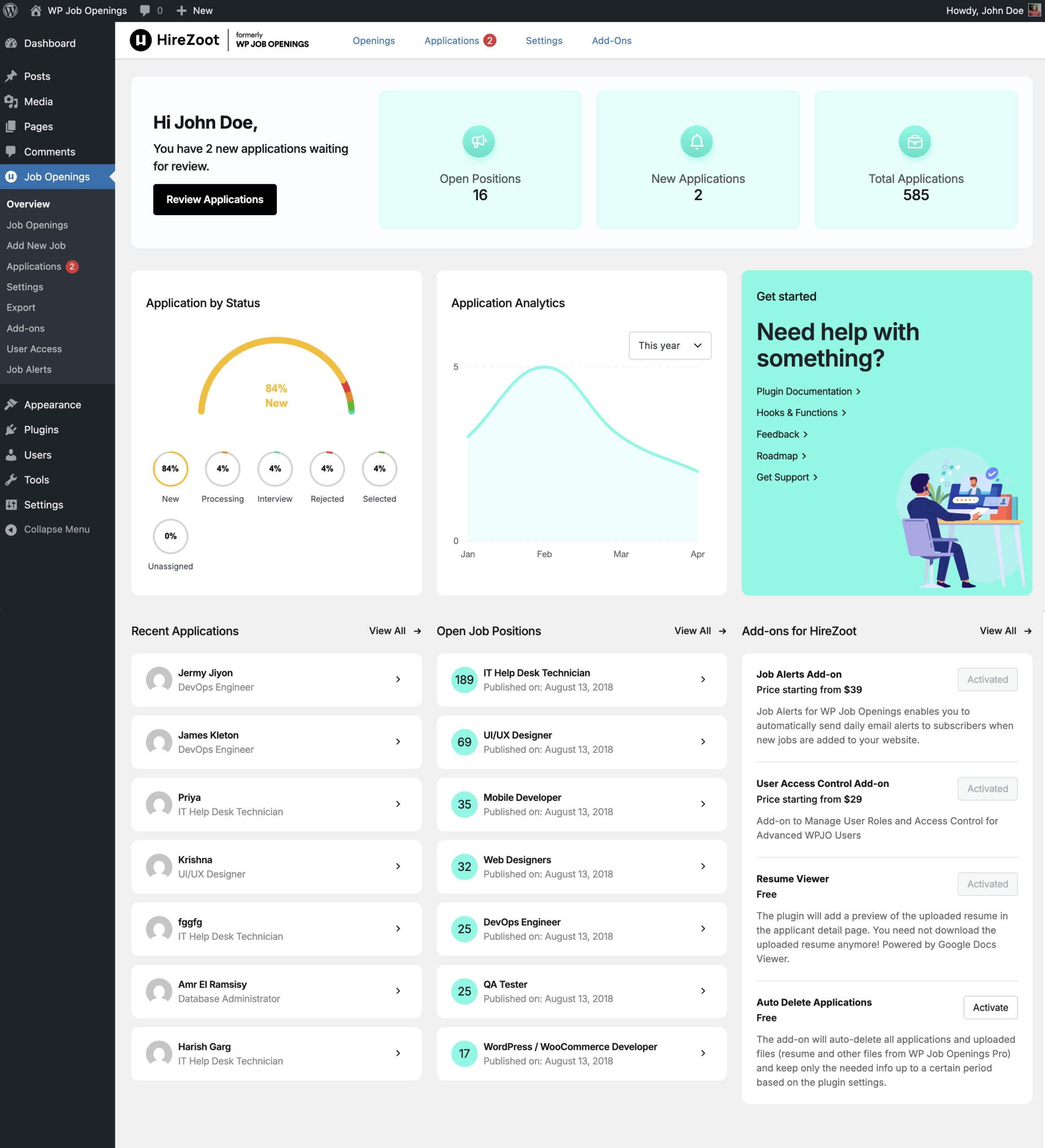
WP Job Openings (HireZoot), maintained by awsm.in under the HireZoot brand, is the cleanest free plugin for a company careers page rather than a third-party-employer job board. The free tier covers job listings, a customisable careers page layout, a built-in applications module inside wp-admin, applicant filtering, and email notifications. For an in-house “We are hiring” page that needs to feel polished without paying for an ATS, this is the strongest free option.
Verdict: The strongest free pick for an in-house careers page. The free tier covers job listings, a polished careers page layout, and an applications inbox inside wp-admin with a New > Reviewed > Shortlisted > Selected > Rejected status workflow. Built for one company’s careers page, not a multi-employer marketplace.
Best for: companies, agencies, and SaaS sites that want a real careers page on their existing WordPress site, with applications collected inside wp-admin rather than going to a third-party ATS.
Key features:
- Job listings custom post type with department, location, and job type taxonomies
- Customisable listings page layout (grid or list) with category and location filters
- Built-in applications module: applicant records, resume attachments, notes, status changes
- Email notifications to applicants and HR
- Spam protection (honeypot and reCAPTCHA)
- Pro add-ons for advanced custom fields, multi-step application forms, multilingual support, indeed.com export, and team collaboration
Setup and feature notes: The plugin’s “Job Openings” menu is the centre of gravity. Each job listing has the usual title and description plus role-specific fields and a list of inline filters. The Applications screen reads like a small inbox: applicant row, filter by status (New, Reviewed, Shortlisted, Selected, Rejected), open the applicant card to see the cover letter and resume, change status, and the candidate gets the right email. The plugin’s careers page shortcode ([awsmjobs]) renders a tidy listings layout that does not need a job board theme to look credible.
Pricing / free-plan note: WP Job Openings is free on WordPress.org with applications, basic filters, and email notifications included. The Pro tiers (Single Site, 3 Sites, 10 Sites, Agency) add advanced application form fields, multi-step forms, multilingual support, indeed.com export, advanced spam protection, and priority support.
Pros
- Free applications module inside wp-admin is rare in this category
- Clean careers page layout out of the box, no job board theme required
- Status workflow (New > Reviewed > Shortlisted > Selected > Rejected) is fast to use
- Sensible spam protection in the free tier
- Active maintenance and a current “tested up to” tag
Cons
- Built for a single company’s careers page, not a multi-employer marketplace
- Advanced custom application fields and multi-step forms are Pro
- Resume search and tagging at scale are Pro
3. Simple Job Board: best WordPress job board plugin for a small careers page
Simple Job Board by PressTigers is the closest match to its name: a small, focused plugin for adding a careers section to a brochure WordPress site. The free version covers job listings, categories, types, locations, an embeddable listings shortcode, a drag-and-drop application form builder, and email notifications. It is not trying to compete with WP Job Manager on depth; it is trying to be the easiest careers section a small business can install on a Friday afternoon.
Verdict: The fastest way to add a careers section to an existing brochure site. The free tier includes a drag-and-drop application form builder with CV upload, which is unusual at this tier. Light on employer accounts, advanced filters, and resume search; the PressTigers Pro add-ons fill in those gaps.
Best for: small businesses, agencies, and service sites that want a “Careers” page added to an existing WordPress site without rebuilding the site into a job board.
Key features:
- Job listings custom post type with categories, types, and locations
- Embeddable shortcode for the listings page
- Drag-and-drop application form builder in the free tier
- File upload field for resumes/CVs
- Email notifications to admins and applicants
- Pro extensions for advanced search, custom fields, resume manager, and email templates
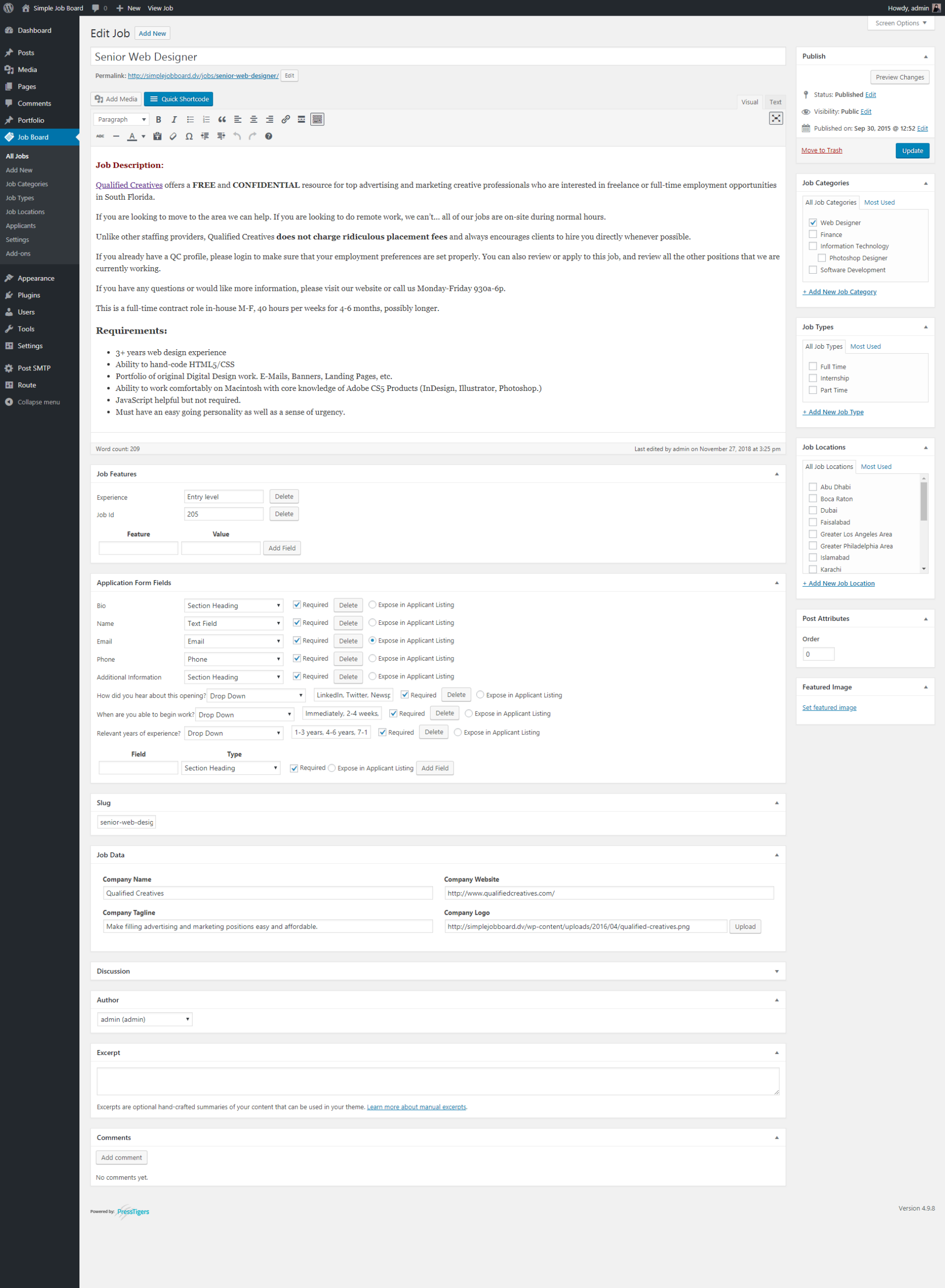
Setup and feature notes: The first-run setup is short. Add a job, fill in description and meta, save. Application Form is its own admin screen with a drag-and-drop builder where you can add a CV upload field, cover letter, phone, and any custom field your role needs. The listings shortcode renders a simple, theme-friendly list that respects category and location filters. The plugin avoids feeling overbuilt for the careers-page use case, which is the right call for the audience it targets.
Pricing / free-plan note: Simple Job Board is free on WordPress.org with the application form builder, file uploads, and basic notifications. Pro extensions are sold per feature on the PressTigers marketplace and bundle as paid add-ons.
Pros
- Drag-and-drop application form builder in the free version is unusual at this tier
- Setup is genuinely “Friday afternoon” simple
- Theme-friendly listings layout
- Active maintenance and a current “tested up to” tag
- Reasonable rating volume for the size of the install base
Cons
- Light on employer accounts and multi-poster workflows
- Advanced filters, resume search, and email templating are Pro
- Not the right pick if you want a full multi-employer job board
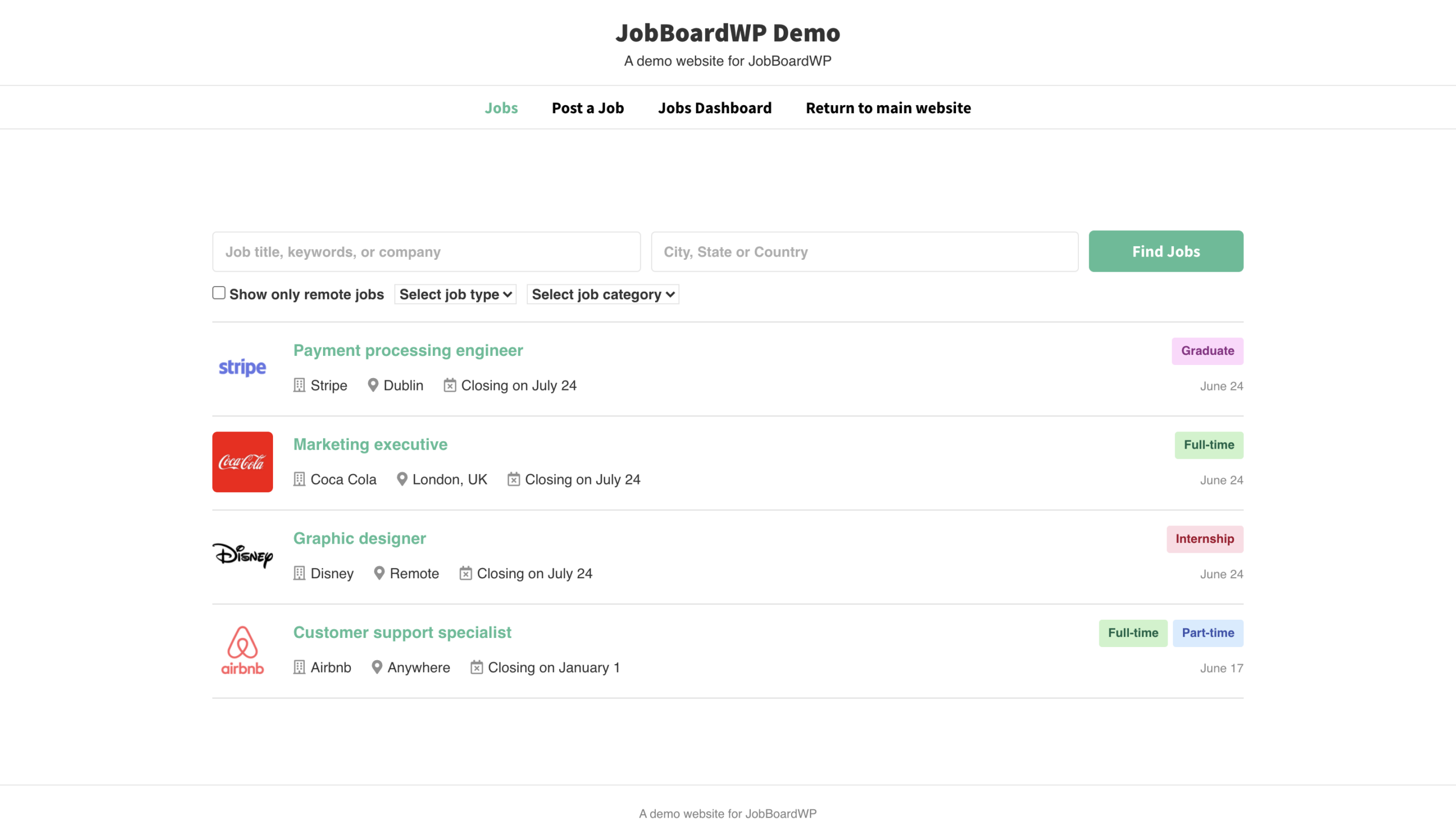
4. JobBoardWP: best free WordPress job board plugin with frontend submission
JobBoardWP, built by the Ultimate Member team, is one of the few free plugins that ships frontend job submission and a frontend job manager dashboard without putting either behind a paid tier. Employers register, submit jobs through a frontend form, manage their listings from a frontend dashboard, and admins moderate from wp-admin. For a site owner who wants a third-party-employer job board on a tight budget, this is the cleanest free starting point.
Verdict: The cleanest free starting point for a third-party-employer job board. Frontend job submission and a frontend employer dashboard are both in the free tier, with admin moderation in wp-admin. Smaller install base than the giants, but the free baseline is broader.
Best for: site owners launching a niche third-party-employer job board on a budget, communities adding a job exchange to an existing membership site, and developers who want a free, well-coded base they can extend.
Key features:
- Frontend job submission form for registered employers
- Frontend dashboard for employers to view and manage their jobs
- Job categories and types taxonomies
- Listing expiry and admin moderation workflow
- Email notifications for submission, approval, and expiry
- Pairs naturally with Ultimate Member for richer employer profiles
Setup and feature notes: The plugin reuses several conventions from Ultimate Member, which is the strength here: registration, dashboards, and email triggers feel familiar. The frontend submission flow uses real WordPress pages with shortcodes ([jb_jobs_dashboard], [jb_submit_job_form], [jb_jobs]), so theme styling is straightforward. The plugin’s smaller install base means fewer third-party add-ons compared with WP Job Manager, but the free baseline is broader.
Pricing / free-plan note: JobBoardWP is free on WordPress.org. The plugin pairs cleanly with the Ultimate Member ecosystem for member profiles and forms; some advanced workflows lean on Ultimate Member extensions.
Pros
- Frontend submission and frontend dashboard in the free tier
- Familiar UX for sites already using Ultimate Member
- Clean shortcode-driven pages for easy theme integration
- Active maintenance and a current “tested up to” tag
Cons
- Smaller install base means a thinner third-party theme ecosystem
- Resume/CV management and paid listings rely on companion features rather than first-party add-ons
- The 10-rating sample is small, even at a 100/100 rating average
5. WP Job Portal: best WordPress job board plugin with employer and candidate accounts
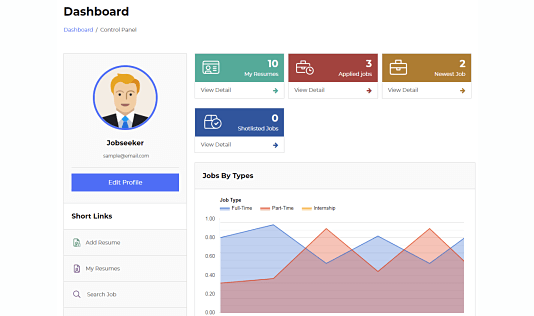
WP Job Portal is the most feature-loaded free plugin in this list. The free tier already includes employer accounts, candidate accounts, resumes, job categories and types, application management, job alerts, and paid-listing packages, all coordinated through a frontend portal that the plugin generates with one click. That is unusual at the free tier; most plugins gate at least half of that surface behind paid add-ons.
Verdict: The most feature-loaded free job board plugin on this list. Employer and candidate accounts, resumes, application management, job alerts, and paid listing packages are all in the free tier. The admin surface is dense in exchange for that depth; plan time to learn it before launch.
Best for: site owners who want a complete multi-employer job board on day one without buying a stack of paid add-ons, and admins who prefer a single plugin over a WP Job Manager add-on grid.
Key features:
- Employer registration and dashboard with company profile fields
- Candidate registration with profile and resume upload
- Frontend job submission and management
- Application management and status workflow
- Job alerts and saved searches for candidates
- Listing packages and paid listings, with PayPal, Stripe, and other gateway extensions
- Resume search and shortlisting
- Frontend portal generated on activation through a single setup screen
Setup and feature notes: Activation runs a setup wizard that creates the required frontend pages (job listings, post a job, employer dashboard, candidate dashboard, resumes, packages) and assigns the right shortcodes. The admin menu is dense, which is the trade-off for the depth: there is a lot to configure, but most teams will not need every screen. The free tier alone replaces several plugins you would otherwise stack on top of WP Job Manager.
Pricing / free-plan note: WP Job Portal core is free on WordPress.org. Premium plans on wpjobportal.com unlock advanced features, additional themes, and priority support. Payment gateways beyond PayPal are typically extensions.
Pros
- Most-complete free job board feature set in this list
- One-click frontend setup creates all the right pages
- Real employer/candidate account model out of the box
- Resume search included in the free tier
- Paid listing packages without buying a separate add-on
Cons
- Bigger admin surface to learn than the lean plugins
- UI is information-dense; tidy theme integration may need design work
- A few advanced workflows and payment gateways are Pro
6. easy.jobs: best WordPress job board plugin with a built-in hiring pipeline
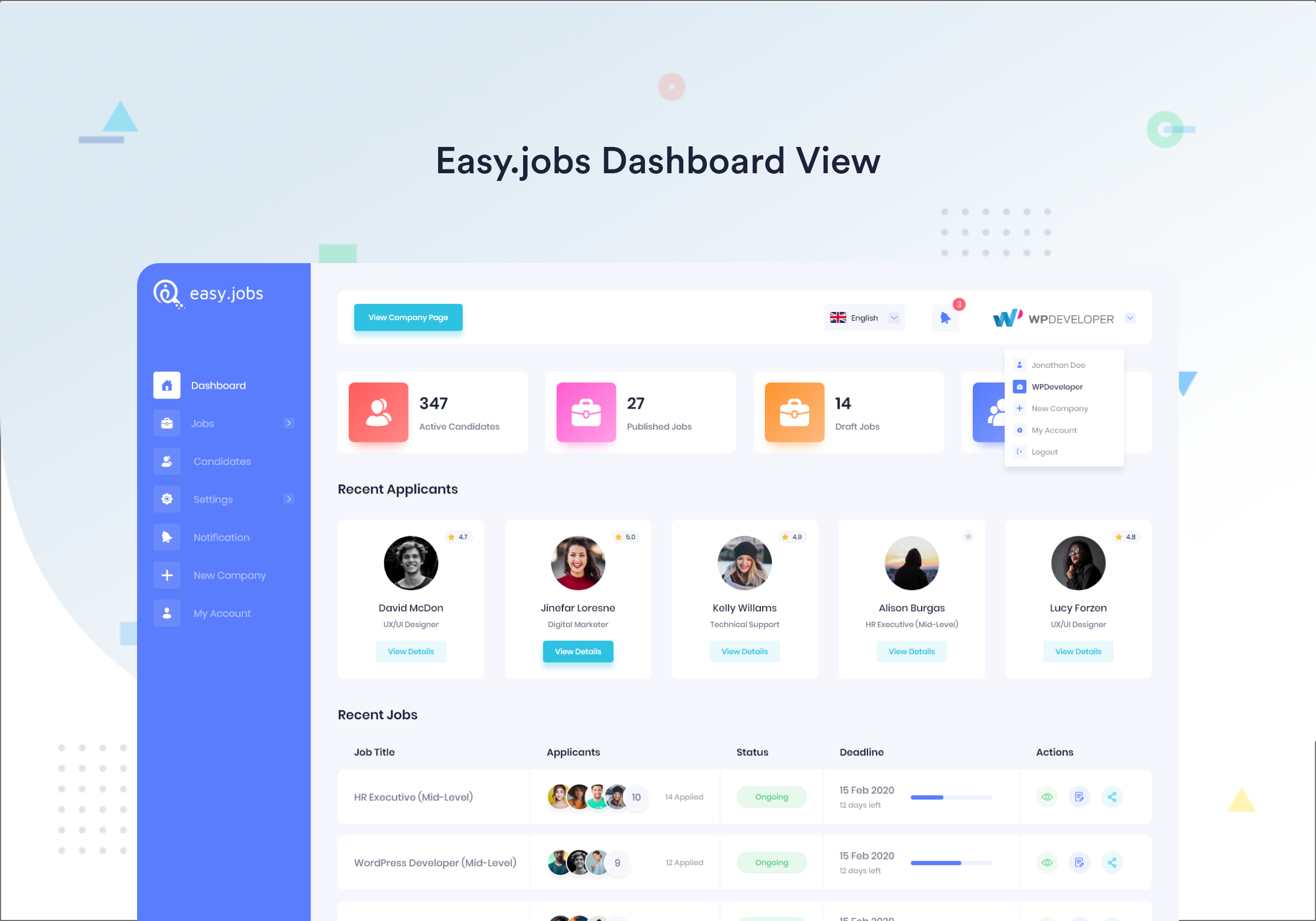
easy.jobs, by the WPDeveloper team behind Essential Addons and NotificationX, is a hybrid: the WordPress plugin handles the public-facing careers page, while the actual applicant tracking, pipelines, candidate database, and hiring stages live in a connected easy.jobs account. For teams that want a careers page on WordPress and a real hiring pipeline elsewhere, this is the cleanest WP-side option.
Verdict: A clean WordPress careers page connected to a real hiring pipeline inside the easy.jobs hosted platform. Use it when you want the careers page on WordPress but the ATS, scoring, and team collaboration in a hosted tool. The source of truth for jobs and candidates lives in the easy.jobs account, not in WordPress alone.
Best for: HR-led teams that want a polished careers page on WordPress but the actual applicant tracking, scoring, and pipeline outside WordPress, in a hosted tool that scales with the team.
Key features:
- WordPress plugin that renders job listings, departments, and a careers page on the site
- Connection to the easy.jobs hosted hiring platform
- Job posting, candidate management, and hiring pipeline in the easy.jobs dashboard
- Elementor and Gutenberg blocks for placing listings inside any page layout
- AI-assisted features for shortlisting and resume parsing on the SaaS side
Setup and feature notes: The WordPress side stays light: connect the easy.jobs account, pick which jobs to expose, and place the listings on a careers page. The heavy lifting (pipelines, candidate scoring, team collaboration, interview scheduling) happens in the easy.jobs dashboard. Trade-off: you get a real ATS experience, but the source of truth for jobs and candidates is the SaaS account, not WordPress alone.
Pricing / free-plan note: easy.jobs offers a free WordPress plugin and a free easy.jobs starter plan. Paid plans on easy.jobs unlock higher job and team limits, advanced AI features, custom branding, and integrations.
Pros
- Real hiring pipeline outside WordPress without sacrificing the careers page
- Familiar block-based placement for listings (Gutenberg and Elementor)
- AI-assisted shortlisting and resume parsing on the SaaS side
- Lower WordPress admin overhead than a self-hosted multi-employer job board
- Active maintenance and a current “tested up to” tag
Cons
- Hiring data and pipeline live on the SaaS, not in your WordPress database
- Free SaaS plan has lower job and team limits than paid tiers
- Less control than a fully self-hosted plugin like WP Job Portal or WP Job Manager
7. JobWP: best lightweight modern WordPress job board plugin
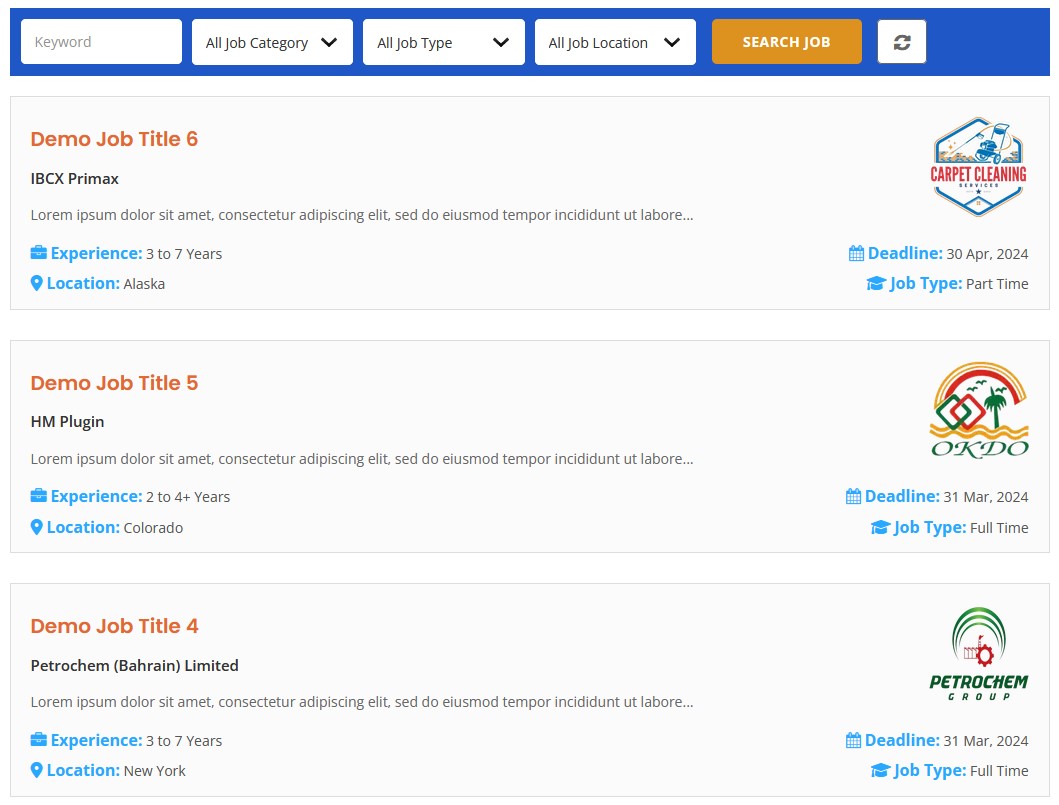
JobWP is a newer, more compact job board plugin that bundles a job listings post type, frontend submission, an employer dashboard, application management, and Stripe-ready paid listings inside a single free download. It positions itself as a leaner alternative to the larger plugins, and the free feature surface is broader than many older free job board plugins on WordPress.org.
Verdict: A modern, single-package job board plugin with paid listings and Stripe inside the free tier. Jobs, employers, applications, and packages share a tidy top-level menu, which keeps the admin cleaner than the established players. Smaller install base and ecosystem than WP Job Manager, but the free baseline is unusually complete.
Best for: site owners who want a modern, single-package job board plugin without piecing together a half-dozen add-ons, and developers who prefer a lighter codebase than the most established players.
Key features:
- Job listings custom post type with categories, types, and locations
- Frontend job submission with a clean form layout
- Employer dashboard for managing posted jobs
- Application management inside wp-admin
- Listing packages and Stripe payments for paid listings in the free tier
- Email notifications for applicants and admins
Setup and feature notes: JobWP’s admin reads cleaner than the established players because it does not have the historical add-on menu pattern. Jobs, employers, applications, and packages all live under a single top-level menu. Stripe support in the free tier is the standout: site owners who want to charge for premium job postings do not need a separate paid add-on to do it. The trade-off is the install footprint: smaller install base means fewer external themes and tutorials.
Pricing / free-plan note: JobWP is free on WordPress.org with frontend submission, employer dashboards, applications, packages, and Stripe in the free tier. Pro tiers add more payment gateways, advanced layouts, and priority support.
Pros
- Single-package feature set covering the core job board scope
- Stripe and paid listings in the free tier
- Cleaner, more modern admin layout than older plugins
- Active maintenance and a current “tested up to” tag
Cons
- Newer plugin with a smaller install base and fewer ratings
- Less third-party theme support than WP Job Manager
- Smaller add-on and integration ecosystem than the established names
8. HivePress with the Jobs extension: best marketplace-style WordPress job board plugin
HivePress is a generic two-sided marketplace plugin (directory, classifieds, listings) that becomes a multi-employer job board once you install the official Jobs extension. The extension adds job-specific listing fields, an employer/candidate model, applications, and listing packages, all reusing the HivePress marketplace plumbing for accounts, dashboards, search, and reviews. For sites already on HivePress, or for owners who want a marketplace-style UX, it is the most consistent two-sided pick on this list.
Verdict: The only pick on this list that runs a job board as a true two-sided marketplace. HivePress core supplies vendor and customer accounts, dashboards, search, and payments; the paid Jobs extension adds job-specific fields, employer profiles, applications, and listing packages on top. Right for marketplace UX, overkill for a brochure-site careers page.
Best for: owners who want a two-sided marketplace UX rather than a brochure-style careers page, sites already running HivePress for a directory or classifieds use case, and teams that value a consistent vendor/customer pattern across categories.
Key features:
- HivePress core: vendor and customer accounts, listings, categories, attributes, search, reviews, messages, payments
- Jobs extension: job-specific fields, job categories, applications, employer profiles, listing packages
- Frontend submission with multi-step listing forms
- Dashboard pages for both employers and candidates
- Payments and packages through HivePress core
- Compatible HivePress themes for a marketplace-style UI
Setup and feature notes: HivePress earns its place here because it is the only plugin in this list that genuinely treats a job board as a two-sided marketplace, not as a careers page or a single-direction listings site. The trade-off is that you are running a marketplace plugin, not a job-board-first plugin, so the setup steps include “this is a marketplace, here are vendors and listings” rather than “this is a job board”. For owners who want a marketplace shape, that framing is a strength.
Pricing / free-plan note: HivePress core is free on WordPress.org. The Jobs extension and many other HivePress extensions are paid, sold on hivepress.io as individual extensions or bundles. Compatible marketplace themes are sold separately.
Pros
- Real marketplace UX with vendor/customer accounts in the core
- Consistent design language across all listing types if you mix categories later
- Strong WordPress.org rating from a sizeable review base
- Active maintenance and a current “tested up to” tag
Cons
- Jobs functionality requires the paid Jobs extension on top of HivePress core
- A job-board-first plugin is closer to “install and run a job board” out of the box
- Marketplace framing adds setup complexity if you only want a careers page

9. Job Postings by BlueGlass: best lightweight WordPress job board plugin for Google for Jobs schema
Job Postings by BlueGlass Interactive AG is the most narrowly scoped plugin on this list. It is a lightweight job listings plugin that adds Schema.org JobPosting structured data to every listing, which is the eligibility prerequisite for Google for Jobs surfaces. There is no frontend submission, no employer accounts, and no application workflow in the free version; you publish jobs as posts and rely on WordPress’s editor and the plugin’s structured data to do the heavy SEO lifting.
Verdict: The smallest, schema-led pick on this list. The plugin adds a job listings post type and ships Schema.org JobPosting structured data on every listing, which is the eligibility prerequisite for Google for Jobs. No frontend submission, no employer accounts, no application workflow; pair it with another plugin if you need any of those.
Best for: small teams that publish a handful of jobs at a time, agencies that prioritise Google for Jobs visibility for a client’s careers page, and SEO-led careers pages where the editor already lives in wp-admin.
Key features:
- Job listings custom post type with structured fields
- Built-in Schema.org
JobPostingstructured data - Google for Jobs feed-ready output
- Category and location taxonomies
- Lightweight, minimal admin surface
Setup and feature notes: The plugin is intentionally small. The “Job Postings” menu adds a custom post type and a settings page; that is the entire surface. The value is in the JobPosting schema output and the simple per-job form that prompts for the fields Google for Jobs expects (title, description, location, employment type, salary, posting date, valid through). For an editorial team that wants to publish a few roles and have them show up correctly in Google’s job results, that is exactly the right scope.
Pricing / free-plan note: Job Postings is free on WordPress.org. There is no paid tier on the WordPress.org listing.
Pros
- Built-in
JobPostingstructured data without extra schema plugins - Tiny admin surface; almost no learning curve
- Free with no upsell modal
- Good fit for SEO-led careers pages
Cons
- No frontend submission, no employer accounts, no application workflow
- Smaller install base than WP Job Manager or WP Job Openings
- Last update is a few months older than the leaders; check the listing before installing on a live site
10. ApplyOnline: best WordPress job board plugin for application management
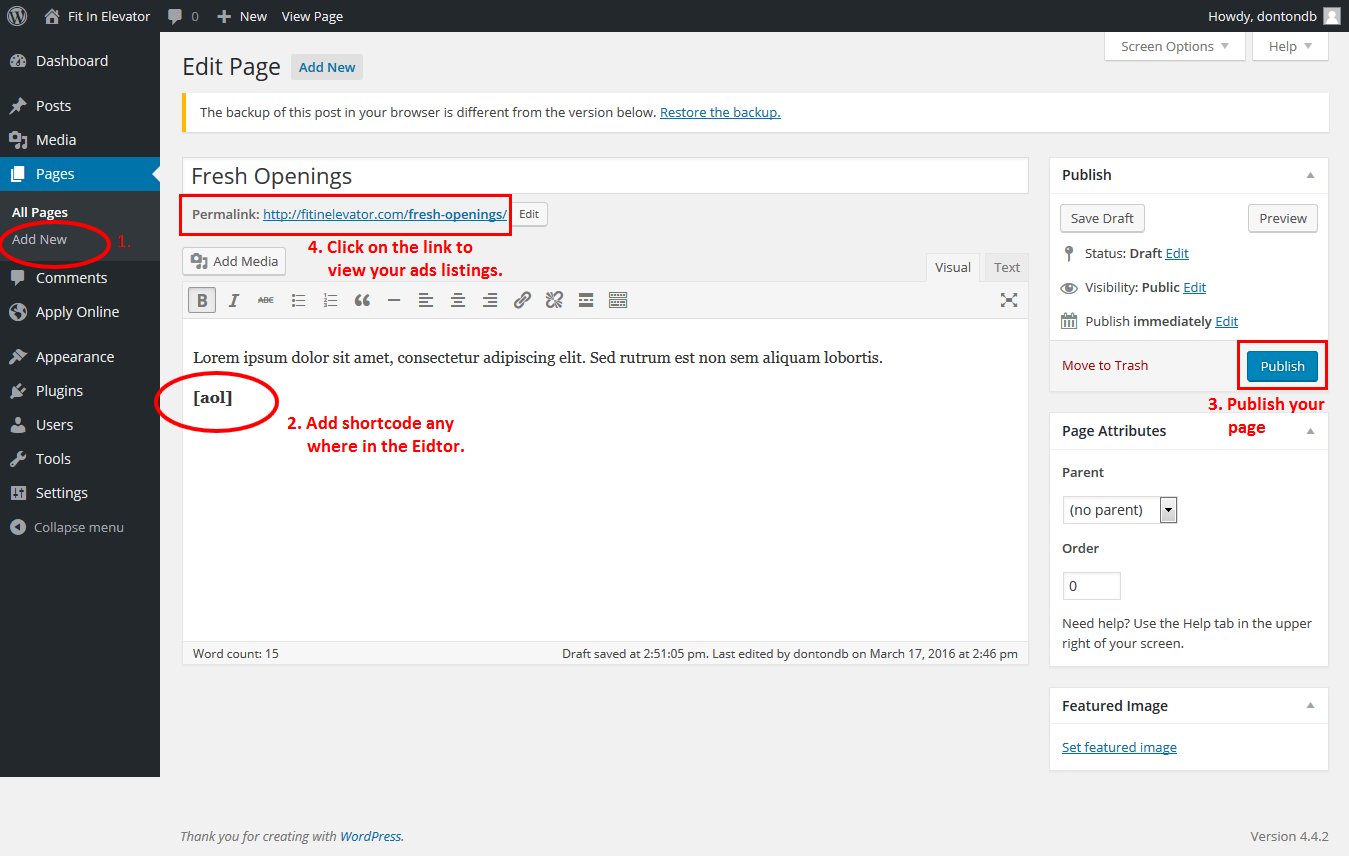
ApplyOnline is not a full job board on its own, it is the applications layer. The plugin adds per-listing application forms with conditional fields, manages submitted applications inside wp-admin with status workflow, handles file uploads (CV, cover letter, supporting documents), and sends email notifications. It is the right pick when the rest of your job listings are already handled by another plugin or by plain WordPress pages, but you need a real application management system.
Verdict: The applications layer, not a full job board. Use it when listings already live on another plugin or on plain WordPress pages and you need a real application form per listing plus an applicant inbox with a status workflow. Useful beyond hiring too (scholarships, grants, residencies).
Best for: site owners who already publish jobs through pages or another plugin and need a real application form behind each one, scholarships and grants programs reusing the same plugin for non-job applications, and admins who want a single inbox for incoming applications.
Key features:
- Per-listing application forms with customisable fields
- File uploads (resume, cover letter, supporting documents)
- Application list inside wp-admin with status workflow (received, shortlisted, hired, rejected)
- Email notifications for applicants and admins
- Conditional logic and integration with PDF export in Pro
- Form builder and reusable templates
Setup and feature notes: ApplyOnline assumes the listing itself already exists somewhere. Pair it with a job listings plugin or a plain WordPress page, attach the application form via the plugin’s shortcode, and the submitted applications show up in the plugin’s own admin section. The status workflow is closer to a small ATS than a typical contact-form flow; that is the reason it earns a place in this list even though it is not a full-stack job board.
Pricing / free-plan note: ApplyOnline is free on WordPress.org. Pro add-ons unlock PDF exports, advanced conditional logic, custom email templates, and integrations.
Pros
- Real application form and applicant management for the price of free
- Status workflow closer to a small ATS than to a contact form
- Useful beyond job boards (scholarships, grants, residencies)
- Active maintenance and a current “tested up to” tag
Cons
- Not a full job board; pair it with another plugin or with WordPress pages for listings
- Smaller install base than the leaders
- Advanced reporting and PDF export sit in paid add-ons
Niche options to watch
These two plugins were researched but did not earn a main ranking. They are premium-only or live outside the WordPress.org directory, so the bar for inclusion is different from the free-tier candidates above.
WPJobBoard (premium)
WPJobBoard is a long-running paid WordPress job board plugin sold on wpjobboard.net. It is one of the most feature-complete commercial alternatives to a WP Job Manager plus add-on stack, with employers, candidates, resumes, packages, alerts, and a wide gateway list in the core licence. It is not in the main list because the free WordPress.org candidates above already cover the same scope, and a paid-only plugin is a different buyer decision; if those candidates do not fit, WPJobBoard is the obvious commercial next step.
WP JobSearch by Eyecix (premium, CodeCanyon)
WP JobSearch by Eyecix is a popular premium WordPress job board plugin on CodeCanyon, typically bought together with the Jobcareer theme. It targets large multi-employer job boards with map-based search, candidate and employer dashboards, alerts, packages, and a long list of payment gateways. As with WPJobBoard, the bar for including a premium-only, marketplace-bundled plugin in the main list is higher than the bar for a free, directory-listed plugin; the strongest free candidates cover the same use cases for most owners.
How to choose the best WordPress job board plugin
There is no single “best WordPress job board plugin” because the right pick depends on the shape of the board you are building. Run through these four questions before installing anything:
- Is this a careers page for one company, or a job board for many employers? A single-company careers page lives comfortably on WP Job Openings, Simple Job Board, or Job Postings (if you only need Google for Jobs schema). A multi-employer job board belongs on WP Job Manager, WP Job Portal, JobBoardWP, JobWP, or HivePress with the Jobs extension.
- Do you need a real ATS pipeline, or just an applications inbox? WP Job Openings and ApplyOnline both give you a wp-admin applications inbox. easy.jobs gives you a real hiring pipeline outside WordPress while keeping the careers page on the site. WP Job Manager’s Applications add-on and WP Job Portal cover the middle ground.
- Do you plan to charge for listings? Free first-party paid listings are unusual. WP Job Portal and JobWP both include paid listings in the free tier. WP Job Manager handles paid listings through paid add-ons (Paid Listings, WC Paid Listings). HivePress handles packages through core marketplace plumbing.
- What is your starting monthly budget? A free job board on WP Job Manager core, WP Job Openings, Simple Job Board, JobBoardWP, JobWP, or Job Postings is realistic. If you need resumes, alerts, applications, and paid listings together from day one, expect to either pay for WP Job Manager add-ons, buy a HivePress extension, run WP Job Portal with its richer free tier, or buy a premium plugin like WPJobBoard or WP JobSearch.
Two more practical checks before installing on a live site:
- Theme compatibility. A job board theme tuned for WP Job Manager, HivePress, or WP JobSearch will look better on day one than a generic theme with shortcodes pasted into a page. If you do not want to switch themes, the careers-page-focused plugins (WP Job Openings, Simple Job Board, Job Postings) are friendlier to existing themes.
- SEO surface. Google for Jobs eligibility requires correct
JobPostingstructured data on each listing. Job Postings has this built in. WP Job Manager, WP Job Openings, WP Job Portal, and HivePress either include it natively or have a recognised path through a free add-on or compatible SEO plugin. If you care about Google for Jobs, confirm structured data is shipping correctly before launch.
FAQ
What is the best free WordPress job board plugin?
For a single-company careers page, WP Job Openings is the strongest free pick because applications are handled inside wp-admin in the free tier. For a multi-employer job board, WP Job Portal is the most feature-complete free option because employer accounts, candidate accounts, resumes, alerts, and paid listing packages are all in the free version. For an Automattic-backed plugin with the deepest add-on ecosystem, WP Job Manager core is free and grows with paid add-ons. JobBoardWP is the strongest free pick if your main requirement is frontend submission plus a frontend dashboard.
Can I run a job board on WordPress without coding?
Yes. Every plugin in this list installs from the WordPress.org directory and configures from wp-admin without code. A no-code job board on WP Job Manager, WP Job Openings, WP Job Portal, or JobWP typically requires only a few setup steps: install the plugin, run the included setup wizard or page creator, add jobs, and (for multi-employer boards) enable frontend submission. Theme styling work may be needed if your existing theme is not built for listings layouts.
Does WP Job Manager support paid listings out of the box?
Not in the free core. Paid listings on WP Job Manager run through the paid Paid Listings add-on (fixed-fee or package pricing) or the WC Paid Listings add-on (full WooCommerce checkout). If “paid listings in the free version” is a hard requirement, WP Job Portal and JobWP both include paid listing flows in their free tiers; WP Job Manager will fit if you are comfortable buying the relevant add-on.
How do I get my WordPress job listings into Google for Jobs?
Google for Jobs reads JobPosting structured data from your listing pages. Job Postings by BlueGlass adds this schema automatically. WP Job Manager and WP Job Openings produce structured data either natively or through small SEO companion plugins, and WP Job Portal, HivePress, and JobWP also ship structured data with their listings. Always validate one of your live job URLs in Google’s Rich Results Test after launch to confirm the schema is being detected correctly.
Do I need a separate ATS if I use a WordPress job board plugin?
It depends on the volume and the team. For a small careers page with a handful of roles and a few applications a week, WP Job Openings or ApplyOnline are usually enough on their own; both keep applications inside wp-admin. For a HR-led team that wants stages, scoring, interview scheduling, and collaboration on candidates, a real ATS (either easy.jobs through its WordPress integration, or a dedicated standalone ATS) is more honest than asking a WordPress plugin to be both a job board and an ATS.
Can these plugins handle resume/CV uploads?
Most can, with different scopes. WP Job Manager handles resumes through the paid Resume Manager add-on. WP Job Portal includes resume upload and resume search in the free tier. WP Job Openings, Simple Job Board, and ApplyOnline all accept resume file uploads as part of the application form. JobWP, JobBoardWP, and HivePress + Jobs accept resume attachments through their application or message flows. easy.jobs handles resumes inside the easy.jobs platform.
Conclusion
If you want the safest default and a long growth path, install WP Job Manager. The free core is enough to start, the add-on ecosystem covers everything a mature job board needs, and the theme support is the widest in the category.
For an in-house careers page with applications inside WordPress, install WP Job Openings (HireZoot). For the simplest careers section on an existing brochure site, install Simple Job Board. For a free frontend-submission job board, install JobBoardWP. For a full multi-employer job board on day one without piecing together add-ons, install WP Job Portal. For a careers page plus a real hiring pipeline outside WordPress, install easy.jobs. For a modern, lean plugin with paid listings and Stripe in the free tier, install JobWP. For a marketplace-style two-sided UX, install HivePress with the Jobs extension. For a tiny careers page that ships Google for Jobs structured data without ceremony, install Job Postings. For the applications layer on top of any of the above, install ApplyOnline.
The best WordPress job board plugin is the one whose shape (single-company careers page, multi-employer board, marketplace, schema-led publisher, or applications layer) matches the shape of the board you are actually building.