

Quick verdict
Polylang is one of the strongest free multilingual plugins for WordPress in 2026. I tested the free version in a clean sandbox, added languages, reviewed the language settings, and checked the strings translation workflow. It is a great fit for manual multilingual content sites, but WooCommerce and advanced workflow features require paid products.
Polylang is still one of the most practical choices if you want a WordPress multilingual free plugin that works with normal WordPress content. This Polylang review focuses on the free plugin first, then explains when Polylang Pro or Polylang for WooCommerce becomes worth paying for.
I tested Polylang 3.8.7 in a clean WordPress 7.1 playground sandbox on August 21, 2026. I also checked the official pricing, WordPress.org listing, documentation, feature pages, and changelog before publishing.
At a glance
| Category | Polylang review notes |
|---|---|
| Best for | Content sites, blogs, business pages, and documentation that need manual multilingual publishing |
| Free version | Strong enough for basic multilingual posts, pages, taxonomies, menus, widgets, and language switchers |
| Paid upgrade | Polylang Pro adds workflow, slug, DeepL, XLIFF, REST API, ACF Pro, and site editing features |
| WooCommerce | Requires Polylang for WooCommerce or the Business Pack |
| My rating | 4.4 out of 5 for most content sites |
What is Polylang?
Polylang is a multilingual WordPress plugin from WP SYNTEX. The free plugin is available on WordPress.org, while Polylang Pro and Polylang for WooCommerce are sold through the official Polylang website.
The plugin adds languages to WordPress and lets each post, page, category, tag, media item, and supported custom content item have a language. Translated versions are linked together as related WordPress content.
That makes Polylang different from tools that only overlay a translation layer on top of the front end. Polylang feels native to WordPress. Each translation is real content with its own title, slug, body, metadata, and URL.
Hands-on setup experience
After activation, Polylang opened a setup wizard. I also tested the manual path from the Languages menu. The language form asks for the full name, locale, language code, text direction, flag, and order.
For the sandbox test, I added English and Spanish. Once the languages were saved, Polylang showed both languages in the admin table and added a Languages menu in the WordPress dashboard.
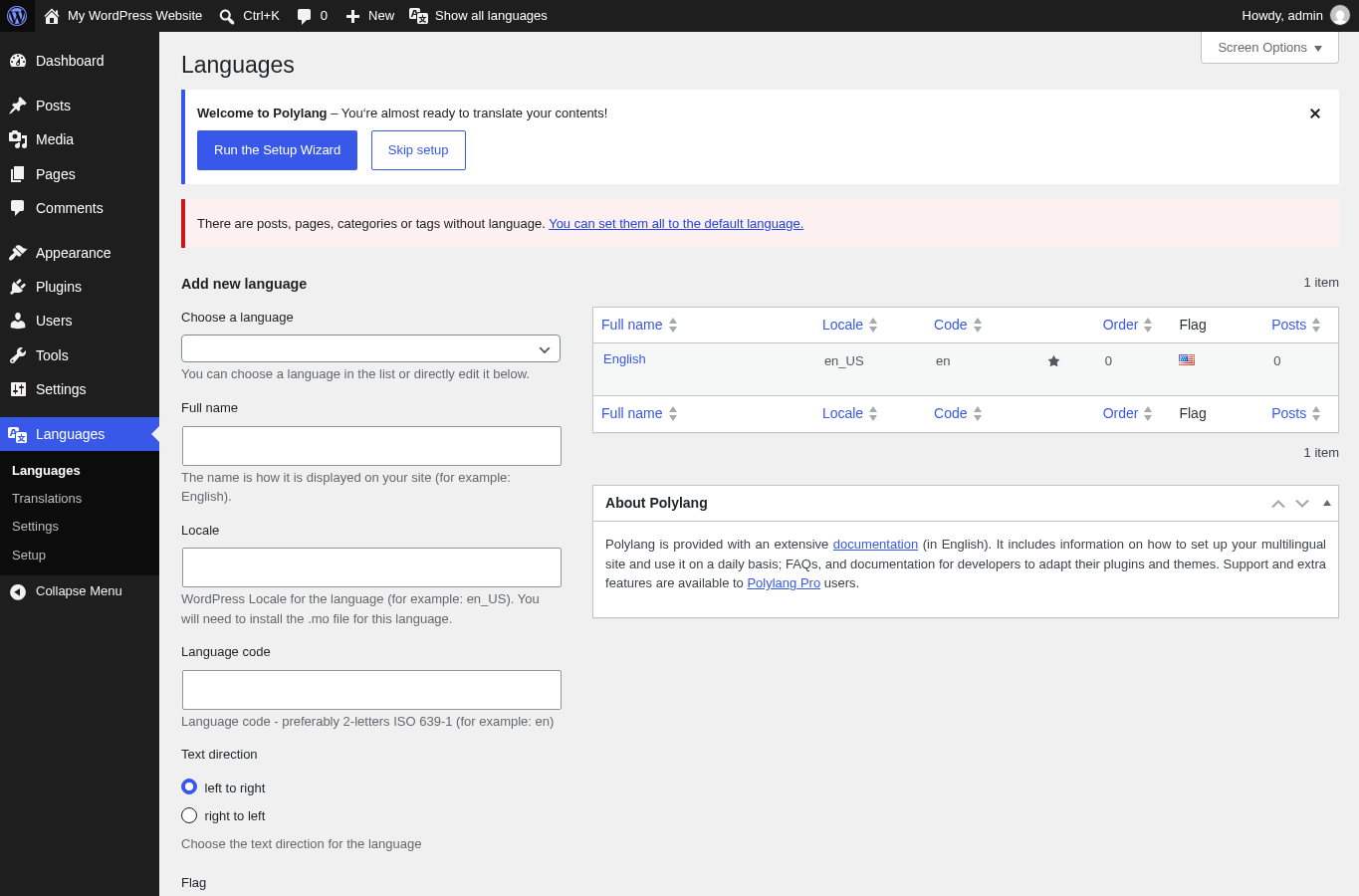
The setup flow is not flashy, but it is clear. Beginners still need to understand language codes, default language behavior, URL format, and what happens to old content that does not have an assigned language.
Translating posts and pages
Polylang uses linked WordPress posts and pages for translations. You do not translate everything in one visual translation screen. Instead, each language version is its own WordPress entry, connected to the original.
- Each language can have its own title, body, slug, excerpt, and SEO metadata.
- Translators can work in the normal WordPress editor.
- The content model stays close to WordPress core.
- You keep editorial control over every localized page.
The tradeoff is maintenance. If you update the English version, the free plugin does not automatically update the Spanish version. Polylang Pro helps with duplication and synchronization, but the free version is best when you already have a manual translation process.
Language switcher options
Polylang includes language switchers for several placement types, including blocks, widgets, menus, navigation contexts, and developer placement through functions. You can show language names, flags, dropdowns, hide the current language, or hide languages that do not have a translation.
This flexibility is a real strength. A small bilingual blog can use a simple menu switcher, while a larger site can use a more customized placement.
One detail matters for user experience: the switcher links to the translation of the current page. If a page is not translated, visitors may be sent to the language homepage depending on your settings. For important pages, do not leave translations half-finished.
Strings translations
Polylang also includes a Strings translations screen. This is where you translate text that is not normal post content, such as registered theme strings, plugin option text, widgets, and similar interface labels.
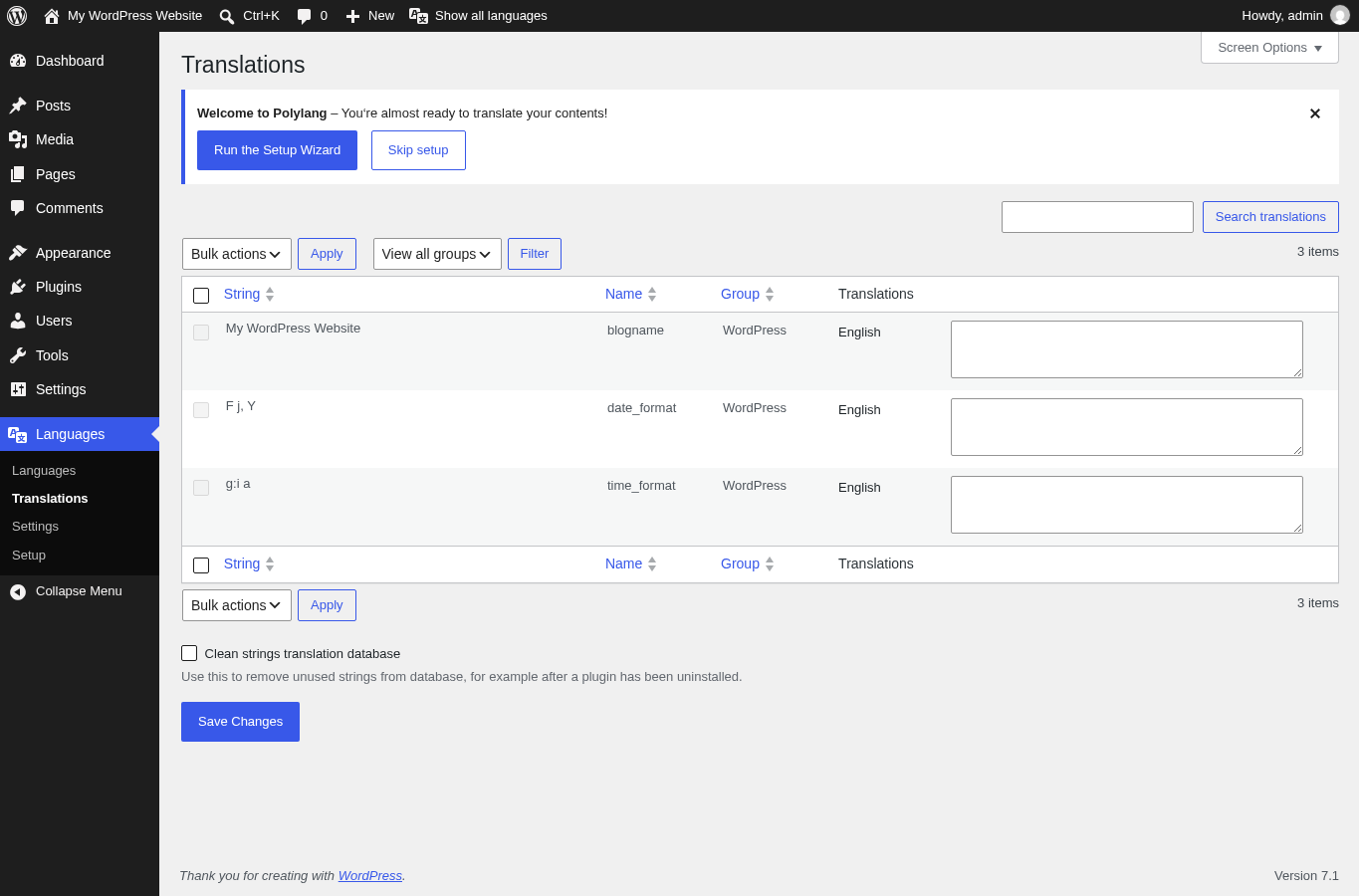
This screen is not as simple as editing a page, but it is necessary for a polished multilingual site. If your header, footer, buttons, or widget text stay in the wrong language, the site will not feel fully localized.
Settings and SEO behavior
Polylang can set the language through a language code in the URL, a subdomain, or a different domain. The free plugin supports translated posts, pages, media, categories, tags, custom post types, custom taxonomies, RSS feeds, RTL scripts, and language switchers.
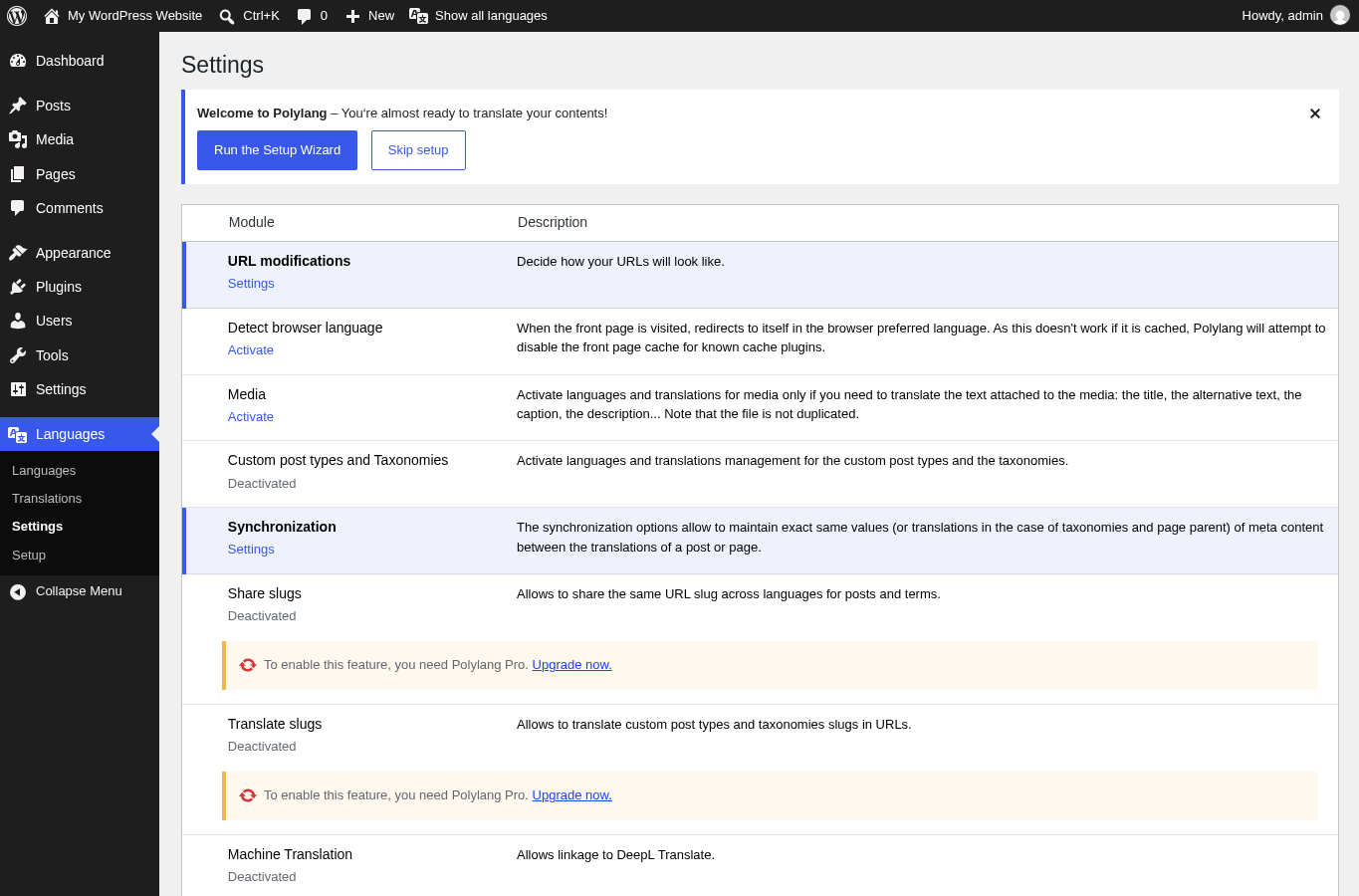
For multilingual SEO, I like that Polylang creates real URLs for translated content. You can write localized titles, localized bodies, and localized metadata. That is a stronger foundation than publishing thin machine-translated pages without review.
The risk is operational. A multilingual site can create duplicate, thin, or unfinished pages if you publish too quickly. Before launch, check default language, URL format, translated slugs, menus, hreflang output, canonical tags, XML sitemap behavior, and internal links.
Polylang Pro review: what the paid version adds
Polylang Pro is mainly a workflow and control upgrade. Official feature comparisons list better block editor integration, language options in the widget block editor, translatable template parts in site editing, duplicate and synchronized content, ACF Pro integration, same slugs across translations, translated URL slugs, DeepL machine translation, XLIFF import/export, REST API support, and premium support.
The Pro version makes the most sense when your site has many pages, editors need to duplicate source content before translating, you need tighter slug control, you use block editor workflows heavily, or you outsource translations and need XLIFF.
Polylang for WooCommerce
WooCommerce is not fully handled by the free Polylang plugin. Polylang for WooCommerce is a separate paid add-on for multilingual products, product categories, global attributes, shop, cart, checkout, My Account pages, WooCommerce emails, product metadata synchronization, cart synchronization across languages, HPOS readiness, and WooCommerce CSV import/export compatibility.
This is important when comparing Polylang vs WPML. If your site is a store, budget for the WooCommerce add-on or the Business Pack instead of assuming the free plugin covers everything.
Pricing and license value
As of August 21, 2026, the official pricing page lists Polylang as free, Polylang Pro from 99€ per year excluding VAT, Polylang for WooCommerce from 99€ per year excluding VAT, and the Business Pack from 139€ per year excluding VAT in the pricing page state I checked. Paid products include one year of updates and premium support, with a listed 50 percent renewal discount.
| Product | Starting price | Best fit |
|---|---|---|
| Polylang | Free | Basic multilingual content sites |
| Polylang Pro | From 99€ per year, ex VAT | Content sites that need Pro workflow features |
| Polylang for WooCommerce | From 99€ per year, ex VAT | WooCommerce stores |
| Polylang Business Pack | From 139€ per year, ex VAT in the checked pricing state | Sites that need both Pro and WooCommerce features |
Polylang vs WPML
Polylang and WPML are both mature multilingual plugins, but they serve different buying styles. Polylang is easier to recommend for small content sites because the free plugin is genuinely useful. WPML is more of a paid-first suite for users who want translation management and commercial tooling from the start.
Choose Polylang if you want a free starting point, a WordPress-native manual workflow, and lightweight content control. Choose WPML if you want a broader paid translation management system from day one.
Pros and cons
Pros
- Excellent free tier for manual multilingual WordPress sites.
- Uses normal WordPress content structures.
- Supports posts, pages, media, categories, tags, custom post types, and taxonomies.
- Flexible language switcher options.
- Multiple URL structure options.
- Pro upgrade adds useful workflow features.
- WooCommerce add-on exists for stores.
- Active plugin with recent updates and broad adoption.
Cons
- WooCommerce support requires a paid add-on.
- Free version lacks the Pro workflow tools.
- Manual translation can become repetitive on large sites.
- Beginners need to understand language relationships and URL behavior.
- Machine translation is a Pro feature and requires your own DeepL API key.
- A complete setup still needs careful SEO QA.
Best-fit users
Polylang is best for bloggers, business sites, documentation sites, small agencies, and site owners who want human-reviewed translations inside WordPress. It is less ideal for stores that need free WooCommerce translation, teams that want built-in assignment workflows, or users who want a single visual translation dashboard for every page element.
Alternatives to Polylang
WPML
WPML is the obvious paid alternative. It is worth comparing if you need a commercial suite and translation management features from the beginning.
TranslatePress
TranslatePress is a good option if you prefer visual front-end translation. It can feel easier for users who want to translate what they see on the page.
Weglot
Weglot is more of a SaaS translation layer. It is convenient, but pricing can scale differently because it is based around hosted translation usage.
GTranslate
GTranslate is useful if machine translation is the priority, although the workflow and SEO model differs from Polylang content-native approach.
Final verdict
Polylang remains a top WordPress language plugin free users should test first. The free version is strong enough for real bilingual and multilingual content sites, especially if you are comfortable creating manual translations inside WordPress.
The main reason to upgrade to Polylang Pro is not that the free plugin is weak. It is that serious multilingual publishing needs workflow shortcuts: duplication, synchronization, translated slugs, XLIFF, DeepL, and better block editor support. The main reason to buy Polylang for WooCommerce is simple: stores need dedicated multilingual product, checkout, email, and cart support.
If I were launching a small multilingual blog or service website, I would start with the free Polylang plugin and prove the workflow. If I were managing a larger content site or a WooCommerce store, I would budget for Pro or the Business Pack before launch.
You can browse more editorial plugin tests in our WordPress plugin reviews archive.
FAQ
Is Polylang free?
Yes. The core Polylang plugin is free on WordPress.org. Paid products include Polylang Pro, Polylang for WooCommerce, and the Business Pack.
Is Polylang good for SEO?
Polylang can be good for SEO because it creates real translated WordPress URLs and lets you manage localized content. Results depend on correct URL settings, hreflang behavior, translated metadata, internal links, and avoiding thin translated pages.
Does Polylang translate content automatically?
The free plugin is mainly a manual translation tool. Polylang Pro lists DeepL machine translation support, but you need your own DeepL API key and should still review translated content manually.
Can I use Polylang with WooCommerce?
Yes, but WooCommerce support requires Polylang for WooCommerce or the Business Pack. The free plugin alone is not enough for a complete multilingual store.
What is the difference between Polylang and Polylang Pro?
Polylang Pro adds workflow and control features such as translated slugs, shared slugs, duplication, synchronization, XLIFF import/export, DeepL integration, REST API support, site editing support, ACF Pro integration, and premium support.
Is Polylang better than WPML?
Polylang is better if you want a capable free starting point and a WordPress-native manual workflow. WPML may be better if you want a paid commercial translation suite with stronger translation management from the start.
Does Polylang work with the block editor?
Yes. The free plugin works with modern WordPress, and Polylang Pro adds better block editor and site editing support according to the official feature comparison.
How many languages can I add with Polylang?
The WordPress.org listing says there is no set limit on the number of languages added. In practice, performance and editorial complexity depend on your hosting, theme, plugins, and content workflow.
Should I use Polylang for a multilingual business site?
Yes, if you want manual control over translated pages and can QA menus, strings, slugs, and SEO settings. For larger business sites, Polylang Pro is worth comparing because it reduces repetitive translation setup work.