


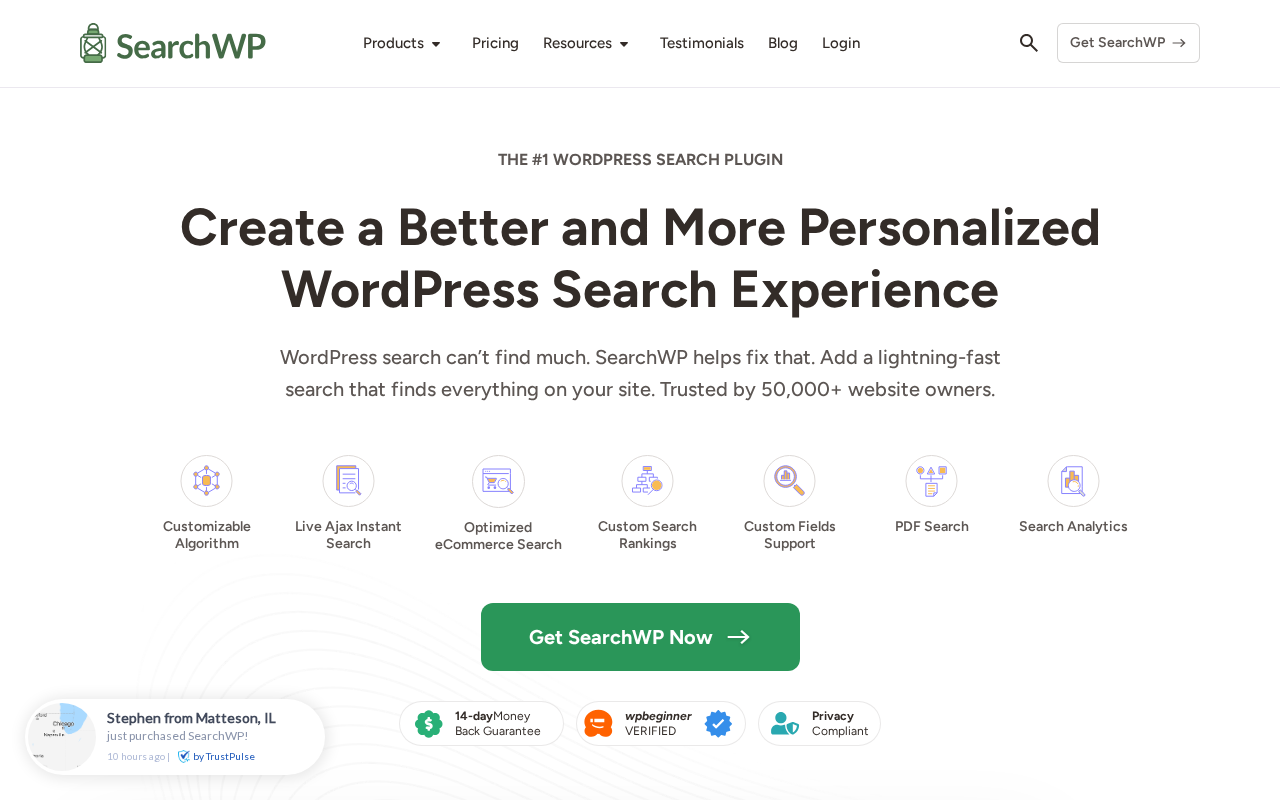
Fifty thousand WordPress site owners have replaced the default search with SearchWP. That number is notable because SearchWP is paid-only, starting at $99 per year for the first year, and no free core version exists on WordPress.org. Site owners are paying for this because WordPress’s built-in search has hard limits: it searches only post titles and body content, ignores custom fields and PDF attachments, applies a basic fixed relevance score that cannot be tuned or extended, and gives you no control when it surfaces the wrong content.
SearchWP attacks that problem with a proprietary indexing engine and a visual algorithm builder. You configure which content sources matter, how much weight each attribute carries, and what gets excluded. The plugin rebuilds its own index, separate from WordPress’s default database queries, and serves results from that index instead.
I reviewed SearchWP 4.6.1 using the official website at searchwp.com, the pricing page, feature and comparison pages, the documentation, and the changelog. SearchWP has no free tier, so plan-gated features (WooCommerce integration, Metrics analytics, Pro and All Access Bundle extensions) are described from official documentation and published user accounts rather than direct testing. Each such section says so where relevant.
At a glance
- Audited on: searchwp.com features, pricing, documentation, and changelog; version 4.6.1, compatible with WordPress 7.0 and above; PHP 8.0 or higher required. Pricing verified September 2026.
- Free tier: none. SearchWP has no free core plugin. Two free companion utilities exist on WordPress.org (SearchWP Live Ajax Search and SearchWP Modal Search Form) but the core engine requires a paid license.
- Paid tiers: Standard at $99 first year (renews at $199/year) for 1 site; Pro at $199 first year (renews at $399/year) for up to 3 sites; All Access Bundle at $399 first year (renews at $699/year) for up to 100 sites. SearchWP labels these as introductory prices: all renewals are at the full rate. All plans carry a 14-day money-back guarantee.
- Bottom line: SearchWP is the most configurable relevance-tuned search plugin for WordPress, and the best answer for WooCommerce stores and sites with heavy custom field usage. The absence of a free tier and the renewal pricing should be factored carefully for budget-conscious sites. For use cases where search quality directly affects conversions or usability, it earns its price.
Quick verdict
SearchWP earns its position as the leading paid WordPress search plugin by solving a problem most site owners don’t realize they have until they try to use their own site’s search. WordPress’s default search is limited to post titles and body content, applies a basic fixed relevance score that cannot be tuned or extended, and provides no visibility into why results appear in the order they do. For a five-page brochure site, that is acceptable. For a WooCommerce store with 500 SKUs, a membership site with custom post types, or a documentation site with PDFs, it actively fails the user experience.
The core SearchWP experience is a visual algorithm builder where you set the relevance weights for each content source: post titles can carry 10x the weight of post content, custom fields can be indexed and weighted independently, product SKUs and attributes become searchable, and PDF documents are indexed through xpdf integration. Once configured, the plugin replaces the default WordPress search with results from its own index, which it maintains automatically.
The Standard plan costs $99 for the first year (renews at $199/year) and covers one site with the full core feature set: live AJAX search, PDF indexing, custom field support, multiple search engines, boolean search, search forms, and basic analytics. The Pro plan is $199 for the first year (renews at $399/year) and adds WooCommerce product data indexing (SKUs, attributes, reviews), related content suggestions, cross-site multisite search, conditional redirects, and priority support for up to 3 sites. The All Access Bundle is $399 first year (renews at $699/year) and covers up to 100 sites with SearchWP Pro and WPFilters.
The honest limitation is the pricing structure. The first-year intro prices double at renewal: Standard goes from $99 to $199/year, Pro from $199 to $399/year. Small blogs and sites with limited budgets have Relevanssi as a free alternative that covers most use cases. SearchWP’s value is clearest for sites where bad search directly costs money: a product is not found, a documentation article is missed, a support question goes unanswered because site search didn’t surface the answer.
Quick verdict card
- Best for: WooCommerce stores needing product-attribute search; content-heavy WordPress sites with custom post types, custom fields, or PDF libraries; membership sites with gated content; documentation and knowledge base sites; digital agencies managing multiple client installs.
- Best plan for single sites: Standard at $99 first year (renews at $199/year) covers the full algorithm builder, live AJAX search, PDF indexing, custom fields, and basic analytics. Upgrade to Pro at $199 first year (renews at $399/year) if you need WooCommerce product-level indexing, full Metrics, multisite support, or conditional redirects.
- Best plan for multiple sites: All Access Bundle at $399 first year (renews at $699/year) for up to 100 sites with WPFilters included is the strongest value for agencies. Pro at $199 first year (renews at $399/year) for 3 sites suits small agencies or freelancers managing a handful of client sites.
- Standout: visual algorithm builder with no-code relevance weighting; PDF and document indexing via xpdf; WooCommerce SKU and attribute search; 24+ integrations; live AJAX search; voice search (added in v4.5.8); 14-day money-back guarantee; WPBeginner-verified.
- Watch out for: no free version of the core plugin; first-year intro prices double at renewal ($99 to $199, $199 to $399, $399 to $699); WooCommerce integration requires Pro plan; full Metrics analytics require Pro; the indexing process takes time on large databases; synonym configuration is manual; annual billing only.
What SearchWP is
SearchWP is a paid WordPress plugin that replaces the WordPress default search engine with its own proprietary indexing system and relevance algorithm. The default WordPress search runs LIKE queries against the wp_posts table, searching only post titles and content. Since WordPress 3.7 it applies a basic relevance score (title matches rank above content-only matches), but the algorithm is fixed and cannot be tuned, extended to custom fields, or applied to content types outside of posts and pages. SearchWP builds a separate, custom index and serves results from that index using a configurable weighted relevance model instead.
The plugin was originally developed by Jonathan Christopher and later acquired by Awesome Motive, the company behind WPBeginner, WPForms, OptinMonster, and MonsterInsights. The Awesome Motive acquisition brought SearchWP under a well-resourced development team with a track record in the WordPress plugin ecosystem. Version 4.6.1 is the current release as of September 2026, running on WordPress 7.0 and PHP 8.0 or higher.
SearchWP is not listed on WordPress.org as a paid-only plugin, but two free companion utilities from the SearchWP ecosystem exist there: SearchWP Live Ajax Search (50,000+ active installs) and SearchWP Modal Search Form (5,000+ active installs). These companions work with or without the paid core plugin, but the algorithm builder, PDF indexing, custom field support, WooCommerce integration, and search analytics all require a paid license.
The 50,000+ site owners number cited on the SearchWP homepage reflects the paid license base, not a free-tier install count. For a paid-only plugin in a category where a free alternative (Relevanssi) exists, that install base signals genuine demand from sites where search quality matters enough to pay for it.
Recent version 4.6.1 highlights: Search Forms settings page reorganized for more intuitive form building; indexing stability and performance improved for large multisite networks; compatibility improvements with PHP and WordPress 7.0’s block editor. Version 4.5.8 added voice search functionality to Search Forms.
Who SearchWP is best for
Strong fit:
- WooCommerce store owners who need customers to find products by SKU, attribute, variation, review text, or any product metadata. The default WooCommerce search frequently misses products that a customer is clearly describing. SearchWP Pro’s WooCommerce integration (based on official documentation) indexes all product data and serves relevance-ranked results.
- Sites with Advanced Custom Fields (ACF) or Meta Box schemas where key content lives in custom fields rather than post bodies. By default, WordPress search ignores custom fields entirely. SearchWP indexes them with configurable weights.
- Documentation and knowledge base sites using BetterDocs, HeroThemes, or BasePress where search quality directly determines whether support tickets are deflected. SearchWP integrates natively with all three.
- Membership sites with gated content. SearchWP respects WordPress content visibility settings by default, so restricted content is not surfaced to users who do not have permission to view it.
- Sites with PDF and document libraries. SearchWP’s xpdf integration indexes the text contents of PDF files and makes them retrievable through the same search interface as post content.
- Multilingual WordPress sites using WPML or Polylang. SearchWP’s multilingual integration maintains separate relevance indexes per language.
- Digital agencies managing multiple client installs. The All Access Bundle at $399 first year (renews at $699/year) for 100 sites is a meaningful cost reduction compared to purchasing individual Pro licenses.
Weak fit:
- Bloggers and small sites with standard post content. If your site consists of posts and pages with standard content and no custom fields, PDFs, WooCommerce, or multisite complexity, Relevanssi’s free version achieves comparable relevance improvements at zero cost. SearchWP’s renewal pricing ($199/year for Standard) is harder to justify for content-only sites.
- Sites on a tight budget. The first-year price is $99 but renewal doubles to $199/year. There is no trial period or free tier to evaluate the algorithm before committing.
- Sites needing faceted filtering out of the box. SearchWP provides relevance-ranked results, but faceted filtering requires WPFilters (All Access Bundle) or a third-party integration with FacetWP.
- Sites where external search (Elasticsearch, Algolia) is already in use. SearchWP builds its own index in WordPress’s database and does not connect to hosted search engines.
Setting up SearchWP
SearchWP installs through the standard WordPress plugin upload flow: download the zip from the SearchWP account dashboard, upload via Plugins, Add New, Upload Plugin, and activate. There is no WordPress.org listing for the core plugin, so the zip comes from the licensed account at searchwp.com.
After activation, SearchWP triggers an onboarding wizard that walks through the first configuration in a structured sequence. The wizard surfaces the most important decisions (which content sources to index, how to weight them) without requiring the user to locate them independently in settings.
The algorithm builder is the interface that sets SearchWP apart. It presents content sources as a visual grid: Posts, Pages, and any registered custom post types appear as indexable sources. Within each source, you see a list of attributes: Title, Content, Excerpt, Slug, Custom Fields, Taxonomies, Comments, and any additional metadata. Each attribute carries a weight from 0 to 100, set by a slider or direct number input. A post title weighted at 40 and a custom field weighted at 10 means a keyword match in the title is four times more significant for ranking than the same match in that custom field.
This weight system is the practical difference between SearchWP and Relevanssi. Relevanssi improves on WordPress’s built-in relevance scoring with MySQL full-text search, but it doesn’t offer the same granular visual configuration per content source. SearchWP’s weight model lets you tune the algorithm to match how your specific content should be ranked, without touching code.
Reindexing runs automatically after the initial configuration and rebuilds itself incrementally as content is published or updated. On large sites, the initial index build takes time proportional to content volume. SearchWP’s indexing progress is visible in the settings panel with a percentage indicator.
Search forms can be implemented three ways: a block in the WordPress editor, a shortcode copy-pasted into any content area, or a widget placed in a sidebar or theme widget area.
Algorithm customization
The algorithm builder is SearchWP’s most differentiating capability. Once you understand that you are assigning relevance weights to indexable attributes, the interface becomes intuitive: high weight for title matches, moderate weight for body content, low weight for taxonomy names, zero weight for attributes that should not influence results.
Multiple independent search engines can be created within a single SearchWP installation. A WooCommerce store could configure one search engine for products (weighted toward SKU, title, and attributes) and a separate engine for documentation articles (weighted toward title and content). Each engine can power a different search form on the site.
Keyword stemming is enabled by default. A search for “running” surfaces results containing “run,” “runs,” “runner,” and “running” without the user having to specify each variant. Synonyms are configurable manually: you can tell SearchWP that “sneaker” and “trainer” mean the same thing as “shoe.”
Boolean search is supported using the NOT operator (written as a minus prefix, such as “-keyword”). Users who understand this syntax can exclude terms from results.
Live AJAX search
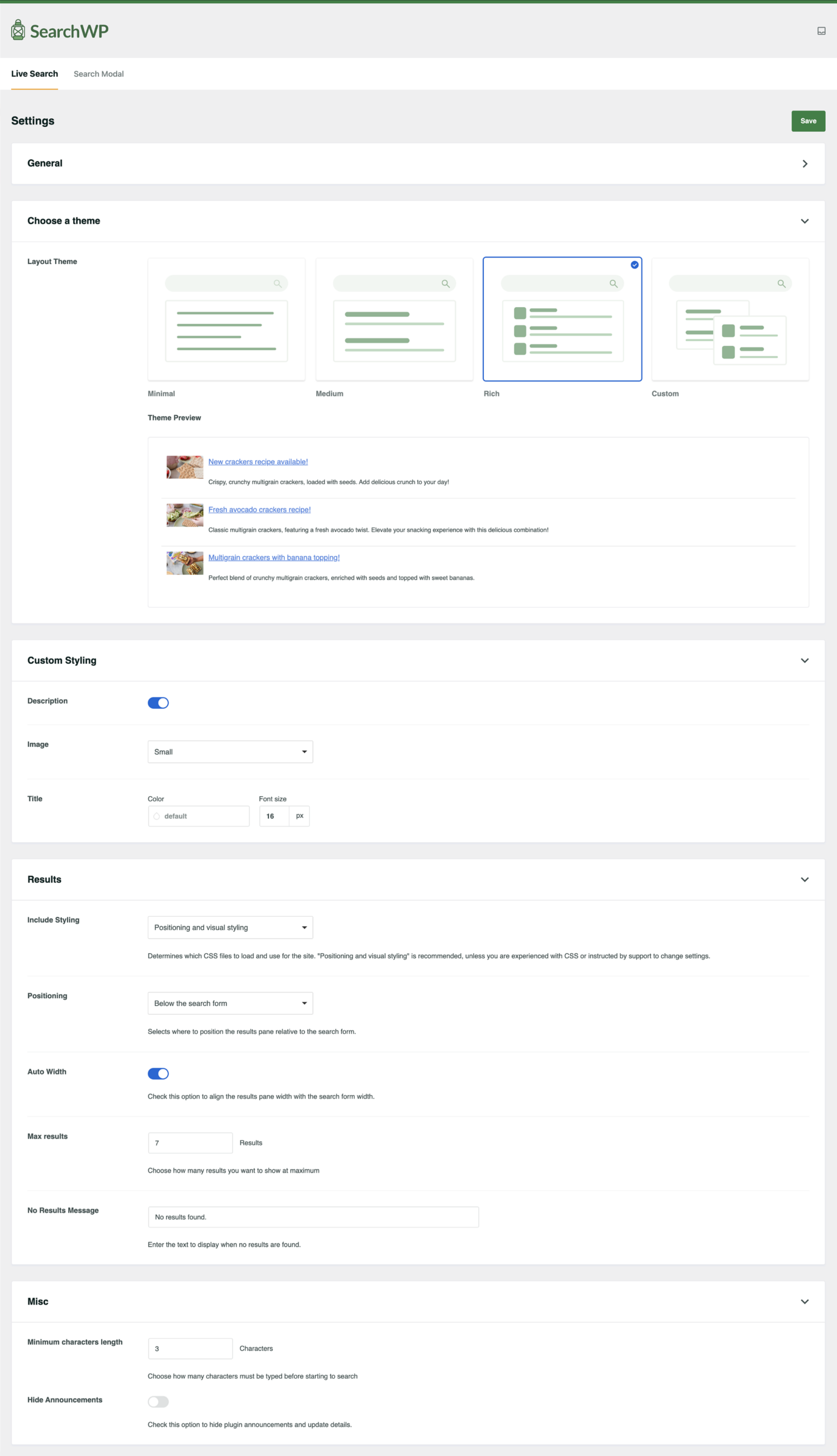
Live search is included in all paid plans. The implementation uses AJAX to query the SearchWP index as the user types and render a dropdown of results before any form submission. Results in the dropdown include the post title and an excerpt, and the list updates with each keystroke after a short delay.

The live search form is implemented as a Gutenberg block or as a shortcode. The modal form variant triggers from any click target you configure, which allows a site to keep a minimal navigation bar without a visible search input while still making search accessible via a keyboard shortcut or button click.
Voice search was added in version 4.5.8. When the live search form is active, a microphone button appears. Clicking it triggers the browser’s speech recognition API and pipes the spoken text into the search input. This is a browser-dependent feature (Chrome and Edge support the Web Speech API; Firefox does not) and works on sites served over HTTPS.
PDF and document indexing
SearchWP indexes PDF text content through an xpdf integration. When a PDF is uploaded to the WordPress media library, SearchWP reads the text content of the PDF (if the PDF has extractable text, as opposed to being a scanned image) and includes that content in the search index.
This means a search for a term that appears in a PDF document but nowhere in a post or page will surface that PDF attachment in the results. The result links to the PDF file directly. For organizations that publish annual reports, white papers, technical specifications, user manuals, or research documents, this capability converts a static file library into a fully searchable resource without any additional categorization overhead.
Office documents (Word, Excel) are also supported in the document indexing feature set. This feature works for PDFs with extractable text; scanned PDFs without OCR-processed text cannot be indexed.
WooCommerce and ecommerce search (Pro plan)
WooCommerce product search is gated to the Pro plan, which is $199 for the first year (renews at $399/year). According to SearchWP’s official documentation, the Pro plan indexes product data beyond what appears in post content: product SKU, price, attributes (color, size, material), variations, product reviews, and custom product fields.
This matters for stores where customers search by SKU rather than product name, or by a specific attribute like “medium blue denim” rather than a generic product category. The default WooCommerce search misses these queries entirely because it doesn’t index product metadata. SearchWP Pro’s WooCommerce engine captures them.
The WooCommerce integration also supports product visibility settings. Products marked as hidden or out-of-stock can be excluded from search results without any custom code. The algorithm can weight product titles, descriptions, SKUs, and attributes independently.
BigCommerce and Easy Digital Downloads are also supported at the Pro tier. The principle is the same: index the platform’s product data into SearchWP’s custom index and serve relevance-ranked results.
Search analytics
Search analytics (called Metrics in SearchWP’s interface) are available in the Pro plan. The analytics dashboard shows the most searched terms over a selected date range, search terms that returned zero results (revealing content gaps), click-through patterns (which results users actually clicked after searching), and searches per user and total results viewed per query.
The zero-result report is practically the most valuable single data point in the analytics dashboard. A list of queries that found nothing tells you exactly where your content is missing coverage that your audience is actively looking for. For content strategy, this is more actionable than most traffic data: users arrived, searched, found nothing, and left.
The Standard plan includes basic search tracking (query volume), but the fuller Metrics dashboard with click behavior and zero-result analysis requires Pro.
Integrations
SearchWP ships with 24+ integrations for the WordPress ecosystem. The plan tier determines which integrations are available.
Standard integrations include ACF (Advanced Custom Fields), bbPress, WP Job Manager, Gravity Forms, WPForms, xpdf (PDF indexing), and compatibility with popular themes including Flatsome.
Pro integrations add WooCommerce, BigCommerce, Easy Digital Downloads, GiveWP, WordPress Multisite, WPML, Polylang, Meta Box, PrivateContent, Co-Authors Plus, WP Document Revisions, DirectoryPress, BetterDocs, HeroThemes knowledge base, BasePress, FacetWP, AJAX Load More, and WooCommerce Product Table.
Version 4.6.0 added WPFilters integration with Results Templates, allowing faceted filtering to coexist with SearchWP’s relevance ranking without breaking the result order. This integration is part of the All Access Bundle.
Pricing and license value
SearchWP is available exclusively from searchwp.com. All prices are annual with no monthly billing option. A 14-day money-back guarantee applies to all plans. Pricing verified September 2026.
SearchWP labels all current prices as introductory. The pricing page states explicitly: “Special introductory pricing, all renewals are at full price.” Budget for the renewal rate when comparing long-term costs.
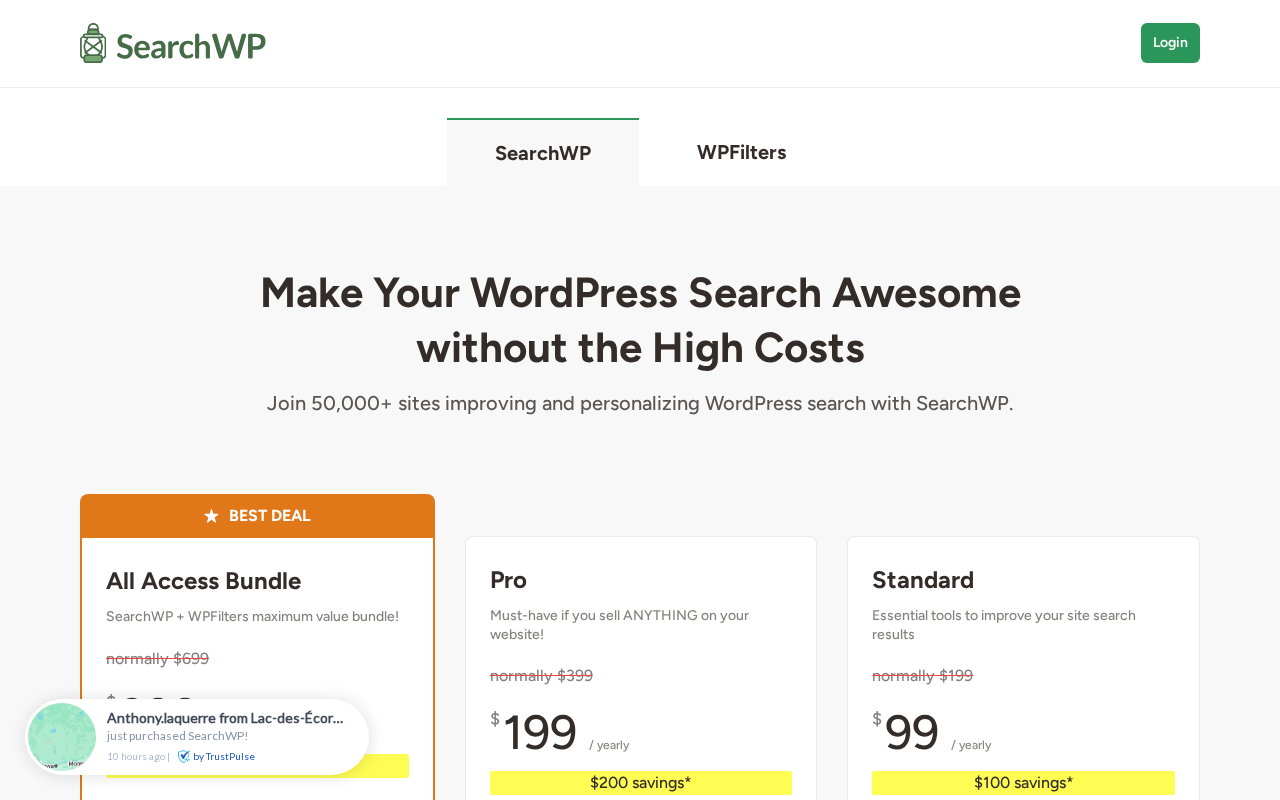
Standard: $99 first year, $199/year at renewal. 1 site license. Unlimited search queries and engines. Embeddable forms, PDF and Office document indexing, WordPress media library search, custom post types, custom fields, taxonomies, multiple search engines, keyword stemming, algorithm customization, priority results, live AJAX search, modal forms, exclusions, boolean search. Integrations: ACF, bbPress, WP Job Manager, Gravity Forms, xpdf, popular themes. Standard support.
Pro: $199 first year, $399/year at renewal. Up to 3 sites. All Standard features. Additional: related content, cross-site multisite search, ecommerce product data (WooCommerce, BigCommerce, GiveWP, EDD), custom result ordering, conditional redirects, Metrics and statistics, visitor insights. Additional integrations: WordPress Multisite, WPML, Polylang, Meta Box, PrivateContent, Co-Authors Plus, WP Document Revisions, DirectoryPress, BetterDocs. Priority support.
All Access Bundle: $399 first year, $699/year at renewal. Up to 100 sites. SearchWP Pro plus WPFilters. WPFilters adds pre-built filter elements, hierarchies, shareable filtered URLs, a Gutenberg block, custom content support, and shortcode output. Premium support.
Against Relevanssi: Relevanssi Premium costs approximately $119/year for a single site. Relevanssi has a free version (Relevanssi Lite) that replaces WordPress’s built-in search scoring with MySQL full-text search at no cost. For sites that only need relevance improvement on standard post content, Relevanssi Lite eliminates the need to spend anything. Note that at renewal, SearchWP Standard is $199/year and Pro is $399/year, making Relevanssi Premium at $119/year competitive on price for standard-content sites. SearchWP’s advantage is the visual algorithm builder, the xpdf PDF integration, WooCommerce SKU-level indexing at the Pro tier, and the curated integration ecosystem.
Against ElasticPress: ElasticPress connects WordPress to Elasticsearch and is free on WordPress.org, but requires a separate Elasticsearch or Elasticpress.io hosting account with significantly higher infrastructure complexity. SearchWP’s managed WordPress-native approach has much lower setup overhead.
Pros and cons
Pros
- Visual algorithm builder is the best no-code relevance configuration interface in the WordPress search category
- Multiple independent search engines per installation with different algorithms and forms
- PDF and document indexing via xpdf; makes a file library fully searchable without manual tagging
- WooCommerce product-level indexing at Pro tier: SKUs, attributes, variations, and review text (per official docs)
- 24+ integrations covering every major WordPress content and ecommerce plugin
- Live AJAX search and modal forms included in all plans
- Voice search added in v4.5.8 (browser-dependent; Chrome and Edge)
- Zero-result analytics in Pro reveals content gaps for editorial teams
- Backed by Awesome Motive (WPBeginner, WPForms, MonsterInsights)
- 14-day money-back guarantee on all plans
- Boolean search support for power users
- Respects WordPress content visibility settings natively
Cons
- No free version of the core plugin; 14-day money-back is the only evaluation window
- First-year intro prices double at renewal: $99 to $199/year (Standard), $199 to $399/year (Pro), $399 to $699/year (All Access Bundle)
- WooCommerce integration requires Pro; first-year cost $199 (renews at $399/year)
- Full Metrics analytics (zero-result report, click behavior) requires Pro
- Faceted filtering (WPFilters) only in the All Access Bundle at $399 first year ($699/year renewal)
- Annual billing only; no month-to-month option
- Synonym management is manual; no automated synonym suggestion
- Initial indexing can be slow on large sites
- No external search integration (Elasticsearch, Algolia)
- 50,000 paid users is smaller than free-tier alternatives; fewer community tutorials
Alternatives to SearchWP
- Relevanssi. The most significant free alternative. Relevanssi Lite on WordPress.org replaces WordPress’s fixed built-in search scoring with MySQL full-text relevance at zero cost. Relevanssi Premium adds phrase searching, synonym support, user searches logging, and pinned results at approximately $119/year. At renewal, SearchWP Standard is $199/year and Pro is $399/year, making Relevanssi Premium competitive on price for standard-content sites. The correct choice over SearchWP if you only need relevance improvement on standard post content and are not dealing with custom fields, WooCommerce product attributes, or PDF libraries.
- ElasticPress. A free WordPress plugin that connects to Elasticsearch (self-hosted or Elasticpress.io hosted). Significantly more powerful for very high-traffic sites or complex aggregation queries, but requires infrastructure knowledge and an Elasticsearch environment outside WordPress. Not a beginner option.
- FacetWP. A faceted filtering layer that sits on top of any search or query. Where SearchWP provides relevance-ranked results, FacetWP adds the filter sidebar. The two are designed to work together and the SearchWP All Access Bundle includes WPFilters, the SearchWP-native faceted filtering companion.
- Ivory Search. A free-first WordPress search plugin with a paid premium tier. Lacks the visual algorithm builder and deep WooCommerce integration of SearchWP, but the free version is more capable than the WordPress default for sites with basic needs.
- Jetpack Search. Includes a hosted search layer powered by Elasticsearch as part of the Jetpack plugin suite. Convenient if you are already a Jetpack user, but requires a Jetpack subscription and all data goes through Automattic’s servers.
Final verdict
SearchWP earns its price for the use cases it is explicitly built for. A WooCommerce store where customers search by SKU and attribute, a documentation site where users expect to find the right article on the first try, a membership site with a content library spread across custom post types and PDF attachments: these are the environments where SearchWP’s algorithm builder, PDF integration, and WooCommerce product indexing translate into measurably better search outcomes and, for commercial sites, better conversion.
The Awesome Motive acquisition has brought visible improvements. Version 4.6.1 reflects ongoing development on both core stability (multisite indexing performance) and usability (search form settings reorganization). Voice search in 4.5.8 is a differentiating feature that no direct competitor currently ships in a comparable WordPress-native package.
The honest limitations apply in two places. At the bottom of the market: a personal blog or small business site with standard content, no WooCommerce, no custom fields, and no PDFs will find Relevanssi Lite resolves the core relevance problem for free, while SearchWP costs $199/year at renewal. On the pricing structure: the first-year intro rate of $99/$199/$399 doubles to $199/$399/$699 at renewal; any multi-year budget should use the renewal rate, not the intro price.
For the clear SearchWP use case, no competing plugin matches the combination of visual algorithm configuration, 24+ integrations, and a development team with the resources of Awesome Motive behind it. If you manage a content-rich site and search is a conversion bottleneck, SearchWP is the most capable WordPress-native answer currently available.