


AT A GLANCE
Audited on: ivorysearch.com feature pages, pricing page, documentation, WordPress.org listing (version 5.5.18, last updated August 2026, tested up to WordPress 7.1). Pricing verified at ivorysearch.com on September 11, 2026.
Free tier: unlimited search forms, AJAX live search, multiple form styles (default, dropdown, sliding, full-width, popup), search posts/pages/categories/taxonomies/custom fields/WooCommerce products/attachments/comments, fuzzy matching, synonyms, stopwords, search analytics, bbPress integration, WPML and Polylang support, TablePress shortcode indexing, content exclusion controls, menu search integration, admin test mode.
Paid tiers: Pro at $19.99/year per site, Pro Plus at $49.99/year per site. Pro adds result ordering, author-specific searching, post-status filtering, and custom field exclusion. Pro Plus adds WooCommerce SKU search, product variation search, media file type filtering, out-of-stock product exclusion, and keyword stemming. Both plans cover one site each.
Bottom line: the most accessible entry point in the WordPress search plugin category. The free version solves the problems most WordPress site owners actually face: no live search, no custom post type inclusion, no WooCommerce product search, and no control over what appears in results. AJAX live search is included free, which sets it apart from competitors that charge for it or require a companion plugin. Premium tiers are priced for single-site use, which keeps costs low for site owners and raises the per-site cost for agencies managing many installations.
QUICK VERDICT
WordPress’s built-in search bar does one thing: it runs a LIKE query against post titles and body content. It does not search custom fields, WooCommerce product data, attachments, or taxonomy term descriptions. It has no live search. It cannot be styled or controlled without code. And it adds a search box to the navigation menu only through manual theme work.
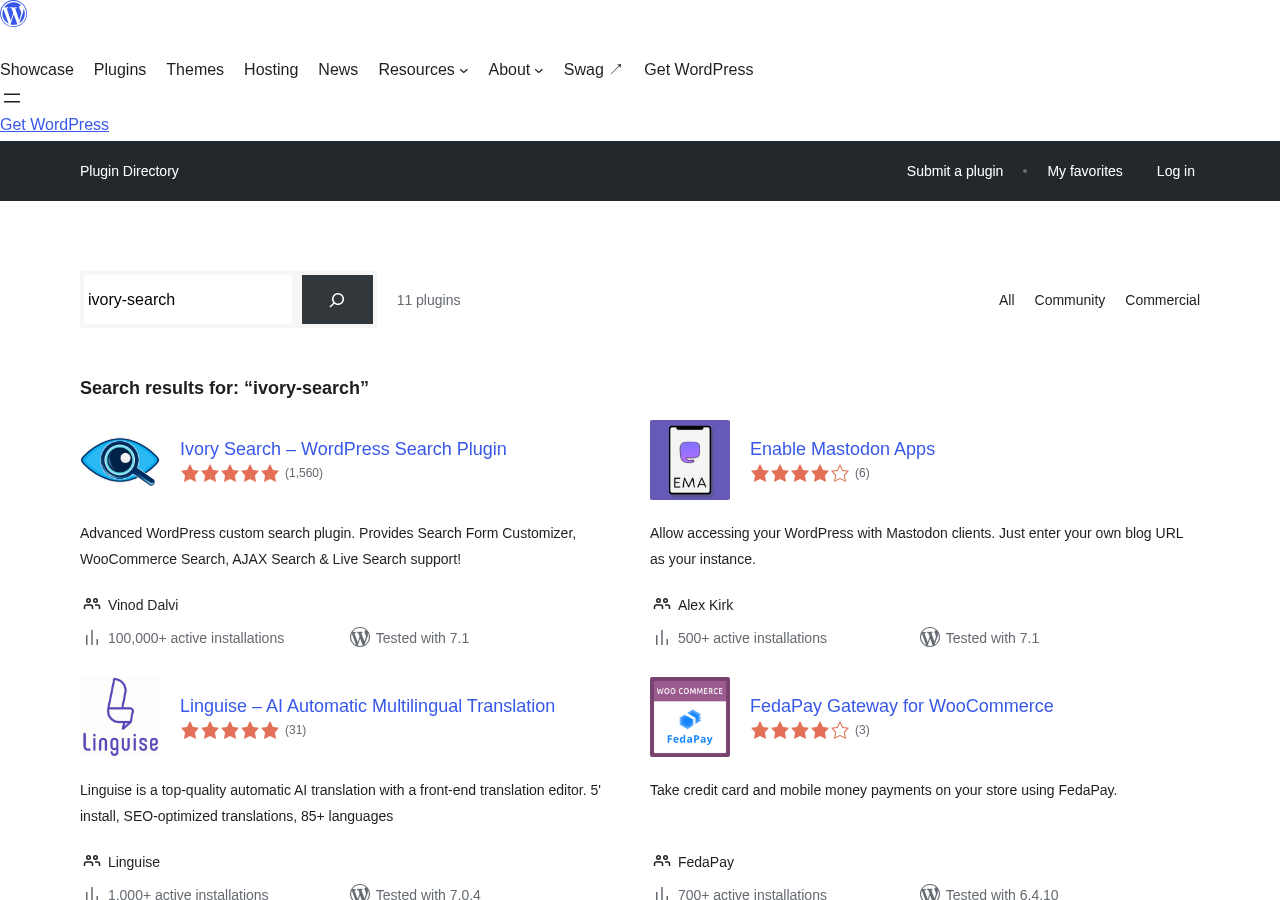
Ivory Search changes all of that without requiring a paid license. You install it, choose a form style, configure what content to include, and enable AJAX. The documented setup path is short, with no external account, API key, or index-building step. This ease of setup, combined with a genuinely capable free tier, is the reason the plugin has accumulated 100,000+ installs and a 98/100 rating on WordPress.org from 1,560 reviews.
The paid tiers exist for specific advanced needs: WooCommerce SKU search, keyword stemming, and media file filtering at the Pro Plus level. At $19.99 or $49.99 per site per year, these are low-stakes purchases for site owners who need those specific capabilities.
- Best for: WordPress blogs, business sites, documentation sites, and WooCommerce stores that want AJAX live search and custom search form styles without a paid plan. Sites needing a quick, well-supported search improvement with minimal configuration friction.
- Best plan for most sites: Ivory Search free. AJAX live search, unlimited forms, multiple form styles, WooCommerce product search, fuzzy matching, synonyms, and search analytics are all free. Most WordPress sites will not need a paid upgrade.
- Best plan for WooCommerce stores needing SKU search: Pro Plus at $49.99/year per site. Adds WooCommerce SKU and variation search, out-of-stock exclusion, and keyword stemming.
- Standout: AJAX live search included in the free tier; five distinct search form styles including dropdown and popup; simple per-form configuration; 100,000+ installs with a 94.9% five-star rate; developer Vinod Dalvi provides active support.
- Watch out for: search form styling depends heavily on your active theme; premium plans are per-site only, making multi-site deployments expensive; no TF-IDF relevance ranking; 30-day money-back is conditional, not unconditional; search analytics details are limited compared to dedicated analytics tools.
WHAT IVORY SEARCH IS
Ivory Search is a WordPress plugin that replaces and extends the default WordPress search system. It started life as “Add Search To Menu,” a plugin focused on placing a search form inside the navigation menu. Over time it grew into a full search configuration tool and was rebranded as Ivory Search to reflect its broader scope.
The plugin’s core function is straightforward: you create search forms, configure what each form searches, choose a visual style, and place the forms anywhere on your site. Each form can be configured independently. A footer form might search only blog posts; a header form might search posts, WooCommerce products, and custom post types simultaneously. The per-form isolation makes it practical for sites that run different content types for different audiences.
Vinod Dalvi, the developer, has maintained the plugin actively since its original release. As of August 2026, version 5.5.18 is the current release. The plugin is tested up to WordPress 7.1 and requires WordPress 3.9 minimum. PHP 5.2.4 is the minimum server requirement, which means it works on virtually any WordPress hosting setup.
On WordPress.org, the plugin has 100,000+ active installs. The rating of 98/100 from 1,560 reviews with 1,480 five-star ratings (94.9%) is one of the stronger records in the search plugin category. Support response times visible in the WordPress.org support forum are notably fast for a free plugin maintained by a single developer.
The plugin’s history as “Add Search To Menu” is worth knowing because the WordPress.org slug remains add-search-to-menu. If you encounter that name in a plugin list or search result, it is the same plugin.
WHO IVORY SEARCH IS BEST FOR
Strong fit:
- WordPress blogs and content sites that want live search results as visitors type, without any paid license. Ivory Search includes AJAX live search in the free tier. Relevanssi, the main free competitor for relevance improvement, requires a separate companion plugin for live autocomplete.
- Small business sites with straightforward content. If your goal is to replace the default WordPress search bar with one that searches custom post types, includes WooCommerce products, and displays results live, Ivory Search does this out of the box.
- WooCommerce stores with moderate catalogs. The free version searches WooCommerce product titles, descriptions, and categories. Pro Plus adds SKU and variation search and out-of-stock exclusion for stores that need those capabilities.
- Sites that need multiple distinct search configurations. You can create one search form for blog posts, another for products, another for documentation, and deploy each independently. This use case is free and unlimited.
- Sites where search form placement in the navigation menu matters. Ivory Search was built around this use case and it handles navigation menu search forms more directly than most alternatives.
- Sites using bbPress, Polylang, WPML, or Weglot. Compatibility is tested and documented.
- Site owners who want minimal setup friction. The setup path is short, with no external account, API key, or index-building step required.
- Budget-conscious site owners. The free tier is capable enough for most WordPress sites, and the paid tiers are the most affordable in the category at $19.99 and $49.99 per site per year.
Weak fit:
- Sites where relevance ranking quality is the primary concern. Ivory Search uses WordPress’s standard search query engine. Result ordering is controlled by publication date and basic relevance unless you purchase Pro for custom ordering. Relevanssi offers TF-IDF relevance scoring in its free tier, which produces meaningfully better ranking for content-heavy sites.
- Agencies managing multiple client sites who need per-feature premium capabilities. Ivory Search’s paid plans are per-site with no multi-site or agency tier. Five sites on Pro Plus would cost $249.95 per year. Ajax Search Pro’s lifetime agency license at €799 for 25 sites competes favorably over a multi-year horizon.
- Sites needing deep WooCommerce search with visual autocomplete, product thumbnails in the dropdown, and attribute-based filtering. Dedicated WooCommerce search plugins like FiboSearch handle these use cases more completely.
- Very large sites with 50,000+ posts where index performance matters. The inverted index-based engine Ivory Search uses is generally faster than WordPress default LIKE queries, but it is not an external index like Elasticsearch. Sites at serious scale should evaluate ElasticPress.
- Sites that need a visual relevance weight editor or advanced synonym expansion. SearchWP and Relevanssi Premium offer more configurability for relevance logic.
SETTING UP IVORY SEARCH
Ivory Search installs from the WordPress plugin directory in the standard way. Navigate to Plugins, Add New, search for “Ivory Search,” install the plugin by Vinod Dalvi, and activate it.
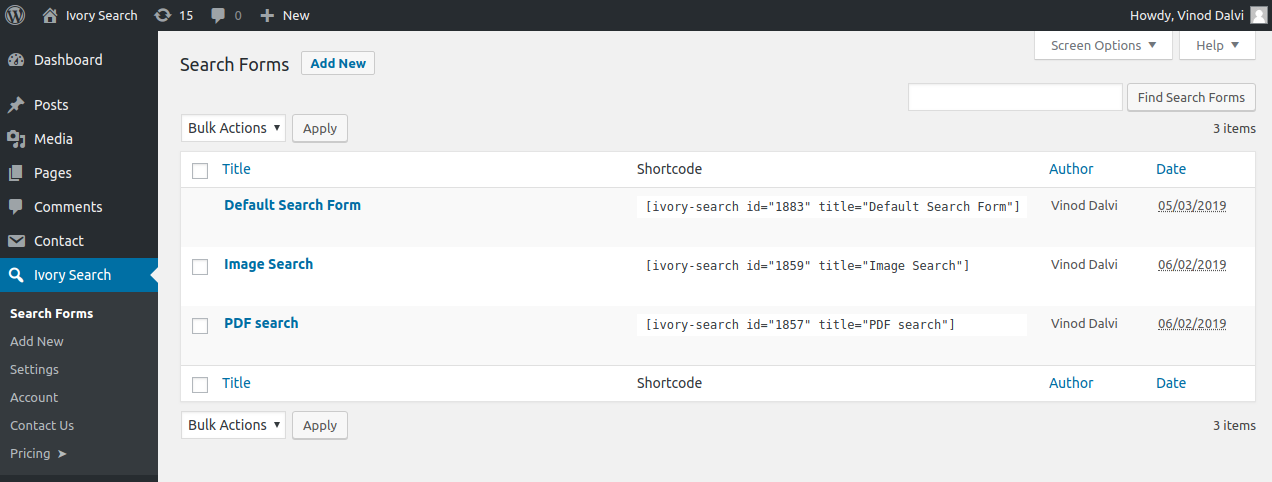
After activation, the plugin adds an Ivory Search item to the WordPress admin sidebar. The first screen shows your Search Forms list. By default, the plugin creates one search form called “Default Search Form” that replaces the standard WordPress search. This form is already active; no configuration step is required for a basic improvement.
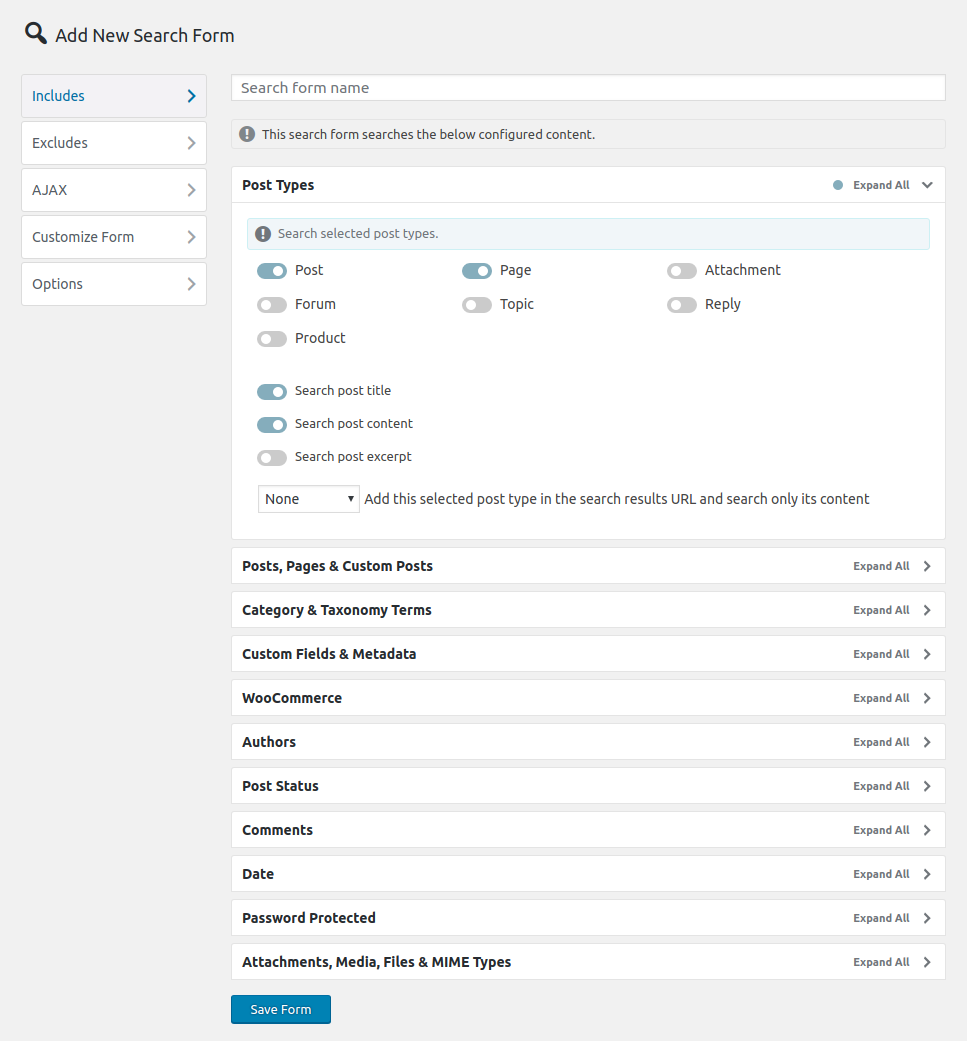
Clicking “Edit” on any form opens the form configuration panel. This is where the search scope is defined. You choose which post types to search (posts, pages, WooCommerce products, attachments, custom post types, bbPress forums), which fields to search within each type (title, content, excerpt, custom fields, taxonomy terms), and what to exclude from results. Each option is a checkbox or dropdown. No code is required.
The AJAX search toggle is on the same form configuration screen. Enabling it converts the search form to live search behavior: results appear beneath the input as the visitor types, without a page reload. The AJAX results panel shows post title and optional excerpt. No additional plugin or account is needed.
Placing a search form is handled through the Display tab of each form configuration. Options include: widget area, shortcode, navigation menu, page header, page footer, and custom placement using PHP hooks. The shortcode option is the most flexible: paste [ivory-search id="N" title="Form Name"] into any page, post, or block editor field.
Based on the documented steps, the path from install to active AJAX search is short. The plugin adds one admin menu item and one ready-to-use default form on activation; enabling AJAX search and placing the form are single-step actions, each requiring one toggle or shortcode paste.
SEARCH FORM STYLES
One of Ivory Search’s most visible features is its selection of five search form styles. Most WordPress search plugins ship with one form layout and expect the theme to style it. Ivory Search ships with five distinct form types:
- Default. A standard search input with submit button, styled by the active theme.
- Dropdown. The search icon sits in the navigation bar. Clicking it opens a dropdown input field. Useful for sites where a persistent visible search bar would crowd the header layout.
- Sliding. The search bar slides in horizontally when triggered. Keeps the navigation bar clean while making search quickly accessible.
- Full Width. A search bar that spans the full width of the page or container, typically used in hero sections or dedicated search landing pages.
- Popup. A centered overlay search panel that appears above the page content when triggered by an icon or button click. Common on portfolio and magazine layouts.
The Search Form Customizer lets you change colors, placeholder text, button text, and icon styles for each form without writing CSS. For deeper styling, a custom CSS field is available per form.
Form style selection is done per-form, not site-wide. This means you can run a dropdown form in the header and a full-width form on a dedicated search page simultaneously.
The form rendering depends on the active WordPress theme for some aspects of styling. The plugin’s documentation notes this plainly and offers free support if a theme does not style the search form correctly out of the box.
AJAX LIVE SEARCH
Ivory Search includes AJAX live search in the free tier. This is a notable distinction in the search plugin category. Relevanssi handles search results pages but requires its companion plugin for live autocomplete. Ajax Search Pro offers AJAX search in the paid version only. Ivory Search makes it free.
Enabling AJAX search on any form converts it to live search behavior. Results appear in a dropdown panel beneath the input as the visitor types, updating after a configurable keystroke delay. The visitor clicks a result to navigate to it, or submits the form to view the full results page.
The AJAX results panel shows the post title, an optional thumbnail, and an optional excerpt. The number of results displayed in the live dropdown is configurable. Content exclusion rules you set at the form level apply to AJAX results as well: if you exclude a post type from the form, it also does not appear in live results.
The AJAX conversion works on the default WordPress search form too, without creating a new search form. This makes it possible to add live search to any theme’s existing search form by enabling one toggle, without replacing the form markup or adjusting placement.
Result relevance in live AJAX mode depends on WordPress’s built-in query engine in the free tier. The most recently published matching posts tend to surface first unless you purchase Pro for custom result ordering.
SEARCH SCOPE CONFIGURATION
Ivory Search’s per-form configuration is where most of its practical value sits. For each search form, you define exactly what it searches. The options are more granular than most search plugins at this price point.
Post types: Any registered post type can be included or excluded per form. Posts, pages, WooCommerce products, media attachments, custom post types, and bbPress forums can each be toggled individually.
Search fields: Within each post type, you choose which fields the search queries: title, content, excerpt, author display name. Taxonomy term titles and descriptions can be searched independently of their posts.
Custom fields: Custom post meta fields (including ACF fields) can be added to the search index per form. This is included in the free tier for general custom field search. Excluding posts by specific custom field values is a Pro feature.
Date control: You can restrict search results to specific date ranges, or exclude content created before or after a defined date. This is useful for sites where old content should be suppressed from results without deleting it.
Comment search: The plugin can search approved comment content and include posts with matching comments in results.
Password protection: Separate controls for whether to include password-protected posts, posts without passwords, or both.
Content containing any or all keywords: You can configure whether a multi-word search returns posts that match any searched word or only posts that match all words. This affects how broad or narrow results are for multi-word queries.
The exclusion controls mirror the inclusion controls: any post type, taxonomy term, specific post by ID, or content category can be excluded from a form’s results. Excluding out-of-stock WooCommerce products and excluding posts by specific custom field values are Pro-tier features.
WOOCOMMERCE SEARCH
WooCommerce product search is included in the free tier. Ivory Search searches WooCommerce products by product title, description, short description, and product category and tag taxonomy terms. Products appear in search results alongside other post types if you configure the form to include them.
The free tier covers the majority of WooCommerce search use cases. Visitors searching by product name, description keyword, or category will find matching products.
Pro Plus extends WooCommerce search with three additional capabilities:
- SKU search. Products can be found by their SKU identifier. This matters for stores where customers know the product code and type it directly into the search bar.
- Product variation search. Specific variations of a variable product can appear in results based on variation-level data.
- Out-of-stock exclusion. Products with no available inventory can be hidden from search results automatically. Useful for stores where showing out-of-stock items degrades the shopping experience.
What Ivory Search does not include at any tier is visual autocomplete with product thumbnails, price display in the live results dropdown, or attribute-based filtering (color, size, material). For stores that need a polished product search dropdown with images and prices, dedicated WooCommerce search plugins like FiboSearch serve that use case more completely. For stores where the main issue is that product search returns irrelevant or incomplete results, Ivory Search’s free or Pro Plus tier covers the gap.
FUZZY MATCHING, SYNONYMS, AND STEMMING
Three features in Ivory Search improve search accuracy beyond exact keyword matching.
Fuzzy matching is included free. It searches for words that begin or end with the search term, not just exact whole-word matches. A search for “book” returns results containing “booking,” “bookings,” and “bookstore.” This handles the most common practical case: visitors who type part of a word expecting results.
Synonyms are configurable from the plugin settings. You define pairs or groups of equivalent terms so a search for “appointment” also finds “booking” and “reservation.” Synonym configuration is free and requires no code. This is straightforward to use for sites where users describe content differently than authors do.
Stopwords are words excluded from the search index. Common words that appear everywhere (and, the, is) inflate query processing without helping relevance. Ivory Search ships with a default stopword list and lets you add to it from the settings panel.
Keyword stemming is a Pro Plus feature. It searches the base word of a keyword: a search for “searching” also finds “search” and “searched.” Stemming goes further than fuzzy matching by reducing words to their root form algorithmically. Most sites do not need stemming on top of fuzzy matching, but content-heavy documentation sites and knowledge bases benefit from it.
SEARCH ANALYTICS
Ivory Search includes built-in search analytics. When enabled, the plugin logs visitor search queries: the terms used, the number of results returned, and the time of the search.
The analytics dashboard in the plugin’s admin panel shows recent search activity and popular queries. This gives site owners a direct read on what visitors are looking for without setting up a separate analytics tool or configuring custom events in Google Analytics.
The most actionable output of this feature is searches that returned zero results. A list of queries that came back empty shows exactly what your audience is looking for that your content does not currently address. This is the same data that Relevanssi provides free in its query logging panel, and it is genuinely useful for content planning.
Search analytics in Ivory Search is functional for the core use case. It does not provide session-level attribution, click-through tracking, or trend analysis over time with the depth of a dedicated search analytics tool. For sites that need detailed search behavior analysis, pairing Ivory Search with Google Analytics custom events or a dedicated analytics plugin provides more depth.
INTEGRATIONS
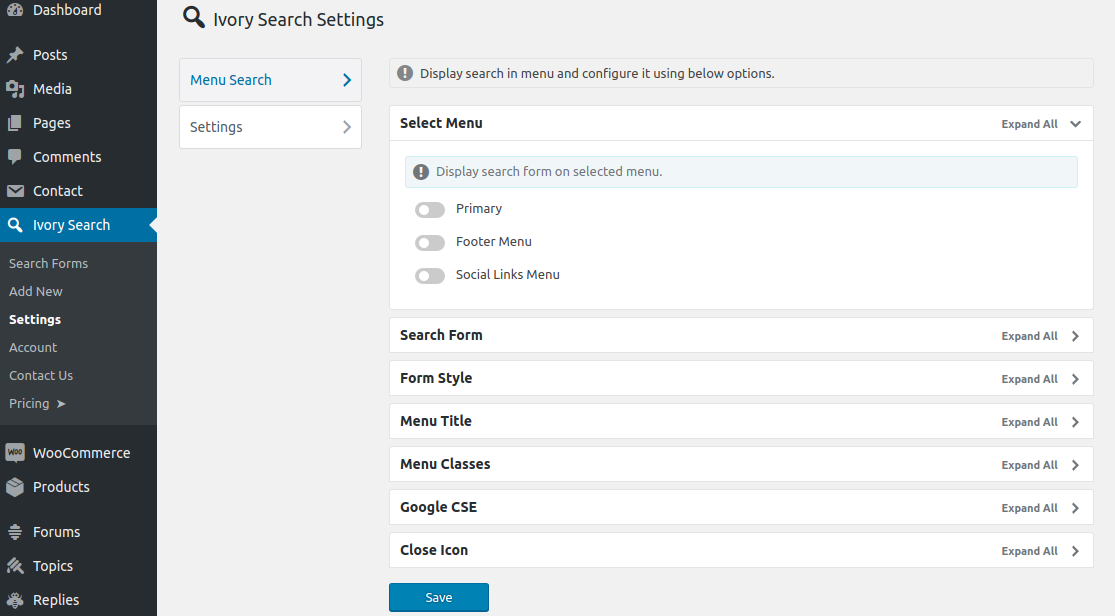
Ivory Search integrates with several widely-used WordPress plugins:
- WooCommerce: product search in the free tier, with SKU, variation, and out-of-stock features in Pro Plus.
- bbPress: forum and topic content is searchable through standard Ivory Search form configuration.
- WPML and Polylang: multilingual search is supported, with results filtered to the current site language.
- Weglot: multilingual search compatibility for sites using Weglot for translation.
- TablePress: table content created with TablePress shortcodes is indexed and searchable.
The Weglot integration is a differentiator in the category. Most WordPress search plugins support WPML and Polylang but not Weglot. Ivory Search explicitly tests against it.
No Elementor, Divi, or Gutenberg block widget ships with the plugin. Placement is handled through shortcode, widget area, or menu. Developers who want a block editor integration need to embed the shortcode in a shortcode block.
PRICING AND LICENSE VALUE
Pricing verified at ivorysearch.com on September 11, 2026.
Starter (Free): Unlimited sites. Unlimited search forms. AJAX live search. All five form styles. Search scope configuration, exclusion controls, fuzzy matching, synonyms, stopwords, search analytics, WooCommerce product search (title/description/categories), bbPress, multilingual support. Lifetime updates.
Pro ($19.99/year, 1 site): All free features plus: result ordering (by date, relevance, title, ID, author, type, comment count, menu order, or random), author-specific search, post status filtering, and excluding posts by custom field values. Includes 1 year of priority support.
Pro Plus ($49.99/year, 1 site): All Pro features plus: WooCommerce SKU search, WooCommerce product variation search, out-of-stock product exclusion, media file type filtering, and keyword stemming. Includes 1 year of priority support.
Money-back guarantee: Conditional 30-day guarantee. A refund is considered if the plugin is unusable on your site due to an issue that the support team cannot resolve. This is not an unconditional 30-day return window. If you want to evaluate before committing, install the free version on your site first.
License scope: Each paid plan covers one site. There are no multi-site, agency, or unlimited-site plans. Agencies managing multiple client sites pay per site.
Value comparison:
- Against Relevanssi: Relevanssi’s free tier offers superior relevance ranking with TF-IDF scoring, but AJAX live search requires the separate companion plugin. Ivory Search’s free tier includes AJAX live search from the start. For sites where live search UX matters more than relevance algorithm depth, Ivory Search is the faster path.
- Against SearchWP: SearchWP Standard is $99/year for one site. Pro is $199/year for up to three sites. Both prices are significantly higher than Ivory Search Pro Plus at $49.99/year. If the advanced relevance weighting and WooCommerce capabilities in SearchWP Pro justify the premium for a given site, they are distinct products. For budget-constrained sites, Ivory Search Pro Plus covers the essential WooCommerce search capabilities at less than half the cost of SearchWP Standard.
- Against Ajax Search Pro: Ajax Search Pro starts at €39/year annual (or €99 lifetime) with a far richer filter system, four result layouts, and a visual theme editor. For sites that need advanced faceted filtering or precise visual customization, Ajax Search Pro covers more ground. For sites that need basic working AJAX search and form configuration, Ivory Search free does the job without any purchase.
PROS AND CONS
Pros
- AJAX live search included in the free tier. Most comparable plugins charge for this or require a companion plugin.
- Five distinct search form styles (default, dropdown, sliding, full-width, popup) with a visual customizer. Form variety without any paid upgrade.
- Unlimited search forms with per-form independent configuration. Route different visitor flows to different search scopes.
- Most affordable paid tiers in the category: $19.99 and $49.99 per site per year. Pro Plus is less than half the annual cost of SearchWP Standard for comparable WooCommerce features.
- 100,000+ active installs and 98/100 rating from 1,560 reviews. 94.9% five-star rate indicates consistent real-world satisfaction.
- Active maintenance by a responsive single developer. Recent changelogs show WooCommerce compatibility fixes and regular security patches.
- Inverted index-based search engine for faster query responses than MySQL LIKE queries on large content tables.
- Fuzzy matching, synonyms, and stopwords in the free tier.
- Search analytics with query logging and zero-results tracking included free.
- bbPress, WPML, Polylang, Weglot, and TablePress integrations included.
- Navigation menu search form support is direct and well-implemented.
- Low setup friction: AJAX live search is operational within minutes of installation.
Cons
- No TF-IDF relevance ranking. Result ordering in the free tier follows WordPress’s default algorithm. Relevanssi’s free tier provides significantly better relevance for content-heavy sites.
- Paid plans are per-site with no multi-site or agency tier. Five client sites on Pro Plus cost $249.95 per year.
- Search form styling depends on the active theme for some aspects. A theme with minimal search form CSS may require custom styling work.
- 30-day money-back guarantee is conditional, not a simple return policy. The refund applies only if the plugin is unusable and the team cannot fix the issue.
- No visual autocomplete with product thumbnails, price display, or attribute-based filtering for WooCommerce.
- No block editor widget. Placement uses shortcodes, widget areas, or PHP hooks.
- AJAX results display is functional but not visually rich. No layout options comparable to Ajax Search Pro’s four result templates.
- Keyword stemming is behind the Pro Plus paywall.
- No REST API or WP-CLI integration for developer-level automation.
ALTERNATIVES TO IVORY SEARCH
Relevanssi. The best free alternative when relevance ranking quality is the priority. Relevanssi free replaces WordPress’s search algorithm with TF-IDF scoring, adds partial word matching, phrase queries, synonym support, custom field indexing, and query logging with zero-results tracking. AJAX live search requires the separate Relevanssi Live Ajax Search companion plugin. For sites where the problem is that search results feel irrelevant or miss content, Relevanssi free addresses the root cause more effectively. For sites where the problem is that there is no live search and no control over form placement, Ivory Search is the faster fix.
SearchWP. The most configurable paid WordPress search replacement. SearchWP’s visual algorithm builder assigns numeric relevance weights to individual indexed attributes. WooCommerce SKU, attribute, and product variation indexing at the Pro tier. Custom post type searching, PDF indexing, and detailed search metrics. SearchWP Standard is $99/year for one site; Pro is $199/year for up to three sites. The relevance algorithm depth and extension marketplace justify the higher price for content-heavy sites. For sites where Ivory Search Pro Plus at $49.99 covers the needed WooCommerce features, SearchWP’s price premium is harder to justify.
Ajax Search Pro. The most feature-complete paid live search and filter plugin. Four result layouts, 400+ configuration options, visual theme editor, faceted filtering with range sliders and attribute checkboxes, PDF and document indexing, and multisite cross-blog search. Ajax Search Pro starts at €39/year or €99 lifetime for one site. For WooCommerce stores needing visual autocomplete with product thumbnails, for agencies needing lifetime multi-site licenses, and for sites needing advanced filter UI, Ajax Search Pro covers substantially more than Ivory Search. For sites that need basic working AJAX search without that complexity, Ivory Search free is the lower-friction choice.
FiboSearch. A live search plugin focused specifically on WooCommerce, with product thumbnails in the autocomplete dropdown, price display, attribute-based filtering, and detailed search analytics. Moved to subscription-only pricing in April 2026. For WooCommerce stores where the search experience in the live results dropdown matters most, FiboSearch is more focused on that specific outcome than Ivory Search.
ElasticPress. A WordPress plugin connecting to Elasticsearch, either self-hosted or via the ElasticPress.io managed service. Correct for very large WordPress sites where database-backed search has performance ceilings. Ivory Search is appropriate for the vast majority of WordPress sites; ElasticPress is for enterprise-scale deployments with tens of thousands of posts or products and high concurrent search traffic.
FINAL VERDICT
Ivory Search earns its 100,000+ install count through a combination that is rare in the WordPress plugin category: a genuinely capable free tier and minimal setup friction. The documented setup path is short: install, activate, enable AJAX on the default form, and the theme’s existing search bar becomes a live search. No account, no API key, no index-building step.
For most WordPress site owners, the free version is the complete answer. AJAX live search, five form styles, multiple search scope controls, fuzzy matching, synonyms, and search analytics are all free. The per-form configuration system handles the most common setup cases, including WooCommerce products alongside blog posts, excluding specific categories from results, and placing different forms in different locations on the same site.
The place where Ivory Search shows its limitations is relevance ranking. The plugin does not add TF-IDF scoring or a relevance algorithm on top of WordPress’s default search. On a site with a large content library where the same keywords appear across many posts, the results a visitor sees will reflect publication date more than topical relevance. For sites where this matters, Relevanssi’s free tier addresses the ranking problem directly, though it requires a separate plugin for AJAX live search.
The paid tiers are fairly priced for what they add. Pro at $19.99 per site per year adds result ordering, which partly compensates for the absence of TF-IDF ranking by letting you control sort order explicitly. Pro Plus at $49.99 adds the WooCommerce capabilities that matter most for e-commerce: SKU search, variation search, and out-of-stock exclusion. Both tiers are the most affordable in the search plugin category for comparable features.
The per-site licensing is the main constraint for agencies and developers managing multiple client sites. There is no multi-site or agency plan. If you maintain five or more WordPress sites, evaluate Ajax Search Pro’s lifetime plans or Relevanssi’s unlimited-site Premium license as alternatives.
For individual site owners, small business sites, blogs, and WooCommerce stores where setup speed and cost matter, Ivory Search free is the right starting point. Install it, enable AJAX search, and you have a working improvement over WordPress default search at no cost.