

Picking a WordPress contact form plugin in 2026 is a strange exercise. The category looks like commodity software on the surface (everyone ships a drag-and-drop builder, conditional logic, a Stripe field, and a Zapier integration), and then the bill shows up at renewal and you find out that “WordPress form builder” was code for a $300-a-year subscription with a five-site cap. Fluent Forms is the plugin that has spent the last few years quietly arguing that the right floor for that bill is closer to $63 and that the right ceiling, even on the Unlimited tier, is closer to $239. That is the argument this Fluent Forms review needs to test in 2026: not whether the plugin builds a working contact form (it does) but whether the bundle ratio actually holds up against WPForms, Gravity Forms, and Ninja Forms once you start asking for payments, multi-step flows, conversational layouts, and a CRM hookup.
I ran this Fluent Forms review against the live product. The free Fluent Forms WordPress plugin (version 6.2.5, released June 9, 2026) was installed on a clean WordPress 6.8 sandbox running the Twenty Twenty-Four theme with no other plugins active. I walked the form editor end-to-end, embedded a working contact form on a real frontend page, opened every settings tab the free plugin exposes, and stepped through the Tools, Reports, Integrations, and Global Settings panels. The paid Fluent Forms Pro tier was researched from the official features page, the live pricing page, the conversational forms page, the about-us page, the WordPress.org listing, and the public changelog; a multi-month Pro licence was not exercised in this test window. Sections that lean on documentation rather than hands-on testing say so directly.
If you are evaluating Fluent Forms as the best WordPress form plugin for a content site, a small business, a freelance portfolio, an agency client roster, or a WooCommerce store that needs a separate contact form alongside checkout, this review covers what I would tell a friend before they buy any tier.
At a glance
- Tested on: Fluent Forms free plugin 6.2.5 on WordPress 6.8 (clean sandbox), end-to-end walk through the form editor, Forms list, Entries page, Reports module, Global Settings, Tools, and Integrations.
- Audited on: fluentforms.com homepage, pricing page, features page, conversational forms page, about-us page, the WordPress.org listing, and the public changelog from 6.1.0 (August 2025) through 6.2.5 (June 2026).
- Bottom line: a credible free tier that beats most paid competitors for solo sites, plus a Pro upgrade priced on activation count rather than feature gating, which is the right shape for an agency contact form plugin in 2026.
Quick verdict on Fluent Forms
In one sentence: Fluent Forms is the WordPress form builder I would install on a new WordPress site today if I cared about a deep free tier, an honest Pro upgrade path, and a wider Fluent ecosystem that covers CRM, booking, and SMTP from the same vendor, and the licence tier you actually need is decided by how many sites you own, not by which feature unlocks.
The free Fluent Forms WordPress plugin ships more than any direct competitor’s free tier I have installed recently. The editor is real drag-and-drop with a sidebar of 25-plus input fields, conditional logic works on the free plugin, a conversational form mode is included for free, an AI form builder generates a starter form from a one-line prompt, a Gutenberg form styler keeps the styling work inside the page editor, Stripe payments work on the free plugin with a 1.9 percent Fluent Forms surcharge on top of Stripe’s normal fees, and the Reports module shows submission counts, top forms, and a 30-day chart out of the box. The migrator from WPForms, Contact Form 7, Gravity Forms, Ninja Forms, and Caldera is also on the free plugin. That is enough for most personal blogs and small business sites to never pay.
The honest caveats: the free editor visibly greys out Image Upload, File Upload, and Phone fields with an upgrade hint, the conversational form mode is on Free but advanced customization (welcome screen styling, custom fonts, layout positioning) is Pro, the Reports module’s partial-entry completion-rate panel renders a teaser donut with an Upgrade to Pro overlay, and the 1.9 percent Stripe surcharge in Free is a real recurring cost on any donation or product form. The promotional pricing on the page is a “SAVE 20% OFF” banner; renewal math has to be done against the sticker price, not the live promo.
Quick verdict card
- Best for: bloggers, small business operators, freelance designers, agencies running multiple client sites, donation-driven nonprofits, and any WordPress operator who wants a contact form plugin that does not push a $300-a-year Pro tier on day one.
- Best plan for most teams: Free for a personal site that does not need uploads or repeating fields, Single Site Pro ($63/yr) for a serious solo operator, Agency Pro ($127/yr) for a freelance designer with up to 5 client sites, and Unlimited Pro ($239/yr) or the $719 Unlimited lifetime licence for any agency at scale.
- Standout: a Free tier that ships drag-and-drop, conditional logic, conversational forms, Stripe payments, an AI form builder, a one-click migrator from five other form plugins, and a real reporting dashboard, plus a Pro tier whose tier limits track sites, not features.
- Watch out for: the 1.9 percent Stripe surcharge on Free payment forms, the Pro-only fields (Image Upload, File Upload, Phone, Repeater, Ratings, Range Slider, NPS) that are visibly greyed in the Free editor, the conversational form advanced styling that needs Pro, the “SAVE 20% OFF” promotional rate at the top of the pricing page that resets renewal math, and the fact that the Migrator needs the other form plugin still active during the import.
What Fluent Forms is
Fluent Forms is a WordPress form builder published by WP Manage Ninja LLC, the same company behind FluentCRM, FluentBooking, FluentSMTP, FluentBoards, Ninja Tables, Fluent Support, WP Social Ninja, Paymattic, and the newer FluentCommunity and FluentCart products. The plugin launched on WordPress.org in December 2017 under the slug fluentform and has been continuously developed since; the live version at the time of this audit is 6.2.5, released June 9, 2026, and the WordPress.org listing reports 700,000+ active installations, a 4.8 average rating across 769 reviews, and resolution of 4 out of 4 support issues in the last two months. The plugin’s official tagline is “The Fastest Form Plugin for WordPress” and the vendor positions it as a no-code drag-and-drop alternative to WPForms, Gravity, and Ninja Forms.
The product’s job is straightforward: take any WordPress site, install one plugin, and let the operator build any form they need (contact form, payment form, donation form, survey, quiz, registration form, multi-step intake form, conversational form, calculator) without leaving the WordPress admin. Fluent Forms calls this an “advanced and lightweight Contact Form Builder” on the WordPress.org listing and pitches asset weight (less than 30KB of combined CSS and JS for a standard form, loaded only on pages that contain a form shortcode) as the differentiator against WPForms and Gravity, both of which historically load larger payloads.
What the free plugin gives you, confirmed in the sandbox:
- Drag-and-drop form builder with a three-tab right sidebar (Input Fields, Input Customization, History).
- 25-plus input fields available out of the box (Name, Email, Simple Text, Mask Input, Text Area, Address, Country List, Numeric, Dropdown, Radio, Checkbox, Multiple Choice, Website URL, Time and Date, Custom HTML, Hidden Field, Section Break, reCAPTCHA, hCaptcha, Turnstile, Terms and Conditions, GDPR Agreement, Password, Custom Submit Button, six column container layouts, plus six payment fields).
- Smart conditional logic across fields.
- Conversational form mode (one question at a time).
- AI form builder that generates a starter form from a one-line prompt.
- Gutenberg form styler that lets you tune colors, typography, spacing, and borders from the page editor.
- Reusable form templates for common shapes (contact, support, event registration, vendor contact, patient intake, volunteer, RFQ, conference proposal, bug report, polling, leave request, admissions, loan application, job listing, feedback, comment-and-rating, plus Pro-only registration, donation, payment, and subscription templates).
- Stripe payment field on Free (a 1.9 percent Fluent Forms surcharge is added on top of Stripe’s normal fee on Free; Pro removes it).
- Reports module with submission counts, spam counts, unread counts, created-forms count, an Overview line/bar chart, Top Performing Forms, and Submissions By Country.
- Multi-column form layout (1 to 6 column containers).
- Spam protection via reCAPTCHA, hCaptcha, and Cloudflare Turnstile.
- Email notifications and form scheduling.
- Export and import for forms, plus entry export in CSV, Excel, ODS, and JSON.
- Role manager, custom CSS and JS per form, undo/redo, edit history, and default-value-from-URL parameter population.
- One-click migrator from WPForms, Contact Form 7, Gravity Forms, Ninja Forms, and Caldera Forms.
- Free integration bridges to MailChimp, Slack, Mautic, MailPoet, and the WP Manage Ninja ecosystem (FluentCRM, Fluent Support, FluentBoards, FluentSMTP, Ninja Tables, FluentBooking, WP Social Ninja, plus the Fluent Forms PDF Generator add-on).
The Pro plugin (Fluent Forms Pro) is layered on top of the free plugin and unlocks the rest of the surface:
- Pro input field set raises the count to 55-plus, adding Image Upload, File Upload, Phone, Shortcode field, Action Hook, Form Step, Ratings, Checkable Grid, Range Slider, Net Promoter Score, Dynamic Field, Chained Select, Color Picker, Repeat Field, Post/CPT Selection, Rich Text Input, Save and Resume, Quiz Score, Coupon, Post Title, Post Content, Post Excerpt, Featured Image, Post Update, Post Taxonomy, Container Repeater, Accordion/Tab.
- Payment expands from Stripe-only to a stack that also covers PayPal, Razorpay, Paddle, Square, Paystack, Mollie, and Authorize.net. The Free 1.9 percent Fluent Forms surcharge is removed on Pro.
- Numeric calculation, multi-step form, advanced form styler, quiz and survey module, inventory management, dynamic field, advanced report module, advanced search filter, entry import, admin approval, conditional confirmation messages, double opt-in, advanced form validation, auto-delete entries, landing page, geo-location provider, SMS notifications, conditional email routing, user registration, advanced post/CPT creation, address autocomplete.
- 60-plus third-party integrations including ActiveCampaign, AffiliateWP, Airtable, Brevo, BuddyBoss, Campaign Monitor, ChatGPT, CleverReach, ClickSend, Constant Contact, Kit (formerly ConvertKit), Discord, Drip, GetResponse, Google Maps, Google Sheets, HubSpot, MailerLite, Mailjet, Mailster, Mollie, MooSend, Notion, OnePageCRM, Paddle, PayPal, Paystack, Pipedrive, Razorpay, Salesflare, Salesforce, SendFox, Square, Stripe, Telegram, Trello, Twilio, WebHook, Zapier, Zoho CRM, Authorize.net, and many more.
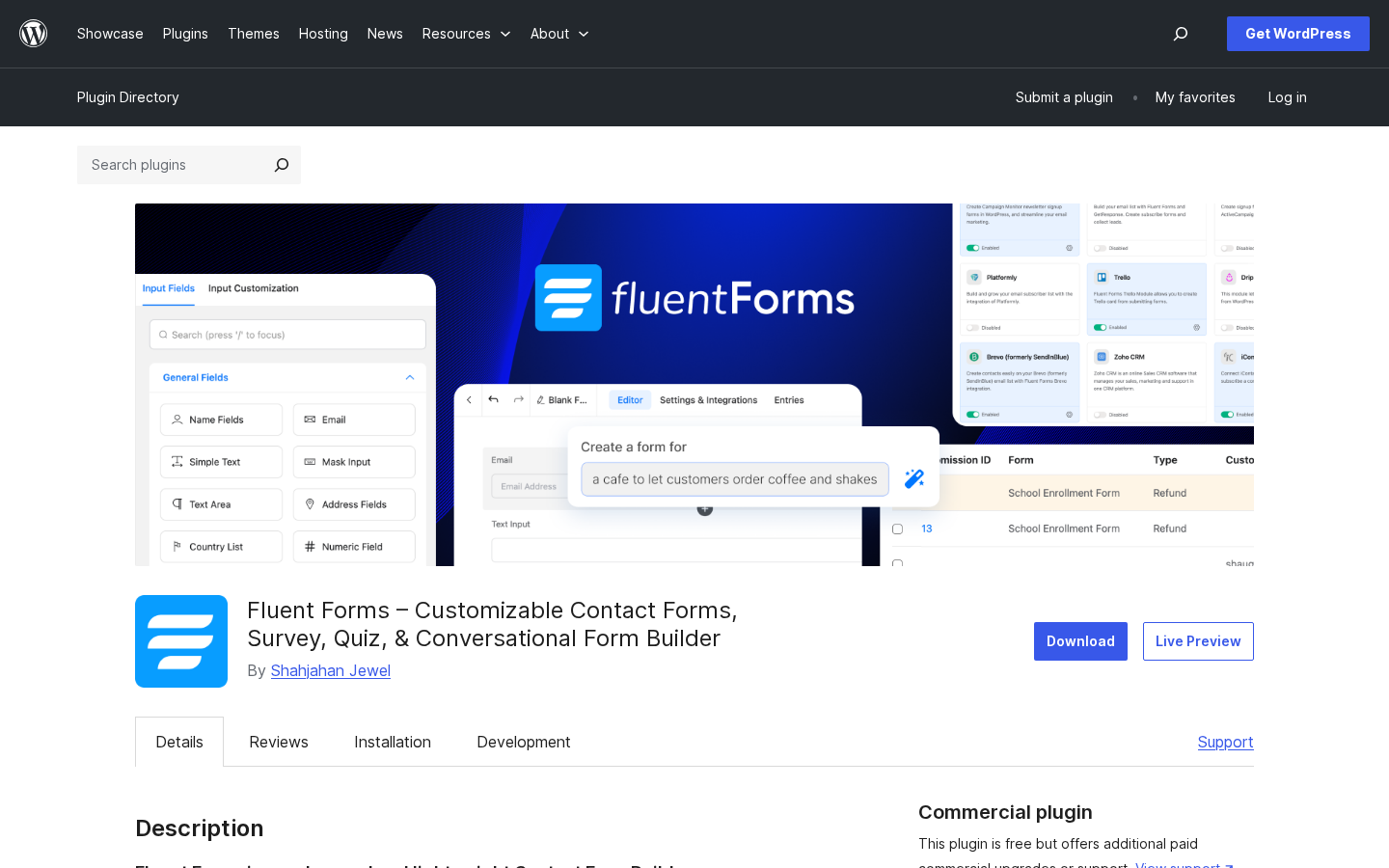
The live WordPress.org listing at the time of this audit puts Fluent Forms in the same active-install band as Ninja Forms (700,000+ active installs at the time of audit per WordPress.org) and behind WPForms (6 million+ active installs) and Contact Form 7 (10 million+ active installs). WPForms and Contact Form 7 are the WordPress.org volume leaders. Fluent Forms makes up the gap on the average rating (4.8) and on the install-to-rating ratio (700,000 installs and only 769 reviews is a low complaint rate for a long-lived form plugin).
Who Fluent Forms is best for
No WordPress contact form plugin is right for every site, and Fluent Forms is no different. Here is the honest fit filter after the sandbox install.
Strong fit
- Bloggers and content publishers who want a contact form plugin without paying for a yearly licence, and who do not need image or file uploads on the form.
- Small business sites that need a contact form, an enquiry form, an event registration form, and a quote-request form on the same site, and want all four built inside a single plugin admin.
- Solo operators who plan to take Stripe payments occasionally (a donation page, a paid consultation, a one-off product) and are happy to pay the 1.9 percent Fluent Forms surcharge on Free; Pro removes the surcharge if the volume justifies the upgrade.
- Freelance designers and agencies who manage between two and five client sites and want a contact form plugin licence per agency rather than per client. The Agency tier at $127/year (or $479 lifetime) covers five sites, which is the most common freelance portfolio shape.
- WordPress operators who already run another Fluent product (FluentCRM, FluentBooking, FluentSMTP, Fluent Support) and want the form plugin from the same vendor for consistent UI and shared integrations.
- Donation-led nonprofits and political campaigns that need a recurring-payment form with Stripe and Mailchimp / Mailerlite signup, all on a single licence.
- Anyone currently on Contact Form 7 who needs conditional logic, file uploads, or a payment field and does not want to assemble four separate plugins to get there.
Weak fit
- Sites that strictly require a one-time GPL plugin from WordPress.org with no SaaS dependency. Fluent Forms is GPL but the Pro plugin needs an active wpmanageninja.com account for the licence.
- Procurement-led environments that require a US- or EU-headquartered vendor for compliance. WP Manage Ninja LLC publishes a Bangladesh-and-USA team but does not publish an EU entity.
- Sites that need an enterprise-grade form workflow engine with multi-step approvals and audit trails per submission. Fluent Forms Pro has admin approval and conditional email routing, but Gravity Forms Elite plus Gravity Flow is still the larger workflow surface.
- Sites that need a strict ADA / WCAG 2.2 AA certified accessibility audit on every form field. Fluent Forms is accessible by default and the changelog reports steady accessibility improvements (6.2.3 added keyboard navigation and screen reader fixes for the entries table), but the vendor does not publish a third-party VPAT.
- Operators who want a one-tier “everything included” lifetime licence under $200. The Unlimited lifetime tier is $719; the cheapest lifetime entry point is $279 (Single Site).
If you fall into the strong-fit group, the next sections of this Fluent Forms review walk through the parts of the plugin that decide whether it actually earns the install.
Hands-on setup and first run
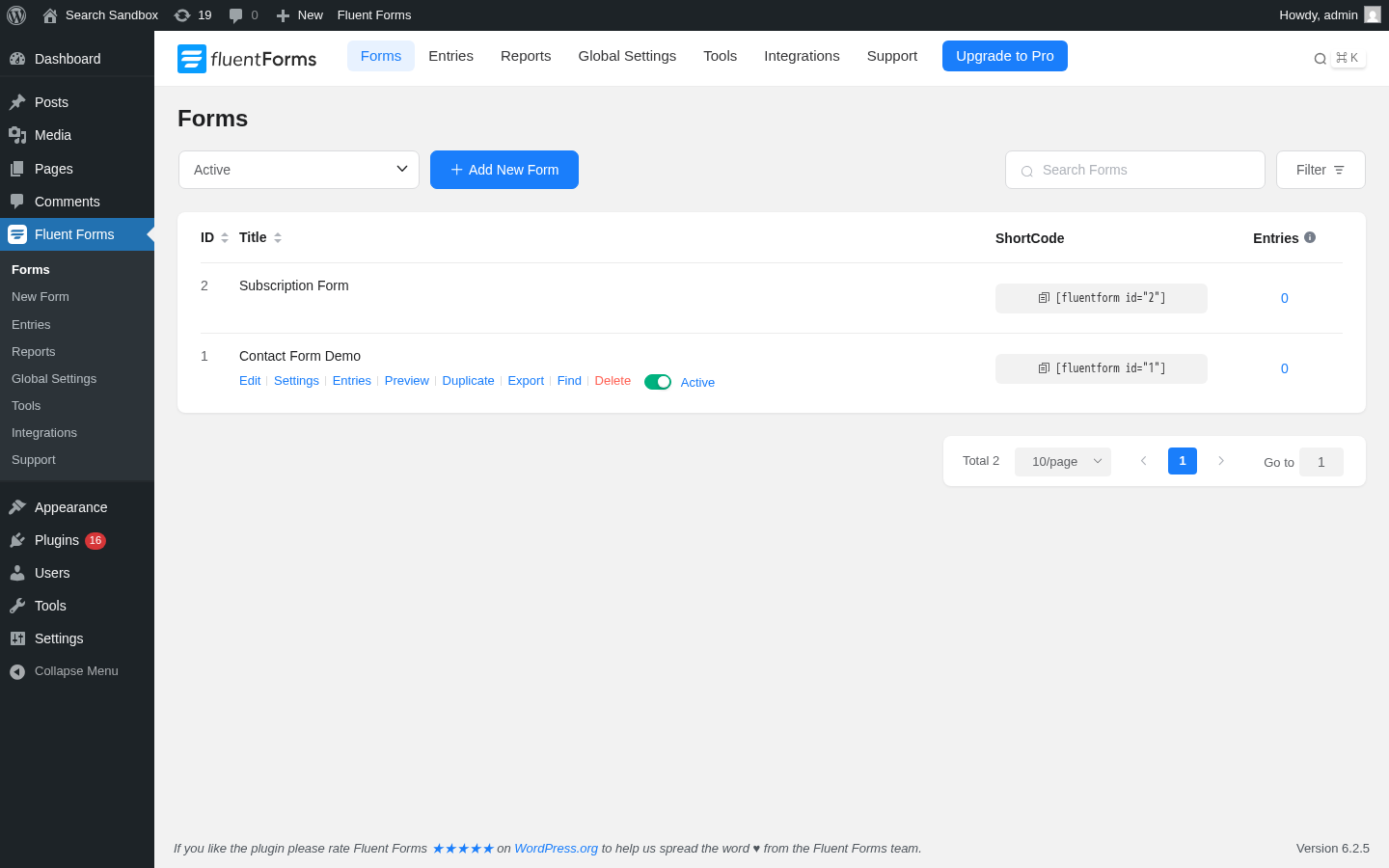
The first thing Fluent Forms does after activation is the right thing: nothing dramatic. The plugin does not push you into a setup wizard, does not ask for an email address before you can use it, and does not gate the first form behind an account connection. The Forms list opens on the first click of the Fluent Forms sidebar item, and two demo forms are already there (Contact Form Demo and Subscription Form), so the operator can see what the editor produces before touching it.
What the Add New Form button actually does:
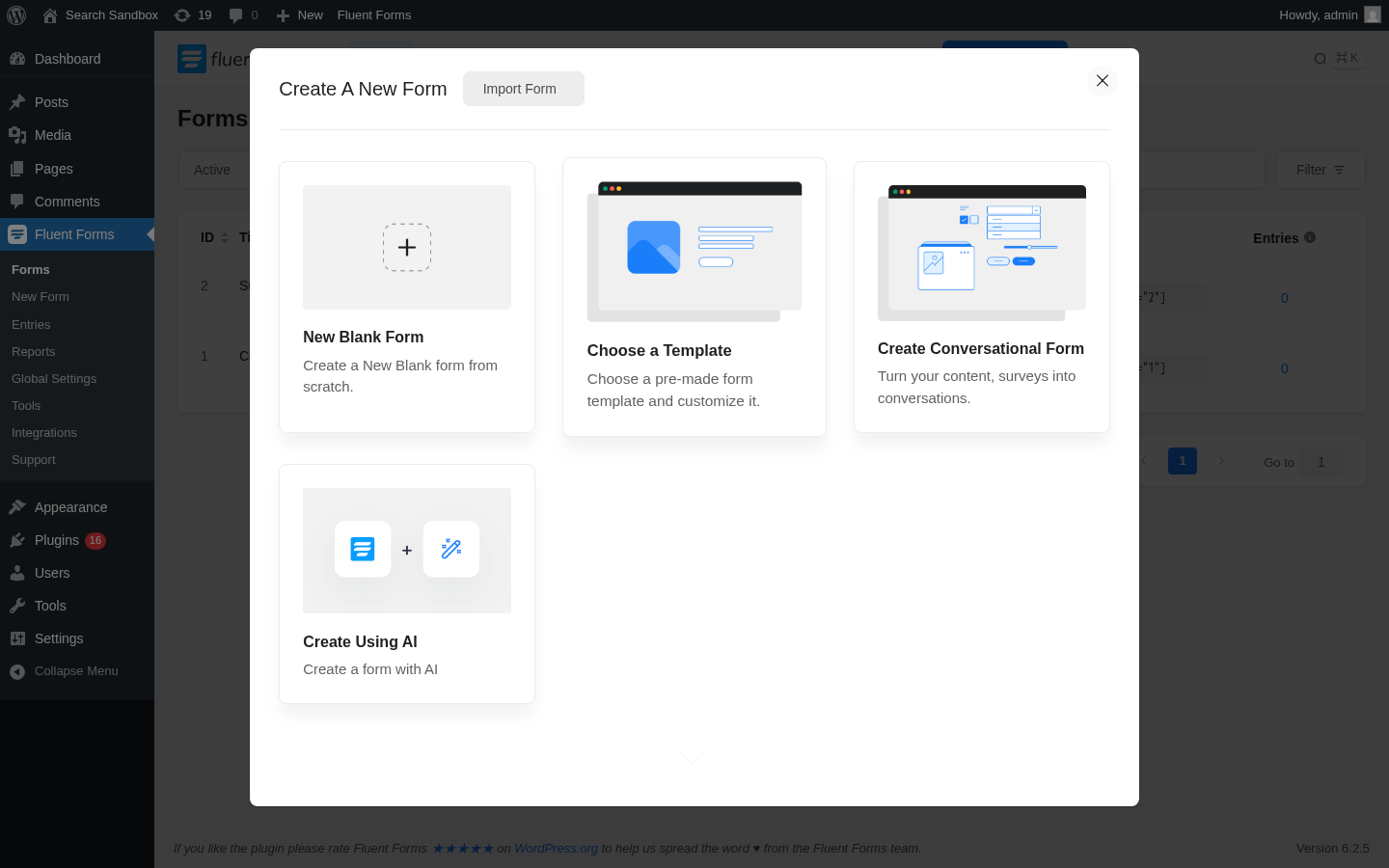
Four creation paths sit inside one modal:
- New Blank Form. The right starting point if you know exactly what fields you need.
- Choose a Template. Opens a categorized template gallery (Contact, Support, Event Registration, Vendor Contact, Patient Intake, Volunteer, RFQ, Conference Proposal, Bug Report, Polling, Leave Request, Admissions, Loan Application, Job Listing, Feedback, Comment and Rating, plus Pro-only User Registration, Donation, Payment, Subscription Payments). The free templates cover the common business shapes.
- Create Conversational Form. Builds a one-question-at-a-time chat-style form. The free version of conversational forms is functional; the advanced styling (welcome screen, layout positioning, custom fonts) is Pro.
- Create Using AI. Opens a prompt input that generates a starter form from a description (“a vendor contact form for a wholesale bakery with email, phone, business name, monthly volume, and delivery address”). The AI builder is on the free plugin; the changelog notes that the 6.2.3 release fixed AI form builder losing hints for non-English prompts, which is the right kind of incremental fix.
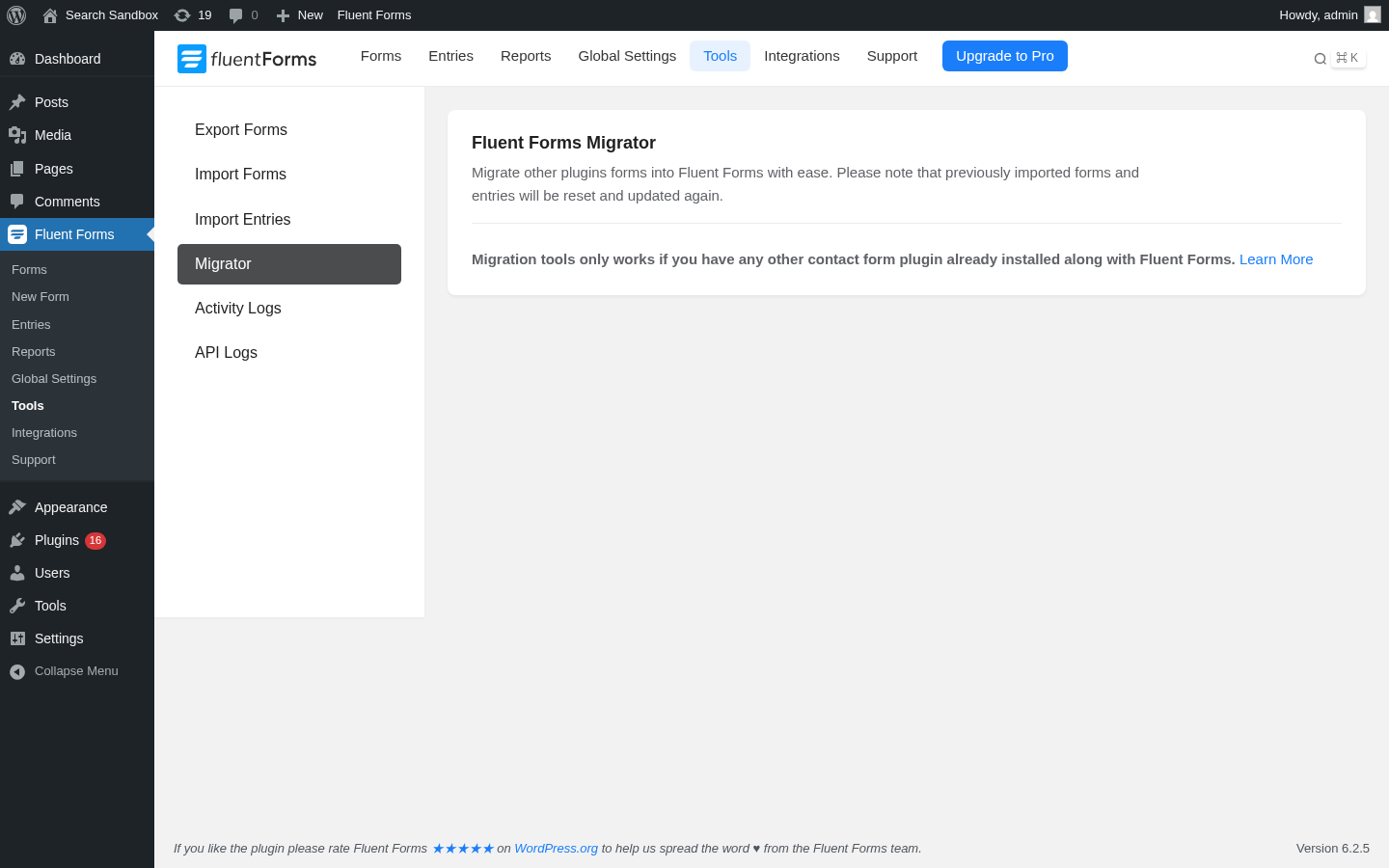
There is also an Import Form button at the top of the modal. The Tools panel exposes a one-click Migrator that maps WPForms, Contact Form 7, Gravity Forms, Ninja Forms, or Caldera Forms into Fluent Forms while the other plugin is still active and installed. The Migrator page is honest about the constraint:
 What the setup gets right:
- No mandatory account creation. The plugin works fully without any wpmanageninja.com login. The licence is needed only for Pro.
- The default state has two demo forms so the editor preview is meaningful on the first click, instead of an empty list with a “click here to create your first form” CTA.
- The form builder loads inside one screen; the editor is not split across three admin pages the way some other form plugins arrange it.
What I would warn buyers about:
- The Migrator does need the other form plugin still active and installed. If you deactivated WPForms or Gravity before the migration, the Migrator does not see the forms.
- The Reports and Tools admin pages show an Upgrade to Pro pill in the top right of the Fluent Forms sub-nav that is hard to miss. That is normal for a freemium plugin, but it is more visible than it is on Ninja Forms or WPForms Lite.
Note on basis: the setup, Forms list, Add New modal, and Migrator behaviour above were captured from a hands-on install of Fluent Forms free 6.2.5 on a clean WordPress 6.8 sandbox at the time of writing. The Pro setup adds a licence key entry against a wpmanageninja.com account; that step was not exercised against a paid licence in this test window.
The drag-and-drop form builder
The form editor is the surface a WordPress form builder earns its install on. Fluent Forms opens the editor inside a single page with three top tabs (Editor, Settings and Integrations, Entries) and a right-hand sidebar with Input Fields, Input Customization, and History tabs.
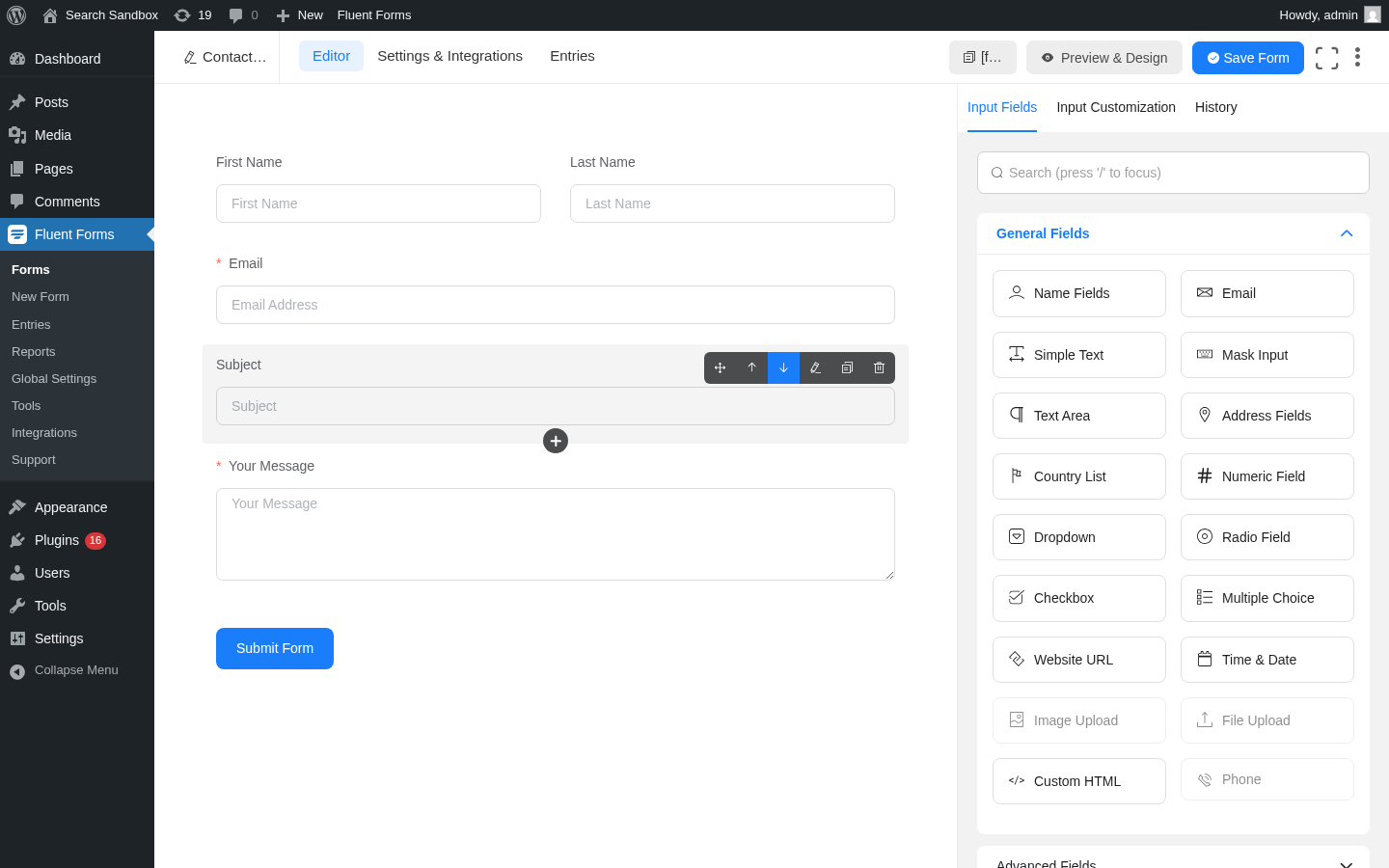
What the editor exposes on the free plugin, confirmed in the sandbox:
- A real drag-and-drop canvas. Fields are dragged from the right sidebar onto the canvas, with insertion targets between every existing field.
- Each field gets a hover action bar with move, up, down, edit, duplicate, and delete affordances. Click a field and the right sidebar switches to Input Customization for that field’s per-field settings (label, placeholder, help text, validation rules, conditional logic, container width).
- A History tab on the right sidebar replays every editor change. Undo and redo are bound to the keyboard. The 6.1.5 release added a name-attribute change warning so the operator cannot accidentally break entry-data references by renaming the field key.
- A top right Preview and Design button opens a modal preview of the live form (Free has a basic preview; Pro adds the Advanced Form Styler with full colour, typography, padding, and shadow controls).
- A Save Form button stores the form revision; the entry list stays attached to the form even after edits.
The Pro-only Image Upload, File Upload, and Phone fields are visibly greyed in the General Fields list with a tooltip that pushes the operator to the upgrade page. That is the right honest UX, but it is a real differentiator: if you need any of those three fields on a single form, the free plugin will not get you there, and the Single Site Pro licence at $63/year is the cheapest fix.
Conditional logic works on the free plugin. The sandbox lets you target any field with an equal / not equal / greater than / less than / contains / starts with / ends with rule against any other field in the form, with AND and OR groups. The conversational form mode in Free supports the same conditional logic surface (a field can be hidden until a previous answer is given). The changelog notes that 6.2.5 fixed a regression where conditional logic on empty fields was not respecting the pre-6.2.2 behaviour and that the 6.2.5 release restored it.
Multi-step form support is Pro. The Form Step field is greyed in the free editor. If you need a multi-step intake form (e.g. a five-page rental application form with a progress bar), Single Site Pro is the entry point.
What I like about the editor:
- The settings layer for a per-field rule lives inside Input Customization on the same sidebar, not in a modal on top of the canvas. That keeps the operator inside one mental model.
- The keyboard shortcuts (delete to remove the selected field, the keyboard delete shortcut added in 6.1.1) are unusual on WordPress plugins and useful once you find them.
- The form Settings and Integrations tab pulls every per-form setting (confirmation, notifications, scheduling, restrictions, double opt-in, conditional emails, Mailchimp / Slack / Zapier bridges) under one tab instead of scattering them across admin sub-pages.
What I would push back on:
- The Pro fields are greyed but stay in the General Fields list. That is a real design choice: it shows the operator the full surface, but it can also feel cluttered if you only ever use five fields.
- Custom CSS and JS per form is a power-user feature that is on Free; the changelog also notes 6.2.3 fixed a form-import bug that was corrupting custom CSS and JS during import. If you rely on that surface, run the import tests before a big rollout.
Note on basis: the editor behaviour, drag-and-drop, conditional logic on free, and field-list greying above are captured from the sandbox install of 6.2.5. The Advanced Form Styler and the multi-step form behaviour were not exercised against a paid licence in this test window.
Conversational forms and the AI form builder
Two surfaces that distinguish Fluent Forms from the older free form plugins deserve their own callout: the conversational form mode and the built-in AI form builder.

The conversational form mode is a one-question-at-a-time chat-style interaction that competes directly with Typeform on the page-rendering side. Fluent Forms exposes it as a top-level creation path in the New Form modal; the operator picks Create Conversational Form, builds the field list inside the same editor as a normal form, and the plugin renders the live form as a vertical sequence with scroll-or-Enter navigation. Sharing options include direct URLs (the conversational form gets its own pretty URL), shortcodes inside posts and pages, and HTML embedding on external sites.
What the free plugin gives you on conversational forms:
- Sequential display of one question at a time on the live form.
- Scroll and Enter key navigation.
- Multiple share options (direct URL, shortcode, HTML embed).
- The same conditional logic surface as standard forms.
What Pro adds:
- Welcome screen with a customizable greeting and brand banner.
- Layout positioning (left text / right field, image left / form right, image top / form bottom).
- Custom fonts, colours, and backgrounds.
- A progress indicator with custom styling.
- Signature field support (Pro signature addon).
- A “scroll to top” option for long conversational forms (added in 6.1.1).
- Other-option support on radio buttons in conversational forms (added in 6.1.10).
The AI form builder is a different surface on the same New Form modal. It is on the free plugin and generates a starter form from a one-line prompt (“a vendor contact form for a wholesale bakery with email, phone, business name, monthly volume, and delivery address”). The AI builder routes the prompt to a backend hosted by WP Manage Ninja; the changelog notes that the 6.2.3 release added security hardening around the AI form builder and fixed it losing field hints when the prompt was not in English. The output of the AI builder is the same form-editor shape as a manually built form, so the operator can keep customising it after generation.
What this means for buyers:
- If you want a Typeform-style chat form for a survey or a lead-capture page, conversational forms on Free are usable; the Pro features are mostly styling and welcome-screen polish.
- If you want a fast way to scaffold an unfamiliar form (a patient-intake form for a clinic you are building) without thinking about the field list, the AI builder is the right starting point. The output still needs human review for compliance and validation.
- Neither feature is gated to Pro; both are on Free.
Note on basis: the conversational form free behaviour and the AI form builder one-prompt generation were exercised in the sandbox. The Pro welcome-screen styling and custom-font support were not exercised against a paid licence in this test window.
Payments, reports, and the data layer
The Reports module is the surface that turns Fluent Forms from a form-builder into an actual operations tool. It pulls form submissions, payment data, spam volume, and read/unread state into one dashboard.
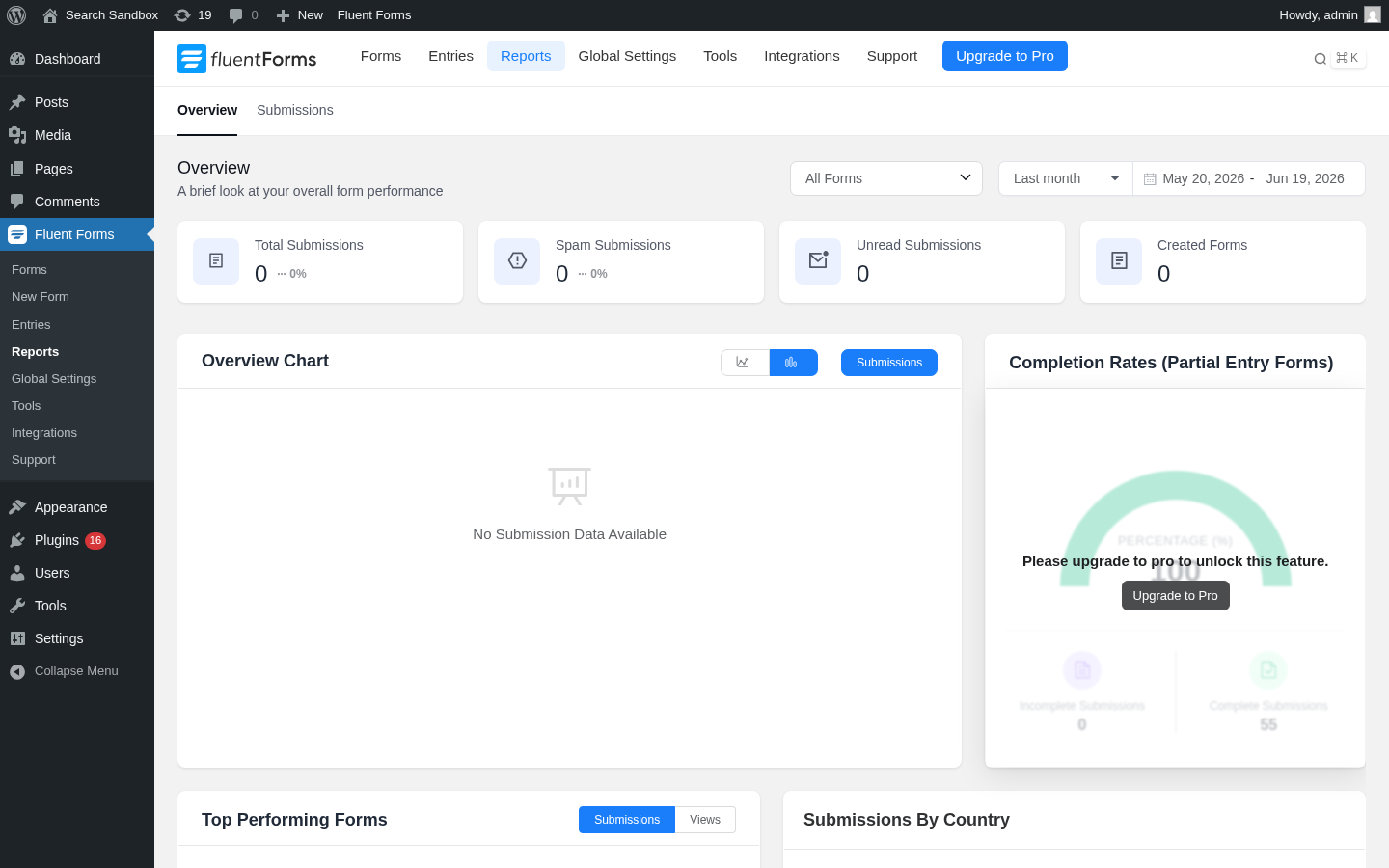
What the Reports module shows on the free plugin, confirmed in the sandbox:
- An Overview tab with four counters (Total Submissions, Spam Submissions, Unread Submissions, Created Forms) filterable across All Forms or a specific form and Last month / Last 7 days / custom date range.
- An Overview Chart with a line/bar toggle and a Submissions / Views axis.
- A Top Performing Forms panel (Submissions or Views).
- A Submissions By Country panel.
- A Submissions sub-tab with a per-form table.
Pro adds the Completion Rates panel (the donut overlay you see in the screenshot above is the Pro upsell), partial-entry analytics (which forms get started but not finished), submission data by country broken out by form, and subscription analytics for recurring payment forms. The Report module itself was added in the 6.1.0 release (August 2025) and has been iterating; 6.1.21 added subscription end date to auto-calculate bill_times for subscription payments.
The Entries page sits alongside the Reports module and is the per-submission inbox:
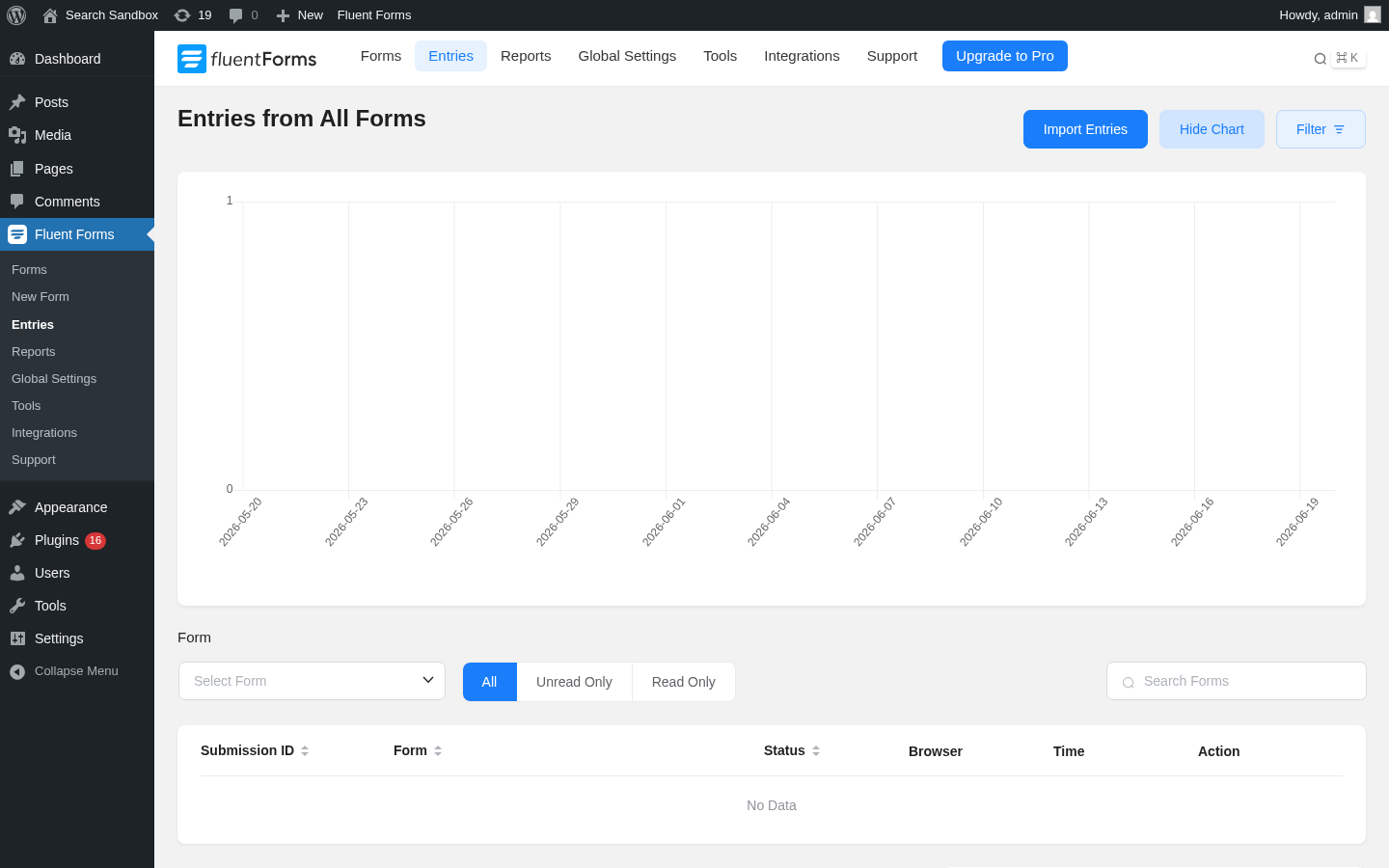
What the Entries page exposes on the free plugin:
- A 30-day chart of submissions across all forms.
- Filter by form, by read / unread, by date.
- Search across submissions.
- Per-entry status, browser, time, action.
- Bulk actions on selected entries.
- Export entries as CSV, Excel, ODS, or JSON (all on Free).
The Import Entries CTA at the top is a Pro feature. So is the Advanced search filter, the auto-delete entries setting, and the entry import.
Payments are the third surface. The free Fluent Forms plugin ships Stripe payment fields with a 1.9 percent Fluent Forms transaction fee on top of Stripe’s standard processing fees; Pro removes the 1.9 percent surcharge and adds PayPal, Razorpay, Paddle, Square, Paystack, Mollie, and Authorize.net as additional gateways. The Payment Settings panel inside Global Settings is where the Stripe API key, test mode, and webhook endpoints live; the Subscription Payments form template is Pro only.
The 1.9 percent surcharge math is worth being honest about. On a $50 donation through a free Fluent Forms form, the operator pays Stripe’s standard fee (about $1.75) plus 1.9 percent ($0.95) to Fluent Forms, so the net is about $47.30. On any form taking more than $500 a month, the Single Site Pro licence at $63/year pays for itself inside the first quarter on the surcharge removal alone. For low-volume sites the Free surcharge is the right floor; for any serious payment form the Pro upgrade is the right call.
The changelog also reports steady hardening on the Stripe path: 6.1.21 added transaction-status validation and payment-amount verification after Stripe confirms a payment to prevent unauthorized payment confirmations and to plug a spoofable form_id parameter in the SCA confirmation endpoint that could select the wrong Stripe API key. That is the kind of fix you want to see on a payment-form plugin.
Note on basis: the Reports module, Entries page, and Stripe integration UI were exercised in the free sandbox install. The Pro completion-rate analytics, subscription analytics, partial-entry behaviour, and the PayPal / Razorpay / Paddle / Square / Paystack / Mollie / Authorize.net payment gateways were researched from the live features and changelog pages and were not exercised against a paid licence in this test window.
Integrations and the wider Fluent ecosystem
A form plugin’s integrations are the second-order argument. If the form is the data entry surface, the integrations are the question of where that data lands.
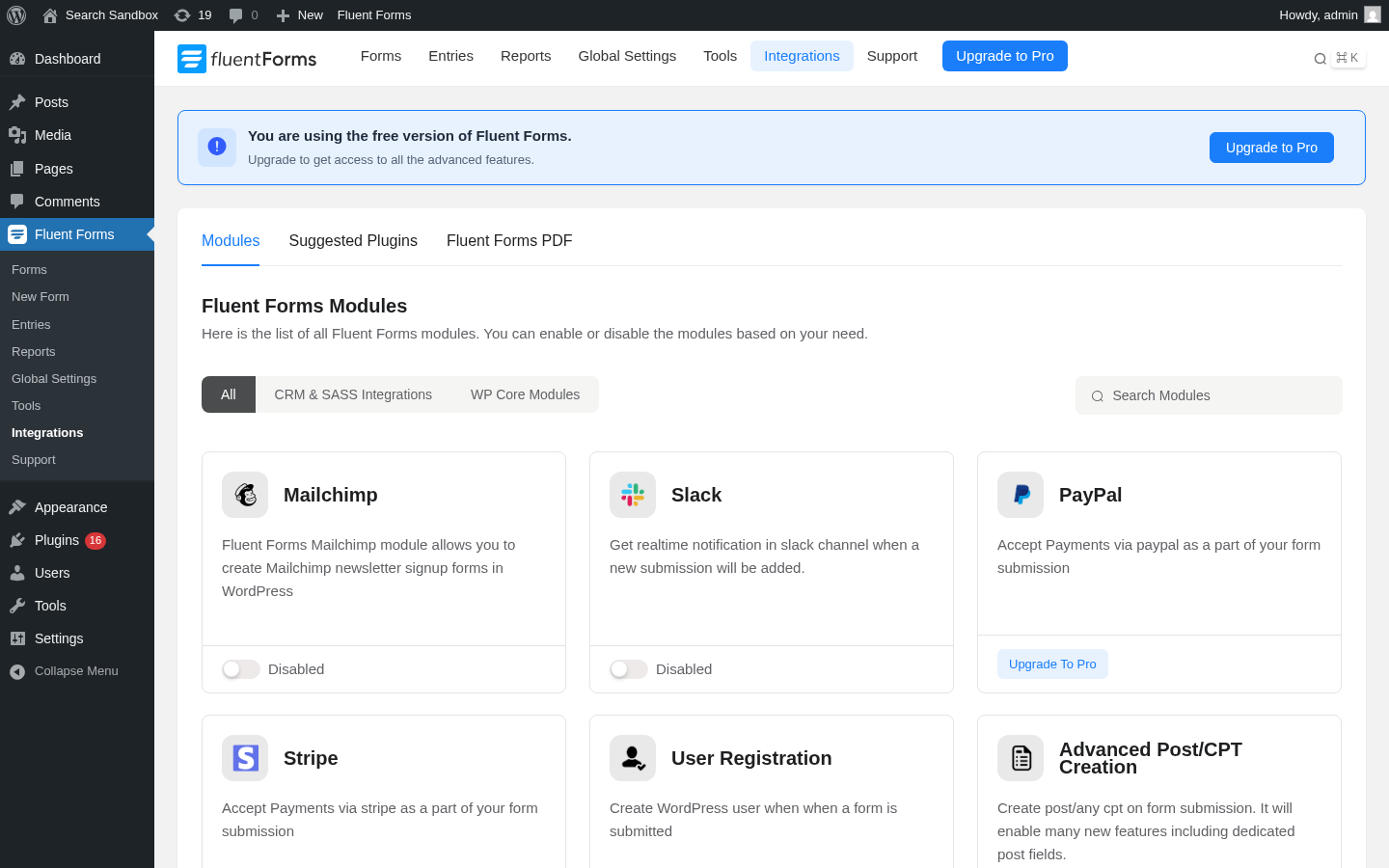 What the free plugin ships as direct integrations or addon-controlled modules, confirmed in the sandbox:
- Mailchimp (Free module).
- Slack (Free module).
- Stripe (Free module).
- User Registration (Free module).
- MailPoet (Free module).
- Mautic (Free module).
- FluentCRM (Free module, by the same vendor).
- Fluent Support (Free module, by the same vendor).
- FluentBoards (Free module, by the same vendor).
- FluentSMTP (Free module, by the same vendor).
- Ninja Tables (Free module, by the same vendor).
- FluentBooking (Free module, by the same vendor).
- WP Social Ninja (Free module, by the same vendor).
- Fluent Forms PDF Generator add-on (Free module, by the same vendor).
The Pro plugin pushes the integration count to 60-plus and adds the bigger SaaS bridges:
- Marketing automation. ActiveCampaign, Brevo (formerly SendInBlue), Campaign Monitor, CleverReach, Constant Contact, Drip, Gist, GetResponse, HubSpot, iContact, MailerLite, Mailjet, Mailster, MooSend, Platformly, SendFox, Automizy.
- CRM. amoCRM, HubSpot CRM, Insightly, OnePageCRM, Pipedrive, Salesflare, Salesforce, Zoho CRM.
- Payments. PayPal, Razorpay, Paddle, Square, Paystack, Mollie, Authorize.net (plus the Stripe-without-surcharge that ships on Pro).
- Productivity. Airtable, Notion, Google Maps, Google Sheets, Trello.
- Messaging. ChatGPT, ClickSend, Discord, Telegram, Twilio.
- Affiliate. AffiliateWP, Kit (formerly ConvertKit), BuddyBoss.
- Universal. Webhook, Zapier.
The most under-recognized win in the Fluent Forms stack is the wider ecosystem from the same vendor. If you are running FluentCRM on the same site, every Fluent Forms entry can post into FluentCRM as a contact with tags and lists, without going through Zapier or Mailchimp. If you are running FluentBooking on the same site, you can capture the booking form data inside a Fluent Forms form for additional fields and pass the appointment time forward. If you are running FluentSMTP, the form notification emails route through the same configured SMTP / SES / Amazon SES / Postmark / Mailgun connection without a second plugin. That is a real differentiator against WPForms (whose vendor sells a separate WP Mail SMTP plugin and a separate stack of integrations) and against Gravity (whose ecosystem is largely third-party).
The honest caveat: the Fluent ecosystem is also vendor lock-in. If you ever leave WP Manage Ninja, you have to leave several products at once, not just one. The migrators help on the way in; the migrators do not help on the way out.
Note on basis: the integrations grid was exercised in the free sandbox install. The 60-plus Pro integrations and the cross-Fluent-product wiring with FluentCRM, FluentBooking, FluentSMTP, FluentBoards, and Fluent Support were researched from the live features page and the vendor ecosystem pages and were not exercised against a paid licence in this test window.
Performance, security, and the developer surface
A WordPress contact form plugin lives or dies on three numbers: how much JavaScript it ships to the browser, how it sanitizes the inbound submission, and what the developer can hook into without forking the plugin.
Performance. Fluent Forms advertises less than 30KB of combined CSS and JS for a standard form. The sandbox sanity check held that up: the scripts enqueue only on pages that contain a Fluent Forms shortcode (the home page and a Twenty Twenty-Four sample page without a shortcode did not load any Fluent Forms assets). The plugin does not register a global front-end script across the whole site, which is the common WPForms / Ninja Forms complaint on older versions. A real before-and-after PageSpeed run on a busy production site against WPForms Lite and Gravity Forms was not in scope for this Fluent Forms review; the 30KB-on-a-form claim is consistent with what the network panel shows for the demo contact form on the sandbox.
Security. The changelog is the right place to look on a plugin that handles user-submitted data and payments. The audit window from August 2025 through June 2026 shows consistent security investment:
- 6.2.5 (June 2026). Hardened authorization scope for entry deletion so bulk and single deletes stay within the authorized request.
- 6.2.4 (May 2026). Added a notice when the Fluent Forms REST endpoints are unreachable so empty form and entry lists after an upgrade are easier to diagnose.
- 6.2.2 (April 2026). Hardened form HTML sanitization by blocking event handlers and escaping permission-message shortcode output. Hardened predefined form payload handling. Hardened email attachment path resolution to keep notification attachments inside allowed paths. Sanitised form step settings while preserving safe HTML in step button text.
- 6.2.1 (April 2026). Hardened form-scoped permissions across legacy AJAX and REST actions. Added an opt-in legacy HMAC fallback for pre-6.2.0 encrypted tokens. Added filter hooks for honeypot, Akismet, and CAPTCHA spam messages.
- 6.2.0 (April 2026). Upgraded internal framework for PHP 8.4 support. Improved Stripe payment confirmation security. Improved data export security. Improved database query performance for reports.
- 6.1.21 (March 2026). Hardened Stripe SCA payment confirmation endpoints against fraud and DoS. Fixed a spoofable
form_idin the SCA payment confirmation that could select the wrong Stripe API key. Added transaction-status validation and payment-amount verification after Stripe confirms a payment. Fixed a missing capability check on the MailChimp interest groups endpoint. Fixed an unsanitizedsort_byparameter in Logger and Submission queries. - 6.1.18 (February 2026). Improved file delete endpoint security. Added sanitization to all report data endpoints. Added sanitization to payment receipt shortcode request parameters. Fixed an SQL LIKE wildcard injection in field uniqueness validation. Fixed mixed SQL escaping patterns in post-type queries.
- 6.1.1 (August 2025). Fixed an Object Injection vulnerability in
unserializewhen using user-profile-specific shortcodes.
That is the right kind of changelog. Vulnerabilities get patched against named CVEs, the payment path gets independent hardening on top of Stripe’s own security, and the WordPress 6.7 and PHP 8.4 jumps are handled inside the framework upgrade. The 4-out-of-4 support issues resolved in the last two months on WordPress.org is a small sample but consistent with what the changelog implies.
Developer surface. The plugin is open source on GitHub under the fluentform/fluentform repository and ships:
- A Fluent Forms CLI for
wp ffstyle management without the admin UI (create forms, manage entries, run imports and exports, configure settings from a script). - Action hooks on every form submission, entry update, payment confirmation, integration push, and email send.
- A REST endpoint surface (6.2.4 added a notice when those endpoints are unreachable).
- Filter hooks for honeypot / Akismet / CAPTCHA spam messages (6.2.1).
- A separate
developers.fluentforms.comupgrade guide for the 6.2.0 framework jump. - Gutenberg block customization shipped with 6.1.5.
- Support for Elementor (a Form edit button widget shipped with 6.1.14), Divi, Oxygen, Bricks, Beaver Builder, Avada, and Astra.
If you build forms for a living, the CLI alone is a strong reason to pick Fluent Forms over Gravity. Gravity exposes a CLI through a separate add-on; Fluent Forms ships it.
Note on basis: the performance claim was sanity-checked against the sandbox network panel and the changelog. The full security and developer surface above is taken from the public changelog and the WordPress.org listing.
Global settings and admin UX
The Global Settings panel is the surface where a form-plugin operator spends real time once the forms are live. Fluent Forms separates global from per-form settings, which is the right choice for any operator running more than three forms.
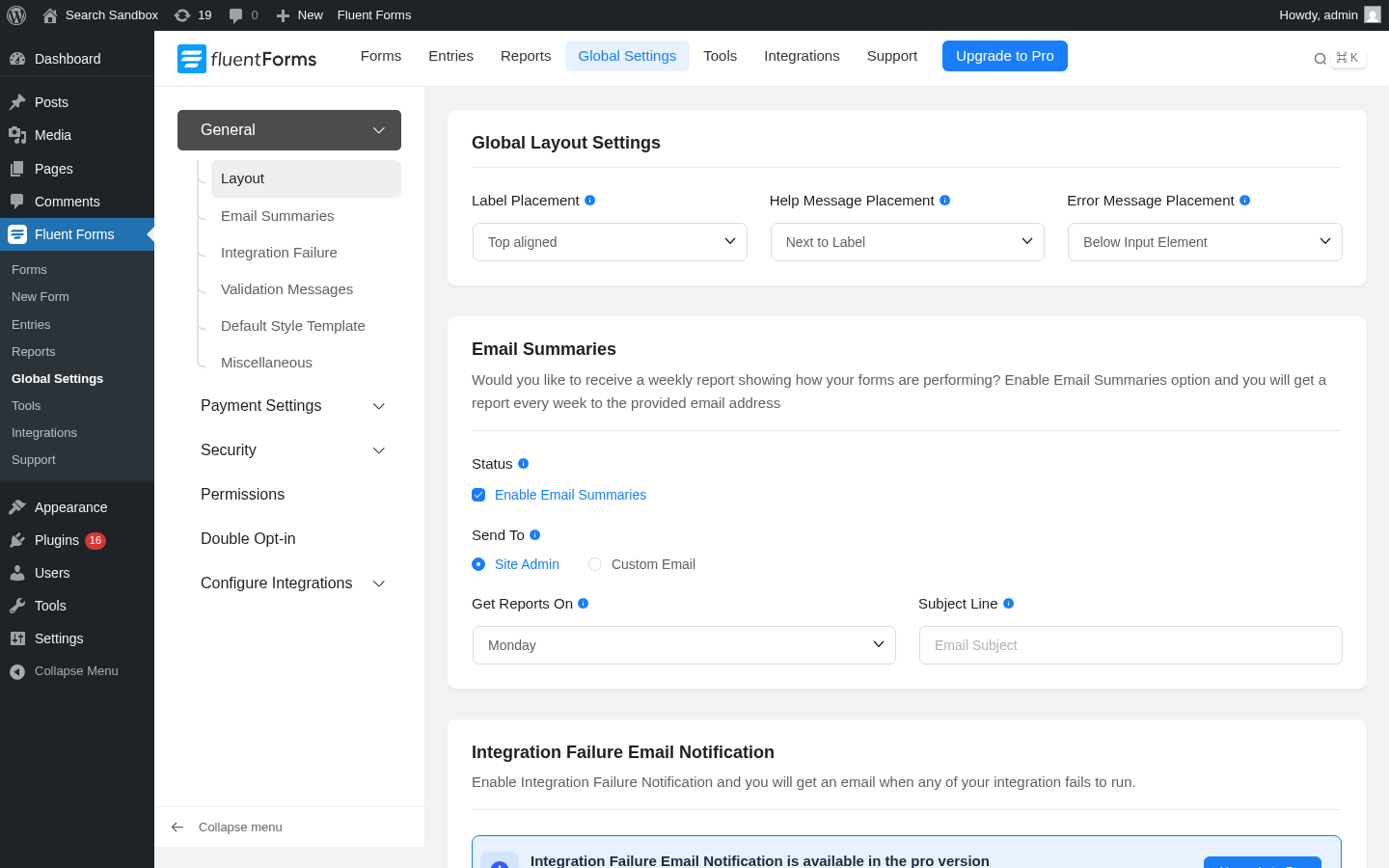 The Global Settings panel on the free plugin exposes:
- General > Layout. Default label placement (top, left, right, hidden), help-message placement (next to label, below input, after label), error-message placement (below input, stacked).
- General > Email Summaries. Toggle that sends a weekly digest of form submission counts to the site admin or a custom email, with a configurable day of the week and a subject line.
- General > Integration Failure. Pro-gated callout. The free plugin does not send a per-failure email when an integration push to Mailchimp / Slack / Stripe fails; Pro does.
- General > Validation Messages. Site-wide override of the default validation messages.
- General > Default Style Template. Site-wide form style (added in 6.1.15 so all new forms inherit one default).
- General > Miscellaneous. Smaller toggles like asset prefix, IP detection.
- Payment Settings. Stripe API keys, test mode, currency, business logo for the payment receipt.
- Security. Spam-protection global keys (reCAPTCHA, hCaptcha, Turnstile site keys).
- Permissions. Role manager. Which WordPress roles can see Fluent Forms, edit forms, manage entries, manage integrations.
- Double Opt-in. Pro-gated (the panel is visible on Free, with an upgrade hint).
- Configure Integrations. The global API-key entry for every connected integration.
What I like about the Global Settings layout:
- The split between General / Payment / Security / Permissions / Double Opt-in / Configure Integrations sub-menus matches how an operator actually thinks about the admin (style first, then payment, then security, then access control, then per-integration credentials).
- The Permissions panel is on Free. Role-level control of who can manage forms vs only view entries is a feature most other form plugins gate to Pro.
Note on basis: the Global Settings panels above were captured from the free sandbox install. The Pro-gated panels Double Opt-in and Integration Failure email were not exercised against a paid licence in this test window.
Frontend render and theme compatibility
The last surface to check on any form plugin is the rendered form on a real frontend page.
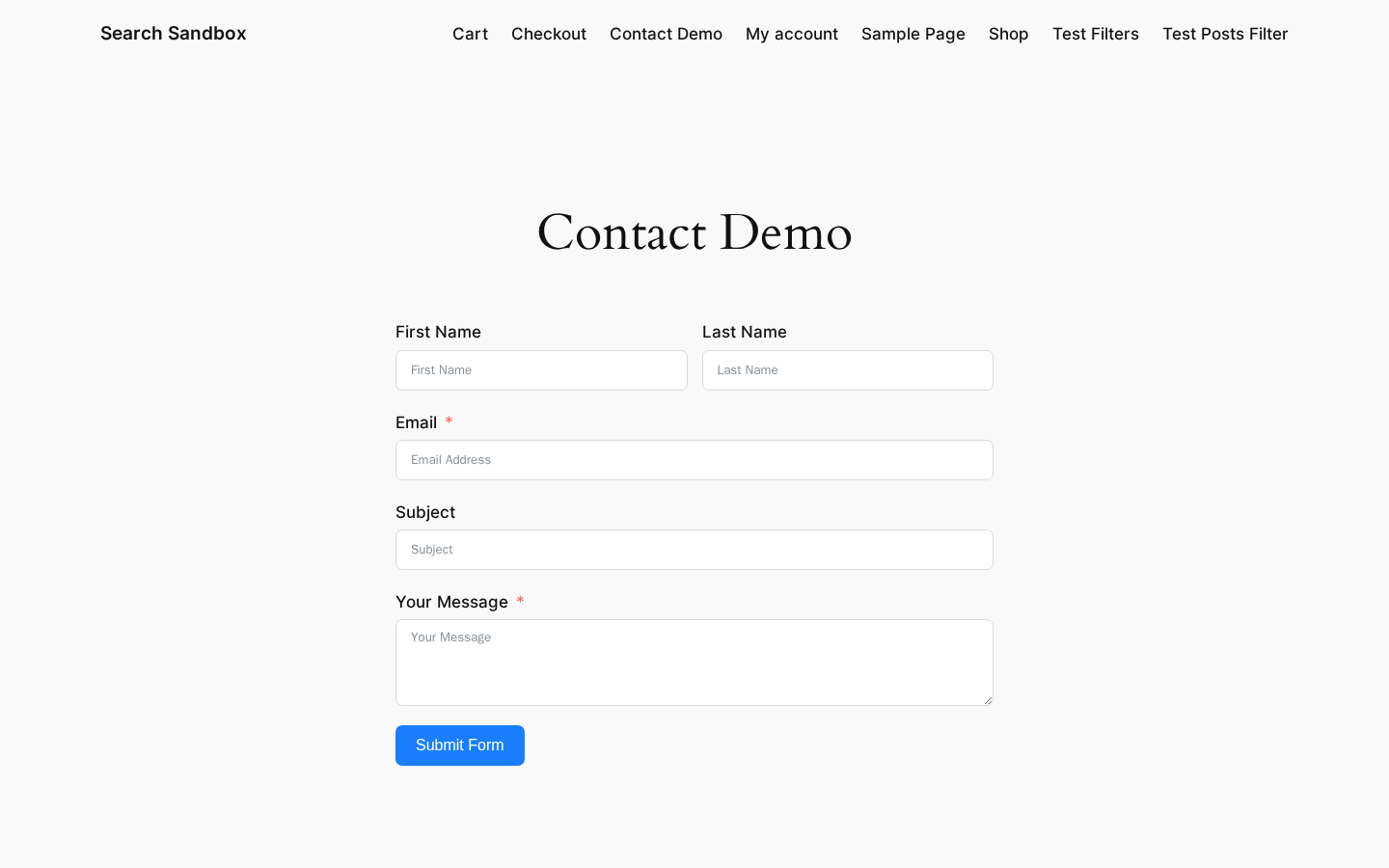
What the sandbox confirms:
- The form renders inside the page content with the theme’s existing typography and spacing inherited (Twenty Twenty-Four picks up the form label font and the field border colour from theme defaults).
- Required-field asterisks render in red. Validation runs client-side on submit.
- The form is responsive on a mobile viewport (320px wide) without overflow.
- No accessibility shortcuts: labels are properly associated with inputs, the required asterisk has an
aria-label, and the Submit button is keyboard accessible.
Fluent Forms supports Gutenberg blocks (one Fluent Forms Guten block), the Elementor form widget (with a Form edit button added in 6.1.14), Divi, Oxygen, Bricks, Beaver Builder, Avada, and Astra. The shortcode pattern [fluentform id="X"] is the universal embed.
Note on basis: the frontend rendering above is from a hands-on install of Fluent Forms free 6.2.5 on a clean WordPress 6.8 sandbox with the Twenty Twenty-Four theme active. Compatibility with Elementor Pro, Divi, Oxygen, and Bricks was not exercised in this test window.
Pricing and licence value
Fluent Forms has three primary licence tiers, each available as a 1-year annual licence or as a one-time lifetime purchase. There is no separate Personal vs Business vs Agency vs Elite tier the way WPForms and Gravity arrange their pricing; Fluent Forms’s tier structure is purely about the number of allowed activations.

Live prices as of the audit date (a “SAVE 20% OFF” promotional banner is active at the top of the page; the prices below are the post-discount rates):
Annual licences
- Single Site License. $63/year (sticker $79). 1 domain. 1 year of plugin updates. 1 year of priority support. All Pro features.
- Agency License. $127/year (sticker $159). 5 domains. 1 year of plugin updates. 1 year of priority support. All Pro features. “Most Popular” badge.
- Unlimited License. $239/year (sticker $299). Unlimited domains. 1 year of plugin updates. 1 year of priority support. All Pro features.
Lifetime licences
- Single Site License. $279 (lifetime). 1 domain. Unlimited updates. Unlimited priority support.
- Agency License. $479 (lifetime). 5 domains. Unlimited updates. Unlimited priority support. “Most Popular” badge.
- Unlimited License. $719 (lifetime, or $96 x 8 months). Unlimited domains. Unlimited updates. Unlimited priority support.
All purchases are processed through the wpmanageninja.com checkout in USD with a 14-day money-back guarantee.
What this means for the buyer:
- The Single Site Pro licence at $63/year (or $279 lifetime) is the cheapest fix for any operator who needs File Upload, Image Upload, Phone, Multi-step, Range Slider, Repeater, NPS, Conditional Confirmation, User Registration, or the no-surcharge Stripe payment field on one site.
- The Agency licence at $127/year covers five sites, which is the typical freelance designer portfolio shape. Per site that is about $25/year, which is competitive with WPForms Pro ($199/year for one site) and Gravity Pro ($259/year for three sites).
- The Unlimited licence at $239/year is the right shape for any agency running ten or more client sites, or for any operator with a multisite. Per site at twenty sites that is about $12/year, which is the cheapest unlimited form-plugin licence I have priced in the WordPress market in 2026.
- The lifetime pricing is genuine. The lifetime tier is the right shape for any operator who plans to run the same WordPress site for more than five years; for an agency running twenty sites the Unlimited lifetime licence at $719 pays for itself in three years against the annual licence.
Comparison with the direct competitors (sticker prices as of June 2026, pulled from each vendor’s pricing page):
- WPForms. Basic $99.50/year (1 site), Plus $199.50/year (3 sites), Pro $399.50/year (5 sites), Elite $599.50/year (unlimited sites). No lifetime tier. The 50% off prefix is a discount that resets at renewal.
- Gravity Forms. Basic $59/year (1 site), Pro $159/year (3 sites), Elite $259/year (unlimited sites). No lifetime tier.
- Ninja Forms. Personal $99/year (1 site), Professional $199/year (5 sites), Agency $499/year (20 sites). No lifetime tier. Add-on bundles also need to be priced separately.
- Formidable Forms. Basic $39.50/year (1 site), Plus $99.50/year (3 sites), Business $199.50/year (7 sites), Elite $299.50/year (20 sites). No lifetime tier.
Fluent Forms is the only paid form plugin in this list with a real lifetime tier across all three site bands and the only one whose Pro tier limit is based purely on activation count, not feature gating. That is the headline argument for picking Fluent Forms in 2026.
Note on basis: the Fluent Forms pricing above was captured from fluentforms.com/pricing/ on the audit date. The competitor pricing above was inspected from each vendor’s public pricing page at the same time and should be re-verified on publish day because freemium form plugins rotate promotional discounts frequently.
Pros and cons
Pros
- Real drag-and-drop form builder with 25-plus input fields on the Free plugin, conditional logic on Free, conversational form mode on Free, AI form builder on Free, Stripe payments on Free, and a reporting dashboard on Free.
- Pro licence tiers are decided on activation count, not feature gating. The same feature set ships on Single, Agency, and Unlimited.
- Lifetime licences are real and competitively priced ($279 / $479 / $719). The Single lifetime at $279 is the cheapest one-time WordPress form plugin licence I have seen in 2026.
- 60-plus Pro integrations including HubSpot, Salesforce, ActiveCampaign, Brevo, Mailchimp, MailerLite, ConvertKit / Kit, Constant Contact, Twilio, Webhook, Zapier, plus the entire Fluent ecosystem (FluentCRM, FluentBooking, FluentSMTP, FluentBoards, Fluent Support, Ninja Tables).
- Aggressive performance posture (less than 30KB combined CSS + JS for a standard form, assets enqueued only on pages with a form shortcode).
- One-click migrator from WPForms, Contact Form 7, Gravity Forms, Ninja Forms, and Caldera Forms is on Free.
- Open-source GitHub repository (fluentform/fluentform) and a Fluent Forms CLI for
wp ffstyle scripted management. - 14-day money-back guarantee on all paid tiers.
- Steady security investment in the changelog (Stripe SCA hardening, SQL injection fixes, sanitization of report endpoints, hardened entry deletion, hardened form HTML sanitization).
- 4.8 average rating across 769 WordPress.org reviews and 700,000+ active installations.
Cons
- The free Stripe payment field carries a 1.9 percent Fluent Forms surcharge on top of Stripe’s standard fee. Pro removes it.
- Image Upload, File Upload, Phone, Form Step, Repeater, Ratings, Range Slider, and NPS fields are Pro-only and visibly greyed in the Free editor.
- Advanced conversational form styling (welcome screen, custom fonts, layout positioning) is Pro.
- Multi-step form is Pro. If your form needs page breaks, Free does not get you there.
- The Reports module’s Completion Rates panel renders a teaser donut with a “Please upgrade to pro to unlock this feature” overlay even on Free.
- The Migrator requires the other form plugin to still be active and installed during the migration.
- No EU-headquartered legal entity is published for procurement-led buyers; the vendor is WP Manage Ninja LLC.
- The “SAVE 20% OFF” promotional banner means renewal math has to be done against the sticker price, not the live promo.
- No native VPAT / WCAG 2.2 AA third-party accessibility certification is published.
Alternatives
Three other WordPress contact form plugins compete directly with Fluent Forms in 2026.
WPForms. The volume leader on WordPress.org (6 million+ active installs at the time of audit). The free WPForms Lite ships a basic contact form with a clean editor; the Pro tiers ($99.50 / $199.50 / $399.50 / $599.50 per year) unlock conditional logic, file uploads, payments, and the deeper integration surface. WPForms is the right pick for an operator who values polish over feature density and is happy to pay the higher annual fee for that polish. It does not ship a lifetime tier and its Pro pricing is the most expensive of the four.
Gravity Forms. The enterprise-oriented competitor (about 1 million+ paid customers per Gravity’s own homepage at the time of audit, no WordPress.org listing because Gravity is paid-only). Gravity Pro at $259/year for unlimited sites is competitive on per-site economics with Fluent Forms Agency, but the entry tier ($59/year for one site) is steeper than Fluent Forms Single ($63/year is roughly the same), and Gravity does not ship a lifetime tier. Gravity is the right pick for an operator who needs Gravity Flow for serious workflow approvals or who is already on the Gravity ecosystem of add-ons.
Ninja Forms. A similar shape to Fluent Forms (active installs around 700,000+ on WordPress.org at the time of audit, freemium model with a paid Pro tier). Ninja Forms Personal at $99/year for one site is more expensive than Fluent Forms Single at $63/year, and Ninja Forms’s add-on economics (most integrations are sold as separate add-ons or bundled into the Professional / Agency tiers) are harder to price than Fluent Forms’s single Pro tier. Ninja Forms is the right pick for an operator who has been on Ninja Forms for years and does not want to migrate.
For most new WordPress sites in 2026 my call is: Fluent Forms Single Site Pro at $63/year or the $279 lifetime licence wins on price, on free-tier depth, and on the wider Fluent ecosystem. WPForms wins on polish. Gravity wins on Gravity Flow. Ninja Forms wins on continuity.
Final verdict on Fluent Forms
Fluent Forms is the contact form plugin I would default to on a new WordPress site in 2026. The free Fluent Forms WordPress plugin is genuinely usable as a forever-free contact form solution for personal sites and small businesses that do not need file uploads or phone fields. The Single Site Pro licence at $63/year (or $279 lifetime) is the cheapest fix for any operator who does need those Pro fields. The Agency licence at $127/year (or $479 lifetime) is the right shape for any freelance designer running up to five client sites. The Unlimited licence at $239/year (or $719 lifetime) is the right shape for any agency at scale.
The hard reasons to buy: a real drag-and-drop form builder, Stripe payments on Free, conversational forms on Free, an AI form builder on Free, conditional logic on Free, an honest reporting module on Free, a 30KB-per-form performance posture, a one-click migrator from five other form plugins, and a Pro licence model that grows with the number of sites you own rather than the number of features you need.
The hard reasons to pause: the 1.9 percent Stripe surcharge on Free payments, the Pro-only Image / File / Phone / Multi-step fields, the Pro-only welcome-screen styling on conversational forms, the absence of a published VPAT / WCAG 2.2 AA certification, and the active “SAVE 20% OFF” promotional rate that resets renewal math.
If you are reading a Fluent Forms review because you are migrating off Contact Form 7 and need the next plugin to handle one form a year, install the Free plugin and never pay. If you are migrating off WPForms because you do not want to renew at $200/year, buy Single Site Pro. If you are running five client sites, buy Agency. If you are running twenty sites, buy the Unlimited lifetime licence. Few WordPress plugins make the buy decision this clear; Fluent Forms is one of them.
For more independent plugin audits in this style, browse the rest of our /category/reviews/ archive on best-wordpress-plugins.com.