


WPForms is the most-installed WordPress form builder on the planet, with more than five million active sites running it. That number is almost hard to argue with. But “most installed” and “best fit for your site” are different questions, and the gap between those two things is what this WPForms review needs to examine in 2026.
I installed WPForms Lite on a clean WordPress sandbox, walked every screen I could access without a paid license, and dug into the pricing tiers, the payment fee structure, and the limits that live behind the upgrade wall. The plugin ships with a polished, genuinely beginner-friendly form builder. It also ships with persistent upsell banners, a 3% Stripe transaction fee on the free plan, no local entry storage unless you pay, and a template library where only 71 of 2,143 templates are actually unlocked without paying. Whether that trade-off is acceptable depends entirely on what you need a form for.
Quick Verdict
Quick Verdict: WPForms
WPForms Lite is the right starting point if all you need is a clean contact form or a simple survey with no integrations. The drag-and-drop editor is one of the easiest I have tested, and built-in spam filtering plus reCAPTCHA, hCaptcha, and Cloudflare Turnstile are available at no cost. The moment you need conditional logic, email marketing connections, payments without a 3% WPForms cut, local entry storage, or more than 71 templates, you are looking at a paid plan. Renewals after the introductory year jump to full price, which is steep compared with competitors like Fluent Forms. If budget matters long-term, run those numbers before committing.
Rating: 4.1 / 5
What WPForms Is
WPForms is a drag-and-drop WordPress form builder created by Syed Balkhi, who also runs WPBeginner. The plugin launched in 2016 and has steadily expanded from a basic contact form tool into a broader data-collection platform covering payments, surveys, quizzes, digital signatures, and marketing automation.
There are two distinct products: WPForms Lite, the free version available on WordPress.org, and WPForms Pro, the paid upgrade sold at wpforms.com. The free version gets you a working form builder with a solid field set and basic spam protection. The paid tiers unlock local entry storage, templates, integrations, conditional logic, and payment processing without a surcharge.
The plugin is built by the same team behind WPBeginner, OptinMonster, and All in One SEO. That heritage shows in the onboarding experience: WPForms is thoroughly documented, actively maintained (version 1.10.2.1 shipped in June 2026, adding AI MCP support and Stripe subscription fixes), and translated into 33 languages.
Who WPForms Is Best For
- Small business owners and bloggers who want a working contact form in five minutes and do not need conditional logic or integrations on day one.
- Agencies on the Elite plan who need unlimited site licenses and premium CRM connections like Salesforce and HubSpot.
- eCommerce sites needing simple payment forms who are on Pro and want to accept Stripe, Square, or PayPal without a separate eCommerce plugin.
- Beginners who want guided onboarding. The in-builder “WPForms Challenge” walks you through naming a form, picking a template, adding fields, configuring notifications, and embedding the form. It is a small thing, but first-timers genuinely benefit from it.
WPForms is probably not the best fit for users who need entry storage without paying, sites that process a high volume of Stripe payments and cannot absorb a 3% platform surcharge, or anyone whose primary need is deep CRM integration on a single-site budget.
Hands-On Setup and User Experience
Installation from the WordPress plugin repository is instant. The plugin activates without friction and drops a WPForms item into the WordPress admin menu immediately.
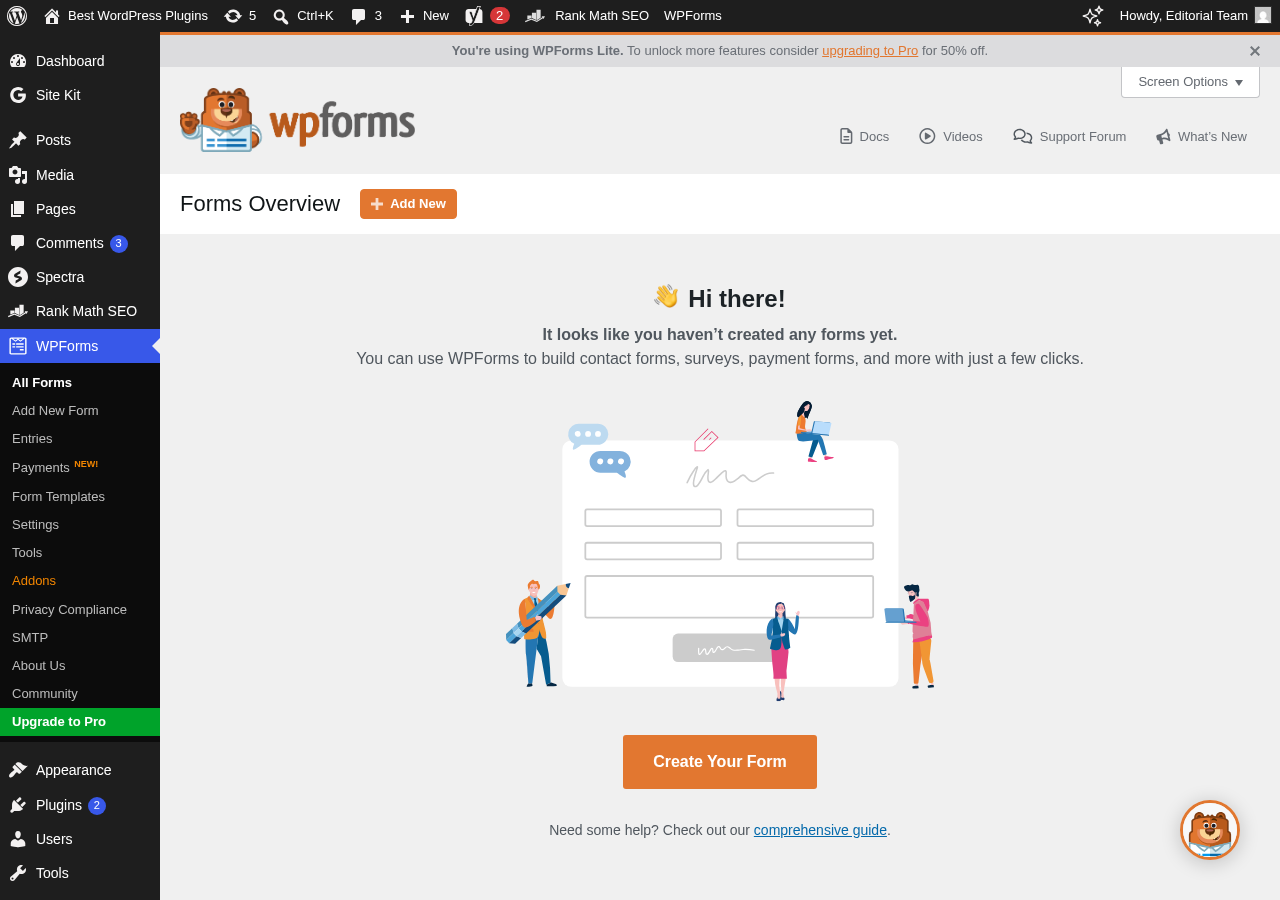
The first screen after activation is the “Forms Overview” dashboard, which shows an empty state with a large “Create Your Form” button and links to docs and tutorial videos. There is a persistent top banner: “You’re using WPForms Lite. To unlock more features consider upgrading to Pro.” That banner stays visible on every WPForms admin screen. It is not intrusive, but it is always there.
Clicking “Add New” opens the full-screen form builder, which is where things get interesting.
The Form Builder Setup Screen
Before the editor loads, you land on a setup screen where you name the form and choose a template. There are two featured options at the top: “Generate With AI” (new, paid-only for full form generation) and “Blank Form.” Below those, the template library shows thumbnail cards organized by category.
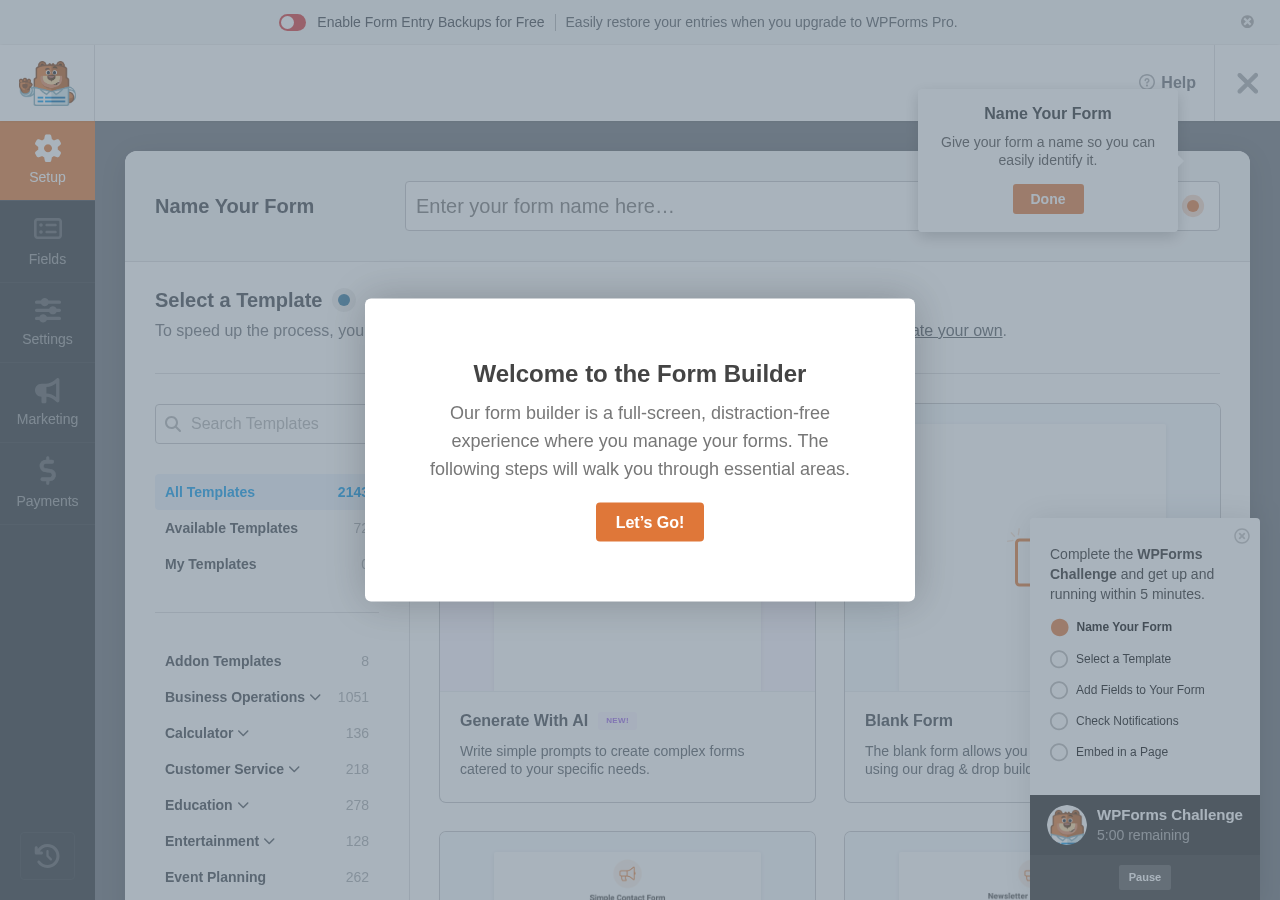
The library filter shows 2,143 total templates and 71 marked as “Available Templates” for free accounts. The rest are visible, with their names shown, but clicking them prompts an upgrade. Template categories include Business Operations (1,051 templates), Calculator (136), Customer Service (218), Education (278), Entertainment (128), and Event Planning (262). The breadth is impressive. The paywall is significant.
I named a test form and selected “Blank Form” to start from scratch.
Inside the Form Editor
The editor opens full-screen, taking over the browser window entirely. The left panel lists available fields in two groups: Standard Fields and Fancy Fields. A right-side canvas area shows a live preview of the form.
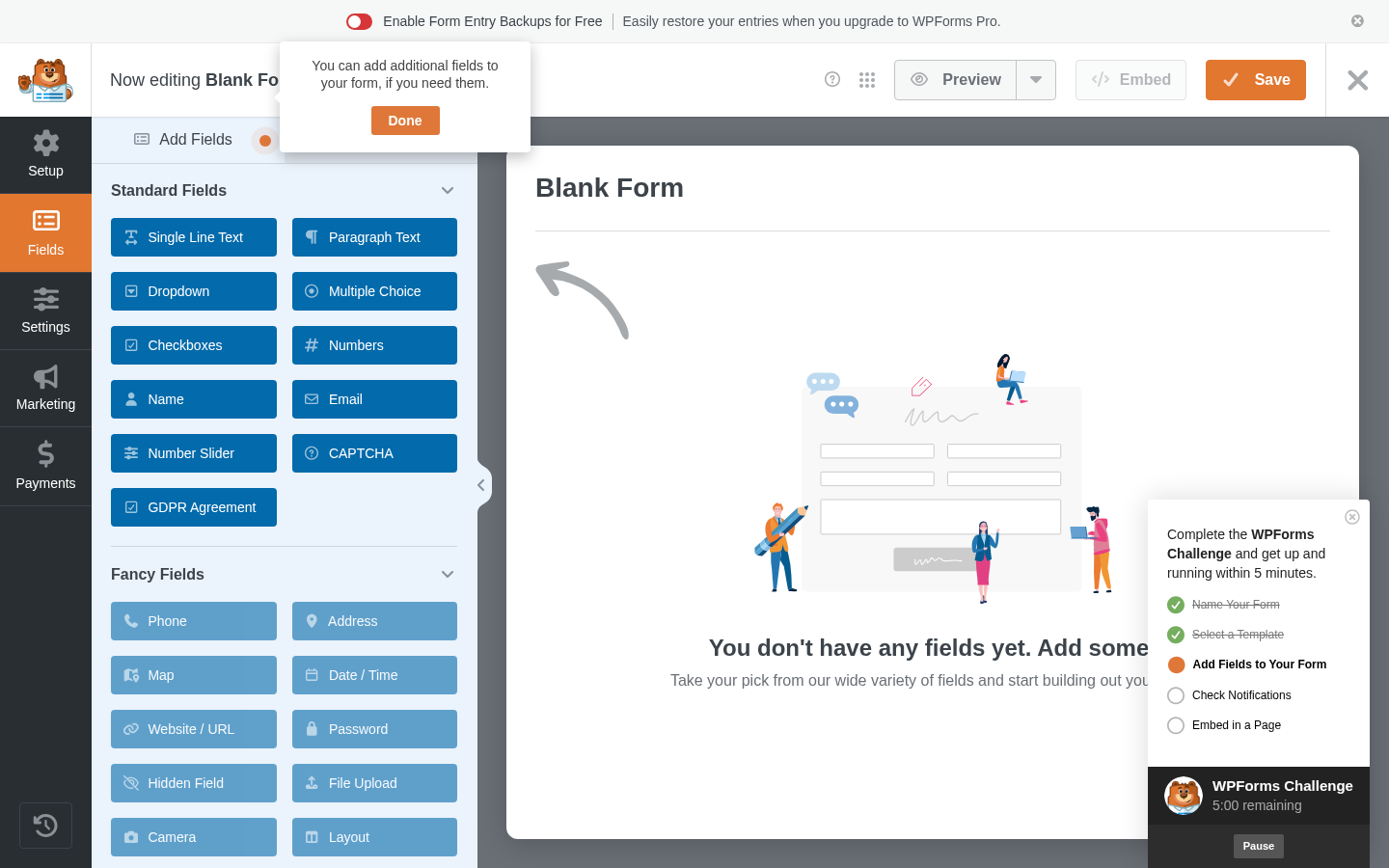
Standard Fields (available in Lite):
Single Line Text, Paragraph Text, Dropdown, Multiple Choice, Checkboxes, Numbers, Name, Email, Number Slider, CAPTCHA, GDPR Agreement.
Fancy Fields (available in Lite):
Phone, Address, Map, Date/Time, Website/URL, Password, Hidden Field, File Upload, Camera, Layout, Repeater, Page Break.
That is a comprehensive free field set. Adding a field is as simple as clicking the button in the left panel: the field drops into the canvas immediately. You can drag to reorder, and clicking a field in the canvas opens its options in the left panel (label, placeholder, required status, CSS class).
The top navigation inside the editor has five tabs: Setup, Fields, Settings, Marketing, and Payments. Each opens a different panel in the left column while keeping the form preview visible on the right.
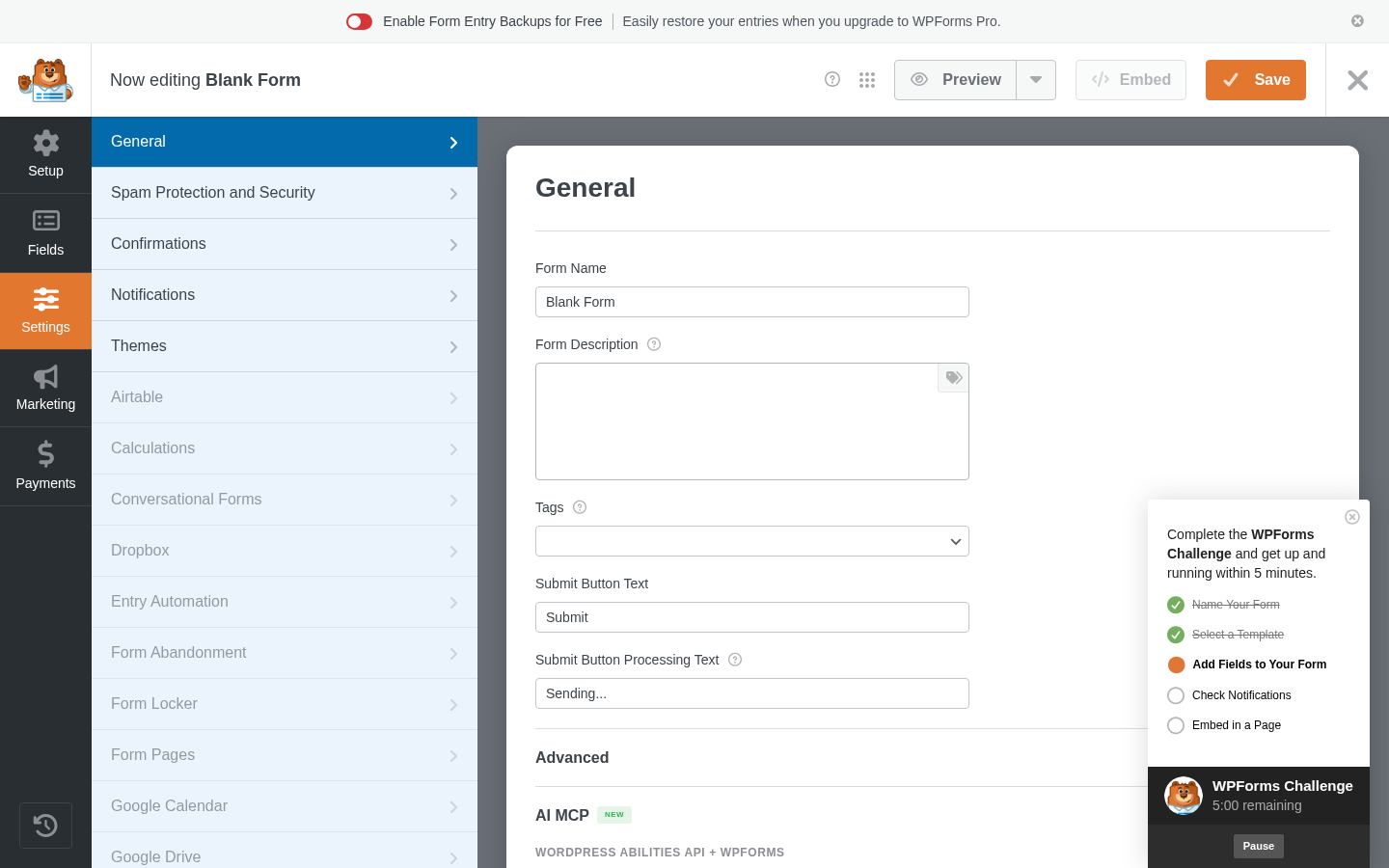
The Settings tab reveals the full scope of the plugin’s addon architecture. The left panel lists: General, Spam Protection and Security, Confirmations, Notifications, Themes, and then a long list of addon-gated sections: Airtable, Calculations, Conversational Forms, Dropbox, Entry Automation, Form Abandonment, Form Locker, Form Pages, Google Calendar, Google Drive. Those sections are visible to free users but prompt an upgrade when clicked.
The Marketing tab shows only Constant Contact and Uncanny Automator connections on the free plan. Every other email marketing integration requires Plus or higher.
The Payments tab lists Stripe, PayPal Commerce, Square (all marked “Recommended”), Authorize.Net, Coupons, and PayPal Standard. On the free plan, none of these are wired up yet.
A “WPForms Challenge” widget appears in the lower-right corner of the editor, tracking five onboarding steps: Name Your Form, Select a Template, Add Fields to Your Form, Check Notifications, Embed in a Page. It is a nice touch for beginners, though the widget does take up visible screen space during form building.
Main Features
Template Library
2,143 templates is an impressive number. In practice, free users have access to 71 of them. The locked templates are still shown in the picker with their thumbnail and name, which creates a browsing experience where you can see what exists, find something that fits your use case, and then discover it requires upgrading.
The 71 free templates cover common use cases: simple contact form, newsletter signup, quote request, event registration. For most basic needs, something in those 71 works. If you need something specific from the broader library, you will need a plan.
AI Form Generation
WPForms added AI form generation in recent releases. There are two distinct AI features, and the split matters:
AI Form Creation (paid only, all paid tiers): You describe the form you want in plain language and WPForms generates a complete form with relevant fields. Not available in the free version.
AI Choices and Smart Edit (free): AI Choices automatically suggests options for dropdown, multiple choice, and checkbox fields. Smart Edit lets you modify an existing form using conversational language directly inside the builder.
The AI MCP integration visible in Settings (labeled “NEW!”) adds WordPress Abilities API support, meaning AI assistants can create and edit WPForms forms programmatically.
For free users, AI Choices and Smart Edit are genuinely useful. That said, the headline “Generate With AI” on the template screen is only fully delivered on paid plans.
Spam Protection
This is one of the more capable areas of WPForms at no cost. The anti-spam features available in Lite are:
- Built-in anti-spam protection: Active by default on all forms, no setup required.
- Minimum time to submit: Detects bot submissions by requiring a minimum elapsed time.
- Google reCAPTCHA: v2 (checkbox and invisible) and v3 supported.
- hCaptcha: Privacy-focused CAPTCHA alternative.
- Cloudflare Turnstile: Frictionless CAPTCHA alternative.
- Akismet: Algorithmic filtering; requires an Akismet account (free for personal use).
The form builder’s Spam Protection panel also shows an “Also Available” section containing features that are locked behind paid plans:
- Country Filter: Block or allow entries by country. Requires Pro+.
- Keyword Filter: Block submissions containing specific words or phrases. Requires Pro+.
- Custom CAPTCHA: Math or question-based CAPTCHA fields. Requires Pro+.
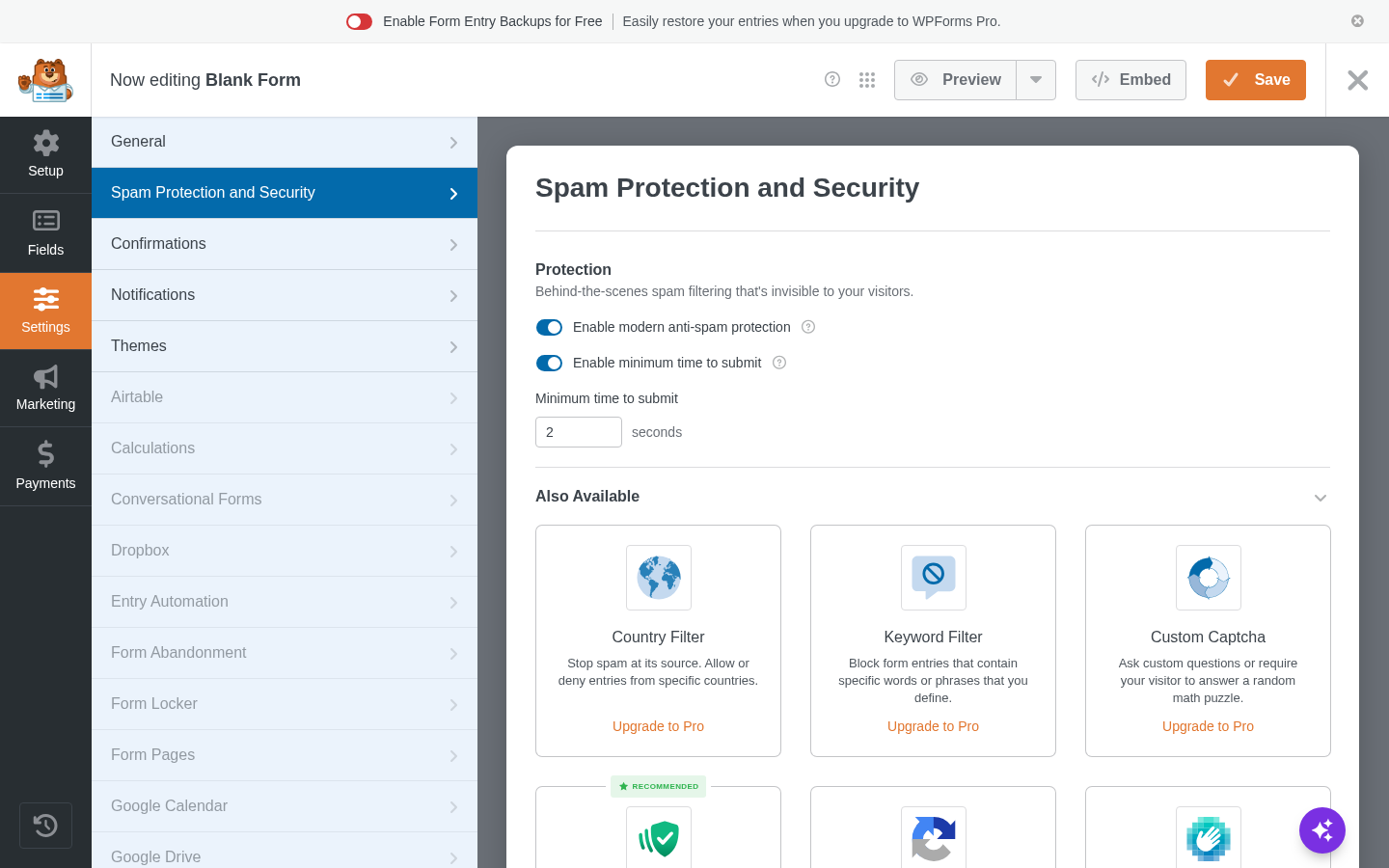
The free tier still handles most spam scenarios effectively through the built-in token and third-party CAPTCHA options.
Payments
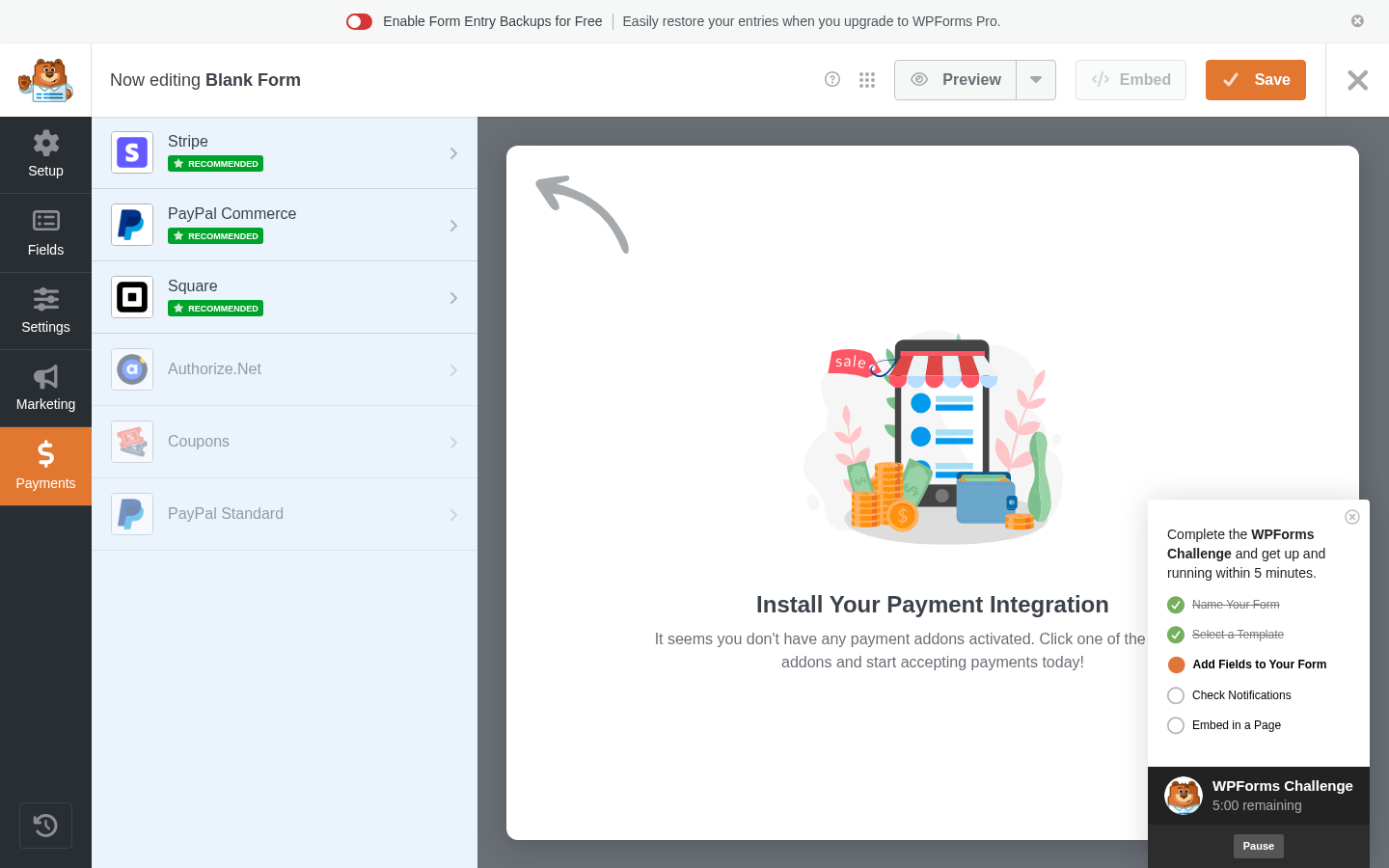
Free plan Stripe: Stripe payments are available in WPForms Lite, but WPForms adds a 3% platform fee on top of Stripe’s standard processing rate. On a $100 transaction, you pay Stripe’s standard rate plus WPForms’ 3%.
Paid plan Stripe (Pro and above): The 3% fee is removed. You pay only Stripe’s standard rates. Pro plans also add recurring subscriptions, Apple Pay, Google Pay, and refund management from within WPForms.
Square and PayPal Commerce require at least Pro. Authorize.Net requires Elite.
If you are processing meaningful payment volume, the free Stripe option costs more in fees than the Pro subscription ($199.50/year for 5 sites) at a relatively low transaction threshold. At $500/month in payments, the 3% WPForms fee costs $180/year, already approaching the Pro plan cost.
Conditional Logic
Conditional logic (showing or hiding fields based on user input) requires at least the Basic plan ($49.50/year introductory). It is not available on the free version.
This is a meaningful limitation. Fluent Forms includes conditional logic on its free plan. For anyone who needs branching logic on a budget, WPForms’ approach is a drawback.
Email Integrations and Marketing
WPForms’ marketing integrations require at least the Plus plan ($99.50/year introductory). On the free plan, Constant Contact is available. Every other major platform, including Mailchimp, AWeber, GetResponse, HubSpot, ActiveCampaign, Brevo, MailerLite, ConvertKit, and Klaviyo, requires Plus or higher.
Notifications and Confirmations
Both are available on the free plan. You can set up email notifications to any address when a form is submitted, with smart tags that pull field values into the email body. Confirmations let you show a success message, redirect to a URL, or redirect to a page. These work reliably and are well-documented.
Entry Management
One of the most important facts about WPForms Lite that many users discover only after installing it: WPForms Lite does not store form entries in your WordPress database.
When you visit WPForms > Entries in the admin, you see sample data and a message: “Form entries are not stored in WPForms Lite. Once you upgrade to WPForms Pro, all future form entries will be stored in your WordPress database.”
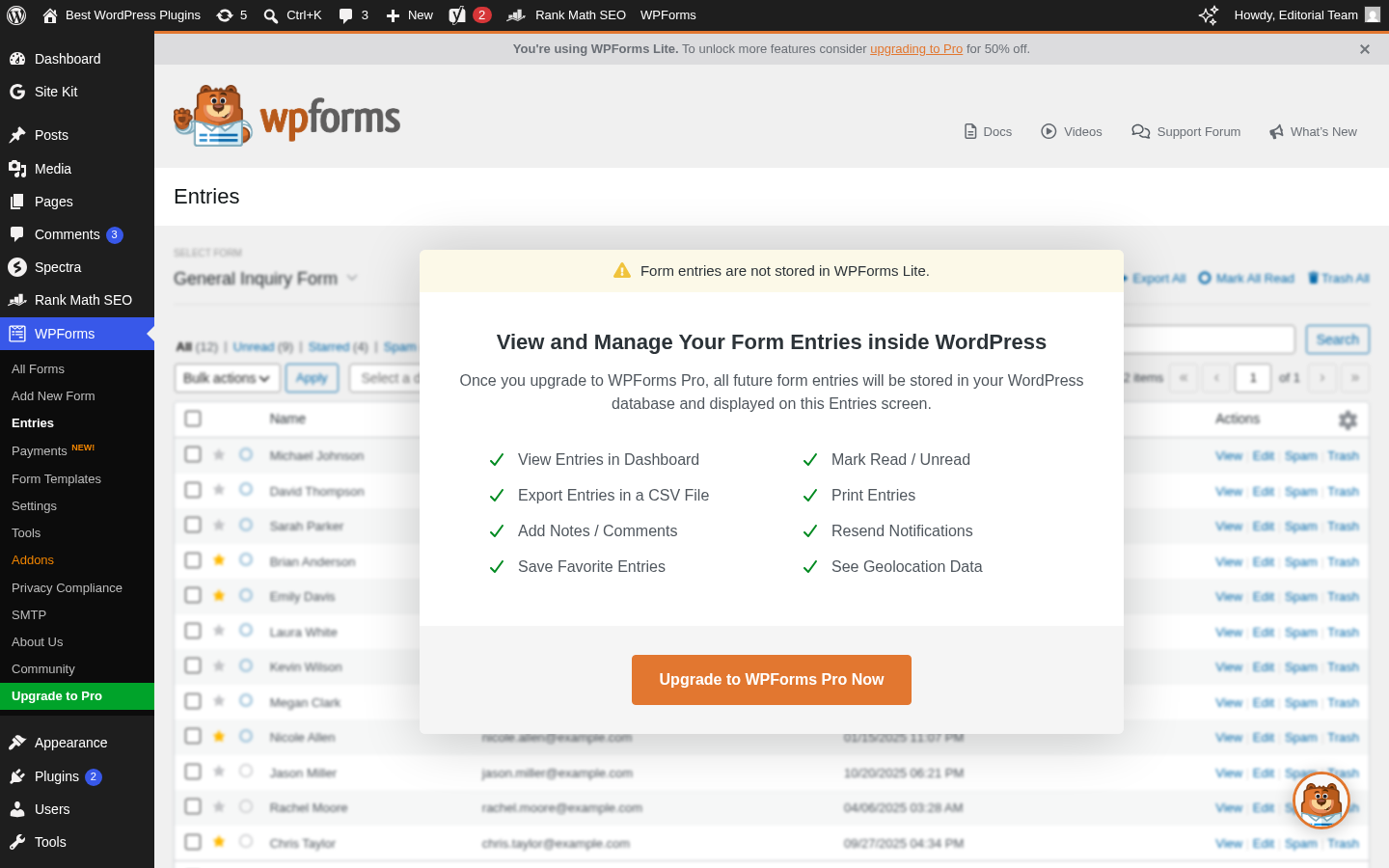
For free users, this means form responses arrive only via email notification. If an email notification fails to deliver (a common hosting SMTP issue), you have no stored record of that submission unless Lite Connect is active.
Lite Connect is the workaround built into WPForms Lite. Under WPForms > Settings in the Lite Connect section, you can enable entry backups. When on, WPForms routes copies of submissions to their servers. If you later upgrade to Pro, those backed-up entries can be restored into your WordPress database. It is a cloud backup for future upgrade scenarios, not a local entry dashboard.
The WPForms settings page is direct about this: “Your form entries are not being stored in WordPress, and your entry backups are not active. If there’s a problem with deliverability, you’ll lose form entries.”
This is a significant limitation for any form collecting important data: lead inquiries, job applications, event registrations. Entry management (view, export CSV, notes, read/unread status, geolocation) is entirely a Pro feature.
Pricing and License Value
WPForms uses four paid tiers, all sold annually. Current introductory pricing applies to the first year only; renewals are at the full price.
| Plan | Introductory | Renewal | Sites |
|---|---|---|---|
| Basic | $49.50/year | $99/year | 1 |
| Plus | $99.50/year | $199/year | 3 |
| Pro | $199.50/year | $399/year | 5 |
| Elite | $299.50/year | $599/year | Unlimited |
All plans come with a 14-day money-back guarantee.
What each tier actually unlocks:
- Basic ($49.50 first year, $99 renewal): Local entry storage in WordPress, conditional logic, multi-page forms, access to the full template library. Standard email support.
- Plus ($99.50 first year, $199 renewal): Marketing integrations (Mailchimp, AWeber, GetResponse, Slack, Twilio, etc.), smart form workflows, data routing. Three-site license.
- Pro ($199.50 first year, $399 renewal): Stripe without the 3% fee, Square, PayPal Commerce, recurring subscriptions, conversational forms, lead forms, form abandonment, form landing pages, PDF addon, quiz builder, country/keyword spam filters, custom CAPTCHA. Five-site license. Priority support.
- Elite ($299.50 first year, $599 renewal): Salesforce, HubSpot, Pipedrive, Zoho CRM, ActiveCampaign, Authorize.Net, webhooks, multisite support, access control, client management. Unlimited sites. Premium support.
The renewal pricing concern is real. After your first year, Basic renews at $99 and Pro renews at $399. Fluent Forms’ Agency plan (unlimited sites) is $299 and does not double at renewal. Gravity Forms Pro (unlimited sites) is $259/year flat. For multi-year WPForms users, the renewal cost is notably higher than several competitors.
The WPForms pricing page states clearly: “Special introductory pricing, all renewals are at full price.” Honest disclosure, but easily missed when comparing plans.
Pros and Cons
Pros
- Clean, distraction-free form editor with genuinely intuitive drag-and-drop interface
- Solid spam protection on the free plan: built-in anti-spam token, reCAPTCHA v2/v3, hCaptcha, Cloudflare Turnstile, Akismet
- Wide field set available in the free builder (file upload, repeater, date/time, layout, page break, and more)
- Lite Connect offers cloud entry backup for future upgrade scenarios
- 5+ million installs, active development, frequent updates
- 14-day money-back guarantee on paid plans
- AI Choices and Smart Edit available on the free tier
- Works with Elementor, Divi, and the Gutenberg block editor
Cons
- No local entry storage in Lite; form responses arrive by email only
- Conditional logic locked behind the Basic plan ($49.50+/year)
- Country Filter, Keyword Filter, and Custom CAPTCHA locked behind Pro+
- Only 71 of 2,143 templates available on the free plan
- 3% WPForms surcharge on free Stripe payments
- Marketing integrations (except Constant Contact) require Plus ($99.50+/year)
- Renewal pricing doubles after the introductory year
- Full AI form generation is paid-only
- Persistent upgrade banners throughout the admin experience
Alternatives
Fluent Forms: A strong competitor with a more generous free plan. Conditional logic, basic email marketing integrations, and local entry storage are available free. Paid plans start at $63/year (single site) and do not double at renewal. Best for users who need entry management and conditional logic without paying.
Gravity Forms: The original premium WordPress form builder. No free version, but pricing is flat at renewal. Better developer tooling, stronger REST API, and a mature addon ecosystem. Starts at $59/year for one site. Best for developers and agencies with complex requirements.
Ninja Forms: Has a free version with more integrations available without a subscription. Less polished editor than WPForms but a lower cost threshold for email marketing connections.
Contact Form 7: Completely free and lightweight. No drag-and-drop editor, no entry storage, no templates. Works reliably and a large ecosystem of third-party addons exists. Best for simple contact forms on a minimal plugin footprint.
Forminator (WPMU Dev): Free, with conditional logic, payment support, basic entry storage, and integrations included at no cost. Less polished than WPForms but a genuinely capable free alternative.
Final Verdict
WPForms is a well-built plugin. The form editor is clean, the onboarding is beginner-friendly, and the spam protection on the free plan is solid. If you are setting up a simple contact form and you want it to work reliably, WPForms Lite is a reasonable choice, as long as you accept that form entries will only arrive via email and not be stored in your WordPress database.
The honest tension in this review is that WPForms markets the free version aggressively while keeping several features most users actually need behind the paid wall: local entry storage, conditional logic, email marketing integrations, and payments without a surcharge. That is not inherently wrong, but it is worth knowing before you build on it.
The pricing model favors buyers who understand the renewal cost going in. The introductory rates are competitive. The full renewal rates are not, particularly against Fluent Forms or Gravity Forms for multi-year use.
For single-site users who need a complete form solution with payments, conversational forms, and email integrations, the Pro plan at $199.50/year introductory delivers genuine value. For anyone starting out who needs only basic forms, the free tier is a workable starting point. Enable Lite Connect, plan for email as your only submission record, and budget for the upgrade cost before you need those features on a deadline.