

If your theme does not give every writer a clear bio section, a free author box plugin can fix that quickly. The right plugin adds a photo, bio, social links, author archive link, and sometimes guest author or co-author support without custom theme code.
For this guide, I compared WordPress.org data, feature depth, setup paths, freshness, pricing limits, and clean sandbox screenshots for the main recommendations. I also checked whether the plugins could render an author box or author management screen in a clean WordPress Playground test site.
Quick recommendation: Simple Author Box is the best starting point for most blogs. Choose PublishPress Authors or Molongui Authorship if you need guest authors, co-authors, or a more structured editorial workflow.
How I chose these WordPress author box plugins
I focused on plugins that solve the author box problem directly, not general page builders or unrelated profile tools. The main ranked list favors plugins with:
- A usable free version on WordPress.org
- Automatic author box placement or simple block, shortcode, or widget output
- Author bio, avatar, and profile link support
- Clear setup for non-technical site owners
- Current compatibility signals where possible
- Enough adoption or review history to trust on a real content site
- A clear use case, such as single-author blogs, multi-author publications, guest authors, or simple visual author boxes
I kept two lower-signal plugins as niche mentions instead of ranking them as top recommendations because their install or review history is still too thin.
Quick comparison table
| Plugin | Best for | Free version | Standout feature | Main limitation |
|---|---|---|---|---|
| Simple Author Box | Most blogs that need a fast author bio box | Yes | Easy profile-based setup and large install base | Advanced layouts and controls are Pro-only |
| PublishPress Authors | Multi-author and guest-author sites | Yes | Multiple authors, guest authors, widgets, blocks, and layouts | More setup than a simple single-author plugin |
| Molongui Authorship | Editorial sites that need author boxes plus attribution tools | Yes | Author boxes, guest authors, co-authors, and import tools | Feature depth can feel heavy for a small blog |
| WP Post Author | Sites that want author boxes, avatars, and extra author tools | Yes | Blocks, widgets, shortcodes, guest authors, and local avatars | Broader feature set may be more than some users need |
| Starbox | Visual author boxes for classic blog layouts | Yes | Polished front-end author box styles | Update cadence is slower than the top options |
| Author Box WP Lens | Lightweight author boxes for simple sites | Yes | Basic automatic author box with simple settings | Smaller install and review base |
1. Simple Author Box: best free WordPress author box plugin for most blogs
Simple Author Box is the best first pick for most site owners because it focuses on the core job: add a responsive author bio box to posts with the author’s name, avatar, bio, website, and social icons. It has the largest install base in this category and a setup path that is easy to understand.
Best for: most blogs
Free/pro: freemium
Standout: simple automatic post author box
Main drawback: advanced styling is Pro-focused
Best for: bloggers, affiliate sites, niche publishers, and small content teams that want a simple author box without building a custom template.
Key features:
- Automatic author box display at the end of posts
- Author avatar, name, website, bio, and social icons
- More than 30 social profile fields
- Responsive layout for desktop and mobile
- Basic design customization for colors, typography, and spacing
- Manual insertion options for more controlled placement
Hands-on notes: In a clean WordPress Playground test, Simple Author Box rendered an author box below the sample post after the author bio was added to the user profile. The front-end output was straightforward and easy to recognize, which matches its position as the most practical default choice.
Pricing / free-plan note: The WordPress.org version is free. Advanced templates, extra controls, and premium support are tied to the paid version.
Pros
- Strongest popularity signal in this list
- Good fit for normal blog posts
- Simple enough for non-technical users
- Many social profile fields in the free plugin
- Recently updated and tested with current WordPress versions
Cons
- Primarily built around normal WordPress authors
- Some design flexibility requires Pro
- Not the best choice if you need complex guest-author workflows

2. PublishPress Authors: best for multiple authors and guest authors
PublishPress Authors is more than a basic bio box. It is built for sites that need to credit one author, multiple authors, co-authors, or guest authors on the same piece of content. If you run an editorial workflow with outside contributors, this is one of the strongest free author box plugin WordPress options to shortlist.
Best for: multi-author sites
Free/pro: freemium
Standout: author management
Main drawback: more setup
Best for: magazines, education sites, agency blogs, news sites, and any publication that regularly works with guest writers or co-authored posts.
Key features:
- Author boxes for single authors, co-authors, multiple authors, and guest authors
- Author profiles with bio, avatar, and description fields
- Display options below content, in widgets, with shortcodes, or with blocks
- Several layout choices for author boxes
- Author management tools inside the WordPress admin
- Free version available on WordPress.org
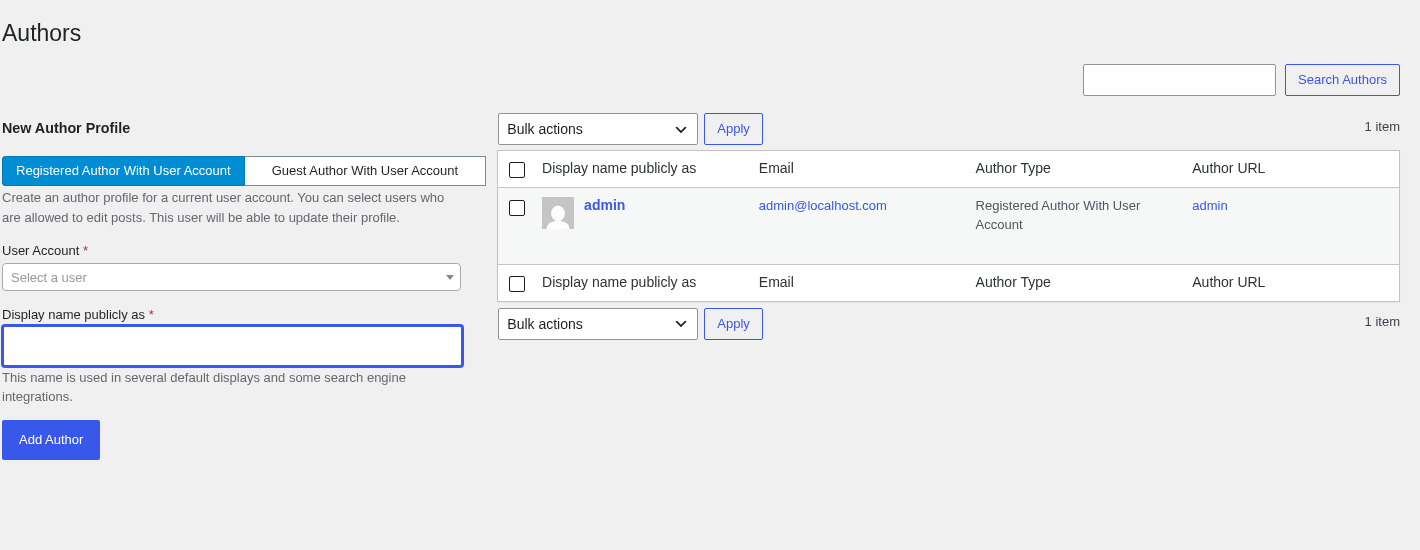
Hands-on notes: In the sandbox, PublishPress Authors opened directly into an Authors admin screen with registered-user and guest-author profile options. The short author box test needed additional profile mapping before it was useful on the front end, which confirms that this plugin is better for structured editorial attribution than for a one-click visual bio box.
Pricing / free-plan note: The free version covers the main author display and management use cases. PublishPress also offers paid plans for advanced needs and support.
Pros
- Excellent fit for multi-author sites
- Supports guest authors without forcing every contributor into a normal user workflow
- Flexible display options
- Strong ratings and active development
- Works well when attribution is part of your editorial process
Cons
- More complex than needed for a solo blog
- Requires more profile and display setup than Simple Author Box
- Some advanced PublishPress ecosystem features are paid
3. Molongui Authorship: best all-in-one authorship plugin
Molongui Authorship is another strong option for sites that need more than a simple author bio. It combines author boxes, guest authors, co-authors, social links, and author attribution tools in one plugin. It is a good match when author identity and contributor credit matter across the whole site.
Best for: all-in-one authorship
Free/pro: freemium
Standout: guest and co-author tools
Main drawback: more settings
Best for: content sites that publish posts from contributors, guest writers, and multiple authors, especially when author attribution affects trust and E-E-A-T.
Key features:
- Customizable author boxes
- Guest author profiles
- Co-author support
- Social profile links
- Import support from other author plugins
- Display controls for where the author box appears
- Compatibility notes for major themes and page builders
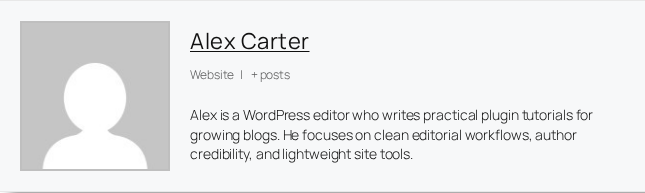
Hands-on notes: In the sandbox, Molongui rendered a front-end author box with the author name, website/post links, avatar, and bio. The output felt more editorial than decorative, and the plugin is clearly built for broader authorship management rather than only visual styling.
Pricing / free-plan note: The WordPress.org version is free. Molongui also sells premium options for more advanced authorship workflows and support.
Pros
- Strong author box and contributor management feature set
- Good option for guest authors
- Useful import path if you are switching from another author plugin
- High review count for this niche
- Trust-focused positioning
Cons
- Can be too much for a simple one-author site
- More settings to understand before publishing
- Premium features may be needed for deeper control
4. WP Post Author: best for author boxes plus extra author utilities
WP Post Author is a flexible WordPress author box plugin that covers more than a basic bio section. It includes author boxes, multiple authors, guest authors, local avatars, post ratings, blocks, widgets, shortcodes, and registration-related tools. That makes it useful if you want author display controls and related user-facing features in one plugin.
Best for: broad author utilities
Free/pro: free/freemium
Standout: blocks, widgets, and shortcodes
Main drawback: broader than a simple bio box
Best for: blogs, magazine sites, and community-style sites that want author boxes plus blocks, shortcodes, custom avatars, or guest-author support.
Key features:
- Author box display for posts
- Multiple author and guest author support
- Local avatar support
- Blocks, widgets, and shortcodes
- Post ratings and registration form features
- Recent update activity and current WordPress compatibility
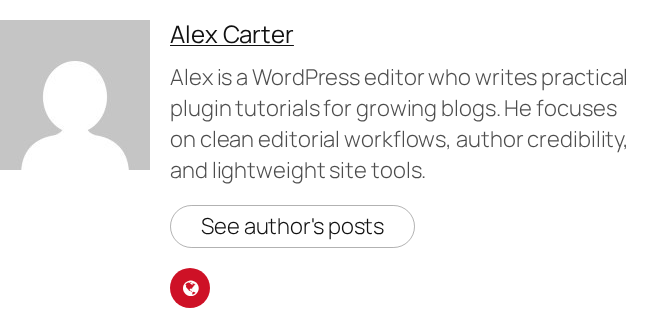
Hands-on notes: In the sandbox, WP Post Author rendered a clean author box with an avatar, author name, bio, and a button linking to the author’s posts. The output was more styled than Simple Author Box and more general-purpose than the editorial tools in PublishPress or Molongui.
Pricing / free-plan note: The WordPress.org plugin is free. Check the developer’s site if you need add-ons, support terms, or any premium options.
Pros
- Broad free feature set
- Offers blocks, widgets, and shortcode placement
- Includes local avatars
- Recently updated
- Good fit for sites that want more than a single automatic box
Cons
- More features can mean more configuration decisions
- Lower review count than the top three options
- Not as focused as Simple Author Box for a basic blog setup
5. Starbox: best for visually styled author boxes
Starbox has been around for a long time and focuses on making the author box feel more engaging for readers. It is less of an editorial management suite and more of a presentation-focused author bio plugin. If you want a visual author profile box with a classic blog feel, it is still worth considering.
Best for: visual author boxes
Free/pro: freemium
Standout: polished author box styles
Main drawback: slower update cadence
Best for: bloggers who care most about the look of the author box and do not need complex guest-author management.
Key features:
- Front-end author box styles
- Author bio and profile presentation
- Social account support through user profiles
- Automatic display options
- Pro version available for more styles and support
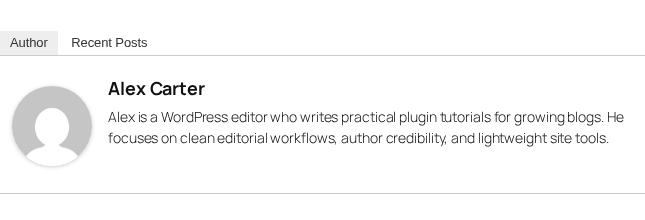
Hands-on notes: In the sandbox, Starbox rendered a tabbed author box with an Author tab and a Recent Posts tab. The output is visually distinct from the simpler boxes above. The main caution is freshness, since its update cadence is slower than the leading options.
Pricing / free-plan note: The WordPress.org version is free. A Pro version is promoted for more social icons, layouts, and priority support.
Pros
- Good visual positioning
- Long history in the WordPress repository
- High number of reviews for this niche
- Simple fit for blog-style author boxes
Cons
- Not as recently updated as the leading options
- Less suitable for advanced editorial workflows
- Some newer layouts and support options are Pro-focused
6. Author Box WP Lens: best lightweight option for simple author boxes
Author Box WP Lens started as Author Box for Divi, but it now works with any WordPress theme or page builder. It automatically adds a simple author box below selected post types. It is a good option if you want a lightweight free author box plugin WordPress users can configure quickly.
Best for: lightweight setup
Free/pro: freemium
Standout: simple automatic output
Main drawback: smaller proof base
Best for: Divi users, simple blogs, and small websites that want a basic author box with a quick settings page.
Key features:
- Automatic author box below selected post types
- Uses Gravatar by default
- Custom profile image URL support
- Social profile icons
- Settings for post type display
- Works beyond Divi according to the current plugin listing
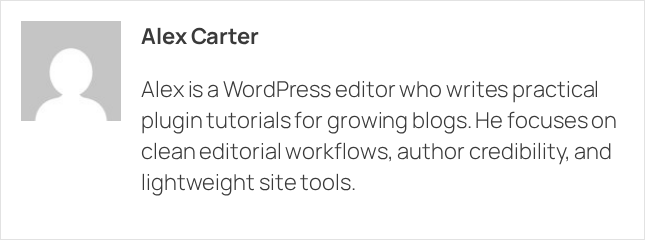
Hands-on notes: In the sandbox, Author Box WP Lens rendered a clean, minimal front-end author box with the author name, avatar, and bio. It did not feel like a full author management system, which is useful if you prefer fewer options.
Pricing / free-plan note: The WordPress.org version is free. The listing also references a premium version for extra features.
Pros
- Lightweight and easy to understand
- Recently updated
- Strong rating, although from a smaller review base
- Good option for basic author bio needs
Cons
- Smaller install base than the top tools
- Fewer reputation signals
- Not the first choice for guest authors or multi-author editorial workflows
Niche options to watch
The two plugins below were researched but not ranked as main recommendations because their proof signals are weaker. They may still fit narrow use cases.
Cool Author Box
Cool Author Box is focused on displaying an author box in a widget area or inside single post content. It supports profile information, an uploaded image or Gravatar, and social links. It is worth a look if you specifically want a sidebar or widget-style author card, but its install base and review count are much smaller than the main picks.
Tidy Author Box
Tidy Author Box has a modern feature set, including a Gutenberg block, shortcode, custom avatar, social links, job title, placement controls, post type selection, and schema markup. It is promising, but at the time of review it had no meaningful install or review history on WordPress.org. Treat it as a plugin to watch rather than a proven top recommendation.
How to choose the best author box plugin for WordPress
If you only need a clean bio box below posts, start with Simple Author Box. It is popular, easy to configure, and focused on the problem most bloggers are trying to solve.
If you publish content from multiple people, compare PublishPress Authors and Molongui Authorship first. Both are stronger than a simple author box plugin when you need co-authors, guest writers, and better attribution.
If you want a wider set of author tools in one plugin, WP Post Author is worth a sandbox test. It includes author boxes, avatars, blocks, widgets, shortcodes, and other site features.
If design matters more than editorial workflows, Starbox is still a recognizable option, but check update compatibility before choosing it. For a lightweight author bio box, Author Box WP Lens is a cleaner choice than many older small plugins.
Before installing any WordPress author box plugin on a live site, check four things:
- Does it work with your theme’s single post template?
- Can you control where the author box appears?
- Does the free version include the social links and avatar controls you need?
- Is the plugin actively maintained and tested with your WordPress version?
FAQ
What is the best free WordPress author box plugin?
Simple Author Box is the best free WordPress author box plugin for most standard blogs because it is focused, popular, easy to configure, and has strong WordPress.org signals. For multi-author sites, PublishPress Authors is usually the better first choice.
Do I need an author box plugin if my theme already shows author bios?
Not always. If your theme already displays a clean author bio with avatar and useful profile links, you may not need another plugin. Use an author box plugin when your theme’s box is missing, too limited, hard to style, or does not support your contributor workflow.
Which author box plugin is best for guest authors?
PublishPress Authors and Molongui Authorship are the strongest choices for guest authors. They are built around contributor attribution, not only a visual author bio box.
Can an author box help with E-E-A-T?
An author box can support trust by making writer identity clearer, especially when it includes a real bio, credentials, profile image, and relevant links. It is not a ranking shortcut by itself, but it can improve transparency for readers and reviewers.
Should I choose a free or paid author box plugin?
Start with a free plugin if you only need author name, avatar, bio, and social links. Consider a paid version if you need guest authors, co-authors, advanced layouts, archive-page author boxes, custom styling, or priority support.
Conclusion
For most blogs, start with Simple Author Box. It gives you the quickest path to a clean author bio box without overcomplicating your site.
For editorial teams, PublishPress Authors and Molongui Authorship are better choices because they handle multiple contributors and guest authors more naturally. For broader author utilities, test WP Post Author. For visual styling, look at Starbox. For a lightweight simple setup, consider Author Box WP Lens.
The best author box plugin for WordPress is the one that fits your publishing workflow first, then your design preferences second.