

Most WordPress block plugins arrive with a simple pitch: here are some extra blocks for your site. Kadence Blocks arrives with 25+ free blocks, a built-in form builder, 900+ Google fonts, 1,500+ SVG icons, a design library, and an AI writing assistant baked into the heading block.
That is an unusual amount of free capability. The catch, as of mid-2026, is that the paid layer changed dramatically. Kadence WP was quietly folded into Liquid Web in May 2026. The standalone Kadence Blocks Pro product is gone. Pro features now come only as part of the Essentials bundle at $99/year, which also includes the premium Kadence Theme, starter templates, header/footer builder, and mega menus. Depending on what you need, that may be better value or a higher floor than you wanted.
I installed Kadence Blocks 3.7.8 in a WordPress Playground environment; the WP.org plugin listing shows the plugin as tested up to WordPress 7.0.1, but the actual Playground runtime version was not independently verified. Plugin download and activation were confirmed via network logs and a front-page screenshot with the WordPress admin bar visible. Due to memory constraints in the headless testing environment, the block editor was not directly accessible for hands-on testing; block editor UI details throughout this review are based on official WordPress.org plugin screenshots and official Liquid Web/Nexcess documentation. Pro features were researched from the Liquid Web product page (liquidweb.com) and Nexcess documentation (docs.nexcess.com). Where features could not be verified from official sources, this is noted in the relevant section.
This is a review for someone deciding whether to add Kadence Blocks to a site, and whether $99/year for the Pro tier makes sense for their use case.
Quick Verdict
Kadence Blocks is one of the most capable free Gutenberg block plugins in its category. A form builder, gallery slider, countdown timer, table of contents, off-canvas nav, and testimonials block are all free. The intelligent per-page asset loading keeps performance clean even on block-heavy pages.
- Best for: WordPress users and small agencies who want to build layout-rich pages inside the native block editor without switching to a visual canvas tool like Elementor.
- Best free use case: Content-rich pages with forms, galleries, tabs, accordions, and icon-based list items, where the native WordPress blocks run out of design options.
- Best paid use case: Full-site builds using the Kadence Theme with advanced query loops, dynamic content, custom fonts, and the full design library.
- Standout: Forms block included free. Most competitors charge for forms.
- Watch out for: The Liquid Web rebrand means no standalone Pro license. Smaller learning curve than Elementor but still real. Some 2026 WordPress.org reviews report blank editor screens under specific configurations.

What Kadence Blocks Is
Kadence Blocks is a WordPress plugin that extends the native block editor (Gutenberg) with additional blocks and advanced design controls. You keep using the standard WordPress editor; you just get more blocks to work with.
The plugin was first released in August 2018 by Kadence WP, a team based in Missoula, Montana. It was acquired by StellarWP (the WordPress software arm of Liquid Web) and, in May 2026, consolidated under the Liquid Web brand along with StellarWP’s other WordPress products. The plugin author on WordPress.org now lists Nexcess, the web hosting brand that sits alongside Liquid Web.
With 600,000+ active installs and a 4.8-star rating across 331 reviews, Kadence Blocks is one of the two or three most widely used Gutenberg block plugins available. It sits in the same category as Spectra, GenerateBlocks, and Greenshift, but with one of the widest free block sets in this category.
The key architectural difference from page builders like Elementor or Divi: Kadence Blocks adds to Gutenberg rather than replacing it. Your content is still stored as standard WordPress block markup. You are not locked into a proprietary visual canvas. Switching off Kadence Blocks leaves your content intact (though unstyled), unlike some classic page builder plugins where disabling the plugin leaves shortcode garbage across every post.
Who Kadence Blocks Is Best For
Kadence Blocks fits you well if you:
- Build sites inside the WordPress block editor and want richer blocks without leaving the native editing experience.
- Need forms, galleries, countdown timers, accordions, or tab layouts but do not want to install five separate plugins to get them.
- Want a performance-conscious block plugin that only loads assets for blocks actually used on each page.
- Are building a site on the Kadence Theme and want the full Kadence ecosystem working together.
- Run an agency or freelance practice that builds multiple WordPress sites and wants design library patterns to speed up client work.
Kadence Blocks is a weaker fit if you:
- Want a visual canvas experience where you drag elements onto a preview of the page. Kadence Blocks works within Gutenberg; it does not give you an Elementor-style canvas.
- Need theme-building features (custom headers, footers, post templates) in the free tier. Those are behind the paid plan.
- Are an experienced developer who prefers writing CSS and PHP. The block system is fast for non-developers but adds an extra UI layer that developers building from scratch may find unnecessary.
- Only need one or two extra blocks. GenerateBlocks or a single purpose plugin will add less overhead.
Setup and First Impression
Installing Kadence Blocks is a standard WordPress plugin install: find it in the Plugin Directory, install, activate. There is no separate onboarding wizard, no account connection required for the free version, and no upsell modal on activation.
After activation, Kadence Blocks appears in the block editor’s insert panel. You will find the blocks listed under a Kadence section when you search or browse. The plugin also adds a Kadence menu item to the WordPress admin sidebar, which leads to the block settings page where you can enable or disable individual blocks, configure block defaults, and enable the Performance Optimizer.
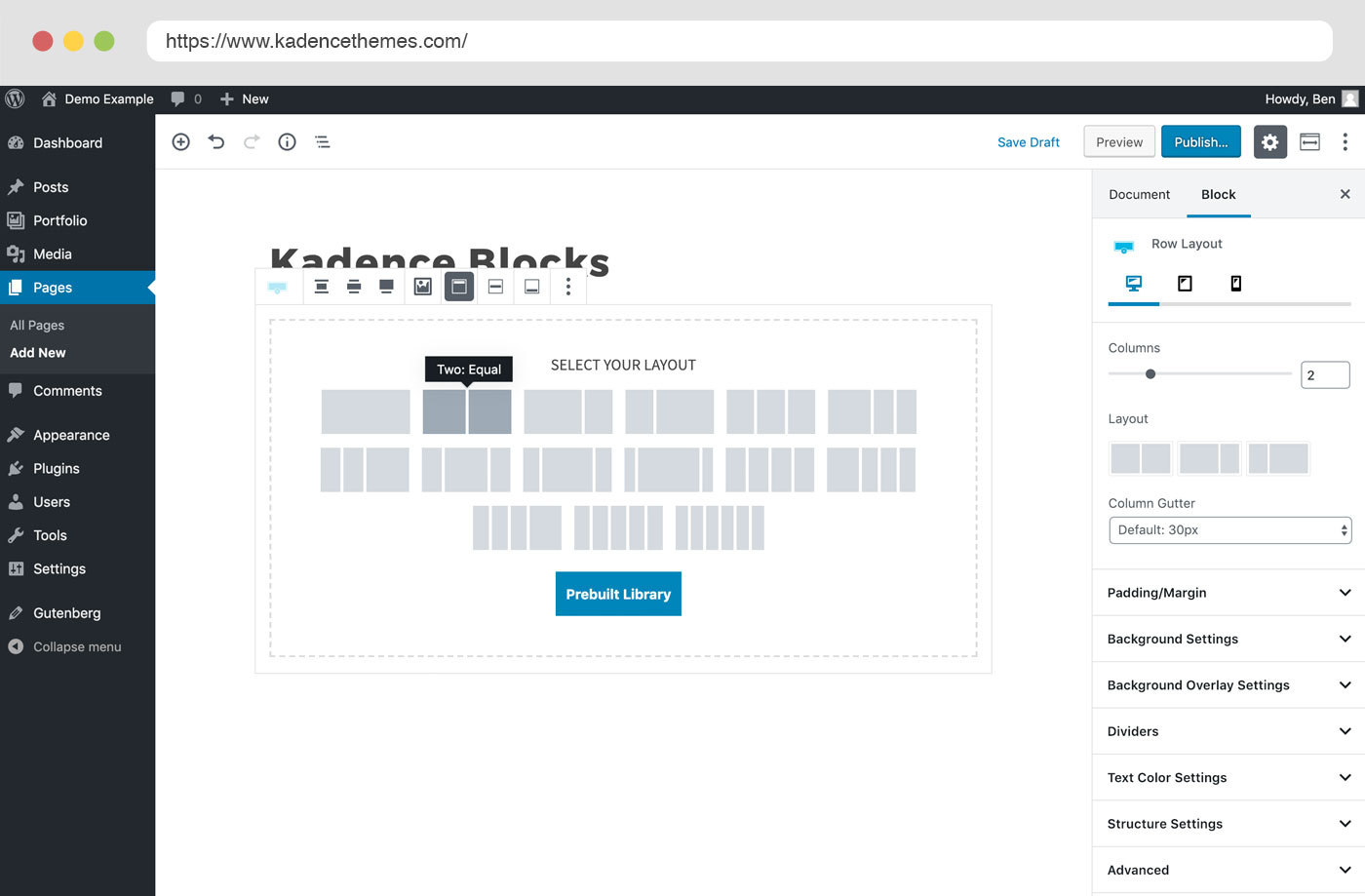
Based on official WordPress.org screenshots and plugin documentation, the blocks integrate cleanly into the existing Gutenberg flow. The official Row Layout screenshot shows the column layout picker appearing in the canvas alongside a detailed settings panel on the right. The Kadence settings panel is more detailed than core WordPress blocks (more padding/margin granularity, per-device controls, background options), but follows the same sidebar convention Gutenberg users expect.
One thing worth noting from the plugin documentation: the block count is higher than it first appears. The block inserter groups Kadence blocks cleanly, and the full list includes sub-components (the Advanced Form block, for example, registers multiple individual field blocks: email, text, date, file, select, checkbox, radio, phone, number, textarea, hidden, and accept). The editor panel itself is logically organized and does not feel cluttered once you are inside a specific block.
Configurable defaults are a genuine time-saver for agency workflows. You can set default padding, font size, and color settings for every block type once, and those defaults apply whenever you add that block type. Useful if you are building multiple pages to a consistent style.
The Free Block Library
The free Kadence Blocks plugin includes 25+ blocks. Here is what each does, based on official documentation and the plugin’s WordPress.org description.
Row Layout and Section
Row Layout is the foundation block. It works as a container that holds one or more columns, each of which can contain any other block. You choose the column layout, set padding and margin values for desktop, tablet, and mobile separately, add background colors or images, apply gradients, and control border/shadow behavior.
Section is the block that lives inside a Row Layout column. It gives you another layer of container control, useful for nesting complex layouts.
This nested container structure is how you build multi-column pages, hero sections, and content grids in Kadence Blocks. It is the Gutenberg-native equivalent of a section/column system, similar to what Elementor uses but implemented as standard WordPress blocks.
Advanced Text (Heading and Paragraph)
The Advanced Text block replaces and extends core Heading and Paragraph blocks with per-device font sizing (different sizes for desktop, tablet, and mobile), access to 900+ Google fonts, text shadow, background color, link styling, inline image insertion, and an inline AI editor.
The inline AI editor is a free feature for limited usage (250 AI credits on activation). You can use it to improve writing, fix grammar, change tone, or generate alternative phrasings directly inside the block. It is a light integration, not a full AI page builder; the intent is editing assistance rather than content generation. Additional credits require a paid plan.
Advanced Form
This is one of the most notable free features in this category. The free Kadence Blocks plugin includes a full form builder. You can build multi-field contact and marketing forms with field validation, CAPTCHA (Google reCAPTCHA v3, Cloudflare Turnstile, or hCaptcha), email notifications to the site admin and the submitter, and basic email marketing integrations.
Most competing Gutenberg block plugins (Spectra, GenerateBlocks, Greenshift) do not include a free form block. Kadence’s inclusion of Advanced Form in the free tier is a meaningful differentiator.
Field types available in the free version: text, email, textarea, number, telephone, date, time, radio, checkbox, select, file upload, and hidden. That covers most standard contact form needs.
What the free form lacks compared to premium form plugins: a submission database in WordPress (Kadence’s form builder sends emails but does not log submissions in a native dashboard), complex conditional logic, and the broader integration library (MailChimp, ActiveCampaign, and webhook connections are available but may require additional setup).
Advanced Gallery
The gallery block supports three display modes: grid (masonry-style), carousel, and slider. You control image size, gutter spacing, lightbox behavior (click to open full image), and link targets. The carousel and slider modes use a swipe-enabled layout suitable for mobile.
Advanced Button
Beyond the core Button block, Advanced Button lets you place multiple buttons side-by-side, add icons from the 1,500+ icon library to buttons, set independent hover states (color, background, border), and apply gradient backgrounds. Useful for CTA sections where you want a primary and secondary button together without manually styling two separate blocks.
Accordion
Tabs-style expandable panels. Each panel can contain any Gutenberg block inside it, so you can put a form, a gallery, or a video inside an accordion panel. You control title styling, expanded/collapsed state, icon choice, and border.
One accessibility note from the changelog: the Accordion block’s ARIA attributes and keyboard navigation have been consistently refined across 2025-2026 versions, with updates to prefers-reduced-motion support and screen reader announcements.
Tabs
Horizontal or vertical tab layouts. Each tab contains an open canvas that accepts any Gutenberg block. Styling options include tab border, active tab color, and tab alignment.
Countdown
A countdown timer block for urgency marketing. The free version supports fixed-date countdowns. The evergreen countdown (which resets for each visitor, useful for limited-time offer funnels) is a Pro feature.
Count Up
An animated number counter. Useful for “by the numbers” sections: 10,000 customers, 99% satisfaction, and similar social proof displays. The animation triggers when the block scrolls into view.
Icon and Icon List
The Icon block draws from a library of 1,500+ SVG icons. You choose an icon, set size, color, background shape, and border. The Icon List block wraps icons with list text items, creating more visually distinct lists than the native WordPress list block.
Info Box
An icon or image paired with a title, description, and “learn more” link. You style the static state and the hover state separately. This is the block to reach for when building feature cards, service grids, or team member cards.
Testimonials
A testimonial block that displays in grid or carousel layout. Each testimonial includes an avatar, name, role, quote, and star rating. The carousel mode uses the same swipe-enabled behavior as the gallery block.
Table of Contents
Reads the heading blocks on the current page and generates an auto-linked ToC. You can control heading levels included, set the ToC title, and choose collapse behavior. This is one of the most polished free ToC implementations in the Gutenberg ecosystem.
Posts
Display a grid of recent posts anywhere on the page. Control the number of posts, category filter, post card layout (image, excerpt, date, author, read more), and column count.
Lottie Animation
Import a Lottie JSON file from the web or your media library and embed an animation directly in the page. You control playback (autoplay, loop, triggered by scroll or hover), animation speed, and dimensions.
Show More
Truncates long content behind a “read more” button. You set the preview height per device (showing a fade-out below the fold), and the user clicks to expand. Useful for long FAQ answers, long product descriptions, and legal-text sections that need to be present but do not need to be front-and-center.
Other Blocks in the Free Set
- Spacer / Divider: Horizontal rule with spacing controls, per-device height.
- Progress Bar: Visual progress indicator (percentage-style), useful for skill ratings or goal tracking.
- Off Canvas: A slide-in sidebar panel triggered by a button. Used for mobile navigation menus or off-canvas sidebars.
- Table (Advanced): Data table with styled headers, row striping, and column width controls.
- Navigation (Advanced): Full navigation block with sub-menu hover controls and standard navigation features. Mega menu support and sticky header behavior require the Essentials paid plan.
- Search (Advanced): A styleable search form block.
- Vector Illustration: SVG illustration block with fill color controls.
Design Controls That Matter
Beyond the block list, Kadence Blocks adds design control features that apply across all blocks.
Responsive Controls Per Device
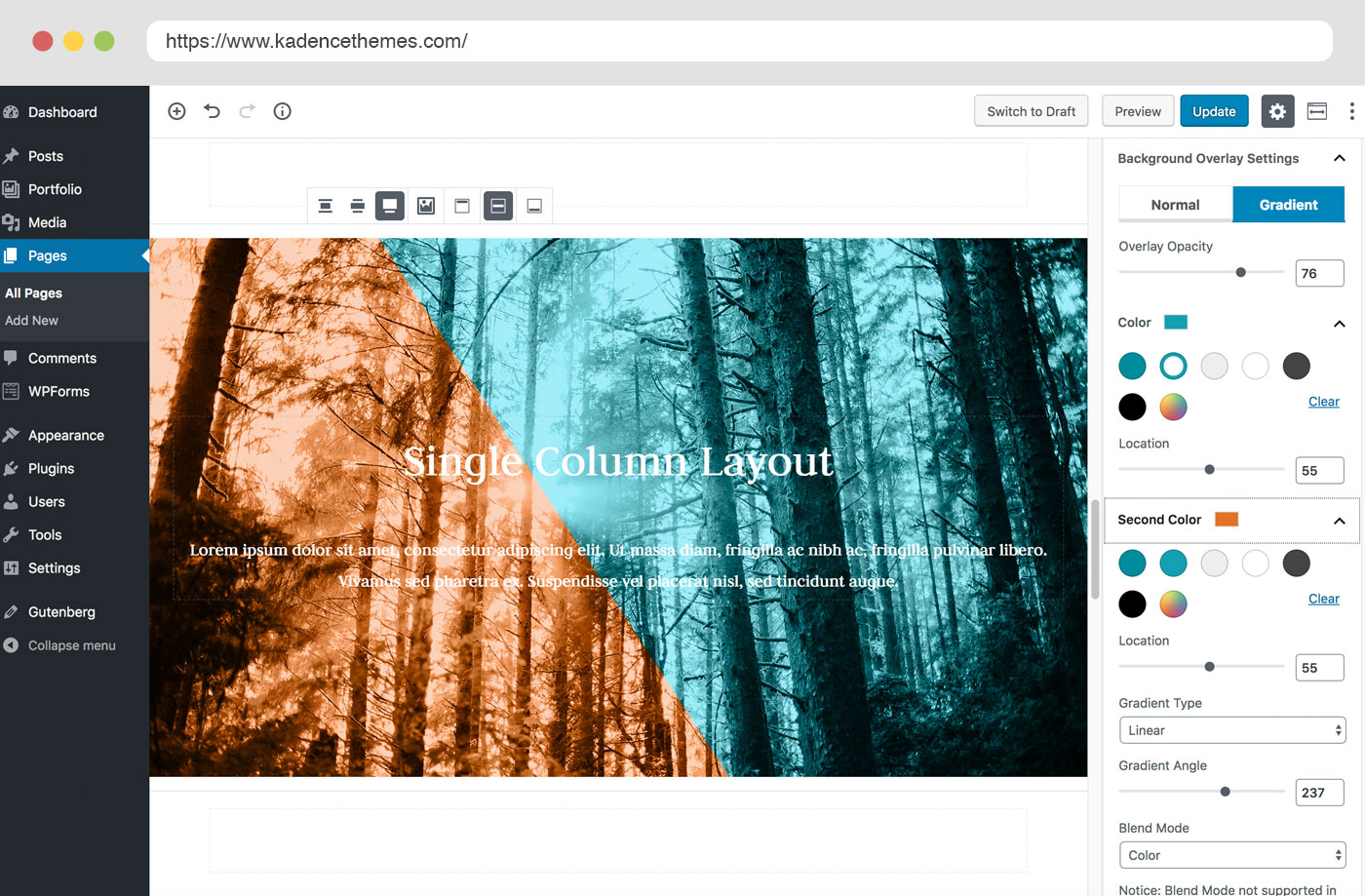
Every major block includes separate settings for desktop, tablet, and mobile breakpoints. Padding, margin, font size, and column count can all be set independently for each device. You preview the result by switching the editor’s responsive view in the top toolbar.
This per-device control is why Kadence Blocks works for responsive design work without requiring additional CSS. You set the desktop layout, switch to tablet, adjust spacing, switch to mobile, collapse columns to single-stack. The settings are persistent per block.
Configurable Defaults
You can set default styles for every block type from the Kadence Blocks settings panel. Set the default padding for Row Layout, the default font size for Advanced Text, or the default button color for Advanced Button, and those values apply every time you add that block type to a page. This pays for itself on the third or fourth page you build to the same brand spec.
Block Settings Visibility Control
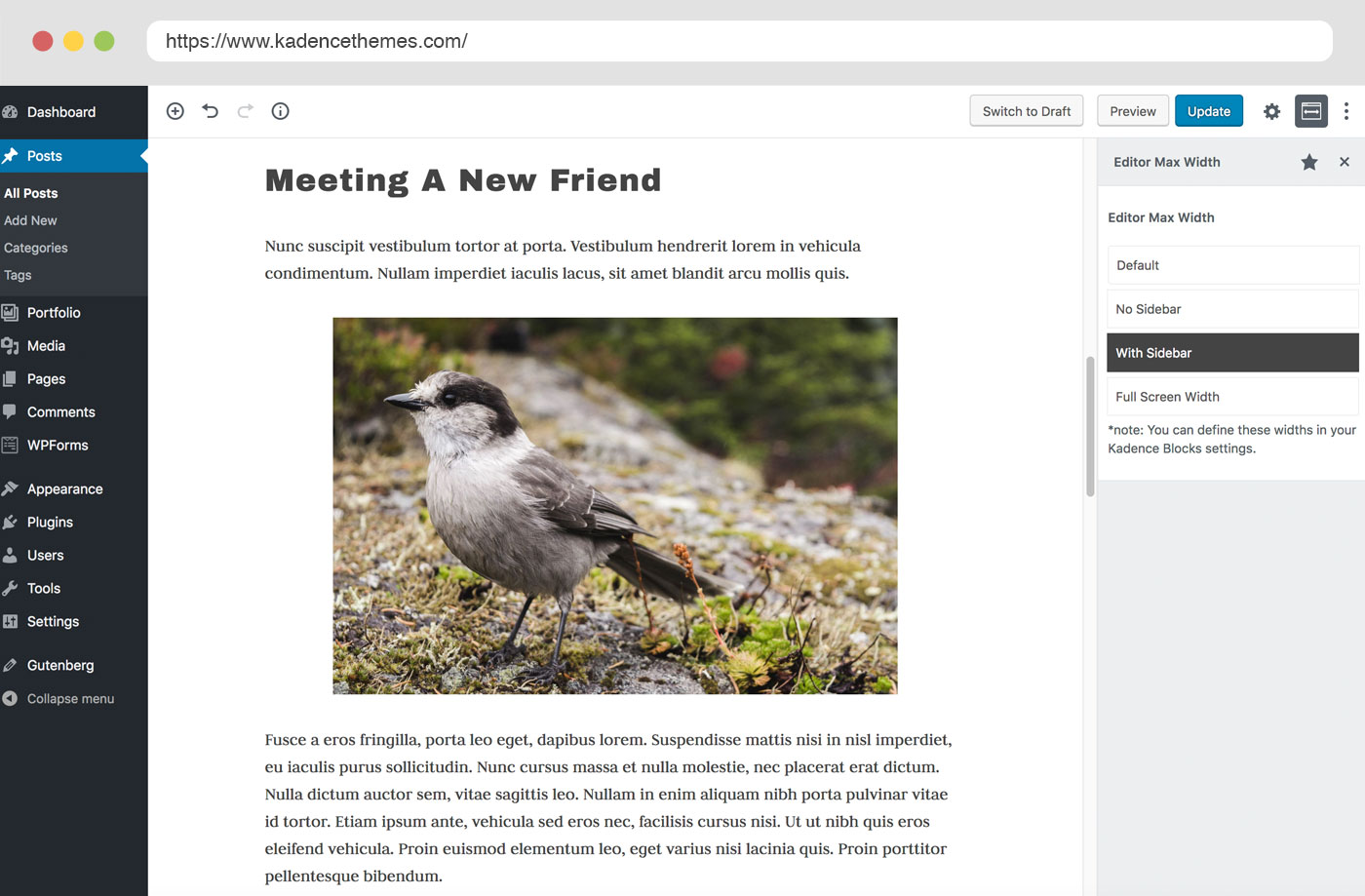
You can hide specific block settings from certain WordPress user roles. If you are handing a site over to a client who should not be adjusting typography or column structure, you can strip those controls from the editor view for their role while keeping them visible for admins.
Performance Optimizer
Added in version 3.6.0 (January 2026), the Performance Optimizer is a configurable tool in the Kadence Blocks settings that helps improve Core Web Vitals. It works alongside the plugin’s built-in intelligent asset loading.
The intelligent loading is a core behavior: Kadence Blocks only loads the CSS and JavaScript for blocks that are actually used on the current page. A post that only uses Advanced Text and Icon List blocks does not load the gallery, countdown, or testimonials scripts. This is meaningfully different from plugins that enqueue a single large bundle on every page.
The Performance Optimizer adds additional controls on top of this baseline, including options for further CSS deferral and script optimization.
The Design Library
The Design Library is accessible from inside the block editor via a grid icon in the toolbar (or from the block inserter in some configurations). It shows a gallery of pre-built page sections and full-page layouts that you can import into your current page with a single click.
Free users get access to a subset of patterns. Pro users (Essentials plan or higher) get the full library of 800+ patterns, including more advanced layouts, wireframe patterns, and the full collection of starter templates.
The patterns are block-based, meaning they import as standard Kadence block markup. You can edit anything after importing. This is not a locked layout; it is just a fast starting point.
From official documentation and third-party accounts, the Design Library is one of Kadence’s stronger practical features. Agencies report that being able to import a well-structured pricing section or hero layout cuts design time significantly, especially for sites that use consistent Kadence defaults.
AI Features
Kadence AI is integrated in two places in the current version.
The first is the inline AI editor in the Advanced Text block. Select text in the block, and a formatting toolbar appears with an AI icon. Clicking it opens a prompt for improving the selected text, changing tone, fixing grammar, or generating alternatives. Free users get 250 AI credits on first install.
The second is the AI website builder, listed as “coming soon” on the Liquid Web product page as of July 2026. This is intended to generate full site designs from a text prompt. It was not available for testing and has not shipped as of this review date.
The inline AI editor is practical for content editing but limited for site building. It is not a content generation tool; it is more like having a Grammarly-adjacent option inside the heading block. The 250 free credits are enough to evaluate the feature but not to run it regularly.
Pro Features and the Essentials Plan
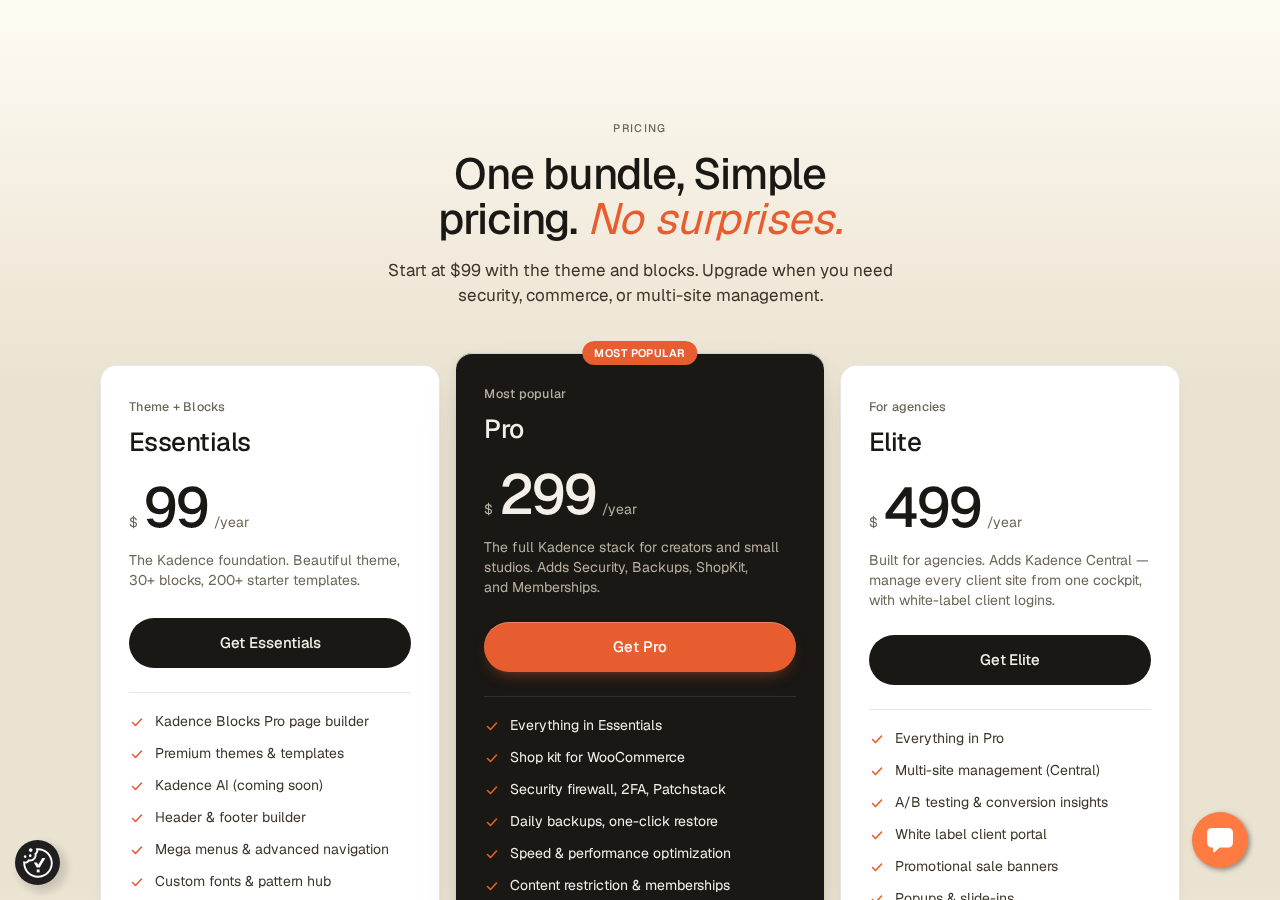
Kadence Blocks Pro is no longer sold as a standalone product. As of May 2026, Pro features are only available through the Essentials plan at $99/year (or the higher Pro and Elite plans).
The Essentials plan includes:
- Kadence Blocks Pro (all Pro blocks and Pro features)
- Premium Kadence Theme
- Starter Templates (200+ pre-built site designs)
- Header and Footer Builder (drag-and-drop, no custom PHP required)
- Mega Menu support in the Navigation block
- Advanced Navigation controls
- Custom Fonts (upload non-Google fonts)
- Pattern Hub (custom pattern library for your own designs)
- Child Theme Builder
- CAPTCHA integrations
Pro-Exclusive Blocks
- Advanced Query Loop: Filter and display posts with extended query controls beyond the core Query Loop block.
- Advanced Slider: Slide any Gutenberg blocks inside a full-featured carousel with autoplay, custom arrows, dot indicators, and responsive break options.
- Image Overlay: Place a text overlay and CTA button on an image, with hover state controls.
- Modal: A button-triggered popup dialog that supports any block content inside the modal.
- Post Grid/Carousel: A styled post display block with more layout options than the free Posts block.
- Product Carousel: WooCommerce product carousel, useful for featured product sections.
- Repeater: A repeating content pattern block for dynamic-looking sections without coding.
- Split Content: Two-column sections with a vertical divider, useful for comparison layouts.
- Video Popup: Opens a video in a lightbox/modal rather than embedding it inline.
Pro-Exclusive Features
- Animate on Scroll: CSS-based scroll-triggered entrance animations for any block.
- Dynamic Content: Pull data from ACF, MetaBox, WooCommerce, and other custom field sources into blocks.
- Conditional Display: Show or hide individual blocks based on user role, device type, date range, or post type.
- Custom Icons: Upload your own SVG icon sets in addition to the built-in 1,500+ library.
- Elements Hooks: Design entire content blocks and inject them anywhere in the theme layout, controlled by conditions.
- Evergreen Countdown: Per-visitor countdown that resets, for always-active urgency campaigns.
Pricing
Pricing is now set entirely by Liquid Web as of May 2026. The following reflects the July 2026 state.
Free (WordPress.org)
The free plugin at wordpress.org/plugins/kadence-blocks/ remains fully available with all free blocks and no account requirement.
Essentials: $99/year
Includes everything required for a full Kadence Blocks Pro workflow plus the Kadence Theme ecosystem: all Pro blocks, Kadence Theme premium version, 200+ starter templates, header and footer builder, mega menus, custom fonts, full Design Library access (800+ patterns), Elements Hooks, Dynamic Content, Animate on Scroll, and Conditional Display.
Pro: $299/year
Adds to Essentials: Shop Kit for WooCommerce (17+ store tools), security firewall with Patchstack virtual patching, two-factor authentication, daily automated backups with one-click restore, speed optimization tools, and content restriction/membership gating.
Elite: $499/year
Adds to Pro: Central (multi-site management dashboard), A/B testing and conversion insights, white label client portal, popups and slide-ins (Kadence Conversions), and 1,000 transactional emails/month (Kadence Mail).
All plans: check liquidweb.com for current pricing, as rates have been adjusted since the May 2026 rebrand. Regional pricing may apply.
Note on the price change: The previous standalone Kadence Blocks Pro cost approximately $79-149/year depending on license tier. The new Essentials plan at $99/year includes more (theme, templates, header builder) than the old standalone Pro did. For users who were already paying for both Kadence Theme and Kadence Blocks Pro separately, the bundled Essentials price is better value. For users who only wanted Kadence Blocks Pro and no theme, the $99 floor is higher than before. Lifetime plans are no longer sold for new customers; existing holders were grandfathered.
Performance
Kadence Blocks’ approach to performance is architectural: the plugin registers each block’s assets separately and only enqueues CSS and JavaScript on pages where those blocks appear. A page with only an Advanced Text block and an Icon List block does not load gallery scripts, countdown scripts, or tab scripts.
This is meaningfully different from plugins that ship a single combined stylesheet and script bundle loaded on every page. On content-heavy sites where different page types use different blocks, Kadence Blocks adds less baseline overhead than a blanket-load plugin.
Community data from third-party testing suggests Kadence Blocks sites can achieve strong Google PageSpeed Insights scores on mobile when paired with a fast host and a performance-optimized configuration. Individual results vary by theme, hosting environment, and page complexity. This is consistent with the plugin’s lightweight-by-default philosophy.
The Performance Optimizer (v3.6.0, January 2026) adds a configurable layer on top of this baseline. The documentation describes options for additional CSS optimization and script deferral on a per-site basis.
Compared to class-based block plugins like GenerateBlocks, Kadence Blocks adds more DOM elements per block (because each block has its own wrapper with specific classes and attributes). For most page types this difference is academic. For extremely complex pages with 50+ block instances, GenerateBlocks or Bricks Builder will produce leaner output.
One footnote: if you use the Kadence Theme alongside Kadence Blocks, the two are designed to share styles efficiently without duplicating CSS. Using Kadence Blocks with a third-party theme works fine but may not achieve the same CSS efficiency.
Honest Drawbacks
The Liquid Web rebrand introduced real friction. In May 2026, kadencewp.com started redirecting to liquidweb.com. The standalone Kadence Blocks Pro license page disappeared without a clear replacement path initially. Users with existing licenses reported login failures and missing invoices during the migration. Liquid Web acknowledged technical problems and committed to resolving them, but the community response was sharp. YouTube creators published “Kadence is dead” videos; WP forums had extensive backlash threads. The operational migration has largely stabilized, but the trust damage with some long-time users is real.
Documentation is fragmented after the rebrand. kadencewp.com help articles now redirect to docs.nexcess.com. Some older community guides and tutorials still link to the old URLs, and not all documentation has been updated consistently. One 2026 WordPress.org reviewer specifically called out “scattered or simply non-existent” documentation. This appears to be a transition artifact, not a permanent state, but it creates friction for new users trying to find answers.
The learning curve is real. Kadence Blocks is simpler than Elementor but it is not trivial. Row Layout with nested Sections, per-device responsive controls, configurable defaults, and the Design Library all have their own logic. One 2026 WordPress.org reviewer (a premium user) described the experience as “convoluted, confusing and UNINTUITIVE.” That is a strong reaction, but the underlying point about complexity is echoed in milder terms in other reviews.
The blank editor bug (reported in 2026). One 2026 WordPress.org review describes blank pages appearing 50% of the time when trying to edit content with Kadence Blocks active. The reviewer resolved it by deactivating other plugins. This is likely a conflict rather than a core Kadence Blocks bug, but it is the type of compatibility issue you should test if your site has a large plugin stack. The support resolution rate of 10/16 recent issues is decent but not perfect.
No standalone Pro anymore. If you want Kadence Blocks Pro features without the Kadence Theme, you still pay $99/year for the full Essentials bundle. The theme and templates come with it whether you use them or not. This is only a drawback if you are committed to a different theme; if not, the bundle is good value.
Evergreen countdowns are Pro-gated. Fixed-date countdowns are free, but the per-visitor reset countdown (the one useful for marketing funnels) requires the paid plan. Most users who want countdown blocks in a marketing context want evergreen behavior.
Alternatives
Spectra (by Brainstorm Force, free + Pro from ~$49/yr). The most direct free-tier comparison. Spectra offers 30+ blocks with excellent Astra theme integration and a slightly smaller DOM output than Kadence Blocks. The free tier is strong, though it does not include a form builder. Pro is cheaper than Kadence Essentials. Best choice if you are on Astra theme or want a lower-cost Pro unlock.
GenerateBlocks (free + Pro from ~$39/yr). Takes the opposite approach: just four blocks (Container, Grid, Headline, Button) that do everything through flexible CSS. The output is leaner than any other option in this category. Best for developers who want minimal overhead and maximum control through direct CSS class management. Not suitable for non-developers who want ready-made block types like testimonials or accordions.
Greenshift. A newer player with a focus on animation effects, dynamic content, and WooCommerce integration. The free version is generous. The Pro pricing is competitive. Worth evaluating if complex scroll animations or visual effects are a primary requirement.
Elementor (free + Pro from ~$59/yr). Not a direct comparison, since Elementor replaces the block editor rather than extending it. But if you are choosing between Kadence Blocks and a classic page builder, Elementor has the larger install base, the more mature template ecosystem, and more visual drag-and-drop polish. It comes at a performance cost and adds a layer of abstraction away from native WordPress. If you want to stay inside Gutenberg, Kadence Blocks is the better choice.
Gutenverse (free + Pro from ~$59/yr). A newer block plugin with a visual design system approach and pre-built block design presets. Worth comparing if the visual styling component matters more than block variety.
Pros and Cons
Pros
- Largest free block set in its category: 25+ blocks covering forms, galleries, tabs, accordions, testimonials, ToC, and more.
- Advanced Form block is free; most competitors charge for forms.
- Intelligent per-page asset loading keeps performance clean on multi-type sites.
- Per-device responsive controls on every major block, without writing CSS.
- 1,500+ SVG icons included free; no third-party icon plugin needed.
- Configurable block defaults, set once and applied everywhere.
- Works cleanly inside native Gutenberg; content stays portable.
- 900+ Google fonts accessible directly from the block editor.
- 4.8-star rating from 331 reviews; active development (v3.7.8 shipped June 2026).
- The $99/year Essentials plan bundles more than the old standalone Pro (adds theme, templates, header builder).
Cons
- Liquid Web May 2026 rebrand caused real user friction and ongoing trust concerns.
- Standalone Pro license no longer available; Essentials bundle required for any paid feature.
- Documentation is fragmented post-rebrand and some articles are hard to find.
- Genuine learning curve, particularly for Row Layout + Section nesting and responsive controls.
- Blank editor bug reported in 2026 under certain plugin configurations.
- Evergreen countdowns are Pro-only; free countdown supports fixed dates only.
- Some 2026 users describe the UI as “convoluted”; complexity grows with project scope.
- Not a visual canvas tool; unsuitable for users who expect Elementor-style drag-and-drop.
Final Verdict
Kadence Blocks is one of the most capable free Gutenberg block plugins available as of mid-2026. The case for it in the free tier is clear: 25+ production-ready blocks including a form builder, gallery carousel, and testimonials block, all with per-device responsive controls, intelligent asset loading, and 1,500+ SVG icons. For sites built inside the native WordPress editor that need more design capability than core blocks offer, the free plugin covers a lot of ground before you hit any paywall.
The 2026 context complicates the paid recommendation. The Liquid Web rebrand and the elimination of the standalone Pro license changed the calculus for returning buyers. If you are starting fresh and want Kadence Blocks Pro plus a fast theme plus a header builder, the Essentials plan at $99/year is genuinely good value: it bundles more than the old standalone products did. If you already have a theme you like and just want to unlock Dynamic Content or Animate on Scroll, you are now paying for bundled products you may not use.
The brand continuity concerns are worth acknowledging, but not overweighting. The plugin itself is actively maintained (security fixes in June 2026, feature updates throughout 2025-2026), and the WordPress.org listing and review volume suggest an active user base. The organizational change at Liquid Web is a business story, not a product stability issue.
For most non-developer WordPress users building content-rich pages inside Gutenberg, Kadence Blocks is the right starting point. Install the free version, evaluate it on a real page, and decide whether $99/year buys enough additional capability for your use case.
FAQ
Is Kadence Blocks free?
Yes. Kadence Blocks is a free plugin available at wordpress.org/plugins/kadence-blocks/. The free version includes 25+ blocks, advanced design controls, a form builder, and basic access to the Design Library. No account is required to install or use the free version.
What happened to Kadence WP? Is the plugin still supported?
Kadence WP was absorbed into the Liquid Web company ecosystem in May 2026. The kadencewp.com domain now redirects to liquidweb.com. The plugin itself continues to be actively maintained and updated on WordPress.org. As of July 2026, the most recent release was version 3.7.8 (June 29, 2026). Support is handled through Nexcess, part of the Liquid Web group.
Can I still buy Kadence Blocks Pro as a standalone product?
No. Since the May 2026 rebrand, standalone Kadence Blocks Pro licenses are no longer sold. Pro features now come only as part of the Essentials plan at $99/year, which also includes the Kadence Theme, starter templates, and header/footer builder. Existing standalone Pro and lifetime license holders were grandfathered according to Liquid Web’s official statement.
How much does Kadence Blocks Pro cost?
Kadence Blocks Pro features are available through the Essentials plan at $99/year. Higher plans (Pro at $299/year, Elite at $499/year) add WooCommerce tools, security, backups, memberships, and multi-site management. Check liquidweb.com for current pricing, as rates are subject to change.
Does Kadence Blocks slow down my website?
Kadence Blocks is designed to minimize performance overhead through intelligent asset loading: it only enqueues CSS and JavaScript for block types that actually appear on the current page. Sites using the plugin alongside the Kadence Theme and a well-configured hosting environment can achieve strong PageSpeed Insights scores; individual results vary by host, theme, and configuration. The Performance Optimizer (introduced in v3.6.0) provides additional tools for further speed tuning.
Is Kadence Blocks compatible with any WordPress theme?
Yes. Kadence Blocks works with any properly coded WordPress theme. The plugin is theme-agnostic by design. It pairs most efficiently with the Kadence Theme (which shares block styles to avoid CSS duplication), but it works cleanly with other popular themes including Astra, GeneratePress, Blocksy, and block-based themes.
Does Kadence Blocks include a form builder?
Yes. The free Kadence Blocks plugin includes the Advanced Form block, which supports contact and marketing forms with text, email, textarea, number, phone, date, file upload, checkbox, radio, and select fields, plus CAPTCHA integration. Email notifications are included. Submission logging and direct email marketing integrations require more configuration or paid tools.
How does Kadence Blocks compare to Spectra?
Both are Gutenberg block plugins with strong free tiers. Kadence Blocks has more free blocks (25+ vs Spectra’s 30+ with different block types) and includes a free form block that Spectra does not. Spectra integrates more tightly with the Astra theme and has slightly leaner DOM output. Kadence Blocks’ Pro tier costs more ($99/year vs Spectra’s lower entry point). If you are on Astra, Spectra is the natural companion; if you are on Kadence Theme or theme-agnostic, Kadence Blocks is the more self-contained choice.
What are the best Kadence Blocks alternatives?
The main alternatives are: Spectra (best for Astra theme users; note that Spectra does not include a free form block unlike Kadence Blocks, but offers a cheaper Pro upgrade), GenerateBlocks (minimal 4-block approach for performance-first developers), Greenshift (better for animation-heavy sites), and Elementor (if you want a visual drag-and-drop canvas rather than a Gutenberg block extension).