


Modern Events Calendar has one of the largest feature sets I have seen in a WordPress events plugin. Twenty-plus calendar views, built-in ticketing, appointment booking, Zoom integration, seat maps, email marketing connections, and one-click migration from competing plugins. On paper, it looks like an answer to nearly every event management need.
But this plugin also comes with a history that any buyer should understand before installing it. The free Lite version was permanently removed from WordPress.org in May 2022 following a guideline violation. A critical file upload vulnerability with a CVSS score of 8.8 was actively exploited in 2024 and affected both the Pro and Lite versions up to 7.11.0. An unauthenticated SQL injection vulnerability with a CVSS score of 8.6 was disclosed and patched in June 2026. The plugin is sold and distributed exclusively through Webnus’s own website, which means it sits outside the WordPress.org update infrastructure that most site owners rely on.
This review covers what the plugin actually delivers in 2026, what those historical incidents mean for current buyers, and how MEC stacks up against alternatives in the events plugin market.
Basis of this review. I installed MEC Lite in a WordPress Playground sandbox (playground.wordpress.net, a browser-based WASM WordPress environment) to test the setup flow and captured the post-activation admin screens. I also navigated the official Webnus demo at mec.webnus.net across multiple views including grid, list, monthly, agenda, timetable, and booking. I reviewed the official documentation at webnus.net/dox/modern-events-calendar/, the pricing page at my.webnus.net/pricing/, the GitHub release history, the WordPress.org listing (now closed), CVE disclosures from Wordfence and the NVD, and user reviews on Capterra and Product Hunt. Event creation and Pro-only admin screens are described from official documentation. Frontend and calendar screenshots were captured from the public demo at mec.webnus.net (July 2026).
Quick verdict
Modern Events Calendar is the most feature-complete WordPress events plugin I have reviewed in this cluster. The visual variety, native ticketing depth, and built-in appointment booking put it ahead of many competitors on a pure feature count.
The caveats matter just as much as the features. The removal from WordPress.org creates genuine distribution and discoverability friction. The add-on pricing model can push the total annual cost well above the base license. And the security history, including two vulnerabilities disclosed in 2026 alone, is something buyers need to assess against their own risk posture.
Quick Verdict
- Best for: Event-focused WordPress sites that need diverse display layouts, integrated ticketing, and don’t rely on the WordPress.org plugin repository for updates.
- Easiest win: Sites migrating from The Events Calendar or EventOn that want a similar feature set without Liquid Web pricing.
- Most defensible paid tier: 1-site Pro at $99/year for organizations that want a self-hosted, feature-complete events solution.
- Skip if: You need seamless WordPress.org-based automatic updates, or if the plugin’s security history creates institutional risk for your organization.
- Watch out for: Add-on costs that compound quickly, slow support responses in user reviews, and CSS customization time.
What is Modern Events Calendar
Modern Events Calendar (MEC) is a WordPress events plugin built and maintained by Webnus, a development company that also makes the Kata theme and the ShopPress WooCommerce plugin. MEC is the company’s flagship product.
The plugin creates a custom post type for events with extensive display options, a built-in ticketing and registration system, appointment booking capability, and a broad set of third-party integrations. Webnus claims 200,000 or more active users.
The Lite (free) version was previously available on WordPress.org at the wordpress.org/plugins/modern-events-calendar-lite/ URL. That listing is now permanently closed. WordPress.org removed all Webnus plugins from the repository in May 2022 after determining that Webnus had solicited WordPress user login credentials through the public support forum in order to provide support access. The specific guideline that was violated relates to requesting full admin access rather than using safer debugging workflows. WordPress.org did not publicly detail its decision; the information about the credential request pattern comes from Webnus’s own forum communications at the time.
The Lite version is still available for download directly from Webnus after a free account registration at webnus.net/modern-events-calendar/lite/. The Pro version is sold and downloaded through Webnus accounts at my.webnus.net.
Because the plugin is not in the WordPress.org repository, it does not appear in the in-admin plugin search results. Updates must be applied manually or through Webnus’s own update mechanism when active with a valid license key. This is worth understanding before deployment at scale.
The Pro version current series is in the 7.x range. The latest publicly verifiable release is 7.34.2 (June 2026).

Who Modern Events Calendar is best for
Strong fit:
- Event businesses and community organizations that want a visually diverse calendar and are comfortable managing plugin updates outside of WordPress.org.
- Conference organizers, entertainment venues, fitness studios, and training companies that need ticketing, seat management, and registration forms in a single plugin.
- Sites migrating from The Events Calendar or EventOn where the one-click migration tool offers a practical path.
- Developers and agencies building event sites who want multiple layout options and Elementor or Gutenberg integration without separate layout plugins.
- Organizations running virtual or hybrid events who need Zoom or Webex integration built in, without an extra plugin.
Weaker fit:
- Site owners or organizations that rely on WordPress.org automatic updates and its security team infrastructure. MEC sits outside that system.
- Organizations where security vulnerabilities create a procurement or compliance concern. Two CVEs have been disclosed in 2026, including a high-severity SQL injection issue. Both are patched, but they are part of the documented product history.
- Teams with limited CSS skills who need a calendar that works well out of the box without customization. Multiple user reviews note significant time spent adjusting styles.
- Sites that only need simple calendar display with no ticketing or booking. The plugin’s breadth creates configuration overhead that simpler alternatives avoid.
Getting started and setup
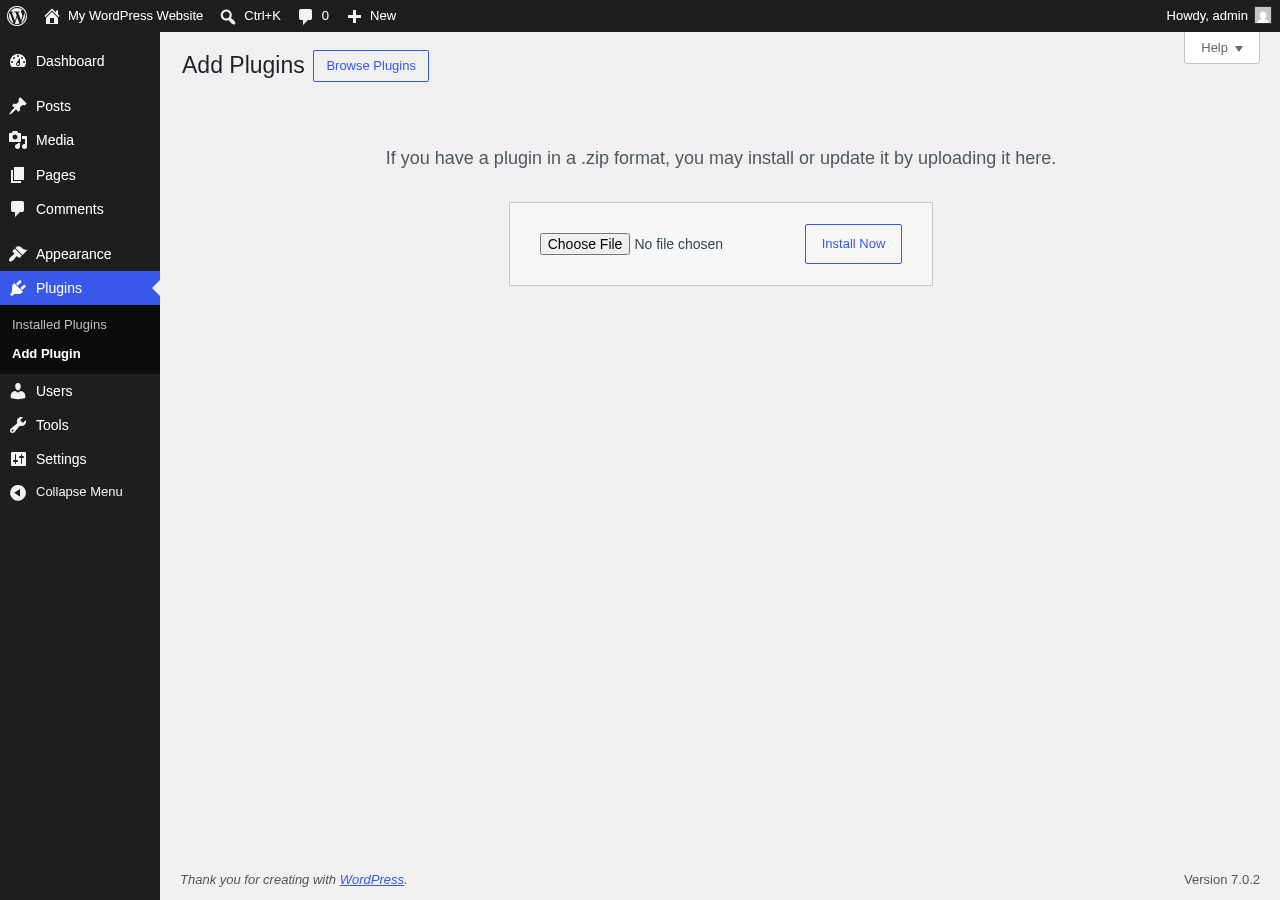
The free Lite version requires a registration at Webnus to download. The process involves providing a name and email, then downloading a zip file. The plugin is installed via the standard WordPress upload method (Plugins > Add New > Upload Plugin) or via FTP.
Pro users log into their Webnus account at my.webnus.net, download the plugin from their dashboard, and install it the same way. After installation, the Pro version requires entering a license key in the plugin settings.
Hands-on testing: Lite in WordPress Playground. I installed MEC Lite in a clean WordPress Playground sandbox (playground.wordpress.net, a browser-based WASM WordPress environment that runs a real WordPress instance). I uploaded the Lite zip file through the standard Plugins > Add New > Upload Plugin flow. After activation, MEC immediately launched its setup wizard.
The setup wizard that appears after activation presents five cards:
- Import Dummy Events
- Import Dummy Shortcodes
- Add Event (via wizard)
- Add Shortcode (via wizard)
- Settings (via wizard)
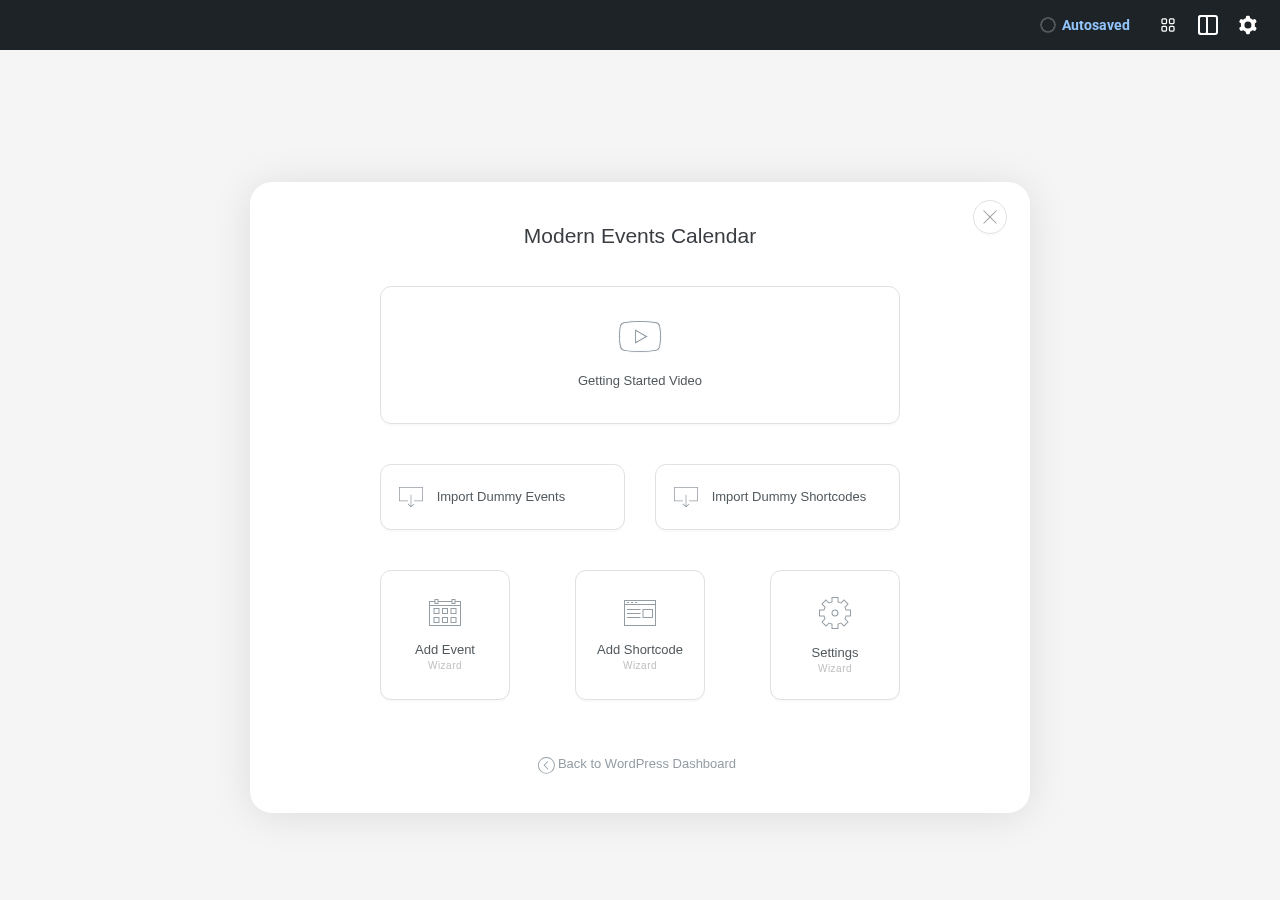
The wizard is optional. You can click “Back to WordPress Dashboard” and begin creating events directly from the admin menu. The setup experience was clean, with no errors or blocking screens during the test install.
A setup wizard is also available when configuring the Pro version. According to official documentation, the Pro wizard includes additional steps for currency, payment gateways, and advanced display settings.
The free Lite version: what you actually get
The Lite version covers a defined set of features and is a functional starting point for small event sites.
Lite includes:
- Single-day, multi-day, and all-day events
- Recurring events (daily, weekly, monthly, yearly, and custom intervals)
- Monthly, weekly, daily, and slider views
- Community event submission from the frontend
- Basic search and filtering
- Google Maps integration for venue display
- iCal and Google Calendar export
- Essential email notifications
- Essential support (documentation and community forum, no premium ticket channel)
Lite does not include:
- Advanced booking and ticketing (PayPal, Stripe, WooCommerce)
- Most of the 20-plus view styles (grid, list, masonry, cover, timetable, carousel, etc.)
- QR code check-in
- Appointment/time-slot booking
- Integrations with Mailchimp, Zoom, Webex, and others
- Advanced import tools from competing platforms
- Custom booking forms
The practical limitation is significant. If you want anything beyond a basic monthly or weekly calendar view and simple event display, the Lite version reaches its ceiling quickly. Grid view, list view classic, timetable view, and the map layout are all Pro features. Most buyers who look at MEC for its visual options need the Pro version to access them.
Calendar views and display
This is where MEC distinguishes itself from every other WordPress events plugin I have looked at. The Pro version ships with more than 20 distinct view styles organized into categories.
Calendar views: Full Calendar, General Calendar, Yearly, Monthly (with style variants including Modern, Clean, Classic, Simple, and Novel), Weekly, and Daily.
List views: Classic, Standard, Modern, Minimal, Toggle, and map-integrated variants.
Grid and card views: Simple, Modern, Minimal, Clean, Classic, Colorful, Novel, Tile, and Masonry.
Specialized views: Agenda, Cover, Countdown, Timetable, Carousel, Slider, and Map.
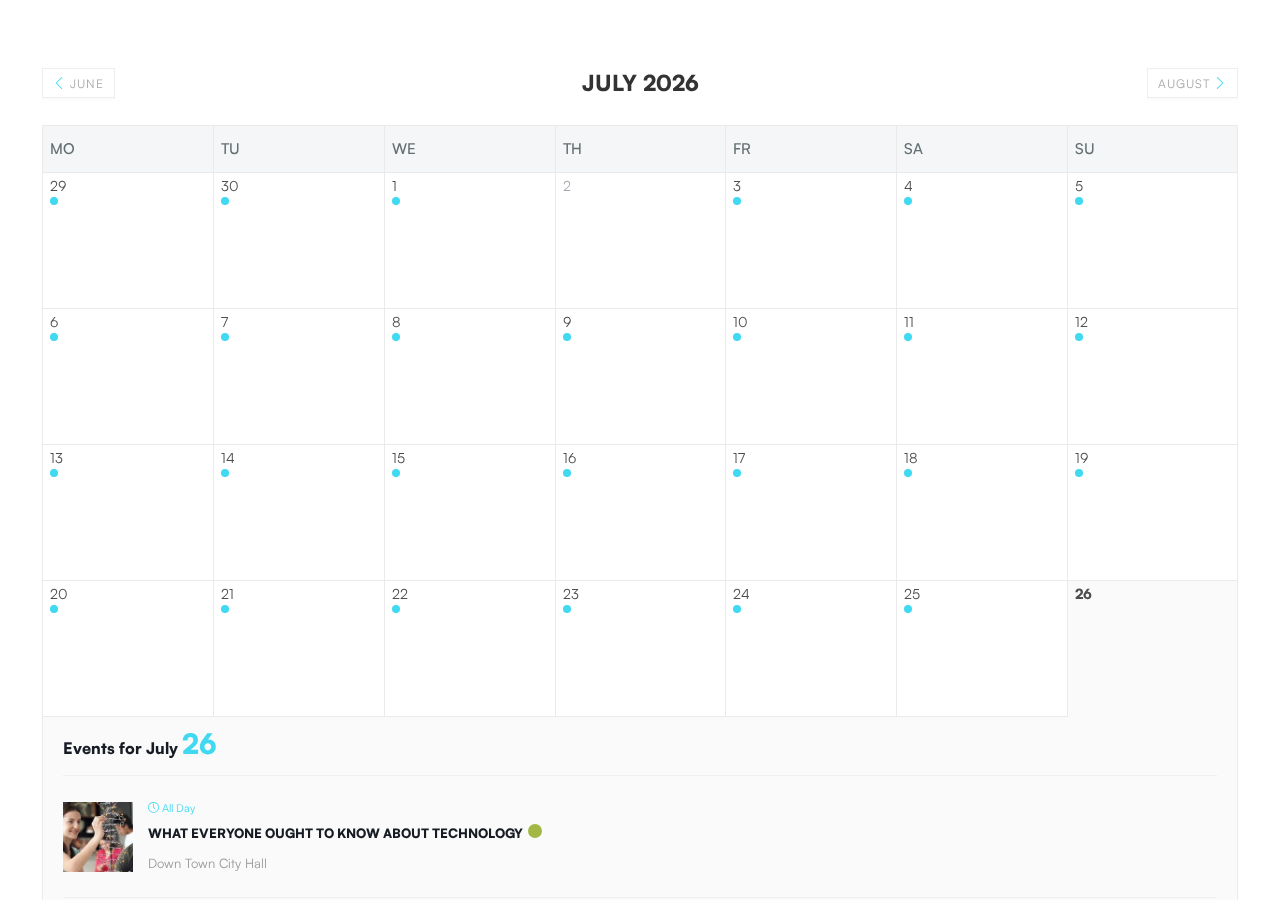
The monthly view renders a standard grid with event dot indicators on each date. Clicking a date expands a list of events for that day below the grid. Navigation between months is clean, without full page reloads.
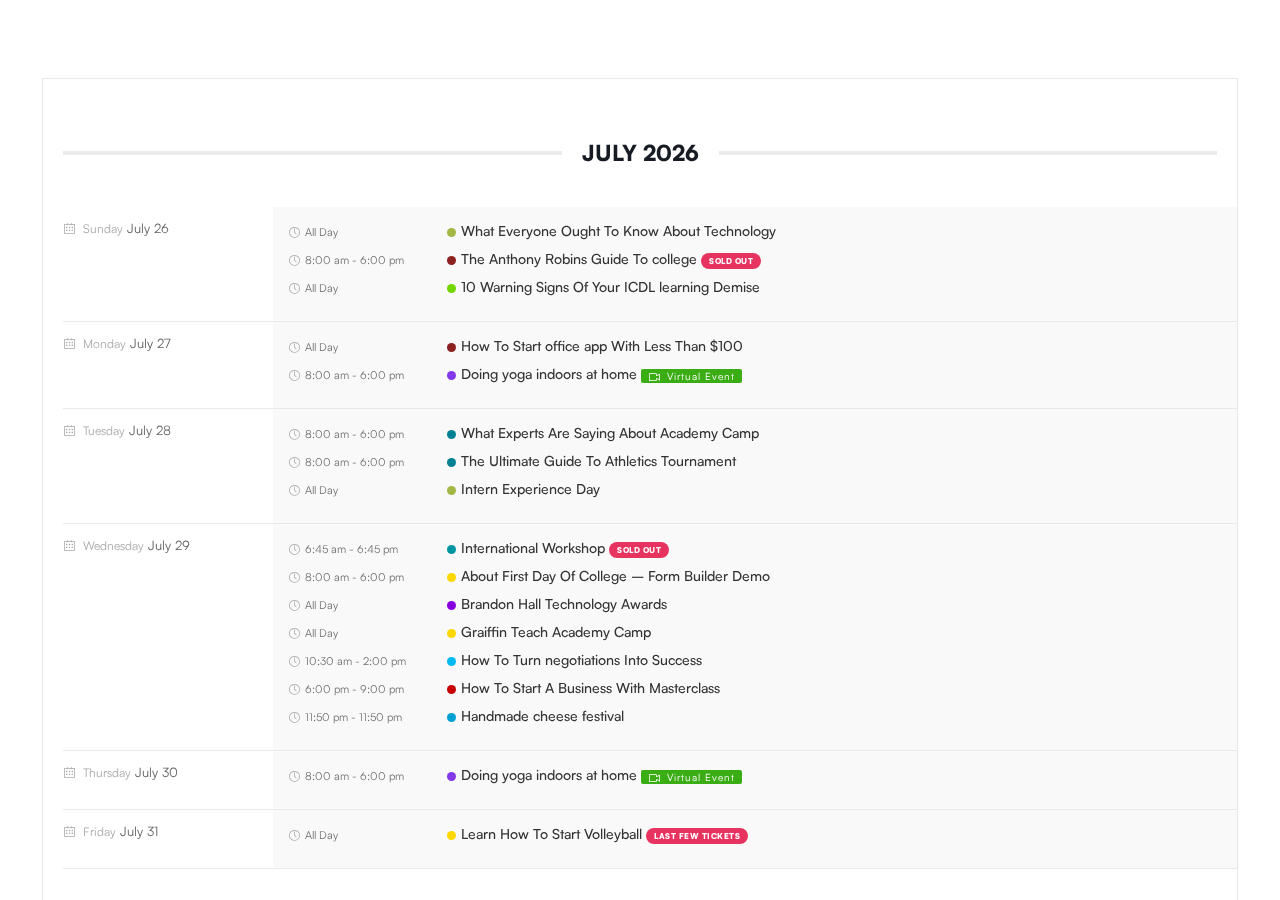
The agenda view is one of the strongest in the Pro suite. Events group by date with day and weekday labels on the left, time ranges in the center, and event titles on the right. Category color dots appear next to each title. Status badges like “SOLD OUT,” “Virtual Event,” and “LAST FEW TICKETS” render inline without extra configuration. I navigated this view on the demo and the layout handled a busy day (seven events on July 29 in the demo) without breaking or truncating.
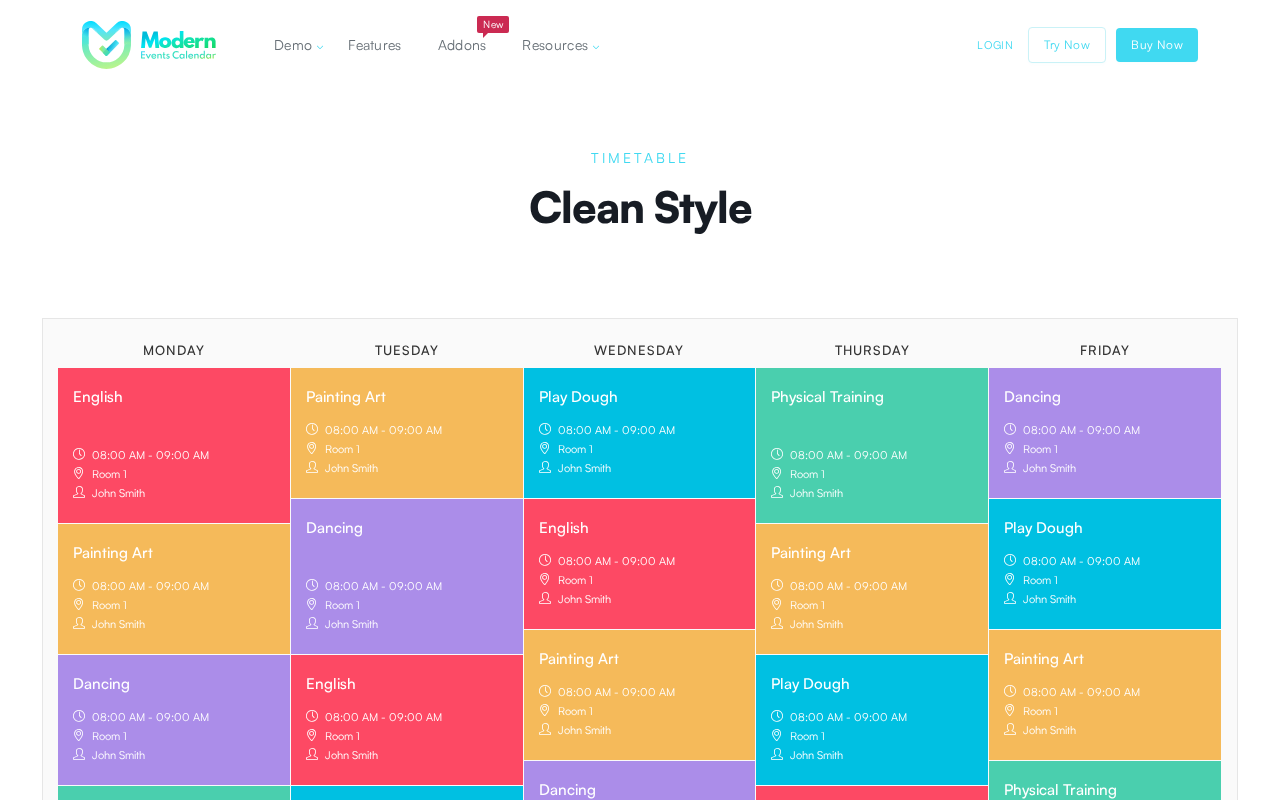
The timetable view displays a day-by-column weekly schedule. Each cell shows event title, time range, venue, and organizer, colored by event category. The visual is reminiscent of a conference agenda or class schedule. It suits education, fitness, and conference use cases well.
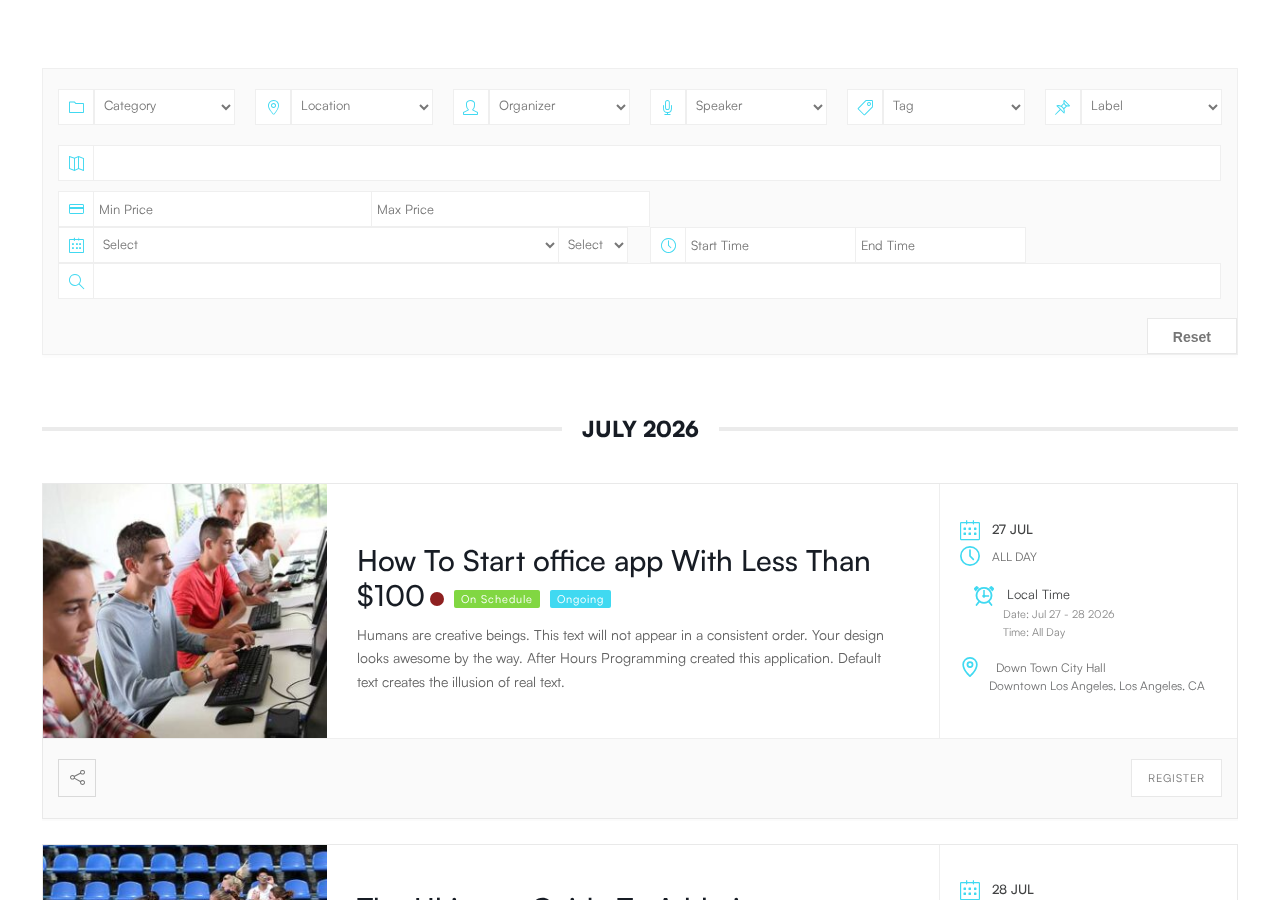
The grid view classic renders event cards with a prominent featured photo, date badge overlay, title, venue, share button, and a “View Detail” link. The layout responds cleanly at different viewport widths.
This view variety is a genuine differentiator. No other WordPress events plugin I am aware of ships this many ready-built layouts in a single package.
Event creation and management
Events are created through a custom post type in the WordPress admin. The creation screen adds structured fields to the standard editor for start/end date and time, all-day toggle, timezone override, event color, venue with address, organizer, and category.
Recurring event rules in the Pro version cover:
- Daily, weekly, monthly, and yearly patterns
- Custom intervals (for example, every three weeks)
- Rules like “last Thursday of each month”
- Exceptions for specific dates within a series
- Editing individual occurrences without affecting the full series
This is more granular than what most competing plugins offer at the paid tier. The recurring event controls are documented in official materials; I reviewed them from documentation rather than live admin testing.
Event colors are assignable per event or per category. Color coding carries through to the timetable and agenda views automatically.
Virtual event support adds a link field for Zoom or Webex. The Zoom integration, available through a paid add-on, can auto-generate Zoom meeting links when an event is saved. The virtual event badge appears in the agenda view without extra configuration.
Ticketing and booking
Advanced ticketing is a Pro-tier feature and one of the stronger parts of the plugin.
Ticket types: The Pro booking system supports unlimited ticket types per event, per-ticket quantity limits, per-user booking caps, and group/family tickets. Ticket variations add options like seat class or package tier.
Pricing: Tickets can have flat rates or price-per-date rules (useful for early bird vs. regular pricing that changes on a specific date). Deposit and partial payment options are documented in official materials.
Payment gateways: PayPal Standard, PayPal Express, Stripe with SCA support, bank transfer, and WooCommerce integration. Stripe Connect is available for multi-organizer commission splits. Currency can be set per event for international deployments.
Tax and fees: A built-in tax and fee engine handles fixed or percentage additions. Discount coupons with usage limits are included.
Forms: The booking form builder allows customizable registration fields per event, including file uploads, date pickers, and reorderable form elements. Custom fields apply per event rather than globally.
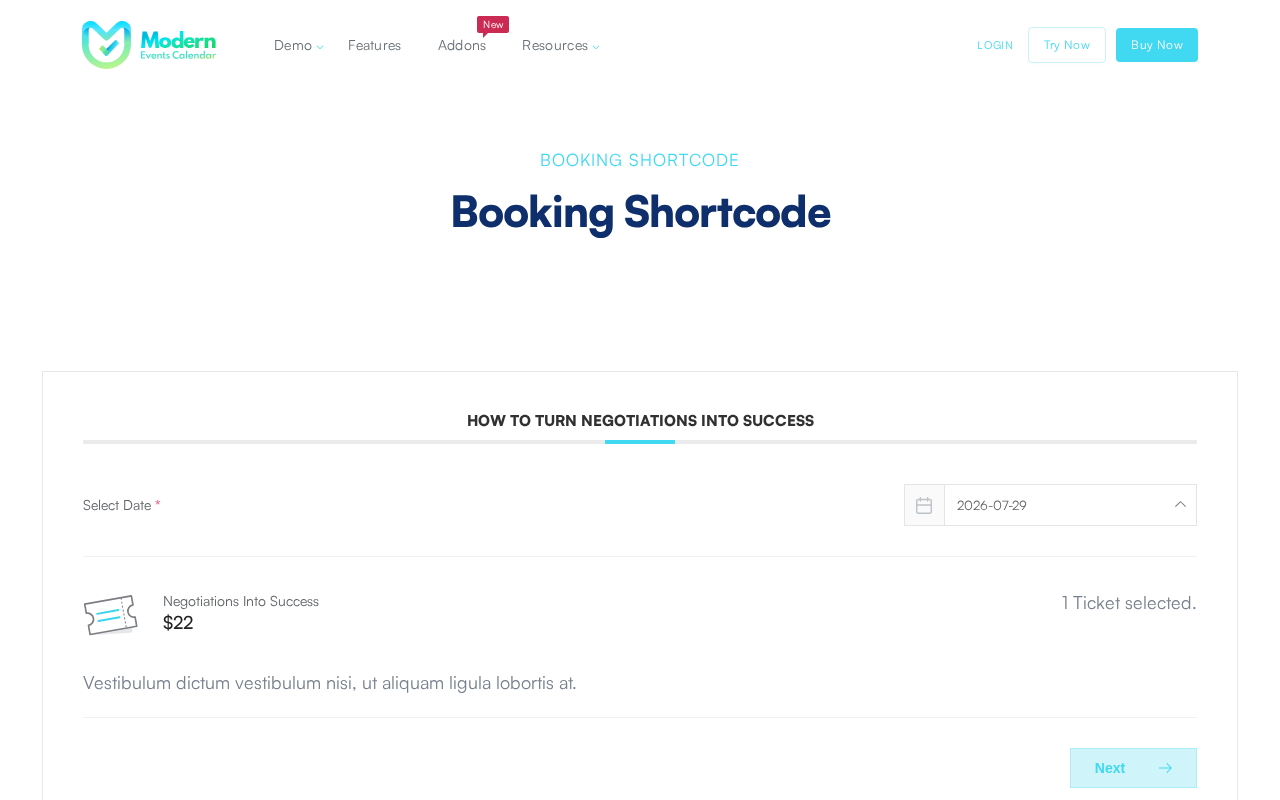
The booking flow on the demo shows a date picker, ticket selection with name and price, and a “Next” step navigation. The interface is clean.
QR code check-in: Each ticket gets a QR code. A companion Android app scans codes at the door. Based on official documentation; I did not test this flow directly.
Attendee management: Booking reports with charts are included. CSV export is available. The Advanced Reports add-on ($19 to $89/year depending on site count) extends reporting further.
Appointment booking: MEC Pro includes a time-slot appointment mode separate from event ticketing. This covers services that run on fixed time blocks, such as consultations, classes, or equipment rentals. This is an unusual feature to find in an events plugin and makes MEC relevant for booking-adjacent use cases without adding a dedicated appointment plugin.
Integrations and add-ons
The base Pro plugin ships with several integrations. Additional integrations and view styles are sold as separate annual add-ons.
Included in Pro:
- Google Calendar two-way sync
- iCal and RSS feeds
- Mailchimp, ActiveCampaign, Constant Contact, MailerLite, AWeber, MailPoet, and Campaign Monitor for attendee list sync
- LearnDash auto-enrollment on ticket purchase
- Paid Memberships Pro for event access restrictions
- Advanced Custom Fields compatibility
- BuddyPress integration
- REST API with approximately 25 endpoints
- Webhooks for CRM and Slack automation
- Elementor, Divi, WP Bakery, and Gutenberg page builder support
- WPML compatibility for multilingual sites
Add-ons (separate annual purchase):
- Elementor builders for single event, list, and grid: $39 to $179/year
- Gutenberg Single Event Builder: $49 to $199/year
- Virtual Events: $39 to $179/year
- Zoom and Webex Integration: $39 to $179/year
- Advanced Importer (Facebook, Meetup, and 7 other sources): $39 to $179/year
- Social Auto Poster: $69 to $299/year
- Liquid-view Layouts: $69 to $299/year
- Ticket and Invoice (PDF tickets and invoices): $119 to $499/year
- Seat Selection (interactive venue maps): $119 to $499/year
- Event API: $49 to $199/year
- Advanced Reports: $19 to $89/year
- Advanced Taxonomies: $39 to $199/year
Prices above are per-year ranges from 1-site to 10-site licenses. The add-on model means the sticker price of $99/year for a 1-site Pro license can multiply quickly if you need Seat Selection, Ticket and Invoice, and Zoom integration together.
Platform migration: The Pro plugin includes one-click import from The Events Calendar, EventOn, Events Manager, and seven other platforms. If your site currently runs another events plugin, this is a practical feature to evaluate before buying.
WordPress.org removal and security history
This section covers three separate topics. All three are relevant to a purchase decision.
WordPress.org removal (2022)
In May 2022, WordPress.org permanently closed the Modern Events Calendar Lite plugin listing and removed all Webnus plugins from the repository. The stated reason, as communicated in forum discussions at the time, was that Webnus had been requesting users’ WordPress login credentials through the public support forum in order to provide support access.
Requesting admin credentials via a public forum violates WordPress.org community guidelines for several reasons: it exposes sensitive information in a public thread, it conditions support access on sharing full admin credentials rather than using debug logs or a safe staging environment, and it creates risk for users who comply.
WordPress.org did not publish a formal explanation. The plugin itself was not found to have intentionally malicious code at that time. The removal was a policy enforcement action.
The practical consequences in 2026:
- The plugin does not appear in WordPress.org search or the in-admin plugin browser.
- The plugin does not receive updates through the standard WordPress.org update channel.
- Users on the Pro plan receive updates through Webnus’s own update mechanism when the license key is active. Users on the Lite version must manually download and install updates from webnus.net.
- Webnus has continued active development. The plugin has been actively updated through 2024, 2025, and 2026 based on GitHub release history.
Whether this history is disqualifying depends on your organization’s posture. Some teams have no issue managing plugin updates outside the WordPress.org ecosystem, especially with a valid Pro license. Others have procurement or IT governance rules that require WordPress.org-hosted plugins. Know which situation you are in before evaluating MEC further.
CVE-2024-5441: critical file upload vulnerability
In May 2024, security researcher Foxyyy reported a vulnerability in Modern Events Calendar through Wordfence’s bug bounty program, earning a $3,094 bounty. The vulnerability was an arbitrary file upload issue in the plugin’s set_featured_image function.
The root cause was a lack of file type validation. The function could be used to upload PHP files disguised as images. Once uploaded, those files were executable, which enabled remote code execution and full site takeover.
- CVSS v3.1 score: 8.8 (High)
- Affected versions: MEC Pro and MEC Lite, both up to and including 7.11.0
- Exploit requirement: Any authenticated WordPress user, including subscriber-level accounts. If front-end event submission was enabled, unauthenticated users could exploit it.
- Patch released: MEC 7.12.0 (July 8, 2024)
- Active exploitation: Wordfence reported over 100 blocked exploit attempts within 24 hours of public disclosure.
The vulnerability is patched in 7.12.0 and later. Any installation running a current version is not affected. But the incident is part of the plugin’s documented history and is worth knowing about.
CVE-2026-32583: missing authorization (March 2026)
A medium-severity vulnerability was disclosed in March 2026 affecting MEC versions up to and including 7.29.0.
- CVSS v3.1 score: 5.3 (Medium)
- Type: Missing authorization on certain AJAX actions (CWE-862)
- Impact: Unauthenticated attackers could trigger restricted actions and potentially modify event data or plugin settings without any credentials
- Affected versions: MEC up to and including 7.29.0
- Patch: Applied in MEC 7.30.0
The severity is lower than the 2024 file upload vulnerability, but it demonstrates an ongoing pattern of access control weaknesses that buyers should weigh when assessing the plugin’s security track record.
CVE-2026-11349: unauthenticated SQL injection (June 2026)
A high-severity SQL injection vulnerability was disclosed in June 2026 affecting both Pro and Lite versions.
- CVSS v3.1 score: 8.6 (High)
- Type: Unauthenticated SQL injection across multiple AJAX endpoints. The plugin’s sanitization helper function was a no-op when called without its optional parameter, causing multiple load handlers to pass attacker-supplied input raw into SQL queries.
- Impact: Any unauthenticated remote attacker can extract sensitive data from the WordPress database with no credentials or user interaction required.
- Affected versions: MEC Pro and MEC Lite, both up to and including 7.33.0
- Patch released: MEC 7.34.0
This is the most recently disclosed vulnerability at the time of writing and the most critical in practical terms: no login is required to exploit it. Sites on 7.34.0 or later are not affected. If you are running MEC and have not updated recently, checking your version against 7.34.0 is the most urgent action to take.
Update posture summary: Three CVEs have been disclosed across 2024 and 2026, two of them rated High severity. All are patched. Two of the three (CVE-2026-32583 and CVE-2026-11349) required no authentication to exploit, making version currency especially critical. Webnus has consistently released patches after disclosure. The concern is not that the vulnerabilities are unpatched, but that MEC’s update flow sits outside WordPress.org’s automatic update infrastructure. Sites must actively maintain version currency, which requires more attention than a standard WordPress.org plugin.
Pricing
MEC Pro is sold at Webnus’s account portal. All plans renew annually.
| License | Annual Price |
|---|---|
| MEC Pro, 1 site | $99/year |
| MEC Pro, 5 sites | $199/year |
| MEC Pro, 10 sites | $299/year |
| MEC Pro, 100 sites | $799/year |
| MEC Pro, Unlimited | $999/year |
Bundles:
| Bundle | 1 Site | 5 Sites | 10 Sites |
|---|---|---|---|
| Event Pro Pack (MEC Pro + Kata theme) | $119/year | $349/year | $599/year |
| Event Commerce Suite (MEC Pro + Kata + ShopPress) | $179/year | $499/year | $799/year |
| Diamond Bundle (MEC Pro + all add-ons + Kata + ShopPress) | $1,142/year (3 sites) | $2,284/year (40 sites) | $2,999/year (unlimited) |
Lifetime licenses are also available for the Diamond bundle: one-time prices starting at $2,248 for 3 sites.
A 30-day money-back guarantee is offered on Pro plans.
There is no free trial equivalent to an activated Pro license. The Lite version, available after registration from webnus.net, provides a free starting point but does not include most Pro features.
The base $99/year for a single-site Pro license is competitive within the events plugin market. The add-on costs can change that picture significantly, depending on which add-ons you need.
Pros and cons
Pros
- The widest selection of calendar view layouts of any WordPress events plugin reviewed: 20-plus styles covering grid, list, masonry, agenda, timetable, cover, countdown, carousel, map, and more.
- Integrated ticketing with PayPal, Stripe, WooCommerce, bank transfer, and Stripe Connect for revenue splitting.
- Built-in appointment/time-slot booking, which is unusual in an events plugin and removes the need for a separate booking plugin.
- Recurring event controls that support fine-grained rules including last-day-of-month patterns and per-occurrence exceptions.
- QR code check-in with an Android companion app.
- One-click import from 10 or more competing events plugins.
- Two-way Google Calendar sync.
- Email marketing integrations with eight platforms included in the base Pro license.
- Zoom and Webex integration available as add-ons.
- REST API with approximately 25 endpoints for headless and external integrations.
- Multilingual support via WPML.
- Strong Elementor compatibility.
- Lifetime license option for teams that want to avoid recurring costs.
- Clean setup wizard after Lite activation makes the initial admin experience clear.
Cons
- The free Lite version is not on WordPress.org and requires registration to download. Updates do not flow through WordPress.org automatic update infrastructure.
- Three CVEs across 2024-2026, including two rated High severity (CVSS 8.8 and 8.6). All are patched, but the pattern requires active version management outside the standard WordPress.org update system.
- CVE-2026-11349 (CVSS 8.6, unauthenticated SQL injection) was patched in June 2026 in version 7.34.0. No credentials are required to exploit it. Sites not on 7.34.0 or later are still at risk.
- The add-on model can make total costs hard to predict. Core features like PDF ticketing, seat maps, and Zoom integration require separate annual payments on top of the base license.
- CSS customization time is consistently flagged in user reviews as higher than expected for non-developers.
- Support responsiveness is mixed in independent reviews. Multiple Capterra reviewers note multi-day response delays.
- The plugin does not appear in standard WordPress.org search, which limits its discoverability and makes it harder for clients to verify or find independently.
- Seat selection (interactive venue maps) is an add-on at $119 to $499/year, which is expensive for a feature that competes with The Events Calendar’s Elite plan at $599/year for the full suite.
- Admin UI density may feel overwhelming for site owners who only need a simple events display.
Alternatives
The Events Calendar
The Events Calendar is the most-installed WordPress events plugin on the market, with 600,000 or more active installs through WordPress.org. The free version covers month, list, and day views with JSON-LD SEO markup, iCal export, and REST API access. Paid plans run from $259 to $599 per year under the current Liquid Web/Nexcess ownership, which represents a significant price increase from the old Events Calendar Pro at approximately $99 per year.
The Events Calendar stays in the WordPress.org ecosystem, which matters for organizations with plugin provenance requirements. Its feature set at the paid tier is narrower than MEC Pro, but the acquisition history has introduced its own support friction. If you are comparing the two directly, the right choice depends on whether WordPress.org distribution or feature breadth matters more to your use case.
Eventin (WP Event Solution)
Eventin is an actively developed events plugin on WordPress.org with 10,000 or more active installs. Its free tier includes multi-tier ticketing, WooCommerce integration, Stripe and PayPal payments, QR code check-in, PDF ticket generation, recurring events, custom registration forms, Zoom integration, and CSV attendee export.
For teams evaluating MEC’s free Lite version, Eventin’s free tier covers more ground. If ticketing and basic virtual event support are the requirements, Eventin is worth installing and comparing before committing to a paid plan. Eventin’s Pro adds AI event content generation, seat maps, and certificate generation.
Sugar Calendar
Sugar Calendar is a lightweight paid plugin focused on calendar display without feature sprawl. Starting around $49 per year, it suits content-only event sites that want a clean, conflict-resistant calendar without a full ticketing ecosystem. It does not compete with MEC on features, but it competes on simplicity and price for sites that do not need ticketing or booking.
Final verdict
Modern Events Calendar is a genuinely impressive plugin for WordPress events management. The view variety, ticketing depth, appointment booking, and integration breadth put it at the top of the feature comparison for this category. If raw capability is your primary criteria, MEC Pro at $99 per year for a single site is good value for what it delivers.
The security history requires specific attention in 2026. Three CVEs have been disclosed since 2024, two of them rated High severity. The most recent, an unauthenticated SQL injection affecting both Pro and Lite users (CVE-2026-11349, CVSS 8.6), was patched in June 2026 in version 7.34.0. No credentials are required to exploit it, which makes it particularly serious for any site that has not updated. Because MEC updates flow outside the WordPress.org update system, sites must actively manage version currency. Before installing or recommending MEC, confirm you are on 7.34.0 or later.
The WordPress.org removal in 2022 created a distribution gap that persists today: the plugin is not discoverable in the standard WordPress plugin search, updates require active license management, and some organizations will have policy requirements that effectively rule it out.
My recommendation: if you are building a new event site and these concerns are not dealbreakers for your context, MEC Pro is worth a serious evaluation. Download the Lite version first, run through the setup wizard, and confirm the update flow works for your infrastructure. If you need WordPress.org assurance, Eventin’s free tier or The Events Calendar’s ecosystem are the more defensible alternatives. If you are already running MEC, confirm you are on 7.34.0 or later before doing anything else.
The plugin earns a recommendation with specific reservations about its distribution model and security track record, not about the product quality itself.
FAQ
Is Modern Events Calendar free?
A free Lite version exists but is not on WordPress.org. You download it directly from webnus.net after providing your name and email. The Lite version includes recurring events, monthly/weekly/daily calendar views, community event submission, basic filtering, and iCal export. Advanced views (grid, timetable, masonry, agenda, etc.), ticketing, booking, and most integrations require the paid Pro license starting at $99 per year.
Why was Modern Events Calendar removed from WordPress.org?
WordPress.org removed all Webnus plugins in May 2022 after determining that Webnus had been asking users to share their WordPress admin login credentials through the public support forum. Providing full admin access via a public channel violates WordPress.org community guidelines and creates security risks for users. The plugin was not found to contain intentionally malicious code. Webnus has continued development and distribution through its own website since the removal.
Is Modern Events Calendar safe to use in 2026?
Three CVEs have been disclosed in MEC: CVE-2024-5441 (CVSS 8.8, arbitrary file upload requiring subscriber-level login, patched 7.12.0), CVE-2026-32583 (CVSS 5.3, unauthenticated missing authorization, patched 7.30.0), and CVE-2026-11349 (CVSS 8.6, unauthenticated SQL injection exploitable with no credentials, patched 7.34.0). All are patched in their respective versions. If you are running MEC, confirm you are on 7.34.0 or later to be clear of all three. Because the plugin is not on WordPress.org, automatic update notifications depend on having an active license key registered with the plugin.
How does Modern Events Calendar compare to The Events Calendar?
MEC Pro at $99/year offers more calendar views, native appointment booking, and more built-in display layouts than The Events Calendar. The Events Calendar has a significantly larger WordPress.org install base (600,000+ active installs vs. Webnus’s claim of 200,000+ users), stays in the WordPress.org ecosystem, and has a longer continuous publishing history. The Events Calendar’s paid plans now start at $259/year under Liquid Web ownership, making MEC the more price-competitive option. The choice comes down to whether you prioritize feature breadth and price (MEC) or WordPress.org distribution and install count (The Events Calendar).
Can Modern Events Calendar handle recurring events?
Yes, and it handles them well in the Pro tier. MEC Pro supports daily, weekly, monthly, and yearly recurrence with custom intervals. Advanced rules include patterns like “last Thursday of each month.” You can edit individual occurrences within a series without affecting others, and set exceptions for specific dates. The Lite version also includes recurring events with a more basic feature set.
Does Modern Events Calendar work with Elementor?
Yes. Elementor integration is included in MEC Pro. Dedicated Elementor builder add-ons for single event pages, list displays, and grid layouts are also available as separate annual add-ons ($39 to $179/year). The base Pro integration covers shortcode-based embedding in Elementor layouts; the dedicated add-ons provide native widget-level control.
Can I migrate from The Events Calendar to Modern Events Calendar?
MEC Pro includes a one-click migration tool for The Events Calendar, EventOn, Events Manager, and several other platforms. The importer copies events, venues, organizers, categories, and recurrence rules. Migration fidelity depends on how each source plugin stores its data. Test the migration in a staging environment before running it on a live site.
What are the best alternatives to Modern Events Calendar?
For a free option on WordPress.org with a comparable ticketing feature set, Eventin is the strongest alternative. For the largest install base and WordPress.org support infrastructure, The Events Calendar free plugin is worth testing despite its higher Pro pricing. For lightweight calendar display without ticketing complexity, Sugar Calendar is a simpler and less expensive option.