


Four million active WordPress sites. Over 82 million total downloads. A 4.8-star rating across more than 5,100 reviews on WordPress.org. WP Mail SMTP is not a niche plugin for power users. It solves a problem almost every WordPress site owner eventually hits: emails not sending, or landing in spam.
This review is not a rehash of those numbers. It is a look at what the Lite version actually gives you, where the Pro upgrade earns its price, what the plugin gets wrong, and who would be better off with a competitor. I checked the official wpmailsmtp.com website, pricing and features pages, the WordPress.org listing, and the plugin changelog to make sure I am describing version 4.9.0 as of June 2026.
Note on basis: this review is built on a thorough audit of the official wpmailsmtp.com homepage, features, and pricing pages; the WordPress.org plugin listing (version 4.9.0, updated June 25, 2026); the plugin changelog; and the vendor-provided admin interface screenshots on WordPress.org. A full live install with hands-on testing against a production server was not part of this review window. Where a feature is documented but not personally exercised on a live site, the relevant section says so. Pricing is shown in USD ex-VAT; verify current pricing on the wpmailsmtp.com pricing page before purchasing.
At a glance
Audited on: wpmailsmtp.com homepage, features, and pricing pages; WordPress.org plugin listing for version 4.9.0 (updated June 25, 2026); the plugin changelog; and vendor-provided admin screenshots.
Free tier: fixes the WordPress email delivery problem for most sites. No trial period, no feature expiry.
Pro tier: earns its price for email logging, failure alerts, backup connections, and smart routing.
Bottom line: the most widely trusted WordPress SMTP plugin, with a free tier that is genuinely capable and a Pro tier that makes sense for any site where email reliability is business-critical.
Quick verdict
WP Mail SMTP solves the most annoying WordPress problem that nobody talks about until something goes wrong: contact form submissions never arriving, WooCommerce order confirmations landing in spam, password reset emails going missing.
The Lite version fixes this for free. You connect a reputable email provider, the plugin routes all WordPress emails through it, and deliverability improves immediately. That covers the needs of most small WordPress sites.
If you run a site where a missed email costs you a customer or creates a support ticket, the Pro upgrade makes sense. Email logging, failure alerts, backup connections, and smart routing are the features that justify the price. Agencies managing multiple sites get additional value from the Developer and Agency tiers.
Quick verdict card
Best for: any WordPress site owner tired of unreliable email delivery, from personal blogs to WooCommerce stores to agency portfolios.
Best plan for most individuals: Lite for personal and small sites; Pro ($49/year at introductory pricing) for business sites where email reliability matters.
Best plan for agencies: Developer (20 sites) or Agency (100 sites).
Standout: the widest mailer support in the category, a genuinely capable free tier, and one of the strongest Pro feature sets around email logging and failure management.
Watch out for: introductory pricing reverts to full price on renewal; White Glove Setup is only available for three mailers (SendLayer, SMTP.com, Brevo); Microsoft 365 and Amazon SES are Pro-only.
What WP Mail SMTP is
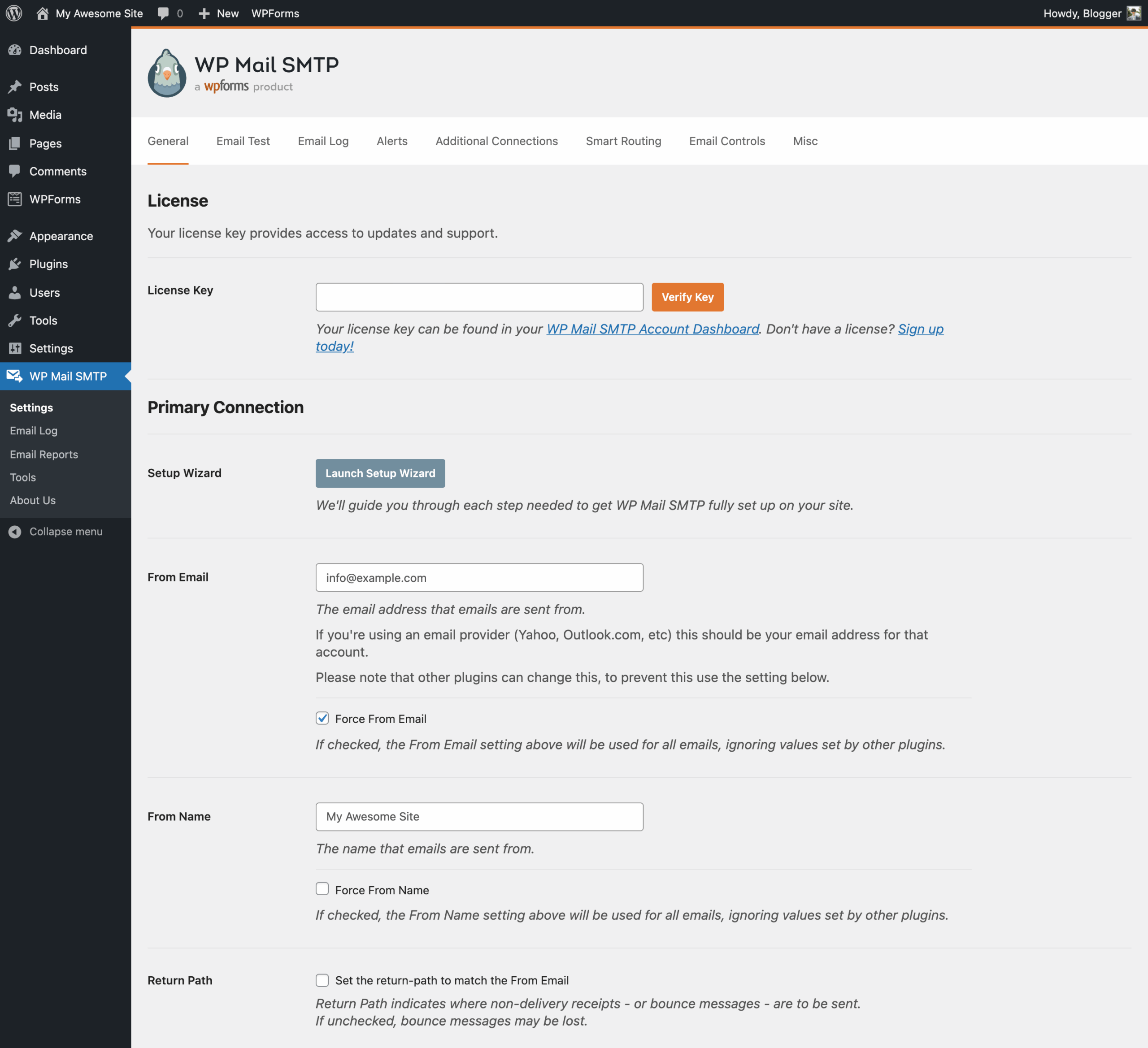
WP Mail SMTP is a WordPress plugin that fixes email deliverability. It does this by replacing the default WordPress email sending method with a proper, authenticated alternative.
By default, WordPress sends emails using the PHP mail() function. Most shared hosting servers are not correctly configured to send PHP mail. The result is that emails from your site either go straight to spam or disappear entirely. It is not a WordPress bug, but a hosting configuration issue that affects millions of sites.
WP Mail SMTP fixes this by intercepting the wp_mail() function (the WordPress core function that handles outgoing email) and rerouting it through a proper SMTP provider or API integration. When emails are authenticated by a reputable provider, spam filters recognize them as legitimate and deliver them to the inbox.
The plugin was originally created by Callum Macdonald and is now owned and maintained by WPForms LLC. Version 4.9.0 was released June 25, 2026, and is the current version at the time of this review. It requires WordPress 5.5 or higher and PHP 7.4 or higher, and it has been tested up to WordPress 7.0.2.
The plugin comes in two versions: Lite (free, on WordPress.org) and Pro (paid, from wpmailsmtp.com). The Lite version does the core job: it fixes email delivery. The Pro version adds a layer of visibility and reliability tools on top of that foundation.
Who WP Mail SMTP is best for
Strong fit
- Small business owners and bloggers who need their contact form, order confirmation, or user registration emails to actually arrive.
- WooCommerce store owners where transactional emails (order confirmations, shipping updates, password resets) going to spam is a real business problem.
- Agencies and freelancers managing client WordPress sites who want consistent email delivery across their portfolio.
- Non-technical users who want a guided setup and do not want to dig into SMTP server settings manually.
- Sites already using Gmail, Google Workspace, Outlook, SendGrid, Mailgun, or other established providers who want to plug that service into WordPress cleanly.
- Teams that need email audit trails and delivery confirmation (Pro).
- Sites with multiple form types, notification types, or subsystems that send email, and where routing different email types through different providers makes sense (Pro Smart Routing).
Weak fit
- Sites that need a built-in transactional email service. WP Mail SMTP is a connector, not a provider. You still need to have or create an account with an external email service.
- Users looking for bulk email marketing or newsletter functionality. WP Mail SMTP handles transactional email from your site; it is not a campaign management tool.
- Budget-conscious site owners who need Pro-level email logging and alerts but cannot afford $49/year. FluentSMTP (a free alternative) offers multiple connections and some logging at no cost.
- Sites that need fully automated managed delivery with no provider account setup. Every mailer integration requires at least a small amount of configuration with the external provider.
Installing and setting up WP Mail SMTP
WP Mail SMTP installs from the standard WordPress plugin repository. Search for “WP Mail SMTP” in Plugins > Add New, and it is typically the first result. Activate it and a new WP Mail SMTP menu item appears in the WordPress admin sidebar.
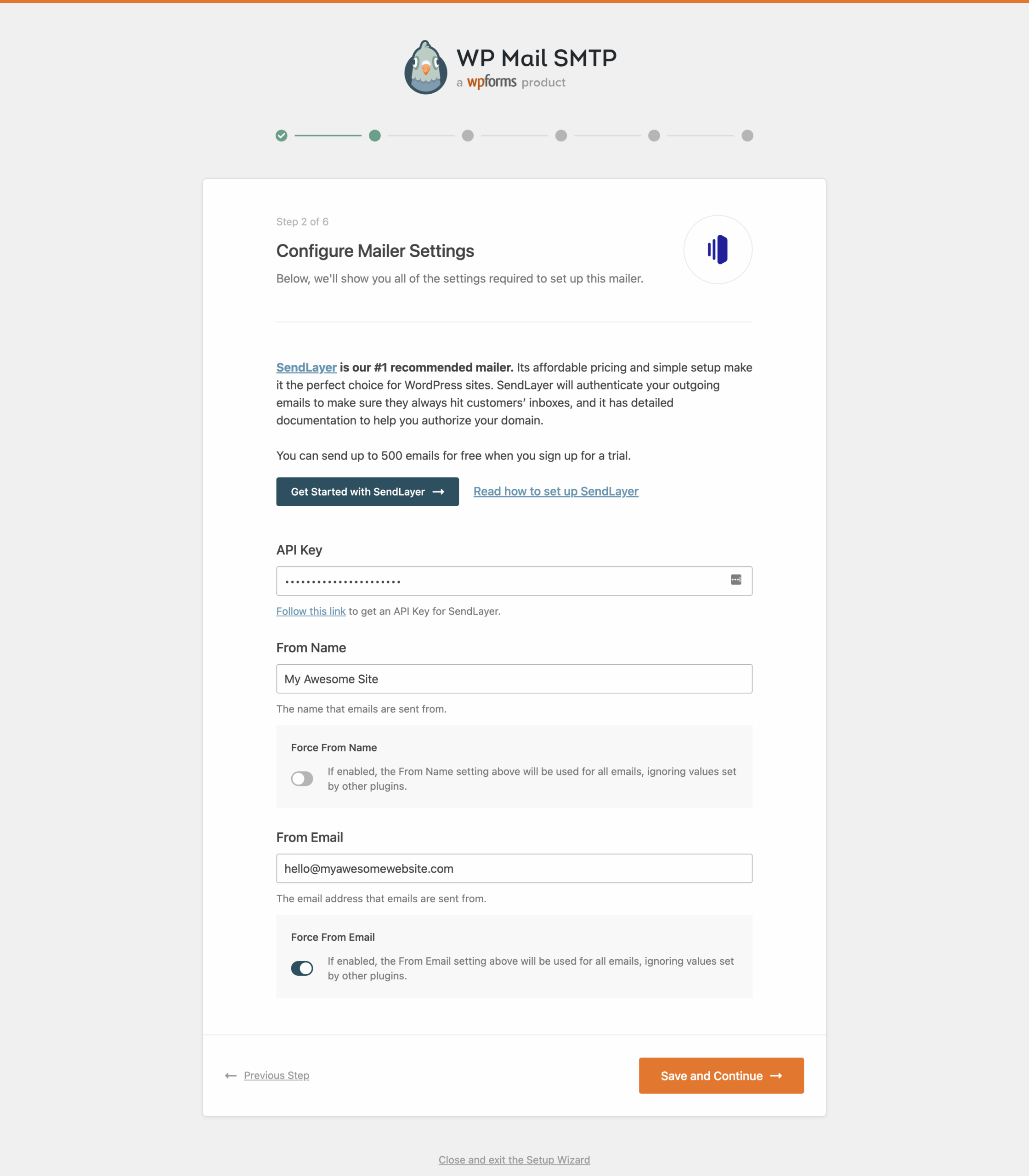
The plugin launches a setup wizard on first activation. The wizard walks you through three steps: choosing a mailer, connecting your account, and sending a test email. The process is laid out clearly, and each mailer has its own connection guide linked directly from the wizard.
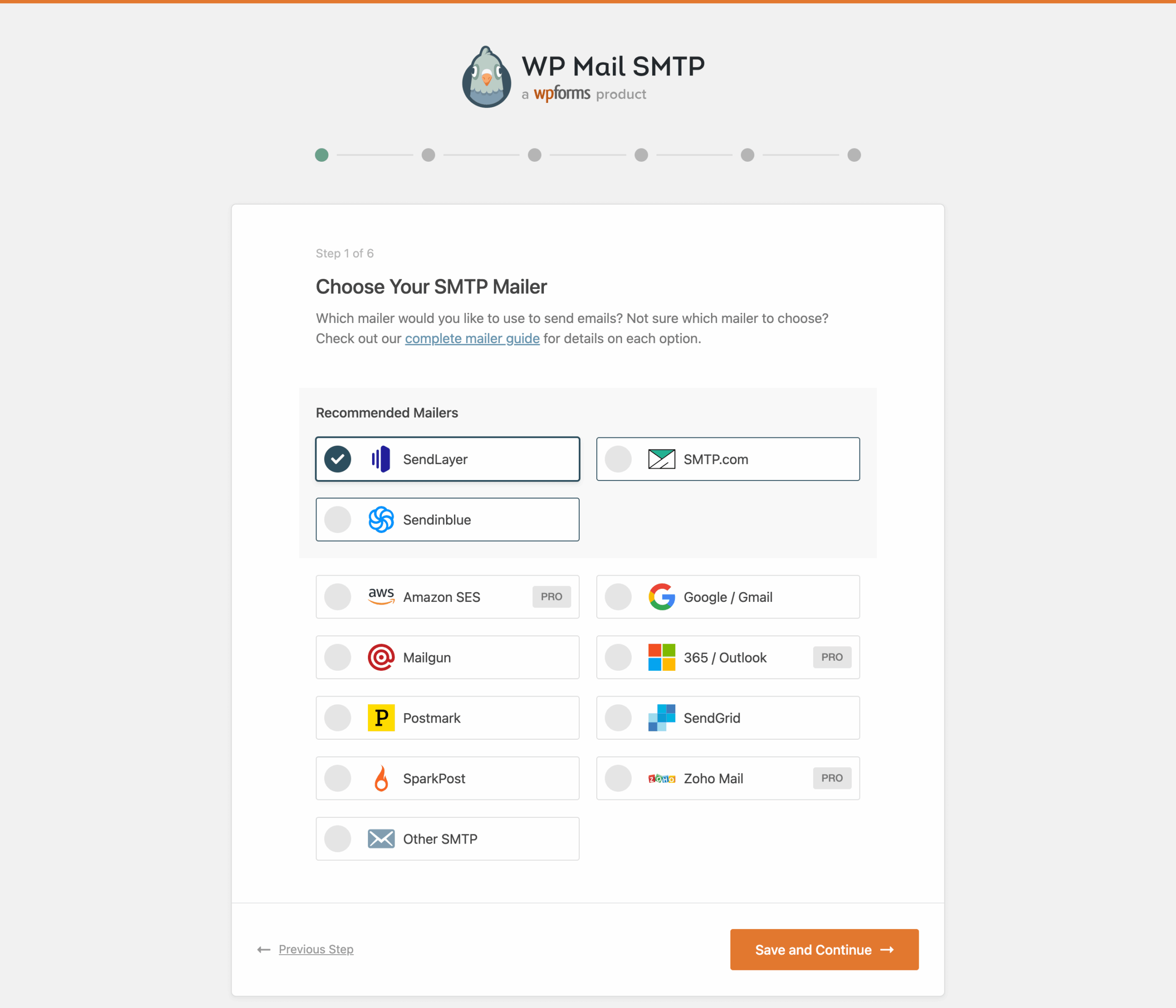
For most users, the wizard recommends SendLayer as the first choice. SendLayer is the plugin team’s recommended transactional email service and has a Quick Connect option (added in v4.8.0) that sets up a working connection in roughly two minutes without needing to configure DNS records manually.
The Other SMTP option at the bottom of the mailer list lets you enter your own SMTP server credentials. This covers any host-provided SMTP service, office email accounts, or smaller providers not listed in the main integrations.
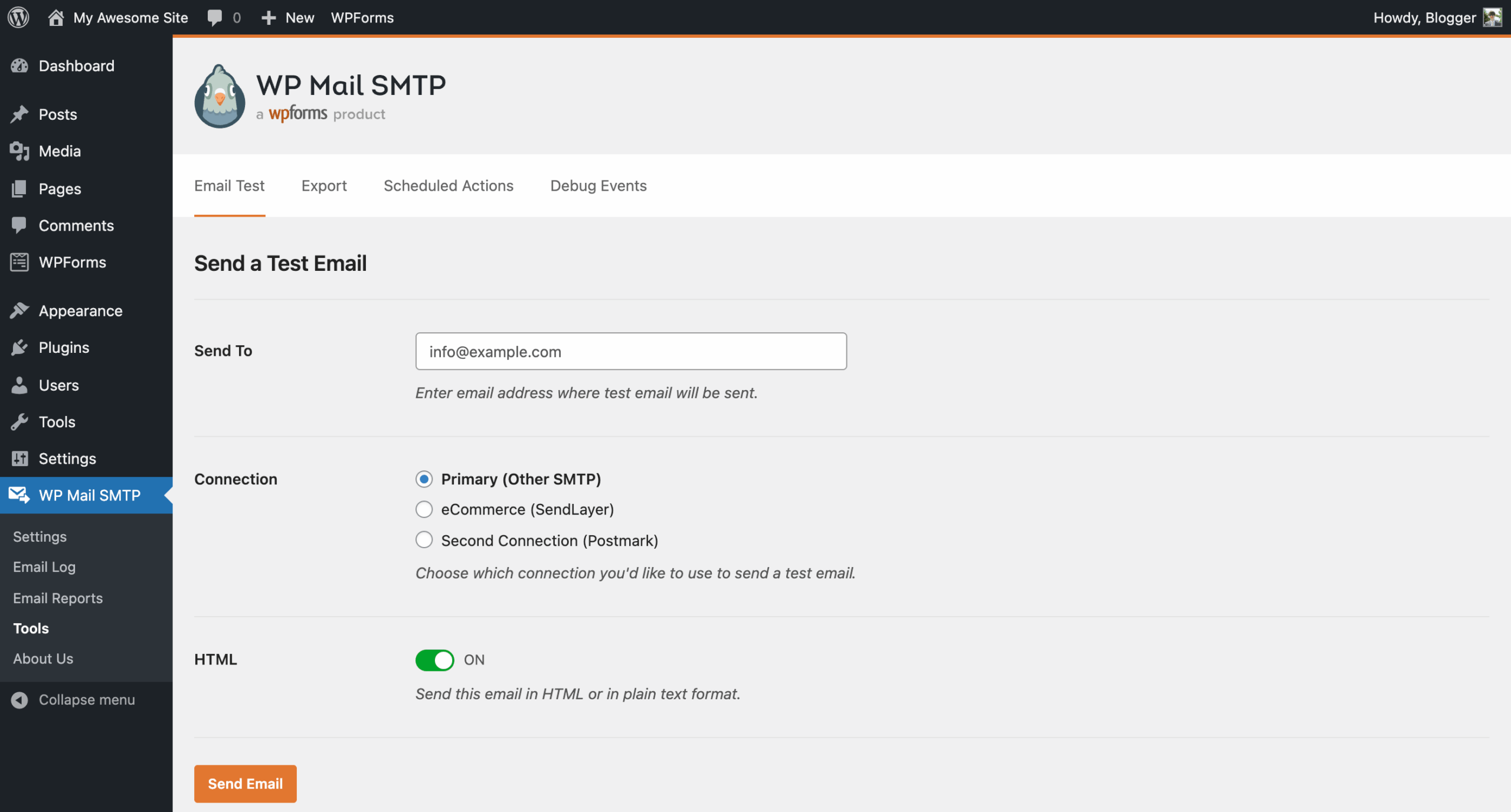
After connecting a mailer, the plugin provides an email test page where you enter a recipient address and send a test message. This confirms the connection is working before you rely on it for real emails.
Note on setup basis: the setup flow described above is drawn from the WordPress.org plugin screenshots, the official documentation references in the plugin listing, and the vendor’s public feature pages. A live wizard run on a production WordPress install was not part of this review.
Mailer integrations: what the free version covers
The breadth of mailer support is one of WP Mail SMTP’s clearest strengths. The Lite version connects to a substantial list of providers:
- SendLayer (recommended)
- SMTP.com
- Brevo (formerly Sendinblue) – 300 free emails per day on their free tier
- Gmail and Google Workspace (manual OAuth connection)
- Elastic Email
- Mailgun
- Mailjet
- SendGrid
- Postmark
- SparkPost
- SMTP2GO
- MailerSend
- Mandrill (Mailchimp’s transactional email service)
- Resend
- Other SMTP (any SMTP server credentials)
That is fourteen named integrations plus a generic SMTP option, all in the free version. Most competitors that offer this breadth charge for it.
Mailers that require Pro
Three integrations are Pro-only:
- Amazon SES
- Microsoft 365 / Outlook.com (via One-Click Setup)
- Zoho Mail
Amazon SES and Microsoft 365 are commonly used by businesses. If you run an Office 365 email account and want to send WordPress emails through it without manual SMTP configuration, that is a Pro feature. Zoho Mail is the same.
The Lite version does include a Gmail/Google Workspace option, but only via a manual OAuth setup. Pro upgrades that to a One-Click Setup that completes the Google Workspace connection without manual API credential entry.
Core free features beyond mailer routing
The free version does more than connect a mailer. A few other features that come with Lite are worth noting.
From name and email override
You can set a specific from name and email address for all outgoing WordPress emails. This overrides whatever plugins or themes set, giving you a consistent sender identity across all outgoing email from your site.
Basic email error tracking
Lite shows email sending errors in the WordPress dashboard. If a connection fails, you can see what went wrong without having to dig into server logs or contact your host.
Basic weekly email summary
Every week, Lite sends a simple summary email showing how many emails your site sent in the previous week. It is not detailed but it is a useful pulse check for any site owner.
WordPress Multisite support
WP Mail SMTP works with WordPress Multisite networks. On Lite, you get basic network-wide SMTP settings, so you do not have to configure the plugin separately on each subsite. Pro enhances this with more granular per-site and network-level email log management.
WP-CLI support (added in v4.9.0)
Version 4.9.0 added WP-CLI commands, allowing you to configure WP Mail SMTP entirely from the command line. You can set up SMTP credentials, configure mailers, and manage individual settings without logging into the WordPress admin. This is useful for server-side automation, deploy scripts, and headless WordPress setups.
Pro features: where the upgrade earns its price
The Pro upgrade sits on top of the Lite foundation and adds a set of tools focused on visibility and reliability.
Email logging
This is the most significant Pro feature. Every email sent from your WordPress site is recorded in a searchable log.
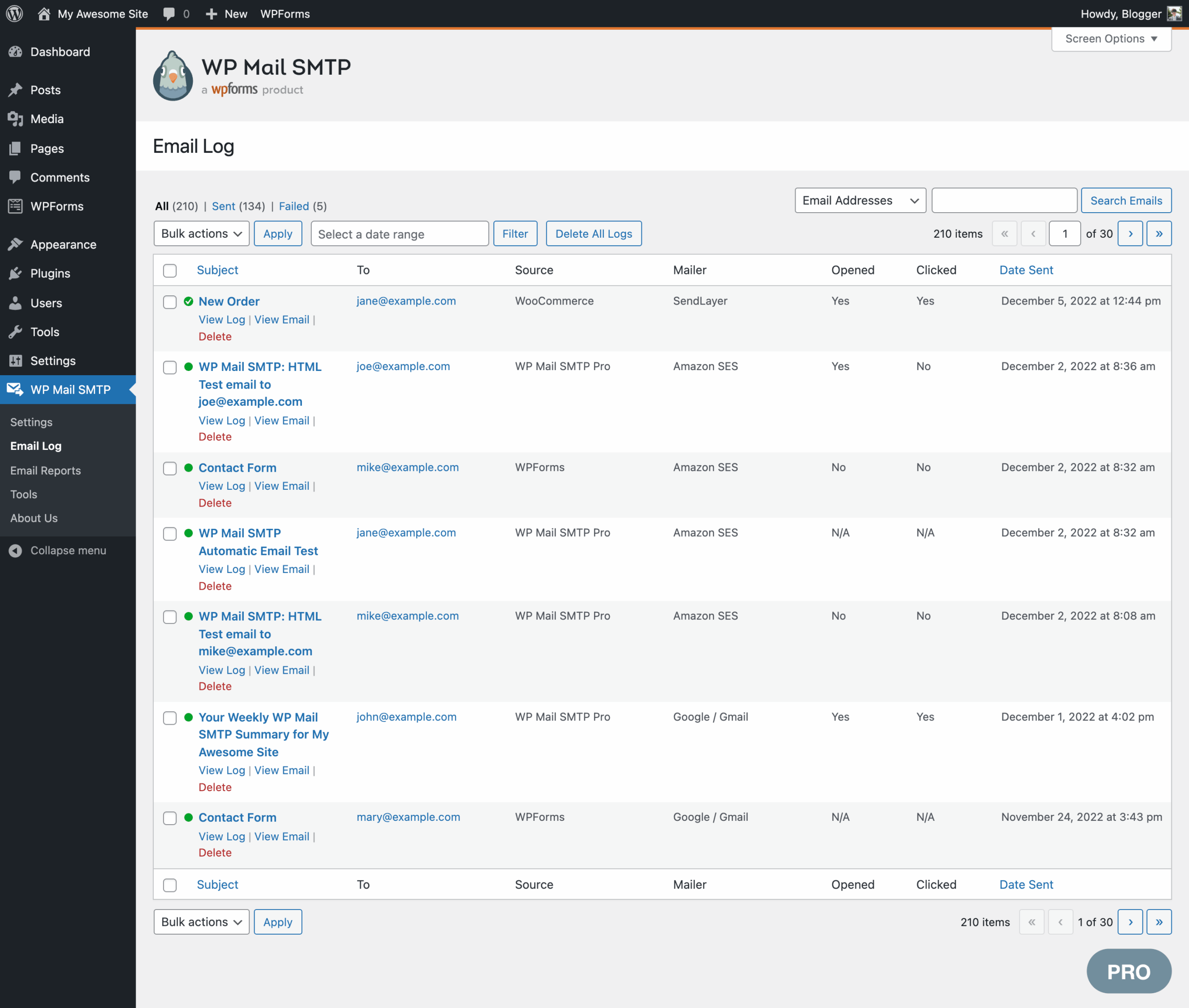
Each log entry shows the email subject, sender, recipients, message content, headers, attachments, the plugin that triggered the email (WooCommerce, WPForms, etc.), delivery status, and open and click rates if tracking is enabled.
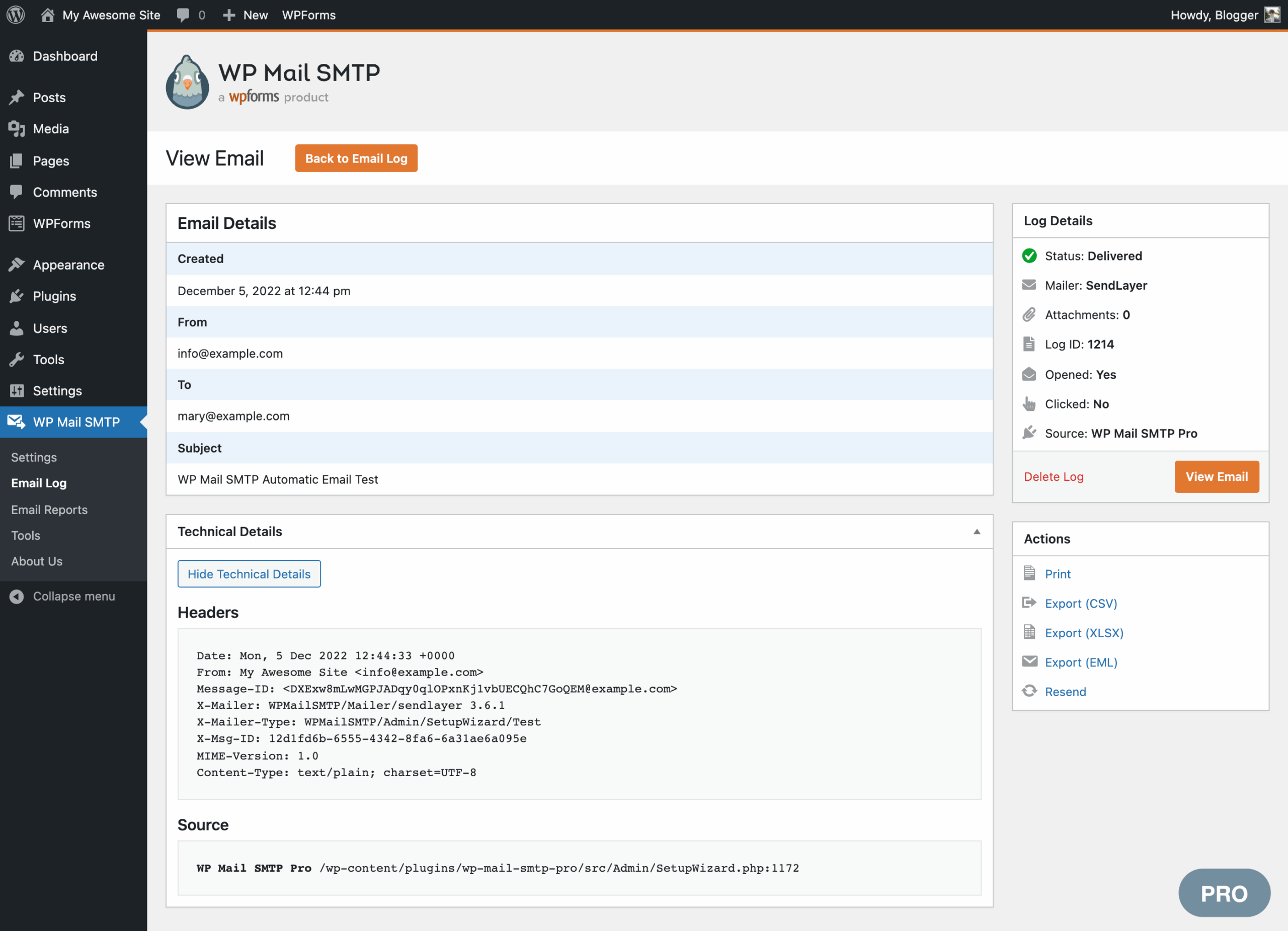
You can also export the full log to CSV for external analysis or compliance records.
Email resend
From the log, you can resend any individual email or bulk-resend a selection. Failed emails can be retried. Successfully delivered emails can be forwarded to an alternative address. For a WooCommerce store where an order confirmation fails to arrive, the resend feature is a practical support tool.
Open and click tracking
Pro tracks whether recipients opened an email and whether they clicked any links. Tracking data is grouped by email subject line in the Reports section, making it easy to see which notification types get opened and which go unread.
Advanced email reports
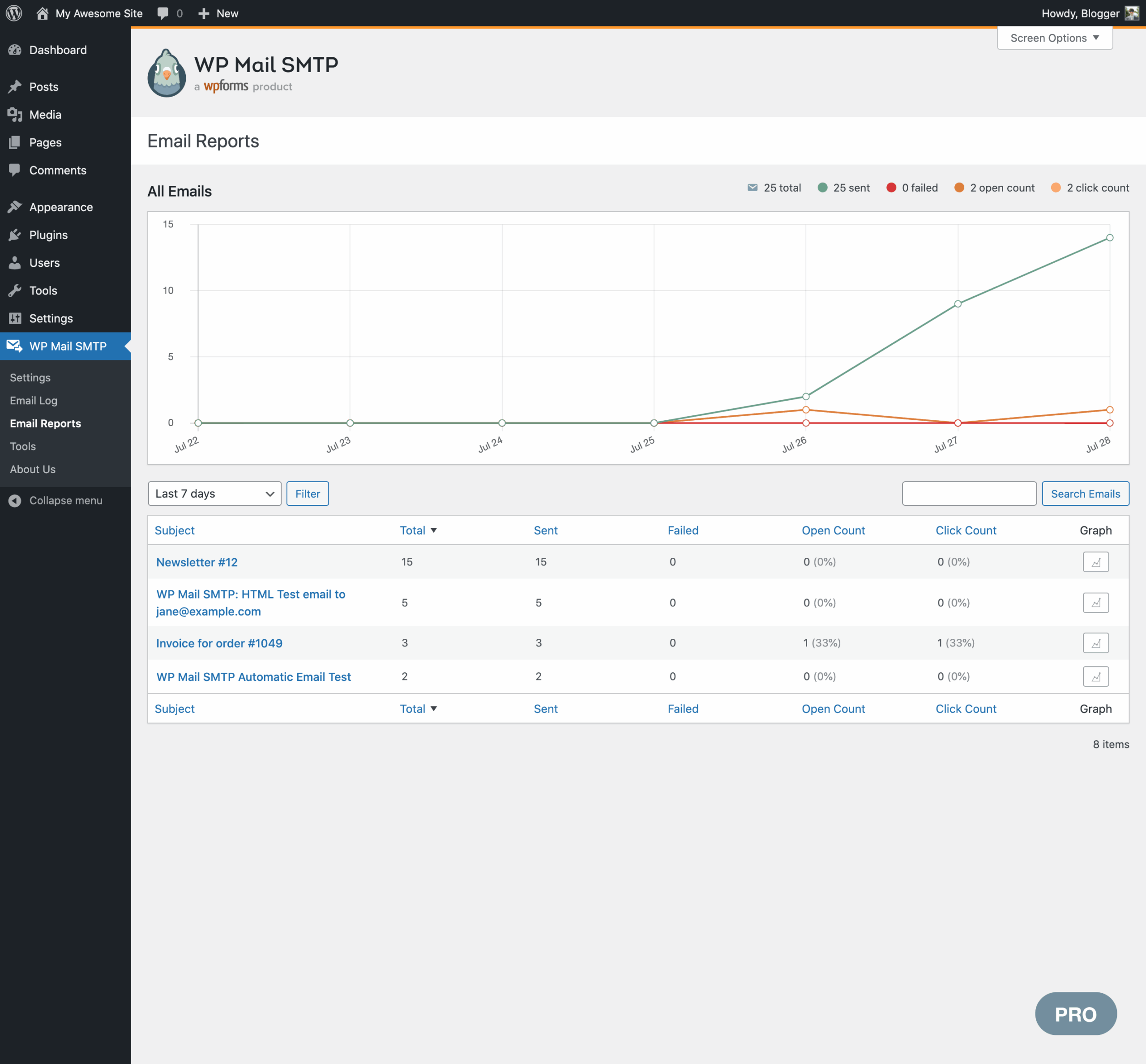
The reports dashboard shows total emails sent, delivered, failed, opened, and clicked. The weekly summary email on Pro includes delivery and engagement statistics for the top five most popular emails, not just a raw count. If you want to know which WooCommerce notification template has the best open rate, the reports page gives you that data.
Email failure alerts
When an email fails to send, WP Mail SMTP can notify you immediately. Alert channels include email, Slack, Microsoft Teams, Discord, SMS via Twilio, and custom webhooks.
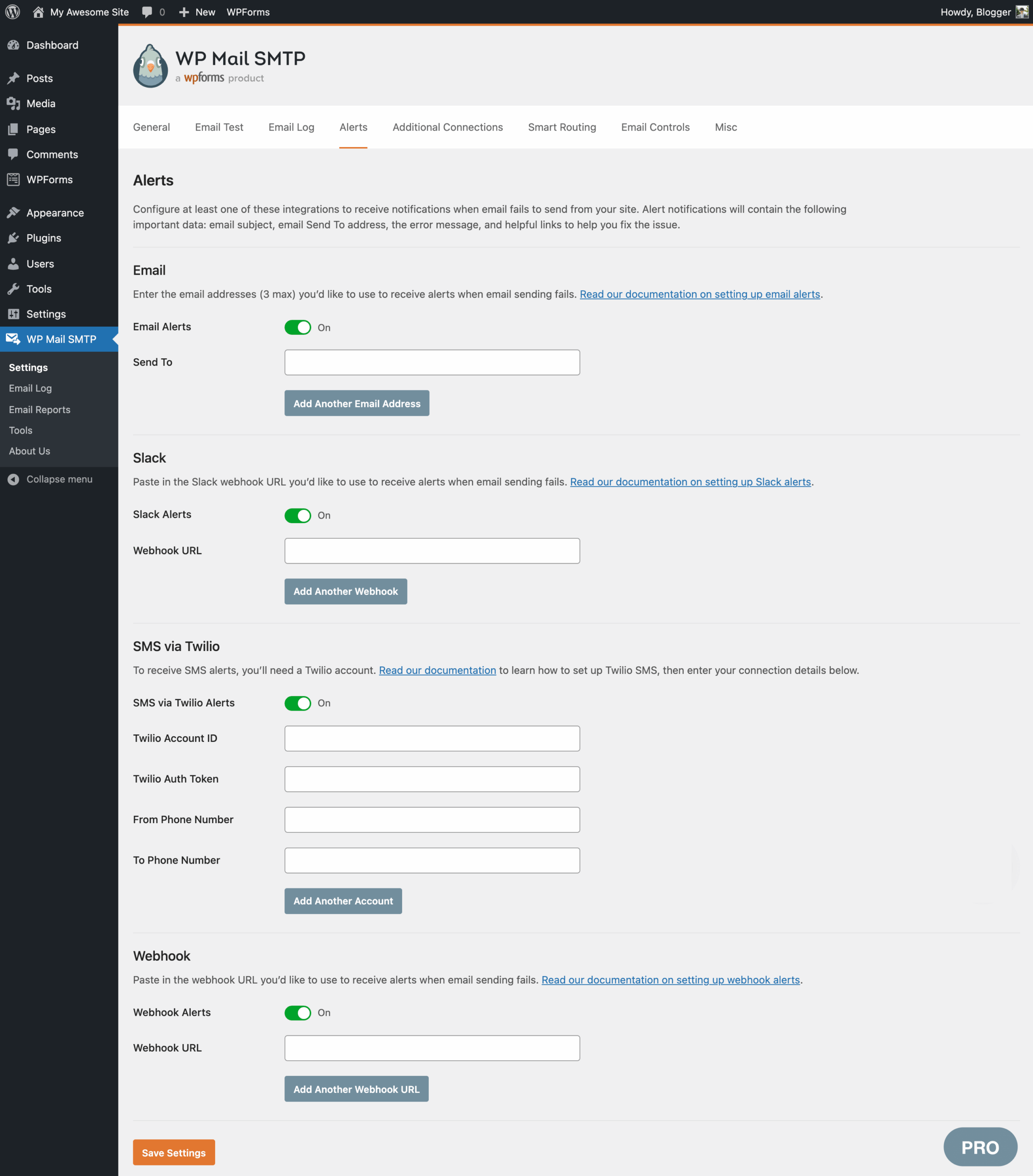
This feature matters most for sites where a failed email has a direct business consequence. A WooCommerce site where order confirmation emails are quietly failing may not notice for days. An alert makes that failure visible within minutes.
Backup connections
You can configure a secondary mailer as a fallback. If the primary mailer fails to send an email, WP Mail SMTP automatically retries through the backup connection.
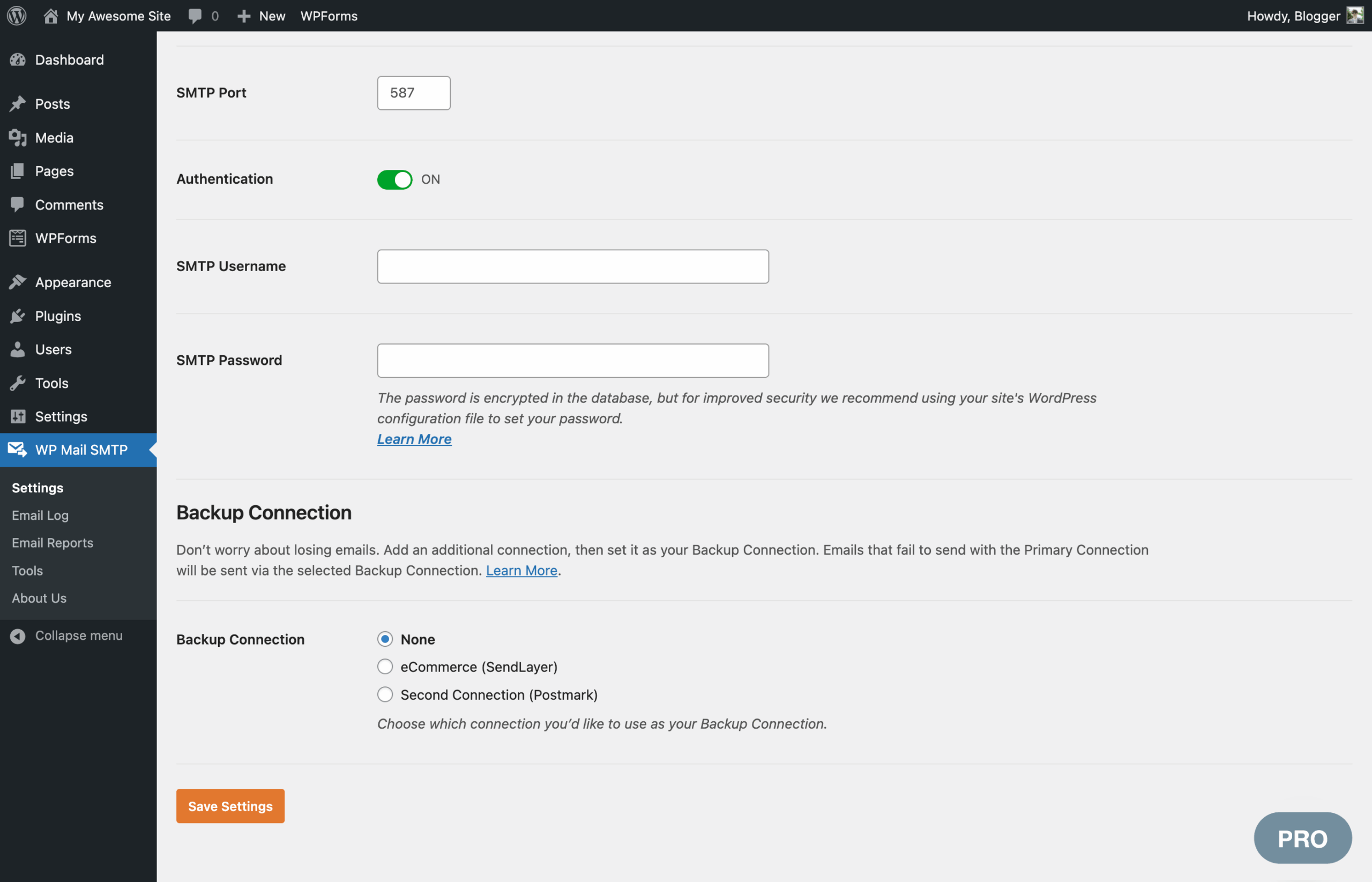
The plugin also automatically queues and retries emails that failed before the failover kicked in. For business-critical email workflows, this is a meaningful reliability improvement over a single connection setup.
Smart email routing
Conditional routing lets you send different types of emails through different mailers. You can create rules based on email subject, message content, from address, to address, or the WordPress plugin that generated the email.
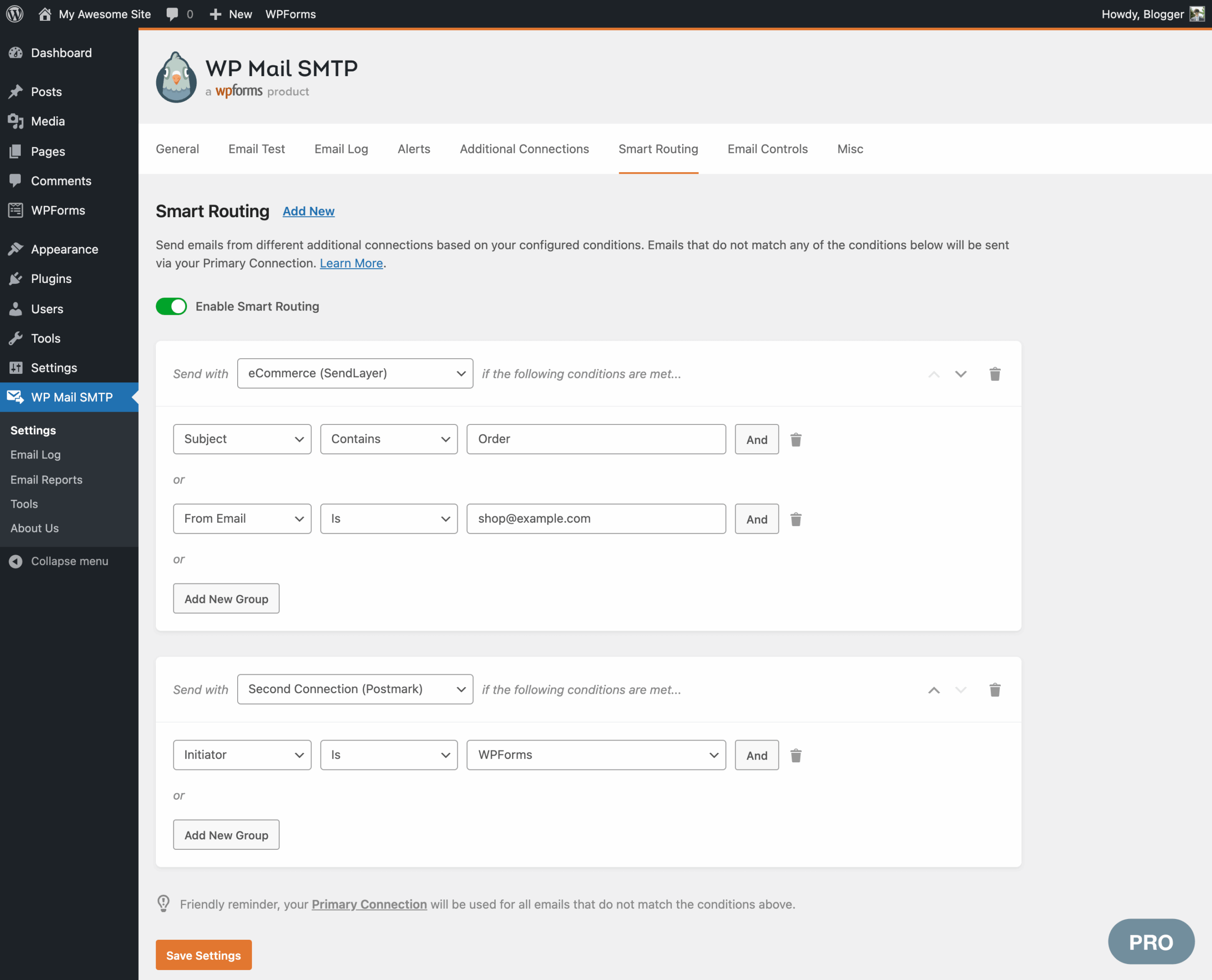
A practical use case: route transactional emails (WooCommerce orders, password resets) through a high-deliverability API service like Postmark, while routing lower-priority notification emails through a cheaper bulk provider. Smart Routing handles the split automatically based on rules you configure.
Manage WordPress email notifications (Pro)
Pro gives you control over the default email notifications WordPress sends automatically. You can use a simple toggle switch to disable specific notification types, such as admin alerts for new user registrations, password changes, or comment notifications. This is useful for sites that generate unwanted internal notification noise and want to stop specific emails without modifying theme or plugin code.
Rate limiting
Pro lets you set a maximum number of emails per minute, hour, day, week, or month. If your site hits that limit, emails queue and send when capacity is available. This keeps you inside your email provider’s sending limits without losing any messages.
Optimized email sending
Related to rate limiting, this feature queues emails in the background so that high-volume sending does not slow down the front-end experience for visitors.
Pricing and license value
WP Mail SMTP offers four paid tiers plus the free Lite version. Prices below are introductory USD rates observed on the wpmailsmtp.com pricing page on August 1, 2026. Introductory pricing applies only to the first year; renewals are at the full price shown in brackets. Prices are ex-VAT. Verify current pricing on the pricing page before purchasing.
- Lite: Free. Core mailer integrations, basic error tracking, basic weekly summary. No time limit.
- Pro: $49/year introductory ($99/year on renewal). 1 site. Standard support. Email reports, email logging, open/click tracking, backup connections, smart routing, email failure alerts. Full mailer list including Amazon SES, Microsoft 365, Zoho Mail.
- Elite: $99/year introductory ($149/year on renewal). 1 site. White Glove Setup service included (available for SendLayer, SMTP.com, or Brevo only). Priority support.
- Developer: $199/year introductory ($249/year on renewal). 20 sites. Priority support. All Pro features.
- Agency: $399/year introductory ($449/year on renewal). 100 sites. Priority support. All Pro features.
All paid plans come with a 14-day money-back guarantee and one year of plugin downloads, support, and updates. There is no free trial for Pro. The Lite version on WordPress.org is effectively the trial.
Important pricing notes:
- Introductory pricing applies only to the first billing period. Renewals charge the full (non-discounted) rate. Factor the renewal rate into your long-term cost calculation, not the first-year price.
- Prices are in USD and exclude VAT. Buyers in VAT-applicable regions will see a higher total at checkout.
- All plans auto-renew annually. You can cancel at any time to stop renewal charges; access continues through the end of the paid period.
The White Glove Setup included in the Elite plan covers plugin installation, DNS configuration for email domain verification, mailer configuration, and final delivery testing, all done by the WP Mail SMTP team. The limitation is clear: White Glove Setup is only available for three mailers (SendLayer, SMTP.com, Brevo). If you want Gmail, Postmark, or another provider, White Glove Setup is not available regardless of your plan tier.
Value assessment
For a single business site: the Lite version handles the core deliverability problem at no cost. Upgrade to Pro ($49 first year, $99 on renewal) if you need email logging, failure alerts, or backup connections. The jump from Lite to Pro is the most meaningful upgrade decision for most individual site owners.
For agencies: the Developer plan ($199/$249) covering 20 sites is the practical entry point for freelancers with a client portfolio. The Agency plan ($399/$449) covering 100 sites is the right fit for a larger agency. The per-site economics are significantly better than buying individual Pro licenses.
For the Elite plan: the White Glove Setup justifies the premium for non-technical users who want the plugin fully configured by the vendor team. Technical users will find Pro at lower cost covers the same features without the hands-on service.
Pros and cons
Pros
- The most widely installed WordPress SMTP plugin, with 4+ million active sites and 82 million+ total downloads.
- 4.8 out of 5 rating from over 5,100 reviews on WordPress.org. Twenty-five of 27 recent support threads resolved at time of review.
- Fourteen named mailer integrations plus generic SMTP in the free Lite version, more built-in options than any comparable plugin.
- The Lite version genuinely solves the core email delivery problem at no cost and with no feature expiry or trial countdown.
- Active development: version 4.9.0 in June 2026 added WP-CLI support, a Code Snippets tab, WordPress Abilities API compatibility, and security hardening. v4.8.0 added SendLayer Quick Connect. v4.7.0 added Resend. v4.6.0 added Mandrill.
- Email logging (Pro) gives a complete audit trail of every email sent from the site, including content, headers, and delivery status.
- Failure alerts (Pro) via Slack, Teams, Discord, SMS, or webhooks mean a failed email does not go unnoticed for days.
- Backup connections (Pro) with automatic failover and retry are a meaningful reliability upgrade for critical email workflows.
- Smart Routing (Pro) allows splitting email types across multiple providers based on conditional rules.
- White Glove Setup (Elite) removes all setup friction for non-technical users.
- Setup wizard makes initial configuration accessible to non-developers.
- Multisite support in both Lite and Pro.
- WP-CLI support (v4.9.0) for command-line and automated setup workflows.
- 14-day money-back guarantee on all paid plans.
Cons
- Introductory pricing is not the renewal price. The first-year Pro cost of $49 becomes $99 per year on renewal. This is a meaningful difference for some buyers.
- White Glove Setup (Elite) is only available for three mailers: SendLayer, SMTP.com, and Brevo. Users who want to use Gmail, Postmark, or other providers cannot access this service regardless of plan.
- Microsoft 365/Outlook.com One-Click Setup and Amazon SES require Pro. Users on the free tier who need these popular enterprise mailers must pay.
- Email logging and failure alerts are Pro-only. A site on the free version will not know about failed emails unless they check manually.
- WP Mail SMTP is a connector, not a provider. You still need to create and configure an account with an external email service. There is no send-email-from-your-domain-immediately option without a third-party provider account.
- No built-in newsletter or marketing email functionality. This plugin is strictly for transactional email.
- FluentSMTP offers multiple mailer connections and basic logging capability for free, which undercuts the Pro value proposition for tight budgets.
Alternatives to WP Mail SMTP
- FluentSMTP. A free plugin with support for multiple simultaneous mailer connections, a built-in email log, and many of the same provider integrations as WP Mail SMTP Lite. Choose FluentSMTP if you want Pro-adjacent features at zero cost and can accept a smaller install base and a less established support network compared to WP Mail SMTP.
- Post SMTP (formerly Postman SMTP). A free plugin with Gmail, Mailgun, and other integrations, plus a basic email log and failure notification support. A solid free alternative if you want a broader feature set than WP Mail SMTP Lite without paying for Pro.
- Easy WP SMTP. A simpler, lighter plugin focused on basic SMTP configuration. Choose it if all you need is to enter SMTP credentials for a single provider and move on. Less feature-rich than WP Mail SMTP Lite.
- WP Offload SES. A plugin specifically for Amazon SES that handles transactional email offloading. Choose it if Amazon SES is your only provider and you want a plugin purpose-built for that integration.
- Gravity SMTP. A newer entrant from the Gravity Forms team. Includes multiple connections, logging, and failure alerts. Worth considering if you are already deeply in the Gravity Forms ecosystem.
For most sites choosing between WP Mail SMTP Lite (free, wide mailer support, no logging) and FluentSMTP (free, multi-connection, basic logging), the decision comes down to ecosystem preference and track record. WP Mail SMTP has a larger install base, longer history, and a more established support team. FluentSMTP covers more Pro-adjacent features at free. WP Mail SMTP Pro is the clearest choice when you need email logging, smart routing, backup connections, and failure alerts in a single well-supported package.
For a broader side-by-side look at all the leading options in this category, see our best WordPress SMTP plugins roundup.
Final verdict
WP Mail SMTP has earned its position as the most-installed WordPress SMTP plugin, and after reviewing version 4.9.0, I do not find a reason to argue with that standing. The Lite version fixes the email delivery problem most WordPress sites eventually encounter, it connects to more providers than any comparable free plugin, and it is actively maintained with meaningful additions in every major release.
Where the plugin really earns its keep is on the Pro side. Email logging, failure alerts, and backup connections are not cosmetic features. They are operational tools that prevent an email failure from becoming an invisible problem that quietly costs you customers or credibility. For any site where email reliability is worth tracking, Pro is worth the cost.
Two caveats worth making clearly: first, the renewal rate is notably higher than the introductory price, so factor $99/year (not $49/year) into your long-term budget for the Pro plan. Second, WP Mail SMTP does not come with email sending capacity. You still need a provider account. That is not a flaw in the plugin, but it is a step that occasionally catches first-time users off guard when they expect to just install and go.
For the majority of WordPress sites, the recommendation is straightforward. Install Lite and connect SendLayer, Brevo, or whatever provider you have access to. If you need to know when emails fail, if you need to see what was sent and when, or if you need a fallback when your primary provider goes down, upgrade to Pro. If you are on a tight budget and can invest setup time, FluentSMTP is worth a look first. But for most sites, WP Mail SMTP is the fastest path from broken email delivery to reliable delivery.