

Sucuri has been cleaning hacked WordPress sites since 2009 and publishing the plugin that helps prevent those hacks since 2011. That is a longer track record than most WordPress security tools can claim, and it shows in how the product is put together: the free plugin covers the monitoring and auditing side of security, while the paid platform handles the firewall, the CDN, and the cleanup guarantees. The two layers work together, but they are not the same product, and understanding which layer you actually need is the most important decision before you install anything.
This review covers version 2.7.4 of the Sucuri Security plugin, released July 7, 2026. It walks through every major feature in the free plugin, explains what stays behind a paid subscription, and lays out the pricing structure across both the Security Platform plans and the Firewall-only options. It also covers the architectural difference between Sucuri’s cloud-based WAF and endpoint-based alternatives like Wordfence, since that difference matters for how you configure your site and what protection you actually get.
Note on basis: this review is built on a detailed audit of the Sucuri plugin page at sucuri.net, the WordPress.org plugin listing (version 2.7.4, last updated July 7, 2026), the full changelog from version 1.9 through 2.7.4, the vendor’s official admin panel screenshots on WordPress.org, the Sucuri pricing page, and the SiteCheck documentation. A live plugin install in a WordPress sandbox was not part of this research. Where this review describes UI panels and behavior, it draws on the vendor’s own screenshots from the WordPress.org listing, the official documentation, and the plugin’s public changelog. Pricing was verified against sucuri.net on August 4, 2026.
At a glance
- Plugin version reviewed: 2.7.4 (released July 7, 2026)
- Active installs: 600,000+ sites
- Downloads: 36 million+
- WordPress.org rating: 4.2/5 from 384 reviews
- WordPress requirement: 3.6 or higher
- Tested up to: WordPress 7.0.2
- Company: GoDaddy (operating as Sucuri, a GoDaddy brand via Mediatemple since 2017)
- Free plugin: broad monitoring, auditing, and hardening feature set per official documentation
- Paid Platform: $229 to $549 per year per site, includes WAF, CDN, and unlimited malware cleanup
- Firewall only: from $9.99 per month
Quick verdict
If you want one sentence: the free Sucuri Security plugin is a solid monitoring and hardening tool for any WordPress site, but if you need a firewall that actually stops traffic before it hits your server, you need a paid plan.
According to the official documentation and the WordPress.org listing, the free plugin covers a broad range of security tasks. Audit logging, file integrity monitoring, blocklist checks across ten security engines, email alerts, two-factor authentication, one-click hardening actions, and post-hack recovery tools are all documented as included at no cost. Those are features that other security plugins charge for. The plugin also integrates with the Sucuri Firewall when you buy a platform plan, which is designed to give you a unified dashboard for both monitoring and active threat blocking.
The limitation to be honest about: the free plugin’s SiteCheck scanner works externally, checking what is visible in your site’s public source code. It cannot see files that are hidden from visitors, which is where sophisticated server-side malware often lives. For full server-level scanning and cleanup guarantees, you need a paid platform plan.
Quick verdict summary:
- Best for: WordPress site owners who want comprehensive free monitoring (audit logs, file integrity, hardening, 2FA) without a subscription, plus a clear upgrade path to a managed security service when the site grows.
- Best paid plan for most sites: Basic Platform at $229/year for sites that need WAF protection and malware cleanup guarantees. Pro or Business for sites where faster response SLAs matter.
- Standout: the audit log is stored remotely on Sucuri’s servers, not in your WordPress database, which means it cannot be tampered with if your site is compromised. That is a meaningful trust signal for sites that need to demonstrate compliance or incident history.
- Watch out for: the free SiteCheck scanner is external only and will not catch server-side malware hidden from public view. The firewall, CDN, and vulnerability scanners (for core, PHP, plugins, and themes) all require a paid subscription. The Sucuri brand is now a GoDaddy product, which is worth knowing if you prefer independent vendors.
What Sucuri Security is
Sucuri was founded in 2009 by Daniel Cid, a security researcher previously known for his work on ClamAV and Sourcefire. GoDaddy acquired the company in 2017 via Mediatemple, and the product continues to operate under the Sucuri name. As of 2026, the legal entity is GoDaddy Mediatemple, Inc., operating as Sucuri. For most users, the practical implication of the acquisition is that Sucuri’s infrastructure and support team are now backed by GoDaddy’s resources. For users who prefer security vendors that are not part of a large hosting conglomerate, that is worth knowing before you hand over DNS control.
The product has two distinct layers, and keeping them straight avoids most of the confusion that appears in public reviews of Sucuri.
The first layer is the free WordPress plugin: Sucuri Security – Auditing, Malware Scanner and Security Hardening. This installs from WordPress.org in the normal way and adds monitoring, auditing, and hardening tools to your site. It does not include a firewall.
The second layer is the Sucuri paid platform: a cloud-based Web Application Firewall (WAF) combined with a CDN, malware monitoring, and a team that handles cleanups when needed. The paid platform is not a plugin feature. It is a managed service that works by routing your site’s DNS through Sucuri’s servers, so all traffic is filtered in the cloud before it reaches your origin host. The free plugin integrates with this service when you buy a plan and enter your API key, which unlocks the firewall management panel and a set of additional vulnerability scanners.
The key point: you can run the free plugin without ever buying a platform plan. You can also use the Sucuri Firewall without the free plugin (the WAF runs at the DNS level, entirely in the cloud). But the plugin and the platform are designed to work together, and the best version of the product uses both.
Who Sucuri Security is best for
Strong fit:
- WordPress site owners who want free monitoring, audit logging, and hardening tools without any subscription. The free plugin’s documented feature set provides genuine value at zero cost.
- Sites that handle user accounts, admin access, or sensitive content where an audit trail of every login, logout, and admin action is useful for compliance or incident investigation.
- Agencies and freelancers managing client WordPress sites who want a free plugin that covers the monitoring layer and integrates with a paid managed service when the client upgrades.
- Any site that has been compromised before and wants to understand exactly what changed, what files were modified, and what users were doing at a given point in time.
- Sites that need a DNS-level firewall rather than an endpoint plugin. Sucuri’s cloud WAF is designed to intercept traffic before it reaches the server, which is lighter on server resources than endpoint-based alternatives.
- WooCommerce stores or business-critical sites that need guaranteed malware cleanup SLAs and cannot afford extended downtime.
Weak fit:
- Sites on free or very basic hosting where DNS configuration changes are not straightforward. The paid WAF requires changing your DNS nameservers to route through Sucuri, which is a step that needs hosting provider access and basic DNS knowledge.
- Site owners who want a completely self-contained plugin that scans files on the server without any external service dependency. The free plugin’s scanner is remote only.
- Users who want a real-time endpoint firewall at zero cost. Wordfence offers a free WAF inside the plugin itself. Sucuri’s WAF requires a paid plan.
- Small personal sites with minimal traffic and no sensitive data where the $229/year Platform plan is hard to justify.
- Buyers who want vulnerability patching as a standalone feature without a full managed service subscription.
Installation and setup
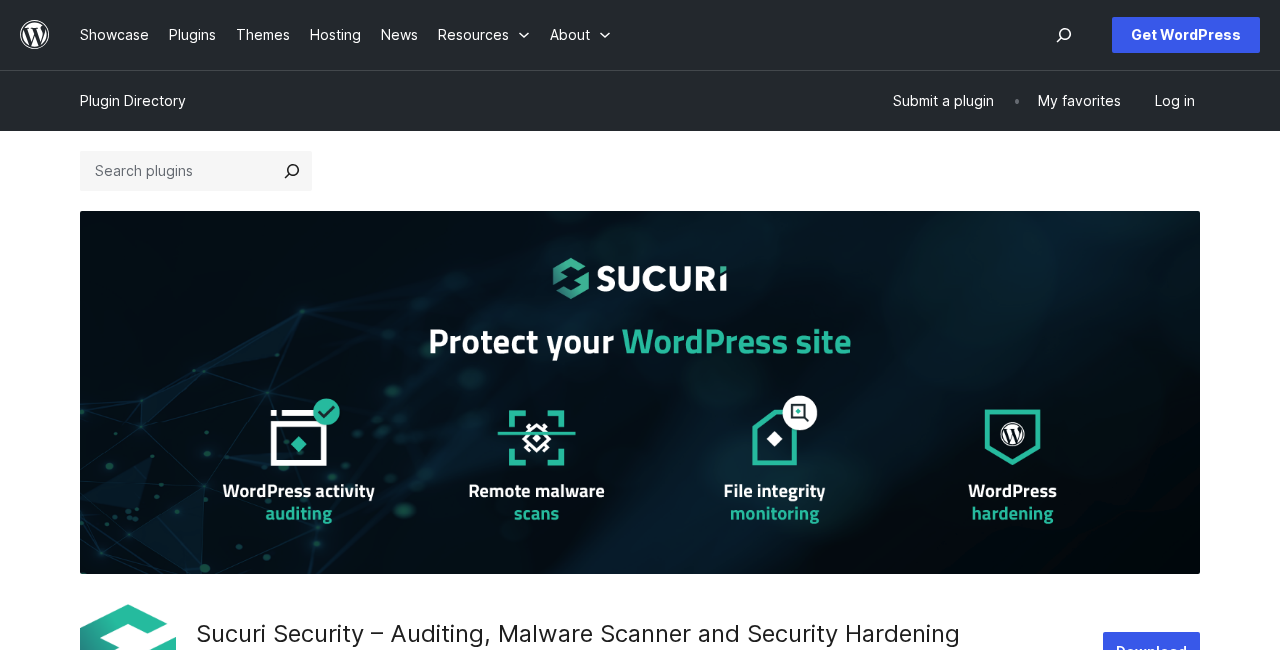
According to the official documentation, the plugin installs from Plugins > Add New in the WordPress admin. Searching “Sucuri” or “sucuri-scanner” returns the result “Sucuri Security – Auditing, Malware Scanner and Security Hardening” with the Sucuri logo. After activation, a Sucuri Security menu item appears in the sidebar.
The documentation recommends generating an API key as the first step after activation. The plugin settings page includes a “Generate API Key” button that creates a unique authentication token for your site. This key is used to communicate with Sucuri’s remote API service, which stores your audit logs off-server. Without the API key, the plugin still runs local monitoring but the audit logs are stored locally only, which means they can be deleted or tampered with if your site is compromised.
Generating the API key is free and takes about 30 seconds. The documentation recommends treating it as mandatory rather than optional for anyone relying on the audit log for security monitoring. The remote storage of logs is one of the plugin’s genuine differentiators.
According to the plugin documentation and the WordPress.org listing, the plugin adds nine functional panels to the Sucuri menu: Dashboard, Firewall (WAF), Settings, Alerts, Integrity Scan, Last Logins, Hardening, Post-Hack, and Headers. The Firewall panel is visible in the free version but requires a paid WAF API key to unlock. The rest are free.
Security activity auditing
The audit log is the plugin’s most underrated free feature and one worth enabling immediately after any hosting move or plugin update.
According to the official documentation, every security-relevant action on your WordPress site is captured and sent to Sucuri’s remote API: user logins, logouts, failed login attempts, content changes, plugin activations and deactivations, settings changes, and dozens of other event types. Each log entry records the timestamp, the user, the IP address, and a plain-language description of what happened.
Because the log is stored on Sucuri’s remote servers rather than in your WordPress database, it cannot be deleted by an attacker who gains admin access to your site. A local log is only as trustworthy as the server it lives on. An off-site log maintained by a third-party system is a much stronger evidentiary record if you ever need to reconstruct what happened during an incident.
Version 1.9.6 added filtering by event type and date range, which according to the changelog turns the raw log feed into something you can search when trying to track down what changed and when.
File integrity monitoring
The Sucuri plugin includes two integrity tools that work together.
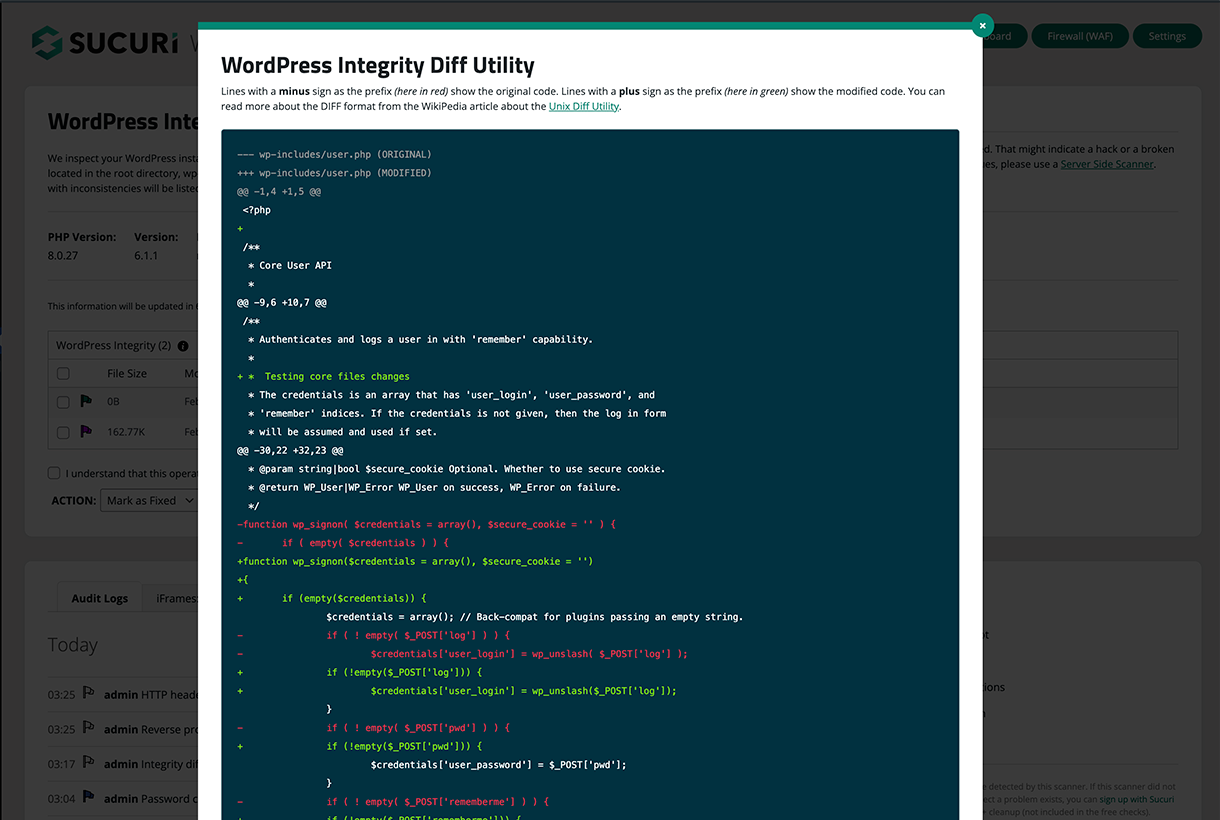
The first is the WordPress Integrity Tool, which the documentation describes as comparing the files on your server against the known-good versions from WordPress.org. If a WordPress core file has been modified, added, or deleted, the tool flags it. This is the standard file integrity monitoring approach, and it is designed to detect core file tampering, which is a common post-hack persistence technique.
The second is the Integrity Diff Utility, which shows the exact line-by-line differences between your current files and the originals. This is the feature that distinguishes a basic integrity check from a useful one. Knowing that a file changed is useful. Seeing what changed is the information you need to assess whether the change is a hack or a routine WordPress update that the comparison table has not caught up with yet.
According to the documentation, the integrity check covers PHP, JavaScript, and CSS files in the WordPress core. It does not extend to theme files, custom plugin files, or uploaded content, which is where much real-world malware hides. For those, the SiteCheck scanner and, for server-level scanning, the paid platform apply.
Remote malware scanning with SiteCheck
The SiteCheck scanner is Sucuri’s free public scanning tool, integrated directly into the plugin. Per the official documentation, when a scan runs, SiteCheck visits your site externally, the same way a regular visitor’s browser would, and checks the public-facing source code for known malware patterns, malicious redirects, injected JavaScript, and other indicators of compromise.
It also checks your domain against ten major blocklist engines: Sucuri Labs, Google Safe Browsing, Norton, McAfee Site Advisor, Yandex, SpamHaus, Bitdefender, PhishTank, ESET, and AVG. If any of them flag your domain, the plugin surfaces the alert immediately, and the Sucuri platform plans include assistance getting the block removed.
The limitation to understand clearly: SiteCheck is a remote, external scanner. It can only see what your site serves to a browser. Server-side malware that is not rendered in the public source code, hidden backdoors in PHP files that only execute on authenticated admin requests, or malware in database fields that never appears in the front-end HTML will not be caught by SiteCheck. Sucuri’s own documentation acknowledges this: the SiteCheck page notes that “the remote scanner only has access to what’s visible on the browser level” and will not detect anything on the server side. The Sucuri platform plans include server-level scanning that addresses this gap. The free plugin does not.
For sites where the primary concern is visible malware (injected spam links, malicious iframes, defacements, drive-by download scripts), SiteCheck is designed to catch these categories at zero cost. For sites handling payments or user data where hidden server-side compromise is the realistic threat, the remote scanner is a starting point, not a complete answer.
Blocklist monitoring
The blocklist check runs automatically as part of every SiteCheck scan and can also be triggered on a schedule. The ten blocklist engines checked cover the services most likely to affect your site’s SEO performance, ad account eligibility, and visitor trust.
A blocklist flag from Google Safe Browsing is the most immediately damaging: Chrome, Firefox, and Safari all display full-screen warnings before allowing visitors through, which effectively halts organic traffic until the flag is removed. Getting delisted requires cleaning the malware, submitting a review request to Google Search Console, and waiting for Google’s verification cycle. The Sucuri platform plans include assistance through this process. The free plugin surfaces the blocklist alert, but the cleanup and delisting support are paid services.
Security hardening
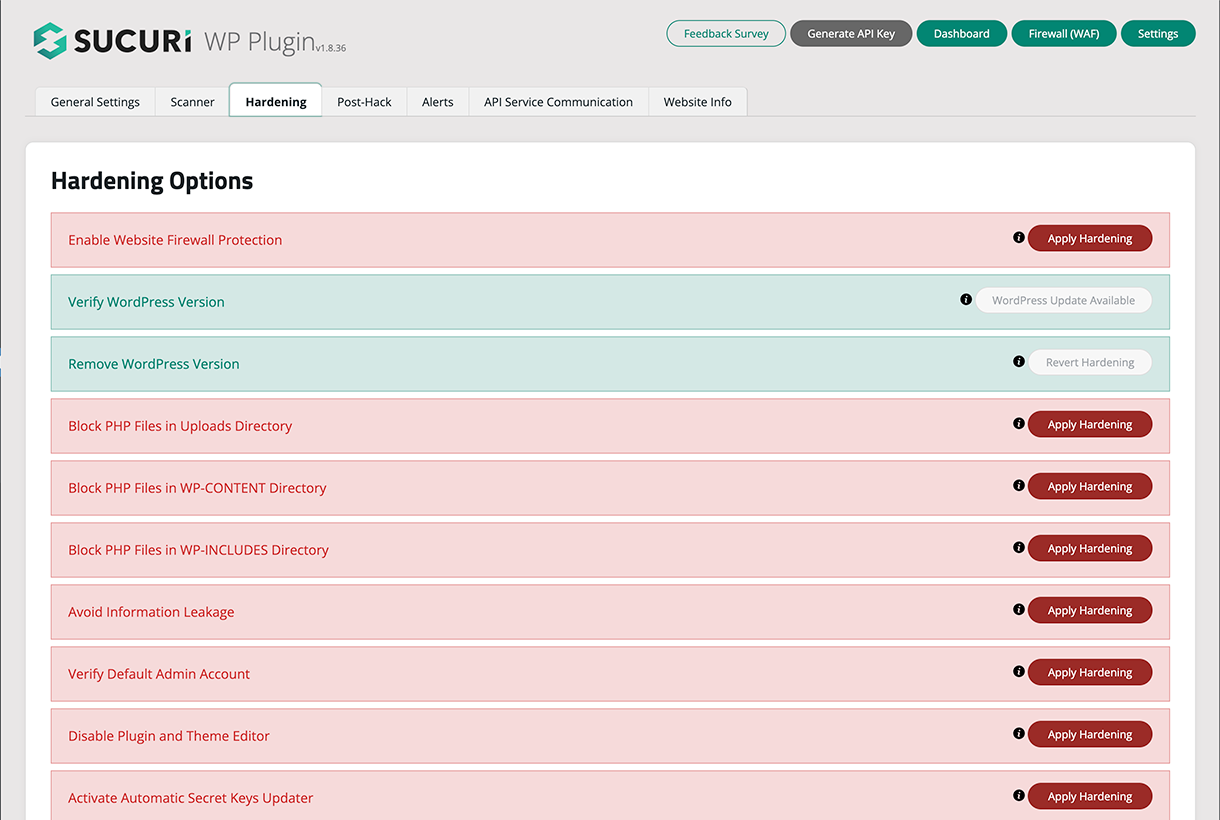
The Hardening panel, as described in the documentation and visible in the vendor’s WordPress.org screenshots, is a practical list of one-click security improvements. Each item shows its current status and a button to apply or reverse the change. The documented actions include:
- Verifying that the default admin username has been changed
- Disabling the plugin and theme file editor inside wp-admin (which, if left enabled, gives any attacker with admin access a browser-based code editor)
- Blocking PHP file execution in the uploads directory, the wp-content directory, and wp-includes
- Enabling website firewall protection (surfaces if you have a WAF API key)
- Removing the WordPress version from the public source (reduces information disclosure)
- Automatic secret key rotation
Version 2.7.4, released July 7, 2026, added a Disable XML-RPC option to this panel per the changelog. XML-RPC is a common attack vector for brute force and pingback-based DDoS attacks. The plugin now offers one-click disabling of XML-RPC with a warning displayed if an active plugin such as Jetpack depends on it. That is a genuinely useful addition for sites where XML-RPC is not needed.
Per the documentation, all hardening actions are reversible from the same panel, so a hardening option that causes issues can be undone without touching the server directly.
Failed logins and two-factor authentication
According to the documentation and the vendor’s screenshots, the Last Logins panel shows a record of every login attempt against your site: successful logins, failed logins, and currently active logged-in users. Each entry shows the username, IP address, hostname, and timestamp. This view is designed to help identify brute force attacks in progress, spot logins from unexpected locations, and confirm whether a specific user was logged in at a given time.
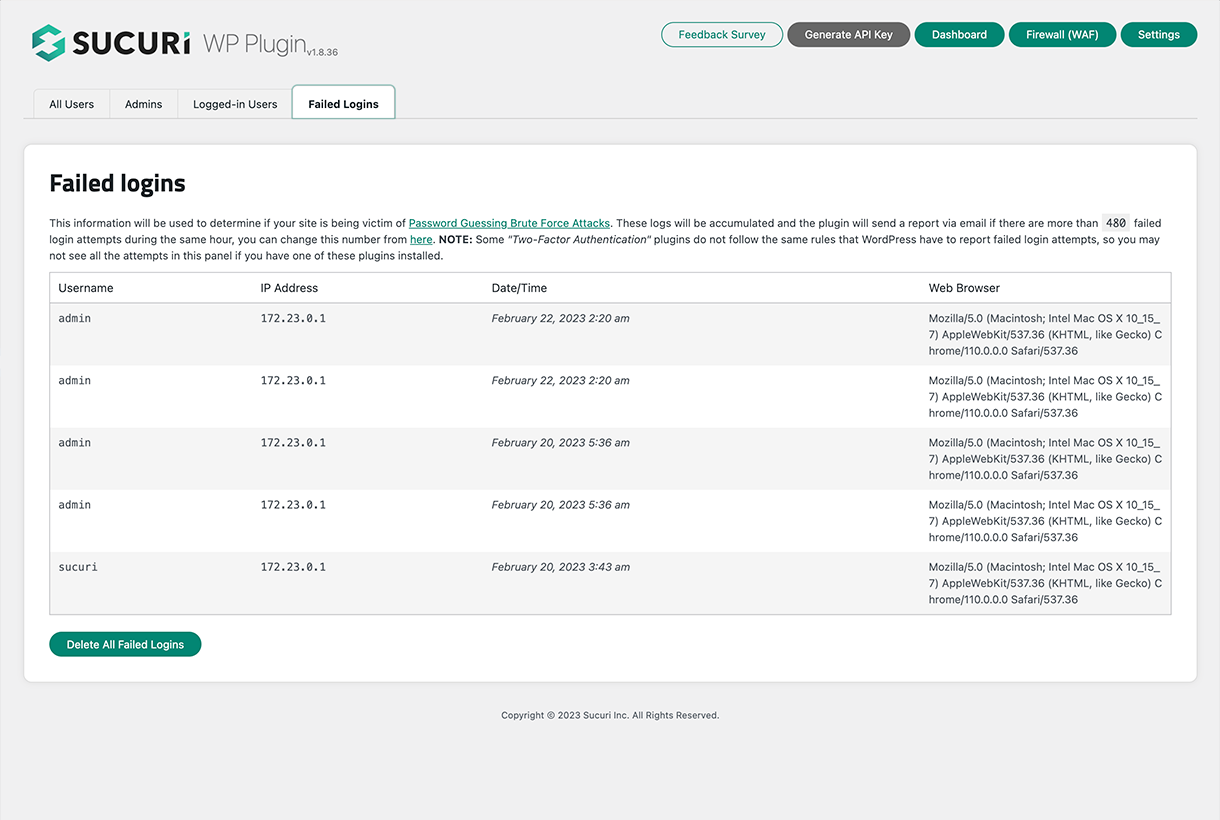
Version 2.5 added two-factor authentication (2FA) per the changelog. Version 2.7.4 extended the 2FA user management to paginated loading, which the changelog notes makes the feature practical on WooCommerce stores or membership sites with hundreds or thousands of registered users. A search box was also added in 2.7.4 to find specific users by username, email, or display name. These are quality-of-life improvements that suggest the 2FA feature is being actively maintained rather than shipped and forgotten.
According to the documentation, 2FA in the Sucuri plugin uses a standard TOTP (time-based one-time password) approach compatible with authenticator apps such as Google Authenticator, Authy, and 1Password.
Post-hack recovery tools
If your site is compromised, the Post-Hack panel provides four focused recovery actions per the official documentation:
- Update Secret Keys: generates and applies new WordPress authentication salts and security keys, which invalidates all active sessions, including any that an attacker may have.
- Reset User Passwords: sends password reset emails to all users or a selected subset, forcing credential rotation across the site.
- Reset Installed Plugins: resets all installed plugins to their current versions from WordPress.org, which is designed to remove any plugin files that may have been modified or replaced.
- Update Plugins and Themes: runs updates on all installed plugins and themes, closing known vulnerabilities that may have been the entry point.
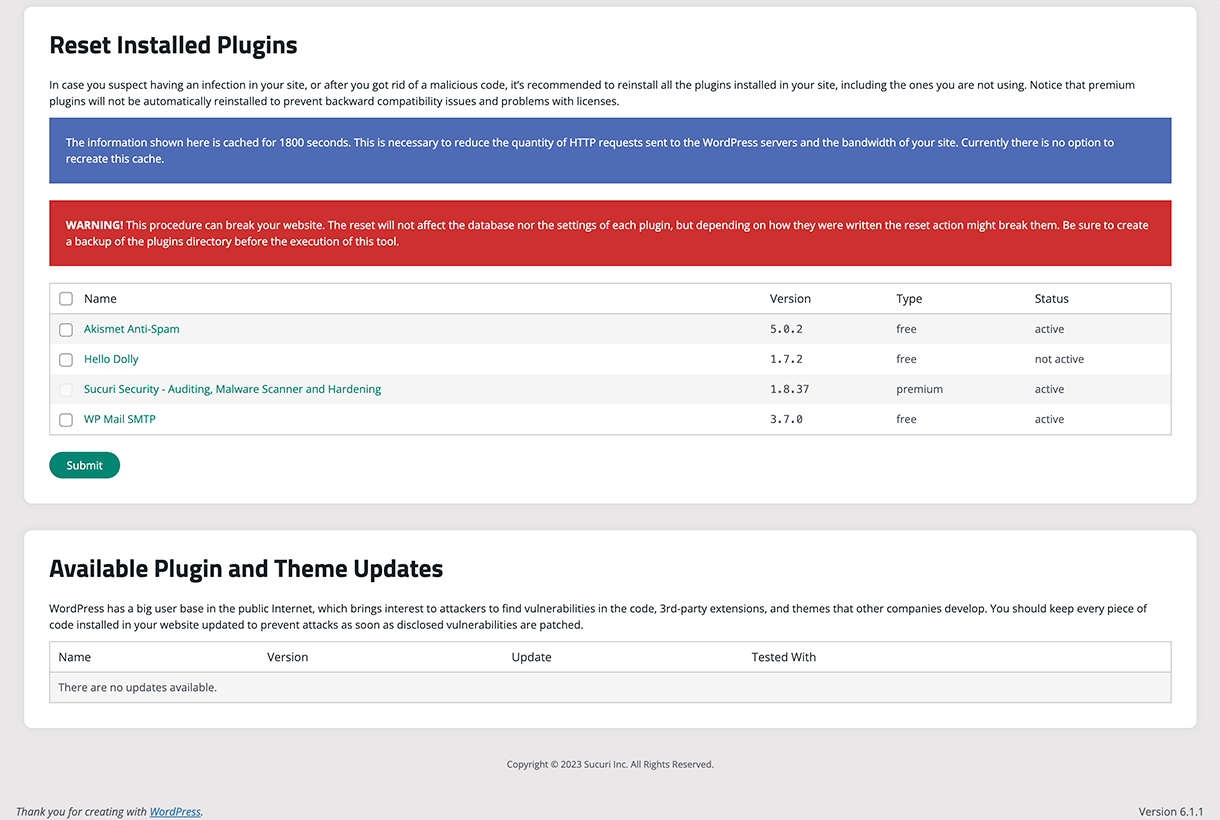
These tools are not designed to clean infected files. They are designed to help lock down the site after a compromise and close the access paths that were most likely used. Cleaning the actual malware requires either manual file review (which requires server access and security knowledge) or a paid Sucuri cleanup service. The distinction between “lockdown and reset” and “cleanup” is one that many users miss: the free plugin is positioned for response, not remediation.
Headers management
The Headers panel manages HTTP security headers that can be set through the plugin rather than directly through your server configuration. According to the changelog, this includes Cache-Control (added in v1.9.1), CORS headers (v1.9.8), and Content Security Policy in report-only mode (v1.9.7).
These headers are most useful when combined with the Sucuri WAF, since the firewall can enforce them at the CDN level. In the free plugin without a WAF API key, the headers are served from your origin server through the plugin’s own mechanisms. For most shared hosting environments, that is the easiest way to set security headers without editing server configuration files.
CSP is currently report-only mode only, which means it logs violations without blocking them. The plugin documentation notes that enforcing CSP can break sites with complex front-end code, which is why the vendor ships it conservatively.
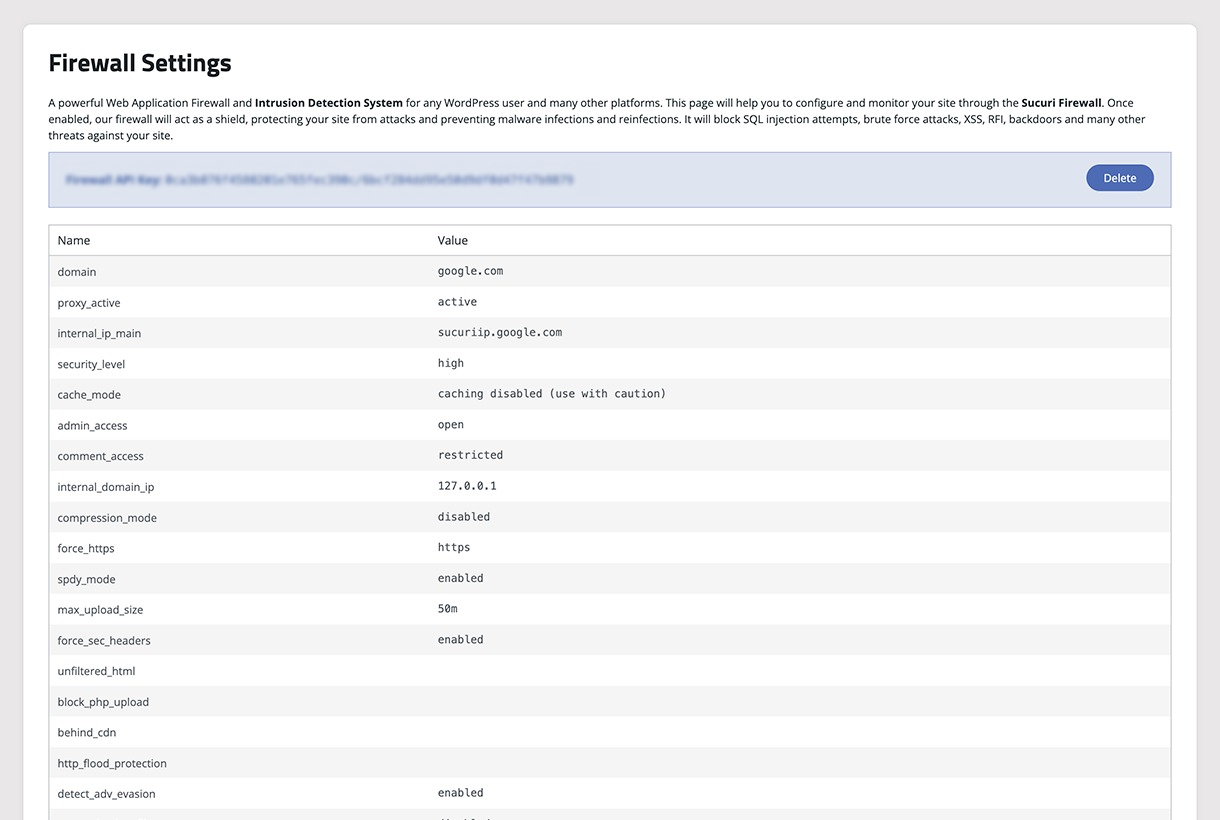
Sucuri Website Firewall (paid feature)
The Firewall panel in the plugin dashboard is visible to all users but locked behind a WAF API key. According to the official documentation, entering a valid key from a paid Sucuri plan unlocks:
- A firewall management view showing blocked IPs, active rules, and geographic attack origins
- Brute force protection with audit logging of login attempts at the CDN layer
- DDoS mitigation running in the cloud, before requests reach your server
- Zero-day exploit patches applied virtually by Sucuri’s security team
- Custom rule creation to block specific countries, IP ranges, or user agents
- Real-time traffic visibility into attack types and blocked requests
The architecture here is different from endpoint firewalls like Wordfence. Sucuri’s WAF is a cloud-based reverse proxy: you point your DNS to Sucuri’s servers, all traffic flows through their CDN and WAF, and only clean traffic reaches your origin host. This means malicious requests are designed to be dropped in the cloud before they consume your server’s CPU or memory. The tradeoff is that changing your DNS takes time to propagate and requires access to your domain registrar’s DNS settings.
The WAF also serves as a CDN. Sucuri’s Anycast network claims a 60 percent average reduction in server load from CDN caching. For sites on shared hosting where performance is already constrained, that is a meaningful benefit beyond security.
Vulnerability scanners for WordPress core, PHP, installed plugins, and themes are also unlocked with the WAF API key per the documentation. These scanners run server-side through the paid platform connection and are designed to detect issues that the remote SiteCheck scanner cannot see.
Pricing
Free plugin
The core Sucuri Security plugin is free with no paid subscription required. Audit logs, file integrity monitoring, SiteCheck scanning, blocklist monitoring, hardening, post-hack tools, email alerts, last logins, 2FA, and headers management are all documented as included.
Security Platform Plans
The paid platform plans bundle the cloud WAF, CDN, server-level scanning, and unlimited malware cleanup guarantees. All plans apply to one site. Pricing is shown in USD as of August 4, 2026. Verify against sucuri.net before purchasing.
| Plan | Price | Scan Frequency | Malware Removal SLA |
|---|---|---|---|
| Basic Platform | $229/year | Every 12 hours | 30-hour response |
| Pro Platform | $339/year | Every 6 hours | 12-hour response |
| Business Platform | $549/year | Every 30 minutes | 6-hour response |
| Junior Dev (2-5 sites) | $999.98/year | Every 6 hours | 12-hour response |
| Multi-Site and Custom | Price on request | Custom | Custom |
The scan frequency difference between Basic and Business is meaningful. A 30-minute scan interval on the Business plan will catch a fresh infection within half an hour. A 12-hour interval on the Basic plan means a compromised site could run for up to half a day before the next scheduled detection. For high-traffic business sites, the Business plan’s scan frequency is worth the price difference. For a low-traffic portfolio site or a client site that needs basic protection, the Basic plan covers the fundamentals.
All platform plans include unlimited malware cleanups with no hidden fees per the pricing page. That claim is significant. Competitors who charge per cleanup incident can become expensive quickly for sites that are repeatedly compromised or running out-of-date software.
Firewall-only Plans
If you want the cloud WAF and CDN without the full platform (no guaranteed malware cleanup, no extended monitoring), the firewall-only plans start lower:
| Plan | Price |
|---|---|
| Basic Firewall | $9.99/month (approx. $120/year) |
| Pro Firewall | $19.98/month (approx. $240/year) |
| Multi-site | Price on request |
The firewall-only plans are appropriate for sites where you handle your own security responses and just want the WAF and CDN layer. They do not include the malware cleanup guarantee or the extended SLA support that the Platform plans provide.
Pros and cons
Pros
- The free plugin’s documented feature set is broad for monitoring and hardening. Audit logging, file integrity, 2FA, and one-click hardening actions are all documented as included at no cost.
- Audit logs are stored remotely on Sucuri’s servers, not in your WordPress database. This is tamper-resistant by design per the documentation.
- The cloud WAF is designed to intercept traffic before it reaches your server, which is lighter on server resources than endpoint-based alternatives.
- Blocklist monitoring covers ten major engines including Google Safe Browsing and SpamHaus.
- Unlimited malware cleanup is included in all paid platform plans with no per-incident fees per the pricing page.
- The plugin has been actively developed since 2011 and is regularly updated, including recent improvements to 2FA, XML-RPC disabling, and PHP 8 compatibility in version 2.7.4.
- The integration between the free plugin and the paid WAF is documented as requiring only one API key to unlock the firewall panel and additional scanners.
Cons
- The free SiteCheck scanner is remote only. It cannot detect server-side malware that is not visible in the public source code, as Sucuri’s own documentation acknowledges.
- Sucuri is owned by GoDaddy. Users who prefer independent security vendors will need to weigh this.
- The firewall requires DNS configuration and a paid subscription. There is no free WAF option in the plugin, unlike Wordfence.
- Vulnerability scanning for WordPress core, PHP, plugins, and themes requires a paid WAF API key. These scanners are not available in the free plugin.
- The platform plan pricing starts at $229/year per site, which is high for small personal sites or low-traffic projects where the risk profile does not justify the cost.
- Setting up the WAF requires changing DNS records, which is a step that non-technical site owners may need help with.
- One review on WordPress.org mentioned a CSS conflict in the admin panel after activation. This appears to be an edge case, but it is worth deactivating and retesting if you see admin interface issues after install.
Alternatives
Wordfence Security: The strongest direct alternative. Wordfence includes a free endpoint WAF inside the plugin itself, which Sucuri does not offer. The trade-off is that Wordfence’s WAF runs inside WordPress (on your server) rather than in the cloud, which means malicious requests consume server resources before being blocked. Wordfence also offers a free malware scanner with server-side file checking. If you want firewall protection without a paid subscription and your hosting can handle the server footprint, Wordfence is the stronger free choice. If you want the WAF to run in the cloud rather than on your server, Sucuri’s paid platform is the stronger option.
Solid Security (formerly iThemes Security): Solid Security focuses on login protection, brute force prevention, and user access controls. It does not include a malware scanner at any tier. It is a lighter plugin with less server footprint, but it covers a narrower security surface than either Sucuri or Wordfence. Good for sites where login security is the primary concern and malware detection is handled separately.
MalCare Security: MalCare runs its malware scanner on its own servers rather than on your origin, which means the scanning process does not slow down your site. That off-server scanning approach is the core differentiator. MalCare also offers one-click malware removal with a paid plan. If the specific concern is server-side malware detection without server performance impact, MalCare is worth comparing directly against Sucuri’s paid platform.
All In One WP Security: A fully free plugin covering firewall rules via .htaccess, login lockdown, user account security, and file scanning. It is significantly lighter and less comprehensive than Sucuri. A reasonable starting point for sites that cannot afford any paid security tooling.
Patchstack: Patchstack focuses on virtual patching for known plugin and theme vulnerabilities. It integrates with the Patchstack vulnerability database and applies patches automatically before a software update is available. This is a different threat model than Sucuri’s monitoring and WAF approach. Not a direct replacement, but worth knowing about for sites where keeping ahead of plugin vulnerabilities is the primary security priority.
Cloudflare: Cloudflare’s free tier includes a WAF with basic rules and a CDN. The Pro tier ($20/month) includes more WAF rules. Cloudflare is not a WordPress-specific security product, but its DNS-level architecture is functionally similar to Sucuri’s paid WAF. Cloudflare’s free tier offers WAF protection that Sucuri only provides on paid plans. The trade-off is that Cloudflare does not include WordPress-specific audit logging, file integrity monitoring, or malware cleanup guarantees.
Final verdict
Sucuri Security is a well-established free WordPress security plugin with a coherent upgrade path to a managed security service. Based on the official documentation, the changelog, and the WordPress.org listing, the free plugin is designed to monitor your site, audit security events in tamper-resistant remote logs, check files against known-good WordPress core versions, run external scans for visible malware and blocklist status, and provide one-click access to hardening actions that most WordPress site owners should apply. This review is built on that documented feature set; readers who want to verify behavior in their own environment should install the free plugin and walk through the panels directly.
The honest summary of what the free tier trades away: there is no firewall, and the malware scanner cannot see server-side threats. Those two gaps are significant for any site handling transactions, user data, or business-critical content. The paid platform is designed to fill both gaps with a cloud WAF and server-level scanning, but at $229/year minimum per site, the cost is not trivial.
For personal blogs, portfolio sites, and small brochure sites, the free plugin’s documented feature set represents a meaningful security baseline over having nothing in place. For business sites, ecommerce stores, and any site where downtime or a compromised site has real financial consequences, the paid platform deserves a direct comparison against managed alternatives like MalCare and against the free Wordfence WAF.
The plugin’s 15-year track record, active development (version 2.7.4 shipped in July 2026), documented tamper-resistant audit logging, and clear free-to-paid upgrade path give it a strong position in the WordPress security toolkit. The GoDaddy ownership is worth knowing. The lack of a free WAF is a real limitation compared to Wordfence. But for users who specifically want DNS-level WAF protection (traffic filtered before it reaches the server), the Sucuri paid platform is one of the established options in this category for WordPress.
Browse all plugin reviews in the Reviews section.