


Two hundred thousand WordPress sites are running Optimole right now. It holds a 4.7 out of 5 rating across 636 reviews on WordPress.org. It has shipped consistent updates since 2018, with version 4.2.10 landing on July 15, 2026.
None of that tells you whether it is the right WordPress image optimization plugin for your site.
This Optimole review covers what the plugin actually does, how the cloud and CDN model works under the hood, what the free plan includes, where the paid tiers begin, and who the visitor-based pricing suits and who it penalizes. I installed and activated the plugin in a clean WordPress sandbox, walked through the setup wizard, reviewed the admin panels, and audited the official website, pricing page, and WordPress.org listing to give you a current picture of Optimole as of August 2026.
Note on testing basis: this review includes hands-on sandbox testing of Optimole (version 4.2.10) on WordPress 7.0.2, PHP 8.2, run in a WordPress Playground environment on August 6, 2026. I installed the plugin from WordPress.org, went through activation and the setup wizard, reviewed the admin UI, and confirmed front-end behavior before API connection. The CDN delivery features, connected dashboard statistics, and image offloading require an Optimole account and API key; those sections are described from official documentation and published third-party benchmark tests. Pricing figures were verified directly on the Optimole pricing page in August 2026; the page shows prices in the browser’s detected currency, so your checkout price will vary by country.
At a glance
Tested: Optimole v4.2.10 on WordPress 7.0.2, PHP 8.2 (sandbox, August 6, 2026); also audited optimole.com, WordPress.org listing, and official docs.
Free plan: 2,000 unique monthly visits; all core features included; expandable to 22,000 visits by displaying the Optimole badge.
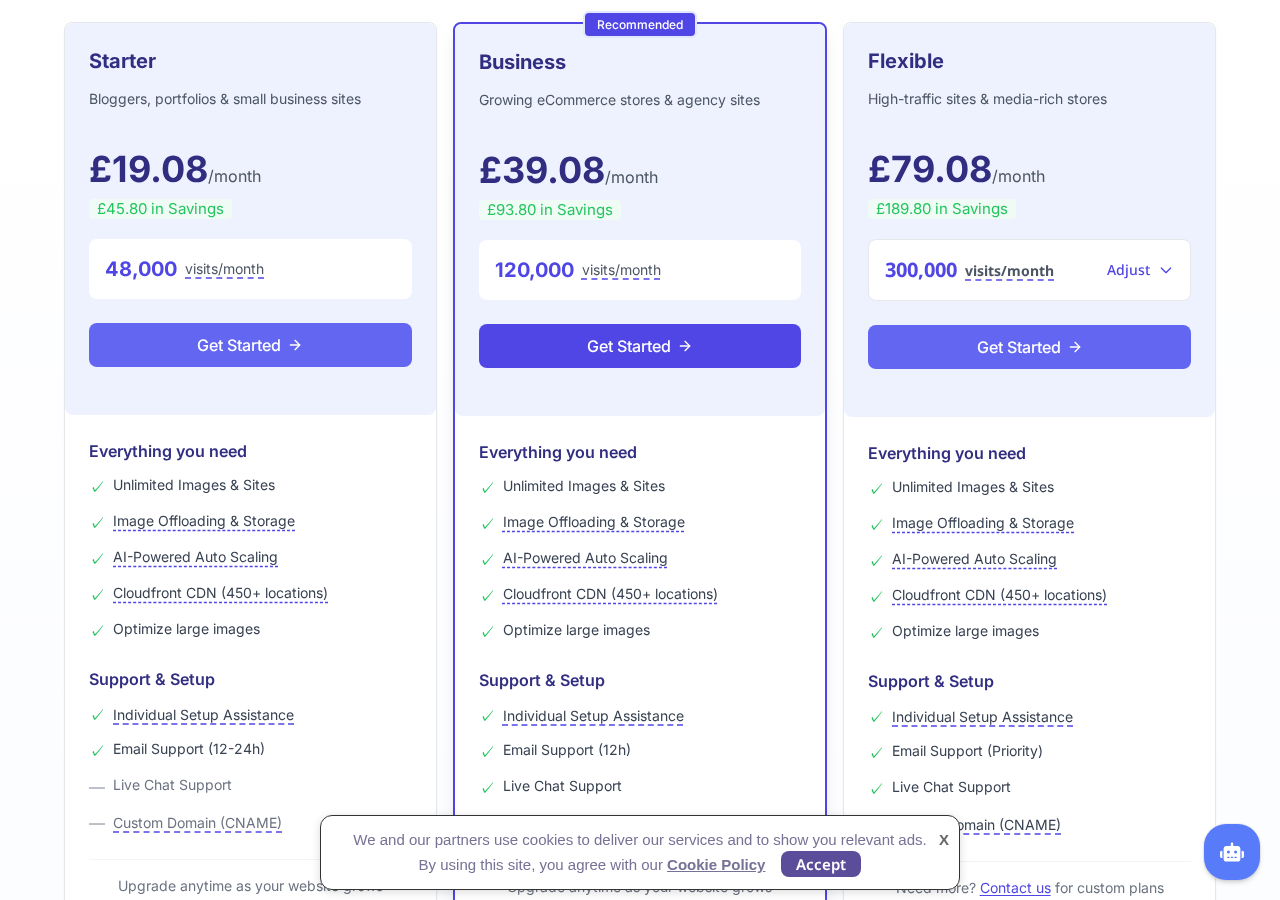
Paid plans: visitor-based pricing. Starter covers 48,000 visits/month. Business covers 120,000 visits/month. Flexible covers 300,000 visits/month and is adjustable.
CDN: all images served via AWS CloudFront at 450+ edge locations.
Bottom line: the most automated WordPress image CDN plugin available in 2026, with real compression gains, but visit-based pricing that becomes expensive quickly as traffic grows.
Quick verdict
Optimole is the right choice if you want a fully automated, cloud-powered image optimization solution that handles compression, format conversion, responsive sizing, and CDN delivery in one step. You upload images to WordPress; Optimole handles everything else. No bulk processing queue, no thumbnail regeneration, no separate CDN subscription.
The significant trade-off is the pricing model. Optimole charges by monthly visits, not by images processed. A site receiving 2,000 visits per month is on the free plan. A site at 50,000 monthly visits is on a paid plan. A site at 500,000 monthly visits is looking at a custom Flexible quote. That structure rewards fast-growing sites and agencies managing multiple installations on one subscription, but it makes Optimole one of the more expensive options per optimization in the market at higher traffic levels.
If you want local image processing with no subscription risk and no cloud dependency, ShortPixel or Imagify are stronger fits. If you want a fully automated cloud service where image sizes, formats, and CDN delivery are handled for you, Optimole is a serious contender.
Quick verdict card
Best for: WordPress sites that want hands-off, automated image CDN delivery; WooCommerce stores with large product image libraries; sites optimizing for Core Web Vitals; agencies managing multiple sites under one subscription.
Best plan for low-traffic sites: Free (2,000 visits/month) for brand-new sites; Starter (48,000 visits/month) for growing small sites.
Best plan for growing sites: Business (120,000 visits/month) when live chat support and a custom image domain are needed.
Standout feature: real-time adaptive sizing. Optimole serves each visitor the exact image dimensions their device and viewport require, dynamically generated from one source image rather than a fixed set of pre-generated size variants.
Watch out for: visit-based pricing escalates fast; image offloading to cloud creates a serious vendor lock-in risk; free plan is only suitable for very low-traffic sites.
What Optimole is
Optimole is a cloud-based image optimization plugin for WordPress, built by Vertistudio. It is not a traditional local-processing plugin. It does not install a compression engine on your hosting server, does not bulk-process your media library to disk, and does not create multiple resized copies of each image locally.
Instead, Optimole intercepts every image on your site and routes it through a cloud CDN. The plugin rewrites image URLs in your pages to point to Optimole’s CDN delivery endpoints. When a visitor loads a page, the CDN serves each image in the correct format and exact size for that visitor’s browser, device, and viewport, optimized in real time using machine learning compression.
That is the core model: cloud-powered, CDN-delivered, real-time image optimization.
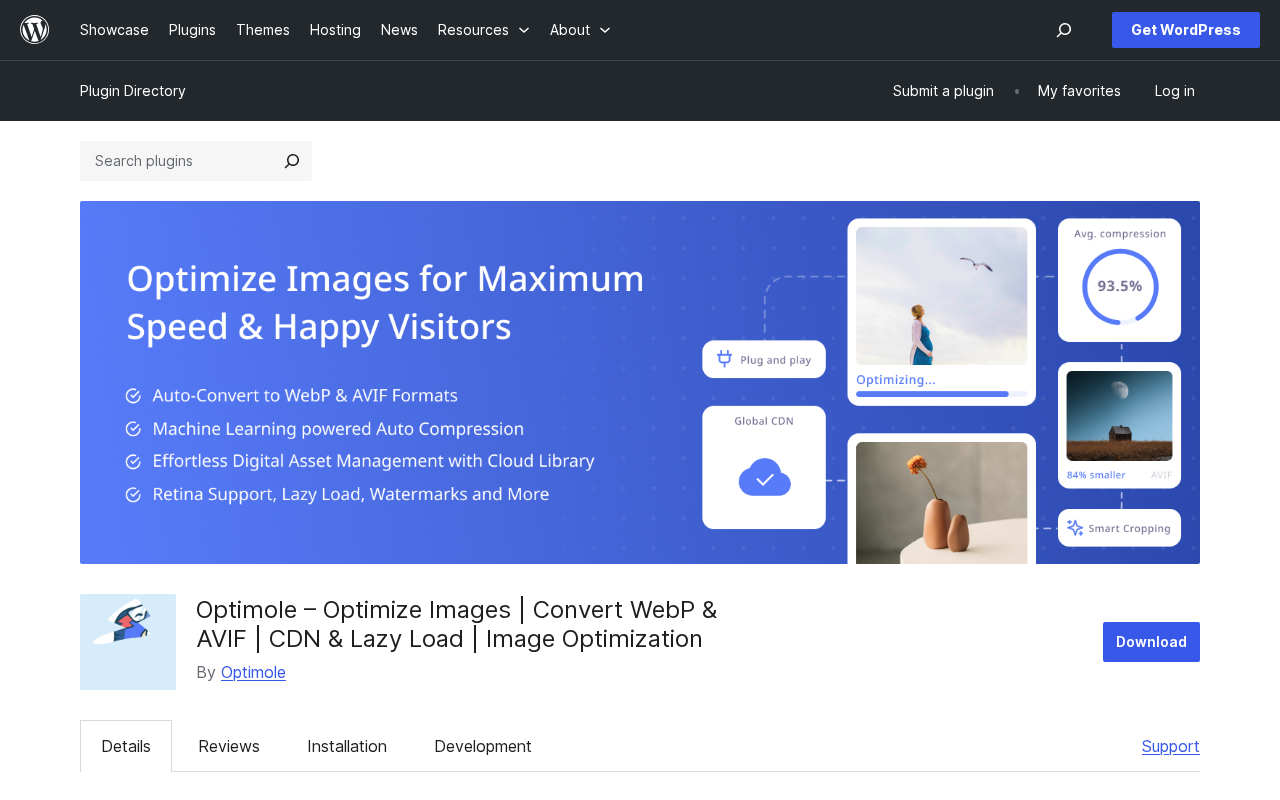
The plugin is published on WordPress.org as “Image optimization service by Optimole.” The description on WordPress.org reads: “Complete handling of your website images.” Version 4.2.10, released July 15, 2026, is the current build. That update improved rollback stability for offloaded images. The plugin requires WordPress 5.5 or higher, PHP 7.4 or higher, and has been tested up to WordPress 7.0.2.
Optimole uses AWS CloudFront as its CDN infrastructure. Images are served from 450+ edge locations globally, so a visitor in Singapore gets the image from a nearby node, not from your New York hosting server. The optimization happens in Optimole’s cloud before delivery. Your original image files stay untouched in your WordPress media library; Optimole does not modify them.
Who Optimole is best for
Strong fit:
- Site owners who want image optimization to run automatically after a one-time setup. Once the API key is connected, Optimole works on autopilot.
- WooCommerce stores with large product image libraries that need responsive images delivered cleanly across many device sizes.
- Sites with international or geographically distributed audiences, where CDN proximity directly reduces latency.
- Agencies and freelancers managing multiple WordPress sites who want one subscription that covers unlimited sites at no extra per-site cost.
- Sites focused on Core Web Vitals, particularly Largest Contentful Paint (LCP), where proper image sizing and CDN delivery have measurable impact.
- Sites where server disk space is a concern: image offloading to Optimole’s cloud removes the media library from your hosting account (Starter plan and above).
Weak fit:
- Very high-traffic sites. Costs grow linearly with visits. A site at 500,000 monthly visits needs a custom Flexible quote well above the standard plan rates.
- Sites already using Cloudflare or a managed hosting CDN with very low traffic. The free plan cap of 2,000 visits limits you quickly, and you may already have partial CDN coverage.
- Sites that need fine-grained per-image control. Optimole applies optimization automatically to all images; there is no easy way to exclude specific images or process them one at a time.
- Budget-constrained sites. Optimole costs more per month than most per-image competitors. For a static image library that rarely changes, ShortPixel or EWWW Image Optimizer achieves solid compression at much lower cost.
- Sites uploading many images with low traffic. A photography portfolio uploading thousands of images while receiving few monthly visitors does not benefit from visit-based pricing.
Installing and setting up Optimole
I tested the installation and activation flow in a clean WordPress sandbox on August 6, 2026, running WordPress 7.0.2 and PHP 8.2.
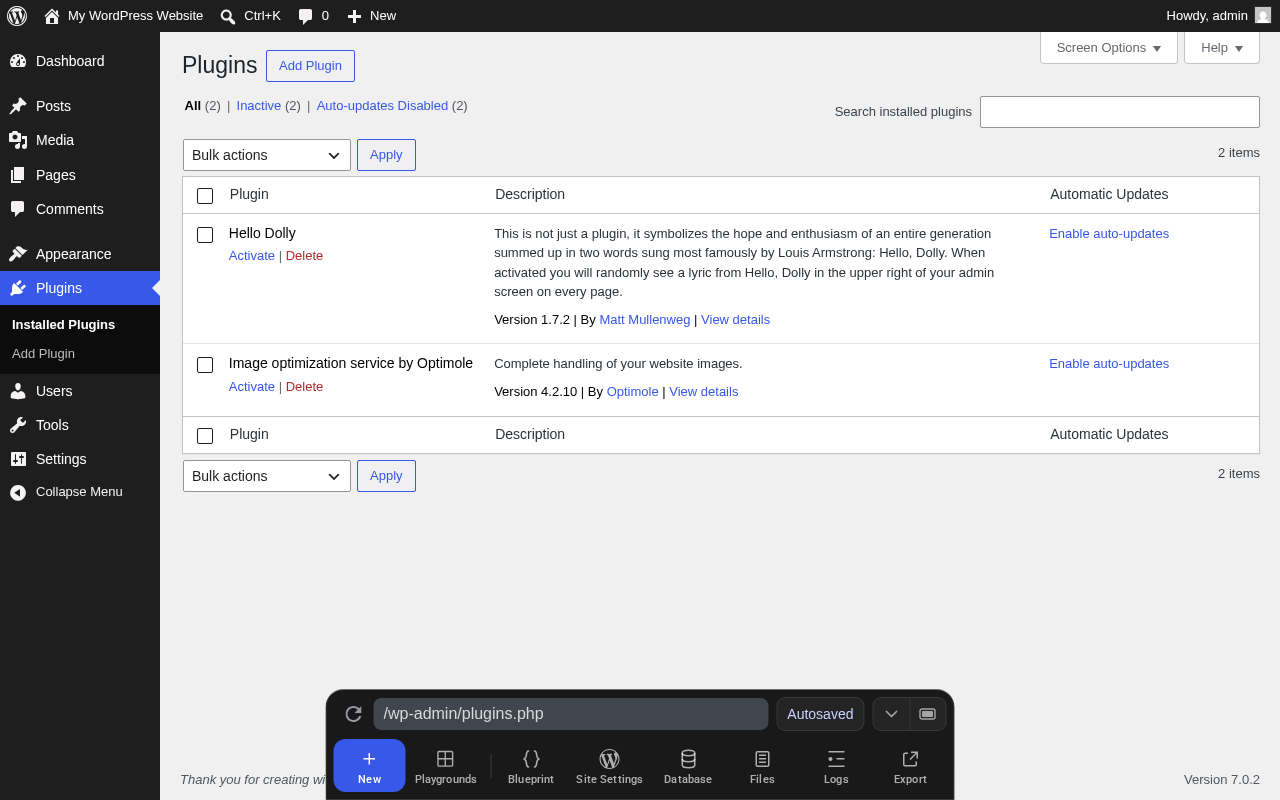
The plugin installs directly from Plugins > Add New in the WordPress admin. Searching “Optimole” surfaces it near the top of results. After clicking Install and then Activate, the plugin redirects automatically to its own admin page at wp-admin/admin.php?page=optimole. This redirect on first activation is intentional behavior.
The setup wizard that appears after activation is clear. The left panel shows the headline “Supercharge Your WordPress Images in 60 Seconds” with a “Setup is instant – just click connect” badge. The right panel presents a single email field pre-filled with the admin email, a “Create and connect your account” button for new users, and an “I already have an API key” option for existing users. A trust note reads “Secure connection – your data is protected.” A “TRUSTED BY 200,000+ HAPPY USERS” badge appears above the headline.
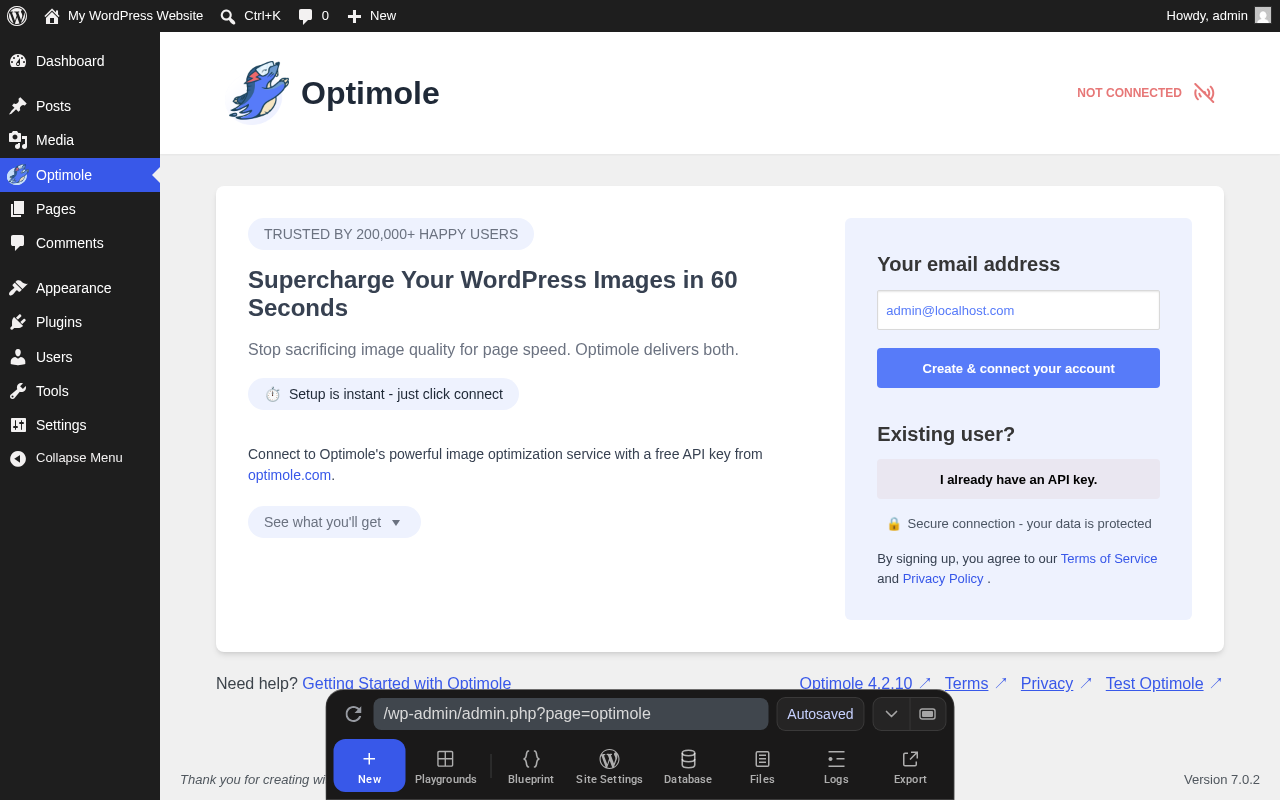
The three-step connection process works as follows. You enter your email in the wizard. Optimole sends an API key and login credentials to that address. You paste the key in the plugin settings to authenticate. After that, the plugin runs automatically. No further configuration is required for basic operation.
The “Optimole” menu item appears in the WordPress left navigation sidebar immediately after activation, before the API key is connected. Clicking it returns you to the setup wizard until the account is connected.
The plugin’s “NOT CONNECTED” status badge is visible in the top-right corner of the Optimole admin header until the API key is entered. This is a clear indicator of the plugin’s two-phase setup: install and activate first, then connect to the Optimole service.
Without an API key connected, the plugin does not rewrite image URLs, does not serve images from the CDN, and does not apply any optimization. The plugin is effectively dormant in the WordPress install until the account connection is made.
One technical note on what happens when you stop using Optimole: the plugin rewrites your image URLs in the front end to point to Optimole’s CDN address (typically i.optimole.com, or a custom subdomain on Business plans). If you later deactivate the plugin and your original images are still on your server (that is, you have not enabled image offloading), WordPress falls back to serving those images from your server normally. CDN delivery and optimization stop, but your images are not broken. The risk of permanently missing images applies specifically when image offloading has been enabled: offloading transfers your media library files to Optimole’s cloud and removes them from your server, so if a subscription lapses before you restore those files, they may be gone permanently. The image offloading feature is covered in detail in its own section below.
Core optimization features
ML-powered compression
Optimole applies machine learning algorithms to determine the optimal compression level for each image: the smallest file size that does not produce visible quality loss at the rendered display size. Published third-party benchmark tests report average compression rates between 79% and 84% on typical WordPress media libraries. The WP.org banner for the plugin claims 93.5% average compression. One detailed test measuring a real page showed image payload drop from 3.2 MB to 342.7 KB, an 89.5% reduction.
Three compression presets are available: low, medium, and high. The default is medium. Lossless compression is also available for images where exact pixel fidelity matters.
A practical note from user reports: compression can occasionally produce visible degradation on certain images, particularly product photography on mobile where the retina setting is not enabled. The documented fix is to enable the Retina Quality option and disable the Limit Image Sizes option, which can conflict with retina delivery. If you see quality problems after connecting, check those two settings first.
WebP and AVIF conversion
Optimole detects which image formats a visitor’s browser supports and serves the most efficient available option: AVIF where supported, WebP as the next fallback, and the original format (JPEG, PNG) where neither is supported. The format switching happens at the CDN layer without creating extra files on your server. As of August 2026, AVIF is supported by Chrome, Firefox, Edge, and Safari 16+.
Adaptive responsive sizing
This is Optimole’s most technically distinctive feature. Standard WordPress image optimization creates fixed size variants when an image is uploaded and stores them on disk. Optimole does not do this.
Instead, Optimole generates images at exactly the dimensions a specific visitor’s viewport requires, dynamically via URL parameters on the CDN request. A visitor on a 390px-wide mobile screen gets a 390px image. A visitor on a 1,440px desktop gets a 1,440px version. The CDN serves and caches each version.
This eliminates the gap inherent in WordPress’s built-in responsive image system: WordPress generates a few fixed sizes and lets the browser choose the closest one. Optimole serves the exact size needed. For sites with many product or hero images, this precision reduces delivered image weight compared to standard WordPress srcset behavior.
Lazy loading
Optimole implements lazy loading without a jQuery dependency. Images below the fold do not load until the visitor scrolls toward them, reducing initial page weight. The implementation uses a low-quality image placeholder (LQIP): a small, blurred version of the image appears immediately while the full image loads in. This prevents cumulative layout shift (CLS), a Core Web Vitals metric, by reserving the correct image dimensions before the full image arrives.
Animated GIF conversion
Optimole converts animated GIFs to MP4 or WebM video format for delivery. The animation plays the same visually, but the file size is dramatically smaller. A 5 MB animated GIF can deliver as a 300 KB video. This conversion is automatic and happens at the CDN layer.
Watermarking
The plugin supports automatic watermarking, with up to five images usable as watermark overlays. Watermarks are applied dynamically at the CDN layer, not burned into your original files. This is useful for photographers and media sites that need basic image attribution without modifying source files.
CDN delivery: how it works
All Optimole image delivery routes through AWS CloudFront, one of the largest commercially available CDN networks. The infrastructure spans 450+ edge locations globally. Images are cached and served from nodes close to each visitor rather than from your origin hosting server.
Published benchmark data illustrates the CDN effect clearly when the origin server and the visitor are geographically distant. One detailed test on a US-hosted site measured a 25.7% page load improvement (from 1.75s to 1.30s) after enabling Optimole, with image data reducing from 3.2 MB to 342.7 KB. For visitors already close to your hosting server, the CDN proximity benefit is smaller, though image optimization savings still apply.
Bandwidth on paid plans is unmetered. You are not charged per gigabyte of CDN traffic; you pay for monthly visit volume only.
On Business plan and above, you can configure a custom domain for image delivery. Instead of images loading from i.optimole.com, they serve from a subdomain of your own domain (for example, img.yourdomain.com). This requires a DNS CNAME record and Optimole support assistance to configure, which adds some friction compared to a fully self-service setup.
Image offloading to Optimole cloud
Image offloading is a Starter-plan-and-above feature that goes further than CDN delivery. When you enable it, your WordPress media library images are transferred to Optimole’s cloud storage and removed from your hosting server. From that point, images are stored in and served from Optimole’s cloud exclusively.
The benefit is disk space reduction. A site with a large media library can free up significant storage on its hosting account.
The risk must be understood clearly before you enable this feature.
If your Optimole subscription expires or is cancelled, Optimole runs a scheduled cleanup that permanently deletes offloaded images from its cloud. Renewing the subscription after that cleanup does not restore the deleted files. Only images that still exist on your server at the time of cancellation can be recovered.
To safely restore offloaded images before cancelling, navigate to Settings > Image Storage and switch to “Optimole Cloud and your website” to initiate a rollback transfer back to your server. Do this before the subscription lapses. If you cancel without doing this and the cloud cleanup runs first, the images are gone permanently.
Disabling the plugin without cancelling makes offloaded images temporarily invisible; reactivating the plugin restores access.
Before enabling image offloading, take an independent full backup of your media library to a location outside Optimole. This is not optional.
Free plan vs. paid plans
The free Optimole plan is a functional plan, not a time-limited trial. It includes ML compression, WebP and AVIF conversion, adaptive responsive sizing, lazy loading, and CDN delivery through CloudFront. All core optimization features are active.
The limit is visits: 2,000 unique monthly visits. A site receiving 100 visitors per day averages 3,000 monthly visits and exceeds the free plan in under a month. For brand-new sites or developer testing environments, the free plan is genuinely useful. For almost any active public site, it is too restrictive for sustained use.
One extension option: displaying the Optimole badge on your site qualifies the account for an additional 20,000 monthly visits, bringing the free-plan total to 22,000. Whether placing a third-party badge on your site is acceptable depends on your design requirements and audience.
When a free plan user exceeds the visit quota, Optimole sends warning emails. If the limit is not addressed, CDN image delivery stops. Your original images remain on your server and load from there, but the optimization and CDN benefits cease.
Pricing and license value
Optimole’s paid plans charge by monthly visits. All paid plans include unlimited images and unlimited WordPress sites with no extra charge for additional installations.
The pricing below was verified directly on the Optimole pricing page in August 2026. The pricing page shows prices in the currency detected from your location. The figures shown below are in GBP (Great Britain Pounds) as displayed to a UK browser in August 2026. Buyers in other countries will see different currency amounts at checkout. Annual billing saves 20% compared to monthly billing. Always verify current pricing on the Optimole pricing page in your currency before purchasing.
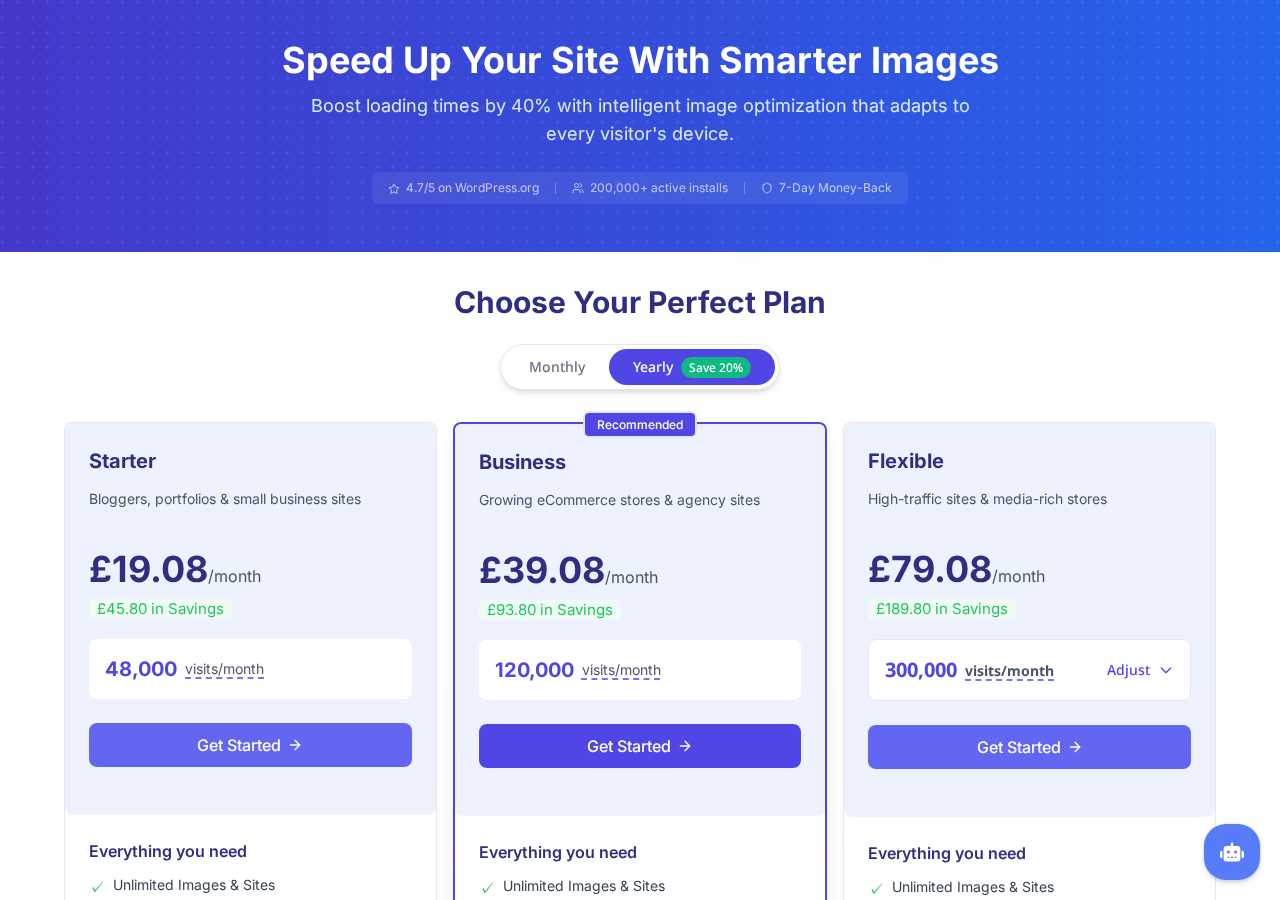
Starter
- Visit limit: 48,000 monthly visits
- Annual billing: £19.08 per month (yearly rate)
- Monthly billing: higher rate; annual billing saves 20%
- Target: bloggers, portfolios, small business sites
- Includes: unlimited images and sites, image offloading and cloud storage, AI-powered auto scaling, Cloudfront CDN (450+ locations), optimize large images, individual setup assistance, email support (12-24h)
- Does not include: live chat support, custom domain (CNAME)
Business (Recommended on the pricing page)
- Visit limit: 120,000 monthly visits
- Annual billing: £39.08 per month (yearly rate)
- Target: growing eCommerce stores and agency sites
- Includes: all Starter features, plus live chat support, email support (12h), custom domain (CNAME)
Flexible
- Visit limit: 300,000 monthly visits, with an adjustable slider for higher volumes
- Annual billing: £79.08 per month (yearly rate) at 300,000 visits; adjustable upward
- Target: high-traffic sites and media-rich stores
- Includes: all Business features, priority email support, custom plans available on request
Optimole offers a 7-day money-back guarantee on all paid plans. There is no paid trial period. The free plan on WordPress.org is the effective trial.
Pricing perspective:
Optimole costs more per month than most per-image competitors. ShortPixel charges per image processed and has plans starting well under $10 per month for typical blog-volume image libraries. Imagify and EWWW offer free tiers with meaningful monthly image allowances.
The correct comparison is not per-image cost alone. Optimole bundles CDN delivery, real-time adaptive sizing, and cloud infrastructure into the subscription. If you separately purchase a CDN and a compression plugin, Optimole’s pricing becomes more competitive. The value calculation depends on whether your site genuinely needs CDN delivery as part of the package.
For a site with 30,000 monthly visits, a large product image library, and international visitors, the Starter plan is a reasonable all-in-one spend. For a small personal blog with 3,000 monthly visits and 50 static images, ShortPixel or the free tier of EWWW achieves solid compression without the visit-quota overhead.
Pros and cons
Pros
- Fully automated. Images are compressed, converted, and delivered via CDN with no manual action after initial setup.
- Non-destructive. Original images in the WordPress media library are never modified. Disabling the plugin (without offloading enabled) restores normal server-based image delivery without permanent damage to your files.
- Real-time adaptive sizing. Each visitor receives the exact image dimensions their device and viewport need, generated dynamically from one source image.
- Strong compression. Third-party tests report average compression rates of 79-84%, with one measured test showing image payload drop from 3.2 MB to 342.7 KB on a single content page.
- WebP and AVIF delivery at the CDN layer, with automatic format fallback for unsupported browsers.
- CDN included in all plans, including free. AWS CloudFront with 450+ edge locations is not a premium add-on.
- Unlimited images and sites on all paid plans. No per-image charges, no additional cost for adding new WordPress installations.
- Lazy loading with LQIP reduces initial page weight and prevents CLS without requiring jQuery.
- Compatible with Elementor, Beaver Builder, and Gutenberg.
- Animated GIF to video conversion dramatically reduces GIF delivery size without visible quality change.
- Watermarking without modifying source files.
- Clean, simple setup wizard confirmed in sandbox test. From install to setup wizard is one click.
- Actively maintained. Version 4.2.10 shipped July 15, 2026.
- 7-day money-back guarantee on paid plans.
Cons
- Visitor-based pricing escalates quickly. A site growing from 20,000 to 150,000 monthly visits moves from Starter to above Business-tier limits mid-growth.
- Free plan is only useful for very low-traffic sites. 2,000 monthly visits is a ceiling that most active sites outgrow within weeks.
- Image offloading creates a serious vendor lock-in risk. If a subscription lapses and Optimole’s cloud cleanup runs before you restore images to your server, offloaded images are permanently gone.
- No local processing option. All optimization routes through Optimole’s cloud servers. An Optimole service outage means image delivery falls back to your server originals, losing the CDN performance benefits.
- Limited per-image granular control. You cannot easily exclude specific images from optimization or apply different compression settings by image category.
- Smart cropping can go wrong. Automated focal-point detection for cropped thumbnails occasionally selects the wrong area of an image, particularly on product photography.
- Custom domain setup for image delivery (Business plan only) requires support assistance and DNS configuration.
- Visit quota counting can be hard to predict on sites with variable or seasonal traffic spikes.
- More expensive per optimization than per-image tools when a site has a large static image library with low traffic.
- Plugin requires external Optimole service account to function at all; installation alone activates nothing until the API key is connected.
Alternatives to Optimole
- ShortPixel. A per-image optimization plugin that processes images via the ShortPixel API and stores optimized WebP and AVIF versions on your server. Best for sites where CDN is handled separately, where local file control is preferred, or where per-image pricing is more economical than per-visit pricing. Free plan covers 100 images per month.
- Imagify. A subscription-based image optimizer from the WP Rocket team. Offers lossless, lossy, and ultra-compression modes for granular quality control. Processes images locally. Best for sites that want more manual control over compression quality, or that already use WP Rocket and want a single-vendor optimization stack.
- EWWW Image Optimizer. A local-processing plugin with both free and paid tiers. No external cloud dependency. Best for privacy-sensitive sites or sites that cannot route images through third-party servers.
- WP Smush. The most widely installed WordPress image optimization plugin by active install count, from the WPMU DEV team. Free version includes unlimited image compression up to 1 MB per image. Pro plan includes CDN delivery. Best for sites that want a well-known option with a large support community and a generous free tier.
- Cloudflare. Not a WordPress plugin, but Cloudflare’s image resizing, Polish (automatic WebP conversion), and page caching features replicate several of Optimole’s benefits at the CDN layer. Best for sites already using Cloudflare for DNS and caching, where adding a separate image CDN plugin may create redundancy.
The core comparison for most buyers is Optimole versus ShortPixel or Imagify. Optimole wins on automation, bundled CDN delivery, and adaptive responsive sizing without a fixed size set. ShortPixel and Imagify win on pricing predictability for static image libraries, local processing control, and independence from an ongoing cloud subscription for CDN delivery.
Final verdict
Optimole delivers on its core promise. The cloud and CDN approach to image optimization works: images get meaningfully smaller, visitors in distant regions receive them faster from nearby edge nodes, and the whole process requires almost no configuration once the API key is connected. I confirmed this setup path directly in the sandbox: from plugin install to the connection wizard is a single redirect, and the wizard itself is the clearest I have seen for a service that requires a third-party account connection.
The limits are equally real. The free plan’s 2,000 monthly visit ceiling means it functions only as a proof-of-concept for any active site. The visitor-based pricing model scales cost with traffic in a way that can catch buyers by surprise: a site that grows from 10,000 to 150,000 monthly visits moves from the free plan to Business-tier pricing in one step. The image offloading feature creates a vendor dependency that deserves a careful read before enabling: offloaded images that are not backed up before a subscription lapse do not come back.
For a site with growing traffic, global visitors, a large product or media image library, and a preference for automated solutions over manual control, Optimole is a competitive choice in 2026. For a small blog with stable, low traffic and a few dozen static images, the per-image pricing of ShortPixel or a free tier of EWWW Image Optimizer achieves solid results without the visit-quota overhead.
Optimole is a premium, cloud-first WordPress image optimization plugin. It prices accordingly and delivers accordingly. The question is whether your site’s traffic profile and operational preferences match what that model offers.