


Ninety thousand active installs is not nothing. It is, however, a number that requires a clear-eyed explanation in a WordPress form builder category where WPForms claims six million, Contact Form 7 claims ten million, and Fluent Forms has crossed 700,000. Everest Forms, published by WPEverest, occupies a specific position in this market: it is the plugin that has staked its reputation on giving away more than its competitors do for free and selling the upgrade at a price that does not require a multi-year business case to justify. Whether that bet pays off depends on what you actually need from a form builder in 2026, and that is what this Everest Forms review is for.
I researched this review from the official Everest Forms website (features, pricing, and free-vs-pro comparison pages), the WordPress.org plugin listing, the public changelog, and third-party coverage. The plugin’s current version, 3.6.0, was released on August 13, 2026, the same day as this review. I reviewed the twelve vendor-submitted admin screenshots on WordPress.org (which show the actual plugin UI across the builder, entries, analytics, templates, addons, and settings panels) and inspected the plugin’s template library, pricing page, and free-vs-pro comparison table. The free tier was reviewed using these official admin screenshots, feature documentation, and WordPress.org listing data. A full multi-month paid Pro install was not exercised for this review; sections that rely on documentation rather than direct observation say so explicitly.
At a glance:
- Audited on: everestforms.net features, pricing, and free-vs-pro pages; the WordPress.org listing (version 3.6.0, August 13, 2026); the public changelog; the vendor-submitted admin UI screenshots on WordPress.org (12 screenshots covering all major admin panels); third-party review coverage from multiple sources.
- Free tier: genuinely useful for basic contact forms with entry management, file uploads, and strong multi-layer spam protection included at no cost.
- Pro upgrade: required for conditional logic, all payment gateways, all email marketing integrations, all CRM connections, multi-step forms, and the Style Customizer.
- Bottom line: a solid free tier for simple forms, and an affordable Pro upgrade with lifetime licensing that makes it worth considering for small sites and budget-sensitive buyers, though smaller competitors like Fluent Forms give you more functionality before the paywall.
Quick verdict
If you are building a standard contact form, a basic inquiry form, or a simple file-upload form on a WordPress site, and you want entry management and spam protection included for free without paying, Everest Forms delivers that without friction. The free tier is legitimate, not a demo.
If you need conditional logic, payment processing, email marketing integrations, or CRM connections, you need Everest Forms Pro. At $49 per year (or $199 as a one-time lifetime purchase) for a single site, the entry price is affordable by the standards of this category. The lifetime license option is unusual in WordPress form builders and makes the Pro upgrade look different from a recurring annual subscription.
The real competitive tension is with Fluent Forms, which ships conditional logic, conversational forms, and basic Stripe payments in its free tier. If any of those are features you need today, Fluent Forms free gets you further before you pay. If you specifically want file uploads and entry management at zero cost and you do not need conditional logic yet, Everest Forms free holds its own.
Quick Verdict
- Best for: solo site owners, bloggers, and small businesses who need a capable free contact form with proper entry storage and strong spam protection, and budget-focused buyers who want a one-time lifetime purchase rather than an annual renewal.
- Best plan for most individuals: the free version for simple contact and inquiry forms; Everest Forms Personal ($49/year or $199 lifetime) for sites that need conditional logic, payments, or integrations.
- Best plan for agencies: Everest Forms Agency ($199/year or $799 lifetime) for unlimited client sites.
- Standout: entry management, file uploads, image uploads, and four layers of spam protection all included in the free version. Lifetime licensing across all three paid tiers.
- Watch out for: conditional logic, all payment gateways, all email marketing integrations, and the Style Customizer all require a paid plan. First-year pricing is discounted; renewals are billed at the higher standard rate. The AI form builder requires an external OpenAI API key you supply yourself.
What Everest Forms is
Everest Forms is a WordPress form builder plugin published by WPEverest, a software company based in Nepal. The plugin was first published on WordPress.org in February 2018 and has been under continuous development since. The current version at the time of this review is 3.6.0, released August 13, 2026, with the WordPress.org listing reporting 90,000+ active installations and a 4.9 out of 5 average rating across 375 reviews (354 of which are five-star, representing a 94 percent five-star rate).
The plugin is free to download from WordPress.org. WPEverest also sells paid plans (annual and lifetime) that unlock advanced features and integrations through a suite of premium add-ons. The core structure is a drag-and-drop builder designed for creating forms without writing code.
Everest Forms covers a wide range of form types in its full feature set:
- Contact forms and inquiry forms
- Payment forms (Stripe, PayPal, Mollie, Square, Razorpay, and Authorize.Net, all requiring Pro)
- Quizzes and surveys (require Pro)
- Conversational forms (require Pro)
- User registration forms (require Pro)
- Post submission forms (require Pro)
- File upload and media collection forms
The underlying builder works on a drag-and-drop interface that integrates with WordPress as a standard plugin. Forms embed into pages and posts via a Gutenberg block, a shortcode, or a widget. Six major page builders are natively supported on the free version: Elementor, Divi, Bricks Builder, Oxygen, Beaver Builder, and WPBakery.
WPEverest also maintains a handful of companion products including UserPro (user profile and membership) and WP Travel (travel booking), but Everest Forms is the company’s primary plugin in the form builder market.
Who Everest Forms is best for
Strong fit
- Bloggers and content site owners who want a free contact form with real entry storage. WPForms locks entry management behind a paid plan; Everest Forms includes it free.
- Sites that need file and image uploads on a contact form without paying. This is another feature WPForms reserves for paid tiers; Everest Forms ships it free.
- Small businesses whose core need is a working inquiry or booking-inquiry form with clear entry tracking and email notifications.
- Buyers who want a lifetime license rather than an annual subscription. Everest Forms is one of the few form builders in this category that offers a genuine one-time payment option across all tiers.
- Sites on a tight budget: at $49/year or $199 lifetime for one site, Everest Forms Pro is among the more affordable full-featured form builder entry points in the market.
- Teams already committed to the WPEverest product ecosystem who want a form builder from the same vendor.
- Developers and agencies who want to import existing WPForms forms into Everest Forms via the built-in Form Migrator.
Weak fit
- Sites that need conditional logic on the free plan. This is the clearest gap. Fluent Forms ships conditional logic free; Everest Forms requires a Pro plan.
- WooCommerce stores or content sites that need basic payment capability on a free tier. Fluent Forms includes Stripe on its free plan (with a 1.9 percent surcharge); Everest Forms locks all payment gateways behind Pro.
- Developers who need deep workflow logic, multi-step approval chains, or calculated data outputs. Gravity Forms and Formidable Forms are better fits for those requirements.
- Sites that prioritize community resources, third-party tutorials, and a wide ecosystem of add-ons. With 90,000 active installs against WPForms’ six million, the Everest Forms tutorial library and third-party developer community is notably smaller.
- Sites that need a Gutenberg-native editing experience. Everest Forms uses a proprietary builder and embeds into the block editor as a block, but the form building itself does not happen inside Gutenberg.
Installing and setting up Everest Forms
Everest Forms installs from Plugins > Add New in the WordPress admin. The plugin is listed under the slug everest-forms and appears in search results for “Everest Forms” or “WPEverest.”
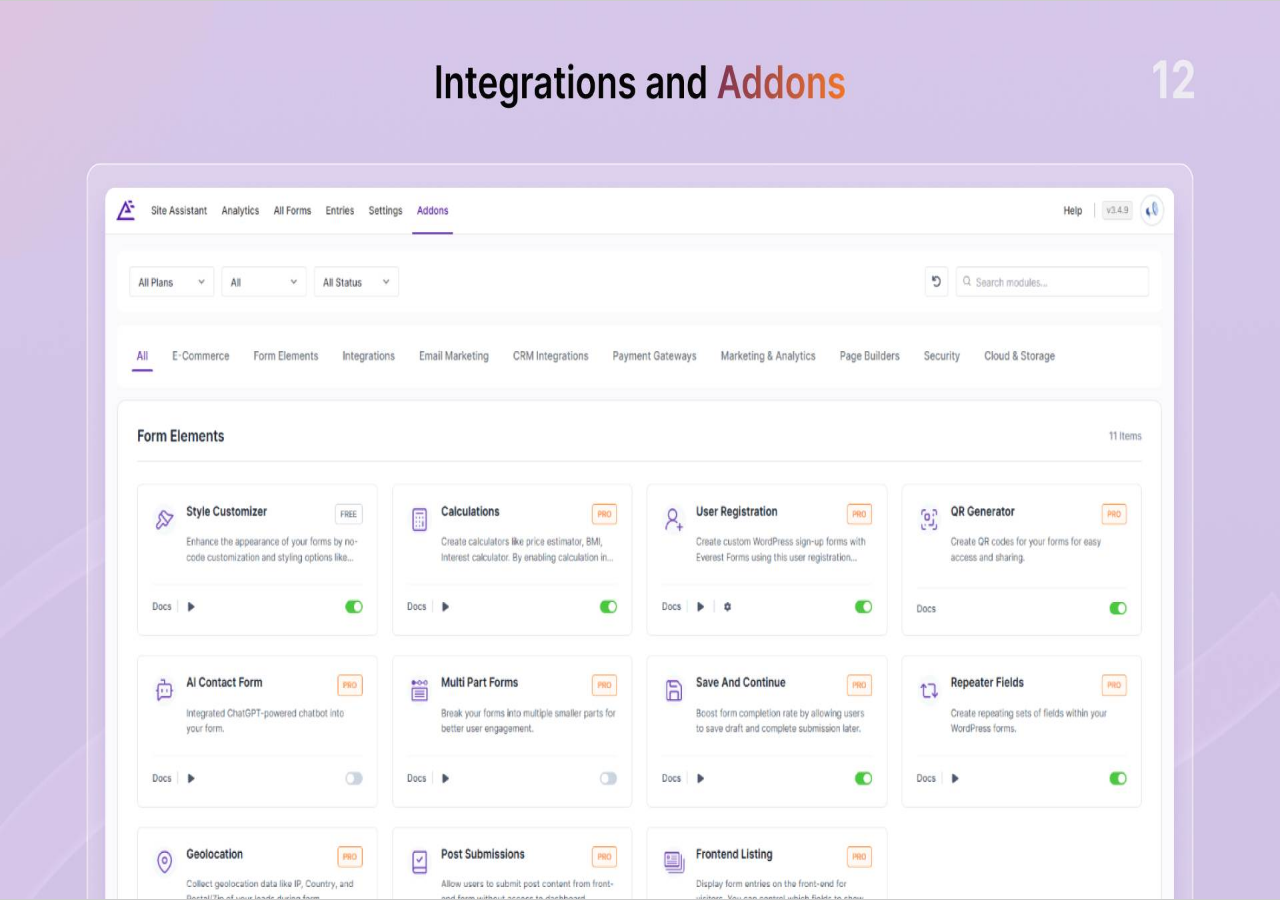
After activation, the plugin adds an “Everest Forms” item to the WordPress admin menu. The top-level navigation uses a horizontal menu bar with six items: Site Assistant, Analytics, All Forms, Entries, Settings, and Addons. The main dashboard shows a list of existing forms with an “Add New” button. The form builder opens in a dedicated admin page rather than a full-screen overlay.
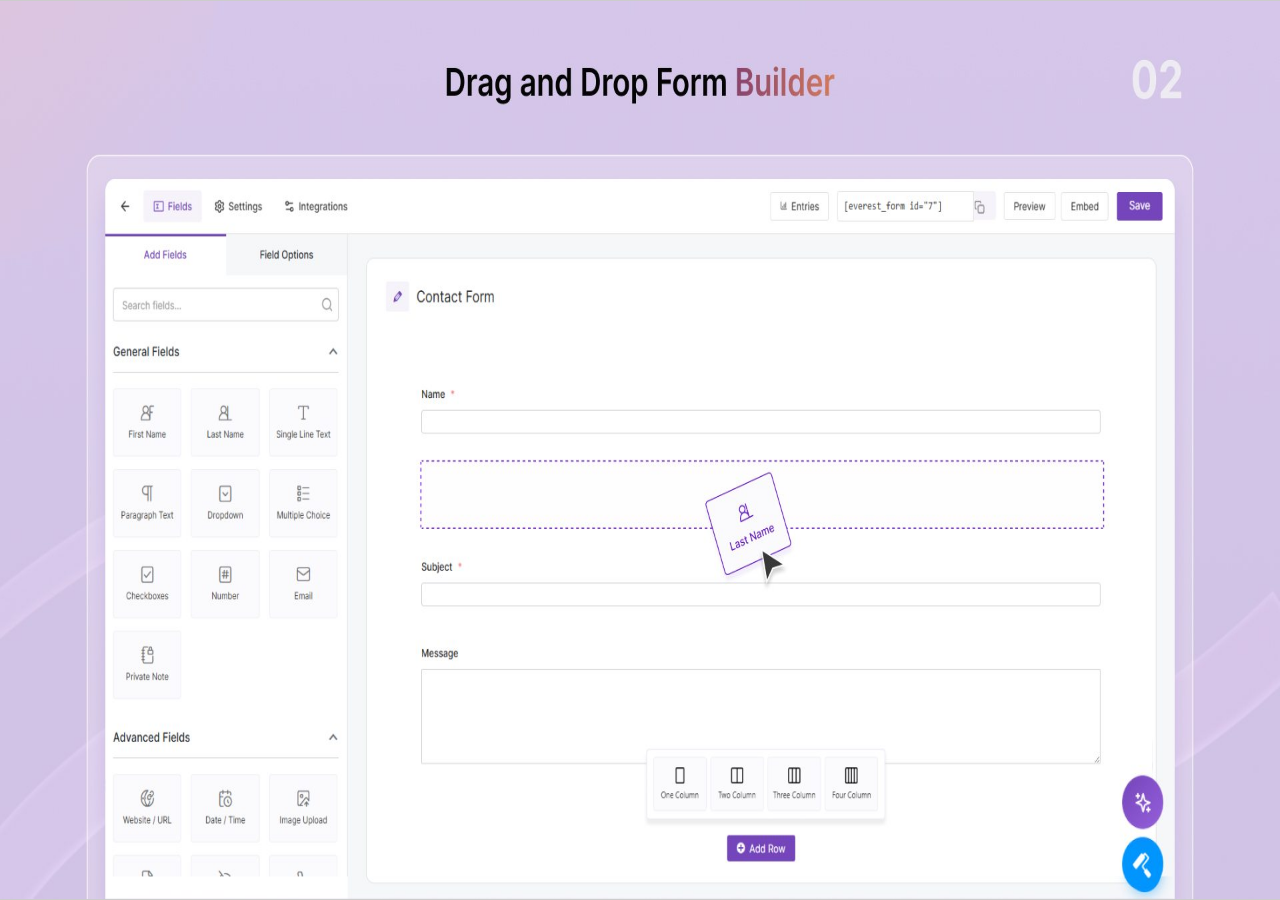
The builder interface follows a two-panel layout: a left sidebar with “Add Fields” and “Field Options” tabs, and a right canvas where you build the form. In the “Add Fields” tab, field types are organized into groups (General Fields, Advanced Fields, Payment Fields, Survey Fields). Dragging a field from the sidebar to the canvas adds it to the form with a visual animation showing the card dropping into position. The canvas header shows the form name with an inline edit option. Each row in the canvas has a column layout picker at the bottom, letting you arrange fields in 1, 2, 3, or 4 columns. The top navigation bar of the builder shows tabs for Fields, Settings, and Integrations, plus a shortcode display, and Preview, Embed, and Save buttons.
The setup flow for a basic contact form:
- Click Add New, give the form a name, choose a template or start blank.
- Drag Name, Email, and Message fields into the canvas from the General Fields panel.
- Configure email notifications under the Settings tab (recipient address, subject, message body with smart tag variables).
- Set a confirmation message or redirect URL under the Settings tab.
- Embed the form using the Everest Forms Gutenberg block, a shortcode
[everest_form id="XXX"], or a widget.
The Settings area uses a two-level navigation with outer sections (General, Security, Email, Integration, Payments, Advanced, License) and expandable subsections. The Validation Messages section under General lets you customize the error text displayed to users for required fields, invalid email formats, mismatched confirmation fields, file type violations, and size limits.
The Import/Export panel includes a Form Migrator tool for converting WPForms forms directly into Everest Forms format, alongside standard JSON import/export for moving forms between WordPress installations.
The process is familiar if you have used any major drag-and-drop form plugin before. For spam protection, the free version integrates Google reCAPTCHA v2 and v3, hCaptcha, Cloudflare Turnstile, a honeypot field, Akismet, and CleanTalk without requiring a paid plan. Configuring each requires entering the relevant API keys in the Everest Forms Settings panel.
Form builder and fields
The free version ships with 35+ form fields organized into field categories. The core General Fields include Name, Email, URL, Phone, Message (textarea), and standard input types. The plugin also includes address fields, date/time pickers, file uploads, image uploads, multi-choice selectors (radio, checkbox, dropdown), and hidden fields in the free tier.
Notable free inclusions that competitors often gate behind paid plans:
- File uploads and image uploads: both available in the free tier, with options to restrict accepted file types and set a maximum file size.
- Repeater fields: allow users to duplicate a field group dynamically (for example, listing multiple addresses or contact names).
- Multi-column form layouts: forms can be arranged in 1, 2, 3, or 4 column configurations in the free builder.
Pro plans add Premium Form Fields for payment forms, conversational flows, calculations, surveys, and integrations, including the Signature field, Payment fields (total, credit card, coupon), Survey fields (Likert scale, rating), and Lookup field.
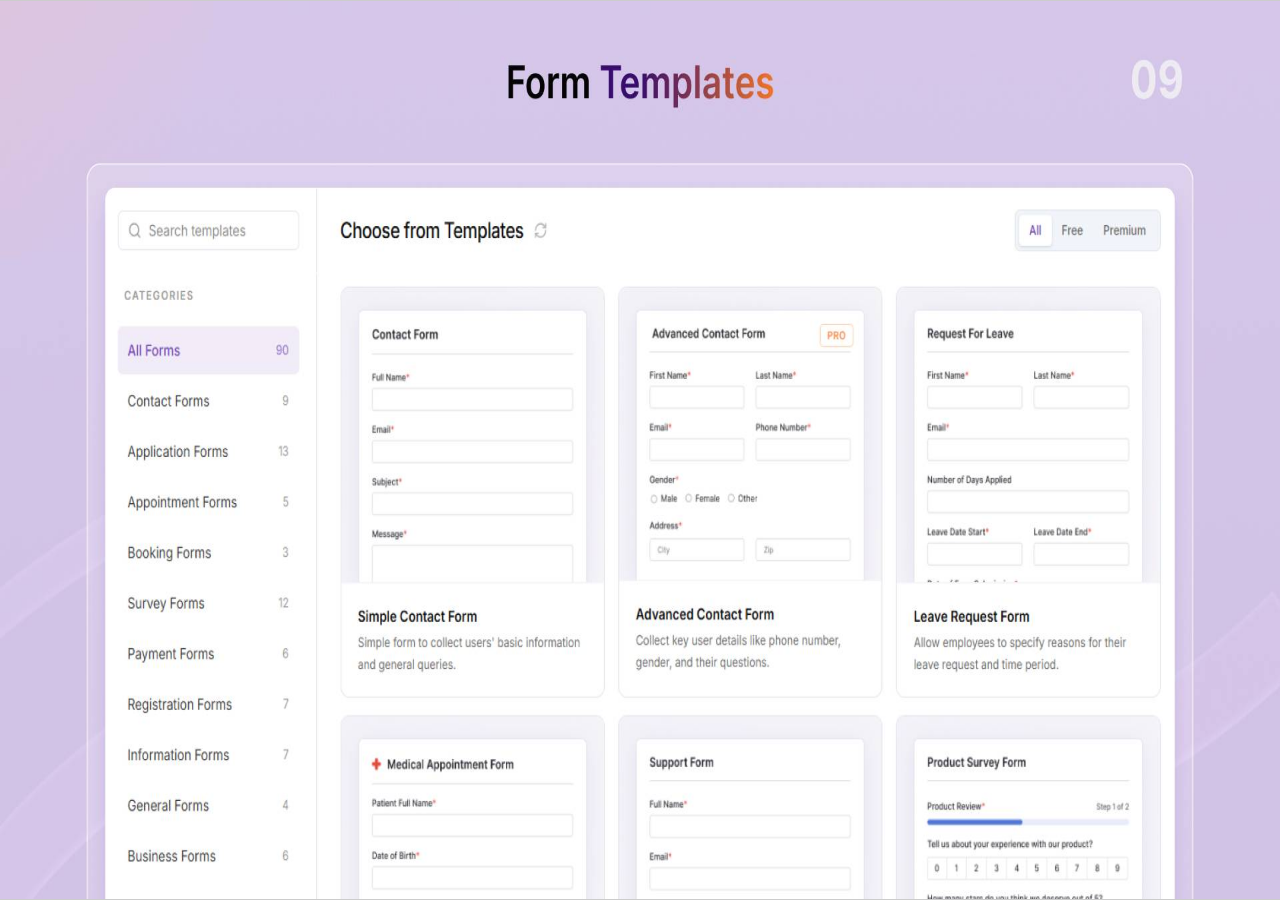
The form template library ships 40+ free templates organized into categories. The total library across free and premium reaches 90 templates, with a Free filter tab in the template picker to show only no-cost options.
Form duplication, form import and export, and popup forms (display any form in a lightbox overlay) are all available in the free version.
Entry management
This is the strongest argument for the free version of Everest Forms compared to its closest competitor.
WPForms, the most-installed WordPress form builder, restricts entry management to paid plans. On WPForms free, form submissions are delivered to the admin via email, but there is no admin dashboard to browse, search, filter, or export submissions. If you miss an email or want to review historical submissions, you cannot do so without upgrading.
Everest Forms includes a full entry management dashboard in its free version. Every form submission is stored in the WordPress database and displayed in an entries table under the Everest Forms admin menu. The entries interface allows searching and filtering submissions, viewing individual entry details, editing entries, bulk-deleting records, and exporting to CSV.
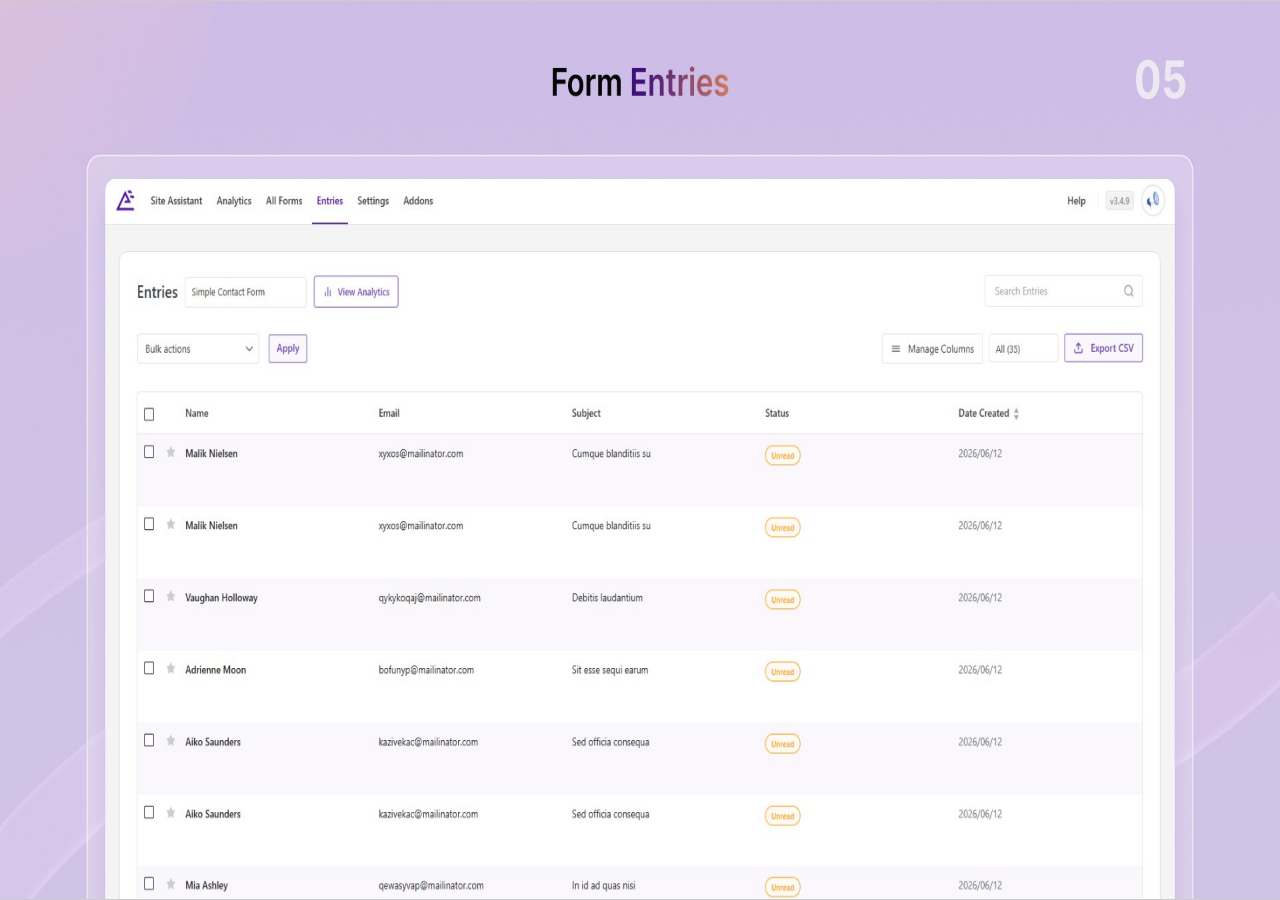
For a solo site owner or small business that relies on form submissions (inquiry forms, booking requests, job applications), having a searchable submission history in the WordPress admin at zero cost is a material advantage over WPForms free.
Pro plans add cloud storage destinations for entries and PDF export from individual submissions, which are useful additions for agencies and professional workflows but not strictly necessary for most basic use cases.
Advanced form types
All advanced form types in Everest Forms require a paid plan. This is the section of the plugin where the free tier ends and Pro begins most clearly.
Conditional logic (Pro only)
Show or hide fields based on what a user has already entered. A simple example: show a “Phone number” field only if the user selects “I prefer a call back” in a contact method dropdown. Conditional logic is the most commonly requested “first Pro upgrade” feature in any form builder. Fluent Forms includes it in its free tier; Everest Forms does not.
Multi-step forms (Pro only)
Break long forms into pages with a progress indicator. Users complete one section, click Next, and continue to the next group of fields. Useful for application forms, onboarding flows, or any intake form where a single long page would be overwhelming.
Conversational forms (Pro only)
Present one question at a time in a chat-like interface. The user answers and advances, rather than seeing all fields at once. Useful for surveys, quizzes, or lead capture forms where a distraction-free experience improves completion rates. Fluent Forms includes a conversational mode on its free plan.
Surveys, polls, and quizzes (Pro only)
Purpose-built survey and quiz field types with scoring. Forminator (a competing free plugin) includes basic poll and quiz functionality at no cost.
Payment forms (Pro only)
All six supported payment gateways are Pro-only: Stripe, PayPal Standard, Mollie, Square, Razorpay, and Authorize.Net. Payment capabilities also include coupon codes and recurring subscriptions. No payment capability is available in the free tier. Fluent Forms free includes Stripe with a 1.9 percent surcharge; Everest Forms free includes no payment option at all.
Post submissions, calculations, and e-signature (Pro only)
Post submission forms allow front-end users to submit posts to the WordPress database without dashboard access. Calculations perform real-time numeric computations within forms. E-signature captures a legally binding digital signature from the submitter directly in the browser.
Spam protection
Everest Forms ships one of the more complete spam protection stacks I have seen in a free WordPress form plugin. The free version includes all of the following without requiring a paid plan:
- Honeypot: a hidden field invisible to humans that bots fill in, automatically flagging the submission as spam.
- Google reCAPTCHA v2 (checkbox challenge) and v3 (invisible, behavior-based scoring).
- hCaptcha: a privacy-first CAPTCHA alternative that does not rely on Google’s infrastructure.
- Cloudflare Turnstile: Cloudflare’s minimal-friction CAPTCHA that requires no user interaction in most cases.
- Akismet integration: routes submissions through Akismet’s cloud-based spam filter (requires an Akismet API key, free for personal use).
- CleanTalk: a cloud-based real-time anti-spam service (requires a CleanTalk API key, paid separately).
Pro adds domain whitelist/blacklist, IP blocking, and Custom CAPTCHA (a math or text-based challenge you define yourself).
Having four independent spam-blocking mechanisms in the free tier is more than most form plugins offer at any price point. reCAPTCHA, hCaptcha, and Turnstile are effectively interchangeable alternatives; being able to choose between them without paying reflects WPEverest’s approach of competing on free-tier depth.
Integrations
This is the area where the free vs. pro gap is sharpest.
All email marketing integrations require a paid Pro plan. All fifteen supported platforms are gated behind the Pro upgrade, including Mailchimp, ActiveCampaign, MailerLite, ConvertKit, GetResponse, Brevo, Constant Contact, AWeber, Campaign Monitor, and Drip. There is no free integration with any email marketing service, not even a limited-entry Mailchimp connection of the sort that some competitors include.
All CRM integrations are Pro-only: HubSpot, Salesforce, Pipedrive, Zoho, OnePageCRM, Salesflare, and amoCRM.
All automation and cloud integrations are Pro-only: Zapier, Google Sheets, Google Calendar, Google Drive, Dropbox, and Trello.
On the notification side, the free version handles email notifications to admin and users. Pro adds SMS and messaging notifications via Twilio, ClickSend, Telegram, and Slack.
For sites that collect form submissions and manually review them (rather than automatically routing them to an email list or CRM), the free integration picture is acceptable. For any site that needs submissions to automatically flow into a mailing list, HubSpot, or a Google Sheet, the Pro plan is required from day one.
AI form builder
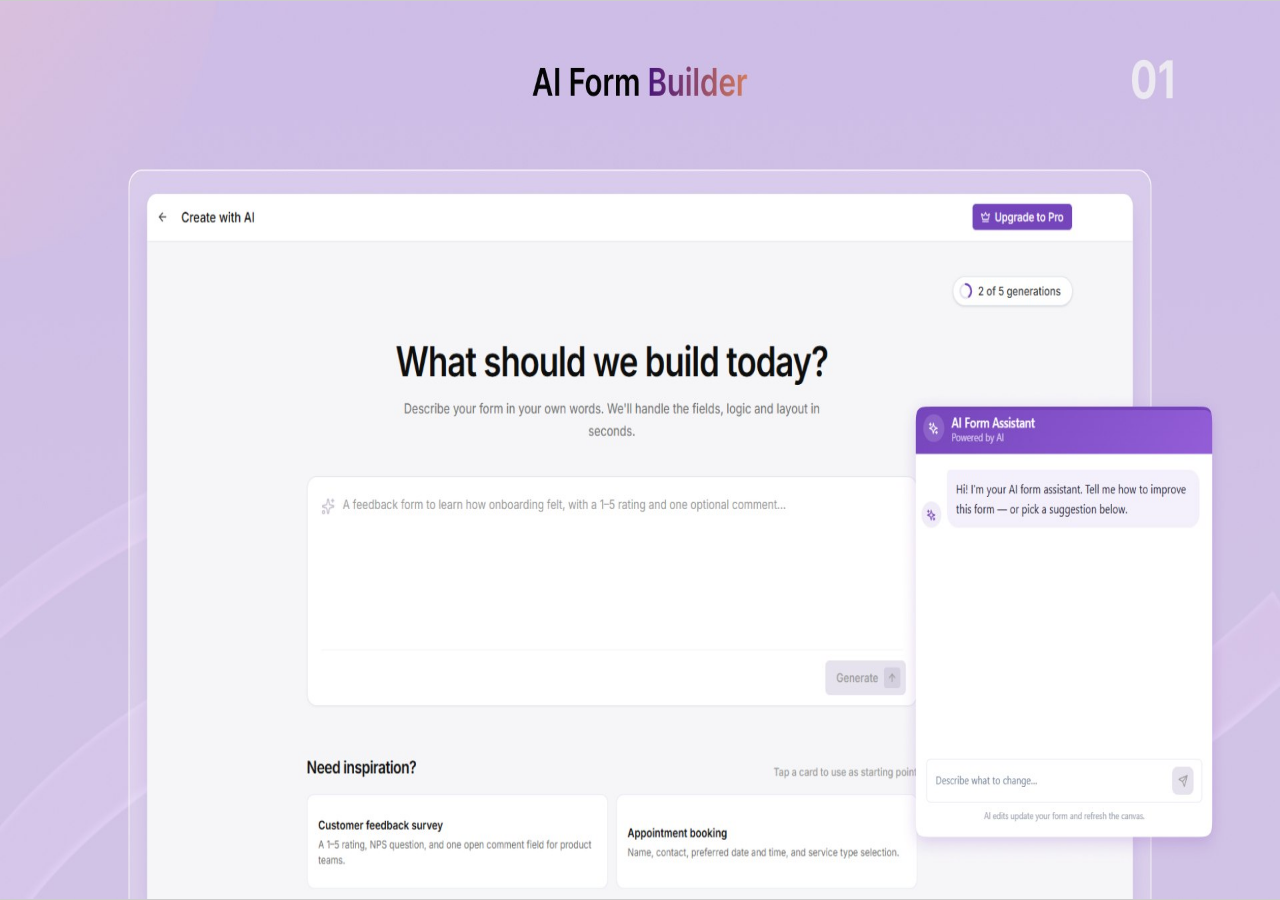
Everest Forms added an AI-powered form creation feature in version 3.5.0 (June 2026). The feature allows a user to describe a form in plain language (for example, “a contact form for a dental clinic with appointment date and service type fields”) and have the AI generate the form structure automatically.
There is a material caveat: the AI form builder requires the user to supply their own OpenAI API key. Using the Everest Forms AI builder requires an active OpenAI account and will consume OpenAI API credits at the rate OpenAI charges for their API, separate from any Everest Forms plan.
For a technical user who already has an OpenAI API key, this is a useful accelerator for form prototyping. For a non-technical user who does not have an OpenAI account, the AI form builder requires an additional setup step that may not be obvious on first exposure.
The AI builder is listed as a free feature in the WordPress.org description, which is accurate in the sense that Everest Forms does not charge for it directly, but the dependency on an external paid service API means it is not truly free to use in practice.
Pricing and license value
Everest Forms Pro is sold as both annual subscriptions and lifetime licenses. The pricing page at everestforms.net/pricing/ shows promotional “first year” rates alongside the standard rates that renewals default to. All prices are in USD.
| Plan | Annual (first year) | Annual (renewal) | Lifetime | Sites |
|---|---|---|---|---|
| Personal | $49/year | $69/year | $199 one-time | 1 site |
| Plus (Most Popular) | $99/year | $149/year | $399 one-time | 5 sites |
| Agency | $199/year | $299/year | $799 one-time | Unlimited sites |
Important pricing notes for buyers:
- First-year discounts are promotional. The standard (renewal) rate is higher: $69/year for Personal, $149/year for Plus, $299/year for Agency. Plan for the renewal price, not the entry price.
- Lifetime licenses eliminate the renewal concern. At $199 for a single site, the Personal lifetime plan pays for itself against the annual Personal rate in under three years.
- All paid plans include all features and add-ons. Everest Forms does not sell individual add-ons separately; the full feature set is unlocked by any paid plan at the appropriate site count.
- Priority and chat support tiers are included on Plus and Agency plans. Standard support is included on Personal.
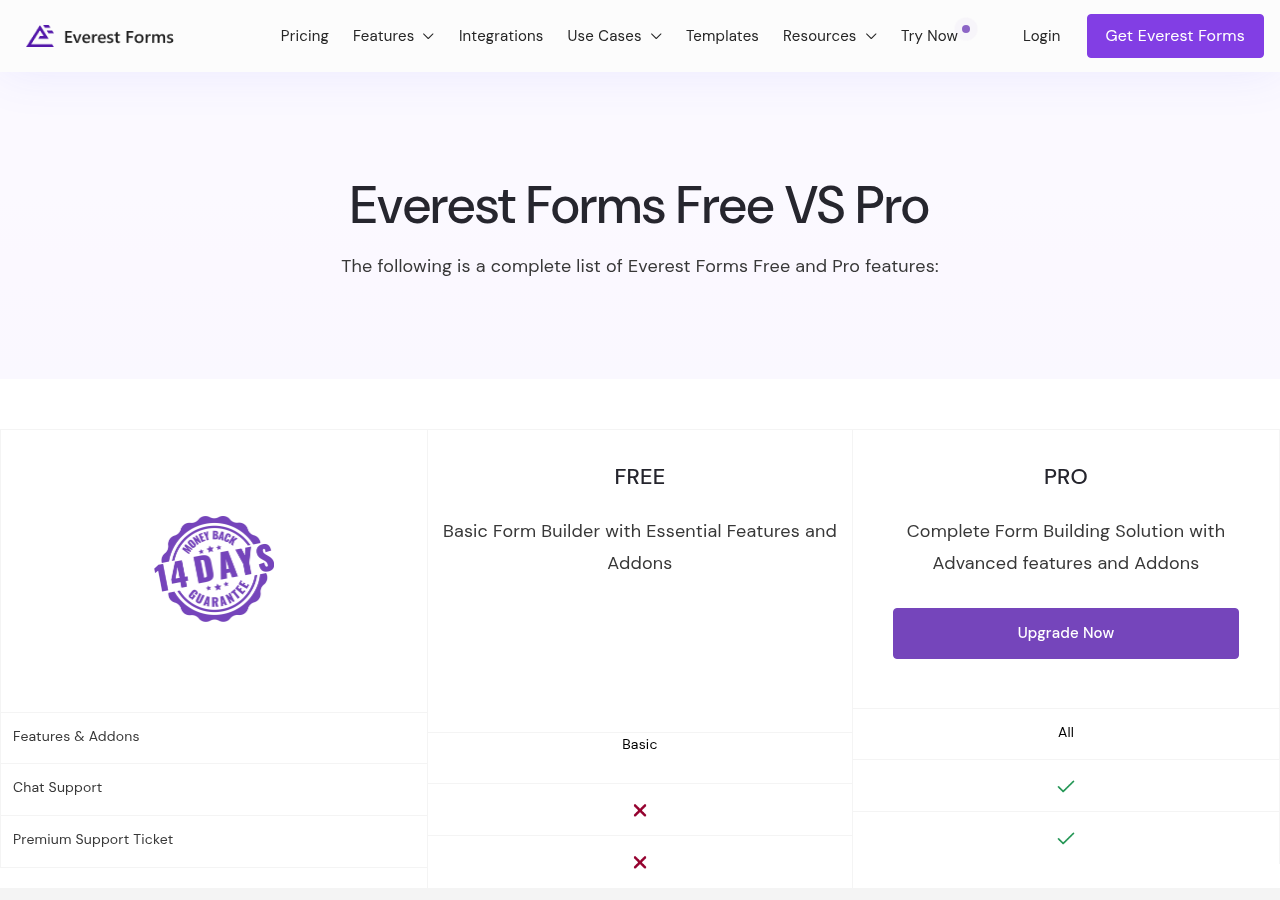
- A 14-day money-back guarantee applies to all paid plans, no questions asked.
The pricing architecture differs from WPForms (annual-only, no lifetime option), Gravity Forms (starts at $59/year, no free tier, no lifetime), and Fluent Forms ($63/year or $279 one-time lifetime for one site). Against those comparators, Everest Forms Personal at $199 lifetime is the most aggressive lifetime entry point in the category.

Pros and cons
Pros
- Entry management, file uploads, image uploads, and CSV export are all included in the free version, features that WPForms reserves for paid plans.
- Four layers of spam protection in the free tier: honeypot, Google reCAPTCHA, hCaptcha/Cloudflare Turnstile, Akismet, and CleanTalk. More free spam protection than most form plugins in this category.
- Lifetime license options across all three tiers. The Personal lifetime at $199 is the most affordable one-time form builder license in the main market.
- 4.9 out of 5 stars across 375 WordPress.org reviews. A 94 percent five-star rate is unusually high for a plugin with this many reviews.
- Consistently praised support team. Multiple long-term user reviews specifically highlight quick, professional support responses.
- Broad page builder compatibility in the free version: Elementor, Divi, Bricks Builder, Oxygen, Beaver Builder, and WPBakery all supported without paying.
- Form migrator included: import existing WPForms forms directly.
- Regular development cadence. Version 3.6.0 shipped with a revamped Style Customizer on August 13, 2026; version 3.5.0 in June 2026 added AI form creation. Active development is confirmed.
- Competitive Pro pricing relative to the feature set delivered. All features and add-ons are included in any paid plan at the appropriate site count.
Cons
- Conditional logic requires a paid plan. This is the most significant free-tier gap. Fluent Forms includes conditional logic free; Everest Forms gates it behind Pro.
- All payment gateways are Pro-only. Fluent Forms free includes Stripe (with a 1.9 percent surcharge). Everest Forms free includes no payment capability.
- All email marketing integrations (Mailchimp, ActiveCampaign, etc.) require a paid plan. There is no free connection to any email list platform.
- All CRM integrations (HubSpot, Salesforce, Pipedrive, Zoho) require a paid plan.
- All automation and cloud integrations (Zapier, Google Sheets, Dropbox) require a paid plan.
- Style Customizer (font, color, border, spacing control) is a Pro-only feature, despite being a natural complement to the free form builder.
- AI form builder requires the user to supply their own OpenAI API key. This adds friction and an external billing dependency for a feature marketed as free.
- 90,000+ active installs is a small install base for this category. The practical consequence is fewer tutorials, fewer third-party integrations, and a narrower community to ask when something goes wrong.
- Not Gutenberg-native. The form builder uses a proprietary interface, not a block editor workflow. Forms embed into Gutenberg via a block, but the building experience does not happen in the block editor.
- First-year promotional pricing reverts to a higher standard rate on renewal. Annual buyers need to plan for $69/year (Personal), not $49/year, from year two.
Alternatives to Everest Forms
WPForms
The most-installed WordPress form builder with six million active installs and 2,000+ templates. Choose WPForms if you want the most polished, beginner-friendly experience, the largest tutorial library, and form abandonment tracking. Do not choose WPForms if you want entry management and file uploads at no cost, or if you want a lifetime license.
Fluent Forms
The most relevant direct alternative to Everest Forms. Fluent Forms ships conditional logic, conversational forms, and basic Stripe payments in its free tier: all features Everest Forms gates behind Pro. Choose Fluent Forms if those free capabilities matter. Choose Everest Forms if entry management and file uploads in the free tier are the priority, and you prefer the Everest Forms pricing structure.
Contact Form 7
Free only, no paid tier, no entry management built in. The largest community and most third-party add-ons of any form plugin in WordPress. Choose Contact Form 7 if you want a free, lightweight, extensible form plugin with a massive support community and are willing to assemble extra plugins for entry storage, file uploads, and spam filtering.
Gravity Forms
Developer-focused, paid-only (starts at $59/year). The deepest conditional logic and workflow engine in the category, including the separate Gravity Flow product for multi-step approvals and automations. No free tier. Choose Gravity Forms for complex data collection, multi-step approval workflows, or deeply customized form-driven applications.
Formidable Forms
The most powerful form builder for turning form submissions into structured data, views, and calculated outputs. Choose Formidable Forms for database-driven form applications (directories, calculators, member portals) rather than standard contact or inquiry forms. The learning curve is steeper than Everest Forms.
Ninja Forms
A large free core plugin with modular paid add-ons (payments, integrations, advanced layouts sold separately). Choose Ninja Forms if you want to pick and pay for only the specific extensions you need, rather than buying a full Pro bundle.
Forminator
A free form builder from WPMU DEV that includes polls, quizzes, and basic payment forms at no cost. Choose Forminator if you want poll and quiz functionality free, or if you are already using other WPMU DEV products.
Final verdict
Everest Forms makes a credible case for a specific type of WordPress site owner: one who needs a contact form with real entry storage, file upload capability, and solid spam protection, all without paying, and who will eventually need a Pro upgrade that offers a genuine lifetime license at a price that does not sting.
The free tier delivers on those first two promises. Entry management, file uploads, and four layers of spam protection are legitimately included at no cost, and the 4.9 rating across 375 reviews suggests the plugin works reliably in practice and that support responds when it does not. That is a better starting position than many free form builders can honestly claim.
Where Everest Forms asks you to pay earlier than I would like: conditional logic and all payment features are behind the Pro wall from day one. That is a meaningful concession to make, particularly against Fluent Forms, which ships both in its free tier. If your site collects form submissions that need to route to an email list or CRM automatically, or if you need fields that show and hide based on earlier answers, the free version is not sufficient and the Pro upgrade is immediate.
For a small business or solo operator whose first need is a working inquiry form with organized entry tracking, and who plans to upgrade when payment or integration needs arise, Everest Forms is a reasonable choice. The Personal lifetime plan at $199 removes the recurring-cost objection permanently, which is a real advantage.
For buyers who want the most from a free tier before paying anything, particularly conditional logic or Stripe payments, Fluent Forms remains the stronger recommendation in this sub-$100/year category. For buyers who want the best-supported, widest-ecosystem experience at any price, WPForms remains the category benchmark.
Everest Forms earns its install for the right buyer. The right buyer is not trying to build conditional logic forms or payment flows for free; they are trying to build a reliable, well-tracked contact form and a clean upgrade path from there.
FAQ
Is Everest Forms free?
Yes. The Everest Forms free version is published on WordPress.org and installs from the WordPress plugin directory. The free version includes drag-and-drop form building, 35+ form fields, file and image uploads, unlimited form submissions, entry management and CSV export, email notifications, and multi-layer spam protection (honeypot, Google reCAPTCHA, hCaptcha, Cloudflare Turnstile, Akismet, CleanTalk). There is no time limit on the free version. Everest Forms Pro is a paid upgrade that adds conditional logic, payment gateways, email marketing integrations, CRM connections, multi-step forms, and the Style Customizer.
How many active installs does Everest Forms have?
The WordPress.org listing reports 90,000+ active installations as of August 2026. This is notably smaller than the category leaders (WPForms at 6 million, Contact Form 7 at 10 million, Fluent Forms at 700,000) but the 4.9 star rating across 375 reviews suggests a high-satisfaction active user base.
What is the difference between Everest Forms free and Pro?
The free version handles standard contact and inquiry form creation with entry storage, file uploads, spam protection, and email notifications. Everest Forms Pro unlocks: conditional logic, multi-step forms, conversational forms, surveys and quizzes, all six payment gateways (Stripe, PayPal, Mollie, Square, Razorpay, Authorize.Net), all 15 email marketing integrations (Mailchimp, ActiveCampaign, etc.), all 7 CRM integrations (HubSpot, Salesforce, etc.), all automation integrations (Zapier, Google Sheets, etc.), the Style Customizer, e-signature, calculations, webhooks, PDF from submission, advanced analytics, geolocation, and form restrictions.
Does Everest Forms include a lifetime license?
Yes. Everest Forms is one of the few major WordPress form builders that offers genuine lifetime licensing across all paid tiers. Personal (1 site) is $199 one-time, Plus (5 sites) is $399 one-time, and Agency (unlimited sites) is $799 one-time. Annual plans are also available at $49, $99, and $199 per year for the first year (renewing at $69, $149, and $299 respectively). WPForms does not offer a lifetime license; Gravity Forms does not; Fluent Forms does at different price points.
Does Everest Forms support payment forms?
Payment forms require a paid Everest Forms Pro plan. The plugin supports six payment gateways on Pro: Stripe, PayPal Standard, Mollie, Square, Razorpay, and Authorize.Net. Recurring subscription payments and coupon codes are also Pro features. No payment capability is available on the free plan. If you need Stripe payments on a free form builder, Fluent Forms free includes Stripe with a 1.9 percent platform surcharge.
Does Everest Forms include conditional logic?
Conditional logic (show or hide fields based on earlier answers) requires a paid Everest Forms Pro plan. The free version does not include conditional logic. Fluent Forms includes conditional logic in its free tier.
What email marketing tools does Everest Forms integrate with?
All email marketing integrations require an Everest Forms Pro plan. The supported platforms include Mailchimp, ActiveCampaign, MailerLite, ConvertKit, GetResponse, Brevo, Constant Contact, AWeber, Campaign Monitor, Drip, iContact, MailPoet, Moosend, CleverReach, and GetGist (15 platforms total). No email marketing integration is available on the free version.
Does Everest Forms work with page builders?
Yes. Everest Forms is compatible with the six major WordPress page builders on the free version: Elementor, Divi, Bricks Builder, Oxygen, Beaver Builder, and WPBakery. Forms also embed in Gutenberg via a dedicated block, and standard shortcodes work across any theme or builder.
Is there a money-back guarantee?
Yes. All Everest Forms Pro plans (annual and lifetime) come with a 14-day money-back guarantee. There is no free trial. The free version on WordPress.org is the practical trial before committing to a paid plan.
How does the Everest Forms AI form builder work?
Everest Forms added an AI-powered form creation feature in version 3.5.0 (June 2026). You describe a form in plain text, and the AI generates the field structure automatically. The AI builder requires an external OpenAI API key that you supply from your own OpenAI account; Everest Forms does not provide AI credits or host the AI service itself. Using the AI builder will consume OpenAI API tokens at OpenAI’s standard API pricing. For users without an existing OpenAI account, this represents an additional setup step and an ongoing cost separate from any Everest Forms plan.
How does Everest Forms compare to WPForms?
The most practical difference is the free tier. Everest Forms includes entry management, file uploads, and multi-layer spam protection in its free version. WPForms reserves those features for paid plans. Everest Forms also offers lifetime licensing; WPForms does not. WPForms has a significantly larger install base (6 million vs. 90,000), far more templates (2,000+ vs. 40+), better form abandonment and analytics tools, and a larger community of tutorials and third-party developers. Both plugins require paid plans for conditional logic, payment forms, and email marketing integrations. For most buyers: WPForms if ease of use and ecosystem size matter most; Everest Forms if the free tier’s included features or lifetime pricing matter more.