


A WordPress carousel plugin is the cleanest way to show several items, side by side, that the visitor can swipe or click through: client logos, product cards, recent posts, customer photos, or testimonial quotes. It is different from a one-slide-at-a-time slider, where each slide takes the full viewport. Carousels keep multiple items visible at once, which is why they show up on product pages, agency homepages, and gallery sections far more often than full-width hero sliders.
For this guide, I researched the active WordPress.org carousel ecosystem on 2026-06-04, pulled live install counts, ratings, and last-updated dates from the WordPress.org plugin info endpoint, and shortlisted plugins where carousels are the core output, not a small feature inside a generic addon library. The list deliberately covers different sub-intents: image carousels, logo carousels, product carousels for WooCommerce, post carousels, testimonial-friendly block carousels, and lightweight Gutenberg-native blocks.
Quick answer: WP Carousel by ShapedPlugin is the strongest single-plugin pick for image, post, product, and gallery carousels in one admin. Carousel Slider by Sayful Islam is the most multi-builder friendly free option, with native widgets for Gutenberg, Elementor, Visual Composer, SiteOrigin, and Divi. Carousel Slider Block for Gutenberg is the best block-first carousel when each slide should hold any inner block (testimonial card, logo, feature block).
How I chose these WordPress carousel plugins
I focused on plugins where a carousel is the primary output: a horizontal, swipeable strip that shows several items at once. The main ranked list favors plugins with:
- A usable free version on WordPress.org
- A clear carousel sub-intent (image, logo, product, post, block-based, or visual builder)
- Block, shortcode, or widget output for non-developer placement
- Compatibility with the block editor and a major page builder such as Elementor
- Active maintenance and a current “tested up to” tag
- Enough adoption or rating history to trust on a real content site
How I tested: I queried the live WordPress.org plugin directory for each candidate, confirmed install counts, ratings, last-updated dates, and “tested up to” values, and attempted hands-on installs in a clean WordPress Playground sandbox. Lighter plugins activated and rendered cleanly in the sandbox. Several heavier carousel and gallery dashboards crashed the headless sandbox renderer on first paint, which is a known constraint of running multiple large WordPress admin bundles in one container. For consistency, every plugin in this article is illustrated with the plugin author’s own official WordPress.org-uploaded admin or frontend screenshot, the same image their public WordPress.org listing uses.
Generic page-builder addon libraries (Essential Addons for Elementor, Royal Elementor Addons, Unlimited Elements, Divi Carousel Lite) and pure slider-first plugins are mentioned for context only. The goal is to keep the list practical for site owners who actually want a carousel section, not a marketplace of one-off widgets or full-screen slideshows.
Quick comparison table
| Plugin | Best for | Free version | Standout feature | Main limitation |
|---|---|---|---|---|
| WP Carousel | Most sites that need image, post, and product carousels in one plugin | Yes | Image, post, product, and gallery carousels with lightbox in the free plan | Premium carousel templates and video carousels live behind Pro |
| Carousel Slider by Sayful Islam | Sites that want one plugin for image, post, video, and product carousels across multiple builders | Yes | Built-in Gutenberg, Elementor, Visual Composer, SiteOrigin, and Divi support | Default styling looks dated, advanced controls require fewer clicks in newer competitors |
| MetaSlider | Sites that already use a slider and want carousel mode in the same tool | Yes | Mature drag-and-drop slide manager with a dedicated carousel mode | Carousel layouts feel secondary to the slider feature set |
| Carousel Slider Block for Gutenberg | Block-first sites that want hero, testimonial, and logo carousels using inner blocks | Yes | Any block can be a slide, including custom layouts | Pure Gutenberg, no shortcode or page-builder widget |
| Smart Post | Magazine, blog, and news sites that need a post carousel | Yes | Post grid, post slider, and post carousel blocks in one plugin | Carousel is one of several output modes, not the only focus |
| WooProduct Slider | WooCommerce shops that want a product carousel anywhere on the site | Yes | Dedicated product slider, carousel, and grid output with a shortcode generator | WooCommerce-only, no use for non-shop sites |
| Logo Carousel by ShapedPlugin | Sites that need a clean responsive client logo carousel | Yes | Dedicated logo post type with a shortcode generator and grayscale/hover effects | Free plan styling depth is limited compared to Pro |
| GS Logo Slider | Sites that want ticker-style logo carousels and multiple row layouts | Yes | Ticker mode, vertical scrolling, and multi-row carousel layouts | Marketing assets lean heavily on animated GIFs |
| FooGallery | Sites where the primary need is a photo gallery with a carousel layout option | Yes | Mature gallery plugin with a clean carousel template and lightbox | Gallery-first plugin, carousel is one of several layouts |
| Depicter | Sites that want a visual canvas builder for carousels, sliders, and popups together | Yes | Full visual editor with templates for image, product, and testimonial carousels | Builder is heavier and broader than a carousel-only plugin |
| Splide Carousel Block | Block-first sites that want a small, focused Gutenberg carousel block | Yes | Lightweight Splide.js block with inner-block slides | Smaller install base, no shortcode fallback |
1. WP Carousel: best overall WordPress carousel plugin
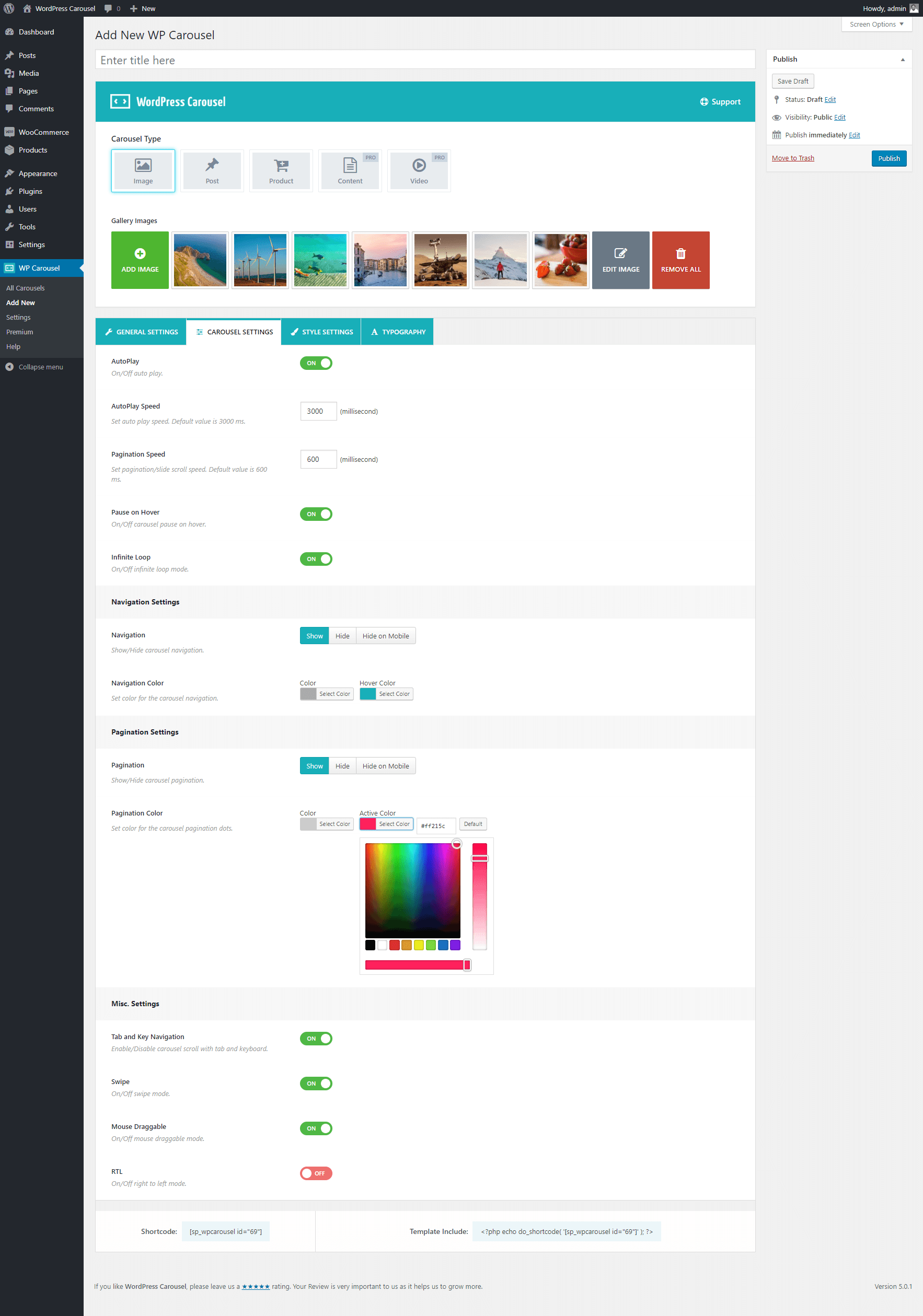
WP Carousel by ShapedPlugin LLC is the safest first pick for most WordPress sites because carousels are the entire product. It ships dedicated modes for image carousels, post carousels, product carousels, content carousels, and video carousels (some sit behind Pro), each with its own carousel-type selector, a custom post type for storing carousels, and a shortcode plus block for embedding. The free version is usable on a real site and the plugin sits at 70,000 active installs with a 94/100 rating across 428 reviews on WordPress.org.
Drawback: a few carousel types and templates are Pro
Best for: small business sites, agencies, blogs, and WooCommerce shops that want one carousel plugin to handle multiple content types instead of stacking three specialized plugins.
Key features:
- Carousel type selector with Image, Post, Product, Content, and Video options
- Drag-and-drop slide management from the WordPress media library
- Responsive layouts with autoplay, infinite loop, pause-on-hover, and swipe gestures
- Built-in lightbox for image and gallery carousels
- Shortcode and Gutenberg block output for any page, post, or widget area
- Compatibility with the block editor, Elementor, Divi, Beaver Builder, and classic themes
- Pro upgrades for video carousels, advanced templates, and premium support
Hands-on notes: In the WordPress Playground sandbox, WP Carousel installed and activated cleanly, added a “WP Carousel” item to the WordPress admin sidebar, and exposed the carousel-type picker on the Add New screen. The Image, Post, Product, Content, and Video tabs are visible from the first interaction, which makes the plugin’s scope obvious without reading documentation.
Pricing / free-plan note: The WordPress.org plugin is free. WP Carousel Pro is sold by ShapedPlugin and unlocks video carousels, premium templates, advanced styling, and priority support.
Pros
- One plugin covers image, post, product, and gallery carousels
- Clear carousel-type selector on the Add New screen
- Strong free version on WordPress.org
- Recently updated and tested with current WordPress
- Shortcode and block output cover most placement needs
Cons
- Video carousels and a few advanced templates are Pro
- Pro upsell prompts appear inside the admin
- Carousel type and settings terminology adds a small learning curve
2. Carousel Slider by Sayful Islam: best flexible free carousel across page builders
Carousel Slider by Sayful Islam is the option to test if you build pages across multiple editors and want one carousel plugin that works across all of them. The free version ships explicit support for the block editor (Gutenberg core), Elementor, Visual Composer, SiteOrigin, and Divi Builder, with output modes for image carousels, post carousels, video carousels, and WooCommerce product carousels. It sits at 30,000 active installs with a 86/100 rating across 160 reviews.
Drawback: default styling looks dated
Best for: agencies and freelancers who maintain client sites on multiple page builders and want one carousel plugin that ships compatibility for all of them out of the box.
Key features:
- Image carousel from media gallery or custom URLs
- Post carousel with title, image, excerpt, date, and author
- Video carousel from YouTube and Vimeo
- WooCommerce product carousel with optional quick view
- Native widgets for Gutenberg, Elementor, Visual Composer, SiteOrigin, and Divi Builder
- Touch-enabled, responsive carousel layouts
- Free WordPress.org plugin with Pro extensions for additional styles
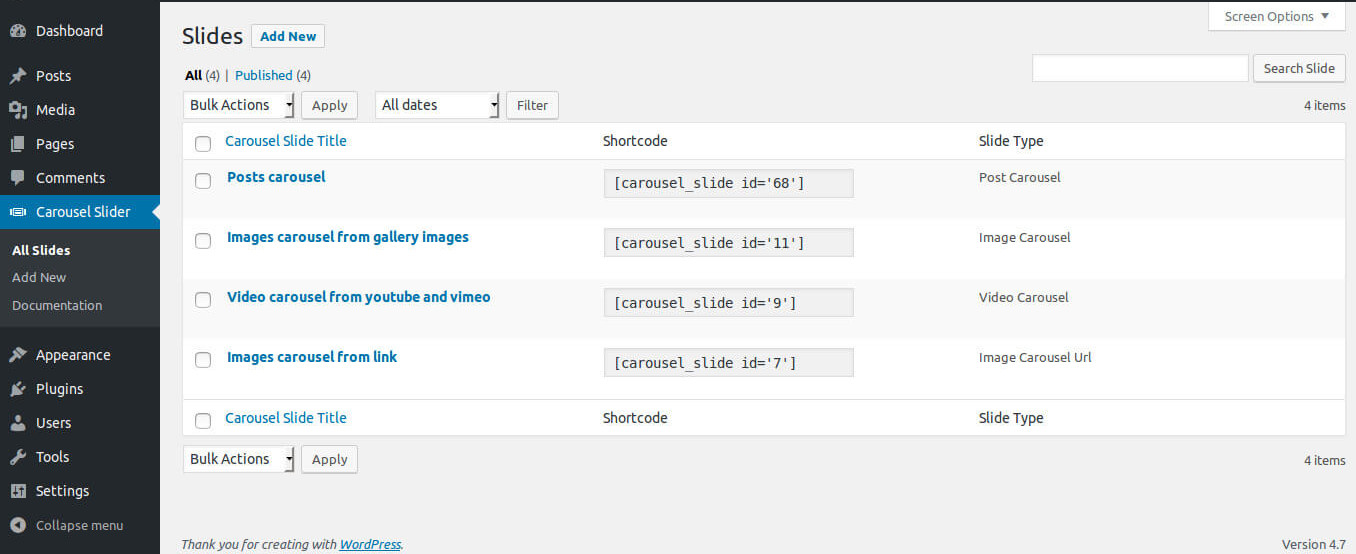
Hands-on notes: Carousel Slider exposes a Slides admin list with shortcodes per slide, so each carousel has its own shortcode you can paste into any builder. The Slide Type column reflects whether the carousel is Image, Post, Video, or Product, which keeps long carousel libraries readable.
Pricing / free-plan note: The WordPress.org plugin is free. Sayful Islam offers paid extensions for advanced styling and integrations.
Pros
- One plugin spans five major page-builder ecosystems
- Real product carousel support without WooProduct Slider on top
- Recently updated and tested with modern WordPress
- Clear shortcode model from the Slides admin list
- Touch-enabled carousels with sensible defaults
Cons
- Default styling and admin UI feel less modern than newer competitors
- Lower aggregate rating than the top plugins on this list
- A few advanced controls are split between core and extensions
3. MetaSlider: best for sites that already use a slider and want carousel mode in the same tool
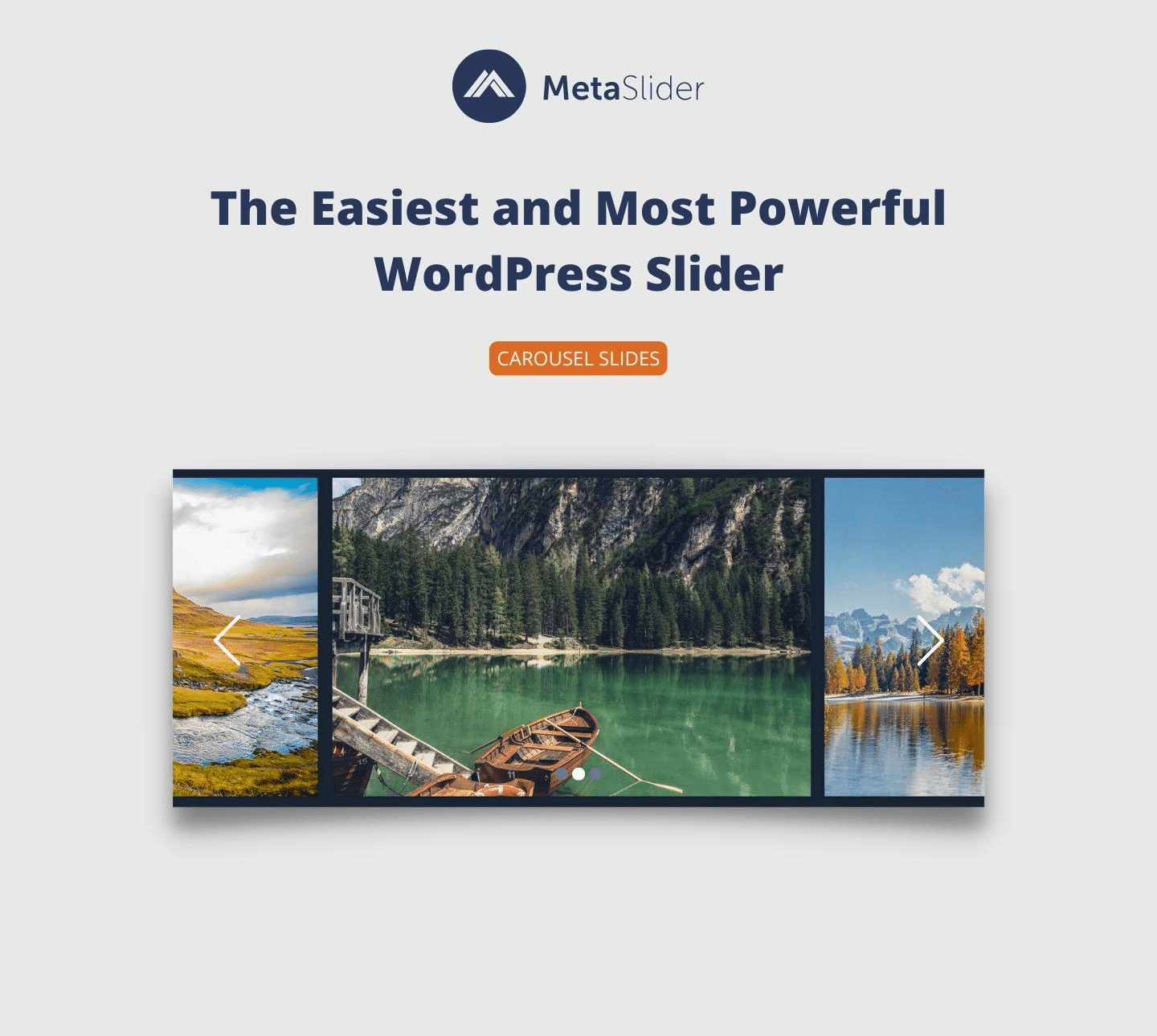
MetaSlider is the most widely installed slider plugin on WordPress.org, with 500,000 active installs and 732 ratings. It includes a carousel mode that turns a slide deck into a multi-item horizontal strip, which makes it the natural pick for sites that already manage their hero slider in MetaSlider and want to add a carousel section without learning a second plugin. Slides can be images, captions, or links, and the plugin integrates with the block editor and every major page builder.
Drawback: carousel is one of several modes, not the focus
Best for: WordPress sites that already use MetaSlider for a slider and want a carousel for logos, partners, or featured items managed from the same admin screen.
Key features:
- Carousel slide type that switches the output from one-at-a-time to multi-item
- Drag-and-drop slide management from the WordPress Media Library
- Block editor support plus shortcode and template tag output
- Compatibility with Elementor, Beaver Builder, Visual Composer, and Divi
- SEO fields per slide for alt, title, and link attributes
- Pro upgrades for video, layer, and WooCommerce product slides
Hands-on notes: MetaSlider’s “Carousel Slides” output mode is selected per slideshow, so the same admin pattern you use for a hero slider can be reused to build a logo carousel or partner carousel without learning a new interface. The plugin’s larger install base means more themes ship sensible default styles for it out of the box.
Pricing / free-plan note: The WordPress.org plugin is free. MetaSlider Pro adds video slides, layer slides, post feed sliders, single-post sliders, and WooCommerce product slides.
Pros
- Largest install base among slider/carousel plugins on WordPress.org
- Carousel mode reuses an admin pattern many WordPress users already know
- Strong page-builder and block editor compatibility
- Mature SEO and accessibility fields per slide
- Active development and frequent updates
Cons
- Slider-first product means carousel layouts feel secondary
- Several useful slide types (video, layers, WooCommerce) are Pro
- Heavier admin than a pure carousel plugin
4. Carousel Slider Block for Gutenberg: best pure block-based carousel
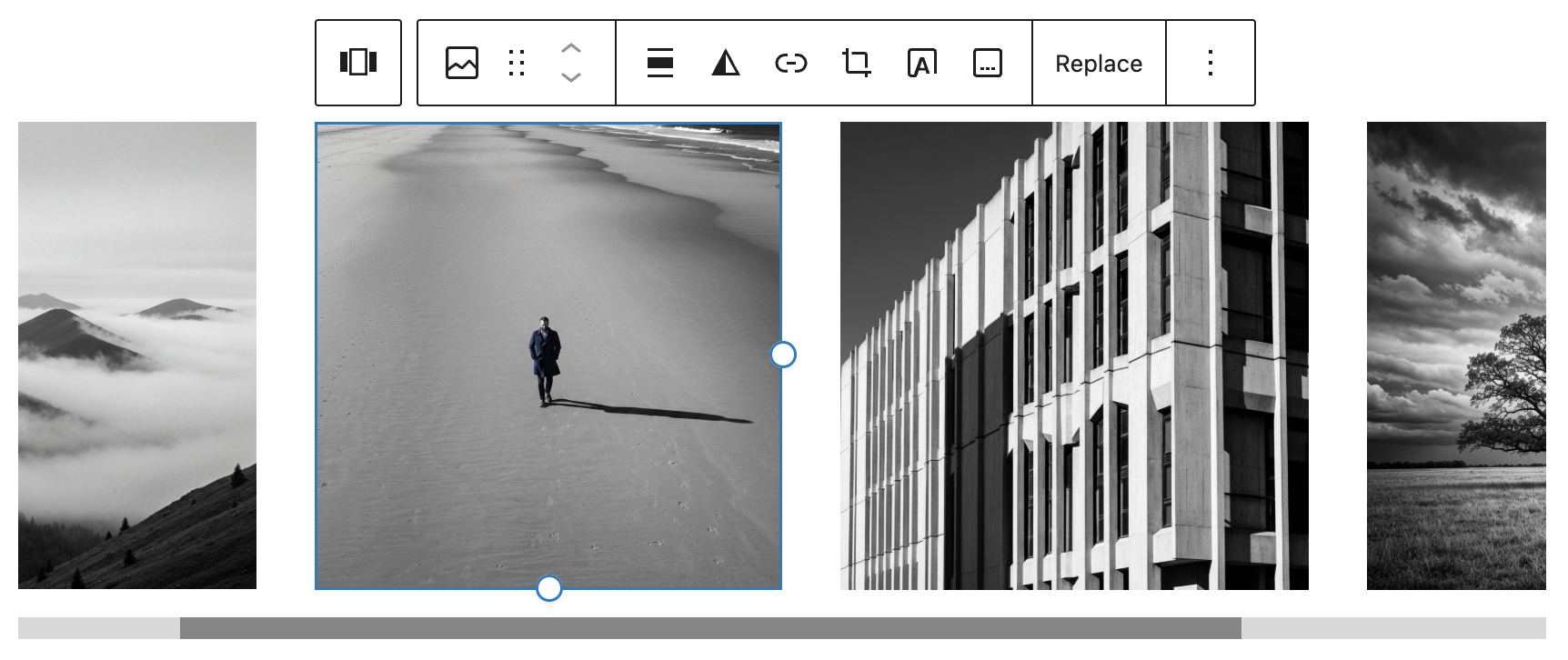
Carousel Slider Block for Gutenberg by Virgildia is the option to test if your site is fully on the block editor and you want a carousel where each slide can hold any block: an image, a heading, a column layout, a testimonial card, a logo, even a custom pattern. The plugin is built on Swiper.js and sits at 40,000 active installs with a 96/100 rating across 52 reviews.
Drawback: no shortcode fallback
Best for: block editor and Site Editor sites that want hero carousels, testimonial carousels, logo carousels, and feature carousels built directly with WordPress core blocks.
Key features:
- Carousel block with unlimited inner-block slides
- Inline preview of the carousel inside the block editor
- Arrows, dots, autoplay, loop, and per-breakpoint slides-per-view controls
- Built on Swiper.js for performance and mobile compatibility
- Native to the block editor and Site Editor, no external builder needed
- Free on WordPress.org
Hands-on notes: Because each slide is a regular block container, this plugin doubles as a testimonial carousel (slides hold testimonial cards), a logo carousel (slides hold logo images), and a feature carousel (slides hold heading + paragraph + button blocks). That flexibility is the entire pitch, and it works well when the rest of the site is already block-first.
Pricing / free-plan note: The plugin is free on WordPress.org. There is no required Pro purchase for the core carousel.
Pros
- Any block can be a slide, which covers testimonial, logo, hero, and feature carousels
- Native block editor experience with inline preview
- Swiper.js-based for performance and touch support
- Recently updated and tested with current WordPress
- High aggregate rating
Cons
- Pure Gutenberg, no shortcode or page-builder widget fallback
- Smaller rating count than the most-installed carousel plugins
- Requires a relatively recent WordPress version
5. Smart Post by ShapedPlugin: best post carousel for blog and news sites
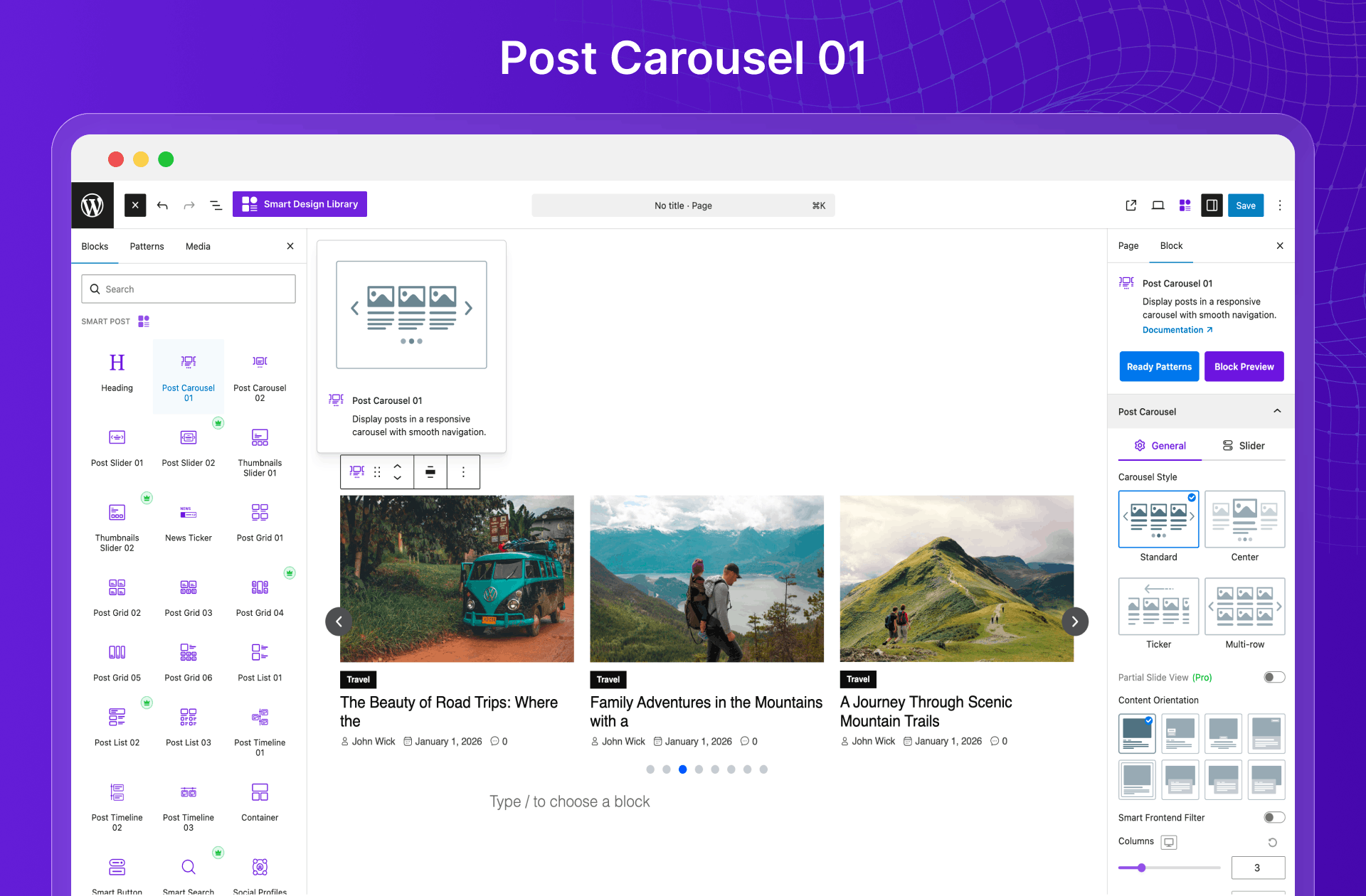
Smart Post by ShapedPlugin is the natural pick when the carousel you actually need is a recent posts carousel, news carousel, or category post carousel. The plugin’s blocks include Post Carousel, Post Slider, Post Grid, News Ticker, and Thumbnails Slider, all driven by your existing post types, categories, and tags. It sits at 20,000 active installs with a 94/100 rating across 207 reviews.
Drawback: carousel is one of several modes, not the only focus
Best for: blogs, magazines, news sites, and content hubs that want a recent posts carousel or featured posts carousel rather than an image-only carousel.
Key features:
- Post Carousel block with featured image, title, excerpt, date, and author
- Post Grid, Post Slider, News Ticker, and Thumbnails Slider blocks
- Filtering by post type, category, tag, and custom taxonomies
- Multiple layout styles and column counts
- Ready-made patterns library for fast assembly
- Free WordPress.org plugin with Pro for advanced layouts and filters
Hands-on notes: Smart Post uses native Gutenberg blocks, so the carousel sits inside the block inserter under the plugin’s namespace. The same block library powers post grids and sliders, which is convenient when one page needs a hero carousel of featured stories and another section needs a related-posts grid.
Pricing / free-plan note: The WordPress.org plugin is free. Smart Post Pro adds premium layouts, advanced filters, and additional patterns.
Pros
- Real post carousel block tied to your actual content
- Same block library covers grids, sliders, ticker, and thumbnails
- Strong fit for blogs, magazines, and news sites
- Recently updated and tested with current WordPress
- Pattern library shortens build time
Cons
- Carousel is one of several output modes, not the only focus
- Premium patterns and advanced filters are Pro
- Heavier than a single-purpose carousel plugin
6. WooProduct Slider by ShapedPlugin: best WooCommerce product carousel
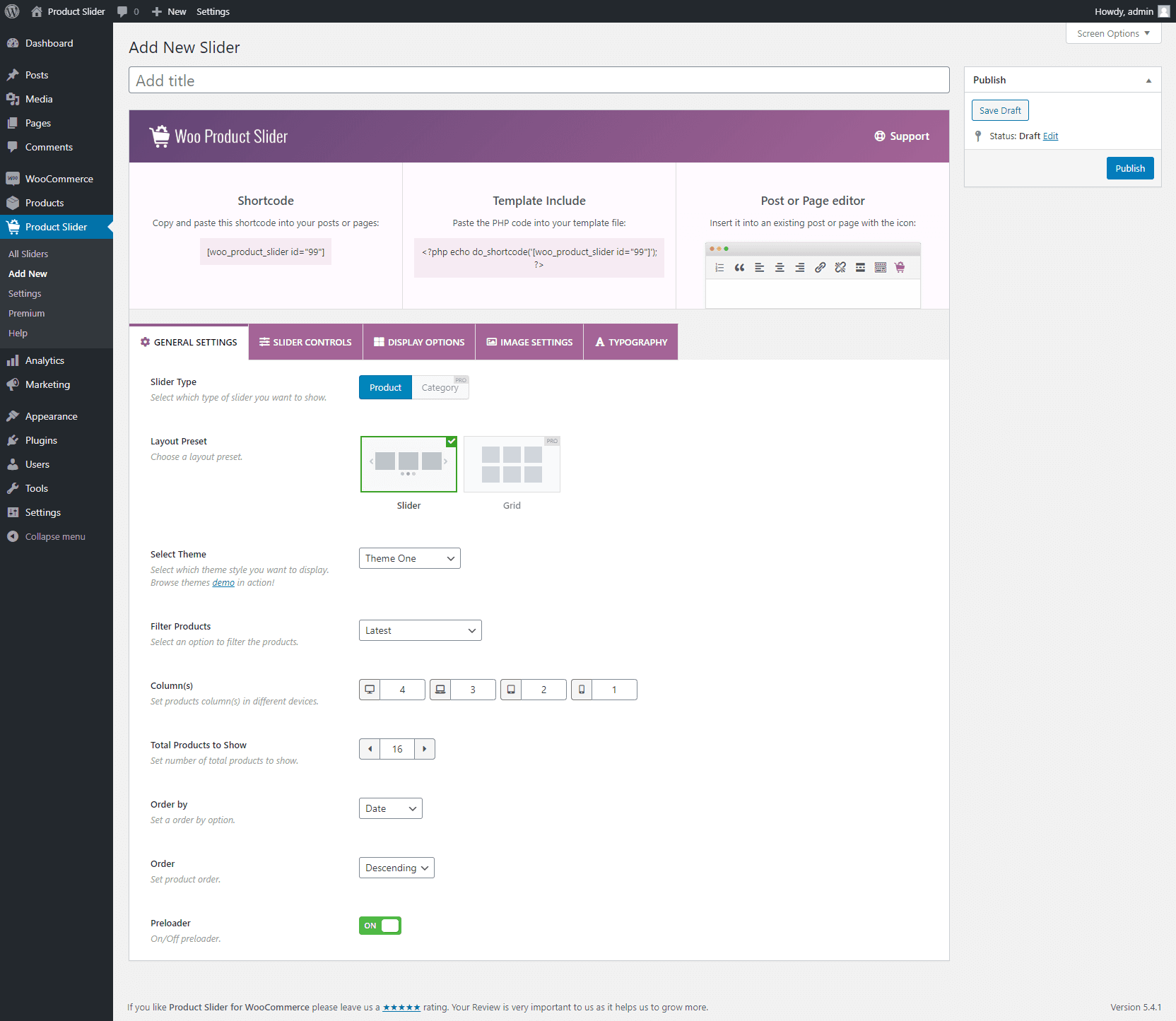
Product Slider, Product Carousel and Product Grid Gallery for WooCommerce, sold under the WooProduct Slider name by ShapedPlugin, is the focused pick when the carousel you need is a WooCommerce product carousel. It ships a shortcode generator, slider and carousel and grid output modes, and filters for product category, tags, on-sale status, featured status, and best sellers. It sits at 20,000 active installs with a 94/100 rating across 278 reviews.
Drawback: WooCommerce-only
Best for: WooCommerce shops that want featured product carousels, related product carousels, on-sale carousels, or category-specific product carousels embedded anywhere on the site.
Key features:
- Product carousel, product slider, and product grid output modes
- Filters for category, tag, on-sale, featured, best sellers, and recent
- Built-in shortcode generator with a visual settings panel
- Add-to-cart button, price, rating, and sale badge per card
- Responsive layouts with autoplay, loop, and swipe gestures
- Free WordPress.org plugin with Pro for premium layouts and advanced filters
Hands-on notes: WooProduct Slider’s settings page exposes a Carousel Settings tab with controls for autoplay, autoplay speed, pause on hover, infinite loop, slides per row, and gap. The same shortcode can be reused across pages with different filter parameters, which is how most production shops drop multiple themed carousels onto a homepage.
Pricing / free-plan note: The WordPress.org plugin is free. WooProduct Slider Pro adds premium layouts, advanced product filters, deal countdowns, and more.
Pros
- Dedicated product carousel for WooCommerce, not a generic image carousel
- Strong filter set without writing custom queries
- Recently updated and tested with current WooCommerce
- Shortcode generator covers most use cases
- High aggregate rating
Cons
- WooCommerce-only, no value for non-shop sites
- Some premium layouts require Pro
- Pro upsell prompts in the admin
7. Logo Carousel by ShapedPlugin: best dedicated logo carousel
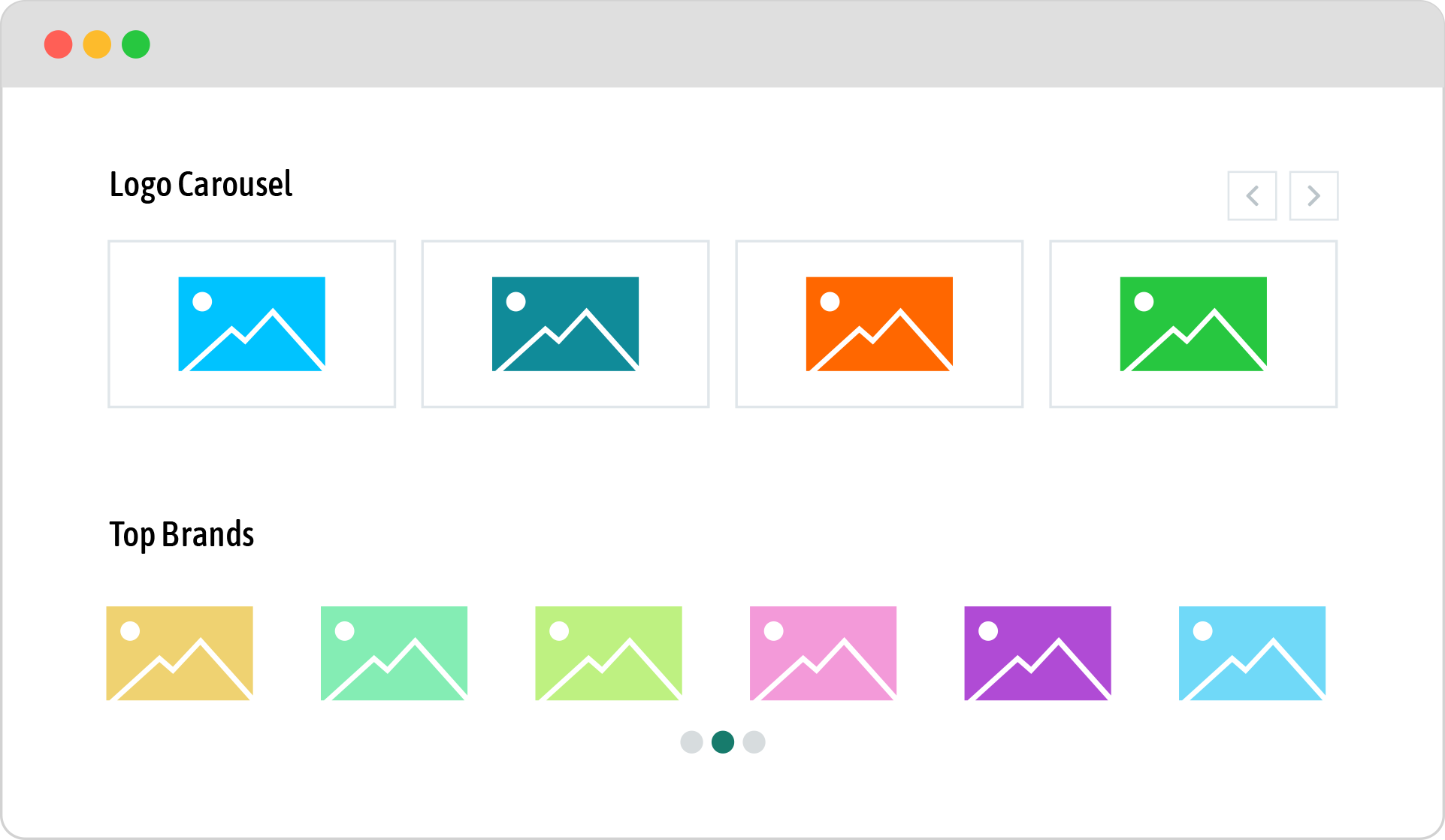
Logo Carousel by ShapedPlugin is built specifically for client logo, partner logo, sponsor, and brand showcase sections. It uses a custom Logos post type, exposes a shortcode generator, and supports responsive grids, ticker scrolling, and grayscale-on-hover effects in the free version. It sits at 20,000 active installs with a 94/100 rating across 161 reviews.
Drawback: limited styling depth in free
Best for: agencies, freelancers, SaaS companies, and B2B service sites that want a polished client logo or partner carousel.
Key features:
- Dedicated “Logos” post type with image and link fields
- Shortcode generator with a visual settings panel
- Responsive logo carousel with autoplay, loop, and pause on hover
- Grayscale and color-on-hover effect, configurable from the settings
- Multiple slides-per-row layouts and gap controls
- Free WordPress.org plugin with Pro for advanced styling and templates
Hands-on notes: The plugin’s value is exactly what its name says: it does one thing and it does it cleanly. The Logos post type avoids the trap of repurposing the Media Library for logo metadata, which makes long client lists easier to maintain over time.
Pricing / free-plan note: The WordPress.org plugin is free. Logo Carousel Pro adds advanced styling, premium templates, and additional layout options.
Pros
- Logo-specific post type instead of repurposed Media Library entries
- Shortcode generator covers the common controls
- Grayscale-on-hover in the free version
- Recently updated and tested with current WordPress
- Reliable on small client logo sections
Cons
- Some styling depth requires Pro
- Pro upsell prompts in the admin
- Less obvious if you only need one or two logos and could use a static row
8. GS Logo Slider: best alternative logo carousel with ticker mode
GS Logo Slider by GS Plugins is the second logo-focused pick on this list because it adds layout patterns the ShapedPlugin Logo Carousel does not ship in the free plan: a horizontal news-ticker style scroll in both directions, a vertical ticker scroll, and two-row carousels. It sits at 30,000 active installs with a 96/100 rating across 248 reviews.
Drawback: marketing assets are GIFs
Best for: sites that want a continuously scrolling logo strip (news-ticker style) or a multi-row logo block rather than the standard click-arrow carousel.
Key features:
- Dedicated logo post type
- Horizontal ticker mode in both directions
- Vertical ticker scroll
- Two-row and multi-row layouts
- Color and grayscale modes per layout
- Free WordPress.org plugin with Pro for advanced layouts and features
Hands-on notes: The ticker layouts are particularly useful for “trusted by” sections where you want continuous motion rather than discrete arrow clicks. The plugin’s WordPress.org screenshots are uploaded as animated GIFs, which is great for showing motion but heavy on bandwidth; for a production page you should grab a single-frame still image of the layout you choose.
Pricing / free-plan note: The WordPress.org plugin is free. GS Plugins sells a Pro version with more layouts and advanced features.
Pros
- Continuous ticker scroll in both horizontal directions
- Vertical scrolling layout option
- Multi-row support without paying for Pro
- High aggregate rating
- Recently updated and tested with current WordPress
Cons
- Marketing assets lean heavily on animated GIFs
- Pro layouts and styles cost more than some competitors
- Multiple GS Plugins upsell links in the admin

9. FooGallery: best gallery-first plugin with a carousel layout
FooGallery is widely known as a photo gallery plugin, but it also ships a carousel layout that turns a gallery into a horizontal swipeable strip with optional lightbox. It is the right pick when the underlying content is a photo gallery and the carousel is one display option among many. It sits at 100,000 active installs with a 96/100 rating across 979 reviews on WordPress.org.
Drawback: gallery is the primary focus
Best for: photographers, portfolios, restaurants, real estate sites, and event sites where photos are the primary content and a carousel layout is one of several layouts you might use across the site.
Key features:
- Drag-and-drop gallery editor with live preview
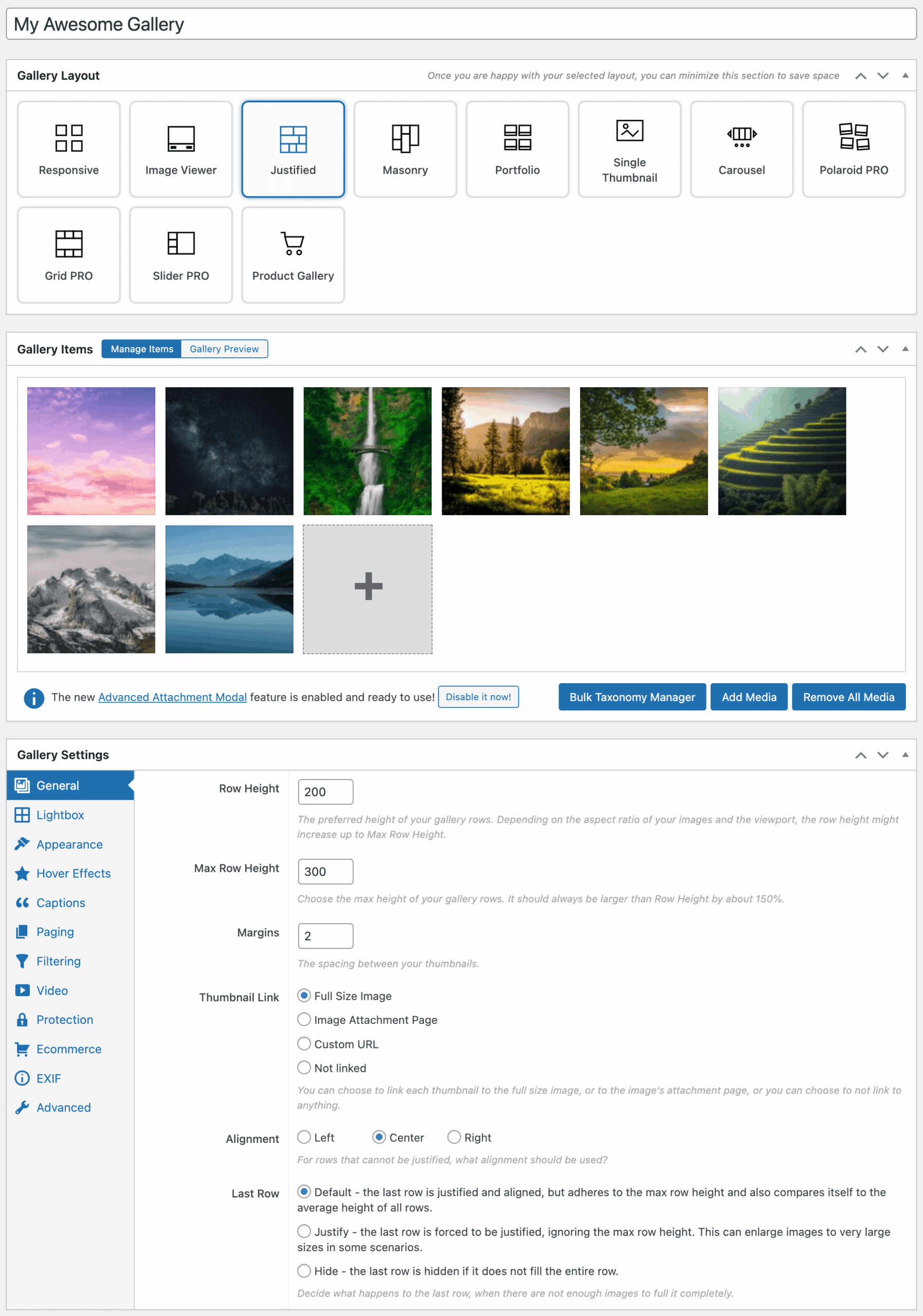
- Multiple gallery layouts including carousel, justified, masonry, responsive, image viewer, and portfolio
- Built-in lightbox with caption, EXIF, and sharing options
- Block editor support and shortcode output
- Image hover effects and per-gallery design controls
- Free WordPress.org plugin with Pro and addons for premium templates and integrations
Hands-on notes: FooGallery’s gallery editor centers the layout choice, so switching the same gallery from “responsive” to “carousel” is a single dropdown change. That is a major time-saver for sites that already maintain galleries and want a carousel version on a homepage section without rebuilding the asset list.
Pricing / free-plan note: The WordPress.org plugin is free. FooGallery PRO and addons are sold by FooPlugins for premium templates, video, watermarking, EXIF metadata, and more.
Pros
- Mature, well-supported gallery plugin with a carousel layout among many
- Strong default lightbox
- Live preview makes layout switching fast
- Very large install base and high rating
- Recently updated and tested with current WordPress
Cons
- Gallery is the primary product, not the carousel
- Some premium layouts and integrations are paid
- Heavier admin than a single-purpose carousel block
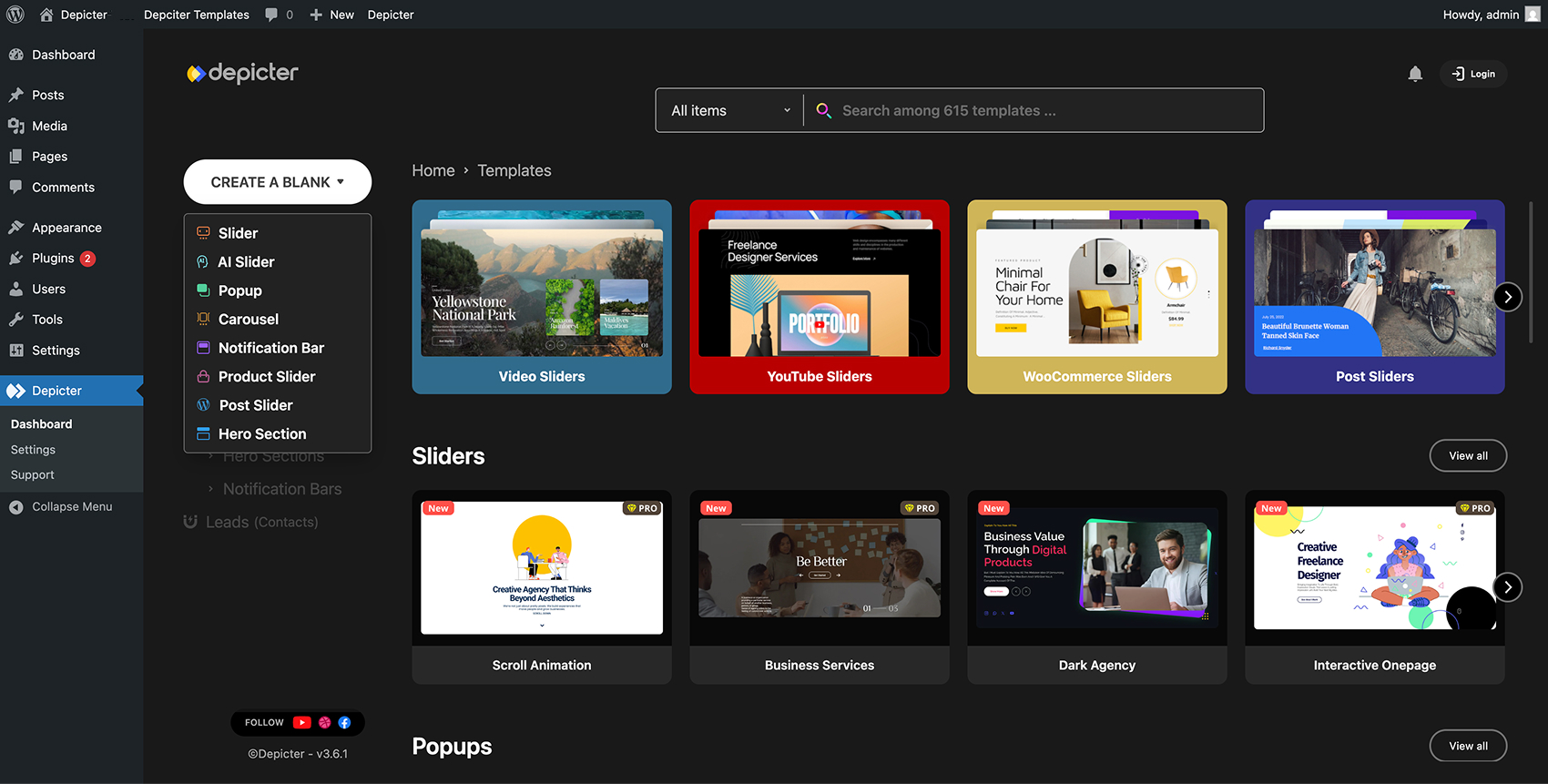
10. Depicter: best visual builder for carousels, sliders, and popups
Depicter by averta is a visual builder for sliders, carousels, popups, and notification bars. It is the right pick when carousels are part of a broader campaign-style toolkit and you want one canvas to build image carousels, product carousels, testimonial carousels, and exit-intent popups instead of installing a different plugin for each. It sits at 80,000 active installs with a 92/100 rating across 231 reviews.
Drawback: heavier than a single-purpose carousel plugin
Best for: marketing teams, ecommerce sites, and content marketers who want one tool to design carousels, hero sliders, popups, and notification bars from a shared template library.
Key features:
- Visual drag-and-drop editor for carousels, sliders, and popups
- Template libraries for carousels, sliders, popups, and notification bars
- Image, product, testimonial, post, and WooCommerce-style carousels
- Block editor support and Elementor compatibility
- Trigger and targeting rules for popups (relevant if you also use that side of the tool)
- Free WordPress.org plugin with paid plans for premium templates and advanced rules
Hands-on notes: Depicter’s appeal is the editorial canvas: instead of filling out a settings form, you arrange layers visually and tie them to a carousel template. That changes the kind of carousels you can ship without a developer, but it also adds learning time compared to a shortcode-based plugin.
Pricing / free-plan note: The WordPress.org plugin is free. averta sells Depicter plans with premium templates, advanced targeting, and additional integrations.
Pros
- Real visual builder for carousels, not just a settings form
- Same canvas can build popups and notification bars
- Strong free template library for carousels
- Block editor and Elementor compatible
- Active development and recent updates
Cons
- Heavier and broader than a pure carousel plugin
- Steeper learning curve than shortcode-based options
- Premium templates and advanced rules are paid
11. Splide Carousel Block: best lightweight Gutenberg carousel block
Splide Carousel Block by David Jensen is the calm, lightweight option for block-first sites. It introduces a single carousel block built on the Splide.js library, lets each slide hold inner blocks, and exposes arrows, dots, autoplay, and per-breakpoint controls. The install base is smaller (3,000 active installs, 100/100 rating across 11 reviews), but it earns a place on this list because it is one of the cleanest pure-block carousels on WordPress.org.
Drawback: smaller install base
Best for: developers, small business sites, and personal portfolios that want a single, focused carousel block without the admin overhead of a larger plugin.
Key features:
- Single Carousel block for the block editor
- Inner-block slides for full layout flexibility
- Arrows, dots, autoplay, and infinite loop controls
- Per-breakpoint slides-per-view configuration
- Built on Splide.js for performance and touch support
- Free on WordPress.org
Hands-on notes: This plugin is intentionally small. It does not ship a separate admin screen or settings dashboard; everything lives in the block sidebar. For a developer or a site owner who wants a single carousel on a homepage without installing a full carousel suite, it is a clean choice.
Pricing / free-plan note: The plugin is free. There is no required Pro purchase.
Pros
- Very small footprint, no extra admin screens
- Splide.js base for performance and touch
- Inner-block slides mean any layout fits in a slide
- High aggregate rating
- Recently updated
Cons
- Small install base compared to top carousel plugins
- No shortcode fallback for non-block layouts
- Fewer ready-made templates than larger competitors

Carousel vs slider: keep the distinction clear
A slider shows one slide at a time, usually full width, often in a hero section, and rotates through one story per slide. A carousel shows several items side by side, lets the visitor swipe or click to reveal more items in the same strip, and is much better suited to logos, products, recent posts, testimonial cards, and small image collections.
Most of the plugins on this list let you build both shapes, but their primary intent is carousel output: multiple items visible at once, swipeable, predictable card sizing. If your real need is a single full-width hero slideshow with text and a button on each slide, a slider-first plugin such as Soliloquy, Smart Slider 3, or the slider mode in MetaSlider will feel more natural than a carousel-first tool. If your real need is a horizontal strip of logos, products, posts, or testimonials, every plugin in this article is a stronger fit than a hero slider in carousel disguise.
How to choose the best WordPress carousel plugin
If you want one plugin that covers most common carousel sub-intents (image, post, product, gallery), start with WP Carousel. The free plan is meaningful and you will not need to layer two plugins for the same job.
If you maintain client sites across multiple page builders, look at Carousel Slider by Sayful Islam. The explicit support for Gutenberg, Elementor, Visual Composer, SiteOrigin, and Divi out of the box removes a lot of friction.
If you already run MetaSlider, do not switch. Use MetaSlider’s carousel mode and reuse the admin pattern your editors already know.
If your site is fully on the block editor and you want carousels where each slide can hold any block (a testimonial card, a logo, a feature block), choose Carousel Slider Block for Gutenberg. For an even smaller footprint with the same idea, Splide Carousel Block is the calm alternative.
If the carousel you need is a recent posts or news carousel, Smart Post is the right pick because it builds the query from your real post types.
For WooCommerce product carousels, WooProduct Slider’s filter set and shortcode generator are the cleanest free path.
For client logo and partner sections, Logo Carousel by ShapedPlugin is the conservative choice; GS Logo Slider adds ticker and multi-row layouts in the free plan if you want continuous motion or denser display.
If photos are your primary content, FooGallery is the safer foundation because you get a gallery plugin and a carousel layout in the same tool.
If carousels are part of a broader campaign toolkit (popups, notification bars, hero sliders), Depicter is the most flexible option because the canvas is the same for every shape.
Before installing any WordPress carousel plugin on a live site, check four things:
- Does it match the carousel sub-intent you actually need (image, logo, product, post, testimonial, gallery)?
- Does the free version include the layout and controls you need (loop, autoplay, swipe, slides-per-row)?
- Does it integrate with your editor of choice (block editor, Elementor, Divi, or others)?
- Is the plugin actively maintained, with a current “tested up to” tag for your WordPress version?
FAQ
What is the best free WordPress carousel plugin?
WP Carousel by ShapedPlugin is the best free WordPress carousel plugin for most sites because it covers image, post, product, and gallery carousels in a single plugin with a usable free plan. If you build across multiple page builders, Carousel Slider by Sayful Islam is the stronger free alternative thanks to its native Gutenberg, Elementor, Visual Composer, SiteOrigin, and Divi support.
Is there a difference between a carousel and a slider in WordPress?
Yes. A slider shows one full-width slide at a time and rotates through them like a hero slideshow. A carousel shows several smaller items side by side and lets the visitor swipe or click to reveal more items in the same strip. Most plugins on this list are carousel-first, even if they also offer a slider mode.
Which carousel plugin works inside Gutenberg?
Carousel Slider Block for Gutenberg and Splide Carousel Block are pure block plugins, so each slide can hold any inner block (image, heading, columns, testimonial, logo). WP Carousel, MetaSlider, Smart Post, WooProduct Slider, FooGallery, and Depicter also ship dedicated blocks or are compatible with the block editor through their shortcodes.
Can I use a WordPress carousel plugin inside Elementor?
Yes. MetaSlider, Carousel Slider by Sayful Islam, WP Carousel, FooGallery, WooProduct Slider, and Depicter all work inside Elementor either through native widgets or by dropping their shortcodes into Elementor’s HTML/shortcode widget. For a deeper Elementor integration, generic addon libraries (Essential Addons for Elementor, Royal Elementor Addons) also ship carousel widgets, but those are addon-first products rather than carousel-first plugins.
Is there a dedicated WordPress logo carousel plugin?
Yes. Logo Carousel by ShapedPlugin and GS Logo Slider are the two dedicated logo carousel plugins on this list. Both ship a custom logos post type, a shortcode generator, and responsive layout controls. GS Logo Slider adds ticker and multi-row layouts in the free plan if you want continuous scrolling rather than discrete arrow clicks.
Can a WordPress carousel plugin show testimonials?
Yes. Carousel Slider Block for Gutenberg and Splide Carousel Block are particularly well suited to testimonial carousels because each slide is a block container, so you can drop a quote, name, photo, and rating into each slide as inner blocks. If your priority is testimonial collection (frontend form, schema markup, custom post type), a dedicated testimonial plugin from a separate roundup is a better starting point.
Are these WordPress carousel plugins free?
Every plugin in this list has a free version on WordPress.org. Most also offer a paid Pro version with extra layouts, templates, or features. The free versions are usable on real production sites; Pro upgrades are optional.
Conclusion
For most WordPress sites, start with WP Carousel by ShapedPlugin. It is the most capable single-plugin pick on this list and covers image, post, product, and gallery carousels with one admin.
If you build across page builders, Carousel Slider by Sayful Islam is the most multi-builder friendly free pick. If you already use MetaSlider, lean on MetaSlider’s carousel mode. For block-first sites, choose Carousel Slider Block for Gutenberg, or Splide Carousel Block for the smallest footprint.
For specialized sub-intents, pick the carousel-specific plugin: Smart Post for post and news carousels, WooProduct Slider for WooCommerce product carousels, Logo Carousel by ShapedPlugin or GS Logo Slider for client logo carousels, and FooGallery when the underlying content is a photo gallery. For a broader marketing toolkit that includes carousels, sliders, and popups in one canvas, choose Depicter.
The best WordPress carousel plugin is the one that matches your carousel sub-intent first and your editor of choice second.