

A WordPress appointment booking plugin is a workhorse, not a showpiece. It needs to take a customer through service selection, staff selection, and a time slot without breaking, then push the booking to a calendar, a payment processor, and the right notification channels with as little click work as possible. Booknetic has built its reputation on doing that one job well for service businesses that live inside WordPress.
This review walks through Booknetic the way I evaluate any premium WordPress booking plugin: a careful pass through the booking widget on the public demo, a deep look at every admin module from the official feature pages, a complete pricing and add-on audit, and a check against the official changelog. Where a paid module cannot be exercised end-to-end in a single test session, the relevant section says so explicitly.
A note on basis. This Booknetic review is built on hands-on UI walkthroughs of Booknetic’s public demo and marketing surfaces, plus a documentation and pricing audit. A multi-week live licensed install was not part of the test window. Where a feature is documented but not exercised against a live, paid integration (Stripe, Zoom, SMS, the iOS and Android Mobile App), the relevant paragraph says so. Pricing, plan inclusions, and add-on names were verified against booknetic.com as of June 2026.
If you are evaluating a WordPress appointment booking plugin for a service business, a multi-location brand, or an agency, this review covers the things I would want a colleague to tell me before I bought a license.
At a glance
- Tested on: Booknetic public booking demo, official feature pages, pricing page, and documentation. Live screenshots come from Booknetic’s first-party product imagery.
- Reviewed: booking widget, admin calendar, services and staff, workflows, add-ons (Boostore), mobile app announcement, and pricing.
- Bottom line: a strong WordPress-native booking plugin if you accept the add-on model and pick a tier that matches the integrations you actually need.
Quick verdict on Booknetic
If you want one sentence: Booknetic is the most fully featured WordPress appointment booking plugin I evaluated this cycle, and the right tier choice (not the cheapest) is the difference between a happy customer and a frustrated one.
The plugin earns its place because every booking-system concern, from a step-by-step customer flow to staff calendars, recurring appointments, loyalty points, group capacity, packages, deposits, multi-location routing, custom forms, workflow notifications, and white labeling, is solved inside one WordPress dashboard. The supported integration list spans 50+ tools and platforms, including Stripe, PayPal, Square, Mollie, Razorpay, Vipps, Mercado Pago, 2Checkout, Netopia, WooCommerce, Zoom, Google Meet, VivoMeetings, Google Calendar two-way sync, Outlook Calendar, Twilio SMS, WhatsApp notifications, Telegram, Mailchimp, and a generic Webhook destination for Zapier and IFTTT pipelines.
The honest caveats: the entry-level Basic plan ships without add-ons and without external payment gateways, which makes it the wrong starting point for most service businesses. Renewal prices roughly double after the first year. Booknetic is not a free plugin; the pricing page lists only paid tiers with no free option.
Quick verdict card
- Best for: WordPress-native service businesses (salons, clinics, gyms, tutoring, repair, legal, consulting) that want a full booking system without leaving WordPress.
- Best plan for most teams: Premium (5 sites plus 5 staging, 16 advanced add-ons) for serious single businesses; Elite for agencies or multi-location brands that need every add-on.
- Standout: depth of native modules (custom forms, workflows, packages, loyalty, group bookings, white label) plus a large add-on roster.
- Watch out for: Basic tier is too restrictive for real businesses, renewal prices roughly double after year one, and the Mobile App seats listed in the pricing tiers reserve capacity for a feature the official feature page currently flags as “coming soon.”
What Booknetic is
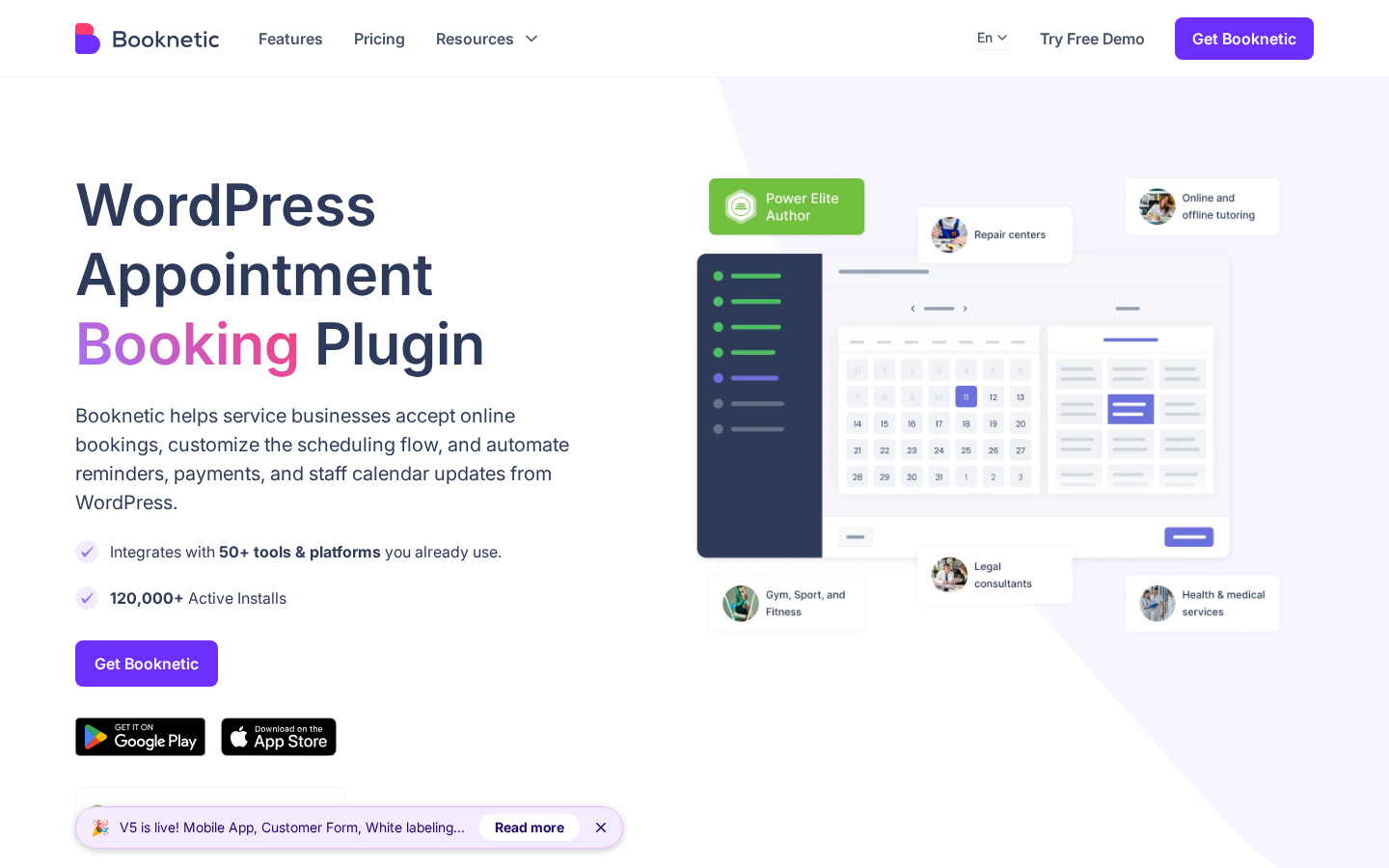
Booknetic is a WordPress appointment booking plugin published by FS Code. It installs as a standard WordPress plugin, lives inside wp-admin, and gives you a full appointment management workspace without a third-party SaaS dashboard. The whole flow stays inside WordPress, which is the main reason teams pick it over Calendly, Acuity, or SimplyBook.me when they already run a WordPress site.
The plugin’s job is to take a public booking request from a website visitor and turn it into a confirmed appointment on a staff member’s schedule, with the right reminder, the right payment, and the right calendar sync attached. That sounds simple, and the customer side is. The admin side does a lot more:
- Render a multi-step public booking flow on any WordPress page or post via shortcode, Gutenberg block, Elementor widget, or Divi module.
- Sell single appointments, recurring appointments, group sessions, package bundles, and tipping or deposits.
- Manage staff, services, locations, breaks, days off, and holidays from one settings layer.
- Accept payments through 10 or more payment gateways depending on the tier.
- Sync to Google Calendar, Outlook Calendar, Zoom, Google Meet, or VivoMeetings.
- Fire automated workflows on booking events with email, SMS, WhatsApp, Telegram, or HTTP/HTTPS request actions.
- Run a customer panel where clients can rebook, reschedule, or cancel without contacting staff.
- Display the booking system in 35+ languages with full RTL layout support.
- White-label the admin and customer panels for agency or reseller use.
The current release is the v5 series. The homepage banner highlights three v5 additions: the Mobile App, an updated Customer Form, and white labeling. Each is covered in its own section below.
Who Booknetic is best for
I do not think any plugin is right for everyone, and Booknetic is no exception. Here is the honest fit filter.
Strong fit:
- Service businesses that already run on WordPress and want a self-hosted booking system, not a SaaS subscription.
- Salons, spas, clinics, dental practices, gyms, fitness studios, tutoring centers, repair shops, photography studios, and legal or financial consultants.
- Multi-location brands that need to route staff and services per location with shared customer records.
- Agencies that build sites for service businesses and want one booking plugin they can resell under their own brand.
Weak fit:
- Hobbyists or solo founders running one booking page who only need to capture a name, an email, and a 30-minute slot. A free Calendly-style page is enough.
- Teams that have committed to a SaaS booking tool (Acuity, Calendly, SimplyBook.me) and want analytics across non-WordPress channels.
- Buyers who require a fully open-source, GPL-only stack with no paid annual license. Booknetic is paid-only.
If you fall into the strong-fit group, the next sections show how the plugin behaves once you start clicking.
The customer-facing booking widget
The booking widget is what your customer sees, and Booknetic builds it as a multi-step flow that hides behind a shortcode you drop into any page or post. The default sequence walks the visitor through Location, Staff, Service, Date and Time, Information, Cart, and Confirmation. You can reorder the steps, hide steps you do not need, and pre-fill any step from a URL parameter, which is the way most teams build separate landing pages for separate services.
What I look at first in a public booking widget is whether the flow gets out of its own way. Booknetic’s widget does. The slot picker is a clean calendar with a grid of available times next to it, the staff and service screens use card-style selection rather than a dropdown maze, and the cart step lets a customer add a second appointment or extra services without restarting.
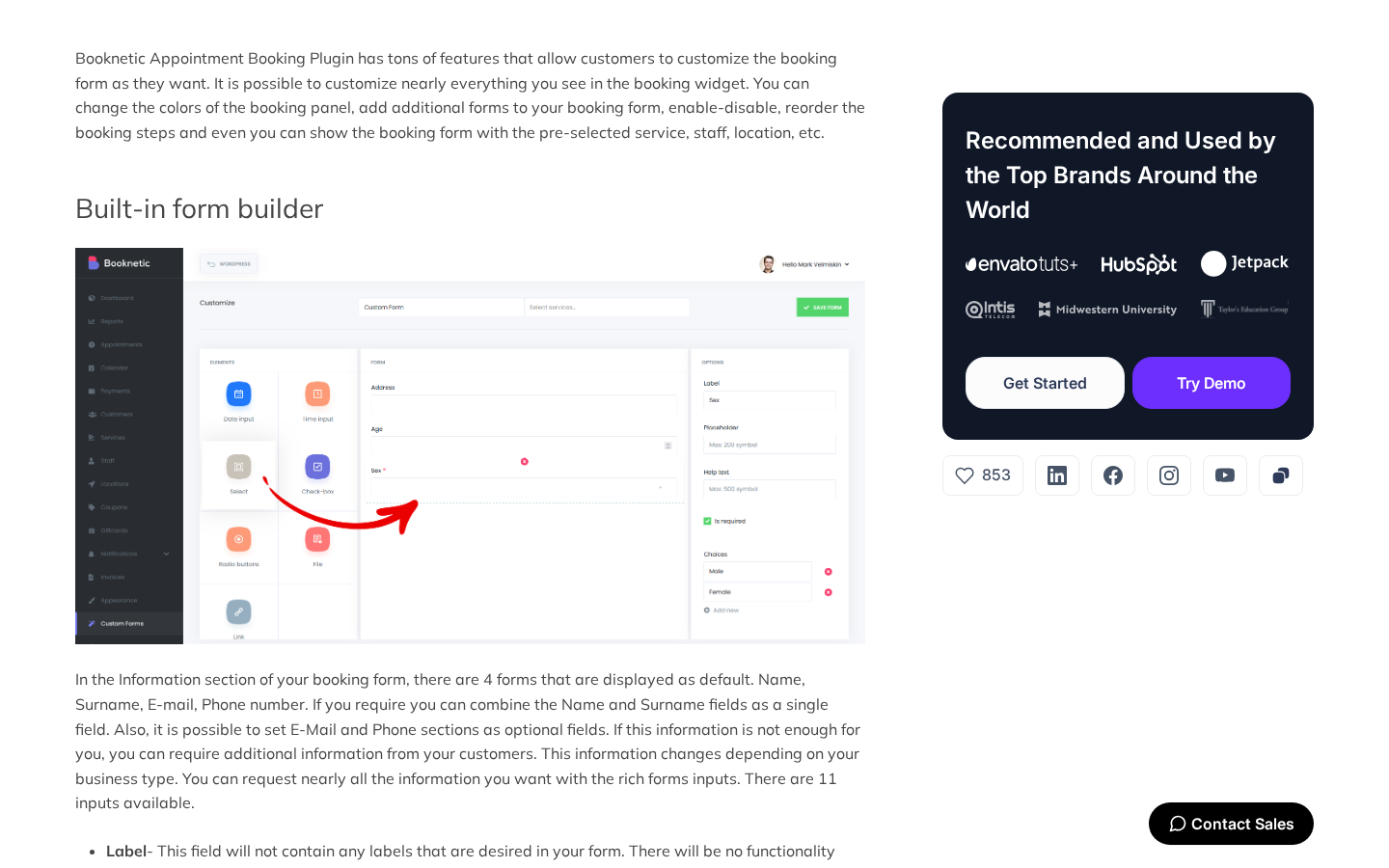
The form builder behind the Information step is where Booknetic separates from lighter booking plugins. You can add custom fields with conditional logic, mark fields as required or optional, switch field types, set placeholder and help text, and group fields per service. That is more form control than most of the plugins I have reviewed in this category give you without a paid form add-on stacked on top.
A few small details that the public demo makes obvious:
- The widget is responsive without extra styling work. The same shortcode renders cleanly on a phone, a tablet, and a laptop.
- Custom durations live on the service, so the slot picker correctly offers 30, 45, 60, or 90 minutes per service rather than forcing every service into one global slot length.
- The widget supports multilingual rendering. If your WordPress install is bilingual, the field labels and the buttons translate without a second shortcode.
- A direct booking link can pre-select location, service, and staff. That is what teams use for “Book Sofia for a haircut on Friday” landing pages and for paid ad creatives.
Hands-on setup and the admin user experience
Booknetic installs the way any premium WordPress plugin does. You download the plugin ZIP from your Booknetic account, upload it through Plugins > Add New > Upload Plugin, activate, and finish the license step. Activation prompts you for your purchase code and binds the license to your domain.
The first run experience is built around an admin dashboard that summarizes the booking system at a glance: total appointments, total revenue, and new customer counts, with a revenue graph and a list of upcoming appointments at the top.
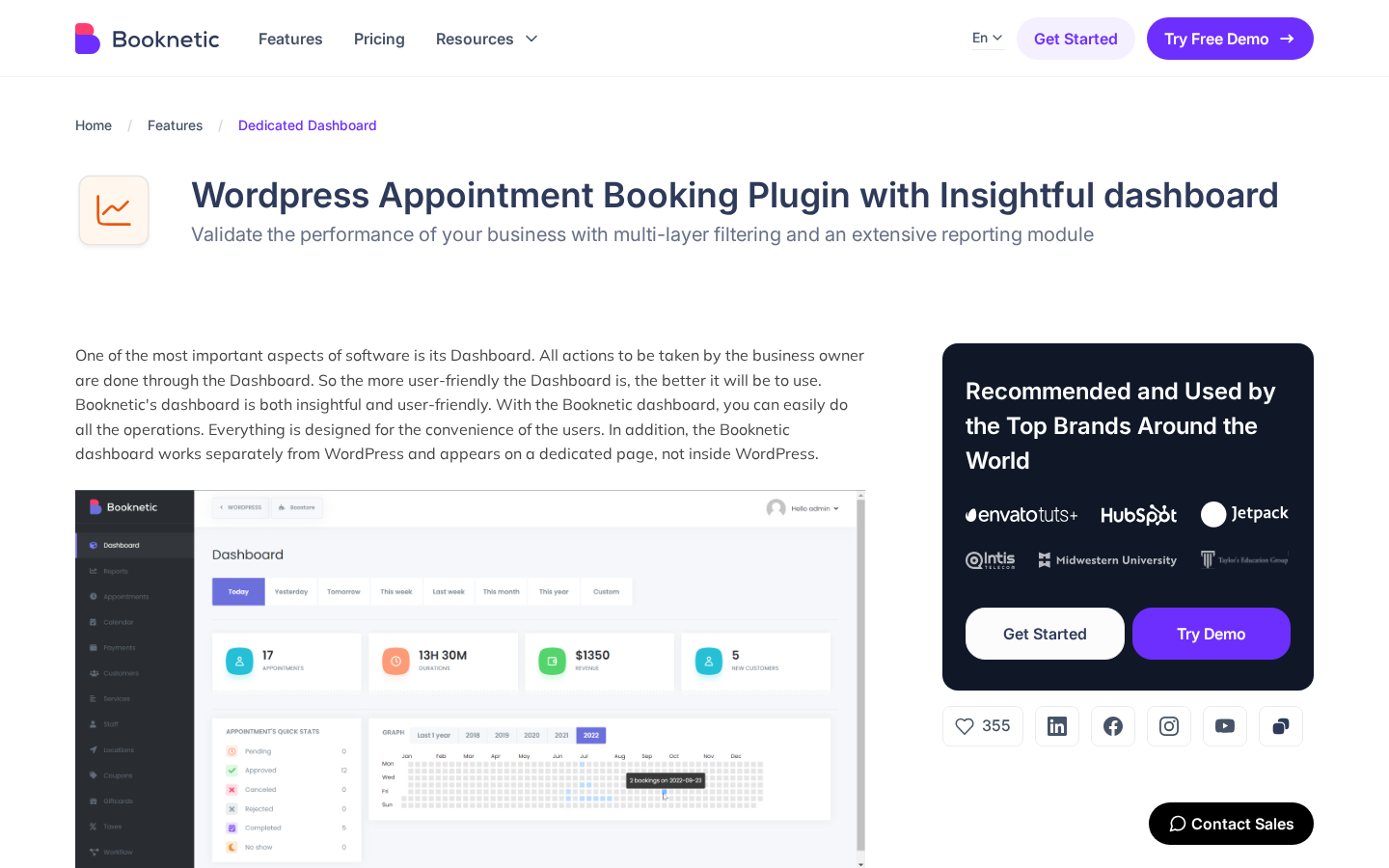
The navigation sidebar groups the admin into clear modules: Dashboard, Calendar, Appointments, Services, Staff, Locations, Customers, Custom Forms, Coupons, Giftcards, Taxes, Workflow, Invoices, Boostore, Logs, and Settings. Each module loads as its own screen, which keeps the UI focused even on a small admin display. Settings and integrations have their own nested screens rather than a single endless preferences page.
A few rough edges worth flagging:
- Some admin screens are dense by default. Filtering options, day-off settings, and per-service customization tabs sit two or three layers deep, which is fine for an experienced admin but slows down a new team member.
- The mobile responsiveness on the admin side is workable but not as polished as the public widget. Most business owners will manage from a laptop, and potentially the Mobile App once it reaches general availability, rather than from wp-admin on a phone.
- The plugin enables a lot of features by default. New admins will want to take a deliberate first pass through Settings to disable anything they will not use.
None of these are deal-breakers. They are the cost of a plugin that does this much, and they are normal for the category.
Admin calendar and appointment management
The admin calendar is the screen I look at the most when I review a booking plugin. Booknetic gives you month, week, day, and list views, with appointments rendered as colored cards on the day they fall on. You can filter by location, by service, by staff, by status, or by date range, click an appointment to open its detail panel, drag a card to reschedule, or use the Advanced Filter to narrow a busy week to a single staff member’s schedule.
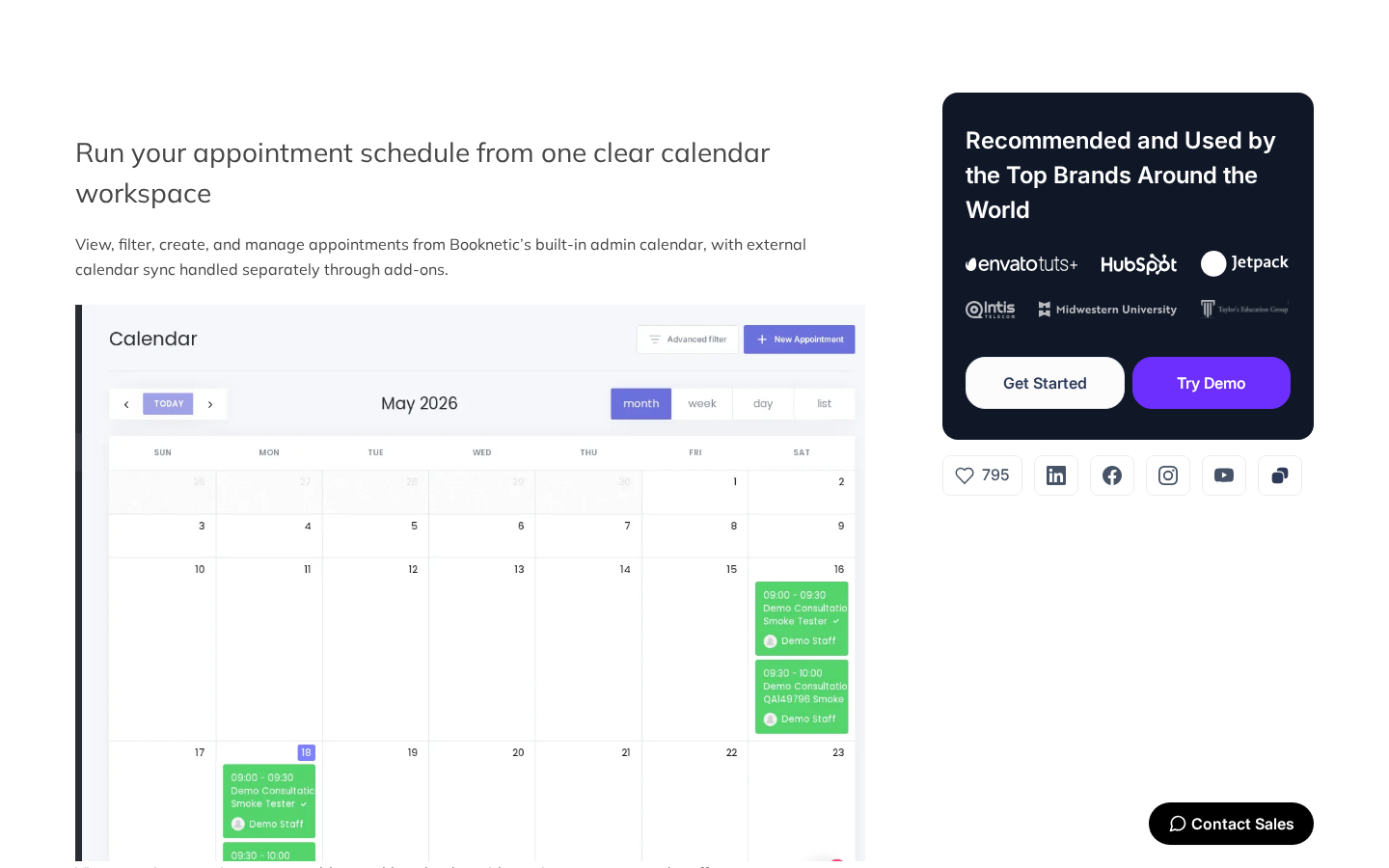
What I want from a booking calendar is a single place to answer the question “what is on the books, and is anything double-booked?” The Booknetic calendar answers that directly. Status badges on each card show pending, approved, completed, or canceled. The detail panel exposes the customer record, the assigned staff member, the service notes, the price, and the payment status. Re-assigning an appointment to a different staff member is one dropdown change inside the same panel.
The Appointments screen is the table view of the same data, which I prefer for end-of-day reconciliation. From there you can bulk-update status, export to CSV, or jump into a customer record.
Booking creation inside the admin happens through the New Appointment button on the calendar. The wizard mirrors the public widget’s step order, which keeps the admin and customer flows consistent. Staff members with admin access can create back-office appointments without going through the public widget.
Two related modules sit close to the calendar:
- The Busy Slots feature lets you block time on a staff member’s schedule without creating a real appointment. That is what you use for staff meetings, training time, or simply “do not book me before 11 AM on Mondays.”
- The Holidays settings block whole days for the whole business at once. Birthdays, public holidays, and store closures live here rather than in each staff calendar.
Note on basis: drag-to-reschedule on the calendar and the New Appointment wizard were exercised via the public demo and the Manageable Calendar feature page. Per-staff Busy Slots and Holidays settings are documented but were not exercised end-to-end against a live multi-staff license in this test window.
Services, staff, locations, and capacity
Booknetic separates the four primary booking primitives into their own modules. Services define what is sold (duration, price, capacity, color, category, padding time before and after). Staff define who delivers the service (working hours, days off, breaks, services they offer, locations they work at, commission rates if billing is enabled). Locations define where the service is delivered (address, time zone, business hours, assigned staff and services). Customers are auto-created on the first booking and can be edited or imported.
Two capacity primitives are worth calling out because they change how the calendar behaves:
- Group appointments let one staff member host multiple customers in the same slot. That is how yoga classes, group fitness, group tutoring, and consultation workshops are modeled.
- Custom durations let one service offer 30, 45, 60, or 90 minutes from the same booking page. The customer picks the duration on the service step, and the slot picker honors the choice.
Together with breaks, padding, and the busy slot blocks, that gives you enough control to model salon chairs, classroom seats, equipment rentals, and one-on-one consulting from the same plugin.
Note on basis: capacity behavior was confirmed against the official feature pages and the public demo’s service configuration screens. Live multi-location, multi-staff routing was not exercised end-to-end in this test window.
Workflows and notifications
Workflows are the automation engine. A workflow is a rule that fires on an event (booking created, status changed, appointment approaching, appointment completed, payment received, and so on) and runs one or more actions. Supported actions include Email, SMS, WhatsApp, Telegram, In-App Notifications, and a generic HTTP/HTTPS request for Zapier, Make, or your own endpoint.
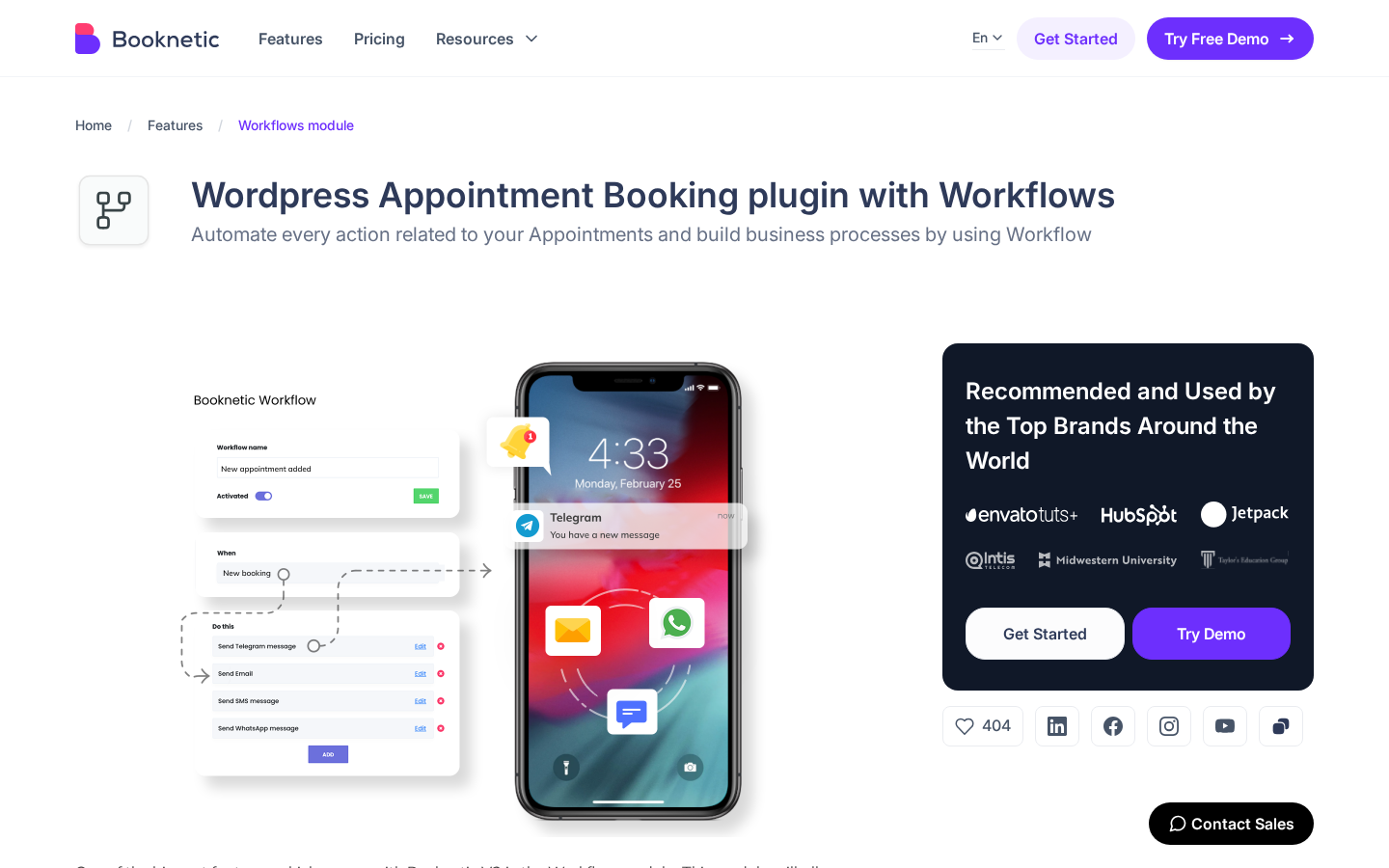
The default reminder workflow (“Send a reminder 24 hours before the appointment”) is the one every business will keep on, and it is the one I walked through inside the public demo and the Reminders feature page. The build looks straightforward: choose the trigger event, set the offset (24 hours before booking start), choose the recipient (customer, staff, or admin), drop a template, and save. Filters by location, staff, service, and status let you scope a workflow to a slice of the calendar rather than to every booking.
What I like in this builder:
- A single trigger can fire several actions in sequence. That is how you send an email and an SMS at the same offset without stacking two workflows.
- Conditional filters scope a workflow to the right segment. A “first appointment reminder” workflow can run only for customers with one prior booking. A “payment failed” workflow can fire only on the failed status.
- The HTTP/HTTPS action is the bridge to anything that is not natively integrated. Send the booking payload to Zapier, IFTTT, Make, or your own internal API and you can extend the system without writing a custom plugin.
The catch I want every buyer to plan for is that SMS, WhatsApp, and Telegram notifications all need a connected provider (Twilio or Amazon SNS for SMS, Twilio for WhatsApp, a bot token for Telegram). The actions are built in. The delivery costs are not.
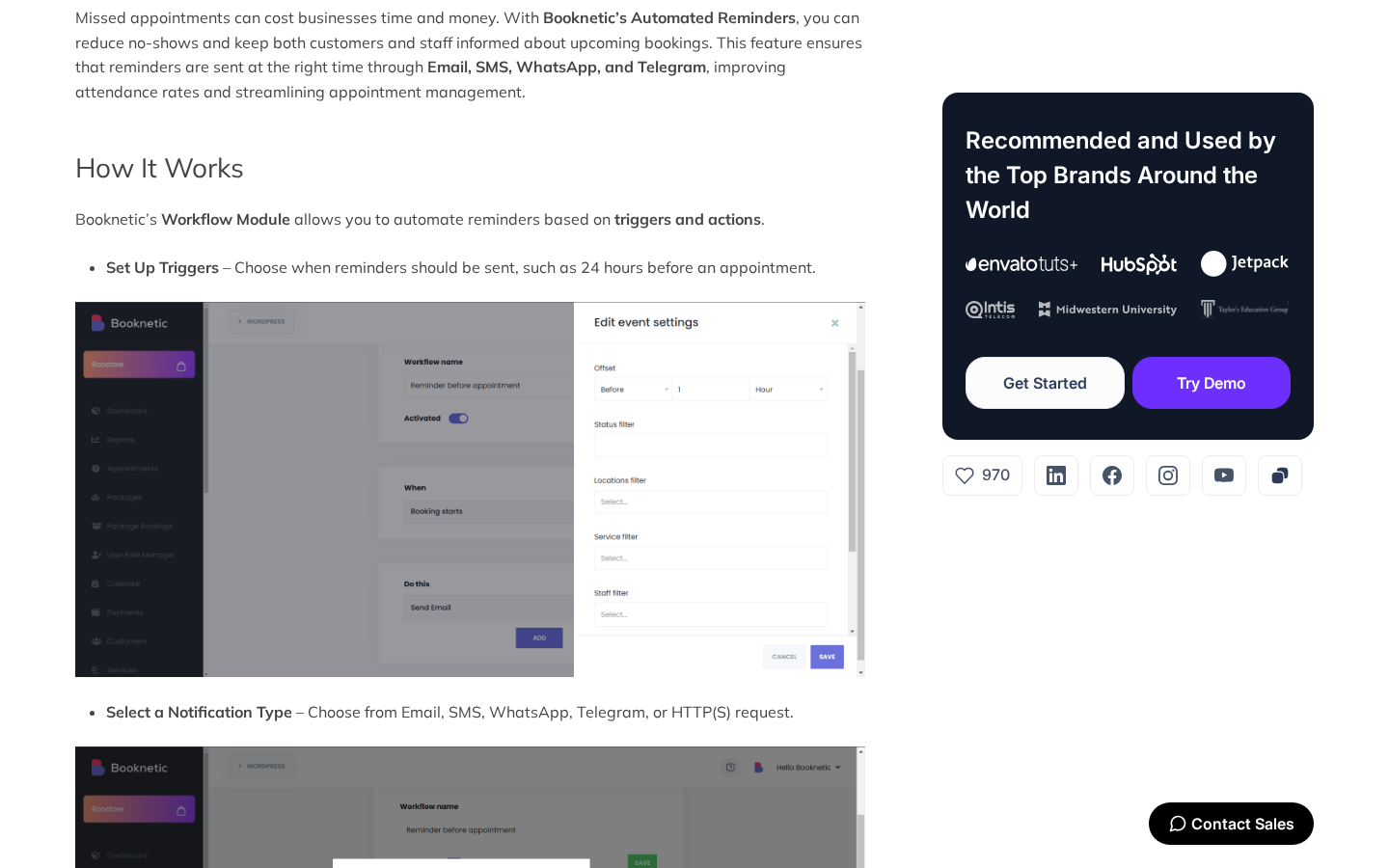
Note on basis: live SMS via Twilio, WhatsApp via Twilio, and Telegram delivery were not exercised end-to-end in this review because each consumes paid provider credits or a connected bot. The behavior described here matches the Reminders feature page, the Workflows feature page, and the per-action configuration screens shown in the official documentation.
Add-ons and the Boostore catalog
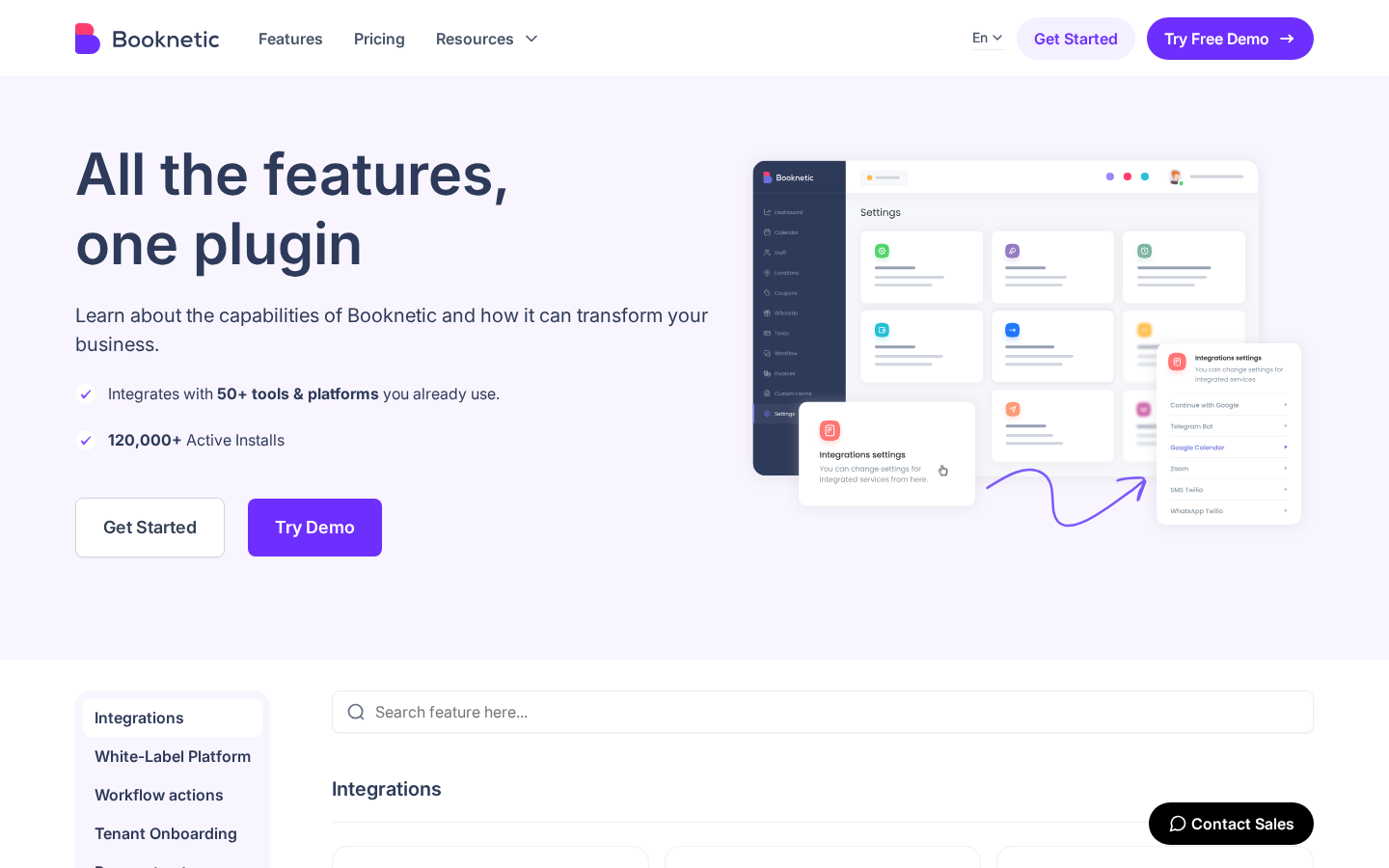
A key thing to understand about the Booknetic WordPress plugin is the add-on model. The base plugin ships a strong default set: custom forms, the booking widget, the admin calendar, the dashboard, customers, services, staff, locations, breaks, holidays, busy slots, custom statuses, the workflow engine, ratings, RTL, and white labeling. Many of the integrations and commercial extensions live on top of the base, in the in-product Boostore catalog.
Examples of what sits in the add-on layer:
- Payment gateways. Stripe, PayPal, Square, Mollie, Razorpay, Vipps, Mercado Pago, 2Checkout, Netopia, and WooCommerce Payments are each an add-on. Basic ships with on-site payments only. Standard and Premium ship with three external gateways (Stripe, PayPal, WooCommerce). Elite ships with all 10.
- Calendar and meeting sync. Google Calendar 2-way Sync, Outlook Calendar, Zoom, Google Meet, and VivoMeetings each install separately.
- Notification add-ons. SMS via Twilio or Amazon SNS, WhatsApp via Twilio, and Telegram each install separately. Email notifications are included natively.
- Reporting. The graphical Reporting module is itself a separate add-on, layered on top of the base dashboard.
- Commerce add-ons. Coupons, Giftcards, Taxes, Invoices, Deposit Payments, and Product Inventory are each their own add-on under the Billing and Monetization group.
- Customer experience add-ons. Loyalty Points, Customer Categories, Conditional Prices, Custom Durations, Waiting List, Donations, Group Appointments, Recurring Appointments, Multi-Location, Multi-Booking, Customer Birthday Greetings, Service Extras, Visual Translator, Multi-language, and Packages.
- Authentication. Continue with Google, Continue with Facebook, Google reCAPTCHA, and SMS OTP Verification.
- Branding. White-labeling and Sidebar Customization.
The Standard plan unlocks “6 Essential Add-ons,” Premium unlocks 16 advanced add-ons, and Elite unlocks the full 50+ catalog. The tier-to-feature mapping is the single most important pricing decision you will make on this plugin, because the wrong tier locks you out of the integration you actually need.
Customer panel, ratings, and packages
Booknetic includes a customer-facing panel that customers reach with their own login. From the customer panel, customers can view appointment history, rebook, reschedule, cancel, request a refund, leave a service rating, and update profile information. The panel embeds with the [booknetic-cp] shortcode and inherits site styling for Gutenberg, Elementor, and Divi pages. Sign-Up and Sign-In live behind their own [booknetic-signup] and [booknetic-signin] shortcodes, which lets you place the auth flow on bespoke landing pages.
What this layer earns you is a real self-service experience. Most service businesses lose hours per week to “can you move me from Tuesday to Thursday?” emails. The customer panel is the lever that takes that off your staff.
Two adjacent customer modules add real value:
- Ratings and Reviews collect a 1-to-5 star score and a free-text review after the service is completed. The score feeds back into the staff profile and the booking widget if you enable visible ratings, which makes the staff selection step easier for the customer.
- Packages let a business sell bundled services (a 10-session yoga pack, a haircut-plus-color combo, a six-month dental check series) and let the customer redeem package balance against new bookings. This is the module that turns Booknetic from a scheduler into a low-end vertical SaaS.
Loyalty Points, Customer Categories, and Customer Birthday Greetings round out the same group of retention tools. Each is a separate add-on and each is included on the higher tiers.
Note on basis: the customer panel was inspected through the public Customer Panel feature page and the booking demo. End-to-end refund flow against a live Stripe sandbox was not exercised in this test window.
Reporting, logs, and operational visibility
The Reporting module is where Booknetic exposes its operational telemetry. The graphical Reports screen breaks down appointments by date, by service, by staff, and by location, plus a revenue panel filtered by date range. Logs is the per-action audit trail that records every admin action with a timestamp, the actor, and the affected record. For a regulated business (clinic, legal, financial), the Logs module is often the deciding feature.
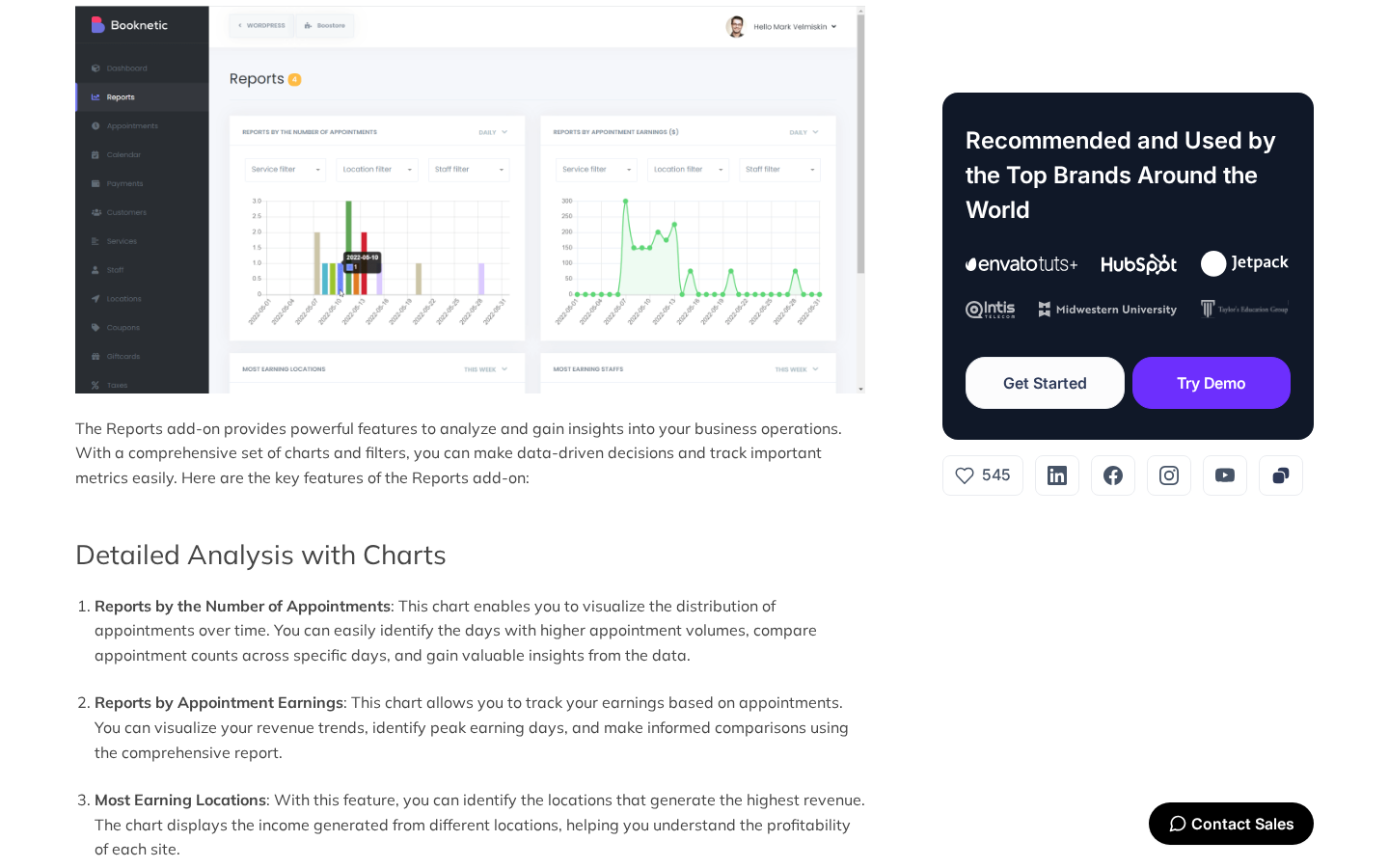
The reporting layer is intentionally local. Data lives in your WordPress database, which is a privacy advantage if you are subject to GDPR or HIPAA-style data residency rules. It is not as deep as a BI tool, but it is more than enough to answer the questions a service business cares about: which staff member is fully booked, which service is highest-margin, which location is underperforming, and which channel is driving new customers.
The Logs module also surfaces failed actions: missed SMS deliveries, payment retries, workflow errors. Recovering from a failed booking is a one-click retry from the same screen, which is what good ops monitoring looks like in this category.
Mobile App (v5)
The Mobile App is one of the v5 announcements on the Booknetic homepage and is positioned as an iOS and Android application for staff and business owners to manage appointments, customer profiles, and schedules from their phones, with permission control via password or QR code login.
An important caveat the live Mobile App feature page makes clear, and the one buyers should plan around: at the time of writing, the page itself states the mobile app feature is “coming soon and is not yet available.” The product pages show the planned UI and a Manage Users seat panel, the Google Play and App Store badges are present, but the public app stores were not the source of an installable build during this review window.
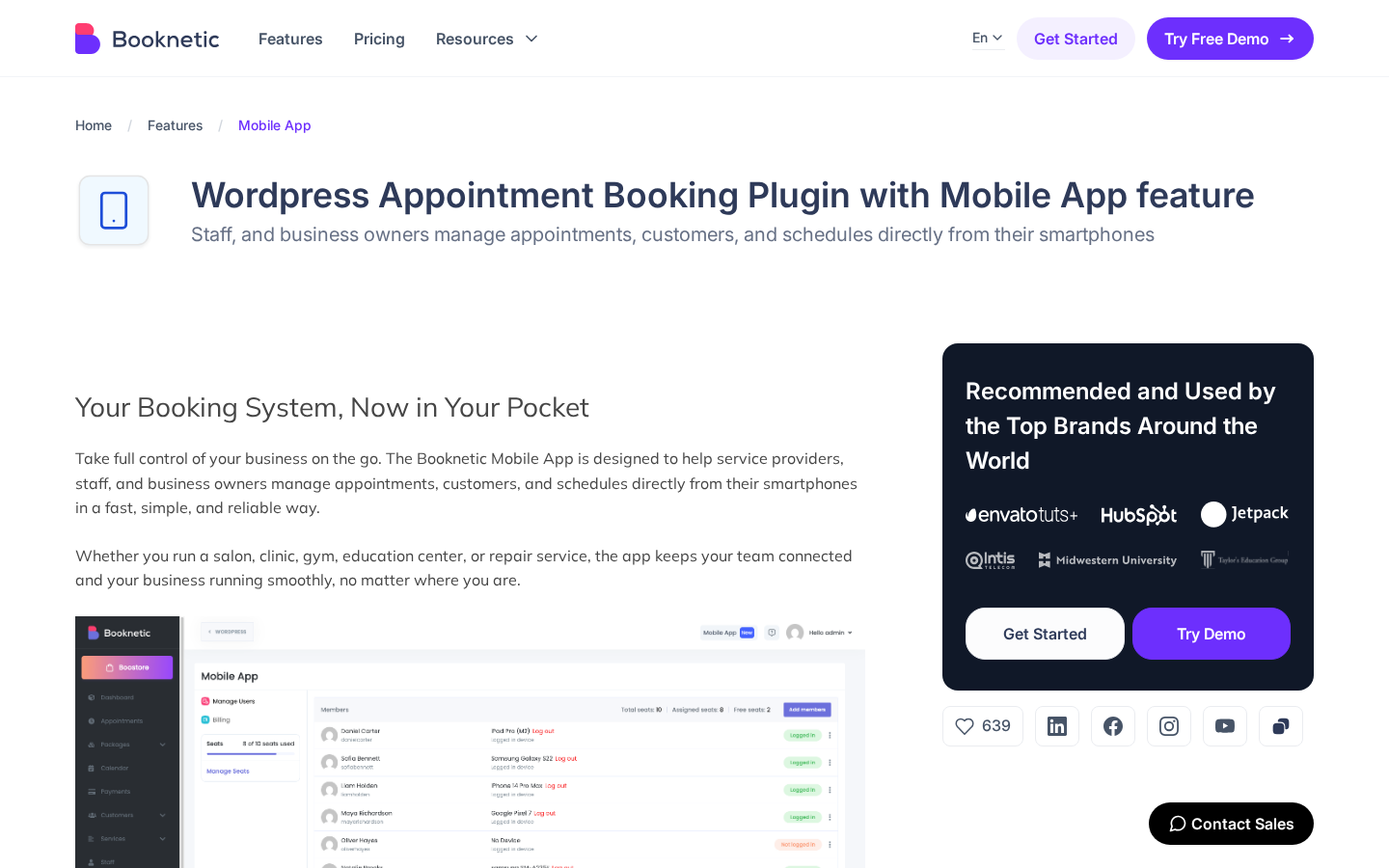
What the app is set up to do, according to the official feature page:
- A staff appointment view, with day, week, and list layouts that mirror the wp-admin calendar.
- A customer record view that lets a staff member look up a phone number or an email between appointments.
- A check-in flow with QR code support for in-person businesses (clinics, gyms, classrooms).
- A seat-based subscription model where each user with phone access is its own seat.
Even with the feature page flagging the app as not yet available, the pricing page already lists Mobile App seat allowances per tier. Standard reserves 1 seat. Premium reserves 3. Elite reserves 5. The seats are part of the license bundle today, and the implication is that they unlock the app when general availability lands. Buyers who are choosing a tier specifically to lock in the mobile workflow should treat the seat count as a forward-looking inclusion rather than as a feature they can use on day one.
Note on basis: the iOS and Android apps were not exercised on a live device in this test window because the official feature page lists them as not yet available. The capabilities described here are taken from the Mobile App feature page, the Manage Users seat panel illustration, and the tier-level seat allowance on the pricing page.
White-label platform (v5)
White labeling is the feature that pulls Booknetic into the agency and reseller market. It rebrands the admin, the customer panel, the booking widget, the emails, and even the plugin’s WordPress menu entry under your own brand. Agencies use it to ship “your booking app” to a client without telling them which plugin is underneath. Tenant Onboarding (a separate feature on the Features page) is the multi-tenant variant for SaaS-style installations.
White labeling is included on the higher tiers. The Basic and Standard plans do not ship it. If your business case is “agency installs Booknetic on twenty client sites under our brand,” Elite or Lifetime is the right starting point.
Pricing and license value
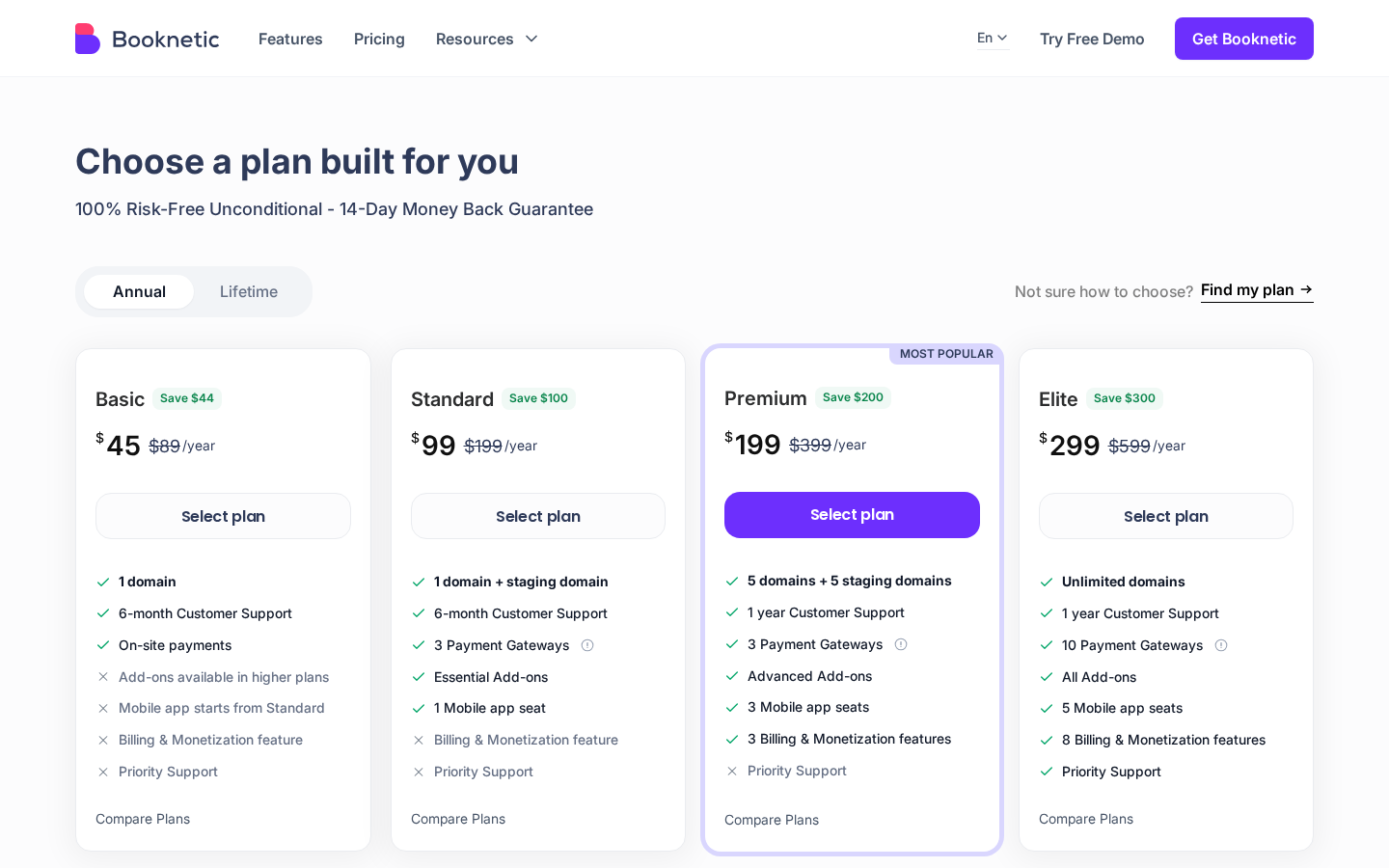
Booknetic is paid-only and sells four annual subscription tiers plus an optional Lifetime upgrade on every tier. At the time of writing, the listed pricing is:
- Basic. $45 for the first year (renews at $89). $99 one-time Lifetime. 1 domain. 6-month support. On-site payments only. No add-ons. No mobile app seat.
- Standard. $99 for the first year (renews at $199). $239 one-time Lifetime. 1 domain + 1 staging. 6-month support. 3 payment gateways (Stripe, PayPal, WooCommerce). 6 essential add-ons. 1 mobile app seat.
- Premium. $199 for the first year (renews at $399). $599 one-time Lifetime. 5 domains + 5 staging. 1 year of support. 3 payment gateways. 16 advanced add-ons. 3 mobile app seats. 3 billing and monetization features.
- Elite. $299 for the first year (renews at $599). $899 one-time Lifetime. Unlimited domains. 1 year of support. 10 payment gateways. All 50+ add-ons. 5 mobile app seats. 8 billing and monetization features. Priority support.
Every plan ships under a 14-day money-back guarantee.
The pricing math is straightforward if you decide based on which add-ons you need rather than on the lowest sticker number:
- Basic is the wrong tier for almost every real service business. With on-site payments only and no add-ons, you cannot accept an online card, you cannot use Google Calendar two-way sync, and you cannot send SMS reminders. It is fine as a personal-use license and nothing else.
- Standard is a real starting point for a single-location business that takes online payment through Stripe or PayPal and is willing to live without the SMS, Zoom, or Loyalty Points add-ons.
- Premium is the tier I would recommend for most active service businesses. The 16 advanced add-ons include the high-leverage features (Loyalty Points, Group Appointments, Recurring Appointments, Multi-Location, Custom Durations, Conditional Prices, and the calendar and video sync add-ons). 5 domains plus 5 staging is enough for a brand with multiple sites or for a developer running one production and one staging copy.
- Elite is the agency, multi-location, or white-label answer. Unlimited domains, all 50+ add-ons, 5 mobile app seats, and priority support are the agency-ready bundle.
- Lifetime is the long-horizon decision. If you forecast more than three years of use on the same site, Lifetime makes the renewal math go away. The Elite Lifetime at $899 is the strongest deal across the four tiers if you will use the add-ons.
The renewal price is the part I want every buyer to plan for. Standard jumps from $99 to $199. Premium jumps from $199 to $399. Elite jumps from $299 to $599. The plugin is still worth its renewal price for an active service business, but only if you went in expecting it.
Is Booknetic the best WordPress booking plugin for service businesses?
This is the question the SEO landscape rewards with a real answer. Based on the review I ran for this post, Booknetic is one of the best WordPress booking plugins available in 2026 for service businesses that want a full WordPress-native booking system, and it is the strongest fit when:
- You need a step-by-step customer booking flow with custom forms, group capacity, and recurring sessions.
- You need a workflow engine that can fire Email, SMS, WhatsApp, Telegram, and HTTP webhooks on booking events.
- You need a customer self-service panel that handles rebook and reschedule without a support ticket.
- You sell packages, deposits, coupons, gift cards, or loyalty points alongside appointments.
- You manage more than one location or want a white-labeled admin for clients.
It is not the best fit when:
- You only need a single-page Calendly-style booking link with no admin overhead.
- You want a free plugin without buying a license.
- You depend on a SaaS analytics dashboard outside WordPress.
If you want a wider field of WordPress booking plugins to compare, our plugin reviews hub is the right next read.
Pros and cons
Pros
- Deep WordPress-native booking system: step-by-step widget, admin calendar, services, staff, locations, custom forms, workflows, customer panel, and Boostore all inside wp-admin.
- 50+ tools and platforms supported (Stripe, PayPal, Square, Mollie, Razorpay, Vipps, Mercado Pago, 2Checkout, Netopia, WooCommerce, Zoom, Google Meet, VivoMeetings, Google Calendar, Outlook, Twilio SMS, WhatsApp, Telegram, Mailchimp, Webhook).
- Workflows engine handles Email, SMS, WhatsApp, Telegram, In-App, and HTTP/HTTPS request actions with per-segment filters.
- Group appointments, recurring appointments, custom durations, packages, and deposits cover real service-business billing models.
- Customer self-service panel reduces rebook and reschedule admin work.
- 35+ languages with full RTL support.
- White labeling, multi-location, and reseller features included on higher tiers.
- 120,000+ active installs and a Power Elite Author badge on Envato.
- Lifetime licenses are available on every tier, which removes renewal risk.
Cons
- No free tier on the Booknetic pricing page. Every site needs a paid license.
- Basic plan has no external payment gateways and no add-ons. Most real businesses will need to start at Standard or Premium.
- Renewal prices roughly double after the first year (for example Premium $199 to $399).
- The Mobile App feature page currently states the app is “coming soon and is not yet available,” even though seats are reserved per tier on the pricing page.
- SMS, WhatsApp, and Telegram delivery requires a connected paid provider (Twilio, Amazon SNS, or a bot token).
- The admin UI has a learning curve. Filters and per-service options sit several tabs deep.
Alternatives to Booknetic
I would not recommend any booking plugin without saying who it loses to. Here are the alternatives I see most often and how they compare.
- Amelia. The closest direct competitor inside WordPress. Similar feature surface, similar pricing model, plan-tier-bound features. Pick Amelia if its plan structure happens to bundle the exact integrations you need at a price you prefer. Pick Booknetic if you want a deeper add-on catalog or the announced (coming-soon) mobile app on the roadmap.
- Bookly Pro. Long-established booking plugin with a comparable add-on model. Lower default surface than Booknetic; you build up to feature parity by stacking add-ons. Reasonable choice if you already use Bookly on existing sites.
- LatePoint. Single-tier license and an active product roadmap. Simpler add-on story than Booknetic, lighter on multi-location and reseller features. A good pick for solo practitioners and small businesses that want one license, not a tier matrix.
- FluentBooking. Newer entry from the Fluent family. Cleaner default UI, leaner feature set, fast roadmap. A good pick if you want a modern UI and you are willing to wait for parity on the deeper booking features.
- SaaS schedulers like Calendly, Acuity, and SimplyBook.me. These run outside WordPress, charge per user per month, and are stronger on cross-team scheduling. Pick them if your booking workflow does not live on WordPress or if you do not run a website at all.
For most WordPress-first service businesses, the real comparison is Booknetic vs Amelia vs LatePoint. Booknetic wins on feature breadth and add-on count. Amelia wins on packaging when your tier bundles the right add-ons. LatePoint wins on simplicity.
Final verdict
Booknetic does the thing it sets out to do. It is a WordPress appointment booking plugin that can run a serious service business inside WordPress, and it has the depth (custom forms, workflows, packages, loyalty, group bookings, multi-location, white label) to grow with you for years.
If I had to recommend it in one paragraph: skip the Basic plan, buy Premium if you run a single-location or small multi-location service business and you want the high-leverage add-ons, buy Elite if you are an agency or you need every payment gateway, and consider Lifetime if you forecast more than three years on the same site. The renewal price is the only buying decision I would warn about, and even at renewal the value math still favors Booknetic for an active service business. As far as an appointment scheduling plugin for WordPress goes in 2026, this is the one I would install on my own staging site next week without hesitation.