

Quick verdict
Quick verdict
Pretty Links is one of the easiest WordPress link cloaking plugins to recommend for bloggers and affiliate publishers. The free plugin covers branded links and basic tracking well. Pretty Links Pro is the better fit when affiliate revenue is serious enough to justify automation, A/B split testing, geolocation rules, and deeper reports.
Pretty Links is still one of the easiest WordPress plugins for turning long affiliate URLs into branded short links on your own domain. In the free version, I like how quickly you can create a clean link, choose a 301, 302, or 307 redirect, add nofollow or sponsored attributes, and see basic click data without leaving WordPress.
The catch is that the best automation lives in Pretty Links Pro. If you want automatic keyword replacement, A/B split testing, geolocation rules, advanced redirect types, conversion reports, or link health monitoring, you need a paid plan. That is not unusual for an affiliate link management WordPress plugin, but it does matter if you are comparing Pretty Links vs ThirstyAffiliates or SliceWP.
My verdict: Pretty Links is best for bloggers, podcasters, YouTubers, and affiliate site owners who want a polished WordPress link cloaking plugin with simple reporting and room to grow into Pro features. It is less compelling if you need a full affiliate program, creator payouts, or non-WordPress link management.
Pretty Links at a glance
At a glance
Free version: Yes, available on WordPress.org.
Best fit: Affiliate publishers, bloggers, podcasters, YouTubers, and content teams that want branded links and click tracking inside WordPress.
Test basis: Free workflow review, WordPress.org listing/screenshots, official feature documentation, and official pricing checked on August 27, 2026.
Bottom line: Start free for basic cloaking and tracking; consider Pro for keyword replacement, geolocation, split tests, and link health.
| Item | Details |
|---|---|
| Plugin type | WordPress link cloaking, branded short links, affiliate link management, click tracking |
| Free version | Yes, on WordPress.org |
| Current WordPress.org rating checked | 4.8 out of 5 stars with more than 1,300 reviews |
| Best for | Affiliate marketers, bloggers, podcasters, course creators, YouTubers, and content teams |
| Main free strengths | Branded links, 301/302/307 redirects, nofollow/sponsored toggles, click and unique-click tracking, CSV import/export, bot filtering |
| Main Pro strengths | Keyword replacement, cloaked redirects, split testing, geolocation and device targeting, link health, advanced reports, QR codes, add-ons |
| Pricing checked | Beginner $99.60/year intro, renews at $249/year; Marketer $149.60/year intro, renews at $374/year; Super Affiliate $199.60/year intro, renews at $499/year |
| Money-back guarantee | 14 days |
What is Pretty Links?
Pretty Links is a WordPress plugin that lets you create branded short links from your own domain. Instead of sharing a long affiliate URL with tracking parameters, you can publish a cleaner link such as yoursite.com/go/tool-name or yoursite.com/recommends/product.
That short URL can redirect visitors to a destination, record click activity, and centralize link edits. If an affiliate program changes its destination URL, you update one Pretty Link in WordPress rather than hunting through old blog posts, emails, podcast show notes, and social profiles.
The plugin is especially popular with affiliate publishers because it combines four jobs in one place:
- Link cloaking and branded short URLs
- Affiliate link organization
- Click tracking and reports
- Paid automation through Pretty Links Pro
Hands-on setup and user experience
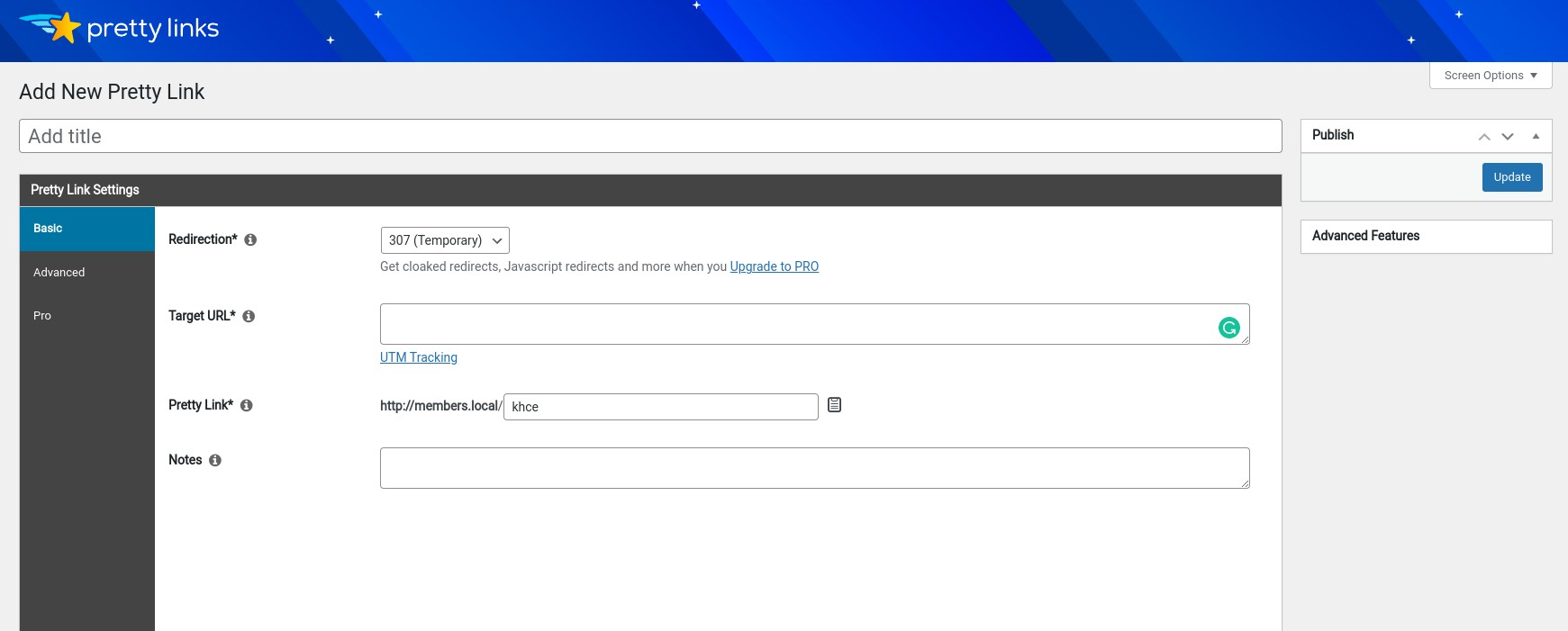
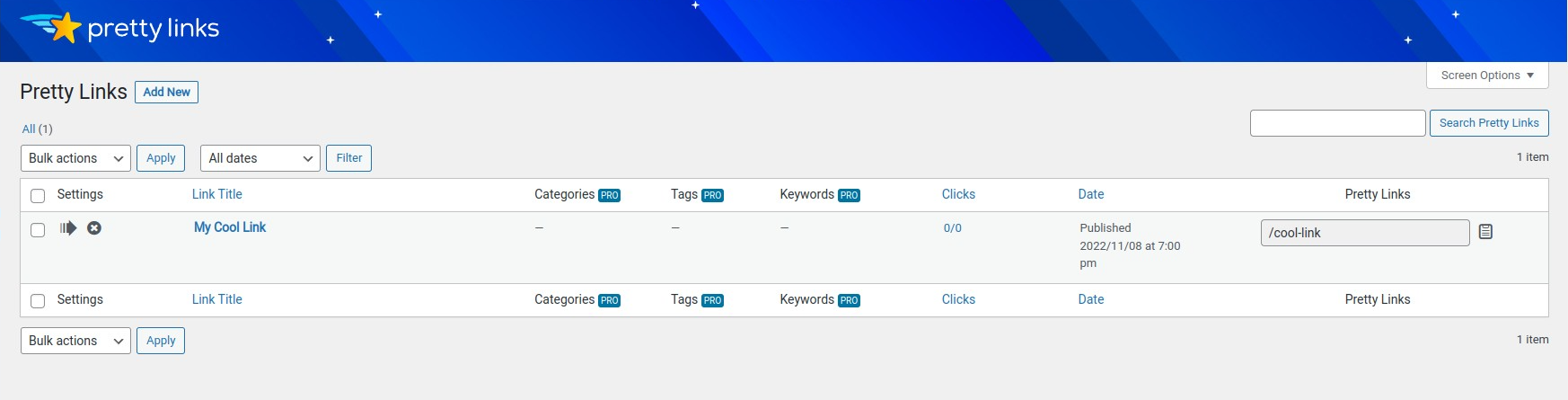
For the free version, the core workflow is straightforward. You install Pretty Links from WordPress.org, open the Pretty Links menu, and create a new link from the Add New Pretty Link screen. The interface asks for a title, redirect type, target URL, and the branded slug you want to use.
The main link editor is practical rather than flashy. The important fields are visible without needing to dig through multiple panels. A beginner can create the first short link in a few minutes, while an experienced affiliate manager can still use notes, groups, reports, and tracking options to keep a growing library organized.
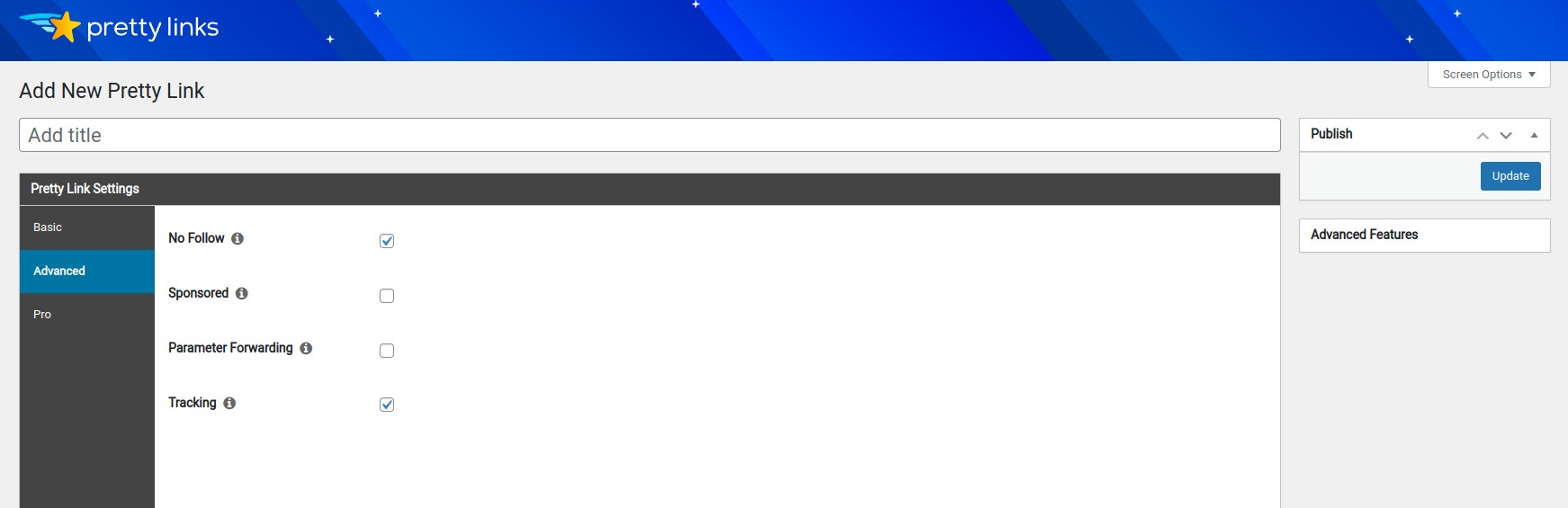
The free plugin also gives you useful advanced toggles. You can mark a link as nofollow, sponsored, enable parameter forwarding, and turn tracking on or off. That matters because affiliate sites often need both tracking control and clean link attributes for search compliance.
I would not call the free interface a full analytics suite. The click data is useful for quick checks, but advanced reporting, conversion tracking, and split testing are Pro territory. Still, for a free Pretty Links WordPress plugin install, the basic experience is friendly and fast.
Link cloaking and redirect controls
Pretty Links starts with the feature most people search for: link cloaking. In the free version, you can create a branded URL on your own domain and choose standard redirect types such as 301, 302, and 307.
For affiliate links, I would usually avoid using a permanent 301 unless I am sure the relationship and destination will not change. A 302 or 307 is often safer for promotional and affiliate destinations because it signals that the redirect may change later.
Pretty Links Pro adds more redirect types, including cloaked redirects, JavaScript redirects, meta refresh, tracking pixel redirects, and branded splash page redirects. Those options are useful for advanced campaigns, but they also require judgment. Some affiliate networks dislike iframe-style cloaking or unusual redirect methods. Before using aggressive cloaking, check your affiliate program terms.
Click tracking and reports
Click tracking is one of Pretty Links’ strongest free features. The WordPress.org listing describes click and unique-click tracking, with logged data such as referrer, IP, browser, operating system, and host data. The plugin has also added modern bot filtering and privacy controls, including IP anonymization and a configurable click-retention window.
In practical terms, this helps you answer basic questions:
- Which affiliate links are being clicked?
- Which older posts still send traffic?
- Are people clicking from email, social, search, or another referrer?
- Do some campaign URLs get many bot clicks?
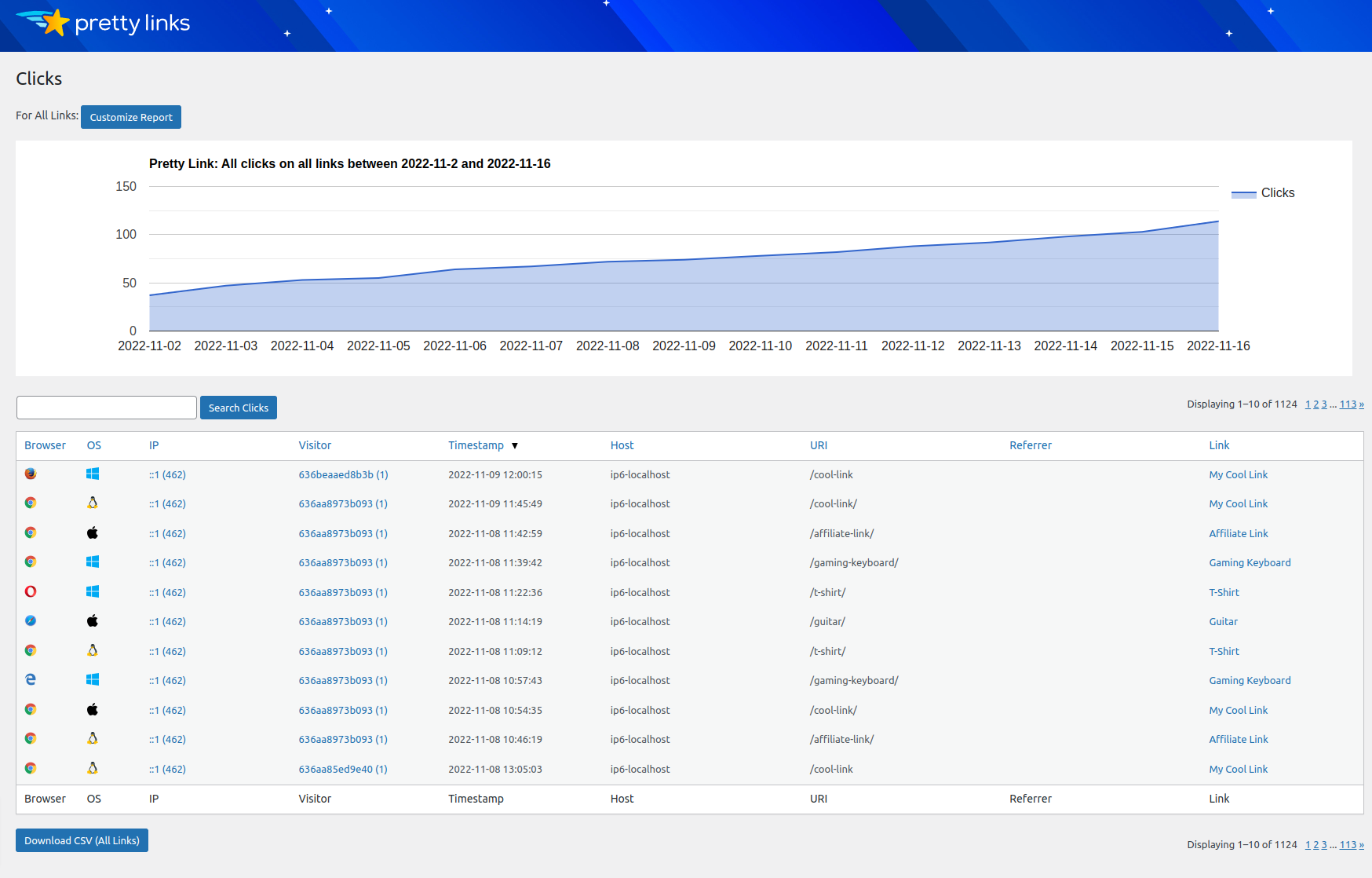
The free reports are enough for directional decisions. If you are optimizing paid campaigns, running controlled experiments, or trying to connect clicks to conversion events, the Pro reports and conversion tracking pixel become more relevant.
A/B split testing and link rotation
Pretty Links Pro includes link rotation and A/B split testing. This lets you send traffic from one branded Pretty Link to multiple destinations, either by weight or rotation, and then compare performance.
That can be useful in several affiliate scenarios:
- Testing two landing pages for the same product
- Comparing a direct vendor page against a comparison article
- Rotating traffic across two partner offers
- Sending a small percentage of clicks to a new offer before committing
The important limitation is that split testing is a Pro feature. If your only need is simple link cloaking, the free version is enough. If you want to optimize revenue per click over time, this is one of the stronger reasons to consider Pretty Links Pro.
Geolocation, device, browser, and time targeting
Pretty Links Pro also includes geographic, device, browser, operating system, day, and time targeting. This is valuable if the same link should not send every visitor to the same destination.
For example, an affiliate site could send US visitors to one merchant, UK visitors to another, and mobile visitors to a lighter landing page. A course creator could send weekend campaign clicks to a specific offer page. A publisher could route expired promotion traffic to a fallback page.
This is a real advantage over basic short-link plugins. It also adds complexity. Geo and device rules should be documented carefully, because a link that behaves differently by country or device can be harder to debug later.
Automatic keyword replacement
Automatic keyword replacement is another major Pretty Links Pro feature. You assign keywords or phrases to a Pretty Link, and the plugin can turn matching words in posts, pages, custom post types, or comments into affiliate links.
This can save a lot of time on large content sites. If you have 200 articles mentioning the same tool, automatic keyword replacement can place links consistently without editing every article manually.
I would use it carefully. Auto-linking too many keywords can make content feel spammy, create repetitive anchors, or place affiliate links in contexts where they do not help the reader. The best setup is conservative:
- Use exact product names rather than broad generic keywords
- Limit replacements per page
- Exclude sensitive pages where affiliate links should not appear
- Review important money pages manually after enabling replacements
Used well, this feature is a time saver. Used aggressively, it can hurt readability.
Link health, QR codes, and add-ons
Pretty Links Pro has become more than a basic cloaking plugin. The current WordPress.org listing and official pricing page mention link health monitoring, QR codes, Pretty Bar branding, advanced reports, conversion tracking, Redirect Turbo Mode, and several add-ons.
The optional Pro add-ons include Link in Bio, Product Displays, Splash Pages, UTMs, User Links, and Developer Tools. These features push Pretty Links closer to a campaign management toolkit for creators.
My favorite additions are practical ones: link health, QR codes, UTMs, and product displays. Link in Bio and Splash Pages may be useful for some creators, but they are not must-have features for every affiliate blog.
Pretty Links free vs Pro
The free version is good if you need branded links and basic tracking. Pretty Links Pro is for automation, advanced redirects, and optimization.
| Feature | Free | Pro |
|---|---|---|
| Branded short links on your domain | Yes | Yes |
| 301, 302, and 307 redirects | Yes | Yes |
| Click and unique-click tracking | Yes | Yes |
| Nofollow and sponsored controls | Yes | Yes |
| CSV import/export | Yes | Yes |
| Keyword and URL replacement | No | Yes |
| Cloaked, JavaScript, meta refresh, tracking pixel, and splash page redirects | No | Yes |
| Link rotation and A/B split testing | No | Yes |
| Geographic, device, browser, OS, day, and time targeting | No | Yes |
| Link health monitoring | No | Yes |
| Advanced reports and conversion tracking | No | Yes |
| Pro add-ons | No | Varies by plan |
If you only cloak a handful of links, start free. If affiliate links are a meaningful revenue channel, Pro becomes easier to justify because it saves editorial time and gives you more control over campaigns.
Pretty Links pricing in 2026
I checked the official Pretty Links pricing page on August 27, 2026. The public pricing page showed three annual Pro plans:
| Plan | Intro price | Renewal price shown | Sites | Best fit |
|---|---|---|---|---|
| Beginner | $99.60/year | $249/year | 1 site | Solo site owner who wants Pro automation on one WordPress site |
| Marketer | $149.60/year | $374/year | 2 sites | Affiliates who want split testing and more strategic campaign tools across two sites |
| Super Affiliate | $199.60/year | $499/year | 5 sites | Larger affiliate publishers managing multiple sites and advanced campaigns |
Pretty Links also lists a 14-day money-back guarantee. The key pricing detail is renewal. The official page labels these as special introductory prices, with annual renewals at full price. That means the first-year deal can be attractive, but you should judge the purchase against the renewal price too.
For a single affiliate site making steady commissions, Beginner can be reasonable. For multi-site publishers, Marketer or Super Affiliate may make sense. For hobby bloggers with only a few outbound links, the free plugin is the safer starting point.
Pros and cons
Pros
- Very easy way to create branded affiliate links inside WordPress
- Free version supports standard redirects, tracking, nofollow, sponsored, and CSV workflows
- Click reporting is useful for quick affiliate performance checks
- Pro adds serious automation through keyword replacement and advanced redirects
- A/B split testing and geolocation make it stronger for revenue optimization
- Link health monitoring and QR codes are useful for larger content libraries
- 4.8-star WordPress.org rating and long plugin history add confidence
Cons
- Most high-value automation requires Pretty Links Pro
- Renewal pricing is much higher than the introductory first-year price
- It is WordPress-first, so it is not ideal if you manage links across non-WordPress properties
- Automatic keyword replacement needs careful limits to avoid over-linking content
- Advanced redirect and cloaking options may conflict with some affiliate program rules
- Free reporting is helpful, but not enough for advanced conversion analysis
Pretty Links alternatives
ThirstyAffiliates
ThirstyAffiliates is the most direct Pretty Links alternative for WordPress affiliate link management. It focuses on cloaked affiliate links, categories, reporting, and Pro automation. If you are comparing Pretty Links vs ThirstyAffiliates, the decision usually comes down to interface preference, pricing, reporting needs, and which Pro features you value most.
Pretty Links feels especially approachable for branded short links and creator-style campaigns. ThirstyAffiliates may appeal if you prefer its affiliate-specific workflow and add-on ecosystem.
SliceWP
SliceWP is a different type of alternative. It is not mainly a link cloaking plugin. It is a WordPress affiliate program plugin for store owners who want to recruit affiliates, track referrals, manage commissions, and run their own affiliate program.
Choose Pretty Links if you are the publisher managing outbound affiliate links. Consider SliceWP if you are the business that wants affiliates to promote your products.
BetterLinks and other link managers
BetterLinks, Lasso, and other link-management tools may be better fits if you want product boxes, SaaS-style dashboards, or a different balance of free and paid features. Pretty Links remains a strong pick when you want everything to live inside WordPress and you value simple branded links first.
Final verdict: Is Pretty Links worth it?
Pretty Links is worth it if you want a reliable WordPress link cloaking plugin that starts simple and can grow into serious affiliate link management. The free version is strong enough for basic link cloaking, tracking, and nofollow controls. Pretty Links Pro is where the plugin becomes powerful, with automatic keyword replacement, A/B split testing, geolocation, link health, and advanced reporting.
I would start with the free version if you are new to affiliate content or only manage a small number of links. I would consider Pro when your affiliate links directly affect revenue, when you want to test destinations, or when manually inserting and updating links has become a workflow bottleneck.
Overall, Pretty Links remains one of the easiest recommendations in the WordPress affiliate link management category, as long as you understand the free vs Pro split and budget for renewal pricing.
You can find more hands-on plugin reviews in the Reviews section.