

Picking a WordPress SEO plugin in 2026 feels like buying boots in winter. The basics have not changed in a decade, but the surface around them has: AI assistants writing drafts, 840-something Schema types competing for the same SERP, search consoles that want OAuth tokens instead of meta tags, and Bing pushing IndexNow at every publish. Rank Math is the plugin that has built itself into all of those surfaces while still leaving most of its work available on a free tier. That is why this Rank Math review is worth running carefully rather than as a checklist of marketing claims.
I ran this Rank Math review against the live product. The free Rank Math SEO plugin was installed on a clean WordPress 6.6 sandbox, the setup wizard was walked end-to-end, and the on-page analysis, snippet preview, sitemap, Schema generator, 404 monitor, and redirection module were exercised against a working post. The paid PRO tier was researched from the official feature pages, the free-vs-PRO comparison table, the live pricing page, the WordPress.org listing, and the public documentation; a multi-month paid licence was not exercised in this test window. Sections that lean on documentation rather than hands-on testing say so directly.
If you are evaluating Rank Math as the best WordPress SEO plugin for a content site, an ecommerce store, an agency, or a network of sites, this review covers what I would tell a friend before they spend a weekend migrating off Yoast or AIO SEO.
At a glance
- Tested on: Rank Math free plugin v1.0.272 on WordPress 6.6 (clean sandbox), live walkthrough of the setup wizard, post editor analysis, snippet preview, sitemap, 404 monitor, redirection module, and Schema generator.
- Audited on: rankmath.com homepage, pricing page, SEO Suite feature page, Content AI feature page, Free vs PRO comparison page, and the WordPress.org plugin listing.
- Bottom line: an aggressive feature-per-dollar WordPress SEO plugin that wins on free-tier depth and Schema generation, with paid tiers that target serious agencies more than solo bloggers.
Quick verdict on Rank Math
In one sentence: Rank Math is the WordPress SEO plugin I would install on a new content site today if I cared about Schema depth, free-tier completeness, and a fast setup, and the tier you actually need depends on whether you run client sites and how many keywords you genuinely track.
The free Rank Math SEO plugin ships more than any competitor’s free tier I have used recently. The setup wizard imports cleanly from Yoast or AIO SEO, the snippet preview and content analyser cover the on-page basics, the XML sitemap is fast, the 404 monitor and redirection manager work without an upsell wall, and the Schema generator handles the common types (Article, Product, FAQ, HowTo, Local Business) on the free plan. That is enough for most personal blogs and small business sites to stop here.
The honest caveats: Rank Math is no longer a clean Free plus single-tier paid product. The PRO, Business, and Agency tiers each add a different shape of capability (PRO unlocks Analytics depth and AI Link Genius for personal sites, Business adds client websites and white-label reports, Agency scales to 750 client sites and 75,000 tracked keywords). Content AI is a separate credit-based subscription with its own Starter, Creator, and Expert plans; the free PRO trial only covers a slice of it. Pricing on the public page is shown at a heavy promotional discount (a “Summer Sale” badge is currently active), so renewal math has to be done against the sticker price, not the intro number.
Quick verdict card
- Best for: bloggers, content sites, small ecommerce stores, freelance SEO consultants, and agencies managing client portfolios that want Schema depth and a feature-rich free tier.
- Best plan for most teams: Free for personal blogs and small business sites; PRO for active single-operator content sites that want analytics and AI Link Genius; Business for freelance SEO consultants who run client work; Agency for portfolios over 200 client sites.
- Standout: 840-plus Schema types and a real schema generator on PRO, AI Link Genius and Content AI integration inside the post editor, a free tier that ships Search Console keyword data, 24 Schema types, sitemap, 404 monitor, and redirections, and a setup wizard that imports from Yoast and AIO SEO without forcing a full reconfiguration.
- Watch out for: paid renewal prices are roughly 30 percent above the displayed sale prices, Content AI is a separate credit subscription on top of PRO, the PRO plan cannot be used on client websites (Business is required for that), and the pricing page mixes a recurring monthly label with annual billing that needs careful reading.
What Rank Math is
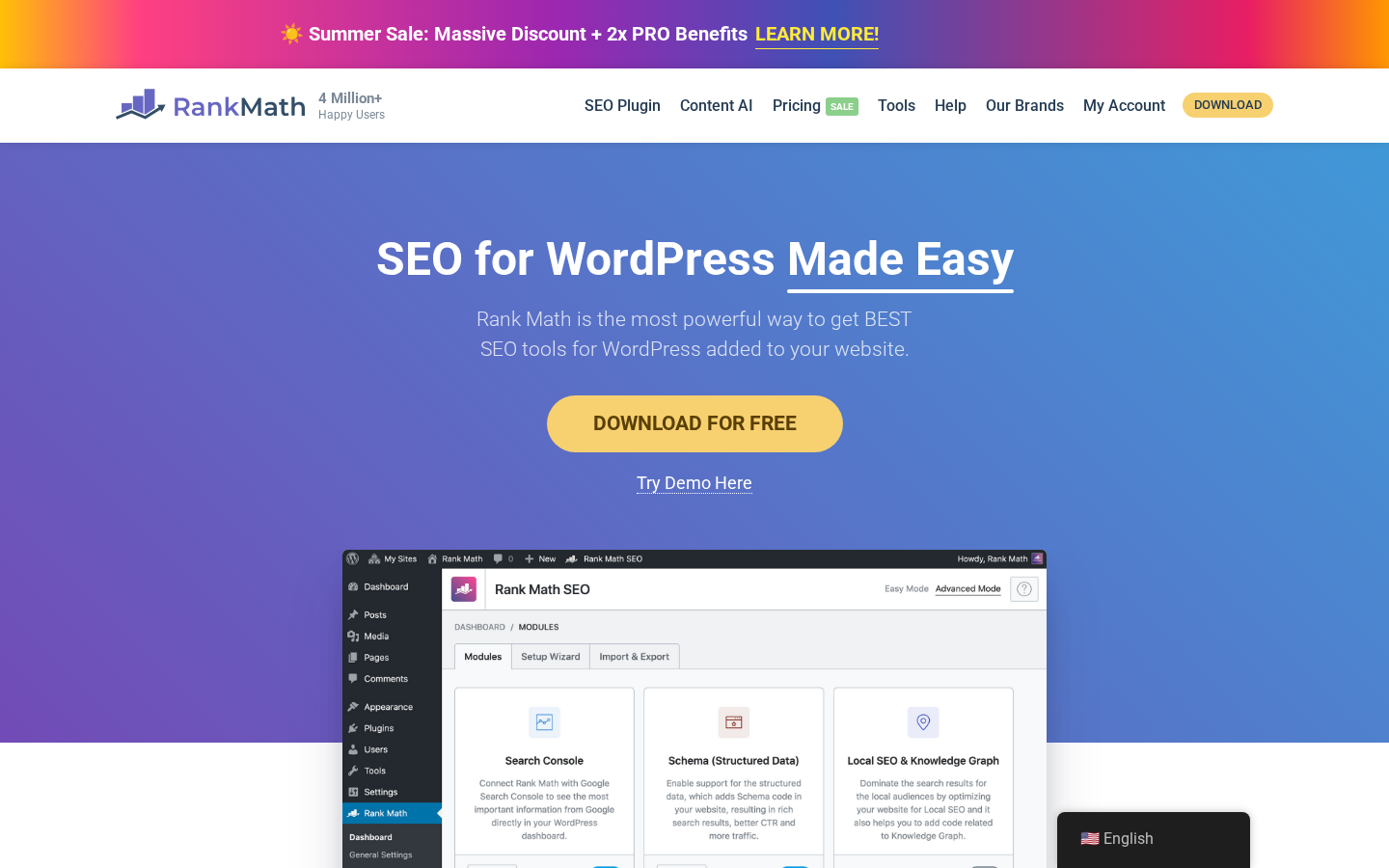
Rank Math SEO is a WordPress SEO plugin published by ONE.COM India Private Limited under the Rank Math brand. It installs as a free plugin from WordPress.org (slug seo-by-rank-math), and the paid tiers ship as a second Rank Math PRO plugin that activates against your Rank Math account. The plugin’s job is to handle every on-page and technical SEO setting a WordPress site needs without forcing the site owner to wire up half a dozen smaller plugins.
The free plugin gives you the basics most WordPress sites actually use:
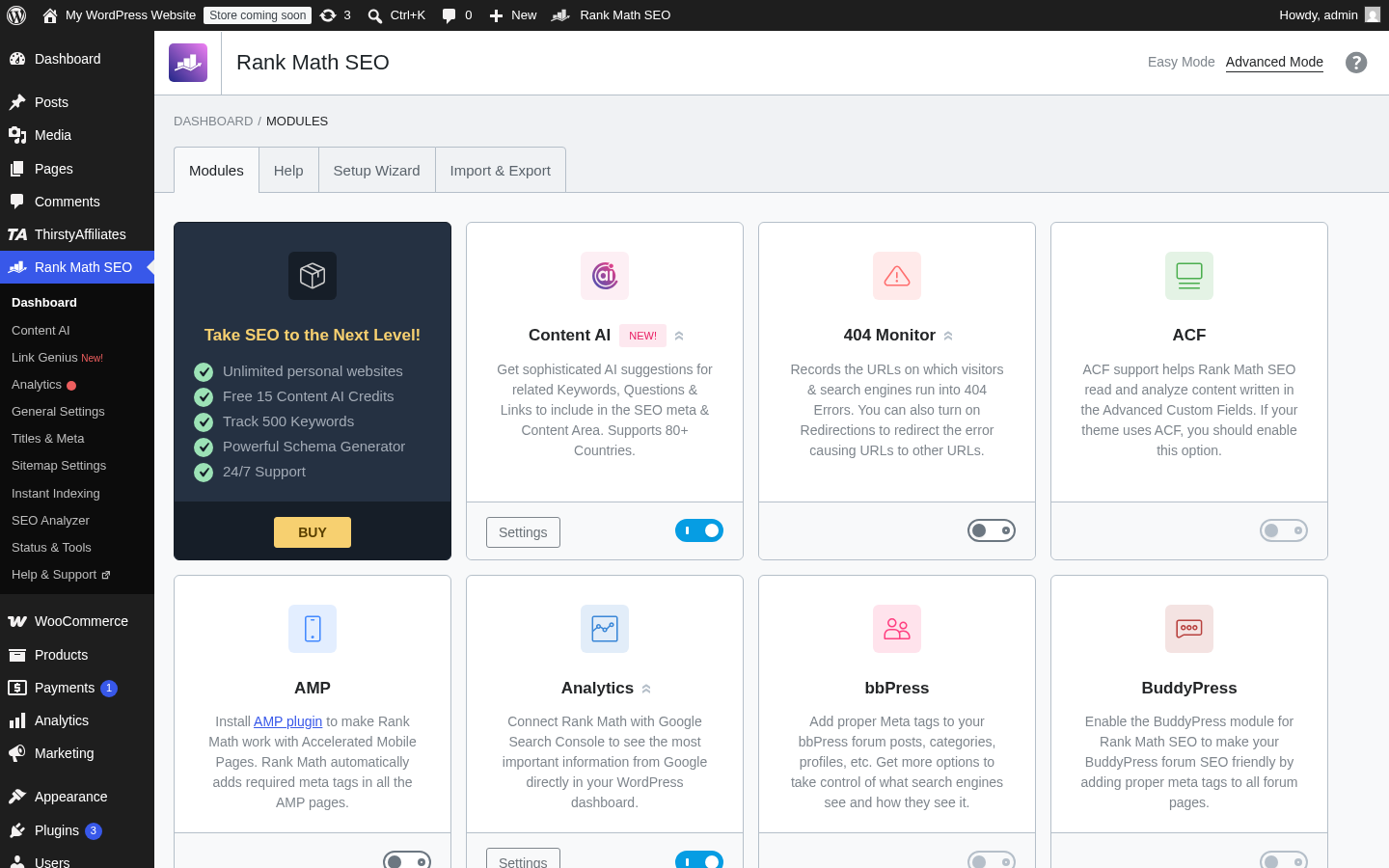
- A step-by-step setup wizard that detects your site type (blog, business, news, community, ecommerce), pulls metadata defaults, and connects Google Search Console and Analytics through Rank Math’s OAuth bridge.
- A snippet preview and a per-post content analyser that scores the page against roughly 30 on-page SEO tests, including focus keyword usage, title length, meta description, image alt text, and internal linking.
- An XML sitemap module that handles posts, pages, custom post types, and tags, with per-type indexable toggles and a news and video sitemap option.
- A Schema generator that supports a useful subset of structured data (Article, Product, Recipe, Event, Video, FAQ, HowTo, Local Business, and a few more), with per-post overrides and JSON-LD output.
- A 404 monitor that logs missing-page hits, a basic redirection manager that supports 301, 302, 307, 410, and 451 codes, and a role manager that controls which user roles can edit SEO data.
- One-click importers from Yoast SEO, Yoast SEO Premium, All in One SEO Pack, SEOPress (free and Pro), All in One Schema Rich Snippets, and the Redirection plugin.
- Integrations with Google Search Console (keyword and impression data), Google Analytics 4 (traffic data), AdSense (earnings), and IndexNow (instant indexing on Bing and Yandex).
The paid plugin (Rank Math PRO) is layered on top and unlocks the rest of the headline feature surface:
- An expanded Schema generator with 840-plus supported types and a custom JSON-LD or HTML schema builder.
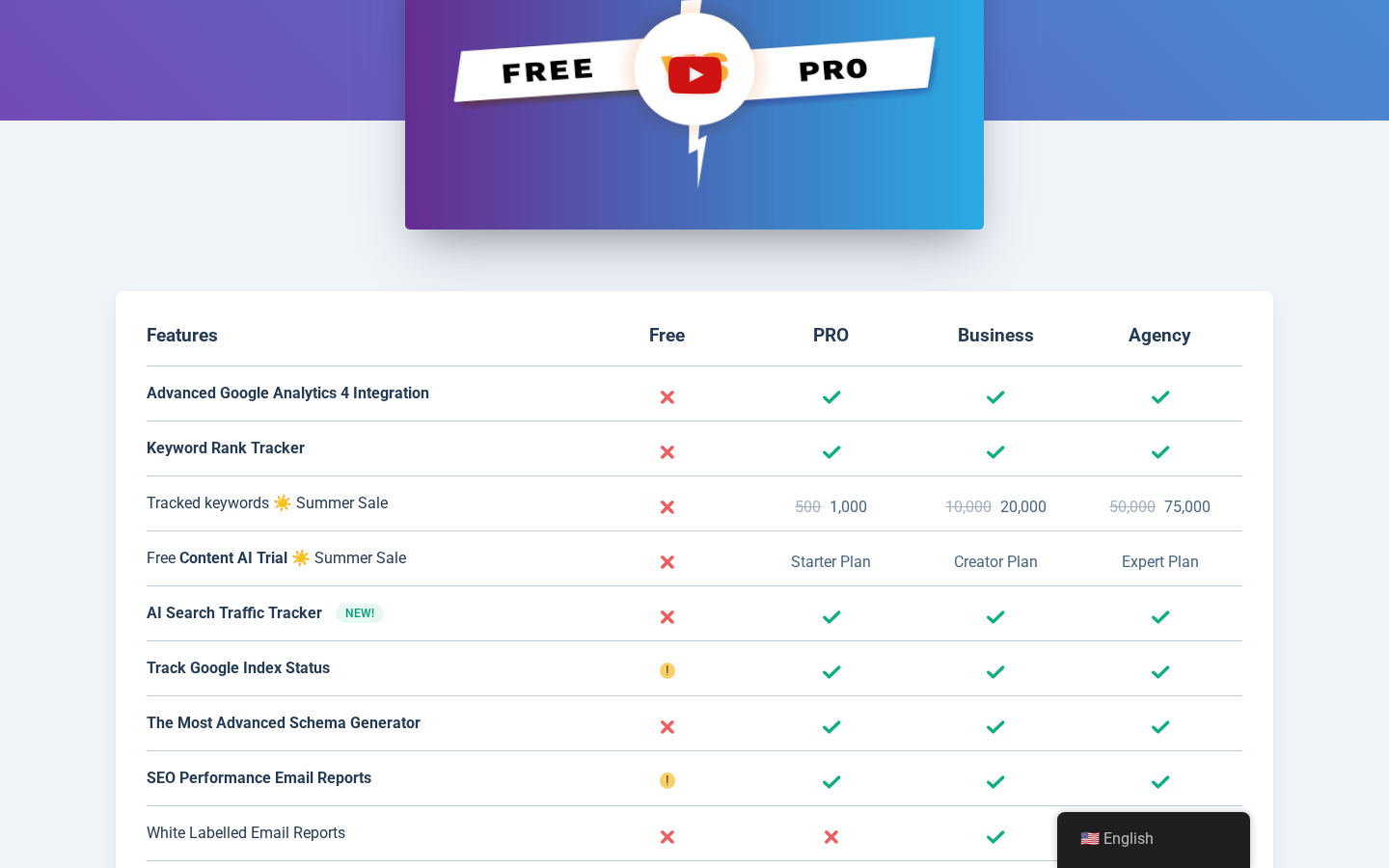
- A keyword rank tracker that monitors 1,000 keywords on PRO, 20,000 on Business, and 75,000 on Agency (those numbers are doubled during the current Summer Sale).
- An advanced Analytics module with daily Google data fetches across all paid tiers, 180 days of data retention on PRO and unlimited retention on Business and Agency, position history, top winning and losing posts and keywords, and per-post SEO performance.
- AI Link Genius for automated internal linking, a broken link checker, automated keyword linking, and bulk SEO meta editing.
- WooCommerce SEO Pro, Local SEO Pro with multi-location support, EDD SEO, an advanced Image SEO module, and a Podcast module.
- White-labelled email reports (Business and Agency only) and support for client websites (Business 200 and Agency 750).
Content AI is a separate, credit-based subscription that integrates into the same post editor. Each Rank Math PRO plan ships with a trial Content AI plan (Starter on PRO, Creator on Business, Expert on Agency); paid Content AI subscriptions cost $4.99 to $15.99 per month billed annually.
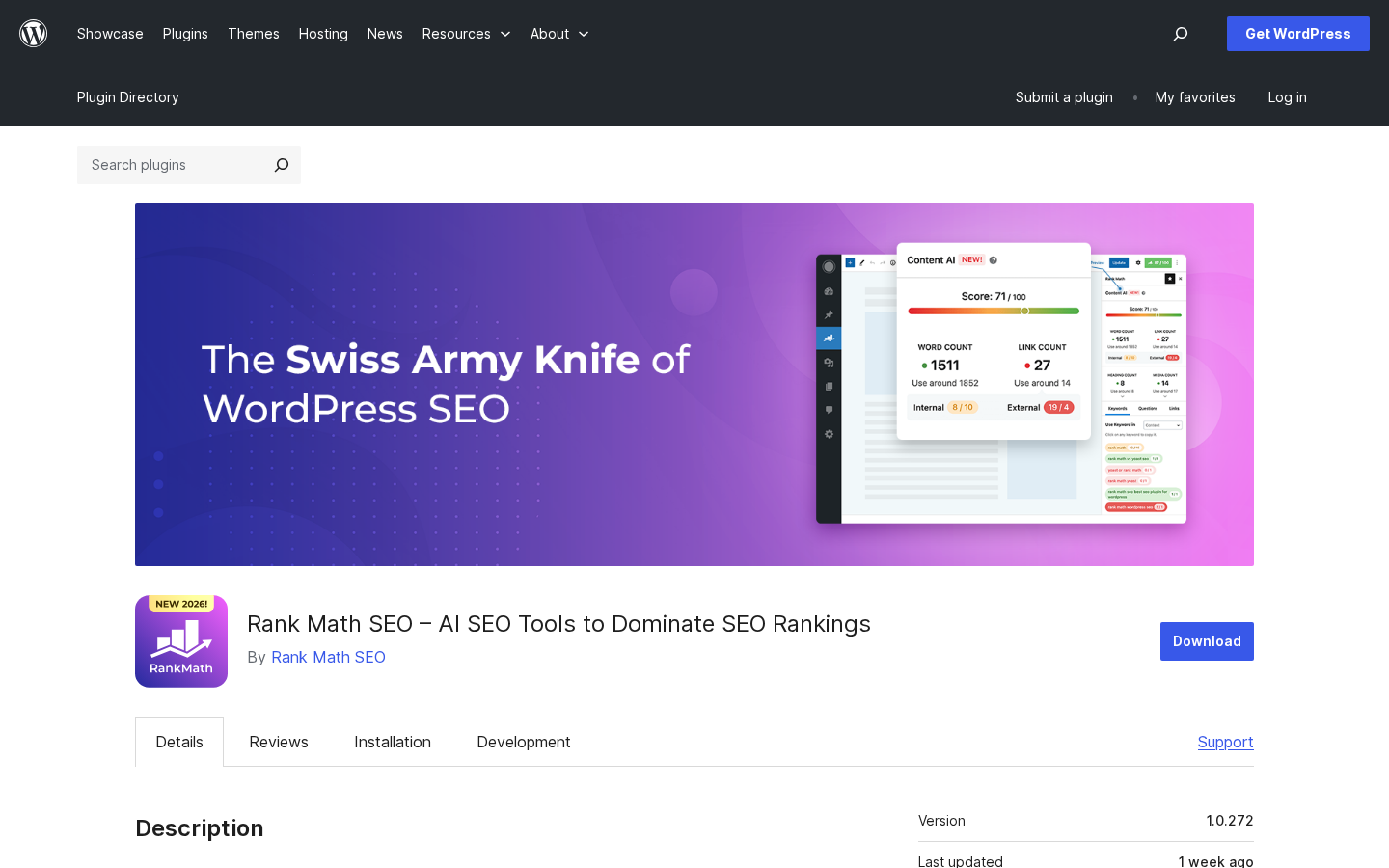
The live WordPress.org listing puts Rank Math at 4-plus million active installs, a 4.8 average rating across more than 7,440 reviews, and a last updated date of one week ago at the time of writing. That puts it second only to Yoast SEO (10-plus million active installs on WordPress.org) and ahead of All in One SEO (3-plus million active installs on WordPress.org) in the WordPress SEO plugin category.
Who Rank Math is best for
I do not think any WordPress SEO plugin is right for every site, and Rank Math is no different. Here is how I would draw the fit lines.
Strong fit
- Bloggers and content publishers who want a single plugin to handle on-page SEO, Schema, sitemaps, redirects, and search console integration without paid upsells.
- Small business and local SEO sites that need Local Business Schema, multi-location support, and Google Business Profile alignment.
- Niche WooCommerce stores that want product Schema, GTIN/MPN support, and review markup on product pages without a separate plugin.
- Freelance SEO consultants and small agencies that want a single tool to standardise SEO setup across multiple client sites (Business tier is the right entry point).
- Larger agencies running 200-plus client sites that want white-label reports and a single dashboard (Agency tier).
- Sites that publish heavily and want AI-assisted internal linking and bulk meta editing without leaving the post editor.
- Anyone currently on Yoast or AIO SEO who wants a faster Schema generator and a more aggressive free tier.
Weak fit
- Very low-content sites where the WordPress theme already handles SEO basics and any plugin would be over-specified.
- Compliance-led environments that block third-party OAuth bridges; Rank Math’s Analytics and Search Console integration routes Google OAuth through
oauth.rankmath.comby default. - Teams that want a one-time licence with no SaaS dependency. Rank Math PRO requires an active account connection, and Content AI is credit-based.
- Sites that explicitly want a paid plugin from a US- or EU-headquartered vendor for procurement reasons. Rank Math’s service provider is ONE.COM INDIA PRIVATE LIMITED.
If you fall into the strong-fit group, the next sections of this Rank Math review walk through the parts of the plugin that decide whether it earns the install.
Hands-on setup with the Rank Math setup wizard
The first thing the free Rank Math SEO plugin does after activation is push you into a setup wizard rather than dump you on a generic settings screen. That is the right call, and the wizard is the single best argument for picking Rank Math over the older free SEO plugins.
What the wizard actually does on a clean install:
- Compatibility check. Rank Math runs through PHP version, WordPress version, multisite status, and the presence of conflicting SEO plugins. On the sandbox I tested, the check finished in under a second and offered to deactivate Yoast if it had been installed (it had not).
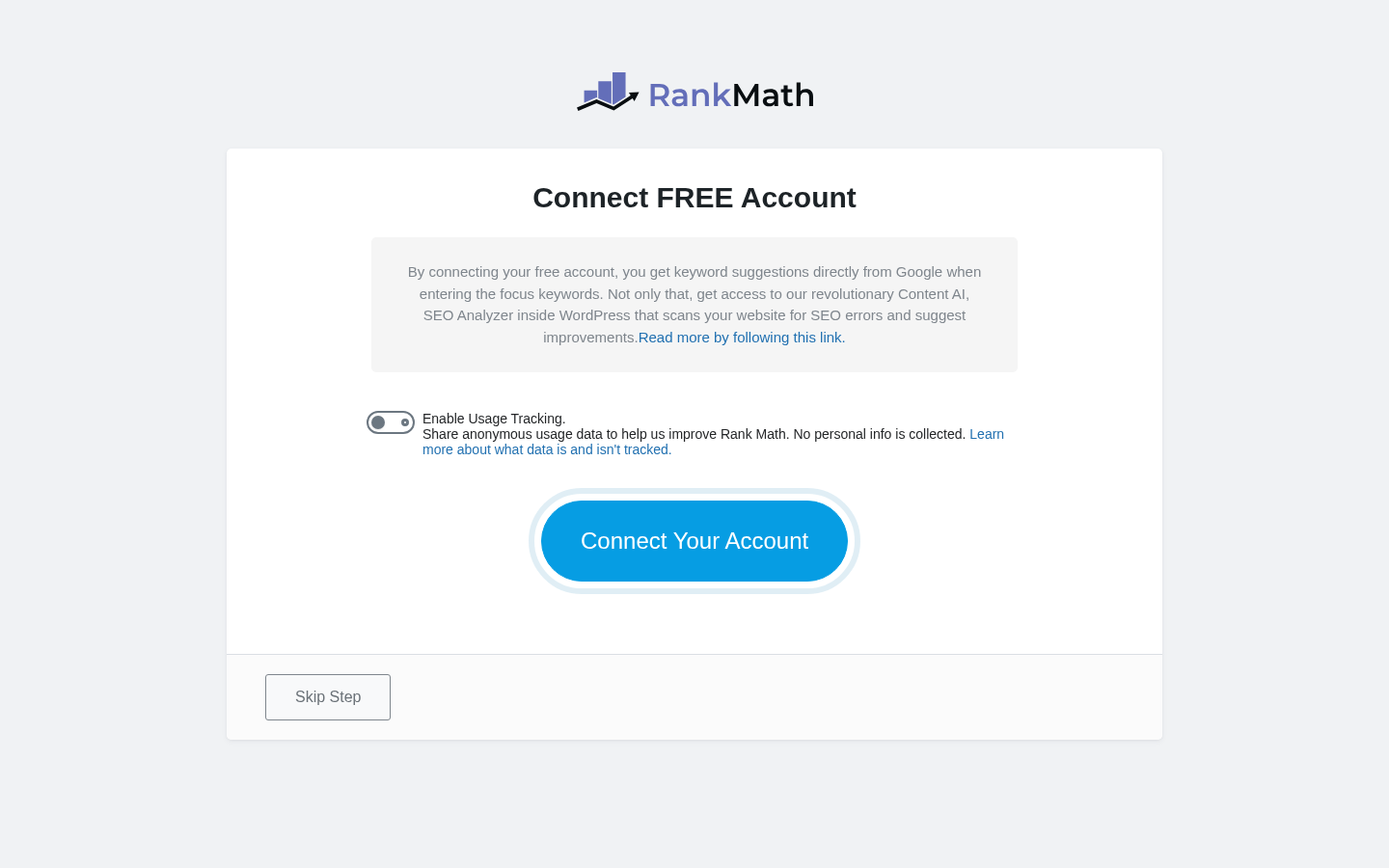
- Account connection. The wizard prompts for a free Rank Math account, which is what unlocks the SEO Analysis tool and Google keyword suggestions. You can skip this step and still use the on-page analyser.
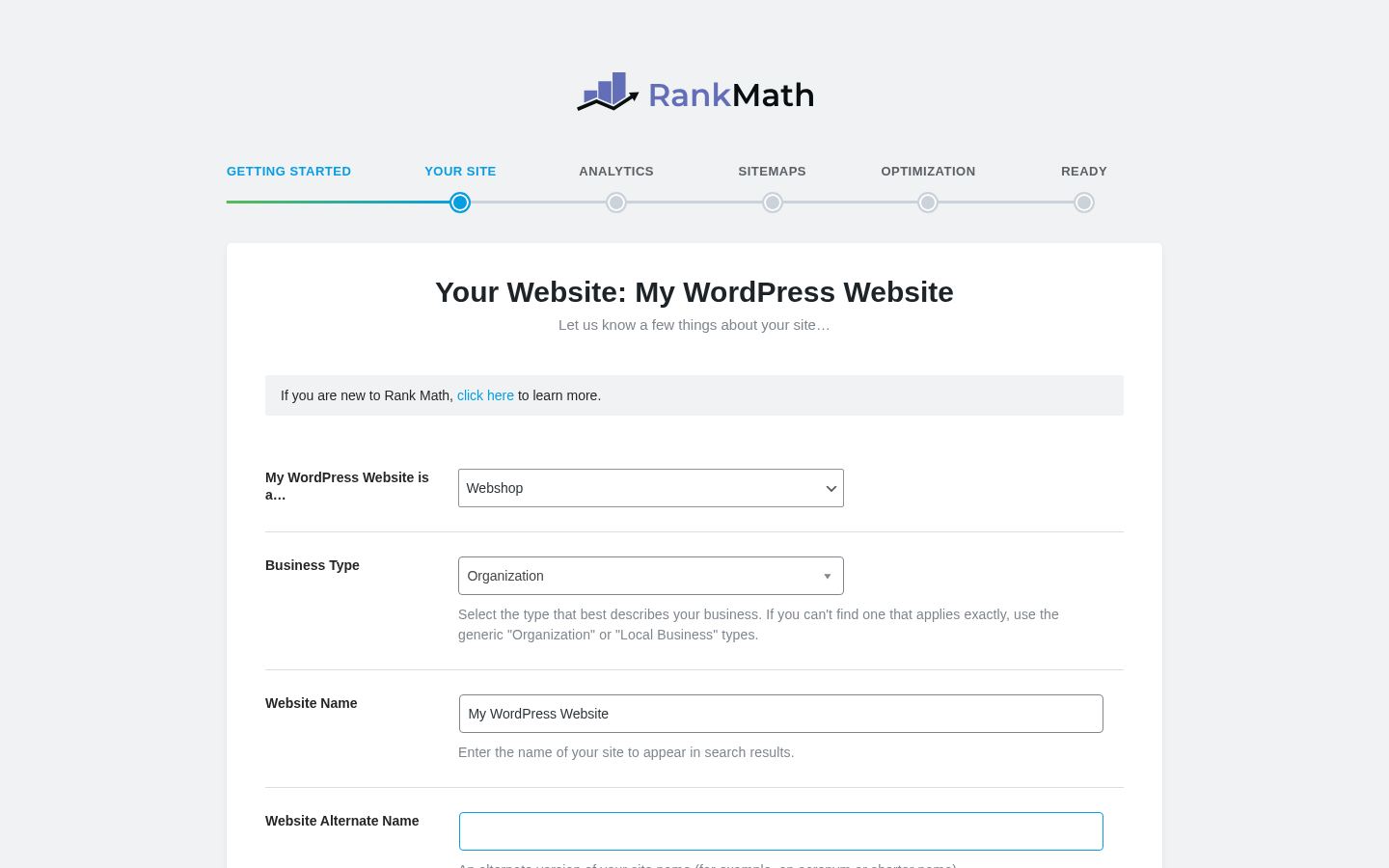
- Site type. Five presets: Personal Blog, Community Blog / News Site, Small Business Site, Webshop, Other Personal Website. The selection feeds defaults into the Schema, breadcrumbs, and sitemap modules. I chose Personal Blog for the test; the wizard set Article Schema as the default for posts and BlogPosting for the homepage.
- Site information. Logo, default social-share image, organisation type (Person or Organisation), business name. This is the data that gets emitted as Organisation or Person Schema on the homepage.
- Search console and analytics. The wizard hands off to Google’s OAuth flow via
oauth.rankmath.com. If you skip it, you can wire it up later from the Analytics module. - Sitemap. Toggles for posts, pages, custom post types, attachments, and image sitemap. The defaults are the ones I would have picked anyway.
- SEO Tweaks. Nofollow image links, redirect attachment URLs, open external links in new tabs, nofollow external links. Each toggle has an inline help text describing the trade-off.
- Ready. The wizard hands off to a Configure Advanced Settings link if you want to go deeper.
What it gets right
- The whole wizard is six clicks if you take the defaults, and every screen explains what the toggle actually does.
- The Yoast and AIO SEO importers run inside the wizard’s Import step rather than buried under Tools. On a real migration that is a 30-second job and the import preserves the SEO settings and metadata (the importer maps focus keywords, meta titles, descriptions, robots flags, canonical URLs, redirects, and basic Schema). Rankings are not guaranteed, but transferring the data cleanly reduces migration risk.
- Skipping a step does not break the install; you can come back from
Rank Math SEO > Setup Wizardat any time.
What I would warn buyers about
- The wizard pushes you to create a Rank Math account fairly hard. The plugin works without it, but the keyword suggestions and SEO Site Analysis features only activate once you connect. The account is free.
- Connecting Analytics and Search Console routes OAuth through Rank Math’s own connector (
oauth.rankmath.com). Practically that is a convenience; for procurement-led buyers it is a third party in the OAuth chain to disclose. - The Site Type preset locks in a default Schema choice that you can change later, but you have to know where to look (Titles & Meta > Posts > Schema Type).
Note on basis: the setup wizard walkthrough above is taken from a hands-on install of Rank Math free 1.0.272 on a clean WordPress 6.6 sandbox at the time of writing. The PRO setup wizard adds two extra steps for the Rank Math PRO licence connection and Content AI activation; those steps were not exercised against a paid licence in this test window.
On-page SEO, snippet preview, and the content analyser
The post editor is where a WordPress SEO plugin earns its install or gets uninstalled at the end of the week. Rank Math’s post-editor surface is a single sidebar tab that opens beside the Gutenberg block editor (or as a metabox in the Classic Editor and inside Elementor and Divi).
The sidebar gives you:
- Focus keyword input with live keyword suggestions from
api.rankmath.com. You can add multiple focus keywords; the free plugin defaults to 5 per post and can be lifted by a filter to unlimited. - Snippet preview that renders title, URL, and meta description as Google would show it, with desktop and mobile preview modes and character-count counters.
- Content analyser score (0-100) against the on-page tests, with a clear Errors, Warnings, and Good breakdown.
- Schema tab that opens the schema generator for the post; default schema is pre-filled by site type from the setup wizard.
- Advanced tab for noindex, nofollow, canonical URL, breadcrumb title, and redirect overrides.
- Social tab for per-post Facebook and Twitter card overrides, with live previews.
The on-page tests run on the post text inside the editor (no separate Analyse button to push). They cover:
- Basic SEO. Keyword in title, in URL, in first paragraph, in meta description, in image alt text, in subheading.
- Additional. Keyword density, length of the post, URL length, table of contents, external links, internal links.
- Title readability. Title power words, sentiment, number in title, length.
- Content readability. Active vs passive voice, sentence length, Flesch reading ease (premium add-on), paragraph length.
What I like about the analyser
- The tests are configurable at the global Rank Math settings level, so you can turn off the ones that do not fit your style (the number-in-title test gets noisy on long-form content).
- Each warning links to a Rank Math KB article explaining what it is checking and why.
- The score updates live as you type, which catches problems before publish rather than after.
What I would push back on
- Some of the tests reward keyword stuffing if you take them literally (the keyword density test is the obvious offender). Treat the score as one signal, not a rubric.
- The readability tests are good for blog posts and bad for product descriptions, where short fragments are correct copy.
- The keyword suggestions API is helpful for surfacing related terms but is not a replacement for a real keyword research tool like Semrush or Ahrefs.
The free plugin’s content analyser is the same engine the PRO plugin uses; PRO mostly adds Analytics and AI features around it rather than changing the core scoring.
Schema generator and structured data
Schema is the place where Rank Math has historically pulled ahead of the competition, and the gap has widened with the 2026 version. The Schema generator on PRO supports 840-plus types (the comparison table on rankmath.com/free-vs-pro/ confirms the count). The free plugin supports a smaller but still useful set: 18 pre-defined types plus 6 extra, totalling 24.
How the generator works in practice:
- From the post editor sidebar, switch to the Schema tab.
- Either accept the default (driven by site type and post type) or open the Schema Catalog and pick another type.
- The generator opens a structured form with every Schema property the type defines (for Article: headline, image, author, datePublished, dateModified, and so on).
- You fill in the fields, or you map them to WordPress data sources (for example, image can be mapped to the post’s featured image).
- The plugin emits clean JSON-LD in the page source.
What is on the free plan
- Article, Recipe, Book, Course, Event, Job Posting, Local Business (with the full Schema.org
LocalBusinesssubtype tree), Music, Movie, Product, Restaurant, Service, Software and App, Person, Video, FAQ, HowTo, plus the six extra types in the comparison table.
What is gated to PRO
- 840-plus Schema types overall (PRO advertises 20-plus pre-defined Schema types inside the UI and a custom builder that lets you compose any other Schema.org type).
- Custom Schema Builder (JSON-LD or HTML) for any type the form-based generator does not pre-define.
- Schema templates that apply Schema in bulk by post type, category, or rule.
- Schema import from a competitor URL.
- Conditional schema (apply Schema only when a condition is true).
- WooCommerce-specific Schema (GTIN, MPN, brand) and EDD Schema templates.
Note on basis: the free Schema generator was exercised against an Article post in the sandbox install. The 840-plus PRO Schema count and the Schema templates, import, and conditional Schema features are taken from the free-vs-PRO comparison table and the dedicated Schema feature page on rankmath.com; they were not exercised against a paid licence in this test window.
The reason this matters: rich results are no longer a nice-to-have on competitive search queries. FAQ Schema on a how-to article, Product Schema with review data on a WooCommerce listing, Local Business Schema on a service-area page, and HowTo Schema on a procedural article each open SERP features that other plugins either gate behind paid blocks or do not implement cleanly. Rank Math handles all four on the free plan, and the PRO plan adds the bulk-apply and template options that turn it from a per-post task into a site-wide policy.
Content AI and AI Link Genius
Rank Math’s AI surface is split into two products that confuse buyers if you do not separate them.
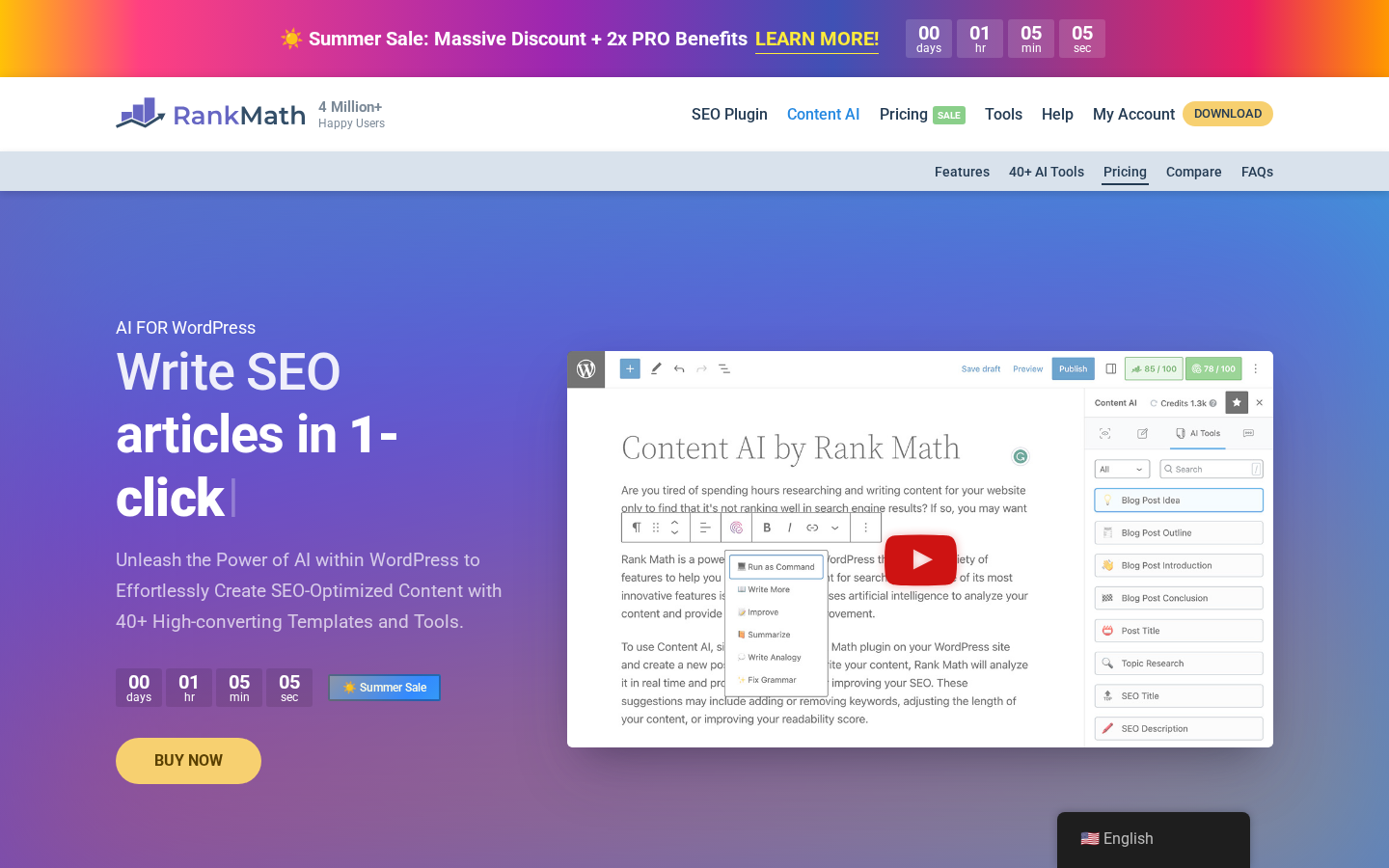
Content AI is a separate, credit-based subscription that lives inside the same post editor as the SEO sidebar. It opens its own tab and exposes:
- A long-form article writer with 1-click generation against a focus keyword and a brief.
- 40-plus pre-built AI tools (blog ideas, outlines, intros, conclusions, paragraphs, product descriptions, social media captions, email composition, YouTube scripts, copywriting formulas AIDA / PAS / BAB / SPIN / HERO / IDCA).
- 125-plus custom prompts and a bulk image alt-text generator.
- RankBot, an AI assistant that answers SEO questions inside WordPress.
Content AI pricing (sourced from the live rankmath.com/wordpress/plugin/content-ai/ page):
- Starter. $4.99 per month billed annually ($59.88/year). 15 long-form articles, 100 RankBot assists, 50 image alt-text generations per month. Renewal $6.99/month.
- Creator. $9.99 per month billed annually ($119.88/year). 60 long-form articles, 500 RankBot assists, 100 alt-text generations per month. Renewal $11.99/month.
- Expert. $15.99 per month billed annually ($191.88/year). Unlimited long-form articles and RankBot, 500 alt-text generations per month. Renewal $18.99/month.
Each Rank Math PRO subscription ships with a 15-day free trial of a Content AI plan: Starter trial on PRO, Creator trial on Business, Expert trial on Agency. The trial is exactly that; once it expires you need a separate Content AI subscription if you want to keep using the AI features.
AI Link Genius is a different product. It ships inside Rank Math PRO at no extra cost and handles internal linking automation: AI-powered link suggestions inside the post editor, auto-link keyword variations, periodic link audits and broken-link monitoring, and a bulk link update tool. The PRO plan also bundles a broken link checker and automated keyword linking module.
What this means for buyers:
- If you only want AI assistance for internal linking and broken-link maintenance, Rank Math PRO is enough. AI Link Genius is included.
- If you want the long-form writer, RankBot, and the 40-plus content tools, you need both Rank Math PRO (for the integration) and a Content AI subscription (for the credits).
- The Content AI trial that ships with PRO is useful for evaluation but not a permanent free tier.
Note on basis: the Content AI feature catalogue and pricing are taken from the live Content AI feature page on rankmath.com as of the audit date. Long-form article generation, RankBot, and AI Link Genius were not exercised against a paid licence in this test window.
Analytics, rank tracker, and Search Console integration
The Analytics module is the surface that turns Rank Math from a settings plugin into something you actually open. It pulls Google Search Console, Google Analytics 4, and AdSense data into a single dashboard inside WordPress.
What you see on a connected install:
- Top winning and losing keywords (Business and Agency expand this to 5 + 5).
- Top winning and losing posts with traffic and ranking delta.
- Position history for tracked keywords with a 12-month trailing window.
- SEO performance score per post.
- Indexing status against the Google URL Inspection API (so you can see which URLs Google has crawled and indexed).
- AdSense earnings history (PRO and above).
- Rank tracker with keyword imports from CSV.
Tier limits matter for the rank tracker. Rank Math’s own surfaces are not perfectly consistent here: the Free column on the rankmath.com/free-vs-pro/ comparison table marks Keyword Rank Tracker with a red cross, while the pricing card lists a Keyword rank tracker (limited) line on Free. The honest reading is that the free plugin surfaces Search Console keyword and impression data inside the Analytics dashboard, but the dedicated keyword position tracker with per-keyword history is a paid feature.
- Free: no dedicated keyword rank tracker per the comparison table. Search Console keyword and impression data does flow into the free Analytics module, but there is no per-keyword position history.
- PRO: 1,000 tracked keywords (sale-boosted from 500).
- Business: 20,000 tracked keywords (sale-boosted from 10,000).
- Agency: 75,000 tracked keywords (sale-boosted from 50,000).
Data fetch frequency and retention also vary:
- Free: 3-day Google data fetch frequency, 90-day data retention.
- PRO: daily fetch, 180-day retention (the page also calls this unlimited for paid plans; the operational figure inside the product is 180 days).
- Business and Agency: daily fetch, unlimited retention.
Email reporting:
- Free: not available.
- PRO: 15 or 30 day cadence, no white label.
- Business and Agency: 7, 15, or 30 day cadence, white-labelled for client delivery.
The integration is convenient for solo operators (you can answer is this page indexed and where is it ranking without leaving WordPress) and useful for agencies (the white-label email report is the easiest way to send a client a credible monthly SEO summary). It is not a replacement for Semrush or Ahrefs, which sit on much larger keyword databases and crawler indexes; it is a complement.
Note on basis: the connected-Analytics dashboard was inspected in screenshots inside the Rank Math demo and on the SEO Suite feature page. Daily and unlimited-retention behaviour on Business and Agency tiers was not exercised against a paid licence in this test window.
Technical SEO, sitemap, redirects, and the 404 monitor
A WordPress SEO plugin lives or dies on its technical modules. Rank Math’s technical surface is broad and uneventful, which is the right shape.
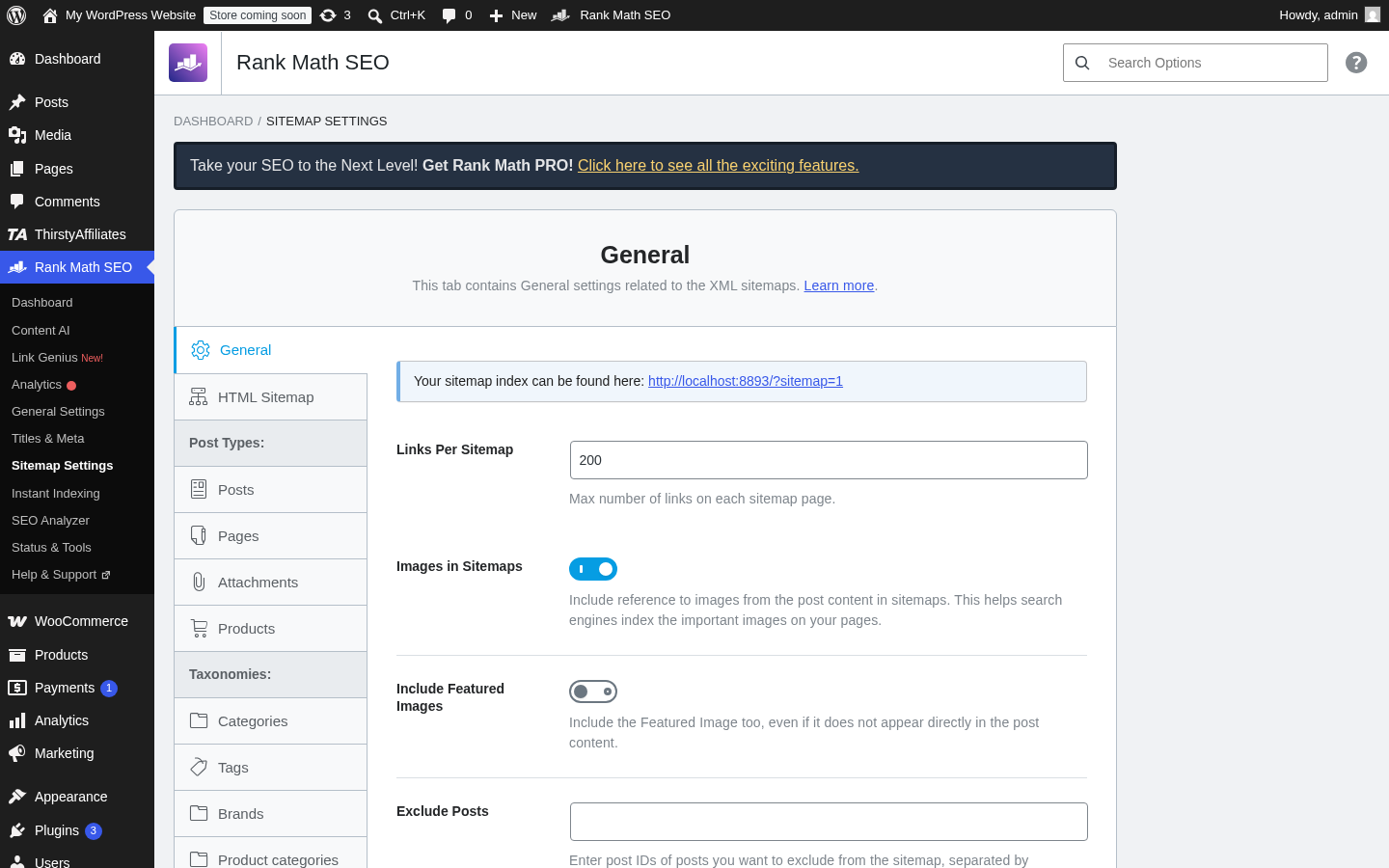
XML sitemap. The free plugin ships a fast-loading XML sitemap at /sitemap_index.xml. You can toggle posts, pages, custom post types, and image sitemaps individually, and there are dedicated News and Video sitemap modules.
Redirection manager. The free plugin includes a redirection manager that supports 301, 302, 307, 410, and 451 codes with source URL, target URL, and regex match. PRO upgrades the same module with bulk import and export, advanced source matching, and a category-based redirect rule. Importantly, the redirection manager is genuinely free; this is a paid feature on most other SEO plugins.
404 monitor. The free plugin includes a basic 404 monitor that logs missing-page hits. The advanced 404 monitor on PRO adds referring URL capture, user-agent capture, and exportable 404 logs.
Robots.txt and .htaccess editors. Both are in the free plugin under Tools, with sensible defaults pre-populated.
llms.txt generator. Rank Math added an llms.txt generator in 1.0.272 (June 2026) that publishes a machine-readable site summary for AI crawlers. Useful for sites that want to control how their content is summarised by AI assistants. The advanced llms.txt generator is on PRO.
Breadcrumbs. SEO-optimised breadcrumbs work with all major WordPress themes (and the plugin can emit BreadcrumbList Schema even when the theme has no breadcrumb support).
Instant Indexing. The plugin can submit new and updated URLs to Bing and Yandex via the IndexNow API as soon as they are published; Google indexing requires the separate Rank Math Instant Indexing plugin.
I/O integrations. WPML, TranslatePress, Weglot, and Polylang are supported for multilingual sites. Multisite is supported on the same install. The plugin works inside Gutenberg, the Classic Editor, Elementor, Divi, Oxygen Builder, WPBakery, Avada, Astra, Kadence, Beaver Builder, and Page Builder Framework.
Note on basis: the XML sitemap, redirection manager, 404 monitor, robots.txt editor, breadcrumbs, and llms.txt generator were exercised against the free sandbox install. The PRO advanced redirection rules, exportable 404 logs, and advanced llms.txt generator were not exercised against a paid licence in this test window.
WooCommerce, EDD, and Local SEO
Three feature modules deserve their own callout because they decide the install for sites that fit them.
WooCommerce SEO. The free plugin handles WooCommerce product titles and meta descriptions correctly and emits basic Product Schema. The WooCommerce SEO Pro module on PRO adds automatic Product Schema with GTIN, MPN, and brand attributes on variations, advanced Open Graph tags for products, automatic noindex for hidden products, removal of the WooCommerce product and category base from the URL structure, and custom brand taxonomy support. For any real WooCommerce store with reviews and inventory, the PRO version is the right starting tier.
EDD SEO. Easy Digital Downloads gets the same treatment: free plugin handles the basics, PRO adds complete Schema and per-download SEO management. This is the right tool for online course sites and ebook stores running on EDD.
Local SEO. The free plugin includes Local Business Schema and a single business profile. Local SEO Pro on PRO adds multi-location support (a separate Schema and contact info block per branch), advanced local SEO blocks for Gutenberg, watermarked social media images, and an auto image caption generator.
If your site fits one of these three modules, Rank Math is the WordPress SEO plugin I would default to in 2026. The free tier alone is competitive with the paid tiers of older plugins, and PRO turns a setting per post into a site-wide policy.
Pricing and licence value
Rank Math has four primary tiers plus a combo bundle with WP Rocket. Pricing is shown on the public page with a current Summer Sale promotional discount; all four PRO tiers are billed annually and are tied to a Rank Math account rather than a licence key.
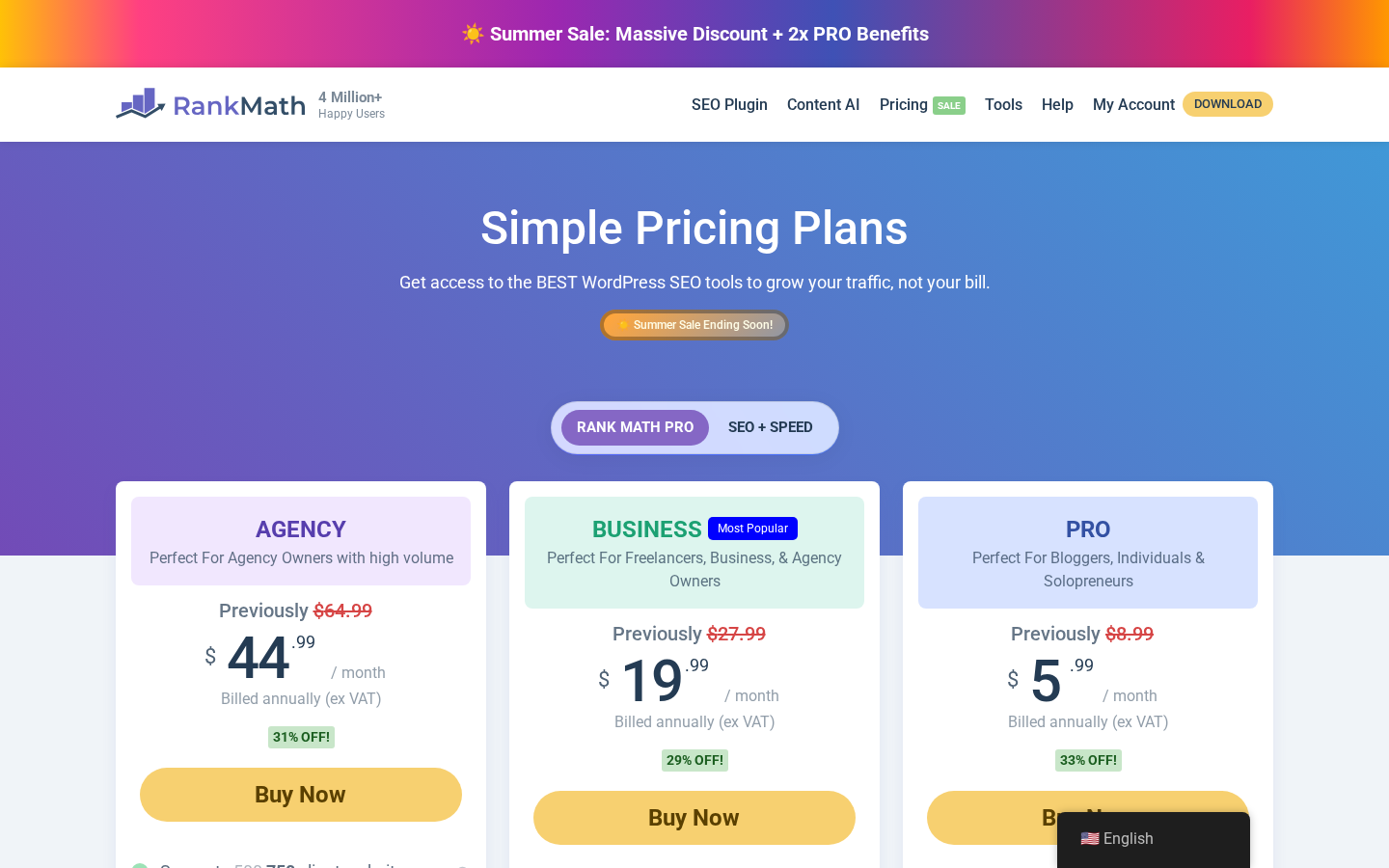
Note on the pricing display: rankmath.com/pricing/ shows monthly numbers billed annually. The number on each card is the monthly equivalent, the actual charge is annual, and the Previously label is the renewal monthly rate. I have done the annual conversion below so the totals are easy to compare.
Live pricing (Summer Sale, as observed during the audit):
- Free. $0. Unlimited personal sites. 24 Schema types. Basic Google Analytics 4 integration. No dedicated keyword rank tracker on the comparison table; Search Console keyword data still flows into the free Analytics module. Basic 404 monitor. Basic redirections. 3-day Google data fetch frequency. 90-day data retention. No white-label email reports. No client sites. No Content AI trial.
- PRO. $5.99 per month billed annually ($71.88/year sale) on the public page; sticker $8.99 per month ($107.88/year). Unlimited personal sites only (no client websites). 1,000 tracked keywords (sale-boosted from 500). 840-plus Schema types. AI Link Genius. Broken link checker. Automated keyword linking. Advanced rank tracker. Comprehensive SEO score. Daily Google data fetch. 180-day data retention. 15 or 30 day email reports (not white-labelled). Content AI Starter trial (15 days). WooCommerce SEO Pro. Local SEO Pro. EDD SEO. Advanced Image SEO. Podcast module. 24/7 priority support.
- Business (Most Popular). $19.99 per month billed annually ($239.88/year sale) on the public page; sticker $27.99 per month ($335.88/year). Up to 200 client websites (sale-boosted from 100). 20,000 tracked keywords (sale-boosted from 10,000). Everything in PRO plus white-labelled email reports, 7 / 15 / 30 day report cadence, unlimited data retention, advanced redirections module, top winning and losing posts and keywords, watermarked social media images, advanced quick edit, detect orphan pages, track PageSpeed per page, export 404 logs, advanced HowTo Schema options, mark cloaked links as external, auto image caption generation, Content AI Creator trial (15 days).
- Agency. $44.99 per month billed annually ($539.88/year sale) on the public page; sticker $64.99 per month ($779.88/year). Up to 750 client websites (sale-boosted from 500). 75,000 tracked keywords (sale-boosted from 50,000). Everything in Business plus the maximum client capacity, role manager, advanced llms.txt generator, multisite compatibility documented as full network support, Content AI Expert trial (15 days).
- Rank Math + WP Rocket combo. $10.99 per month billed annually ($131.88/year sale) on the public page; sticker $13.99 per month ($167.88/year). Includes Rank Math PRO plus WP Rocket for 1 website. Personal sites only.
Every paid plan ships under a 30-day no-questions-asked money-back guarantee. Payment is processed through FastSpring (PayPal, credit and debit cards, Amazon Pay, and local payment options). Nonprofits get a 30 percent discount on the first year only.
A Rank Math licence is account-based: no licence key is entered into the WordPress site. The PRO plugin activates when it sees a connected Rank Math account that holds an active subscription.
The pricing math is straightforward if you decide based on which capability you actually need rather than on the lowest sticker number:
- Free is the right starting point for any personal blog or small business site. The free tier includes the on-page analyser, 24-type Schema generator, XML sitemap, 404 monitor, redirections manager, and Search Console keyword data inside the Analytics module. There is no dedicated per-keyword rank tracker on Free; if you need that, the 1,000-keyword PRO tier is the entry point. Stop on Free unless a PRO-only feature is on your roadmap.
- PRO is the right tier for active single-operator content sites and small ecommerce stores where you want Analytics depth, AI Link Genius, the full Schema generator, and WooCommerce SEO Pro. The 1,000-keyword rank tracker is enough for most personal-brand sites.
- Business is the right tier for freelance SEO consultants and small agencies who run client work. The 200 client sites limit, the white-labelled email reports, and the unlimited data retention are the reasons to upgrade from PRO. The Most Popular badge on the Rank Math pricing page lines up with that recommendation.
- Agency is the right tier for portfolios over 200 client sites and for teams that want the 75,000 keyword tracker.
The renewal price is the part I want every buyer to plan for. The public price is the Summer Sale rate; sticker prices are roughly 30 to 50 percent higher. Plan annual budget against the sticker (PRO $107.88, Business $335.88, Agency $779.88) so renewal year is not a surprise.
Note on basis: pricing details above are taken from the live rankmath.com/pricing/ page and the rankmath.com/wordpress/plugin/content-ai/ page as observed during the audit. Renewal pricing is listed on the same pages as the Previously or Normal monthly rate.
Is Rank Math the best WordPress SEO plugin in 2026?
Based on the Rank Math review audit and the hands-on test on the free plugin, Rank Math is one of the best WordPress SEO plugins available in 2026 and the strongest free-tier WordPress SEO plugin I have installed this year.
It is the right pick when:
- You want a single plugin to handle on-page SEO, Schema, sitemaps, redirects, and 404 monitoring on a free plan.
- You publish enough Schema-driven content (FAQ, HowTo, Product, Recipe, Local Business) that the 840-plus PRO Schema types and templates pay back on rich results.
- You run a WooCommerce store and want product Schema, GTIN / MPN attributes, and review markup without a separate plugin.
- You manage client sites and want white-labelled email reports and a 200 to 750 client capacity.
- You are migrating from Yoast or AIO SEO and want a clean one-click import that preserves SEO settings and metadata.
It is not the best fit when:
- You only run a hobby blog and your theme already handles SEO basics.
- Your procurement rules block third-party OAuth bridges for Google Search Console and Analytics.
- You want a one-time licence with no SaaS dependency or no AI subscription.
- You explicitly want a paid plugin from a US- or EU-headquartered vendor.
If you want a wider field of WordPress SEO plugins to compare, our plugin reviews hub at best-wordpress-plugins.com is the right next read.
Pros and cons
Pros
- Free tier is the most complete in the WordPress SEO plugin category, including 24 Schema types, snippet preview, content analyser, XML sitemap, redirection manager, 404 monitor, and Search Console / Analytics integration (the dedicated per-keyword rank tracker is paid; Search Console keyword data does flow into the free Analytics module).
- Schema generator is the deepest of any current WordPress SEO plugin: 840-plus types on PRO with a custom builder, templates, and conditional rules.
- Setup wizard runs in six steps, imports cleanly from Yoast and AIO SEO, and ships with sensible defaults per site type.
- Content analyser updates live as you type, with linked KB articles on every warning.
- AI Link Genius and broken link checker are bundled inside Rank Math PRO at no extra cost.
- Analytics dashboard pulls Search Console, Google Analytics 4, and AdSense data into a single WordPress screen, with rank tracker, position history, and SEO performance per post.
- White-labelled email reports on Business and Agency tiers make client delivery straightforward.
- 4.8 average rating on WordPress.org across 7,440-plus reviews; 4-plus million active installs.
- Plugin is updated frequently (1.0.272 shipped within the last week of the audit) and supports the latest WordPress release.
- 30-day money-back guarantee on every paid tier; 15-day Content AI trial bundled with each PRO plan.
- Works inside Gutenberg, Classic Editor, Elementor, Divi, and other major page builders.
Cons
- Content AI is a separate credit-based subscription. The PRO trial is 15 days; ongoing AI tools require a Starter, Creator, or Expert subscription on top of PRO.
- PRO plan cannot be used on client websites. Freelance SEO consultants who run client work need Business at minimum.
- Renewal pricing is roughly 30 to 50 percent above the displayed Summer Sale rate; planning needs the sticker, not the intro.
- Pricing page shows monthly numbers billed annually with a Previously sticker price; reading the page quickly is easy to misread.
- Analytics and Search Console OAuth flow routes through Rank Math’s own connector at
oauth.rankmath.com. Practically convenient, procurement-relevant. - The on-page analyser’s keyword density test can encourage keyword stuffing if you take the score literally.
- Connecting the free Rank Math account is required to unlock keyword suggestions and SEO Site Analysis features. The plugin works without it, but the wizard pushes the account creation step hard.
- Email reports and the dedicated per-keyword rank tracker are not available on the Free tier. Search Console keyword data still flows into the free Analytics module, but PRO at 1,000 keywords is the practical entry point if you want position history.
- The product is published by ONE.COM INDIA PRIVATE LIMITED and routes some external calls through its own APIs; that is a data flow some compliance environments will want to disclose.
Alternatives to Rank Math
I would not recommend any SEO plugin without naming who it loses to. Here are the alternatives I see most often and how they compare.
- Yoast SEO. The historical default and the most-installed WordPress SEO plugin on WordPress.org (10-plus million active installs at the time of audit). Pick it if you want the most mature option, the most third-party integrations, and a brand your CMO has heard of, and you accept a thinner free tier and a different (smaller) Schema surface. Rank Math vs Yoast typically goes to Rank Math on free-tier depth and Schema breadth, and to Yoast on documentation maturity and enterprise procurement comfort.
- All in One SEO (AIOSEO). A long-running and well-supported WordPress SEO plugin (3-plus million active installs on WordPress.org at the time of audit, slightly below Rank Math on raw install count). Pick it if you want a polished product with a similar feature surface to Rank Math and you are comfortable with its tier structure. AIOSEO competes most directly with Rank Math on the Business / agency tier; Rank Math typically wins on free-tier Schema breadth and AIOSEO wins on Link Assistant polish and search statistics surfacing.
- SEOPress. Lighter, lower-priced, and explicitly GPL. Pick it if you want a simpler interface and a single-tier paid licence model. SEOPress wins on simplicity and loses on feature breadth.
- Squirrly SEO. AI-led on-page assistant with a different scoring engine. Pick it if you want a heavier AI-driven content workflow and you do not mind a steeper learning curve. Squirrly wins on AI depth on the writer side; Rank Math wins on technical SEO surface and Schema breadth.
- The SEO Framework. Lean, performance-led, GPL. Pick it if your priority is a near-invisible plugin footprint and you handle Schema with another tool.
For most operators evaluating a WordPress SEO plugin in 2026, the real comparison is Rank Math vs Yoast on the established side and Rank Math vs AIOSEO on the modern side. Rank Math wins on free-tier depth, Schema breadth, and AI Link Genius. Yoast wins on documentation maturity and the strongest WordPress.org install footprint. AIOSEO wins on search statistics presentation and a more polished Link Assistant.
Final verdict
Rank Math does the thing it sets out to do. It is a WordPress SEO plugin that ships an unusually complete free tier, doubles down on Schema as the place to win SERP features, and adds an AI-assisted internal linking and content surface on PRO that the older plugins are still catching up to. The setup wizard, the snippet preview, the Schema generator, and the Analytics integration are the four reasons I would install Rank Math on a new WordPress site in 2026.
If I had to recommend it in one paragraph: start with Free on any personal blog or small business site and stay there until a PRO-only feature is actually on your roadmap; buy PRO for an active single-operator content site or a small WooCommerce store where Analytics depth, AI Link Genius, and the full Schema generator are worth the annual subscription; buy Business if you run client SEO work because white-label reports and 200 client sites are the upgrade trigger; and pay for Agency only once you are past 200 client sites or genuinely tracking 20,000-plus keywords. Plan renewal against the sticker price, not the Summer Sale rate. As far as a WordPress SEO plugin goes in 2026, Rank Math is the one I would install on a new site without hesitation and the one I would migrate to from Yoast if I were starting today.