


Quick verdict
Smart Slider 3 is one of the easiest WordPress slider plugins to recommend if you want a visual hero slider, image carousel, or layered promotional section without buying a heavy marketplace plugin first. I tested the free WordPress plugin path and reviewed the current Pro feature set, pricing, documentation, and WordPress.org listing. The short version: the free version is strong enough for basic hero and image sliders, while Pro is mainly worth it for agencies, stores, and content sites that need dynamic slides, extra slider types, richer layers, and more templates.
The editor is the main reason Smart Slider 3 still stands out in 2026. It feels closer to a small page builder than a basic slideshow tool. You can start from templates, arrange layers visually, change responsive behavior, and publish through a shortcode or the Smart Slider block. That makes it a good fit for marketers and site owners who need polished sliders but do not want to edit theme templates.
My main caution is simple: sliders can become slow or visually noisy if you overbuild them. Smart Slider 3 gives you useful controls, but the quality of the final result still depends on restraint. If you only need a plain rotating gallery, a lighter plugin may be enough. If you need a WordPress hero slider plugin with real design controls, Smart Slider 3 belongs near the top of the shortlist.
What Smart Slider 3 is
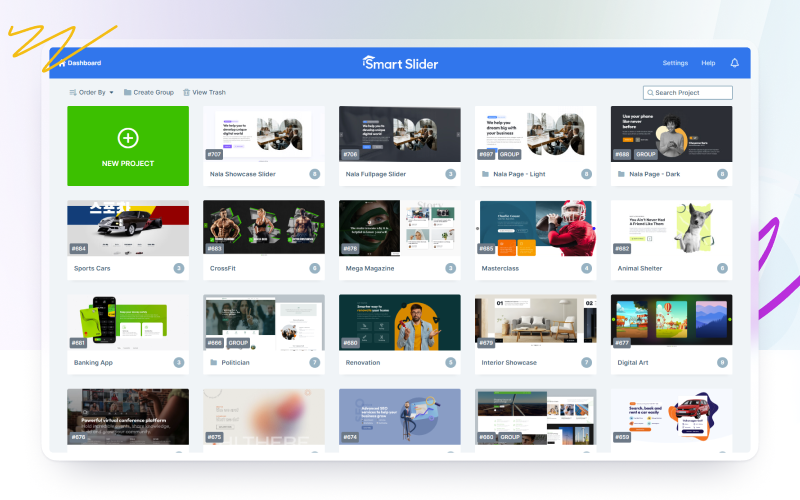
Smart Slider 3 is a freemium slider builder for WordPress and Joomla from Nextend. On WordPress, it adds a Smart Slider admin area where you can create slider projects, import templates, build slides with layers, and embed the result in posts, pages, widgets, or templates.
The WordPress.org listing describes it as a responsive, SEO-oriented slider plugin that works with any WordPress theme. The free plugin includes the visual editor, image and layer slider use cases, templates, device controls, and a Gutenberg block. Pro expands the product into a broader content presentation tool with carousel and showcase slider types, more layers, more templates, animation controls, video options, and dynamic content sources.
In practical terms, Smart Slider 3 sits between three categories:
- A simple image slider plugin for galleries and banners
- A visual hero section builder for landing pages and homepages
- A dynamic content slider for posts, products, videos, and social sources when Pro is available
That flexibility is the product's biggest strength. It is also why new users should start with one clear goal instead of exploring every animation and template on day one.
Who Smart Slider 3 is best for
Smart Slider 3 is best for WordPress users who want visual control without custom code. I would shortlist it for:
- Small business sites that need a modern homepage hero slider
- Bloggers and publishers who want featured post sliders
- WooCommerce stores that need product or promotion sliders
- Agencies that build repeated hero sections for client sites
- Designers who want layer-based editing inside WordPress
- Site owners who want a capable free slider before paying for Pro
It is less ideal for teams that avoid sliders entirely for conversion or performance reasons. It is also not the simplest answer for a basic photo slideshow. If your requirement is only "show five images with arrows," MetaSlider or a gallery block may feel more direct.
Setup experience and first impressions
The free setup flow is straightforward. Install Smart Slider 3 from WordPress.org, activate it, then open the new Smart Slider menu in wp-admin. From there, you can create a new project, start from a template, or manage existing sliders.
The dashboard is more polished than most free slider plugins. Projects are shown as visual cards, and the main actions are easy to find. The tradeoff is that the interface has more depth than a classic settings-page plugin. You will see project options, slide options, layers, responsive tools, animation settings, and publishing choices. Beginners can still create a slider, but they should expect a short learning curve.
The best setup path is to import a template, replace the images and text, then adjust spacing and mobile behavior. Starting from a blank slider is possible, but templates show how the row, column, and layer system is intended to work.
Main features
Visual slide editor
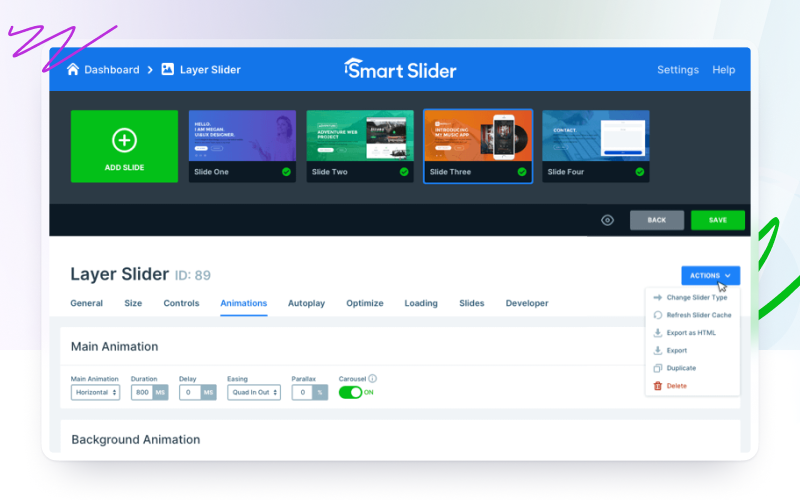
The visual editor is the core feature. Instead of editing one image and caption field at a time, you build a slide with layers. Common free-layer options include heading, text, button, image, and video-style presentation elements depending on the slider type and source. Pro adds many more layer choices, including items such as icons, lists, captions, iframe, audio, counters, animated headings, highlighted headings, and before-after layers.

The editor gives Smart Slider 3 a major advantage over simpler sliders. It is good for hero sections where you need a headline, supporting copy, a call-to-action button, and a background image. It is less useful if you only need a very lightweight image rotator.
Responsive controls
Smart Slider 3 includes device-aware controls so you can adjust how layers behave on desktop, tablet, and mobile. The WordPress.org listing highlights adaptive layer font sizing, custom responsive breakpoints, and the ability to hide layers on specific devices.
This matters because many slider plugins look acceptable on desktop and cramped on mobile. In Smart Slider 3, you can design for mobile instead of hoping the desktop version shrinks cleanly. I still recommend checking every slider at phone width before publishing, especially if your hero has multiple text layers.
Templates and slide library
Templates are a major part of the value proposition. The current pricing page lists 14 slider templates in the free version and 120+ templates in Pro. The templates cover common website patterns like hero blocks, image sliders, landing sections, team sections, magazines, and promotional layouts.

The free library is enough to understand the workflow. Pro becomes more attractive when you regularly need production-ready starting points for client or campaign pages.
Slider types
The free plan includes 2 slider types. Pro expands this to 4 slider types and adds more layout options. The official free vs Pro documentation specifically calls out Carousel and Showcase as Pro slider types, plus a Fullpage layout.
This difference is important for buyer intent. If your project is a standard homepage hero or basic image slider, the free plugin may be enough. If you need multi-item carousels, product showcases, or magazine-style content displays, Pro is the more realistic version to evaluate.
Animations and effects
Smart Slider 3 includes animation controls that can make a slider feel more like a designed section than a static slideshow. Pro adds background animations, layer animations, reveal effects, Ken Burns, morph and distortion animations, shape dividers, and parallax effects.
Animations are useful, but they are also where users can go too far. My recommendation is to use motion to support the message, not to show every effect. Keep transitions short, avoid stacking too many moving layers, and test the result on mobile and slower connections.
Dynamic content sources
Dynamic slides are one of the biggest Pro reasons to upgrade. Smart Slider 3 can generate slides from sources such as WordPress posts, WooCommerce products, folders, galleries, RSS, YouTube, and other supported integrations depending on setup and version.
For publishers and stores, this is more valuable than manual slide design. A dynamic post slider can update as new content is published. A WooCommerce slider can highlight products without rebuilding the slider every week. The free version is still useful for static design, but dynamic sources are where Smart Slider 3 becomes a content automation tool.
Gutenberg block and shortcode publishing
Smart Slider 3 provides a Gutenberg block, so you can insert a slider without memorizing shortcodes. Shortcodes are still available and useful for theme placements, widget areas, and builders that accept shortcode content.
The publishing experience is flexible enough for most WordPress sites. The main thing to remember is placement. A slider near the top of a homepage can affect perceived speed and Core Web Vitals if the images are large or the animation stack is heavy.
Documentation and changelog
The documentation is extensive, with separate pages for free vs Pro differences, dynamic sources, layers, animations, publishing, and troubleshooting. The changelog is active, and recent entries include accessibility improvements, dynamic source fixes, and security improvements.
That matters for a plugin in this category. Slider plugins often touch frontend JavaScript, images, responsive layout, video embeds, and third-party data. I would rather use a slider plugin with visible maintenance than one with a static feature page and an old changelog.
Smart Slider 3 pricing
Smart Slider 3 has a free version on WordPress.org and paid Pro licenses sold from the official website. As checked for this review, the pricing page lists:
| Plan | Price | Sites | Billing | Notes |
|---|---|---|---|---|
| Free | $0 | Unlimited sites | Free | 2 slider types, 6 layers, 14 templates |
| Standard | $49 | 1 site | One-time payment | All Pro features, lifetime updates and support |
| Premium | From $99 | 3, 5, or 10 sites | One-time payment | All Pro features, volume licensing, priority support |
The official pricing page states that paid packages include lifetime updates and support for the activated domains. It also lists a 14-day money-back guarantee. Prices exclude taxes.
The value is strong if you prefer one-time plugin licensing. Many WordPress tools moved to yearly subscriptions, so a $49 one-site lifetime license is appealing for a focused slider builder. The Premium tier makes sense for agencies that know they will reuse the plugin across multiple client sites.
Smart Slider 3 free vs Pro
The free version is not just a teaser. It can create real sliders with a visual editor, basic layers, templates, responsive controls, and WordPress embedding. For many small sites, that is enough.
Pro is worth considering when you need:
- Carousel or Showcase slider types
- More templates and design starting points
- More layer types
- Layer animations and advanced effects
- Dynamic slides from posts, products, videos, galleries, or feeds
- Priority support
- A license for client or commercial work
My advice is to build one real slider in the free version first. If you hit a specific Pro wall, such as needing a product carousel or dynamic post generator, the upgrade decision becomes much clearer.
Pros and cons
Pros
- Polished visual editor that feels more modern than basic slider plugins.
- Strong free version for static hero and image sliders.
- Good responsive controls, including device-specific layer handling.
- Pro licenses use one-time pricing with lifetime updates and support.
- Dynamic content features make Pro useful for publishers and WooCommerce stores.
- Gutenberg block and shortcode support make placement flexible.
Cons
- More complex than a simple image slideshow plugin.
- Advanced animations can hurt usability if overused.
- Many of the most interesting content automation features require Pro.
- Sliders still need careful image optimization and mobile QA.
- No affiliate program is listed, so deal-focused sites have less partner upside.
Alternatives to consider
MetaSlider
MetaSlider is a good alternative if you want a simpler slideshow workflow. It is easier for basic image rotators and galleries, but it does not feel as design-focused as Smart Slider 3.
Slider Revolution
Slider Revolution is better known for highly animated hero sections and advanced visual effects. It can be powerful, but it may feel heavier and more complex for users who only need a clean WordPress slider.
Soliloquy
Soliloquy is worth considering if you want a lightweight slider plugin with a simpler WordPress-style interface. It is not as visually ambitious as Smart Slider 3, but that can be a benefit for straightforward use cases.
Depicter
Depicter is another modern visual slider and content builder. Compare it if you want a design-heavy interface and a broader creative toolset beyond classic sliders.
Final verdict
Smart Slider 3 is a strong recommendation for WordPress users who want a polished visual slider builder with a free starting point and a sensible Pro upgrade path. The free plugin is capable enough to test on a real site, while Pro adds the features that matter for commercial projects: more templates, more layers, extra slider types, animations, and dynamic content sources.
I would not install it just to rotate a few images in a sidebar. For that, a simpler gallery or slider plugin is enough. But if you need a homepage hero, content slider, post showcase, or WooCommerce promotion slider, Smart Slider 3 is one of the best WordPress slider plugin options to test first.
FAQ
Is Smart Slider 3 free?
Yes. Smart Slider 3 has a free WordPress.org version. It includes the visual editor, 2 slider types, 6 layers, 14 templates, responsive controls, and WordPress embedding options.
What is the difference between Smart Slider 3 free and Pro?
The free version is best for static image and layer sliders. Pro adds extra slider types such as Carousel and Showcase, more layers, more templates, advanced animations, dynamic content sources, and priority support.
How much does Smart Slider 3 cost?
As checked for this review, the Standard Pro license starts at $49 for 1 site as a one-time payment. Premium starts at $99 for 3 sites, with larger 5-site and 10-site options shown on the pricing page.
Is Smart Slider 3 good for a WordPress hero slider?
Yes. This is one of its strongest use cases. The layer editor works well for hero layouts with a headline, text, button, background image, and responsive adjustments.
Can Smart Slider 3 create dynamic post sliders?
Yes, but dynamic content sources are mainly a Pro reason to upgrade. Smart Slider 3 Pro can build sliders from sources such as WordPress posts, WooCommerce products, galleries, feeds, and video platforms depending on the generator.
Does Smart Slider 3 work with Gutenberg?
Yes. The plugin provides a Smart Slider 3 block for the block editor. You can also use shortcodes for other placements.
Is Smart Slider 3 bad for performance?
Not automatically. The plugin includes responsive and publishing controls, but sliders can become heavy if you use large images, videos, or too many animations. Compress images, limit motion, and test mobile performance before publishing.
Who should avoid Smart Slider 3?
Avoid it if you only need a very simple image rotator or if your site strategy avoids sliders for conversion and performance reasons. It is most useful when you need visual design control.
Is Smart Slider 3 worth upgrading to Pro?
Pro is worth it if you need carousels, showcases, dynamic slides, advanced animations, a larger template library, or client-site licensing. If a basic static hero is enough, start with the free plugin.