


BulletProof Security has been blocking WordPress attacks since April 2010. That longevity alone sets it apart from most security plugins. A plugin that has survived sixteen years of WordPress ecosystem changes, PHP version jumps, and shifting attack patterns is not one that quietly disappeared from the plugin directory. As of August 2026, version 7.2 sits on 20,000-plus active sites with a 4.8-star average from 674 reviews on WordPress.org.
The pitch is straightforward: a server-level .htaccess firewall that stops SQL injection, XSS, code injection, and similar attacks before they ever reach WordPress PHP. A one-click Setup Wizard. A malware scanner. Login brute-force protection. Database backup. All available free. The Pro version adds real-time file monitoring, automated file restoration, an IP firewall for the plugins folder, and a fuller anti-spam layer, all for a one-time $69.95 payment that covers unlimited sites with no annual renewal.
That one-time pricing model is unusual enough in 2026 that it shapes every honest comparison with the competition.
This review is based on the WordPress.org free plugin (version 7.2, tested against documented behavior, the official AIT-pro.com forum FAQ, and independent technical assessments), official plugin documentation, user feedback on WordPress.org, and multiple third-party reviews and comparisons. Where Pro-only features were not exercised in a live install, the relevant sections say so and note the source of the information.
At a glance
- Version reviewed: 7.2 (last updated May 2026)
- Active installs: 20,000+
- Rating: 4.8/5 stars (674 reviews on WordPress.org)
- Free version: Yes, on WordPress.org
- Pro price: $69.95 one-time, unlimited sites, lifetime updates
- Core approach: Apache .htaccess server-level firewall; rules block attacks before they reach PHP
- Best for: Apache-hosted WordPress sites that want a lightweight, no-subscription firewall with a capable free tier
- Not for: Nginx-only servers (the core .htaccess firewall does not function); sites that need 2FA, vulnerability scanning, or a cloud WAF
Quick verdict
BulletProof Security delivers genuine server-level protection at a price point that most competing plugins cannot match: the free version covers the .htaccess firewall, login security, database backups, and basic malware scanning. The Pro version costs $69.95 once, covers unlimited sites forever, and adds real-time file monitoring and automated file restoration. No year two renewal bill.
The honest tradeoff is that BulletProof Security is a niche tool built for a specific scenario: Apache-hosted WordPress sites where the administrator is comfortable working with htaccess-level security and does not need a polished modern UI. It does not offer two-factor authentication at any tier. It has no vulnerability scanning or virtual patching. Its malware scanner works best as a tripwire rather than an active threat-removal engine. For Nginx-only hosting environments, the core firewall feature simply does not function.
For the right operator on the right server, it is one of the best-value security plugins available. For someone who wants an all-in-one security solution with a clean dashboard, a built-in WAF that works across server types, and 2FA out of the box, Wordfence or Solid Security are better fits.
Quick verdict card
- Best for: Apache and LiteSpeed WordPress sites, developers and advanced users comfortable with .htaccess, agencies that want unlimited-site coverage for a one-time fee.
- Best plan for most users: The free version covers the core firewall and login protection for most small sites. The Pro version at $69.95 one-time is compelling for anyone managing multiple sites and wanting file monitoring and AutoRestore.
- Standout: One-time $69.95 unlimited-site lifetime license with no annual renewal; server-level .htaccess firewall that blocks attacks before PHP; 4.8-star rating from over 670 reviews.
- Watch out for: No .htaccess firewall on Nginx-only servers; no 2FA at any tier; no vulnerability scanning; UI is dated; 20,000 installs is low compared to category leaders; malware scanner effectiveness questioned by some independent testers.
What BulletProof Security is
BulletProof Security is a WordPress security plugin developed by AITpro, a security-focused developer that has maintained the plugin since its first release on April 29, 2010. The plugin is listed at wordpress.org/plugins/bulletproof-security/ and the Pro version is sold directly through ait-pro.com with no marketplace intermediary.
The plugin’s security model is built around Apache .htaccess files. An .htaccess file is a server configuration file that Apache web servers read before processing any web request. By writing security rules into .htaccess, BulletProof Security instructs the web server to block certain types of malicious requests before they ever reach WordPress’s PHP code. This is a fundamentally different approach from plugins that hook into WordPress at the application level and inspect requests after PHP has started running. Server-level filtering adds no PHP overhead; requests that match the firewall rules are rejected at the server layer entirely.
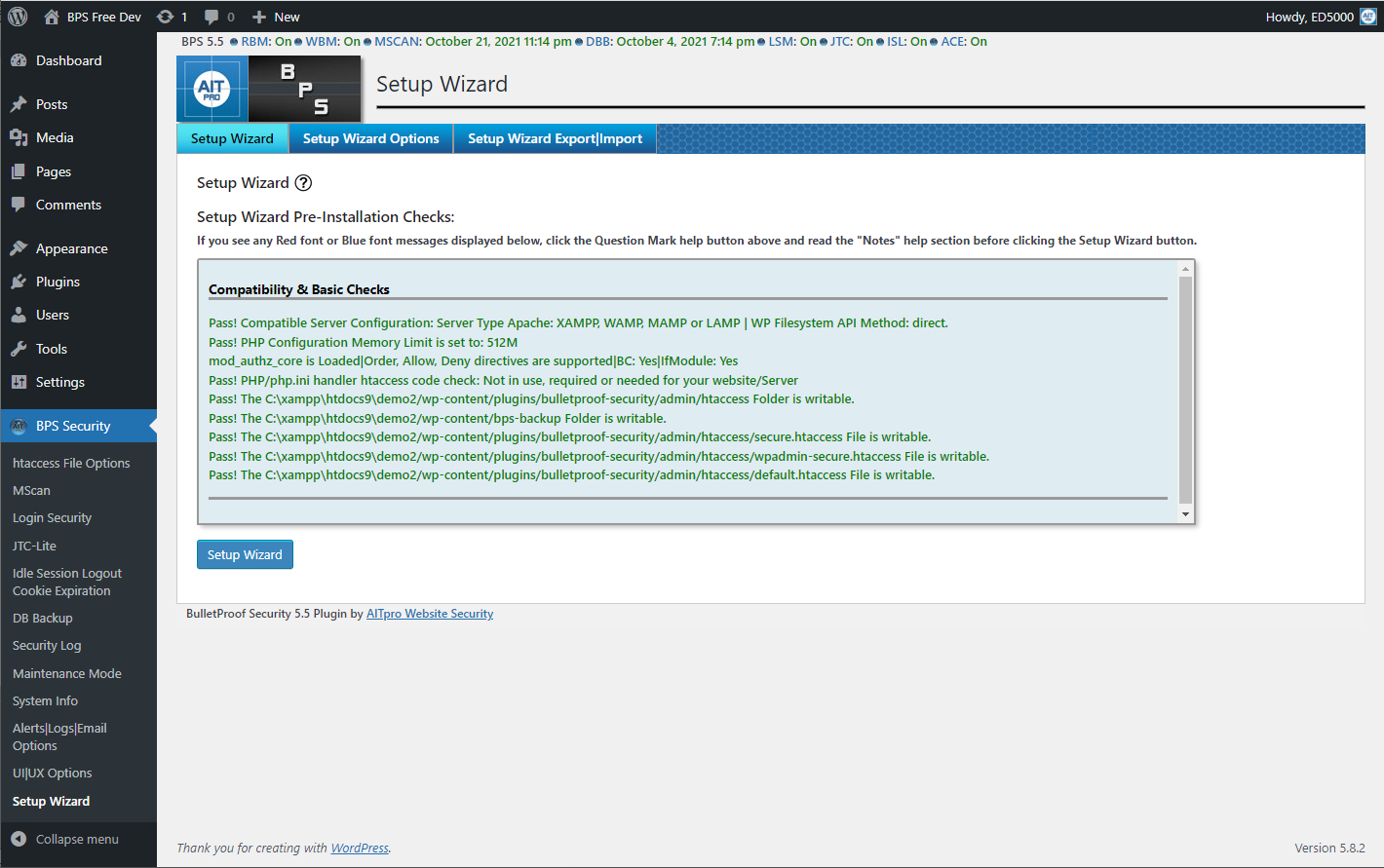
The Setup Wizard, which is the entry point for every new install, automatically generates customized .htaccess security rules for the root folder and the wp-admin folder, applies them with a single button press, and runs pre-installation checks to identify and automatically fix known conflicts with other plugins. AITpro documents more than 100 known plugin conflicts that the AutoFix feature handles without requiring manual intervention.
The free version has been the primary offering since 2010. The Pro version, at $69.95 one-time with unlimited installs and lifetime updates, is sold as a separate download from the developer’s site. There is no paid subscription model of any kind: one payment, one download, forever.
Key distinction for buyers: BulletProof Security is not a managed security service, a cloud WAF, or a real-time cloud threat intelligence platform. It is a locally installed WordPress plugin whose protection strength depends on the quality of its .htaccess rules and, for Pro users, the real-time monitoring and file restoration capabilities that run on your server. The plugin developer updates the firewall rules through plugin updates; you need to update the plugin for rules improvements.
Who BulletProof Security is best for
Strong fit:
- WordPress sites hosted on Apache or LiteSpeed servers where .htaccess firewall rules function as designed.
- Developers and technical administrators who are comfortable reading and understanding server-level security concepts and who want granular control over their firewall rules.
- Agencies and freelancers managing many WordPress sites who want unlimited-site coverage for a one-time Pro fee. At $69.95, covering fifty sites works out to roughly $1.40 per site for lifetime protection.
- Budget-conscious site owners on shared hosting who want server-level firewall protection without a recurring subscription.
- Sites that already have a separate malware scanner (a managed hosting scanner, a standalone service, or a cloud-based solution) and want BulletProof Security specifically for .htaccess hardening and login protection.
Weak fit:
- Sites hosted on Nginx-only servers. BulletProof Security relies on .htaccess files, which are an Apache-specific feature. Nginx does not read .htaccess files; if your server runs only Nginx, the core firewall functionality does not work. (Sites using a Nginx-plus-Apache hybrid stack, where Nginx is the frontend and Apache is the backend, can still benefit.)
- Beginners and first-time WordPress users who want a security plugin that is easy to interpret and manage without understanding server configuration. The Setup Wizard simplifies the initial installation, but the plugin’s interface, terminology, and configuration depth assume a technically comfortable user.
- Sites that need two-factor authentication (2FA). BulletProof Security does not offer 2FA at any tier. Free or Pro, you cannot add a TOTP authenticator, email OTP, or passkey to your WordPress login through this plugin.
- Sites that need vulnerability scanning and patching. BulletProof Security has no feature that checks whether your installed plugins and themes have known CVEs. For that, you need Solid Security Pro (Patchstack integration), Wordfence, or a standalone vulnerability scanner.
- Sites that need a cloud-based WAF. BulletProof Security’s firewall runs on-server through .htaccess. It does not route traffic through a cloud proxy, so it cannot filter DDoS traffic or attacks that come from distributed sources before they reach your hosting account. Sucuri and Cloudflare WAF handle that scenario.
Installing and setting up BulletProof Security
BulletProof Security installs from the WordPress.org plugin directory via the standard Plugins > Add New flow. After activation, it adds a BulletProof Security menu item to the WordPress left navigation. The first screen you land on is the Setup Wizard dashboard.
The Setup Wizard is the central reason the plugin’s user reviews are consistently positive despite its complexity. Before writing a single line of .htaccess, the wizard:
- Runs pre-installation checks to identify potential conflicts with other installed plugins and server configurations.
- Applies AutoFix automatically for the 100-plus known conflicts it recognizes (specific plugin combinations, theme edge cases, server environment variations).
- Generates customized .htaccess security rules for both the root folder and the wp-admin folder based on your specific WordPress install path and server configuration.
- Writes those rules to the appropriate .htaccess files with a single button press.
You click one button. The setup completes in seconds. This is genuinely one-click; the wizard does not ask you to choose security levels, configure rule sets, or understand what .htaccess means before you can use the plugin.
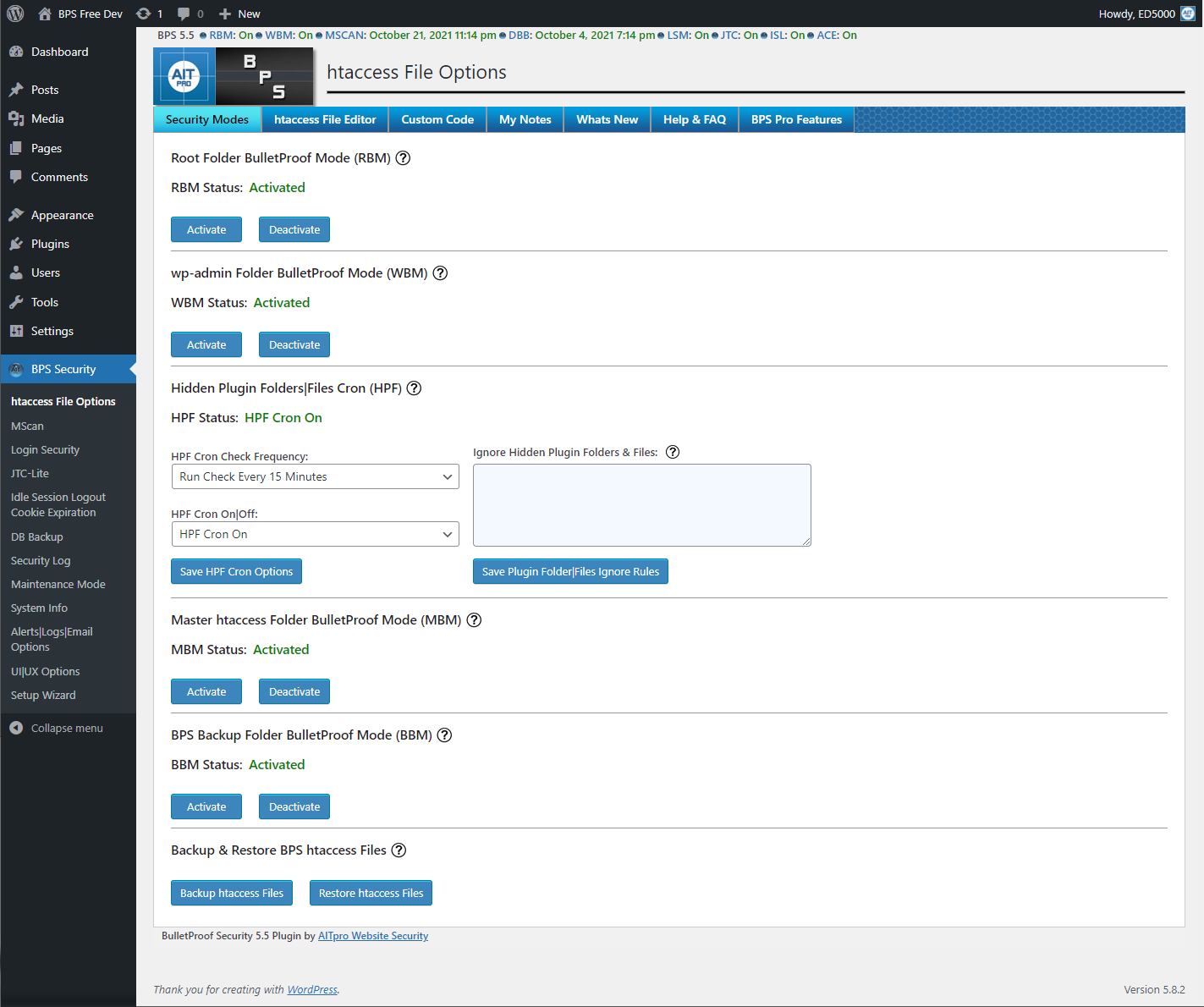
After setup, BulletProof Security’s admin interface divides into sections covering the firewall, login security, database backup, MScan, security logging, and various utilities. The interface is functional but clearly dates from an earlier era of WordPress admin design. It does not follow modern WordPress UI conventions (no React components, no card-based layouts, no contextual tooltips). For users coming from Wordfence’s dashboard or Solid Security’s modern interface, BulletProof Security’s admin will feel antiquated.
One legitimate limitation: ModSecurity, a server-level WAF module that some hosting providers run, can conflict with BulletProof Security’s .htaccess operations and trigger 403, 404, or 500 errors during setup or login attempts. The plugin’s FAQ addresses this, but resolving it requires either disabling ModSecurity rules via hosting support or adjusting ModSecurity whitelists, which is beyond what a non-technical site owner can do independently.
The .htaccess firewall
The .htaccess firewall is the plugin’s core protection mechanism and the feature that justifies the “BulletProof” name. When the Setup Wizard completes, it has written a set of Apache directives into your site’s .htaccess files that instruct the server to block requests matching known attack signatures before those requests reach WordPress PHP.
What the firewall blocks:
- SQL injection: Requests containing common SQL injection strings (UNION SELECT, DROP TABLE, etc.) in query parameters, form fields, and URI paths.
- Cross-site scripting (XSS): Requests containing script tags, JavaScript event handlers, and other XSS patterns in request parameters.
- Remote file inclusion (RFI): Requests attempting to load remote files by passing external URLs as PHP include parameters.
- Code injection: Requests attempting to execute PHP or server-side code through parameter values.
- Base64-encoded attacks: Requests using Base64 encoding as an obfuscation layer around attack payloads.
- Directory traversal: Requests attempting to navigate the server directory structure through relative path sequences (../../../etc/passwd patterns).
The server-level nature of this filtering matters for performance. When Apache rejects a request based on .htaccess rules, it does so at the server layer before any PHP interpreter starts, before WordPress loads, before any database query runs. This is categorically less resource-intensive than a PHP-based firewall that hooks into WordPress and inspects requests after PHP is already running.
The primary limitation is server specificity. Apache reads .htaccess files as part of every request it handles. Nginx does not. If your hosting stack uses Nginx as the only web server, none of the .htaccess firewall rules take effect. You would be running BulletProof Security without its most distinctive feature. The plugin’s forum documentation acknowledges this and notes that the plugin still provides value for Nginx-only sites through login security, database backup, and MScan, but the firewall capability itself is unavailable.
WAFPlanet’s technical assessment credits BulletProof Security’s firewall with coverage for 79,000-plus known CVEs, including 45,000-plus XSS variants and 19,000-plus SQL injection variants. Treat this as a marketing-oriented figure, not a precision security audit result, but it reflects the breadth of rule coverage that has accumulated across sixteen years of updates.
One feature worth noting: the plugin blocks by attack pattern rather than by IP address. Some security plugins accumulate large IP block lists and apply performance overhead every time they look up an incoming request against that list. BulletProof Security’s .htaccess approach evaluates the request itself, not the source IP, which keeps the performance profile lighter.
Login security and brute-force protection
BulletProof Security includes login security features that protect the WordPress login form from automated brute-force attempts and unauthorized access.
The login protection system:
- Failed login lockout: Automatically locks out an IP address after a configurable number of failed login attempts within a defined time window. Locked out IPs are logged and the administrator receives an email notification.
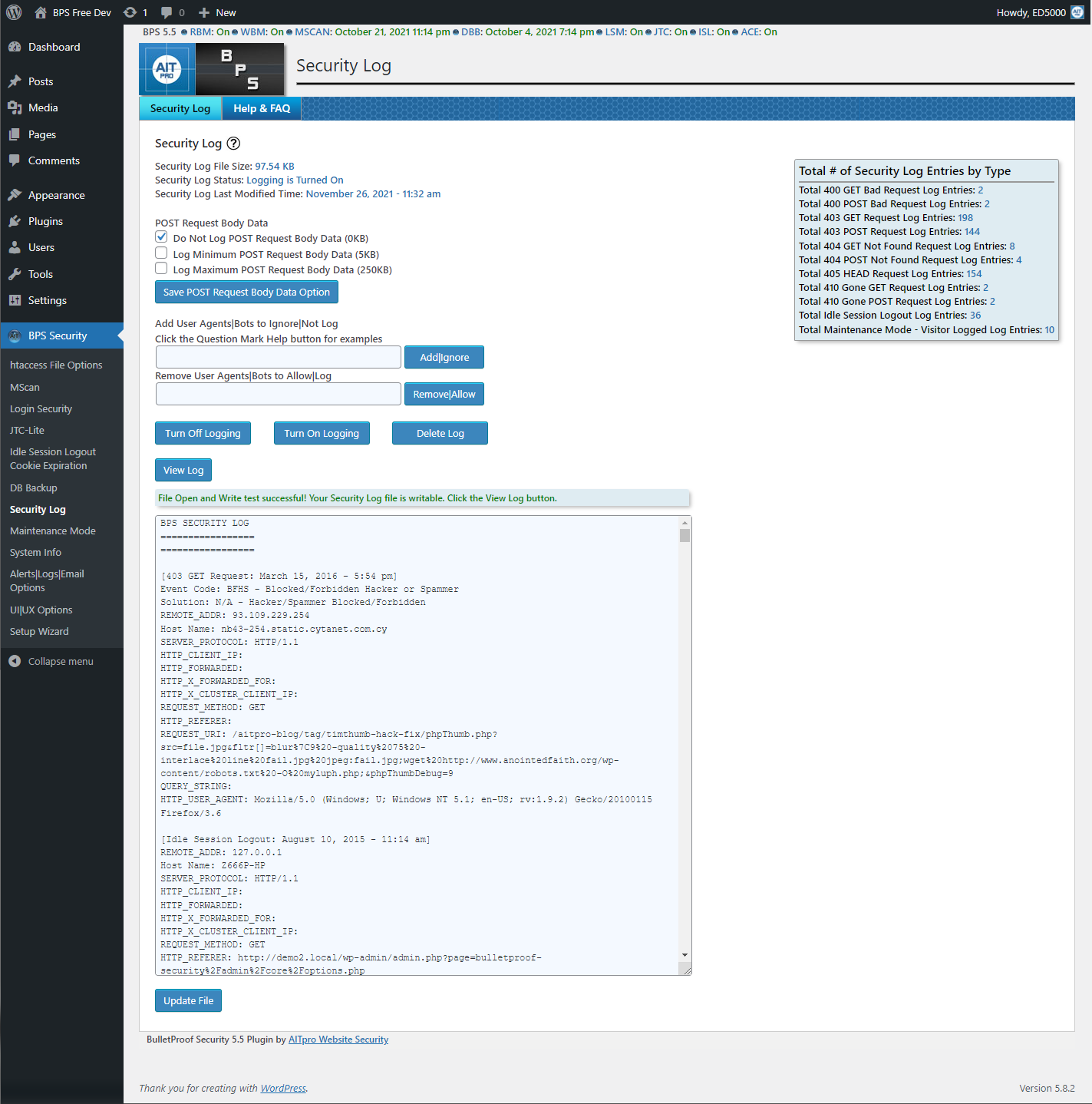
- Login monitoring: Records all login events (successful and failed) with timestamps and IP addresses in the security log. The administrator can choose to log all attempts or only lockout events.
- JTC-Lite (free): A simplified anti-spam and bot-trap layer for the login form. JTC-Lite includes a SpamBot Trap that catches automated login scripts that do not behave like real browsers.
- Idle Session Logout: Automatically logs out users who have been idle for longer than a configured time limit. Useful for shared computer environments or for administrators who leave WordPress sessions open.
- Auth Cookie Expiration: Allows the administrator to set a maximum lifetime for authentication cookies, forcing re-authentication after a defined period.
The JTC-Lite implementation in the free version is a trimmed-down edition of the full JTC Anti-Spam/Anti-Hacker feature available in Pro. The full Pro JTC adds more aggressive bot detection, CAPTCHA variants, and anti-hacker measures that go beyond the login page.
One significant gap: BulletProof Security has no two-factor authentication at any tier. Whether you are on the free version or Pro, you cannot add a TOTP authenticator app, an email-based OTP, or a hardware key to your WordPress login through this plugin. For sites where 2FA is required, you would need to add a separate plugin (Two Factor, WP 2FA, or a security plugin with 2FA like Wordfence or Solid Security) alongside BulletProof Security.
Independent testing of the login protection has produced mixed results. MalCare’s comparative review described the captcha implementation as bypassed in their test environment. WordPress.org user reviews are generally positive about the lockout feature working reliably in practice. The honest summary: the brute force lockout (rate limiting failed attempts) is a well-implemented, reliable feature; the anti-spam/CAPTCHA layer in JTC-Lite is more limited than what purpose-built 2FA or CAPTCHA solutions provide.
MScan malware scanner
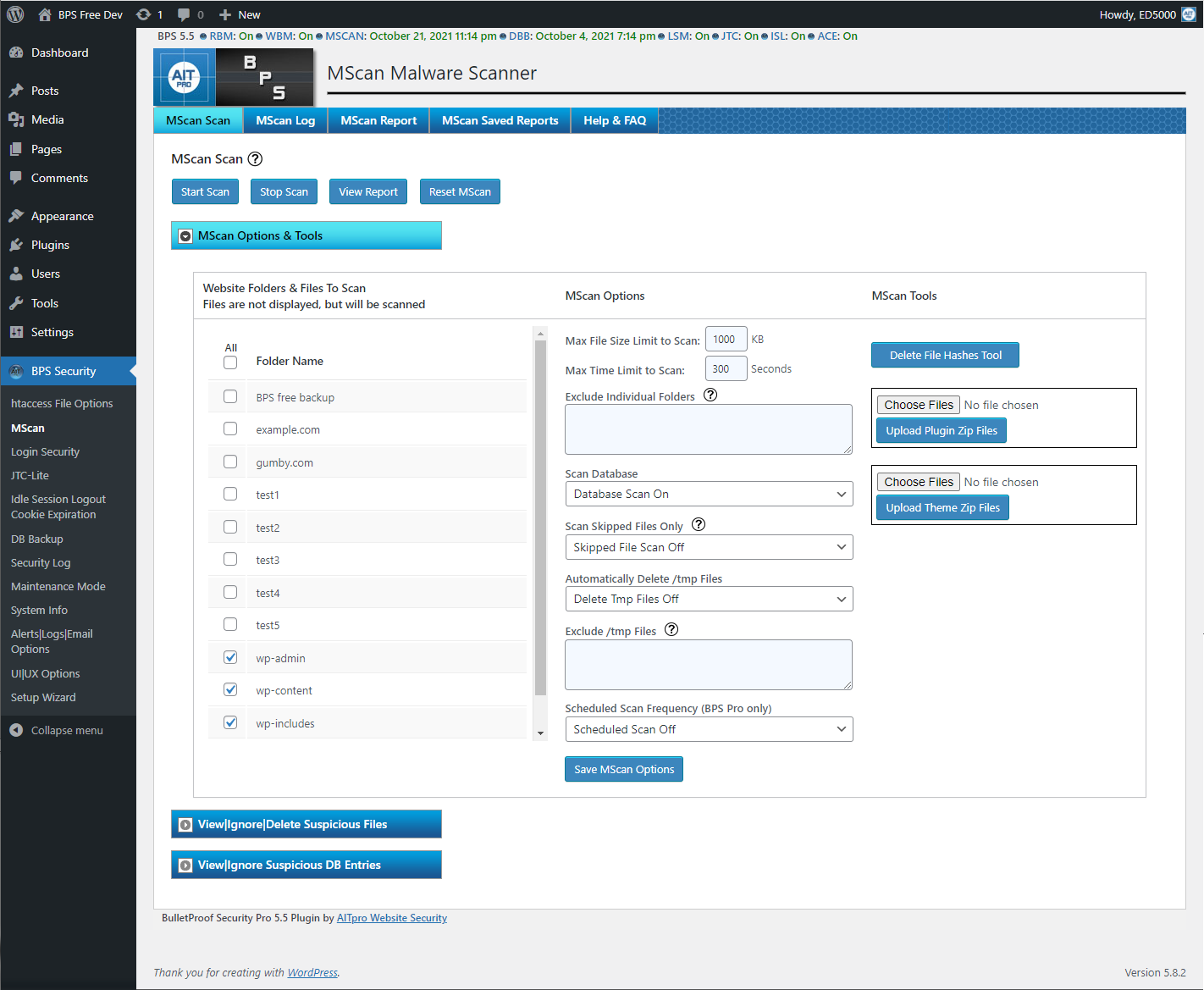
MScan is BulletProof Security’s built-in malware scanner. It scans your WordPress installation for files that may contain malicious code, using two primary methods: file hash comparison and pattern matching.
File hash comparison works by comparing the cryptographic hash (checksum) of each of your WordPress files against a known-good hash for that file. If the file on your server has been modified compared to the expected version, the hash will not match, and MScan flags the file as potentially tampered. This approach is effective for detecting modifications to WordPress core files, plugin files, and theme files whose expected hashes are known.
Pattern matching adds a secondary layer: MScan scans file contents for known malicious code signatures, patterns commonly associated with backdoors, web shells, and injected scripts.
Important context on malware scanner effectiveness: BulletProof Security’s MScan works best as a file integrity monitor and a first-pass indicator that something may have changed, rather than as a comprehensive malware removal tool. MalCare’s comparison review reported that MScan did not detect active malware during their test on a known-compromised site. The WAFPlanet review describes the Pro version’s scanner as stronger than the free version’s, with the AutoRestore/Quarantine IDPS providing real-time protection that the basic MScan does not.
The free MScan should be understood as a useful supplementary tool: it will catch many cases of obvious file modification and known-signature malware, but it should not be treated as a primary defense against sophisticated malware. For sites that need reliable malware detection and removal, a dedicated scanner (Malwarebytes for Websites, Sucuri SiteCheck, or a server-level scanner from a managed hosting provider) provides stronger coverage.
Where the Pro version changes this picture: the AutoRestore/Quarantine Intrusion Detection and Prevention System (ARQ IDPS) is a different class of tool compared to MScan. The ARQ IDPS monitors files in real-time for unauthorized changes and automatically restores altered files from a known-good baseline and quarantines suspicious files for review. AITpro describes ARQ IDPS as “more advanced, automated and superior to malware scanners” and it is designed to catch modifications as they happen rather than on a scheduled scan basis.
Database backup
BulletProof Security includes a built-in database backup system that handles both full and partial database backups, either on a manual basis or on a schedule.
Backup configuration options:
- Backup type: Full database backup (all tables) or partial backup (selected tables only).
- Schedule: Manual on demand, or scheduled at a defined interval.
- Storage: Local folder on the server, with optional automatic compression and email delivery of backup archives.
- Retention: Automatic deletion of old backup files after a configured retention period to prevent disk space accumulation.
This is a useful convenience feature for maintaining a recent database backup without installing a separate backup plugin. It covers the most critical WordPress data (posts, settings, user accounts, comments, plugin data) in a single compressed archive.
Important limitations: BulletProof Security’s database backup does not include files. It backs up the database only, not your uploads folder, plugin files, or theme files. A full site backup (database plus files) requires a dedicated backup plugin like UpdraftPlus, Duplicator, or a hosting-provided backup system. Treat BulletProof Security’s database backup as a lightweight safety net for database-only changes, not as a replacement for a full-site backup solution.
Pro features: AutoRestore, Plugin Firewall, and Pro-Tools
AutoRestore/Quarantine IDPS (ARQ)
The AutoRestore/Quarantine Intrusion Detection and Prevention System is the Pro version’s most significant feature. Where MScan scans files on demand or schedule, ARQ monitors files in real-time. When a file is created, modified, or deleted in a monitored directory, ARQ:
- Compares the change against the known-good baseline.
- If the change is unauthorized, automatically restores the original file from the baseline.
- Quarantines the suspicious file for the administrator’s review.
- Sends an alert notification.
This is a continuous-monitoring approach. A hacker who manages to write a backdoor file to your server does not get to leave it there until your next scheduled MScan runs. ARQ catches the file write event and restores the clean state. AITpro describes this as a more reliable protection model than periodic scanning.
Plugin Firewall (IP Firewall)
The Plugin Firewall applies an IP-based whitelist to your WordPress plugins folder. Only whitelisted IP addresses (primarily your own) can access the plugins folder directly via HTTP. This prevents direct HTTP access to plugin files from unauthorized IPs, which is a common attack surface for plugin-specific exploits and scanner probes.
The whitelisting is automated: the Plugin Firewall maintains and updates the whitelist without requiring manual IP management.
Real-time File Monitor and DB Monitor
Separate from ARQ, the Real-time File Monitor watches for file system changes and logs them with details. The Database Monitor and Diff Tool tracks changes to the WordPress database and provides a comparison view (diff) so the administrator can see exactly what changed between two points in time.
Full JTC Anti-Spam and Pro-Tools
The full JTC Anti-Spam/Anti-Hacker system (versus the JTC-Lite in the free version) adds more aggressive bot detection and anti-spam protection for the login form and other entry points. The 16 Pro-Tools mini-plugins are a collection of additional security utilities that cover PHP error logging, file and folder locking (F-Lock), custom php.ini security headers, and other hardening tasks.
Pricing
BulletProof Security has the simplest pricing structure of any WordPress security plugin in its category: free or a one-time $69.95 payment.
Free version:
- Available permanently at wordpress.org/plugins/bulletproof-security/
- Includes the .htaccess firewall, Setup Wizard with AutoFix, MScan, login security, JTC-Lite, database backup, security logging, idle session logout, maintenance mode, and DB table prefix changer.
- No time limit. No feature expiry after a trial period.
BulletProof Security Pro:
- One-time payment: $69.95
- License: unlimited sites, lifetime updates, no renewal required
- Adds: AutoRestore/Quarantine IDPS, real-time file monitor, DB monitor and diff tool, Plugin Firewall, full JTC anti-spam, custom php.ini, F-Lock, PHP error logging, uploads anti-exploit guard, 16 Pro-Tools mini-plugins, dashboard alerting
- Money-back guarantee: 30 days
There is no annual subscription, no monthly plan, no agency tier with a different price, and no upsell to a higher-cost bundle. One payment covers your entire portfolio of sites permanently.
For context: Wordfence Premium costs $99 per year per site. Solid Security Pro (now Kadence Security Pro) requires a Kadence bundle at significantly higher cost. All In One WP Security is free with no premium tier. BulletProof Security sits in a distinct position: a capable paid tier at a one-time cost that becomes more economical the more sites you manage and the longer you use it.
Note: verify the current price directly at ait-pro.com before purchasing. The $69.95 price point has been consistent across multiple independent sources as of 2025-2026, but pricing is subject to change without notice.
Pros and cons
Pros
- One-time $69.95 Pro price covers unlimited sites forever with no renewal; exceptional value for developers and agencies managing multiple WordPress installations.
- Server-level .htaccess firewall blocks attack patterns before requests reach PHP, with lower performance impact than plugin-level firewalls that run inside WordPress.
- One-click Setup Wizard with AutoFix handles 100-plus known plugin conflicts automatically, making the initial configuration accessible despite the plugin’s technical depth.
- Free version is genuinely capable: the .htaccess firewall, login brute-force protection, database backup, MScan, and security logging are all available without paying.
- Pro AutoRestore/Quarantine IDPS provides real-time file monitoring and automatic file restoration, a continuous protection approach stronger than scheduled scanning.
- Active development since 2010 with version 7.2 in 2026; AITpro has maintained consistent updates for sixteen years.
- 4.8-star rating from 674 WordPress.org reviews demonstrates sustained user satisfaction across a long deployment period.
- Database backup built in at every tier; no need to install a separate backup plugin for database-only coverage.
- Maintenance mode (front-end and back-end) available from within the plugin without an additional maintenance plugin.
- Performance-conscious design: the plugin explicitly avoids excessive database queries and caching abuse; the server-level firewall adds no PHP overhead.
- No cloud dependency: all protection runs locally on your server; no data is sent to an external monitoring service.
Cons
- No .htaccess firewall on Nginx-only servers; the core protection feature is unavailable for a significant portion of the WordPress hosting market.
- No two-factor authentication at any tier; a basic security control absent entirely from both free and Pro.
- No vulnerability scanning or virtual patching; the plugin cannot identify whether your installed plugins and themes have disclosed CVEs.
- Interface is visually dated; the admin panel does not follow current WordPress UI conventions and requires more reading/orientation than modern alternatives.
- 20,000-plus active installs is low for a security plugin category where Wordfence claims five million-plus. Smaller install base means less network-effect data for threat intelligence.
- MScan malware detection has received criticism in some independent tests; it works better as a file integrity tripwire than as an active malware-removal tool.
- No cloud-based threat intelligence; firewall rules are updated via plugin updates rather than real-time threat feeds.
- ModSecurity conflicts are a documented issue on hosting environments where ModSecurity is active; resolving them requires hosting-level intervention.
- No 2FA, no vulnerability scanning, and no cloud WAF means BulletProof Security covers a narrower security surface than all-in-one alternatives.
- Support is primarily forum-based at forum.ait-pro.com; there is no ticket-based or live chat support at either the free or Pro tier.
- Some user reports of compatibility issues with backup plugins including UpdraftPlus; verify compatibility before running both simultaneously.
Alternatives to BulletProof Security
- Wordfence Security. The most installed WordPress security plugin with five million-plus active installs. The free version includes an application-level firewall (PHP-based rather than .htaccess), malware scanner, 2FA, brute force protection, and real-time IP blocking. Wordfence Premium adds real-time firewall rule updates, country blocking, and a faster rule feed at $99/year per site. Works on Apache and Nginx. More beginner-friendly interface than BulletProof Security. Higher annual cost for multi-site agencies, but stronger malware detection and built-in 2FA.
- All In One WP Security and Firewall. Completely free with no premium tier. Offers firewall rules (including .htaccess options), login security with brute-force lockout, 2FA, file system permission checks, and security hardening tools. No malware scanner. Popular choice for personal and small business sites that want solid free protection. Similar .htaccess-based approach to BulletProof Security but with a cleaner, more beginner-accessible interface and built-in 2FA.
- Solid Security (formerly iThemes Security, now Kadence Security). Strong login security with 2FA, passkeys, network brute force protection backed by 700,000-plus sites, and Patchstack vulnerability scanning on Pro. The free version covers the login security basics well. Pro now requires the Kadence bundle at significantly higher cost than its standalone $99/year price before May 2026. No malware scanner at any tier. See the Solid Security review on this site for a detailed comparison.
- Sucuri Security. Free WordPress plugin with security auditing, file integrity checking, blacklist monitoring, and basic post-hack hardening. Sucuri’s paid value is the cloud-based WAF (separate from the WordPress plugin), which filters traffic at the DNS level before it reaches your server; pricing starts at $199.99/year. If your primary concern is DDoS protection and edge-level filtering rather than server-side .htaccess rules, Sucuri’s WAF is a different kind of tool.
- MalCare Security. A managed security service with cloud-based malware scanning that does not run the scanner on your server’s resources. Offers one-click malware removal, a login protection firewall, and real-time protection. Paid plans start at $99/year for one site. Better malware detection track record in independent tests than BulletProof Security’s MScan, but more expensive for multi-site users.
For most small to medium WordPress sites with Apache hosting and a technically confident admin, BulletProof Security’s free version covers the firewall basics well, and the Pro version at $69.95 one-time is a strong choice for anyone managing multiple sites. For sites that need 2FA, vulnerability scanning, or better malware detection, Wordfence or a combination of All In One WP Security plus a standalone malware scanner provides a more complete picture.
Final verdict
BulletProof Security earns its 4.8-star rating. The Setup Wizard delivers on its promise of one-click protection. The .htaccess firewall is architecturally sound: blocking attack patterns at the server level before PHP runs is a correct design choice for performance-conscious deployments. The Pro version’s one-time $69.95 unlimited-site pricing is a genuine market anomaly in a category where most competitors charge $99 or more per year per site.
The honest limitations are equally clear. No 2FA. No vulnerability scanning. No Nginx compatibility for the core firewall feature. A malware scanner that works better as a file integrity checker than an active detection engine. An interface that has not kept up with WordPress admin design standards. An install base of 20,000-plus that is modest for the security category.
The plugin fits a specific operator profile: technically comfortable, hosting on Apache or LiteSpeed, managing multiple sites, and wanting server-level firewall protection and real-time file monitoring for a single one-time payment. For that profile, BulletProof Security is difficult to beat on value. For operators who want a more complete all-in-one solution with 2FA, vulnerability alerts, and a modern interface, the alternatives listed above are worth evaluating alongside it.