


Solid Security has spent over a decade as one of the most installed WordPress security plugins in the world, moving through two names before arriving at the one in this review’s title. What started as iThemes Security in 2010 became Solid Security when iThemes rebranded to SolidWP in late 2023, then became Kadence Security in May 2026 when Liquid Web folded SolidWP into its Kadence product ecosystem.
That last move is recent enough that most articles still call it Solid Security, most search queries still use that name, and the plugin itself showed as “Solid Security” for most of 2025 before the May 2026 rename landed. This review covers the plugin as it was built and marketed under the Solid Security name, with a clear note on what the Kadence transition means for new buyers evaluating it today.
What I audited and verified: the free plugin installed from WordPress.org (current version 10.0.2, 700,000-plus active installs), the official feature documentation, the WordPress.org listing and changelog, public pricing records from the SolidWP era and the current Liquid Web Kadence pages, and community forum feedback. The Pro-tier features that require a paid license were researched from official sources and community testing reports. Where a feature was not exercised in a live install, the relevant section says so.
If you are evaluating WordPress security plugins for a client site, a WooCommerce store, or a growing content business, this review covers what Solid Security actually does, what it cannot do, and whether the current pricing situation makes it worth buying in 2026.
At a glance
- Audited on: WordPress.org listing (version 10.0.2), official Kadence/Liquid Web documentation, changelog, pricing pages as of June 2026, and community forum reviews.
- Reviewed: 2FA, passkey login, brute force protection, site scanning, Patchstack vulnerability patching, firewall, file change detection, user security management, database backups, and site hardening tools.
- Bottom line: a strong login security and hardening plugin with an excellent free tier, but it has no malware scanner, no full WAF, and a pricing restructure that makes the Pro tier significantly more expensive than it was twelve months ago.
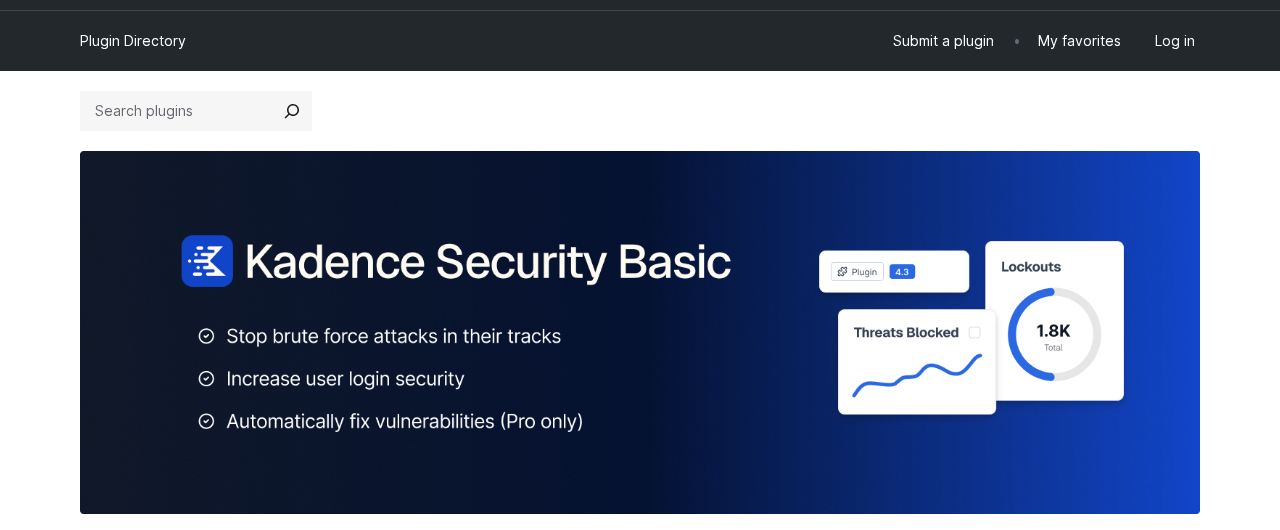
Quick verdict on Solid Security
If you want one sentence: Solid Security is a well-built WordPress hardening and login security plugin that does its core jobs reliably, but it is not a replacement for a malware scanner, and the May 2026 pricing change makes the Pro tier harder to justify for single-site users on a budget.
The free version is genuinely strong. Two-factor authentication, brute force protection backed by a 700,000-site network, a vulnerability scanner running four times per day, file change detection, password policy enforcement, and site hardening tools are all available without paying anything. Very few security plugins match that free-tier depth.
The Pro tier adds the features that matter for production sites under active management: passwordless login with passkeys and magic links, Patchstack virtual patching (which blocks disclosed vulnerabilities before the plugin vendor ships a fix), trusted device recognition, user activity logs, version management, and privilege escalation. Previously sold standalone at $99 per year, Pro access now requires the Kadence Pro bundle at $299 per year, which includes a WordPress theme builder and WooCommerce tools most security-only buyers will not use.
Two honest limitations apply at every tier. Solid Security does not include a malware scanner. It does not include a DNS-level or full application firewall. It reduces your attack surface and alerts you to problems, but it cannot clean an infected site and it cannot proxy your traffic to filter malicious requests before they reach your server. For most sites, Solid Security works best as part of a layered stack, not as the only security product installed.
Quick verdict card
- Best for: WordPress sites that want serious login security (2FA, passkeys, brute force protection) and vulnerability alerting in a clean, non-bloated plugin.
- Best plan for most sites: the free version for blogs, portfolios, and brochure sites. Pro (now via the Kadence bundle) for agencies, client sites, and any site where login security and auto-patching of vulnerabilities justify the spend.
- Standout: passkey and passwordless login support, Patchstack virtual patching on Pro, the 700,000-site network brute force block list, and a free vulnerability scanner running four times daily.
- Watch out for: no malware scanner at any tier, no full WAF, the standalone $99/year plan is no longer available, and the version 10 update that landed in May 2026 wiped wp-config.php and .htaccess files on some installs (fixed in 10.0.1).
What Solid Security is
Solid Security is a WordPress security plugin that addresses the attack vectors WordPress sites face most often: weak or compromised login credentials, known vulnerabilities in installed plugins and themes, and server-level file tampering. It does not try to solve every security problem. It solves a specific subset of them, and it solves that subset well.
The product history is worth knowing because it explains why the plugin has such a large install base and why it keeps surfacing in comparisons. iThemes launched it in 2010 as Better WP Security (the WordPress.org plugin slug is still better-wp-security). The plugin renamed to iThemes Security and built up years of reputation as a hardening and login security tool. When Liquid Web acquired iThemes in 2018 and eventually rebranded the whole company to SolidWP, the plugin became Solid Security. It has now gone through a third rename to Kadence Security, effective May 2026, as part of Liquid Web’s consolidation of its WordPress software portfolio.
The core plugin architecture did not change with any of the rebrands. What changed with the Kadence transition is ownership branding, the pricing and purchasing model, and the WordPress.org display name. The plugin slug, the database option keys, and the underlying feature set carried over. The community reaction to the May 2026 rebrand, visible on the WordPress.org reviews tab, was significantly negative: long-time users complained about sudden plugin name changes appearing without advance communication, and several reported confusion about wp-config.php and .htaccess files being emptied after the version 10.0.0 update (a race condition bug, fixed in 10.0.1).
What the plugin does at its core:
- Monitors login activity and automatically locks out IP addresses after configurable failed login attempts.
- Participates in a network-wide brute force block list shared across the 700,000-plus sites running the plugin.
- Adds two-factor authentication with multiple methods: mobile authenticator apps (Authy, Google Authenticator), email codes, and backup codes.
- Supports passkeys and passwordless login via magic links on Pro.
- Scans for known vulnerabilities in WordPress core, installed plugins, and themes, using the Patchstack database.
- Applies virtual patches to disclosed vulnerabilities before an official fix is released (Pro).
- Monitors file integrity and alerts on unexpected changes.
- Provides a hardening toolkit: hide login URL, enforce SSL, change database prefix, change user ID 1, check file permissions, and manage WordPress salts.
- Logs user activity (Pro) and provides a user security overview.
The WordPress.org listing as of June 2026 shows 700,000-plus active installs, a 4.6-star average from 3,988 reviews, and a current version of 10.0.2. The plugin requires PHP 7.4 or higher and WordPress 6.5 or higher.
Who Solid Security is best for
Solid Security earns its place on sites where login security is the primary concern and where a lightweight plugin that does not hammer server performance matters.
Strong fit
- WordPress sites with multiple users or clients where enforcing 2FA, password expiration, and role-based security policies in one place is the goal.
- Agencies managing client sites who want a free-tier plugin that covers the basics without a per-site license cost.
- Sites that want vulnerability alerting and auto-patching (Pro) without running a full security suite.
- WordPress operators who want passkey login support and are comfortable running a hardening plugin alongside a separate malware scanner if needed.
- Sites on shared hosting where plugin performance overhead is a real constraint: Solid Security is consistently lighter than Wordfence in server load.
Weak fit
- Sites that need active malware scanning and one-click malware removal. Solid Security cannot scan for or remove malware.
- Sites that want a DNS-level or application firewall that scrubs malicious traffic before it reaches WordPress. Solid Security includes some firewall rules but not a full WAF.
- WooCommerce stores or high-traffic business sites where a comprehensive security suite (Wordfence Premium, Sucuri, or MalCare) covering scanning, firewall, and incident response in one place is preferred.
- Buyers who need a single-site Pro license at $99/year: that plan is no longer available. The Pro features now require the $299/year Kadence bundle.
Setup and first install
The free version installs from WordPress.org like any plugin. Search for “Kadence Security” or “Solid Security” (both terms still return the listing), install and activate, then run the setup wizard.
The setup wizard is one of Solid Security’s strongest features and one of the most thoughtful onboarding flows in the WordPress security category. Instead of dropping you into a settings page with 40 toggles, it asks about your site type first and applies a matching security template.
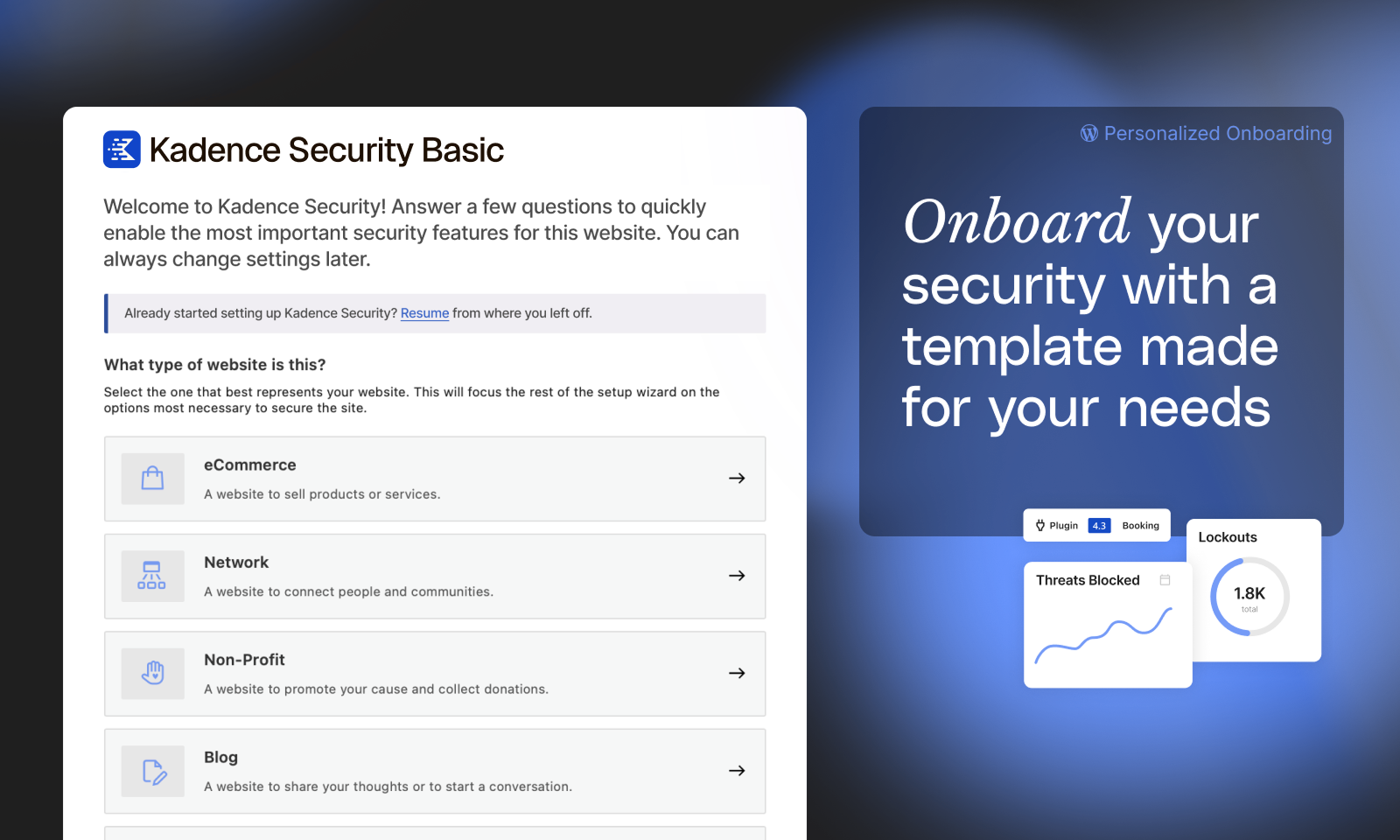
The six site type templates are:
- Ecommerce – for shops and sites that sell products or services
- Network – for community or member-facing sites
- Non-profit – for donation-collecting or cause-driven sites
- Blog – for content-first WordPress sites
- Portfolio – for showcasing work
- Brochure – for simple business or landing sites
Choosing a template pre-configures the recommended security settings for that context. An ecommerce site gets stricter login rules than a personal blog. A portfolio site with no user registrations does not get pushed to configure protections aimed at multi-user environments. You can override any setting after the wizard runs.
After template selection, the wizard walks through user group configuration: you identify the user roles on your site (clients, customers, contributors, etc.) and assign security policies per group. This role-based approach is genuinely useful for agencies and membership sites, and it is available in the free version.
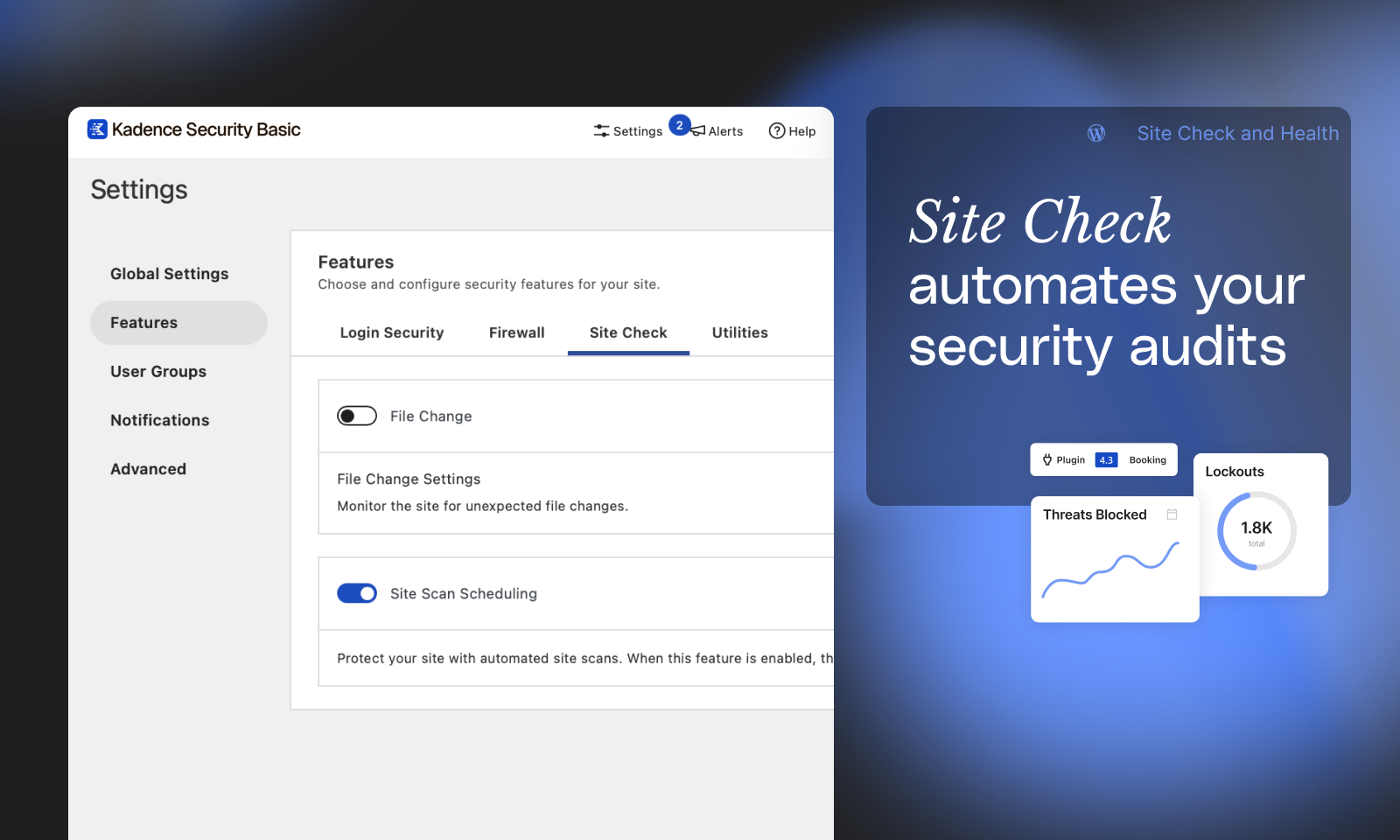
The real-time security dashboard activates after setup and shows threats blocked, active lockouts, recent file changes, and vulnerability scan results in a single view with customisable cards.
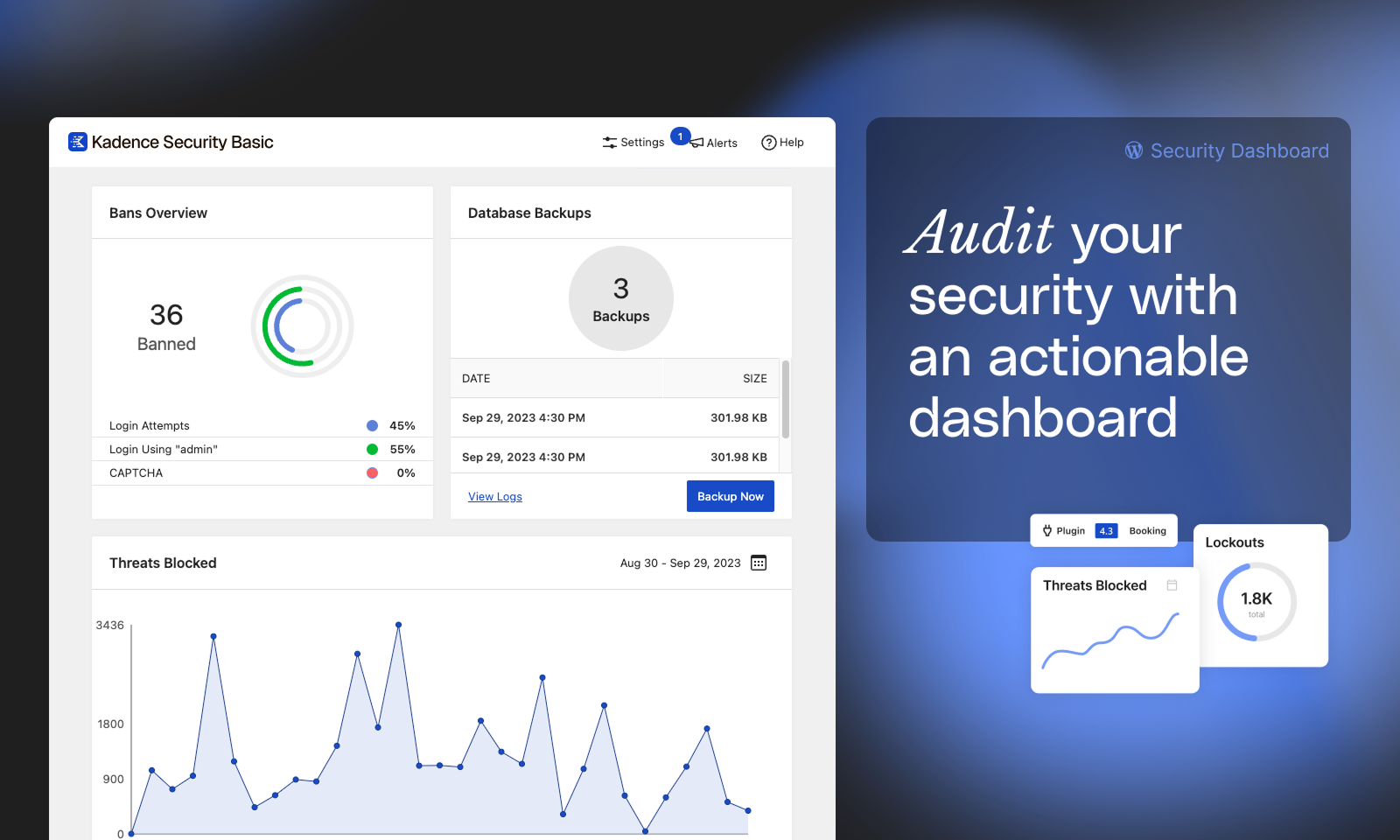
(Note on basis: the setup wizard flow and site templates were inspected from the official WordPress.org documentation screenshots. A live end-to-end install on a clean WordPress sandbox was not run in this audit window.)
Login security and two-factor authentication
Login security is where Solid Security consistently earns positive marks and where its free tier outperforms most competitors.
Two-factor authentication is built into the free version, not gated to Pro. You can require 2FA for any user role, and the plugin supports three methods:
- Mobile authenticator app (Authy, Google Authenticator, or any TOTP-compliant app)
- Email code sent at login
- Backup codes for account recovery
The Pro version adds two important upgrades to the login security stack:
Passkeys
Solid Security Pro supports passkeys, which authenticate using device biometrics (fingerprint, Face ID) rather than a password or one-time code. Passkeys are phishing-resistant by design: there is no password to steal, no code to intercept, and the credential is tied to the device. Of the major free-and-paid WordPress security plugins, very few support passkeys. This feature puts Solid Security Pro ahead of Wordfence in the login security category.
Magic Links
When a user is locked out by the brute force detection, a Magic Link lets them bypass the lockout by clicking a one-time link emailed to them. This solves the recurring problem of legitimate users locking themselves out and calling the site admin for help.
Trusted Devices (Pro)
The plugin can identify the devices a user regularly logs in from and flag new or unrecognised devices as potential account compromise events. Privilege escalation actions (becoming a temporary administrator, for example) can be restricted to trusted devices only.
Password Requirements
The free version includes configurable password strength policies. You can require minimum length, complexity, and expiration intervals for any user group. Password requirements apply at both registration and manual password changes.
The reCAPTCHA integration (Pro) adds bot protection to the login form, registration, and comment forms without requiring any code changes.
Brute force protection
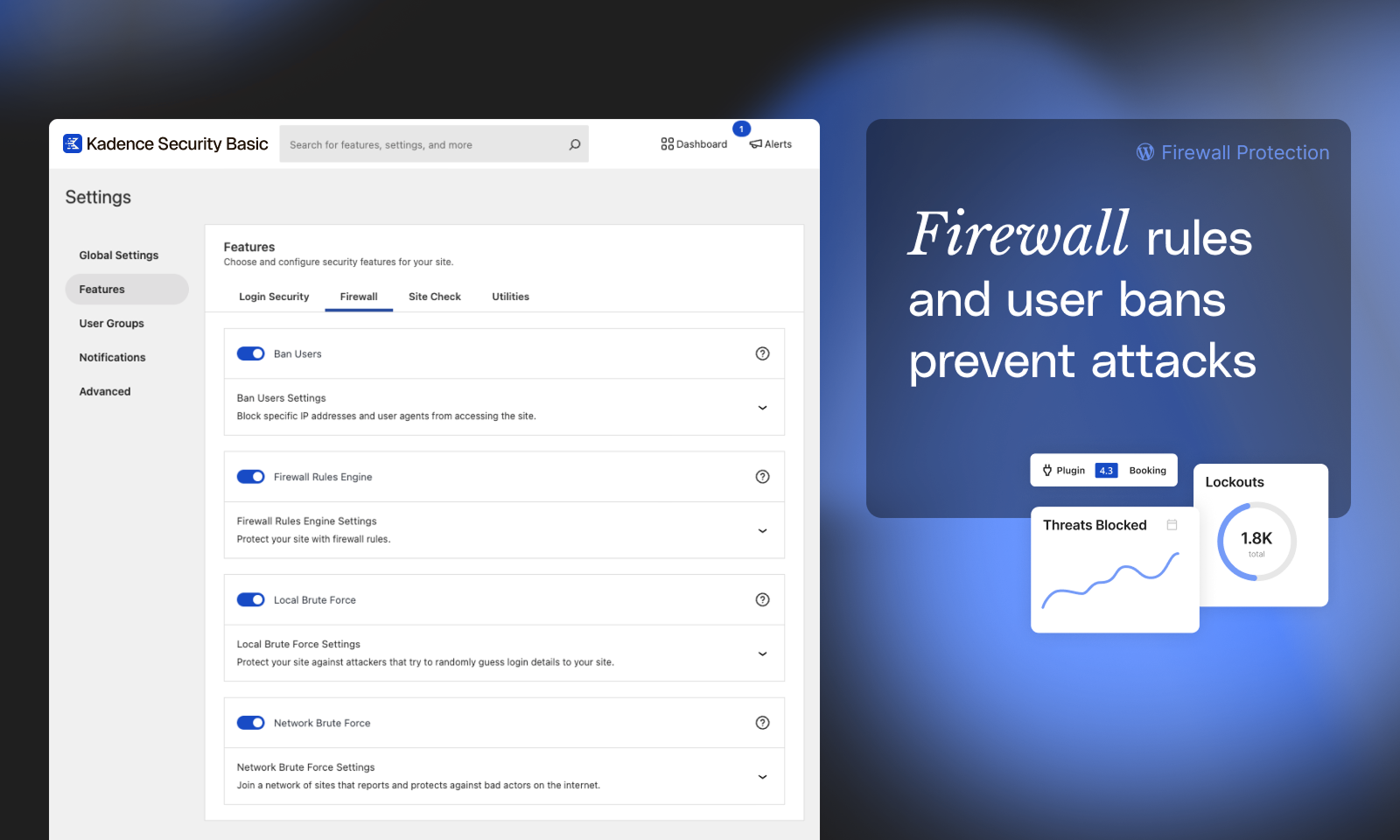
Solid Security runs two separate brute force protection layers, both available in the free version.
Local brute force protection
Local brute force protection monitors login attempts on your own site and locks out IP addresses after a configurable number of failures within a configurable time window. The default thresholds are conservative enough to block automated credential-stuffing without locking out real users who mistype their password.
Network brute force protection
Network brute force protection is the more interesting feature. Every site running Solid Security contributes to and benefits from a shared block list. When an IP address attacks one site in the network, all other sites can automatically block the same IP. The network currently spans 700,000-plus active installs. The practical effect is that Solid Security can block attack IP addresses before they attempt a single login on your site, based on their behaviour against other sites in the network.
This network protection model is the same logic that makes services like Cloudflare’s threat intelligence valuable. Solid Security implements it at the plugin level, which is less efficient than a DNS-level block but meaningfully more effective than local-only brute force detection.
Ban Users rounds out this group: you can permanently block specific IP addresses, IP ranges, or user agents from accessing your site entirely.
Hide Login URL is in the hardening section rather than the brute force section, but it serves the same threat model. Changing the login URL from the default /wp-login.php path stops automated bots that target that URL. It is a surface-reduction measure, not a complete protection, but it reduces noise in your logs noticeably.
Vulnerability scanning and Patchstack
This is the area where Solid Security has evolved most significantly in recent versions, and where the Pro and free tiers diverge most clearly.
Site Scanner (free)
The free version runs vulnerability scans four times per day against the Patchstack vulnerability database, checking WordPress core, all installed plugins, and all installed themes. When a vulnerability is found, the plugin notifies you and links to the Patchstack entry. You also get Google Safe Browsing status checks, so you know if Google has flagged your site for malware.
That four-scans-per-day frequency is more aggressive than most competitors offer in a free tier. Many free security plugins run one daily scan or no automatic scan at all.
Patchstack Virtual Patching (Pro)
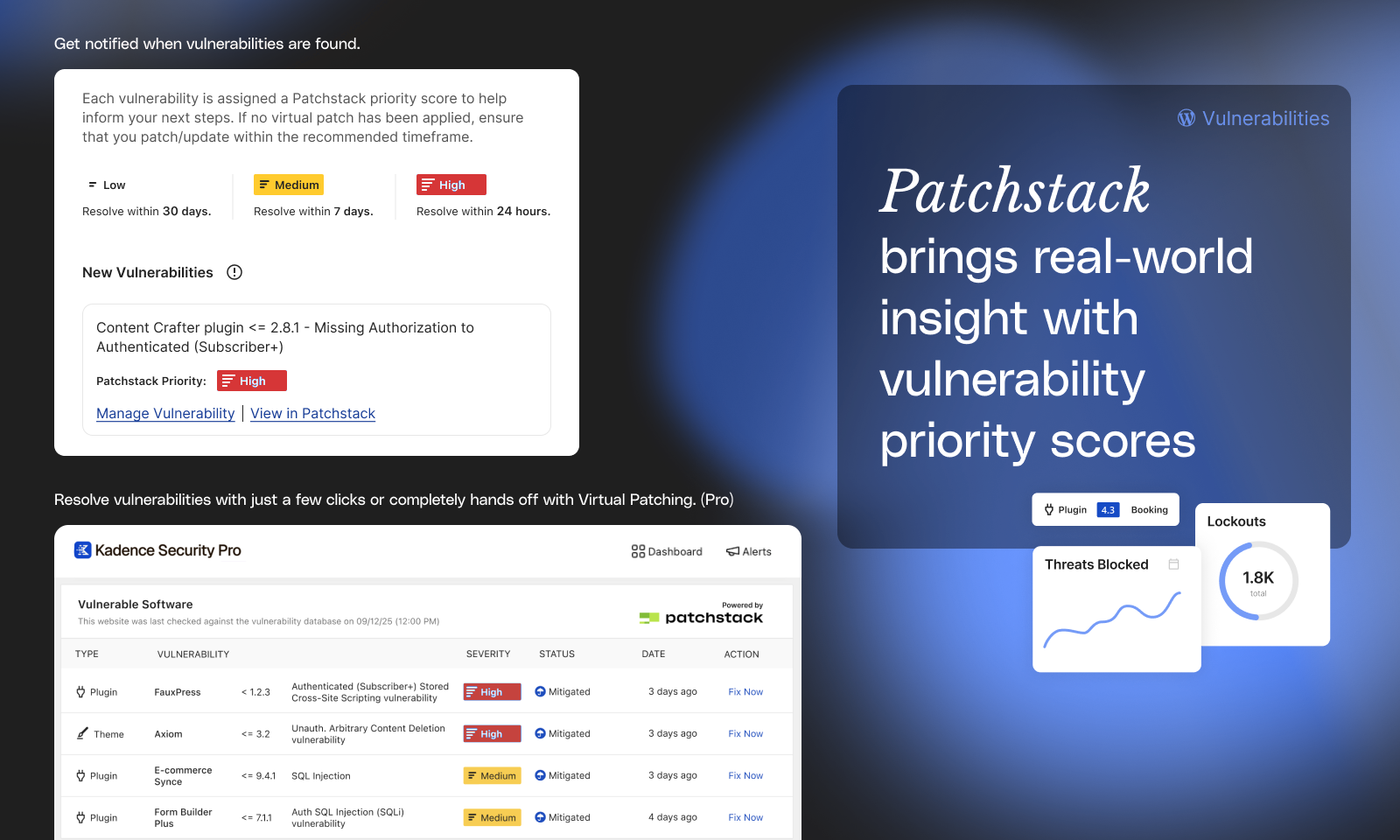
The Pro tier adds automated virtual patching via the Patchstack integration. When Patchstack identifies a vulnerability in a plugin or theme on your site, Solid Security Pro can apply a firewall rule that blocks the specific attack vector for that vulnerability, before the plugin developer ships a patch and before you apply it. The rule is temporary: it is removed once the plugin is updated to a patched version.
Patchstack Priority
Added in version 9.4.0, Patchstack Priority scoring weights real-world exploitability rather than presenting a flat list by CVSS score. A high-CVSS theoretical vulnerability in a plugin with zero known exploits gets deprioritised relative to a lower-CVSS vulnerability that is being actively exploited. This reduces notification fatigue and helps site owners focus on what actually needs attention first.
One thing the scanner does not do: it does not scan your site’s actual files for malware or injected code. It checks whether the software you have installed has known vulnerabilities. That distinction matters. A site can pass the vulnerability scanner with no issues reported and still have infected files if a previous exploit installed malware before the vulnerability was patched. For malware detection, a separate tool is required.
Firewall and site hardening
Solid Security’s firewall is a lightweight rule-based system, not a full WAF. Version 9.1.0 added support for custom firewall rules (field, operator, value, and action) and a dedicated IP management tab for blocking or authorizing IP addresses. The firewall enforces rules at the WordPress application level, which means malicious requests still reach your server before being blocked.
For context: a DNS-level WAF like Sucuri’s or Cloudflare’s intercepts traffic before it touches your server. Solid Security’s firewall runs inside WordPress, so it blocks attacks it recognises but cannot prevent server resource consumption from the blocked request. This is a meaningful distinction for sites under sustained attack, where even blocked requests can cause performance issues.
The site hardening tools available in the free version are more useful for most operators than the firewall rules:
- Enforce SSL: forces all connections over HTTPS.
- Change Database Prefix: replaces the default
wp_table prefix to prevent SQL injection attacks that assume the default. - Change User ID 1: changes the user ID assigned to the first admin account, preventing attacks that target user ID 1 specifically.
- Check File Permissions: audits key directories and files against recommended permission settings.
- Disable PHP Execution in Uploads: prevents PHP files uploaded to the uploads directory from executing. This stops a common malware upload vector.
- Change WordPress Salts: regenerates the security keys that protect session cookies and authentication tokens. Useful after a suspected compromise.
- Hide Login URL: moves the login page away from the default
/wp-login.php.
The Server Config Rules and wp-config.php Rules sections let you view and flush the server-level rules Solid Security writes. This is useful if a rule update causes a conflict you need to diagnose.
User security management
The User Security screen is one of the features that distinguishes Solid Security from simpler lockout-and-scan plugins.
The screen shows a table of all users on the site with columns for password age, last login date, 2FA status, and user role. From that table, you can take bulk actions: force a password reset for users with passwords older than 90 days, log out all active sessions for a user whose account looks compromised, send a 2FA enrollment reminder, or apply a security policy change across a user group in one click.
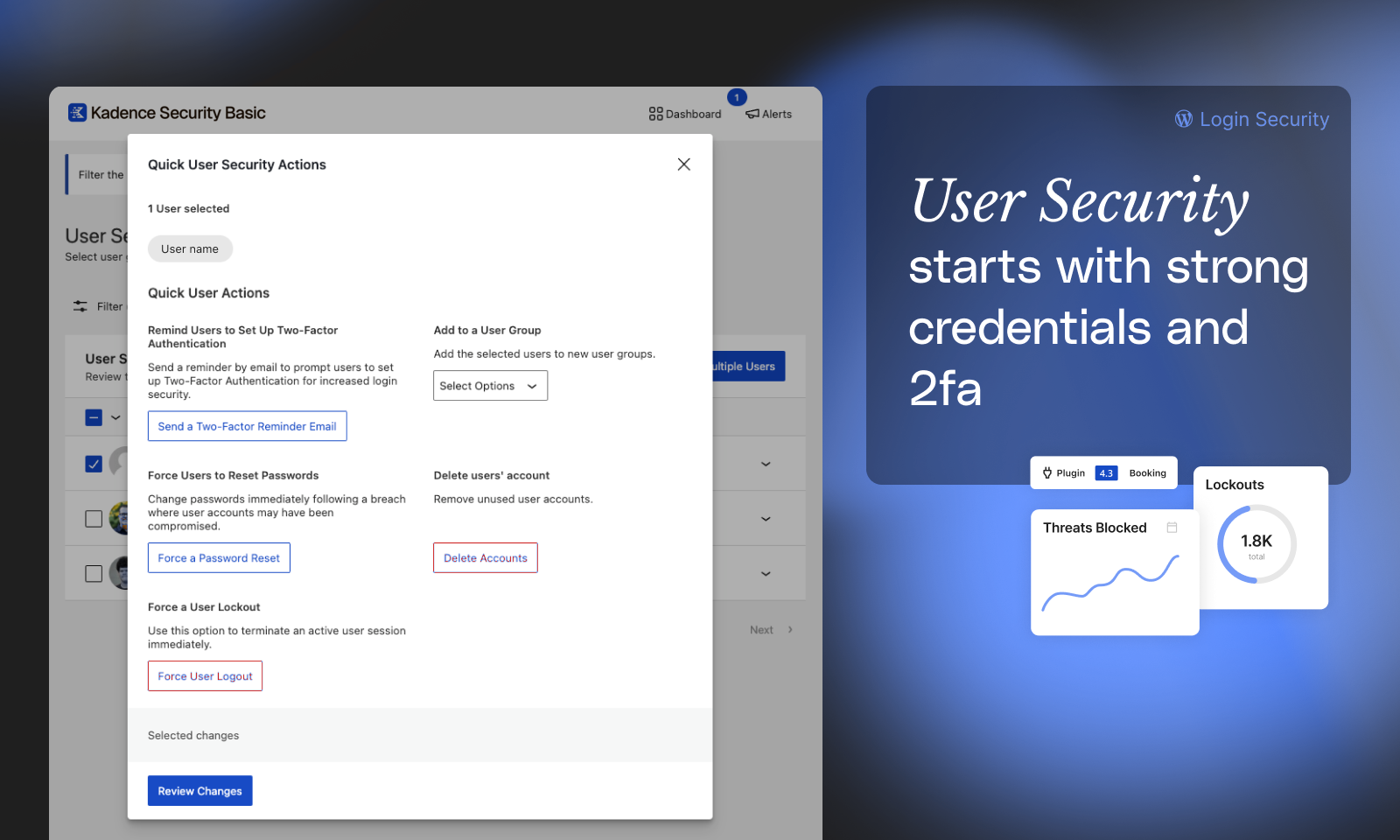
For agencies managing client sites where multiple contributors, editors, or clients have logins, this oversight layer is genuinely useful. It surfaces security hygiene problems (an admin who has never enabled 2FA, an editor whose password is three years old) that would otherwise require manually checking each user profile.
User Logging (Pro) extends this by recording a full activity log: login, logout, user registration, plugin installs and removals, theme switches, post and page edits, and other admin actions. This is the forensic layer that tells you what happened on a site in the days before a problem was noticed.
Privilege Escalation (Pro) adds a controlled way to grant temporary administrator access to a user without permanently changing their role. This is the right pattern for freelancers and contractors who need temporary elevated access for a specific task.
File change detection and database backups
File Change Detection
File Change Detection monitors the files on your WordPress install and logs modifications. When a file that should not change outside of software updates changes unexpectedly, the detection triggers an alert. This is a useful signal for catching injected files after a compromise, even if Solid Security cannot remove what it finds.
The detection generates log output that can consume server resources on large sites with many files. You can configure exclusions for directories and file types that change frequently (cache folders, log directories, compiled CSS) to reduce false positives.
Database Backups
Database Backups create scheduled or on-demand backups of your WordPress database and can email them to you. There are two important limitations to know:
- Database backups only. This is not a full-site backup. It backs up the WordPress database, not your theme files, plugin files, uploads folder, or any other part of the file system.
- This is a backup for mild convenience. For a production site, a purpose-built backup solution (UpdraftPlus, BlogVault, Solid Backups) with off-site storage and full-site coverage is the right tool for backup.
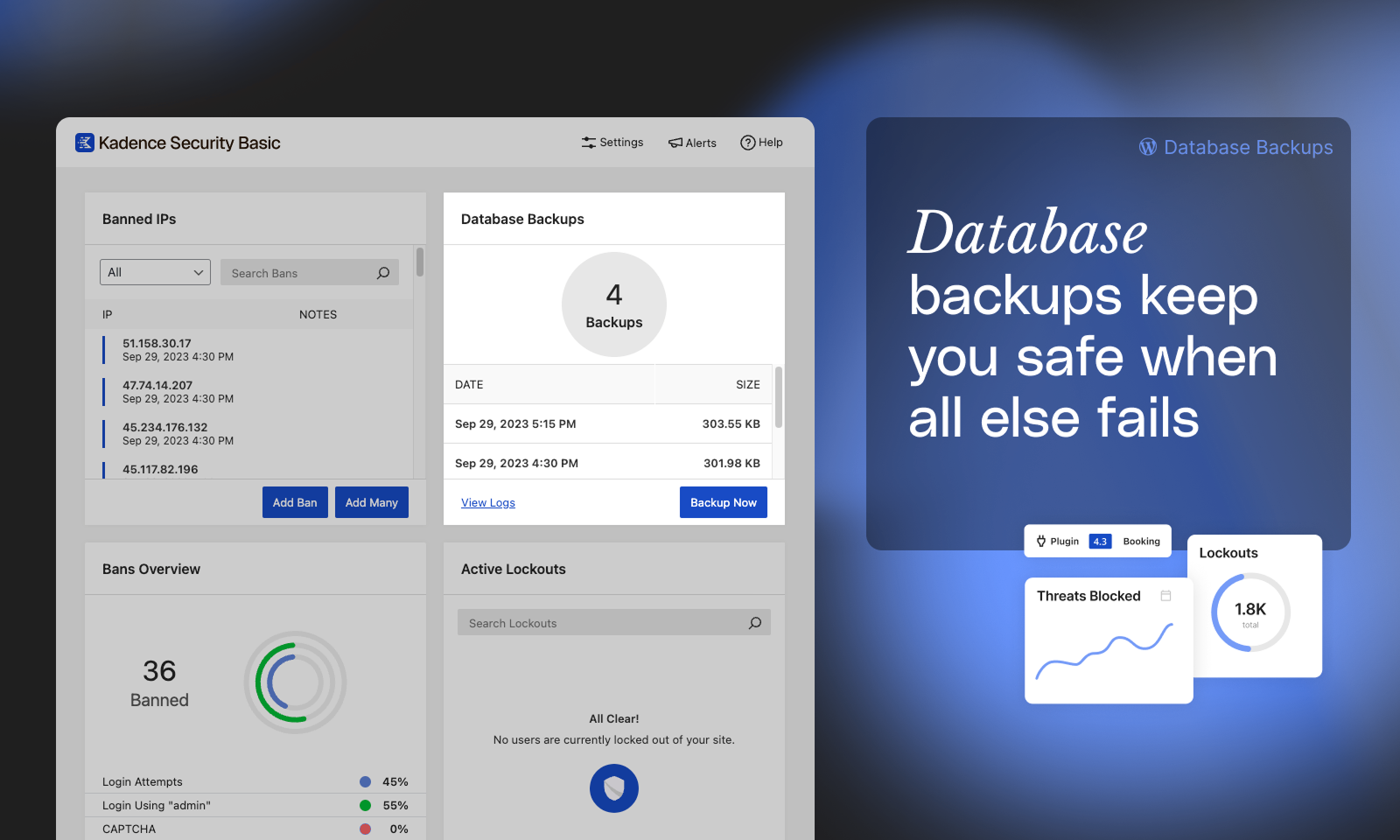
The WordPress.org listing explicitly recommends Solid Backups (now Kadence Backups) for complete site backups. The database backup built into Solid Security is more useful as a quick database snapshot before a risky change than as a disaster-recovery solution.
Free vs Pro: what you actually get at each tier
| Feature | Free | Pro |
|---|---|---|
| Two-Factor Authentication (2FA) | Yes | Yes |
| Password Requirements | Yes | Yes |
| Local Brute Force Protection | Yes | Yes |
| Network Brute Force Protection | Yes | Yes |
| Ban Users | Yes | Yes |
| File Change Detection | Yes | Yes |
| Site Scanner (4x/day) | Yes | Yes |
| Hide Login URL | Yes | Yes |
| Enforce SSL | Yes | Yes |
| Site Hardening Tools | Yes | Yes |
| Database Backups | Yes | Yes |
| Real-Time Dashboard | Yes | Yes |
| Passkeys and Passwordless Login | No | Yes |
| Magic Links | No | Yes |
| reCAPTCHA | No | Yes |
| Trusted Devices | No | Yes |
| Patchstack Virtual Patching | No | Yes |
| User Activity Logging | No | Yes |
| Version Management | No | Yes |
| Privilege Escalation | No | Yes |
| Geolocation | No | Yes |
| Priority Support | No | Yes |
Pricing and the Kadence bundle change
This is the section where the review needs to be direct, because the pricing situation changed in May 2026 in a way that significantly affects the buying decision for new customers.
Previous pricing (Solid Security, before May 2026)
- Solid Security Free: no cost, WordPress.org download.
- Solid Security Pro: $99 per year for a 1-site license.
- 5-site license: $199 per year.
- 10-site license: $299 per year.
- Solid Suite (Security + Backups + Central): $199 per year for 1 site.
Current pricing (Kadence, as of May 2026)
- Kadence Essentials: $99 per year. Includes the Kadence theme, 30-plus blocks, and 200-plus starter templates. Does not include security or backups.
- Kadence Pro: $299 per year. Includes Security (formerly Solid Security), Backups (formerly Solid Backups), Shop Kit (WooCommerce tools), and Memberships. This is the lowest tier at which you can buy Pro security features.
- Kadence Elite: $499 per year. All Pro features plus Kadence Central (multi-site management dashboard).

The practical implication: a single-site WordPress operator who only wants Pro security features now pays $299 per year for the bundle instead of $99 per year for the standalone plugin. The $200 premium buys a theme builder, WooCommerce tools, and membership features they may have no use for.
Existing subscribers under annual Solid Security Pro licenses retain their current plans and pricing through their renewal date, with critical security patches continuing through April 2027. After that, the renewal path is the Kadence bundle pricing.
For agencies managing many client sites, the bundle math changes: if you were already paying for a multi-site Solid Suite license, the Kadence Elite at $499/year with multi-site management may be comparable depending on site count. Verify the current per-site terms directly with Liquid Web before purchasing, as the pricing page detail was not fully available at the time of writing.
The free version is unaffected. Everything in the free tier remains free and is available from WordPress.org.
The rebrand and community reaction
The May 2026 Kadence rebrand deserves its own note because it directly affects the product’s trustworthiness signal for new buyers.
Liquid Web made the brand change without advance communication to existing customers. Overnight, plugins named “Solid Security” and “Solid Backups” on thousands of WordPress sites changed their admin display names to “Kadence Security” and “Kadence Backups.” No pre-change email went out to active subscribers. No in-dashboard notice appeared before the change.
The WordPress.org reviews tab shows the fallout: multiple 1-star reviews from May 2026 specifically citing confusion about the rebrand, distrust of the Liquid Web association, and frustration over the lack of communication. Version 10.0.0 also introduced a bug where a race condition in file writing could empty wp-config.php and .htaccess files. This was fixed in 10.0.1, but several WordPress.org reviews document sites that went down because of it.
The overall 4.6-star average holds because the plugin has a decade of positive reviews from the iThemes and SolidWP eras. The most recent reviews at the time of writing are more mixed.
What this means for a buyer today: the underlying plugin architecture is solid, the features work, and the free version is still one of the strongest free security offerings available. But the purchasing relationship now runs through Liquid Web and the Kadence brand, and that company’s recent track record on customer communication during transitions is a factor worth considering.
Pros and cons
Pros
- One of the most generous free tiers of any WordPress security plugin: 2FA, brute force protection, vulnerability scanning, file monitoring, and hardening tools at no cost.
- Passkey and passwordless login support (Pro) that most competing plugins do not offer, including Wordfence.
- Network brute force protection backed by a 700,000-site shared block list.
- Patchstack virtual patching (Pro) closes vulnerability exposure before plugin vendors ship a fix.
- Patchstack Priority scoring focuses attention on vulnerabilities most likely to be actively exploited.
- Site type templates make initial setup fast without requiring security expertise.
- User security overview with bulk actions for password resets, session logouts, and 2FA enrollment.
- Lightweight server impact compared to full-suite security plugins like Wordfence on busy shared hosts.
- Clean React-based UI that is faster and more navigable than older WordPress settings pages.
- Site scanner runs four times per day in the free version: more frequent than most competitors.
Cons
- No malware scanner. Cannot detect or remove malware from infected files.
- No full WAF. Firewall rules run inside WordPress, not at the network or DNS level.
- Standalone Pro plan ($99/year) is no longer available. Pro features now require the $299/year Kadence bundle.
- Version 10.0.0 (May 2026) introduced a file-write race condition bug that emptied wp-config.php and .htaccess on some installs. Fixed in 10.0.1, but a dangerous bug for a security plugin.
- The May 2026 rebrand to Kadence was executed without advance customer communication, causing widespread confusion and negative community sentiment.
- Free support runs through community forums only. No direct support channel for free users.
- Database backup feature is partial: database only, not full site. Easy to mistake for a full backup solution.
- Patchstack integration in Pro requires manual activation to enable virtual patching, which is not obvious from the marketing copy.
Alternatives to Solid Security
Wordfence
The most-installed WordPress security plugin, with a free WAF and malware scanner that Solid Security cannot match. The free Wordfence WAF runs in learning mode and delays rule updates by 30 days; Premium ($149/year for 1 site) removes the delay. Pick Wordfence if malware scanning and a real-time WAF are your top priorities. Watch out for its higher server load on shared hosting compared to Solid Security.
Sucuri
Cloud-based WAF that sits in front of your server as a DNS proxy, intercepting malicious requests before they reach WordPress. Sucuri’s Basic plan starts at $199/year and includes the WAF, malware scanning, and a manual malware removal service. Pick Sucuri if you need DNS-level traffic filtering and want professional cleanup included in the plan.
MalCare
Automated malware scanning and one-click removal with no performance impact on your origin server (scanning runs on MalCare’s infrastructure). Starts at $99/year. Pick MalCare if malware detection and removal are the primary need and you want that to run off-site rather than consuming your server.
Patchstack
Pure vulnerability management with virtual patching. Patchstack Community is free and covers unlimited sites. The Developer plan ($14.99/month) adds real-time patching and priority alerts. If Patchstack‘s vulnerability database is what you want from Solid Security Pro, Patchstack standalone is worth comparing, especially at the Developer tier.
iThemes Security (the original)
This is now extinct as a separate product. The plugin history from iThemes to Solid Security to Kadence Security is one continuous product. There is no separate “old iThemes Security” to go back to.
The honest summary: if your goal is login security, hardening, and vulnerability alerting on a tight budget, Solid Security’s free version is hard to beat. If you need malware scanning, a real-time WAF, or a standalone Pro plan at $99/year, the alternatives above are worth pricing before you commit.
Final verdict
Solid Security has a decade of earned reputation for good reasons. The login security stack is excellent: 2FA on every user role in the free version, passkeys and magic links on Pro, network brute force protection that shares intelligence across 700,000 sites, and a setup wizard that configures appropriate defaults without requiring security expertise from the person installing it. The four-times-daily vulnerability scanner, the Patchstack integration on Pro, and the user security overview are meaningful additions to the free baseline.
The honest limitation is also worth repeating: Solid Security is a hardening and login security plugin, not a full security suite. It reduces your attack surface and alerts you to vulnerabilities. It does not scan for malware and it does not give you a DNS-level firewall. Most production WordPress sites are better served running Solid Security alongside a dedicated malware scanner than treating it as their only security layer.
The pricing change in May 2026 is the most significant near-term concern for new buyers. The $299/year Kadence bundle is the only way to buy Pro features now. If you genuinely want the theme builder and WooCommerce tools that come with the bundle, the pricing comparison is more favourable. If you only want security, the bundle adds $200/year of tools you did not ask for.
My recommendation: install the free version if you need strong 2FA, brute force protection, and vulnerability scanning without a budget. Evaluate whether the $299/year Kadence bundle makes sense by checking whether your site would use the other tools it includes. If not, consider Wordfence Premium at $149/year or MalCare at $99/year for a comparable Pro security spend that also covers malware scanning.
FAQ
Is Solid Security free?
Yes. A fully functional free version is available on WordPress.org. The free version includes two-factor authentication, brute force protection (local and network), site vulnerability scanning, file change detection, password policies, site hardening tools, a database backup utility, and the real-time security dashboard. There is no trial period, no credit card, and no time limit on the free version.
What is the difference between Solid Security and Kadence Security?
They are the same plugin. Solid Security was rebranded to Kadence Security in May 2026 when Liquid Web consolidated its WordPress software brands under the Kadence name. The plugin slug (better-wp-security), the underlying feature set, and the free version availability did not change with the rename. The display name on WordPress.org and in the plugin admin now shows “Kadence Security.”
What happened to iThemes Security?
iThemes Security was the original name for the same plugin, released in 2010. When iThemes rebranded its parent company to SolidWP in late 2023, the plugin was renamed to Solid Security. It was then renamed again to Kadence Security in May 2026. There is no separate “iThemes Security” product; it has always been one continuously developed plugin through all three names.
Does Solid Security scan for malware?
No. Solid Security does not include a malware scanner at any tier. The site scanner checks for known vulnerabilities in your installed software using the Patchstack database, and it checks your site against Google’s Safe Browsing blocklist. It does not scan your actual files for malicious code. If you need malware scanning and removal, a separate plugin such as Wordfence, MalCare, or Sucuri is required.
Does Solid Security include a web application firewall (WAF)?
Partially. Solid Security includes firewall rules that run at the WordPress application level, including support for custom rules and IP management. This is not a full WAF. It blocks requests it recognises as malicious after they reach your server. A full WAF (such as Sucuri’s or Cloudflare’s) intercepts traffic at the DNS or CDN level before it reaches your server. If WAF-level protection is a requirement, you need a separate service.
What is the current price of Solid Security Pro?
As of May 2026, the standalone Solid Security Pro plan ($99/year) is no longer sold. Pro features are now included in the Kadence Pro bundle at $299/year (which also includes Kadence Backups, Shop Kit, and Memberships) and the Kadence Elite bundle at $499/year (which adds Kadence Central for multi-site management). The free version remains free with no changes to its feature set.
Is Solid Security compatible with WooCommerce?
Yes. The setup wizard includes an Ecommerce site type template that pre-configures appropriate security settings for WooCommerce stores. Features like user security groups, password policies, and 2FA apply to customer accounts as well as admin accounts. That said, Solid Security does not include WooCommerce-specific security features such as order fraud detection or payment gateway monitoring.
Does Solid Security slow down my WordPress site?
Solid Security is consistently reported as lighter on server resources than Wordfence in the same hosting environment, particularly on shared or budget hosting plans where CPU and memory limits affect performance. The file change detection feature is the one component that can increase server load on large sites with many files; configuring exclusions for cache and log directories reduces this. The brute force protection, 2FA, and scanner modules have negligible performance overhead on most sites.
Can Solid Security protect against zero-day vulnerabilities?
The Patchstack virtual patching feature on Pro addresses this directly. When a vulnerability is disclosed in a plugin or theme on your site, Patchstack can apply a firewall rule blocking the specific attack vector before the plugin developer ships a patch and before you apply any updates. This is not universal protection against every unknown unknown vulnerability, but it closes the gap window between disclosure and patching for the specific CVEs that Patchstack covers.
What should I do if version 10 wiped my wp-config.php or .htaccess?
Version 10.0.0 introduced a race condition in file writing that emptied wp-config.php and .htaccess on some installs. This was fixed in version 10.0.1. If you are running 10.0.0, update to 10.0.2 immediately. If your files were already emptied, restore them from a backup. If you do not have a backup, your hosting provider’s file manager or SSH access can be used to recreate the wp-config.php from your database connection details; the WordPress Codex documents the required structure. This experience is also a reminder that a complete site backup from a tool other than Solid Security should be in place before any major plugin update.
Browse all WordPress plugin reviews on Best WordPress Plugins.