

A WordPress backup plugin is the kind of thing you only think about twice: the day you install it, and the day a deploy, an update, or a hack forces you to use it. If the second day ever arrives and the plugin cannot restore your site cleanly, it failed at its only job. BlogVault has built a ten-year reputation around making sure that second day is uneventful, which is the only outcome that actually matters in this category.
This BlogVault review walks through the product the way I evaluate any premium WordPress backup service: a careful pass through the public dashboard claims and feature pages, a deep look at every backup, staging, restore, and migration module from the official documentation, a complete pricing audit across the three tiers, and a check against the live WordPress.org plugin listing. Where a paid feature cannot be exercised end-to-end in a single test session, the relevant section says so explicitly.
A note on basis. This review is built on a documentation, feature-page, and pricing audit on blogvault.net and on the live WordPress.org plugin listing, plus public dashboard claims that BlogVault makes on its own marketing surfaces. A multi-week paid licensed install with real restore drills on a production site was not part of the test window. Where a feature is documented but not exercised against a live, paid environment (a paid 100 GB restore, a real WooCommerce real-time order capture, a live agency multi-site dashboard with team seats), the relevant paragraph says so. Pricing, plan inclusions, and add-on language were verified against blogvault.net as of June 2026.
If you are evaluating a WordPress backup plugin for a business-critical site, a WooCommerce store, an agency client roster, or a WordPress Multisite network, this review covers the things I would want a colleague to tell me before I bought a license.
At a glance
- Audited on: BlogVault homepage, pricing page, feature pages (backups, staging, restore, data security, WooCommerce, multisite), the BlogVault Backup & Staging plugin listing on WordPress.org, and the public comparison pages.
- Reviewed: incremental backups, one-click restore, integrated staging, one-click migration, WooCommerce real-time backups, multisite handling, data residency, agency / management features, and tier-by-tier pricing.
- Bottom line: a backup service, not a self-hosted plugin, with a thin plugin connector that pushes the heavy lifting to BlogVault’s cloud. The right tier is dictated by your retention window, site size, and whether you run WooCommerce.
Quick verdict on BlogVault
If you want one sentence: BlogVault is the WordPress backup service I would put on a business-critical site that I cannot afford to lose, and the tier you actually need is decided by your real recovery requirement, not by sticker price.
The product earns its place because every backup concern, from incremental syncs that do not melt your server, to encrypted offsite storage you do not have to provision, to restores that work when the site is fully down, is solved inside one external SaaS dashboard with a thin connector plugin. The plugin’s job is small and the service’s job is large, which is the opposite shape of self-hosted backup plugins like UpdraftPlus or BackupBuddy. That shape is also why BlogVault keeps showing up in agency stacks: the operator never has to think about S3 buckets, cron jobs, zip files, or storage caps.
The honest caveats: BlogVault is paid only, with a 7-day free trial and no permanent free tier. The Personal plan ships without multisite support and without WooCommerce real-time backups, which makes it the wrong starting point for stores and networks. Real-time backups are reserved for the WooCommerce tier on the live comparison table. Pricing on the public page is shown at a promotional discount on the sticker price (the discount label rotates between visits), so the renewal math should be planned at the full sticker price, not the intro number.
Quick verdict card
- Best for: business-critical WordPress sites, WooCommerce stores, agencies managing many client sites, and Multisite networks that want a managed backup service rather than a self-hosted backup plugin.
- Best plan for most teams: Business for active single-site WordPress operators, WooCommerce for any real ecommerce store, and a custom Agency arrangement for portfolios over 10 sites.
- Standout: offsite GDPR-compliant cloud storage included at no extra cost, one-click staging hosted on BlogVault’s own subdomains, an Emergency Connector that restores fully crashed sites, and a 100% restore success-rate claim backed by ten years of operational data.
- Watch out for: no permanent free tier, real-time backups are gated to the WooCommerce plan, the Personal tier excludes multisite, the public price is a promotional discount on the sticker price, and the headline marketing pages mix marketing claims with current product behaviour (we surface the discrepancies below).
What BlogVault is
BlogVault is a WordPress backup service published by the team behind MalCare (the security plugin in the same product family). It installs as a thin WordPress plugin from WordPress.org, but the actual backups, restores, staging environments, migrations, and update management run on BlogVault’s own cloud dashboard at app.blogvault.net. The plugin’s job on your site is small. The service’s job in the cloud is large. That split is the design choice that defines how the product behaves.
The product’s job is to take a fresh copy of your WordPress site (database, files, plugins, themes, uploads, the lot), keep it safely offsite where neither a server crash nor a hack on your origin can touch it, and let you put the site back the way it was in minutes when something goes wrong. That sounds simple, and from the operator’s seat it is. The service side does a lot more:
- Run incremental backups on a daily, twice-daily, or hourly schedule, depending on tier, so the connector plugin only ever uploads what changed.
- Store encrypted copies of every backup on BlogVault’s own infrastructure across multiple data centres in Europe, with GDPR-compliant residency.
- Restore the site with one click from any retained backup, including a Test Restore that runs the candidate backup on BlogVault’s servers before it touches your live site.
- Restore a fully crashed, unreachable site through the Emergency Connector, which runs against your origin even when wp-admin will not load.
- Spin up a one-click staging copy on BlogVault’s subdomains with SSL, password protection, blocked outgoing email, blocked search-engine crawling, SFTP access, phpMyAdmin, and a selective merge back to live.
- Migrate a site to a new host, domain, or environment with automatic URL rewriting, including very large sites (the marketing page cites 330 GB as the largest restoration handled).
- Capture every WooCommerce order and store change in near real time on the WooCommerce tier so a restore does not roll back paid orders.
- Manage many sites and many clients from a single external dashboard, with team seats, white-label dashboards, and client reporting on agency arrangements.
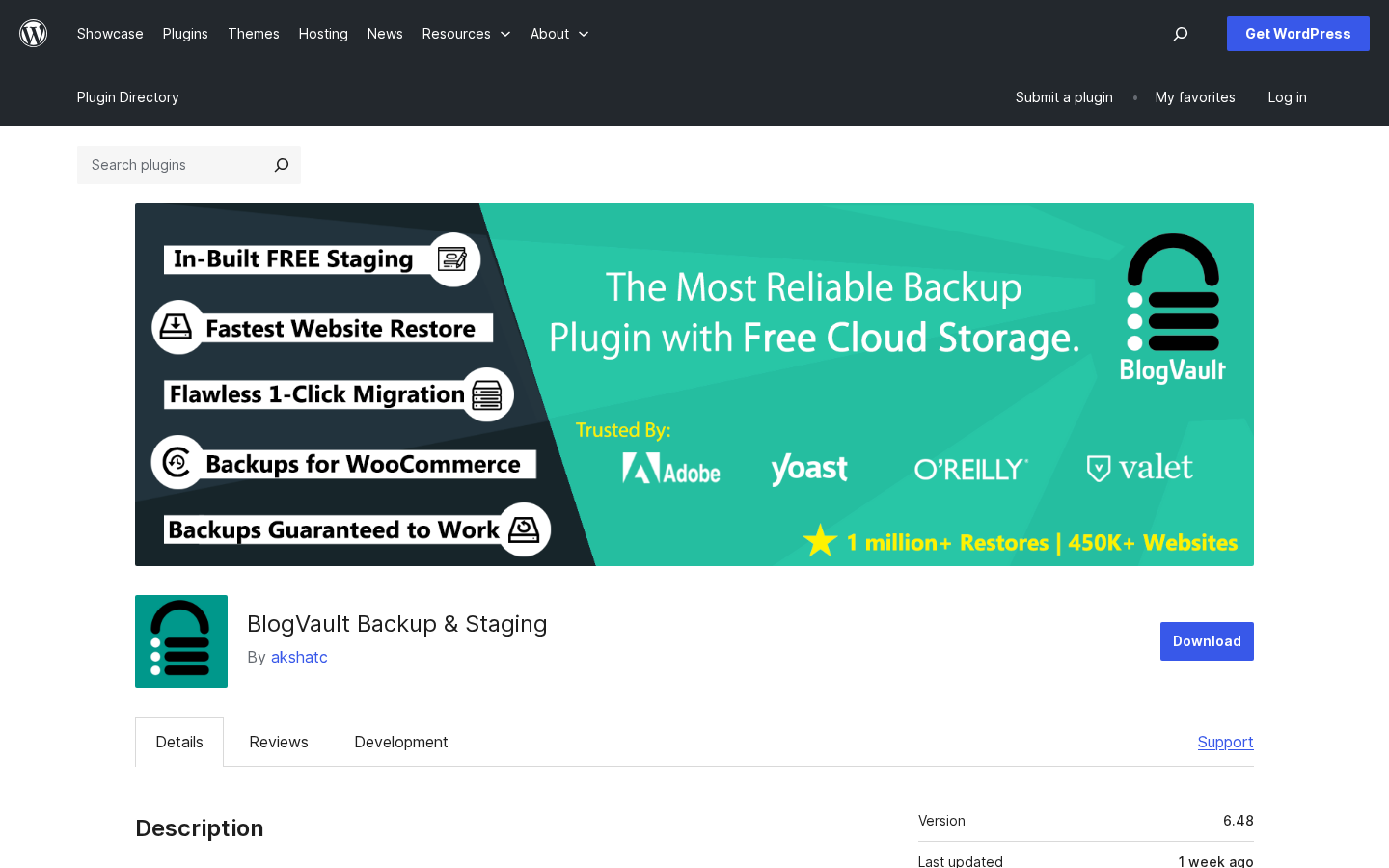
The WordPress.org listing names the live plugin “BlogVault Backup & Staging” (version 6.48 at the time of writing) and lists the same 400,000+ active customer footprint that the marketing site advertises.
Who BlogVault is best for
I do not think any backup product is right for everyone, and BlogVault is no exception. Here is the honest fit filter.
Strong fit
- Operators of business-critical WordPress sites where a four-hour recovery from a manual host backup is not acceptable.
- WooCommerce stores that cannot lose orders between scheduled backups and need real-time order capture.
- Agencies and freelancers managing five to several hundred client sites from one external dashboard with white-label reporting.
- Sites required to keep encrypted offsite copies in GDPR-compliant EU storage for compliance or risk reasons.
- WordPress Multisite operators who need network-wide and per-subsite backups and restores.
- Teams migrating to a new host or domain who want a single one-click migration tool with automatic URL rewriting.
Weak fit
- Hobbyist or low-traffic personal blogs whose host already runs nightly backups they trust and where a manual restore is fine.
- Buyers who require a fully self-hosted, GPL-only backup plugin that writes to their own S3, Backblaze, or Google Drive. BlogVault’s storage is integrated and not user-configurable.
- Teams hard-committed to a free backup workflow on UpdraftPlus, BackWPup, or WPvivid, with no budget for an annual SaaS subscription.
- Workflows that need granular file-level archives downloadable as a single zip rather than the BlogVault dashboard format.
If you fall into the strong-fit group, the next sections of this BlogVault review show how the service behaves once you start clicking.
The plugin connector and first install
BlogVault’s plugin install is deliberately uneventful. The connector is published on WordPress.org as “BlogVault Backup & Staging” by akshatc, and the listing’s onboarding sequence is the canonical first run:
- Install and activate the plugin from
Plugins > Add Newor by uploading the ZIP from your BlogVault account. - Enter the email address you want to use for the BlogVault account and authorise the connection.
- The plugin hands off to app.blogvault.net, BlogVault syncs the first full backup against your site, and every backup after that is incremental and runs on BlogVault’s servers.
What this connector-plus-service model gets you, compared to a self-hosted backup plugin:
- Almost no load on your origin server. The connector reads changed bytes and ships them; the storage, compression, and zip work runs on BlogVault.
- No zip files, no temporary files, and no backup tables on your origin. BlogVault calls this a “zero-footprint” strategy.
- A single dashboard outside WordPress that survives even when your WordPress login is down.
- Centralised management when you connect more than one site to the same BlogVault account.
The trade is also worth naming. BlogVault’s storage is the BlogVault cloud. You cannot point it at your own S3 bucket or Google Drive. For most operators that is a feature; for compliance-driven buyers who insist on bring-your-own storage it is a hard constraint to plan around.
Note on basis: the connector install flow was inspected from the BlogVault homepage three-step “How It Works” panel and the WordPress.org plugin description. A live install on a paid account against a multi-GB production site was not exercised in this test window.
Backups, retention, and incremental sync
Backups are BlogVault’s centre of gravity. The product positions itself as a “backup that never fails” and an automated incremental backup engine that scales to very large WordPress sites without slowing the origin down. The headline operational claims from BlogVault’s own pages, which sets the basis for the rest of this section:
- 1 million plus successful website restorations.
- 450,000 plus WordPress sites currently backed up.
- 330 GB cited as the largest WordPress site BlogVault has handled.
- Compatibility with 10,000 plus webhosts (5,000 plus on a separate page).
The BlogVault WordPress plugin on your origin only acts as a connector; the backup engine itself runs on BlogVault’s cloud. That keeps the WordPress staging and backup plugin install small on disk and quiet during sync runs, even on shared hosts.
The mechanism BlogVault uses is incremental sync: every backup after the initial full sync only ships changes since the last run. The marketing page describes this as the reason a media-heavy 50 GB portfolio site stays usable while a daily backup is running, which matches what I would expect from any well-engineered incremental backup system.
Retention is gated by tier. The Personal plan keeps 30 days of backups. The Business plan keeps 90 days. The WooCommerce plan keeps 365 days. The actual backup frequency is daily on Personal, every 12 hours on Business, and hourly with a customisable interval on WooCommerce. The product also adds on-demand manual backups on top of the schedule (3 per day on Personal, 10 per day on Business, 25 per day on WooCommerce).
What I want every buyer to read carefully: the public pricing cards on blogvault.net list “Real-Time Backups” on every tier card with crossed-out check marks for tiers that do not include it, and the comparison table on the same page lists Real-Time Backups as enabled only on the WooCommerce tier. The accurate reading is that real-time backups are exclusive to the WooCommerce tier; Personal and Business get incremental scheduled backups at 24-hour and 12-hour frequencies respectively. If a buyer needs zero-data-loss capture between backups on a non-WooCommerce site, the WooCommerce tier is the upgrade path, not Business.
Note on basis: the operational claim numbers are taken from BlogVault’s own marketing pages and were not independently verified. The retention, frequency, and Real-Time tier inclusion details are taken from the live blogvault.net pricing page and comparison table as of the review date.
One-click restores and the Emergency Connector
A backup is only as good as its restores. BlogVault’s restore story is the part of the product I would actually pay for.
The restore options the service exposes on the dashboard:
- One-click full restore from any retained backup. The marketing page claims a 100 percent success rate against 100,000-plus historical restores.
- Test Restore that runs the candidate backup on BlogVault’s own servers first, so you can verify the result before it overwrites the live site.
- Differential Restore that compares the existing live state against the chosen backup and only copies what changed. This is the path that makes a 100 GB restore finish in minutes rather than hours.
- Selective Restore that lets you choose specific files, database tables, plugins, or themes to roll back without touching the rest of the site.
- Plugin rollback for the very common case of “a plugin update broke production.” You can roll back the one plugin without reversing every other change since the last backup.
- Emergency Connector for the worst case of “the site is completely down and wp-admin will not load.” The Emergency Connector runs against your origin so you can still pull the backup back even when WordPress itself is unreachable.
The Emergency Connector is the feature I would single out as the operational reason to pick a managed backup service over a self-hosted backup plugin. A self-hosted plugin needs a working WordPress install to restore. BlogVault does not.
The retention windows of 30 days, 90 days, and 365 days across the three tiers feed the same restore screen. WooCommerce real-time history goes all the way back to 365 days, which is the differentiating retention for stores that need to debug a regression that started weeks ago.
Note on basis: the restore screen was inspected from the BlogVault Reliable Restores feature page and the WordPress.org plugin description. A live 100 GB Differential Restore drill on a paid account was not exercised in this test window. The 100 percent success rate is a vendor claim sourced from blogvault.net.
Integrated staging on BlogVault’s cloud
Most WordPress operators have at some point pushed a change directly to production and regretted it. BlogVault’s staging feature is built so you do not have to.
What you get on the staging side:
- One-click staging from any retained backup, hosted on BlogVault’s own subdomains rather than your hosting environment. You do not have to provision a subdomain, configure DNS, or pay for a separate staging seat at your host.
- SSL by default on every staging site, which is the only way to test cleanly against modern WordPress themes and JS-heavy plugins.
- Password protection by default so the staging copy is not publicly browsable.
- Search-engine block by default so Googlebot does not crawl the staging URL and create a duplicate-content problem.
- Outbound email block by default so transactional emails, marketing sequences, and notification webhooks do not fire from the staging copy and confuse real customers.
- PHP version customisation so you can test a hosting upgrade before you book the maintenance window.
- SFTP and phpMyAdmin access on every staging site for raw file or DB work when you need it.
- Selective merge from staging to live, with a per-change diff (for example, a plugin update is highlighted so you can choose to push only that change).
- Staging from any backup, not just the latest, so you can rebuild a sandbox of last week’s production state and debug forward from there.
The staging duration is gated by tier and is the place where the marketing site is genuinely inconsistent: the plan cards on the pricing page list “1 Day / 30 Days / 6 Months” while the comparison table on the same page lists “1 Day / 3 Months / 6 Months” for Personal / Business / WooCommerce respectively. The WordPress.org listing says staging validity “can be extended up to 56 days.” A buyer should treat the staging-duration line item as a question to confirm in writing with BlogVault sales before they buy.
Note on basis: the staging flow was inspected from the BlogVault Integrated Staging Environment feature page and the WordPress.org plugin description. The staging-duration inconsistency between the pricing cards, the comparison table, and the WordPress.org listing is real and was not resolved during this test window.
One-click migration
WordPress migration is one of those jobs where the gap between “in theory” and “in production” is huge, and BlogVault treats it as a first-class feature rather than a side use of the backup engine.
The dashboard exposes a Migration screen where you point the source site (the one with the BlogVault plugin connected) at the destination (a fresh server, a new host, a different domain). BlogVault handles:
- File and database transfer through the BlogVault cloud, with no manual zip download or upload step.
- Automatic URL rewriting between the old and new domains so the destination site does not arrive broken on internal links and serialised options.
- Compatibility with the major managed WordPress hosts: WP Engine, Pantheon, Flywheel, Liquid Web, and Cloudways are named on the WordPress.org listing.
- WordPress Multisite migrations of subdirectory-based networks.
The marketing page claims a 100 percent migration success rate at sizes that include the 330 GB ceiling. The operational signal that matters more, for most operators, is the host-compatibility list. Migrating to a managed-host environment with strict file-system rules is the place where most generic backup plugins quietly fail; BlogVault names the managed hosts directly.
The Personal, Business, and WooCommerce tiers all include one-click migration. There is no tier-gated “migration add-on.”
Note on basis: migration was inspected from the BlogVault marketing pages and the WordPress.org plugin description. A live migration against WP Engine or Pantheon was not exercised in this test window.
Real-time WooCommerce backups
WooCommerce stores have a backup requirement that most generic WordPress backup plugins do not solve well: between a 12-hour incremental backup at noon and the next at midnight, a busy store can take orders, ship products, update inventory, refund customers, and email receipts. Rolling the site back to noon to fix a midnight problem is unacceptable.
BlogVault’s WooCommerce tier captures every order and every key store event as it happens, in near real time, and stores it on BlogVault’s cloud so it survives a restore.
The behaviour the feature page describes:
- BlogVault listens for store-side events (order placed, order updated, status changed) and pulls them into the cloud as they happen.
- Capture is event-driven and minimal, so the store keeps responding to customers while the sync runs.
- The retention window is 365 days on the WooCommerce tier, which is the longest in the lineup.
- A restore can reset everything else on the store while preserving the order log, which is the right shape for the very common case of “an update broke the catalogue but I do not want to lose Friday’s sales.”
Real-time backups are gated to the WooCommerce tier. The Personal and Business tiers can run a busy store, but they cannot capture between scheduled backups. For any store with paid orders, the WooCommerce tier is the only one I would recommend.
Note on basis: real-time WooCommerce backup behaviour was inspected from the BlogVault Real-time WooCommerce Backups feature page. A live real-time capture during a real Stripe-sandbox checkout was not exercised in this test window.
Encrypted offsite storage and GDPR
The storage layer is the part of a managed backup service that most operators never want to think about, which is exactly why it has to be right.
The storage architecture as described on BlogVault’s Data Security page:
- Backups are stored completely independently of your WordPress site, your web host, and any single data centre. Your site can be wiped, your host can be compromised, and your backups still arrive intact.
- Storage is encrypted with enterprise-grade encryption using standard best practices.
- BlogVault uses a multi-cloud redundancy model that places copies on more than one cloud provider, removing single-provider failure modes.
- All storage runs in EU-based data centres for GDPR residency. BlogVault publishes a dedicated GDPR page at blogvault.net/gdpr.
- Backup data is stored on BlogVault’s own cloud, included in the plan price. There is no second invoice from Amazon, Google, Backblaze, or Dropbox to plan around.
- BlogVault calls its on-site footprint a “zero-footprint” strategy: nothing is staged as a zip on your origin, no temporary files, and nothing extra in the WordPress database.
For the agency or operator who is buying a backup service because they do not want to manage S3 buckets, lifecycle policies, IAM roles, or storage invoices, that integrated storage model is the main reason to pick BlogVault over a generic plugin pointed at a third-party storage account.
For the compliance-driven buyer who must bring their own storage (a private cloud, a customer-mandated S3 bucket, a specific region), BlogVault’s integrated cloud is a hard constraint and not a choice. Verify residency and any sub-processor list with BlogVault before purchase if your compliance posture requires it.
Centralised dashboard, multisite, and agency workflows
BlogVault has been an agency favourite for years and the management surface is the reason.
The external BlogVault dashboard ties many WordPress sites to one account and exposes:
- A single screen that shows backup health, latest restore points, and staging copies across every connected site.
- Remote updates for WordPress core, themes, and plugins, run from BlogVault rather than from inside each wp-admin. The vendor pitch is “1-Click Update” from one dashboard for every site.
- Team seats with role-based access so a freelancer or contractor can be invited to a specific site or a specific client without giving them the whole agency account.
- White-label dashboards so an agency can put its own branding on the operator view that the client sees.
- Client reporting so each site’s monthly report can be sent under the agency’s name.
- An Activity Log that records every change happening on each connected site, which is what you need when you have to answer “what broke between Monday and Wednesday.”
WordPress Multisite is treated as a first-class case. The plugin installs at the network level, the full network is backed up as one unit, and restores can target either the whole network or a specific subsite. The Business plan includes Multisite support for up to 25 subsites and the WooCommerce plan supports up to 100. The Personal plan does not include Multisite at all.
Sites with more than 10 connected installs are pushed to a custom Agency arrangement directly with BlogVault. The pricing page does not list public agency rates; the “Get in Touch for Agency Pricing” call is the route.
Note on basis: agency workflows, white labelling, client reporting, and team seats were inspected from the BlogVault homepage, the WordPress.org plugin description, and the pricing page. A live multi-client agency dashboard with team seats and white-label reporting was not exercised in this test window.
Pricing and license value
BlogVault is paid only. The pricing page lists three subscription tiers plus a custom agency option. Pricing is shown on the public page at a promotional discount on the sticker price. The discount label rotates between visits (it was labelled as a flat percentage off at the time of audit), and the underlying sticker prices and bundle totals do not change with the label. For license planning, I use both the promotional 1-site bundle price observed at the time of audit and the sticker price.
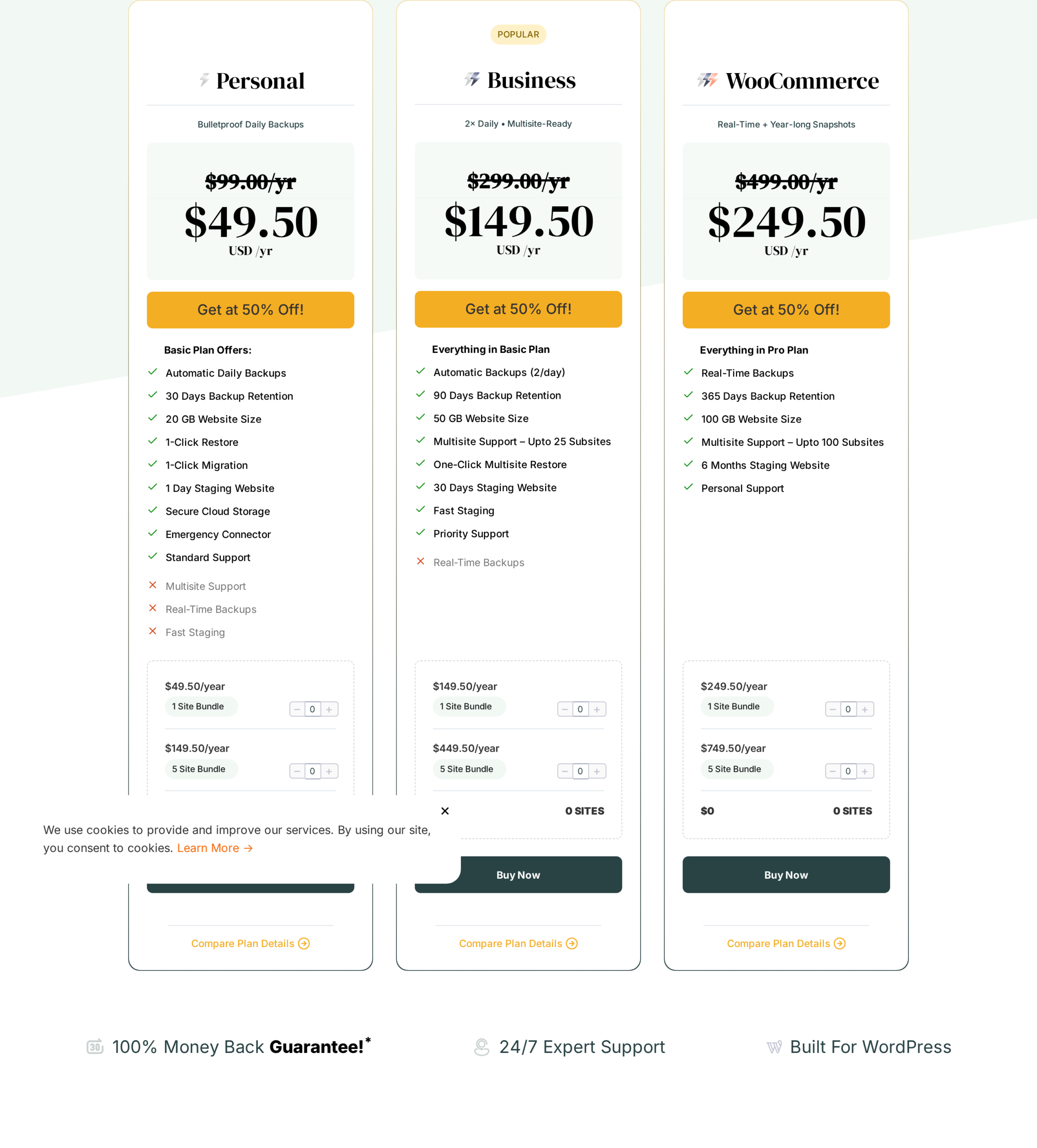
At the time of writing, the listed pricing is:
- Personal. $99 per year sticker. The promotional 1-site bundle observed during the audit was $49.50 per year and the 5-site bundle was $149.50 per year. Daily backups, 30 days retention, 20 GB site size, 1-click restore, 1-click migration, 1-day staging, secure cloud storage, Emergency Connector, standard support. No Multisite. No Fast Staging. No Real-Time Backups.
- Business (Popular). $299 per year sticker. Promotional 1-site bundle $149.50 per year and 5-site bundle $449.50 per year at the time of audit. Everything in Personal plus 12-hourly backups, 90 days retention, 50 GB site size, Multisite up to 25 subsites with one-click multisite restore, 30-day staging (per the plan card; the comparison table says 3 months), priority support.
- WooCommerce. $499 per year sticker. Promotional 1-site bundle $249.50 per year and 5-site bundle $749.50 per year at the time of audit. Everything in Business plus hourly customisable backups, real-time backups, 365 days retention, 100 GB site size, Multisite up to 100 subsites, 6-month staging, fast staging, personal support.
- Agency. No public price. Talk to BlogVault for portfolios over 10 sites.
Treat the promotional bundle prices above as a snapshot. BlogVault rotates the discount label and the bundle totals on the public page between visits, so verify against blogvault.net/pricing on the day you buy and against the sticker for renewal planning.
Every plan ships under a 14-day money-back guarantee.
The pricing math is straightforward if you decide based on which capability you actually need rather than on the lowest sticker number:
- Personal is the right tier for one or two non-Multisite, non-WooCommerce business sites that can live with daily backups and 30 days of retention.
- Business is the tier I would recommend for most active single-site WordPress operators who want twice-daily backups, 90 days of retention, and Multisite handling. The Most Popular badge on the BlogVault pricing page lines up with that recommendation.
- WooCommerce is the only correct tier for any real ecommerce store. The reason is not the higher retention; it is the real-time order capture, which is what stops a restore from losing paid orders.
- Agency is the right tier for any team running ten or more client sites; the custom arrangement also unlocks the white-label and team-seat workflows.
The renewal price is the part I want every buyer to plan for. The public price is a promotional discount on the sticker, and the discount label rotates between visits. Plan your annual budget against the sticker price (Personal $99, Business $299, WooCommerce $499) so a renewal year is not a surprise. Even at sticker, BlogVault is in the right neighbourhood for what it does; the issue is only the gap between intro and renewal.
Is BlogVault the best WordPress backup plugin for business sites?
This is the question the SEO landscape rewards with a real answer. Based on the BlogVault review audit I ran for this post, BlogVault is one of the best WordPress backup plugins available in 2026 for business-critical sites, and it is the strongest fit when:
- You need backups that run as a service on someone else’s infrastructure, not as a self-hosted plugin that you have to monitor.
- You need encrypted offsite storage in the price, not a side bill from S3 or Backblaze.
- You need a one-click staging environment hosted outside your origin so testing does not touch production.
- You need a restore mechanism that still works when the live site is fully down (the Emergency Connector).
- You run WooCommerce and cannot lose orders to the gap between scheduled backups.
- You run an agency or a Multisite network and want one dashboard, white-label reporting, and team seats.
It is not the best fit when:
- You only want a free WordPress backup plugin and have no budget for an annual subscription.
- You require fully self-hosted backups to your own S3 bucket, Backblaze account, or Dropbox folder.
- You need granular per-file zip exports rather than a managed dashboard format.
If you want a wider field of WordPress backup plugins to compare, our Reviews category on best-wordpress-plugins.com is the right next read.
Pros and cons
Pros
- Backup engine runs on BlogVault’s infrastructure, so origin server load stays minimal during sync.
- Incremental backup design scales to very large sites; vendor cites 330 GB as the largest restoration handled.
- Encrypted offsite storage included in the plan price, with GDPR-compliant residency in EU data centres and multi-cloud redundancy.
- One-click full and selective restores, with a Test Restore on BlogVault servers before the live restore.
- Differential Restore on very large sites recovers in minutes by only copying changed bytes.
- Emergency Connector restores fully crashed sites that no longer load wp-admin.
- Integrated one-click staging on BlogVault’s own subdomains with SSL, password protection, Googlebot block, outbound-email block, SFTP, phpMyAdmin, and selective merge to live.
- One-click migration across hosts and domains with automatic URL rewriting, with named support for WP Engine, Pantheon, Flywheel, Liquid Web, and Cloudways.
- Real-time WooCommerce order capture on the WooCommerce tier so a restore does not roll back paid orders.
- WordPress Multisite support (Business 25 subsites, WooCommerce 100 subsites) with per-subsite restores.
- Centralised dashboard, remote updates, Activity Log, white-label dashboards, client reporting, and team seats for agencies.
- 4.5-star public rating on the BlogVault homepage testimonial bar.
Cons
- No permanent free tier. Only a 7-day free trial is available; the plugin connector on WordPress.org cannot back up without a BlogVault account.
- Real-time backups are exclusive to the WooCommerce tier. Personal and Business get scheduled incremental backups only.
- Multisite support is excluded from the Personal tier.
- Storage is the BlogVault cloud and is not configurable to your own S3, Backblaze, or Google Drive bucket.
- Pricing on the public page is shown at a promotional discount on the sticker price, with the discount label rotating between visits; planning needs the sticker price, not the intro number.
- The marketing pages mix current behaviour with broader marketing claims. The staging-duration line item differs between the plan cards (1 / 30 / 180 days), the comparison table (1 / 90 / 180 days), and the WordPress.org listing (“up to 56 days”).
- Several operational claim numbers (100 percent restore success rate, 5,000 vs 10,000 webhost compatibility, 400,000 vs 450,000 active customer count) move between marketing pages and were not independently verified.
Alternatives to BlogVault
I would not recommend any backup product without saying who it loses to. Here are the alternatives I see most often and how they compare.
- UpdraftPlus. The most-installed self-hosted WordPress backup plugin. Free tier on WordPress.org and a paid Premium upgrade that adds remote storage and incremental backups. Pick UpdraftPlus if you want a free backup workflow, you are comfortable wiring your own S3 or Google Drive, and you accept that a self-hosted plugin needs a working WordPress install to restore.
- BackupBuddy (now Solid Backups). Long-established self-hosted backup plugin with full-site export and import. Pick it if you already standardise on the SolidWP family or you want a single-vendor zip-based workflow.
- Jetpack VaultPress Backups. Real-time and daily backup option from Automattic. Pick it if you already pay for the Jetpack family and want a single vendor for security, backup, and CDN, and you accept that the deep WooCommerce, multisite, and white-label surfaces are different from BlogVault’s.
- WP Time Capsule. Incremental backup plugin that targets Google Drive, Dropbox, Amazon S3, or Wasabi. Pick it if you have a strong bring-your-own-storage requirement that BlogVault cannot satisfy.
- ManageWP and MainWP. Centralised WordPress management dashboards with their own backup add-ons. Pick one of these if your buying decision is led by the dashboard rather than by the backup engine.
For most operators of business-critical WordPress sites, the real comparison is BlogVault vs UpdraftPlus on the self-hosted side and BlogVault vs Jetpack VaultPress on the managed-service side. BlogVault wins on Emergency Connector restores, integrated staging, and WooCommerce real-time capture. UpdraftPlus wins on free entry price and bring-your-own-storage flexibility. Jetpack VaultPress wins when you have already standardised on the Automattic stack.
Final verdict
BlogVault does the thing it sets out to do. It is a WordPress backup service that puts the engine outside your origin, keeps encrypted offsite copies in EU data centres, and gives you a restore path that still works when your site is fully down. The Emergency Connector, the Differential Restore, and the integrated staging on BlogVault’s own subdomains are the three features that I would buy this product for if I were running a business-critical site.
If I had to recommend it in one paragraph: skip the Personal plan unless your site is non-Multisite and you can accept daily backups with 30 days of retention; buy Business if you run a single active WordPress site and want twice-daily backups, 90 days of retention, and Multisite handling up to 25 subsites; buy WooCommerce for any real ecommerce store because real-time order capture is the only configuration that stops a restore from losing paid orders; and call BlogVault sales for a custom Agency arrangement once you cross ten client sites. Plan the renewal against the sticker price, not the promotional intro number. As far as a WordPress backup plugin goes in 2026, this is the one I would install on a production site I cannot afford to lose without hesitation.