


Breeze launched in 2017 as a free cache plugin built by Cloudways for Cloudways. That origin story shapes almost everything about it: a plugin designed to run on a specific managed hosting environment, released to the public because the underlying code is useful to anyone running WordPress.
The result is a plugin that punches above its weight when it sits on a Varnish-enabled server, and performs competently on any other WordPress host, but carries some rough edges that reflect its roots as an internal tool rather than a product built from the ground up for public release.
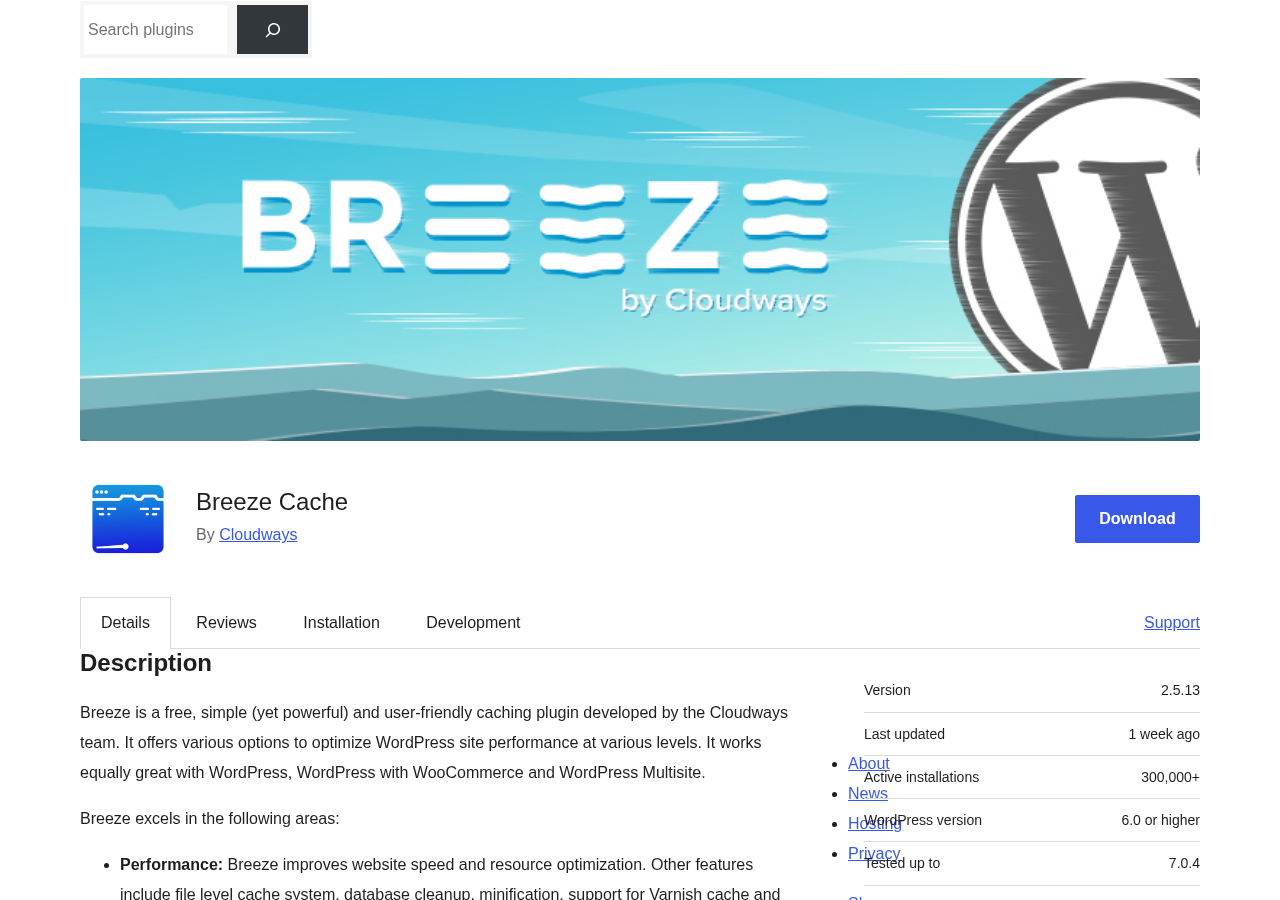
This Breeze review covers what the plugin does on any WordPress host, what it adds when paired with Cloudways servers, how the settings panels work, where it compares well against free competitors like WP Super Cache and WP Fastest Cache, and where it falls short. I worked through the official WordPress.org listing (version 2.5.13, last updated August 10, 2026), the full feature list, the changelog, and user review patterns to make sure this reflects the plugin as it stands in 2026.
At a glance:
- Audited: WordPress.org listing (version 2.5.13, August 2026); official Cloudways documentation; changelog through version 2.5.13; 126 user reviews on WordPress.org.
- Price: Free. No paid version exists. Every feature is included at no cost.
- Active installs: 300,000+ on WordPress.org; 17 million total all-time downloads.
- Rating: 3.6 out of 5 stars (73 five-star, 30 one-star, a polarized spread that reflects real-world variation in experience).
- Bottom line: a genuinely capable free cache plugin with a wider free-tier feature set than most competitors. Varnish integration, lazy load, deferred JS, and database cleanup are all free. Best results come from Cloudways hosting, but it works well elsewhere.
Quick verdict
Breeze offers one of the most complete free feature sets in the WordPress caching plugin space. Page caching, HTML/CSS/JS minification, file combining, lazy load, deferred JavaScript, Varnish integration, CDN support, database cleanup, Heartbeat API management, and import/export settings all come at no cost. There is no premium tier, no upsell, and no features locked behind a license.
Where Breeze shows its age and its origins: the rating is lower than most comparable free plugins (3.6 vs 4.9 for WP Fastest Cache), support resolution rates are modest, and some users report leftover files after uninstallation. The plugin’s best capabilities are tied to Cloudways infrastructure, and users on other hosting environments get a solid but sometimes less-polished experience.
Quick verdict card:
- Best for: WordPress site owners looking for a no-cost plugin that covers caching, minification, lazy load, and database cleanup without any premium upgrade. Especially strong on Cloudways hosting.
- Ideal sites: blogs, portfolios, small business sites, WooCommerce stores, and WordPress Multisite networks.
- Standout feature: complete feature parity across all users at zero cost, including deferred JS and lazy load that competing free plugins lock behind premium plans.
- Watch out for: lower-than-average user ratings, modest support resolution rates, and Varnish features that only reach full potential on Cloudways servers.
What Breeze is
Breeze is a free WordPress caching and performance plugin developed and maintained by Cloudways, a managed cloud hosting platform. It was first published on WordPress.org on July 22, 2017, and has been updated actively since then, reaching version 2.5.13 in August 2026.
The plugin generates static HTML files from dynamically generated WordPress pages and serves them to visitors instead of executing PHP and querying the database on every request. This is standard page caching behavior. What distinguishes Breeze from most comparable free plugins is the scope of features included at no cost: alongside basic page caching, it includes HTML/CSS/JS minification, file combining, lazy load for images, deferred JavaScript, advanced preloading (DNS prefetch, link prefetch, font preloading), Varnish integration, CDN integration, database cleanup, and Heartbeat API management.
Breeze also integrates directly with the Varnish cache layer that Cloudways deploys on its managed servers. On a Cloudways server, Breeze detects the Varnish configuration automatically and handles cache purging without manual setup. On any other host, the plugin’s built-in file-based cache handles the same role.
The plugin has recorded 17 million total downloads since launch. Active installations stand at 300,000+. The 3.6 out of 5 star average across 126 reviews reflects a split audience: 73 users gave five stars, 30 gave one star, with limited middle ground.
Who Breeze is best for
Strong fit:
- WordPress site owners who want the widest free caching feature set without any premium upgrade. Breeze includes lazy load, deferred JS, and database cleanup at no cost, features that competing free plugins often sell as premium add-ons.
- Cloudways customers, for whom Breeze is the most natural choice: it was built for Cloudways servers, it integrates automatically with Cloudways’ Varnish layer, and the support ecosystem on Cloudways’ community forum is more active than the WordPress.org forum.
- WooCommerce store owners. Breeze is documented as compatible with WooCommerce out of the box without special configuration, including compatibility with currency switcher plugins (WCML, CURCY/WMC, WOOCS, Aelia) as of version 2.5.13.
- WordPress Multisite networks. The plugin handles Multisite at the network level, applying settings globally across all sub-sites from a single admin panel.
- Site owners who run CDN services like Cloudflare, MaxCDN, KeyCDN, or Amazon CloudFront. Breeze’s CDN integration rewrites static asset URLs without requiring a separate CDN plugin.
- Developers who manage many sites and want a single free plugin that can export and import its configuration as a .json file. The Import/Export feature means you can replicate a working setup across multiple sites without manual reconfiguration.
- Sites where Heartbeat API load is a concern. Breeze includes Heartbeat API frequency controls that many caching plugins do not offer.
Weak fit:
- Sites that need a proven, community-tested plugin with near-universal positive reviews. Breeze’s 3.6/5 average and 30 one-star reviews reflect real-world frustration for a meaningful minority of users. WP Fastest Cache (4.9/5) and WP Super Cache (4.3/5) have stronger public confidence.
- Sites where uninstall cleanliness matters. User reports indicate Breeze leaves residual files after deactivation and deletion.
- Sites requiring object caching or database query caching in addition to page caching. Breeze does not offer Redis or Memcached integration.
- Sites needing image optimization with WebP conversion. Breeze includes lazy load but not compression or format conversion. A separate image optimization plugin is required.
- Sites on LiteSpeed hosting where LiteSpeed Cache would integrate at the server level.
- Sites already running WP Rocket, WP Fastest Cache, WP Super Cache, LiteSpeed Cache, or another full cache plugin. Breeze should be the only active cache plugin.
Setting up Breeze
Installation is standard: Plugins > Add New in the WordPress dashboard, search for “Breeze,” install, and activate. After activation, Breeze appears as a menu item under Settings > Breeze in the WordPress admin sidebar.
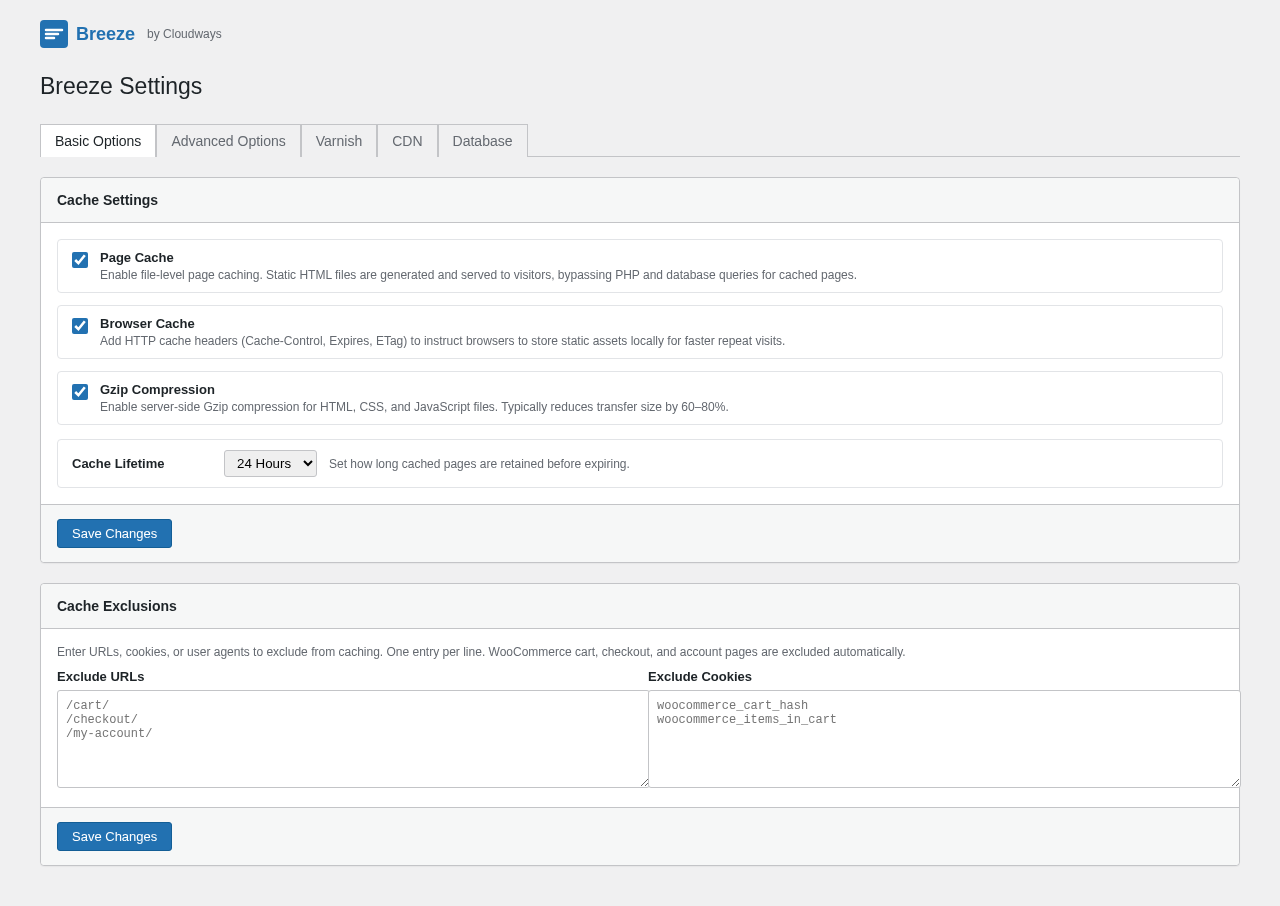
The settings panel is organized into five tabs: Basic Options, Advanced Options, Varnish, CDN, and Database.
I found the organization logical for an intermediate user but potentially confusing for beginners. The distinction between “Basic” and “Advanced” is not immediately obvious from the tab labels, and some settings that affect everyday performance (like lazy load and deferred JavaScript) are housed under Advanced rather than Basic. First-time users following the recommended settings should work through all tabs before concluding setup.
One genuine advantage: Breeze includes Import/Export functionality at the bottom of the settings panel. After configuring Breeze on one site, you can export the configuration as a .json file and import it directly on other sites. This is a time-saver for developers managing multiple WordPress installations.
Basic settings
Page cache enables static HTML file generation. When active, WordPress generates a cached HTML copy of each page on first load and serves that copy to subsequent visitors. Cache files are stored on disk in wp-content/cache/breeze.
Browser cache adds HTTP cache headers (Cache-Control, Expires, ETag) to instruct visitor browsers to store static assets locally. Repeat visitors load assets from their browser cache rather than re-downloading them from the server.
Gzip compression enables server-side compression of HTML, CSS, and JavaScript. Compressed responses typically reduce transfer size by 60 to 80 percent compared to uncompressed equivalents.
Cache lifetime sets how long cached files are preserved before they expire and are regenerated. The default is reasonable for most sites, but high-traffic sites with frequently updated content may want shorter intervals.
Cache exclusions allow specific URLs, cookies, or user agent strings to bypass caching. Breeze handles WooCommerce cart, checkout, and account page exclusions automatically. Custom exclusions are set here for other dynamic pages or logged-in user handling.
Advanced settings
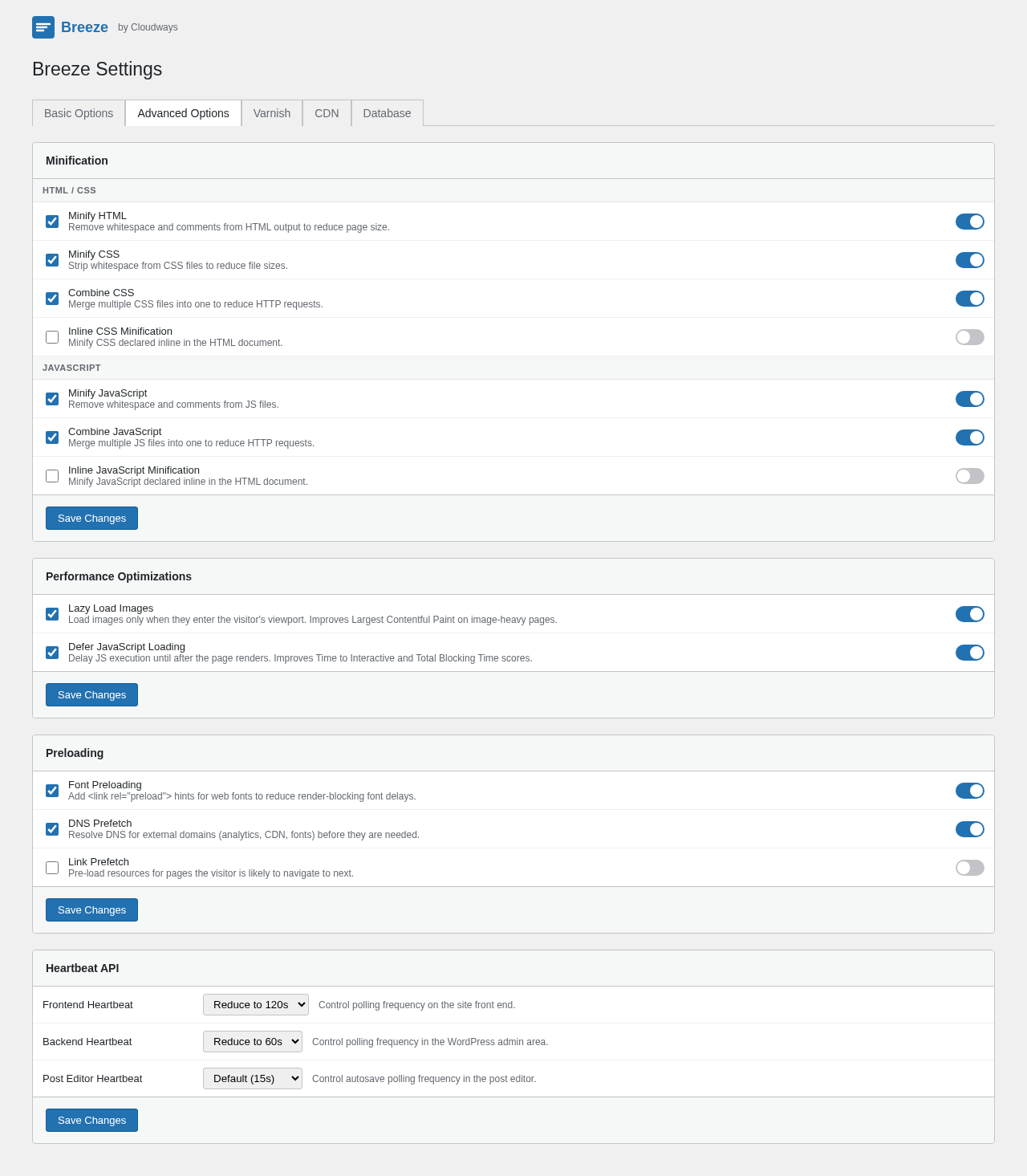
The Advanced Options tab contains optimization features that most users should also configure:
Minify HTML strips whitespace and comments from page HTML output, reducing transfer size. This is lossless optimization with minimal risk of breaking page display.
Minify CSS and Combine CSS reduce CSS file sizes and merge multiple CSS files into fewer HTTP requests. CSS combining can break styling on rare sites with dependency-sensitive CSS load order, but works correctly on the majority of WordPress themes.
Minify JavaScript and Combine JavaScript apply the same reduction and merging to JS files. Combining JavaScript carries higher risk than combining CSS: plugins that register scripts in a specific order sometimes break. Breeze lets you exclude specific files from combining through an exclusion field.
Lazy load images defers image loading until images enter the visitor’s viewport, reducing initial page weight and improving Largest Contentful Paint scores for pages with many images below the fold.
Deferred JavaScript delays JS file execution until after the initial page render. This directly improves Time to Interactive and Total Blocking Time scores in Google PageSpeed Insights and is one of the most impactful settings in this tab.
Preloading features include font preloading (early browser fetch hints for web fonts), DNS prefetch (DNS lookup hints for external domains like analytics and CDN providers), and link prefetch (pre-loading resources for pages the visitor is likely to navigate to next).
Heartbeat API management lets you adjust how often WordPress polls the server for live updates. WordPress’s default Heartbeat interval can create sustained server load on high-traffic or WooCommerce dashboards. Breeze’s controls let you disable Heartbeat in specific contexts or reduce its frequency.
Varnish integration
The Varnish tab handles integration between Breeze’s file-based cache and a server-side Varnish proxy cache.
Varnish is a caching HTTP reverse proxy that sits in front of the web server and serves cached responses from memory. On Cloudways servers, Varnish is pre-installed and pre-configured. Breeze detects this automatically and enables the Varnish integration without manual setup.
When Varnish integration is active, Breeze sends a cache purge signal to Varnish whenever it clears its own file cache. This ensures both the Breeze file cache and the Varnish memory cache stay in sync. Without this coordination, you could clear the Breeze cache and still see Varnish serving stale content to visitors.
On non-Cloudways servers, Varnish integration can still be configured manually if your hosting environment runs Varnish. The settings accept the Varnish host and port. For most shared hosting environments, the Varnish tab is not relevant. Breeze’s file-based cache works independently without Varnish and performs well on standard Apache and NGINX hosting.
CDN integration
The CDN tab handles static asset URL rewriting for content delivery network integration. Breeze rewrites the URLs of static assets (images, CSS, JS files) in page output to point to a CDN hostname you specify.
Officially supported CDNs include Cloudflare (no Breeze-specific configuration needed), MaxCDN/BunnyCDN, KeyCDN, and Amazon CloudFront. Breeze does not natively support push CDN configurations. Pull CDN setups are the supported pattern.
The CDN integration is straightforward for sites already using one of the supported providers. It eliminates the need for a separate CDN plugin and consolidates asset URL management in the Breeze settings panel.
Database cleanup
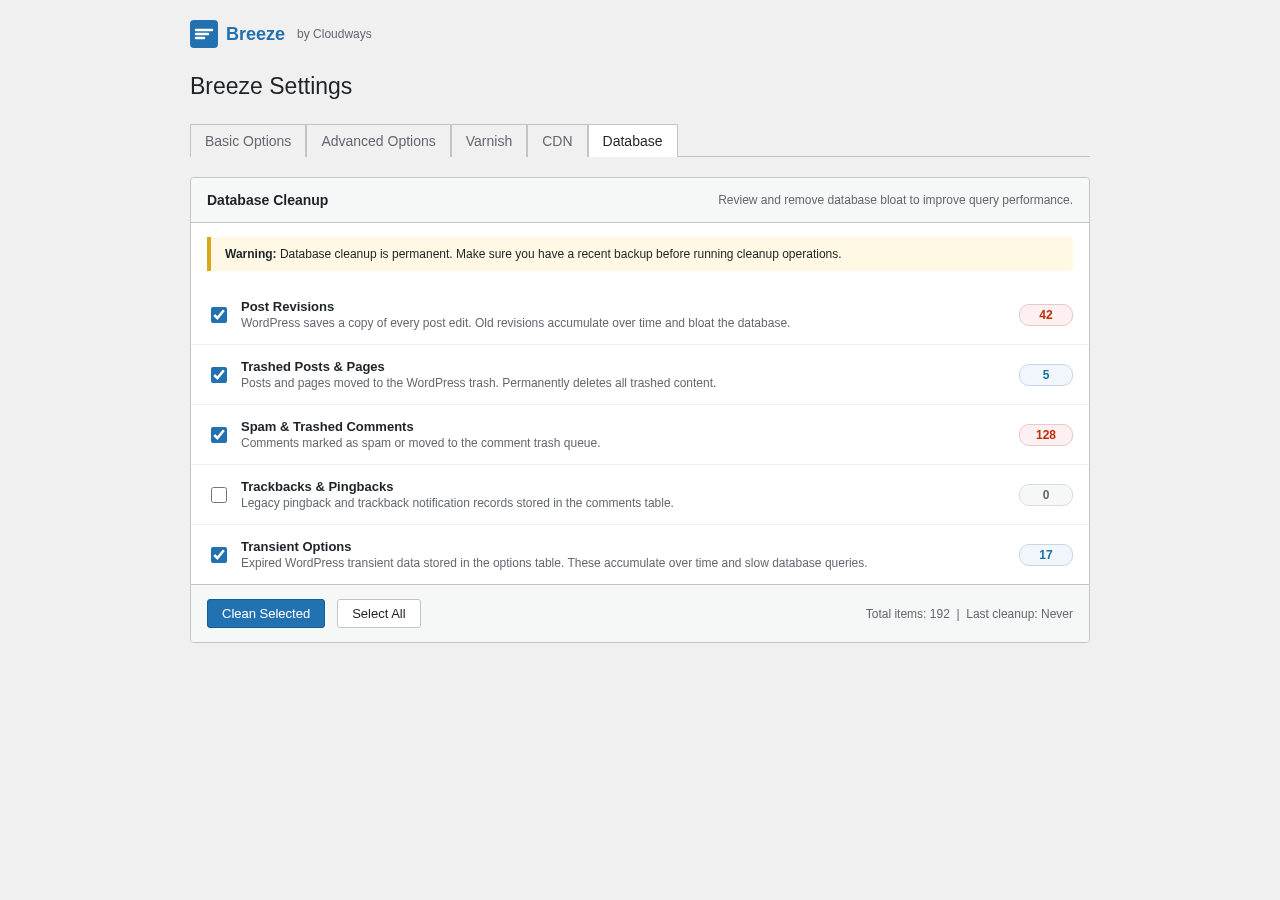
The Database tab provides cleanup tools for removing WordPress database bloat, including post revisions, trashed posts and pages, spam and trashed comments, trackbacks and pingbacks, and expired transient options. Each category can be cleaned individually or as a batch, with a preview count showing how many items exist before you run cleanup.
This is a practically useful feature that many site owners would otherwise handle with a dedicated plugin. Having it built into the cache plugin reduces the total plugin footprint for sites that want basic database housekeeping alongside caching.
One note: database cleanup should be treated as a maintenance operation, not a set-and-forget toggle. Review the counts before running cleanup to confirm you are not removing content you need.
WooCommerce and Multisite compatibility
Breeze handles WooCommerce compatibility out of the box without additional configuration. Cart, checkout, and My Account pages are excluded from caching automatically. As of version 2.5.13, Breeze includes refined compatibility with currency switcher plugins (WCML, CURCY/WMC, WOOCS, Aelia Currency Switcher) and improved cache key handling for product variation pages.
For WordPress Multisite, Breeze manages settings at the network level. The network admin panel controls caching and optimization settings for all sub-sites in the network. Individual sub-site administrators can override specific settings if the network admin allows it.
Pricing
Breeze is free. There is no premium version, no paid tier, no add-on module, and no license fee. Every feature described in this review is available at no cost. Cloudways maintains Breeze as a free tool because the plugin serves as a practical demonstration of the performance stack on Cloudways hosting.
This is a meaningful distinction from competing cache plugins. WP Rocket starts at $59 per year and requires a paid license for access. WP Fastest Cache charges a one-time fee for premium features including lazy load and deferred JavaScript. Breeze includes both lazy load and deferred JS in its free version.
The trade-off: Breeze has no commercial incentive to prioritize user experience or support beyond what serves Cloudways’ broader business interests. This is likely part of why the public support forum resolution rate is lower than established commercial alternatives.
Pros and cons
Pros
- Completely free. No premium version, no locked features, no upsell. Every capability including lazy load, deferred JS, Varnish support, CDN integration, and database cleanup is included at zero cost.
- Broad feature set for a free plugin. Most free cache plugins offer basic page caching and Gzip. Breeze adds lazy load, deferred JavaScript, font preloading, DNS prefetch, link prefetch, Heartbeat API controls, CDN integration, and database cleanup.
- Varnish integration is automatic on Cloudways servers. No manual server configuration needed for Varnish cache purging.
- WooCommerce compatible out of the box with currency switcher support refined in version 2.5.13.
- WordPress Multisite support with network-level settings management.
- Import/Export configuration. Export settings as .json and import on other sites, useful for agencies and developers.
- Heartbeat API management included. Reduces server load from WordPress polling behavior.
- CDN integration for Cloudflare, MaxCDN, KeyCDN, and Amazon CloudFront built in.
- 17+ million total downloads. Real-world deployment history across diverse WordPress environments.
- Active development: version 2.5.13 released August 10, 2026 with security patches and WooCommerce improvements.
- PHP 8.4 support and available in 12 languages.
Cons
- Below-average public ratings. 3.6 out of 5 stars across 126 reviews, with 30 one-star ratings. Lower than WP Fastest Cache (4.9/5) and LiteSpeed Cache.
- Polarized review spread. The 73 five-star / 30 one-star pattern suggests the plugin works excellently for some configurations and frustratingly for others.
- Modest support resolution rate. 4 out of 7 reported support threads resolved in the last two months per the WordPress.org listing.
- Residual files on uninstall. Multiple user reports indicate Breeze leaves cache files or configuration files behind after deactivation and deletion.
- No image optimization or WebP conversion. Breeze includes lazy load but not image compression or format conversion. A separate plugin is required.
- No object caching. Redis or Memcached integration is not available.
- No built-in cache verification tool. Checking whether caching is active requires inspecting page HTML source or using an external speed testing tool.
- Varnish features reach full potential only on Cloudways. Manual configuration required on other hosting environments.
- Smaller user community than W3 Total Cache or WP Super Cache.
- 12 language translations vs 39+ for WP Fastest Cache.
Alternatives
WP Rocket is the premium reference for WordPress caching. Starts at $59/year and covers everything Breeze does plus critical CSS generation, database optimization scheduling, smart cache warming, Google Fonts async, and a more polished settings experience. If budget allows and you want a fully managed performance plugin, WP Rocket is the upgrade path from Breeze.
WP Fastest Cache is free with a premium one-time-fee upgrade ($49 for a single site lifetime license). The free version covers page caching, CSS/JS minification, browser caching, Gzip, CDN, and Varnish. The premium adds lazy load, deferred JS, image optimization, and database cleanup. The free version has a 4.9/5 rating across 4,200+ reviews, significantly higher community confidence than Breeze. The paid one-time pricing makes the full feature set accessible without a subscription.
LiteSpeed Cache is free and substantially more powerful than Breeze on LiteSpeed hosting environments. Includes image optimization with WebP conversion, object caching, critical CSS, HTTP/3 Push, and a 4.8/5 star rating across 12,000+ reviews. On non-LiteSpeed hosting, some features are unavailable or reduced.
WP Super Cache is the Automattic-maintained free cache plugin with basic page caching, Gzip, and CDN integration. Much simpler feature set than Breeze. 4.3/5 stars across 1,600+ reviews. Best for sites that want a minimal, well-maintained free plugin without advanced optimization features.
W3 Total Cache is a long-established free plugin with extensive advanced options covering page caching, object caching, database caching, browser caching, CDN integration, and minification. The free version is more complex to configure than Breeze but strong for developers who want granular control.
Final verdict
Breeze is a well-specified free WordPress caching plugin that delivers more out of the box than most free alternatives. The zero-cost access to lazy load, deferred JavaScript, Heartbeat API management, Varnish integration, CDN support, and database cleanup is a genuine differentiator: competing free plugins typically charge for at least some of these.
The honest drawback is that the plugin’s public reputation reflects a more mixed experience than that feature list implies. A 3.6 out of 5 star average, 30 one-star reviews, and a below-average support resolution rate indicate that a meaningful segment of users encounter problems that are not always resolved. That contrast matters when choosing a plugin for a production site where performance and reliability are not interchangeable.
For Cloudways customers, the calculus is simple: Breeze was built for Cloudways servers, integrates automatically with their Varnish layer, and pairs naturally with the hosting environment. Using a different cache plugin on Cloudways is not wrong, but Breeze is the most tested option in that context.
For users on other hosting environments: Breeze is a solid choice if the feature scope is your primary criterion and you are comfortable with a lower average public rating. If community confidence and support resolution track records weigh heavily, WP Fastest Cache (free tier) or WP Super Cache (simpler) are lower-risk alternatives among the free options.
FAQ
Is Breeze really free?
Yes. Breeze has no premium version and no paid tier. Every feature, including lazy load, deferred JavaScript, Varnish integration, CDN support, and database cleanup, is included at no cost.
Does Breeze work on all WordPress hosting, or only Cloudways?
Breeze works on any WordPress hosting that meets the requirements (PHP 7.4+, WordPress 6.0+). The Varnish integration features reach their full potential on Cloudways servers where Varnish is pre-installed and pre-configured, but the core caching, minification, and optimization features work on shared hosting, VPS, and other managed WordPress environments.
Can I use Breeze with WooCommerce?
Yes. Breeze is documented as compatible with WooCommerce out of the box. Cart, checkout, and My Account pages are excluded from caching automatically. Version 2.5.13 includes improved compatibility with WooCommerce currency switcher plugins.
Does Breeze work with Cloudflare?
Yes. Cloudflare and Breeze work together without any Breeze-specific configuration changes. Enable Cloudflare on your domain normally and Breeze will function alongside it.
Can I run Breeze alongside other cache plugins?
No. Breeze should be the only active cache plugin on your site. Running two cache plugins simultaneously causes cache conflicts and unpredictable behavior. Disable any existing cache plugins before activating Breeze.
Does Breeze support WordPress Multisite?
Yes. Breeze handles Multisite at the network level. Settings are managed from the network admin panel and apply across all sub-sites. Individual sub-sites can override specific settings if the network administrator permits.
Does Breeze convert images to WebP?
No. Breeze includes lazy load (deferred image loading) but does not compress or convert images. For WebP conversion and image optimization, a separate plugin like Imagify, ShortPixel, or EWWW Image Optimizer is required.
How do I clear the Breeze cache?
Breeze adds a cache management item to the WordPress admin toolbar at the top of the screen. You can purge the entire cache with one click from the toolbar. Cache is also cleared automatically when you publish or update a post or page.