


Over one million active installations. A 4.9 out of 5 star rating across more than 4,200 reviews on WordPress.org. One developer, building and maintaining it since 2013. WP Fastest Cache has held an unusual position in the WordPress performance market for over a decade: genuinely competitive, widely adopted, and almost entirely run by a single person.
Most popular caching plugins are backed by companies with engineering teams, venture funding, or a big-name acquirer. WP Fastest Cache is Emre Vona’s project. That is both its character and, in some ways, its limitation.
This WP Fastest Cache review covers what the free version actually delivers, what the premium upgrade adds, how the settings panel works, where the plugin fits against WP Rocket and LiteSpeed Cache, and who should look elsewhere. I worked through the official WordPress.org listing (version 1.5.1, updated August 19, 2026), the plugin settings screenshots panel, the official website, the pricing page, and the full changelog to make sure this reflects the current plugin rather than an older impression.
At a glance:
- Audited on: WordPress.org listing (version 1.5.1, August 19, 2026); official website and pricing page; plugin settings panel via WordPress.org vendor screenshots; changelog through version 1.5.1.
- Free tier: page caching via Mod_Rewrite, HTML/CSS minification, Gzip, browser caching, CSS and JS combining, preload, CDN integration, WP-CLI. No paid version required for the core caching stack.
- Premium: one-time fee (not a subscription), lifetime license. Adds mobile-specific caching, JS minification, render-blocking JS removal, lazy load, Google Fonts async, image optimization with WebP conversion, and database cleanup.
- Bottom line: a strong free cache plugin with a clean settings panel and an unusually good rating for the install count. The one-time pricing makes the premium upgrade genuinely attractive for site owners who want image optimization and database tools without a recurring cost.
Quick verdict
WP Fastest Cache delivers a solid, full-featured free caching layer that is easier to configure than most of its free competitors. The settings panel is clear, the defaults are sensible, and the Mod_Rewrite delivery method is the fastest approach available for Apache hosting. For a free plugin, the scope is broader than many users expect: CSS combining, Gzip compression, browser caching, preload, CDN integration, and WP-CLI support all come at no cost.
The premium upgrade makes sense if you want image optimization, lazy loading, render-blocking JS removal, or database cleanup without installing separate plugins. The one-time pricing model is rare in this category and a genuine advantage over subscription-based alternatives.
Where WP Fastest Cache falls short: it is not a full performance suite. Object caching, database query caching, and real-time WooCommerce order capture are not part of what this plugin does. If you need those capabilities alongside page caching, you need a different setup or additional plugins.
Quick verdict card:
- Best for: bloggers, small business sites, and developers who want a reliable free WordPress cache plugin that is straightforward to configure, or site owners who want premium image optimization and JS deferral under a one-time license.
- Ideal sites: blogs, portfolios, brochure sites, WooCommerce stores with straightforward product catalogs, and multi-site setups on Apache or NGINX hosting.
- Standout feature: Mod_Rewrite-based page caching at no cost, plus one-time-fee premium pricing with lifetime updates and support.
- Watch out for: image optimization is credit-based (10,000 credits per license), not unlimited. Premium features like lazy load and render-blocking JS removal are not in the free version. No object or database query caching.
What WP Fastest Cache is
WP Fastest Cache is a page caching plugin for WordPress. When a visitor arrives at a WordPress page for the first time, WordPress normally runs PHP code and queries the database to generate the page. WP Fastest Cache saves a static HTML copy of that generated output and serves it to subsequent visitors instead. Fewer database queries. Less PHP execution. Faster responses.
The plugin uses Apache’s Mod_Rewrite module as its primary delivery mechanism. Emre Vona’s description on the WordPress.org listing is direct: Mod_Rewrite is “the fastest method.” It intercepts requests at the web server level, before PHP is invoked, and delivers the cached HTML file directly. On Apache hosting, this means the caching benefit is as close to the server layer as a WordPress plugin can get.
For NGINX and IIS hosting, the plugin still works, but Gzip compression and browser caching require manual server-side configuration steps rather than the automatic .htaccess-based setup that Apache sites enjoy. That is a meaningful distinction if you are on managed WordPress hosting or a VPS running NGINX.
The plugin was first published on August 4, 2013. Version 1.5.1, released on August 19, 2026, is the current version. More than 1 million active installations are recorded on WordPress.org. The vendor’s website also claims the plugin powers over 1.5 million websites globally, likely including installations not captured in the WordPress.org active-install count.
The 4.9 out of 5 star rating across 4,223 reviews is notable. Of those, 4,014 are five-star ratings. That consistency across more than a decade and a million sites is not the product of a single positive period: it reflects a plugin that has worked reliably for a very wide range of sites and configurations.
Who WP Fastest Cache is best for
Strong fit:
- Bloggers, portfolio owners, and small business site operators who want meaningful page speed improvements from a free plugin without a complex multi-tab configuration process. The settings panel has a single main checkbox list that covers most common optimizations.
- Developers and agency freelancers who manage multiple WordPress sites and want a one-time-fee premium license covering image optimization and JS deferral without committing to annual renewals. The Bronze plan at $49 covers one site for life.
- Sites on Apache hosting where Mod_Rewrite is available and automatic .htaccess management is appropriate. This is the configuration where WP Fastest Cache performs best.
- WooCommerce sites with standard product catalogs that want page caching for category and product pages. Cart, checkout, and account pages should be excluded (as with any cache plugin), and WP Fastest Cache handles that through the Exclude settings.
- WordPress Multisite installations. The plugin is documented as Multisite compatible.
- Sites already using Cloudflare or Bunny CDN. WP Fastest Cache includes built-in integration with both, including Cloudflare API cache purging.
- Developers who manage cache from the command line. WP-CLI commands for cache clearing are included in the free version.
Weak fit:
- Sites that need Redis or Memcached object caching alongside page caching. WP Fastest Cache does not offer object or database query caching. W3 Total Cache or a dedicated object cache plugin is required for that layer.
- WooCommerce stores where no order can be lost between scheduled backups or where real-time inventory display affects front-end pages. WP Fastest Cache caches pages; it does not handle real-time dynamic content per session beyond the standard exclusion rules.
- Sites hosted on NGINX where full caching benefit without manual server configuration is a priority. LiteSpeed Cache on LiteSpeed hosting is the stronger choice in that scenario.
- Site owners who want a fully hands-off managed performance suite covering page speed, image CDN, critical CSS, and Core Web Vitals tooling in one plugin. WP Rocket covers significantly more ground for those buyers.
- Sites running LiteSpeed Cache, W3 Total Cache, WP Super Cache, WP-Optimize, SiteGround Optimizer, or Breeze. WP Fastest Cache is incompatible with all of these: running them simultaneously causes cache conflicts and must be avoided.
Setting up WP Fastest Cache
Installation is standard: Plugins > Add New in WordPress admin, search for “WP Fastest Cache,” install and activate. After activation, WP Fastest Cache adds a top-level menu item in the WordPress admin sidebar. This is intentional, not a bug, though the plugin documentation notes that users who prefer a less prominent placement can move it under the Settings menu.
The settings panel is organized as a tabbed interface. The main tabs are: Settings, Delete Cache, Image Optimization, Premium, Exclude, CDN, and DB (Database).
The Settings tab is where the core configuration lives. Every option is a single checkbox with a plain-language label. There is no multi-step wizard, no guided onboarding, and no recommended-defaults mode. What you see is a list of checkboxes with short descriptions, and you choose which to enable.
I found the settings panel to be one of the cleaner checkbox layouts in this plugin category. The labels are descriptive without being technical, the order of options follows a logical sequence from core caching to minification to delivery optimization, and the tab structure keeps advanced options (CDN, database, exclusions) out of the way until you need them.
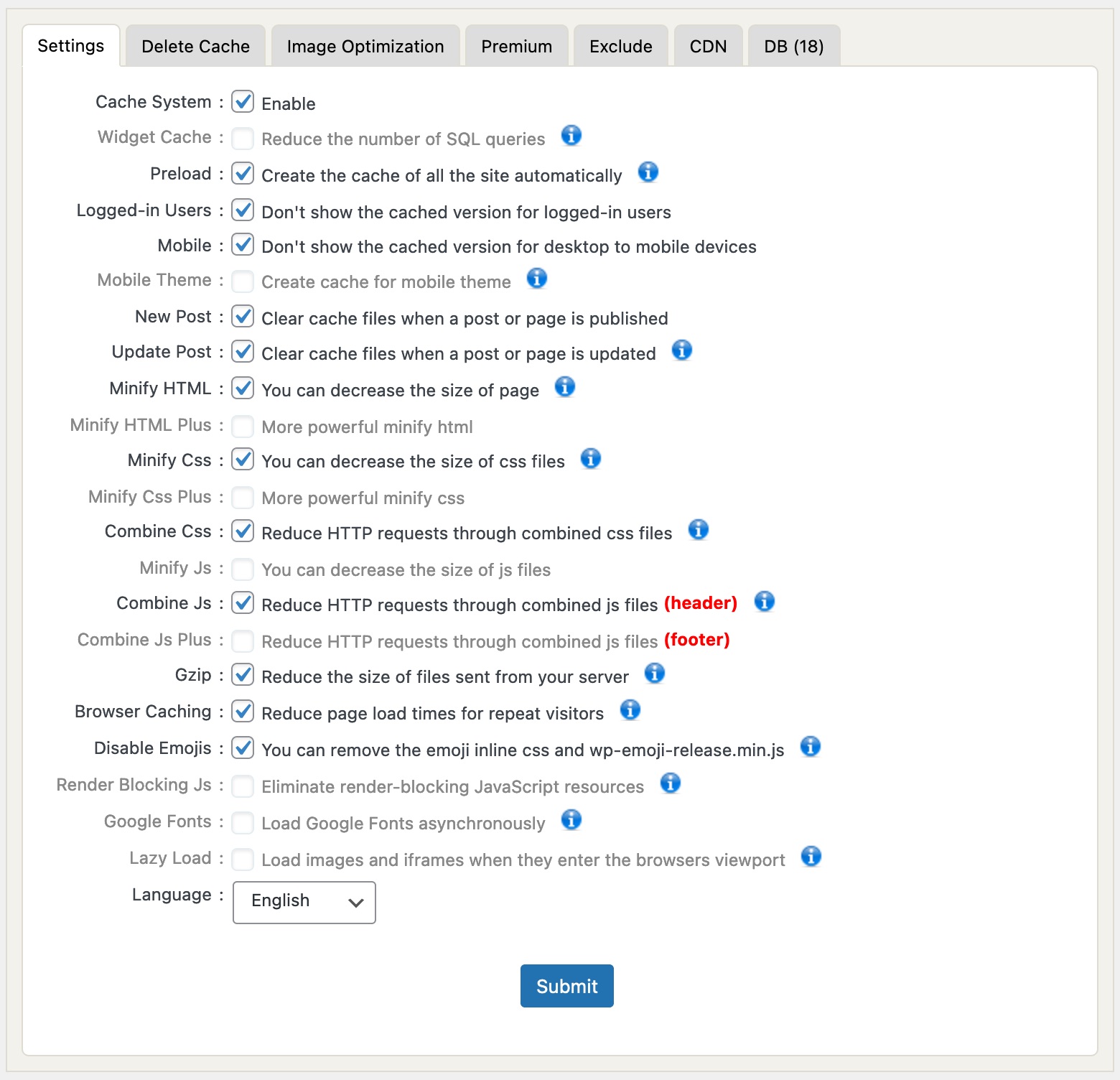
The most important setting is the first one: Cache System. Checking this box enables the plugin and writes the necessary Mod_Rewrite rules to .htaccess. On Apache hosting with a writable .htaccess file, this happens automatically. After enabling, subsequent page requests from non-logged-in visitors receive cached HTML instead of dynamically generated pages.
There is no built-in cache verification tool in the admin interface. To verify that caching is working, you check the page HTML source for a footer comment like “WP Fastest Cache file was created in X seconds, on [date].” This is less user-friendly than WP Super Cache’s built-in cache tester, but it is straightforward enough for anyone comfortable looking at page source.
Cache invalidation is automatic on publish and update. When you publish a new post or update an existing one, WP Fastest Cache clears the cache for that page, the homepage, and related archive pages. You can also manually delete the entire cache from the Delete Cache tab or via the admin toolbar, which adds a cache management button after activation.
Page caching in detail
Mod_Rewrite delivery
The plugin’s core architectural choice is Mod_Rewrite. Apache’s Mod_Rewrite intercepts the incoming HTTP request before PHP is loaded and serves the cached HTML file directly from disk if one exists. This means a cached page request on Apache hosting bypasses PHP execution and database queries entirely: the response is a static file read delivered at web server speed.
This approach is the same as WP Super Cache’s Expert mode. The difference is that WP Fastest Cache uses Mod_Rewrite by default for all users on Apache, without requiring a mode selection step. On NGINX, the plugin works without Mod_Rewrite, but Gzip and browser caching require server-level configuration that is not automated by the plugin.
Preload
Preloading generates cached HTML files for your pages before any visitor arrives and requests them. Without preloading, pages are only cached after the first visitor loads them, meaning that visitor sees an uncached page load. With preloading enabled, the plugin visits your pages on a schedule and generates their cache files proactively.
The Preload settings dialog shows checkboxes for Homepage, Posts, Categories, Pages, Tags, Attachments, Custom Post Types, and Custom Taxonomies. You also set a crawl rate in pages per minute and can enable Restart After Completed so preloading runs continuously on a loop.
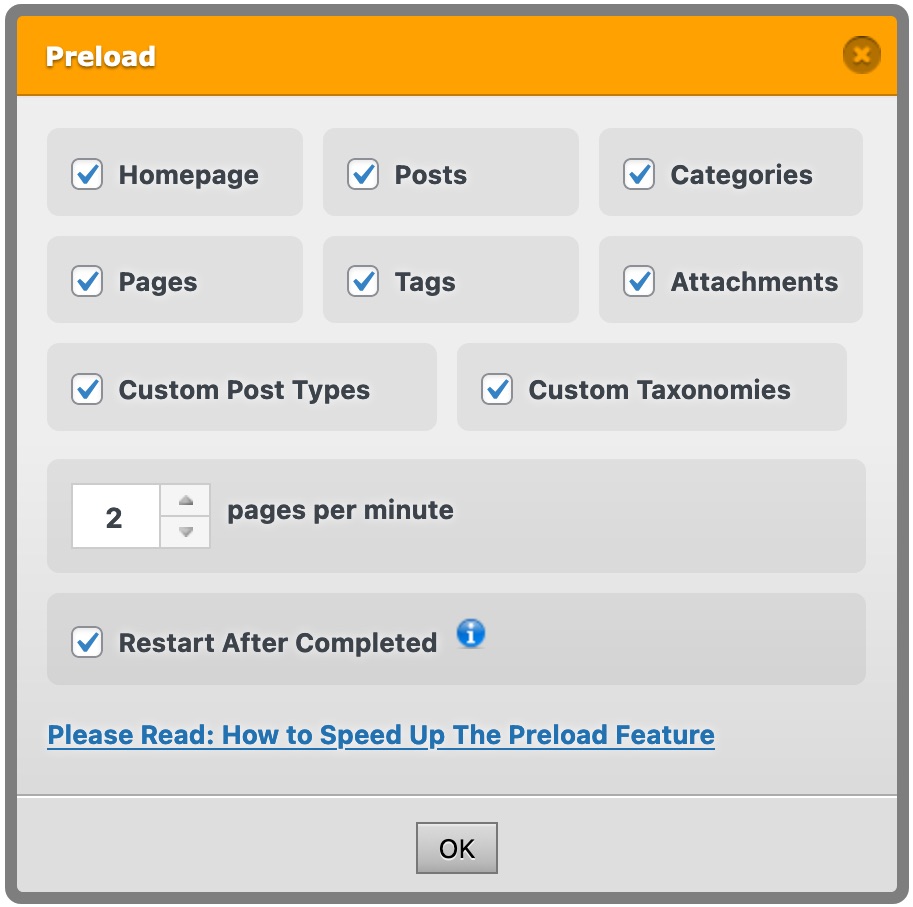
For sites with large post archives, lower crawl rates prevent the preload process from loading the server. The default of 2 pages per minute is conservative enough for most shared hosting environments.
Cache timeout
The Cache Timeout feature lets you schedule automatic cache clearing at set intervals. You configure a time (for example, daily at 3:00 AM) and WP Fastest Cache clears and regenerates the cache on that schedule. This is useful for sites where content is updated on a predictable schedule and you want the cache to stay fresh without manual clearing.
Cache exclusions
The Exclude tab handles pages, user agents, and cookies that should not be cached. You can exclude specific pages by URL, by URL pattern, or by cookie name. Regex support for exclusion rules was added in version 1.4.8, which makes exclusions flexible for sites with complex URL structures or cookie-based personalization.
The plugin also handles WooCommerce exclusions: cart, checkout, and account pages should be excluded from caching. WP Fastest Cache detects WooCommerce and applies appropriate exclusions automatically for those pages.
HTML and CSS/JS optimization
Included in the free version
The free version’s optimization options cover the practical basics:
- Minify HTML: removes whitespace and HTML comments from page output to reduce file size.
- Minify CSS: reduces CSS file sizes by stripping whitespace.
- Combine CSS: merges multiple CSS files into one, reducing HTTP requests.
- Combine JS (header): merges JS files loaded in the header into one file.
- Gzip compression: serves compressed page content to browsers that support it, typically reducing HTML and text file sizes by 60 to 80 percent.
- Browser caching: adds HTTP cache headers instructing browsers to store static assets locally, reducing load times for repeat visitors.
- Disable Emojis: removes the WordPress emoji script and CSS that are loaded on every page by default, reducing page weight for sites that do not use WordPress emoji.
These options are meaningfully useful for most sites. Combining CSS files reduces HTTP requests, Gzip reduces payload sizes, and browser caching improves repeat-visit load times. For a free caching plugin, the optimization scope is broader than many alternatives.
Premium-only optimizations
The premium version adds the options that matter most for Core Web Vitals and performance audit scores:
- Minify JS: reduces JavaScript file sizes by stripping whitespace and comments.
- Combine JS Plus (footer): merges footer JS files into one combined file (the free version covers header JS only).
- Minify HTML Plus: a more aggressive HTML minification option beyond the standard minify.
- Minify CSS Plus: a more aggressive CSS minification option.
- Render Blocking JS: eliminates render-blocking JavaScript by deferring or removing scripts that block the initial page paint. This is the most impactful option for PageSpeed Insights scores.
- Google Fonts: loads Google Fonts asynchronously to prevent font loading from blocking page render.
- Lazy Load: loads images and iframes only when they enter the browser’s viewport, reducing initial page weight and improving Largest Contentful Paint scores.
- Delayed JavaScript: defers JavaScript execution until user interaction, which can significantly improve Time to Interactive scores.
For sites where PageSpeed Insights and Core Web Vitals scores matter (which includes essentially all business sites in 2026), these premium options close the gap between WP Fastest Cache and a more comprehensive premium plugin.
Mobile caching
Mobile caching in the free version is limited to the Mobile toggle, which prevents the desktop-optimized cached page from being served to mobile devices. With this toggle enabled, mobile visitors receive dynamically generated pages rather than desktop-cached static HTML.
The Premium version adds a dedicated Mobile Theme option that creates separate cache files for mobile devices. For sites using a responsive theme (which is the vast majority of WordPress sites built in the last several years), separate mobile caching is not necessary: the same HTML is served to all devices and the responsive CSS handles layout. Separate mobile cache files are primarily relevant for sites still running distinct mobile themes.
CDN integration
CDN support in WP Fastest Cache rewrites static asset URLs in page output to point to a CDN hostname you specify. This works with any CDN that accepts a custom domain or CNAME. The plugin has named integrations for Bunny CDN and Cloudflare, including Cloudflare API cache purging through the CDN tab.
The CDN tab asks for your CDN hostname and which file types to rewrite. This is URL rewriting, not a CDN subscription: you supply the CDN account, WP Fastest Cache rewrites the URLs. For sites already using Cloudflare’s free plan or a CDN account they manage separately, this integration works well.
Image optimization (Premium)
Image optimization in WP Fastest Cache Premium is credit-based. Each premium license includes 10,000 image credits. Each image processed by the optimization tool consumes one credit. The plugin converts images to WebP format and compresses them. Processed images are served from the CDN or the server depending on your configuration.
10,000 credits is enough for a medium-sized site’s existing image library. For sites that regularly upload many new images or that have large existing libraries (e-commerce catalogs, photography portfolios), 10,000 credits per license may be insufficient long-term. The vendor’s pricing page does not document the cost of additional credits beyond the license allocation, so buyers with large image volumes should check this before purchasing.
Database cleanup (Premium)
The DB tab is a premium feature showing a visual interface for WordPress database cleanup. It identifies and allows removal of post revisions, trashed posts and pages, trashed and spam comments, trackbacks and pingbacks, and transient options.
Each category shows a count of items found. You can select which categories to clean and run the cleanup immediately. Auto Cleanup can be scheduled to run once a day automatically, keeping the database lean over time without manual intervention.
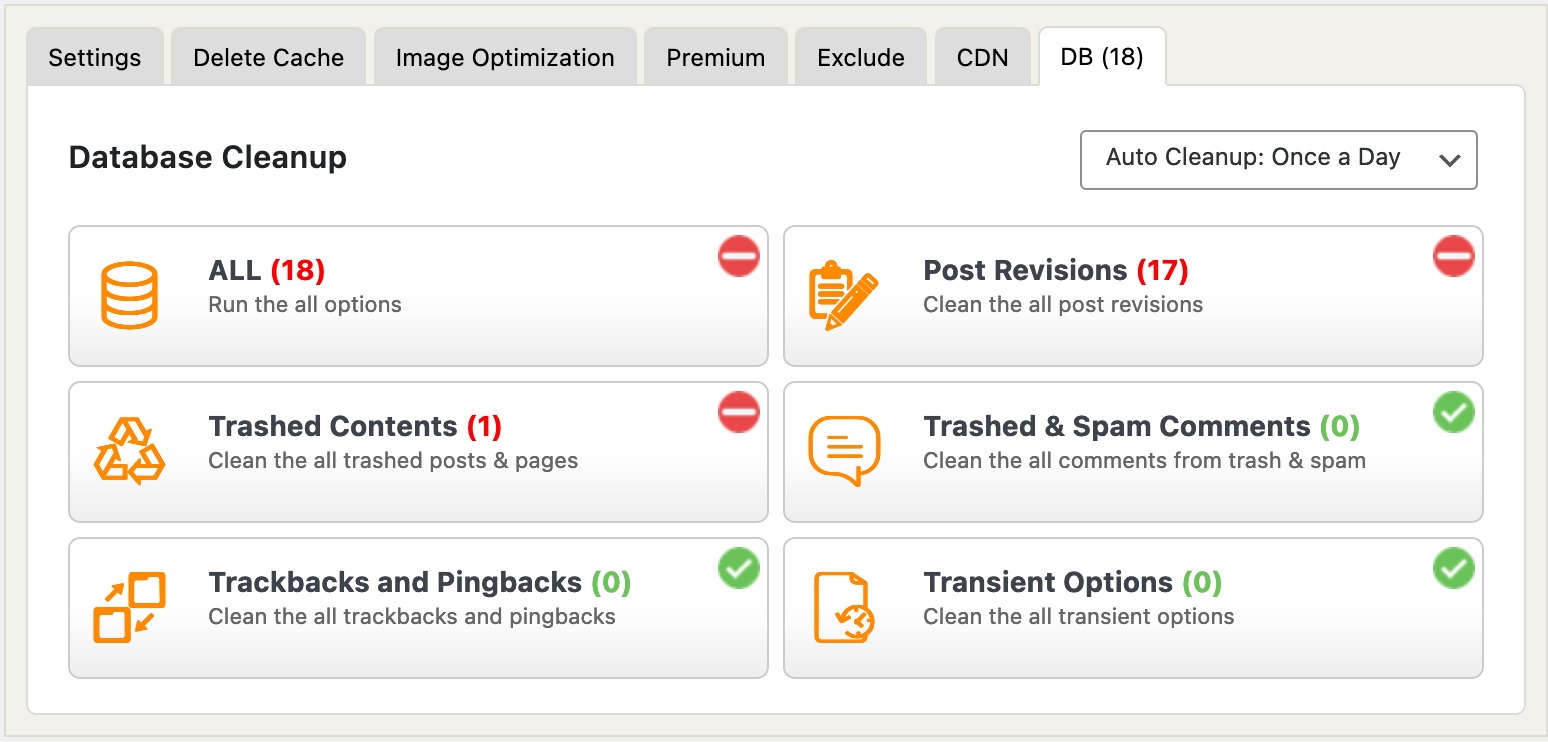
This is a genuinely useful premium feature. WordPress databases accumulate revision bloat, leftover transients, and spam comment records over time. A scheduled auto-cleanup addresses this without requiring a separate plugin that would conflict with WP Fastest Cache.
Varnish Cache and WP-CLI
Varnish Cache integration tells WP Fastest Cache to purge the Varnish proxy cache when the WP Fastest Cache cache is cleared. If your hosting stack includes a Varnish layer (some managed and enterprise hosting providers use it), this prevents stale content from being served through the proxy even after the plugin has cleared its own cached files.
WP-CLI support allows developers to clear the WP Fastest Cache cache from the command line. This is useful in automated deployment pipelines, CI/CD workflows, and staging-to-production push scripts where cache clearing should happen without browser-based admin access.
Pricing and license value
WP Fastest Cache Premium uses one-time fee (lifetime) pricing. There is no annual renewal. You pay once and receive the premium features, support, and updates for the life of the plugin.
This is unusual in the WordPress caching plugin market. WP Rocket charges an annual subscription. LiteSpeed Cache is free but limited to LiteSpeed hosting for its best features. W3 Total Cache has a Pro upgrade sold as a subscription. WP Fastest Cache Premium at $49 for one site, one time, is a genuinely different value proposition.
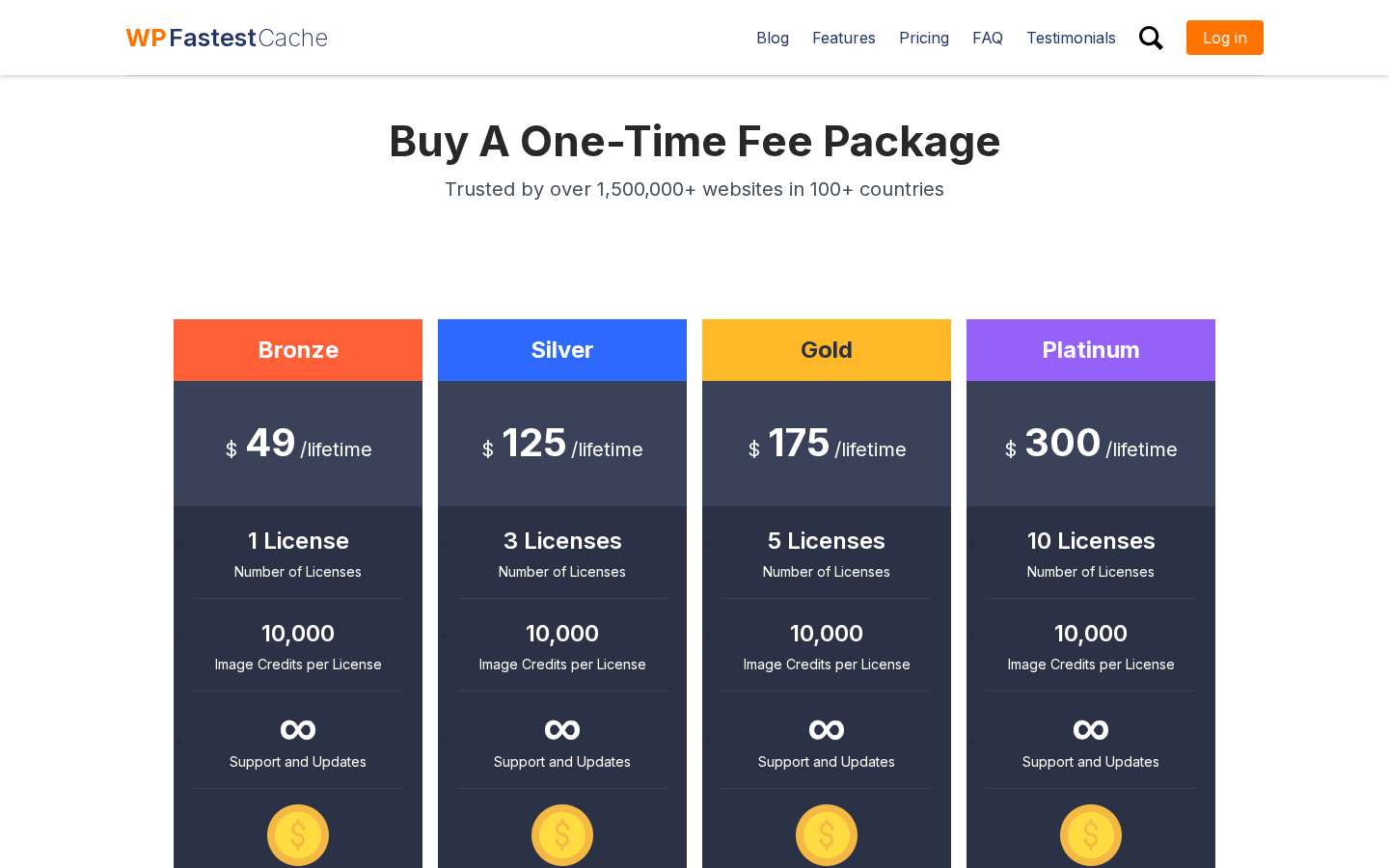
Pricing verified on August 19, 2026 from the official pricing page. Verify before purchasing as prices may change:
- Bronze: $49 one-time, 1 license, 10,000 image credits
- Silver: $125 one-time, 3 licenses, 10,000 image credits per license
- Gold: $175 one-time, 5 licenses, 10,000 image credits per license
- Platinum: $300 one-time, 10 licenses, 10,000 image credits per license
All plans include infinite support and updates (no expiry), 1-year license transfer rights, and a 30-day money-back guarantee.
The pricing math for most buyers:
- Single personal or business site: Bronze at $49 is a one-time cost that compares favorably to a year’s WP Rocket subscription. If you plan to keep the site running for more than one year, Bronze often wins on total cost.
- Small agencies or developers managing up to 3 client sites: Silver at $125 works out to roughly $42 per site for lifetime coverage.
- Larger agencies: Gold (5 sites, $175) or Platinum (10 sites, $300) reduce the per-site cost further.
One important caveat: “infinite support and updates” is a vendor claim that depends on the plugin continuing to be maintained. The plugin’s changelog and active development history through 2026 are encouraging, but it remains a single-developer project. Annual-subscription plugins carry their own risks, but the vendor has an ongoing revenue incentive to maintain them.
Pros and cons
Pros
- Strong free tier: Mod_Rewrite page caching, Gzip, browser caching, HTML/CSS minification, CSS and header JS combining, preload, CDN integration, WP-CLI, Varnish support, and Cloudflare API purging at no cost.
- Highest rating in the WordPress cache plugin category: 4.9 out of 5 stars across 4,223 reviews, with 4,014 five-star ratings.
- 1+ million active installs on WordPress.org, plus 1.5+ million total deployments globally per the vendor. Real-world scale validates stability across diverse hosting configurations.
- One-time pricing for Premium: no annual renewal. $49 for a single-site lifetime license is one of the best value-for-money positions in the caching plugin category for site owners who plan multi-year use.
- Premium image optimization built into the same plugin: WebP conversion and compression, no separate image optimization plugin required.
- Database cleanup built into Premium: auto-scheduled cleanup of revisions, transients, and spam avoids the need for a separate plugin.
- Clean, beginner-friendly settings panel: the main Settings tab is a single-page checkbox list with plain-language labels.
- Preload with granular content-type selection covers homepage, posts, categories, pages, tags, attachments, custom post types, and custom taxonomies.
- Cache timeout scheduling for automatic periodic cache refresh.
- Regex-based exclusion rules for advanced URL pattern matching (added version 1.4.8).
- Active development: version 1.5.1 released August 19, 2026, with security patches and Polylang compatibility.
- Translated into 39+ locales.
- Multisite, NGINX, IIS, SSL/HTTPS, and WooCommerce compatible.
- 30-day money-back guarantee on all premium plans.
Cons
- No built-in cache verification tool. Checking whether caching is active requires inspecting page HTML source or using a third-party tool.
- Single developer project. Emre Vona maintains the plugin alone. This has worked well across 13 years, but it represents a risk that team-backed plugins do not share.
- Image credits are finite: 10,000 credits per license. Sites with large media libraries or frequent new uploads may exhaust credits. Additional credit pricing is not documented on the public pricing page.
- Premium optimization features critical for Core Web Vitals (render-blocking JS removal, lazy load, JS minification) are gated behind the paid version.
- No object caching or database query caching. Redis and Memcached support are not available.
- Incompatible with several popular plugins that may already be installed: LiteSpeed Cache, WP-Optimize, W3 Total Cache, WP Super Cache, SiteGround Optimizer, Breeze. Sites switching from any of these must fully deactivate the existing plugin first.
- NGINX and IIS hosting requires manual server configuration for Gzip and browser caching.
- No managed CDN. CDN integration requires your own CDN account.
WP Fastest Cache vs WP Rocket
WP Rocket is the most direct premium comparison for WP Fastest Cache. Here is how they differ on the points that matter most.
Cost: WP Fastest Cache free is $0. WP Fastest Cache Premium Bronze is $49 one-time for one site. WP Rocket starts at roughly €59 per year for one site, renewing annually. For a site you plan to keep for more than a year, WP Fastest Cache Premium is cheaper on total cost.
Ease of setup: WP Rocket applies recommended defaults automatically on activation and guides you through settings with contextual explanations. WP Fastest Cache presents a checkbox list with plain labels; recommended settings are not auto-applied, and there is no guided setup flow.
Optimization depth: WP Rocket includes Remove Unused CSS, Delay JavaScript Execution, image lazy loading, critical CSS generation, and Core Web Vitals-specific tools without a separate upgrade. WP Fastest Cache Premium covers lazy load, render-blocking JS, and JS minification, but Remove Unused CSS and critical CSS are not available.
Image optimization: WP Rocket integrates with Imagify (separate product, separate pricing). WP Fastest Cache includes image optimization with WebP conversion in the premium package (credit-based).
Database cleanup: WP Rocket does not include database cleanup. WP Fastest Cache Premium includes it.
Summary: if you want the most comprehensive performance plugin with the least configuration work, WP Rocket is the stronger choice. If you want capable page caching at no cost, or want a one-time-fee premium with image optimization and database cleanup included, WP Fastest Cache is a compelling alternative.
Alternatives to WP Fastest Cache
WP Rocket. The premium standard for WordPress performance optimization. Better guided setup, Remove Unused CSS, critical CSS, and more complete Core Web Vitals tooling. Starts at roughly €59 per year for one site. Choose WP Rocket if you want a comprehensive, subscription-backed performance suite and the annual renewal cost fits your budget.
LiteSpeed Cache. Free plugin with 7+ million active installs, 4.8 out of 5 stars. Delivers server-level caching on LiteSpeed or OpenLiteSpeed hosting that bypasses PHP more completely than any WordPress-side plugin can. Also includes image optimization, CSS/JS optimization, database tools, and object caching. The limitation: server-level caching only works on LiteSpeed hosting. If your host uses LiteSpeed servers, it is likely the strongest free option available.
W3 Total Cache. Free with a Pro upgrade option. Covers page caching, object caching (Redis, Memcached), database caching, CDN management, and minification in one plugin. Choose W3 Total Cache if you need Redis or Memcached object caching alongside page caching and want to stay on a free plugin. It is significantly more complex to configure than WP Fastest Cache.
WP Super Cache. Free, maintained by Automattic. Three caching modes including Apache mod_rewrite, PHP-based, and a WP-Cache layer for logged-in users. Permanently free with no paid version. Choose WP Super Cache if you want a trusted, Automattic-maintained free caching plugin with no premium upsell, and you are comfortable handling JS/CSS optimization through separate plugins.
Autoptimize. Not a caching plugin but frequently paired with free cache plugins to add CSS/JS optimization, critical CSS inlining, and Google Fonts async loading that the free caching plugin does not cover. WP Fastest Cache free plus Autoptimize is a viable combination for sites that want both layers at no cost.
Final verdict
WP Fastest Cache has earned its position as one of the highest-rated caching plugins on WordPress.org, and reviewing the 2026 version gives me no reason to question that standing. The free version is meaningfully useful: Mod_Rewrite-based page caching, Gzip, browser caching, CSS combining, preload, CDN integration, and WP-CLI support cover the caching fundamentals that most informational sites actually need. For a personal blog, a portfolio, or a content site on Apache hosting, the free version is a legitimate complete solution for the caching layer.
The premium tier earns its place through two specific additions: render-blocking JS removal and lazy loading (which matter for PageSpeed Insights scores), and built-in image optimization with database cleanup (which remove the need for separate plugins that would otherwise conflict with WP Fastest Cache anyway). At $49 one-time for a single site, the Bronze plan is priced well below a single year of WP Rocket for buyers who want those features without an ongoing subscription.
The honest drawbacks: this is a single-developer plugin, and that carries long-term risk that team-backed plugins do not. The image credits model means image optimization is not unlimited. And buyers who need Remove Unused CSS, critical CSS, or Redis object caching will not find those here, regardless of which version they use.
For the large majority of WordPress operators, WP Fastest Cache free is a sound, well-maintained choice that outperforms many heavier free alternatives in both simplicity and feature coverage. If you want more from the same plugin, the premium upgrade’s one-time pricing structure is rare enough to be genuinely worth considering.
FAQ
What is WP Fastest Cache?
WP Fastest Cache is a WordPress page caching plugin developed by Emre Vona, first published in 2013. It generates static HTML files from your WordPress pages and serves them to visitors instead of executing PHP and querying the database on each request. It uses Apache’s Mod_Rewrite as its primary delivery method. The plugin has over 1 million active installations and a 4.9 out of 5 star rating across more than 4,200 reviews on WordPress.org.
Is WP Fastest Cache free?
Yes. WP Fastest Cache has a free version available on WordPress.org that includes page caching, HTML and CSS minification, Gzip compression, browser caching, CSS and JS file combining, preload, CDN integration, WP-CLI support, and cache exclusion rules. A paid premium version adds mobile-specific caching, JS minification, render-blocking JS removal, lazy loading, Google Fonts async, delayed JS, image optimization with WebP conversion, and database cleanup.
How does WP Fastest Cache work?
When a non-logged-in visitor loads a WordPress page, WP Fastest Cache saves the generated HTML output as a static file. Subsequent requests for the same page are served from that static file using Apache Mod_Rewrite rules written to .htaccess by the plugin. The Mod_Rewrite approach serves cached pages at the web server level before PHP is invoked, which means no PHP execution and no database queries for cached requests.
What is the difference between WP Fastest Cache free and premium?
The free version covers page caching, HTML/CSS minification, Gzip, browser caching, CSS and JS combining, preload, CDN integration, WP-CLI, and Varnish Cache support. The premium version adds mobile-specific cached pages, widget caching, advanced HTML and CSS minification, JS minification and combining for footer scripts, render-blocking JS elimination, Google Fonts async loading, lazy loading for images and iframes, delayed JavaScript execution, image optimization with WebP conversion (10,000 credits per license), and a database cleanup tool with scheduled auto-cleanup. Premium is sold as a one-time lifetime license, not an annual subscription.
How much does WP Fastest Cache premium cost?
WP Fastest Cache Premium is sold at a one-time fee with no annual renewal. Pricing as of August 2026: Bronze is $49 for 1 license (10,000 image credits), Silver is $125 for 3 licenses, Gold is $175 for 5 licenses, and Platinum is $300 for 10 licenses. All tiers include infinite support and updates, 1-year license transfer rights, and a 30-day money-back guarantee. Verify current pricing on the official website before purchasing.
Does WP Fastest Cache work with NGINX?
Yes, but with a limitation. The plugin’s primary Mod_Rewrite-based caching delivery works on Apache hosting. On NGINX hosting, the plugin still generates cached HTML files, but Gzip compression and browser caching require manual NGINX server-level configuration separate from the plugin’s automatic .htaccess setup. Core page caching functionality works on NGINX; the server-level optimization features require additional configuration.
Does WP Fastest Cache work with WooCommerce?
Yes. WP Fastest Cache is documented as WooCommerce compatible. Cart, checkout, and account pages must be excluded from caching because they contain session-specific content. The plugin’s Exclude tab handles page-level exclusions by URL or pattern. Product and category pages can be cached normally.
Is WP Fastest Cache compatible with WordPress Multisite?
Yes. WP Fastest Cache supports WordPress Multisite installations. This is confirmed in the plugin’s WordPress.org FAQ.
What plugins conflict with WP Fastest Cache?
WP Fastest Cache is incompatible with LiteSpeed Cache, WP-Optimize, W3 Total Cache, WP Super Cache, SiteGround Optimizer, and Breeze. Running any of these alongside WP Fastest Cache causes cache conflicts. Fully deactivate and remove any incompatible plugin before activating WP Fastest Cache.
What are WP Fastest Cache image credits?
Image credits are used by the premium image optimization feature. Each license includes 10,000 image credits. Each image processed by the WebP conversion and compression tool consumes one credit. When credits are exhausted, the image optimization feature stops processing new images. The credits are tied to the license.
How do I verify WP Fastest Cache is working?
Load a page on your site in a browser, view the page HTML source, and look for a comment near the bottom that reads something like “WP Fastest Cache file was created in X seconds.” If that comment is present, caching is active for that page. You can also check response headers for cache-control directives or use a performance testing tool to compare load times before and after enabling the plugin.
Is WP Fastest Cache actively maintained?
Yes. Version 1.5.1 was released on August 19, 2026, with security improvements including Polylang domain allowlist validation and protection against feed cache poisoning. Recent releases have also addressed PHP warnings, added regex support for cookie exclusions, implemented null byte injection protection, and improved Elementor compatibility. The plugin has been actively updated since 2013 with no extended maintenance gaps.
Can I use WP Fastest Cache with Cloudflare?
Yes. WP Fastest Cache includes a Cloudflare API integration in the CDN tab. You enter your Cloudflare API credentials, and the plugin triggers a Cloudflare cache purge whenever the WP Fastest Cache cache is cleared. This prevents Cloudflare from continuing to serve stale cached pages after the plugin has regenerated its own cached files. Standard CDN URL rewriting for Cloudflare is also supported.