


One hundred and thirty-six million downloads. More than three million active installs. A 5-star rating held across more than 8,500 reviews on WordPress.org. By any measure, UpdraftPlus is not an obscure plugin you discovered scrolling a forum thread. It is the most-downloaded WordPress backup plugin ever built, and it has been since 2012.
None of that makes it the right choice for you.
This UpdraftPlus review is not a rehash of the install count or the star rating. It is a feature-by-feature look at what the free WordPress backup plugin actually does, where the paid tier earns its price, what the plugin cannot do that some buyers will need, and which sites it is best suited for. I also checked the WordPress.org listing, the official documentation, the pricing page, the free vs premium comparison table, and the recent changelog to make sure I am describing 2026 UpdraftPlus rather than a cached memory of it from three years ago.
(Note on basis: this review is built on a detailed feature-page, pricing, and WordPress.org listing audit of UpdraftPlus as of June 2026 (plugin version 1.26.5). The free version’s admin interface was also inspected via the WordPress.org plugin screenshots panel. A full multi-week paid licensed install with real restore drills against a production database was not part of this test window. Where a feature is documented but not exercised against a live paid account, the relevant section says so. Pricing is shown in USD including German VAT; buyers in non-VAT countries (the US, for example) will see a lower price at checkout. Verify pricing against teamupdraft.com on the day you buy.)
At a glance
- Audited on: teamupdraft.com overview, features, free-vs-premium, and pricing pages; the WordPress.org plugin listing (version 1.26.5, last updated June 5, 2026); the plugin changelog; and the admin interface screenshots provided by the vendor on WordPress.org.
- Free tier: genuinely capable for most personal WordPress sites, including scheduled backups and eight remote storage destinations.
- Premium: earns its place for incremental backups, pre-update auto-backups, Multisite, WP-CLI, direct site-to-site migration, database encryption, and a wider storage list.
- Bottom line: the strongest free WordPress backup plugin available in 2026, and a credible paid upgrade for freelancers and small agencies managing up to 35 sites.
Quick verdict
If you are a solo site owner, a freelancer, or a small business running a single WordPress site, UpdraftPlus free is the first plugin I would tell you to install before anything else. It handles scheduled full-site backups to eight major cloud destinations without charging you a single cent, and it has been doing so reliably since WordPress 3.2. The free tier is not a demo. It is a working backup solution.
If you need incremental backups, automatic pre-update snapshots, Multisite compatibility, database encryption, or direct site-to-site migration, you need UpdraftPlus Premium. The Personal plan covers two sites for roughly $70 per year ex-VAT. That is a reasonable price for what it unlocks.
If you are running a WooCommerce store where order data between scheduled backups is business-critical, or if you need a restore path that still works when the site is fully down, UpdraftPlus is not the strongest fit in this category. A managed service with an integrated cloud engine and an emergency connector (such as BlogVault) handles those two scenarios better by design.
Quick verdict card
- Best for: freelancers, solo developers, bloggers, small business owners, and agencies managing multiple WordPress sites who want a trusted free WordPress backup plugin or a competitively priced paid upgrade.
- Best plan for most individuals: the free version for single personal sites; UpdraftPlus Personal for one or two business sites where pre-update auto-backups and incremental storage matter.
- Best plan for agencies: UpdraftPlus Agency (up to 35 sites) or Enterprise (unlimited).
- Standout: the most comprehensive free tier of any WordPress backup plugin, the widest remote storage list in the category, and 14 years of consistent active development.
- Watch out for: no real-time backup capability, restore requires a functioning WordPress install (no emergency connector for crashed sites), staging feature (UpdraftClone) requires tokens, and the active install count on the vendor homepage (5+ million) differs from the WordPress.org count (3+ million active installs).
What UpdraftPlus is
UpdraftPlus is a self-hosted WordPress backup and migration plugin published by Team Updraft (formerly trading under the UpdraftPlus brand directly, now under the teamupdraft.com umbrella). The UpdraftPlus WordPress plugin installs directly from wordpress.org, runs on your own server, and writes backup files to whichever remote storage destination you choose, whether that is Google Drive, Dropbox, Amazon S3, or eight others on the free plan.
That self-hosted design is the defining characteristic of UpdraftPlus compared to managed backup services. The backup engine lives on your server. The backup files go to your own cloud storage account. You control where your data lives, how long it stays, and what happens to it. That is a meaningful difference from services that push your backups to a proprietary cloud you do not own and cannot export without a dashboard login.
As a WordPress backup and restore plugin, UpdraftPlus covers three use cases from one admin panel:
- Backup: scheduled or manual full-site backups of files and database to remote storage, with selective component choice (database, plugins, themes, uploads, others).
- Restore: one-click restore from any retained backup, with component-level selection so you can roll back only the database without touching the theme files.
- Migrate: move a WordPress site to a new host, domain, or server, with a built-in search-and-replace engine that rewrites old URLs across the database automatically.
The plugin published on WordPress.org is version 1.26.5 as of this review and was last updated on June 5, 2026. The most recent update was a security patch: a defect in earlier versions allowed unauthorized operations on sites with an active Migrator key (paid versions) or UpdraftCentral key (free and paid). All users should update immediately if they have not already.
Team Updraft also maintains several companion products that extend UpdraftPlus: UpdraftVault for integrated cloud storage (1 GB included with Premium), UpdraftClone for temporary staging sites (tokens included with Premium purchases), and UpdraftCentral for remote management of multiple sites from one dashboard (available in free self-hosted, paid self-hosted, and paid cloud-hosted versions).
Who UpdraftPlus is best for
Strong fit:
- Personal bloggers and portfolio site owners who want a reliable free WordPress backup plugin and are comfortable connecting a Google Drive or Dropbox account for storage.
- Freelancers and solo developers managing their own client sites who want a backup-before-update safety net without a monthly subscription.
- Small agencies managing up to 35 client sites who want a paid plan covering the full portfolio under one license.
- WP-CLI users who want to run backups from the command line as part of a deploy or maintenance workflow (Premium only).
- Teams with a bring-your-own-storage requirement, including specific S3 buckets, Backblaze B2 accounts, or Azure Blob Storage (Premium only).
- Developers who need database encryption for sites handling sensitive information (Premium only).
- WordPress Multisite operators who want per-network or per-subsite backup control (Premium only).
Weak fit:
- WooCommerce stores where orders placed between scheduled backups cannot be lost. UpdraftPlus does not have real-time or near-real-time event capture; restoring from the most recent backup will lose orders placed since that backup ran.
- Sites where the emergency scenario is “WordPress itself is down.” UpdraftPlus restore runs through wp-admin. If the site is fully crashed and wp-admin is unreachable, the restore path is manual.
- Buyers who want integrated offsite cloud storage included in the plugin price without setting up a third-party storage account. The free tier requires a storage account; Premium includes 1 GB of UpdraftVault, but that fills quickly for media-heavy sites.
- Teams who want a fully hands-off managed backup service where no configuration is expected. UpdraftPlus requires setup: connecting a storage destination, choosing a schedule, and checking backup logs is part of the workflow.
Installing and setting up UpdraftPlus
UpdraftPlus installs from Plugins > Add New in the WordPress admin. Search for “UpdraftPlus” and it is the first result. Activate it and a new Settings > UpdraftPlus Backups menu item appears.
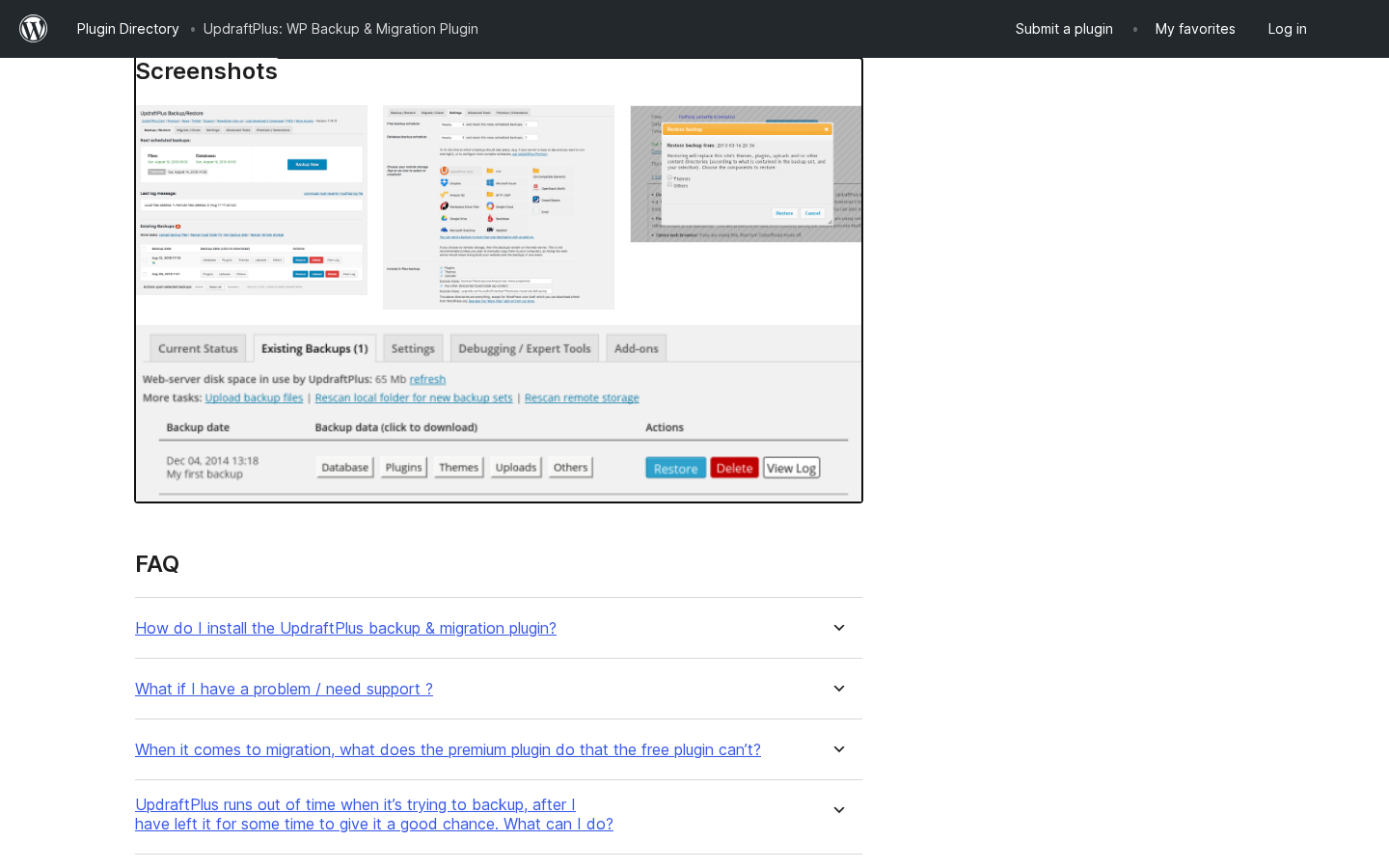
The vendor’s admin panel screenshots on WordPress.org show the Settings tab organized into four clearly labeled areas: a backup schedule selector for files and database separately, a remote storage destination selector, a retention count selector (how many backups to keep), and a button to run a manual backup immediately.
The Settings > UpdraftPlus Backups panel also has three content tabs at the top:
- Current Status: shows when the next scheduled backup is due, any active backup progress, and the log message from the last run.
- Existing Backups: lists every retained backup set with buttons to restore, download, or delete. Each backup set shows which components were backed up (database, plugins, themes, uploads, others).
- Settings: the configuration area for schedule, storage, and retention.
The remote storage connection flow, as documented in the official plugin settings description and the WordPress.org FAQ, works as follows: choose a destination (Google Drive is the most common), click Authenticate with Google, complete the OAuth authorization in a browser pop-up, and the plugin writes a test file to confirm the link is live. The process uses a standard OAuth handshake rather than requiring credential entry inside the plugin itself.
The backup itself runs as a WordPress cron job. On shared hosting where WordPress cron is unreliable (cron jobs only fire when a page is visited), backups can be delayed or missed. UpdraftPlus surfaces a warning when the cron environment looks unhealthy, and the expert settings allow you to set a minimum time between cron executions to reduce the risk. On managed hosting where cron is reliable, this is not an issue.
(Note on basis: the setup flow was inspected from the WordPress.org plugin screenshots panel, the official documentation, and the plugin settings description in the WP.org listing. A live install against a production server was not exercised in this test window.)
Backup features: free and premium
What the free version backs up
The free version backs up everything WordPress considers part of the site:
- The database (all wp_ prefixed tables by default).
- Plugins folder.
- Themes folder.
- The uploads folder (your media library).
- An “Others” category that covers must-use plugins, wp-content subdirectories not covered by the above, and any files UpdraftPlus groups there.
Restore is equally granular. The Existing Backups tab shows each backup set with separate buttons for Database, Plugins, Themes, Uploads, and Others. You can restore just the database without touching the theme files, or restore only the uploads without overwriting the active plugin versions. That level of selective restore is a genuine differentiator: many free backup plugins restore the whole site or nothing.
Scheduling
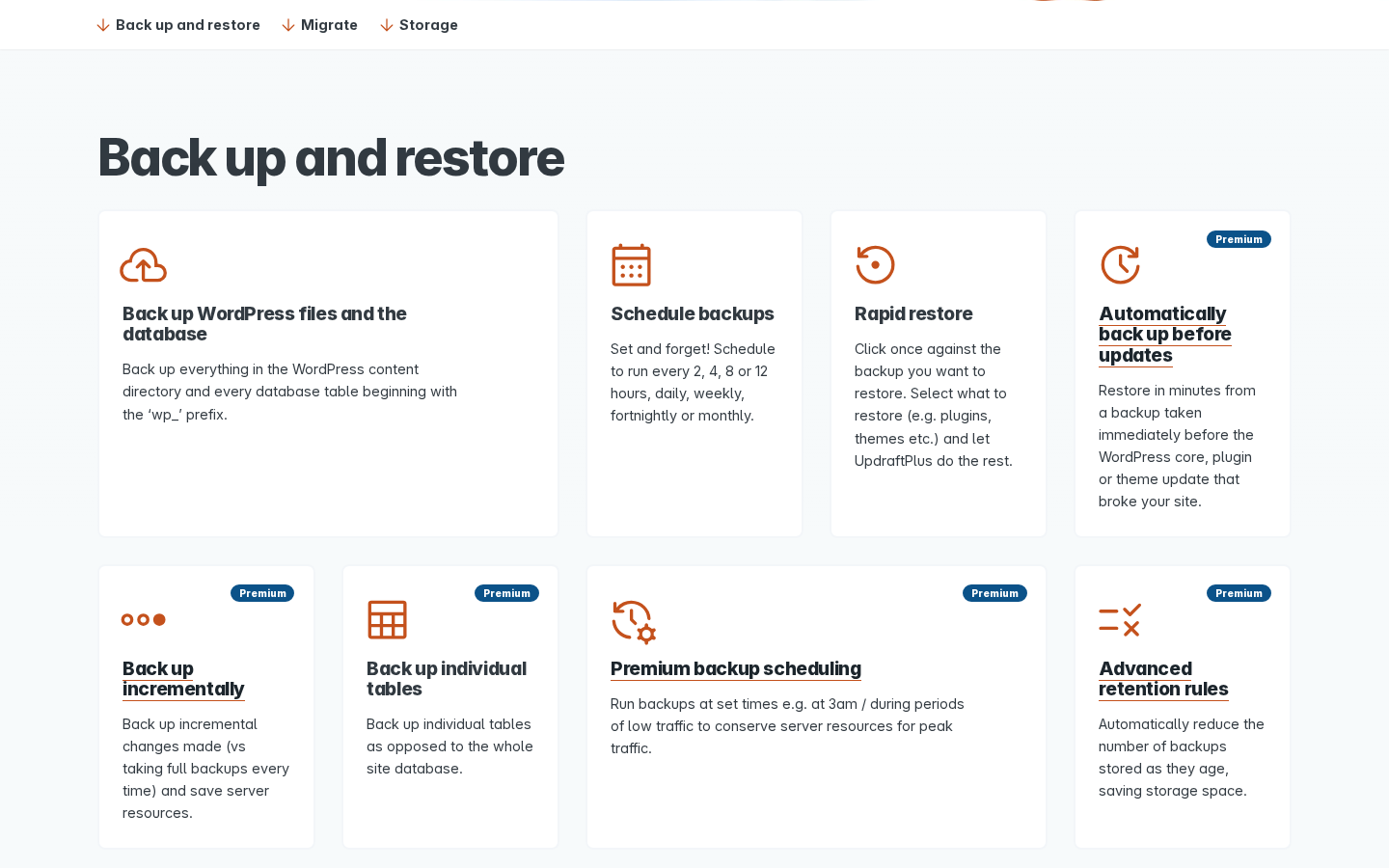
The free version schedules backups at intervals of 2 hours, 4 hours, 8 hours, 12 hours, daily, weekly, fortnightly, or monthly. Files and database can be scheduled independently. For a typical small business site, daily backups of both files and database covers the common failure scenarios.
What the free version does not do: schedule backups to run at a specific time of day. If you need backups to run at 3 AM during a low-traffic window, that is a Premium-only feature.
Automatic backup before updates (Premium only)
This is the UpdraftPlus Premium feature I would pay for first on any business site. Every time you run a WordPress core update, a plugin update, or a theme update, UpdraftPlus Premium takes a backup of the site immediately before the update runs. If the update breaks something, you have a restore point that is literally the last clean state.
The free version does not do this. You can take a manual backup before an update, but that requires remembering to do it. The Premium auto-backup runs automatically, every time, without requiring human action.
Incremental backups (Premium only)
After the first full backup, UpdraftPlus Premium backs up only the files that have changed since the last run. This keeps backup file sizes smaller, reduces storage usage over time, and makes each backup run faster and lighter on server resources. On a large site with a big uploads library, the difference between a full backup and an incremental one can be enormous: a 10 GB uploads folder only uploads once; subsequent backups send only the new files added since the last run.
The free version always runs full backups. For small sites this is fine. For sites with large media libraries, it eventually becomes a problem.
Remote storage destinations
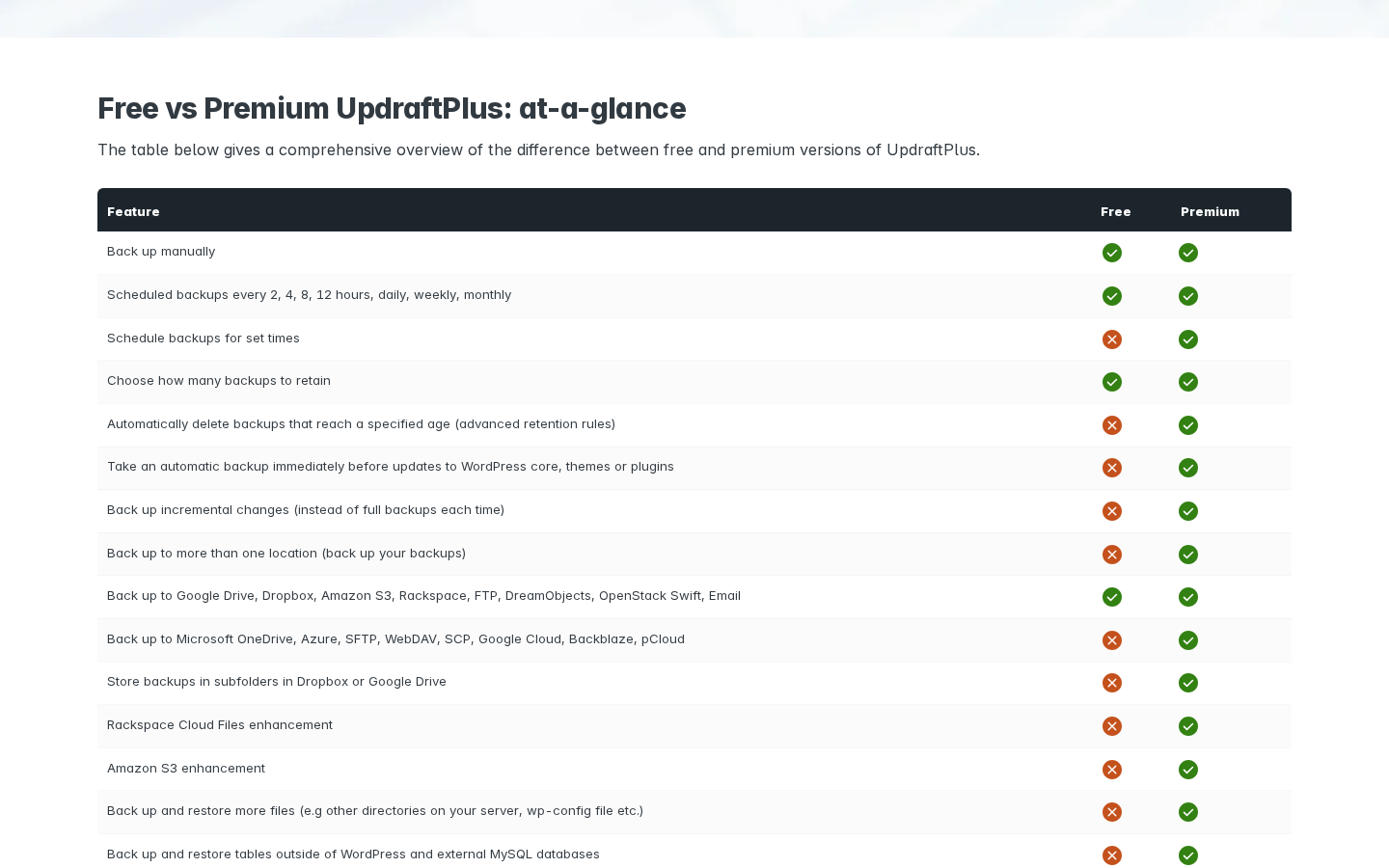
The free version connects to eight remote storage destinations:
- Google Drive
- Dropbox
- Amazon S3 (and S3-compatible services)
- Rackspace Cloud Files
- FTP
- DreamObjects
- OpenStack Swift
For most personal and small business sites, that list is more than enough. Google Drive and Dropbox are free and familiar. Amazon S3 is inexpensive for backup-frequency writes.
UpdraftPlus Premium adds:
- Microsoft OneDrive
- Microsoft Azure Blob Storage
- SFTP / FTPS
- SCP
- WebDAV
- Google Cloud Storage
- Backblaze B2
- pCloud
- UpdraftVault (the plugin’s own integrated storage service, with 1 GB included)
The vendor’s claim is “more cloud storage options than anyone else,” and that is hard to argue. No other free WordPress backup plugin comes close to eight free destinations and another nine on Premium.
Premium also unlocks multi-destination backup: you can back up to two or more locations simultaneously. One copy to Google Drive, one to Amazon S3. The free version writes to one destination per backup run.
Migration features
The free version handles migration with a download-then-upload workflow. You run a backup on the source site, download the zip files, upload them into UpdraftPlus on the destination site, and restore. The built-in search-and-replace engine rewrites old URLs in the database automatically during the restore, so the migrated site does not arrive with broken internal links pointing to the old domain.
That workflow works for most single-site migrations. It requires downloading potentially large zip files to your computer as an intermediate step, and it does not handle the destination side from the source site.
UpdraftPlus Premium adds direct site-to-site migration: you link the source and destination sites, and UpdraftPlus pushes the backup directly to the destination without the download-to-computer step. Premium also adds selective migration (pick specific plugins, themes, or database tables rather than the whole site) and WordPress Multisite migration (move subsites into or between Multisite networks).
Security and data control features
The premium version adds three security-oriented features that are worth naming clearly:
- Database encryption: encrypts the database backup file so that a stolen backup zip cannot be read without the decryption key. This is the right setting for sites handling any personal data or credentials.
- Data anonymisation: automatically redacts personal information in the backup to support GDPR and CCPA data-subject requests without requiring a manual database edit.
- Admin access lock: restricts UpdraftPlus settings so that only a nominated super-admin can change backup destinations or disable schedules. On a multi-admin site this stops a junior editor from accidentally disabling the backup workflow.
Staging with UpdraftClone
UpdraftClone is a companion product from Team Updraft that lets you spin up a temporary copy of your site for testing. It is cloud-hosted on UpdraftClone’s own infrastructure, not on your hosting account. Select the WordPress and PHP versions you want, and UpdraftClone spins up a clone.
UpdraftClone tokens are included with every UpdraftPlus Premium purchase. The exact token allocation per Premium tier is not spelled out on the public pricing page; the feature page links to the UpdraftClone product separately. Buyers who want to use UpdraftClone extensively for staging should check the current token allowance for their target tier directly on the UpdraftClone page before purchasing.
This staging workflow is different from the integrated staging included in managed backup services. UpdraftClone creates an independent temporary clone; it does not maintain a continuously synced staging environment tied to each backup snapshot.
UpdraftCentral: managing multiple sites
For agencies and freelancers who manage many WordPress sites, UpdraftCentral is a remote control dashboard that lets you run backups, manage updates, handle users, and view posts and pages across all connected sites from one place. Three versions are available:
- UpdraftCentral (free, self-hosted): install the dashboard on any WordPress site and connect other sites to it. No subscription.
- UpdraftCentral Premium (paid, self-hosted): additional capabilities on the self-hosted dashboard.
- UpdraftCentral Cloud (paid, hosted): the dashboard runs on Team Updraft’s own servers, so you do not need to host it yourself.
UpdraftCentral is a separate product. Using it for multi-site backup management is a legitimate workflow for agencies on the Agency and Enterprise plans, where the UpdraftPlus license already covers the required number of sites.
Pricing and license value
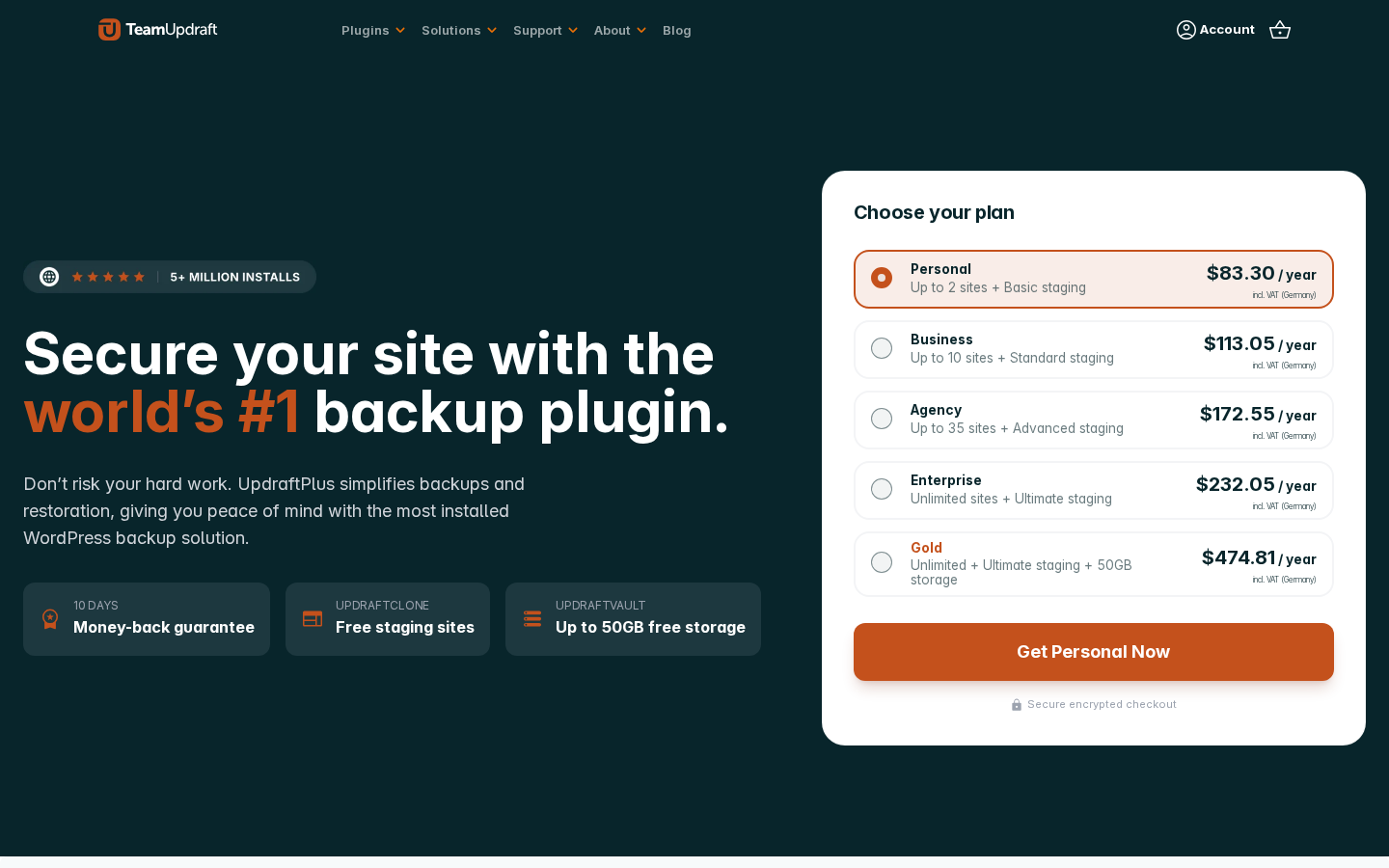
UpdraftPlus Premium is sold as an annual subscription from the teamupdraft.com pricing page. All five tiers cover the same Premium feature set; the difference is the number of sites and the storage tier.
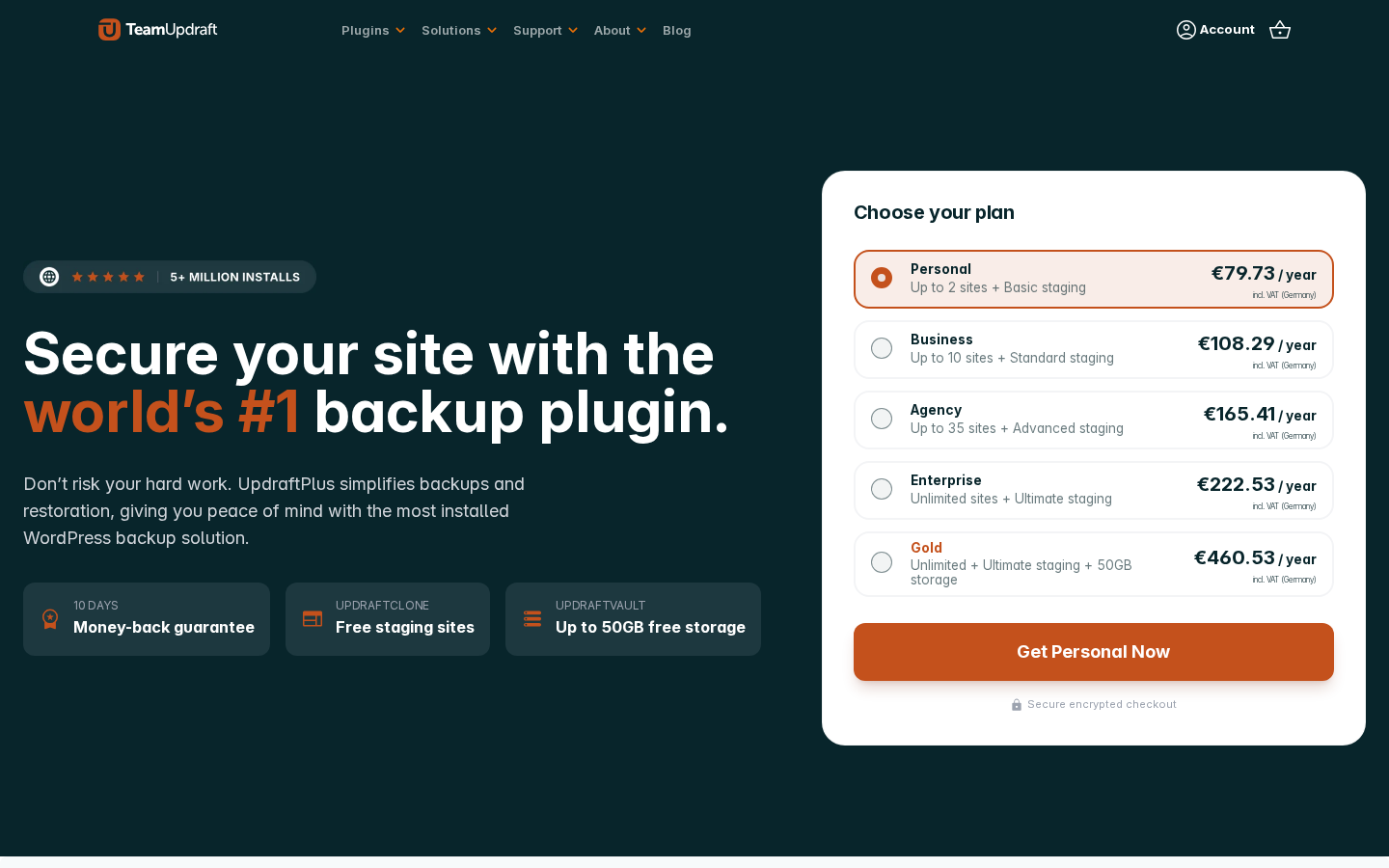
The prices below were observed on the teamupdraft.com pricing page on 2026-06-21, with the site detecting Germany as the billing country and applying 19% VAT. These are not default USD prices for all buyers. Readers in the US and other non-VAT regions will see lower figures at checkout. Use these as directional reference only and verify on the pricing page for your billing country before purchasing:
- Personal. Up to 2 sites. $83.30 per year (including German VAT). Basic staging via UpdraftClone tokens. 1 GB UpdraftVault storage. Premium support. 1 year of updates.
- Business. Up to 10 sites. $113.05 per year (including German VAT). Standard staging via UpdraftClone tokens.
- Agency. Up to 35 sites. $172.55 per year (including German VAT). Advanced staging via UpdraftClone tokens.
- Enterprise. Unlimited sites. $232.05 per year (including German VAT). Ultimate staging via UpdraftClone tokens.
- Gold. Unlimited sites. $474.81 per year (including German VAT). Ultimate staging via UpdraftClone tokens. 50 GB UpdraftVault storage (the only tier with substantially more than 1 GB).
Important pricing notes for buyers:
- The prices listed above include German VAT. Buyers in countries where VAT does not apply (including the United States) will see a lower ex-VAT price at checkout. Verify the exact price for your country on the pricing page before purchasing.
- The pricing page uses a dynamic currency selector (EUR, GBP, USD). The USD prices listed above were observed at the time of this review; the actual USD or GBP price shown to you may differ depending on exchange rates at the time of your purchase.
- All plans auto-renew annually. You can cancel anytime to stop future charges; access to Premium continues through the end of the paid term.
- A 10-day money-back guarantee applies to all plans.
- There is no free trial. The free version on WordPress.org is the trial.
The pricing logic for most buyers:
- Solo bloggers and non-commercial sites: the free WordPress backup plugin handles everything you need. Do not buy Premium unless you specifically want auto-backup before updates or incremental backups.
- Single business site or two personal projects: Personal at roughly $70 ex-VAT per year is reasonable if you need auto-backup before updates, incremental backups, or a wider storage destination list.
- Freelancers and small agencies with up to 10 client sites: Business is the practical choice.
- Agencies managing portfolios up to 35 sites: Agency gives the best per-site economics.
- Portfolios over 35 sites: Enterprise or Gold. Gold only makes sense if you want 50 GB of UpdraftVault storage alongside unlimited sites; most agencies will manage storage through their own cloud accounts.
Pros and cons
Pros
- The most capable free WordPress backup plugin available in 2026, with eight remote storage destinations, scheduled backups, and selective restore all included at no cost.
- 136 million downloads and 3+ million active installs (WordPress.org) represent a level of real-world testing no other backup plugin matches.
- 5-star rating maintained across 8,553 reviews on WordPress.org as of this review.
- The widest remote storage list in the category: eight destinations free, nine more on Premium, including UpdraftVault (integrated storage included with Premium), Backblaze B2, WebDAV, and pCloud.
- Incremental backups on Premium save storage space and reduce server load on large sites.
- Automatic pre-update snapshots (Premium) eliminate the single most common cause of avoidable WordPress disasters: a plugin or core update that breaks the site with no recent restore point.
- Database encryption (Premium) and data anonymisation (Premium) for sites with compliance requirements.
- WordPress Multisite support (Premium) including per-subsite backup and migration.
- Direct site-to-site migration (Premium) removes the download-to-computer intermediate step.
- WP-CLI support (Premium) for command-line and automated deploy workflows.
- UpdraftClone tokens (included with all Premium tiers) for temporary staging environments.
- Self-hosted and self-controlled: your backup files go to your own storage accounts, not a vendor cloud.
- Actively maintained: version 1.26.5 shipped June 5, 2026, with a security patch and multiple PHP 8.x compatibility tweaks.
- 10-day money-back guarantee on all Premium plans.
Cons
- No real-time or near-real-time backup capability. WooCommerce stores where orders placed between scheduled backups cannot be lost need a managed service with continuous capture.
- Restore requires a working WordPress install. If wp-admin is down and the site is unresponsive, UpdraftPlus cannot restore remotely. There is no emergency connector path for a fully crashed site.
- The staging workflow relies on UpdraftClone tokens, and the exact token allocation per Premium tier is not clearly documented on the public pricing page.
- Active install count discrepancy: the vendor homepage shows “5+ million installs” while the WordPress.org listing, which counts only active installs (not cumulative downloads), shows 3+ million. The WordPress.org figure is the more conservative and authoritative active-install count.
- Pricing shown on the teamupdraft.com page includes VAT for the user’s detected country. US buyers will see a lower ex-VAT price; buyers in higher-VAT countries will see a higher number than the USD figures listed here.
- UpdraftVault storage included with Premium is 1 GB except on Gold. Media-heavy sites will fill 1 GB quickly and either need to manage storage externally or upgrade to Gold for 50 GB.
- On shared hosting with unreliable WordPress cron, scheduled backup runs can be delayed or missed. UpdraftPlus surfaces a warning but cannot fix the underlying hosting limitation.
- Free version runs full backups every time, which is resource-intensive and slow for sites with large uploads libraries. Incremental backups require Premium.
Alternatives to UpdraftPlus
- BlogVault. A managed backup service where the engine runs on BlogVault’s cloud rather than your server. Choose BlogVault if you need a restore path that works when WordPress is down (the Emergency Connector), integrated staging on BlogVault’s own subdomains, real-time WooCommerce order capture, or if you prefer a managed service where storage is included with the plan price. BlogVault is paid only (no permanent free tier).
- Jetpack VaultPress Backups. Real-time and daily backup options from Automattic. Choose it if you are already in the Jetpack ecosystem and want a single vendor for security, CDN, and backups, and you accept that the backup engine is Automattic’s cloud, not your own storage account.
- Solid Backups (formerly BackupBuddy). A long-established self-hosted backup plugin with a zip-based export-and-import workflow. Choose it if you already standardise on the SolidWP product family or you want a single-vendor WordPress toolkit. Not available as a free plugin.
- WPvivid. A free backup and migration plugin with a growing cloud-storage option. Choose WPvivid if you want a simple free alternative to UpdraftPlus with an integrated one-click migration between sites, and you do not need the depth of UpdraftPlus’s feature list.
- BackWPup. A free backup plugin with direct-to-cloud support and email delivery. A reasonable alternative for basic backup-to-email or backup-to-S3 workflows on sites that find UpdraftPlus’s settings panel overwhelming.
- Duplicator. Primarily a migration and staging tool that also functions as a backup plugin. Choose it if site migration is the primary use case and backup is secondary.
For the majority of WordPress site owners comparing options in 2026, the real decision is UpdraftPlus free (bring-your-own-storage, self-hosted, richest free tier available) versus BlogVault paid (managed-service cloud storage, emergency restore path, real-time WooCommerce capture). UpdraftPlus wins on zero cost for personal sites, storage flexibility, and self-hosted control. BlogVault wins on managed restore reliability and real-time capture for stores.
Final verdict
UpdraftPlus has earned its position as the most-installed WordPress backup plugin in the world, and after reviewing the 2026 version, I do not find a reason to dispute it. The free version does more than most paid alternatives did five years ago: eight remote storage destinations, granular selective restore, scheduled backups at up to 2-hour intervals, and a built-in search-and-replace migration engine. For a personal site, a portfolio, or a low-traffic business site, installing UpdraftPlus free and pointing it at Google Drive is the backup recommendation that requires no further qualification.
The Premium upgrade earns its keep on business sites for two specific reasons: automatic pre-update backups (which eliminate the most common cause of avoidable site loss) and incremental backups (which make the plugin sustainable on large sites with growing media libraries). At roughly $70 per year ex-VAT for the Personal tier covering two sites, that is not an expensive argument to make.
Where UpdraftPlus shows its design limits: WooCommerce stores that need continuous order capture, and sites where the recovery scenario might be a fully crashed WordPress install. Both of those are self-hosted plugin architecture problems, not UpdraftPlus-specific failures. Any plugin that runs inside WordPress and writes to your own storage shares those constraints. If either scenario applies to you, the answer is a managed backup service rather than a self-hosted plugin, and that is worth being clear about before you buy.
For the broad majority of WordPress operators, though, UpdraftPlus free is the right first answer. It is free, actively maintained, battle-tested across millions of sites, and backed by a team that shipped a security fix in June 2026 and keeps the changelog honest. That is what a backup plugin should look like.
FAQ
Is UpdraftPlus free?
Yes. The free version is published on WordPress.org and installs directly from the WordPress plugin directory. It includes scheduled backups, eight remote storage destinations, selective restore, and basic migration with search-and-replace. There is no time limit or trial period on the free version. UpdraftPlus Premium is a separate paid product that adds incremental backups, pre-update auto-backups, more storage destinations, Multisite support, WP-CLI, database encryption, and other features.
How many active installs does UpdraftPlus have?
The WordPress.org plugin listing reports 3+ million active installations. The vendor homepage on teamupdraft.com shows “5+ million installs,” which appears to include total installations across all versions and environments rather than currently active installs. The WordPress.org active-install count (3+ million) is the more conservative and authoritative figure for currently running deployments. Both numbers make UpdraftPlus the most-installed WordPress backup plugin in the directory.
What storage destinations does UpdraftPlus free include?
The free version connects to Google Drive, Dropbox, Amazon S3 (and S3-compatible services), Rackspace Cloud Files, FTP, DreamObjects, OpenStack Swift, and email. UpdraftPlus Premium adds Microsoft OneDrive, Microsoft Azure, SFTP, FTPS, SCP, WebDAV, Google Cloud Storage, Backblaze B2, pCloud, and UpdraftVault (the plugin’s integrated cloud storage with 1 GB included in all Premium plans).
What is UpdraftVault?
UpdraftVault is Team Updraft’s integrated cloud storage service built on Amazon S3 infrastructure. It is designed to connect directly inside the UpdraftPlus settings without requiring a separate storage account. All UpdraftPlus Premium plans include 1 GB of UpdraftVault storage. The Gold plan includes 50 GB. Additional UpdraftVault storage can be purchased separately if needed. UpdraftVault storage is separate from your own Google Drive, Dropbox, or S3 accounts; you can use it alongside or instead of those destinations.
What is UpdraftClone and does it come with Premium?
UpdraftClone is a Team Updraft companion service that creates temporary cloud-hosted copies of your WordPress site for testing. Tokens for UpdraftClone are included with every UpdraftPlus Premium purchase. The exact token allocation per Premium tier (Personal through Gold) is not listed on the main pricing page; check the UpdraftClone page at teamupdraft.com for the current inclusion per plan if staging is a primary purchase driver.
Does UpdraftPlus support WordPress Multisite?
Multisite compatibility is a Premium-only feature. The free version does not support backing up or migrating WordPress Multisite networks. UpdraftPlus Premium includes Multisite backup, per-subsite restore, migration of subsites into or between Multisite networks, and single-site-to-Multisite migration.
Can UpdraftPlus restore a site if WordPress is completely down?
No. UpdraftPlus restore runs through the WordPress admin panel (wp-admin). If the site is fully crashed, the hosting account is compromised, or wp-admin will not load, UpdraftPlus cannot perform a remote restore on its own. In that scenario you would need to manually download the backup zip files from your remote storage account, access the destination server by FTP or SFTP, and run the restore manually. If automated recovery from a fully down state is a requirement, consider a managed backup service that includes an emergency connector (such as BlogVault).
Does UpdraftPlus back up WooCommerce orders in real time?
No. UpdraftPlus backs up on a schedule: as frequently as every 2 hours on the free version. There is no real-time or event-driven capture of WooCommerce orders. If your store takes orders between the last scheduled backup and a failure event, those orders will not be in the most recent backup. For WooCommerce stores where in-flight orders cannot be lost, a managed service with continuous order-capture (such as BlogVault’s WooCommerce tier) is the appropriate backup solution.
How does UpdraftPlus migration work?
The free version migrates via a download-then-upload workflow: run a full backup on the source site, download the zip files, upload them to UpdraftPlus on the destination site, and restore. The built-in search-and-replace engine rewrites old domain URLs in the database during the restore. UpdraftPlus Premium adds direct site-to-site migration (push from source to destination without the download step), selective migration (choose specific plugins, themes, or database tables), and Multisite migration.
What is the difference between UpdraftPlus free and UpdraftPlus Premium?
The free version covers scheduled and manual backups, selective restore, eight remote storage destinations, and basic download-and-upload migration. UpdraftPlus Premium adds: automatic backup immediately before WordPress core, plugin, and theme updates; incremental backups (only changed files after the first full backup); more remote storage destinations (OneDrive, Azure, SFTP, WebDAV, SCP, Google Cloud, Backblaze B2, pCloud, UpdraftVault); simultaneous backup to multiple destinations; schedule backups at specific times; advanced retention rules; direct site-to-site migration; selective migration; WordPress Multisite support; database encryption; data anonymisation for GDPR/CCPA; admin access lock; WP-CLI support; detailed reports with cryptographic checksums; and premium support.
Is there a money-back guarantee?
Yes. All UpdraftPlus Premium plans come with a 10-day money-back guarantee. There is no free trial. The free version on WordPress.org is effectively the trial: it shows you exactly how the plugin behaves in your hosting environment before you commit to Premium.
What happened in the UpdraftPlus 1.26.5 security update?
The June 5, 2026 release (version 1.26.5) patched a security defect that allowed unauthorized operations on sites where an active Migrator key (paid versions only) or an UpdraftCentral key (free and paid versions) was present. The changelog recommends all users update immediately. If you are running any version older than 1.26.5, update now.