


Most WordPress backup plugins treat migration and staging as add-ons you pay extra for. WPvivid treats them as core features, and hands you migration for free.
That positioning alone makes this plugin worth a closer look. With 900,000+ active installations and a 4.9-star rating across more than 1,500 reviews on WordPress.org, WPvivid is not a fringe tool. It is one of the most-installed backup plugins in the directory, and it earned that position partly by being unusually generous with its free tier.
This WPvivid review covers what the free version actually delivers, what the Pro upgrade adds, how pricing stacks up against the competition, and where the plugin has genuine limitations you should know about before relying on it for site recovery.
Basis for this review: I audited the official wpvivid.com website, the WordPress.org plugin listing (version 0.9.132, last updated August 2026), the Free vs Pro comparison page, the Pro pricing page, and the plugin changelog going back more than 30 versions. Setup flows and UI descriptions are drawn from the WordPress.org plugin listing, vendor screenshots, and official documentation. Pricing is quoted in USD. Verify all prices on wpvivid.com before purchasing as promotions may apply.
At a glance
- Plugin: WPvivid Backup and Migration
- Free version: Yes, with migration, staging, and seven remote cloud storage destinations
- Pro pricing: from $49/year or $99 one-time (2 sites)
- Reviewed version: 0.9.132
- WordPress.org rating: 4.9 out of 5 (1,527 reviews)
- Active installs: 900,000+
- Bottom line: a capable free backup and migration plugin with genuinely competitive Pro pricing and a standout staging feature, though a high frequency of recent security patches deserves honest mention, and restoration from a fully crashed site remains manual.
Quick verdict
WPvivid earns its place as a go-to free WordPress backup and migration plugin for freelancers and developers who move sites regularly. The migration feature is free, works out of the box, and includes crash protection that prevents the live site from being corrupted if a restore fails mid-way. Built-in subdirectory staging in the free version adds more value than most competing free backup plugins offer.
The Pro upgrade stands out for two reasons: lifetime pricing is available starting at $99 for two sites, and the per-site cost on multi-site plans is among the lowest in the backup plugin category. At $99/year for 50 sites, or $199 as a one-time lifetime payment for the same coverage, the value calculation is straightforward for anyone running a portfolio of client sites.
Honest drawbacks: the changelog shows a notable frequency of security vulnerability fixes in recent releases, restore does not work when WordPress is inaccessible, and the entry-level Blogger plan imposes a 3-day limit on license transfers that is easy to overlook in the pricing table.
Quick verdict card
- Best for: freelancers, developers, and small agencies who migrate WordPress sites regularly and want a free migration tool alongside their backup workflow.
- Best free backup plugin for: migration-first workflows, subdirectory staging, and cloud backup to Google Drive, OneDrive, or Amazon S3 at no cost.
- Best Pro plan for most developers: Freelancer at $69/year or $139 lifetime (up to 10 sites) with unlimited license transfers.
- Standout features: free one-click migration, built-in crash protection during migration, subdirectory staging in the free version, white label on all Pro plans, and lifetime pricing from $99.
- Watch out for: multiple security vulnerabilities patched across recent releases, no restore path when wp-admin is down, and the 3-day license transfer window on the entry-level Blogger plan.
What WPvivid is
WPvivid is a WordPress backup, migration, and staging plugin developed by ATOZSOFT INC, a Canada-registered company. The free plugin is listed on WordPress.org as “WPvivid – Backup, Migration and Staging” and has been actively maintained since at least 2019, with regular updates through 2026 including WordPress 7.0 compatibility (added in version 0.9.128).
The plugin handles three workflows from one admin panel:
- Backup: manual and scheduled backups of your WordPress database and files, with remote storage to multiple cloud destinations.
- Migration: export a site and restore it to a new domain or host, with automatic URL rewriting. The basic workflow is free.
- Staging: create a staging copy of your site on a subdirectory to test changes safely. Also free.
That combination is genuinely unusual. Most free backup plugins omit staging entirely. Many treat migration as a paid feature or a separate product. WPvivid ships all three in the free version.
The company’s product lineup also includes a separate Staging and Dev Environment Pro plugin, a Database Merging plugin, a Database Snapshots plugin, a MainWP Extension for multi-site management, and image optimization tools. This review focuses on the Backup and Migration plugin (free and Pro).
Who WPvivid is best for
Strong fit:
- Freelancers and developers who migrate sites regularly. The free one-click upload-based migration is as practical as most paid migration tools. If you regularly move sites from local dev to live, from one host to another, or between client domains, WPvivid removes a cost you may have been paying.
- Small agencies managing 10 to 50 client sites. The Pro Freelancer plan (up to 10 sites, $69/year or $139 one-time) and the Small Business plan (up to 50 sites, $99/year or $199 one-time) offer per-site economics that beat most alternatives in the category.
- Site owners who want staging without paying for a higher-tier hosting plan. The free subdirectory staging lets you test plugin updates, theme changes, or design edits before pushing them live, all within the same hosting account.
- Agencies who want to offer backup services under their own brand. White label is included on all Pro plans, letting you replace WPvivid branding in the plugin UI with your own name. No separate add-on fee.
- WordPress Multisite operators. Full multisite backup, restore, migration, and staging is included in Pro.
Weak fit:
- WooCommerce stores with real-time order capture requirements. WPvivid backs up on a schedule, not continuously. Orders placed between the last backup and a failure event will not appear in the most recent restore point.
- Sites that need to recover from a fully crashed WordPress install. Restore runs through wp-admin. If the site is down and the admin is unreachable, WPvivid cannot run a restore remotely. Manual server access is required.
- Teams who need a managed, enterprise-grade backup service. WPvivid is a self-hosted plugin. The backup files live in your own cloud storage accounts, not in a vendor-monitored proprietary cloud. That is the right trade-off for most independent developers; it is not the right fit for enterprise SLA environments.
- Buyers who plan to rotate licenses between many client projects. The Blogger entry plan ($49/year, 2 sites) limits license transfers to 3 days. The Freelancer plan is the practical minimum for anyone who reuses licenses regularly.
Installing WPvivid and first impressions
WPvivid installs from Plugins > Add New in the WordPress admin. Search for “WPvivid”, install the plugin, and activate it. A WPvivid menu item appears in the admin sidebar.
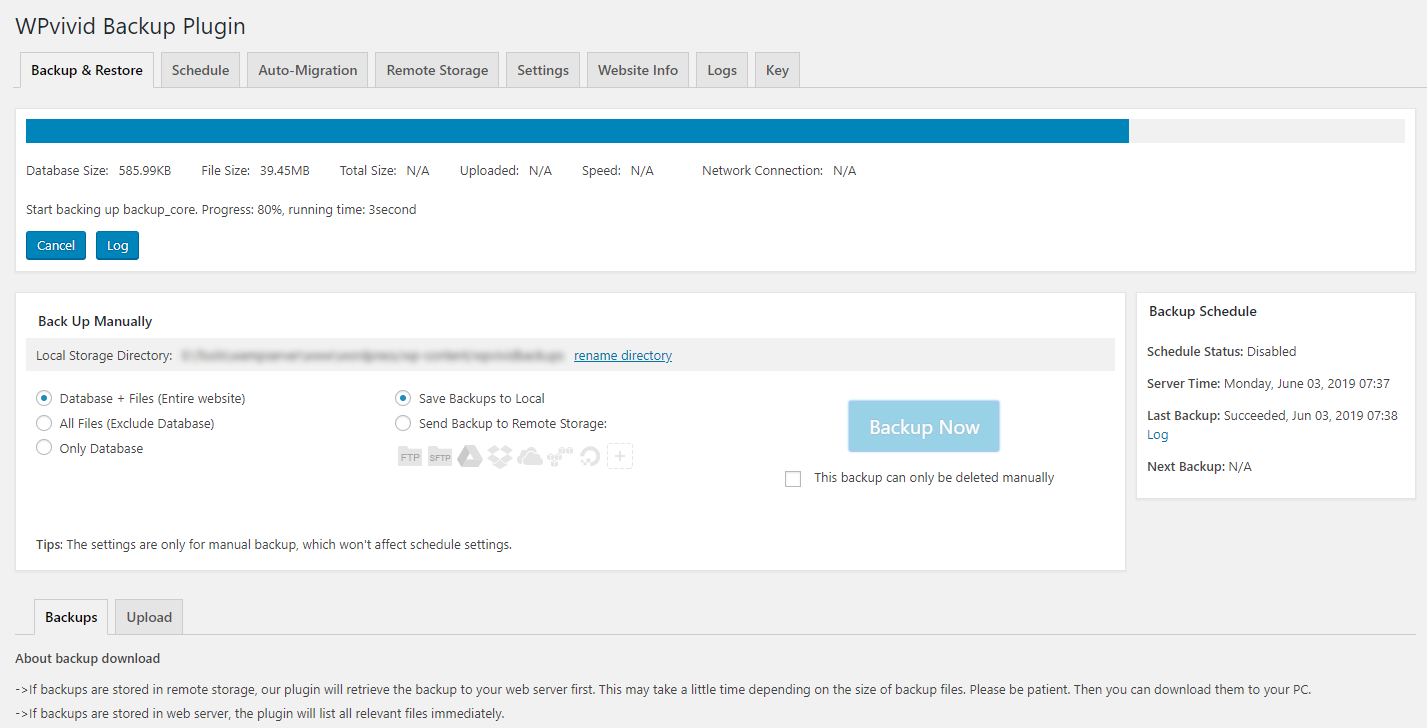
The admin panel is organized into distinct tabs: Backup, Migration, Staging, and Settings. This is notably cleaner than some backup plugins that cram everything into a single scrolling page. Each section has its own workflow, reducing confusion for first-time users.
The Settings tab covers remote cloud storage configuration, backup schedules, email notifications, and retention rules. Connecting a cloud storage destination (Google Drive is the most common choice) uses a standard OAuth authorization flow. Since version 0.9.102, the plugin encrypts cloud storage authentication tokens before storing them in the database, which is an important security improvement over earlier versions.
One scheduling detail worth knowing: since version 0.9.127, WPvivid randomizes the backup start time within a 30-minute window at midnight UTC rather than running all scheduled backups at the same fixed time. This was introduced to prevent many WPvivid users from simultaneously flooding cloud storage APIs. It is the correct design decision, but it means you cannot set an exact backup start time on the free plan.
WPvivid includes a built-in adaptive mode that automatically adjusts backup parameters for shared hosting environments. In version 0.9.113, the team expanded this into four explicit backup performance modes, letting you choose the mode that matches your server’s resource constraints. For shared hosting users who previously struggled with backup timeouts, this is a practical improvement.
The plugin is actively maintained. Version 0.9.128 added full WordPress 7.0 compatibility, and versions from 0.9.113 through 0.9.120 confirmed compatibility with PHP 8.4 and WordPress 6.x releases. The changelog is detailed and honest about what each release fixes or adds.
(Note on basis: the setup flow, tab layout, and UI description above are drawn from the WordPress.org plugin listing, the vendor’s official screenshots, and the documentation pages available on wpvivid.com. A full live install test against a production server was not part of this review window.)
Backup features: free and Pro
What the free version backs up
The free WPvivid version backs up:
- The entire WordPress database
- All site files (WordPress core, themes, plugins, uploads)
- Or database only, or files only (your choice per backup job)
Restore is one-click from the backup list in the admin panel. You can restore from a backup stored on the local web server, from a backup file you upload manually, or from a backup already sitting in your connected cloud storage account.
Cloud storage destinations (free)
The free version supports seven remote cloud storage destinations:
- Google Drive
- Amazon S3
- Microsoft OneDrive
- DigitalOcean Spaces
- Dropbox
- FTP
- SFTP
Seven destinations at no cost is a strong free offering. The list covers the cloud accounts most site owners already have. UpdraftPlus free includes eight destinations, but WPvivid free includes OneDrive and DigitalOcean Spaces that UpdraftPlus free does not, while UpdraftPlus free adds Rackspace Cloud Files and email backup that WPvivid free does not. For practical purposes, both free lists cover the same common use cases.
Scheduled backups
Free version schedule intervals: every 12 hours, daily, weekly, fortnightly, and monthly. Files and database share a single schedule on the free plan.
This covers the common use cases for personal sites and small business sites. A daily backup protects you from most common failure scenarios. The 12-hour option is useful for sites with frequent content updates.
What the free version does not do: run multiple independent schedules, separate file and database schedules, or run incremental-only scheduled backups. Those are Pro features.
Incremental backups (Pro only)
After an initial full backup, incremental backups capture only files that changed since the last run. On large sites with growing media libraries, this keeps backup file sizes manageable, lowers cloud storage costs, and makes each backup faster on the server.
This is a Pro-only feature. For sites with small uploads libraries, full backups are fine. For a site with 20 GB of media, incremental backups are the feature that makes regular scheduled backup sustainable at any plan tier.
Backup retention rules
The free version includes basic retention: set how many backups to keep per storage location, and older sets are deleted automatically when the limit is reached. Pro adds granular retention with separate limits for manual, scheduled, incremental, and rollback backup types, per storage location and per cloud destination. For agencies managing storage costs across many sites, the Pro retention rules are a meaningful operational control.
Backup performance modes
Version 0.9.113 added four backup performance modes. The plugin’s original design included a built-in adaptive mode that automatically handles shared hosting constraints without manual tuning. The explicit modes give you direct control when you know your server environment: use a conservative mode on resource-limited shared hosting, or push for higher throughput on a VPS with more headroom.
Auto-backup before updates and rollback (Pro only)
This is the Pro feature most worth paying for on any live business site. When enabled, WPvivid automatically backs up your WordPress core files, plugins, and themes immediately before any update runs. If the update causes a problem, you restore from the pre-update snapshot.
The rollback feature takes this further: rather than restoring the entire site, you can roll back individual plugins or themes to their specific pre-update versions. This is more precise than a full site restore and faster when a single plugin caused the problem.
The auto-backup scope is configurable. You can select which specific plugins and themes trigger an auto-backup rather than creating snapshots for every installed plugin on every update cycle. Combined with versioning retention rules for rollback backups, this is a mature and practical system for managing update risk.
Database encryption (Pro only)
Pro encrypts the database backup file at rest. A stolen or accidentally exposed backup cannot be read without the decryption key. For any site that stores user personal data, account credentials, or business-sensitive information in the database, encryption at the backup layer is the right practice.
Migration features
Free one-click migration
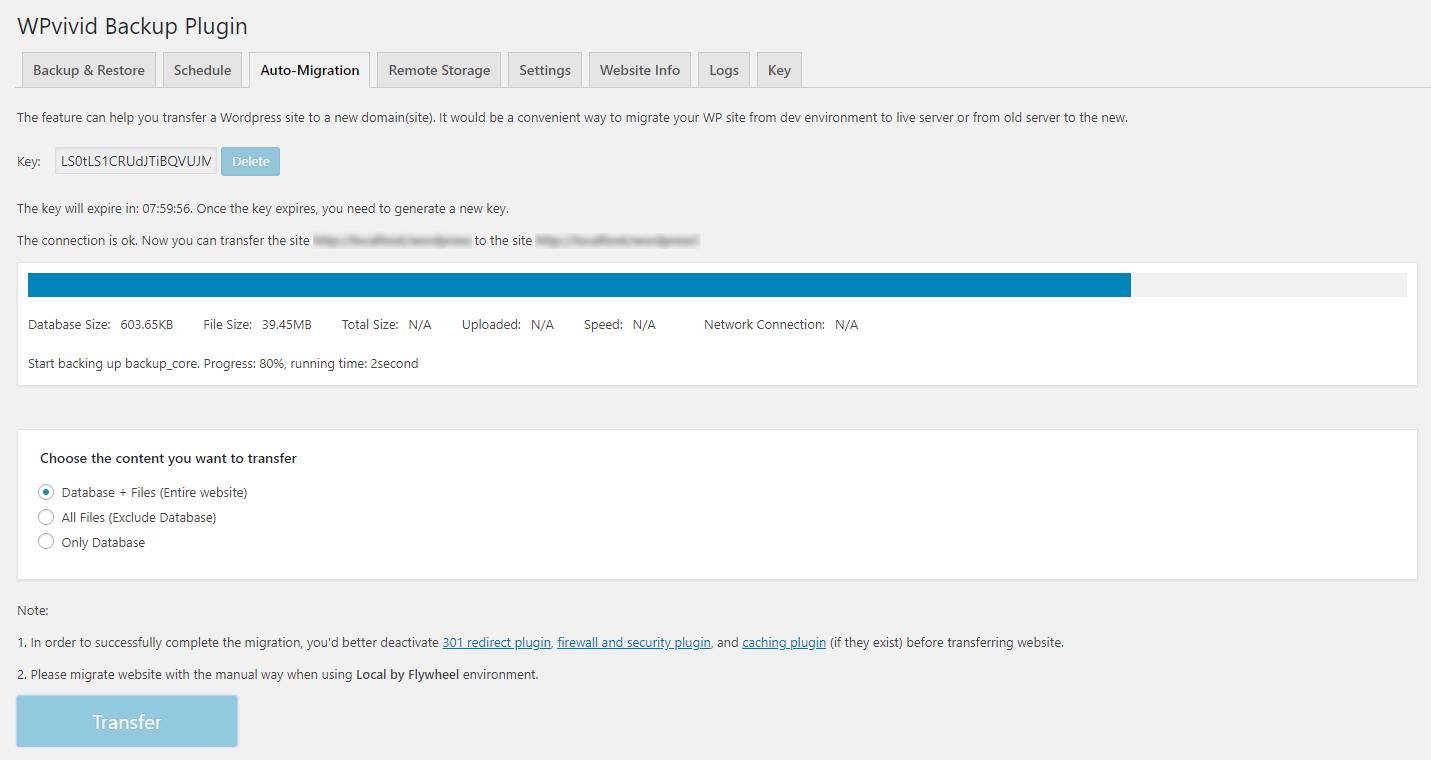
WPvivid’s site migration is completely free, and this is the plugin’s most distinctive selling point in its category.
The free migration workflow:
- Run a full backup on the source site.
- Download the backup files, or send them to a shared cloud storage account both sites can access.
- On the destination site, upload the backup or pull it from cloud storage.
- Run restore. WPvivid automatically rewrites all old domain URLs in the database during the restore process.
This covers the vast majority of single-site migrations: local dev to live, one host to another, or one domain to another. URL rewriting is handled internally, so you do not need a separate tool like WP-CLI search-replace after the fact.
Crash protection during migration
This is a feature that genuinely sets WPvivid apart from most free backup plugins.
Before any restore begins, WPvivid takes a quick snapshot of the current live site state. If the restore fails partway through (which can happen due to timeout, memory limits, or a corrupt backup file), the plugin automatically rolls back to the snapshot. The live site returns to its pre-restore state. Nothing is left in a partially overwritten condition.
Most free backup plugins offer no protection here. A failed restore often leaves the site in a broken state requiring manual cleanup. WPvivid’s crash protection significantly reduces that risk without any configuration required.
Site-to-site auto-migration (Pro only)
The free workflow requires downloading backup files or routing them through a shared cloud storage account as an intermediate step. Pro adds direct site-to-site migration: link the source and destination sites, and WPvivid pushes the backup directly without a download step. This is faster, uses less local disk space, and reduces the risk of interrupted transfers on large sites.
Pro also adds migration through cloud storage as a direct pipeline (source uploads to cloud, destination pulls from cloud without the source having to stay connected), and selective content migration: choose specific plugins, themes, or database tables to migrate rather than the entire site.
Staging features
Subdirectory staging (free)
The free version creates a staging copy of your WordPress site on a subdirectory of the production domain. For example, a site at yourdomain.com gets its staging copy at yourdomain.com/staging/. You can test plugin updates, design changes, content edits, or theme customizations there before applying anything to the live site.
Subdirectory staging has a known limitation: some plugins behave differently on a subdirectory than on the root domain. Security plugins and some ecommerce extensions can behave unexpectedly in a subdirectory environment. For plugin and theme update testing, subdirectory staging works well. For comprehensive full-site testing including checkout flows on WooCommerce sites, a subdomain staging environment is more reliable.
Pro staging features
Pro unlocks:
- Multiple staging sites: run more than one staging environment at the same time.
- Push staging to live: apply approved changes from the staging site to the production site in one operation. Without this, you need to manually replicate changes from staging to live.
- Update a staging site: refresh the staging copy with the current state of the live site without rebuilding from scratch.
- Subdomain staging: install the staging site on a proper subdomain (staging.yourdomain.com). This resolves most plugin compatibility issues inherent in subdirectory staging.
Push-to-live is the feature that makes the Pro staging workflow complete. A staging environment without a clean path back to production is less useful than it sounds. With push-to-live, you stage, review, approve, and push. That is a proper staging workflow.
Multisite support (Pro only)
WPvivid Pro handles WordPress Multisite networks:
- Back up and restore the entire Multisite network
- Migrate the entire Multisite network to another Multisite
- Migrate a child site from the network to a standalone WordPress install
- Stage the entire Multisite network on a subdirectory
- Stage individual child sites
Multisite is an area where many backup plugins fall short or charge extra. Having full multisite backup, migration, and staging included on all Pro plans at WPvivid’s pricing is a meaningful differentiator for developers who manage Multisite installations.
Roles, white label, and email notifications (Pro only)
Roles and Capabilities: Administrators can restrict which WPvivid features are accessible to Editors, Authors, Contributors, and Subscribers. This is important on sites where clients have admin or editor access and you do not want them accidentally triggering a restore, disabling the backup schedule, or changing the cloud storage destination.
White label: All Pro plans let you replace WPvivid branding in the plugin UI with your own brand name. The license permits presenting WPvivid functionality as part of your own service offering to clients; it does not permit reselling the plugin itself as a product.
Advanced Email Notifications: Pro supports multiple email recipients and customizable notification subjects per site. On an agency managing dozens of client sites, clearly labeled email reports per site (rather than all reports going to one generic inbox) is a practical quality-of-life feature.
Pricing and license value
WPvivid offers both annual subscriptions and one-time lifetime payments. The lifetime option is rare in this plugin category and represents strong long-term value for stable agency portfolios.
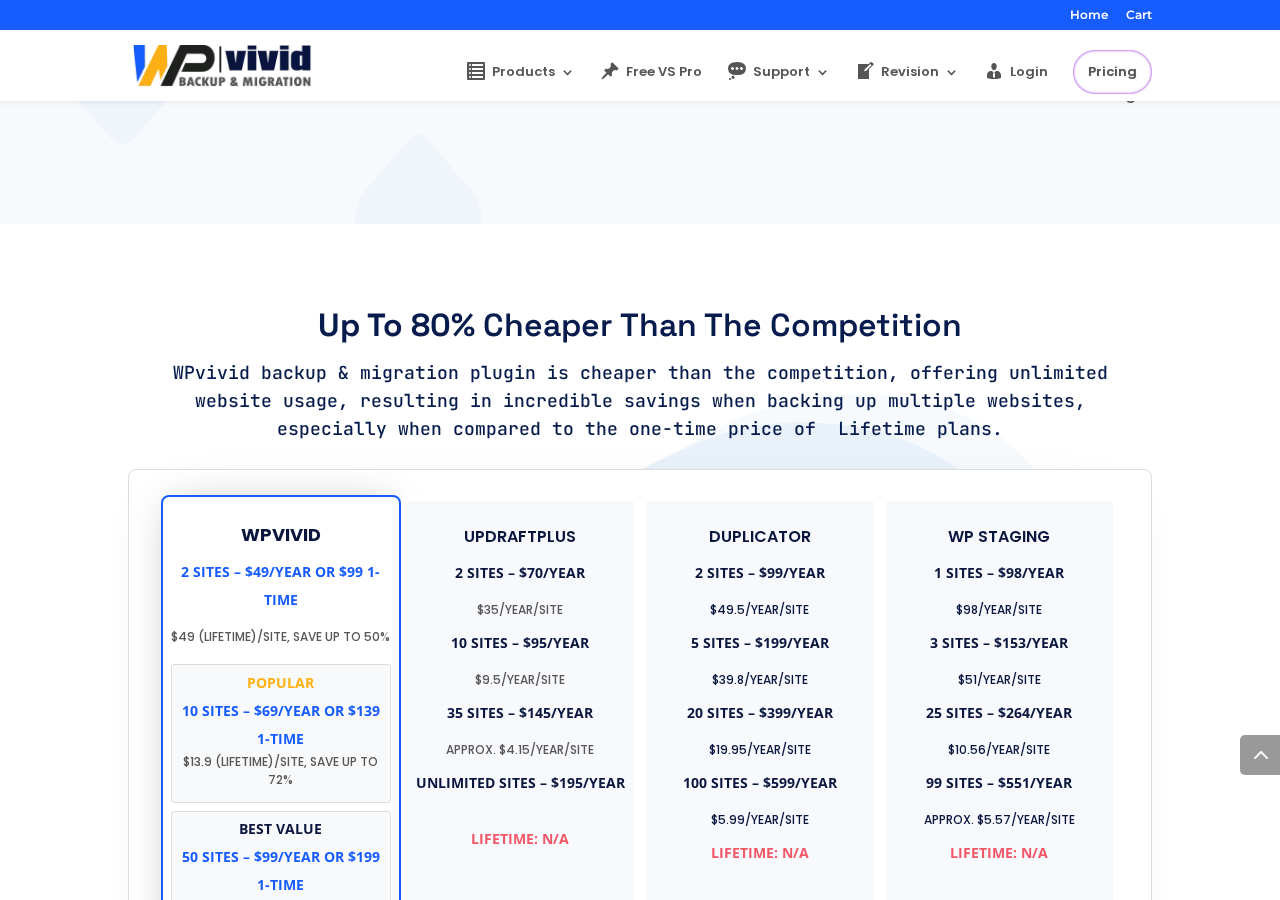
Annual plans:
| Plan | Sites | Price per year | License Transfers |
|---|---|---|---|
| Blogger | 2 | $49 | 3-day window |
| Freelancer | 10 | $69 | Unlimited |
| Small Business | 50 | $99 | Unlimited |
| Agency | Unlimited | $149 | Unlimited |
Lifetime plans (one-time payment):
| Plan | Sites | One-time Price | License Transfers |
|---|---|---|---|
| Blogger | 2 | $99 | 3-day window |
| Freelancer | 10 | $139 | Unlimited |
| Small Business | 50 | $199 | Unlimited |
| Agency | Unlimited | $299 | Unlimited |
All Pro plans include: Backup and Migration Pro, Staging Pro, White Label, Roles and Capabilities, Multisite Support, and 24/7 ticket support. All plans include a 30-day 100% money-back guarantee. There is no free trial for Pro; the free plugin on WordPress.org is the trial.
Key pricing notes:
- The Blogger plan’s 3-day license transfer window is a real operational constraint. If you move licenses between client projects, the Freelancer plan is the practical minimum, despite the higher price.
- The Small Business lifetime plan at $199 for 50 sites works out to roughly $4 per site permanently. For agencies with stable portfolios, this is the strongest value in the category.
- Prices listed here were observed on wpvivid.com at the time of writing. Promotional pricing may reduce these figures. Always verify current prices on the pricing page before purchasing.
Competitive context:
WPvivid publishes a direct comparison on its pricing page. Based on that comparison and independent verification:
- UpdraftPlus: 2 sites at $70/year, 10 sites at $95/year, no lifetime option.
- Duplicator: 2 sites at $99/year, 5 sites at $199/year, no lifetime option.
For an agency managing 50 sites, WPvivid Small Business at $99/year or $199 lifetime is substantially more economical than the nearest competitor tier in both cases.
A note on recent security patches
Reading the changelog carefully before recommending any plugin is part of this review process. WPvivid’s changelog shows security vulnerability patches in versions 0.9.106, 0.9.107, 0.9.108, 0.9.113, 0.9.117, 0.9.121, 0.9.124, 0.9.129, 0.9.131, and 0.9.132. That is ten releases with security fixes across a relatively short period.
Most of these are not publicly described in detail. Version 0.9.131 credited Nir Yehoshua from Cipher Security Labs for reporting and helping to fix two vulnerabilities, which indicates some were found through responsible disclosure. The team is patching issues when found, and the most recent release (0.9.132) includes the latest fix.
The honest read here: the team is responsive to vulnerabilities, which is good. The frequency of patches suggests the codebase has had more exploitable issues than average for this plugin category. Running the latest version at all times and enabling auto-updates is strongly recommended. If you are running WPvivid on a site with sensitive user data, verify that you are on the current version before and after each new release.
Pros and cons
Pros
- Migration is free. Upload-based one-click migration with automatic URL rewriting ships in the free version with no restrictions.
- Built-in subdirectory staging at no cost. Most competing free backup plugins do not include any staging.
- Crash protection during migration: failed restores do not corrupt the live site because the plugin takes a snapshot before any restore begins.
- Seven remote storage destinations in the free version: Google Drive, Amazon S3, OneDrive, DigitalOcean Spaces, Dropbox, FTP, and SFTP.
- Lifetime pricing from $99 for 2 sites, $199 for 50 sites. No other major competitor in this category offers a comparable lifetime option.
- Very competitive per-site cost at the Freelancer and Small Business tiers.
- Auto-backup before updates with selective rollback per plugin or theme (Pro). A mature approach to update safety.
- White label included on all Pro plans, not sold as a separate add-on.
- Roles and Capabilities for restricting WPvivid access by user role (Pro).
- Full WordPress Multisite support: backup, restore, migration, and staging (Pro).
- Incremental backups to keep large-site backup sizes manageable (Pro).
- Database encryption for backup files (Pro).
- Actively maintained: WordPress 7.0.4 support confirmed, PHP 8.4 tested, consistent update cadence.
- 4.9 out of 5 stars across 1,527 reviews on WordPress.org.
- 30-day 100% money-back guarantee.
- Cloud storage tokens encrypted in the database since version 0.9.102.
- Four backup performance modes for different server environments (added in 0.9.113).
Cons
- No real-time or continuous backup. WooCommerce stores that need to capture every order need a managed service instead.
- Restore requires a working WordPress install. No emergency remote restore path when wp-admin is unreachable.
- Frequent security vulnerability patches in recent releases. Auto-updates are not optional; running an outdated version is a real risk.
- Entry-level Blogger plan limits license transfers to a 3-day window. Easy to miss in the pricing table, significant in practice for active developers.
- Subdirectory staging in the free version has plugin compatibility limitations. Subdomain staging (more compatible) requires Pro.
- Push-to-live staging requires Pro. The free staging environment has no built-in path back to the production site.
- Free support is via the WordPress.org support forums. Priority 24/7 ticket support requires a paid plan.
- Free version does not support incremental backups, selective content backup, or multiple backup schedules.
- Advanced scheduling (specific start time, multiple independent schedules) is Pro-only.
- The free backup schedule randomizes start time within a midnight UTC window; you cannot pin it to a specific time on the free plan.
Alternatives
- UpdraftPlus. The most-installed WordPress backup plugin, with over 3 million active installations. Choose UpdraftPlus if you want the broadest community, the longest track record, or a plugin with eight free cloud storage destinations. UpdraftPlus free does not include staging, and its free migration workflow is less streamlined than WPvivid’s. Premium pricing is higher per site and offers no lifetime option.
- BlogVault. A managed backup service with a cloud-hosted engine, an Emergency Connector that restores from a fully crashed site, and real-time WooCommerce order capture. Choose BlogVault if recovering from a fully down site without manual FTP access is a hard requirement. Paid-only, no permanent free tier, and more expensive than WPvivid Pro.
- Duplicator. Primarily a site migration and packaging tool that functions as a backup plugin. Choose it if site packaging and migration are the primary use cases and backup is secondary. No free staging. Pro pricing is higher than WPvivid on a per-site basis.
- BackWPup. A simpler free backup plugin with FTP, S3, and email delivery. Lower learning curve, fewer features. Does not include migration or staging.
- Solid Backups (formerly BackupBuddy). An established self-hosted backup plugin from the SolidWP family. No free version. Choose it if you already standardize on SolidWP products.
The comparison that matters most for most readers is WPvivid vs UpdraftPlus. UpdraftPlus wins on install count, community size, and a longer established track record. WPvivid wins on free migration, free staging, crash protection, and substantially more competitive Pro pricing for anyone managing more than a handful of sites.
Final verdict
WPvivid occupies a clear and defensible position in the WordPress backup plugin market. It is a genuinely capable free backup plugin that includes migration and staging at no cost, backed by Pro pricing that undercuts the main alternatives on a per-site basis and offers lifetime plans none of them currently match.
For a freelancer or developer who moves sites between clients and hosts regularly, the free migration workflow alone is worth the install. The crash protection against failed restores is a real safety net that most free alternatives skip. Getting backup, migration, and subdirectory staging from a single free plugin is an unusual level of value, and it explains why 900,000+ sites are running it.
The Pro upgrade makes the strongest sense for agencies managing 10 or more sites. At $69/year for 10 sites or $99/year for 50 sites, the per-site economics beat UpdraftPlus and Duplicator at comparable tiers. If your client portfolio is stable, the lifetime plans represent even stronger long-term value. The inclusion of white label, staging push-to-live, auto-backup before updates, and multisite support in every Pro plan rather than as add-ons makes the value proposition straightforward.
What tempers the endorsement honestly: the frequency of security vulnerability patches in recent releases is a real concern. The team patches what is found, which is the responsible approach. But the volume of recent security fixes is higher than I see in most mature plugins of this size. Keep auto-updates enabled. If you manage WPvivid across many client sites, build a process to check the changelog on new releases and update immediately.
For WooCommerce stores where orders cannot be lost, or for sites where recovery from a fully crashed server is a hard requirement, WPvivid is not the strongest fit. A managed service with continuous capture and an emergency connector covers those scenarios better by design.
For the broad majority of WordPress site owners, freelancers, and small-to-mid agencies, though, WPvivid free is a smarter starting point than most alternatives at the same price, and the Pro upgrade is worth the cost once your site portfolio reaches five sites or more.
Rating: 4.2 / 5