

Duplicator has been around since 2011 and has quietly become the go-to plugin for anyone who needs to move a WordPress site from one host to another without hiring a developer or wrestling with FTP clients. Over 1.5 million users and more than 4,900 reviews on WordPress.org are not numbers you accumulate by accident. Something about the archive-plus-installer model clearly works.
This Duplicator review covers what the free version actually delivers, where the Pro upgrade earns its price, what the plugin still cannot do that some buyers will need, and who should look elsewhere entirely. I installed Duplicator Lite 1.5.16.1 in a clean WordPress sandbox, walked through backup creation hands-on, and verified the scan and build steps. Pro-only features were researched from official duplicator.com feature pages, the pricing page, and the plugin changelog.
A note on testing basis. For this review, I installed Duplicator Lite 1.5.16.1 in a clean WordPress sandbox, created a manual backup, and ran through the Setup, Scan, and Build wizard steps. The scan completed with all checks passing in under 1 second, and the build produced a 31 MB archive with no errors. I did not complete a full destination restore in this sandbox because Duplicator Lite’s restore flow requires placing the installer and archive in a destination web root, and the test environment did not provide a safe document-root upload path for that step. Where a feature is Pro-only or was verified from official documentation rather than live testing, the relevant section says so. Pricing was checked against duplicator.com/pricing on July 4, 2026. Duplicator uses dynamic promotional pricing where both sticker prices and discount percentages can differ between sessions. Verify the current price from the live pricing page before publishing this article.
At a glance
- Tested: Duplicator Lite 1.5.16.1 installed in a clean WordPress sandbox (July 4, 2026); backup wizard completed through Setup, Scan, and Build with a clean result; Pro features sourced from duplicator.com feature pages, pricing page, and official changelog through Pro 4.6.5 (July 2, 2026).
- Free tier: genuinely useful for one-off full-site migrations and manual backup creation; not a scheduled backup solution.
- Pro: earns its price for scheduled backups, cloud storage, staging, multisite, and Recovery Points.
- Bottom line: the strongest free WordPress migration plugin available in 2026, and a credible paid upgrade when you need ongoing scheduled backups, cloud offloading, or staging alongside that same migration reliability.
Quick verdict
If you are a freelancer or agency moving client sites between hosts, Duplicator free is the plugin I would tell you to install before anything else. It packages the entire site into a single archive, ships an installer script that handles the destination setup, and gets the migrated site live faster than any alternative I know of.
If you need ongoing scheduled backups to cloud storage, that is a Pro-only feature. The free version does not schedule backups and does not connect to Dropbox, Google Drive, or any cloud storage destination. You build packages manually, download them locally, and re-install them at the destination. That workflow is excellent for migration and adequate for occasional manual backups, but it is not a daily backup routine for a production site.
If you also need staging and Recovery Points for quick rollbacks, those are on the Pro tier (staging) and the paid plans generally (Recovery Points). The honest answer for ongoing backup protection is either Duplicator Pro or a dedicated backup service alongside the free version.
Quick verdict card
- Best for: agencies, freelancers, and developers who need a reliable, repeatable full-site migration tool, plus anyone who wants to clone a site for staging or testing.
- Best plan for one-time migrations: the free version handles unlimited manual full-site migrations at no cost.
- Best plan for ongoing backup: Duplicator Pro Basic (2 sites) for a business site that needs scheduled cloud backups alongside the migration capability.
- Standout: among the migration plugins I have reviewed, Duplicator is the only one that can deploy a WordPress site on a completely empty server with no WordPress pre-installed; AES-256 encryption on all backups and a migration wizard that handles serialized data rewrites automatically complete a uniquely capable free feature set.
- Watch out for: scheduling and cloud storage are Pro-only; multisite is Pro-only; staging is Pro-only; very large sites can hit PHP timeout limits during archive build on shared hosting; no real-time WooCommerce backup (hourly is the highest frequency).
What Duplicator is
Duplicator is a WordPress backup and migration plugin published by Syed Balkhi through the Snap Creek LLC / Awesome Motive family. It installs and runs entirely on your own WordPress server, which is the fundamental design difference from managed backup services that push your data to their own cloud.
The plugin’s core mechanic is the archive-and-installer model. When you create a backup, the plugin produces two files:
- An archive containing your entire WordPress installation: database, plugins, themes, uploads, and all other files.
- An
installer.phpscript you place at the destination root.
On the destination server you run the installer script in a browser. The installer handles creating or connecting the database, running search-and-replace through serialized data for the new domain, and setting up wp-config.php. The migrated site comes up fully configured at the new URL, with no manual database import, no FTP file copying, and no manual wp-config.php edits.
This is the model that agencies have relied on for years. It is deterministic. If the archive builds without errors and the installer runs to completion, the site is live. That predictability is harder to find than it sounds.
The free version is published on WordPress.org as “Duplicator – Backups & Migration Plugin” and currently sits at version 1.5.16.1 (tested up to WordPress 7.0). The Pro version is a separate plugin delivered through the Duplicator account dashboard, currently at version 4.6.5 as of July 2, 2026.
Duplicator also publishes companion products that extend the Pro offering:
- Duplicator Cloud: a dedicated cloud storage service for Duplicator backups, available as a separate add-on subscription. Storage tiers run from 2 GB at $29/year to 150 GB at $199/year.
- WP Media Cleanup: included with Pro and Elite plans, removes unused media to reduce archive size.
- DB Optimizer: included with Pro and Elite plans, cleans and optimises the database before backup.
- Activity Log: included with the Elite Bundle, tracks every WordPress change for audit and rollback purposes.
Who Duplicator is best for
Strong fit
- Freelancers and agencies who need a reliable, repeatable migration tool for moving client sites between hosts, domains, or environments. The archive-plus-installer model is the cleanest way I know to hand off a site migration to someone else.
- Developers working between local development environments (LocalWP, MAMP, XAMPP) and live servers. Duplicator is the free standard for this workflow.
- Site owners running one-time host changes or domain renames. The free version handles this completely without a paid license.
- Business site owners who want scheduled cloud backups and the migration reliability in the same plugin, and are comfortable with a Pro license.
- WordPress Multisite operators who need full-network and per-subsite backup and migration (Pro).
- Anyone who needs to create pre-configured WordPress installs to clone repeatedly. Duplicator’s backup model is well-suited to spinning up template sites.
Weak fit
- WooCommerce stores where orders placed between backups cannot be lost. Hourly is Duplicator’s highest backup frequency; there is no real-time or continuous order capture between scheduled runs. A store with active transactions needs a managed service with real-time capture.
- Sites where the disaster scenario might involve a completely down server and no accessible admin panel. Duplicator’s restore runs through the installer.php script at the destination, which requires server access. If the origin is compromised and you cannot access its files, you need to have the archive already stored somewhere else.
- Buyers who want backup storage included in the price without connecting a third-party cloud account. The free version stores backups locally only. Pro requires you to configure your own Dropbox, Google Drive, S3, or other cloud destination; Duplicator Cloud is an optional paid add-on.
- Teams looking for integrated staging hosted on an external cloud. Duplicator’s staging runs on your own server (as a subfolder clone), not on Duplicator’s infrastructure.
Installing Duplicator and creating the first backup
Duplicator installs from the WordPress admin at Plugins > Add New. Search for “Duplicator” and the plugin with the orange logo is the first result. After activation, Duplicator adds a left-nav menu labelled Duplicator with these items: Backups, Import Backups, Schedule Backups (marked “NEW!”), Storage, Staging, Tools, Settings, About Us, and Upgrade to Pro. A Lite upsell banner appears at the top of the Backups screen: “You’re using Duplicator Lite. To unlock more features consider upgrading to Pro.”
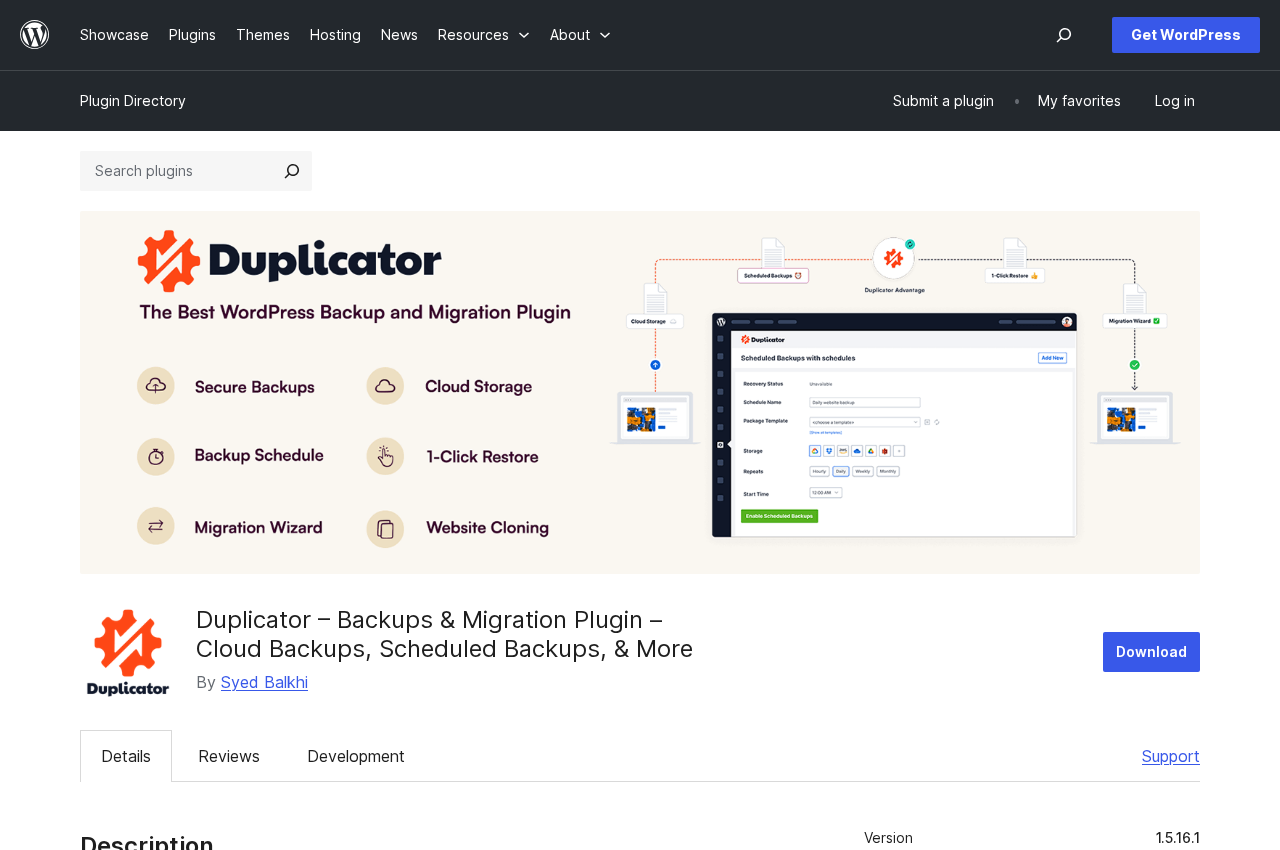
The main Backups screen opens on a fresh install with a “No Backups Found” empty state and a “Create New” button to start the wizard.
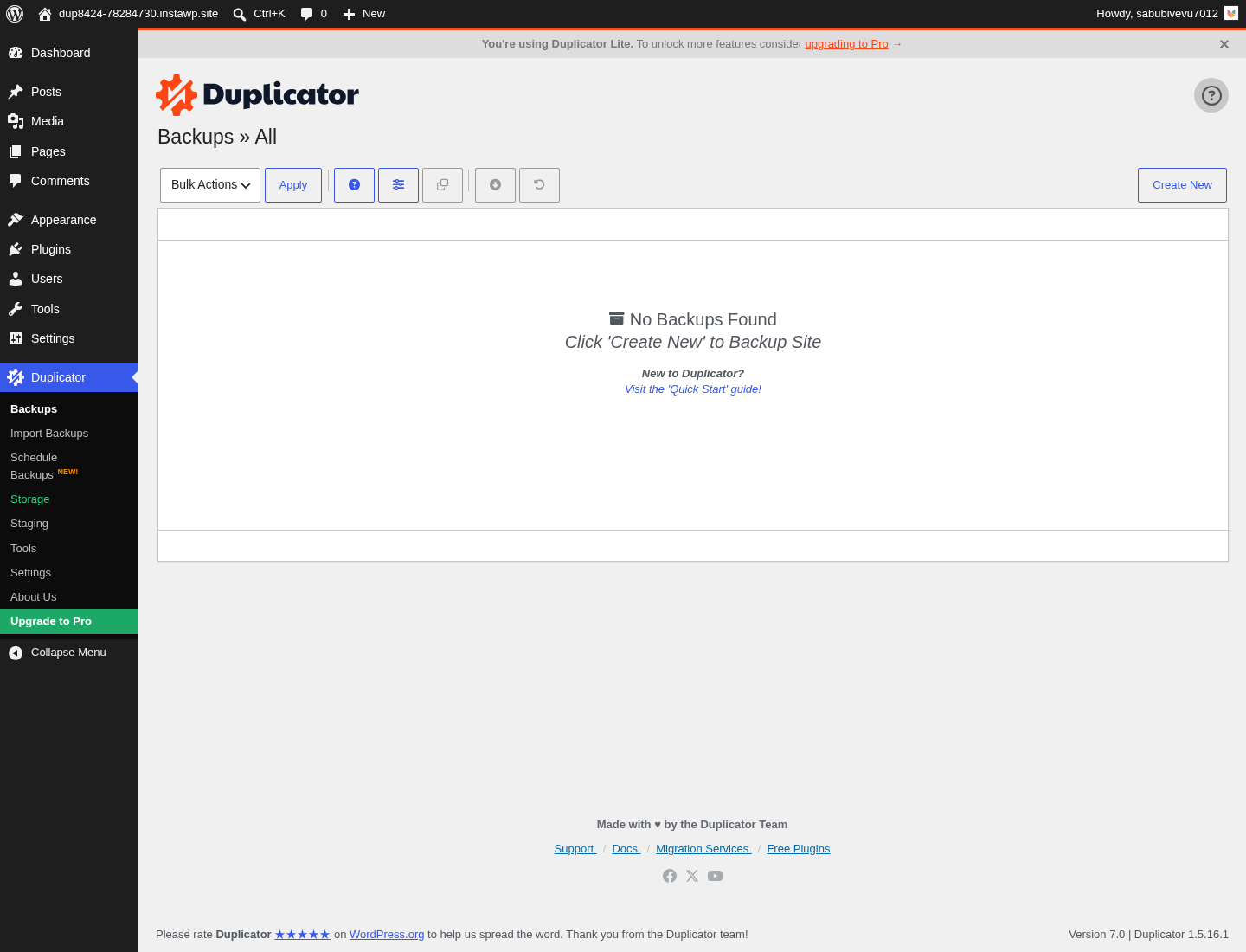
Creating the first backup follows a three-step wizard:
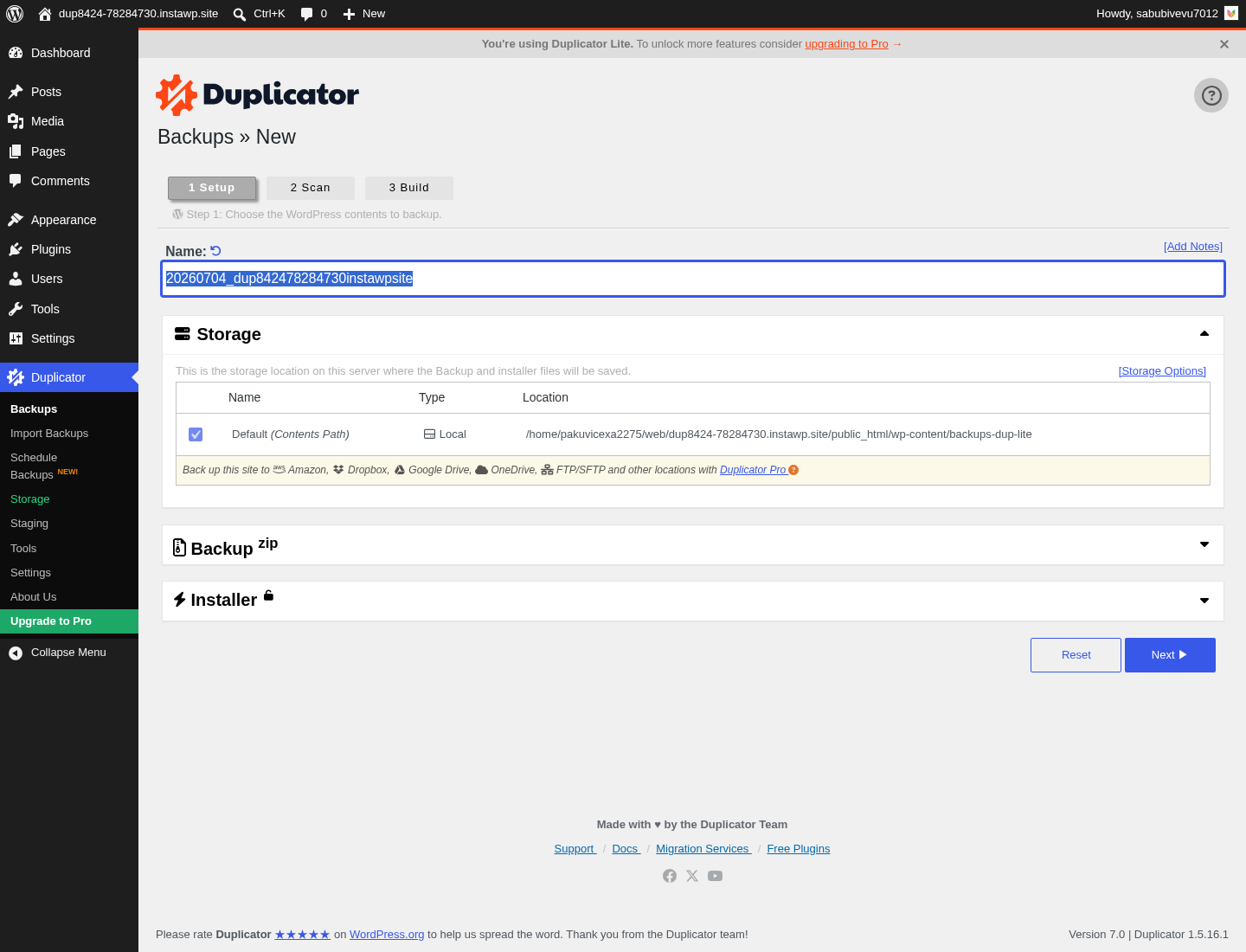
- Setup. Duplicator auto-generates a name from the current date and site name. You can adjust the name, add a password, and configure filters to exclude specific folders, tables, or file types. The default local storage path is
wp-content/backups-dup-lite. Cloud storage destinations (Amazon S3, Dropbox, Google Drive, OneDrive, FTP/SFTP) are shown at this step as Pro upgrade options. - Scan. Duplicator runs a pre-build scan to check for known issues: file size warnings, large database tables, non-standard table prefixes, and PHP configuration limits that could interrupt the build. On a clean sandbox the scan reported Good status across all checks in under 1 second. The result page notes that unchecked warnings are not blockers but may cause issues on some systems.
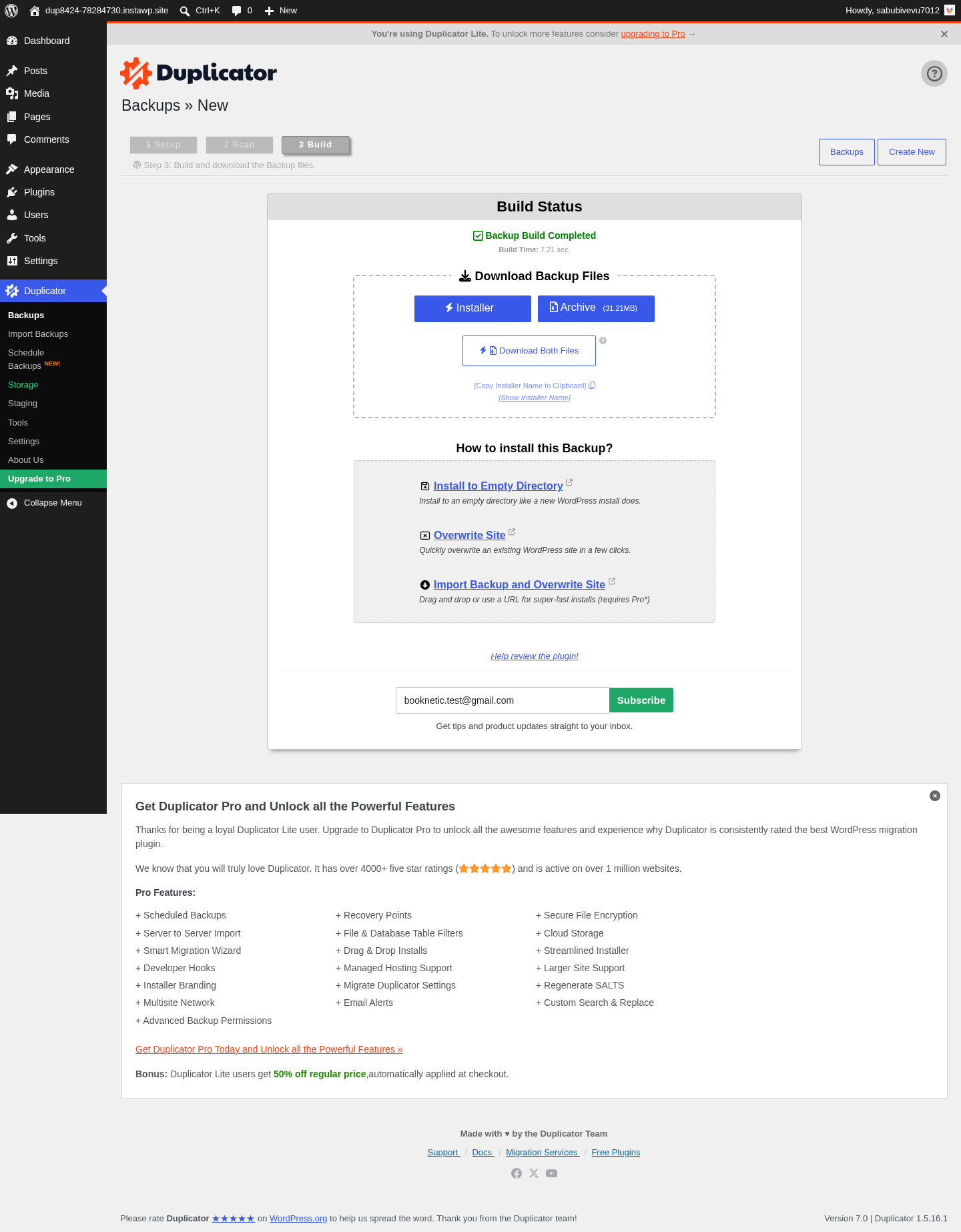
- Build. Duplicator creates the archive and the
installer.phpfile. On the clean sandbox test, the build completed in about 7 seconds and produced a 31 MB archive. The final screen offers three downloads: Installer, Archive, and Download Both Files.
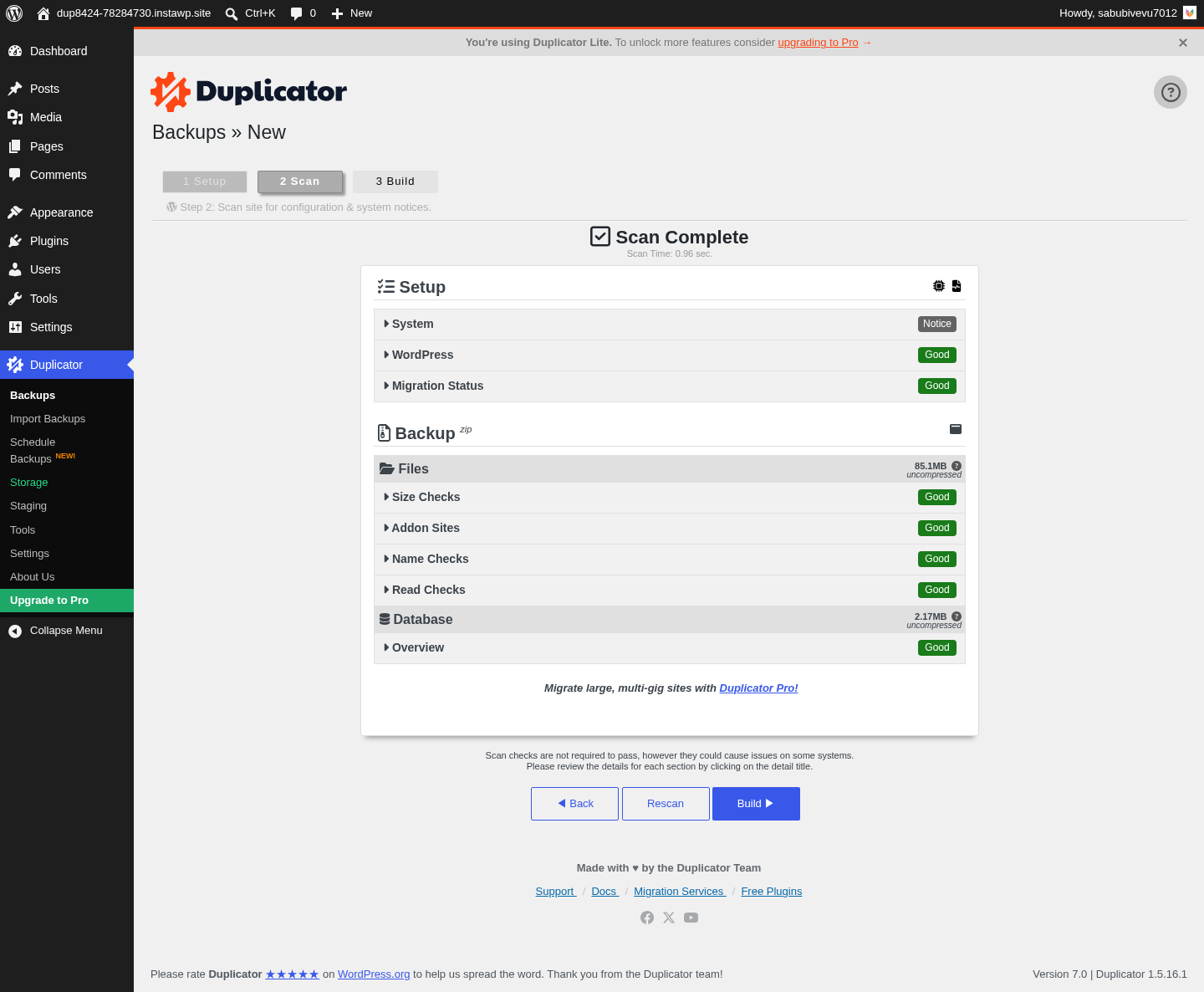
The scan-before-build step is one of the features that has made Duplicator the default choice in agency workflows. Other migration plugins build first and fail silently during import. Duplicator tells you what is wrong before it starts.
The archive format for very large sites is DupArchive, which handles packages up to 400 GB by splitting the archive and using a chunked transfer approach that works around PHP upload limits at the destination.
Backup features: free and Pro
What the free version backs up
The free version creates a full-site backup in a single archive: database, plugins, themes, the uploads folder, and all other WordPress files. The archive can be built with optional password protection and with file/table filters to exclude specific components.
What the free version does not do: schedule backups automatically, connect to cloud storage, or create incremental backups. Every backup is a manual full-site archive. You have to click “Create New” yourself every time.
For a one-time migration or an occasional manual snapshot before a major change, that is fine. For ongoing backup protection of a production site, the free version alone is not enough.
Scheduled backups (Pro only)
Pro unlocks automatic scheduled backups at hourly, daily, weekly, or monthly intervals. The schedule is configured from the Duplicator dashboard and runs as a WordPress cron job. The Plus plan and above add hourly backup frequency; the Basic plan is limited to daily, weekly, and monthly.
Scheduled backups are what make Duplicator a serious backup tool rather than a migration-first utility. Without scheduling, the free version leaves the backup cadence entirely in the user’s hands.
Partial backups (Pro)
Pro adds partial backup types: database-only, media-only, or fully custom selections of which components to include. Partial backups are faster to build, smaller to store, and more practical for daily runs where you only need the database changes from the last 24 hours.
Cloud storage (Pro only)
Cloud storage destinations are fully Pro. The free version writes only to your local server. The Pro version connects to:
- Amazon S3 (and any S3-compatible storage: Cloudflare R2, Wasabi, Digital Ocean Spaces, Vultr, Backblaze B2, DreamObjects, Google Cloud Storage, Linode Object Storage)
- Google Drive
- Dropbox
- Microsoft OneDrive
- FTP / SFTP
That is one of the widest cloud storage lists in the backup plugin category, covering the major consumer cloud destinations (Google Drive, Dropbox, OneDrive) and the major developer/infrastructure destinations (S3 and all its compatibles) in a single plugin. The Plus plan and above allow unlimited simultaneous cloud destinations; Basic is limited to one.
(Note on basis: cloud storage integrations were verified from the duplicator.com backup features page and the WordPress.org plugin description. A live S3 or Google Drive connection was not exercised in this test window.)
Migration wizard and how it works
Migration is Duplicator’s original home, and the migration wizard is the part of the plugin with the most accumulated polish.
The migration flow using the archive-and-installer model:
- Build a backup on the source site.
- Download the archive and the installer.php to your computer.
- Upload both files to the destination server root via FTP or a file manager.
- Point a browser at
destination-domain.com/installer.php. - The installer wizard reads the archive, creates or connects the database, runs search-and-replace through all instances of the old domain in the database (including serialized arrays), updates wp-config.php, and completes the install.
The search-and-replace step is what most basic migration tutorials miss. WordPress stores URLs in the database in multiple places, including serialized PHP arrays where a naive string replacement breaks the serialization and corrupts the data. Duplicator’s installer handles this correctly, which is why migrated sites arrive with working internal links rather than broken ones.
Distinct migration modes:
- Drag-and-drop import: upload the archive directly through the Duplicator importer on the destination site, no FTP required.
- Server-to-server import (Pro): provide a URL to the archive (from cloud storage or another server) and Duplicator pulls it directly without a local download step.
- Quick Move (Pro): a direct site-to-site transfer initiated from the Duplicator dashboard, bypassing the manual upload step entirely.
- Local WP migration: export from a local development environment (LocalWP, MAMP, XAMPP) and import to a live server.
The vendor claims Duplicator can deploy on a completely empty server with no WordPress pre-installed, which it achieves by bundling the full WordPress installation inside the archive. The installer does not need an existing WordPress install to unpack. Among the migration plugins I have reviewed, that is a genuine differentiator.
Large sites use the DupArchive format, which chunks the archive to work around PHP upload limits and timeout constraints. DupArchive supports packages up to 400 GB, which covers all but the very largest WordPress deployments.
Recovery Points and 1-click restore
A backup is only useful when the restore works. Duplicator’s restore story is built around Recovery Points and the two-step installer.
Recovery Points (Pro) are automatic restore snapshots created before scheduled backups run. When a WordPress core update, plugin update, or site change goes wrong, you pick the most recent Recovery Point from the Duplicator dashboard and restore with one click. At hourly backup frequency (Plus and above), you are never more than 59 minutes from a clean Recovery Point.
The restore flow for any backup:
- Build or download the archive for the target recovery state.
- Upload the archive and installer.php to the destination.
- Run the installer at
destination-domain.com/installer.php. - The two-step wizard unpacks the archive, connects the database, and restores the site.
What Duplicator’s restore does not do: run remotely against a crashed server where file access has been lost. If your origin server is inaccessible and you cannot upload files, you need a pre-downloaded archive stored off-site. This is an architectural constraint of self-hosted plugins generally, not a Duplicator-specific failure, but it is worth being clear about. A managed backup service with a cloud-resident archive and an emergency connector covers that scenario; a self-hosted plugin does not.
Duplicator also offers database-only and media-only selective restores on Pro, so you can roll back just the database without touching the file system if a data-only fix is all you need.
Staging sites (Pro)
Duplicator Pro adds one-click staging from the WordPress dashboard, available on the Pro plan (up to 20 sites) and Elite Bundle.
The staging workflow:
- Open the Duplicator dashboard and select “Create Staging Site.”
- Duplicator clones the live site to a subfolder on the same server (e.g.,
yourdomain.com/staging). - The staging copy gets a separate database with distinct table prefixes so it does not share data with the live site.
- Duplicator automatically disables outgoing email from the staging copy and disables search-engine indexing.
- An admin bar label marks the staging environment clearly when you log in.
The honest limitation of Duplicator’s staging approach: the staging site runs on the same server as the production site. That is different from managed backup services that host staging copies on their own cloud infrastructure. On shared hosting, a resource-intensive staging clone shares the server’s CPU and memory with the live site. On VPS or dedicated hosting it is less of a concern.
There is also no “push staging to live” merge button analogous to what you find in hosts like WP Engine or managed services like BlogVault. Moving staged changes to live requires building a package from the staging environment and installing it over the live site manually. That is the same migration workflow as any other Duplicator move, which is reliable but more deliberate than a one-click merge.
(Note on basis: staging behaviour was inspected from the duplicator.com staging feature page and the WordPress.org plugin description. A live staging environment on a shared host was not exercised in this test window.)
Multisite backup and migration (Pro only)
Multisite support is a Pro-only feature. The free version does not support WordPress Multisite networks.
On the Pro tier, Duplicator can:
- Back up entire Multisite networks in a single package or back up individual subsites separately.
- Restore entire networks or individual subsites.
- Migrate a subsite from a Multisite network and install it as a standalone WordPress site.
- Migrate a standalone WordPress site into an existing Multisite network as a new subsite.
- Handle subdirectory-based Multisite structures with hundreds of subsites using the DupArchive format.
For agencies that manage client sites on Multisite networks, the subsite-to-standalone migration capability is the feature that makes Duplicator irreplaceable: when a client outgrows the shared Multisite install and needs their own dedicated server, Duplicator extracts just their subsite cleanly.
WooCommerce backups
Duplicator backs up WooCommerce stores the same way it backs up any WordPress site: the full database, including all order tables, customer records, product data, payment gateway settings, and transaction history, is included in every backup.
The frequency limitation is important to state clearly. The highest backup frequency on any Duplicator Pro plan is hourly. That means a store with active transactions during a busy hour could lose up to 59 minutes of order data between a failure and the most recent backup. There is no real-time or near-real-time order capture between scheduled backups.
For a WooCommerce store where recovering every order is a hard requirement, hourly Duplicator backups are a meaningful improvement over daily backups but are not the same as a managed service with continuous order-level capture. If your store takes enough orders that losing 59 minutes of data is unacceptable, a managed service built for WooCommerce real-time capture is the right tool, used alongside or instead of Duplicator.
For smaller WooCommerce stores where hourly backups provide adequate protection and a migration tool is also needed, Duplicator Pro covers both jobs in a single plugin.
Pricing and license value
Duplicator Pro is sold as an annual subscription from duplicator.com/pricing. The pricing page uses dynamic promotional pricing: both the sticker price and the discount percentage can vary between sessions. Verify the current price directly on the pricing page before publishing or purchasing. The plan structure, site limits, and included features are stable; exact prices are not.
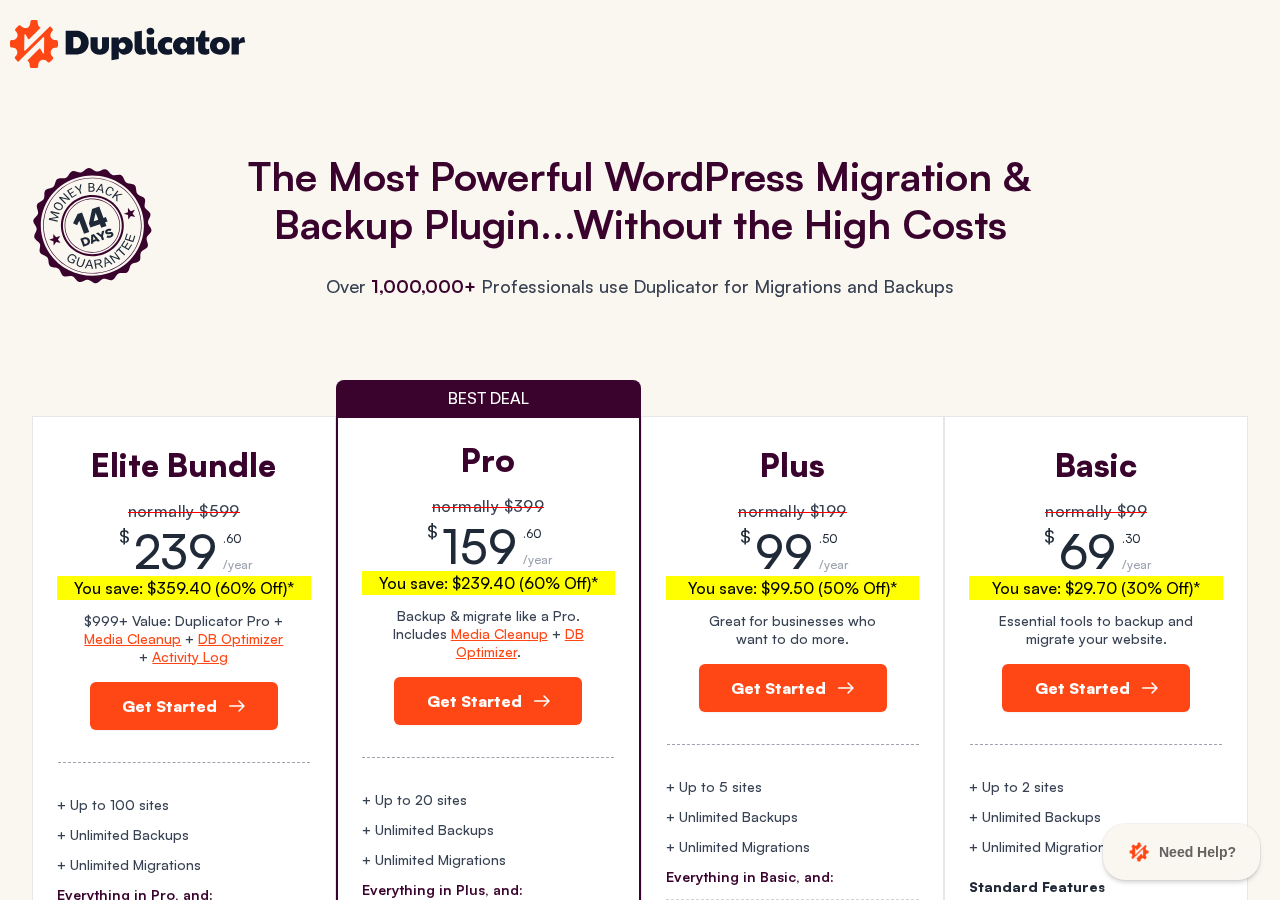
Plans, site limits, and included features (see duplicator.com/pricing for current prices, which rotate between sessions):
- Basic. Up to 2 sites. Unlimited backups and migrations, scheduled backups (daily, weekly, monthly), 1-click restore, AES-256 encryption, 1 cloud storage destination, Recovery Points, standard support.
- Plus. Up to 5 sites. Everything in Basic plus hourly backup frequency, unlimited cloud destinations, installer branding, migration settings import, standard support.
- Pro (marked “Best Deal”). Up to 20 sites. Everything in Plus plus staging sites, multisite backup and migration, custom backup types, WP Media Cleanup and DB Optimizer add-ons, priority support.
- Elite Bundle. Up to 100 sites. Everything in Pro plus Activity Log for WordPress (tracks all site changes), premium support.
Important notes on pricing:
- Duplicator uses dynamic promotional pricing: both the sticker price and the discount percentage shown on duplicator.com/pricing can differ between visits, devices, and time periods. Verify the current sticker price and discounted price directly from the pricing page before purchasing.
- All plans come with a 14-day money-back guarantee.
- The Duplicator Cloud add-on (dedicated cloud backup storage) is sold separately: from $29/year for 2 GB to $199/year for 150 GB. If you do not want to configure your own cloud destination, this is the integrated option.
The pricing logic for most buyers:
- Free version: right for anyone doing one-time migrations, cloning a site for staging on a local environment, or taking occasional manual snapshots before major changes. No cost, no license.
- Basic: the entry point for a business site that needs automated daily cloud backups and the migration reliability in the same plugin. The 1-cloud-destination limit is the constraint to watch.
- Plus: the practical upgrade for active sites that want hourly backups, multiple cloud destinations, or five-site coverage. The hourly frequency is the key step up from Basic for busy sites.
- Pro: right for freelancers and small agencies managing up to 20 sites who also need staging environments and multisite support. At the discounted price, the per-site value is strong.
- Elite: right for agencies managing up to 100 sites or any team that wants the Activity Log for change tracking and audit.
Always verify current prices at duplicator.com/pricing before purchasing or publishing. Both sticker and discounted prices are dynamic and will differ from any prior check or published snapshot.
Pros and cons
Pros
- The strongest free WordPress migration plugin available in 2026. Unlimited manual full-site migrations with serialized data search-and-replace, at no cost.
- The archive-and-installer model is deterministic and portable. You can hand the archive and installer.php to any host’s support team and they can run the migration without touching wp-admin.
- Scan-before-build step surfaces known configuration issues (PHP limits, file size warnings, large tables) before they cause a mid-build failure.
- Works on an empty server with no WordPress pre-installed. The installer bootstraps WordPress from the archive, which no other free migration plugin I have reviewed does.
- DupArchive format handles very large sites up to 400 GB with chunked transfer to work around PHP upload limits.
- The widest cloud storage list in the paid-plugin category: Amazon S3 and all S3-compatible services, Google Drive, Dropbox, OneDrive, FTP/SFTP, Cloudflare R2, Wasabi, Digital Ocean, Vultr, Backblaze B2, Google Cloud, Linode.
- AES-256 encryption on all packages, free and paid.
- Active development: Pro 4.6.5 shipped July 2, 2026 with fixes for staging backup accuracy and Dropbox upload reliability.
- 4.9/5 rating on WordPress.org across more than 4,900 reviews.
- 14-day money-back guarantee on all Pro plans.
Cons
- Scheduling and cloud storage are Pro-only. The free version does manual full-site archives only; it is not a daily backup solution without a paid license.
- Multisite support is Pro-only (Pro plan and above). The free version cannot back up or migrate Multisite networks.
- Staging is Pro-only and runs on the same server as the live site, not on external cloud infrastructure. Very large staging clones share server resources with production.
- No push-staging-to-live merge. Moving changes from a Duplicator staging environment back to production requires building a new package and running the migration installer.
- Very large sites on shared hosting can hit PHP timeout limits during the archive build. DupArchive helps but does not eliminate this constraint on resource-constrained hosts.
- No real-time WooCommerce backup. Hourly is the maximum frequency, which means up to 59 minutes of orders can be lost between a failure and the most recent backup point.
- No emergency connector for crashed sites. If the origin server is inaccessible and you cannot upload files, you need a pre-downloaded archive stored elsewhere. The restore requires server file access.
- The Duplicator Cloud add-on (integrated cloud storage) is a separate annual subscription on top of the Pro license price.
- Pricing on the public page uses dynamic promotional pricing: both the sticker price and the discount percentage can differ between visits. Verify current prices on the pricing page before purchasing.
Alternatives to Duplicator
- UpdraftPlus. The most-installed self-hosted backup plugin. A stronger ongoing backup tool for sites that prioritise scheduled cloud backups over migration. The free version includes scheduling to eight storage destinations. The Pro upgrade adds incremental backups and pre-update auto-snapshots. Pick UpdraftPlus if backup reliability and storage flexibility matter more than a polished migration wizard.
- All-in-One WP Migration and Backup. A popular migration plugin with a drag-and-drop import flow. The free import is limited by file size; large sites require a paid extension. Pick it if you prefer the drag-and-drop import model and do not regularly move very large sites.
- Migrate Guru. A free, server-side migration service that transfers your site directly between servers without a local download step. Powered by BlogVault’s cloud. Pick Migrate Guru if you need to migrate large sites for free and your host supports the server-to-server transfer model.
- BlogVault. A managed backup service where the engine and storage run on BlogVault’s own cloud. Pick BlogVault if you need a backup that works when the site is fully down (the Emergency Connector), integrated offsite cloud storage included in the plan price, real-time WooCommerce order capture, or managed staging on external cloud infrastructure.
- WPvivid. A free backup and migration plugin that includes a direct site-to-site migration token in the free tier. A simpler alternative to Duplicator for straightforward migrations between compatible hosts.
- WP Staging. A staging-focused plugin with a polished one-click local staging workflow in the free tier and a Pro push-to-live feature. Pick it if staging and testing are the primary use case and full-site migration is secondary.
For the majority of WordPress operators, the practical choice is Duplicator free (for migrations and occasional manual snapshots) alongside UpdraftPlus free (for scheduled daily backups to Google Drive or Dropbox). You get the best migration tool and the best scheduled backup tool, both at no cost. When a Pro upgrade makes sense, the question is whether you want everything in one plugin (Duplicator Pro covers backup, migration, staging, and multisite) or specialised tools at potentially lower cost.
Final verdict
Duplicator earns its position as the most recommended WordPress migration plugin in 2026. The archive-and-installer model, the scan-before-build step, the serialized data search-and-replace, and the ability to land a site on a completely empty server make it the most reliable free migration tool available. If you move WordPress sites, you should have Duplicator installed.
The honest caveat: migration is Duplicator’s first job, and the free version shows it. For ongoing backup protection, the free version is not enough on its own. You either pair it with a dedicated backup plugin, or you upgrade to Duplicator Pro to get scheduled cloud backups, Recovery Points, and cloud storage in the same tool.
For agencies managing several to dozens of sites, Duplicator Pro is the clearest value in the category. The Pro plan covers 20 sites with staging, multisite, scheduled backups to unlimited cloud destinations, and the same migration reliability as the free version, at a discounted price that sits well below what most competing agency-grade tools charge. The Elite Bundle’s Activity Log makes it a genuine operations platform, not just a backup plugin.
Where I would look elsewhere: WooCommerce stores where losing 59 minutes of orders is unacceptable, and sites where the recovery scenario might involve a fully crashed, inaccessible server. Those two requirements call for a managed backup service with real-time capture and a cloud-resident archive. For everything else, Duplicator is the plugin I would install first.