


Sixty-eight million downloads. Five hundred thousand active websites. A plugin that started as a passion project in 2011 and has been growing inside WordPress dashboards ever since. MailPoet is one of the most installed email marketing plugins in the WordPress ecosystem, and it has an unusual proposition for the category: the entire platform lives inside your WordPress admin, including the email sending infrastructure.
This review is not a rewrite of the plugin page. It is a close look at what the free Starter plan actually delivers, where the paid Business plan earns its price, how the WooCommerce integration holds up, and who would be better served by a different tool. I audited the official mailpoet.com website (homepage, pricing, features, and WooCommerce pages), the WordPress.org plugin listing (version 5.34.3, updated July 28, 2026), the plugin changelog, and the vendor-provided admin interface screenshots on WordPress.org.
Note on research basis: This review is built on a thorough audit of the official mailpoet.com homepage, pricing, features, and WooCommerce pages; the WordPress.org plugin listing (version 5.34.3, updated 2026-07-28); the WordPress.org Plugin API metadata; and the vendor-provided admin interface screenshots on WordPress.org. A live install was not part of this review: the worker environment lacked PHP/MySQL support for a local install, and the cloud-based browser testing environment (WordPress Playground via WebAssembly) was terminated by the runtime due to memory limits before the install could complete. All admin interface descriptions in this review are drawn from official vendor materials and WordPress.org documentation. Where a specific screen or flow is described, it is attributed to those sources, not to first-person interaction with a running site. Pricing is in EUR; verify current pricing on mailpoet.com/pricing/ before purchasing.
At a glance
Research basis: mailpoet.com homepage, pricing, features, and WooCommerce pages; WordPress.org plugin listing (version 5.34.3, updated 2026-07-28); WordPress.org Plugin API metadata; vendor-provided admin screenshots.
Free tier: genuinely capable for lists under 500 subscribers, with WooCommerce automation included at no cost.
Paid tiers: unlock unlimited sending, advanced automation, detailed analytics, and larger subscriber limits.
Bottom line: the strongest all-in-one WordPress newsletter plugin with a built-in sending service, and a credible WooCommerce marketing tool starting at the free tier.
Quick verdict
MailPoet is not an SMTP plugin. It is not a form widget that connects to Mailchimp. It is a full email marketing platform that runs entirely inside WordPress, with its own subscriber management, its own email builder, its own automation engine, and its own email delivery infrastructure.
That scope is what makes it interesting and what makes the free Starter plan worth taking seriously. Up to 500 subscribers, up to 5,000 emails per month, access to abandoned cart emails, first purchase emails, and WooCommerce transactional email customization: all of that is free. No trial clock. No feature expiry. No need to set up a third-party ESP account before you send a single email.
The limitation is real, though. Five hundred subscribers is a tight ceiling. Once you cross it, you need to pay. And the paid plans are priced in EUR, which surprises some buyers who expect USD billing. If your list is small and WooCommerce-powered, the Starter plan might be one of the best free tools in the WordPress ecosystem. If you need serious automation, segmentation depth, or a larger list capacity, the Business plan is the right move.
Quick verdict card
Best for: bloggers, small business owners, and WooCommerce store operators who want email marketing inside WordPress without setting up external ESP accounts.
Best plan for most individuals: Starter for lists under 500 subscribers; Business for any site where the list is growing, advanced automation matters, or detailed analytics are needed.
Best plan for agencies: Agency plan covering 50 websites.
Standout: the MailPoet Sending Service is built into the free Starter plan, eliminating the need to configure SMTP or create a third-party account just to send your first newsletter.
Watch out for: the 500-subscriber cap on the free plan is tight; pricing is in EUR (not USD); advanced automation and detailed analytics require a paid plan; Creator plan buyers need their own sending infrastructure.

What MailPoet is
MailPoet is a WordPress plugin for building, sending, and managing email newsletters and automated email campaigns, all from within the WordPress dashboard. Unlike SMTP plugins (which fix how WordPress sends transactional emails) or external SaaS email platforms (which live outside WordPress entirely), MailPoet installs like any other plugin and runs as a self-contained marketing system on your site.
The plugin was created in 2011 and has been on WordPress.org since 2016. Version 5.34.3, the current release at the time of this review, was published on July 28, 2026. It supports WordPress 6.9 and higher, requires PHP 7.4 or higher, and for WooCommerce features requires WooCommerce 10.9 or higher.
At its core, MailPoet handles three things:
- Newsletter sending: create, schedule, and send newsletters to subscriber lists from a drag-and-drop editor inside WordPress.
- Subscriber management: collect subscribers via customizable forms, manage lists, import from CSV or Mailchimp, and apply segmentation.
- Email automation: send automated emails based on triggers like new sign-ups, new blog posts, WooCommerce purchases, or abandoned carts.
The MailPoet Sending Service is the feature that sets the plugin apart from simpler newsletter tools. Rather than routing emails through your hosting server (which often leads to deliverability problems) or requiring you to configure a third-party SMTP service, MailPoet includes its own email delivery infrastructure. The service is available on the free Starter plan for up to 5,000 emails per month. Paid plans remove that monthly cap.
According to the vendor, the service delivers over 30 million emails per month, sends at up to 50,000 emails per hour, and maintains a 98.5% deliverability rate. It also handles bounce processing and spam complaint removal automatically, which keeps sender reputation healthy without manual list hygiene.
Who MailPoet is best for
Strong fit:
- Bloggers and content publishers who want to notify subscribers about new posts automatically, without copying content into an external tool.
- Small business owners building a mailing list from scratch who need a capable free solution for their first 500 subscribers.
- WooCommerce store operators who want abandoned cart recovery, first-purchase follow-ups, and product-specific automated emails without paying for a standalone ESP.
- Non-technical users who want a guided, template-driven email editor inside WordPress with no external dashboard to learn.
- Sites already in the WordPress ecosystem that want subscriber data stored on their own server, not in a third-party cloud account.
- Non-profits looking for a discounted paid solution (MailPoet offers 20% off any plan for non-profits).
Weak fit:
- Sites with lists already well over 500 subscribers on a tight budget. The free tier ends at 500; upgrading requires committing to a monthly EUR subscription.
- Experienced email marketers who need advanced CRM features, deep behavioral tracking, or complex multi-branch automation. FluentCRM or a dedicated SaaS like ActiveCampaign will serve those use cases better.
- Teams that need everything billed in USD. MailPoet prices in EUR; buyers in other regions will see exchange rate variability.
- Users who want to manage their own sending infrastructure from day one. If you have a specific SMTP provider relationship or send from your own server, the Creator plan is the right option, but be ready to handle bounce management yourself.
- Sites that purely need to fix transactional email deliverability (contact forms, password resets). For that, a focused SMTP plugin like WP Mail SMTP or FluentSMTP is simpler and cheaper.
Installing and setting up MailPoet
The following is based on the official plugin documentation and vendor-provided materials on WordPress.org, not a live installation walkthrough.
MailPoet installs from the standard WordPress plugin repository. Search for “MailPoet” in Plugins > Add New and it is typically the first result. Activate the plugin, and a MailPoet menu item appears in the WordPress admin sidebar.
On first activation, the plugin walks you through connecting to the MailPoet Sending Service by creating a free account. This is a necessary step to use the managed delivery infrastructure: the free Starter plan requires a MailPoet account, even though no credit card is needed. If you prefer to skip this and send through your own host or an SMTP provider, the plugin also supports that option via the Settings panel.
The initial setup creates a default subscriber list and gives you access to the email editor, subscription form builder, and automation setup without further configuration. The interface lives entirely inside WordPress; there is no external dashboard to switch between.
The email editor and templates
The core creation experience in MailPoet centers on a drag-and-drop email editor. You choose a starting point (blank canvas or one of 70+ pre-built templates), then arrange blocks for text, images, buttons, spacers, and dynamic content.
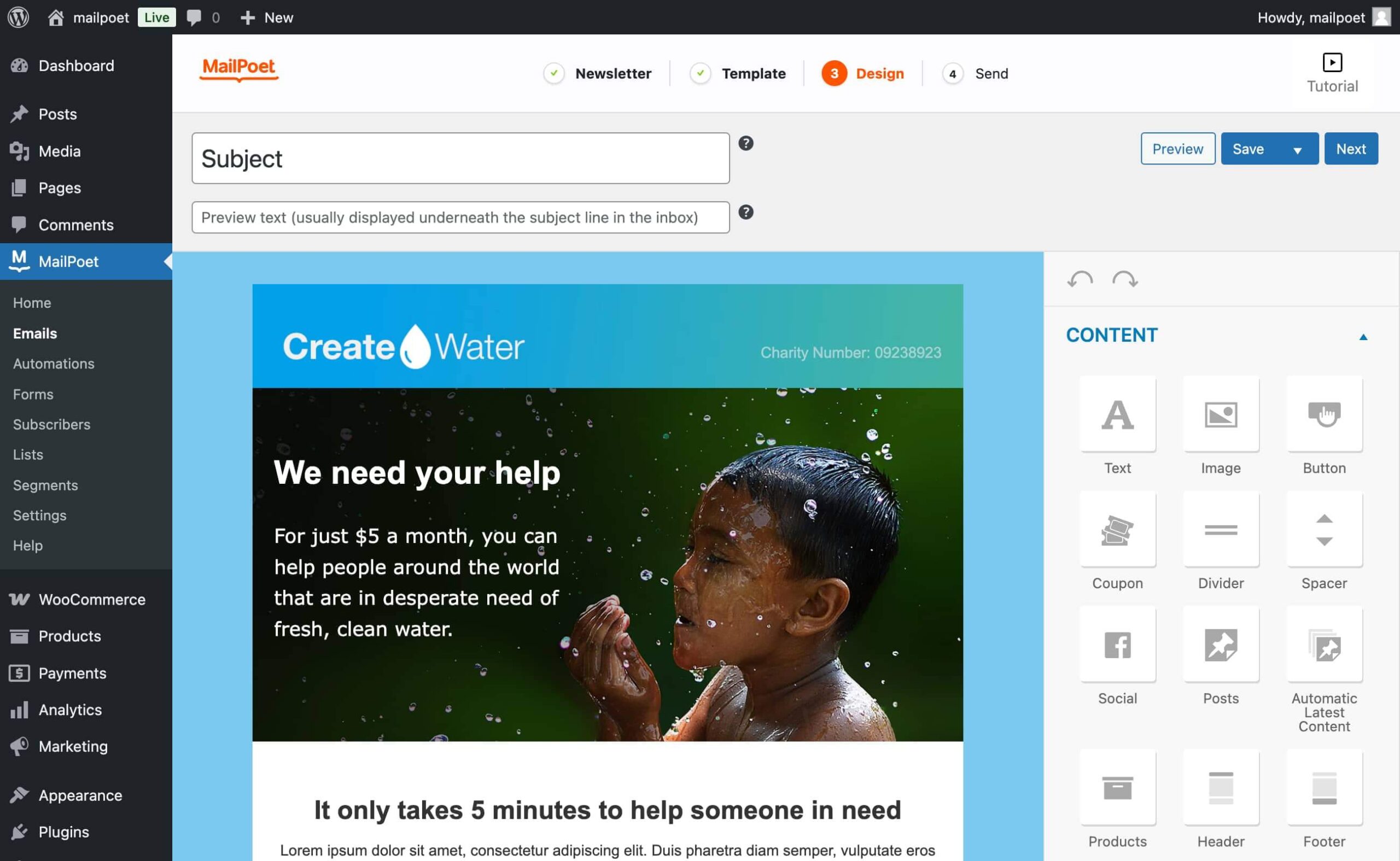
All templates are mobile-responsive by default. The editor produces HTML emails that display correctly across major email clients, which is worth noting because hand-coding responsive email HTML is notoriously painful. The template library covers newsletters, promotional campaigns, product announcements, and seasonal content.
Two dynamic blocks are worth highlighting:
- Include WordPress posts: the editor lets you pull in recent posts from your WordPress blog automatically. You define the layout (list or grid, with or without featured images), and MailPoet fills in the content from your latest posts at send time. This is the feature that makes blog post notification emails particularly easy to set up.
- Include WooCommerce products: similar to posts, you can pull in WooCommerce products with images, descriptions, and pricing directly from your store catalog. No external product feed required.
The editor and templates are included in all plans, including the free Starter tier.
Email types you can send
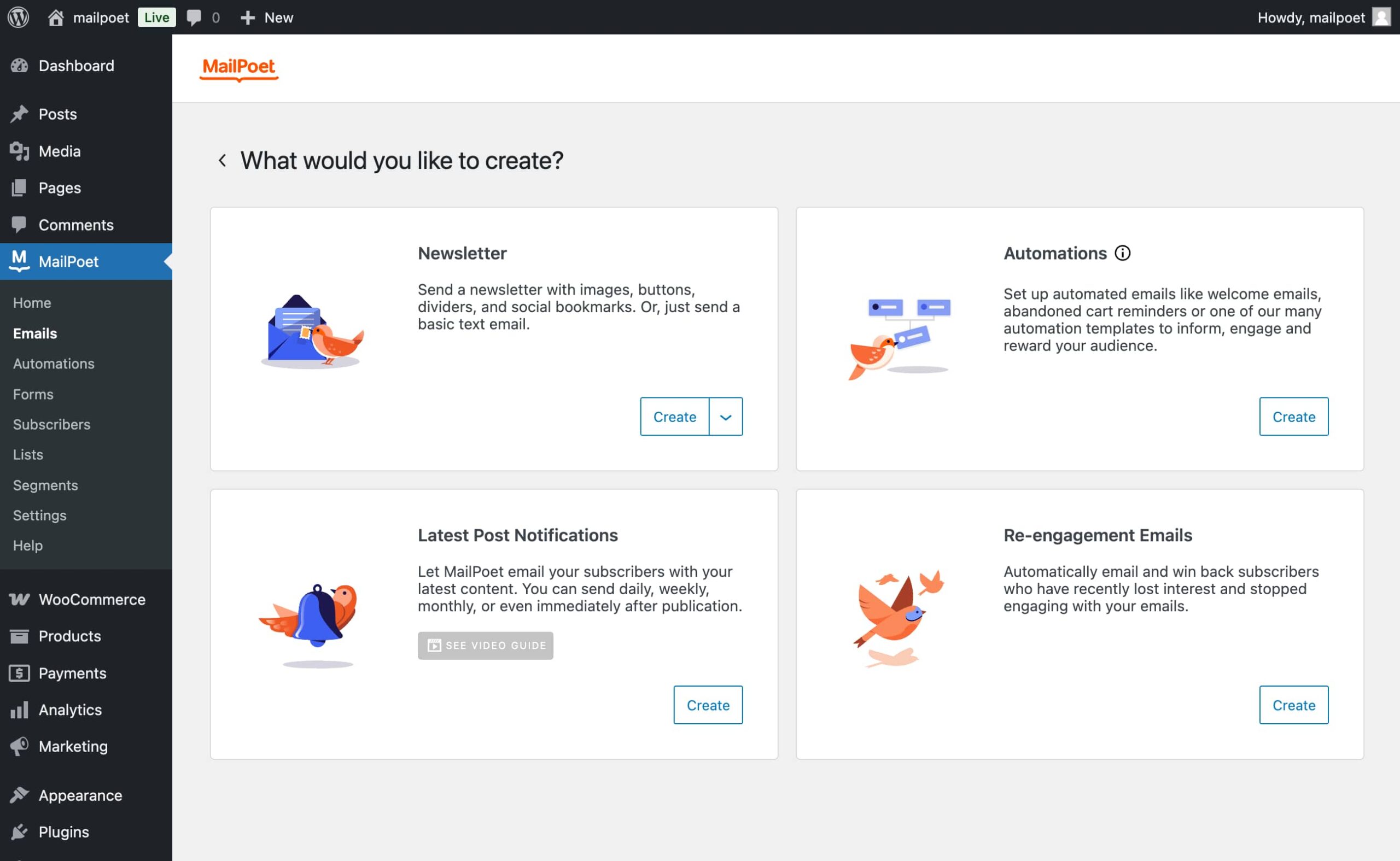
MailPoet organizes outgoing emails into distinct types, each with its own creation and management flow.
Newsletters
Standard broadcast emails to your entire list or a segment. You design the email, choose a recipient list, set a send time or schedule, and send. Newsletter archives can be published publicly on your site if you want past issues browsable.
Latest post notifications
You set up a template once, choose how often to check for new posts (daily, weekly, or per-post), and MailPoet sends an email automatically whenever new content is published. The notification pulls in your post title, excerpt, featured image, and a read-more button without any manual work after the initial setup.
Welcome emails
Triggered automatically when a new subscriber joins a specific list. You can send a single welcome email immediately, or build a sequence with delays between messages. Welcome email sequences are available on the Starter plan, which is generous compared to tools that lock drip sequences behind paid plans.
WooCommerce emails
This category is where MailPoet’s WooCommerce integration comes into its own. More detail in the WooCommerce section below.
Subscriber management and forms
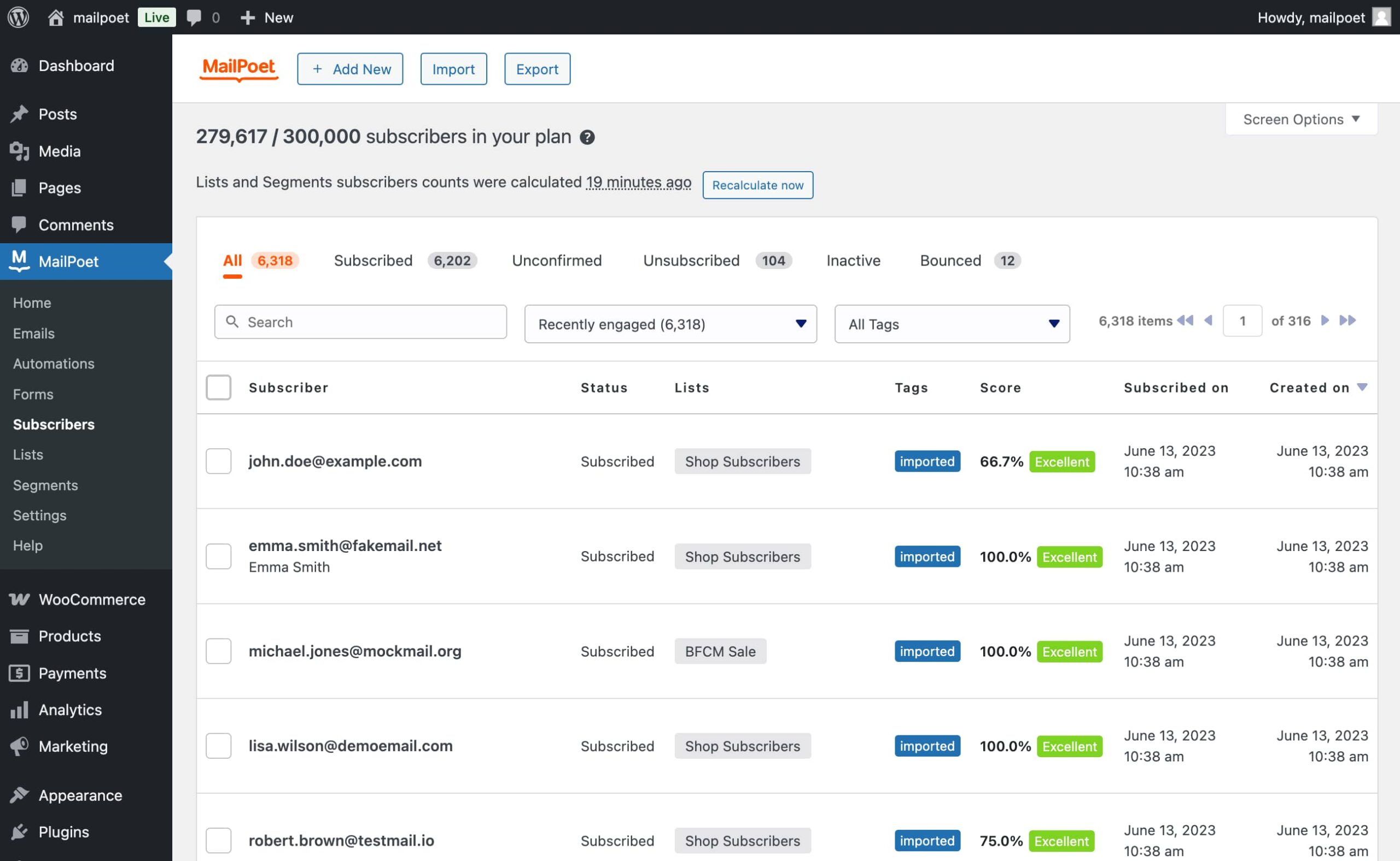
MailPoet stores subscriber data inside your WordPress database. Your subscriber lists, their names, email addresses, custom fields, engagement history, and tags all live on your own server.
The form builder supports several placement types:
- Inline forms embedded below post content
- Widget-based forms in sidebars and footers
- Pop-up forms triggered on time delay, scroll depth, or exit intent
- Slide-in forms from the side or bottom
- Fixed bar forms at the top or bottom of the screen
- Shortcode embedding for any page or post
All form types are customizable in style and content from the WordPress admin. No external landing page tool is required.
Beyond forms, MailPoet automatically creates two useful subscriber lists:
- WordPress Users List: syncs with WordPress registered users, so any existing user account automatically appears as a subscriber.
- WooCommerce Customers List: pulls in customers from WooCommerce orders, giving you a ready-made segment for post-purchase follow-up.
Subscribers can be imported via CSV file or directly from a connected Mailchimp account. Export is also supported for moving lists to another tool if needed.
Segmentation
Subscriber segmentation scales with plan tier. The free Starter plan includes:
- Subscriber engagement scores (tracks email open and click activity)
- Engagement-based segmentation (filter by active, inactive, or unengaged subscribers)
- Purchasing behavior-based segmentation (filter by WooCommerce purchase history)
Paid plans (Business, Agency, Creator) add:
- Advanced multi-condition segmentation (combine multiple subscriber properties and behaviors in a single segment)
- Subscriber tags (apply freeform labels to subscribers for flexible filtering)
WooCommerce integration
This is where MailPoet earns genuine credit as a WooCommerce-specific email tool. Most newsletter plugins treat WooCommerce as a list source. MailPoet treats WooCommerce purchase data as automation fuel.
The following WooCommerce email automations are available on all plans, including the free Starter tier:
Abandoned cart emails: if a customer adds items to their cart and leaves without completing the purchase, MailPoet can send a reminder email. You can configure the delay before the first send and set up a sequence of follow-ups. This is a standard WooCommerce recovery flow and works at no cost on the Starter plan.
First purchase email: when a WooCommerce customer makes their first-ever order, MailPoet sends a customized welcome email. You can include product recommendations, a coupon, or a personalized thank-you message.
Purchased this product: automated email triggered when a customer buys a specific product. Useful for product setup guides, upsell sequences tied to a particular item, or post-purchase review requests.
Purchased in this category: similar to the above, but triggered when a purchase falls within a product category. Useful for sending category-specific follow-ups, such as a care guide after a clothing purchase.
WooCommerce transactional email customization: MailPoet can replace WooCommerce’s default transactional email templates (order confirmation, shipping notice, and so on) with branded designs built in its own editor. This is separate from the marketing automation features and applies to every WooCommerce system email.
Paid plans (Business and Agency) also unlock two additional WooCommerce automations:
- Re-engagement campaigns: send personalized emails to customers who have not made a purchase within a configurable time window.
- Review follow-up: after a customer has left a product review, trigger a follow-up email.
WooCommerce-specific segmentation is available across plans. You can build segments filtering by customer country, number of orders placed, total spend, active WooCommerce Subscriptions, and active WooCommerce Memberships.
For a WooCommerce store with a small customer list and a tight budget, the free Starter plan delivers a meaningful email marketing workflow with zero recurring cost.
Automation
MailPoet’s automation scope changed significantly in recent versions. The platform now supports a visual automation editor for building multi-step workflows.
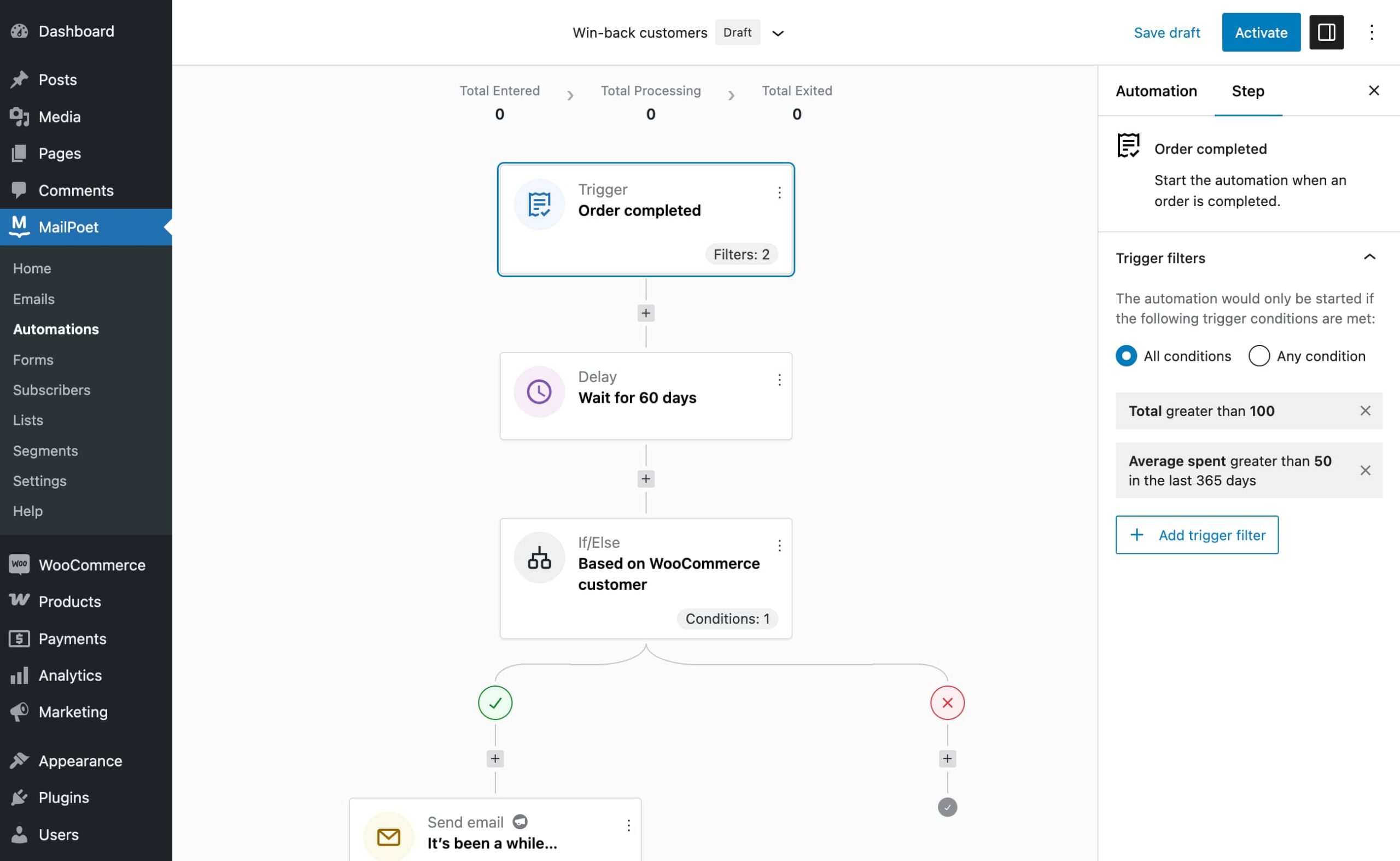
The automation editor supports:
- Custom triggers: subscription events, WooCommerce events, specific dates, tag changes
- Actions: send an email, add to list, remove from list, add tag, remove tag, update a subscriber field
- Conditions: if/else branching based on subscriber properties or behavior
- Delays: wait a specified time between steps
The branching and custom trigger features are paid-only (Business, Agency, Creator). The Starter plan includes only the built-in automation types (welcome sequences, post notifications, abandoned cart, first purchase, product/category-triggered emails).
For most small site operators, the Starter plan’s built-in automations cover the scenarios they actually need. The upgrade to Business makes sense when you need if/else logic, multi-step sequences with multiple branches, or automation triggers that go beyond WooCommerce and new subscriber events.
Analytics
Analytics in MailPoet are split between free and paid tiers.
Starter (free):
- Summarized email engagement statistics: total sent, opens (as a count), and clicks (as a count) per newsletter, shown in a simplified view.
Business / Agency / Creator (paid):
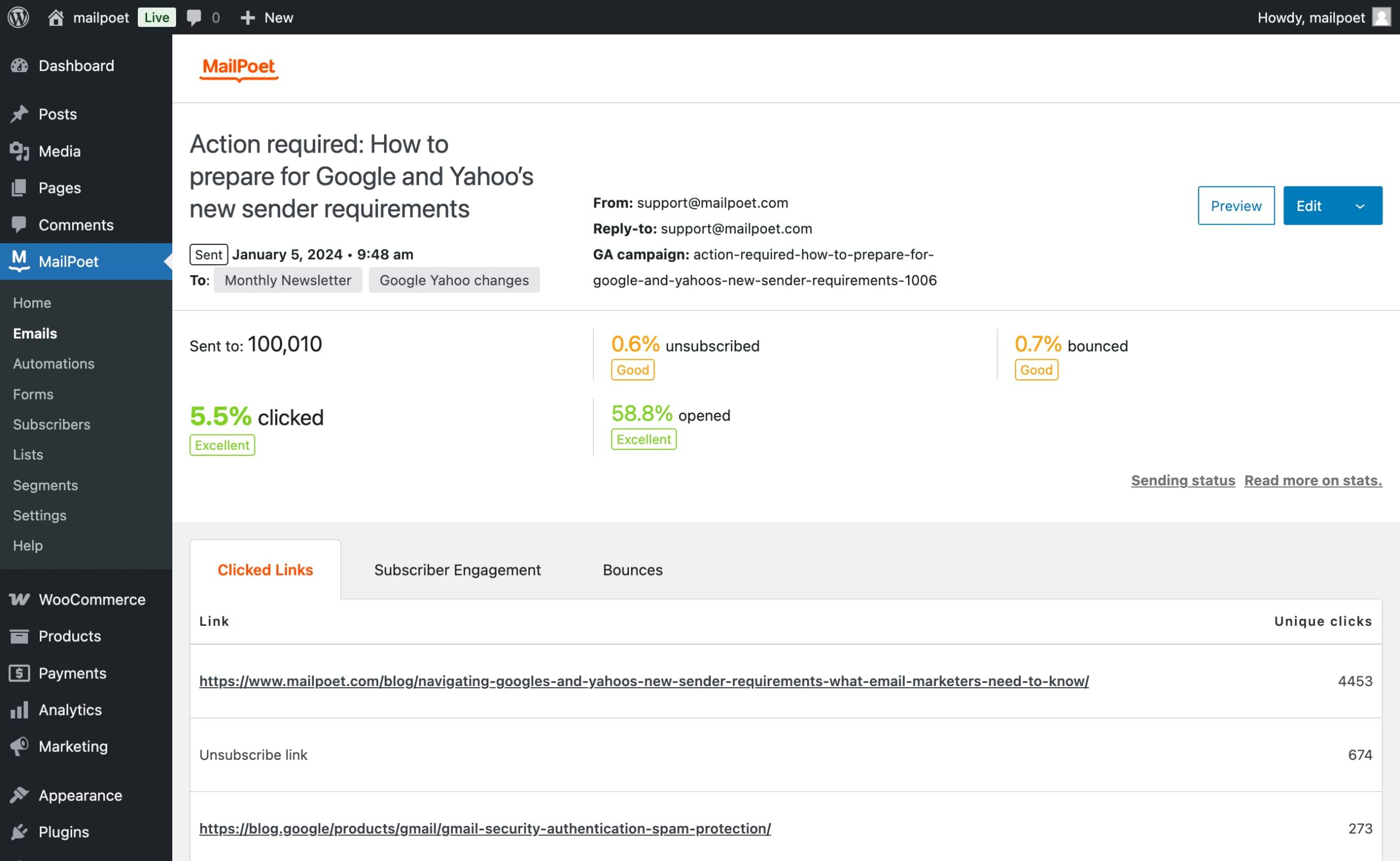
- Detailed email engagement statistics: open rate, click rate, unsubscribe rate, per-campaign and per-subscriber breakdowns.
- Detailed WooCommerce purchasing statistics: revenue driven by email, number of orders attributed to email, and products purchased per campaign.
- Google Analytics integration: campaign tracking parameters attached to links automatically, so email-driven traffic appears in GA with proper campaign attribution.
- Individual subscriber engagement statistics: per-subscriber open and click history.
The WooCommerce revenue attribution on paid plans is a meaningful analytics upgrade for store operators who want to know which email campaigns drive actual sales, not just clicks.
The MailPoet Sending Service
The sending service deserves its own section because it is the feature that most distinguishes MailPoet from other newsletter plugins.
When you install a standalone newsletter plugin and connect it to your hosting server’s PHP mail function, email deliverability varies by host. Some hosts limit how many emails can be sent per hour. Others have poorly configured mail servers that cause emails to land in spam. Fixing this normally requires setting up an external SMTP service (like SendGrid, Mailgun, or Amazon SES) and connecting it separately.
MailPoet bypasses this entirely. The MailPoet Sending Service is their own email delivery infrastructure, built specifically for WordPress. It handles:
- Sending at up to 50,000 emails per hour
- SPF and DKIM authentication (sender verification that improves deliverability)
- Automatic bounce processing: addresses that bounce are flagged and removed from active sending
- Automatic complaint handling: recipients who mark your email as spam are removed from the list
The service is free on the Starter plan for up to 5,000 emails per month. Paid plans remove the monthly email cap. The Creator plan, by contrast, specifically excludes the MailPoet Sending Service; it is designed for users who want to supply their own SMTP credentials or use a third-party ESP for delivery.
The vendor reports a 98.5% deliverability rate and over 99% uptime. These are vendor-reported figures, not independently verified in this review, but the scale of the service (30+ million emails per month) gives some weight to the deliverability claims.
If you need or want to use your own SMTP provider instead, MailPoet supports that too. The Settings panel has an SMTP configuration option that accepts credentials from any provider: Postmark, Brevo, SendGrid, Mailgun, and so on. This is available on all plans, including free.
Pricing
MailPoet pricing is subscriber-based and scales up as your list grows. All prices are in EUR and are billed either monthly or yearly (yearly saves up to 15%). Base prices below are for up to 500 subscribers as displayed on the pricing page on August 2, 2026. Verify current pricing on mailpoet.com/pricing/ before purchasing.
| Plan | Base price | Subscribers | Monthly emails | Sites | Sending |
|---|---|---|---|---|---|
| Starter | Free | Up to 500 | Up to 5,000 | 1 | MailPoet Sending Service |
| Business | From €10/month | 500+ (scales up) | Unlimited | 1 | MailPoet Sending Service |
| Agency | From €30/month | 500+ per site (scales up) | Unlimited | 50 | MailPoet Sending Service |
| Creator | From €8/month | 500+ (scales up) | Unlimited | 1 | BYO SMTP only |
The subscriber tier pricing works as an estimate slider on the pricing page. The more subscribers you have, the higher the monthly cost. Example ranges visible on the pricing page: 500, 1,500, 2,500, 5,000, 10,000, 15,000, 20,000, 25,000, 30,000, 40,000, 50,000, and beyond up to 500,000+. Exact prices at higher tiers are calculated dynamically; check the pricing page for your subscriber count.
Non-profit organizations can request a 20% discount on any paid plan by contacting MailPoet support.
Value assessment
For the free Starter plan: this is among the most generous free tiers in the WordPress email marketing category. The 500-subscriber cap is the binding constraint. If your list stays small or you are just starting out, the free plan is a viable long-term option. If you are already building toward a larger list, start the free plan and budget for the Business upgrade early.
For the Business plan: the upgrade is justified when you need advanced automation (custom triggers and if/else branching), detailed analytics (open/click rates, WooCommerce revenue attribution), or a subscriber count beyond 500. The re-engagement and review follow-up WooCommerce automations also require Business.
For the Agency plan: the right choice for freelancers or agencies running MailPoet installations across multiple client sites. The Agency plan covers 50 websites with the subscriber count per site managed independently.
For the Creator plan: targeted at experienced operators who want all Business features but prefer to manage their own sending infrastructure. It is priced slightly below Business because the sending service is excluded. If you are comfortable with SMTP configuration and have an existing ESP relationship, Creator makes economic sense.
Pros and cons
Pros
- Full email marketing platform inside WordPress, not a connector to an external SaaS. Subscriber data stays on your server.
- The MailPoet Sending Service is included at the free Starter tier, eliminating the need to set up a third-party SMTP account just to send email.
- WooCommerce automation (abandoned cart, first purchase, product/category-triggered emails, and transactional email customization) is free on the Starter plan. Competitors often charge for equivalent features.
- 70+ professionally designed email templates included on all plans.
- WordPress post and WooCommerce product blocks in the email editor make content-driven emails significantly faster to build.
- Flexible subscription form types: inline, widget, pop-up, slide-in, fixed bar, exit intent, shortcode, WooCommerce checkout, and WordPress registration.
- Subscriber segmentation by engagement score and purchasing behavior on the free plan.
- Automatic bounce processing and spam complaint handling via the MailPoet Sending Service.
- Agency plan covers 50 websites, with per-site subscriber management.
- Non-profit discount available (20% off any paid plan).
- GDPR-compliant by design; privacy-first forms supported.
- Actively developed: version 5.34.3 released July 28, 2026, with WooCommerce 11.0 compatibility.
- 68+ million total downloads across the plugin’s lifetime.
Cons
- The free plan caps at 500 subscribers. This is tight for any site with an existing audience.
- Pricing is in EUR, not USD. Buyers outside Europe see prices that fluctuate with exchange rates.
- Advanced automation (custom triggers, if/else branching) requires a paid plan. The Starter automations are useful but limited.
- Detailed analytics (open rates, click rates, WooCommerce revenue attribution, Google Analytics integration) are paid-only.
- The Creator plan does not include the MailPoet Sending Service, requiring buyers to configure and manage their own sending. Bounce handling and complaint management are the user’s responsibility on Creator.
- Rating is 4.4 out of 5 from 1,426 WordPress.org reviews. While generally positive, it is lower than some category leaders. The 150 one-star reviews suggest some reported friction, particularly around deliverability troubleshooting and plan transitions.
- WooCommerce version requirement was bumped to 10.9 in the latest release. Sites on older WooCommerce versions must update before using WooCommerce features.
- No native transactional email support (receipts, password resets, contact form submissions) in the same plugin. Pairing MailPoet with a separate SMTP plugin for transactional emails is common practice.
- The MailPoet branding (a “Powered by MailPoet” footer line) appears in emails sent on the free Starter plan. Removing it requires a paid upgrade.
Alternatives to MailPoet
- Newsletter (by Stefano Lissa): a free standalone newsletter plugin that handles subscriber management and broadcast emails. Lighter and simpler than MailPoet. No built-in sending service, no WooCommerce automation depth. A reasonable fit for basic blogging newsletters where simplicity is the goal.
- FluentCRM: a CRM-oriented email marketing tool with strong automation capabilities. More powerful on the automation side but lacks a built-in sending service. Requires pairing with FluentSMTP or another SMTP plugin. Better choice for advanced marketers who need deep CRM records.
- Mailster: a paid standalone newsletter plugin with similar scope to MailPoet. No built-in sending service. A credible alternative for agencies that prefer a one-time license over a subscription.
- Brevo (formerly Sendinblue) for WordPress: routes WordPress emails through the Brevo SaaS platform. More powerful analytics and transactional email capabilities in the Brevo ecosystem; subscriber data lives in Brevo’s cloud rather than your WordPress database.
- Mailchimp for WordPress (MC4WP): a form integration plugin that connects subscriber forms to Mailchimp. Not a standalone newsletter tool. Choose it if you are already invested in Mailchimp and only need a clean WordPress form connection.
- ActiveCampaign for WordPress: external SaaS with deep CRM and automation, connected to WordPress via form embeds or their plugin. Overkill for most small sites; the right choice for sophisticated marketing teams with a large budget.
For most WordPress site owners choosing between MailPoet and a lighter newsletter plugin, MailPoet wins on depth, especially the WooCommerce features and the managed sending service. For sellers comparing MailPoet to a dedicated ESP, the tradeoff is data control (stays in WordPress vs. moves to the ESP’s cloud) and cost structure (subscriber-based recurring in EUR vs. varying ESP models). MailPoet is strongest when WordPress is your primary operations center and you want email marketing to live there too.
Final verdict
After a detailed review of MailPoet version 5.34.3, it is clear that the plugin’s core proposition holds up: if you want a full email marketing system inside WordPress rather than an external SaaS you need to log into separately, MailPoet is the most capable option in the category.
The Starter plan is the real story here. Five hundred subscribers and 5,000 emails per month, with the managed sending service, abandoned cart emails, first-purchase emails, and product-triggered automations, all at no cost. That is a lot of capability for a free tier. Comparable WooCommerce email features in standalone tools like Klaviyo or Drip start at significantly higher price points.
The limitations are real and worth stating clearly. The 500-subscriber cap means the free tier has a defined expiry date for any growing list. The pricing in EUR introduces variability for non-European buyers. Advanced automation (branching, custom triggers) and detailed analytics sit behind the Business paywall. The 4.4/5 rating across 1,426 reviews is decent but not remarkable; the 150 one-star reviews are worth reading before committing to the tool.
For a blog owner growing a newsletter from scratch, MailPoet Starter is the easiest entry point in the category. For a WooCommerce store that wants to turn customer data into personalized email sequences without a separate ESP account, MailPoet makes a compelling case at every paid tier. For an email marketer who needs sophisticated CRM behavior, multi-channel automation, or a platform that scales to millions of subscribers, look at FluentCRM or a dedicated SaaS instead.
The recommendation: start with the Starter plan. If your list grows past 500 or you need open rates and WooCommerce revenue attribution in your dashboards, upgrade to Business. The managed sending service alone removes a setup headache that stops many small site owners from ever sending their first newsletter.