

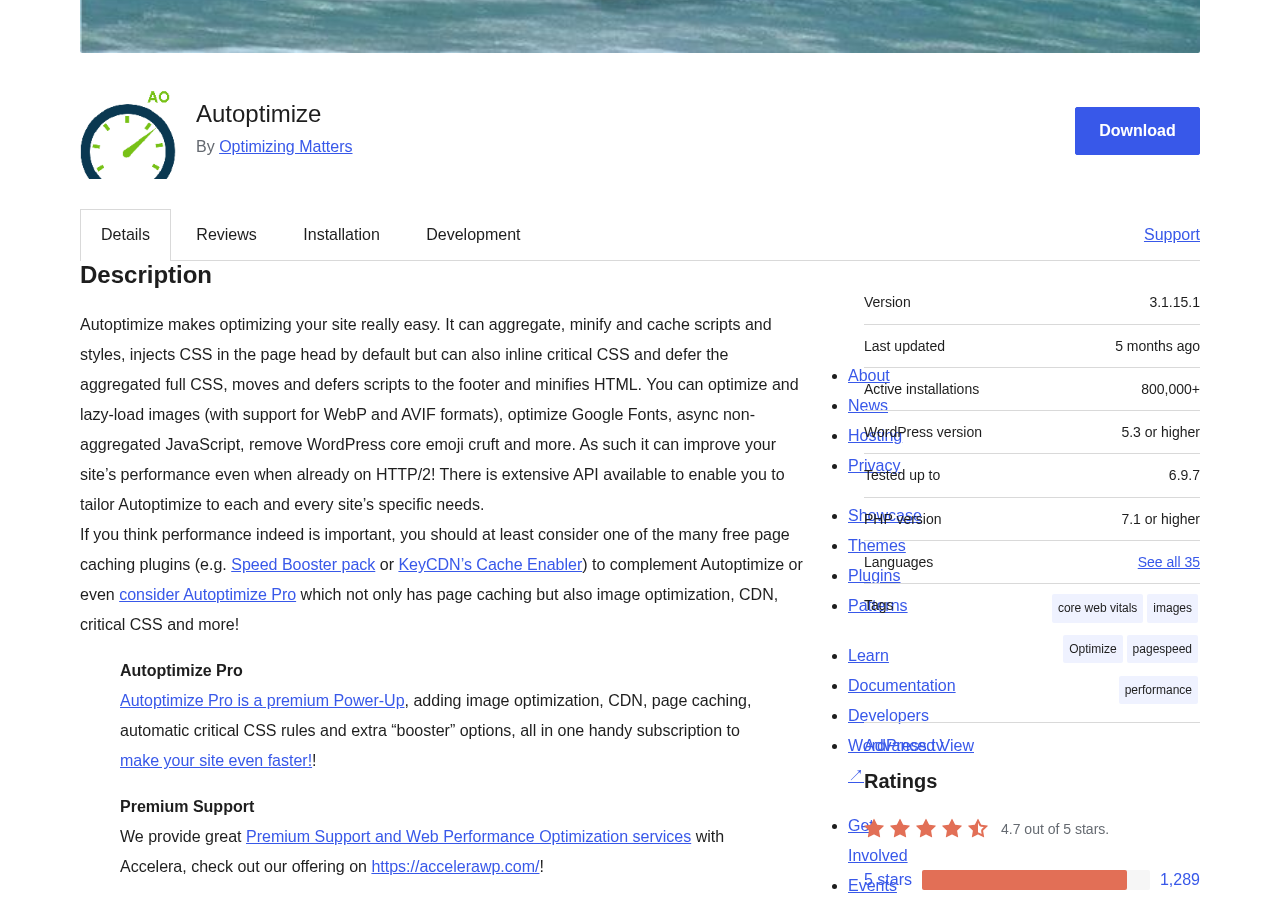
Autoptimize has been reducing WordPress load times since 2009. That is a long run for any plugin, and the install count backs it up: 800,000+ active installations on WordPress.org, a 4.7-out-of-5-star rating from more than 1,400 reviews, and a spot on the default stack of many WordPress developers who want a free, reliable CSS and JavaScript optimizer without much fuss.
The plugin does one thing well: it takes the scripts and stylesheets WordPress generates and makes them faster to deliver. It aggregates, minifies, and caches CSS and JavaScript files. It defers render-blocking resources. It handles Google Fonts. It lazy-loads images. For most sites, that combination produces a measurable improvement in page load time and Core Web Vitals scores, without the complexity of an all-in-one performance suite.
This Autoptimize review covers version 3.1.15.1, the current release as of August 2026. I worked through the WordPress.org listing, the official autoptimize.com and Pro pages, the changelog, and the plugin settings to give you an accurate picture of what the free version delivers, where the Pro add-on is worth considering, and where the plugin has real limits.
At a glance:
- Audited on: WordPress.org listing (version 3.1.15.1, last updated April 4, 2026); autoptimize.com features and Pro pages; the official FAQ and changelog. Active install count and rating verified on WordPress.org on August 19, 2026.
- Free tier: JavaScript, CSS, and HTML minification; file aggregation; image lazy-loading with WebP/AVIF support; Google Fonts optimization; critical CSS (manual rules); remove emoji code; extensive filter API.
- Pro: adds automatic critical CSS generation, image CDN via ShortPixel, page caching, configuration wizard, JS delay options, iframe deferral, and more.
- Bottom line: the most capable free WordPress code optimizer in its category, with a straightforward Pro upgrade for sites that need automated critical CSS and image CDN.
Quick verdict
Autoptimize free is the first plugin I recommend to WordPress site owners who need CSS and JS optimization without paying for it. The free version covers the core performance stack: minification, aggregation, deferral, Google Fonts optimization, lazy-loading, and HTML compression. For most small-to-medium WordPress sites, those features alone will improve Largest Contentful Paint and Total Blocking Time scores without touching a single server setting.
The free version has one notable limit: critical CSS automation. Critical CSS is the above-the-fold stylesheet that prevents a flash of unstyled content during page load. In version 3.0.0, Autoptimize added support for manually authored critical CSS rules without an API. That is genuinely useful for developers who know their site’s above-the-fold CSS and want to enter it directly. It is less useful for non-technical users who want automatic detection and generation. That is where Pro earns its price.
Autoptimize Pro, powered by ShortPixel, adds automated critical CSS generation, an image and CDN delivery network, page caching, and a guided setup wizard. The pricing starts at around $89/year for a single site. That is a fair price for the bundle if you need all four components; it is not a great deal if you already have a caching plugin and image optimizer you are happy with.
Quick verdict card:
- Best for: WordPress site owners and developers who want a free, well-maintained CSS/JS/HTML optimizer with a 15-year track record.
- Best plan for individual sites: the free version for code optimization; Autoptimize Pro single-site if you also need automated critical CSS and image CDN.
- Best plan for agencies: the Pro 5-site plan at $379/year if you manage multiple sites and want the full optimization stack in one license.
- Standout: free CSS/JS aggregation and minification with strong real-world results; manual critical CSS support since v3.0.0; 800,000+ active installs and active developer support.
- Watch out for: no built-in page caching in the free version; automated critical CSS requires Pro; aggregation can break some themes and plugins and needs testing per site; no sub-hourly scheduling (it is a code optimizer, not a caching server); setup requires some technical judgment.
What Autoptimize is
Autoptimize is a WordPress asset optimization plugin. Its job is to take the CSS, JavaScript, and HTML that WordPress generates on each page load and deliver them faster.
It does this through three main techniques: aggregation (combining multiple files into fewer requests), minification (stripping whitespace, comments, and redundant characters from code files), and caching (storing the optimized output so it does not have to be regenerated on every visit). These three techniques together reduce the number of HTTP requests a browser needs to make, reduce the file size of each request, and reduce the server CPU needed to serve pages to returning visitors.
Frank Goossens, a web technology consultant based in Ghent, Belgium, created Autoptimize in 2009 and has maintained it since through his company, Optimizing Matters. The plugin has been continuously updated for 15 years. That is unusual longevity in the WordPress plugin ecosystem, and it matters: a plugin that has survived 15 major WordPress versions has had its edge cases worked out in the wild across millions of sites.
Version 3.0.0 was a meaningful shift in philosophy. Before it, new installs aggregated JavaScript and CSS by default. After it, new installs no longer aggregate by default. The reason is HTTP/2: modern connections handle multiple simultaneous requests efficiently, which reduces the load-time benefit of concatenating many files into one. Aggregation is still available, and for many sites it still helps, but the plugin no longer assumes it is the right default. That kind of considered change reflects an author paying attention to how the web actually works in 2026.
Autoptimize currently has 800,000+ active installations, a 4.7/5 rating on WordPress.org (1,428 total reviews, 1,289 five-star), and active development with a security update released in April 2026.
Who Autoptimize is best for
Strong fit:
- WordPress site owners who want a free, no-nonsense code optimizer that does not require a subscription to use well. The free version is genuinely complete for CSS, JS, and HTML minification.
- Developers who want granular control over how assets are handled. Autoptimize exposes a rich filter API that lets you disable optimization per page, modify exclusion lists, change cache paths, and hook into almost every optimization step.
- Sites running standard WordPress themes and plugins where aggregation works without conflicts. Autoptimize’s default behavior is conservative enough that most sites can enable it and see results quickly.
- Site owners managing Google Fonts. Autoptimize handles fonts in two modes: combine and link (render-blocking but immediate), or combine and load async (non-render-blocking but may show unstyled text briefly). Both are useful depending on the site’s font strategy.
- Developers who want to test manual critical CSS without paying for an API service. Since version 3.0.0, you can paste in your own critical CSS rules directly.
- Image optimization-focused sites that want WebP and AVIF delivery with lazy-loading included in the free tier.
- Sites using a separate page caching plugin (LiteSpeed Cache, W3 Total Cache, WP Super Cache, or similar) and looking for a code optimizer that layers cleanly on top of caching without owning the full stack.
Weak fit:
- Site owners who want a fully automated, wizard-driven optimization experience out of the box. Autoptimize’s free settings panel requires some technical judgment: enabling aggregation and deferral without testing can break JavaScript-dependent features on some themes and plugins.
- WooCommerce stores or membership sites where careful exclusion management is critical. Dynamic pages with user-specific content need exclusion rules to prevent incorrect caching. Getting those rules right requires testing.
- Sites that want page caching from the same plugin without a Pro subscription. Autoptimize free does not include a page cache. You need a separate caching plugin or Autoptimize Pro.
- Buyers who want automated critical CSS generation at no cost. Automatic detection and generation of critical CSS rules is a Pro feature. The free version supports manual critical CSS, which requires writing the rules yourself.
- Sites on very old PHP (below 7.1) or WordPress (below 5.3). These are beyond Autoptimize’s minimum requirements.
- Sites where a developer-friendly all-in-one solution with built-in CDN and page caching is needed from a single vendor. WP Rocket or NitroPack are better fits for that scenario.
Setting up Autoptimize
Autoptimize installs from the WordPress admin at Plugins > Add New. Search for “Autoptimize” and the plugin with the gear icon appears at the top of results. Installation is standard WordPress plugin procedure.
After activation, Autoptimize adds a Settings > Autoptimize menu item. The main settings page presents three top-level sections: JS, CSS, and HTML. A fourth section handles images, and a fifth covers extras (Google Fonts, emoji removal, pre-connect hints).
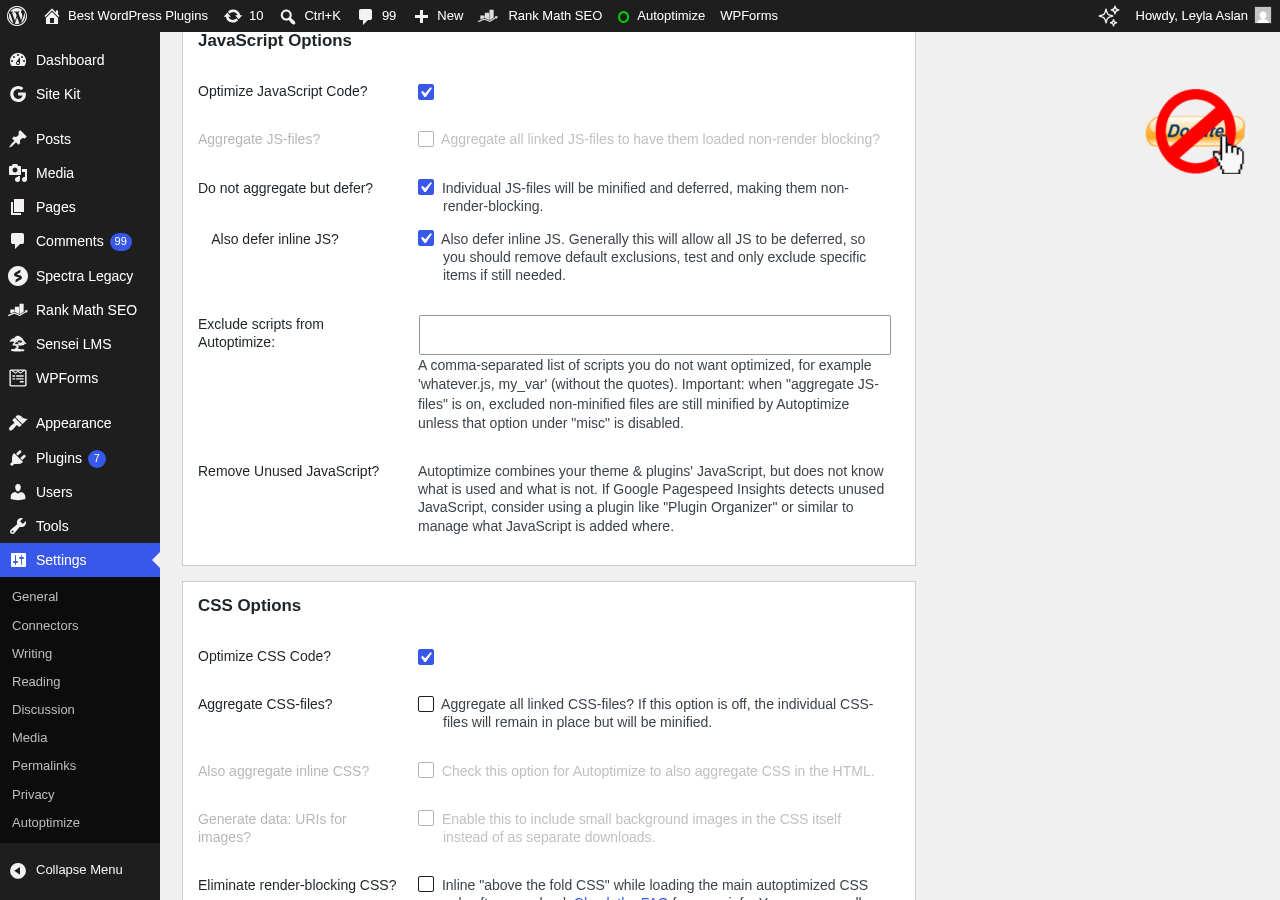
The recommended starting point is to enable all three top-level optimizations (JS, CSS, HTML) and then check the front end of your site. On most standard WordPress themes, enabling Autoptimize with default settings produces no visible issues. Where problems appear, the plugin provides exclusion fields for each section: enter a file name or path to skip that file from optimization.
The most common setup issue is JavaScript conflicts. If you see blank pages or broken functionality after enabling JS aggregation, the fix is usually to add the conflicting script to the exclusion list. Autoptimize ships with a sensible default exclusion for jquery.min.js because WordPress core’s jQuery is often injected inline by other plugins in ways that break when concatenated. If you use a page builder or a complex theme, test with aggregation disabled first, then re-enable it gradually.
(Note: this setup assessment is based on the official documentation, changelog, and FAQ for version 3.1.15.1. A direct live install was not tested during this review window. The described behavior reflects the plugin’s documented defaults.)
A useful feature for cautious testing: Autoptimize lets you disable optimization for logged-in users. This means you can see the optimized version as a visitor while testing with your admin account showing unoptimized output. For a complex site with custom JavaScript, this reduces the risk of breaking the live site during configuration.
JavaScript optimization
The JavaScript optimization section offers four key controls:
- Aggregate JS files: Combines multiple JS files into one or a small number of cached files, reducing HTTP requests.
- Minify JS: Removes whitespace, comments, and unnecessary characters from JS files.
- Force JS in head: Moves scripts to the page head (not recommended for most sites; use for specific compatibility cases only).
- Defer JS loading: Makes JavaScript non-render-blocking. The default behavior moves scripts to the footer; full deferral can be enabled for maximum effect.
Autoptimize uses Mr Clay’s Minify library for JavaScript compression. The results are solid across standard WordPress scripts. Where a script behaves incorrectly after minification, you can add it to the JS exclusion list and it will be served unmodified.
The wrapper comment is one of the more useful developer tools in the free version. Wrapping any inline script block with these HTML comments tells Autoptimize to leave that block entirely untouched, without needing to touch the exclusion settings.
Since version 3.0.0, new installs no longer aggregate JS by default. If your site runs on HTTP/2 (which any hosting on a modern server does), the bandwidth and latency benefit of JS concatenation is smaller than it was in the HTTP/1.1 era. Autoptimize’s non-aggregate default is the right call for most 2026 WordPress installs. You can still enable aggregation manually if benchmarking shows it helps your specific configuration.
CSS optimization
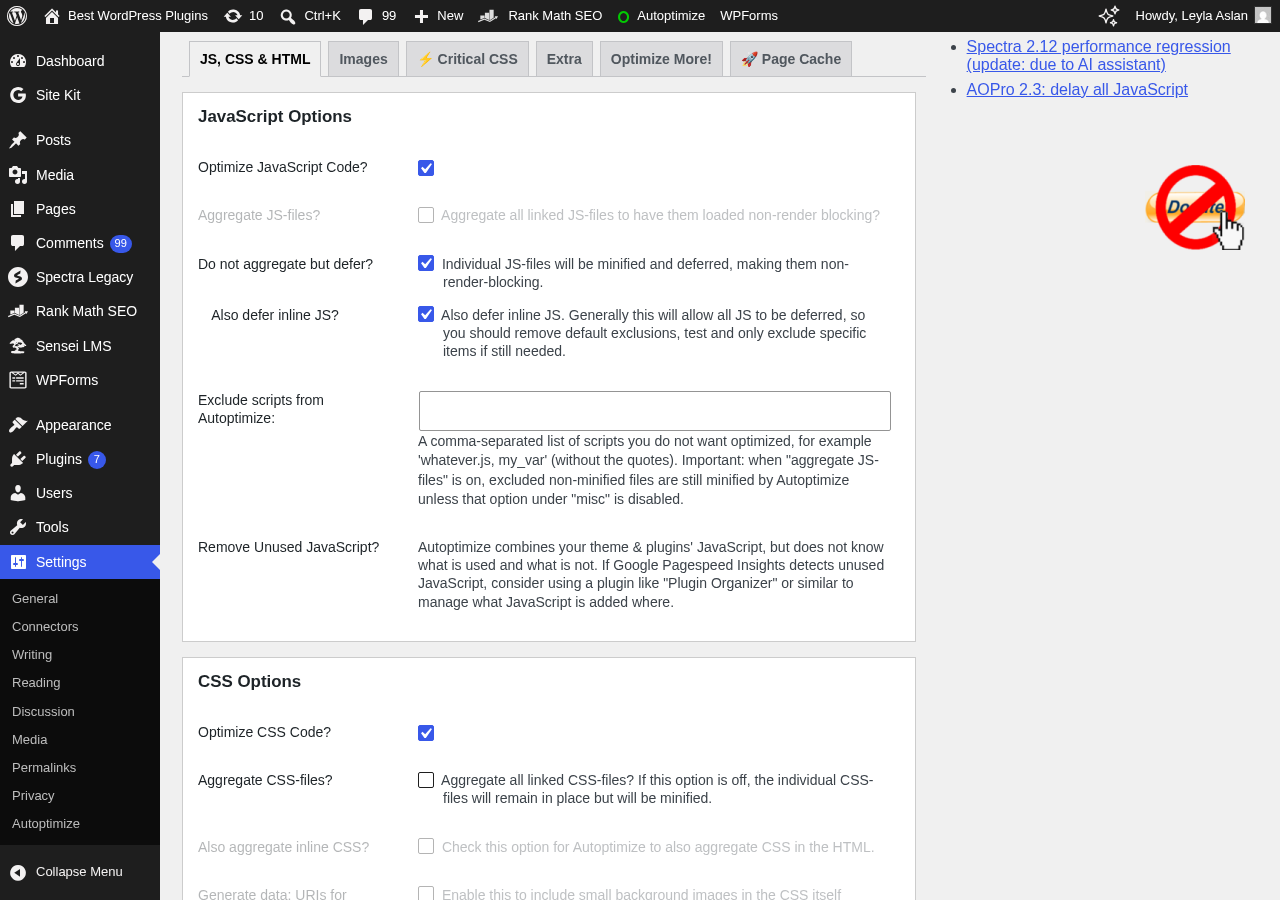
The CSS section gives you similar controls to the JS section, plus one extra decision: how to handle CSS loading relative to the page render.
The three CSS delivery strategies are:
- Aggregate CSS in head (default): Combines CSS into one cached file and links it in the page head. Render-blocking, but the correct default for most sites.
- Inline all CSS: Puts all CSS directly in the page HTML. No separate CSS request, but the page HTML grows substantially. Effective for small sites; impractical for sites with large stylesheets.
- Inline critical CSS, defer full CSS: Pastes your critical CSS inline (above the fold), then loads the full stylesheet asynchronously. This is the highest-performance option for LCP scores, but requires you to have a valid critical CSS definition.
The third option is where Autoptimize’s critical CSS story plays out. In the free version, you write the critical CSS rules manually and paste them into the settings field. Since version 3.0.0, this works without any external API: you can paste critical CSS from a tool like Critical (the npm package) or generate it yourself, and Autoptimize will use it directly.
For non-developers who do not want to write critical CSS by hand, Autoptimize Pro handles this step automatically. Pro’s critical CSS service generates rules per page type (home, blog, single post, WooCommerce shop, etc.) and keeps them updated automatically. That is a meaningful time saving for complex sites.
YUI CSS Compressor is the compression engine for CSS files. It handles standard WordPress theme stylesheets reliably. For stylesheets with unusual syntax or complex preprocessor output, adding specific files to the CSS exclusion list is the fallback.
HTML optimization
The HTML section is simpler: it minifies the raw HTML output of each WordPress page. This means stripping whitespace and comments from the rendered HTML before it is sent to the browser.
The benefit is modest on most sites: HTML files are generally smaller than CSS and JS files, so the savings are smaller in absolute terms. But for high-traffic pages where every byte matters, HTML minification contributes to the overall footprint reduction.
Version 3.1.0 added “minify inline CSS/JS” as a sub-option of HTML optimization. This extends minification to CSS and JavaScript that is embedded directly in HTML rather than loaded from external files. For themes or plugins that output significant inline scripts (as many page builders do), this covers optimization cases that the CSS/JS sections miss.
Image optimization and lazy-loading
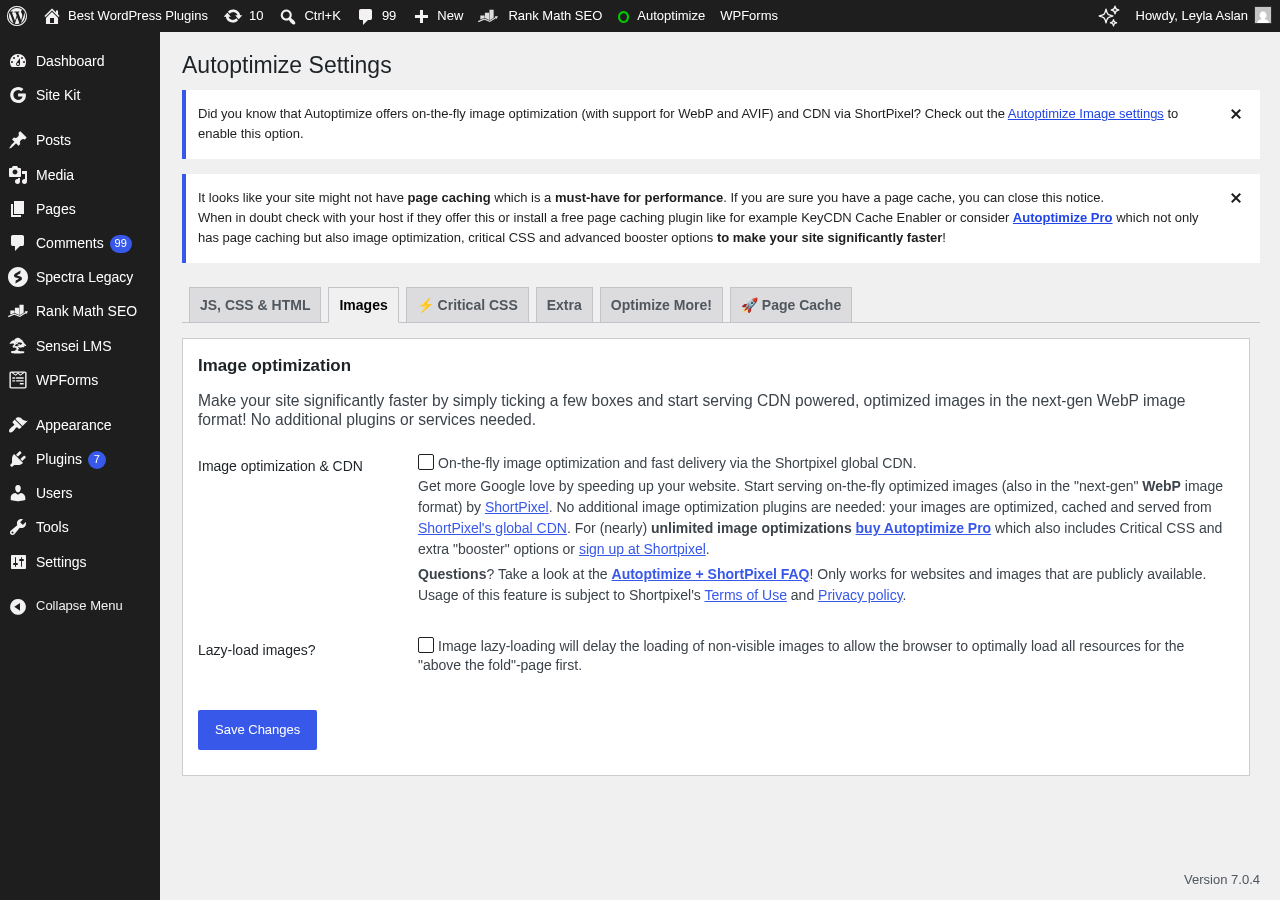
Autoptimize free includes lazy-loading for images and iframes. The lazy-loader uses the Lazysizes JavaScript library: images below the visible viewport are not downloaded until the user scrolls toward them. This reduces the initial page payload and improves LCP by deferring images that are not immediately visible.
WebP and AVIF format support is included in the free version. Autoptimize can serve WebP and AVIF versions of images when the image optimization is enabled and the server or CDN supports format negotiation. This reduces image payload for browsers that support modern formats (which is the majority of browsers in 2026).
The image optimization service itself (compression, format conversion, CDN delivery) is powered by ShortPixel and is part of Autoptimize Pro. In the free version, you get lazy-loading and format-aware serving; you do not get the compression and CDN pipeline that reduces file sizes before delivery.
Google Fonts optimization
Google Fonts are one of the most common render-blocking resources on WordPress sites. Autoptimize provides two handling modes:
- Combine and link: Merges all Google Fonts requests into a single request, links it in the head. Still render-blocking, but reduces requests.
- Combine and load async: Merges requests and loads the font stylesheet asynchronously. Non-render-blocking, but the page may show a brief flash of unstyled text while fonts load.
The async option improves Lighthouse performance scores but may create a noticeable unstyled text flash on sites where fonts are prominent in above-the-fold content. Testing both modes and checking your specific site’s visual behavior is the right approach.
Autoptimize also provides an option to remove Google Fonts entirely, which is the highest-performance option for sites that have moved to system fonts or self-hosted font files.
Extras and API
The Extras tab covers two useful housekeeping features:
- Remove emoji scripts: WordPress core loads a small JavaScript file to handle emoji rendering across browsers that do not support the emoji Unicode standard natively. For most modern sites, this script adds no value. Removing it eliminates one JavaScript request per page load.
- Preconnect hints: Autoptimize can add DNS prefetch or preconnect hints for external resources, which reduces connection latency for resources loaded from third-party origins.
The filter API is where Autoptimize becomes a developer-grade tool. A set of WordPress filters lets you:
- Disable optimization entirely for specific posts, pages, or conditions (
autoptimize_filter_noptimize). - Modify the exclusion list programmatically.
- Change the cache directory and file naming.
- Override settings per page or per user type.
This API means Autoptimize can be adapted to almost any WordPress setup without modifying the plugin itself. Sites with complex conditional logic (different optimization levels for logged-in vs. anonymous users, different rules for checkout pages, different behavior on AMP pages) can implement those rules through filters in a theme’s functions.php or a custom plugin.
Autoptimize Pro
Autoptimize Pro is a subscription add-on that extends the free plugin with four additional services:
Automated critical CSS. Instead of writing critical CSS manually, Pro’s service analyzes your pages and generates critical CSS rules automatically. It covers multiple page types: home page, blog listing, single posts, WooCommerce shop, product pages, and custom post types. Rules are refreshed automatically. For non-developer site owners, this removes the hardest part of advanced CSS optimization.
Image CDN via ShortPixel. Images are served through ShortPixel’s CDN with compression and format conversion applied automatically. The CDN handles WebP and AVIF delivery at the edge, which reduces image file sizes for all visitors regardless of origin server. For sites with large image libraries or international audiences, CDN delivery has a measurable impact on load time.
Page caching. Autoptimize Pro includes a server-side page cache. Cached HTML pages are served without executing PHP or querying the database, which is the single biggest throughput improvement for most WordPress sites. Combined with code optimization and CDN delivery, page caching completes the optimization stack.
Configuration wizard. A guided setup wizard walks through five optimization presets. For site owners who do not want to configure settings manually, the wizard selects an appropriate preset based on the site type and confirmed compatibility.
Pro Boosters. Advanced optimization features including: delay all JavaScript (JS does not execute until the user interacts with the page, improving TBT scores), iframe deferral with thumbnail placeholders for YouTube, Vimeo, and Dailymotion embeds, HTML delay for below-the-fold content, and selective removal of specific JavaScript or CSS that is identified as unnecessary.
Pro pricing
Prices checked against autoptimize.com on August 19, 2026:
- Single site, monthly: $12.99/month
- Single site, annual: $89/year
- 5 sites, monthly: $39.99/month
- 5 sites, annual: $379/year
- Starter (basic tier): from $5/month
The single-site annual plan at $89/year is the practical entry point. For a business site where LCP improvement has measurable commercial impact, $89/year for automated critical CSS, image CDN, and page caching is reasonable. For a personal blog or low-traffic informational site, the free version is sufficient.
The 5-site annual plan at $379/year breaks down to roughly $75.80 per site per year. For developers and small agencies managing a handful of client sites, this is the efficient tier.
Note: for comparison, WP Rocket (an all-in-one caching and optimization plugin) starts at around $59/year for a single site and includes page caching, code optimization, image lazy-loading, and CDN integration. WP Rocket does not have a free tier. Autoptimize’s free version is more capable in absolute feature terms than WP Rocket’s trial period, and the Pro bundle is slightly more expensive for a single site than WP Rocket’s entry plan. The decision depends on whether you value the free tier for code optimization (Autoptimize) or a unified plugin for everything (WP Rocket).
Pros and cons
Pros:
- Genuinely complete free code optimizer. JS minification, CSS minification, HTML minification, aggregation, deferral, image lazy-loading, Google Fonts optimization, emoji removal, and manual critical CSS are all free.
- 15 years of continuous development and 800,000+ active installs. That depth of real-world testing means most common WordPress plugin and theme combinations have been encountered and addressed.
- Excellent free-tier ratings. A 4.7/5 rating from 1,428 reviews with 1,289 five-star ratings is a strong signal of user satisfaction for a plugin that costs nothing.
- Conservative and sensible defaults in version 3.x. New installs do not aggregate by default, which reduces the risk of JS conflicts on first activation. Getting started without breaking the site is easier than it used to be.
- Developer-friendly filter API. Extensive hooks let you disable, modify, or conditionally override almost every optimization behavior without touching the plugin itself.
- Manual critical CSS support (free, since v3.0.0). Developers who know their site’s above-the-fold CSS can implement the inline-critical-and-defer strategy without a paid subscription.
- WebP and AVIF image delivery in the free version. Modern format support at no cost is a meaningful free-tier inclusion.
- Active security maintenance. The April 2026 update addressed an authenticated stored XSS vulnerability. Critical security issues are patched, not deferred.
tag support. Block any section of HTML from optimization with a simple HTML comment, without configuration changes.- Works well alongside dedicated caching plugins. Autoptimize is designed to complement, not compete with, separate page caching solutions.
Cons:
- No page caching in the free version. Code optimization without page caching leaves the biggest single performance win on the table. You need a separate caching plugin or Autoptimize Pro.
- Automated critical CSS requires Pro. For site owners who cannot write critical CSS by hand, getting the inline-critical-and-defer strategy working requires either Pro or a separate service.
- Aggregation requires per-site testing. Combining multiple scripts into one file works reliably on most standard setups and breaks on some complex ones. There is no automated conflict detection; you test, observe, and exclude manually.
- No built-in CDN. The free version optimizes file sizes but delivers from your origin server. CDN delivery is a Pro feature (or requires a separate CDN plugin).
- Settings can be overwhelming for first-time users. The free settings panel has more options than a beginner needs, and the documentation assumes some familiarity with web performance concepts.
- No automatic backup before critical CSS updates or version upgrades. Autoptimize does not trigger a backup or snapshot before making changes that could affect the live site.
- Image CDN and compression are Pro-only. Lazy-loading is free, but actual image file optimization and CDN delivery require Pro.
- Support for the free version is through WordPress.org forums, not a dedicated helpdesk. Response times depend on community and author availability.
- Last updated April 2026 (version 3.1.15.1). At five months since the last release at the time of this review, the update cadence is slower than some comparable plugins.
Alternatives to Autoptimize
- WP Rocket. An all-in-one premium performance plugin that combines page caching, code optimization, lazy-loading, CDN integration, and database optimization in a single purchase. No free version. Starting at $59/year for one site, it is more affordable at entry level than Autoptimize Pro’s single-site annual plan. Choose WP Rocket if you want a single plugin that handles the full optimization stack with a simpler configuration experience and no free-tier trade-off.
- LiteSpeed Cache. A free, feature-rich plugin with page caching (requires LiteSpeed web server), code optimization, image optimization via QUIC.cloud CDN, and object caching. Best fit for sites hosted on LiteSpeed servers. If your host runs LiteSpeed, LiteSpeed Cache is a stronger free alternative to the Autoptimize free-plus-Pro stack.
- W3 Total Cache. A free plugin that covers page caching, database caching, object caching, CDN integration, and code minification. More complex to configure than Autoptimize; better fit for developers managing VPS or dedicated server environments who want full control over every caching layer.
- Perfmatters. A lightweight paid plugin focused on reducing WordPress bloat: disabling unused scripts, removing unused CSS, managing Google Fonts, and removing core WordPress features that most sites do not need. Not a page cache or a JS/CSS minifier in the same sense as Autoptimize. Best used alongside Autoptimize or a caching plugin for a layered approach.
- NitroPack. A premium all-in-one performance service with automatic optimization, CDN, caching, and image handling at the server and CDN level. More expensive than Autoptimize Pro (plans start around $21/month for a single site). Choose NitroPack if you want fully automated performance optimization with minimal configuration and budget is not a primary constraint.
The most common practical comparison is Autoptimize free (code optimization) plus a caching plugin (LiteSpeed Cache, WP Super Cache, or W3 Total Cache) versus WP Rocket (unified paid solution). Both approaches produce comparable results; the Autoptimize-plus-cache-plugin approach costs nothing at the free tier; WP Rocket costs from $59/year but requires only one plugin to manage.
Final verdict
Autoptimize is the best free WordPress CSS and JavaScript optimizer available in 2026. It has 15 years of real-world testing, 800,000+ active installs, a 4.7-star rating, and a feature set that covers everything a non-paying WordPress site owner needs for code optimization: minification, aggregation, deferral, Google Fonts handling, image lazy-loading, and HTML compression.
The free version has two honest limits. First, it does not include page caching. For the majority of WordPress performance gains, page caching is the single most impactful change you can make; Autoptimize free does not do it, so you need a separate plugin. Second, automated critical CSS is behind the Pro paywall. The plugin supports manual critical CSS, which is fine for developers but impractical for most site owners.
Autoptimize Pro fills both gaps, adding automated critical CSS, image CDN delivery via ShortPixel, and page caching. At $89/year for a single site, it is reasonably priced as an add-on if you are already using the free plugin and want to extend it. As a first purchase for someone who has not committed to the Autoptimize ecosystem, WP Rocket at $59/year is worth comparing side-by-side: WP Rocket handles the full stack, has a simpler configuration experience, and is slightly less expensive at the entry tier.
For most WordPress developers and technical site owners, the answer is Autoptimize free alongside LiteSpeed Cache or WP Super Cache. That combination is zero cost, covers all the core optimization layers, and has a track record measured in years on millions of sites. For site owners who want automated critical CSS and a managed image CDN without managing multiple plugins, Autoptimize Pro is a clean upgrade path from the free version they are already running.
FAQ
Is Autoptimize free?
Yes. The core Autoptimize plugin is free and published on WordPress.org. It includes JavaScript, CSS, and HTML minification; file aggregation and deferral; image lazy-loading with WebP/AVIF support; Google Fonts optimization; manual critical CSS support; and an extensive filter API. Autoptimize Pro is a separate paid subscription that adds automated critical CSS generation, image CDN delivery via ShortPixel, page caching, and advanced optimization boosters.
Does Autoptimize replace a caching plugin?
The free version does not. Autoptimize focuses on code minification, aggregation, and deferral, which optimizes file sizes and reduces render-blocking resources. It does not generate or serve cached HTML pages. Page caching (serving pre-built HTML without executing PHP) is a separate function. You need a dedicated caching plugin like LiteSpeed Cache, W3 Total Cache, or WP Super Cache alongside Autoptimize free. Autoptimize Pro includes a built-in page cache, so the Pro bundle covers both functions.
Does Autoptimize work with WooCommerce?
Yes, with caveats. Autoptimize works with WooCommerce, but cart, checkout, and account pages need to be excluded from aggressive optimization settings. Specifically, pages where user session data is involved (checkout, my account, cart) should be excluded from page caching and may need JS exclusion rules if your WooCommerce setup uses inline scripts that conflict with aggregation. Autoptimize’s exclusion fields handle these cases; getting them right requires testing on your specific WooCommerce setup.
What is critical CSS and does Autoptimize handle it?
Critical CSS is the minimal set of CSS rules needed to render the above-the-fold portion of a page without a flash of unstyled content. Loading it inline in the page head and deferring the full stylesheet asynchronously is one of the most effective ways to improve Largest Contentful Paint (LCP). Autoptimize supports critical CSS in the free version via a manual input field where you paste the CSS rules directly. Since version 3.0.0, this does not require any external API. Automatic critical CSS generation (where the plugin analyzes your pages and creates the rules itself) is an Autoptimize Pro feature.
Can Autoptimize break my site?
In some configurations, yes. Specifically, enabling JavaScript aggregation can cause conflicts with themes or plugins that assume scripts are loaded individually or in a specific order. The plugin includes exclusion lists for each optimization type, and the most common conflicts (jQuery, inline scripts from page builders) are documented in the official FAQ. The conservative approach is to enable optimizations one at a time and check the front end after each change. The option to disable optimization for logged-in users lets you test on the live site as a visitor without exposing the broken behavior to your admin session.
How does Autoptimize compare to WP Rocket?
Autoptimize free covers code minification, aggregation, deferral, image lazy-loading, and Google Fonts optimization at no cost. WP Rocket is a paid plugin starting at $59/year that covers page caching, code optimization, lazy-loading, database optimization, and CDN integration in a single purchase with a simpler configuration experience. Autoptimize Pro at $89/year adds automated critical CSS, image CDN via ShortPixel, and page caching to the free code optimizer. If budget is not a constraint and you want a single plugin with the simplest configuration, WP Rocket is the cleaner experience. If you want maximum capability at zero cost and are comfortable managing a second caching plugin, Autoptimize free plus a free caching plugin is the stronger value.
Does Autoptimize support HTTP/2?
Yes. The plugin works on HTTP/2 connections and, since version 3.0.0, defaults to non-aggregated mode on new installs to reflect HTTP/2’s efficient handling of multiple concurrent requests. Aggregation is still available as a manual option and can improve performance on specific site configurations. The Autoptimize documentation notes that “concatenation can still make sense” even on HTTP/2, and benchmarking your specific site before and after enabling aggregation is the recommended approach.
What is Autoptimize Pro and what does it cost?
Autoptimize Pro is a subscription add-on that extends the free plugin. It adds: automated critical CSS generation per page type; image optimization and CDN delivery via ShortPixel; a built-in page cache; a guided configuration wizard with five presets; and Pro Boosters including delay-all-JavaScript, iframe deferral with video thumbnails, and selective JS/CSS removal. Pricing as of August 2026: single site at $89/year or $12.99/month; five sites at $379/year or $39.99/month; a starter tier from $5/month.
How often is Autoptimize updated?
The plugin has been maintained continuously since 2009. The current version 3.1.15.1 was released April 4, 2026. Prior releases in the 3.x series addressed security issues, WordPress 6.9 compatibility, HTML preload enhancements, and JavaScript minification improvements. Updates are less frequent than some premium alternatives (major releases roughly quarterly in 2025-2026), but security-relevant updates are pushed promptly.
Is Autoptimize compatible with page builders?
Generally yes, with some per-builder configuration required. Autoptimize 3.0.0 introduced specific compatibility logic for popular page builders. For builders that generate large volumes of inline JavaScript and CSS, enabling the “disable for logged-in users” option during testing reduces the risk of breaking the editor experience. For builders like Elementor or Divi that inject inline scripts in ways that conflict with JS aggregation, adding those scripts to the exclusion list is the standard fix.
Does Autoptimize have a free trial for Pro?
No. The free plugin on WordPress.org is effectively the trial for the code optimization layer. Autoptimize Pro (automated critical CSS, image CDN, page caching) does not have a free trial period. Review the Pro feature list against your site’s specific needs before purchasing. A money-back policy may apply; check the current terms on autoptimize.com at the time of purchase.