


Choosing a WordPress page builder in 2026 is a decision a lot of agencies and freelancers still get wrong. They reach for the tool with the most features, then spend the next six months dealing with update-related breakage on client sites, bloated page weights, and a learning curve that keeps their new hires confused.
Beaver Builder takes the opposite bet. It has been growing slowly and deliberately since 2014, it prioritizes stability over feature count, and it has a tagline that reads like a thesis statement: “The page builder freelancers start with. The one agencies never outgrow.”
I installed Beaver Builder 2.10.2.2 on a clean WordPress sandbox, worked through the free lite version from installation to a finished page, and researched the premium features from the official site, documentation, and pricing pages. Features I could not test directly on the free tier are covered with clear disclosure.
This review is for the person deciding whether to install Beaver Builder, pay for one of its plans, or reach for Elementor, Divi, or Bricks instead. Not a sales page.
Quick verdict
Beaver Builder is the most stable, performance-efficient page builder in the WordPress market for agency and freelance use.
The front-end drag-and-drop editor is genuinely fast, the code it produces is clean, and in twelve years of development the team has built a reputation for not breaking client sites on update day. The premium ecosystem, which now includes the Beaver Builder Theme and Beaver Themer on all paid plans, covers the full site-building lifecycle at a reasonable price point.
The honest caveats: the free lite version is limited enough that most users will need to upgrade to do serious work. Feature development moves slowly by design. And the active install count on WordPress.org (100,000+ for the lite version) is modest compared to Elementor’s 10+ million, which matters because a smaller community means fewer third-party tutorials and add-ons.
- Best for: freelancers and agencies building client websites who prioritize stability, clean code, and long-term maintainability.
- Best free use case: testing the editor interface before buying, building simple landing pages, or prototyping layouts on an existing theme.
- Best paid use case: full site design with custom headers, footers, archive templates, WooCommerce pages, and dynamic content across an agency portfolio.
- Standout: 12 years in production, front-end editing with live preview, cleaner code output than Elementor or Divi, and Beaver Themer now bundled in every paid plan.
- Watch out for: limited free tier, slow feature rollout compared to competitors, a smaller add-on ecosystem, and no standalone form builder with submission management.
What Beaver Builder is
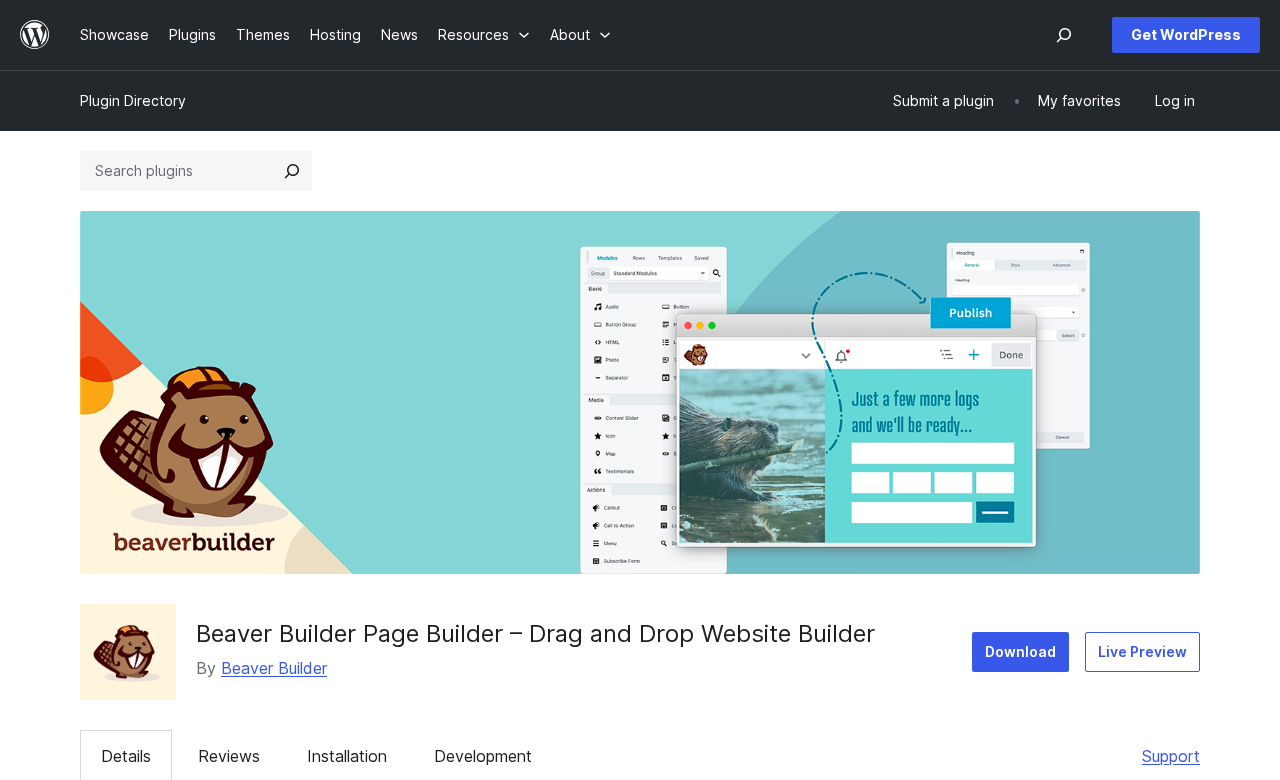
Beaver Builder is a WordPress page builder plugin published by a company of the same name, based in the United States. The first version launched on November 4, 2014, which makes it one of the longest-running commercial WordPress page builders still in active development.
Unlike the native WordPress block editor (Gutenberg), which edits content in the WordPress admin dashboard, Beaver Builder is a front-end editor: clicking “Launch Beaver Builder” loads the live front end of the page with an editing interface layered on top. You see exactly what your visitors will see, in real time, as you drag and drop modules into place.
The plugin installs on top of your existing WordPress theme and works with almost any theme that follows standard WordPress coding practices. You do not have to replace your theme to use Beaver Builder, though all paid plans include the proprietary Beaver Builder Theme, which is optimized as a lightweight canvas for Beaver Builder layouts.
The core plugin is free and available on WordPress.org. All paid plans (Starter, Plus, Professional, Unlimited) add the Beaver Builder Theme, Beaver Themer (the site-wide template builder), additional content modules, 170+ pre-built templates, and email support. The Unlimited plan adds white labeling and multisite network management for agencies running large client portfolios.
As of July 2026, the plugin is on version 2.10.2.2, with a release candidate for 2.11 shipping earlier this month with accessibility improvements including keyboard navigation for popup modules.
Who Beaver Builder is best for
Beaver Builder is a strong fit if you:
- Build client websites as a freelancer or agency and need a builder that will not break on update day or create unexpected layout shifts when you or the client updates a plugin.
- Run a small or medium agency and want a tool new team members can learn quickly, while experienced developers can extend through custom modules and CSS without fighting the builder’s defaults.
- Manage a portfolio of 3 to 50 sites and want multisite support without paying enterprise prices.
- Build WooCommerce stores and need visual control over shop pages, product templates, cart, and checkout beyond what your theme provides.
- Need a front-end editing experience. Beaver Builder’s live preview is a genuine workflow advantage over back-end editors for clients who want to see changes before hitting Publish.
Beaver Builder is a weaker fit if you:
- Need a rich standalone form builder with conditional logic, submission management, and direct CRM integrations. Beaver Builder includes a Contact Form module in premium, but it is not a full form builder in the way WPForms or Gravity Forms is.
- Want the most features possible and are comfortable managing frequent updates. Elementor Pro has a significantly larger widget library, more interaction effects, and more AI tooling. Beaver Builder’s measured release cadence is a deliberate trade-off, not a bug, but it is a real limitation for users who want cutting-edge capabilities.
- Are on a tight budget. The free lite version works for evaluation and simple pages, but the premium tier you need for serious site building starts at $89 per year. Add the agency-grade Unlimited plan and you are at $546 per year.
- Run a very design-heavy site where complex animations, motion effects, and advanced interaction layers are central to the work. Bricks or Elementor Pro have stronger options in this area.
Setup and first impression
Installing Beaver Builder lite follows the same two steps as any WordPress plugin: install from the Plugin Directory, activate, done. No theme replacement is required or suggested on activation, which is the first notable contrast with Elementor’s Hello theme auto-install behavior.
After activation, a Beaver Builder item appears in the WordPress admin Settings menu. The settings panel lets you configure which post types Beaver Builder should be enabled for. By default it is enabled on Pages. You can add Posts, Custom Post Types, and any other registered post type from this screen.
To edit a page, navigate to Pages in the WordPress admin, click on any page, and click the “Launch Beaver Builder” button in the page editor. The page reloads in front-end editing mode.
The front-end interface is clean and deliberately minimal. A dark toolbar sits along the left side of the screen with icons for Modules, Templates, and Layout. The page canvas fills the rest of the browser. A top bar provides access to Responsive Mode (switching between desktop, tablet, and mobile preview), History (undo/redo), Global Styles, and the Publish/Save buttons.
First impressions: the editor is noticeably fast to launch and to navigate. Adding modules, adjusting styles, and switching breakpoints all respond quickly. There is no “processing” spinner between interactions that some builders show on heavier interfaces.
The editor interface
Beaver Builder uses a row-and-column model rather than a CSS-first atomic model. You add rows to the canvas, set the column structure (one column, two columns, three columns, asymmetric splits), and then drag modules into columns. This is the same model Elementor used in v3 before the Atomic Editor overhaul.
For newcomers, this model is immediately intuitive. Rows stacked top to bottom, columns side by side within rows, content modules inside columns. No design theory required.
Each module has its own settings panel with three tabs: General (content settings), Style (color, typography, spacing), and Advanced (custom CSS, custom ID/class, visibility settings per device). The separation is logical and easy to scan.
Right-clicking any row, column, or module brings up a context menu with options to copy, duplicate, move, save as template, or delete. Copying and pasting styles between modules using this context menu is one of the faster workflow features: style a button the way you want it, copy the style, and paste it onto every other button on the page in a few clicks.
The Outline Panel, accessible from the left toolbar, shows a hierarchical tree of every row, column, and module on the page. On complex pages this is faster than scrolling the canvas to find a nested element.
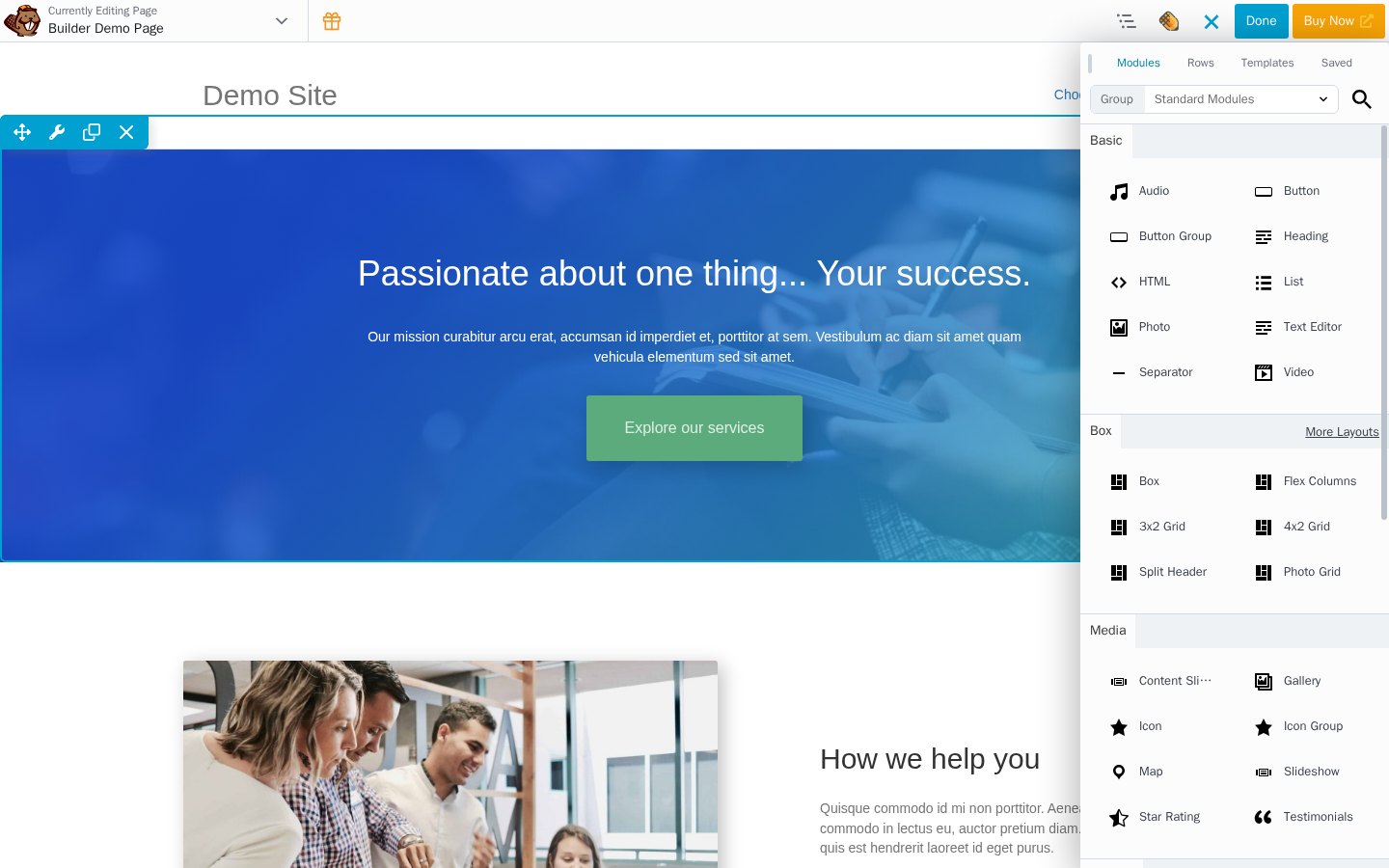
Inline text editing works as expected: click a Text Editor module to edit its content directly on the canvas using a standard rich-text toolbar. Headings, buttons, and other single-field modules have inline edit handles that open without leaving the canvas.
One note for first-time users: Beaver Builder saves changes in real time as a draft. Clicking “Publish” makes changes live. Clicking “Done” without publishing saves the draft. Closing the editor without saving discards unsaved changes. The autosave behavior during an active session is reliable, but the save flow is worth understanding before working on a live client site for the first time.
Free lite tier: what you actually get
The free version of Beaver Builder includes 20 standard modules organized into four categories:
Basic: Audio, Button, Button Group, Heading, HTML, Icon, Photo, Text Editor, Sidebar, Video.
Box: Box, Flex Columns, 3×2 Grid, 4×2 Grid, Split Header, Photo Grid.
Action: Callout, Call to Action, Menu.
Info: Number Counter.
The Box module is worth singling out. It functions as a multi-purpose container with flexbox layout support, letting you compose layouts inside a column using flex properties without writing CSS. It ships with several built-in presets (split layouts, card grids) that make the free tier more capable than the module count alone suggests.
The free tier also includes:
- Responsive editing mode: switch between desktop, tablet, and mobile breakpoints and adjust layout and visibility per device.
- Global Styles (partially): basic color and typography settings accessible from the top bar.
- History panel: undo and redo within an active editing session.
- Basic template access: a small set of starter layouts is available, though the full 170+ template library is premium-only.
- Custom CSS: add custom CSS per module, row, or at the page level via the Advanced tab or the Global Styles panel.
- Shortcode support: use any WordPress shortcode inside an HTML module.
- Compatibility with pages, posts, and custom post types.
What the free tier does not include:
- The Beaver Builder Theme.
- Beaver Themer (no custom headers, footers, post templates, or archive layouts).
- The expanded module library: Slider, Tabs, Accordion, Pricing Table, Map, Contact Form, Blog Posts, Subscribe Form, Icon Group, Countdown, Gallery, and all other premium modules.
- The full 170+ page and row template library.
- The ability to save and reuse rows, modules, or full-page layouts.
- Global Color palettes.
- Global styles that apply across all BB layouts on a site.
- Email support (community forums only).
- Multisite support.
- White labeling.

For a developer evaluating the tool before recommending it to a client, the free tier covers the full interface and core workflow. For building a real production site, the free tier hits its ceiling when you need any of the features above, which happens within the first few pages on most projects.
Premium: what unlocks when you pay
Every paid plan (Starter at $89/year through Unlimited at $546/year) adds:
Beaver Builder Theme. A lightweight, framework-style theme designed to stay out of Beaver Builder’s way. It includes a basic header, footer, and sidebar configuration via a live Customizer panel. The theme is not required: Beaver Builder works with third-party themes. But it is the fastest path to a clean starting canvas, particularly when combined with Beaver Themer for full site design.
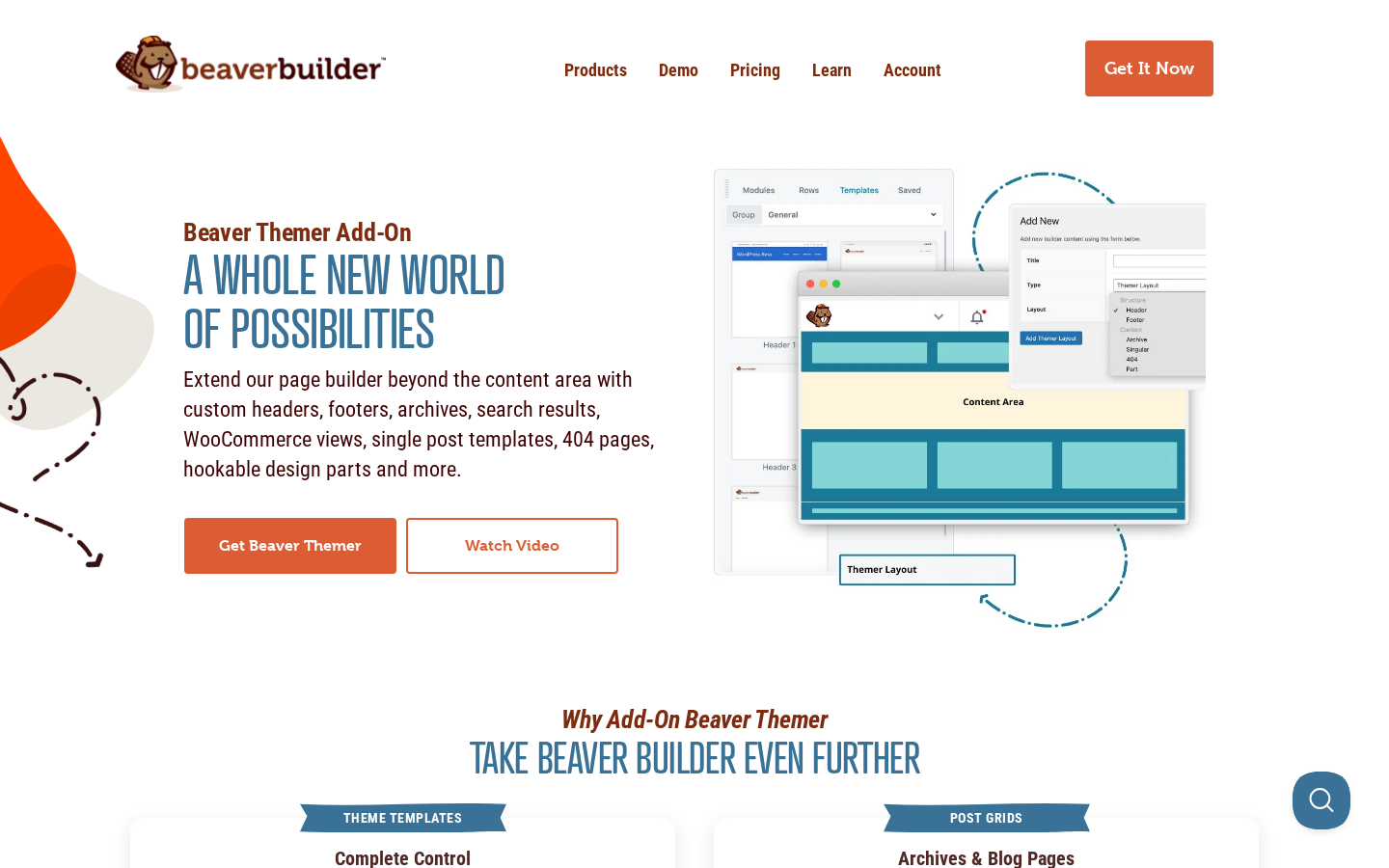
Beaver Themer. This is the feature that elevates Beaver Builder from a page builder to a full site builder. Beaver Themer lets you design templates and apply them site-wide, covering:
- Custom headers and footers that replace your theme’s defaults.
- Post and page templates (design the layout once, apply it to all posts, a category of posts, or any conditional rule).
- Archive page templates (blog index, category archives, tag archives, custom post type archives).
- WooCommerce templates: product pages, shop archive, cart, checkout, and My Account pages.
- Search results pages and 404 pages.
- Theme Parts: reusable sections like announcement banners or call-to-action bars that appear on every page.
- Dynamic content fields: connect any module to data from ACF, Pods, Metabox, or native WordPress fields (post title, featured image, author, date, etc.).
Beaver Themer used to be sold separately for $147. It is now included in every paid plan. This is a meaningful price reduction for anyone who previously had to budget for the plugin separately.
Expanded module library. Premium plans unlock all the additional modules the free tier locks: Slider, Tabs, Accordion, Pricing Table, Map, Contact Form, Blog Posts Carousel, Subscribe Form, Icon Group, Gallery, Countdown, and more.
170+ templates and row templates. A full library of pre-built page layouts and individual row templates, accessible from inside the editor. Templates cover landing pages, homepages, service pages, WooCommerce storefront pages, and category-specific layouts (restaurant, fitness, real estate, etc.). The templates are editable: load one, replace text and images, and publish.
Global template saving. Save any row, module, or full-page layout to a saved templates library and reuse it across the site or export it to use on a different site.
Global Styles. A site-wide style panel for colors, typography, and spacing. Change a global color and it updates everywhere it is used across all Beaver Builder layouts on the site.
Assistant Pro integration. Premium plans gain deeper integration with Assistant Pro, the Beaver Builder cloud service for storing and syncing templates, cloud template libraries from the community, and cross-site template management. The Unlimited plan includes six months of Assistant Pro cloud storage.
Access controls. Role-based editing permissions: configure which WordPress user roles can access which parts of the Beaver Builder editor. Useful for restricting clients to content editing without exposing layout or global style controls.
Beaver Themer in practice
For agencies, Beaver Themer is often the real reason to pay for Beaver Builder rather than a competitor. The ability to design every part of a client’s WordPress theme visually, without writing a child theme or hiring a PHP developer, is the feature that makes an all-in-one workflow possible.
I researched Beaver Themer from the official documentation and feature pages. A few practical points worth knowing:
Beaver Themer requires a compatible theme. The Beaver Builder Theme, Astra, GeneratePress, OceanWP, and several others are officially compatible. Most popular lightweight themes work. Theme compatibility is documented on the official site.
Display Conditions control where each Themer layout applies. You can set a header template to apply to the entire site, or a post template to apply only to posts in a specific category, or a WooCommerce template to apply only to single product pages matching a certain tag. The condition builder uses standard WordPress conditional logic.
The dynamic content system connects any text, image, or link field in any module to WordPress data. In a post template, the Post Title field pulls the title of whichever post the visitor is viewing. The Featured Image field pulls that post’s featured image. For sites using Advanced Custom Fields, any custom field value can be pulled into any module field using the same connection system. This is the core mechanic that makes post templates and directory builds practical without custom PHP.
Performance
Performance is one of Beaver Builder’s clearest differentiators. Third-party comparisons and real-world testing consistently show that Beaver Builder-built pages carry less DOM overhead and make fewer HTTP requests than comparable pages built with Elementor or Divi.
The reasons are structural. Beaver Builder was built before DOM bloat became a major talking point, and the team has kept the output disciplined: clean row-column-module nesting without excessive wrapper divs, and conditional asset loading that only enqueues the scripts and styles actually used on a given page. A simple landing page with three modules does not load the full Beaver Builder asset bundle; it loads only what that page needs.
In practical terms: pages built in Beaver Builder will typically require less work from WP Rocket, LiteSpeed Cache, or similar optimization plugins to hit competitive Core Web Vitals scores compared to Elementor or Divi builds of equivalent complexity.
Some important caveats:
Performance advantages shrink as complexity grows. A Beaver Builder page with multiple Slider modules, Icon Groups, and a Blog Posts Carousel loads more assets than a simple one-column page, as expected. The baseline is better, but it is not immunity.
Third-party add-ons affect performance. Beaver Builder’s add-on ecosystem is smaller than Elementor’s, but add-ons like Ultimate Addons for Beaver Builder, PowerPack, and Beaver Extender do exist and do add weight. Users who stack multiple add-on packs will see performance closer to Elementor levels.
Caching still helps. Even on clean Beaver Builder builds, a caching plugin is recommended for sites where Core Web Vitals are competitive. Beaver Builder’s advantage is that you spend less time tuning the caching configuration to reach acceptable scores.
Agency use cases
Beaver Builder is positioned explicitly for agencies, and the premium feature set supports that positioning in several concrete ways.
White labeling (Unlimited plan). The white-label option removes all Beaver Builder branding from the editor, the admin menu, and the settings panel. You can rename it to your own tool name. This is the feature that lets agencies ship client-managed websites without exposing the underlying plugin, which matters for branding consistency and client perception.
Multisite (Professional and Unlimited). Network activation and network-level settings management for WordPress Multisite. Manage plugin settings across all subsites from the network admin. The Professional plan covers up to 50 sites; the Unlimited plan removes the cap.
Staging sites are free. Staging and development environments do not count toward the site license limit on any plan. For agencies running client sites through a deployment workflow (develop on local, push to staging, push to production), this means each client takes only one license slot instead of three.
Content preservation. Beaver Builder stores your actual text and image content in the standard WordPress post database, not in proprietary shortcode format that becomes readable gibberish if the plugin is deactivated. If a client ever migrates off Beaver Builder, their content is still accessible. This is not guaranteed by all builders, and it matters for long-term client relationships.
Access controls. Role-based permissions let agencies hand a site to a client for content updates while locking the client out of layout editing, global style changes, or module addition. The granularity is sufficient for most agency handoff scenarios without requiring a separate membership plugin just for content management.
Developer extensibility. Builders can create custom modules in PHP, register them with Beaver Builder, and have them available in the editor panel alongside native modules. This makes Beaver Builder a practical base for building client-specific functionality within the editor without maintaining a separate shortcode system. ACF Blocks are supported as well.
Pricing
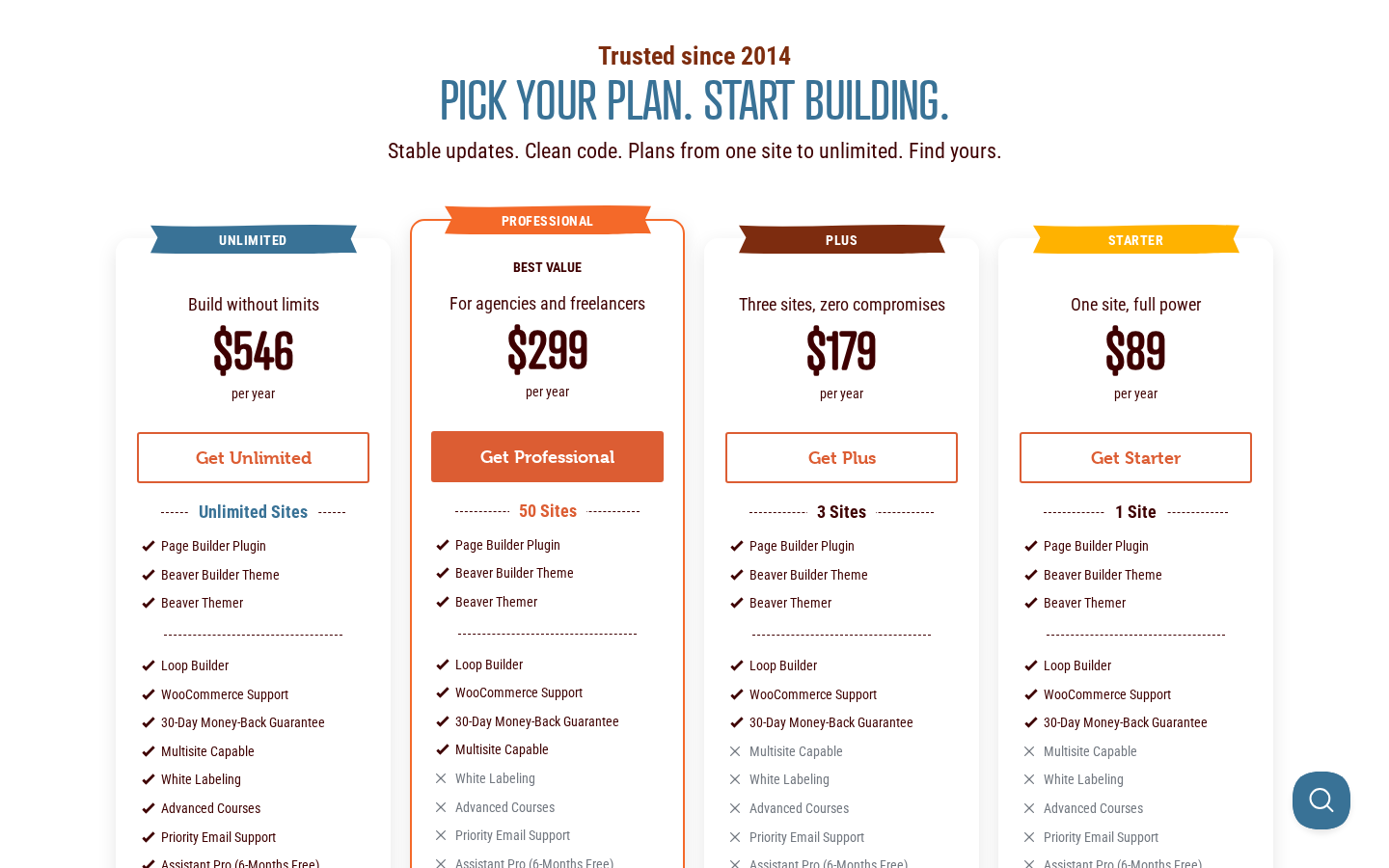
Beaver Builder offers four annual plans. Staging and development sites do not count toward any plan’s site limit. All plans include a 30-day money-back guarantee.
| Plan | Price/year | Sites | Key inclusions |
|---|---|---|---|
| Starter | $89 | 1 | Page Builder, BB Theme, Beaver Themer, all modules, templates |
| Plus | $179 | 3 | Everything in Starter, 3 sites |
| Professional | $299 | 50 | Everything in Plus, multisite network support, manage multiple sites from one dashboard |
| Unlimited | $546 | Unlimited | Everything in Professional, white labeling, advanced training, priority email support, 6 months Assistant Pro cloud storage |
All four plans include the Beaver Builder Theme and Beaver Themer. This is a change from earlier pricing where Beaver Themer was sold separately for $147, which used to make the effective entry cost significantly higher.
For a solo freelancer building client sites: the Starter plan ($89/year) is the minimum viable paid plan for one client site. The Plus plan ($179/year) covers three sites, which is reasonable for a small freelance portfolio. The Professional plan ($299/year, 50 sites) is the first plan with multisite support, which an agency network may need.
For agencies: the Unlimited plan ($546/year) provides white labeling and priority support alongside the unlimited site license. At roughly $45 per month for unlimited sites, it competes favorably with Elementor’s Agency plan on a per-site cost basis for agencies with more than a few dozen active client sites.
One important pricing note: Assistant Pro (Beaver Builder’s cloud template and storage service) is a separate subscription. The Unlimited plan includes six months of Assistant Pro free; after that, Assistant Pro is billed separately if you want cloud storage for templates. Factor this into your budget if you plan to use cross-site template sync.
Honest drawbacks
The free tier is genuinely limited. Beaver Builder’s lite version is useful for testing the editor. It is not a serious site-building tool for most use cases. There are no premium templates beyond basic starters, no Beaver Themer, no saved templates, no full module set, and community-only support. Users who install the free plugin expecting a complete site builder will hit the paywall within the first one or two pages of a real project. This is not a secret, but the marketing language around “start with Beaver Builder” can create an expectation mismatch.
Slow feature development. Beaver Builder’s development cadence is conservative. Features that Elementor, Divi, and even Gutenberg have shipped in the past two years (AI-assisted layout generation, CSS-first design systems, advanced animation libraries) are not on Beaver Builder’s current public roadmap in comparable form. If you are working with clients who ask for the newest capabilities, you will sometimes have to explain the gap or add third-party add-ons to close it.
Smaller add-on ecosystem. The Beaver Builder community and third-party developer base is considerably smaller than Elementor’s. Popular add-ons like Ultimate Addons for Beaver Builder, PowerPack, and Beaver Extender are solid, but the total number of available add-ons is a fraction of the Elementor ecosystem. Users who need specialized modules (advanced mega menus, complex form builders, animation libraries) have fewer options without writing custom code.
No standalone form builder. The premium Contact Form module handles basic name-email-message forms. It is not a replacement for a dedicated form plugin. Agencies that need conditional logic, multi-step forms, file uploads, submission logging, payment integration, or CRM connections will need to add WPForms, Gravity Forms, Fluent Forms, or a similar plugin on top of Beaver Builder. This adds cost and a plugin dependency that some users do not anticipate.
Template library quality is inconsistent. The 170+ templates cover a wide range of use cases, but the design quality varies. Some templates are polished and useful as direct starting points. Others are dated or generic. Elementor and Divi have invested more heavily in premium template quality. You will likely end up building more custom layouts from scratch or adapting from scratch, which is fine for an experienced builder but adds friction for less experienced users who bought a premium plan expecting ready-to-use designs.
Limited animation and interaction effects. Beaver Builder includes basic entrance animations per module (fade in, slide in) and background video rows. It does not have the scroll-based parallax effects, mouse-tracking animations, or sticky element tools that Elementor Pro includes. For most business and agency websites, this is not a missing feature. For design-forward projects where motion is a core design element, it is a real limitation.
Alternatives
Elementor (free tier, Pro from $59/year for 1 site). The most feature-rich WordPress page builder with the largest ecosystem, 10+ million active installs, and the new Atomic Editor architecture introduced in v4. Better for design-heavy projects and users who want the widest widget selection. More DOM overhead out of the box, more update-related disruption in 2025-2026 due to the v4 transition, and a steeper optimization workload for Core Web Vitals on complex pages. Worth comparing directly if feature count matters more than stability.
Divi (by Elegant Themes, $89/year for all ET products). A comprehensive page builder with Divi 5 introducing a new editor alongside full site editing support. Comparable user volume to Elementor, heavier DOM output than Beaver Builder, and deeper theme ecosystem lock-in. The Elegant Themes lifetime license option remains appealing for long-term users who want to avoid annual renewal costs. Worth considering for users who are already in the Elegant Themes ecosystem.
Bricks Builder ($79/year, unlimited sites). Developer-first, performance-first alternative. Produces leaner HTML output than any of the major visual builders by default, with CSS-grid native support and developer-grade controls baked into the editor. Steeper learning curve than Beaver Builder and smaller community, but the performance ceiling for complex pages is consistently higher. The first choice for performance-obsessed agencies building custom client work.
WordPress block editor (Gutenberg, free). The native WordPress editor is sufficient for blogs, news sites, and content-heavy sites that do not need the page-level visual control of a dedicated page builder. Gutenberg adds zero performance overhead and creates no plugin dependency. For agencies whose clients primarily publish content rather than design marketing pages, it is worth evaluating seriously before reaching for a page builder.
Pros and cons
Pros
- 12 years of production history with a consistent, non-breaking update record.
- Front-end editing with live preview: you edit exactly what visitors see.
- Cleanest code output of the major visual builders, with fewer HTTP requests and less DOM overhead than Elementor or Divi.
- Beaver Themer now bundled in all paid plans, covering full site building (headers, footers, post templates, archive templates, WooCommerce pages, dynamic content).
- Developer extensible: custom modules, ACF block support, custom CSS and JavaScript per element.
- Content preservation: text and images stored in the WordPress database, not proprietary shortcode format.
- White labeling available (Unlimited plan) for agency client site delivery.
- Multisite network support (Professional and Unlimited) for agency portfolios.
- Excellent support reputation: high response rates, human support staff, fast fixes.
- Staging and development sites do not count against license limits.
- Works with almost any WordPress theme without requiring a theme swap.
- Active Facebook group and Slack community for peer support.
Cons
- Free lite tier is quite limited and not a viable complete site-building tool for most projects.
- Feature development pace is slow by design. New capabilities take longer to arrive compared to Elementor or Divi.
- Smaller add-on ecosystem than Elementor. Fewer third-party widget packs, templates, and integrations.
- No standalone form builder with submission management. The Contact Form module covers basic contact pages only.
- Template library design quality is inconsistent. Some templates are dated.
- No advanced animation or motion effects beyond basic entrance animations.
- The Unlimited plan ($546/year) is the first tier with white labeling, which some agencies need from day one.
- Active install count of the lite version (100,000+) is modest compared to Elementor (10+ million), meaning less community content and fewer third-party guides.
Final verdict
Beaver Builder earns its reputation. For agencies and freelancers who build production WordPress sites for clients, the combination of front-end editing, clean code output, Beaver Themer for full site design, and a twelve-year update record without dramatic breaking changes is a compelling package. The stability-first philosophy is not marketing language: the WordPress.org review section has almost no complaints about broken sites after updates, which stands in real contrast to recent Elementor v4 transition reports.
The Unlimited plan at $546 per year with unlimited sites, white labeling, multisite support, and priority support is the tier where the agency pitch makes most sense. For a 10-site or 20-site agency portfolio, the per-site cost is low enough to be absorbed into project rates without thinking about it.
The honest limits are real. The free tier is thin. Feature development is slow. The add-on ecosystem is smaller. If your clients regularly ask for the latest interactive effects, AI-generated layouts, or complex form automation, Elementor Pro will match those requests faster than Beaver Builder. If your clients want pages that load fast, look professional, and do not break unexpectedly when you update their plugin stack, Beaver Builder is harder to argue against.
For most agency and freelance WordPress work in 2026, the Professional plan ($299/year, 50 sites) or Unlimited plan is the practical starting point. The Starter and Plus plans make sense for solo freelancers with small portfolios. The free lite version is worth installing to evaluate the editor before committing to any paid plan.