

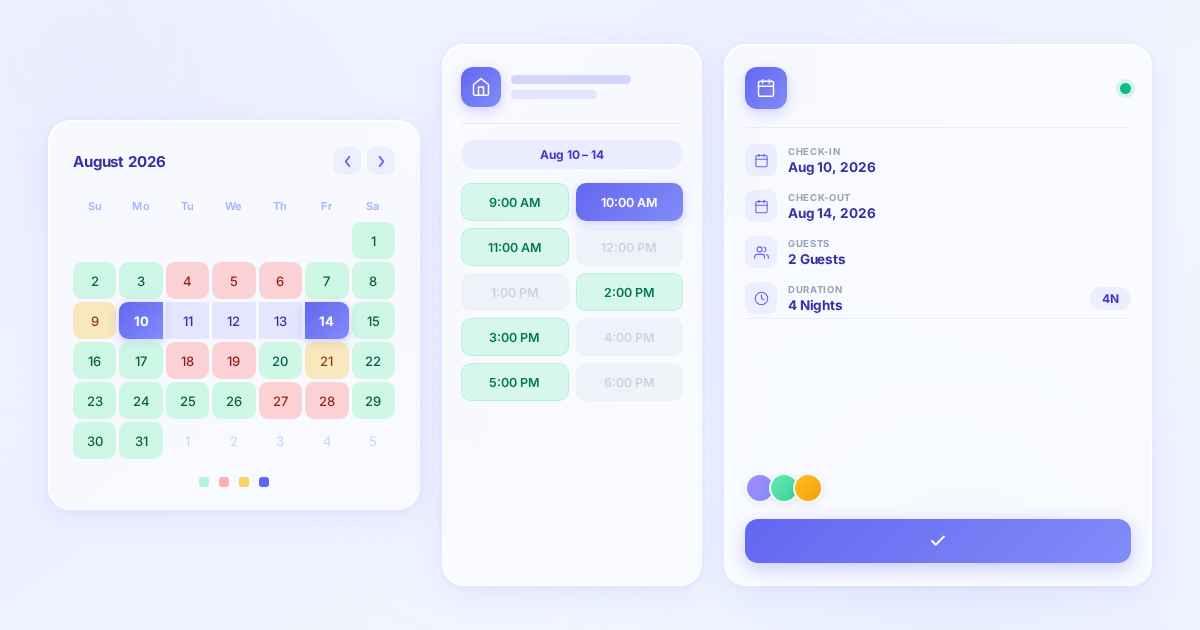
Most WordPress booking plugins start from appointments. A service, a staff member, a time slot, done. Booking Calendar starts from availability. A resource, a calendar, a set of rules about what dates are open, done. That difference defines everything about how it works, who it suits, and who it does not.
I reviewed Booking Calendar by walking through the live front-end demos (Personal and Business Small versions), the official features and pricing pages at wpbookingcalendar.com, and the WordPress.org listing. I also reviewed the changelog through version 11.4 (released July 14, 2026) and compared the plugin’s feature set across all five paid tiers. No sandbox install of the free or paid plugin was set up for this review; where a feature was not directly exercised on a live public demo, I say so and note the documentation source.
At a glance
- Reviewed from: Live front-end demos at personal.wpbookingcalendar.com and bs.wpbookingcalendar.com, official features page, pricing page (wpbookingcalendar.com/buy/), changelog through July 2026, and WordPress.org listing (free version 11.4.3).
- Free version: Yes. A single-resource booking calendar with email notifications and a drag-and-drop form builder included at no cost.
- Active installs: 50,000+ on WordPress.org.
- Rating: 94/100 across 653 ratings on WordPress.org (593 five-star ratings).
- In development since: 2009. One of the oldest WordPress booking plugins still in active development.
- Bottom line: A deep, calendar-first WordPress booking system built around property rentals, multi-resource scheduling, and availability management. If you need a rental or accommodation booking calendar, it is among the best. If you need appointment booking with staff scheduling, it is the wrong tool.
Quick verdict on Booking Calendar
In one sentence: Booking Calendar is one of the most mature WordPress booking plugins available, and its unique strength is calendar-based availability management for properties, rentals, and multi-resource scheduling, not appointment booking for service businesses.
The plugin has been in production use since 2009, and that depth shows in the feature set. The ICS feed integration supports Airbnb, Booking.com, HomeAway, VRBO, TripAdvisor, FlipKey, Google Calendar, and any .ics-compatible system. The MultiUser mode creates independent booking admin panels per WordPress user, enabling rental marketplace portals. The pricing model is entirely one-time, with no annual renewal on any tier.
The honest caveats: Booking Calendar is not a service-appointment plugin in the modern sense. There is no staff scheduling, no employee-to-service assignment, no service packages, no WhatsApp or SMS notifications, and no real-time bidirectional Google Calendar sync (it uses periodic ICS feeds instead). Businesses that want an online meeting integration or a customer self-service portal are better served by a different plugin. And the free version, while genuinely usable, covers only one booking resource and does not support online payments.
Quick verdict
- Best for: Property rental managers, bed and breakfast owners, vacation rental hosts, accommodation providers, equipment rental businesses, event venue operators, and multi-resource scheduling portals.
- Best plan for most buyers: Business Small ($78.97 one-time) for properties or services that need online payments and time-slot bookings with a small number of resources.
- Standout: ICS feed sync with Airbnb, Booking.com, and VRBO; MultiUser mode for rental portals; lifetime/one-time pricing on all tiers; active development since 2009.
- Watch out for: Online payments are not available on the free version or Personal tier. The free version supports only one booking resource. No staff scheduling. No WhatsApp or SMS notifications. No real-time Google Calendar sync.
What Booking Calendar is
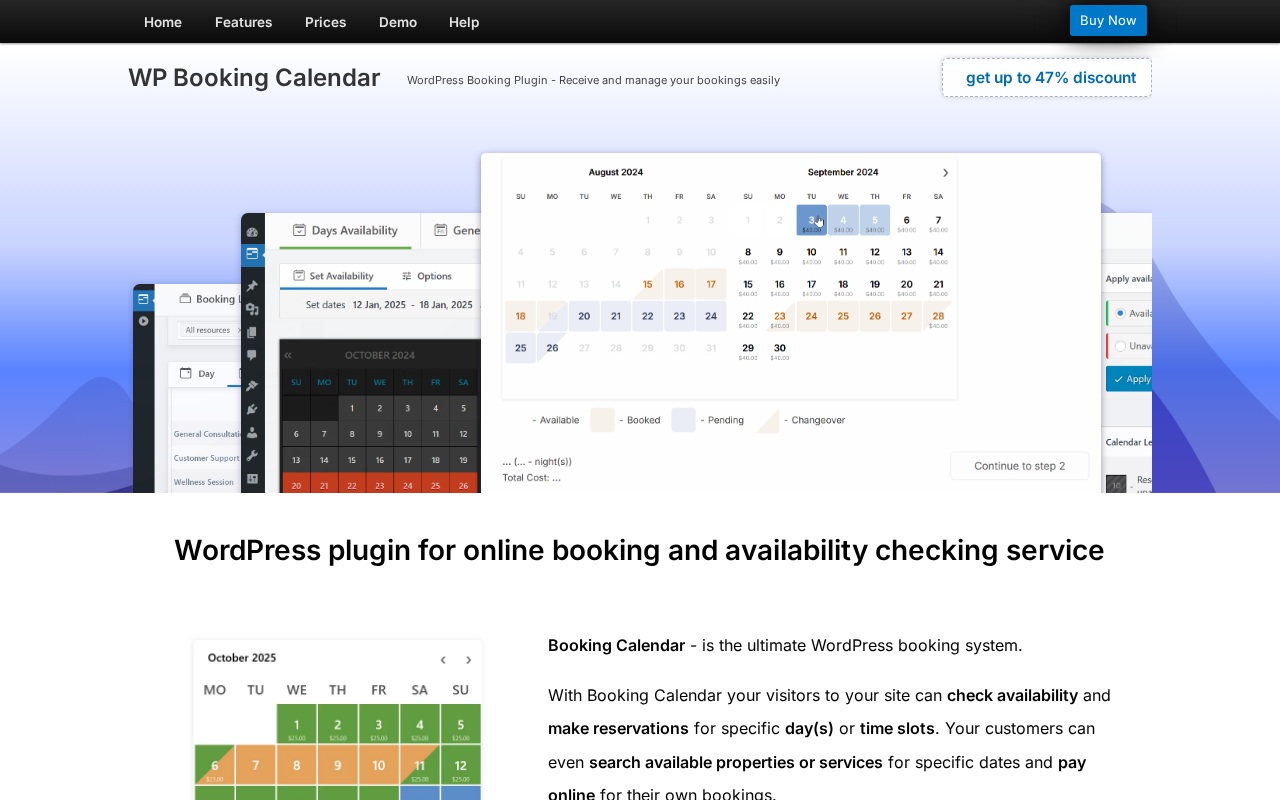
Booking Calendar, developed by oPlugins (author handle: wpdevelop), was first published in 2009, making it one of the longest-running WordPress booking plugins still in active development. It is distributed as a free core plugin on WordPress.org with a series of paid versions sold directly at wpbookingcalendar.com. The plugin calls itself “The #1 Booking Plugin for WordPress,” a positioning it stakes on longevity and feature depth rather than modern UI polish.
The core concept is simple: a booking resource is any item that can be reserved. It could be a vacation apartment, a photography studio, a meeting room, a kayak, a doctor’s appointment slot, or a yoga class. Each resource gets its own independent calendar. Visitors see the calendar for a specific resource on the front end, select available dates or time slots, and submit a booking form. The admin sees all bookings across resources in a consolidated panel.
This resource-centric model is different from the person-centric or service-centric model used by most appointment plugins. In Amelia or Booknetic, the central object is a staff member with a schedule. In Booking Calendar, the central object is a resource with a calendar. That makes Booking Calendar better suited for properties, equipment, and shared spaces, and less suited for multi-staff appointment businesses where routing a specific customer to a specific employee is the primary need.
The plugin is genuinely broad in scope. The official feature description and the plugin’s own target audience list covers:
- Bed and breakfast, hotels, vacation rentals, apartments
- Equipment rentals: cars, bikes, yachts, boats, technical equipment
- Client scheduling: photographers, lawyers, beauty salons, spas
- Medical and healthcare scheduling
- Event and class scheduling: conferences, fitness classes, yoga studios
- Meeting scheduling: coaching, phone consultations
What ties all of these together is the availability calendar as the starting point, not the service catalog or the staff roster.
The free version is available directly from WordPress.org with 50,000+ active installs. The paid versions (Personal through MultiUser) are sold as one-time purchases at wpbookingcalendar.com. Version 11.4.3 is the current free release (last updated July 20, 2026); the paid versions are on version 11.14.x as of July 2026.
Who Booking Calendar is best for
I will be specific about the fit because the wrong buyer will be frustrated by this plugin even though the right buyer will find it one of the most capable tools in its category.
Strong fit
- Property rental managers with one or more properties who want to show availability on a WordPress site, accept bookings with a deposit or full payment, and sync with Airbnb or Booking.com to prevent double-bookings.
- Accommodation businesses: bed and breakfasts, guesthouses, holiday cottages, vacation rental owners, hotel room types.
- Equipment rental operators: boat hire, bike rental, car rental, photography equipment, AV equipment.
- Event venue, meeting room, or studio space managers who need capacity-controlled calendar booking for multiple spaces.
- Practitioners with a single-person practice who need a simple full-day or time-slot booking calendar without multi-staff complexity.
- Developers building a multi-property rental portal or a co-working space booking system, where the MultiUser mode enables each property owner or tenant to manage their own calendar independently.
Weak fit
- Service businesses with multiple staff members who need routing logic: a salon with six stylists, a clinic with four doctors. Booking Calendar does not assign staff to services; it assigns a resource to a calendar. That is not the same thing for most service businesses.
- Businesses that need a customer self-service portal for rescheduling or cancellation (Booking Calendar has no customer portal equivalent).
- Teams that rely on WhatsApp or SMS notifications. Booking Calendar’s notification system is email-only.
- Businesses that need native real-time Google Calendar sync. The ICS feed integration is solid but not the same as the bidirectional real-time sync offered by Amelia or Booknetic.
- Subscription or package-based booking models (recurring package of 10 sessions, for example).
The booking calendar on the front end
I walked through the live Personal and Business Small demos to understand the customer-facing booking experience directly.
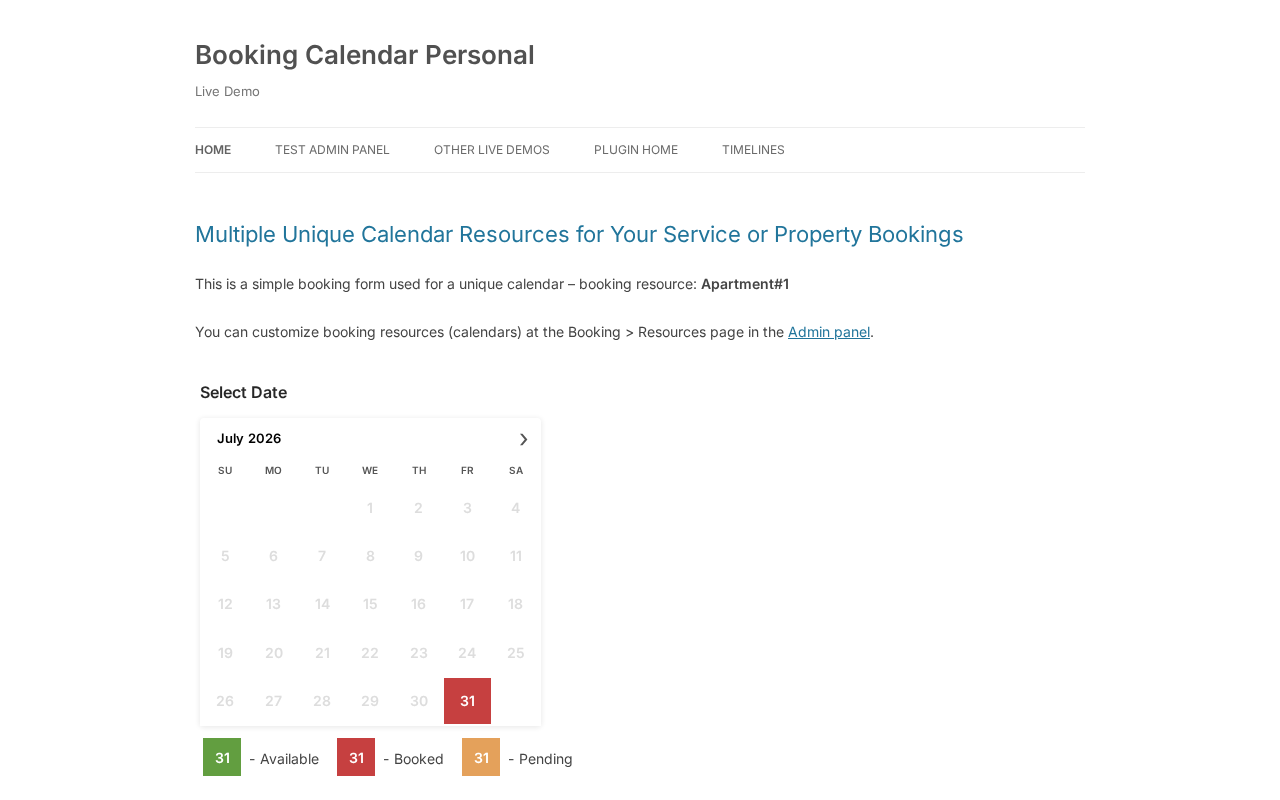
The Personal demo (personal.wpbookingcalendar.com) shows a full-day booking calendar for a single resource called “Apartment #1.” The calendar displays the current month with color-coded date states: green for available, red for booked, orange for pending. Clicking an available date selects it; the system prevents selection of already-booked dates automatically. The customer fills in a short contact form below the calendar and submits.
This is the typical use case for property rental: a simple, clear calendar that communicates availability at a glance. There is no step-by-step wizard, no multi-screen flow. The calendar and the form are on the same page. The customer can select a single day, multiple days, or a date range depending on how the resource is configured.
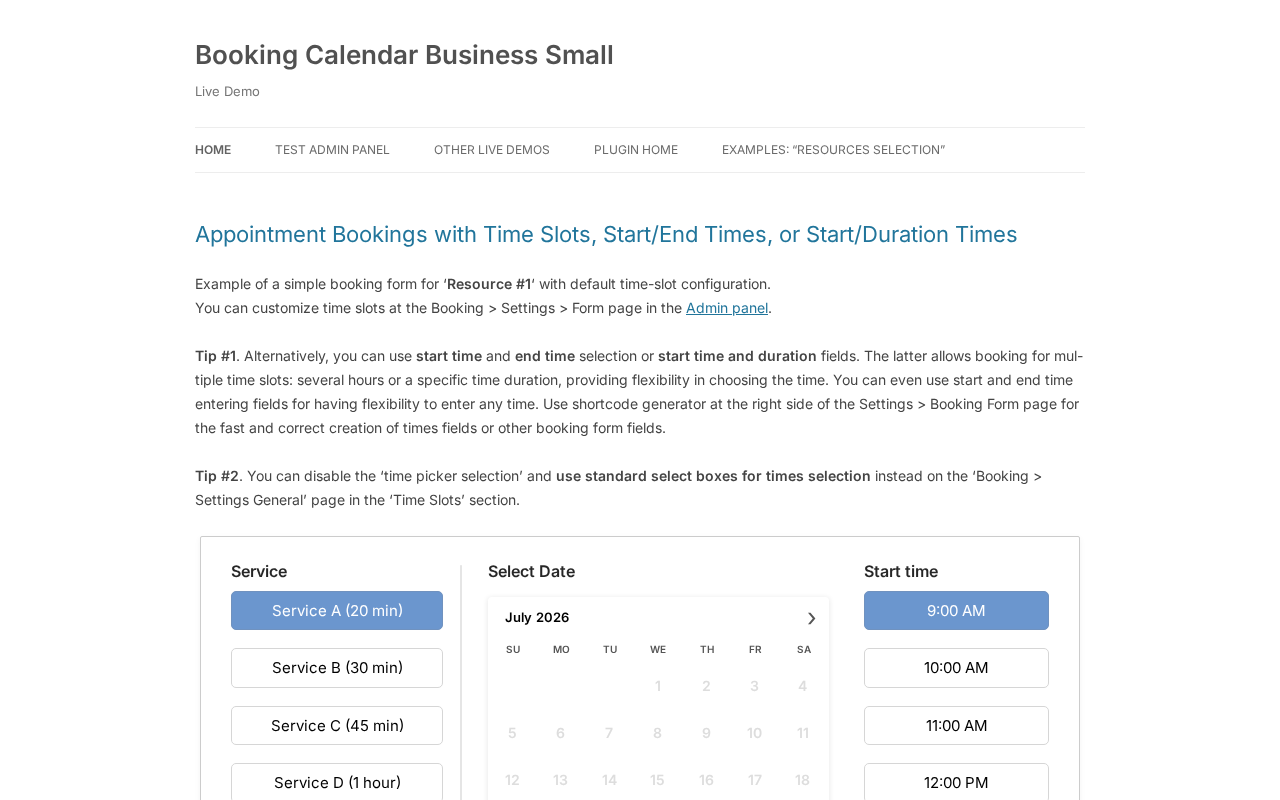
The Business Small demo (bs.wpbookingcalendar.com) switches to time-slot appointment mode. The form layout changes significantly: a service selection panel on the left (Service A 20 min, Service B 30 min, Service C 45 min, Service D 1 hour), a date picker in the center, and a start time column on the right (9:00 AM, 10:00 AM, and so on). The customer picks a service, picks a date, and picks a start time. All three are on one screen.
What I noticed in both demos:
- The calendar renders cleanly and is mobile-responsive. No janky overflow or horizontal scroll on small screens.
- The color legend (available, booked, pending, changeover) is shown below the calendar without configuration. Customers understand their options at a glance.
- The forms are functional, not polished. They work, but they look like they were designed for reliability rather than conversion optimization. Newer plugins like Amelia, LatePoint, or Booknetic have more visually refined booking forms.
- The new Drag and Drop Booking Form Builder (added in version 10.15, available in all versions including free) makes it possible to rearrange form fields visually, add and remove fields, organize them into columns, and preview the result without touching code.
One practical observation: the demo data resets every three hours according to the demo page notice. That is a useful sign that these are live interactive demos, not static screenshots.
The Drag and Drop Booking Form Builder
The most significant recent addition to Booking Calendar is the Drag and Drop Booking Form Builder, which replaces the older shortcode-based form configuration approach. This builder is available in all versions, including the free tier.
The builder lets you:
- Drag fields from a sidebar onto a canvas
- Arrange fields into rows and columns
- Create multi-step forms with separate pages
- Resize columns for layout control
- Edit field settings in a right sidebar panel
- Preview the form live as you build it
Version 11.4 (July 14, 2026) added new global Form Style presets: Light, Dark, and Custom, with a borderless and soft-background variant for each. These presets apply consistently to the calendar skin, booking form appearance, button styles, and time picker. A new Appearance/Theme settings page (added in version 11.3, July 4, 2026) shows a live calendar and form preview before saving, which is useful for seeing how a color theme or date selection mode change affects the actual front-end output.
The form builder also supports contact forms and inquiry forms where the calendar is optional. That means Booking Calendar can double as a structured contact or request form that captures and organizes submissions in the admin panel, which is a distinct use case beyond traditional booking workflows.
I did not test the Drag and Drop Booking Form Builder in a live licensed install. My assessment of the builder is based on the official documentation, the July 2026 changelog notes, and the features page description.
Booking resources: the core model
A booking resource is the unit of everything in Booking Calendar. One resource corresponds to one calendar. The number of resources you can create and manage independently determines which plan you need.
The free version includes one booking resource. The Personal plan and above unlock unlimited booking resources.
Each resource has:
- Its own calendar showing availability states
- Its own booking form (or a shared form configuration, depending on version)
- Its own capacity settings (Business Large and above)
- Its own cost/pricing settings (Business Small and above)
This becomes powerful for multi-property scenarios. A vacation rental company with eight properties creates eight resources, each with its own calendar embedded on the relevant page or listing. Bookings for each property are managed independently in the admin, with no cross-contamination between resources.
The Business Large tier adds capacity management: the ability to allow multiple bookings per date or time slot up to a defined maximum. A studio space that can accommodate 12 people per session sets its capacity to 12, and Booking Calendar automatically marks the slot as unavailable when that limit is reached. This also enables the availability search feature, where visitors can search for resources with openings on specific dates and matching criteria.
Calendar types: full-day, time-slot, and changeover
Booking Calendar handles three distinct calendar modes, which is more flexibility than most booking plugins offer.
Full-day bookings
Full-day bookings are the default. The customer clicks dates on the calendar to select one or more full days. The selection style is configurable: single day, multiple individual days, or a date range with click-and-drag or two-click selection (the two-click date range is now available in all versions as of version 11.4). Minimum and maximum day selection limits are configurable. This mode is natural for rentals and accommodation.
Time-slot bookings
Time-slot bookings work for appointment scheduling. The customer picks a date, then picks a start time from a predefined list of time slots. The time slot becomes unavailable for that resource once it is booked. The Business Small tier adds the ability to book specific start and end times or a start time with a defined duration (30 minutes, 1 hour, etc.), which is more flexible than fixed time slots.
Changeover days
Changeover days are the third mode, and this is where Booking Calendar is genuinely unique among WordPress plugins. In a property rental, the same date can serve as a check-out day for one guest and a check-in day for the next. Booking Calendar marks these changeover dates with a diagonal or vertical line on the calendar, allowing two different bookings to share the same date without conflicting. The calendar legend labels these appropriately. No other WordPress booking plugin I am aware of handles changeover days as a native calendar feature.
The changeover day feature is specifically valuable for hotels, bed and breakfasts, and vacation rentals where same-day turnover between guests is a standard operational pattern.
Payment gateways
Payment support follows the tiering model: the free version and Personal plan have no online payment capability. Business Small and above unlock a range of payment gateways:
- Stripe (Checkout server integration)
- PayPal (Standard Checkout)
- Authorize.Net (Server Integration Method)
- iDEAL Buckaroo (formerly Sisow)
- Redsys (Redirection integration)
- iPay88
- Cash payment (no gateway; shows text instructions)
- Bank transfer/direct wire (no gateway; shows text instructions)
All gateways are configured from the Booking admin panel’s Payment Gateways settings screen. For businesses where customers expect to pay a deposit rather than the full amount upfront, deposit/partial payment configuration is available in Business Medium and above.
The Business Medium tier also adds seasonal pricing, duration-based pricing, and advanced cost configuration based on form option selections. This is where Booking Calendar’s pricing model becomes genuinely sophisticated for rental businesses: the cost of a booking can factor in the season, the number of guests, the rental duration, any extras selected in the form (cleaning fee, pet fee, breakfast), and coupon codes applied by the customer (coupon codes are a Business Large feature).
Availability management: seasons and rules
The availability management layer is one of the most developed parts of Booking Calendar, and it is where the plugin’s age and iteration show in a positive way.
Season filters let you define date ranges by name: “High Season,” “Low Season,” “School Holiday,” “Christmas Week.” These season definitions then connect to:
- Season availability: block all dates in a season as unavailable, or define a conditional filter (only weekends during summer are unavailable)
- Seasonal pricing: higher daily rate during peak dates, lower off-season rate
- Advanced days selection: different minimum stay rules for different seasons (7-night minimum in High Season, 2-night minimum off-season)
- Different time slots: different available appointment times on different days or during different seasons
The Buffer time feature adds an unavailability window before or after each booking. A rental property that needs a full day for cleaning between guests sets a one-day buffer, and Booking Calendar automatically prevents the day before and after each booked period from being selected by a new visitor. Buffer time works for both full-day bookings and time-slot appointments.
Availability from today lets you define a rolling window: show only the next 90 days as available, for example, or mark the next 3 days as unavailable (for properties that need advance notice). Both settings can be combined.
I did not configure any of these features in a live install. The season filter, seasonal pricing, and buffer time behavior described above is based on the official features page, FAQ documentation, and pricing tier comparison table.
ICS feed sync: the unique platform integration
This is the feature that sets Booking Calendar apart from every other WordPress booking plugin in its category.
Booking Calendar supports import and export of bookings via .ics calendar feeds, compatible with:
- Google Calendar (bidirectional: import and export)
- Apple iCal (import)
- Airbnb (import and export)
- Booking.com (import only)
- HomeAway / Vrbo / FlipKey / TripAdvisor (import and export)
- Any other .ics-compatible calendar system
This matters enormously for property rental operators. A vacation rental property that is listed on both Airbnb and Booking.com needs to prevent double-bookings between the two platforms and the property’s own WordPress booking calendar. Booking Calendar addresses this directly: you configure an Airbnb iCal export feed as an import source for the relevant resource, and Booking Calendar marks dates from Airbnb as unavailable automatically. The reverse is available for most platforms: Booking Calendar can export a feed that Airbnb, HomeAway, or VRBO can subscribe to.
This is a practical operational feature, not a marketing checkbox. No other appointment-first WordPress plugin like Amelia, Booknetic, or Bookly covers this use case because they are not designed for property listings. Booking Calendar covers it because property rental has been a primary use case since the plugin’s earliest versions.
The ICS import also supports Google Calendar, which provides a manual or periodic sync of external events into Booking Calendar. This is not the real-time bidirectional sync that Amelia or Booknetic offer through the Google Calendar API. The .ics feed updates on a schedule or when manually refreshed, not instantly on event creation. For most rental businesses, this is sufficient. For appointment businesses that need a tight two-way calendar integration, it is a meaningful limitation.
MultiUser mode
The MultiUser version is the highest paid tier ($343.97 single site, normally $649), and it enables a feature no other plan includes: each registered WordPress user gets an independent booking admin panel.
In MultiUser mode:
- Each user sees only their own bookings and resources
- Each user configures their own booking form independently
- Each user receives their own email notifications at their own address
- Each user activates their own payment gateway with their own account
This architecture supports a specific type of business: a rental marketplace or co-working portal where multiple property owners or service providers each need to manage their own availability independently, but all operate within the same WordPress site. Think of a small Airbnb-style aggregator site, a shared workspace with multiple companies each managing their own room availability, or a health center where each practitioner manages their own appointment calendar.
The MultiUser version is not for most businesses. It is purpose-built for multi-tenant WordPress booking portals where independence between accounts is the requirement.
(Note: MultiUser behavior is documented on the features page and the pricing page feature comparison. I did not test the MultiUser admin demo beyond reviewing the demo page at wpbookingcalendar.com/demo/.)
Admin panel and booking management
The admin panel for Booking Calendar is functional, organized around a practical list-and-calendar model, and shows its age compared to newer competitors in terms of visual design. It works correctly, but it is not as modern-looking as the admin panels in Amelia, LatePoint, or Booknetic.
What the admin covers:
- Booking listing: A searchable, filterable table of all bookings across all resources. Search by keyword, date range, status, and other parameters. The listing panel operates via AJAX for instant filtering without page reload.
- Timeline view: A visual timeline of bookings across multiple resources, useful for rental operations where seeing occupancy across properties is more useful than a single-resource calendar.
- Calendar view per resource: A month-by-month calendar showing booked, available, pending, and changeover date states.
- Booking actions: Edit booking details or dates, add internal notes, duplicate a booking to another resource, change resource assignment, print a booking summary, export to CSV.
- Availability management: Set specific dates or date ranges as available or unavailable with a few clicks, directly in the admin calendar or via the new Timeline Availability popup (version 11.3+). Admins can also create new bookings directly from an available time slot in the availability popup.
The Time Slots Availability popup (new in version 11.3, July 2026) allows admins to select a date range and block or unblock exact time intervals in an interactive timeline that shows available, booked, unavailable, and full-day unavailable states. From this same popup, admins can create a new booking from an available time interval with the resource, date, start time, and end time pre-filled.
Email notifications are templated. Notification events include: new booking, approved, rejected, cancelled, payment confirmed, and pending. Templates use shortcodes for dynamic content (customer name, dates, cost, resource name, booking notes, etc.). The notification system is email-only; there is no SMS or WhatsApp channel.
Pricing and license value
Booking Calendar’s pricing model is unusual in 2026: every tier is a one-time lifetime purchase, with no annual subscription required. You buy the version you need, use it indefinitely, and receive free updates for six months from the purchase date. After six months, you can purchase a 12-month update extension at a reduced price, or continue using the version you have without paying again.
Single site prices (current discounted prices as of July 2026; up to 47% off normal pricing):
| Version | Normal price | Sale price |
|---|---|---|
| Personal | $79 | $41.87 |
| Business Small | $149 | $78.97 |
| Business Medium | $249 | $131.97 |
| Business Large | $349 | $184.97 |
| MultiUser | $649 | $343.97 |
All prices are single site (one WordPress installation). Developer edition (2 sites) and Multi-Site edition (5 sites) are available at higher prices with lower per-site cost. The plugin processes payments via FastSpring (secure checkout). 14-day money-back guarantee on all purchases.
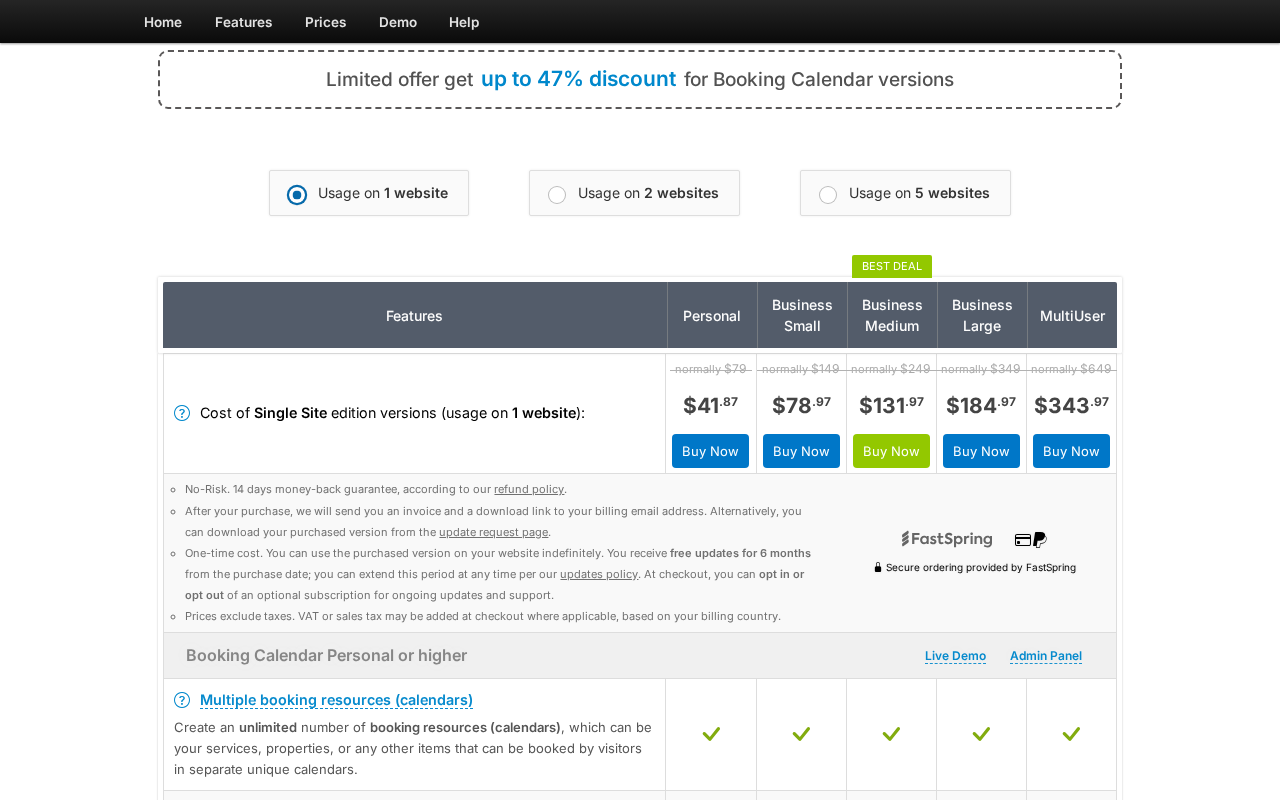
How to read the tiers
The jump from Personal ($41.87) to Business Small ($78.97) is the most important for any business that needs to accept payment. Personal gives you unlimited resources and form configuration but no online payment gateway. Business Small adds Stripe, PayPal, and the other gateways, plus time-slot bookings, changeover days, and auto-approval/cancellation.
The jump from Business Small to Business Medium ($131.97) matters most for businesses with pricing complexity: seasonal rates, multi-day pricing, early/last-minute discounts, deposit payments, and form-based cost additions (cleaning fees, breakfast, pet fees). A single rental property with simple pricing can stay on Business Small indefinitely. A property with high-season rates, extra charges, and partial payment options needs Business Medium.
Business Large ($184.97) adds capacity management (multiple bookings per slot), availability search for visitors, and coupon codes. This is primarily relevant for group event bookings, accommodation with multiple units of the same type, or equipment rental businesses with multiple identical items.
MultiUser ($343.97) is for multi-tenant portals. If you do not need independent admin panels per WordPress user, this tier adds nothing for your use case.
The lifetime pricing model is the strongest differentiator in Booking Calendar’s commercial offer. Most competing plugins with this feature depth charge $149 to $299 per year, annually. Business Medium at $131.97 one-time is, at a two-year view, substantially cheaper than any annual-subscription plugin in the same feature category. The trade-off is that updates beyond six months require renewal, but the plugin is functional and stable without updates if you are not running security-sensitive configurations that require the latest patches.
Pros and cons
Pros
- In active development since 2009; among the most mature WordPress booking plugins available.
- 50,000+ active installs and a 94/100 rating across 653 WordPress.org reviews (593 five-star ratings).
- ICS feed sync with Airbnb, Booking.com, VRBO, HomeAway, TripAdvisor, FlipKey, Google Calendar: essential for rental operators managing listings on multiple platforms.
- Changeover day support: a first-class feature for rental businesses with same-day guest turnover.
- All tiers are one-time lifetime purchases. No annual renewal required.
- Flexible calendar modes: full-day, time-slot, and changeover with extensive availability rules.
- MultiUser mode for multi-tenant rental portals: independent admin panels per WordPress user.
- Drag and Drop Booking Form Builder available in all versions including free.
- Advanced pricing: seasonal rates, multi-day discounts, duration-based pricing, deposit payments, form option costs.
- Capacity management for group bookings and accommodation with multiple identical units (Business Large).
- Wide payment gateway coverage: Stripe, PayPal, Authorize.Net, Redsys, iPay88, iDEAL, cash, bank transfer.
- 14-day money-back guarantee.
- Regular updates: version 11.4 and multiple sub-releases shipped in July 2026 alone.
Cons
- No native staff/employee scheduling. There is no concept of assigning a staff member to a service and routing customers to them. Resources are items or spaces, not people.
- No SMS or WhatsApp notification channel. Email is the only automated notification delivery method.
- No real-time Google Calendar sync. The .ics feed integration is functional but updates periodically, not instantly.
- No customer self-service portal. Customers cannot log in to reschedule or cancel their own bookings without admin involvement.
- No packages or subscription booking models.
- Online payments require Business Small or above ($78.97+). The free version and Personal tier are payment-free.
- Free version is limited to one booking resource. Any site with multiple services or properties needs Personal ($41.87+) for unlimited resources.
- Admin interface is functional but visually older than modern competitors. It does not have the polished look of Amelia or LatePoint.
- No event ticketing: there is no concept of selling tickets to a public event with a registration list and QR codes.
- The update model (6 months of free updates, then paid extension) is different from competitors with annual subscriptions that include ongoing updates by default.
Alternatives to Booking Calendar
Recommending alternatives honestly is part of a useful review. Here is how Booking Calendar compares to the options buyers most often consider.
- Amelia: The clearest alternative for service-based businesses. Amelia handles appointment scheduling, staff routing, event ticketing, and online meeting integrations. It has a polished booking UI, real-time Google Calendar sync, WhatsApp notifications, and a free tier with Square payments. Where Booking Calendar wins: rental-specific features (changeover days, Airbnb ICS sync, MultiUser portals), lifetime pricing. Where Amelia wins: staff scheduling, event management, WhatsApp, customer self-service portal. The choice is straightforward: rental or accommodation businesses belong on Booking Calendar; service businesses with multiple staff belong on Amelia.
- Booknetic: A modern WordPress appointment plugin with white labeling, Telegram notifications, Zoom/Google Meet, and a large add-on ecosystem. Strong for service businesses. No rental-specific features, no ICS feed sync with Airbnb or Booking.com. Booking Calendar has no white labeling. Right plugin depends on the use case: property rentals versus appointment services.
- Bookly Pro: A long-established appointment plugin with a modular add-on catalog and genuine free tier. Similar age to Booking Calendar but service-business-focused. No rental features. Add-on stacking can make total cost comparable to or higher than Booking Calendar’s higher tiers.
- LatePoint: A newer, simpler appointment plugin with a clean UI. Ideal for solo practitioners. No multi-resource calendars, no ICS feed sync, no rental features. Better UI, narrower scope.
- WP Booking System: A direct competitor in the rental/accommodation calendar category. Similar ICS sync features. Smaller install base and less active development history than Booking Calendar.
- SaaS rental platforms (Lodgify, Hostaway, Guesty): Purpose-built for vacation rental management with direct channel manager integrations. More powerful for large-scale rental operations. Higher cost, requires hosting outside WordPress. Booking Calendar is the self-hosted alternative for owners who want to keep everything on their own site.
Final verdict
Booking Calendar earns its longevity. Seventeen years of active development have produced a tool that handles genuine operational complexity in the rental and accommodation sector: changeover days, ICS feed sync with Airbnb and Booking.com, multi-resource calendars, seasonal pricing, and a MultiUser mode that no competing plugin matches for multi-tenant portal use cases.
For a rental or accommodation business that wants to manage bookings on WordPress, accept payment, sync with Airbnb or VRBO to prevent double-bookings, and set seasonal rates with deposit options, Booking Calendar is one of the best available options. The pricing model is honest: you pay once, use it indefinitely, and pay for updates after six months if you want them.
For a service business with multiple staff members, or any business that needs WhatsApp notifications, a customer self-service portal, or real-time Google Calendar sync, Booking Calendar is the wrong tool. Not because it fails, but because its resource-based model is not designed for person-based scheduling.
My practical recommendation: start with the free version if you have a single property or resource and do not need payment. Upgrade to Business Small when you add payment or need time-slot bookings. Move to Business Medium when you need seasonal pricing or deposit payments. Business Large when you run group events or multi-unit capacity. MultiUser only if you are building a portal where multiple WordPress users each manage their own independent calendar.
The 593 five-star ratings out of 653 total across 17 years of active users are a reasonable signal. The plugin delivers on its specific promises for its specific audience.