


CleanTalk has a simple pitch: full-site spam protection for $12 per year, no CAPTCHA, no puzzles, and no visitor friction. That price point is roughly one-tenth of what Akismet charges for a single commercial site, and CleanTalk does not restrict its cheapest tier to personal use only. Any WordPress site ( blog, WooCommerce store, membership site, or booking platform ( can use CleanTalk at that price.
Whether the lower cost comes with meaningful trade-offs is what this review is here to answer. I went through CleanTalk’s official website, WordPress.org listing (version 6.87, last updated September 2, 2026), pricing pages, and plugin documentation to write this review. Where I relied on official materials rather than hands-on testing, that is noted.
At a glance
- Reviewed version: 6.87 (September 2, 2026), tested up to WordPress 7.1
- Made by: CleanTalk Inc (cleantalk.org)
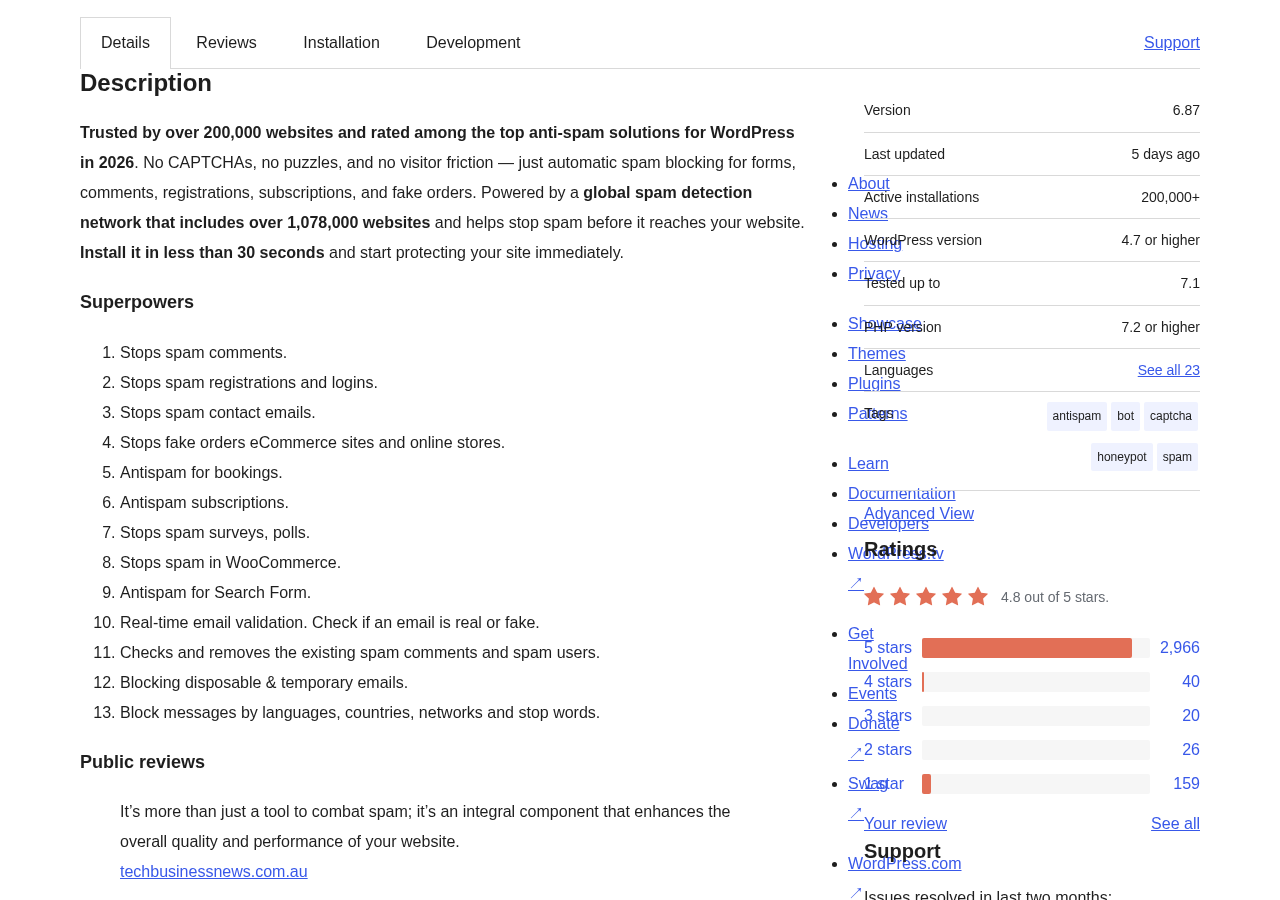
- WordPress.org rating: 4.8/5 stars (3,211 reviews)
- Active installs: 200,000+
- Network size: 1,097,000+ websites in the global spam detection network
- Free trial: 7 days (no credit card required)
- Price: $12 per year for one site (no commercial restriction)
- Bottom line: the best-value cloud anti-spam option for commercial WordPress sites, with the broadest form coverage in the category
Quick verdict
CleanTalk is the most cost-efficient cloud anti-spam plugin for WordPress in 2026. At $12 per year, it covers comment spam, registration spam, login spam, contact form spam, WooCommerce fake orders, booking spam, subscription spam, and search form spam in a single subscription. No other plugin at this price covers all of those form types simultaneously.
The SpamFireWall feature blocks known spam bot IPs at the HTTP level before WordPress loads, which is a meaningful performance and security benefit that most competing plugins do not offer. The analytics dashboard on cleantalk.org gives you a clear view of how much spam your site is blocking over time.
The trade-offs are real but manageable: there is no free tier after the 7-day trial, the active install count (200,000) is smaller than Akismet’s (5 million), and the plugin sends visitor data to CleanTalk’s cloud , which has GDPR implications worth reading before activating on EU-hosted sites.
Quick verdict card
- Best for: commercial WordPress sites of any size that need broad spam coverage at the lowest sustainable price
- Best plan: Anti-spam for sites, $12/year for one site (no commercial use restriction)
- Standout: SpamFireWall blocks spam bots at the HTTP layer before they hit PHP; broadest form coverage of any plugin at this price; real-time email validation and spam audit tools included
- Watch out for: no permanent free tier; smaller spam database than Akismet; visitor data sent to CleanTalk’s cloud; subscription must be renewed annually
What CleanTalk is
CleanTalk is a cloud-based anti-spam service for websites, delivered as a WordPress plugin that connects to CleanTalk’s external API. The plugin itself is a thin connector. The filtering intelligence runs on CleanTalk’s servers: when a visitor submits a comment, registration, or form, CleanTalk’s plugin sends that data to the API, receives a spam or not-spam verdict, and acts on it.
The service launched in 2012 and was added to WordPress.org the same year. By 2026, the global network includes over 1,097,000 websites that collectively contribute spam signal. Every blocked spam attempt across the network strengthens the shared database.
The plugin’s full name on WordPress.org is “Spam protection, Honeypot, Anti-Spam by CleanTalk.” This reflects the multiple methods it uses: cloud database checking, behavioral analysis, JavaScript-based invisible tests, and honeypot fields. The combination is designed to catch spam that evades any single method.
The WordPress.org listing shows:
- Active installs: 200,000+
- Total downloads: 25+ million
- Rating: 4.8 out of 5 stars (3,211 ratings)
- Rating breakdown: 5-star: 2,966 | 4-star: 40 | 3-star: 20 | 2-star: 26 | 1-star: 159
- PHP required: 7.2 or higher
- WordPress required: 4.7 or higher
- Languages: 23
- Added to WordPress.org: May 18, 2012
Who CleanTalk is best for
Strong fit:
- Commercial WordPress sites that want the lowest cost for full spam coverage. At $12/year with no commercial restriction, the value case is straightforward.
- WooCommerce store owners dealing with fake orders and registration spam. CleanTalk blocks checkout fraud attempts and spam account creation.
- Sites with multiple form types: contact forms, registration pages, booking forms, subscription forms. CleanTalk protects all of them through one subscription.
- Agencies managing multiple client sites. CleanTalk’s multi-site pricing scales more affordably than per-site alternatives.
- Sites that have tried reCAPTCHA and found the friction unacceptable. CleanTalk runs invisibly with no visitor interaction required.
- Sites receiving spam from specific countries or languages, who want geographic/language blocking without managing IP lists.
Weak fit:
- Personal non-commercial blogs on a tight budget who want a permanent free solution. Antispam Bee is free with no trial expiry.
- Sites with strict GDPR requirements where external data transmission is not acceptable. Antispam Bee runs entirely on your server with no cloud calls.
- Sites that primarily need comment protection and already have Akismet’s free Personal plan working for them.
- Site owners who prefer to avoid subscription renewals. CleanTalk requires annual renewal; missing it means protection stops until renewal.
Setting up CleanTalk
Setup requires creating a CleanTalk account and getting an access key. The process is:
- Go to cleantalk.org and create an account. You provide your email, website address, and a password.
- A 7-day free trial starts automatically after account creation.
- CleanTalk emails you the access key for your site.
- Install the “Spam protection, Honeypot, Anti-Spam by CleanTalk” plugin from the WordPress plugin directory.
- Activate the plugin in WordPress.
- Go to Settings and find “Anti-Spam by CleanTalk.”
- Enter your access key and save.
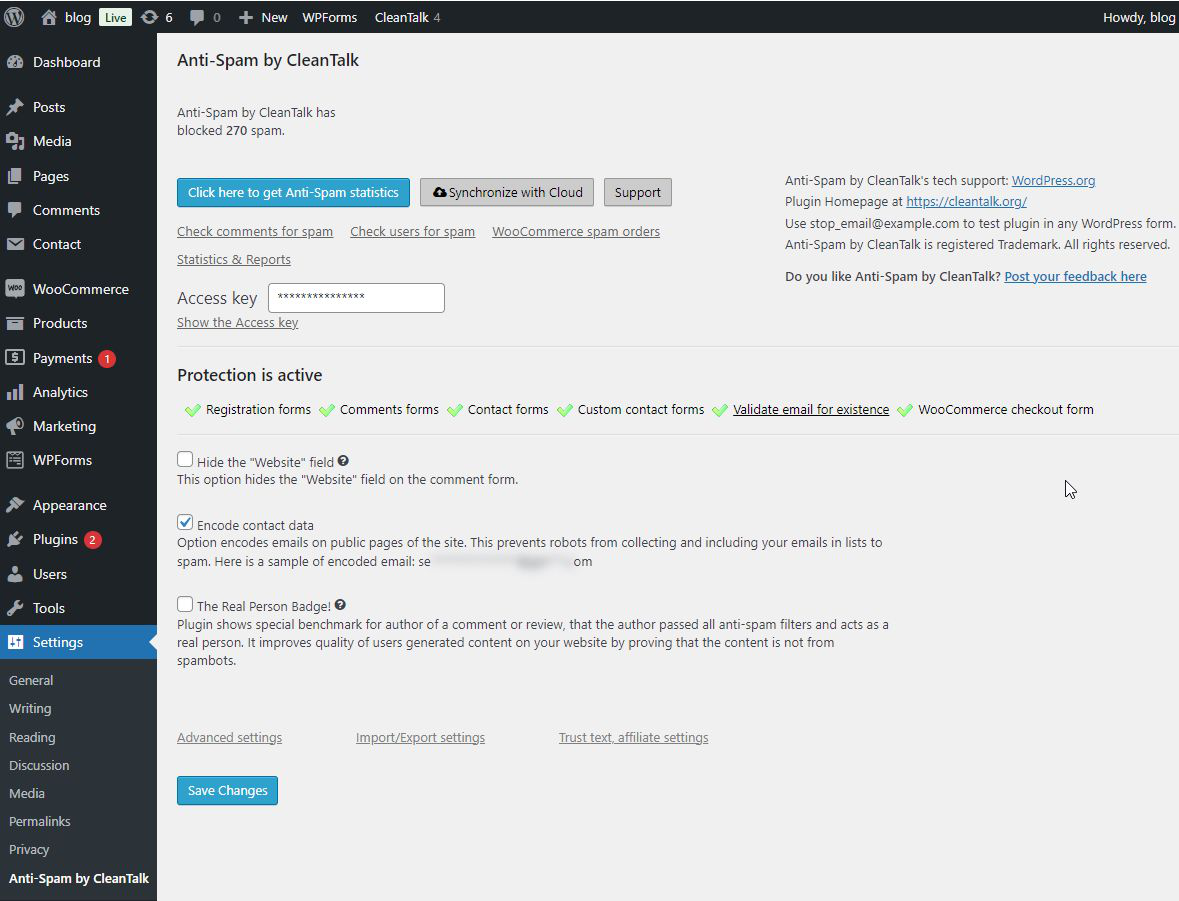
After saving, the plugin shows a “Protection is active” status with green checkmarks for every form type it detects on your site. On a standard WooCommerce site with Contact Form 7 and user registration enabled, this immediately activates protection for registration forms, comment forms, contact forms, custom contact forms, email validation, and WooCommerce checkout forms.
Setup takes a few minutes. There is no configuration wizard, and the default settings work without adjustment for most sites. Advanced settings allow tuning: auto-delete old spam, block by country or language, hide the website field on comment forms, and encode contact email addresses to prevent harvesting.
Core features
SpamFireWall
SpamFireWall is CleanTalk’s pre-filtering layer. It checks the IP address of every incoming request against CleanTalk’s database of known spam bots before that request reaches WordPress’s PHP layer. If a bot’s IP is on the blacklist, the request is blocked at the HTTP level and never touches your WordPress installation.
This has two meaningful benefits. First, it reduces server load from spam bot traffic, which can be significant on high-traffic sites. Second, it adds a layer of protection that is independent of WordPress itself, meaning bots that know how to submit forms can be stopped before they get that far. SpamFireWall is included in the base $12/year subscription.
Broad form coverage
This is CleanTalk’s clearest competitive advantage. The plugin integrates with over 50 WordPress form plugins and e-commerce tools, including:
Contact Form 7, WPForms, Gravity Forms, Fluent Forms, Formidable Forms, Ninja Forms, Elementor Forms, HubSpot, Mailchimp, AWeber, bbPress, BuddyPress, WooCommerce, Easy Digital Downloads, GiveWP, LearnPress, Events Manager, Jetpack, FluentBooking, and many more.
Each integrated form type is protected through the same CleanTalk API call and the same access key. Registration spam, login spam, checkout spam, and comment spam all funnel through the same cloud service , one subscription handles the entire site without needing separate tools.
Anti-Spam analytics dashboard
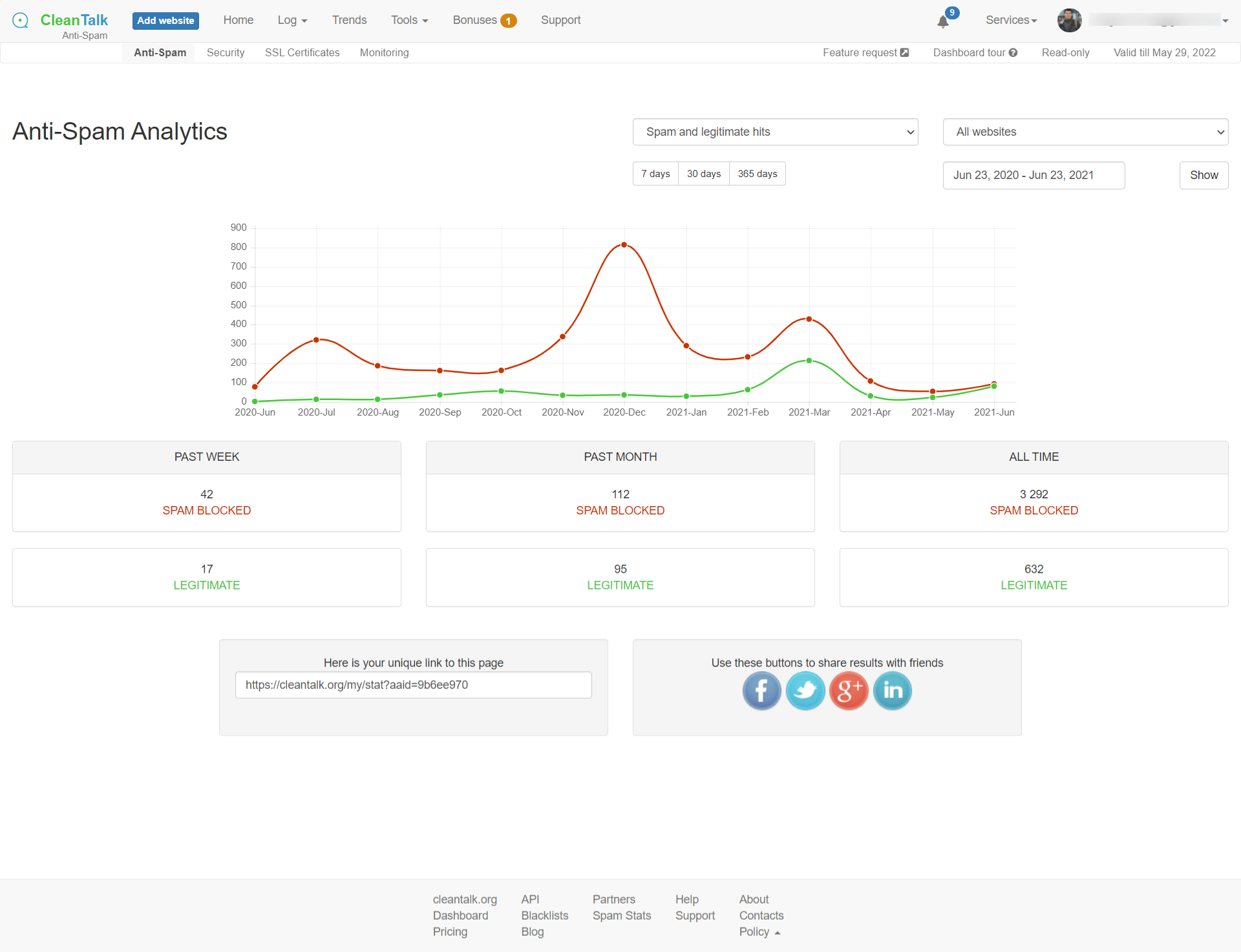
Every CleanTalk account includes a web-based analytics dashboard at cleantalk.org. The dashboard shows spam blocked versus legitimate traffic over time, with date range filters (7 days, 30 days, 365 days) and per-site views for accounts managing multiple websites.
Real-time email validation
CleanTalk includes real-time email validation in the base subscription. When a visitor enters an email address in any protected form, CleanTalk checks whether that email exists and is not associated with known spam activity. Disposable email addresses from services like Mailinator are blocked as well.
This is particularly useful for WooCommerce stores, membership sites, and newsletter sign-ups where fake email addresses cause deliverability problems and inflate subscriber counts.
Spam audit tools
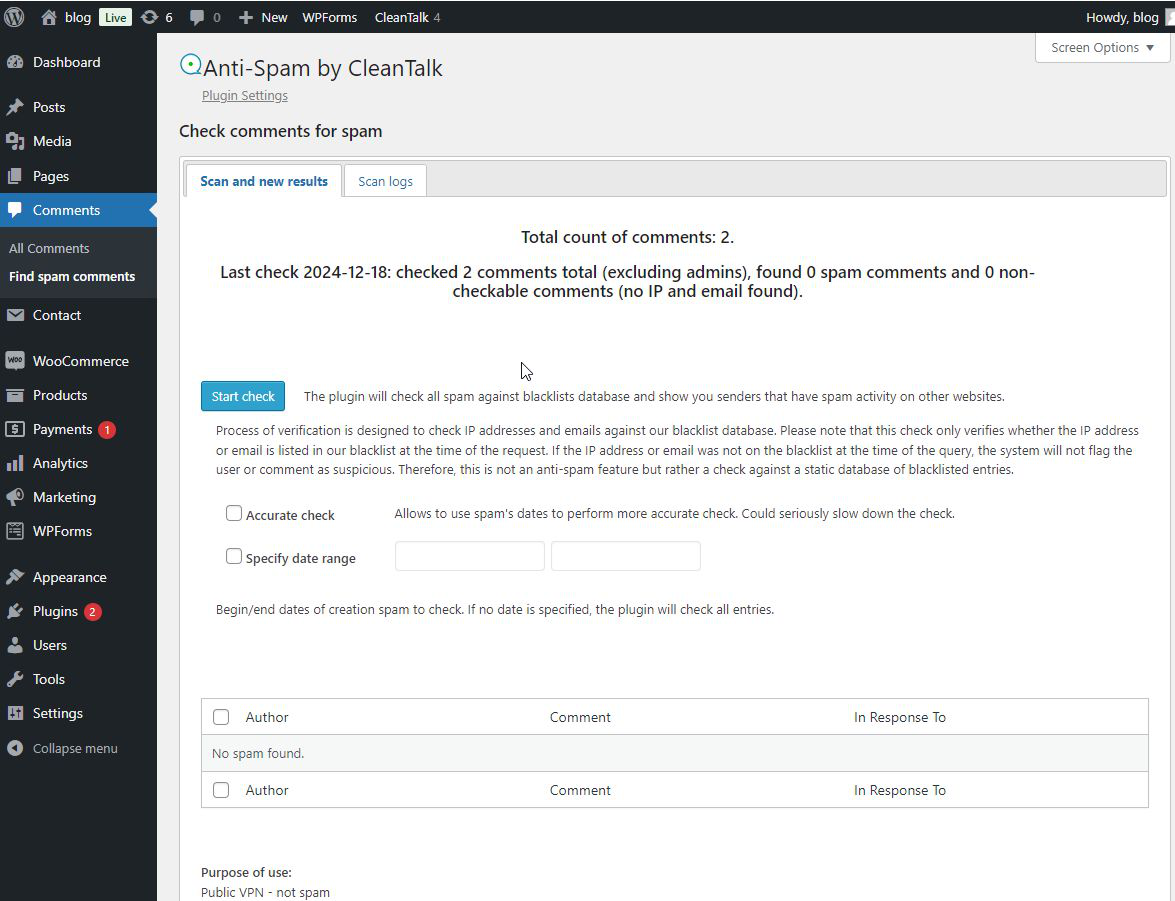
The plugin adds two audit tools to the WordPress admin. “Check comments for spam” scans your existing comment database against CleanTalk’s blacklist. Comments from IPs or emails with spam history that were published before you installed CleanTalk are flagged for review or deletion.
“Check users for spam” does the same for registered users. You can scan your entire user table and mass-delete or review accounts flagged as potential spam registrations. The tool also shows the purpose of each IP (public VPN, TOR, hosting infrastructure) to help you make informed decisions on borderline cases.
WooCommerce and e-commerce protection
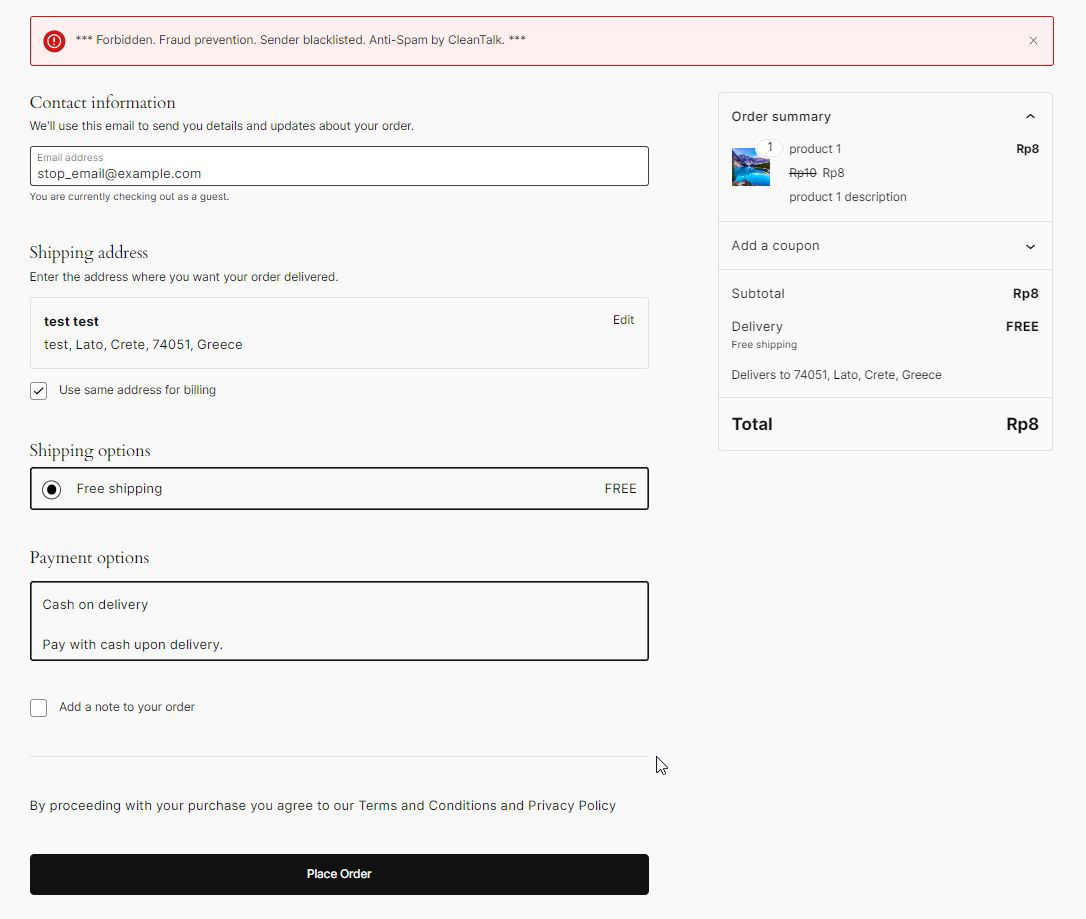
WooCommerce checkout spam , fake orders placed by bots , is a real problem for stores that can inflate refunds, consume stock, and generate fraudulent payment attempts. CleanTalk blocks checkout attempts from blacklisted senders at the form level, displaying a “Forbidden. Fraud prevention. Sender blacklisted.” message to the bot.
This protection covers WooCommerce checkout and works alongside CleanTalk’s registration spam blocking. Combined, the two features address the most common bot vectors against e-commerce sites: fake account creation and fake order placement.
Additional filtering options
Beyond core detection, CleanTalk includes optional filters in advanced settings: block by country, block by language, block by stop words, encode contact data to prevent email harvesting, and a “The Real Person Badge” that displays a verified-human badge next to comment authors who passed all checks.
Pricing
CleanTalk pricing is based on annual subscriptions per site. Verify current pricing at cleantalk.org before purchasing, as rates may vary by location.
Anti-spam for sites (base plan)
- $12 per year for 1 site (1-year subscription)
- $10.80 per year for 1 site (3-year subscription, 10% discount)
- Includes: Unlimited Anti-Spam service, Unlimited SpamFireWall service, anti-spam logs up to 7 days, spam and SpamFireWall trends, filter by IP/email/IP networks, Real-Time Email Validation, 24/7 tech support
Optional add-ons
- Extra package: $5.99/year (additional anti-spam enhancements)
- Site Security: $8.10/year (Security FireWall, Malware Scanner, Web Application FireWall, Brute Force protection)
- Uptime Monitoring: $10/year (every-minute response monitoring with real-time alerts)
Free trial: 7 days with full access. No credit card required.
Multi-site pricing: CleanTalk’s checkout allows selecting multiple websites under one subscription with per-site cost decreasing at volume. For agencies managing 10+ client sites, the economics are considerably better than purchasing individual licenses.
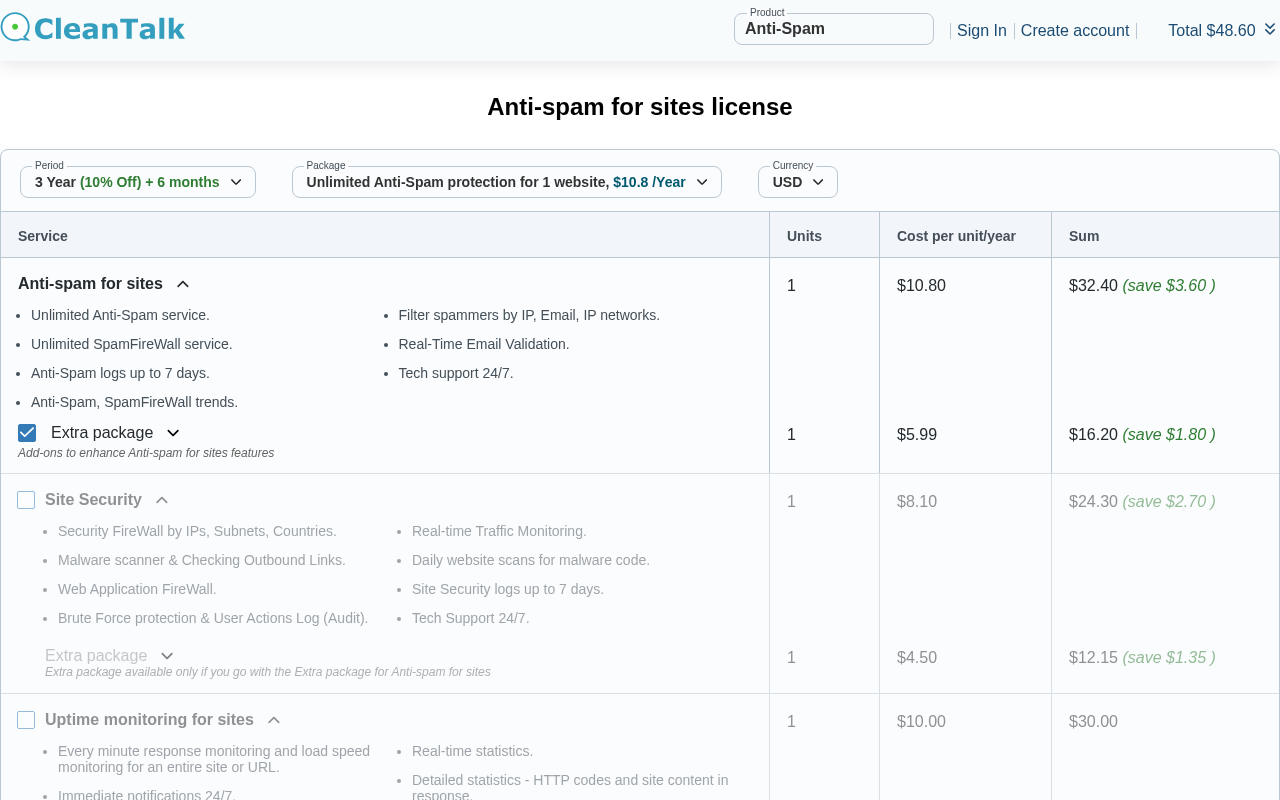
The $12/year base price compares to Akismet Pro at approximately $120/year for one commercial site. For WooCommerce stores and commercial sites in particular, the cost difference is significant enough to make this comparison a primary decision point.
Pros and cons
Pros
- $12/year covers one commercial site with no restrictions on site type or revenue
- Broadest form coverage in the category: comments, registrations, logins, contact forms, WooCommerce checkout, bookings, subscriptions, and search forms , all through one subscription
- SpamFireWall blocks spam bot IPs at the HTTP level before WordPress loads
- 4.8/5 stars across 3,211 reviews, with 2,966 five-star ratings
- Real-time email validation and disposable email blocking included in base plan
- Spam audit tools included: scan existing comments and users against the blacklist
- No CAPTCHA for visitors ; all filtering is invisible
- Compatible with 50+ form plugins and e-commerce tools
- Web-based analytics dashboard with per-site spam stats and trends
- 7-day free trial with no credit card required
- Advanced country, language, and stop-word blocking options
- 24/7 tech support included in the base plan
- 25+ million total downloads and 14-year track record on WordPress.org
- Actively maintained: version 6.87 released September 2, 2026, tested to WordPress 7.1
Cons
- No permanent free tier. Protection stops after the 7-day trial if you do not subscribe
- Smaller spam database than Akismet: 1,097,000 websites in the CleanTalk network versus 5+ million for Akismet
- Sends visitor data (form content, email addresses, IP addresses) to CleanTalk’s cloud API ; GDPR disclosure required
- Subscription must be renewed annually. Missing the renewal date means spam protection goes inactive
- 159 one-star reviews out of 3,211 total, some citing false positives or support issues
- Log data retained only 7 days; no long-term local log storage in base plan
- Plugin name in admin is verbose (“Spam protection, Honeypot, Anti-Spam by CleanTalk”)
Alternatives to CleanTalk
Akismet. The most-installed anti-spam plugin for WordPress (5+ million active installs). Free for personal non-commercial use; Pro costs approximately $9.95/month for one commercial site ($120/year). Akismet’s spam database is larger and its history longer. The trade-offs: it costs ten times more for commercial use and does not cover WooCommerce checkout or login forms by default. For non-commercial personal blogs, Akismet free is the easiest recommendation. For commercial sites comparing costs, CleanTalk is the more economical choice with broader coverage. Read the full Akismet review for a side-by-side breakdown.
Antispam Bee. Free, open-source, with no external API calls and no subscription. Antispam Bee runs entirely on your server using honeypots, local spam databases, and IP validation. There are no GDPR complications from external data transmission. The limitations: it primarily targets comment spam, lacks WooCommerce protection, has no SpamFireWall, and does not include email validation. The strongest free option for personal or small-business sites where cost is the primary driver and comment spam is the main concern.
Cerber Security. A security suite that covers spam protection alongside malware scanning, firewall rules, login protection, and brute-force defense. Cerber’s free version covers registration spam and login spam that Akismet does not touch. Choose Cerber if you want a combined spam and security plugin rather than a dedicated spam-only tool.
WPBruiser. A no-CAPTCHA spam prevention plugin that uses token-based verification rather than a cloud blacklist. WPBruiser is a good choice for sites where privacy is a concern and external API calls are not acceptable. False positives are rare because the check does not depend on reputation data.
Final verdict
CleanTalk solves the problem that keeps most commercial site owners from using Akismet: the price gap between the free personal tier and the paid commercial tier is too wide. At $12/year with no commercial restrictions and no CAPTCHA, CleanTalk covers the entire site : comments, registrations, WooCommerce, contact forms, and more , for less than the cost of one month of Akismet Pro.
The 4.8-star rating across 3,211 reviews is not a coincidence. The plugin is well-maintained, broadly compatible, and genuinely effective at stopping spam across the form types where WordPress sites are most frequently attacked. The SpamFireWall adds a meaningful layer of protection that few competitors include at any price.
The weaknesses are worth being honest about. The spam database is smaller than Akismet’s, which matters most for unusual or emerging spam patterns. The no-free-tier model means you are always paying or unprotected. And the cloud dependency creates the same GDPR considerations that Akismet does, without the same brand recognition that might make the conversation with a legal team easier.
What I would say to a commercial site owner choosing spam protection in 2026: if you run a WooCommerce store, a membership site, or any site with multiple form types and you are paying for Akismet Pro, check CleanTalk before renewing. The math is compelling and the feature set is broader. If you run a personal blog and Akismet’s free tier covers you, there is no strong reason to switch. If you have hard GDPR requirements that prohibit external data transmission, Antispam Bee is the appropriate choice regardless of price.
CleanTalk earns its reputation as the practical choice for commercial WordPress spam protection.
FAQ
Is CleanTalk free?
CleanTalk offers a 7-day free trial with full access to all features. No credit card is required to start the trial. After the trial period, a subscription is required: the base plan costs $12 per year for one website. There is no permanent free tier. Unlike Akismet, CleanTalk does not restrict its paid plans to commercial use only ; any WordPress site can subscribe at the base price without a personal-use-only limitation.
How does CleanTalk’s pricing compare to Akismet?
Akismet’s free Personal plan is limited to personal non-commercial blogs. For any site that earns revenue, shows advertising, or promotes a product or service, Akismet requires the Pro plan at approximately $9.95 per month ($120/year) for one site. CleanTalk charges $12 per year for one site with no commercial use restriction. For a single commercial site, CleanTalk costs approximately ten times less than Akismet Pro while offering broader form coverage including WooCommerce, registrations, and login forms that Akismet Pro does not cover by default.
Does CleanTalk work with WooCommerce?
Yes. CleanTalk protects WooCommerce checkout forms from fake order attempts, blocks spam registrations for WooCommerce customer accounts, and catches fake product reviews in the comment layer. The WooCommerce protection is included in the base $12/year subscription and activates automatically when CleanTalk detects WooCommerce on your site. When a blacklisted sender attempts to place an order, CleanTalk displays a “Forbidden. Fraud prevention. Sender blacklisted.” message and blocks the order.
What is CleanTalk’s SpamFireWall?
SpamFireWall is a pre-filtering layer that checks incoming request IP addresses against CleanTalk’s database of known spam bots before the request reaches WordPress. If a bot’s IP is on the blacklist, the request is blocked at the HTTP level without involving WordPress’s PHP layer. This reduces server load from bot traffic and adds a protection layer independent of WordPress itself. SpamFireWall is included in the base CleanTalk subscription at no extra cost.
Does CleanTalk require CAPTCHA?
No. CleanTalk is explicitly designed as a CAPTCHA-free alternative. Visitors never see a checkbox, image puzzle, or verification challenge. All spam detection runs in the background using behavioral analysis, invisible JavaScript tests, honeypot fields, and CleanTalk’s cloud spam database. This is one of CleanTalk’s primary positioning points and a key reason site owners switch from reCAPTCHA.
Is CleanTalk GDPR compliant?
CleanTalk processes visitor data (form submissions, email addresses, IP addresses) on its cloud servers. This has GDPR implications for sites with EU visitors. CleanTalk’s privacy policy describes its data handling practices. To be compliant, your site’s privacy policy must disclose CleanTalk and the data it processes. For sites where transmitting visitor data to a third-party cloud service is not permissible, Antispam Bee is the alternative that processes everything locally with no external API calls.
How many form plugins does CleanTalk support?
CleanTalk integrates with over 50 WordPress form plugins and e-commerce tools, including Contact Form 7, WPForms, Gravity Forms, Fluent Forms, Formidable Forms, Ninja Forms, Elementor Forms, HubSpot, Mailchimp, WooCommerce, Easy Digital Downloads, GiveWP, LearnPress, Events Manager, bbPress, BuddyPress, and many others. The full list is on CleanTalk’s WordPress.org plugin page. All integrations work through the same access key and subscription.
What happens if my CleanTalk subscription expires?
When the annual subscription expires, CleanTalk’s API stops accepting requests from your site and spam protection becomes inactive. Existing comments and users are not affected, but new form submissions will no longer be checked. CleanTalk sends renewal reminders before the expiry date. You can renew at cleantalk.org to restore protection. If you are on a 3-year plan, the renewal interval is longer and the per-year cost is lower.
How does CleanTalk compare to Antispam Bee?
The main difference is the operating model. CleanTalk is a cloud service: form submissions are sent to CleanTalk’s API for checking, which gives it access to a global spam database at the cost of external data transmission. Antispam Bee runs entirely on your server with no external API calls, making it the stronger choice for GDPR-sensitive deployments. Antispam Bee is free with no subscription, but it covers primarily comment spam and does not include WooCommerce protection, SpamFireWall, or real-time email validation. CleanTalk at $12/year adds all of those features for sites where cloud processing is acceptable.
What is CleanTalk’s WordPress.org rating?
As of September 2026, CleanTalk has a 4.8-out-of-5-star rating on WordPress.org based on 3,211 total reviews. The rating breaks down as: 5-star: 2,966 | 4-star: 40 | 3-star: 20 | 2-star: 26 | 1-star: 159. The 159 one-star reviews include complaints about false positives (legitimate users blocked) and occasional technical issues after plugin updates. Overall, the 4.8 rating is among the highest in the anti-spam plugin category.