


ConvertKit is a name that most WordPress bloggers know. The email marketing platform built its reputation as the go-to tool for content creators who wanted something more capable than Mailchimp but less complex than ActiveCampaign. In 2024, the company rebranded to Kit, but the WordPress plugin at the core of its site integration still carries the ConvertKit legacy in its URL and in millions of people’s search queries.
This review covers the Kit (formerly ConvertKit) WordPress plugin in 2026. I worked through the plugin’s WordPress.org listing (version 3.3.9, updated August 19, 2026), the official feature pages, the pricing structure, the platform’s documentation, and third-party testing reports. Where a feature required a live paid account for testing, the relevant section says so.
At a glance:
- Audited on: Kit WordPress plugin version 3.3.9 (August 19, 2026); wordpress.org/plugins/convertkit; kit.com feature pages and pricing verified August 2026.
- Free tier: Up to 10,000 subscribers at no cost. Unlimited email broadcasts, landing pages, and forms. One automation and one sequence included.
- Paid plans: Creator starts at $39/month or $33/month billed annually. Creator Pro starts at $79/month or $66/month billed annually. Both scale by subscriber count.
- Bottom line: The most generous free plan in its category for bloggers and creators, a well-integrated WordPress plugin with Gutenberg blocks, and an automation platform that punches above its complexity level. The main challenge in 2026 is the price, after the September 2025 increase made Kit significantly more expensive for growing lists.
Quick verdict
Kit (formerly ConvertKit) is the right choice if you are a blogger, newsletter writer, course creator, or solo creator building an email list. The free plan supports up to 10,000 subscribers with unlimited sends, unlimited landing pages, and unlimited forms. That is a meaningful head start compared to Mailchimp (500-subscriber free limit) or ActiveCampaign (no free plan at all).
The WordPress plugin integrates cleanly. You connect your Kit account in one OAuth click, and from there you can embed forms in any post or page using native Gutenberg blocks, replace WordPress pages with Kit-hosted landing pages, gate content for paying members, and automatically import your past email broadcasts as WordPress posts. The plugin currently sits at version 3.3.9 with a 4.8/5 rating from 90 WordPress.org reviews.
The catch is pricing. Kit raised Creator plan prices sharply in September 2025, from $15/month to $33/month (annual) or $39/month (monthly) for a 1,000-subscriber list. At 10,000 subscribers, Creator costs $92.50/month on annual billing.
Quick verdict card
- Best for: bloggers, newsletter writers, course creators, and solopreneurs building an audience on WordPress who want email list growth, automations, and light monetization in one tool.
- Best plan for starting out: the free Newsletter plan for lists up to 10,000 subscribers. No credit card required.
- Best plan for growing creators: Creator at $33/month billed annually, for unlimited automations, RSS campaigns, A/B subject line testing, and branding removal.
- Best plan for newsletter businesses: Creator Pro at $66/month billed annually, for the SparkLoop referral system, subscriber engagement scoring, advanced A/B testing (5 variants), and Facebook Custom Audiences.
- Standout: free plan’s 10,000-subscriber limit; native Gutenberg form builder block; membership content gating without a separate plugin; broadcasts-to-posts import for SEO.
- Watch out for: pricing that escalates sharply with list growth; A/B testing limited to subject lines; no timezone-based broadcast scheduling; advanced analytics behind Pro paywall; free plan includes Kit branding.
What Kit (formerly ConvertKit) is
Kit is an email marketing platform built for content creators. It handles email list building, newsletter broadcasts, automated sequences, landing pages, digital product sales, and membership sites. The platform’s core philosophy is that everything flows through a single subscriber list with tags, not through separate lists per campaign or product.
The company started as ConvertKit in 2013, founded by Nathan Barry as a direct response to Mailchimp’s lack of creator-focused features. For years, ConvertKit was the email marketing recommendation in the WordPress and blogging community, particularly for creators who had outgrown MailerLite or Mailchimp’s free plans and wanted automation without ActiveCampaign’s complexity.
In 2024, the company rebranded to Kit, positioning itself as an “email-first operating system for creators.” The WordPress plugin was updated from ConvertKit to Kit branding in version 2.6.0. The WordPress.org plugin URL (wordpress.org/plugins/convertkit) and the original convertkit.com domain (which redirects to kit.com) both continue to work.
Kit integrates with WordPress through an official plugin with 40,000+ active installations. Version 3.3.9 was published on August 19, 2026.
Who Kit is best for
Strong fit
- Bloggers and content creators building an email list from zero. The 10,000-subscriber free plan gives you room to grow before paying anything.
- Newsletter writers who want to import past email broadcasts as WordPress posts, making newsletters searchable and permanent on the site.
- Course creators and coaches who sell digital products through Kit Commerce and want purchase events to trigger subscriber tags and automations.
- WordPress site owners who want content gating without adding a separate membership plugin.
- Creators in the Kit Creator Network who cross-promote newsletters with other Kit users to grow their lists.
- Users who want a clean, beginner-friendly visual automation builder covering welcome sequences and post-purchase flows.
- Teams using Elementor, Divi, or Contact Form 7 who want native Kit form integration.
Weak fit
- E-commerce stores with complex automation needs. Kit’s automation does not reach the depth of ActiveCampaign or Klaviyo for multi-step behavioral flows, CRM integration, and lead scoring.
- Users who need diverse, visually rich email templates. Kit’s template library leans toward minimal text-heavy newsletters. Mailchimp or Brevo offer more visual options.
- Fast-growing lists where cost is a concern. At 10,000 subscribers, Creator costs $92.50/month annually. MailerLite is significantly cheaper at the same subscriber counts.
- Teams requiring timezone-based broadcast scheduling. Kit does not send broadcasts based on each subscriber’s local timezone.
- Multi-brand operators managing many separate audiences. Kit’s single-account, single-list model is not designed for multi-brand email management.
- Users who need A/B testing beyond subject lines. Content testing and multivariate testing are not available at either paid tier.
Setting up the Kit WordPress plugin
The setup process is one of the cleaner ones among email marketing WordPress plugins. No API keys, no copy-paste credentials.
- Install the plugin from the WordPress plugin directory. Search for “Kit” or “ConvertKit” at Plugins > Add New.
- Activate the plugin. A notice prompts you to connect your Kit account.
- Navigate to Settings > Kit. Click Connect. This opens an OAuth flow in Kit’s interface.
- Authorize the connection. Kit issues a site-specific access token stored by the plugin. No API key management required.
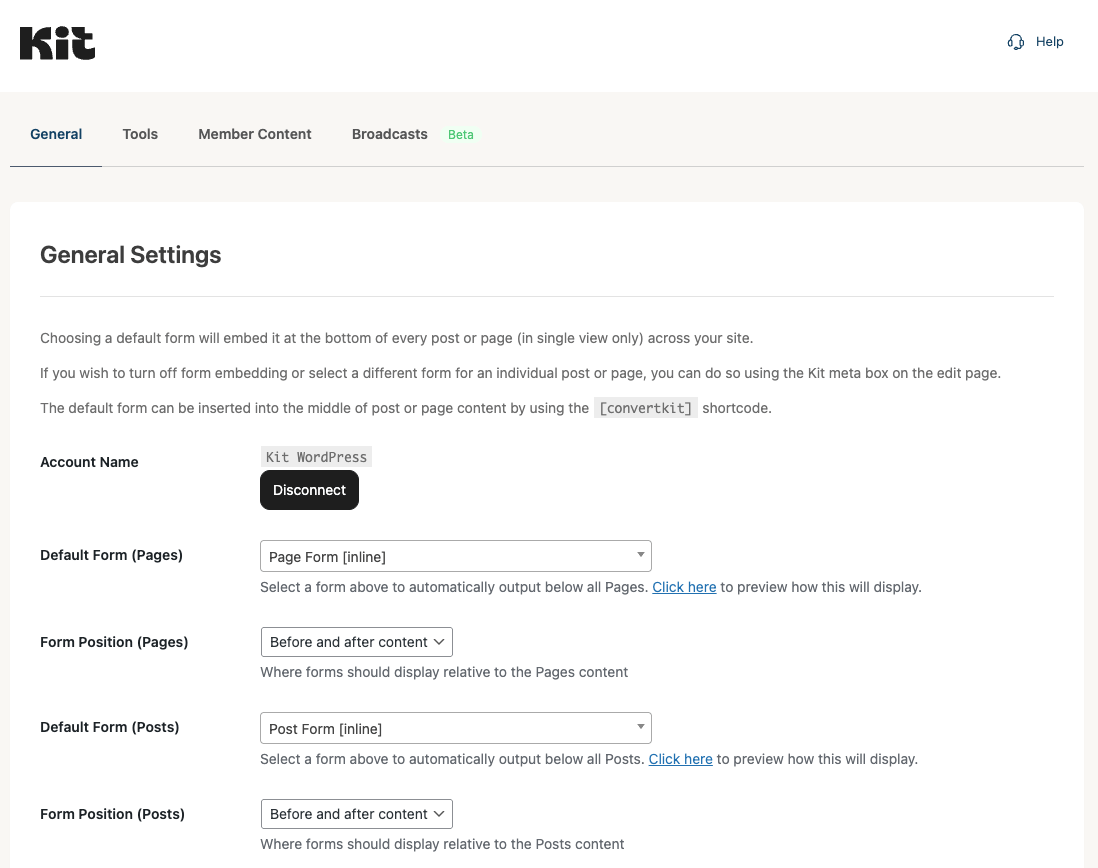
- Select default forms for posts and pages in the plugin settings.
- Use blocks or shortcodes for fine-grained control on individual posts.
The plugin settings page is minimal. Analytics live in the Kit web interface. The plugin’s job is integration, not replacing the Kit platform.
WordPress plugin features
Form blocks in the Gutenberg editor
The Kit plugin adds eight blocks to the WordPress block editor. The two most important for list building are:
Kit Form: Embed an existing Kit-hosted form directly into a post or page. The form renders using Kit’s hosted JavaScript. Four display formats are supported: inline, modal, slide-in, and sticky bar.
Kit Form Builder: Build and customize a subscription form directly inside the WordPress block editor. Add name and email fields, custom fields, apply tags on submission, configure reCAPTCHA v3 or Cloudflare Turnstile spam protection, and use the site’s theme styles. Forms built here sync back to your Kit account.
Other blocks include Kit Form Trigger (a button that opens a modal form), Kit Broadcasts (display a list of past email newsletters on a page), and Kit Product (embed a purchase button for a Kit digital product). Shortcodes remain available for classic themes. All forms load asynchronously without adding render-blocking resources.
Automatic form placement
The plugin settings include a global default form for posts and for pages separately. Every post or page appends that form automatically. Individual posts can override the default or disable form appending using a sidebar selector in the block editor. This global-then-per-post model is practical for most blogs.
Landing pages
Kit landing pages are hosted on Kit’s servers. The plugin lets you replace a WordPress page with a Kit-hosted landing page at the same URL. The advantage is a clean conversion-optimized landing page using Kit’s template library and drag-and-drop builder, available at all plan tiers including free. The trade-off is that Kit-hosted landing pages render outside your WordPress theme, so your site’s navigation and footer do not appear. For dedicated lead capture pages where removing navigation is intentional, this works well.
Broadcasts import to WordPress posts
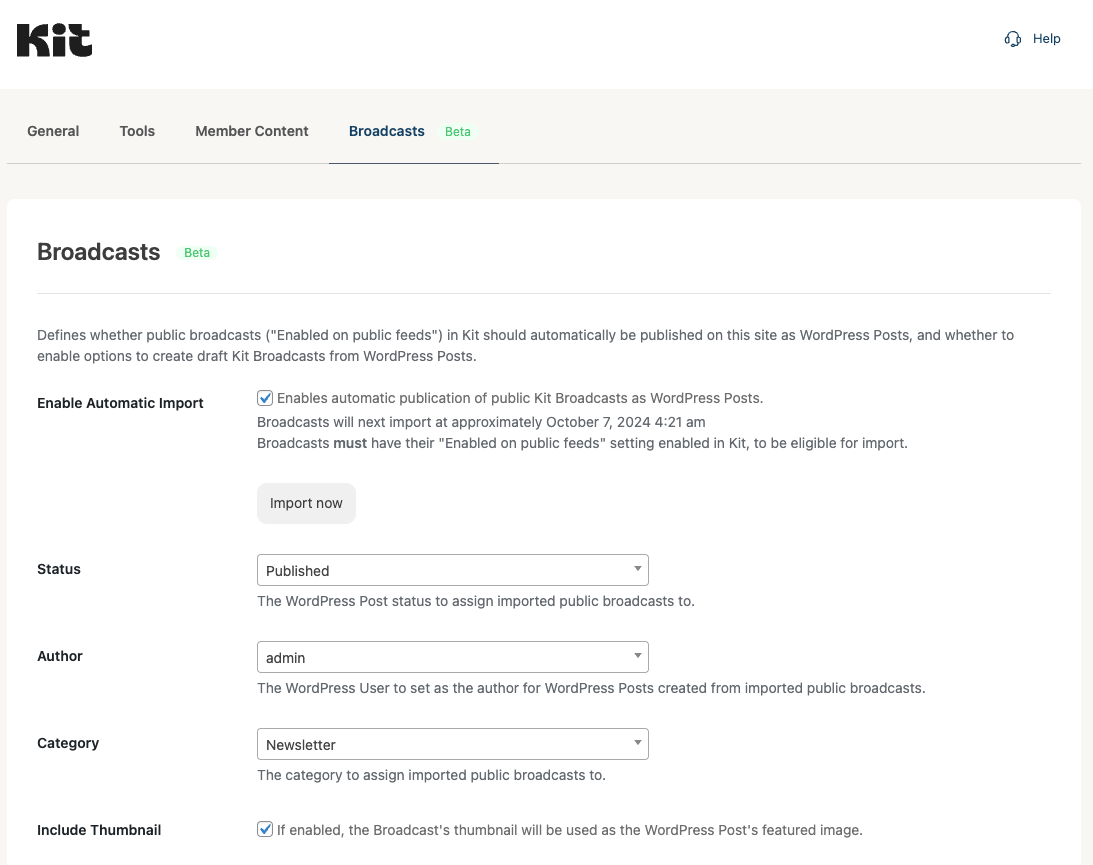
This is one of Kit’s most underused WordPress integration features. The plugin can automatically import your published Kit email broadcasts as WordPress posts. You configure the import schedule, post author, WordPress post category, and whether imports publish immediately or create drafts.
The result: every newsletter you send through Kit becomes a permanent, indexable post on your WordPress site. For a newsletter-first creator, this is a useful passive SEO benefit with no extra writing effort.
Membership content gating
The plugin includes built-in content gating. You can restrict any WordPress post or page to subscribers only (free list members who authenticate via a one-time email passcode) or to paid members only (users who have purchased a specific Kit product). Authentication uses a magic-link system: visitors enter their email, receive a one-time code, enter the code, and gain access. No separate password is created.
This replaces what a basic membership plugin would handle for simple creator use cases. The limitation is complexity ceiling: Kit’s gating is product-level, not tier-based. Complex membership tiers, drip content schedules, or LMS functionality require a dedicated membership plugin. The plugin’s WishList Member integration handles the handoff for more complex setups.
Third-party integrations
- Elementor: Kit Form and Broadcasts widgets in the Elementor widget panel.
- Divi: Dedicated Kit modules for forms, broadcasts, form triggers, and products.
- Contact Form 7: Map CF7 form submissions to Kit subscriber lists and tags automatically.
- Forminator: Map Forminator form fields to Kit subscriber data.
- WishList Member: Sync membership levels with Kit subscriber tags and sequences.
- WooCommerce: Separate Kit for WooCommerce plugin enables opt-in at checkout, purchase triggers, and abandoned cart sequences.
- Gravity Forms: Separate Gravity Forms Kit Add-On routes form submissions to Kit.
Email marketing platform features
Email broadcasts
Broadcasts are one-time emails sent to your full list or a segment. The broadcast editor offers a drag-and-drop visual editor and a plain text editor. Kit’s emphasis on plain-text and minimal-design emails is intentional: emails that look like personal messages tend to perform better for deliverability and open rates in creator and newsletter contexts. Broadcast recipient filtering uses tags, segments, and form subscriptions. All plan tiers include unlimited broadcast sends.
Email sequences
Sequences are automated email series triggered by a subscriber action: joining a form, being tagged, purchasing a product, or completing another sequence. You write the emails once, set delays between each one, and the sequence runs automatically for each new trigger. The free plan includes one sequence. Creator and Creator Pro include unlimited sequences.
Visual automation builder
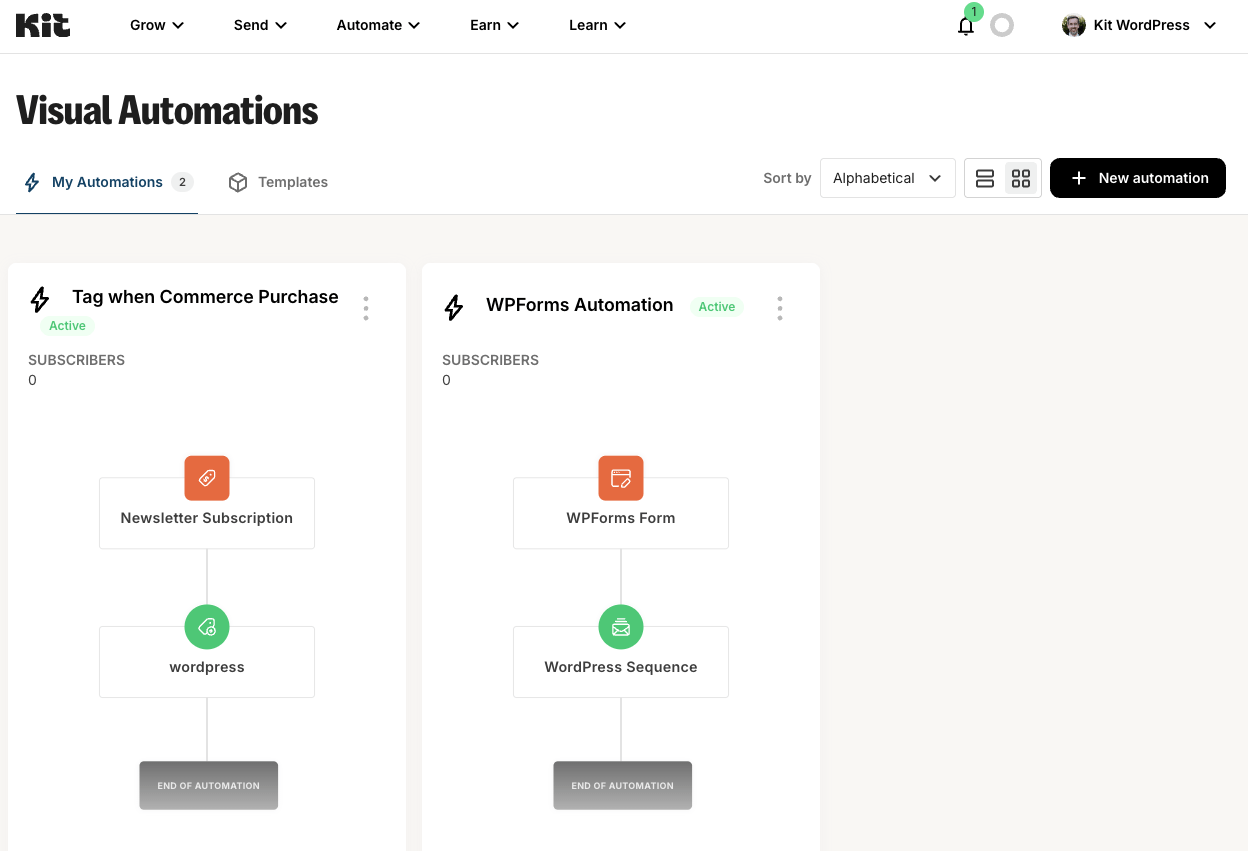
The automation builder is a canvas-based drag-and-drop interface where you connect triggers, actions, and conditions to build subscriber journeys. Triggers include: subscribing to a form, being tagged, purchasing a product, clicking a link, and completing a sequence. Actions include: adding or removing a tag, starting a sequence, sending a broadcast. Conditions branch the journey based on subscriber attributes.
Kit’s automation builder is one of its genuine strengths: more approachable than ActiveCampaign’s equivalent while covering real creator workflows. The free plan allows one automation. Creator and Creator Pro allow unlimited automations.
Subscriber tagging and segmentation
Kit uses a tag-based subscriber model. Every subscriber exists once in your account, regardless of how many forms, products, or automations they have touched. Tags and segments target that single record. The practical benefit: one person who subscribes to your lead magnet, buys your course, and clicks a link in your newsletter still counts as one subscriber for billing. List-based platforms can bill the same person multiple times if they appear on multiple lists. Kit’s model prevents that double-billing.
Creator Network
The Creator Network is Kit’s built-in newsletter cross-promotion feature. New subscribers see a recommendation page at the opt-in confirmation step, suggesting other Kit newsletters. You participate by recommending other newsletters in your niche, and others recommend yours. Creator Network is free for all plan tiers and is one of Kit’s unique differentiators.
Kit Commerce
Kit includes basic digital product sales at all tiers. You create a product (file download, course, membership, or tip jar), set a price, and embed the purchase button using a Kit Product block in WordPress. Commerce fees are 3.5% plus $0.30 per transaction on the Creator plan. Always verify current transaction fees on kit.com/pricing before building a commerce workflow.
Creator Pro-only features
- SparkLoop referral system: An automated newsletter referral program where subscribers earn rewards for referring new subscribers. Integrated natively at the Pro tier.
- Subscriber engagement scoring: Automatically calculated scores based on open and click behavior. Filter and segment by engagement level.
- Advanced A/B testing: Creator plan allows 2 subject-line variants. Creator Pro allows up to 5 subject-line variants in a single test.
- Facebook Custom Audiences: Sync Kit subscriber lists and segments with Facebook Ads targeting for retargeting or lookalike audiences.
Pricing and license value
All pricing below was verified from multiple third-party pricing analysis sources in August 2026. Verify current rates at kit.com/pricing before purchasing, as Kit has a history of pricing changes.
Newsletter (Free)
- Price: $0 permanently
- Subscribers: Up to 10,000
- Includes: unlimited email broadcasts, unlimited landing pages, unlimited forms, 1 automation, 1 sequence, Kit Commerce, subscriber tagging, Creator Network
- Excludes: unlimited automations and sequences, RSS campaigns, A/B testing, advanced integrations, advanced analytics, referral system, engagement scoring, Facebook audiences, Kit branding removal
The free plan is genuinely competitive. Mailchimp’s free plan is limited to 500 contacts. MailerLite’s free plan allows 1,000 subscribers. Kit’s 10,000-subscriber free limit is the most generous in its direct competitor set. The key limitation is the one-automation, one-sequence ceiling. Any workflow beyond a simple welcome flow requires a Creator upgrade.
Creator
- Monthly: $39/month for up to 1,000 subscribers
- Annual: $33/month ($390/year) for up to 1,000 subscribers
- Pricing at scale (annual/mo): 3,000 subs = $49 | 5,000 subs = $66 | 10,000 subs = $92.50 | 25,000 subs = $149 | 50,000 subs = $232.50
- Adds over Free: unlimited automations, unlimited sequences, 100+ integrations, RSS campaigns, A/B subject line testing (2 variants), 2 user seats, Kit branding removal
The September 2025 price increase moved Creator from $15/month to $33/month (annual) at 1,000 subscribers: a 120% increase. At 10,000 subscribers, annual Creator costs $1,110 per year. By contrast, MailerLite charges $162/year at up to 5,000 subscribers. Kit Creator is more expensive than MailerLite at every comparable tier.
Creator Pro
- Monthly: $79/month for up to 1,000 subscribers
- Annual: $66/month ($790/year) for up to 1,000 subscribers
- Pricing at scale (annual/mo): 3,000 subs = $99 | 5,000 subs = $132.50 | 10,000 subs = $185.83 | 25,000 subs = $299
- Adds over Creator: SparkLoop referral system, subscriber engagement scoring, advanced A/B testing (5 subject-line variants), collaborative editing, deliverability reporting, Facebook Custom Audiences, unlimited user seats
Creator Pro makes financial sense if you actively run a newsletter referral program or rely on Facebook Ads retargeting of your subscriber list. The $33/month increase over Creator at 1,000 subscribers requires meaningful usage of Pro-specific features to justify the cost.
No free trial for paid plans. The free plan serves as the trial. A 30-day refund policy applies to paid plan purchases.
Pros and cons
Pros
- Free plan supports up to 10,000 subscribers with unlimited sends, forms, and landing pages. Most generous free plan in the category by subscriber count.
- Tag-based subscriber model: no duplicate billing when one person subscribes to multiple forms.
- Eight native Gutenberg blocks for forms, broadcasts, products, and form triggers.
- Form Builder block creates custom subscription forms inside WordPress with theme style inheritance and spam protection.
- Broadcasts-to-posts import: past email newsletters automatically become indexable WordPress posts.
- Built-in membership content gating: restrict posts and pages to subscribers or paid members without a separate plugin.
- Visual automation builder is approachable for beginners while covering real creator workflows.
- Creator Network provides native newsletter cross-promotion at all plan tiers, including free.
- 4.8/5 rating from 90 WordPress.org reviews. Version 3.3.9 published August 19, 2026. Actively maintained.
- Native integrations with Elementor, Divi, Contact Form 7, WooCommerce, WishList Member, and Gravity Forms.
- 30-day refund policy on paid plans. No credit card required for the free plan.
Cons
- September 2025 price increase moved Creator from $15/month to $33/month (annual) at 1,000 subscribers: a 120% increase.
- Pricing escalates sharply with list growth. At 10,000 subscribers, Creator costs $92.50/month annually. MailerLite is substantially cheaper at equivalent subscriber counts.
- A/B testing limited to subject lines only. Content A/B testing not available. Creator allows 2 variants; Pro allows 5.
- No timezone-based broadcast scheduling.
- Free plan includes Kit branding on forms and emails. Removal requires Creator upgrade.
- Free plan limited to one automation and one sequence.
- Advanced analytics (deliverability reporting, engagement scoring) locked behind Creator Pro.
- Email template library is thin. Templates lean toward minimal text-heavy newsletters.
- Commerce transaction fees (3.5% + $0.30 per transaction on Creator).
- Automatic subscriber-tier upgrades happen without proactive notification.
- No phone support. Support is email and chat only.
Alternatives to Kit (ConvertKit) for WordPress
MailerLite. The most direct alternative for cost-conscious creators. Free plan supports 1,000 subscribers (vs Kit’s 10,000), but paid plans are significantly cheaper at equivalent list sizes. MailerLite has a richer drag-and-drop email builder and larger template library. Choose MailerLite if cost is the priority for growing lists. Choose Kit if you need the 10,000-subscriber free head start or the broadcasts-to-posts import feature.
Mailchimp. Better name recognition and a more capable visual email template builder with more design variety. Free plan limited to 500 contacts and 1,000 monthly sends. Choose Mailchimp if branded HTML email templates are central to your strategy. Choose Kit if you want simpler automations, a larger free plan, and a creator-first workflow.
ActiveCampaign. The strongest automation platform in this comparison. Multi-step behavioral flows, CRM integration, lead scoring, and site tracking place ActiveCampaign beyond Kit’s capabilities for teams with complex sequences. No free plan available. Choose ActiveCampaign if automation depth and CRM features matter. Choose Kit if creator-focused simplicity and a zero-cost starting tier are the priority.
Brevo (formerly Sendinblue). Charges by email volume rather than subscriber count, which can be cost-effective for large lists with low send frequency. Adds SMS, WhatsApp, and transactional email. Free plan allows unlimited contacts with 300 emails per day. Choose Brevo if your audience is large but infrequently emailed, or if multichannel messaging is part of your strategy.
beehiiv. A newsletter-native platform competing directly with Kit’s creator positioning. Free plan supports unlimited subscribers but restricts monetization. Paid plans start at $39/month. Strong newsletter-specific features including Boosts referral feature, native web archive, and advertising network. Choose beehiiv if you want a dedicated newsletter platform. Choose Kit if deep WordPress integration through native Gutenberg blocks matters more.
Final verdict
Kit (formerly ConvertKit) remains a strong choice for WordPress bloggers and content creators in 2026. The free plan is the strongest argument for trying it: 10,000 subscribers, unlimited sends, unlimited landing pages, and unlimited forms at no cost puts every competing platform’s free tier to shame. The WordPress plugin is well-maintained, actively developed, and integrates cleanly with the block editor, Elementor, WooCommerce, and the broader plugin ecosystem.
What separates Kit from general email marketing tools is the creator-specific feature set: broadcasts-to-posts import for newsletter SEO, membership content gating without a separate plugin, the Creator Network for cross-promotion, and a commerce layer for digital product sales. For a blogger or course creator who wants email marketing plus light monetization plus WordPress integration in one tool, Kit’s combination is still genuinely useful.
The honest challenge in 2026 is the price. The September 2025 increase made Kit Creator one of the more expensive email platforms at mid-list sizes. At 10,000 subscribers, you are paying $92.50/month on the annual plan. MailerLite covers similar ground for significantly less. If your list is under 10,000 subscribers and you have no immediate plans to exceed it, the free plan is exceptional value. Once you grow past 10,000, run the cost comparison against MailerLite before defaulting to a Kit upgrade.
If you are starting a blog today and want email from day one, Kit’s free plan is the right starting point. If you are evaluating a paid upgrade and primarily need automations and an affordable per-subscriber rate, compare Kit Creator against MailerLite’s paid plans first. If you are building a newsletter business and need a referral program, engagement scoring, and audience monetization, Kit Creator Pro is purpose-built for that use case.
FAQ
What is Kit (formerly ConvertKit)?
Kit, formerly ConvertKit, is an email marketing platform built for content creators, bloggers, newsletter writers, and course creators. Founded in 2013 as ConvertKit, it rebranded to Kit in 2024. The platform handles email list building, broadcast newsletters, automated sequences, landing pages, digital product sales, and membership content gating. A permanent free plan supports up to 10,000 subscribers. The official WordPress plugin is available at wordpress.org/plugins/convertkit as “Kit (formerly ConvertKit).”
Is ConvertKit free?
Yes. Kit’s Newsletter plan is permanently free for up to 10,000 subscribers. It includes unlimited email broadcasts, unlimited landing pages, unlimited forms, one automation, one sequence, and Kit Commerce for digital product sales. No credit card is required. The free plan includes Kit branding on forms and emails; removing branding requires a Creator plan upgrade. No free trial exists for paid plans; the free plan serves as the trial experience.
How does the ConvertKit WordPress plugin work?
The Kit WordPress plugin connects your site to your Kit account via OAuth authentication. After installing the plugin and clicking Connect in Settings > Kit, the plugin stores a site-specific access token. Once connected, you can embed Kit subscription forms using Gutenberg blocks, append a default form globally to all posts and pages, replace WordPress pages with Kit-hosted landing pages, automatically import past email broadcasts as WordPress posts, and gate content for email subscribers or paid members. The plugin requires WordPress 5.6+ and PHP 7.1+.
Does ConvertKit have a WordPress plugin?
Yes. The official plugin is “Kit (formerly ConvertKit) – Email Newsletter, Email Marketing, Membership, Subscribers and Landing Pages,” available at wordpress.org/plugins/convertkit. It has 40,000+ active installs and a 4.8/5 star rating from 90 reviews. Version 3.3.9 was published on August 19, 2026. The plugin is free to install; full functionality depends on your Kit account plan tier.
What is the ConvertKit free plan limit?
The Kit free Newsletter plan supports up to 10,000 subscribers at no cost. The free plan limits you to one automation and one sequence. Unlimited email broadcasts, unlimited landing pages, unlimited forms, and Kit Commerce are included at the free tier. If your list grows beyond 10,000 subscribers, an upgrade to Creator or Creator Pro is required.
How much does ConvertKit cost in 2026?
As of August 2026: Newsletter (Free) is $0 for up to 10,000 subscribers. Creator is $33/month billed annually ($390/year) or $39/month billed monthly, for up to 1,000 subscribers, scaling to $92.50/month (annual) at 10,000 subscribers. Creator Pro is $66/month billed annually ($790/year) or $79/month billed monthly, for up to 1,000 subscribers, scaling similarly. Kit raised prices significantly in September 2025, from a $15/month Creator starting price (annual). Always verify current rates at kit.com/pricing before purchasing.
What is the difference between ConvertKit Creator and Creator Pro?
Creator adds over the free plan: unlimited automations, unlimited sequences, 100+ integrations, RSS campaign emails, A/B subject line testing (2 variants), two user seats, and Kit branding removal. Creator Pro adds over Creator: the SparkLoop newsletter referral system, subscriber engagement scoring, advanced A/B testing (5 subject-line variants), collaborative editing, advanced deliverability reporting, Facebook Custom Audiences sync, and unlimited user seats. Creator Pro costs approximately double Creator at each subscriber tier.
What are the best alternatives to ConvertKit for WordPress?
The strongest alternatives to Kit for WordPress users are MailerLite, Mailchimp, ActiveCampaign, and Brevo. MailerLite is the most affordable alternative with similar creator-focused tools at a lower price per subscriber. Mailchimp offers richer HTML email templates. ActiveCampaign provides deeper automation and CRM features. Brevo is strong for high-volume or multichannel strategies. beehiiv competes directly with Kit for newsletter-native creators who want a dedicated newsletter platform.
Does ConvertKit integrate with WooCommerce?
Yes. Kit integrates with WooCommerce through a separate plugin on WordPress.org (“Kit for WooCommerce”). This extension enables subscriber opt-in at the WooCommerce checkout, applies tags based on product purchases, and can trigger automated sequences such as post-purchase thank-you flows or abandoned cart recovery emails. The core Kit plugin handles standard WordPress pages and content gating; the WooCommerce integration requires the separate Kit for WooCommerce plugin.
Can ConvertKit gate content on WordPress?
Yes. The Kit WordPress plugin includes built-in content gating. You can restrict any post or page to subscribers only (free members who authenticate via a one-time email passcode) or to paid members only (users who have purchased a specific Kit Commerce product). Authentication uses a magic-link flow without passwords. For complex membership tiers, drip-content schedules, or LMS functionality, a dedicated membership plugin like MemberPress or WishList Member is the more capable option.
Does ConvertKit support email automation?
Yes. Kit includes a visual automation builder on all plans, but the free plan allows only one automation. Creator and Creator Pro include unlimited automations. The builder uses a drag-and-drop canvas connecting triggers (form subscriptions, tag applications, product purchases, link clicks, sequence completions) to actions (add/remove tags, start sequences, send broadcasts) and conditions (branch based on subscriber attributes). Kit’s automation builder is more approachable than ActiveCampaign’s and well-suited for solo creators and bloggers.
Is ConvertKit good for beginners?
Yes, with some caveats. Plugin setup takes a few minutes via OAuth. The Kit platform interface is clean and uncluttered. The visual automation builder is one of the more accessible in the category. The main adjustment for beginners coming from Mailchimp is understanding the tag-based subscriber model versus a list-based approach. The 10,000-subscriber free plan removes financial pressure during the early growth stage, which is a meaningful practical advantage for bloggers starting from zero.