


Picking a WordPress page builder in 2026 is harder than it looks. The free options have matured, the paid options keep adding AI wrappers, and the performance debates between Bricks, Divi, and Elementor never quite settle. What has not changed is that Elementor is the one most site owners will encounter first, and the one most non-developers will stick with.
I installed Elementor 4.1.4 on a clean WordPress sandbox and worked through the free tier from the first page load to the publish button. The Atomic Editor, the widget panel, the responsive controls, and the free-vs-Pro split are all covered here from hands-on use. Pro features were researched from the official feature pages, the live pricing page, and the WordPress.org listing, with clear disclosure where I could not exercise a paid capability directly.
This is a review for the person deciding whether to install Elementor, pay for a Pro plan, or look at alternatives. Not a feature brochure.
At a glance
- Plugin tested: Elementor 4.1.4 (WordPress page builder), free tier tested on a live WordPress 7.0 sandbox with hands-on editor access; Pro features researched from official Elementor pages and WordPress.org listing.
- Free tier: drag-and-drop editor, 40+ widgets, Atomic Editor elements, basic templates, and responsive controls. Functional for simple pages and landing pages.
- Pro tier: Theme Builder, Popup Builder, Form Builder, WooCommerce Builder, Dynamic Content, 85+ widgets, Custom CSS, and more. Required for any full site-building workflow.
- Bottom line: the most-installed WordPress page builder in the world and the lowest-friction entry point for non-developers. The v4 Atomic Editor is the right architectural direction; the execution has rough edges in mid-2026.
Quick verdict
Elementor is the most widely-used WordPress page builder for a reason: it has the widest widget library, the most template options, and the largest third-party addon ecosystem of any builder on the market. The free tier is genuinely functional for simple pages. The Pro tier is where the product becomes a full site-building platform with theme building, popups, forms, WooCommerce customization, and dynamic content.
The honest caveats: the v4 Atomic Editor released in early 2026 is a significant architectural shift that some long-time users are finding jarring. Recent WordPress.org reviews include real frustration about bugs, performance regressions in early v4 builds, and the Hello theme being installed automatically on activation. The product is improving fast, but if you are on a deadline with a client site, those complaints are worth reading before you commit.
Quick verdict card
- Best for: freelancers, agencies, and non-developers building professional WordPress sites without custom coding.
- Best free use case: landing pages, simple business pages, portfolio pages where theme-building is not needed.
- Best paid use case: full site design with custom headers, footers, post templates, WooCommerce storefronts, and lead-capture popups.
- Standout: 10+ million active installs, 22M+ websites built, the largest free widget library of any WordPress page builder.
- Watch out for: v4 Atomic Editor transition bugs, performance overhead on complex pages, Hello theme auto-install on activation, and the fact that serious features like theme building and forms require at least the Essential Pro plan.
What Elementor is
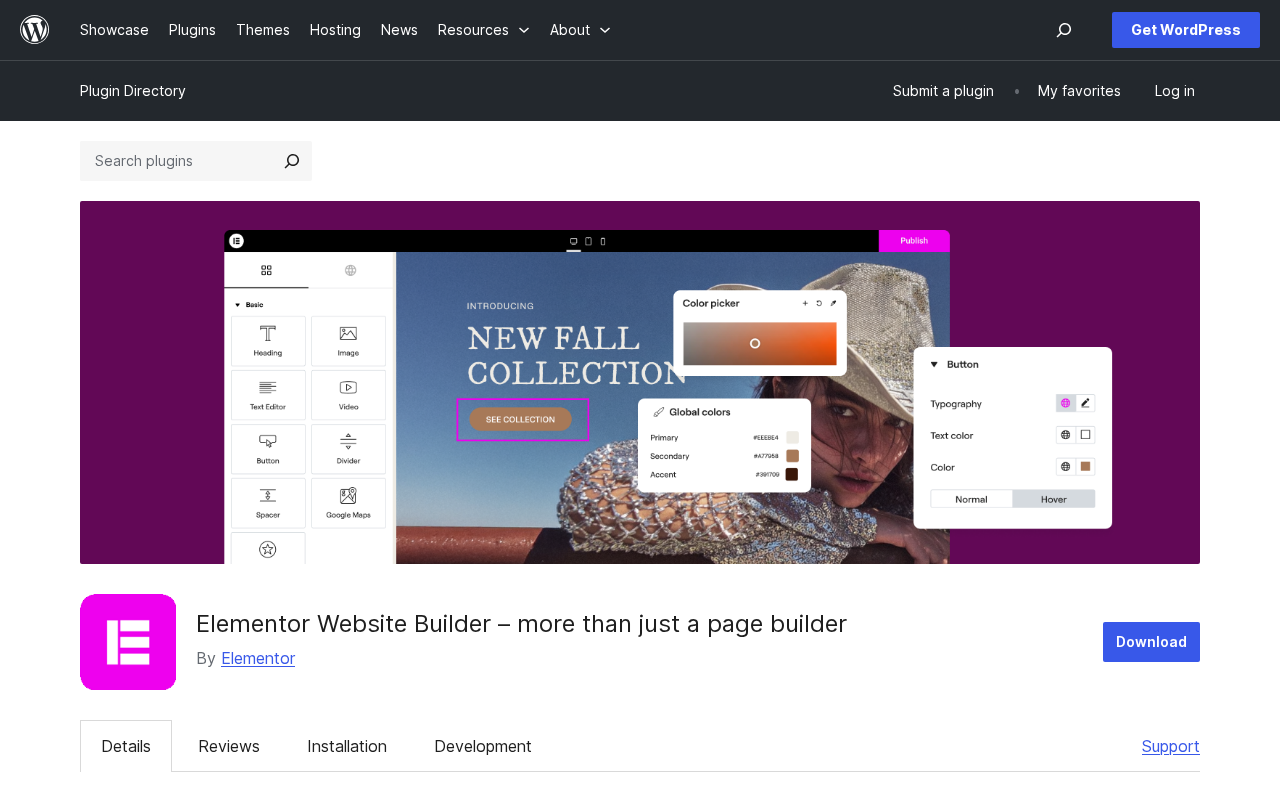
Elementor is a WordPress page builder plugin published by elementor.com. It was first released in May 2016 and now counts 10+ million active installations on WordPress.org, making it the most-installed page builder plugin in the WordPress ecosystem by a wide margin.
The plugin works by replacing the default WordPress post editor with a visual drag-and-drop canvas. You pick widgets from a panel on the left, drag them into the canvas, click to style them, and preview the result in real time. No PHP, no CSS required for basic use. The plugin handles the HTML output automatically.
The core plugin is free and available on WordPress.org. A paid Elementor Pro layer (sold separately) adds advanced widgets, theme-building capabilities, a popup builder, a form builder with lead submissions, WooCommerce customization, dynamic content, and more. The newest offering, Elementor One, bundles Pro features with additional services (AI generation, image optimization, email delivery, and web accessibility tools) into a single credit-based subscription.
As of June 2026, the plugin is on version 4.1.4, the fourth major version since launch. The defining change in v4 is the Atomic Editor: a redesigned architecture that replaces the legacy section/column/widget structure with a CSS-first, design-system-based workflow built around reusable components, global style variables, and classes. V4 is the default for new installs. Existing v3 sites are not forced to migrate; the two systems can coexist on the same page.
Who Elementor is best for
Elementor is a good fit if you:
- Build client websites and want a visual editor that clients can use without breaking layouts.
- Run a freelance or small agency and need one tool that covers pages, headers, footers, popups, and forms without buying five separate plugins.
- Are a small business owner building your own site and do not want to learn CSS or hire a developer.
- Run a WooCommerce store and want full visual control over product pages, cart, checkout, and category pages.
- Need a large template library to start from and a well-documented plugin with a large community.
Elementor is a weaker fit if you:
- Prioritize raw performance above everything else. Bricks Builder and Oxygen produce leaner HTML output by default and require less caching optimization to hit Core Web Vitals targets on complex pages.
- Are an experienced developer who prefers writing code. The visual editor adds overhead that is unnecessary if you are comfortable with PHP and CSS.
- Run a simple blog where the default WordPress block editor (Gutenberg) or a lightweight theme is enough. Adding Elementor to a site that does not need it adds payload and complexity.
- Need Gutenberg-first workflows. Elementor and Gutenberg work on separate pages; mixing them on the same site works but requires management attention.
Setup and first impression
Installing Elementor on a clean WordPress site is a standard two-step process: install from the Plugin Directory, activate, done. The process is identical to any WordPress plugin install.
What happens immediately after activation is worth noting. Elementor suggests (and in some configurations automatically activates) its Hello Elementor theme. Hello is a lightweight blank-canvas theme designed to get out of Elementor’s way. For a brand-new site with no existing theme it is a reasonable default. On a site where you already have a theme configured, the unexpected theme activation is a friction point. Several recent WordPress.org reviews mention this specifically. The Elementor team’s position is that Hello is the recommended starting point for Elementor builds; users who prefer another theme can switch manually.
After activation, clicking “Edit with Elementor” on any page or post opens the editor. The first load presents the v4 Atomic Editor on a fresh install.
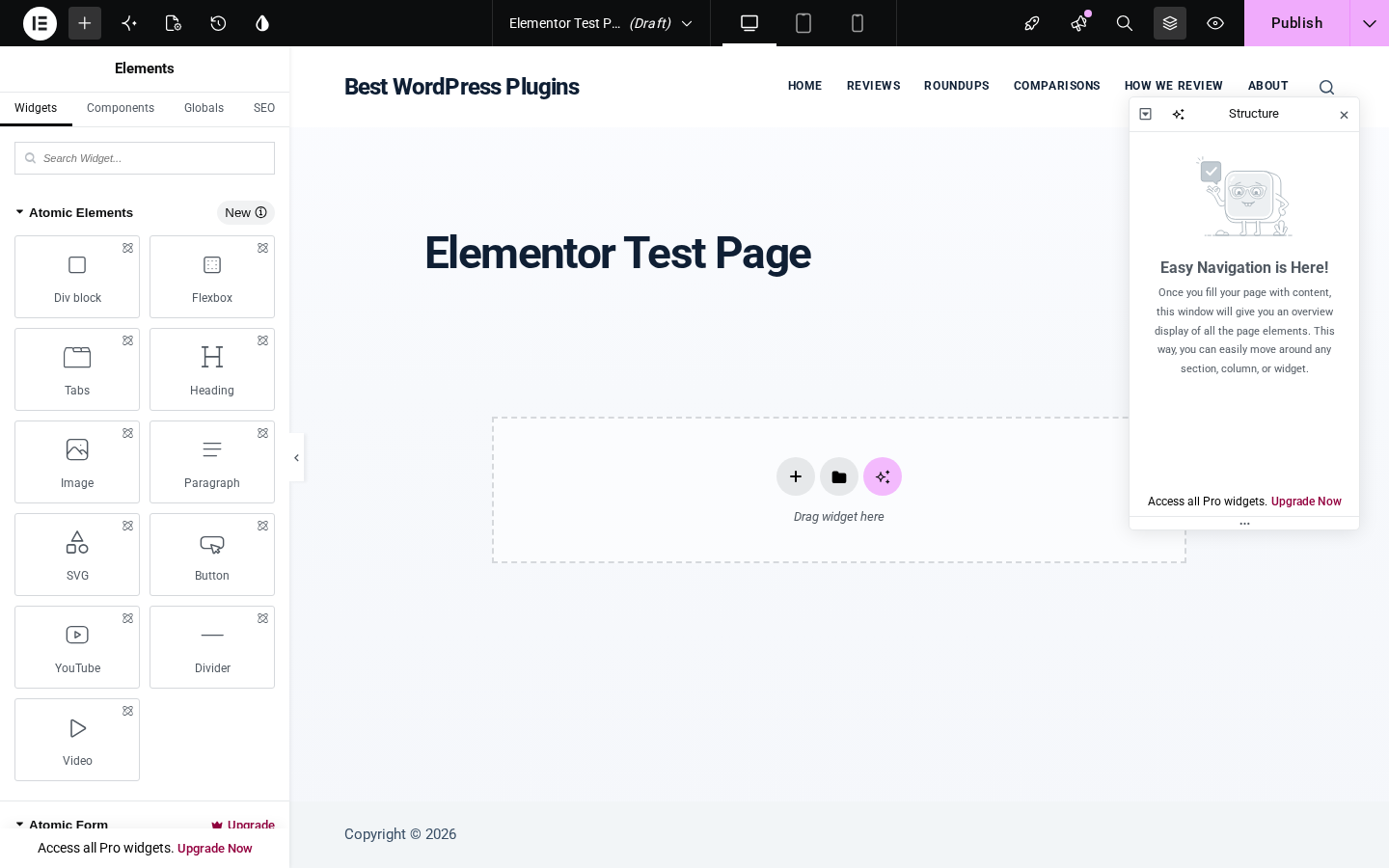
The editor interface has three main areas. The left panel contains the widget library (Widgets, Components, Globals, SEO tabs). The canvas in the center shows a real-time preview of the page. A persistent top bar contains device breakpoint switchers (desktop, tablet, mobile), a search icon, a Publish button, and access to history and settings.
The Atomic Editor: what changed in v4
Version 4, released as production-ready in March 2026, rewrites Elementor’s underlying architecture around the concept of atomic design: small, reusable building blocks that combine into larger components, driven by CSS variables and classes rather than per-widget inline styles.
In practical terms, this means:
- Instead of dragging a Section, adding Columns, then dragging a widget, you now drag atomic elements like Div Block, Flexbox, or Heading directly into a container.
- Styles are applied through Classes (reusable CSS class definitions) and Variables (global design tokens for colors, typography, spacing). Change a Variable, and every element using it updates simultaneously across the site.
- Components let you save and reuse complete layout blocks across pages. Update the component in one place and it propagates everywhere.
For a professional or agency workflow, this is a meaningful upgrade. Setting up a design system in Variables, building page templates from reusable Components, and achieving site-wide consistency from a central panel is closer to how developers build design systems in code.
For a first-time Elementor user, or someone who learned Elementor on v3 before March 2026, the mental model shift is real. The old section/column layout is still available as “Classic” mode. New installs get Atomic as the default.
Free tier: what you actually get
The free Elementor plugin includes:
Drag-and-drop editor. The full visual canvas with real-time preview. No feature is hidden behind a modal until you try to add a Pro widget.
40+ free widgets. Heading, Paragraph, Image, Button, Divider, Spacer, Video, YouTube, Tabs, Accordion, Icon, Icon Box, Image Box, Social Icons, Image Gallery, Image Carousel, Counter, Progress Bar, Rating, Alert, HTML, Shortcode, Google Maps, and more. For building content pages, the free widget set covers most standard use cases.
Atomic Elements (v4). All the new v4 atomic building blocks are free: Div Block, Flexbox, Tabs, Heading, Image, Paragraph, SVG, Button, YouTube, Divider, and Video.
Basic templates. A library of starter page templates is available in the free tier. Access is through the folder icon in the canvas drop zone.
Responsive controls. The breakpoint switcher in the top bar lets you adjust layout and styles for desktop, tablet, and mobile separately. Seven device breakpoints are available (some may be Pro).
Design system (Atomic, partially free). Variables for global colors and fonts, and Classes for reusable styles, are accessible in the free tier for Atomic Elements.
Revision history. Undo/redo and a revision history panel are included in the free version.
SEO tab. If you have Rank Math SEO installed, its SEO analysis panel appears as a tab in the Elementor editor sidebar, letting you optimize page-level SEO without leaving the builder.
What the free tier does not include:
- Theme Builder (custom headers, footers, post/archive templates, 404 pages)
- Popup Builder
- Form Builder (including form submission logging)
- WooCommerce Builder
- Dynamic Content
- Motion Effects
- Custom CSS per element
- Custom Code injection
- Global Widgets (save and reuse any widget across the site)
- 60+ additional Pro widgets (Slides, Animated Headline, Flip Box, Call to Action, Nav Menu, Login, Portfolio, Price Table, Table of Contents, Countdown, Reviews, and many more)
- Mega Menu
- Role Manager (restrict editor access by user role)
- Priority support
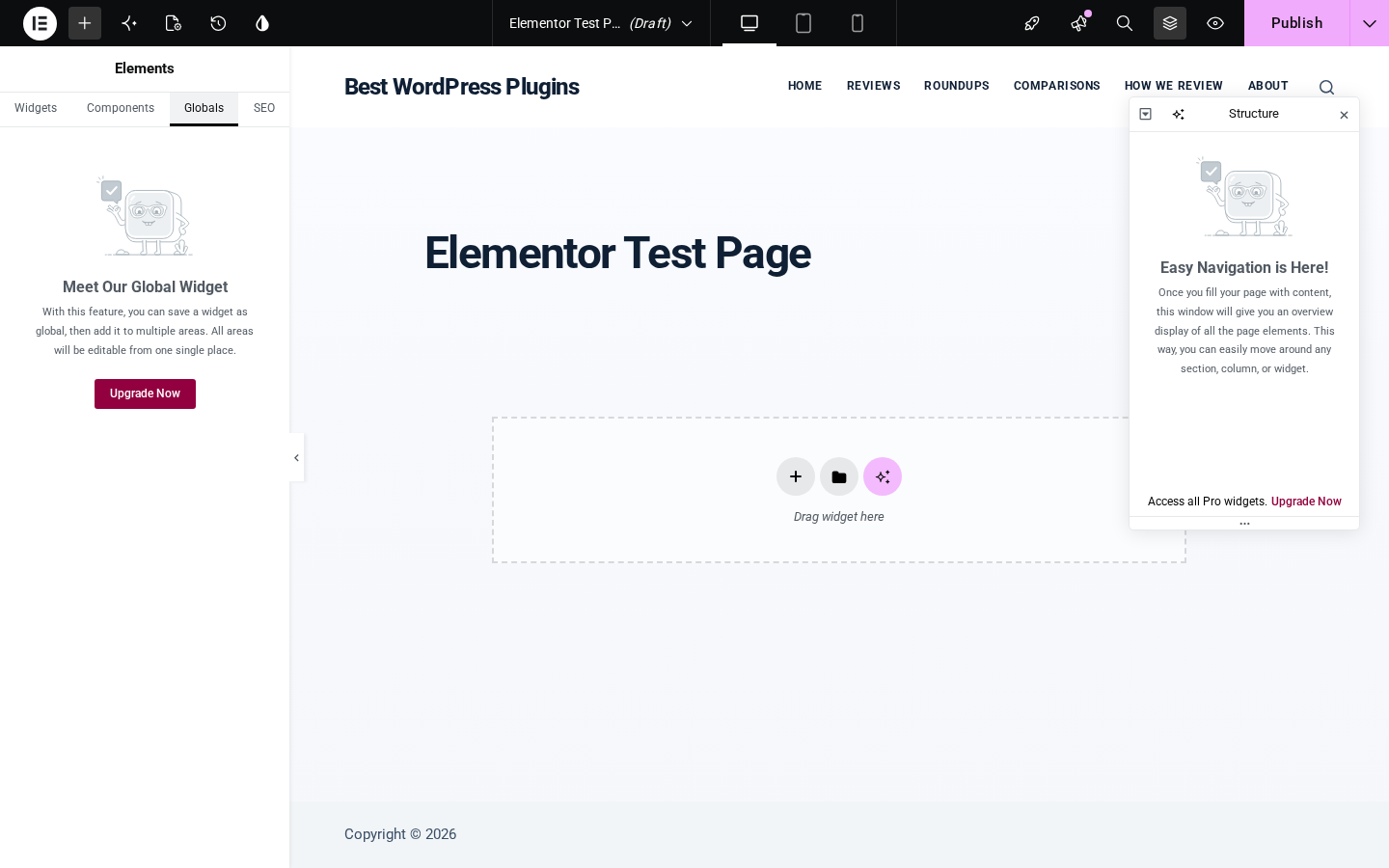
For a landing page or a basic business homepage, the free tier is workable. For anything that touches site-wide design (headers, footers), lead capture (forms, popups), or WooCommerce, the free tier hits its ceiling quickly.
Pro features
Elementor Pro (any paid plan) unlocks:
Theme Builder. Design every part of your WordPress theme visually: headers, footers, single post templates, archive pages, 404 pages, search results pages. Each template uses Display Conditions to control which pages it applies to. This is the feature that turns Elementor from a page editor into a full site builder.
Popup Builder. Build popups with the same drag-and-drop editor. Advanced targeting and triggering: show a popup after X seconds, on exit intent, on scroll, after X page views, or based on URL/user login status. Integrate with the Form widget for lead capture.
Form Builder. Multi-step forms, file uploads, date pickers, rating fields, and a submission log. Integrations with MailChimp, HubSpot, Zapier, ActiveCampaign, Slack, Discord, and more. A Stripe button widget is also available for simple payment capture.
WooCommerce Builder. Design product pages, shop archives, cart, checkout, My Account, and purchase summary pages with full visual control. Includes 25+ dedicated WooCommerce widgets.
Dynamic Content. Pull data from post fields, custom fields (ACF, Pods, JetEngine), author meta, site settings, and more into any widget. Useful for post templates, directory builds, and data-driven pages.
Motion Effects. Scrolling effects (parallax, sticky), entrance animations on scroll, and mouse-tracking effects for elements.
Custom CSS and Custom Code. Apply custom CSS at the element, section, or page level. Inject custom JavaScript or PHP snippets at specific points in the page (head, body start, body end).
Pro Widgets. 60+ additional widgets including: Slides, Animated Headline, Portfolio, Gallery (Pro), Flip Box, Call to Action, Media Carousel, Testimonial Carousel, Nested Carousel, Loop Carousel, Table of Contents, Countdown, Facebook embeds, PayPal Button, Stripe Button, Lottie Widget, Code Highlight, Video Playlist, Mega Menu, Off Canvas, and more.
Theme Widgets (for Theme Builder). A full set of widgets for building post templates: Post Title, Post Excerpt, Featured Image, Author Box, Post Comments, Post Navigation, Post Info, Site Logo, Search Bar, Breadcrumbs, Loop Grid, and more.
Role Manager. Control which WordPress user roles can access which parts of the Elementor editor.
Components (Atomic). Save reusable design blocks that update everywhere when you edit the source.
Elementor One: the all-in-one subscription
Elementor One is a separate product tier that bundles Editor Pro with a set of additional services delivered through a shared monthly credit pool. As of June 2026, One includes:
- Full Editor Pro (all widgets, theme builder, popup builder, etc.)
- AI generation (Angie AI for layouts, text, images, and code generation)
- Image Optimization (WebP/AVIF compression for uploaded images)
- Email Deliverability (transactional email without a separate SMTP plugin)
- Web Accessibility tools (scan and remediate WCAG violations)
- Cookie Consent management
- Site Management dashboard
The credit system pools all of these services into one monthly allowance. Individual plans and their credit volumes determine how heavily you can use AI generation, image optimization, and other credit-consuming features. Unused credits do not roll over.
For a solo freelancer or small agency already paying for separate image optimization and email delivery plugins, One can replace multiple subscriptions at a lower combined cost. For someone who only needs the core page builder, the Editor Pro plans are a simpler buy.
Pricing
Elementor offers two main product tracks: the Editor Pro plans (plugin-only) and the Elementor One plans (plugin plus bundled services). Pricing is region-adjusted and displayed in your local currency at checkout. Always verify the current price at elementor.com/pricing/ before purchasing.
Editor Pro plans:
| Plan | Sites | Key inclusions |
|---|---|---|
| Essential | 1 | 57 Pro widgets, Theme Builder, basic dynamic content, limited form builder |
| Advanced Solo | 1 | 85 Pro widgets, Popup Builder, custom CSS/code, full form builder, WooCommerce |
| Advanced | 3 | Same as Advanced Solo, 3 sites |
| Expert | 25 | Same as Advanced Solo, 25 sites, 5,000 Cloud Templates |
Elementor One plans:
| Plan | Sites | Credits/month | Key additions over Editor Pro |
|---|---|---|---|
| One | 1 | 25,000 | AI generation, image optimization, email delivery, accessibility, cookie consent |
| One Agency | Unlimited | 350,000 | All One features, unlimited sites |
All annual plans come with a 30-day money-back guarantee. Monthly billing is available on some plans at a higher rate; the money-back guarantee does not apply to monthly plans.
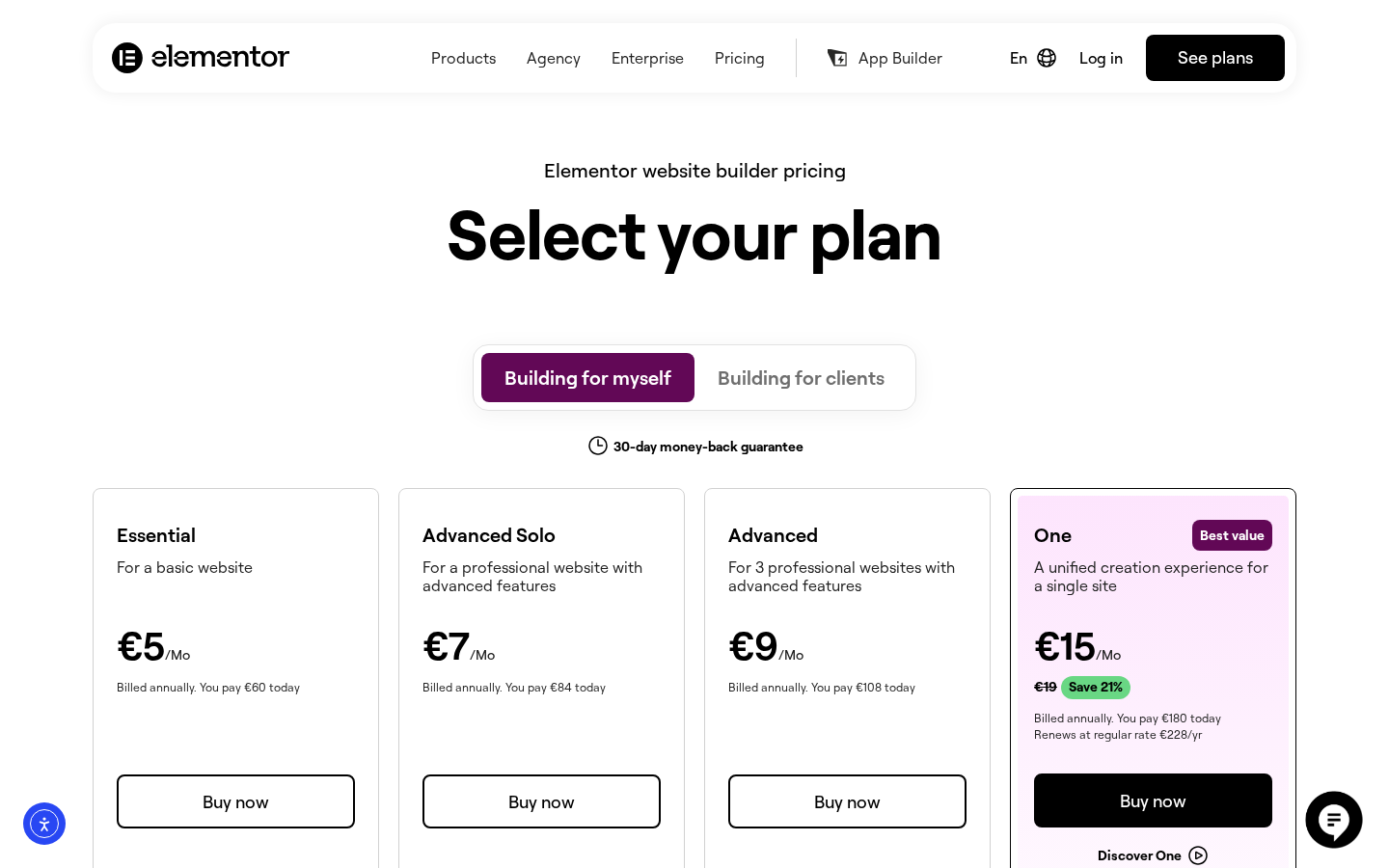
The Essential plan is the entry point to Pro, but it is the most limited of the four tiers: it includes only 57 of the 85+ Pro widgets, lacks the Popup Builder, and has a restricted form builder with no submission log. For most professional use cases, Advanced Solo is the more honest starting point.
One plan pricing note: the One plan shows “Renews at regular rate” language on the pricing page, and the renewal rate is substantially higher than the introductory price shown at checkout. Budget at the renewal rate, not the intro figure.
Performance
Performance has been a recurring topic in Elementor’s community throughout the v4 transition. The headline claims are positive: Elementor’s own benchmarks show improved PageSpeed Insights scores from v3 to v4, and the reduced DOM output in Atomic Elements produces leaner HTML than the old section/column/widget wrapper stack.
The ground-level picture from user reports is more mixed. Some users report meaningful Core Web Vitals improvements after switching from v3 to v4 Atomic layouts, particularly on pages rebuilt from scratch with the new elements. Others report regressions in specific v4.0 and v4.1 builds, attributed to bugs introduced during the architectural transition.
What is consistently true across sources:
- Elementor adds more DOM overhead than a hand-coded theme or a builder like Bricks that is designed for minimal output first.
- The Hello Elementor theme paired with the free plugin and no third-party addons gives the best baseline performance. Layering Pro widgets, third-party Elementor addon packs, and complex animations accumulates overhead.
- A caching plugin (WP Rocket, LiteSpeed Cache, or similar) is effectively required for Elementor sites that need to compete on Core Web Vitals at scale.
- Elementor’s built-in performance settings (asset loading per-page, lazy loading, reduced CSS) help but do not eliminate the overhead entirely.
For most marketing sites and professional portfolios, Elementor’s performance is acceptable with proper caching. For sites where every millisecond of LCP matters, like high-traffic ecommerce stores or landing pages in competitive ad auctions, the performance ceiling is lower than with leaner builders.
Honest drawbacks
The v4 transition is bumpy. The Atomic Editor is the right direction architecturally. The execution has been uneven. WordPress.org reviews from May and June 2026 mention editor-side bugs (saving failures, missing styles on front end, undo not working correctly for Class properties), an overwhelming v4 learning curve compared to v3, and frustration with near-daily plugin updates. The rate of updates is itself a signal of active development, but it creates maintenance overhead for agencies managing many client sites.
Hello theme auto-install. Elementor installs or suggests its Hello theme on activation, sometimes without a clear opt-out prompt. For a fresh install this is minor. For an existing site with a configured theme, it catches some users off guard. Several 2-star and 1-star reviews on WordPress.org cite this as the trigger for their frustration.
The free tier has a real ceiling. Elementor’s free version is often described as the most capable free page builder. That is true in terms of widget count and template access. But it excludes the features most users want after the first few pages: forms, popups, custom headers and footers. Users who install the free plugin expecting a complete site builder will hit the Pro wall on their second or third task.
Third-party addon sprawl. Elementor has the largest addon ecosystem of any WordPress page builder. Plugins like JetElements, ElementsKit, The Plus Addons, Crocoblock JetPlugins, and dozens more add widgets, skins, and integrations. This ecosystem is useful, but each addon adds to page weight and creates a dependency chain that complicates plugin updates. Sites that accumulate many Elementor addons become harder to maintain and optimize.
Credit system complexity on One. The Elementor One plans replace a simple seat count with a shared credit pool across AI, image optimization, accessibility, and email features. The credit costs per action are not prominently displayed. Understanding how fast a 25,000-credit monthly pool depletes under real usage requires checking the documentation rather than reading from the pricing page.
Alternatives
- Bricks Builder ($79/year, unlimited sites). The leading performance-first alternative to Elementor. Produces leaner HTML output by default, favored by developers, and has grown its market share significantly since 2024. The learning curve is steeper than Elementor, and the addon ecosystem is smaller, but Core Web Vitals results on complex pages are consistently better than Elementor without extra optimization. Worth serious consideration for performance-sensitive projects.
- Divi (by Elegant Themes, $89/year for all ET products). Elementor’s most direct commercial competitor in terms of user volume. Divi 5 introduced a new editor with full site editing support. Performance tends to require more optimization than Elementor, and the Elegant Themes ecosystem lock-in is higher. Template options are extensive, and the lifetime license option remains appealing for long-term users.
- WordPress block editor (Gutenberg, free). The native WordPress editor has improved substantially with full site editing in modern WordPress versions. For standard blogs and content sites, it is sufficient and adds zero performance overhead. It is not a replacement for Elementor’s visual control on complex marketing pages, but for teams who want to minimize plugin dependencies, it is a real option.
- Oxygen Builder (discontinued active development). Once a top alternative for developers, Oxygen has been superseded by Bricks in most developer circles following the ownership change and reduced update pace.
Pros and cons
Pros
- Largest active install base of any WordPress page builder (10+ million).
- Most comprehensive free tier in its category (40+ free widgets, Atomic Editor, basic templates).
- Full-site builder with Pro: headers, footers, popups, forms, WooCommerce, dynamic content all under one plugin.
- Atomic Editor (v4) introduces a real design-system workflow with Variables, Classes, and Components.
- Largest third-party addon and integration ecosystem.
- Well-documented, with extensive official help articles, video tutorials, and a large community.
- 30-day money-back guarantee on annual plans.
- 22+ million websites built: proven track record at scale.
Cons
- V4 Atomic transition has introduced real bugs and workflow disruptions in mid-2026.
- Hello theme auto-install on activation surprises existing-site users.
- Pro features (forms, popups, theme builder) are behind a paywall the free tier makes easy to overlook.
- More DOM overhead than Bricks or a hand-coded theme; caching is effectively required for competitive performance.
- Third-party addon ecosystem adds maintenance overhead.
- Elementor One credit system is not transparent about real usage costs.
- Renewal rates are higher than promotional intro prices on some plans.
Final verdict
Elementor remains the default recommendation for non-developers and agencies building professional WordPress sites who want a visual editor that covers the full site lifecycle. The breadth of the platform, the ecosystem around it, and the sheer volume of tutorials and community resources make it the lowest-friction entry point for most use cases.
The honest qualifier in mid-2026 is the v4 transition. The Atomic Editor is a genuine architectural improvement, and the design-system features it introduces are exactly what professional workflows need. The execution is still catching up, with real bugs and a learning curve that has frustrated long-time users. If you are starting a new site or building from scratch, v4 Atomic is the right way to start. If you are maintaining existing v3 client sites, read the recent WordPress.org reviews and have a testing plan before updating.
For performance-sensitive projects where Core Web Vitals are a primary constraint, Bricks Builder is a stronger technical choice. For everyone else, Elementor Pro in the Advanced Solo tier or higher gives you a complete visual site-building platform with fewer plugin dependencies and a reliable support tier.
The free version is worth installing to evaluate the editor before buying. Just know that the product you want for a real site is the Pro version.
FAQ
Is Elementor free?
Yes, a free version of Elementor is available on WordPress.org. It includes the drag-and-drop editor, 40+ widgets, and basic templates. The features most users want for a full site (custom headers and footers, forms, popups, WooCommerce customization) require a paid Elementor Pro plan.
What is the difference between Elementor free and Elementor Pro?
The free version is a page editor for building individual pages. Elementor Pro adds the Theme Builder (for designing headers, footers, and post templates), Popup Builder, Form Builder, WooCommerce Builder, Dynamic Content, custom CSS, motion effects, 60+ additional widgets, and priority support.
What is Elementor One?
Elementor One is a subscription tier that bundles the full Elementor Pro editor with additional services: AI content and layout generation (Angie AI), image optimization, transactional email delivery, web accessibility tools, and a cookie consent tool. These services are consumed from a shared monthly credit pool.
How much does Elementor Pro cost?
Elementor Pro is available in four tiers: Essential (1 site), Advanced Solo (1 site, full feature set), Advanced (3 sites), and Expert (25 sites). Pricing is region-adjusted. Check elementor.com/pricing/ for the current price in your region. All annual plans include a 30-day money-back guarantee.
Does Elementor slow down my website?
Elementor adds DOM overhead compared to hand-coded themes or minimal builders like Bricks. The v4 Atomic Editor reduces this overhead compared to v3. A caching and performance plugin (WP Rocket, LiteSpeed Cache) is recommended for any Elementor site where Core Web Vitals are important.
What is the Elementor Atomic Editor?
Introduced in Elementor v4.0 (March 2026), the Atomic Editor is a redesigned architecture built around reusable Atomic Elements, global style Variables, and reusable CSS Classes. It enables a design-system workflow where one change to a Variable updates every element using it across the site. Existing v3 sites are not forced to migrate; v3 Classic mode remains available.
Is Elementor compatible with WooCommerce?
Yes. Elementor Pro includes a WooCommerce Builder with 25+ dedicated widgets for designing product pages, shop archives, cart, checkout, My Account pages, and more. The free version does not include WooCommerce Builder widgets.
What are the best alternatives to Elementor?
The main alternatives are Bricks Builder (better performance ceiling, developer-friendly, $79/year unlimited sites), Divi (comparable user volume, full site editing with Divi 5), and the native WordPress block editor (Gutenberg, free, best for content-focused sites without complex layouts).
Can I use Elementor with any WordPress theme?
Elementor works with any WordPress theme that follows standard WordPress coding practices. The Elementor team recommends their own Hello Elementor theme as the most compatible and lightweight canvas. The Theme Builder feature in Elementor Pro effectively replaces the active theme’s header, footer, and template files with Elementor designs.