

One million WordPress site owners. That is the number ExactMetrics puts on its homepage, and there is an interesting story underneath it. ExactMetrics was not built from scratch: it was originally “Google Analytics Dashboard for WordPress,” a well-established free plugin, later acquired and rebranded by the team at MonsterInsights, LLC. That acquisition in 2018 created an unusual situation: two Google Analytics plugins, ExactMetrics and MonsterInsights, now exist under the same corporate roof, developed by the same founders, and sold at the same price points.
In 2026, ExactMetrics runs on version 10.1.3, supports GA4 natively, and covers the same broad territory as its sibling: dashboard reports inside WordPress, eCommerce tracking, form conversions, AI analytics queries, GDPR compliance tooling, and integrations with the major WordPress ecosystem plugins. On WordPress.org, the free version shows 300,000+ active installs. The WordPress.org rating sits at 2.5 out of 5 stars, a figure that sets it apart from MonsterInsights’ 4.5 stars and that any serious buyer should understand before committing.
This review covers version 10.1.3, which updated August 19, 2026 with WordPress 7.1 compatibility improvements, report table fixes, and security hardening. I worked through the official ExactMetrics website, pricing page, feature documentation, WordPress.org listing, public changelog, user reviews, and the available plugin screenshots. Where a Pro feature was not accessible for direct hands-on verification, the relevant section says so clearly.

At a glance
Audited on: exactmetrics.com features, pricing, and documentation pages; the WordPress.org plugin listing (version 10.1.3, last updated August 19, 2026, tested up to WordPress 7.1); the plugin changelog; and official screenshots on WordPress.org. Pricing checked against exactmetrics.com/pricing on August 20, 2026.
Free tier: basic GA4 connection, overview dashboard with key metrics, real-time stats (limited), admin bar quick stats.
Paid tiers: Plus at $99.50/year for 1 site, Pro at $199.50/year for 5 sites with 10,000 AI credits, Agency at $399.50/year for 25 sites with 20,000 AI credits, and a 100-site plan at $699.50/year. All current prices are promotional (50% off regular rates). 14-day money-back guarantee on all plans.
Bottom line: a capable GA4 dashboard plugin for WordPress, with identical pricing to MonsterInsights and a nearly identical feature set. The more complete option for sites that need 25-100 site licenses with advanced site-management tools. The WordPress.org rating and review distribution require honest attention before buying.
Quick verdict
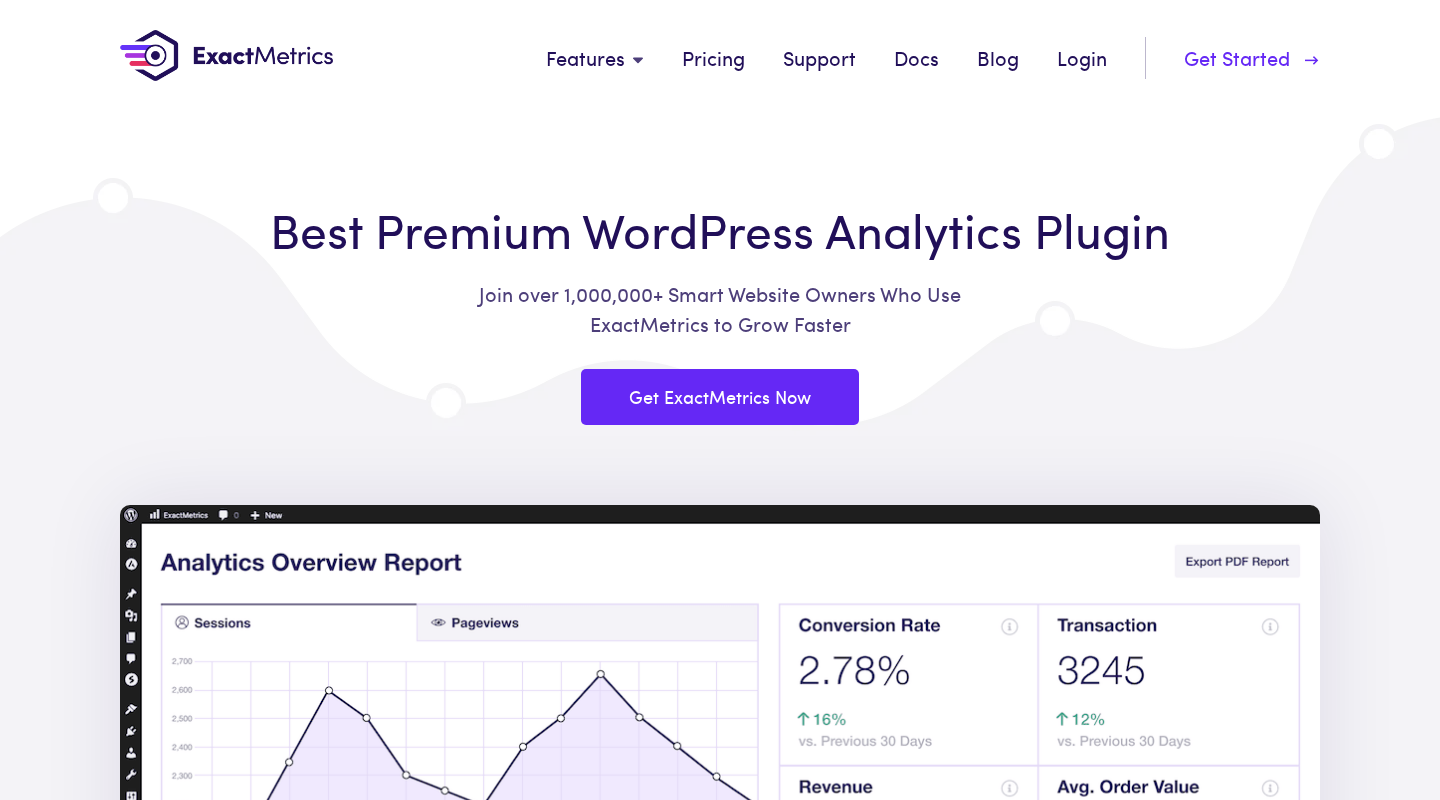
ExactMetrics does what it says: it connects WordPress to Google Analytics 4 and surfaces the resulting data inside the WordPress admin without requiring the site owner to navigate the native GA4 interface. The setup wizard works through OAuth authentication, automatic eCommerce event tracking ships without custom JavaScript, and the report set covers the use cases most WordPress site owners actually need.
What requires honest acknowledgment is the WordPress.org review distribution. Of the 1,547 reviews on record as of August 2026, 927 are one-star and only 539 are five-star. Reviews do not break cleanly into satisfied and unsatisfied users: they split into “this plugin made my analytics easy” and “the free version is a paywall demo.” Both reactions are accurate. The free version is extremely limited, and users who install it expecting a full analytics solution find themselves immediately pushed toward a paid upgrade.
For buyers who have already decided they want a paid GA4 dashboard plugin for WordPress, ExactMetrics delivers solid value. The feature set is comprehensive. The integration list is long. The Agency tier adds tools that MonsterInsights does not offer at the same price. The question of “ExactMetrics or MonsterInsights” is, at current feature parity, a matter of interface preference and which tier fits your site count.
Quick verdict
Best for: WordPress site owners who want GA4 data in their WordPress admin without writing tracking code, and buyers who need a 100-site license at scale.
Best plan for single sites: Plus at $99.50/year covers the core analytics experience. Pro at $199.50/year for 5 sites adds eCommerce and form tracking.
Best plan for agencies: Agency at $399.50/year for 25 sites includes site management tools, site notes automations, exceptions reports, multisite support, and client license management. The 100-site plan at $699.50/year covers larger operations.
Standout: automatic eCommerce tracking for 7 platforms; PrivacyGuard GDPR compliance; Site Notes synced with GA4 annotations (Agency); 100-site plan not available in MonsterInsights; AI analytics queries.
Watch out for: 2.5/5 WordPress.org rating with more one-star than five-star reviews; free version is effectively a trial; promotional pricing reverts to full rates on renewal; both ExactMetrics and MonsterInsights share the same corporate parent (MonsterInsights, LLC).
What ExactMetrics is
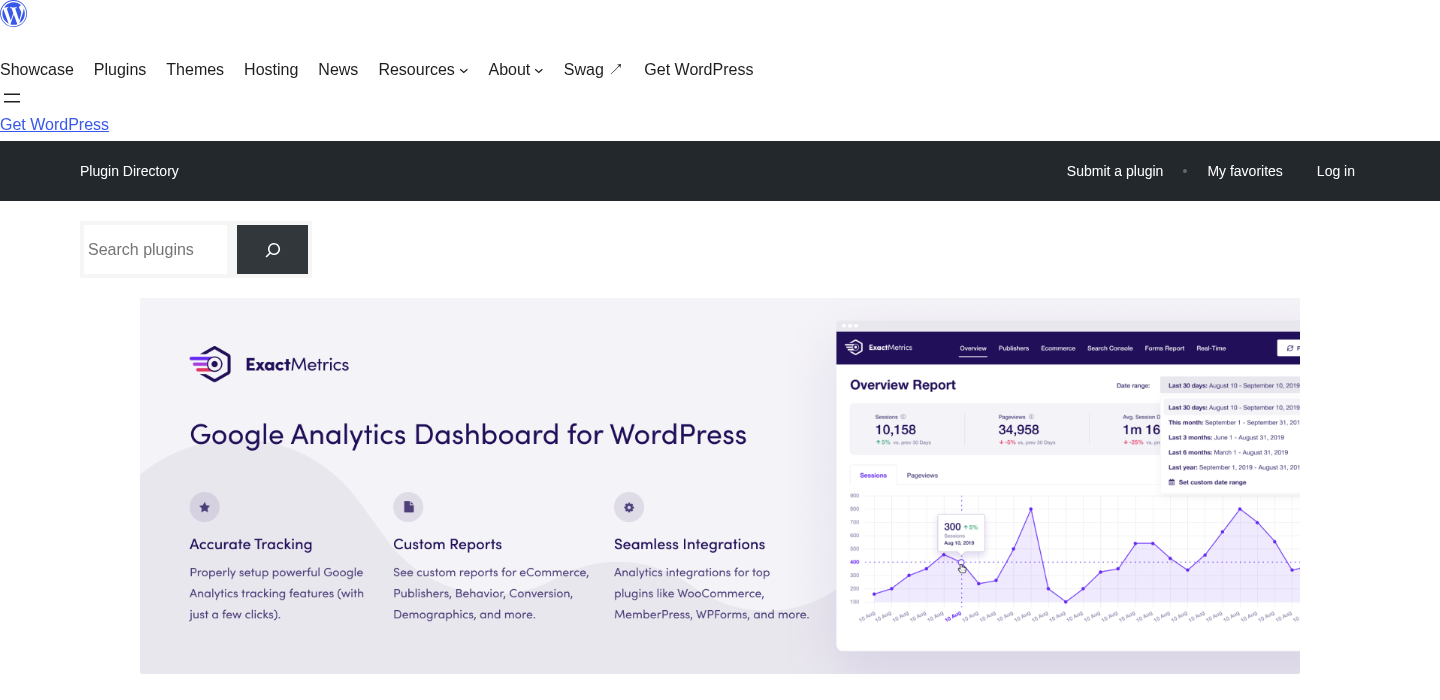
ExactMetrics is a WordPress plugin that connects your site to Google Analytics 4, then surfaces analytics data through a set of reports and dashboards inside the WordPress admin. It was originally released as “Google Analytics Dashboard for WordPress” (GADWP), a popular free plugin. In 2018, Syed Balkhi and Chris Christoff, the founders of MonsterInsights, acquired it and rebranded it as ExactMetrics. The plugin is now a product of MonsterInsights, LLC; the copyright reads “Copyright © 2013–2026 MonsterInsights, LLC. ExactMetrics is a trademark of MonsterInsights, LLC.”
This shared parentage is not a hidden detail. It is on the ExactMetrics about page. But it matters when evaluating comparisons between ExactMetrics and MonsterInsights. They are sister products from the same team. Feature decisions, pricing strategies, and integration priorities are made by the same people. Where differences exist between the two, they reflect deliberate product positioning, not independent development choices.
Like MonsterInsights, ExactMetrics does not store analytics data independently. All data lives in your Google Analytics 4 property. ExactMetrics reads that data through the GA4 API and reformats it into the reports you see inside WordPress. Uninstalling the plugin does not delete your Google Analytics data; it only removes the WordPress interface to it.
The free version, published on WordPress.org as “ExactMetrics, Google Analytics Dashboard for WordPress,” shows 300,000+ active installs and a 2.5-star rating across 1,547 reviews as of August 2026. ExactMetrics’ own website claims over one million users, a figure that includes paid license holders and presumably the full install base, not only the subset that installed through WordPress.org and left a review. The plugin requires WordPress 5.6 or higher and PHP 7.2 or higher. It is tested up to WordPress 7.1.
Who ExactMetrics is best for
Strong fit:
- WordPress site owners and bloggers who want to check their traffic metrics (sessions, pageviews, top pages, referrers, device split) directly in the WordPress admin without navigating Google Analytics 4’s learning-curve-heavy interface.
- WooCommerce store operators who need automatic revenue tracking, cart abandonment monitoring, coupon performance analysis, and order attribution without writing GA4 eCommerce event code. ExactMetrics Pro handles the WooCommerce data layer automatically.
- Content publishers who need author-level, category-level, and tag-level traffic reporting to understand which content types and writers drive the most sessions, set up through custom dimensions without manual GA4 configuration.
- WordPress agencies managing 25 or more client sites who need site management tools, multisite support, exceptions reporting, client license control, and Site Notes automations. The ExactMetrics Agency and 100-site plans serve this use case where MonsterInsights stops at 25 sites.
- GDPR-conscious site operators who need automated PII stripping through PrivacyGuard, consent management platform integrations, and compliant analytics configuration.
- Sites already running affiliate programs that need automatic affiliate link click tracking natively integrated with Pretty Links, ThirstyAffiliates, and AffiliateWP.
- Marketing teams running paid ads on Google Ads, Meta, Microsoft Ads, TikTok, and Pinterest who want conversion tracking through a single plugin rather than individually deployed scripts.
Weak fit:
- Sites that only need a basic GA4 tracking code inserted with no interest in in-WordPress reporting. A simple code inserter or Google’s own Site Kit plugin is less overhead and zero cost.
- Privacy-first operations that do not want any Google Analytics involvement. ExactMetrics is built entirely on the GA4 infrastructure. Self-hosted analytics alternatives (Matomo, Burst Statistics, Plausible) are the correct path here.
- Developers writing their own GA4 event tracking via gtag.js or Tag Manager directly. ExactMetrics adds an abstraction layer that can create conflicts with manual implementations.
- Small personal sites where $99.50/year for Plus at promotional rates does not match the value of in-dashboard traffic numbers over occasionally checking analytics.google.com.
Setting up ExactMetrics
ExactMetrics installs from the WordPress admin under Plugins > Add New. Searching “ExactMetrics” or “Google Analytics Dashboard for WP” finds the plugin. Free installation is one click.
After activation, a setup wizard launches. The process mirrors the MonsterInsights setup flow: select your Google account, authorize ExactMetrics to access your Google Analytics data through OAuth, then select the GA4 property to connect to the site. No Google Tag Manager is required, and no manual GA4 measurement ID entry is needed, though direct measurement ID entry remains an option in the settings.
The wizard includes a recommended settings step that enables standard tracking behaviors out of the box: file downloads, outbound links, affiliate links. Enabling these at setup avoids a later return trip to the settings panel.
After setup, the plugin adds an “Insights” or “ExactMetrics” item to the left WordPress navigation. The settings panel organizes options into tabs: General, Tracking, Conversions, Publisher, and Advanced. The Tracking tab handles the configuration that most users want to tune: scroll depth thresholds, file extension lists for download tracking, affiliate link path prefixes, excluded IP addresses, and user role exclusions so administrator traffic does not inflate session counts.
One recurring observation from user reviews is that setup occasionally runs into friction despite the “easy setup” marketing claim. Common friction points involve the OAuth flow in multi-account Google environments and the separate authorization step required for Search Console data (distinct from the main GA4 connection). The ExactMetrics documentation includes troubleshooting articles for both scenarios.
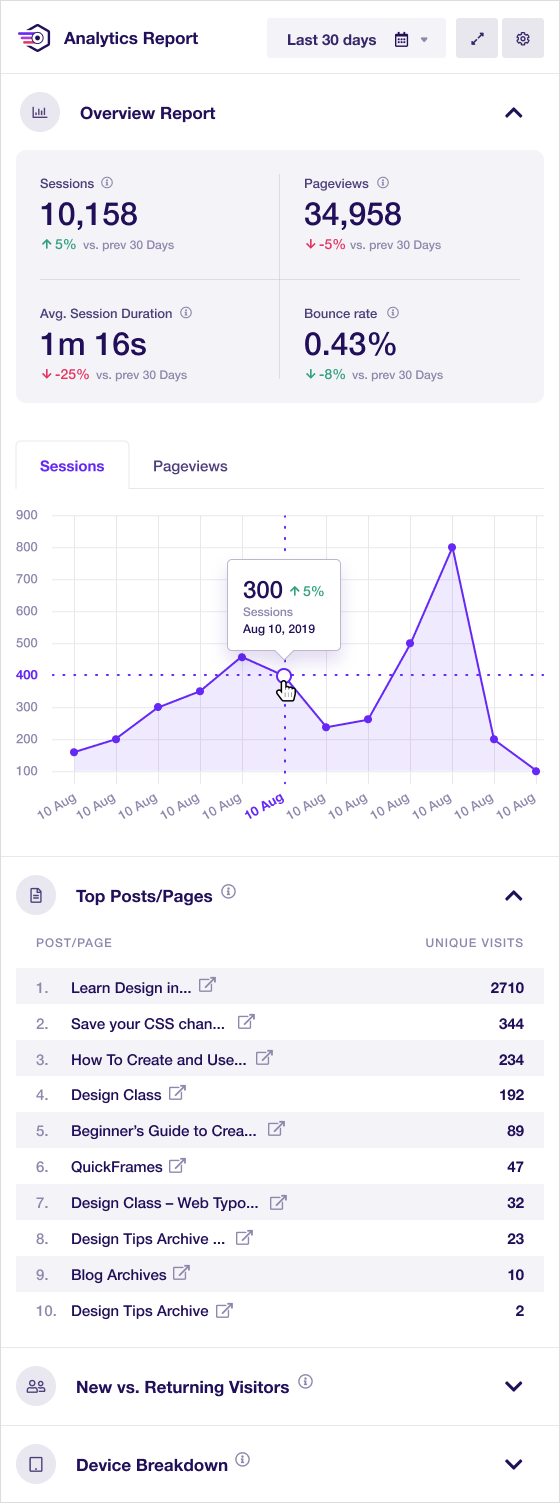
The dashboard widget is a distinct ExactMetrics feature: a compact analytics panel that appears on the main WordPress dashboard screen, showing at-a-glance stats without requiring navigation to the Insights reports. It can be configured to small mode, full mode, or hidden.
Overview report and main reports
The Reports screen, accessible from the Insights menu, is the main hub. The free version provides a single Overview report. Paid plans unlock the full report library.
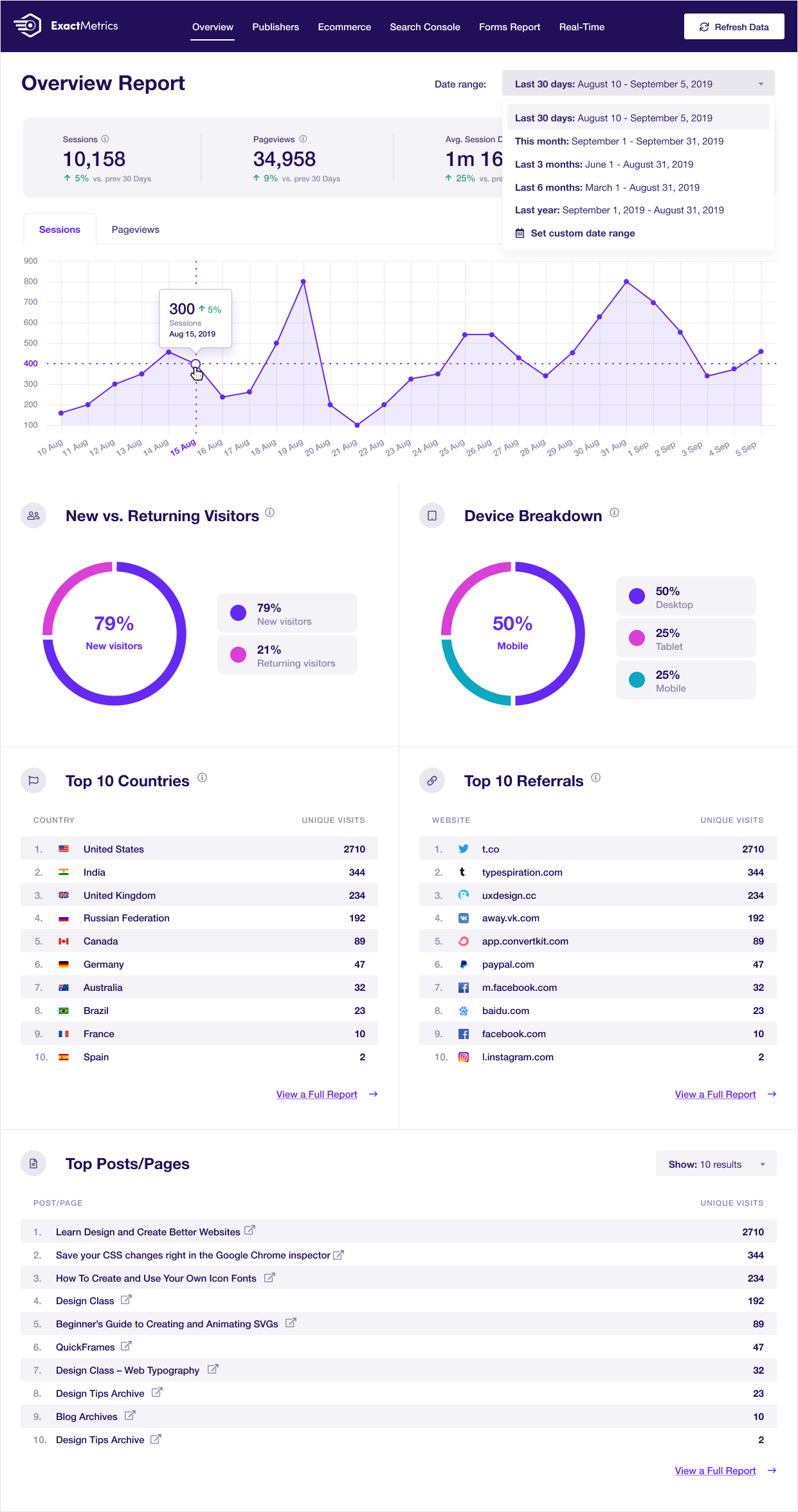
The overview report shows:
- A sessions chart over the selected date range.
- Top metrics: sessions, pageviews, session duration, and bounce rate.
- New versus returning visitors breakdown.
- Top referral sources by session count.
- Top countries.
- Device split (desktop, mobile, tablet with percentages).
This is enough for a site owner who needs a quick traffic read without logging into GA4. The date range defaults to 30 days in the free version. Custom date ranges and comparison periods are available on paid plans.
The paid report library expands substantially. Pro and above unlock: Traffic Sources, Publisher (content, author, category), Search Keywords (Search Console integration), Real-Time, eCommerce, Forms Conversion, Custom Dimensions, Coupons, User Journeys, Landing Pages, Campaigns, Source-Medium, Technology, and Site Speed. That is 15+ distinct reports drawn from the connected GA4 property and rendered inside WordPress.
The admin bar integration adds a lightweight page-level stats panel. When browsing individual posts or pages while logged into WordPress, a quick-access menu item in the admin bar shows analytics data for the current URL: sessions, pageviews, and time on page. This is a practical shortcut for content teams checking performance of specific articles without navigating the full reports screen.
Email summaries deliver key metrics to the inbox on a weekly or monthly schedule: sessions, top pages, top referrers, and similar. PDF export with custom logo branding rounds out the reporting output options, useful for agencies sharing client analytics reports.
Publisher and content reports (Pro)
The Publisher report group addresses the metrics content-focused sites track: top posts and pages by session count, author-level breakdown, category performance, tag performance, optimal publish timing analysis, and SEO score correlation with traffic patterns.
Custom dimensions power these reports. ExactMetrics sets up the necessary GA4 custom dimensions automatically as part of the Pro activation flow: author dimension, category dimension, published-date dimension, SEO score dimension, focus keyword dimension (compatible with Yoast and AIOSEO). Without ExactMetrics, this requires manual GA4 property configuration and custom JavaScript or Tag Manager variables. The automatic setup is a genuine time saver.
The Headline Analyzer is an AI-powered feature available in Plus and above. It scores post titles inside the Gutenberg editor for SEO and engagement potential, offering alternative headline suggestions. This is a lightweight version of what standalone headline scoring tools provide, and it integrates directly into the content publishing workflow.
eCommerce tracking (Pro)
eCommerce tracking is where ExactMetrics Pro earns its subscription for store operators.
Standard WooCommerce on WordPress does not automatically send GA4 eCommerce events. Implementing purchase, add-to-cart, begin-checkout, and refund events correctly requires either custom PHP/JavaScript or Google Tag Manager with a custom data layer, both developer-level tasks. ExactMetrics Pro handles this automatically.
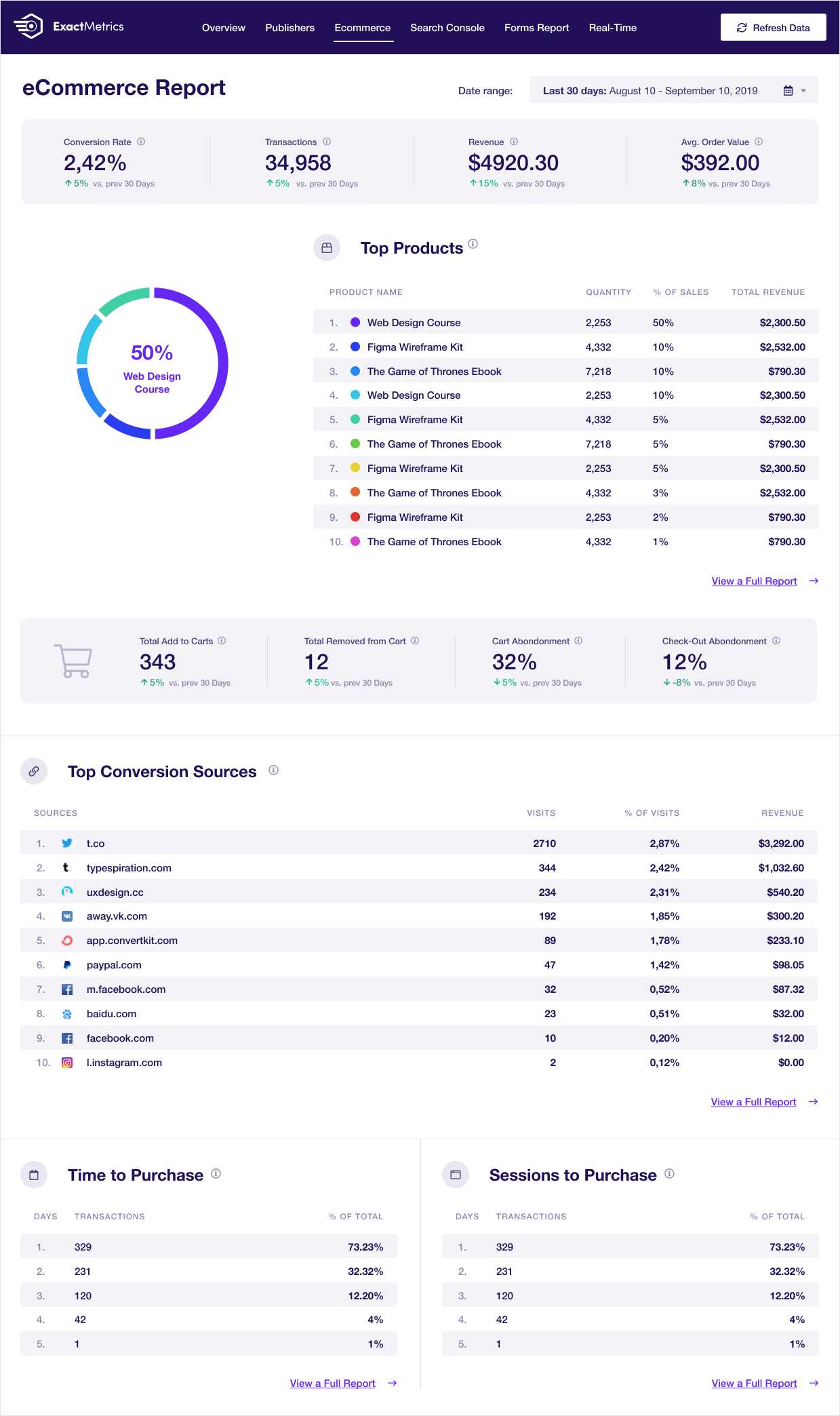
After enabling eCommerce tracking in the settings, the plugin listens to WooCommerce order events and sends the corresponding GA4 eCommerce events without additional configuration. The eCommerce report inside WordPress then shows:
- Total revenue and revenue over time.
- Conversion rate (transactions divided by sessions).
- Average order value.
- Top products by revenue and by units sold.
- Cart abandonment rate.
- Coupon performance: which coupon codes are used and what revenue they generate.
- Refund tracking.
- Orders by country.
User journey tracking (Pro) adds a conversion path view: the sequence of pages a visitor navigated before completing a purchase. For store operators optimizing the funnel, this data is actionable in a way that GA4’s standard eCommerce reports do not surface easily.
Beyond WooCommerce, ExactMetrics Pro supports automatic eCommerce tracking for Easy Digital Downloads, MemberPress, MemberMouse, Restrict Content Pro, LifterLMS, and GiveWP. Setup for each follows the same pattern: toggle in settings, plugin handles the event layer.
Form conversion tracking (Pro)
Form conversion tracking brings GA4 event data for form submissions into a readable WordPress report.
ExactMetrics Pro adds automatic form tracking for WPForms, Ninja Forms, Gravity Forms, Formidable Forms, and Contact Form 7. When a visitor submits a form, the plugin records the event in GA4 and surfaces it in the Forms Conversion report. The report shows impressions (how many times the form was displayed), conversions (submissions), and conversion rate per form.
For service businesses where lead generation is the primary site goal, this report replaces a recurring gap in standard GA4 reporting: the need to configure custom events manually before form submission data appears in analytics. One-click setup through the ExactMetrics settings means that conversion data appears in the Forms report without any developer involvement.
Custom dimensions (Pro)
Custom dimensions allow GA4 to attribute traffic to WordPress-specific data points. ExactMetrics Pro automates the setup of a standard set:
- Author: which author wrote a post, enabling per-author traffic analysis.
- Category: which category a post belongs to.
- Published at: publication date, enabling analysis of content aging and freshness effects on traffic.
- SEO score: the post’s SEO score from Yoast or AIOSEO, enabling correlation between SEO health and traffic.
- Focus keyword: the target keyword set in the SEO plugin.
The Custom Dimensions report in ExactMetrics presents these as filterable tables: top authors by sessions, top categories, content performance by publish date, and so on. The dimensions report is a standard tool in content-focused analytics setups. ExactMetrics automates what would otherwise be a multi-step manual configuration in the GA4 property interface.
AI features
ExactMetrics includes an AI analytics query interface on Pro and above. Pro plans include 10,000 AI credits, Agency includes 20,000, and the 100-site plan includes 30,000. The interface lets you ask natural language questions against your connected GA4 data: “Which pages drove the most traffic this month?” or “What is my eCommerce conversion rate?” and the plugin retrieves answers from the GA4 API through a language model layer.
The practical value scales with how unfamiliar you are with the native GA4 interface. For site owners who find GA4’s report architecture confusing, natural language querying removes the barrier. For GA4-fluent users, it is a convenience shortcut. The AI credit system’s replenishment schedule and overage behavior are not fully documented on the public pricing page, a gap worth clarifying with support before purchasing.
The Headline Analyzer (available from Plus) uses AI to score and suggest improvements to post titles inside the Gutenberg editor. This is a lightweight headline optimization tool built into the publishing workflow rather than a separate service.
Link and event tracking
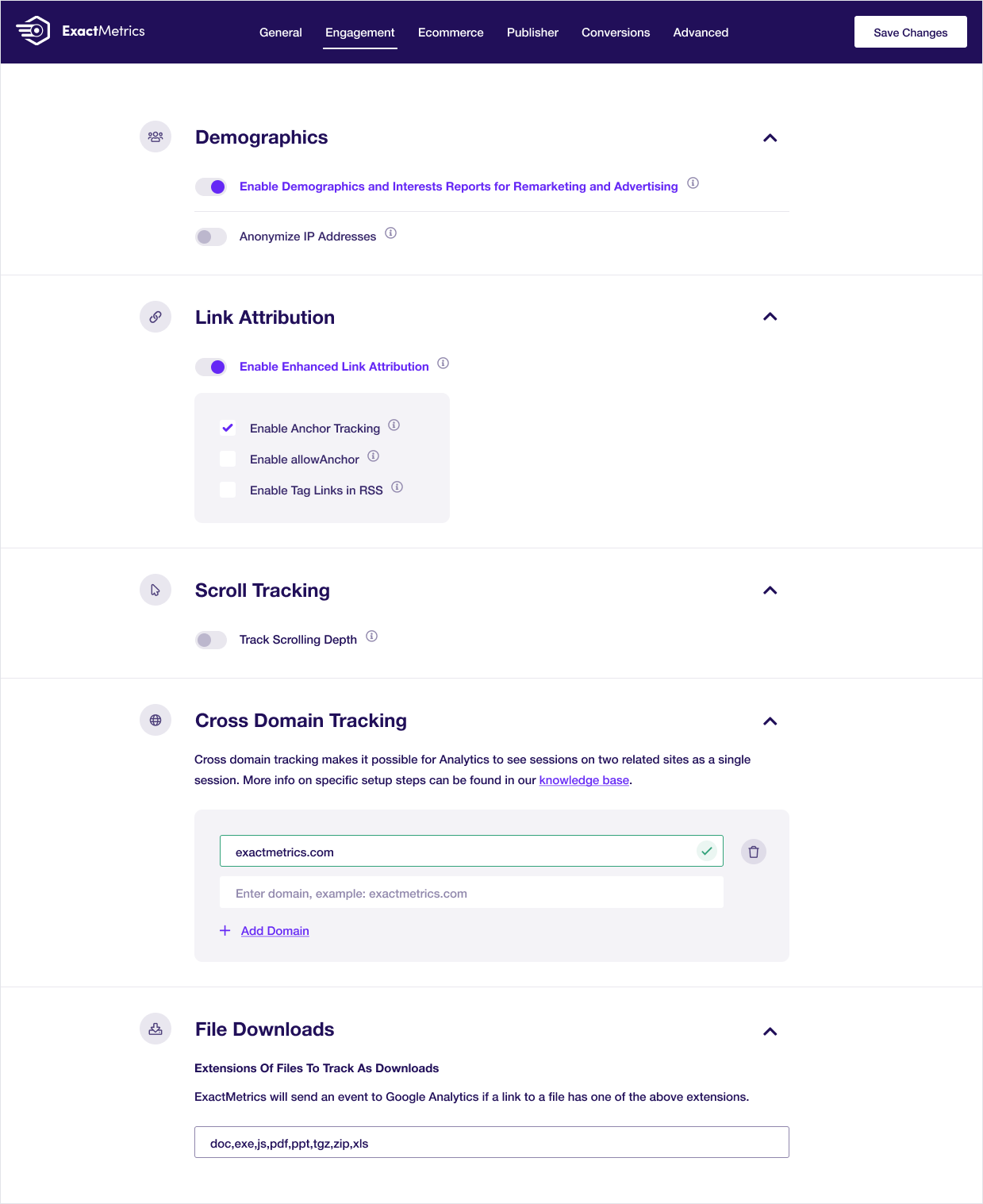
ExactMetrics automates several tracking behaviors through toggle switches in the settings panel:
- Outbound link tracking: records clicks on links leaving your site as GA4 events.
- Affiliate link tracking: monitors affiliate URL clicks matching path prefixes you configure (/go/, /recommends/, /out/, and others). Works natively with Pretty Links, ThirstyAffiliates, and AffiliateWP.
- File download tracking: records downloads for file extensions you specify (PDF, DOCX, ZIP, MP3, and others). Visible in the Downloads report.
- Scroll depth tracking: records how far down a page visitors scroll as GA4 events (25%, 50%, 75%, 100% thresholds).
- Video engagement tracking: records play, pause, and completion events for embedded YouTube, Vimeo, and HTML5 video.
- Telephone and email click tracking: records clicks on tel: and mailto: links as conversion events.
- Enhanced link attribution: assigns individual link identities within a page so multiple links to the same destination can be distinguished by click volume.
None of these require writing JavaScript or configuring GA4 custom events manually. They are enabled through the ExactMetrics settings interface.
GDPR and privacy compliance
ExactMetrics addresses GDPR compliance through a feature layer it calls PrivacyGuard:
- IP anonymization: the last octet of visitor IP addresses is stripped before data reaches GA4.
- PII detection and stripping: email addresses, phone numbers, and other personally identifiable information detected in page URLs or form parameters are removed before the pageview event is recorded.
- Consent management platform integrations: ExactMetrics integrates with CookieBot, Complianz, WPConsent, and compatible cookie consent plugins. When a supported consent platform is active, ExactMetrics withholds analytics tracking until visitor consent is obtained and stops tracking if consent is withdrawn.
- Role exclusions: administrator and editor visits can be excluded from tracking to keep internal traffic out of analytics data.
- Compliance scope: PrivacyGuard covers GDPR, CCPA, PECR, and PIPEDA.
These features implement the standard technical compliance measures that most GDPR-aware analytics setups use. Whether GA4 data transfers to US servers satisfy EU regulators is an ongoing legal question that no WordPress plugin resolves, but PrivacyGuard covers the implementation layer that regulators check first.
Pricing and license value
ExactMetrics is sold as an annual subscription from exactmetrics.com/pricing. All current prices are promotional (50% off regular rates). Prices verified August 20, 2026:
Plus. 1 site. $99.50/year promotional ($199/year regular). Features: GA4 connection, overview report, publisher reports, site speed report, search keywords (Search Console integration), pages/campaigns/source-medium/landing page/technology reports, real-time dashboard, full date range history, email summaries, PDF export, standard tracking (scroll, automatic events, media), PrivacyGuard, headline analyzer, popular posts templates, smart URL builder. Standard support.
Pro. 5 sites. $199.50/year promotional ($399/year regular). 10,000 AI credits. Everything in Plus, plus: eCommerce report and tracking (WooCommerce, EDD, MemberPress, MemberMouse, Restrict Content Pro, LifterLMS, GiveWP), form conversion report and tracking (WPForms, Ninja Forms, Gravity Forms, Formidable, Contact Form 7), custom dimensions, coupons report, user journeys, advanced tracking, advanced integrations (12+ platforms), AI analytics queries. Priority support.
Agency. 25 sites. $399.50/year promotional ($799/year regular). 20,000 AI credits. Everything in Pro, plus: exceptions reports, site notes automations (synced with GA4 annotations), site management dashboard, WordPress multisite support, advanced access control, client license management. Premium support.
100-site plan. 100 sites. $699.50/year promotional ($1,399/year regular). 30,000 AI credits. All Agency features at scale. Premium support.
All plans include a 14-day no-questions-asked money-back guarantee. There is no free trial for paid plans; the free version on WordPress.org is the trial.
The pricing comparison to MonsterInsights is straightforward at the lower tiers: both charge $99.50/year for a 1-site plan and $199.50/year for a 5-site plan at current promotional rates. At the agency level, both charge $399.50/year for 25 sites. ExactMetrics then offers a 100-site plan at $699.50/year with no MonsterInsights equivalent.
The promotional pricing caveat applies to both: current prices are 50% off regular rates, and renewal pricing reverts to the full rate. Verify the renewal cost before committing, particularly at the Pro and Agency tiers where the full regular price is $399–$799/year.
Pros and cons
Pros
- GA4 setup through OAuth without coding. The wizard handles authentication, property selection, and the recommended tracking configurations in one flow.
- Automatic eCommerce tracking for seven platforms: WooCommerce, Easy Digital Downloads, MemberPress, MemberMouse, Restrict Content Pro, LifterLMS, and GiveWP. No custom event code required.
- 15+ in-WordPress reports covering the analytics use cases WordPress site owners and agencies actually need, without requiring navigation into GA4.
- Automatic link and event tracking through toggle switches: outbound links, affiliate links, file downloads, scroll depth, video engagement, phone and email clicks.
- Custom dimensions setup is automated on Pro. Author, category, published date, SEO score, and focus keyword dimensions are created and populated without manual GA4 property configuration.
- PrivacyGuard covers GDPR, CCPA, PECR, and PIPEDA. PII stripping, IP anonymization, and consent management platform integrations ship as a bundled compliance layer.
- Agency and 100-site plans for larger operations. Agencies managing 25+ sites get site management tools, multisite support, exceptions reports, and Site Notes automations. The 100-site plan serves large-scale operations that MonsterInsights cannot accommodate.
- Email summaries and PDF export with custom logo branding for client reporting.
- AI analytics queries (Pro+) with natural language input against GA4 data.
- 14-day money-back guarantee on all plans.
- Active development: version 10.1.3 released August 19, 2026, with compatibility improvements and security hardening.
Cons
- WordPress.org rating of 2.5/5 stars with 927 one-star reviews (more than the 539 five-star reviews). The dominant complaint is that the free version functions as a paywall prompt rather than a usable analytics tool.
- The free version is a limited trial, not a usable product. Meaningful reports, eCommerce tracking, form tracking, custom dimensions, and date range flexibility all require payment.
- Both ExactMetrics and MonsterInsights are from MonsterInsights, LLC. The ExactMetrics vs MonsterInsights comparison is an internal one within the same company.
- Promotional pricing reverts to full rates on renewal. Plus is $99.50/year now and $199/year at regular rates. Pro is $199.50/year now and $399/year at regular rates.
- Setup friction is reported more often than the easy setup marketing suggests. Multi-account Google environments and OAuth edge cases generate recurring support requests.
- Performance overhead is real. ExactMetrics loads a GA4 tracking script, a plugin tracking library, and makes GA4 API calls for dashboard report rendering. Benchmark on slower hosting before committing.
- AI credit replenishment schedule and overage handling are not clearly documented on the pricing page. Clarify with ExactMetrics support before purchasing if AI queries are a primary driver.
Alternatives to ExactMetrics
- MonsterInsights. The closest direct alternative and a sister product from the same company (MonsterInsights, LLC). Both are priced identically ($199.50/year for 5 sites at promotional rates). MonsterInsights has 2 million active installs versus ExactMetrics’ 300,000+ and a 4.5-star rating versus 2.5 stars. MonsterInsights’ Elite tier adds UserFeedback survey tools. ExactMetrics’ Agency tier adds Site Notes automations and exceptions reports not available in MonsterInsights at the same price. The decision is interface preference and the features at the tier your site count requires.
- Site Kit by Google. The official free plugin from Google that connects WordPress to GA4, Search Console, PageSpeed Insights, and AdSense. Zero cost. No WooCommerce eCommerce tracking layer. No reformatted in-WordPress reporting. The correct choice if you want minimal overhead, no subscription, and are comfortable using the native GA4 and Search Console interfaces directly.
- Analytify. A simpler, lower-priced GA4 dashboard plugin for WordPress. Analytify Pro plans start below ExactMetrics Plus pricing. Feature depth is narrower: fewer integrations, lighter eCommerce tracking, no AI chat. For a personal blog or small site that wants basic in-dashboard reports at a lower annual cost, Analytify is a reasonable trade-off.
- Burst Statistics. A privacy-first, self-hosted WordPress analytics plugin. Tracks visitors without cookies, stores data on your own server, sends no data to Google. The correct tool if Google Analytics is not acceptable for privacy or compliance reasons.
- Matomo for WordPress. Self-hosted analytics with a full feature set including eCommerce, goals, event tracking, heat maps, and session recording. No Google dependency. More complex to configure and maintain than ExactMetrics. The right choice for organizations that have decided GA4 is not acceptable under their compliance or data sovereignty framework.
- GA Google Analytics (by RaMMicHaeL). A lightweight plugin that inserts only the GA4 tracking code. No dashboard, no reports, no integrations. For developers who manage GA4 natively and want zero abstraction overhead, this is the minimal zero-cost option.
Final verdict
ExactMetrics is a mature GA4 dashboard plugin with a feature set that holds up under review. The eCommerce tracking case for WooCommerce stores, the automatic custom dimensions setup, the form conversion reports, and the PrivacyGuard compliance layer all represent genuine functionality that saves meaningful developer time. For agencies, the Agency and 100-site plans with site management tools and client license control address a use case that MonsterInsights does not match at the same price.
The WordPress.org rating requires honest engagement rather than dismissal. A 2.5/5 star score with more one-star reviews than five-star reviews does not mean the paid product is poor. The review distribution reflects a free version that creates significant expectation mismatch. But expectation mismatch is itself a product quality signal: the onboarding experience for free users is clearly creating more friction and disappointment than it should, and the review record shows it.
The relationship with MonsterInsights is the most unusual aspect of this plugin’s market position. Two GA4 dashboard plugins from the same company, at the same price, covering mostly the same ground. The practical guidance: if you want a WordPress GA4 plugin from the Awesome Motive ecosystem and you need 25 or fewer sites, compare the interfaces directly and choose the one whose report design you find more usable. If you need 100 sites, ExactMetrics is the only option in this family that goes that high.
The promotional pricing caveat matters. Buying at $99.50/year Plus and renewing at $199/year is a different financial calculation than buying at $99.50/year ongoing. Verify the renewal rate before committing.
For a WooCommerce store, a content site with multiple authors, or any WordPress operation where form conversions are the primary tracking goal: ExactMetrics Pro delivers on the core promise. The decision between it and MonsterInsights at the same price is one of interface preference, not capability.
FAQ
Browse more WordPress plugin reviews to compare your options.