


AT A GLANCE
Audited on: wordpress.org/plugins/ajax-search-for-woocommerce listing, fibosearch.com feature pages, pricing page, and documentation. Version 1.34.2, last updated September 2026, tested up to WordPress 7.1. Pricing verified at fibosearch.com on September 11, 2026.
Free tier: AJAX live product search with autocomplete suggestions, product images in the dropdown, product prices and descriptions in results, SKU search, search history, mobile-first full-screen search mode, details panel with “Add to Cart” button on hover, terms search (categories and tags), smart result ordering, WooCommerce search results page integration, multilingual support (WPML, Polylang, qTranslate-XT), Google Analytics integration, 2 WordPress blocks, shortcode, widget, and menu item placement.
Paid tiers: Personal at $59/year first year, then ~$50/year on renewal (1 site, up to 10,000 products); Entrepreneur at $99/year first year, then ~$84/year on renewal (3 sites, up to 50,000 products per site); Agency at $249/year first year, then ~$212/year on renewal (25 sites, up to 150,000 products per site). All Pro plans include: ultra-fast inverted index search engine (up to 10x faster), fuzzy search with 4 configurable modes, custom fields search (with ACF support), attributes search, categories with thumbnails, brand search with thumbnails, variation SKU search, posts and pages search, synonyms, conditional product exclusion, TranslatePress support, built-in search analytics, and 1 year of priority email support.
Bottom line: FiboSearch is the most popular WooCommerce-specific AJAX search plugin on WordPress.org. At 100,000+ active installs and a 4.9/5 rating from 1,814 reviews, it sits at the top of the category by both adoption and satisfaction. The free version delivers live product search with images and prices in the autocomplete dropdown. The Pro version adds a purpose-built inverted index engine that handles large catalogs significantly faster than database-based alternatives. The main trade-offs are a styling system limited to two pre-built form themes and plan tiers whose product-count figures (10k/50k/150k) govern licensing and official support rather than a hard technical ceiling; FiboSearch’s own FAQ states Pro can technically index catalogs of up to 1,000,000 products, just without guaranteed support above your licensed tier.
QUICK VERDICT
WooCommerce ships with a basic search bar that queries product titles and descriptions using MySQL LIKE operations. It has no live autocomplete. It does not show product images or prices as visitors type. It does not search SKUs, variation-level data, attributes, or custom fields unless you add code. For most WooCommerce stores, this is a real conversion problem: customers who cannot find a product quickly leave.
FiboSearch’s free version addresses this directly. Install it, and your search bar gains live autocomplete with a product thumbnail in each suggestion row by default. Price, SKU, and description display are built into the free version too, but each is an opt-in toggle in the Autocomplete tab, off until you switch it on. The same is true of the Details Panel: it ships free but is disabled out of the box, and you enable it from the same settings screen to get the hover panel with an Add to Cart button. No code is required. No external service. No API key.
The Pro version goes further by replacing the underlying search query with an inverted index engine that delivers results up to 10 times faster than standard database search. Fuzzy matching catches typos. Synonym expansion maps alternative terms. Attribute and brand search let customers find products by color, size, or brand name without navigating category pages.
- Best for: WooCommerce store owners who want live product search with images and prices in the autocomplete dropdown, without coding or a subscription upfront. Stores with 10,000+ products that need faster search through an inverted index engine.
- Best plan for most small stores: FiboSearch free. Live AJAX search with product images, prices, SKU search, mobile mode, and category/tag search are all free.
- Best plan for growing stores: Personal at $59/year (first year; renews at ~$50/year) for 1 site. Adds the inverted index engine, fuzzy search, attributes, brands, custom fields, synonyms, analytics, and variation SKU search.
- Best plan for agencies: Agency at $249/year first year (renews at ~$212/year) for 25 sites. Around $10 per site per year.
- Standout: Product thumbnails and prices in autocomplete dropdown, included free. Inverted index Pro engine up to 10x faster. 54+ one-click theme integrations. 100,000+ installs with a 4.9/5 rating from 1,814 reviews.
- Watch out for: Pricing tiers (10k/50k/150k products) that set licensing and support eligibility, not a technical ceiling; FiboSearch’s FAQ says Pro can run on catalogs up to 1,000,000 products without official support above your tier. Only two visual form styles. Analytics and fuzzy search are Pro-only. Free version slows on large catalogs.
WHAT FIBOSEARCH IS
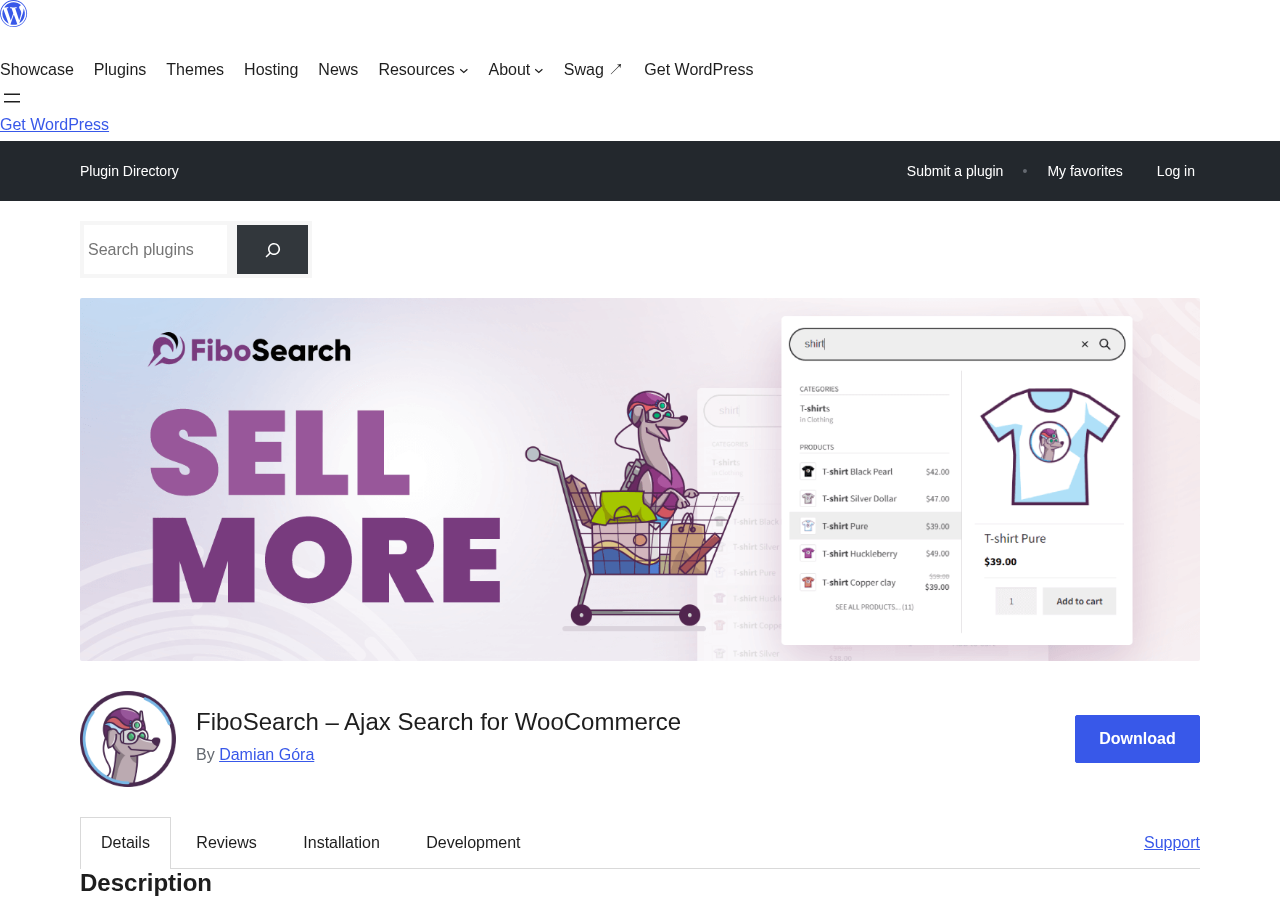
FiboSearch, originally released as “Ajax Search for WooCommerce,” is a live search plugin built specifically for WooCommerce stores. The name change reflects a product maturity shift: the plugin has grown from a basic live search add-on into a full product discovery tool for WooCommerce.
The problem it solves is concrete: WooCommerce’s native search runs a LIKE query against the products table. It has no autocomplete. It does not show product images. It does not rank results by relevance. If a visitor misspells a product name, they get zero results. If a product is findable only by SKU or attribute value, it will not surface.
FiboSearch replaces that experience with a purpose-built search layer. The free version hooks into WooCommerce’s search form and returns live autocomplete suggestions as visitors type. Out of the box, each suggestion row shows the product thumbnail and title; price, SKU, and a short description excerpt are additional free-tier fields you switch on in the Autocomplete tab. A built-in Details Panel can appear when a visitor hovers a suggestion, showing extended product information with an Add to Cart button and allowing a purchase without ever loading the product page, once you enable it (it is off by default).
The Pro version adds a second layer: an inverted index engine that pre-builds a searchable index of the product catalog. Instead of querying the database for every search, it looks up terms in the pre-built index. The plugin’s own benchmark claims up to 10x faster results than standard WooCommerce search, even on catalogs with 100,000 or more products.
Damian Góra and Mateusz Czardybon are the plugin’s primary developers. Version 1.34.2 was released in September 2026, tested up to WordPress 7.1. The WordPress.org listing shows 100,000+ active installs, a 4.9/5 rating, and 1,814 total reviews, with 1,759 five-star ratings representing a 97.0% five-star rate. The plugin requires WordPress 6.5 or higher, WooCommerce, and PHP 7.4 or higher.

WHO FIBOSEARCH IS BEST FOR
Strong fit
- WooCommerce stores where the default search experience is losing customers. If visitors are typing product names and getting no results, or getting a generic results page with no visual feedback, FiboSearch’s free tier is a direct solution.
- Stores where showing products visually matters. The autocomplete dropdown shows a thumbnail and price for each matching product. Visitors identify what they want before pressing Enter.
- Store owners who want live search without a monthly cost. The free version includes AJAX autocomplete with images and prices at no cost.
- Stores on popular themes. FiboSearch includes one-click search bar replacement integrations for 54+ themes including Blocksy, Divi, Astra, Woostify, Storefront, and OceanWP.
- Stores growing toward 5,000 to 100,000+ products that are starting to see search latency. The Pro inverted index engine is licensed and supported up to 150,000 products per site on the Agency plan; FiboSearch says it can technically run on catalogs as large as 1,000,000 products, though without official support past the licensed tier.
- Multilingual WooCommerce stores. WPML, Polylang, qTranslate-XT, and TranslatePress are all explicitly supported and tested.
- Developers building WooCommerce stores on Elementor or Divi. Both page builders are supported with documented integration patterns.
Weak fit
- Stores that primarily need content search (blog posts, documentation pages, custom post types) rather than WooCommerce product search. For general-purpose WordPress content search, Relevanssi or SearchWP serve those use cases more completely.
- Stores with complex faceted filtering requirements on the search results page. FiboSearch handles live autocomplete. A full faceted search results page with checkboxes, range sliders, and dynamic counts requires a companion filtering plugin.
- Stores that need official support at massive scale. FiboSearch’s paid tiers cap licensed support at 150,000 products per site (Agency plan); the FAQ notes the plugin can technically index up to 1,000,000 products, but without guaranteed support past 150,000, so stores at that scale should budget for the support gap or evaluate a dedicated enterprise search setup.
- Stores where visual design control is a priority. FiboSearch ships with two form styles. Getting a search bar that looks substantially different requires custom CSS.
- Pure content sites and blogs with no WooCommerce. There is no practical reason to install a WooCommerce-specific search plugin on a site without products.
SETTING UP FIBOSEARCH
The setup process for the free version is a standard WordPress plugin installation: Plugins, Add New, search “FiboSearch,” install the plugin by Damian Góra, activate.
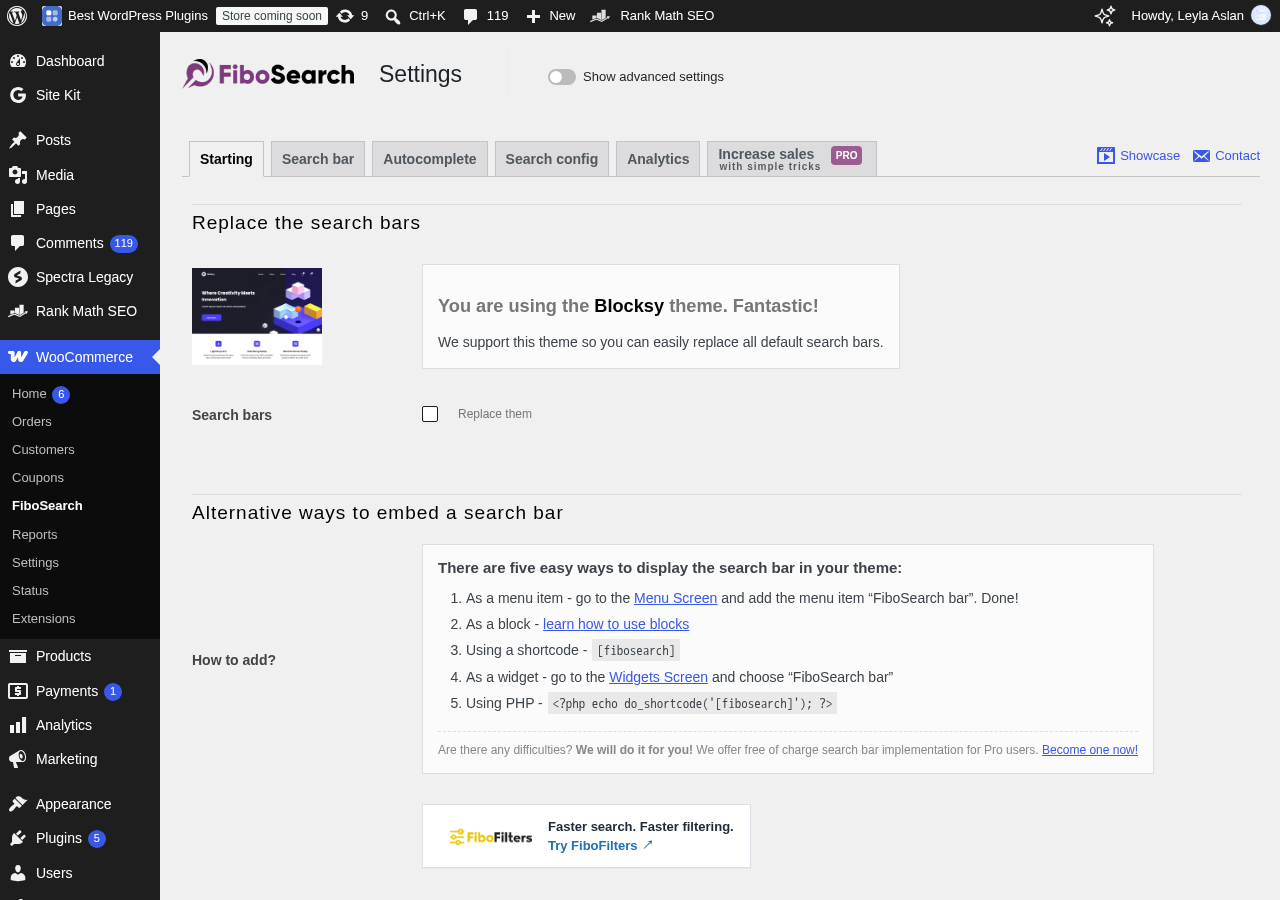
After activation, FiboSearch appears in the WordPress admin sidebar. The settings panel is organized into several tabs. The Starting tab is the onboarding view: it detects your active theme and offers one-click search bar replacement for supported themes. The Search bar tab controls form behavior (show/hide the submit button, placeholder text, and breakpoint for the mobile overlay). The Autocomplete tab controls what appears in the live dropdown: result limit (default 7), no-results label, whether to show product images, prices, or SKUs per suggestion row, and category listing. The Search config tab controls the search scope: title search is always on; description, short description, and SKU search are optional toggles, free to enable. Attribute search, custom fields, and fuzzy matching are Pro-only. The Analytics tab is present even in the free version with a single toggle to enable built-in search tracking.
The simplest setup path is the Starting tab’s one-click theme replacement: the plugin detects your active theme and, if it is among the 54+ supported integrations, shows a “Replace search bars” checkbox. Checking it replaces every existing search form in the theme with FiboSearch without any shortcode placement or widget configuration. I confirmed this works as documented: FiboSearch correctly identified the active theme on our test installation and surfaced the replacement toggle immediately on activation.
For unsupported themes or custom placements, you can embed FiboSearch using a Gutenberg block, a shortcode, a widget area, a navigation menu item, or a PHP function call. Two WordPress blocks are included: a standard search bar block and a navigation item search block for header menus.
The Autocomplete settings tab controls what appears in the live suggestions dropdown. I found it set to 7 suggestions by default (not 5 as often cited in older documentation), with product images enabled, price and SKU display toggled off by default, and categories included in the autocomplete. The right side shows a live preview panel that updates as you change settings, which makes it easy to see the exact customer-facing experience without switching back and forth.
Upgrading to Pro adds an Index tab to the settings. The first action after activation is building the inverted index. This is a background process. A progress indicator shows the current indexing state. For a 1,000-product store, the index typically builds in under a minute. For larger stores, the process runs in the background while the old query-based search remains active for visitors. Once the Pro index is built, subsequent product changes are indexed automatically in the background. Scheduled indexing is also available for stores that make bulk catalog updates on a set schedule.
AJAX LIVE SEARCH AND AUTOCOMPLETE
FiboSearch’s core deliverable, across free and Pro tiers, is the autocomplete dropdown. It is meaningfully different from what Relevanssi, Ivory Search, and SearchWP provide.
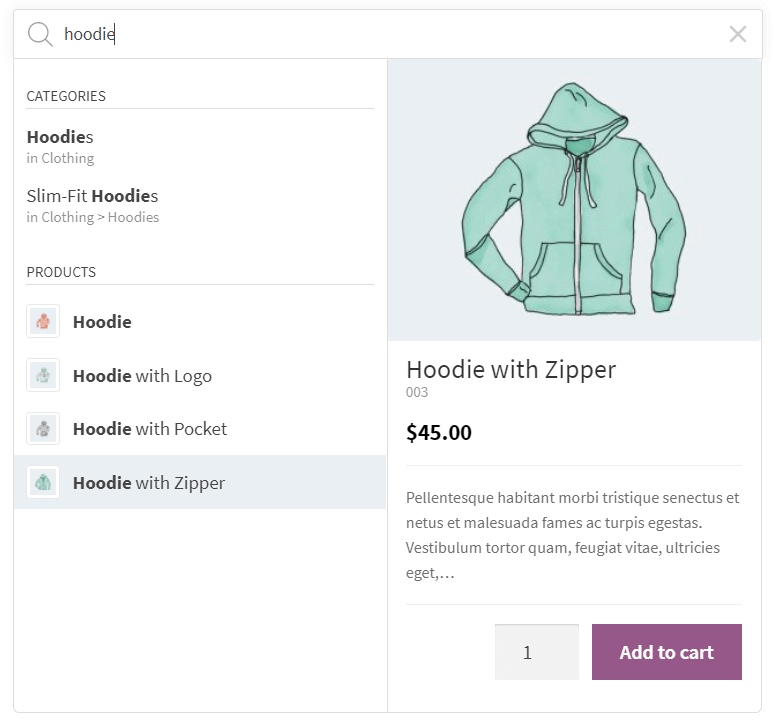
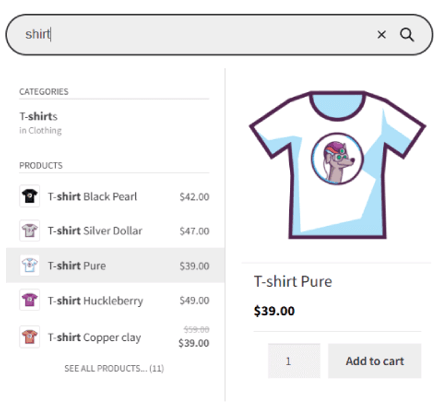
When a visitor types in the FiboSearch search bar, the dropdown appears below the input with a list of matching products. By default, each row shows a product thumbnail image on the left and the product title in bold; the price, SKU, and a line of short description text are optional fields you turn on in the Autocomplete tab settings. With those fields enabled, the result reads as a full product listing rather than a plain text list of page titles.
The Details Panel is available in the free version, but it is switched off by default; you turn it on from the Autocomplete tab’s Extra views section. Once enabled, hovering over any suggestion slides out a panel alongside the dropdown with extended product data: a larger image, full product title, price (including sale pricing if active), a description excerpt, and an Add to Cart button with a quantity field. For simple products, a visitor can then add the item to the cart directly from the search dropdown without loading the product page.
Search history is included. When a visitor clicks the search input without typing, their recent search terms appear in the dropdown. This provides a quick re-access path without requiring a full re-query.
Grouping results by type is supported. Stores that want to show categories first, then products, can configure the suggestion list to group by content type.
Mobile search gets a dedicated treatment: on mobile screen sizes, FiboSearch opens a full-screen overlay search experience. Instead of a small dropdown attached to a header search bar, the overlay uses the full screen width and height. This is a notable usability improvement over desktop-style dropdowns that break on mobile layouts.
In the Pro version, the same autocomplete panel extends to attributes and brands. Searching “red” in a clothing store can return products tagged with the attribute value “red” in addition to products with the word in the title or description. Brand search allows a visitor typing a brand name to see a brand entry with thumbnail above the product list.
PRO ENGINE: INVERTED INDEX AND PERFORMANCE
The most significant technical difference between the free and Pro versions is the search engine itself.
The free version queries the WooCommerce database directly for every search. On stores with hundreds of products, this is fast enough to feel responsive. On stores with thousands of products and complex meta configurations, query time increases and search latency becomes perceptible.
The Pro version replaces this with an inverted index. An inverted index is a precomputed data structure that maps each searchable term to the list of products containing it. Instead of scanning rows in the products table at query time, the search engine looks up the term in the index and returns the pre-computed result set. This is the same approach used by full-text search systems like Elasticsearch, scaled to the WordPress plugin environment.
FiboSearch’s Pro engine also operates in SHORTINIT mode. When a search request arrives, the plugin loads only the WordPress files it needs to serve the response, not the full WordPress and WooCommerce bootstrap. Other plugins do not fire during a FiboSearch query. Heavy themes do not execute. The result is isolation: search performance becomes predictable and independent of how many other plugins are installed.
The plugin’s documented performance benchmark claims results up to 10x faster than standard WooCommerce search. Multiple independent assessments corroborate meaningful speed improvements on catalogs above 5,000 products.
The index handles parallel operation. When a reindex runs, the new index builds alongside the old one. Visitors get results from the old index until the new one is complete and validated. There is no search downtime window during reindexing. This is a concrete operational advantage for high-traffic stores.
SEARCH BAR DESIGN AND THEMES
FiboSearch ships with two named form styles:
Solaris. A modern design with rounded corners, soft shadows, and smooth transitions. Suited for contemporary e-commerce store designs that use rounded UI elements.
Pirx. A classic design with sharper edges and a more structured appearance. Suited for stores with a traditional grid-based layout style or flat design aesthetic.
Both styles are customizable from within the plugin settings. You can change the search bar background and text colors, button color, placeholder text, and widget width. A live preview panel in the settings dashboard shows changes in real time before saving.
Beyond the two named themes, custom CSS is the path to deeper visual changes. Stores that need the search bar to match a highly specific design system will need CSS work to go beyond the two presets.
The form size has three layout modes: full bar (always expanded), icon only (collapses to a search icon, expands on click), and icon/bar responsive (full bar on desktop, icon on mobile). The Details Panel also has configurable display elements: you can toggle the product image, price, rating stars, description, SKU, and Add to Cart button on or off independently.
SEARCH ANALYTICS
Search analytics is a Pro-tier feature in FiboSearch. The analytics dashboard inside the WordPress admin captures customer search queries, the number of results each query returned, and click-through behavior on suggestions.
From the analytics data, a store owner can identify:
- The most-searched product terms, revealing which products visitors are actively looking for.
- Zero-result searches, which are queries that returned no matching products. This is the most actionable output: a direct content or catalog gap signal.
- Low-click searches, which are queries that returned results but where visitors did not click any suggestion. These often indicate relevance problems.
The analytics data is stored locally in the WordPress database. There is no external service dependency. Data does not leave the site.
The analytics integration with Google Analytics is separate and available in the free version. FiboSearch can push search query data to Google Analytics as custom events, allowing search analysis inside a GA dashboard.
MULTILINGUAL AND INTEGRATION SUPPORT
FiboSearch is tested with the major multilingual WordPress frameworks:
- WPML: Products are searched within the current active language. Results for a French-language store session stay French.
- Polylang: Same language scoping behavior as WPML.
- qTranslate-XT: Supported in the free version.
- TranslatePress: Added as a Pro-tier compatibility feature.
For brand search, FiboSearch Pro supports four major WooCommerce brand plugins: WooCommerce Brands, Perfect Brands for WooCommerce, Brands for WooCommerce, and YITH WooCommerce Brands. Brand entries can appear with their brand thumbnail in the autocomplete dropdown.
For custom fields, Pro supports standard WordPress post meta and Advanced Custom Fields (ACF) in the search index. Products can be found by values stored in ACF fields, useful for stores that use ACF for additional product specifications or technical attributes.
FacetWP compatibility is listed in the documentation for stores using faceted search on results pages alongside FiboSearch’s live autocomplete. Elementor and Divi page builder integrations are also documented.
PRICING AND LICENSE VALUE
Pricing verified at fibosearch.com on September 11, 2026.
Free (WordPress.org): AJAX live search with product images, prices, descriptions, SKU search, Details Panel with Add to Cart on hover, mobile overlay, terms search, search history, Google Analytics integration, multilingual support, two WordPress blocks, shortcode/widget/menu placement.
Personal ($59/year first year, renews at ~$50/year; 1 site, up to 10,000 products): All free features plus inverted index Pro search engine (up to 10x faster), fuzzy search (4 modes), custom fields and ACF search, attributes search, categories search with thumbnails, tags search, brands search with thumbnails, variation SKU search, posts and pages search, synonyms, conditional product exclusion, TranslatePress support, built-in analytics, 1 year priority email support.
Entrepreneur ($99/year first year, renews at ~$84/year; 3 sites, up to 50,000 products per site): All Pro features across 3 sites.
Agency ($249/year first year, renews at ~$212/year; 25 sites, up to 150,000 products per site): All Pro features across 25 sites. At the full 25-site limit, the initial year works out to about $10 per site, and around $8.49 per site on renewal.
Money-back guarantee: 30-day refund policy. Test using the free version first if you have questions about fit.
License scope: All plans renew annually. Renewal pricing is 15% off the initial purchase rate (Personal renews at ~$50/year, Entrepreneur at ~$84/year, Agency at ~$212/year). The 10,000/50,000/150,000-product figures per tier set licensing and official support eligibility, not a hard technical ceiling: FiboSearch’s own pricing FAQ states Pro can technically run on catalogs of up to 1,000,000 products, just without guaranteed support past the limit tied to your plan. There are no lifetime pricing options as of September 2026.
Value comparison
- Against the free version: If your store has fewer than 5,000 products and search performance is not a problem, the free version covers live AJAX search with product images by default, plus price, SKU, and description display as free opt-in toggles, all without any cost. The Pro upgrade makes most practical sense when catalog size creates search latency, or when attribute, brand, or fuzzy search is a priority.
- Against Ivory Search: Ivory Search’s free tier includes AJAX live search but without product thumbnails in the autocomplete dropdown. FiboSearch’s free tier shows thumbnails by default and lets you enable price, SKU, and description display too. For general WordPress sites where content search matters more than product search, Ivory Search’s broader content scope is more relevant.
- Against Ajax Search Pro: Ajax Search Pro starts at €39/year or €79 lifetime for one site and offers four result layouts, 400+ configuration options, and a visual theme editor. FiboSearch has the stronger WooCommerce-specific default experience; Ajax Search Pro covers more visual customization ground.
- Against SearchWP: SearchWP Standard at $99/year per site focuses on relevance algorithm control. FiboSearch Pro at $59/year covers the live search UX with its inverted index engine. They target different core priorities.
PROS AND CONS
Pros
- Product thumbnails in the autocomplete dropdown are shown by default, and price, SKU, and description display are included free as opt-in toggles. Most comparable search plugins charge for visual product results or do not offer them at all.
- Details Panel with Add to Cart button on hover, free. Visitors can add products to the cart without loading the product page.
- 100,000+ active installs and 4.9/5 rating from 1,814 reviews. 97.0% five-star rate.
- Pro inverted index engine up to 10x faster on large catalogs. SHORTINIT mode isolates search from other plugin overhead.
- Parallel indexing with zero downtime during reindexing.
- 54+ one-click theme integrations.
- Fuzzy search with 4 configurable modes (Pro) handles typos at varying tolerance levels.
- Attributes and brand search with thumbnails (Pro).
- Variation SKU search (Pro).
- Mobile-first full-screen overlay search for better UX on small screens.
- Built-in analytics with zero-result tracking (Pro). No external service dependency.
- Explicit WPML, Polylang, qTranslate-XT, and TranslatePress support.
- Two native WordPress blocks for placement in block editor layouts.
- Active development: version 1.34.2, September 2026, tested up to WordPress 7.1.
Cons
- Pricing tiers (10k/50k/150k products) govern licensing and support eligibility rather than a hard technical limit; FiboSearch’s FAQ says Pro can technically handle up to 1,000,000 products, but support is not guaranteed above your licensed tier, so stores growing past a tier limit need to budget for an upgrade to stay supported.
- Only two form styles (Solaris and Pirx). Customizing beyond these presets requires CSS.
- Analytics is Pro-only. The free version includes only basic Google Analytics event tracking.
- Fuzzy search is Pro-only. Free version does exact and partial-word matching only.
- No full faceted search results page built in. A companion plugin is needed for checkbox filters and price sliders on results pages.
- All plans renew annually. No lifetime pricing option.
- The free version uses a database query engine, which slows on catalogs approaching 5,000+ products.
- No multisite network cross-search. Each subsite gets its own FiboSearch installation and index.
- Advanced styling for the Details Panel requires CSS.
ALTERNATIVES TO FIBOSEARCH
Ivory Search. The most accessible general-purpose WordPress search plugin. Ivory Search’s free tier includes AJAX live search, five search form styles, unlimited forms with per-form scope configuration, fuzzy matching, synonyms, and search analytics. The AJAX results panel shows post title and excerpt, not product thumbnails or prices. For general WordPress content sites, blogs, and smaller WooCommerce stores where form style variety and content search scope matter more than WooCommerce-specific autocomplete, Ivory Search is the lower-friction choice. For stores where showing product images and prices in the live dropdown is the priority, FiboSearch has the more complete free offering.
Ajax Search Pro. The most visually configurable paid WordPress search plugin. Ajax Search Pro starts at €39/year or €79 lifetime (one site) and offers four result layouts, a drag-and-drop visual theme editor, 400+ configuration options, faceted filter dropdowns, PDF and document indexing, and multisite cross-blog search. For sites and stores that need maximum visual control over how results look, and for agencies that want lifetime multi-site licenses, Ajax Search Pro provides the widest surface area. FiboSearch has a cleaner WooCommerce-specific default experience with the Details Panel; Ajax Search Pro offers far more layout and styling options.
Relevanssi. The best free alternative when relevance ranking quality is the priority for a WordPress content site. Relevanssi replaces WordPress’s default search algorithm with TF-IDF scoring, adds partial word matching, phrase queries, synonym support, and custom field indexing. AJAX live search requires the separate companion plugin. Relevanssi solves the relevance problem better than FiboSearch for content-heavy sites. FiboSearch solves the WooCommerce product search UX problem better than Relevanssi. They target different core use cases.
SearchWP. The most configurable paid search replacement for relevance weight editing. SearchWP’s visual algorithm builder assigns numeric weights to individual indexed attributes. SearchWP Standard is $99/year for one site. For content-heavy sites where relevance ordering precision drives business decisions, SearchWP’s approach is purposeful. For WooCommerce stores where the live search UX and product discovery in the autocomplete dropdown is the priority, FiboSearch’s WooCommerce-specific design wins on focused use.
FINAL VERDICT
FiboSearch earns its position as the most popular WooCommerce search plugin through a clear and specific value proposition: it makes live product search usable, without requiring a paid plan to get there.
The free version’s autocomplete dropdown shows product thumbnails by default, and store owners can turn on price, SKU, and description fields plus the Details Panel with a couple of settings clicks, all still on the free plan. These are capabilities that other search plugins either charge for or do not include at all. For a WooCommerce store where the current search experience is plain and slow, installing FiboSearch’s free version and switching on those display options is a straightforward quality upgrade.
The Pro version makes the case for stores with larger catalogs or more specific needs. The inverted index engine scales from thousands to hundreds of thousands of products without query degradation. Fuzzy matching prevents zero-result searches from typos. Attribute and brand search extends product discovery beyond text matching. The analytics dashboard shows what customers are searching for and where the catalog has gaps.
The areas where FiboSearch shows its constraints are design flexibility and plan structure. Two form styles are a real limit, and the per-tier product figures (10k/50k/150k) are licensing and support boundaries rather than a hard technical ceiling. Stores growing past the Personal plan’s 10,000-product ceiling need to budget for the Entrepreneur plan to stay within supported territory. Stores needing a fully custom-designed search bar need CSS work.
If you run a WooCommerce store and want live product search with a clean thumbnail-based dropdown working today, with the option to switch on price, SKU, and description display for free, no subscription and no setup friction beyond a plugin install, FiboSearch free is the starting point. If your catalog is growing or you are already experiencing slow search, the Pro Personal plan at $59/year is the most direct solution in the category for WooCommerce-specific live search performance.