


Two hundred thousand active installs. A 4.3-star rating across 207 reviews on WordPress.org. A plugin that ships CRM, email marketing, live chat, chatbots, forms, and analytics in a single free download.
The HubSpot for WordPress plugin is not a contact form wrapper or a CRM lite add-on. It is the official HubSpot integration for WordPress, published and maintained by HubSpot directly, and it connects your self-hosted WordPress site to one of the largest CRM platforms in the world.
This review covers what the free plugin actually delivers in 2026, where the cost ceiling appears, which businesses it fits best, and which ones should look elsewhere. The review is based on an audit of the WordPress.org plugin listing (version 11.3.70, updated August 12, 2026), HubSpot’s marketing and CRM pricing pages, the plugin FAQ, and public user reviews.
At a glance
- Plugin: HubSpot All-In-One Marketing (slug: leadin), version 11.3.70
- Active installs: 200,000+ (WordPress.org)
- Rating: 4.3/5 across 207 reviews (158 five-star, 21 one-star)
- Last updated: August 12, 2026
- Free tier: CRM (up to 1,000 marketing contacts), 2,000 email sends per month with HubSpot branding, forms and popups, live chat with branding, six chatbot types, analytics dashboards
- Paid plans: Starter from $20/seat/month; Professional $890/month for 3 seats plus mandatory $3,000 onboarding; Enterprise $3,600/month plus mandatory $7,000 onboarding
- Best for: small businesses, service firms, freelancers, and WooCommerce stores wanting a free CRM and marketing toolkit in a single plugin
Quick verdict
HubSpot for WordPress earns a place as the most feature-complete free WordPress CRM and marketing plugin available in 2026. No other single free plugin gives you a working CRM, email marketing, live chat, chatbots, forms, and analytics in one install. The free tier is not a stripped trial. It is a fully functional tool for sites with under 1,000 contacts and modest email volume.
The catch is the cost cliff. When your needs outgrow the free plan, pricing jumps sharply. Moving from free to Professional goes from $0 to $890 per month, plus a mandatory $3,000 onboarding fee. That is a significant gap for a small business to navigate.
- Best for: small businesses, service-based WordPress sites, solopreneurs, and WooCommerce stores wanting a free all-in-one CRM and marketing stack
- Best plan for most small sites: the free tier handles the essentials without any payment
- Best plan for growing teams: Starter at $20/seat/month for light automation and increased send limits
- Standout: the only free WordPress plugin that combines a real CRM, email marketing, live chat, chatbots, forms, and analytics under one login
- Watch out for: the sharp pricing jump to paid tiers, the 2,000 emails per month cap on free, HubSpot branding on free email and live chat, the 1,000-contact free CRM limit, and the mandatory $3,000 onboarding fee when upgrading to Professional
What HubSpot for WordPress is
HubSpot for WordPress (plugin slug: leadin) is a free plugin published directly by HubSpot. It was originally called “Leadin” when it launched as a lead capture and form-tracking tool. Over time, HubSpot acquired the plugin and expanded it into a full integration layer between WordPress and the HubSpot CRM platform.
The plugin is listed on WordPress.org as “HubSpot All-In-One Marketing – Forms, Popups, Live Chat.” That name understates what it does. The plugin also includes email marketing, a full CRM, live chat, chatbots, and analytics dashboards.
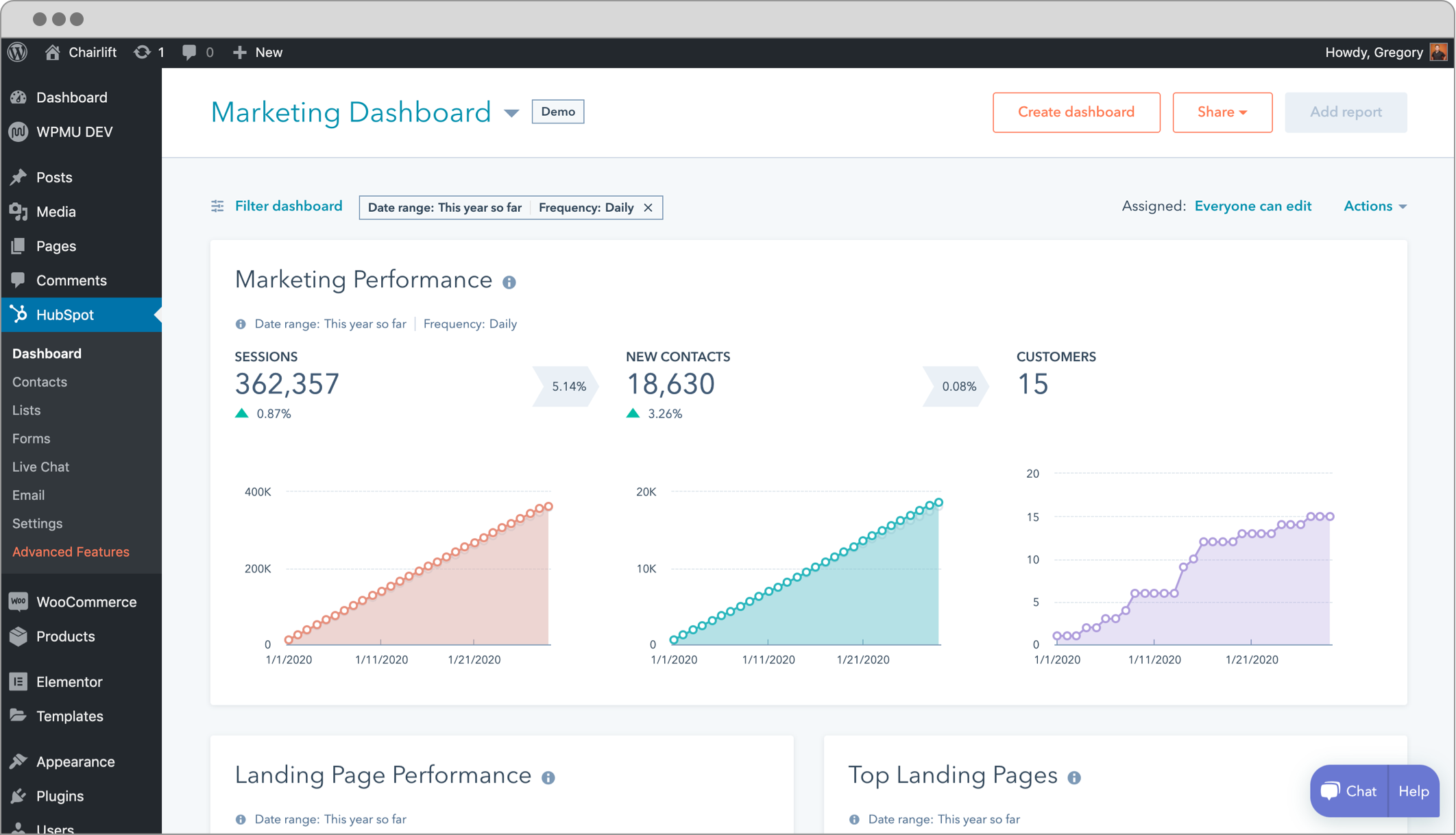
The core mechanic: the plugin installs a tracking code on every page of your WordPress site and connects your WordPress install to a HubSpot account (free to create). From that point, every visitor interaction on your site, such as a form submission, a page view, a live chat session, or an email click, is recorded in HubSpot’s CRM and tied to a contact record.
The plugin was updated to version 11.3.70 on August 12, 2026. The update fixed a reverse proxy issue where client Accept-Encoding headers caused Brotli responses that WordPress could not decode, and corrected a bug where multiple Set-Cookie headers collapsed into a literal array string. The plugin is actively maintained with regular releases.
Technical requirements: WordPress 5.8 or higher, PHP 7.2 or higher. The plugin does not work on WordPress.com-hosted sites. It requires a self-hosted WordPress.org install.
Who HubSpot for WordPress is best for
Strong fit:
- Small business sites that need a CRM without paying for one. HubSpot’s free CRM is among the best-documented and most capable free CRMs available, and the WordPress plugin gives you access to it directly from your site.
- Service businesses, agencies, freelancers, and consultants that capture leads through contact forms and want those leads in a CRM automatically with page-view history and interaction tracking.
- WooCommerce store owners who want e-commerce-level CRM capabilities, since the plugin supports WooCommerce contact syncing and segmentation.
- Sites that want live chat and basic chatbots without a standalone paid service. The free plan includes chat and six chatbot types.
- Teams that want a single tool to handle forms, email marketing, and CRM without managing multiple plugin integrations or third-party syncs.
- Businesses that plan to grow into HubSpot’s broader platform and want to start without paying anything.
Weak fit:
- WordPress.com hosted sites. The plugin requires WordPress.org and will not install on WordPress.com.
- High-volume email senders. The free plan caps outgoing email at 2,000 sends per calendar month. A list of 800 contacts emailed three times per month already exceeds the free limit.
- Businesses that want a fully self-hosted CRM where contact data lives only on their own server. HubSpot is a SaaS platform; contact data goes to HubSpot’s cloud.
- Teams that need marketing automation at scale. The free plan allows 1 automated action and 50 active CRM segments. Serious automation requires Professional at $890 per month.
- Buyers who want to avoid vendor lock-in. HubSpot’s free-to-paid gap is steep, and migrating a large CRM database to another platform is always costly in time.
Installing and setting up the plugin
Installation takes under two minutes. Search for “HubSpot” in Plugins > Add New from the WordPress dashboard. Activate the plugin and a setup screen appears asking you to connect an existing HubSpot account or create a new free one.
Creating a free HubSpot account is straightforward: enter an email, set a password, answer a few onboarding questions about your business and role, and you are in. The connection between WordPress and HubSpot happens through an OAuth-style authorization that the plugin handles automatically. You do not enter API keys manually.
Once connected, the plugin installs a tracking code on every page of your WordPress site. This is the foundation for all analytics and contact tracking. The plugin surfaces a warning if it detects the tracking code is not loading correctly, which is useful when a caching plugin or cookie consent tool interferes with the script.
The main HubSpot menu appears in your WordPress sidebar. It surfaces four primary areas: Forms, Live Chat, Email, and the connection to your HubSpot dashboard. Most of the more advanced features, including the CRM contact database, deal pipelines, and detailed reporting, live in the HubSpot web app rather than the WordPress plugin panel. The plugin is a gateway, not a replacement for the HubSpot dashboard.
CRM and contact management
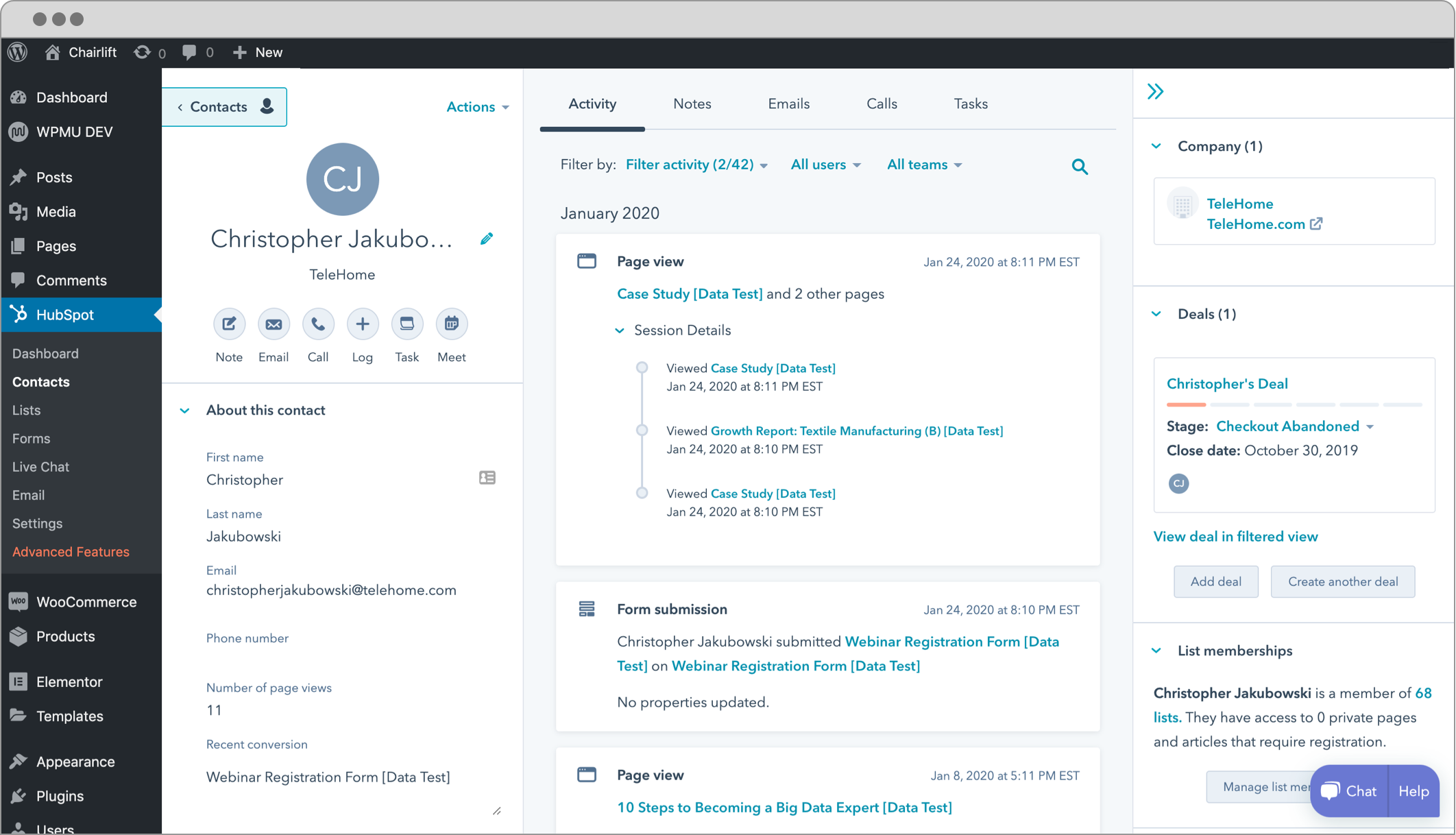
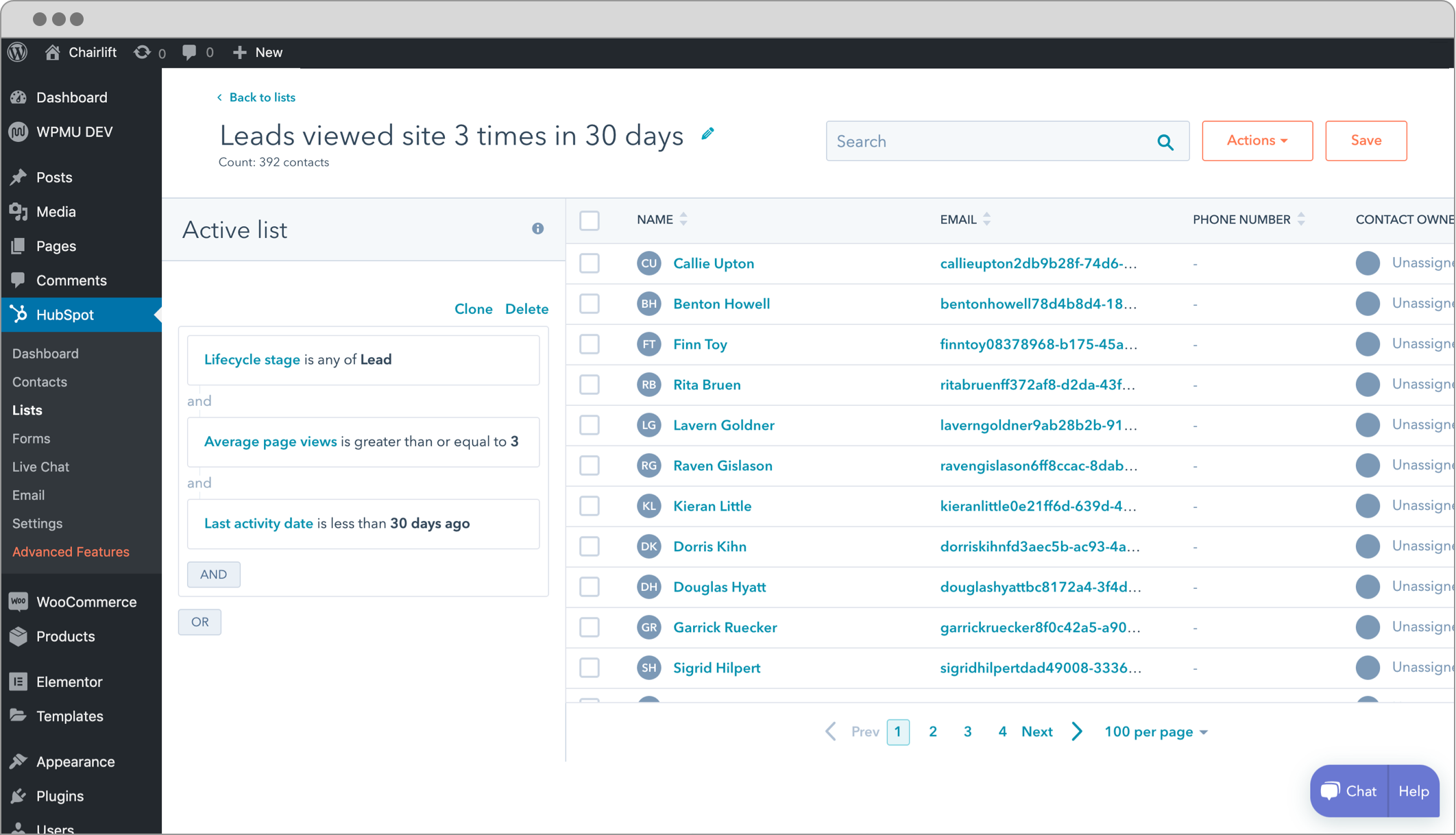
The CRM is the most important reason to choose HubSpot over other form or email marketing plugins. When a visitor fills in a form on your WordPress site, HubSpot creates a contact record automatically. The record includes the visitor’s page-view history before and after the form submission, the source of the visit (organic search, referral, direct), and every subsequent interaction: email opens, email clicks, live chat sessions, and return visits.
That unified contact history is genuinely useful. Most WordPress form plugins send you an email and record the submission in a database table. HubSpot builds a dossier. Knowing that a prospect visited your pricing page four times over two weeks before submitting a contact form tells you something a simple form notification cannot.
Free CRM limits worth knowing:
- Maximum 1,000 marketing contacts on the free plan. Contacts beyond that limit cannot receive marketing emails without upgrading.
- 2 users on the free plan. A solo operator or a founder-with-one-assistant fits within this. A small team of three needs to pay.
- 1 sales pipeline with unlimited deal stages. Deal management is included free.
- Up to 10 customizable dashboards with 50 reports each.
- 50 active CRM segments for list-based targeting.
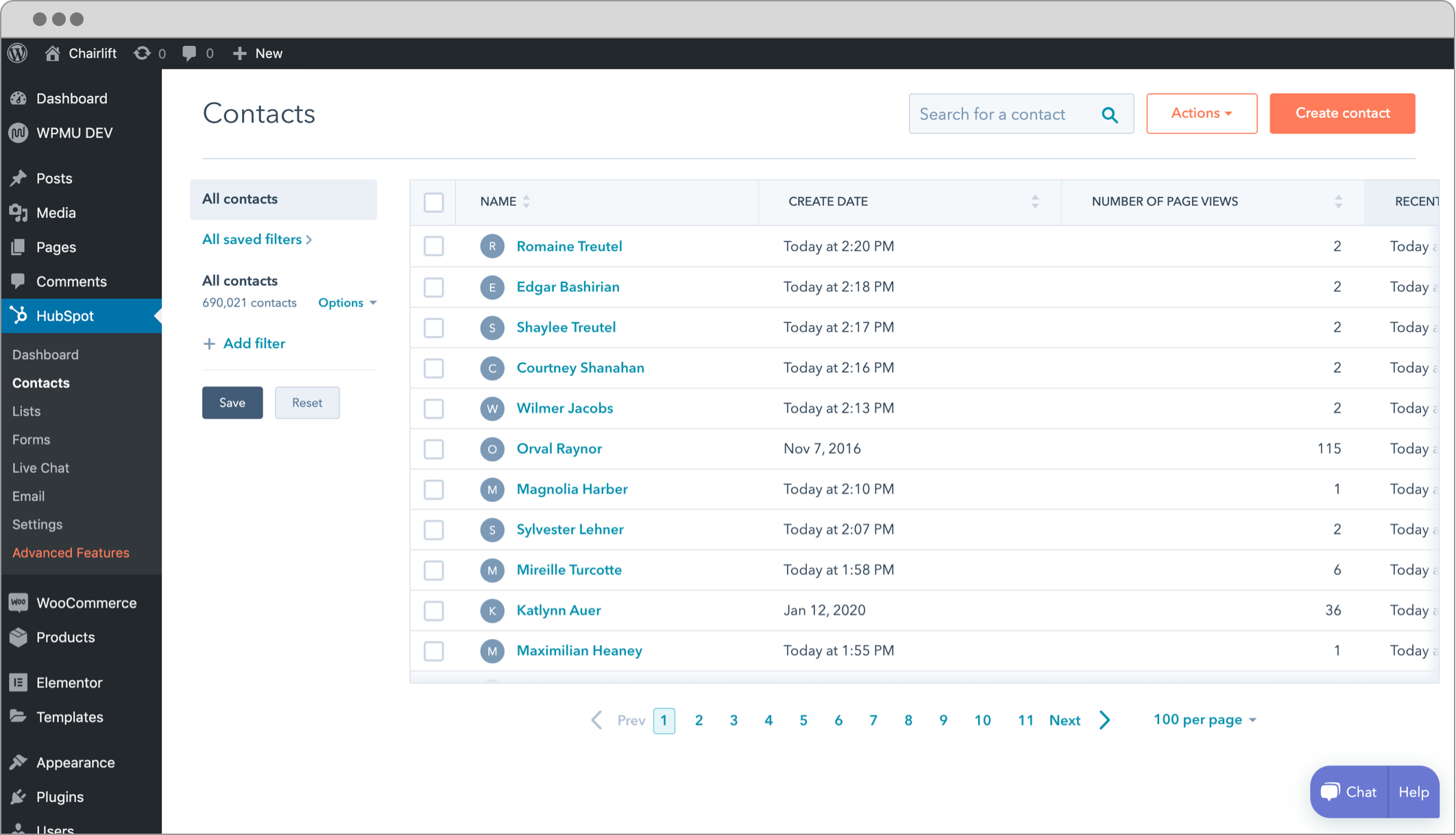
The contact database supports basic segmentation. You can create lists based on contact properties (form source, page views, email activity) and use those lists to target email campaigns.
A recurring issue flagged by some users: the free plan provides no built-in spam contact filtering. Bots that complete forms can add fake contacts to the CRM. HubSpot’s paid plans include more sophisticated spam protections. On the free plan, keeping reCAPTCHA active on forms reduces but does not eliminate this problem.
Forms and popups
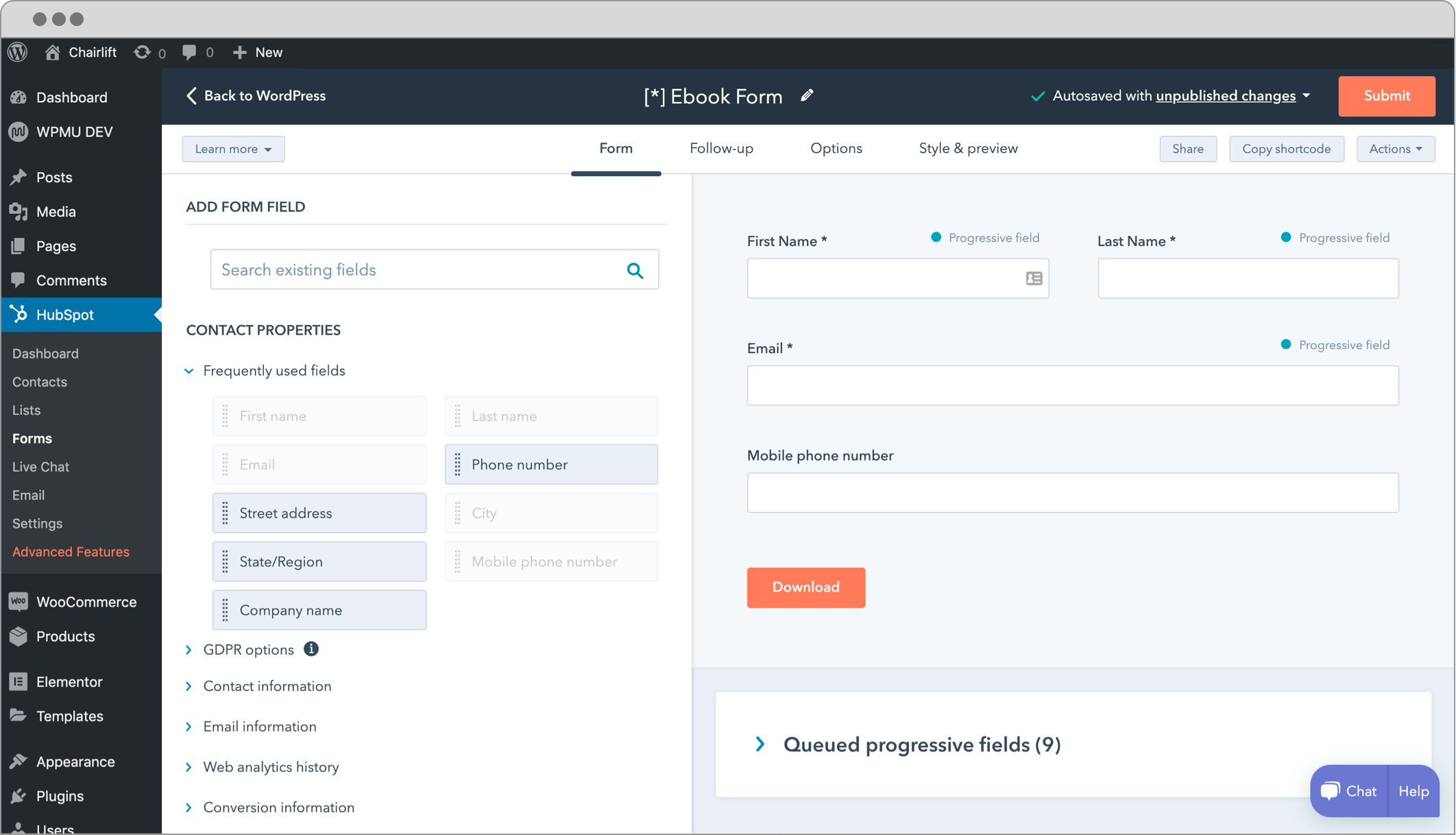
The plugin includes a drag-and-drop form builder that creates forms and popups directly within WordPress. Form types include standard embedded forms, popup overlays, slide-in boxes, dropdown banners, and exit-intent triggers.
Every form created through the HubSpot plugin syncs automatically to your HubSpot CRM. This is the strongest structural argument for using HubSpot forms over a standalone form plugin: there is no third-party sync to configure, no webhook to maintain, and no risk of a broken connection dropping submissions.
The form builder offers standard field types: text, email, phone, dropdown, checkbox, radio, date, and file upload. A simple contact form takes about three minutes to build. A multi-step lead qualification form takes around ten.
Forms also capture page-view context. A visitor who views your services page three times and then submits a contact form does not appear in HubSpot as a cold lead. The timeline shows the full pre-submission browsing history, which is more useful than a form notification with no context.
Email marketing
The email marketing feature is where the free plan shows its limits most clearly. The free tier includes:
- 2,000 email sends per calendar month (with HubSpot branding in the footer)
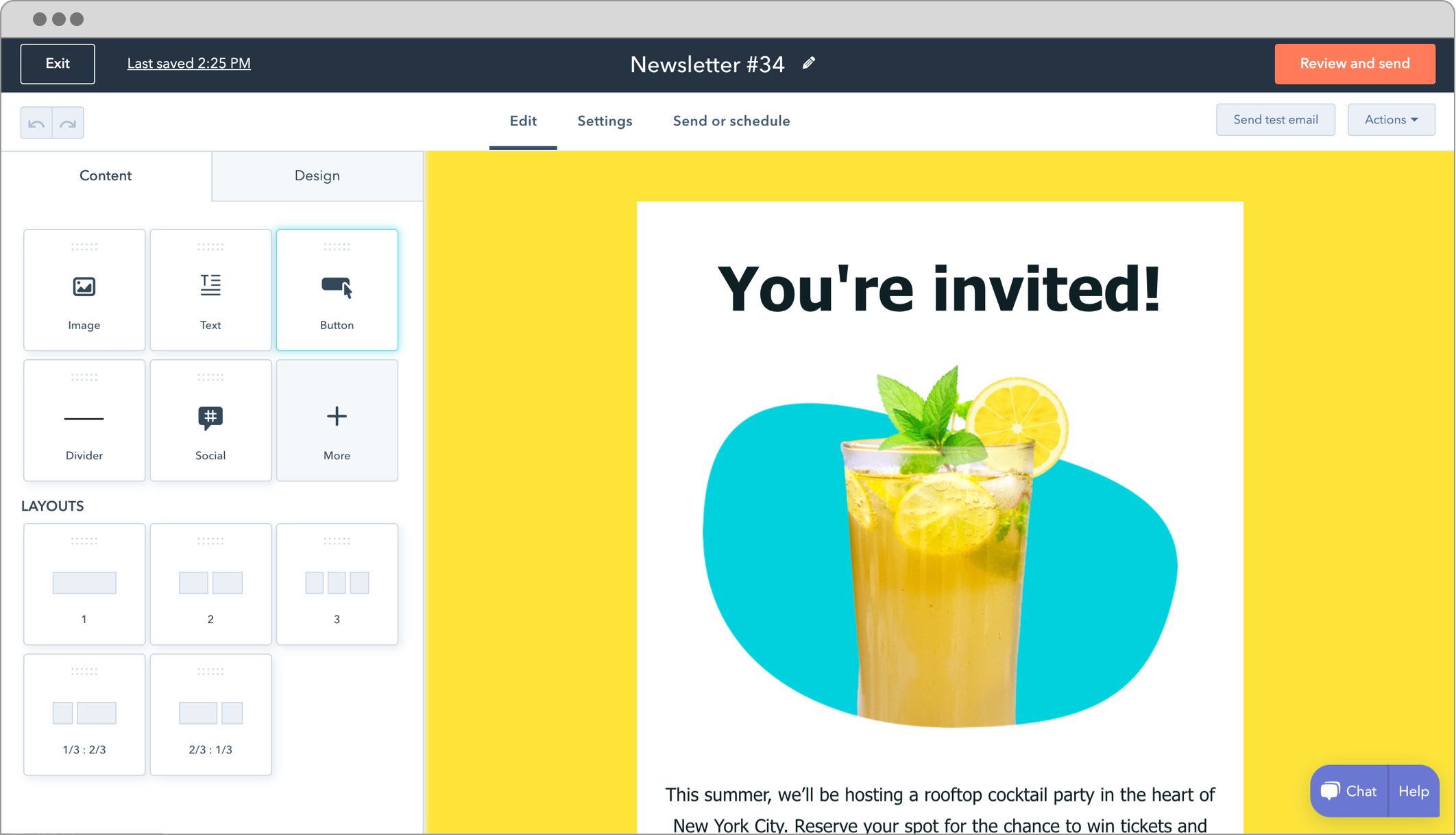
- 20+ pre-built email templates
- Drag-and-drop email editor
- A/B testing between two email variants
- Email scheduling
- Open and click rate tracking
- Automatic logging of every email in the recipient’s CRM contact record
- 1 automated action
The 2,000-send monthly cap is the binding constraint for most sites. A newsletter list of 400 subscribers contacted five times per month reaches exactly that cap. Any growth beyond it requires upgrading.
The HubSpot branding in the email footer is visible to recipients on the free plan. For a personal newsletter or early-stage startup communication, this is acceptable. For a professional B2B campaign, it looks out of place. Removing the branding requires at minimum the Starter plan.
A/B testing is available on the free tier, which is unusual. Most free email marketing tools do not include split testing. HubSpot’s free plan lets you test two variants of a subject line or email body and track which version performs better.
Live chat and chatbots
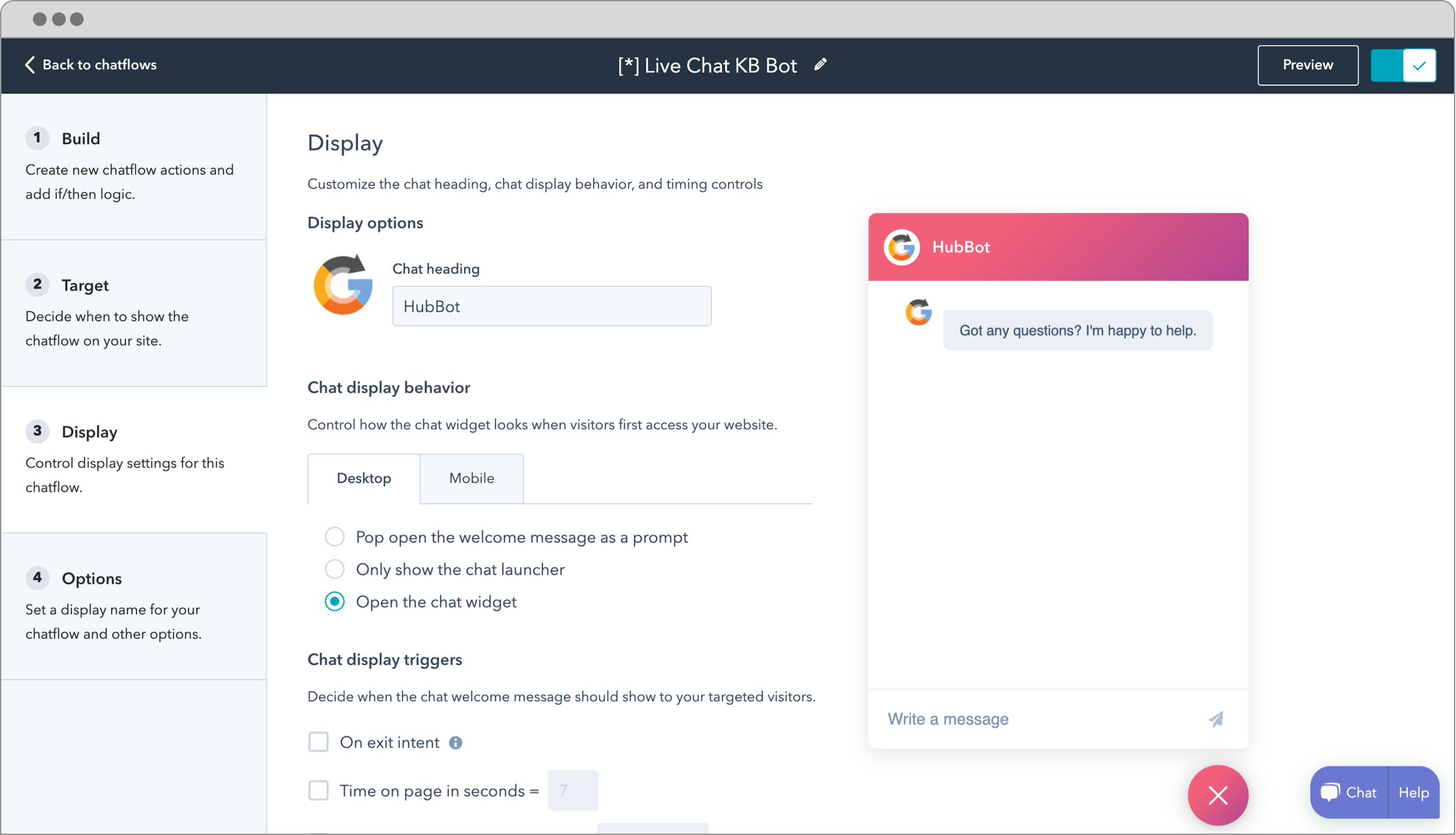
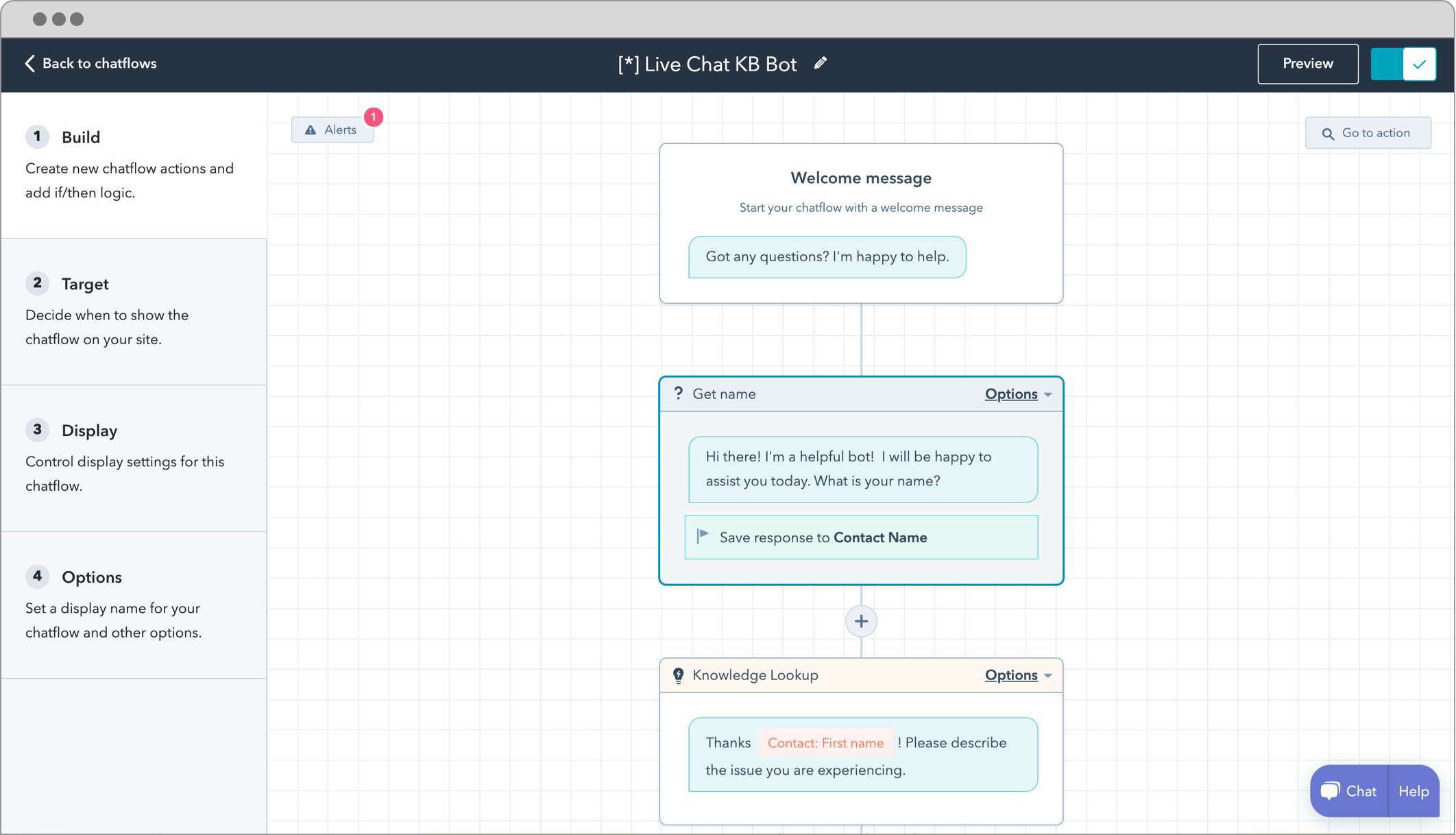
The plugin adds live chat and chatbot functionality to your WordPress site without a separate plugin or third-party subscription. On the free plan, the live chat widget appears with HubSpot branding. Removing branding requires a paid HubSpot plan.
Six chatbot types are available:
- Concierge bot: greets visitors and routes them based on intent
- Lead qualification bot: collects contact information through a conversation flow
- Support bot: handles common support questions with branching answers
- Meeting bot: lets visitors book a meeting directly in the chat window
- Ticket creation bot: opens a support ticket from the chat conversation
- Offline bot: handles chats when no human agent is available
The chatbots operate 24/7 without requiring a human to be online. Conversations are logged in HubSpot and linked to contact records when the visitor is identified via a prior form submission or tracked email click.
Live chat conversations can be handled from the HubSpot web app, from the HubSpot mobile app, or from a connected inbox. Site operators do not need to stay logged into the WordPress dashboard to respond to chats.
Analytics and reporting
The plugin’s tracking code captures visitor behavior on every page of your WordPress site: page views, session source (organic, direct, social, referral), and conversion events (form submissions, chat starts).
This data is aggregated in HubSpot’s reporting dashboards. Free-plan users get 10 customizable dashboards with up to 50 reports each. Standard reports include traffic by source, top pages by views, form conversion rates, email open and click rates, and contact acquisition trends.
The analytics are not as granular as a dedicated analytics platform. HubSpot’s free reporting shows trends and campaign-level metrics well. It does not replace a full analytics tool for detailed behavioral analysis or funnel modeling. That said, for a business-level view of which forms are converting, which emails are performing, and where contacts are coming from, the free reporting is more than adequate for most small sites.
One technical note: the tracking code can conflict with cookie consent plugins. Some users report that GDPR-oriented consent management tools block the HubSpot tracking script from loading until consent is given. HubSpot has documented a consent-mode integration, but configuring it requires following vendor-specific setup steps.
Integrations
HubSpot lists 1,030+ third-party integrations in its marketplace. These span social media platforms (Facebook, LinkedIn, Instagram), e-commerce (WooCommerce, Shopify), payment processing (Stripe, PayPal), productivity tools (Google Workspace, Slack, Zoom), and industry-specific tools.
The WooCommerce integration is natively supported. WooCommerce order and customer data can sync to HubSpot CRM, allowing e-commerce stores to segment contacts by purchase history, automate post-purchase email sequences, and track lifetime value in the CRM.
Third-party integrations beyond the basics typically require HubSpot’s paid plans or separate integration tools. Deeper automation using third-party triggers and actions generally requires Starter or higher.
Pricing and license value
HubSpot for WordPress is free to download and install. A free HubSpot account is also free to create. There is no paid version of the plugin itself. The payment structure is at the HubSpot platform level.
Free plan: $0 per month
- Up to 1,000 marketing contacts
- 2,000 email sends per calendar month (HubSpot branding)
- 1 automated action
- 50 active CRM segments
- Live chat with HubSpot branding
- Basic chatbots
- 10 dashboards with 50 reports each
- 2 users maximum
Starter plan: $20 per seat per month (approximately $15/seat/month billed annually)
- 1,000 marketing contacts included
- 5x email send limit per month relative to contact count
- Up to 10 automated actions
- 500 HubSpot Credits per month
Professional plan: $890 per month for 3 core seats (billed monthly); $800/month billed annually
- 2,000 marketing contacts included
- 10x email send limit per month
- Unlimited automated actions with omni-channel automation
- Up to 1,200 active CRM segments
- Remove HubSpot branding from live chat and email
- Mandatory one-time Professional Onboarding fee: $3,000
Enterprise plan: $3,600 per month for 5 core seats
- 10,000 marketing contacts included
- 20x email send limit per month
- Mandatory one-time Enterprise Onboarding fee: $7,000
Two characteristics buyers should understand before starting. First, the gap between free and Professional is enormous. There is no gradual staircase: the Starter plan provides useful but limited automation, and Professional unlocks full marketing automation but costs $890 per month plus a non-negotiable $3,000 onboarding fee. Second, the paid plans use a “marketing contacts” model. Contacts you can email are counted separately from total CRM records, adding operational complexity that simpler tools do not have.
Verify pricing against hubspot.com/pricing/marketing on the day you evaluate, as HubSpot adjusts pricing periodically.
Pros and cons
Pros
- The most complete free WordPress CRM and marketing plugin available in 2026: CRM, email marketing, forms, live chat, chatbots, and analytics in one install
- 200,000+ active installs and a 4.3-star rating across 207 reviews on WordPress.org
- No SMTP or email delivery setup required; HubSpot handles email delivery independently
- Automatic form sync to CRM with full visitor history context (page views before and after submission)
- A/B testing available on the free plan (unusual for a free email marketing tier)
- Six chatbot types including lead qualification and meeting booking on the free plan
- WooCommerce integration for e-commerce CRM and post-purchase automation
- 1,030+ third-party integrations in the HubSpot marketplace
- 10 customizable dashboards with 50 reports each on the free plan
- No coding skills required; setup takes under 10 minutes
- Actively maintained: version 11.3.70 shipped August 12, 2026
Cons
- Free email sends capped at 2,000 per calendar month; runs out fast for medium-sized lists
- HubSpot branding appears on free-plan emails and live chat, not suitable for professional B2B campaigns
- Free CRM limited to 1,000 marketing contacts and 2 users
- Free plan allows only 1 automated action; serious automation requires Professional at $890 per month
- Sharp pricing jump from free to Professional, with a mandatory $3,000 onboarding fee
- Some users report connection instability; the plugin can disconnect from HubSpot and require reconnection
- No built-in spam contact filtering on the free plan; bots submitting forms can pollute the CRM
- Does not work on WordPress.com-hosted sites
- HubSpot is a SaaS platform: contact data lives in HubSpot’s cloud, not your own server
- Tracking code can conflict with some cookie consent plugins in certain configurations
Alternatives to HubSpot for WordPress
- FluentCRM. A WordPress-native CRM and email marketing plugin. Contact data stays in your own WordPress database rather than a third-party SaaS platform. Choose FluentCRM if you want full data ownership, no SaaS dependency, and a one-time or annual license rather than a monthly subscription. FluentCRM does not include live chat or chatbots, but covers CRM and email marketing in a self-hosted model.
- Brevo for WordPress (formerly Sendinblue). Email marketing and basic CRM with a free plan offering up to 9,000 emails per month, more generous than HubSpot’s 2,000 per month. Choose Brevo if email send volume is the primary constraint or if you want a simpler contact management model.
- WPForms + Mailchimp. A combination approach: WPForms handles form creation and Mailchimp handles email marketing. More complex to configure than HubSpot’s all-in-one model, but useful for businesses that want best-of-breed tools rather than a single platform.
- Jetpack CRM. A WordPress-native CRM from Automattic. Self-hosted contact management with a free core and paid extensions. Choose it if you want CRM inside WordPress without connecting to an external SaaS platform and you do not need built-in email marketing or live chat.
- ActiveCampaign for WordPress. A paid marketing automation platform with deeper automation than HubSpot’s free or Starter tier, starting at $15 per month for 1,000 contacts. Choose it if automation sophistication is more important than a built-in CRM or live chat, and you want to avoid HubSpot’s steep Professional pricing.
For most small WordPress businesses choosing in 2026, the decision comes down to HubSpot free (all-in-one, SaaS-dependent, generous free tier, steep paid escalation) versus FluentCRM paid (self-hosted, data ownership, one-time cost, no built-in chat). HubSpot wins if the free plan fits your volume. FluentCRM wins if you want to own your data and avoid SaaS pricing curves at scale.
Final verdict
HubSpot for WordPress delivers something no other free WordPress plugin does: a genuine CRM, email marketing, live chat, chatbots, forms, and analytics under a single install at zero cost. For a solo founder, a small service business, or a WooCommerce store under 1,000 contacts, the free tier is a complete tool. You get more functionality from the free HubSpot plugin than from most paid alternatives in the same category.
The honest limitations are clear. Two thousand emails per month runs out faster than most site owners expect. HubSpot branding on free-tier emails and live chat is a visible reminder that you are on the free plan. And the cost curve from free to Professional is steep enough to feel like a trap if you have not planned for it in advance.
If you are a small business capturing leads through a WordPress site and you need a CRM that builds contact timelines automatically, the HubSpot plugin is the starting point I would recommend. Just be clear-eyed about what happens to the bill when your list grows past 1,000 contacts or when you need more than one automated sequence.
If you are already at the stage where you need unlimited automation, HubSpot branding removal, and advanced segmentation, the $890 per month Professional plan is a business decision that deserves serious budget consideration before you start.