


Most appointment booking plugins ask you to choose between simplicity and power. You get a clean, focused tool that handles basic scheduling well but hits a wall when your business grows, or you get a feature-rich system that takes two weekends to configure and still feels like it was built for a different business type.
LatePoint takes a different angle: a free version that is genuinely useful for solo operators, a Pro tier that unlocks the full platform, and a pricing model where every paid plan gets every feature with no per-feature gating based on which tier you buy.
I reviewed LatePoint by going through the official WordPress.org listing, the plugin documentation, the official UI screenshots published on WordPress.org, the pricing and features pages, and the detailed changelog through version 5.6.9 (July 2026). Where a Pro feature was not exercisable without a live licensed install, I say so and note the research basis.
At a glance: LatePoint
- Reviewed on: LatePoint free plugin (WordPress.org listing, version 5.6.9, July 2026), official plugin UI screenshots, official features page, pricing page, documentation (getting-started guide), and changelog.
- Free version: Yes, with Stripe and Razorpay payments included at no cost.
- Active sites: 100,000+ on WordPress.org.
- WordPress.org rating: 4.9 stars across 93 reviews (89 five-star ratings).
- Bottom line: A well-built WordPress appointment booking plugin with an unusually complete free tier, transparent per-site pricing where all features are included regardless of plan, and active development with multiple releases per month.
Quick verdict on LatePoint
One sentence: LatePoint is one of the most straightforward WordPress appointment booking plugins available in 2026, and its “all features on every plan” pricing model removes the common frustration of discovering that the feature you need costs two tiers more than the one you bought.
The plugin earns its position because the free version is a real starting point, not a stripped demo. Free users get Stripe and Razorpay payments, unlimited appointments, a full multi-step booking wizard, a customer dashboard, and an admin analytics panel. That is a more complete free offering than many paid competitors provide at their entry tier.
The honest caveats: the free version is firmly single-location and single-agent. Everything that makes booking systems useful for a growing service business (multiple agents, calendar sync, SMS and WhatsApp notifications, recurring appointments, group bookings, service packages) requires the paid Pro plan. And while the pricing model is transparent, there is no in-between option between the Starter plan (1 site) and the Scale plan (5 sites).
Quick verdict card
- Best for: Solo practitioners and small service businesses on WordPress who want a clean booking experience with real payment processing from the start, plus teams that want to avoid per-feature pricing tiers.
- Best plan for most businesses: Starter ($79/year) for single-site service businesses; Scale ($149/year) for agencies managing a small client portfolio.
- Standout: All features on every paid plan with no feature gating by tier. Free version includes Stripe and Razorpay payment processing. Clean, modern booking UI that works on any WordPress theme.
- Watch out for: Multiple staff, recurring appointments, SMS and WhatsApp, Google Calendar sync, and most Pro integrations require the paid plan. No unlimited-domain tier exists; Agency caps at 100 sites.
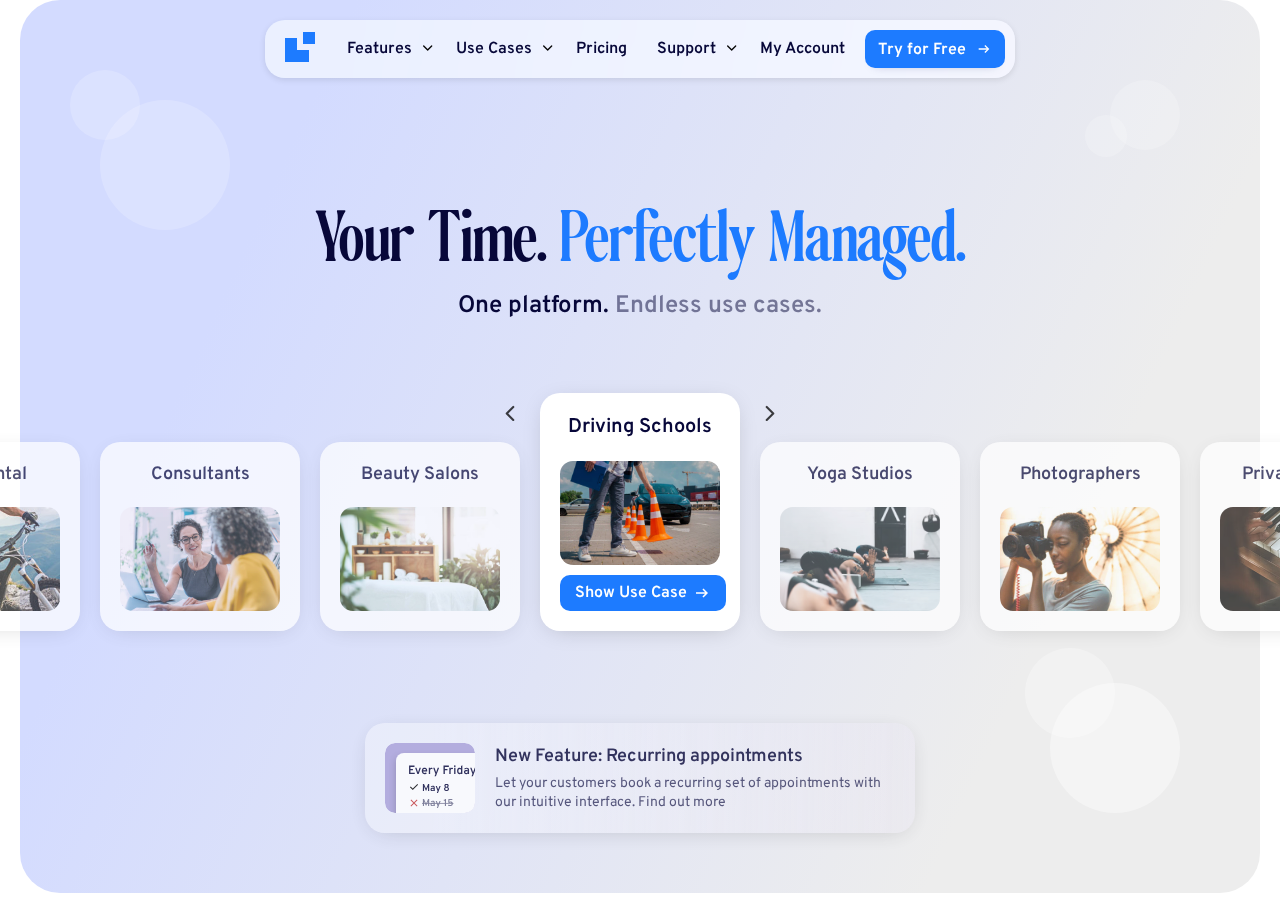
What LatePoint is
LatePoint is a WordPress appointment and booking plugin developed and maintained by LatePoint LLC, based in San Diego, California. It installs as a standard WordPress plugin, adds its own admin menu inside wp-admin, and renders booking forms on the front end via shortcodes, Gutenberg blocks, Elementor widgets, or Bricks builder widgets.
The plugin has two distinct functional layers that every buyer needs to understand before installing.
The free version (available on WordPress.org at no cost) gives any WordPress site a working booking system: single location, unlimited appointments, Stripe and Razorpay payment processing, email notifications, a multi-step booking wizard, and a customer dashboard for managing appointments. For a solo practitioner who takes card payments and runs one location, the free version is a production-ready tool.
LatePoint Pro (the paid upgrade) unlocks the full platform: multiple locations, multiple staff members and agents, recurring appointments, group bookings, service packages and bundles, additional payment gateways (PayPal, Square, Mollie, MercadoPago, Flutterwave, Braintree, PayStack, SureCart, WooCommerce), Google Calendar and Outlook Calendar and Apple Calendar sync, Zoom and Google Meet and Microsoft Teams integration, SMS and WhatsApp notifications, webhooks, Mailchimp integration, custom form fields, invoice management, and a white label admin option added in June 2026.
The current release is version 5.6.9, published July 20, 2026. Development is active, with multiple releases per month including security patches, new gateways, and feature expansions.
Who LatePoint is best for
Strong fit:
- Solo practitioners: coaches, consultants, tutors, photographers, therapists, and personal trainers who need a professional booking system on their WordPress site without a monthly SaaS subscription and want real payment processing from day one.
- Small service businesses: salons, spas, clinics, yoga studios, driving schools, pet groomers, and similar operations that need multi-staff scheduling, calendar sync, and automated reminders, all included in the paid plan without extra per-feature costs.
- Agencies building booking sites for clients: the Scale (5 sites) and Agency (100 sites) plans cover multiple client installs at a flat rate with all features included, making per-project cost management predictable.
- Activity and rental businesses: tour operators, bike rental shops, jet ski hire, and experience providers that need slot-based bookings with upfront payment and capacity controls.
- WordPress-first teams that want booking data self-hosted in their own database rather than stored on a third-party SaaS platform.
Weak fit:
- Multi-location chains needing a centralized SaaS dashboard across multiple sites: LatePoint is WordPress-native, one install per site, so cross-site reporting requires custom development.
- Businesses that need a dedicated event ticketing system with QR code e-tickets, public event listings, and attendee management: LatePoint handles appointment bookings and group sessions but does not have a formal event ticketing module.
- Teams that want loyalty point or membership integration built in: no native loyalty or membership module.
- Operations that need Telegram as a notification channel: email, SMS, and WhatsApp are the supported delivery options.
Setup and the onboarding experience
LatePoint’s official documentation describes a setup that takes under 10 minutes from plugin installation to first booking. The process follows a guided wizard that runs on first activation.
From the WordPress.org listing and official getting-started documentation, the installation and setup steps are:
- Install from WordPress.org: search “LatePoint” in Plugins > Add New, click Install Now, then Activate. Or download the ZIP and upload via Plugins > Add New > Upload Plugin.
- On activation, LatePoint automatically redirects to its admin area. The setup wizard launches from there.
- The wizard walks through four configuration steps: notifications setup, adding services, setting working hours, and completing the initial setup to open the dashboard.
- Embed the booking form using the shortcode
[latepoint_booking_form], the[latepoint_book_button]shortcode for a popup trigger, a Gutenberg block, or an Elementor or Bricks widget. - Configure payment gateways under LatePoint > Settings, and set up notification templates under LatePoint > Automation.
The setup wizard is the correct place to start. Based on the official UI documentation and the setup wizard screenshot published on WordPress.org, the wizard presents each configuration step on a single screen: notifications first, then services, then working hours.
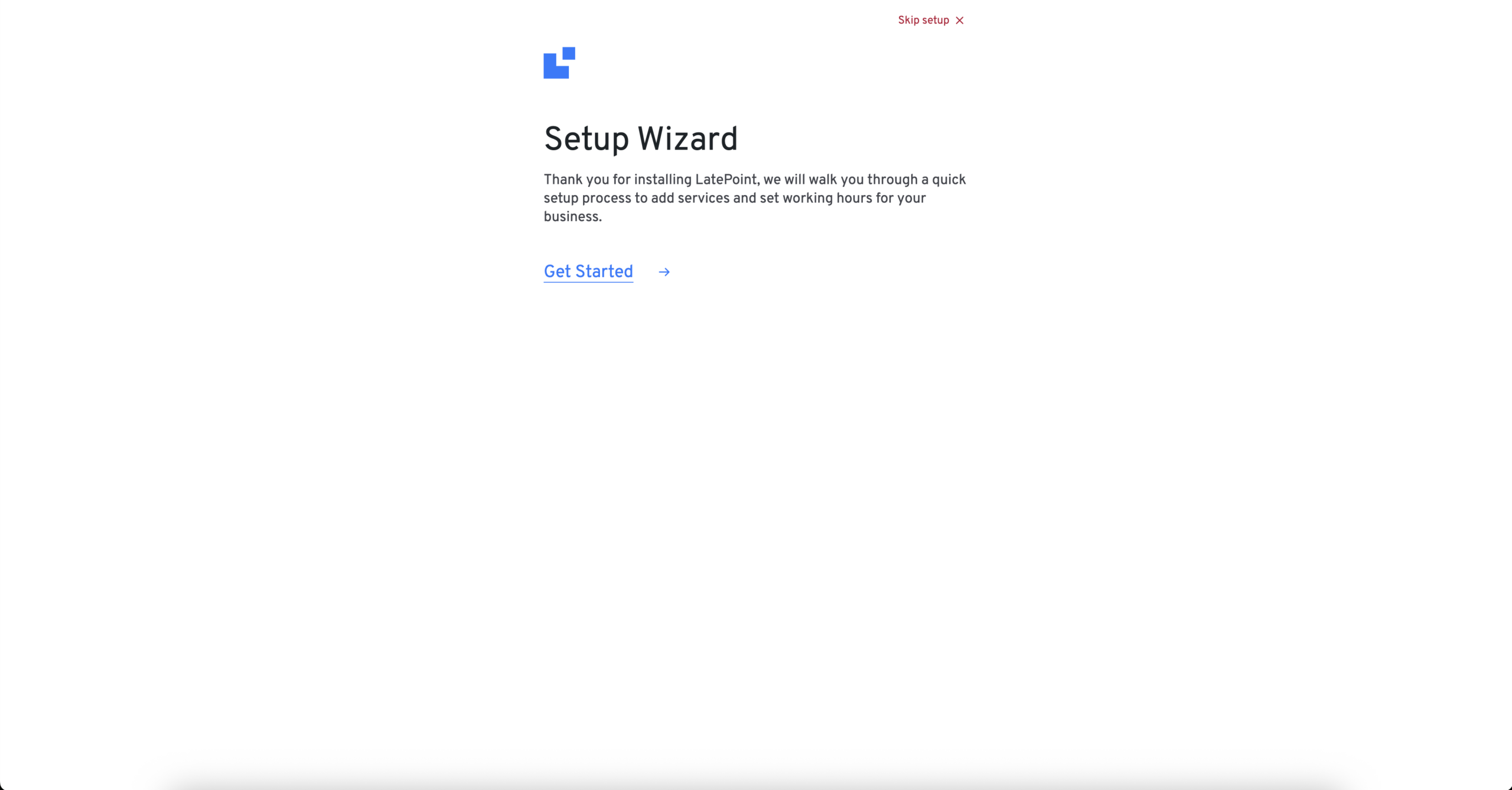
What stands out about this flow: the wizard makes the minimum-viable booking system (one service, one agent, one working schedule) configurable in a few screens. A first-time user does not need to know WordPress deeply to get from install to taking bookings. The official documentation notes that the full setup can complete in under 10 minutes.
The single constraint worth noting at setup: payment gateway configuration (Stripe or Razorpay on the free plan) requires a separate account at the chosen gateway provider. LatePoint connects to an existing gateway account; it does not issue credentials. For a brand-new business that has not yet set up Stripe, that adds a step before payments can go live.
(Note on basis: Setup process reviewed from the official documentation at latepoint.com/docs/getting-started-with-latepoint/ and the official plugin screenshots at wordpress.org/plugins/latepoint/. The setup wizard was not directly exercised in a live install during this review session.)
The booking wizard experience
The booking form is the most important screen in any appointment plugin. Customers spend the most time there, and the quality of that flow directly affects how many bookings actually complete versus how many abandon partway through.
LatePoint uses a multi-step wizard layout. Each step handles one decision: service selection, agent selection (if multiple agents are configured), date and time, customer information, and confirmation. No step is cluttered.
The official plugin UI shows the service selection step presents each service with its name, duration, and price in a clean card layout. Customers can see all available services at a glance and tap to proceed.

After selecting a service, the customer moves to the date and time step. The official plugin UI shows a calendar picker with real-time availability: available time slots appear as selectable options, unavailable slots do not appear. The customer picks a date from the calendar and then selects a time slot from the available options for that date.
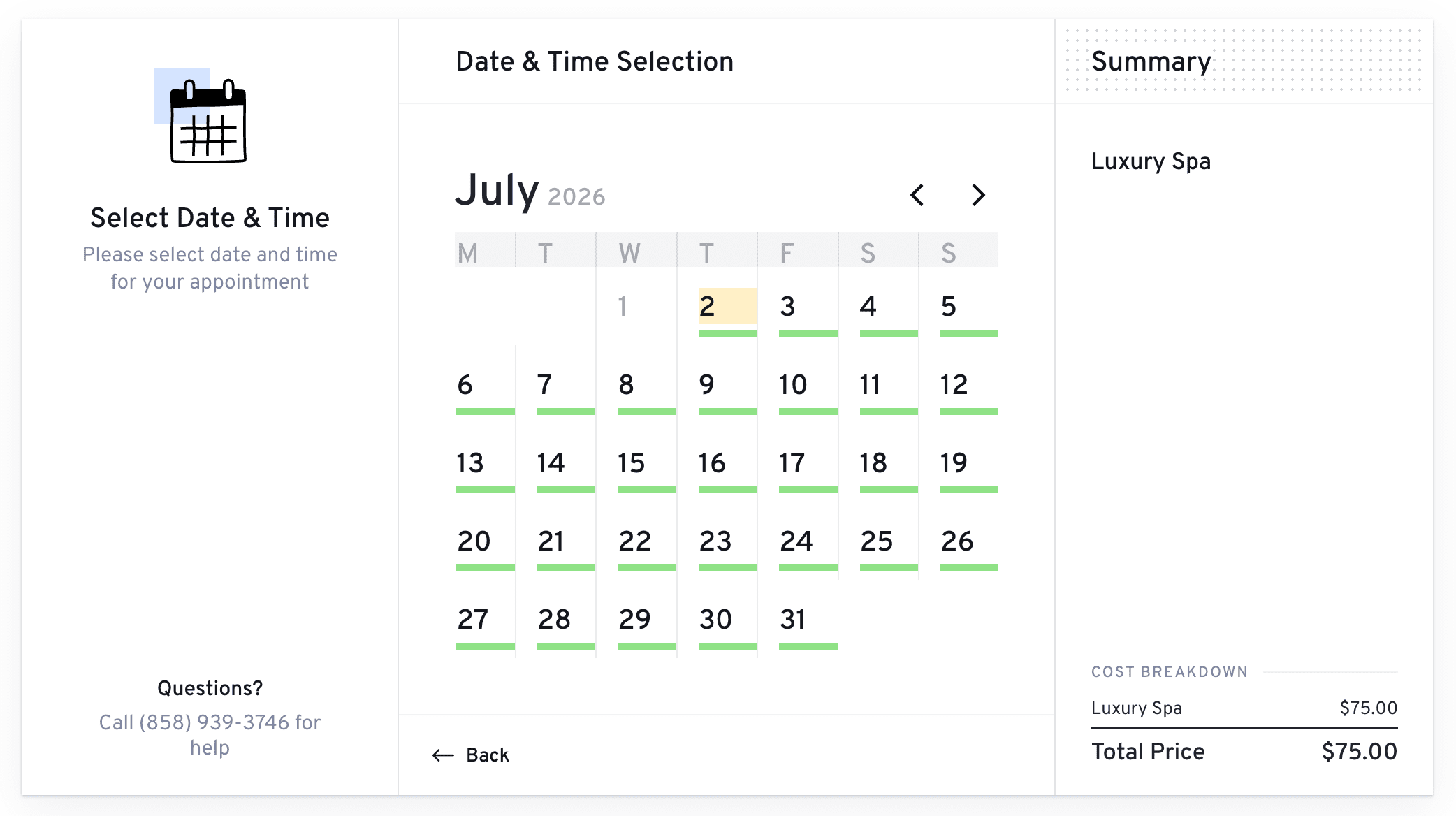
Several behaviors in the booking form are worth calling out specifically:
- Time zone detection: The form detects the customer’s browser time zone and presents availability in their local time. This is essential for remote services where the customer and service provider are in different time zones.
- Service extras: Customers can add optional extras during the booking flow. Extras add to the base service price and give service businesses an upsell path without any manual follow-up.
- Group bookings: When a service has a group capacity configured, the booking form lets a customer select how many attendees they are adding. LatePoint tracks the remaining capacity and prevents overbooking.
- URL pre-fill: URL parameters can pre-populate customer fields (first name, email, service, agent) so booking links from email campaigns or landing pages skip the fields the customer has already provided.
- Shopping cart: Pro plan allows multiple appointments to be booked in one checkout session. A customer booking a haircut and a color treatment can add both services and pay for both at once.
- Popup mode: The booking form can be triggered as a popup by a button rather than embedded inline, which is useful for booking CTAs on service and landing pages.
The form embeds via shortcode, Gutenberg block, Elementor widget, or Bricks builder widget.
(Note on basis: The booking form UI and step behavior are documented through the official plugin screenshots at WordPress.org and the official WP.org listing. Multi-agent selection and group booking flows were not exercised against a live install with multiple staff configured.)
Admin calendar and dashboard
The admin interface is where a service business owner manages day-to-day scheduling. The LatePoint admin dashboard and calendar are visible in the official plugin screenshots published at WordPress.org.
The admin dashboard provides a summary view of the business: total appointments, revenue overview, and occupancy metrics. The appointment list below gives a filterable, sortable view of all bookings across all services and agents.
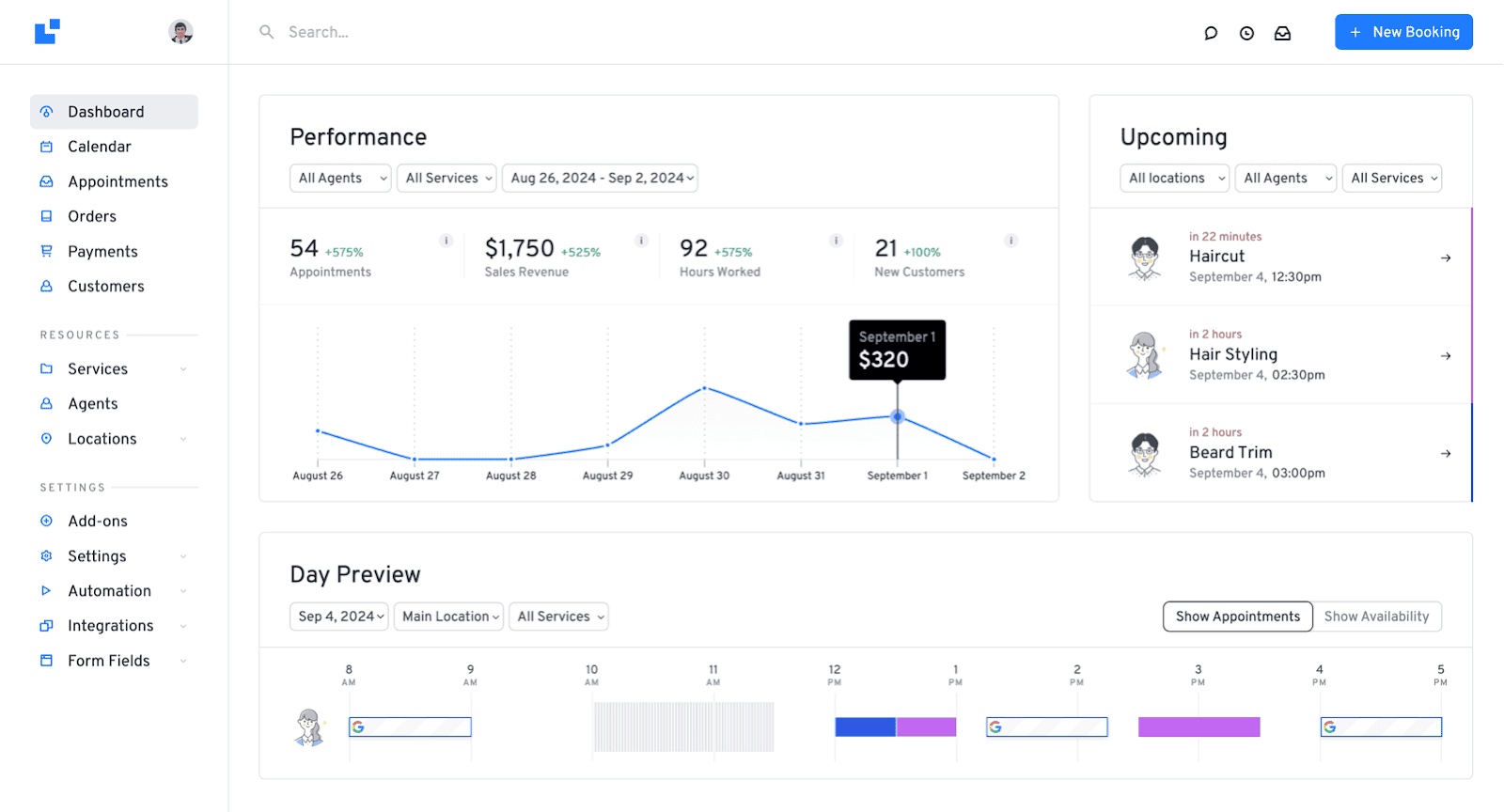
The admin calendar gives the operator a view of all appointments in day, week, and month formats. Agent filtering lets you narrow to a specific staff member’s schedule. The calendar appointment cards show service name, customer, and booking status.
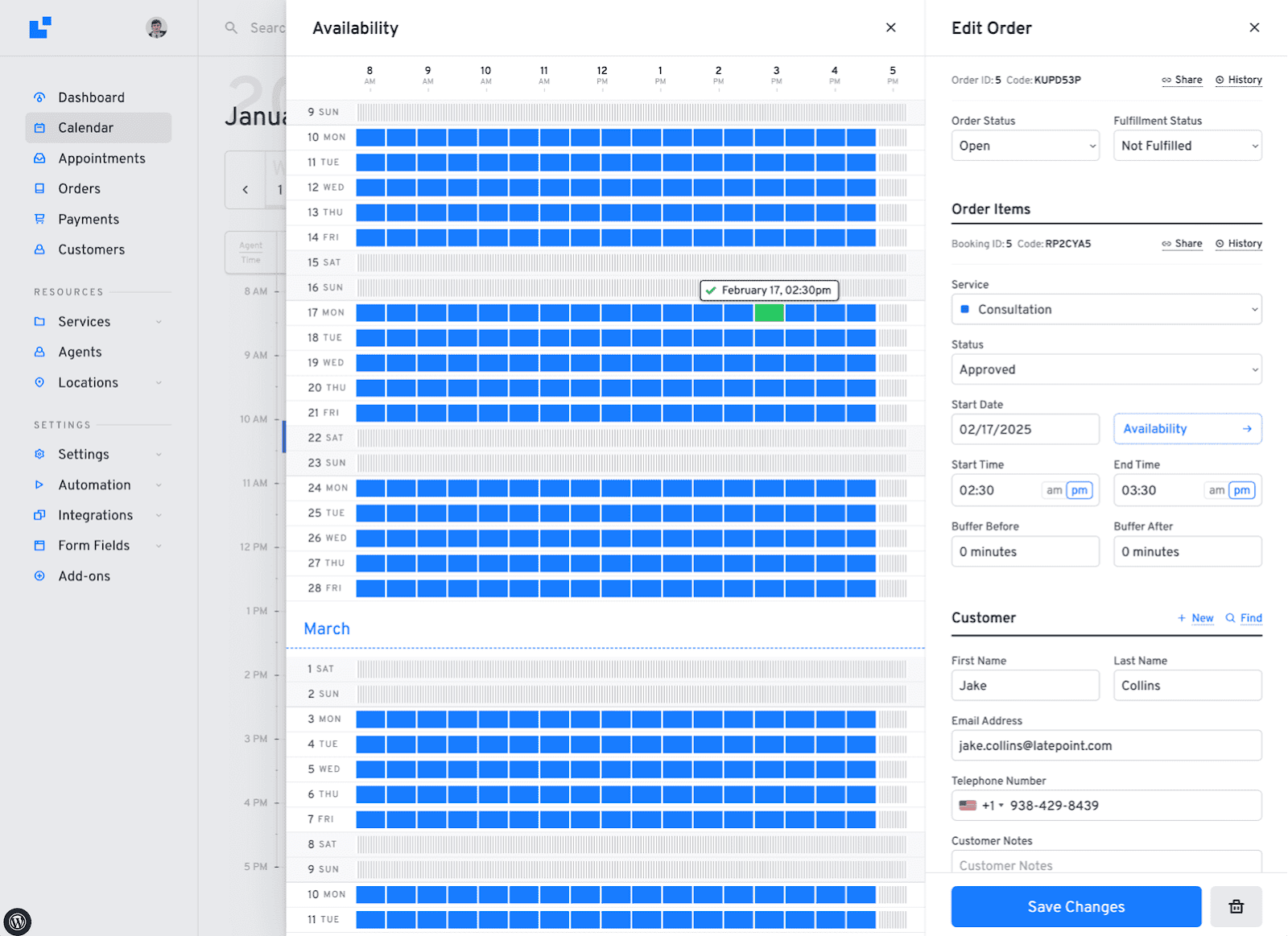
Creating appointments from the admin side uses the same step structure as the front-end booking form, which keeps the admin and customer experiences consistent. A front-desk operator creating an appointment for a walk-in customer works through the same service, agent, date, time, and customer steps that the online customer would use.
The analytics dashboard shows business-level KPIs. Version 5.6.5 (July 2026) fixed a revenue statistics bug that was incorrectly displaying pre-discount amounts when coupons were applied. Dashboard revenue now correctly reflects post-coupon totals.
The activity log (available in the free version) records every action taken on the account, which is useful for troubleshooting and accountability in multi-agent operations.
(Note on basis: Admin calendar and dashboard UI reviewed from official plugin UI screenshots at WordPress.org, the WP.org listing, and the changelog. The calendar was not navigated in a live install during this review session.)
Services, agents, and locations
LatePoint separates the booking primitives in a way that maps well to how service businesses actually operate.
Services define what is sold: name, category, price, duration (or multiple durations with individual pricing), capacity, color coding, and which agents are authorized to perform the service. Services can have extras (optional add-ons the customer selects during booking) that add to the base price. Services can be grouped into bundles (packages of multiple sessions at a discounted total) which customers purchase once and then schedule from their customer cabinet over time.
Agents define who delivers the service. Each agent has their own working schedule, days off, breaks, and linked services. Agents with the agent dashboard enabled can manage their own appointments without needing wp-admin access. Version 1.6.0 of the Pro Features Addon (June 2026) added White Label settings that allow LatePoint branding in the admin to be replaced with the operator’s own brand identity.
Locations define where services are delivered, with address, contact data, and linked agents. Each location can have its own working hours and service offerings, which is the correct model for a salon group with multiple physical branches.
A notable feature added in version 5.5.0 (April 2026) is no-show restrictions: operators can block future bookings for customers with a pattern of not showing up, or require upfront payment from those customers. For service businesses with limited appointment slots, this is a practical anti-abuse tool.
(Note on basis: Service, agent, and location configuration reviewed from the official features page and changelog. End-to-end multi-location scheduling and the agent dashboard were not exercised in a live licensed install.)
Payment processing
LatePoint has one of the broader payment gateway selections in the WordPress booking plugin space.
Free version gateways: Stripe and Razorpay. Both are connected directly from the LatePoint Settings panel and process payments through the operator’s own gateway account. Card data is handled entirely by the chosen processor; LatePoint never holds funds. For international operators, Razorpay is a popular choice in South Asia; Stripe covers most major markets globally.
Pro plan gateways: PayPal (v6 integration added July 2026), Square, Mollie, MercadoPago, Flutterwave, Braintree, PayStack, SureCart, and WooCommerce integration. This is a wide range for a WordPress booking plugin and reflects the range of markets LatePoint serves.
Payment collection options:
- Full payment at booking: the customer pays the complete service fee upfront, which is the simplest and strongest no-show deterrent.
- Deposit at booking: a fixed amount or percentage required to hold the slot, with the remainder invoiced or collected separately.
- Pay later: the booking is confirmed without upfront payment, and a payment link is sent after the appointment via the invoicing feature.
Invoices are generated automatically per booking (Pro). The operator can send payment request links directly to customers. Refund processing is available within the LatePoint admin for Stripe, PayPal, Mollie, and other supported gateways.
Tax support (custom taxes or fees charged on top of appointment price) is a Pro feature. Coupon codes with complex rules (percentage off, fixed amount, specific services, expiry dates, usage limits) are also a Pro feature.
Notifications and workflow automation
LatePoint sends automated notifications at key booking lifecycle events: confirmation, reminder, rescheduling, cancellation, and payment. The notification system uses template variables (customer name, service, agent, date, time, location, payment amount) to personalize each message.
- Email: Included in the free version. Booking confirmations and reminders are configured through notification templates in the LatePoint settings panel.
- SMS: Pro plan. LatePoint integrates with SMS delivery providers to send text message notifications and reminders. Scheduled reminders (send an SMS 24 hours before the appointment) are a Pro feature.
- WhatsApp: Pro plan, via the WhatsApp by Meta addon. Version 1.1.0 of the WhatsApp addon (May 2026) added a searchable template selector and now fetches all approved WhatsApp templates rather than only the first 25. Operators who rely on WhatsApp for customer communication can send booking confirmations, reminders, and payment requests through it.
Workflow automation (Pro) is a rule-based system for triggering actions when booking events occur. Operators can configure a workflow to send a follow-up email two hours after an appointment completes, or to fire a webhook when a booking is created. Version 5.6.1 (May 2026) added an “Order Item Counts” condition, allowing workflow logic to fire differently depending on how many bookings were included in a single order.
Webhooks (Pro) send structured booking data to a third-party URL on create, update, or cancel events, which is the bridge to Zapier, Make, or any custom CRM or automation endpoint.
Mailchimp integration (Pro) automatically adds customer email and contact data to a Mailchimp audience when a booking is made. MCP server support, added in version 5.6.8 (July 2026), opens an API endpoint that allows AI assistants to interact with the LatePoint scheduling system.
Calendar and video meeting integrations
Calendar synchronization is a Pro feature. LatePoint connects to:
- Google Calendar: Bidirectional sync. Appointments booked in LatePoint appear on the agent’s Google Calendar, and existing Google Calendar events block the corresponding time in LatePoint.
- Outlook Calendar: Bidirectional sync. Added as a new feature in a recent release.
- Apple Calendar: Sync for Apple Calendar users, also newly added.
- Zoom: Automatic Zoom meeting creation per appointment. When a customer books a session configured for Zoom, the meeting link is auto-generated and included in the confirmation notification.
- Google Meet: Same automatic meeting creation behavior as Zoom.
- Microsoft Teams: Automatic Teams meeting link generation per appointment.
For services where multiple customers book the same time slot (group classes, shared sessions), the Zoom, Google Meet, and Outlook Teams add-ons support a Shared Meeting Mode added in April 2026: all bookings in the same slot reuse one meeting link rather than creating separate links per booking, which is the correct behavior for group class formats.
(Note on basis: Calendar sync and meeting link behavior confirmed from the official features page and April 2026 changelog. These integrations were not connected in a live install during this review session.)
The free version: what it actually covers
LatePoint’s free version is worth examining carefully because the gap between a genuine free tier and a marketing-limited demo is significant.
What the free version includes:
- Unlimited appointments (no booking volume cap).
- Multi-step booking wizard, embeddable via shortcode, Gutenberg block, or Elementor widget.
- Stripe payment processing, including deposit collection.
- Razorpay payment processing.
- Single location.
- Email notifications (booking confirmation, reminders).
- Customer dashboard (customers can view and manage their own appointments).
- Admin analytics dashboard with appointment and revenue reporting.
- Activity log.
- Import and export.
- Conversion tracking via third-party tracking code configuration.
What the free version does not include:
- Multiple staff members (single agent only).
- Multiple locations.
- Recurring appointments.
- Group bookings with capacity management.
- Service packages and bundles.
- Shopping cart.
- SMS notifications.
- WhatsApp notifications.
- Google Calendar, Outlook, or Apple Calendar sync.
- Zoom, Google Meet, or Microsoft Teams integration.
- PayPal, Square, Mollie, or other additional gateways beyond Stripe and Razorpay.
- Invoices, refund processing, payment links, or tax support.
- Custom form fields or address autocomplete.
- Webhooks or Mailchimp integration.
- Custom roles.
- White label.
For a solo practitioner who takes Stripe payments, runs one location, and needs email confirmations and reminders, the free version is a legitimate production tool. For any business with more than one person delivering services, the upgrade to Pro is immediate and non-negotiable.
Pricing and license value
LatePoint’s pricing model is structured differently from most competing booking plugins. The key difference: every paid plan includes every feature. The only variable is the number of WordPress sites you can activate the license on.
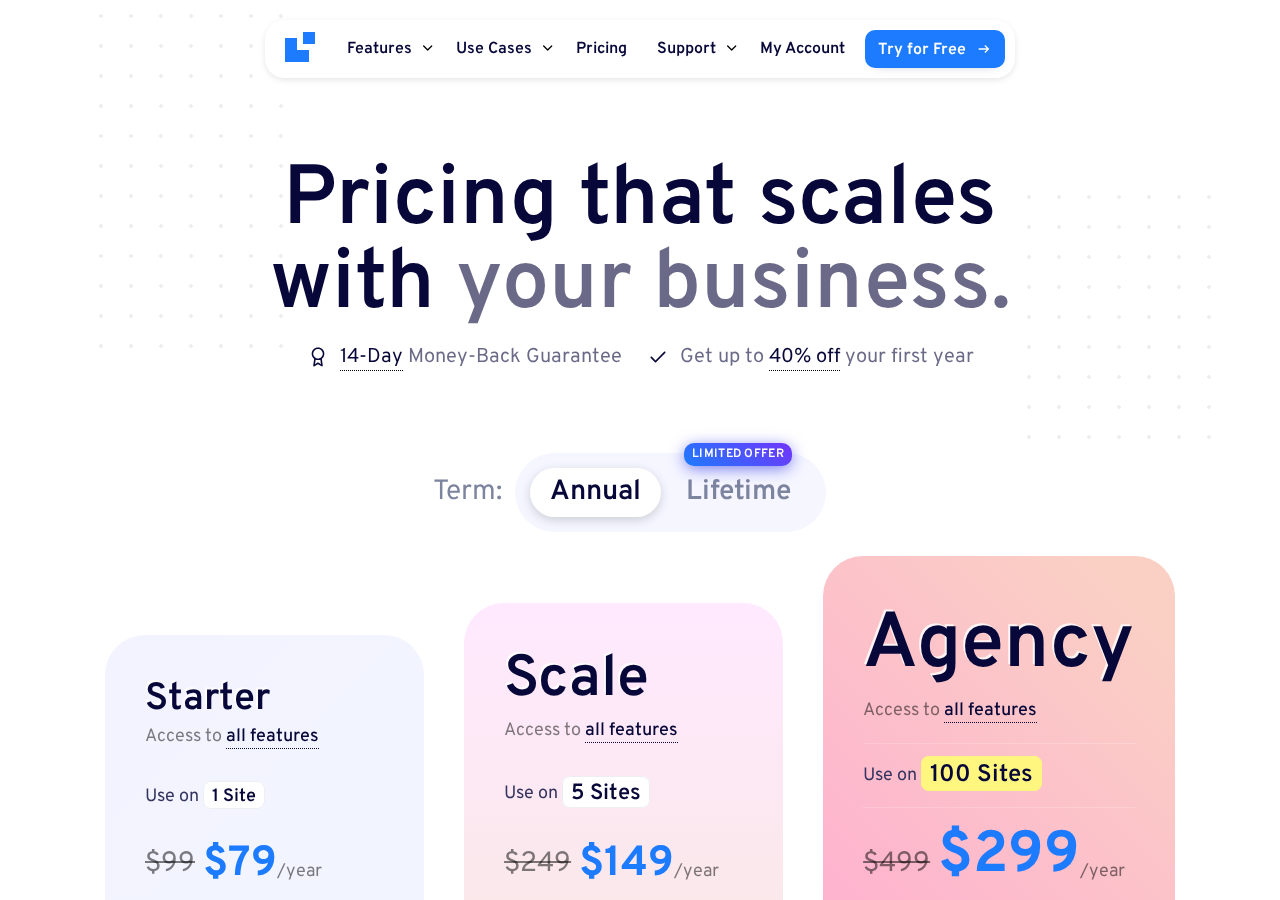
Annual plans (promotional pricing, July 2026):
- Starter: $79/year (regular $99) – 1 site. All features included.
- Scale: $149/year (regular $249) – 5 sites. All features included.
- Agency: $299/year (regular $499) – 100 sites. All features included.
Lifetime plans are also available alongside the annual options. All plans carry a 14-day money-back guarantee. The FAQ confirms that websites continue to function without renewal; renewal is only required to receive continued updates and support.
How to read the pricing:
The “all features on all plans” model is the clearest decision-simplifier in LatePoint’s positioning. When comparing booking plugins, if one of them tells you that every tier gets the same feature set, your only question is how many sites you need.
At $79/year for a single site with all features, the Starter plan is competitive against the midrange tiers of comparable WordPress booking plugins that put calendar sync, SMS, or multi-staff capability behind a more expensive tier.
The watch-out: there is no two-site option between Starter (1 site) and Scale (5 sites). A consultant who runs two separate WordPress sites for two different business ventures pays for the Scale plan even though they only need two activations.
Renewal pricing after the first promotional year reverts to the regular rate shown during checkout. Buyers on annual plans should note this at the time of purchase.
Pros and cons
Pros
- All features on every paid plan. Calendar sync, WhatsApp, Zoom, recurring appointments, and every Pro feature are available on the Starter plan at $79/year.
- Genuine free tier: Stripe and Razorpay payment processing included at no cost, making it a real option for solo practitioners.
- 100,000+ active installs and 4.9-star rating across 93 reviews on WordPress.org, with 89 five-star ratings and only 2 one-star reviews.
- Active development: multiple releases per month including new features (MCP server support, PayPal v6, shared meeting mode for group bookings, recurring appointments, white label), security patches, and bug fixes.
- Clean, modern, mobile-first booking UI across Gutenberg, Elementor, and Bricks builder with no extra configuration required.
- Wide payment gateway support on the Pro plan: PayPal (v6), Square, Mollie, MercadoPago, Flutterwave, Braintree, PayStack, SureCart, WooCommerce, Stripe, and Razorpay.
- White label admin (Pro, added June 2026): replace LatePoint branding with your own for client-facing agency setups.
- Outlook Calendar and Apple Calendar sync added recently, covering Microsoft and Apple ecosystem users.
- MCP server support added July 2026: integrates with AI assistants for scheduling via the WordPress REST API.
- No-show restrictions added April 2026: block repeat offenders from booking or require upfront payment from them.
- Self-hosted: all customer data stays in your own WordPress database.
- 14-day money-back guarantee on all plans.
Cons
- Multiple staff, recurring appointments, group bookings, calendar sync, SMS and WhatsApp, and most commercially important features require the paid plan. The free version is single-location and single-agent only.
- No in-between option between Starter (1 site) and Scale (5 sites). Businesses with two or three sites pay for the Scale plan.
- No event ticketing system: LatePoint handles appointments and group capacity sessions but does not have a dedicated event management layer with public event listings, QR code e-tickets, or event-specific attendee management.
- No native loyalty points or membership module.
- Telegram is not a supported notification channel: email, SMS, and WhatsApp only.
- No unlimited-domain tier: Agency covers 100 sites, which will be the ceiling for large agencies.
- Introductory promotional pricing reverts to higher standard pricing on renewal.
- Active security patches are frequent (WordFence, Patchstack flagged multiple issues in 2026): while this demonstrates a responsive team, the volume is worth noting for buyers with strict security postures.
Alternatives to LatePoint
Amelia is LatePoint’s closest full-featured competitor. Amelia adds native event management (ticketed events, QR code e-tickets, event waiting lists) and a free tier that includes Square payments. Amelia’s Pro plan at $149/year covers one domain, while LatePoint’s Starter covers one site for $79. If you need event ticketing alongside appointments, Amelia is the stronger pick. If you want broader gateway selection and the all-features-per-plan pricing model, LatePoint is the better value.
Booknetic offers a comparable WordPress-native appointment booking experience with white labeling, Telegram notification support, and a broad add-on ecosystem. Booknetic requires per-add-on purchases for some extended features, which gives granular control but can increase total cost. LatePoint’s pricing is simpler.
Bookly is a long-established WordPress booking plugin with a modular add-on model. Its base Pro plan requires stacking paid add-ons to reach feature parity with LatePoint’s Pro plan. For buyers who want to pay only for individual add-ons, Bookly is worth evaluating; for buyers who want everything included, LatePoint’s model is cleaner.
FluentBooking is a newer entry from the Fluent product family. It has a clean default UI and a fast feature roadmap, and it integrates naturally with other Fluent tools (FluentForms, FluentCRM). It is still building parity on some of the deeper integrations that LatePoint covers.
SaaS schedulers (Calendly, Acuity, SimplyBook.me) are outside WordPress, charge per user per month, and handle cross-platform scheduling well. Choose them if your booking flow does not live on a WordPress site or if you need multi-tool scheduling across non-WordPress properties. The trade-off is that customer data lives on the SaaS provider’s infrastructure, not your own server.
For most WordPress-first service businesses, the real comparison is LatePoint vs Amelia vs Booknetic. LatePoint wins on price per feature for single-site operators and on gateway breadth. Amelia wins on event management and the Square-free-tier combination. Booknetic wins on Telegram support and add-on flexibility.
Final verdict
LatePoint does what a good appointment booking plugin should do: it makes it easy for a customer to book, makes it easy for a business owner to manage their schedule, and handles payments and notifications without requiring third-party integrations for the basics.
What sets it apart in the competitive booking plugin landscape is the pricing model. Getting every feature on every plan at a per-site rate means a solo practitioner or a small agency can access Google Calendar sync, WhatsApp notifications, Zoom meetings, recurring appointments, and ten-plus payment gateways on a single-site license at $79/year. That is a straightforwardly good deal compared with plugins that put the same features behind higher tiers or per-feature add-ons.
The free version is also a legitimate option for solo operators who take Stripe or Razorpay payments and run a single location. Few booking plugins give you real payment processing at no cost.
The honest limits: if you need event ticketing with public listings and QR-coded attendee tickets, LatePoint is not the right tool. If you manage more than 100 WordPress sites and need an unlimited-domain option, LatePoint’s tier ceiling is at 100. And if your business has grown beyond one person, the upgrade from free to Pro is non-negotiable.
My practical recommendation: start with the free version if you are a solo practitioner testing whether online booking suits your business model. The Stripe integration means you can take real payments without paying for the plugin. When you hire your first staff member or open a second location, that is the upgrade trigger for LatePoint Pro Starter at $79/year. Agencies building multiple client sites should look at the Scale plan for 5-site coverage.
LatePoint is a well-executed, actively maintained WordPress appointment booking plugin with a transparent pricing model. The 100,000+ active installs and 4.9-star rating on WordPress.org are a reasonable signal that it delivers on its core promise in real-world conditions.