


Quick Verdict
Linguise is a solid cloud-based automatic translation plugin for WordPress that delivers high-quality AI translations in 85+ languages, full SEO URL translation, and a genuinely useful live frontend editor for reviewing and editing translations in context. It costs less than Weglot at comparable word volumes and offers an honest one-month free trial with no credit card required. The word-count-per-domain pricing model works well for small to mid-sized sites, though large multilingual sites with many languages may find the quota fills faster than expected. Best for: content-focused websites, WooCommerce stores, and agencies needing affordable multilingual SEO. Less ideal for: sites needing a free-forever plan or requiring translation stored entirely on their own server. Rating: 4.4/5
At a Glance
Plugin: Linguise AI Automatic Multilingual Translation | Current version: 2.2.60 | Free trial: 1 month, up to 600,000 words, no credit card | Monthly pricing: $15 (Start), $25 (Pro), $45 (Large) | Yearly pricing: $165 / $275 / $495 | Languages: 85+ | Sites per plan: 1 (agency discounts at 3+ sites) | WooCommerce: Supported | SEO URL translation: Yes | Live frontend editor: Yes | Hreflang: Yes | WordPress.org: Active, 31+ reviews
What Is Linguise?
Linguise is a cloud-based automatic translation service with a dedicated WordPress plugin. It works by routing your website content through Linguise’s servers, translating it using neural machine translation, caching the result on a dedicated infrastructure, and serving those translated pages to visitors within roughly 10 milliseconds. The company has been active since at least 2020 and is focused on website translation across a wide range of CMS platforms, including WordPress, Shopify, Squarespace, Webflow, Wix, and Joomla.
Unlike self-hosted plugins such as TranslatePress or Polylang, Linguise does not store translations in your WordPress database by default. Translations live on Linguise’s cloud infrastructure, which means your server load stays minimal. This is the same architectural approach that Weglot uses. Where Linguise differentiates itself is primarily on price per word volume, the depth of its live frontend editor, and its content exclusion and replacement rule system.
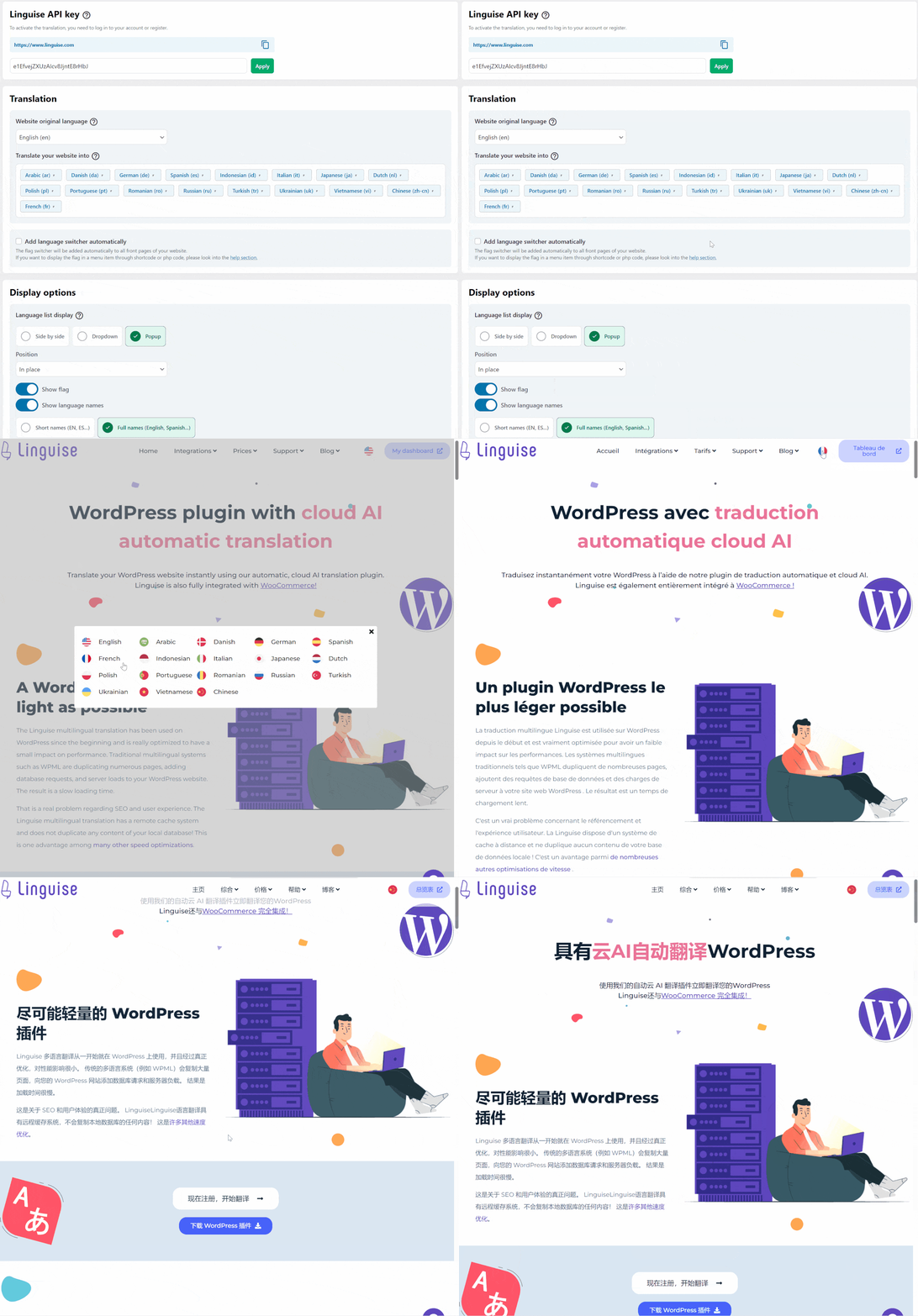
The plugin connects via an API key that you generate inside the Linguise dashboard after registering a domain. The free one-month trial is genuinely useful: you get up to 600,000 translated words (the Pro plan quota) during that first month with no credit card required. After the trial, you choose a paid plan based on your translation volume. The company is transparent that this is not a free-forever service, which I respect. The pricing page spells it out clearly.
Who Is Linguise Best For?
After reviewing the features, pricing, and user feedback on WordPress.org, here is my honest read on who will get the most out of this plugin.
Works best for:
- Content-heavy WordPress and WooCommerce sites targeting 2 to 4 new language markets
- Agencies managing multiple client websites who qualify for volume discounts (3, 10, or 20+ domains)
- Site owners who want SEO-optimized translated URLs and hreflang without manual configuration
- Teams that want a human translator to review and edit AI output from the frontend without giving them WordPress admin access
- Developers who need translation of dynamic AJAX content or content from page builders like Elementor and Divi
- Sites migrating away from Weglot due to cost as word volume grows
Less suitable for:
- Sites that need a free-forever translation plan with no usage caps
- Those who want all translation data stored locally on their own server as the primary model
- Very high traffic sites with millions of pages that may hit the Large plan’s fair usage ceiling
- Projects requiring completely manual translation workflows with no AI involvement
Setup and User Experience
I reviewed the setup process based on the official documentation and WordPress.org installation guide. Getting Linguise running is a straightforward multi-step process, but it does require creating an external account before the plugin does anything meaningful.
Setup steps:
- Register a free account at dashboard.linguise.com (no credit card needed during the trial period)
- Add your domain and choose which languages you want to translate from and into
- Copy the API key generated for your domain
- Install the Linguise plugin from the WordPress plugin directory
- Activate it, navigate to the Linguise settings page in the WordPress admin, and paste the API key
- Add a language switcher using the WordPress menu, a shortcode, or a floating widget
The plugin is lightweight on the WordPress side. Most of the configuration happens inside the Linguise cloud dashboard rather than in wp-admin. This is a deliberate design choice that keeps the plugin fast and easy to update, but it does mean you are managing settings in two places: the WordPress admin for the API connection and language switcher placement, and the Linguise dashboard for translation rules, quota tracking, and translator management.
One standout feature I noticed during my review is the optional local cache. You can configure the plugin to store translated content locally in a folder on your server alongside the cloud storage. This gives you a fallback option and can speed up delivery for repeat visitors. It is not the default mode, but the option being there matters for sites with strict data residency requirements.
Linguise offers to do the full installation for free when you sign up. Based on the WordPress.org reviews I read, the support team appears genuinely responsive, which is consistent with the offer to handle setup on your behalf.
Key Features
AI Neural Translation
Linguise’s default translation engine uses Google Cloud’s neural machine translation, which it describes as achieving around 95% of a human translator’s quality. All plans include this baseline Cloud AI translation. There is also an optional Linguise AI add-on tier that uses a specialized large language model tuned for translation. This premium tier is available as a pay-as-you-go add-on rather than being included in the standard subscription. I found this approach sensible: most sites will be fine with Cloud AI quality, while agencies doing high-stakes content in specific industries can opt into the premium model.
Translation models are updated automatically, so quality improvements happen without any action required from you. The word quota counts initial translations only. Editing translations manually with a human reviewer does not consume your word quota. This is worth noting because many sites use the automatic translation as a first draft and have a native speaker clean it up.
Live Frontend Editor
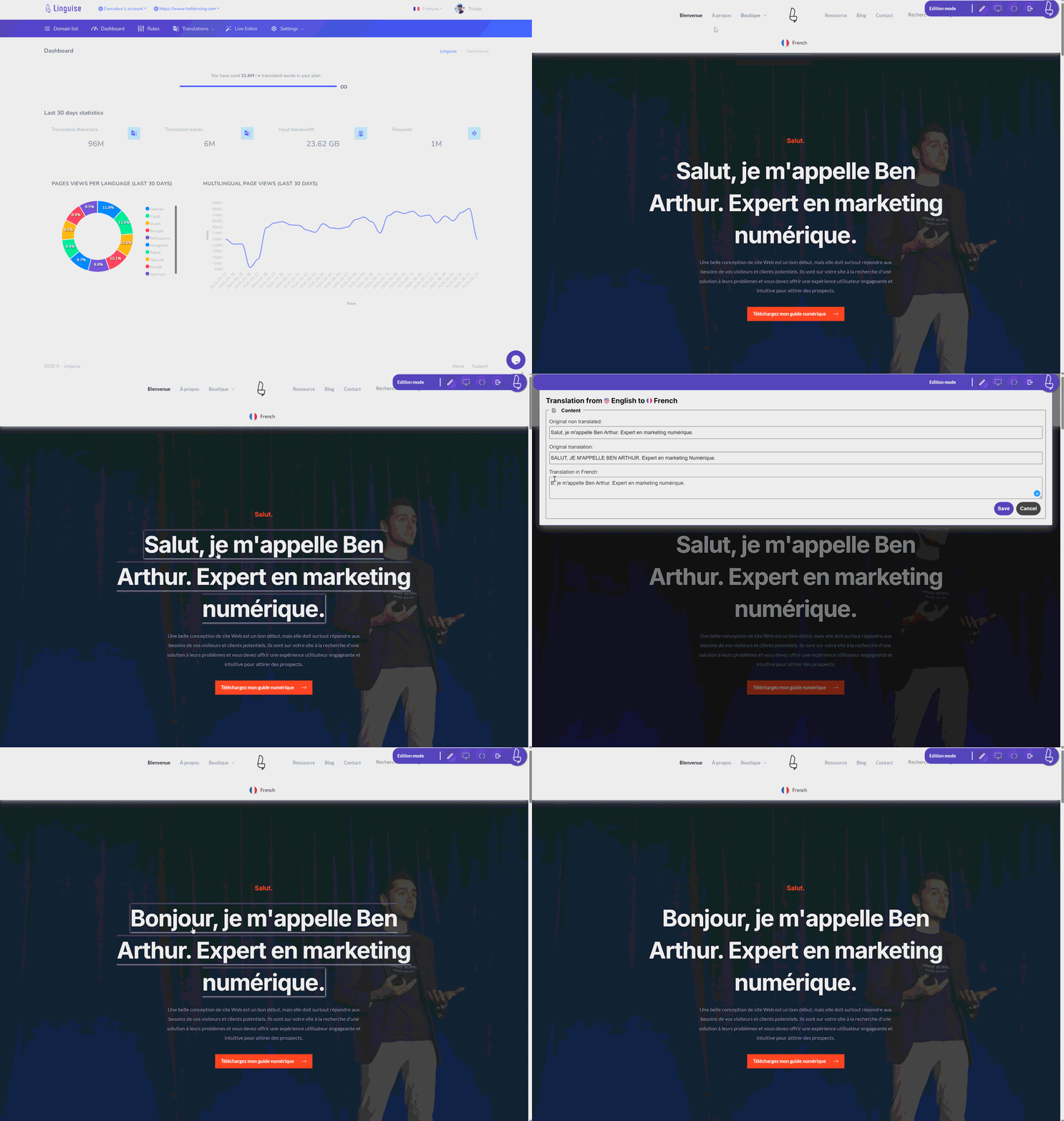
This is one of Linguise’s most practical features. Once you switch your site to a translated language, an authorized admin or translator account can click directly on any text element and edit the translation in place, seeing exactly how it appears on the live page. This is the same visual editing model that TranslatePress built its reputation on, and Linguise does it well. Translators do not need WordPress admin access; you can create translator accounts by language, limiting their scope to specific languages and domains.
The frontend editor also allows editing of SEO metadata such as title tags and meta descriptions in each language. Given that meta information often uses phrasing that does not translate well literally, this is a feature that will matter to anyone serious about multilingual SEO.
SEO URL Translation
Every translated page on Linguise gets its own URL in each target language. For example, an English page at yourdomain.com/contact becomes yourdomain.com/fr/contact for French. The plugin generates these translated URLs automatically and updates them when content changes. This matters for SEO because search engines like Google treat each URL as an independently indexable page. Translated URLs with localized slugs can rank in local search results independently.
Hreflang Tags
Linguise generates hreflang tags, canonical URLs, and x-default language tags automatically. These signals tell search engines which version of a page to serve to users in which region or language. Getting this right manually is tedious and error-prone. Having it handled automatically is a genuine time saver. The plugin is also compatible with all major WordPress SEO plugins: Yoast SEO, Rank Math, and All in One SEO.
I also noted that Linguise automatically generates multilingual XML sitemaps, which helps translated content get discovered and indexed by search engines faster. This is a complete SEO package rather than a partial implementation.
Language Switcher
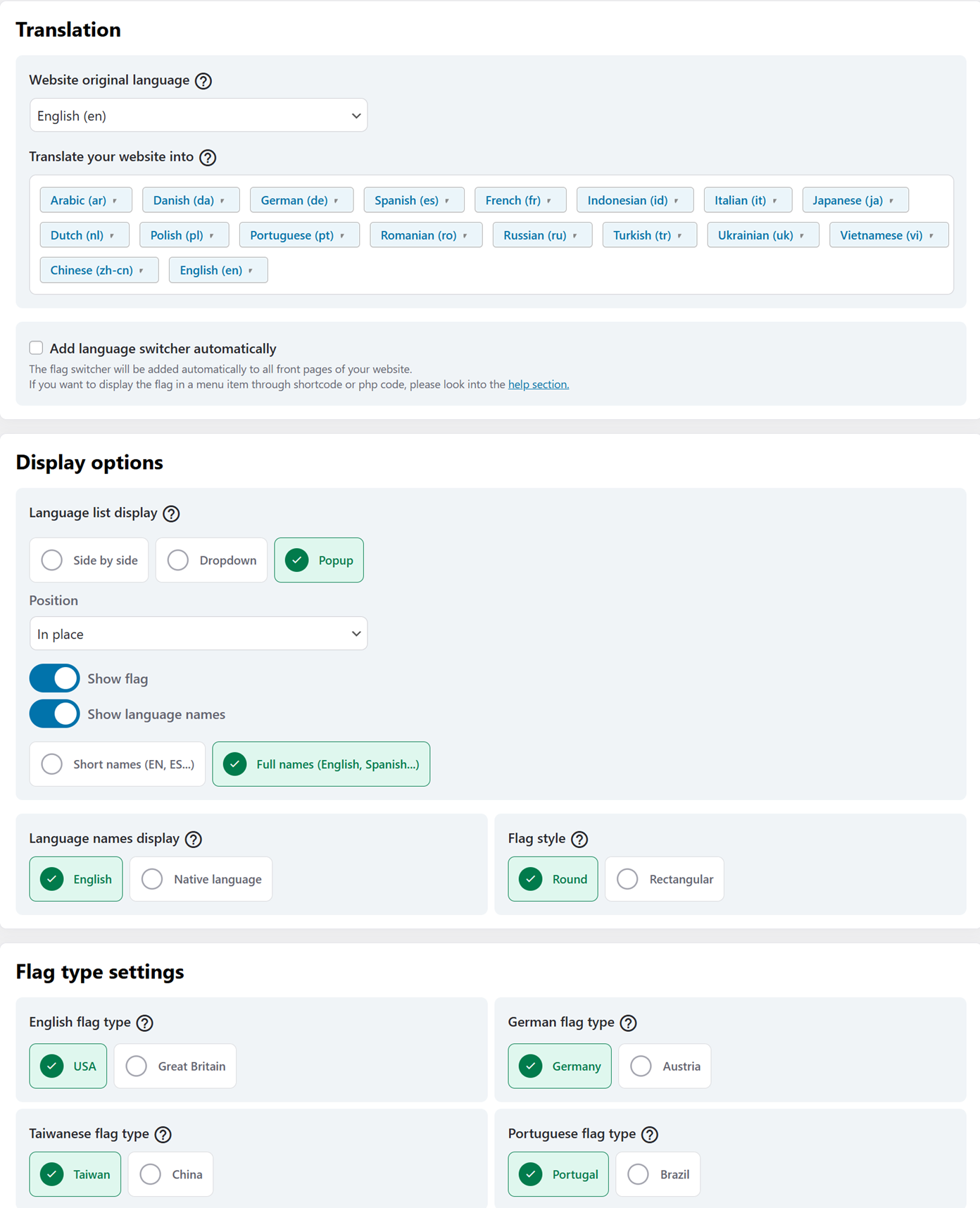
The language switcher is flexible. You can add it to your WordPress navigation menu, embed it using a shortcode, call it via a PHP snippet, or use a floating widget that appears on all pages without any theme modification. The display options include flags as a popup, side by side, dropdown, or floating position. You can show language names in English, in the original language (so “Deutsch” instead of “German”), or just as language code letters. Loading multiple language switchers on the same page is also supported, which is useful for themes with both a header and footer navigation.
WooCommerce and Dynamic Content Support
Linguise translates WooCommerce stores including the full checkout process. Customer emails are also translated based on the customer’s language, which is a detail that some competing plugins miss. The plugin handles dynamic AJAX content, detecting and translating elements that load asynchronously after the initial page load. This is relevant for stores using filters, live search, or dynamically loaded product listings. Page builder content from Elementor Pro, Divi, and Avada is fully supported.
Content Exclusion and Replacement Rules
One area where Linguise goes beyond the basics is its global translation rules system. You can set rules to exclude specific content from being translated at all, or to replace specific text with a custom string in a given language. These rules can target content by URL pattern, by language, or by CSS class. This level of control is useful for things like brand names that should not be translated, legal disclaimers that need custom localized versions, or entire blog sections that you want to serve only in the original language.
Pricing
Linguise uses a word-count-per-domain pricing model. Each plan is tied to one website domain. The word count reflects the volume of content initially translated (not the number of times translated pages are viewed, which is unlimited on all plans). If you reach your monthly translation quota, new content stops being translated but existing translations continue to be served to visitors.
| Plan | Monthly Price | Yearly Price | Words/Month | Sites | Languages |
|---|---|---|---|---|---|
| Start | $15/month | $165/year | 200,000 | 1 | Unlimited |
| Pro | $25/month | $275/year | 600,000 | 1 | Unlimited |
| Large | $45/month | $495/year | Unlimited (fair use) | 1 | Unlimited |
| Free Trial | Free (1 month) | N/A | Up to 600,000 | 1 per domain | Unlimited |
The yearly plans work out to about 10% less than paying monthly, equivalent to roughly two months free. Agency discounts apply automatically: 10% off for 3 or more active domains, 20% off for 10 or more, and 30% off for 20 or more. The free trial applies per domain, so each new domain you register restarts a fresh one-month free period. I found this to be genuinely useful for agencies onboarding multiple clients.
A note on how words are counted: the quota applies to the number of words translated per language multiplied by the number of languages you activate. A 500-word page translated into four languages uses 2,000 words from your quota. The Start plan’s 200,000 words translates to roughly 400 pages translated into one language, or 100 pages into four languages. For most small to medium business websites, the Pro plan at $25/month is the practical starting point if you are translating into more than one language.
The optional Linguise AI premium translation tier is priced separately on a pay-as-you-go basis for sites that need near-human quality beyond the standard Cloud AI output.
Pros and Cons
Pros
- One-month free trial with 600,000 words and no credit card required
- Affordable monthly pricing starting at $15 with a generous word quota
- Full SEO package: translated URLs, hreflang, canonical URLs, XML sitemaps
- Live frontend editor for in-context translation review and editing
- Dedicated translator accounts with per-language permissions
- WooCommerce support including checkout and customer email translation
- Dynamic AJAX content translated automatically
- Unlimited languages on all plans
- Content exclusion and replacement rules by URL, language, or CSS class
- Fast dedicated cache servers with optional local cache storage
- Free installation offered by the Linguise team
- Agency volume discounts for 3, 10, and 20+ domains
- Compatible with Yoast, Rank Math, Elementor, Divi, Avada
Cons
- No free-forever plan; after the trial period you need a paid subscription
- Translations stored on Linguise’s cloud servers by default, not in your WordPress database
- One domain per plan; multi-site pricing requires multiple subscriptions
- Word quota multiplies across languages, so adding many languages drains quota faster
- Most configuration happens in the external Linguise dashboard, not wp-admin
- Large plan unlimited tier has a fair usage ceiling (over 100,000 multilingual page hits per 24 hours)
- Premium Linguise AI translation is a separate pay-as-you-go add-on, not included in plans
Alternatives to Linguise
Weglot
Weglot is the most direct competitor. It uses the same SaaS proxy architecture and offers a polished translation management dashboard. Weglot starts at around $19/month for the Starter plan, which covers one language and 2,000 words. At scale, Weglot’s pricing becomes significantly higher than Linguise’s. One WordPress.org reviewer noted switching from Weglot after their costs reached over $8,000 per year on a WooCommerce multisite. Weglot has a longer track record and a slightly more refined UI, but Linguise is more cost-effective for most sites that have grown beyond beginner word volumes.
TranslatePress
TranslatePress is a self-hosted translation plugin that stores all translations in your WordPress database. It has an excellent visual frontend editor and is popular with developers who want full data ownership. Pricing starts at $99/year for a single site license. TranslatePress does not include automatic AI translation in the free version (that requires add-ons), and managing large translation volumes manually can be time-consuming. It is a strong choice if data sovereignty is a priority and your site’s translation volume is manageable.
WPML
WPML is the most feature-rich and most established multilingual plugin for WordPress. It is entirely self-hosted, stores all translations in your database, and integrates deeply with the WordPress ecosystem. WPML costs $39 to $199 per year depending on the license tier, and it requires more setup time than cloud-based options. WPML is the go-to for complex multilingual sites that need granular control, multisite support, or deep integrations with custom post types and taxonomies.
Polylang
Polylang has a free version available on WordPress.org that covers the basics of multilingual content management. It is self-hosted, stores translations in the database, and works well for sites that want to manage translations manually. Automatic translation requires the Polylang Pro license at $99/year plus a separate DeepL or other API integration. Polylang is a good entry point for smaller sites where the content team can handle the translation work themselves.
Final Verdict
Linguise earns its place as a competitive option in the WordPress automatic translation space. For sites that want professional-quality AI translations, full SEO implementation, and a live editor without the configuration overhead of self-hosted plugins, it delivers the core package at a price that undercuts Weglot considerably. The Start plan at $15/month covers 200,000 translated words per month, and the Pro plan at $25/month covers 600,000. Both include unlimited languages and unlimited page views, which is a generous baseline.
The one-month free trial is the most honest way to evaluate this type of service. You can translate your full site, test the live editor, review the translation quality, and check how your quota usage maps to your actual content volume before committing. The fact that this works without a credit card removes a real barrier to trying it. Based on the WordPress.org reviews, the support team appears attentive, which matters for a service where translation quality and technical issues can directly affect your site’s revenue.
The main limitations to acknowledge honestly are the lack of a free-forever option, the cloud-first storage model for translations, and the per-domain pricing that can add up for agencies managing many sites (though the volume discounts help). If you are already paying for Weglot and your word volume has grown significantly, Linguise is worth evaluating as a direct replacement. If you need total data ownership, TranslatePress or WPML are better fits. For most WordPress site owners who want automatic AI translation up and running quickly, with solid SEO defaults and a fair price, Linguise is a strong choice in 2026.
Disclosure: This review is based on published documentation, the official Linguise website, the WordPress.org plugin listing, and the pricing pages. A one-month free trial is available for self-testing at no cost and without a credit card.