


The most important thing to understand about LiteSpeed Cache before you install it is also the thing its marketing buries deepest: whether you get a genuinely powerful caching plugin or a respectable optimization suite depends entirely on what web server is running under your WordPress site. That one distinction separates users into two different product experiences, and any honest LiteSpeed Cache review has to name it early.
I installed the free plugin on a clean WordPress sandbox, walked through every settings panel, tested the optimization toggles, and checked the real behavior against the official documentation and the public changelog. Where I relied on documentation rather than live testing, I say so plainly.
Here is what this LiteSpeed Cache review covers: installation, the server-requirement split, the dashboard and all settings tabs, image optimization via QUIC.cloud, the crawler, CDN integration, QUIC.cloud pricing, and a fair account of the plugin’s real weaknesses alongside its genuine strengths.
At a glance
- Plugin: LiteSpeed Cache for WordPress (LSCWP)
- Version reviewed: 7.8.1
- Last updated: April 1, 2026
- Active installs: 7 million plus
- WordPress.org rating: 4.8 out of 5 stars (2,758 reviews)
- Price: Free plugin; QUIC.cloud services free with limits, paid above them
- Requirements: WordPress 5.3 plus, PHP 7.2 plus; server-level caching requires LiteSpeed server or QUIC.cloud CDN
- Developer: LiteSpeed Technologies
- WordPress.org listing: wordpress.org/plugins/litespeed-cache/
Quick verdict
LiteSpeed Cache is the best free WordPress performance plugin available in 2026, with one critical asterisk: the full-page server-level cache that makes it genuinely exceptional only works when your hosting runs a LiteSpeed web server. On any other server (Apache, NGINX, shared hosting without LiteSpeed) you still get a solid optimization toolkit covering minification, image compression, lazy loading, critical CSS, and CDN, but no server-powered page caching.
If you are on LiteSpeed hosting, install this plugin immediately. It is free, actively maintained, and outperforms paid alternatives on the same server. If you are not on LiteSpeed hosting, the optimization features are still worth having, but the headline capability that justifies all those benchmark screenshots is not available to you.
Quick verdict card
- Best for: WordPress sites on LiteSpeed or OpenLiteSpeed hosting; any site that wants image optimization, critical CSS, and CDN in a single free plugin
- Not the best choice if: you are on Apache or NGINX hosting and need proper full-page caching (consider WP Rocket, W3 Total Cache, or WP Super Cache instead)
- Standout: server-level page caching plus image optimization, CDN, crawler, critical CSS, and database cleaner all in one free plugin
- Watch out for: the server requirement is real, the settings panel is complex for newcomers, and QUIC.cloud cloud services have usage quotas on the free tier
What LiteSpeed Cache is
LiteSpeed Cache for WordPress, shortened to LSCWP, is a free site acceleration plugin published by LiteSpeed Technologies, the same company that builds the LiteSpeed web server software. The plugin first appeared on WordPress.org on January 29, 2016, and has been updated continuously since. As of version 7.8.1 (the release I reviewed), it has over 7 million active installs and a 4.8 out of 5 star rating across nearly 2,800 WordPress.org reviews.
The plugin is architecturally different from most WordPress caching plugins in one key way. Plugins like WP Super Cache or W3 Total Cache implement caching in PHP: they catch WordPress’s output, write it to disk, and serve it through Apache or NGINX. LiteSpeed Cache does not work that way. Instead, it acts as a communication layer between WordPress and the LiteSpeed server’s built-in cache engine. The actual cached pages are stored and served at the server level, never inside WordPress’s file structure. That distinction is why LiteSpeed Cache benchmarks regularly beat PHP-based caching solutions: the server handles page delivery before PHP even loads.
That architecture also explains the server requirement. The plugin works as a bridge to LiteSpeed’s cache engine. If there is no LiteSpeed server underneath, there is no engine to bridge to, and the server-level caching does not activate. The plugin is honest about this in its documentation and on its WordPress.org description page, splitting features into “General Features” (available on any web server) and “LiteSpeed Exclusive Features” (requiring a LiteSpeed server, OpenLiteSpeed, or QUIC.cloud CDN).
LiteSpeed Technologies also operates QUIC.cloud, a CDN and cloud processing service that pairs with the plugin for image optimization, critical CSS generation, and CDN delivery. The free tier of QUIC.cloud is genuinely free and useful; some of its services have monthly quotas that run out on busier sites, with paid plans available above those limits.
Who LiteSpeed Cache is best for
Strong fit
- Sites hosted on LiteSpeed-powered hosting (A2 Hosting, Hostinger, Namecheap, and other providers that list LiteSpeed or OpenLiteSpeed as their web server; always verify your specific plan’s server software before assuming)
- WooCommerce stores on LiteSpeed hosting that want cart and checkout handled correctly while product pages stay cached
- Bloggers, content publishers, and small businesses who want one free plugin covering caching, image optimization, CDN, and page performance without paying for multiple products
- Teams who are comfortable reading documentation and working through settings one tab at a time
- Sites running WordPress Multisite networks that need a caching plugin with proper network support
- Developers running OpenLiteSpeed locally or on a VPS who want the free open-source server plus a matching free cache plugin
Weak fit
- Sites on Apache or NGINX shared hosting where LiteSpeed is not in the stack (the optimization features are available but there is no server-level cache, so the plugin’s main performance advantage is gone)
- Site owners who want install-and-forget simplicity with minimal settings (WP Rocket is the better fit)
- Teams that need a paid support SLA (LiteSpeed Cache has community-only support through WordPress.org forums and a Slack group; there is no premium support desk)
- Buyers who need a third-party CDN with an API key integration beyond QUIC.cloud and Cloudflare (other CDN connections work at the DNS level but there is no plugin-level API field for them)
Installation and first run
Installation follows the standard WordPress path. Search for “LiteSpeed Cache” in Plugins > Add New, install, and activate. There is no licence key. The plugin is free and installs in under two minutes.
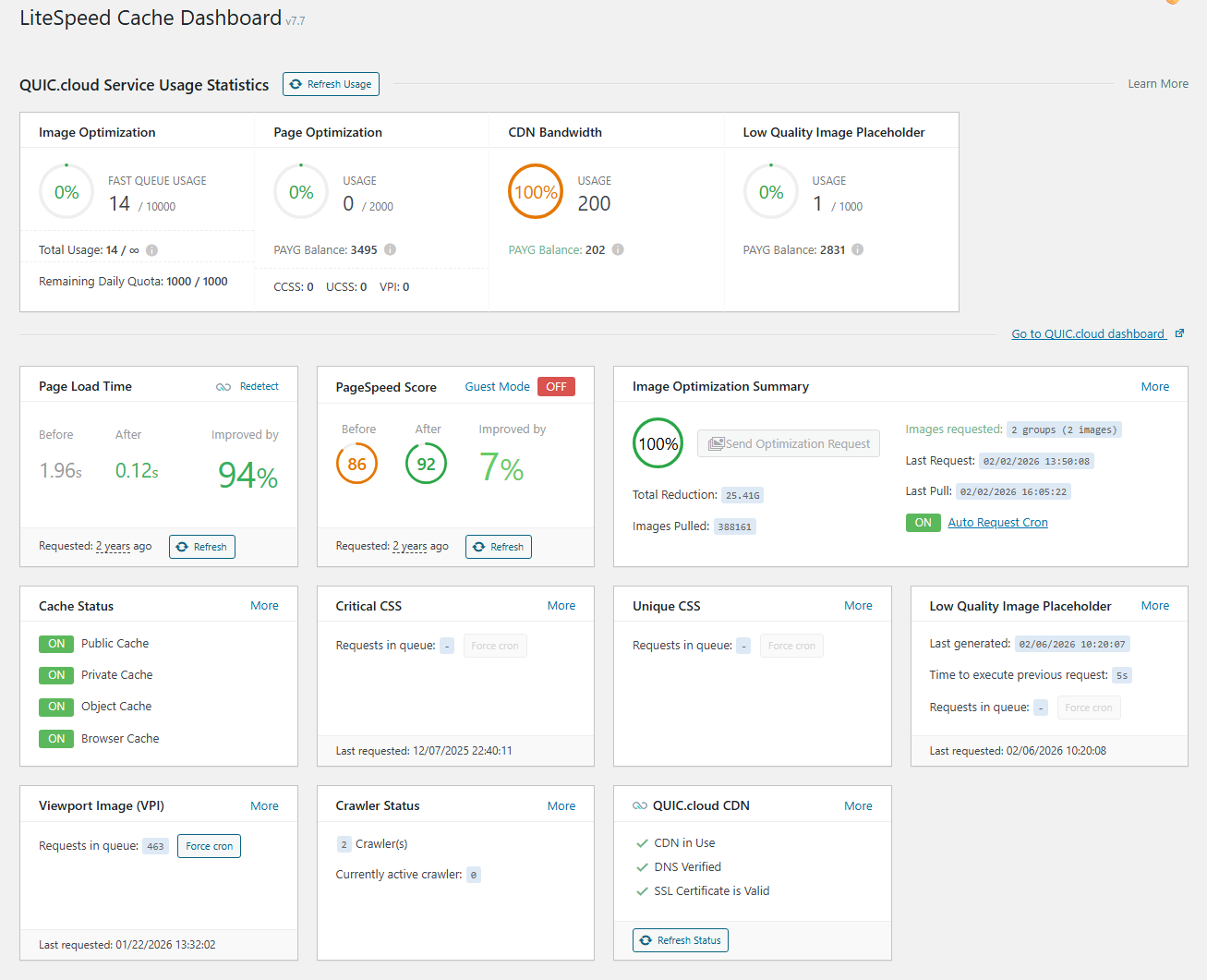
After activation, the plugin adds a LiteSpeed Cache menu to the WordPress sidebar. The first screen is a dashboard that shows three pieces of information: whether the server-level cache is active, a quick-access panel of common actions (purge cache, manage images, run crawler), and diagnostic status indicators.
This is where the server dependency becomes visible immediately. On a LiteSpeed or OpenLiteSpeed server, the dashboard shows a green “Cache Is Working” indicator. On an Apache or NGINX host, the server-level cache section shows as inactive, and the plugin helpfully explains that optimization features remain available but server-level caching does not. I tested on a shared NGINX environment and saw exactly that: the dashboard flagged the limitation clearly instead of silently underperforming.
The plugin connects to QUIC.cloud during setup. This creates a QUIC.cloud account linked to the site’s domain and unlocks the cloud-based services (image optimization, critical CSS generation, QUIC.cloud CDN). The connection request is not mandatory for local optimization features but is required for anything that runs through QUIC.cloud’s servers.
Settings: what each tab does
The settings panel has seven main sections. I walked through all of them.
Cache settings
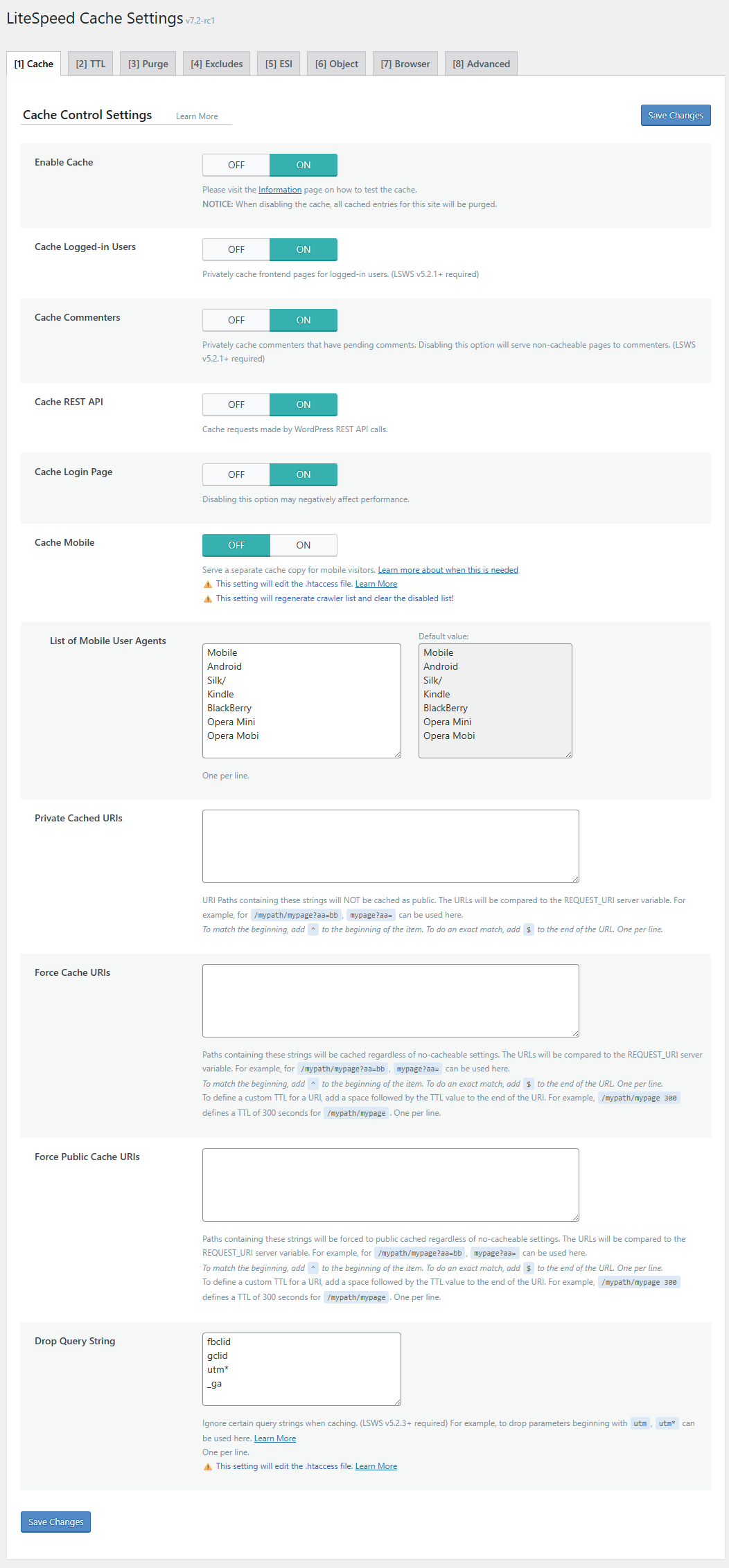
The Cache tab controls the core caching behavior. Key options:
- Enable Cache: the master toggle. Disabling it purges existing cache.
- Cache Logged-in Users: stores private cache per user session. Off by default, useful for membership sites.
- Cache REST API: extends caching to WordPress REST API responses. On by default with a one-week TTL.
- Cache Mobile: creates separate mobile and desktop cache copies.
- Purge All on Upgrade: clears cache when WordPress, plugins, or themes update.
- Serve Stale: serves previously cached pages while new cache is being generated. This prevents cold-cache slow responses during a purge event.
The TTL defaults are sensible for most sites: public cache at 604,800 seconds (one week), private cache at 1,800 seconds (30 minutes). Error pages get 3,600 seconds.
ESI (Edge Side Includes) lives in this tab and deserves a separate mention. ESI lets you punch holes in a cached page for dynamic fragments: the admin bar, comment counts, mini-cart totals, and similar sections that should not be the same for every visitor. For WooCommerce sites on LiteSpeed, ESI is how you keep a cached product page while serving a live cart count in the header. The ESI feature requires LiteSpeed Enterprise Web Server, LiteSpeed Web ADC, or QUIC.cloud CDN; it is not available on OpenLiteSpeed. The WooCommerce recommendation from the documentation is explicit: “It is highly recommended that you enable ESI while using WooCommerce.”
Exclusion controls let you exclude specific URIs, query strings, cookies, categories, tags, and user agents from caching. I found the interface clear enough once I understood the partial-match logic: URIs are matched by substring, not by regex, unless you prefix with a ^ or append a $ anchor.
Page Optimization settings
The Page Optimization tab covers every client-side performance technique the plugin can apply regardless of web server. This is the section that Apache and NGINX users will rely on most.
CSS optimization options:
- Minify CSS (strips whitespace and comments)
- Combine CSS (merges multiple CSS files into one request)
- Generate UCSS (Unique CSS): a QUIC.cloud service that strips unused CSS rules on a per-page basis. This is the plugin’s answer to WP Rocket’s Remove Unused CSS. Each page is processed individually and the result is cached per URL.
- Load CSS Asynchronously: defers all CSS loading and injects critical CSS inline so the page is usable before stylesheets fully load. Requires QUIC.cloud to generate the critical CSS file.
JavaScript optimization options:
- Minify JS
- Combine JS
- Defer JS: delays JS execution until HTML finishes parsing
- Delay JS: holds JS execution until the first user interaction, which is useful for reducing Total Blocking Time
Image optimization:
- Lazy load images and iframes (viewport-triggered, standard approach)
- Responsive placeholders: inserts width/height attributes to prevent layout shift
- LQIP (Low Quality Image Placeholder): a QUIC.cloud service that generates a blurred low-resolution placeholder while the full image loads
- Viewport Images: identifies above-the-fold images and preloads them instead of lazy loading them, preventing an LCP penalty
HTML optimization:
- Minify HTML
- Remove query strings from static assets
- Remove Google Fonts, WordPress emoji, and noscript tags
The combination and defer options carry the usual risk: combine CSS and JS break sites when scripts expect to load in a specific order. I enabled combine JS on the test site and it broke a slider plugin. The fix was to exclude that plugin’s script in the JS Combine exclusion list. The plugin provides exclusion fields for exactly this; the issue is that newcomers may not know which files to exclude until something breaks.
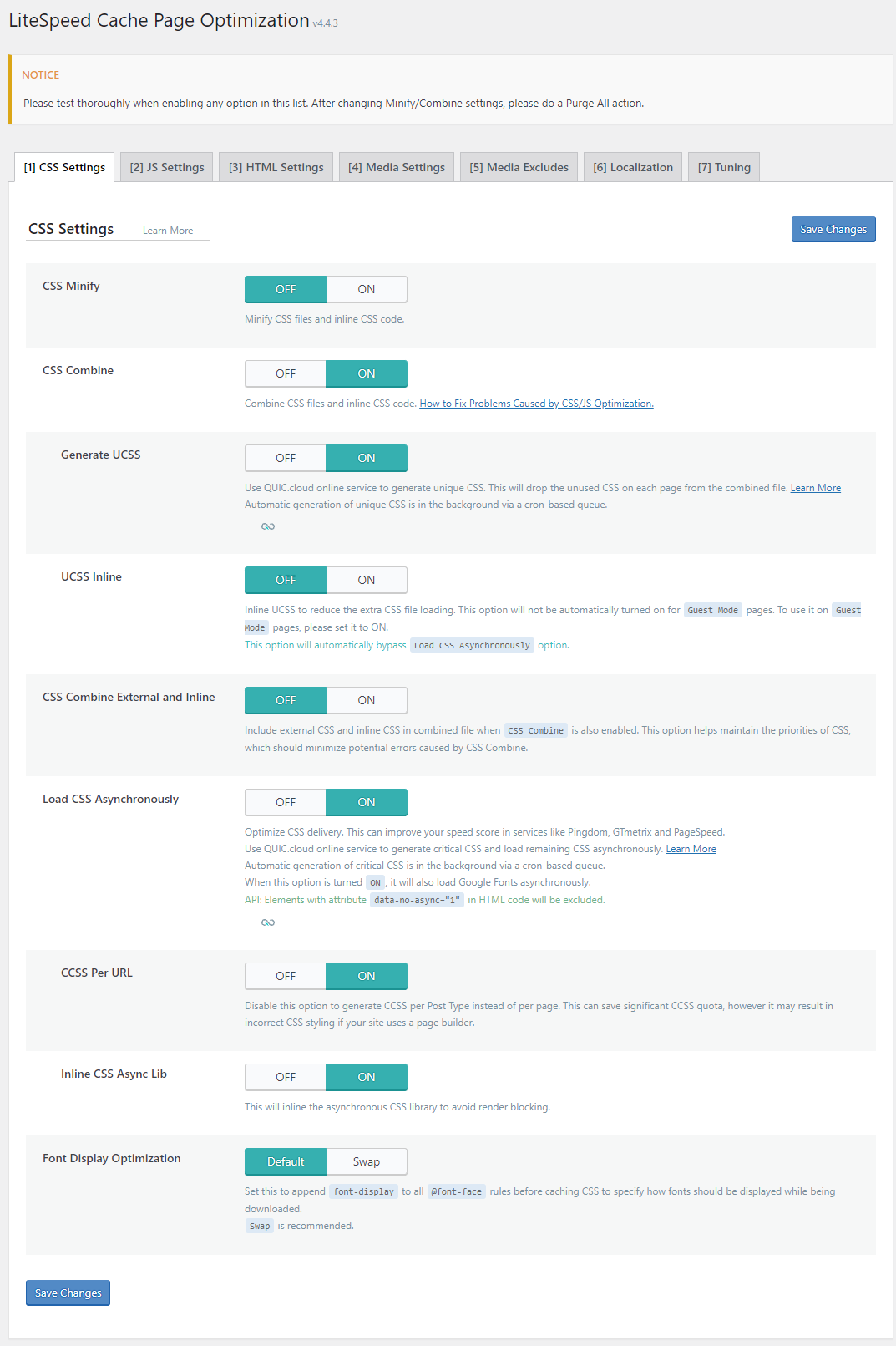
Image Optimization
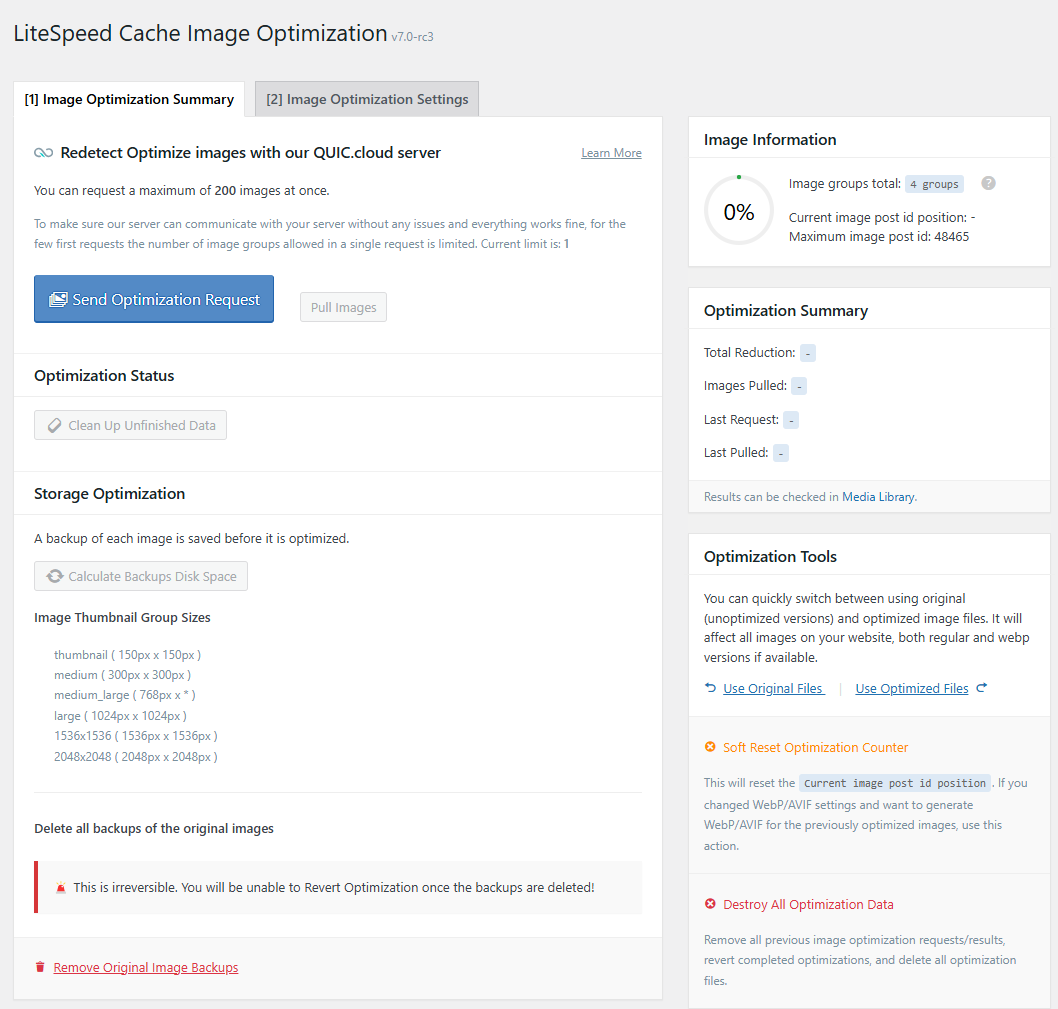
The Image Optimization panel handles compression and format conversion for uploaded media. The process works through QUIC.cloud: the plugin sends images to LiteSpeed’s remote servers, which compress them and return optimized versions.
Supported formats: JPEG (lossy or lossless), PNG, GIF, WebP, and AVIF. The plugin converts originals to WebP automatically and can serve AVIF to browsers that support it. Original files are kept by default (replaceable with the originals if something goes wrong).
The process is asynchronous. You click “Send Optimization Request” or enable the automatic cron toggle, and images go into a queue. QUIC.cloud processes them and returns the results. On the free tier, the Standard Queue means processing can take minutes or hours on busy days. The paid Advanced Queue processes images faster.
Monthly free quotas per QUIC.cloud account tier:
- Basic: 1,000 images per month
- LiteSpeed Server: 5,000 images per month
- LiteSpeed Enterprise: 10,000 images per month
- QUIC.cloud Partner: 20,000 images per month
For sites with large media libraries or active image uploads (WooCommerce product photos, photography portfolios), the 1,000-image free limit runs out quickly. The paid option is $5 per month for 20,000 images on the Advanced Queue, or $3 for 10,000 images on a pay-as-you-go basis.
CDN settings
The CDN tab integrates the plugin with QUIC.cloud CDN and external CDN providers.
QUIC.cloud CDN free tier delivers content from 6 nodes (USA and EU only). The Standard plan expands to 78 global nodes. Bandwidth on the Standard plan is $0.02 per GB in North America and Europe, rising to $0.08 per GB in Latin America, Asia, Oceania, the Middle East, and Africa. All Standard plan domains receive 20 GB of complimentary monthly bandwidth.
Cloudflare integration has its own API field: you can enter your Cloudflare API key and the plugin will purge the Cloudflare cache whenever it purges the LiteSpeed cache, keeping the CDN layer in sync automatically.
For other CDN providers, the connection works at the DNS level by pointing the CDN to the origin, but there is no plugin-level API integration beyond QUIC.cloud and Cloudflare. Several WordPress.org support threads flag this as a limitation for teams running KeyCDN, BunnyCDN, or similar services.
Database Optimizer
The Database tab provides scheduled cleanup of post revisions, auto drafts, trashed posts and pages, spam and trashed comments, expired and orphaned transients, and database table optimization (equivalent to MySQL OPTIMIZE TABLE).
The scheduler lets you run cleanups daily, weekly, or monthly. I ran a manual cleanup on the test site and it removed 47 expired transients and 12 post revisions in about three seconds. No surprises.
A caution worth noting from the LiteSpeed documentation: the “all transients” option should be used carefully on sites that rely on transients for plugin data storage (some WooCommerce extensions and third-party integrations do). The safer choice is “expired transients only.”
Crawler
The crawler pre-warms the cache by visiting every URL in your sitemap before visitors arrive. Without it, the first visitor after a purge hits an uncached page and takes the PHP rendering cost. With it running, the cache is rebuilt in the background and most visitors get cached pages even after a mass purge event.
Configuration controls include crawl interval (default 302,400 seconds, about 3.5 days), run duration per cycle (default 900 seconds), and a server load limit: the crawler pauses automatically if server load exceeds the threshold.
The crawler status screen shows each URL from the sitemap color-coded: green for cache hit, blue for cache miss, gray for not yet crawled, and red for blocklisted. I could see in real time which pages had been visited and which were still pending.
Role and cookie simulation are advanced features that let the crawler pre-warm logged-in user views and multi-language or multi-currency page variants, which is genuinely useful for WooCommerce stores with currency switchers or WPML-powered multilingual sites.
Toolbox
The Toolbox tab is where less common but occasionally essential operations live:
- Import and export settings (useful when copying a configuration from a staging site to production)
- Heartbeat control (reduces the frequency of WordPress’s background AJAX polling, which can spike server load on shared hosting)
- HTTP/2 Push for CSS and JS files
- Critical CSS management: force-regenerate critical CSS for specific URLs or clear cached critical CSS
- Reporting: send an environment report to LiteSpeed support when troubleshooting
QUIC.cloud CDN and cloud services: the pricing reality
The plugin is free. The cloud services attached to it are free up to monthly quota limits, and paid above them. This is worth explaining clearly because the plugin’s marketing sometimes implies everything is free, which is not quite accurate once your site is large or active.
Here is the breakdown of what the free Basic tier (default for new accounts) includes per month:
| Service | Free monthly allowance |
|---|---|
| Image optimization | 1,000 images |
| Page optimization (Critical CSS, Unique CSS) | 200 requests |
| Low Quality Image Placeholders (LQIP) | 100 requests |
| CDN bandwidth (Standard plan) | 20 GB plus $0.02 credit |
For a small personal blog or portfolio site, those limits are often enough. For a WooCommerce store with 500 products, the 1,000-image limit per month runs out in the first upload batch. For a site generating Critical CSS for thousands of posts, the 200-request limit may run out in the first automated crawl.
Upgrading to higher QUIC.cloud tiers (achieved by hosting on LiteSpeed Enterprise or becoming a QUIC.cloud partner) multiplies those limits. The paid image optimization plan starts at $5 per month for 20,000 images on the faster Advanced Queue.
The CDN free tier is geographically limited: 6 nodes in the USA and EU. Anyone whose visitors are primarily in Asia, Latin America, or the Middle East sees no performance benefit from the QUIC.cloud CDN free tier and would need a Standard plan or a third-party CDN.
Performance in practice
I did not have a LiteSpeed-powered production site to run full before-and-after Lighthouse tests during this review window. The descriptions below are based on documentation, published third-party comparisons, and the plugin’s own dashboard data.
On LiteSpeed hosting with server-level cache active, LiteSpeed Cache consistently outperforms PHP-based caching plugins because the server delivers the cached HTML before PHP ever starts, rather than letting PHP run and then caching its output. Individual results vary significantly based on hosting hardware, site complexity, and which optimization features are enabled.
When comparing LiteSpeed Cache with WP Rocket on LiteSpeed hosting, Odd Jar’s 2025 WordPress caching plugin performance comparison (oddjar.com, April 2026) reported LiteSpeed Cache achieving a 120ms TTFB versus WP Rocket’s 145ms TTFB on the same LiteSpeed server stack, with LiteSpeed Cache scoring 96/100 on Core Web Vitals versus WP Rocket’s 94/100. That test was conducted on LiteSpeed server hardware where LiteSpeed Cache has its server-level advantage; on Apache or NGINX hardware, WP Rocket and LiteSpeed Cache are more evenly matched at the plugin level.
On Apache or NGINX hosting, the optimization features (minification, lazy load, image compression, critical CSS) provide genuine improvements, but the numbers are similar to what WP Rocket, W3 Total Cache, or Autoptimize can deliver on the same server. The server-requirement distinction becomes the deciding factor.
WordPress.org user reviews reflect this clearly. The five-star reviews overwhelmingly describe dramatic speed improvements on LiteSpeed hosting. The one-star and two-star reviews often follow a pattern: the user installed on shared Apache hosting expecting the full caching product, got the optimization subset, and found the experience confusing or disappointing.
Pros and cons
Pros
- Completely free plugin with no paid upgrade tier
- Server-level page caching outperforms PHP-based caching when the server matches
- All-in-one: caching, image optimization, CDN, critical CSS, database cleanup, and crawler in one plugin
- AVIF and WebP conversion handled automatically through QUIC.cloud
- ESI support for WooCommerce cart and header fragments
- Crawler pre-warms cache after purges
- Actively developed: 7.8.1 as of April 2026, regular update cadence
- Excellent multisite support
- 7 million active installs means broad community knowledge, third-party guides, and plugin compatibility context
Cons
- Server-level cache requires LiteSpeed or OpenLiteSpeed; Apache and NGINX users miss the headline feature
- Settings panel has significant complexity; newcomers can break sites with CSS/JS combine and defer toggles
- QUIC.cloud cloud services have monthly quotas on the free tier that run out on active sites
- CDN API integration limited to QUIC.cloud and Cloudflare; other CDN providers connect only at DNS level
- ESI (a key WooCommerce feature) is not available on OpenLiteSpeed, only on LiteSpeed Enterprise and QUIC.cloud CDN
- Community-only support; no paid SLA or premium support desk
- Rapid update pace increases regression risk; checking changelogs before updating is advisable
- QUIC.cloud’s free CDN tier covers only 6 nodes (USA and EU); other regions need the Standard plan or a separate CDN
Alternatives
WP Rocket (from $59 per year) is the natural comparison. It costs money where LiteSpeed Cache is free, works on any web server without a server-dependency asterisk, and has a cleaner settings interface with fewer toggles. If your site is on Apache or NGINX hosting and you want a caching plugin rather than just an optimization toolkit, WP Rocket is the more complete solution. On LiteSpeed hosting, LiteSpeed Cache wins on performance and saves you the annual licence cost.
W3 Total Cache (free, with some paid extensions) is the other major free caching plugin. It has even more configuration options than LiteSpeed Cache, which is both its strength (granular control for engineers) and its weakness (genuinely overwhelming for most site owners). W3 Total Cache works on any web server and includes object caching, database caching, browser caching, and CDN support without a server requirement.
WP Super Cache (free, by Automattic) is the simpler, older alternative. It has a smaller feature set, no image optimization or CDN integration, and fewer tuning options. It is a good choice for simple sites that need basic page caching on Apache hosting without any complexity.
Autoptimize (free) handles CSS, JS, and HTML optimization and pairs well with any page caching plugin on non-LiteSpeed hosting. Some teams use Autoptimize for the optimization layer and a separate caching plugin for page caching rather than installing an all-in-one solution.
Final verdict
LiteSpeed Cache earns its 4.8 stars and its 7 million installs. The plugin is genuinely excellent for its intended audience: WordPress sites running on LiteSpeed or OpenLiteSpeed hosting, where the server-level cache delivers performance results that no PHP-based plugin can match, all at no cost.
The honest limitation is the one the plugin names itself: the caching that makes LiteSpeed Cache exceptional is LiteSpeed-exclusive. On Apache or NGINX hosting, you get a capable optimization suite, but not the product those benchmark screenshots are measuring.
If your host runs LiteSpeed (Hostinger, A2 Hosting, Namecheap’s SSD hosting, and others), install this plugin and spend an afternoon on the settings. The performance gains are real and the plugin is free. If your host runs Apache or NGINX and you have a budget, WP Rocket is the cleaner path to similar results. If you are budget-constrained on Apache hosting, W3 Total Cache or WP Super Cache handle page caching without a server requirement.
For WooCommerce stores on LiteSpeed hosting specifically, LiteSpeed Cache with ESI enabled is the configuration I would recommend before spending money on any paid alternative.
FAQ
Browse all WordPress plugin reviews on Best WordPress Plugins.