


Over two million WordPress sites connect to Mailchimp through a single plugin: MC4WP: Mailchimp for WordPress. That kind of adoption is unusual for a connector plugin in a market full of alternatives, and it raises a clear question: what does MC4WP actually do that keeps site owners coming back?
I spent time researching the plugin in depth, reviewing the official mc4wp.com site, the WordPress.org listing (version 4.14.0, updated August 4, 2026), 1,497 user reviews, the changelog, and the full documentation library. Here is what I found.
Research basis: This review is built on the official mc4wp.com website (homepage, features, pricing, premium features, e-commerce, and knowledge base), the WordPress.org plugin listing (version 4.14.0, updated August 4, 2026), 1,497 user reviews, the full changelog, and vendor-provided screenshots. Pricing is in USD. Verify current pricing on mc4wp.com/pricing/ before purchasing.
At a glance
| Plugin name | MC4WP: Mailchimp for WordPress |
| Version reviewed | 4.14.0 (August 4, 2026) |
| Active installs | 1+ million on WordPress.org (vendor reports 2 million+ users) |
| Rating | 4.8/5 from 1,497 reviews (1,376 five-star) |
| Author | Danny van Kooten, maintained by ibericode |
| Free version | Yes, fully functional for most basic use cases |
| Premium pricing | From $59/year (1 site) to $249/year (25 sites) |
| Requires | WordPress 5.3+, PHP 7.4+, a Mailchimp account |
| WP compatibility | Tested up to WordPress 7.0.4 |
| Languages | 33 languages |
| Bottom line | The most popular WordPress-to-Mailchimp bridge. Excellent for forms and plugin integrations. Not a standalone email platform. |
Quick verdict
MC4WP is not an email marketing platform. It does not store your subscribers, send your newsletters, or manage your automations. All of that happens inside Mailchimp. What MC4WP does is make it seamless to connect WordPress to Mailchimp: forms on your site subscribe people to your Mailchimp audiences, checkout checkboxes add WooCommerce customers to your list, and contact form submissions sync with Mailchimp without any custom code.
That distinction matters. If you already use Mailchimp or plan to, MC4WP is the most direct, well-supported way to bridge your WordPress site into that ecosystem. If you are looking for an all-in-one email marketing tool that lives inside WordPress, MC4WP is not what you need.
- Best for: WordPress site owners who use Mailchimp and want to grow their list through forms, contact form integrations, and WooCommerce checkout sync.
- Best plan for individuals: Free plugin for one sign-up form and basic integrations; Single ($59/year) for unlimited forms, AJAX, or e-commerce tracking.
- Best plan for agencies: Agency ($249/year) for up to 25 client sites.
- Standout feature: Deep integration with third-party WordPress plugins. MC4WP turns Contact Form 7, Gravity Forms, WooCommerce checkout, and 10+ other plugins into Mailchimp subscriber collection points with minimal configuration.
- Watch out for: You still need a Mailchimp account and Mailchimp pricing applies on top of MC4WP fees. The free plugin is limited to one sign-up form.
What MC4WP is
MC4WP: Mailchimp for WordPress is a connector plugin. It creates a link between your WordPress site and your Mailchimp account so that people who fill out forms on your site are added to your Mailchimp audiences automatically.
The plugin was created by Danny van Kooten and is now maintained by ibericode, a small WordPress plugin company. It has been in active development for over a decade and is one of the most downloaded plugins on WordPress.org, with 70+ million total downloads over its lifetime.
The plugin works in two main ways:
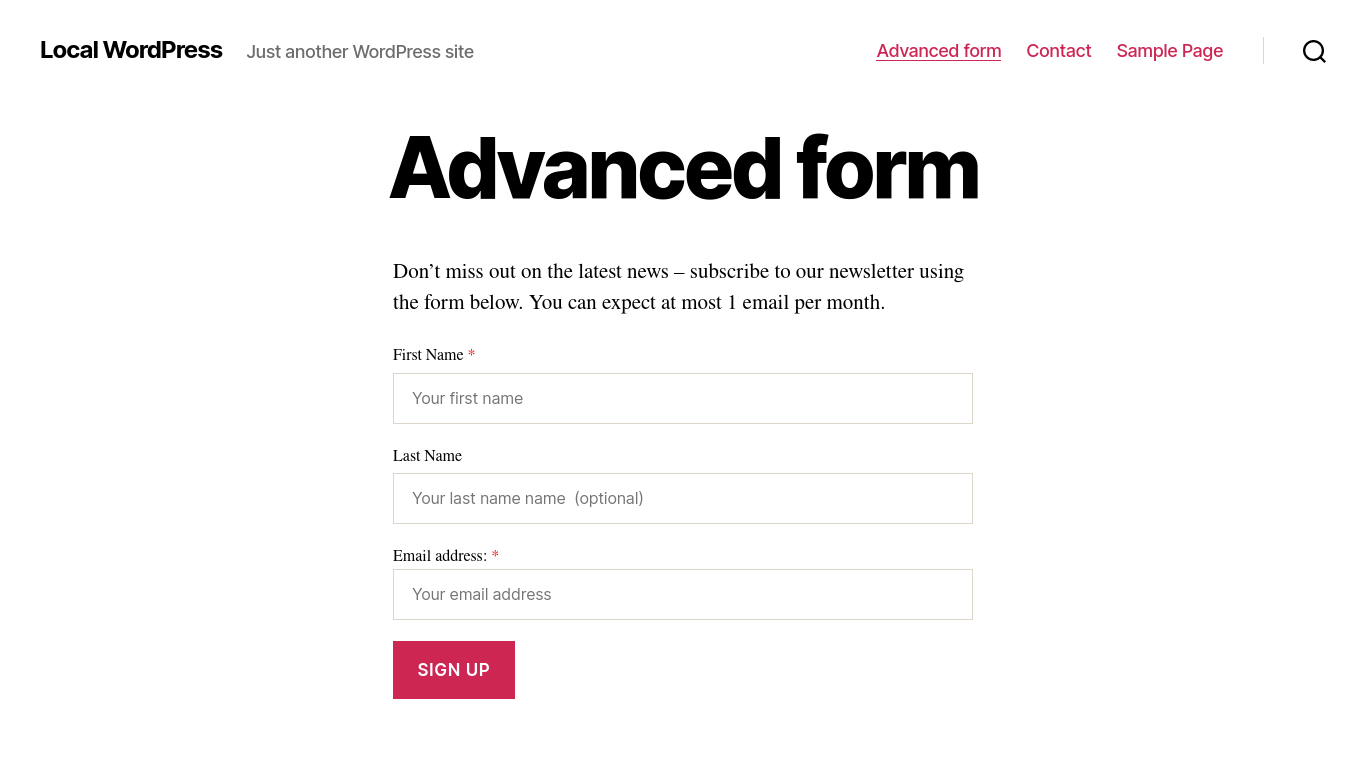
- Dedicated sign-up forms: You create subscription forms within the MC4WP interface and embed them via shortcodes, widgets, or Gutenberg blocks. When someone submits, they are added to your Mailchimp audience.
- Integrations with existing forms: You configure MC4WP to hook into forms you already have (WooCommerce checkout, Contact Form 7, Gravity Forms, etc.). A checkbox appears on those forms, and checking it subscribes the user.
This means you do not need to redesign your site to add Mailchimp sign-ups. Whatever forms you already have can become Mailchimp collection points. The plugin does not manage your email campaigns, design templates, or automate sequences. Those still happen inside Mailchimp. MC4WP’s job is to make sure the right people get into your Mailchimp audience in the first place.
Who MC4WP is best for
Strong fit
- WordPress site owners already on Mailchimp who want a clean, reliable way to grow their list without custom API integrations.
- Bloggers who want a subscription form feeding directly into Mailchimp campaigns.
- WooCommerce store owners who want customers to opt in at checkout without a complicated setup.
- Sites using Contact Form 7, Gravity Forms, or Ninja Forms that want submissions to also subscribe users to Mailchimp.
- Developers who want a plugin with a solid hook/filter API for programmatic customization.
- Multilingual sites: available in 33 languages.
Weak fit
- Site owners without a Mailchimp account. MC4WP requires Mailchimp and does not work with other email providers.
- Sites looking for a self-contained newsletter solution inside WordPress. MailPoet or FluentCRM is better for that.
- Users who want exit-intent popups, slide-in forms, or A/B tested opt-in overlays. MC4WP forms are functional but not a dedicated lead-generation tool.
- Users on a tight budget with a fast-growing list. Mailchimp pricing scales with subscriber count, on top of MC4WP premium fees.
Installing and getting started
Installing MC4WP follows the standard WordPress plugin flow. Search for “Mailchimp for WordPress” in the Plugins screen, install the free plugin, and activate it.
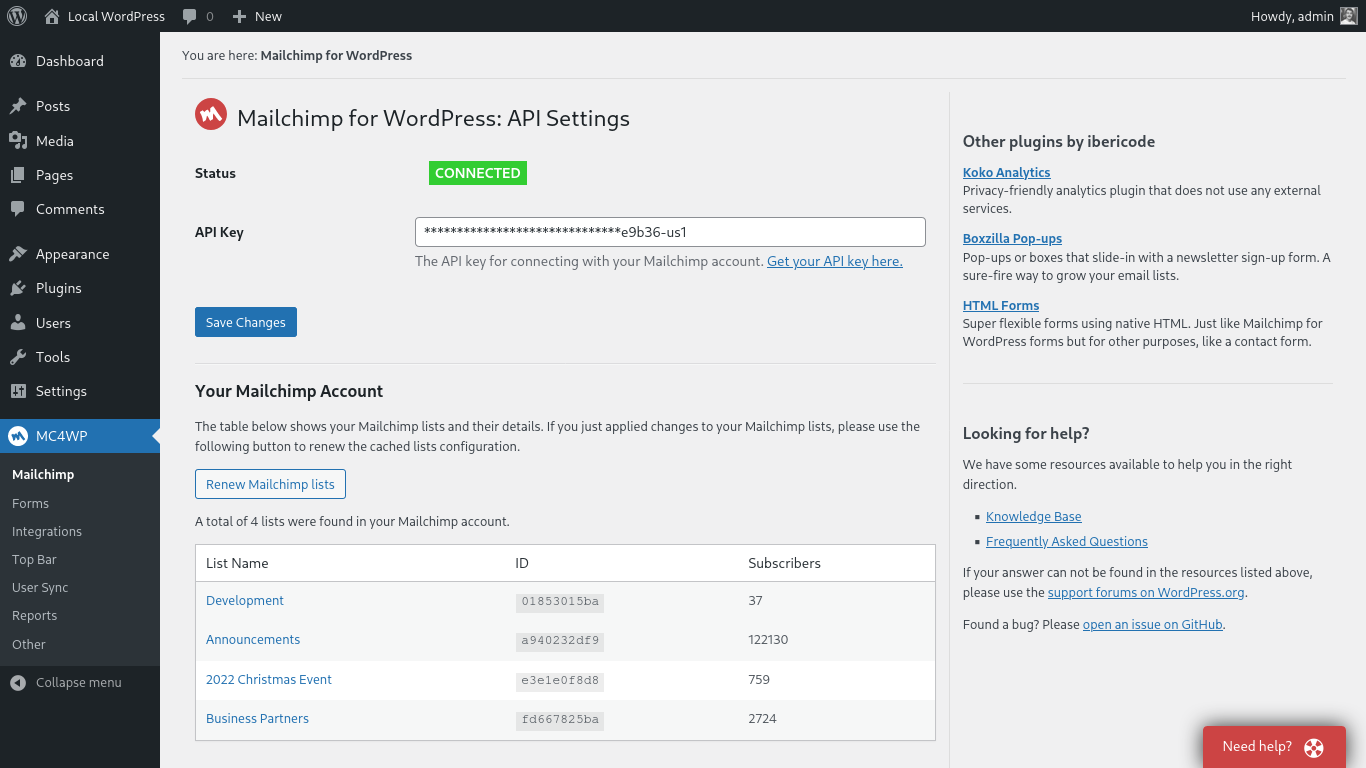
After activation, a “Mailchimp for WP” menu item appears in the WordPress admin sidebar. The plugin then asks you to connect your Mailchimp account using a Mailchimp API key, which you generate inside your Mailchimp account settings under Account > Extras > API Keys.
Once you paste the API key into the MC4WP settings and save, the plugin confirms the connection with a green success message. From that point, your Mailchimp audiences are visible inside the plugin and you can start creating forms or configuring integrations. Users familiar with API keys should be done in under five minutes. If this is your first time working with API keys, the MC4WP documentation walks through exactly where to find the key in Mailchimp.
Creating sign-up forms (free)
The free plugin includes one sign-up form. You build it inside Mailchimp for WP > Forms, where you choose which Mailchimp audience and fields to connect, write the HTML for the form, and configure the messages shown on success, already-subscribed, and error states.
The form HTML is fully editable. You control every field, label, and button. The plugin renders the form wherever you place it: as a WordPress widget, a Gutenberg block, via a shortcode [mc4wp_form], or by calling a PHP function directly in your theme. This placement flexibility means you can put the form in sidebars, within posts, on landing pages, or any template location your theme supports.
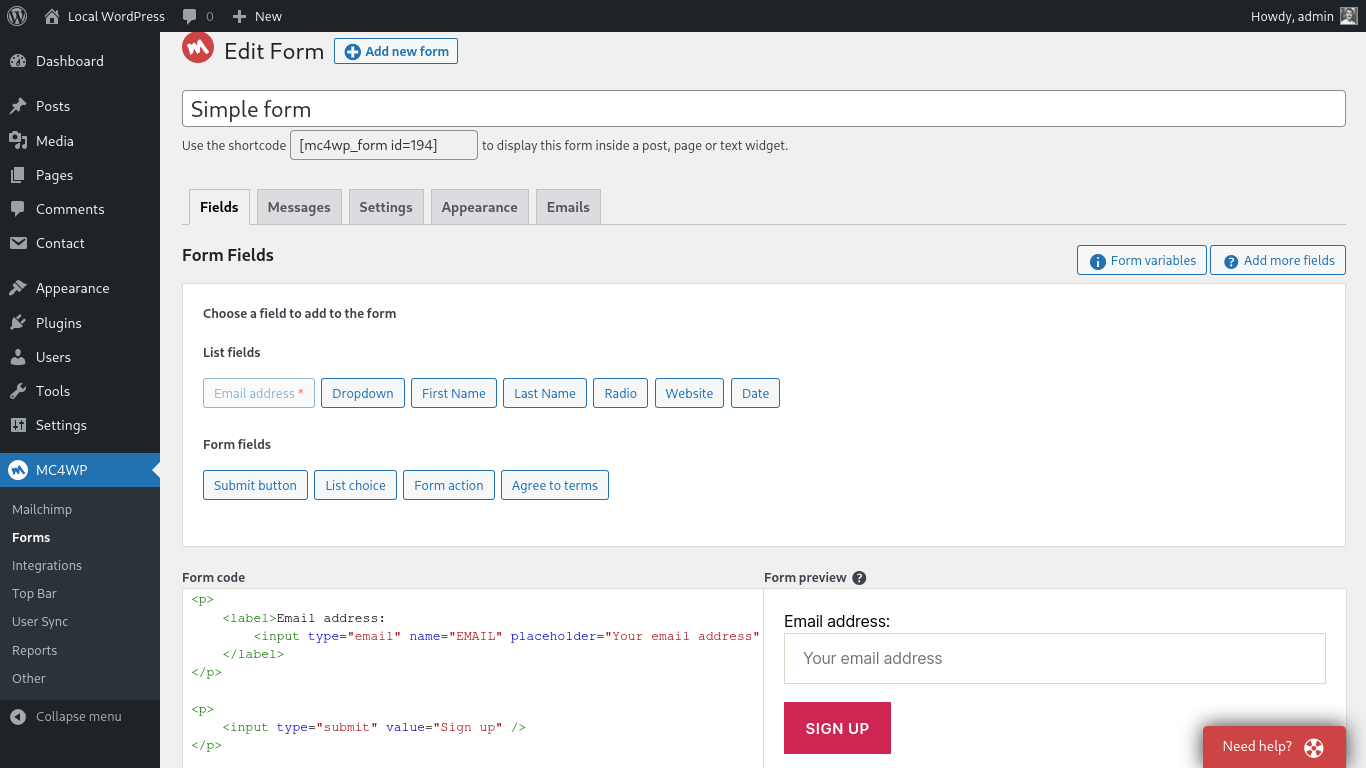
One limitation of the free plugin is that form styling is largely up to you. The plugin applies minimal default CSS. If your theme does not make the form look polished, you will need custom CSS. The premium Styles Builder addresses this with a visual editor, but on the free plan, styling is a manual task.
Plugin integrations: turning existing forms into subscriber sources
This is where MC4WP stands apart from simpler sign-up plugins. Rather than requiring a dedicated MC4WP form, the integration system lets you add Mailchimp sign-up checkboxes to forms you already have.
Supported integrations out of the box:
- WooCommerce: a checkbox on the checkout form subscribes customers to your Mailchimp audience when they complete a purchase.
- Contact Form 7: a checkbox field added to your CF7 form subscribes the user on submission.
- Gravity Forms: a checkbox on Gravity Forms submissions triggers a Mailchimp subscription.
- Ninja Forms, WPForms: checkbox integration on any form.
- WP Registration Form: subscribes new WordPress users when they register.
- BuddyPress, MemberPress, LearnDash: subscribes users during registration or enrollment.
- Also supported: Jetpack Contact Form, Easy Digital Downloads, Give (donation plugin), and others.
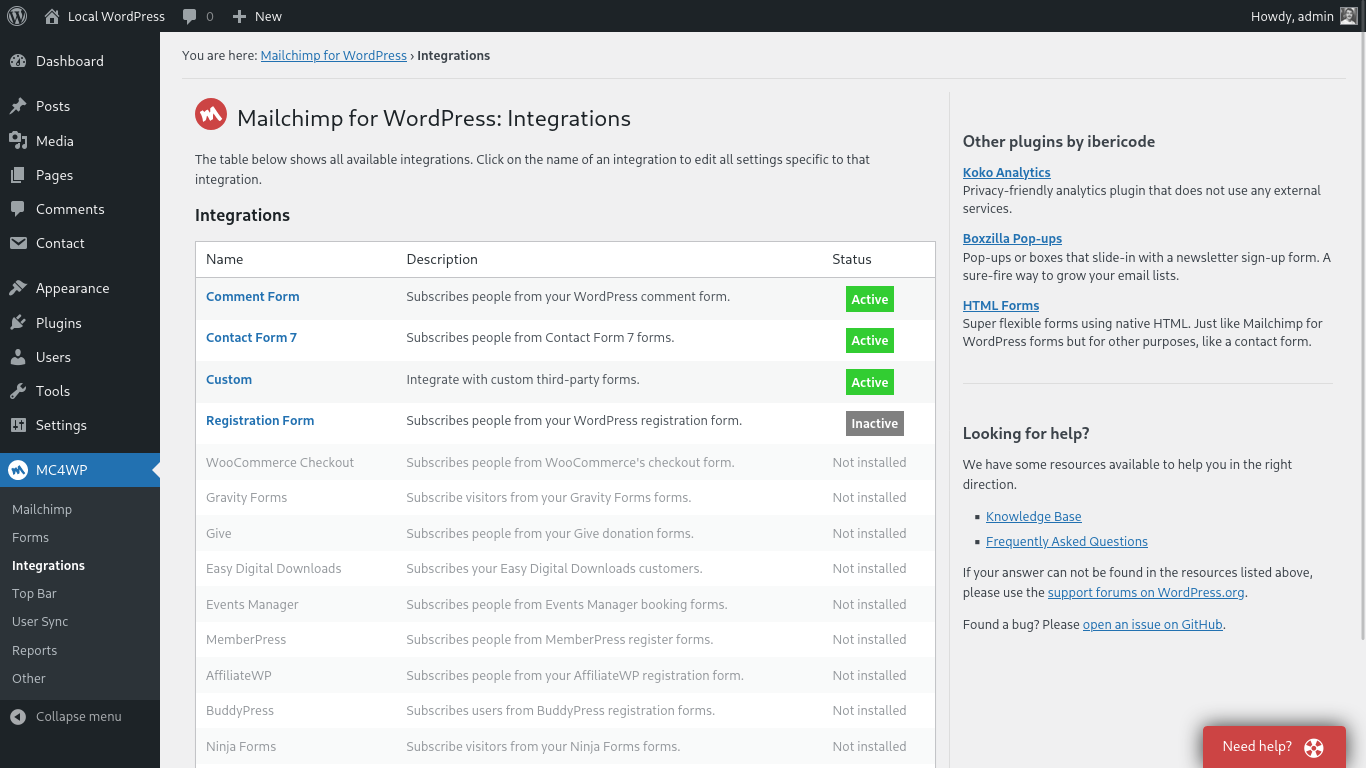
For each integration, you configure which Mailchimp audience to add subscribers to, which fields to map, whether the checkbox is pre-checked, and what label text appears. This is done inside the MC4WP settings, not inside the third-party plugin itself.
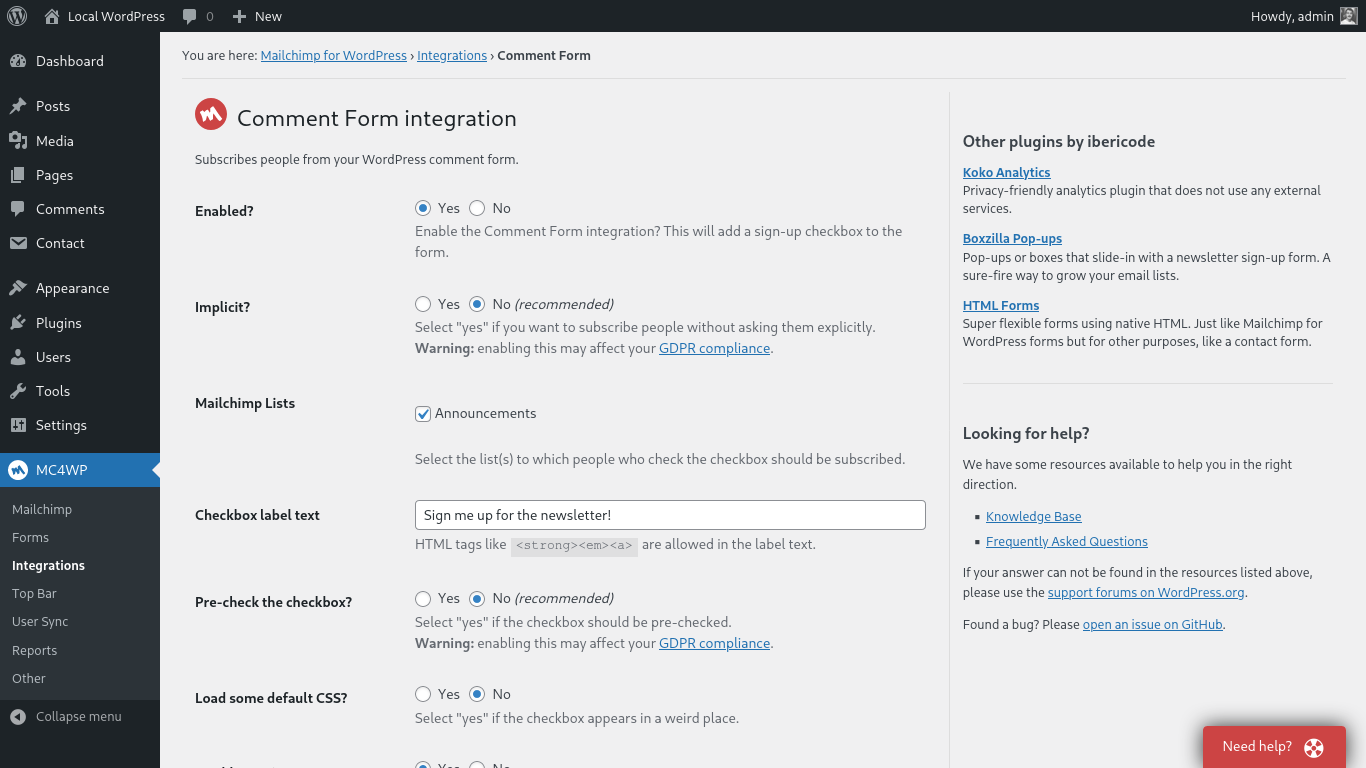
The integration approach is genuinely practical. Many sites already have a WooCommerce checkout or a Contact Form 7 contact page. Adding Mailchimp sign-up to those forms without writing any code is a real time-saver, and the MC4WP integration system is reliable enough that this feature alone justifies installing the plugin.
Premium features
The premium add-on extends the free plugin with eight additional feature areas.
Unlimited forms and AJAX submission
The free plugin limits you to one sign-up form. Premium removes that limit. You can create separate forms for different Mailchimp audiences, different pages, or different offers. Each form can also use AJAX submission, meaning the page does not reload after a visitor submits. The success message appears inline, reducing friction for users who encounter the form mid-content.
Styles Builder
The Styles Builder is a visual CSS editor for MC4WP forms. You set colors, fonts, spacing, border styles, button appearance, and input field design through a point-and-click interface. The resulting CSS is scoped to your forms so it does not conflict with your theme, replacing the manual CSS work otherwise required on the free plan.
E-commerce integration
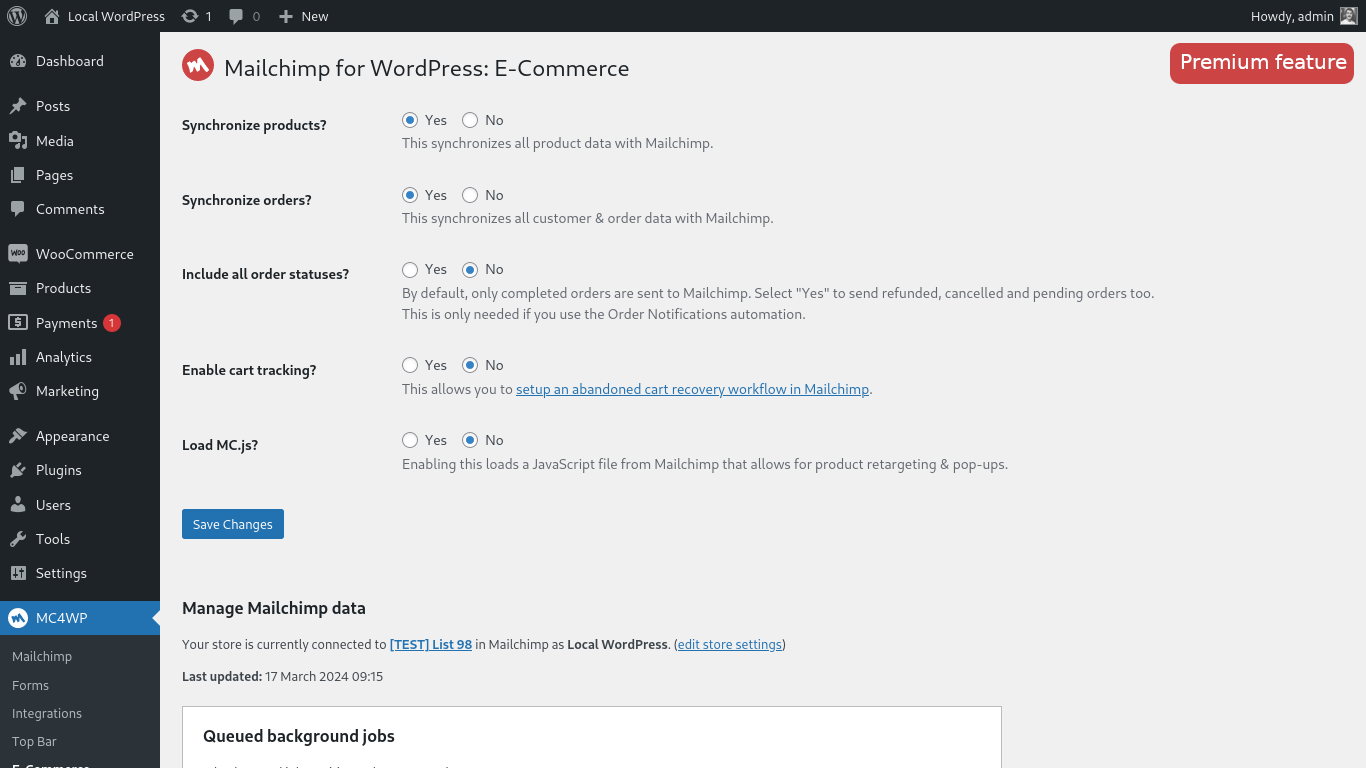
The e-commerce module connects WooCommerce order and product data to Mailchimp. When enabled, it syncs your WooCommerce products, customers, and orders into Mailchimp so your account understands your store catalog and purchase history. With this data available in Mailchimp, you can:
- Track revenue per campaign: See exactly how much revenue each Mailchimp email campaign generated by connecting clicks to completed orders.
- Abandoned cart recovery: When a customer adds products but does not complete checkout, Mailchimp sends automated reminder emails using cart data sent by MC4WP.
- Audience segmentation by purchase behavior: Build Mailchimp segments based on what customers bought, how much they spent, or when they last purchased.
- Product recommendations: Mailchimp uses order history to recommend products each subscriber is likely to buy next.
- Coupon syncing: WooCommerce coupons sync to Mailchimp as promo codes for use in automated emails.
User Sync
User Sync keeps WordPress user profiles and Mailchimp subscriber records in sync automatically. When a WordPress user updates their profile (name, email, or any mapped custom field), User Sync pushes the change to Mailchimp. When a Mailchimp subscriber updates their preferences, that change is pulled back into WordPress. This eliminates manual CSV exports on membership sites, online courses, or any platform with ongoing user profiles.
Logging
The logging feature records every sign-up attempt made through MC4WP forms and integrations. Each log entry shows the user email, the form or integration that triggered the subscription, the timestamp, whether the subscription succeeded, and any error details. Logs can be exported as CSV or JSON for external analysis or compliance records.
Audience Activity widget, email notifications, and auto post placement
Three smaller premium features complete the add-on. The Audience Activity dashboard widget shows subscription trend data over a configurable period (up to 90 days) directly in WordPress admin. Email notifications send an alert each time a visitor subscribes through an MC4WP form. The automatic post category placement feature appends a selected sign-up form to all posts in specified categories automatically, without manually adding shortcodes to each post.
Pricing
MC4WP offers a free plugin and three premium license tiers priced annually. All premium plans include the same feature set; the only difference is the number of sites covered.
| Plan | Price | Sites |
|---|---|---|
| Free | $0 | 1 |
| Single | $59/year | 1 |
| Multi | $99/year | Up to 5 |
| Agency | $249/year | Up to 25 |
All premium plans include all premium features, priority customer support (email, 24-hour response), plugin updates for the license period, and a 30-day money-back guarantee. If your premium license expires, premium-specific features become unavailable, but the free plugin core continues to work.
Important note on total cost: MC4WP pricing covers the plugin only. Your Mailchimp account is a separate cost. Mailchimp offers a free plan for up to 500 contacts and 1,000 sends per month. As your list grows, Mailchimp subscription fees apply. Factor both into your budget when evaluating MC4WP premium against alternatives that include their own sending infrastructure.
- Free: Excellent starting point. One form, all integrations, full developer API. Most small sites will find this sufficient indefinitely.
- Single ($59/year): The right upgrade when you need multiple forms, AJAX submission, or e-commerce tracking. Under $5 per month.
- Multi ($99/year): Practical for freelancers managing a handful of client sites. At $20/site/year for five sites, significantly cheaper than five Single licenses.
- Agency ($249/year): Designed for agencies with larger portfolios. At $10/site/year across 25 sites, strong economics for routine Mailchimp client work.
Pros and cons
Pros
- Free version is genuinely capable: one form, all plugin integrations, full developer API, 33 languages.
- Integration system turns WooCommerce, CF7, Gravity Forms, Ninja Forms, and WPForms into Mailchimp collection points with minimal configuration.
- 4.8/5 stars from 1,497 reviews on WordPress.org, one of the highest ratings in the category.
- Over a decade of active development and 70+ million total downloads. Mature and stable.
- Lightweight: minimal impact on page load compared to heavier all-in-one email plugins.
- Developer-friendly: well-documented PHP API, action and filter hooks, code snippets in the knowledge base.
- E-commerce features (premium) connect WooCommerce data to Mailchimp for revenue tracking, abandoned cart recovery, and segmentation.
- User Sync (premium) eliminates manual CSV exports between WordPress and Mailchimp.
- 30-day money-back guarantee on all premium plans.
- Double opt-in support for GDPR-compliant list building.
Cons
- Requires a Mailchimp account. Does not work with Brevo, MailerLite, ConvertKit, ActiveCampaign, or any other email provider.
- One form limit on the free plan is tight for sites needing different forms for different purposes.
- No built-in popup, slide-in, or exit-intent form types. These require a separate plugin.
- No built-in A/B testing for form copy or design.
- Free plan styling requires manual CSS. The Styles Builder is premium-only.
- Total cost is Mailchimp subscription plus MC4WP premium, which adds up for growing lists.
- No email campaign functionality inside WordPress. All campaigns are managed in Mailchimp.
- Some users report initial setup confusion, particularly around locating the Mailchimp API key.
Alternatives to MC4WP
MailPoet: A full email marketing platform built into WordPress. Unlike MC4WP, MailPoet stores subscribers in your WordPress database, includes an email editor, manages campaigns, and has its own managed sending service. If you want everything in one place without a separate Mailchimp account, MailPoet is the closest direct alternative.
WPForms with Mailchimp addon: If you already use WPForms as your primary form plugin, the Mailchimp addon may cover what MC4WP does within a tool you already pay for, with less granular Mailchimp-specific control.
OptinMonster: A lead generation tool focused on exit-intent popups, countdown timers, slide-in forms, and A/B testing. Connects to Mailchimp and dozens of other providers. More powerful for conversion-focused list building, but significantly more expensive and heavier than MC4WP.
MailOptin: A WordPress newsletter plugin with Mailchimp integration and its own form types including optin widgets, popups, and inline forms. Bridges the gap between MC4WP’s connector approach and MailPoet’s all-in-one model.
FluentForms: A lightweight drag-and-drop form builder with a Mailchimp integration module. Simpler than Gravity Forms and straightforward for basic use cases, with less integration breadth than MC4WP.
Chimpmatic: A specialized plugin for Contact Form 7 and Mailchimp specifically, with more granular interest group and field mapping options than MC4WP’s CF7 integration. The tradeoff: it only handles CF7, where MC4WP supports 10+ integrations.
Final verdict
MC4WP earns its position as the most popular Mailchimp connector for WordPress. The plugin does one thing exceptionally well: it makes it easy to get WordPress visitors into a Mailchimp audience through whatever forms already exist on the site. The integration system is its strongest feature, and the 4.8-star rating from nearly 1,500 reviews reflects a plugin that consistently delivers on that promise.
The limitations are just as clear. This is a Mailchimp-only tool. If you are not on Mailchimp, look elsewhere. The free plan allows only one sign-up form, which quickly becomes restrictive for sites with more than one audience or offer. And unlike MailPoet or FluentCRM, MC4WP adds no email sending or campaign management to WordPress; you still manage all campaigns inside Mailchimp.
If you use Mailchimp and want a reliable, low-overhead way to grow your audience from WordPress: start with the free plugin. If you find yourself needing multiple forms, AJAX submission, or e-commerce revenue tracking, the Single plan at $59/year is a straightforward upgrade. If you are evaluating Mailchimp and MC4WP together as a total solution, factor in Mailchimp’s own pricing for your subscriber count and decide whether the combined cost makes more sense than a self-contained WordPress email tool like MailPoet.
Browse our plugin reviews for comparisons with other email and newsletter tools for WordPress.
FAQ
Is MC4WP free?
Yes. The core plugin is free with no time limit. The free version includes one sign-up form, all plugin integrations (WooCommerce, CF7, Gravity Forms, Ninja Forms, WPForms, WP Registration Form, and more), connection to a Mailchimp account, placement via widgets, shortcodes, and Gutenberg blocks, and a developer API with hooks and filters. Premium plans ($59 to $249/year) add unlimited forms, AJAX submission, e-commerce tracking, user sync, logging, and a visual Styles Builder.
Does MC4WP work with email providers other than Mailchimp?
No. MC4WP is built exclusively for Mailchimp. It communicates with the Mailchimp API and does not support Brevo, MailerLite, ConvertKit, ActiveCampaign, or any other email service provider.
Do I need a Mailchimp account to use MC4WP?
Yes. A Mailchimp account and a Mailchimp API key are required to use any part of the plugin. Mailchimp has a free plan for up to 500 contacts and 1,000 sends per month, which is a reasonable starting point for a small list.
What is the difference between free and premium?
The free plugin provides one sign-up form, all integrations, and the developer API. The premium add-on adds: unlimited forms, AJAX form submission, visual Styles Builder for form design, e-commerce integration (WooCommerce revenue tracking, abandoned cart, product recommendations, coupon syncing), User Sync (bidirectional WordPress-to-Mailchimp profile updates), sign-up attempt logging with CSV/JSON export, an audience activity dashboard widget, email notifications for new subscriptions, and automatic form placement below posts in selected categories.
Does MC4WP support double opt-in?
Yes. Double opt-in can be enabled per form and per integration. When enabled, Mailchimp sends a confirmation email before adding the subscriber to the audience. Double opt-in is recommended for GDPR compliance and for maintaining a high-quality list.
What changed in version 4.14.0?
Version 4.14.0 (August 4, 2026) added the ability to show the Mailchimp sign-up checkbox on the WordPress admin “Add New User” form, updated WordPress Coding Standards to version 3.4 with corrected type annotations, and added a code snippet to the documentation for sending WordPress usernames to Mailchimp via the User Sync feature.
Who makes MC4WP?
The plugin was originally created by Danny van Kooten and is now maintained by ibericode, a Netherlands-based WordPress plugin company. It has been in continuous development for over 10 years with 70+ million total downloads.
Can I style MC4WP forms without knowing CSS?
On the free plan, basic styling comes from your theme and custom CSS is required for more control. The premium Styles Builder provides a visual, code-free interface for customizing form colors, fonts, borders, button styles, and spacing.
Is MC4WP GDPR compliant?
MC4WP supports GDPR-compliant list building through configurable double opt-in, explicit consent checkboxes on forms, and no local storage of subscriber personal data in the WordPress database (data goes directly to Mailchimp via the API). You are still responsible for Mailchimp’s own data processing configuration and your overall compliance posture.