


Master Slider is a well-established WordPress touch slider plugin from Averta that has been downloaded more than 3.2 million times across its WordPress and jQuery editions. I audited the free version, reviewed the Pro feature set, checked the pricing page, and cross-referenced the WordPress.org listing and official documentation. The result is a plugin with a solid free core for basic responsive sliders and a Pro tier that unlocks the features most site owners actually want: animated layers, parallax, video backgrounds, and post or WooCommerce sliders.
The free version is more capable than some competitors at the same price point, but it is also more limited than the free offerings from plugins like Smart Slider 3. The honest take for 2026 is that Master Slider remains a dependable choice for touch-enabled WordPress sliders, especially for anyone who values one-time licensing over subscriptions. It is not the most visually ambitious plugin on the market, but it is reliable, well-maintained, and the $39 Pro price point is competitive.
At a glance
| Developer | Averta |
| Free version | Yes (WordPress.org) |
| Pro price | $39 one-time (1 site) |
| Active installs | 60,000+ |
| Rating | 4.6/5 (503 reviews) |
| WP version | 5.0+ (tested to 6.9.7) |
| PHP version | 5.4+ |
| Current version | 3.11.2 |
| Last updated | 4 months ago |
| Touch support | Yes (free) |
| Parallax | Pro only |
| Video backgrounds | Pro only |
| Animated layers | Pro only |
What Master Slider is
Master Slider is a responsive touch slider plugin for WordPress built by Averta, a team known primarily for the Phlox theme on ThemeForest. The plugin has been available for several years and has accumulated over 3.2 million downloads across its WordPress and jQuery editions. On WordPress.org alone, it currently shows 60,000+ active installations.
The plugin works in two modes. The free version available on WordPress.org provides a functional drag-and-drop slider builder with touch swipe navigation, 8 starter sample sliders, 6 slider skins, and the basic transition and navigation controls you would expect from a responsive WordPress slider. That is enough to build a simple homepage hero or image carousel.
Master Slider Pro extends the plugin into a richer content presentation tool. Pro adds animated text, image, and button layers, parallax scrolling effects, HD video backgrounds, YouTube and Vimeo embedding, post sliders for any custom post type, WooCommerce product sliders with dynamic filtering, and a timeline-based WYSIWYG editor for layer animations. The gap between free and Pro is significant, which I will cover in detail below.
The plugin is positioned as a touch-enabled slider WordPress plugin first. Touch swipe navigation works in both the free and Pro versions, and it functions on iOS and Android browsers without any additional configuration. This is a practical advantage over older slider plugins that added touch support as an afterthought or charged for it.
Who Master Slider is best for
Master Slider is best for WordPress site owners who want a reliable, touch-enabled slider and are comfortable with a modest one-time Pro upgrade cost. I would shortlist it for:
- Small business sites that need a homepage image or content slider with touch support
- Bloggers and magazine sites that want featured post sliders (Pro)
- WooCommerce store owners who need a product or promotional slider (Pro)
- Developers and theme builders who want a lightweight jQuery-compatible slider solution
- Site owners who specifically want one-time licensing instead of annual subscriptions
It is a weaker fit if you want a highly visual, design-focused layer editor available in the free version, or if you need an extensive free template library. Smart Slider 3 beats it on both of those points in the free tier. Master Slider’s strengths are its touch navigation reliability, its lower Pro price, and its long track record as a WordPress touch slider plugin.
Setup experience and first impressions
Installing the free version follows the standard WordPress plugin flow: search for “Master Slider” in the plugin directory, install, and activate. Once active, a new Master Slider item appears in the wp-admin sidebar.
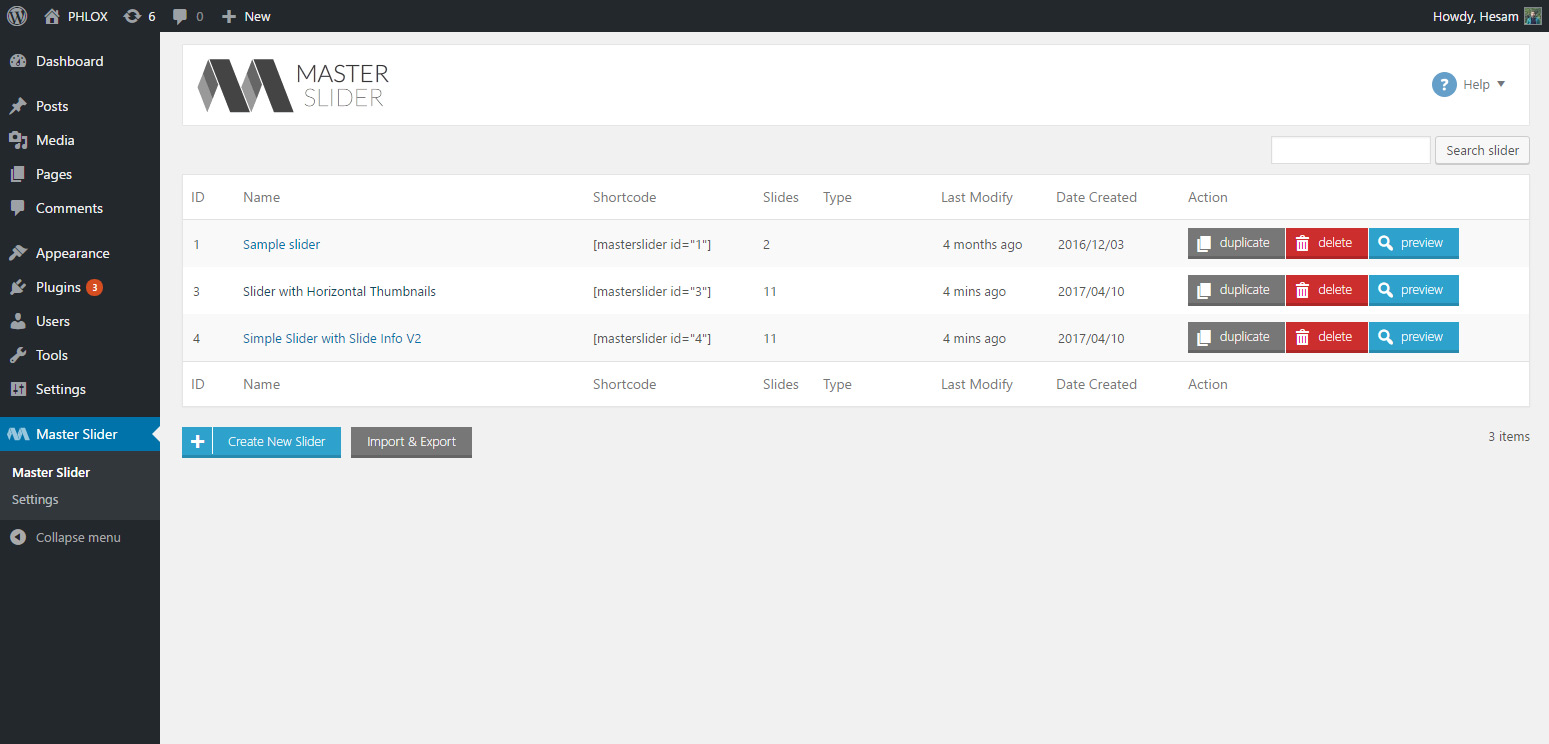
The dashboard shows an overview of existing sliders in a table format with quick-edit options, shortcodes, and a new slider button. This is simpler than the card-grid interface you see in Smart Slider 3, but it is also more direct. The functional design feels a bit dated visually, but it is easy to navigate.
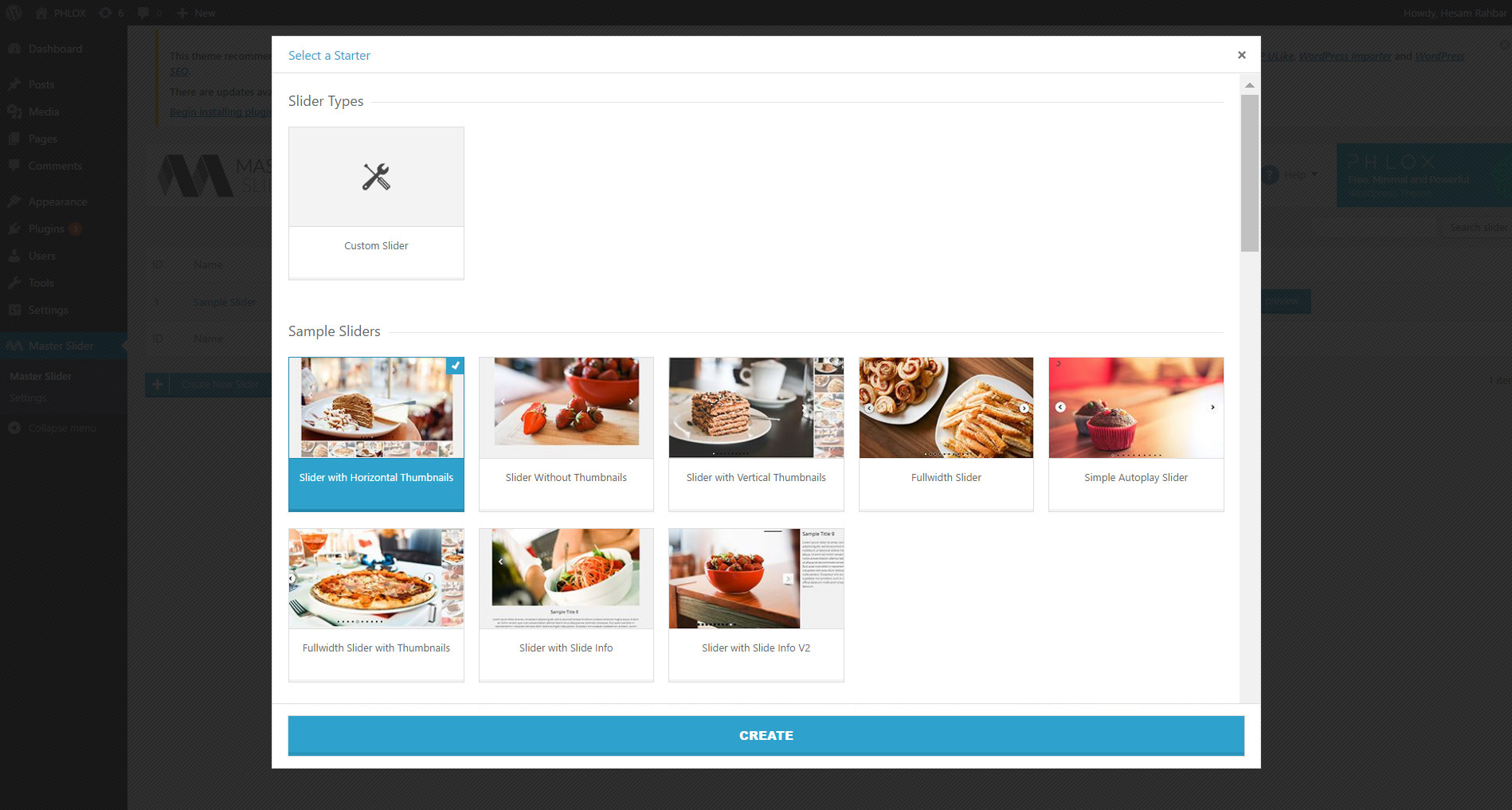
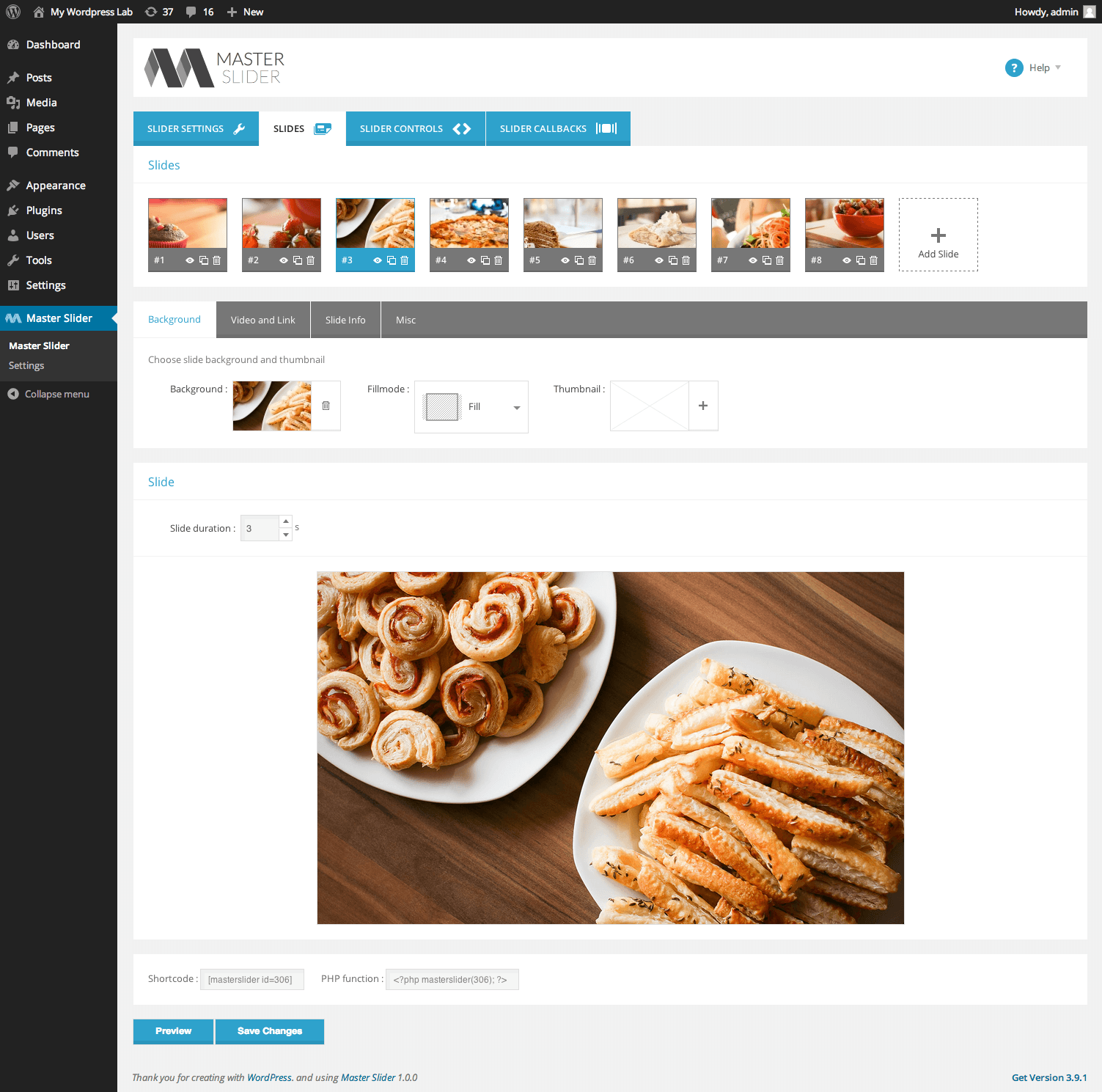
Creating a new slider starts with choosing a slider type and entering basic dimensions. The free version offers 8 pre-built sample sliders to import as a starting point. From there, you land in the slide editor where you can add and rearrange slides using drag-and-drop.
The core workflow in the free version is: create slider, import a sample or add slides manually, upload images, configure controls in the Slider Controls tab, copy the generated shortcode, and embed it in your post or page. The slider also supports the classic widget area for sidebar or footer placement.
One thing that stands out immediately in the free version is the slider controls panel. You can add thumbnail strips, arrows, bullets, timer bars, and scroll indicators as separate UI components that layer onto your slider. This level of granular control over navigation appearance is more flexible than most free slider plugins offer out of the box.
Main features
Touch swipe navigation
Touch swipe navigation is Master Slider’s flagship feature and it works well in the free version. The plugin uses hardware-accelerated CSS3 transitions for smooth slide changes on mobile and tablet. Swipe gestures work in both horizontal and vertical slider orientations, and mouse wheel navigation is also supported.
This is not always a given with WordPress slider plugins. Some tools treat touch as an extension or a paid tier feature. Master Slider includes touch support in the free core, which simplifies setup for sites with significant mobile traffic.
Animated layers (Pro)
Animated layers are a key reason to consider Master Slider Pro. Pro unlocks a text, image, button, and video layer system with timeline-based animations. You can set entry and exit animations for each layer, control timing and delay, and preview the result in the visual WYSIWYG editor.
This is what makes Master Slider Pro usable for homepage hero sections where you want a headline to appear, a subtitle to fade in, and a CTA button to follow with a short delay. The free version does not include this layer system, which means basic free sliders show images and captions but not fully animated content stacks.
Parallax effects (Pro)
Parallax scrolling is available in the Pro version. It allows background images or individual slider layers to move at different speeds as the user scrolls, creating a depth effect. Master Slider’s parallax applies to both slide backgrounds and layer elements.
For portfolio and marketing pages, parallax can add visual interest without requiring a full page builder plugin. The usual caveat applies: parallax can affect perceived performance and cause layout shifts on mobile if not tested carefully. Use it where it adds clear value rather than as a default setting on every slider.
Video support (Pro)
Master Slider Pro supports HD video backgrounds, YouTube embedding, and Vimeo embedding. Videos can serve as full slide backgrounds or as individual video layer elements within a slide.
Video sliders are one of the more popular Pro use cases. A full-screen video background hero and a product video showcase for a WooCommerce page are both achievable. The free version does not include video layer or video background support.
Post and WooCommerce sliders (Pro)
Pro includes a post slider module that pulls content from any WordPress custom post type, with advanced filtering options. This works well for news sites, portfolio sites, or any blog where you want slider content to update automatically as new content is published.
The WooCommerce product slider is a separate Pro feature that generates slides from your product catalog with optional filtering by category, tag, or custom attribute. For online stores, this removes the need to rebuild promotional sliders every time the featured products change.
Navigation controls and skins
Master Slider’s navigation control system is one of its free-version strengths. In the Slider Controls tab, you can add and configure thumbnail strips, bullet indicators, arrow buttons, timer bars, and scroll-down indicators as separate components. Each control can be positioned and styled using the 6 included skins.
The 6 skin options cover light and dark visual styles with different icon and typography treatments. While not a large library, they cover the most common site design contexts. Users who need a custom look can override the skin CSS without modifying plugin files.
Slider transitions and hardware acceleration
The free version includes 6+ interactive slide transitions with CSS3 support and hardware-accelerated 3D transforms. These cover the standard dissolve, slide, and scale transition families that work cleanly across devices.
Hardware acceleration using GPU compositing is what keeps the transitions smooth on mobile, especially on mid-range Android devices where purely JavaScript-driven animations can stutter. This is correctly listed as a differentiating feature in the plugin’s own positioning.
Import and export
Master Slider includes built-in slider import and export functionality in the free version. This is useful for duplicating slider configurations between test and production sites, or for backing up a complex slider before editing. The exported file can be re-imported on any site running Master Slider.
Master Slider pricing
Master Slider uses one-time licensing for all paid editions. There are no annual renewals for continued updates.
| Plan | Price | Sites | Billing | Notes |
|---|---|---|---|---|
| Free | $0 | 1 domain | Free | 8 samples, touch nav, 6 skins, basic controls |
| WordPress Pro | $39 | 1 domain | One-time | All Pro features, permanently free updates |
| jQuery edition | $17 | 1 domain | One-time | For standalone HTML/jQuery projects |
License terms: updates are permanently free after purchase. Each license covers one domain only. A new license is required for each additional domain. There is no multi-domain, developer, or agency bundle available, which is the main practical limitation for freelancers managing multiple client sites.
Extended licenses exist for situations where clients pay to access the slider as part of a paid service. In-stock licenses for theme marketplace bundles require direct contact with Averta.
The $39 one-time Pro price is competitive in the WordPress slider category. Slider Revolution uses higher annual pricing. MetaSlider Pro starts at $49 per year. Smart Slider 3 Standard starts at $49 one-time. Master Slider Pro at $39 one-time sits below all of these, making it an appealing option for budget-conscious single-site owners who do not need recurring support contracts.
Master Slider free vs Pro
| Feature | Free | Pro |
|---|---|---|
| Touch swipe navigation | Yes | Yes |
| Drag-and-drop slide editor | Yes | Yes |
| CSS3 transitions | Yes | Yes |
| Hardware acceleration | Yes | Yes |
| Shortcode and widget embed | Yes | Yes |
| Import/export | Yes | Yes |
| Starter sample sliders | 8 | 30+ |
| Slider skins | 6 | 6 |
| Animated layers | No | Yes |
| Parallax effects | No | Yes |
| Video backgrounds | No | Yes |
| YouTube/Vimeo embed | No | Yes |
| Post slider | No | Yes |
| WooCommerce slider | No | Yes |
| Timeline layer animation | No | Yes |
| Google Fonts (600+) | No | Yes |
| Deep-linking | No | Yes |
| Hotspot functionality | No | Yes |
| Flickr/Facebook gallery | No | Yes |
Pros and cons
Pros
- Touch swipe navigation included in the free version, not locked behind Pro.
- One-time Pro licensing at $39 with permanently free updates and no annual renewal.
- Granular navigation control panel in the free tier: thumbnails, bullets, arrows, timers.
- Hardware-accelerated CSS3 transitions for smooth mobile performance.
- Long track record with 3.2 million+ total downloads and active maintenance.
- Vertical and horizontal orientation options available in the free version.
- Import/export functionality makes slider duplication and backup straightforward.
Cons
- No animated content layers in the free version, limiting hero section design.
- No multi-domain, developer, or agency license for managing multiple client sites.
- Admin interface design feels dated compared to more recently redesigned slider plugins.
- Gutenberg block support is not confirmed in current free version documentation.
- Free template library is limited to 8 samples versus 14+ in Smart Slider 3 free.
- Some users report persistent admin notification banners across wp-admin pages.
- 60,000+ active installs is lower than comparable slider plugins, suggesting a smaller community for troubleshooting.
Alternatives to consider
Smart Slider 3
Smart Slider 3 is the stronger overall choice if you want a richer free version and a more modern visual editor. The free tier includes a layer-based visual editor, 14+ templates, responsive device controls, and two slider types. Pro adds carousels, showcases, dynamic content sources, and advanced animations at $49 one-time. If you are comparing both, I recommend testing Smart Slider 3 free before deciding.
Slider Revolution
Slider Revolution is better suited for highly detailed hero sections, animated scene builders, and an extensive premium template library. It is one of the most feature-complete WordPress slider plugins available but comes with more complexity, higher pricing, and heavier front-end output. The right choice when maximum visual impact is the top priority.
MetaSlider
MetaSlider is the practical choice when simplicity matters more than design depth. It focuses on clean image slideshows and basic carousels without a layer editor or animation system. Lightweight, fast to configure, and ideal for users who need a rotating image gallery without any design overhead.
Soliloquy
Soliloquy is a lightweight WordPress slider plugin with a clean native interface. It does not have the layer or animation system of Master Slider or Smart Slider 3, but it works well for straightforward image sliders where performance and ease of management are the priority.
Final verdict
Master Slider delivers on its core identity as a touch-enabled WordPress slider plugin. The free version covers basic responsive slider use cases with hardware-accelerated touch support, and the Pro upgrade at $39 one-time adds the animated layers, parallax effects, and dynamic content features that most site owners need for modern marketing pages.
The main limitations are the absence of animated layers in the free version and the lack of multi-site licensing. If you manage multiple client sites, the per-domain pricing becomes costly quickly. If you need one site with a touch-friendly slider and a one-time payment model, Master Slider Pro at $39 is fair value for a plugin with this track record.
My recommendation: test Smart Slider 3 free first if you want the best free-version experience with a visual layer editor. If you have compared both, prefer Master Slider’s pricing structure, or specifically need WooCommerce or post sliders at the $39 price point, Master Slider Pro is worth the investment.
FAQ
Is Master Slider free?
Yes. Master Slider has a free version on WordPress.org. It includes touch swipe navigation, 8 starter sample sliders, 6 slider skins, drag-and-drop slide creation, CSS3 transitions, and shortcode and widget embedding.
What does Master Slider Pro add?
Master Slider Pro adds animated content layers (text, image, button, video), parallax effects, HD video backgrounds, YouTube and Vimeo embedding, post sliders for any post type, WooCommerce product sliders, a WYSIWYG timeline animation editor, 600+ Google Fonts, deep-linking, hotspot support, Flickr and Facebook gallery integration, and 30+ additional sample sliders.
How much does Master Slider Pro cost?
As checked for this review, the WordPress Pro regular license is $39 as a one-time payment for one domain. Updates are permanently free after purchase, with no annual renewal required.
Does Master Slider support touch and swipe navigation?
Yes, and this is included in the free version. Touch swipe navigation with hardware-accelerated CSS3 transitions is available on both iOS and Android browsers without any paid upgrade.
Is Master Slider good for parallax sliders?
Parallax is a Pro-only feature. With Pro, you can apply parallax scrolling to background images and individual slider layers. It is not available in the free version.
Can Master Slider embed YouTube and Vimeo videos?
Yes, but only in the Pro version. Master Slider Pro supports HD video backgrounds, YouTube embedding, and Vimeo embedding. Video layer support is not included in the free plugin.
Is Master Slider still actively maintained?
Yes. Version 3.11.2 is the current release as of this review, tested up to WordPress 6.9.7, and last updated approximately four months ago. The plugin has a sustained maintenance history.
Master Slider vs Smart Slider 3: which should I choose?
For most users, Smart Slider 3 has a stronger free tier with a richer visual layer editor and more templates. Master Slider’s advantages are its lower one-time Pro price ($39 vs $49 for Smart Slider 3 Standard) and its established track record. If animated layers in the free version matter, Smart Slider 3 is the better choice. If you prefer Master Slider’s pricing or need WooCommerce sliders at a lower one-time cost, Master Slider Pro is worth evaluating.
Does Master Slider work with WooCommerce?
Yes, but WooCommerce integration is a Pro feature. Master Slider Pro includes a dynamic product slider with filtering by category, tag, or attribute. The free version does not include WooCommerce or post slider functionality.
Does Master Slider work with any WordPress theme?
According to the official FAQ, yes. The plugin is designed to be theme-agnostic. Averta recommends the free Phlox theme as an optimized pairing, and support is available for resolving CSS conflicts with other themes.