


The Newsletter Plugin has been on WordPress.org since 2011 and has been downloaded more than four million times. It currently sits at 200,000+ active installations and a 4.6-star rating across 1,203 reviews. Those numbers are not remarkable on their own, but one feature sets it apart from nearly every other newsletter plugin on the market: the free version places no cap on subscribers. Unlimited lists, unlimited sends, no monthly fees. That is a genuinely unusual offer in a category where most free tiers cut you off at 500 or 1,000 contacts.
This review covers what the free version actually delivers, where the paid plans earn their price, and where the plugin falls short. It is built on a thorough audit of the official thenewsletterplugin.com website including the pricing and features pages (captured August 2026), the WordPress.org plugin listing for version 9.3.4 (tested to WordPress 7.0.4), and the official plugin documentation. Admin interface screenshots in this review are sourced from the vendor’s own documentation site (thenewsletterplugin.com/documentation) and the WordPress.org plugin listing, not from an independent live installation. Pricing is in EUR; verify current prices at thenewsletterplugin.com/premium before purchasing.
At a glance
- Research basis: Official thenewsletterplugin.com homepage, pricing page (August 2026), features page, vendor documentation, and WordPress.org listing for version 9.3.4. Admin screenshots sourced from vendor documentation site.
- Free tier: Genuinely unlimited subscribers and newsletters with basic composer, forms, and SMTP plugin compatibility. No subscriber cap, ever.
- Paid tiers: One-time payment (not a monthly subscription) for analytics, form integrations, automation, WooCommerce, and delivery service APIs.
- Bottom line: The strongest self-hosted newsletter plugin for WordPress sites with large or fast-growing lists, and one of the few that can be run at zero cost indefinitely. The tradeoff is that deliverability setup requires real configuration work.
Quick verdict
Most WordPress newsletter plugins make the free tier attractive by keeping it simple, then cut you off when the list grows. The Newsletter Plugin inverts that. The free version has real limits, but “size of your list” is not one of them. You can collect 100,000 subscribers and send to all of them from the free plugin, for free, as long as your hosting can handle the outgoing mail.
What the free version does not do: schedule automated sequences, connect to professional delivery APIs like Amazon SES or SendGrid, or show campaign-level analytics broken out by geolocation. Those require paid plans. And the plugin does not include its own sending infrastructure the way MailPoet does, so if you do not configure an SMTP plugin or a delivery service, your emails will go out through PHP mail, which is a reliable path to the spam folder on most shared hosts.
The right question to ask before installing is not just “how many subscribers do I have?” It is also “what do I want to do with them?” Pure list-building and manual sends at unlimited scale: the free version works. Automated sequences, WooCommerce cart follow-ups, and professional deliverability: you need the Professional plan at 99 EUR one-time.
- Best for: WordPress site owners, bloggers, and small businesses who want a free, self-hosted newsletter system with no subscriber cap and no monthly fees.
- Best plan for most growing sites: Free for getting started; Professional (99 EUR one-time, up to 3 sites) for automation, WooCommerce integration, and delivery service APIs.
- Best plan for agencies: Agency plan (299 EUR one-time) for unlimited sites without per-site licensing costs.
- Standout: No subscriber limit in the free version, at any list size, with no expiry. One-time payment model for paid plans instead of monthly recurring fees.
- Watch out for: No built-in sending service; you must configure SMTP or a delivery service integration for reliable inbox placement. Automation and WooCommerce features are Professional-only. After the first year of a license, add-ons continue to function but compatibility with new WordPress or plugin versions is not guaranteed.
What the Newsletter Plugin is
The Newsletter Plugin is a self-hosted WordPress email marketing system developed by Stefano Lissa, with contributions from Roberto Fietta, and sold through The Newsletter Team brand. It has been available on WordPress.org since 2011 and is currently at version 9.3.4 (tested to WordPress 7.0.4, requires PHP 7.0 or higher).
The plugin handles four core jobs inside WordPress: collecting subscribers through customizable opt-in forms; organizing those subscribers into lists with segmentation; composing and sending newsletter campaigns with a drag-and-drop editor; and tracking opens, clicks, and engagement metrics.
What makes the architecture different from SaaS email platforms like Mailchimp or ActiveCampaign is that everything runs on your server. Your subscriber database lives in your WordPress installation. Your emails go out through your hosting’s mail system or a connected delivery service. There is no external platform to log into, no subscriber data leaving your server to a third party, and no per-subscriber monthly fee.
The tradeoff is that the plugin is only as deliverable as its sending infrastructure. A hosted email platform maintains dedicated IP addresses, handles bounce processing automatically, and keeps sender reputation warm. The Newsletter Plugin can do all of that, but it requires you to configure it. The free version is compatible with any SMTP plugin (Post SMTP, WP Mail SMTP, Fluent SMTP, and others). The Professional plan adds direct API connections to major delivery services with bounce and complaint management built in.
The free plugin is available on WordPress.org as “Newsletter – Send awesome emails from WordPress.” The premium plans, which bundle add-on extensions rather than replacing the core plugin, are sold from thenewsletterplugin.com.
Who the Newsletter Plugin is best for
Strong fit
- Bloggers and content publishers who want to send post notification emails to an unlimited list at no monthly cost, without creating an account with an external ESP.
- Non-profits, community organizations, and local news sites that need a capable free newsletter system with no subscriber limits and no branding requirements.
- Site owners who have outgrown the free tiers of MailPoet or Mailchimp (where subscriber caps are tight) and want to stay self-hosted.
- WooCommerce stores and business sites on the Professional plan that need abandoned cart recovery, checkout opt-in, and product-based subscriber segmentation without paying a monthly SaaS fee.
- Developers and agencies managing multiple client sites who prefer a one-time license cost over recurring per-site fees. The Agency plan at 299 EUR covers unlimited sites.
- Sites already running a reliable SMTP service (SendGrid, Amazon SES, Mailgun, or a dedicated SMTP plugin) where deliverability is already handled and a self-hosted list manager is what is needed.
Weak fit
- Non-technical users who want to send their first newsletter in under an hour without configuring SMTP. The free version sends through PHP mail, which lands in spam on most shared hosts. Reliable delivery requires setup.
- Sites that want built-in sending infrastructure included in the plan price. The Newsletter Plugin does not have a proprietary sending service; MailPoet’s sending service is built into its free plan without external configuration.
- Users who want advanced automation (drip sequences, multi-step behavioral flows) at a low entry price. Autoresponders are Professional-only and the automation system is simpler than dedicated CRM tools.
- Teams that need A/B split testing, advanced segmentation by behavioral triggers, or multi-channel marketing sequences. Those use cases point toward FluentCRM or a dedicated SaaS platform.
- Sites where subscriber data residency in a third-party cloud is acceptable and deliverability reliability matters more than data ownership. A managed SaaS platform is a simpler choice for that profile.
Installing and setting up
The Newsletter Plugin installs from the WordPress admin under Plugins > Add New. Search for “Newsletter” and the plugin with the red envelope icon by Stefano Lissa appears as one of the top results. After activation, the plugin launches a configuration wizard automatically.
The wizard creates a dedicated WordPress page for the plugin’s shortcode-driven subscription interface and walks you through the basic settings: sender name, sender address, and delivery speed. One important note from the documentation: the wizard creates a page containing the [newsletter] shortcode. Do not delete this page or remove the shortcode. Doing so will produce a 404 error on subscription confirmation links.
After the wizard, the plugin adds a top-level “Newsletter” menu to the WordPress admin sidebar with submenu items for Subscribers, Newsletters, Subscription (form settings), and Settings. The interface uses a dark-themed sidebar navigation across the top of its screens, with the main menu items: Subscribers, List Building, Newsletters, Settings, and a “Professional Extensions” button that links to the paid add-ons store.
The overall dashboard shows three panels: a statistics widget with a chart of subscriptions over time, a list of recent newsletters with their status, and a “Last Subscribers” panel showing the most recent sign-ups with their confirmation status. The design is functional and informative but reflects an older WordPress admin aesthetic rather than the current block-editor style. Users coming from MailPoet, which has a more modern, tutorial-driven onboarding, will notice the contrast.
Delivery configuration is the critical setup step. By default, the plugin sends through WordPress’s default mail function (PHP mail). On most shared hosting environments, this results in poor deliverability. The documentation is explicit about this, directing users to install an SMTP plugin or configure a delivery service. The free version is compatible with any SMTP plugin. The Professional plan adds direct API integrations with Amazon SES, SendGrid, Mailgun, Postmark, Mailjet, SparkPost, and others, with bounce and complaint syncing built into those connections.
Subscriber management and list building
The subscription system is one of the areas where the Newsletter Plugin’s age shows as a strength: it has been refined over years and handles edge cases that newer plugins miss.
Forms: The free version provides shortcode-based subscription forms, widget forms, and basic HTML forms for custom placement. The Essential plan adds popup forms, topbar forms, form injection on posts (automatic placement above or below content without touching post templates), subscription-on-comment opt-in (an opt-in checkbox on the comment form), and locked content (content that requires subscription to unlock). These growth-focused form types are a meaningful step up from the bare shortcode forms in the free tier.
Lists: The plugin supports multiple subscriber lists, and campaigns can be targeted to subscribers in specific lists with AND/OR/NOT logic. You can send a campaign only to subscribers on List A but not List B, for example. This is a core feature available in all tiers, including the free version.
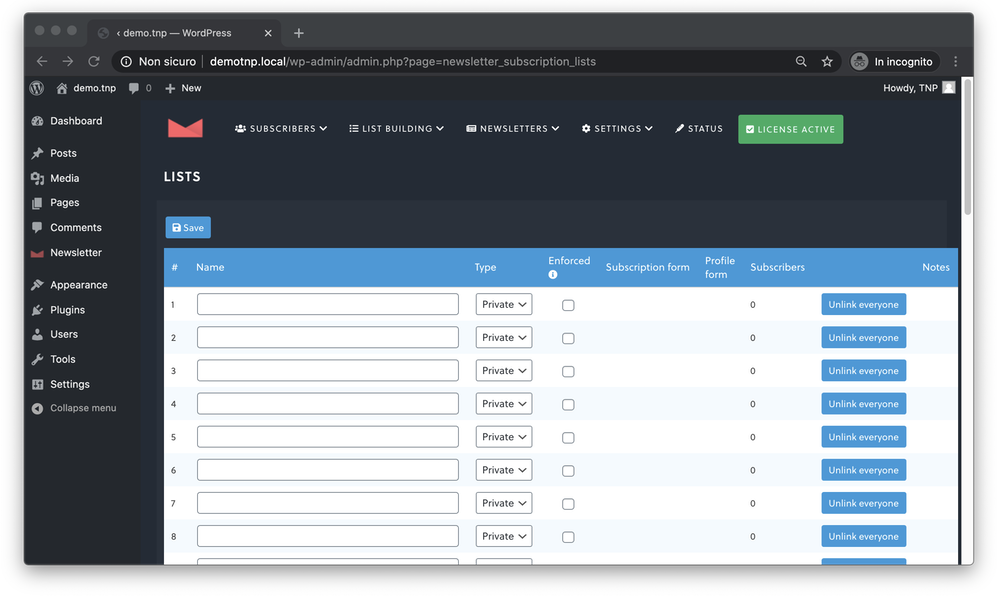
Custom fields: Custom subscriber profile fields are available across all tiers. You can capture name, city, interests, or any other data at subscription time, and use those fields for targeting and personalization in campaigns.
Opt-in types: Single opt-in and double opt-in are both configurable. Double opt-in sends a confirmation email before adding the subscriber to the list, which improves list quality and satisfies GDPR requirements. GDPR compliance tools, including a privacy checkbox on forms and consent tracking, are available in all tiers.
Import/Export: The plugin supports CSV import and export across all tiers, which makes migrating from another platform possible without a paid upgrade. The Import addon (listed as free in the documentation) extends the import functionality.
Spam protection: Subscription forms include anti-bot protections including domain blacklisting, Akismet integration, and CAPTCHA compatibility. One-click unsubscribe (required by Google and Yahoo mail platforms since 2024) is supported and noted in the WordPress.org listing.
Statistics per subscriber: The plugin tracks engagement at the individual subscriber level, including opens, clicks, and campaign history. This is available in the Professional plan and above for the advanced view, with basic tracking available in all tiers.
Email composer and campaigns
The core creation experience is a block-based drag-and-drop composer that produces fully responsive HTML emails. The composer is described in the WordPress.org listing as a “Drag and drop composer and fully responsive emails,” and the vendor also offers a classic HTML editor for users who prefer direct markup control.
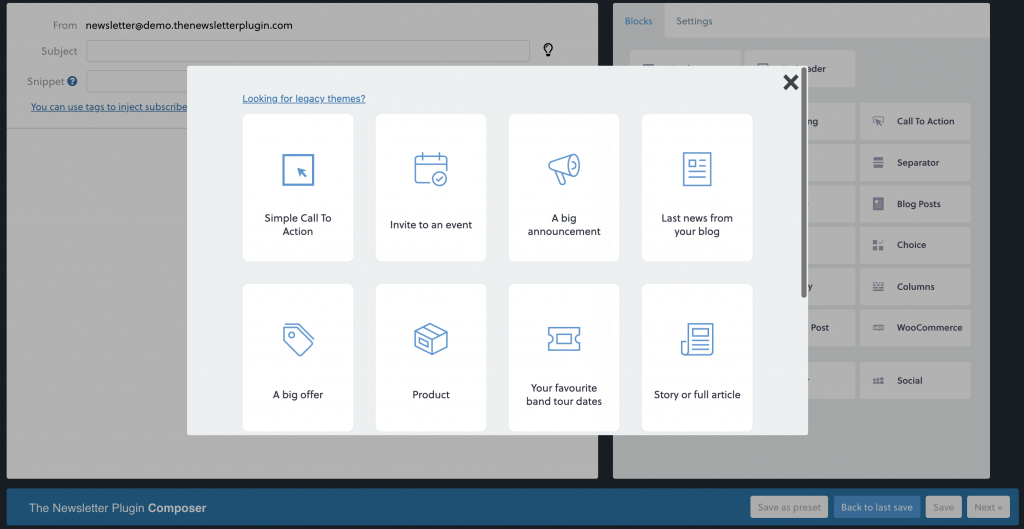
Available composer blocks across tiers include text, images, buttons, dividers, spacers, a blog post block that pulls in recent WordPress posts automatically, social icons, and a GIF block. The Essential plan adds extra composer blocks beyond the free set, and the Professional plan adds a WooCommerce products block that pulls live product data from the store catalog into newsletters.
One practical note from user reviews and third-party roundups: the visual output in the composer does not always match exactly what subscribers see across different email clients. Email client rendering varies, and the Newsletter Plugin’s composer, while generally responsive, produces some cross-client inconsistencies that more polished editors like MailPoet’s resolve with greater consistency. This is a known limitation of the plugin’s design approach.
Campaign targeting: You can target a campaign to all subscribers, to subscribers on specific lists, to subscribers who match list combinations, to subscribers with specific custom field values, or to subscribers in a specific language (for multilingual sites using WPML or Polylang). This targeting is available across all tiers.
Scheduling: Newsletters can be scheduled for a specific date and time, available in all tiers. The Automated (periodic) newsletter feature, which automatically generates and sends newsletters when new blog posts are published on a schedule, is a Professional plan feature.
Delivery speed control: The plugin allows fine-tuning of the delivery rate, from as few as 12 emails per hour to the maximum the server can handle. This is useful for shared hosting environments where sending too fast triggers host-level throttling.
Newsletter archive: A public newsletter archive page is supported, so subscribers or visitors can read past campaigns on the website. This is referenced in the features documentation.
Analytics and reporting
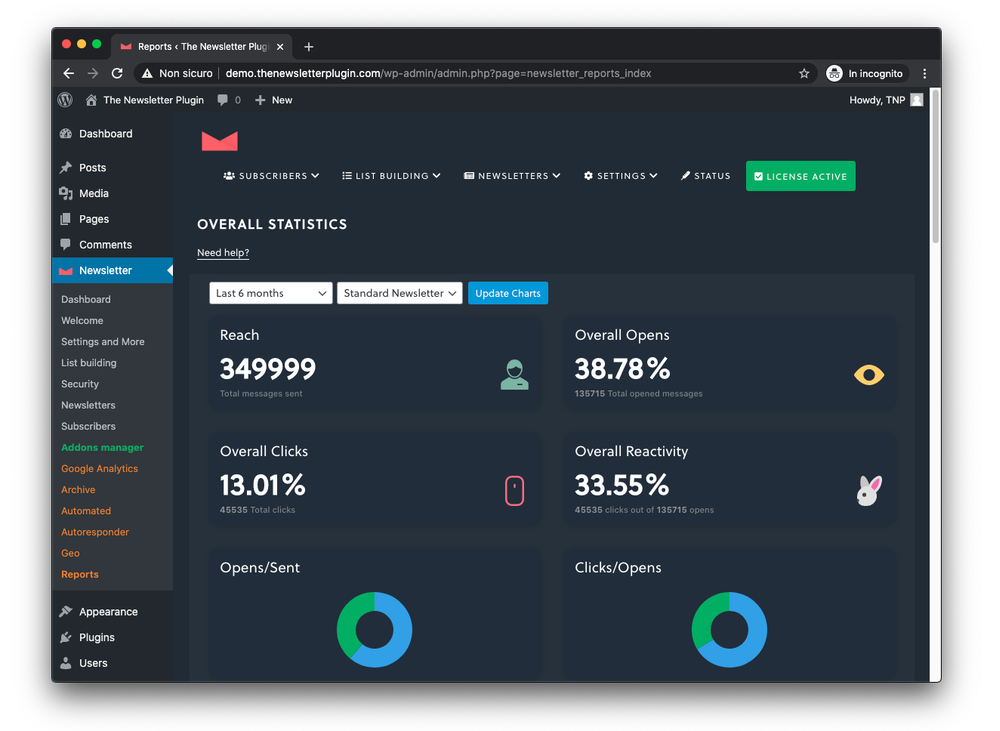
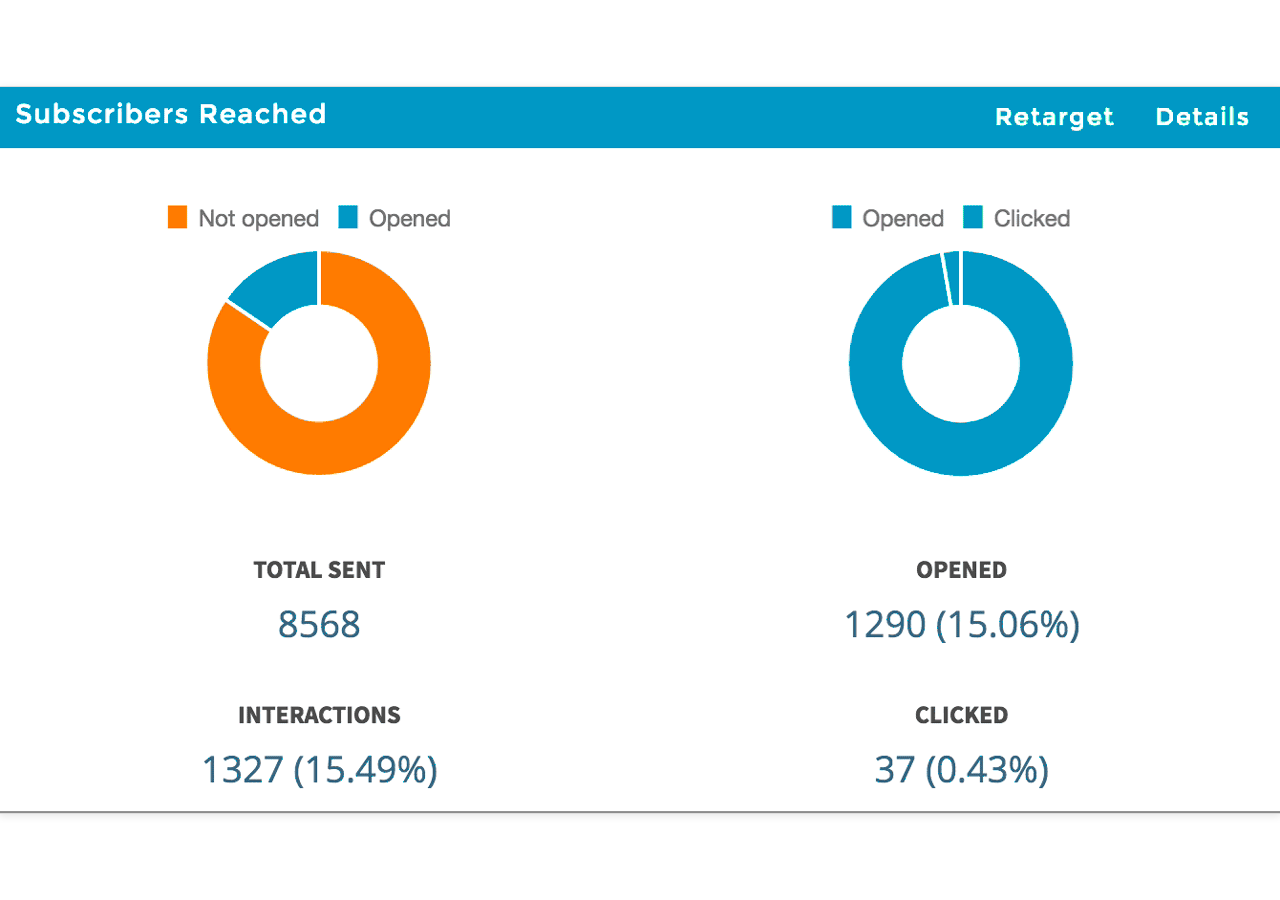
Free tier analytics: The free version includes basic reporting per newsletter: opens and clicks are tracked. You can see how many emails were sent, how many were opened, and how many links were clicked. This is enough to understand whether a campaign worked.
Advanced reports (Essential and above): The Essential plan unlocks the Reports addon, which provides detailed per-campaign breakdowns including engagement graphs over time, click-level data showing which links were clicked and how many times, and individual subscriber activity (which subscribers opened, clicked, or did not engage). This subscriber-level view is the analytics feature most serious senders will want.
Google Analytics integration (Essential and above): The Essential plan adds automatic Google Analytics campaign parameter tracking on all links in newsletters. Each link gets UTM parameters added at send time. This is configurable per campaign and works alongside the plugin’s own tracking.
Geolocation (Essential and above): Subscriber location tracking from IP address at subscription time is available with the Essential plan and above. This allows sending campaigns targeted by country or region.
Retargeting: The Professional plan adds behavioral segmentation: you can target resend campaigns to subscribers who did not open a previous newsletter, or to subscribers who clicked a specific link. This retargeting-by-action feature is a meaningful capability for re-engagement sequences.
Automation: autoresponders and email series
Automation is the area where the free and Essential plans hit a clear wall.
The autoresponder system, available in the Professional plan, allows you to set up a series of emails with configured delay intervals. A subscriber joins a list, receives the first email immediately (or after a configured delay), then receives subsequent emails at the intervals you set: 3 days later, 1 week later, 2 weeks later, and so on. This is the standard welcome series or drip campaign model.
Series are configured with a set of messages called steps. Each step has its own delay and content. The system works only on confirmed subscribers (double opt-in completers), which keeps the automation list clean by design. When a subscriber completes all steps, the series ends; you can configure a list reassignment at that point to move them to a different segment.
The Automated Newsletter feature (also Professional) automatically generates a newsletter from your latest blog posts and sends it on a configured schedule (daily, weekly, monthly, or a specific date). The “smart” skip option prevents sending when no new content has been published since the last automated send, which avoids empty-looking newsletters.
What the automation system does not offer: multi-branch conditional logic (if subscriber clicks X, send email A; if they do not, send email B), behavioral event triggers beyond open/click retargeting, or the kind of full marketing automation sequences found in FluentCRM or ActiveCampaign. The Newsletter Plugin’s automation is well-suited to linear drip series and automatic blog digests. For complex behavioral workflows, it is not the right tool.
WooCommerce and e-commerce integration
WooCommerce integration is fully a Professional plan feature. There is no WooCommerce functionality in the free or Essential tiers.
The Professional plan’s WooCommerce integration covers:
- Import customers as subscribers: Pull existing WooCommerce customers into a newsletter list, mapped by order status if needed.
- Checkout opt-in: An opt-in checkbox on the WooCommerce checkout page, so new customers can subscribe when they place an order.
- Account opt-in: An opt-in option on the WooCommerce My Account page for registered customers.
- Segment by purchased products: Create subscriber segments based on what customers have bought, enabling product-specific follow-up campaigns.
- Products composer block: A composer block that pulls live WooCommerce product data (name, image, price, add-to-cart link) directly into newsletter campaigns without manual copy-paste.
The Easy Digital Downloads integration follows the same pattern: customer import, checkout opt-in, and EDD-specific product segmentation.
What is not in the integration: abandoned cart emails. The Newsletter Plugin’s WooCommerce integration focuses on subscribed customer marketing and post-purchase follow-up rather than cart recovery. If abandoned cart automation is the primary WooCommerce email use case, a dedicated WooCommerce email plugin or MailPoet (which includes abandoned cart emails in its free tier) is a better fit for that specific workflow.
Delivery services and inbox placement
This is the most important technical consideration for anyone evaluating the Newsletter Plugin: it does not have its own email sending infrastructure.
The free version is compatible with any WordPress SMTP plugin. If you already have Post SMTP, WP Mail SMTP, Fluent SMTP, or a similar plugin configured, the Newsletter Plugin sends through that connection. The free tier also natively supports MailerSend, SMTP2Go, SMTP.com, and SendPulse as delivery options (no Professional plan required for these four).
The Professional plan and above add full API-level integrations with bounce and complaint management built in: Amazon AWS SES (marked as a featured integration), SendGrid, Postmark, Mailgun, Mailjet, Elastic Email, and SparkPost.
The distinction between “compatible with SMTP plugin” and “direct API integration with bounce management” matters for serious senders. When the Newsletter Plugin connects to Amazon SES through a general SMTP plugin, it sends the email but does not automatically process SES bounce notifications or complaint events. When it connects to SES through the Professional plan’s native integration, bounce and complaint events are synced back to the subscriber database automatically, which protects sender reputation by removing bad addresses.
For high-volume senders or any site where inbox placement is business-critical, the Professional plan’s delivery integrations are the feature that makes the upgrade most defensible.
Integrations
Form builders: The Essential plan adds integrations with Gravity Forms, Contact Form 7, Elementor Forms, Forminator, WPForms, Ninja Forms, Fluent Forms, and Formidable Forms. These integrations add a newsletter opt-in field to forms built with those plugins, so subscribers collected through contact forms, booking forms, or any other form can be added to the newsletter list. This is not available in the free version.
Event managers: The Essential plan also adds integrations with The Events Calendar, Events Manager, EventPrime, and WP Event Manager. These allow adding event details (date, venue, images) as newsletter content blocks, and sending targeted campaigns to attendees of specific events.
Membership plugins: The Professional plan adds integrations with Paid Membership Pro, Ultimate Member, MemberPress, and WP Users Pro. These allow importing members as subscribers with their membership level mapped to newsletter lists, enabling targeted communications by membership tier.
WordPress user registration: A free addon (WP Registration Addon) connects new WordPress user registrations to the newsletter subscription system. Optionally, all existing registered users can be imported as subscribers. This is available in all tiers.
REST API and webhooks: A REST API is included in all tiers. This allows external applications to add or update subscribers, trigger sends, or query subscriber data programmatically. Webhook support is also available for event-driven integrations with Zapier and other automation platforms.
WPML and Polylang: Multilingual newsletter targeting is supported in all tiers, allowing language-specific campaigns to subscribers who subscribed in a specific language.
Pricing and license value
The Newsletter Plugin uses a one-time payment model, which is unusual in a category dominated by monthly SaaS subscriptions. You pay once, get one year of premium support and software updates, and after that year the add-ons continue to work, but compatibility with new major versions of WordPress or the core Newsletter Plugin is not guaranteed.
That licensing model has a meaningful practical implication: if you install the Professional plan today, use it for a year, and then stop renewing, the automation and delivery integrations will continue to function on the current plugin version. But if WordPress releases a major update or the Newsletter Plugin’s core changes, the unlicensed add-ons may stop working without a new purchase.
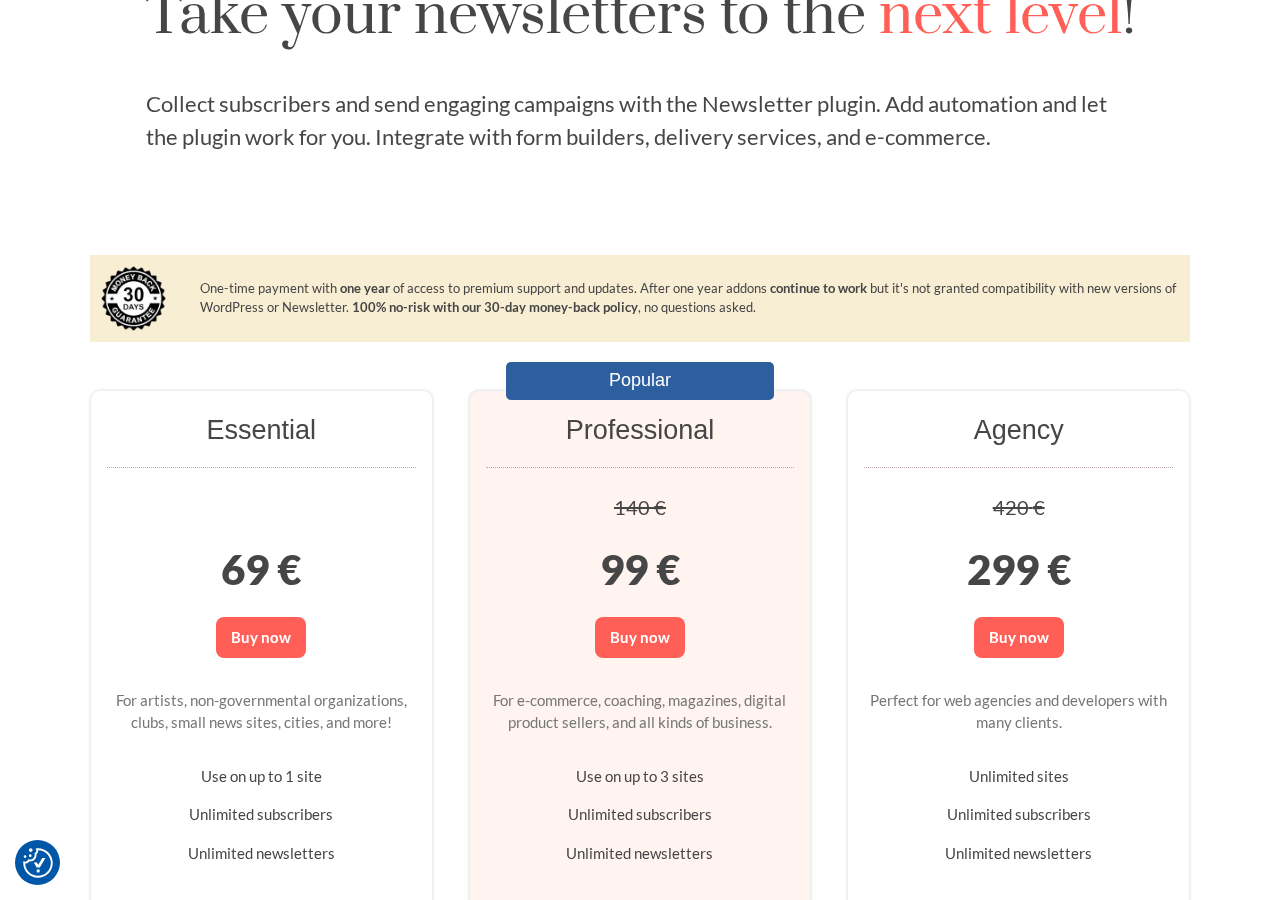
Current plans and prices (verified August 2026 from thenewsletterplugin.com/premium):
Free (no purchase required)
- Unlimited subscribers
- Unlimited newsletters
- Drag-and-drop visual composer
- Basic subscriber forms (shortcode, widget)
- Single and double opt-in, GDPR compliance
- Basic reports (opens, clicks)
- Compatible with any SMTP plugin
- Free API integrations: MailerSend, SMTP2Go, SMTP.com, SendPulse
- WordPress user registration integration (free addon)
- REST API access
- Import/export
- Lists and basic targeting
Essential: 69 EUR (one-time, 1 site)
Everything in Free, plus:
- Advanced campaign-level reports
- Google Analytics link tracking
- Geolocation tracking
- Extra composer blocks
- AI assistant (alpha)
- List growth forms: popup, topbar, in-post form injection, subscription-on-comment, locked content
- Form builder integrations: Gravity Forms, Contact Form 7, Elementor, WPForms, Ninja Forms, Fluent Forms, Forminator, Formidable
- Event manager integrations: The Events Calendar, Events Manager, EventPrime, WP Event Manager
- WPML/Polylang multilanguage support (premium level)
- Priority support
Professional: 99 EUR (one-time, up to 3 sites, marked Popular)
Everything in Essential, plus:
- Autoresponders and email series (multi-step drip campaigns)
- Automatic periodic newsletter generation from blog posts
- WooCommerce integration (customer import, checkout opt-in, product segmentation, products composer block)
- Easy Digital Downloads integration
- Membership plugin integrations: Paid Membership Pro, Ultimate Member, MemberPress, WP Users Pro
- Delivery service API integrations with bounce and complaint management: Amazon SES, SendGrid, Postmark, Mailgun, Mailjet, Elastic Email, SparkPost
Agency: 299 EUR (one-time, unlimited sites)
Everything in Professional, for unlimited site installs.
Billing notes: All prices are one-time payments in EUR. There are no monthly recurring fees. The listed prices at time of audit show discounts (Professional shown as 99 EUR from 140 EUR; Agency shown as 299 EUR from 420 EUR). Verify current prices before purchasing, as promotional pricing may vary. After one year, add-ons continue to function but are not guaranteed compatible with new WordPress or Newsletter Plugin versions. Renewing extends the support and update period. 30-day money-back guarantee on all paid plans, no questions asked.
Pros and cons
Pros
- Genuinely unlimited subscribers and newsletters in the free version. No cap at any list size, no “upgrade to send more” wall at 500 or 1,000 contacts.
- One-time payment model for paid plans. No monthly subscription fees. The Professional plan at 99 EUR covers 3 sites without recurring charges.
- Self-hosted with complete data ownership. Subscriber database stays on your server; no subscriber data in a third-party cloud.
- Wide delivery service compatibility. Compatible with any WordPress SMTP plugin for free; Professional adds native API integrations with Amazon SES, SendGrid, Mailgun, Postmark, and more, with built-in bounce management.
- Strong list management. Multiple lists, AND/OR/NOT targeting logic, custom subscriber fields, and behavioral retargeting (re-send to non-openers) across plans.
- Active development. Version 9.3.4 includes security patches and steady feature updates; version 9.2.0 improved the sending engine locking strategy.
- Solid WordPress.org track record. 4.6 out of 5 stars across 1,203 reviews; 200,000+ active installations; tested to WordPress 7.0.4.
- One-click unsubscribe is fully supported, required by Google and Yahoo since 2024.
- Good integration breadth in the paid tiers: form builders, event managers, membership plugins, WooCommerce, and EDD all covered.
- 30-day money-back guarantee on all paid plans.
Cons
- No built-in sending service. Unlike MailPoet, the Newsletter Plugin has no proprietary email delivery infrastructure. Sending reliable email requires configuring an SMTP plugin (free but requires setup) or paying for a delivery service account separately.
- Automation is Professional-only. Autoresponders and email series are not available even on the Essential plan. If you want any kind of drip campaign, you need the 99 EUR Professional tier.
- WooCommerce integration is Professional-only. There is no WooCommerce connection in the free or Essential plans. This includes checkout opt-in, customer import, and the product composer block.
- No abandoned cart emails. The WooCommerce integration in the Professional plan covers post-purchase marketing and checkout opt-in, but not cart abandonment recovery. Sites that need cart recovery need a different plugin or addon.
- UI is dated. The admin interface design uses an older aesthetic that does not match the current WordPress block editor style. Users accustomed to MailPoet’s or Mailchimp’s modern UI will notice the visual gap. Some reviewers on WordPress.org find the interface confusing on first contact.
- License continuity risk. After one year, add-ons “continue to work” but compatibility with new WordPress or Newsletter Plugin versions is not guaranteed. Long-term users need to factor in renewal costs.
- No built-in A/B testing. There is no split testing feature for subject lines or campaign content.
- No multi-channel or CRM features. Users who need contact scoring, behavioral event tracking beyond open/click, or multi-channel sequences (email + SMS + push) need a CRM-focused tool like FluentCRM.
Alternatives to the Newsletter Plugin
- MailPoet. The most direct comparison. MailPoet includes a proprietary sending service in its free plan (up to 5,000 emails per month, 500 subscribers), eliminating the deliverability setup step. Its free tier is more limited in subscriber count but easier to get running. The Newsletter Plugin wins on unlimited subscriber count and one-time pricing; MailPoet wins on out-of-box deliverability and a more modern UI.
- Mailchimp for WordPress (MC4WP). A form plugin that connects your WordPress forms to an existing Mailchimp account. If you already use Mailchimp, MC4WP is a clean integration layer rather than a full email marketing system. Pick it when Mailchimp is your platform of record and you just need WordPress forms to feed it.
- FluentCRM. A self-hosted CRM and marketing automation plugin for WordPress. If you need multi-step conditional email sequences, contact scoring, and sales pipeline integration alongside email marketing, FluentCRM is the right direction. It is more complex to set up and starts at a higher price point, but it handles automation depth that the Newsletter Plugin does not.
- Omnisend. A SaaS email and SMS marketing platform with a free tier. Pick it if you want abandoned cart recovery, SMS, and push notifications in a single platform, and you are comfortable with your subscriber data in an external cloud. The free plan is generous but has monthly send limits.
- Mailster. A premium-only WordPress newsletter plugin (from 79 USD per year, no free version) with a more modern interface, included automation, and a native spam-check integration. Pick it if you want a polished one-plugin solution and are willing to pay from day one.
- Brevo (formerly Sendinblue) WordPress plugin. Connects WordPress to the Brevo SaaS platform. The free tier includes 300 emails per day and unlimited contacts. Pick it if transactional email and marketing email unified in one SaaS account is more important than self-hosting.
For most WordPress users who want a free, unlimited newsletter system and are comfortable with SMTP setup or already have a delivery account, the Newsletter Plugin is the strongest self-hosted option. For users who want everything working out of the box with no configuration work, MailPoet’s free plan is the easier starting point.
Final verdict
The Newsletter Plugin earns its place as the default recommendation for one specific profile: a WordPress site owner who needs an unlimited, self-hosted newsletter system with no monthly subscriber fees, and who has the technical comfort level (or motivation) to configure a delivery service for reliable inbox placement.
The free version is more capable than it appears at first glance. Unlimited subscribers, unlimited newsletters, a drag-and-drop composer, double opt-in, list management, basic analytics, REST API, and SMTP plugin compatibility at zero cost is a serious free tier. The competitors that put this plugin in context are SaaS tools with subscriber caps; compared to them, the Newsletter Plugin’s free version looks very strong on price and control.
The paid plans make more sense once you understand the one-time pricing model. 99 EUR once (not per month) for automation, WooCommerce, and professional delivery integrations on up to 3 sites is a fundamentally different cost structure from paying 15 EUR to 30 EUR per month for similar features from a SaaS tool. Over two years, the difference is significant.
The honest caveats: the UI is not as polished as MailPoet or modern SaaS tools. The automation system covers the basics but not complex behavioral workflows. And the deliverability setup is real work, not optional fine-tuning. If you want an email newsletter system that works immediately with no SMTP configuration, the Newsletter Plugin free tier will disappoint. If you configure it properly, it is one of the most cost-effective email tools in the WordPress ecosystem.
Where I would look elsewhere: WooCommerce stores that specifically need abandoned cart recovery (the plugin does not include this), teams that want conditional multi-branch automation, and users who absolutely cannot spend time on SMTP setup. For everyone else managing a self-hosted WordPress site with a list of any size, the Newsletter Plugin is worth a serious look.
FAQ
Is the Newsletter Plugin free?
Yes, the core plugin is free with no feature expiry and no subscriber cap. The free version is available on WordPress.org and includes unlimited subscribers, unlimited newsletters, a drag-and-drop composer, double opt-in, lists, basic analytics, and SMTP plugin compatibility. Paid plans (Essential at 69 EUR, Professional at 99 EUR, Agency at 299 EUR) are one-time payments that unlock additional features including automation, advanced analytics, WooCommerce integration, form builder integrations, and delivery service API connections.
How many active installs does the Newsletter Plugin have?
The WordPress.org listing shows 200,000+ active installations and 4 million total downloads (as of August 2026). The plugin has been available on WordPress.org since 2011. Its 4.6-star rating is based on 1,203 reviews.
Does the Newsletter Plugin limit subscribers?
No. The free version, and all paid plans, support unlimited subscribers. There is no subscriber cap at any tier. This is the plugin’s most significant differentiator compared to SaaS newsletter platforms that cut off free access at 500 or 1,000 contacts.
Does the Newsletter Plugin have a built-in email sending service?
No. Unlike MailPoet, the Newsletter Plugin does not include a proprietary email delivery service. The free version is compatible with any WordPress SMTP plugin (Post SMTP, WP Mail SMTP, Fluent SMTP, and others) and includes native support for MailerSend, SMTP2Go, SMTP.com, and SendPulse. The Professional and Agency plans add direct API integrations with Amazon SES, SendGrid, Postmark, Mailgun, Mailjet, Elastic Email, and SparkPost, including automatic bounce and complaint management.
Is the Newsletter Plugin suitable for WooCommerce stores?
Partially. The WooCommerce integration is available only on the Professional plan (99 EUR one-time) and above. It covers customer import, checkout opt-in, segmentation by purchased products, and a product composer block for newsletters. It does not include abandoned cart recovery. Sites where cart abandonment emails are the primary WooCommerce email need should evaluate MailPoet or a dedicated WooCommerce follow-up plugin for that feature.
What is the difference between the Essential and Professional plans?
The Essential plan (69 EUR, 1 site) adds advanced campaign analytics, Google Analytics tracking, geolocation, list growth forms (popup, topbar, in-post), form builder integrations, and event manager integrations to the free feature set. The Professional plan (99 EUR, up to 3 sites) builds on Essential by adding autoresponders and email series (drip automation), automatic blog post newsletters, WooCommerce and EDD integration, membership plugin integrations, and delivery service API connections with bounce management. Automation is the clearest reason to choose Professional over Essential.
Is the Newsletter Plugin a one-time payment?
Yes. All paid plans use a one-time payment model rather than monthly subscriptions. The payment includes one year of premium support and software updates. After the first year, add-ons continue to function but compatibility with new major versions of WordPress or the Newsletter Plugin core is not guaranteed. Renewing the license extends the support and update period. The 30-day money-back guarantee applies to all plans.
How does the Newsletter Plugin compare to MailPoet?
The Newsletter Plugin and MailPoet are the two strongest self-hosted WordPress email plugins. The Newsletter Plugin’s advantages are: unlimited subscribers even in the free version (MailPoet free caps at 500), one-time payment for paid plans (MailPoet charges monthly), and data fully on your server with no external account required. MailPoet’s advantages are: a built-in sending service in the free tier (no SMTP setup needed), a more modern and intuitive UI, and abandoned cart automation included in the WooCommerce integration at lower plan tiers. For budget-conscious sites with large lists, the Newsletter Plugin’s unlimited-subscriber free tier is the stronger starting point. For sites that value out-of-box deliverability and ease of use, MailPoet is the easier path.
Can I use the Newsletter Plugin on multiple sites?
The free version can be installed on any number of sites. Paid plans have site limits: Essential covers 1 site, Professional covers up to 3 sites, and Agency covers unlimited sites. All paid plan prices are one-time (not per year per site), so the Agency plan at 299 EUR one-time is cost-effective for agencies managing multiple client installations.
What WordPress version does the Newsletter Plugin support?
Version 9.3.4, the current release at the time of this review, is tested to WordPress 7.0.4 and requires PHP 7.0 or higher. WordPress 6.1 is the minimum supported version according to the WordPress.org listing.
Is there a money-back guarantee?
Yes. All paid plans come with a 30-day money-back guarantee with no questions asked.