


At a Glance
- Plugin: Ninja Tables by WPManageNinja
- Active installs: 70,000+
- Rating: 4.6/5 (471 reviews on WordPress.org)
- Current version: 5.2.15 (August 2026)
- Free version: Yes, with limited features
- Pro pricing: From $63/year (1 site)
- Money-back guarantee: 14 days
- Best for: WooCommerce tables, agencies, data-driven responsive tables
Quick Verdict
Ninja Tables is a capable WordPress table plugin with a genuinely easy drag-and-drop builder. The free version covers the basics, but most features that set it apart, including Google Sheets sync, WooCommerce product tables, conditional formatting, and custom filters, require a Pro upgrade starting at $63 per year. For WooCommerce store owners and agencies managing multiple sites, the value is solid. If you only need simple static tables, the free version or TablePress may be enough.
What Is Ninja Tables?
Ninja Tables is a WordPress table builder plugin developed by WPManageNinja, the team behind Fluent Forms, FluentCRM, and FluentCart. The plugin launched in 2017 and has grown to over 70,000 active installations with a 4.6 out of 5 star rating across 471 reviews on WordPress.org.
The plugin offers two table creation modes: Simple Mode (drag-and-drop visual builder) and Advanced Mode (classic form-based editor with more granular control). Both modes let you embed tables via shortcode or a Gutenberg block anywhere on your site. The Pro version connects to external data sources including Google Sheets, WooCommerce, and WordPress post types.
Who Is Ninja Tables Best For?
- WooCommerce store owners who want a filterable product comparison table or catalog outside the default shop grid.
- Marketing agencies managing multiple client sites who benefit from the Agency or Unlimited license.
- Content creators publishing data-heavy posts: comparison tables, pricing breakdowns, sports standings, or employee directories.
- Teams already using WPManageNinja products like Fluent Forms or FluentCart, since Ninja Tables connects directly to those data sources.
Ninja Tables is less suited for users who want a fully featured free table plugin without paying. TablePress offers a broader free feature set for basic data management without a Pro upgrade.
Installation and Setup
I installed the free version of Ninja Tables from WordPress.org on a clean WordPress install. The process is standard: search for “Ninja Tables” in the plugin directory, install, and activate. No account creation or license key is required for the free version.
After activation, a “Ninja Tables” menu item appears in the WordPress admin sidebar. The dashboard shows your table list and a button to create a new one. Clicking “Add New” prompts you to name the table, then directs you into the builder where you choose Simple Mode or Advanced Mode.
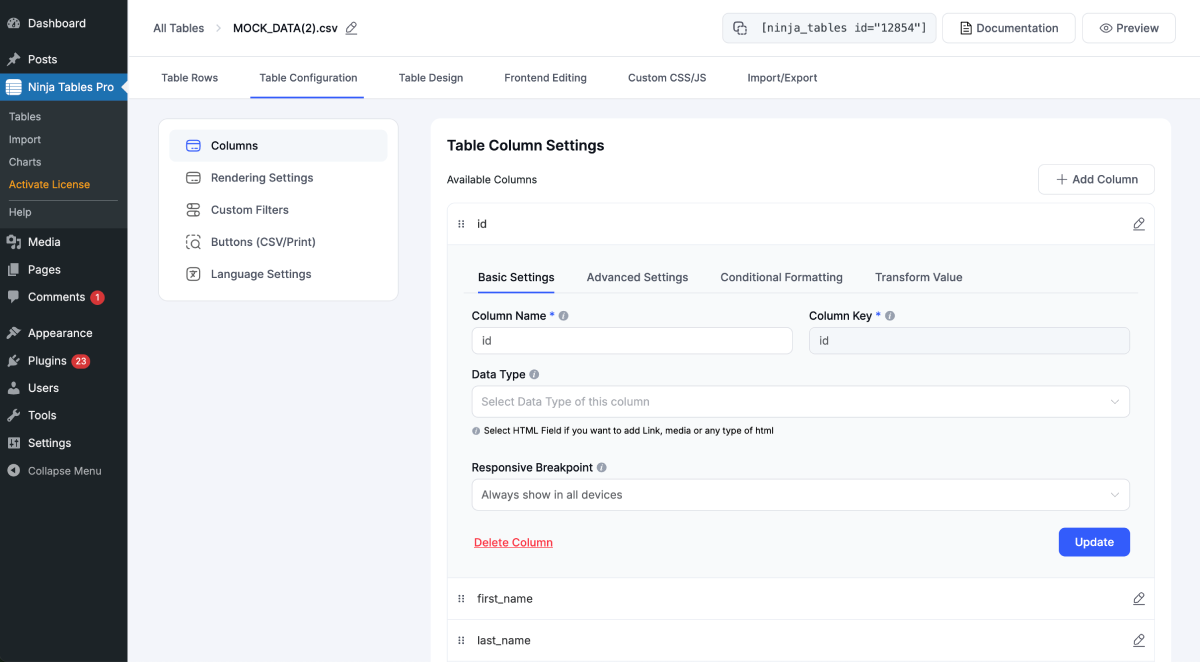
The backend interface is clean and uncluttered. There are no upsell banners crowding the admin screens, which is a better experience than many freemium plugins. Simple Mode is genuinely beginner-friendly: you add columns, select field types, and fill in rows directly in the interface, similar to editing a lightweight spreadsheet.
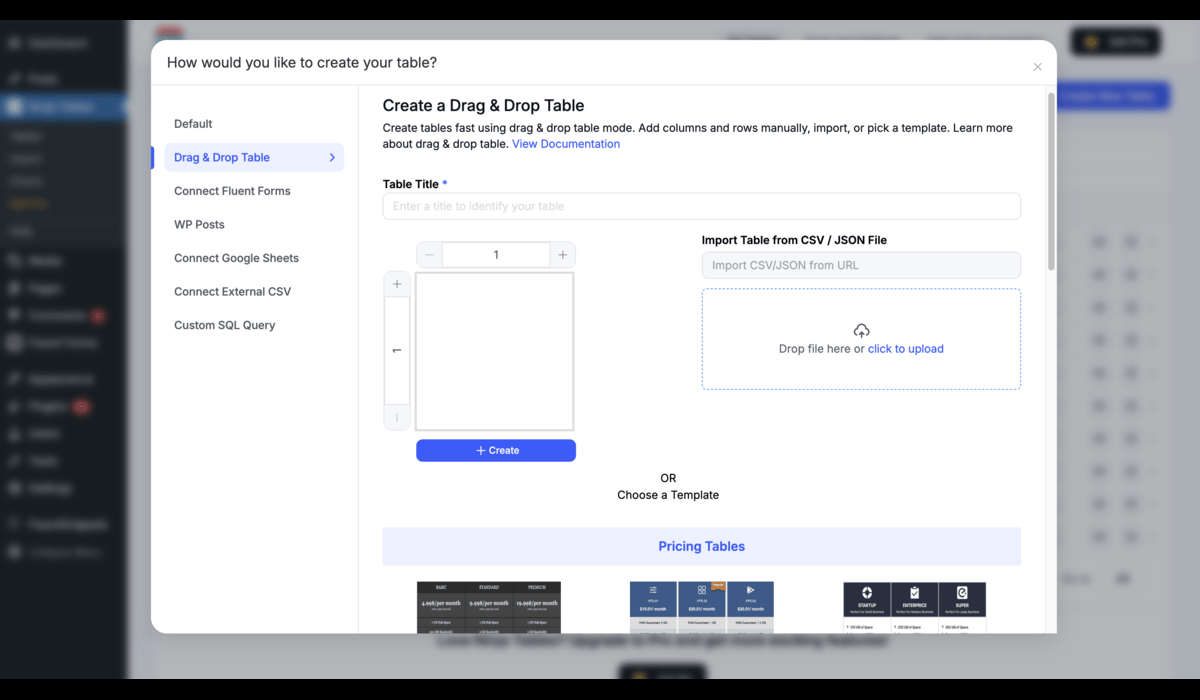
Every table generates a shortcode for embedding in posts, pages, or widgets. A Gutenberg block is also available for embedding tables directly in the block editor. The shortcode approach means the plugin works regardless of which page builder or theme you use.
Main Features
Drag and Drop Table Builder
The Simple Mode builder is the headline feature for non-technical users. You build tables visually by adding columns, selecting field types (text, image, button, link), and filling rows inline. The table preview updates live as you work. Building a basic product spec or pricing comparison table takes under five minutes from install.
100+ Table Styles and Design Customization
Ninja Tables ships with over 100 pre-built visual styles based on Bootstrap 3, Bootstrap 4, and Semantic UI CSS libraries. You can apply preset color schemes or build a custom palette. In the free version, custom color schemes are not available; you get the default style options. Pro unlocks the full color and design customization layer, including single-column color highlights and custom palettes.
Responsive Tables with Six Breakpoints
Ninja Tables handles responsive design by letting you set column visibility rules at six screen-size breakpoints. On small screens, the “Stackable” option reflows each table row into a vertical block, so mobile readers see data clearly without horizontal scrolling. This is one of the stronger points compared to basic alternatives: TablePress handles mobile mostly through scroll or basic column hiding, while Ninja Tables gives you more granular per-breakpoint control.
WooCommerce Product Tables (Pro)
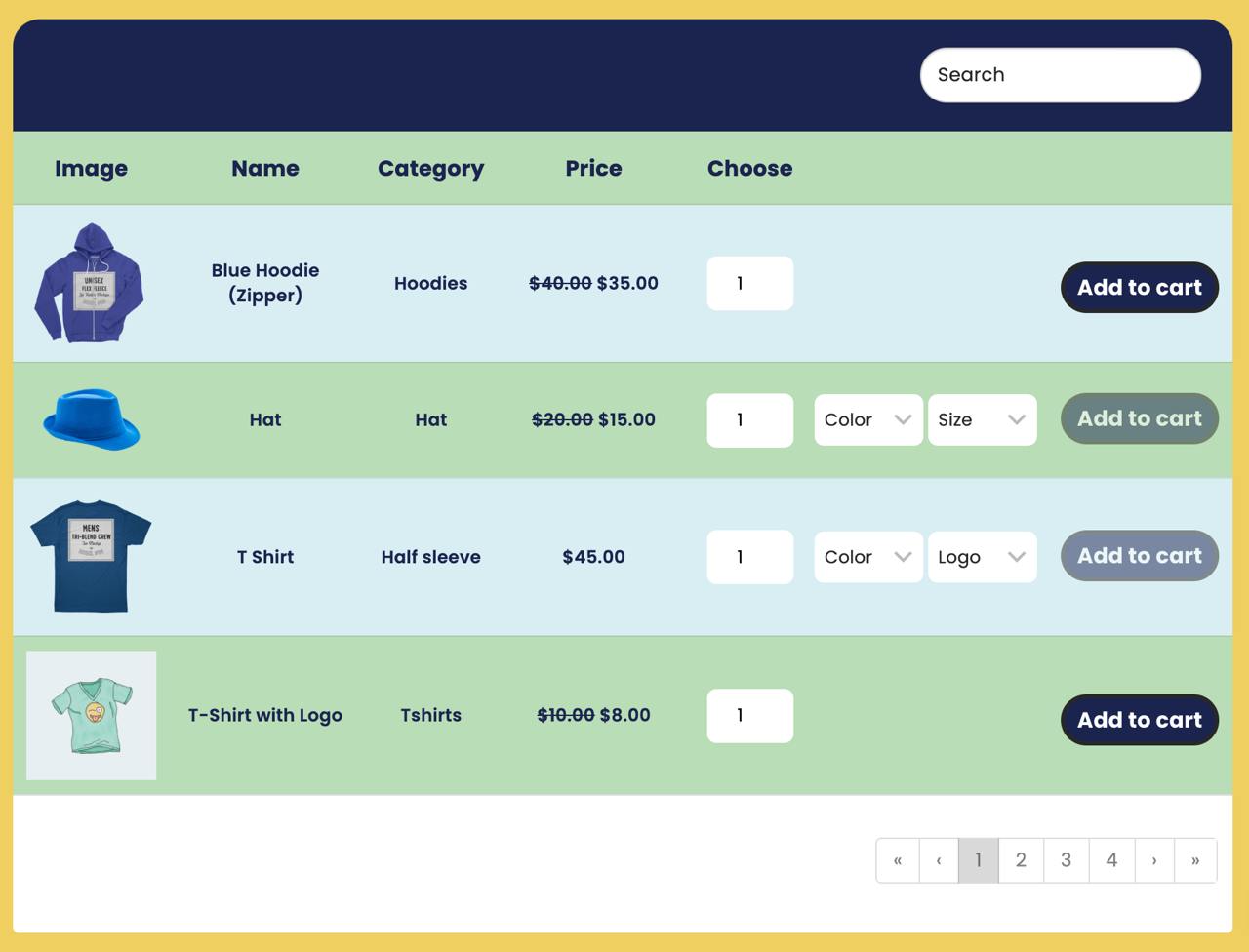
The WooCommerce integration is one of the clearest reasons to upgrade to Pro. You connect Ninja Tables to your WooCommerce product catalog and build a table showing products with images, prices, ratings, and Add to Cart buttons. The integration pulls live product data automatically so the table stays current when prices or stock change. Custom filters let visitors sort by category, price range, or product attributes.
Google Sheets Auto-Sync (Pro)
Pro users can connect a published Google Sheet to a Ninja Tables table. The table pulls data from the sheet on a schedule or on demand. When you update the sheet, the table on your site updates automatically. This removes the manual CSV export-and-import workflow for teams that manage data in Google Sheets and want it visible on a WordPress site.
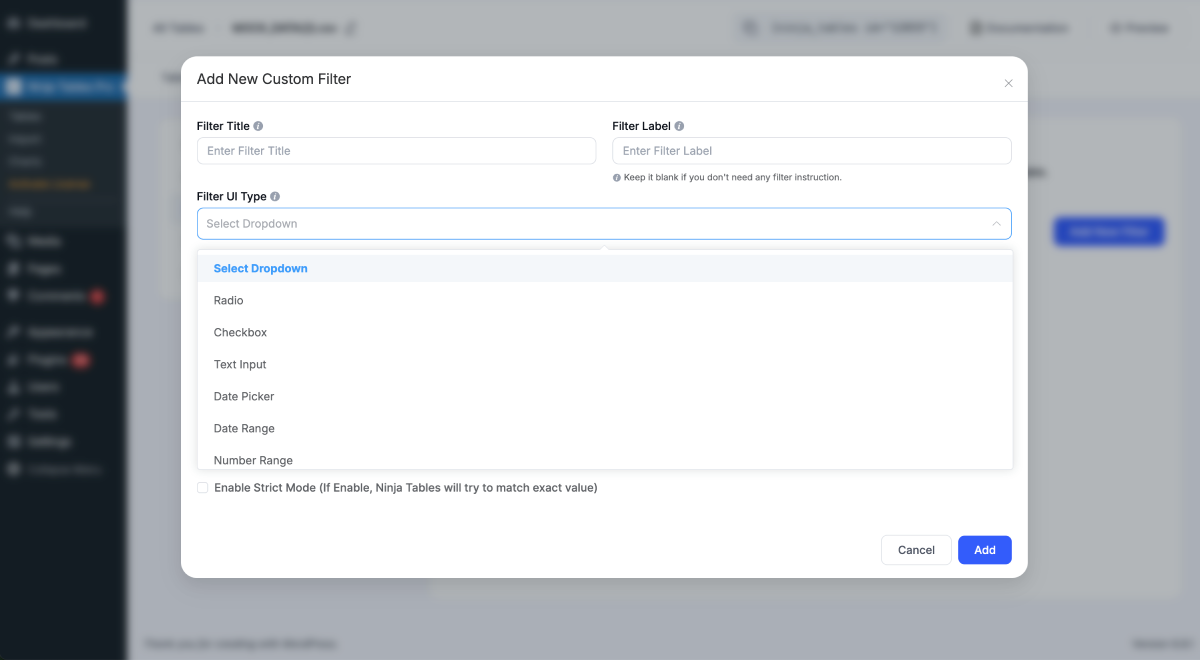
Custom Filters and Search (Pro)
Custom filters let site visitors narrow table data using dropdowns, checkboxes, or text search. This is a standard feature in premium data table plugins but absent from the free version. The DataTables rendering engine (introduced in version 5.2.8) improves filter accessibility and dynamic-select behavior for dropdown controls.
Conditional Formatting (Pro)
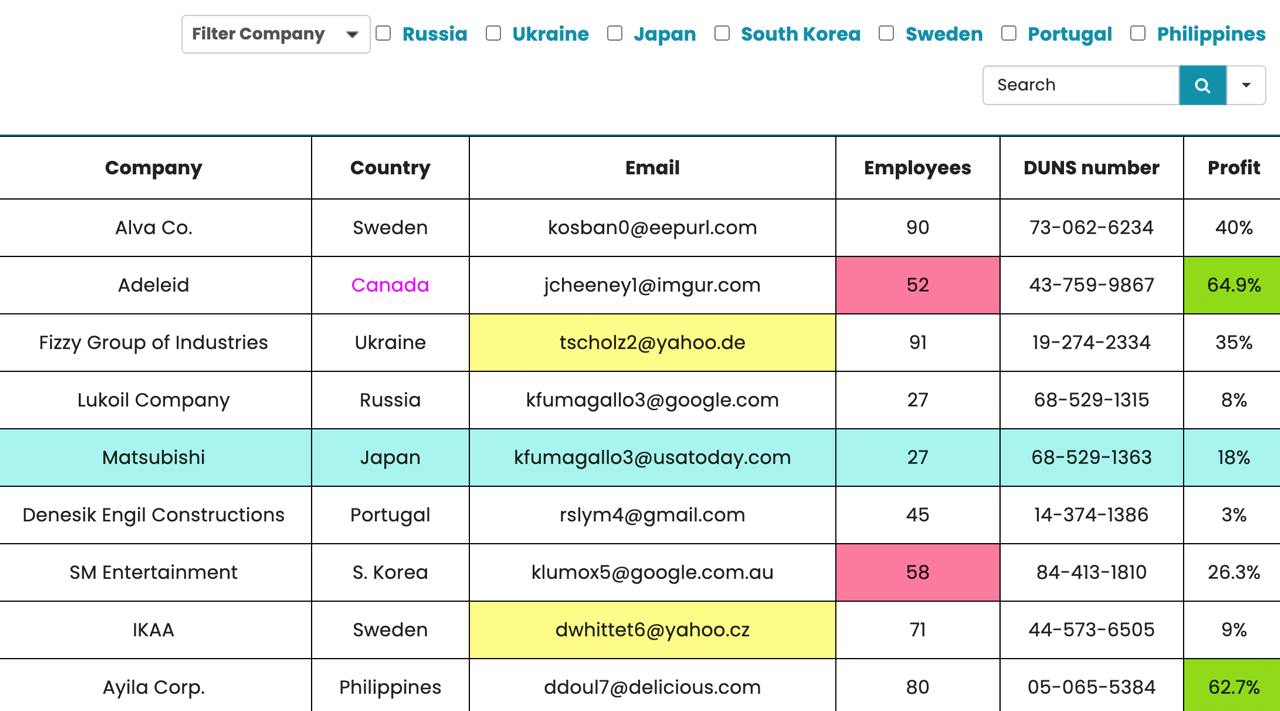
Conditional formatting lets you apply color highlighting or custom styles to cells based on their values. For example, you can highlight a “Low Stock” cell in red when inventory drops below a threshold, or color a “Score” cell green when it exceeds a target value. This is useful for product sheets, inventory displays, and reporting tables. It is entirely Pro-only.
Import from CSV, JSON, and TablePress
The plugin supports importing existing data from CSV and JSON files and offers a one-click TablePress importer that lowers the migration cost for users switching from the most popular free alternative. Exporting tables to CSV and JSON is available in both free and Pro versions. Version 5.2.12 addressed a reported bug in large CSV and JSON exports.
Ninja Charts Integration
Ninja Tables includes an integration with Ninja Charts, a companion visualization plugin from WPManageNinja. You can visualize table data as bar charts, pie charts, or line charts without leaving the Ninja Tables admin. This is included at no extra cost in both free and Pro versions.
WordPress Posts and Custom Post Type Tables (Pro)
Pro users can pull WordPress posts or custom post types into a table. This is useful for building a sortable list of posts by category, date, or custom field, displayed as a structured table rather than a standard blog grid. FluentCart product data is also available as a table source in Pro, at no additional cost.
Pricing
Ninja Tables is available as a free plugin from WordPress.org and a paid Pro version at ninjatables.com.
Annual Plans
| Plan | Sites | Price per Year |
|---|---|---|
| Single | 1 | $63 |
| Agency | 20 | $103 |
| Unlimited | Unlimited | $239 |
Lifetime Plans
| Plan | Sites | Price (one-time) |
|---|---|---|
| Single | 1 | $247 |
| Agency | 20 | $399 |
| Unlimited | Unlimited | $599 |
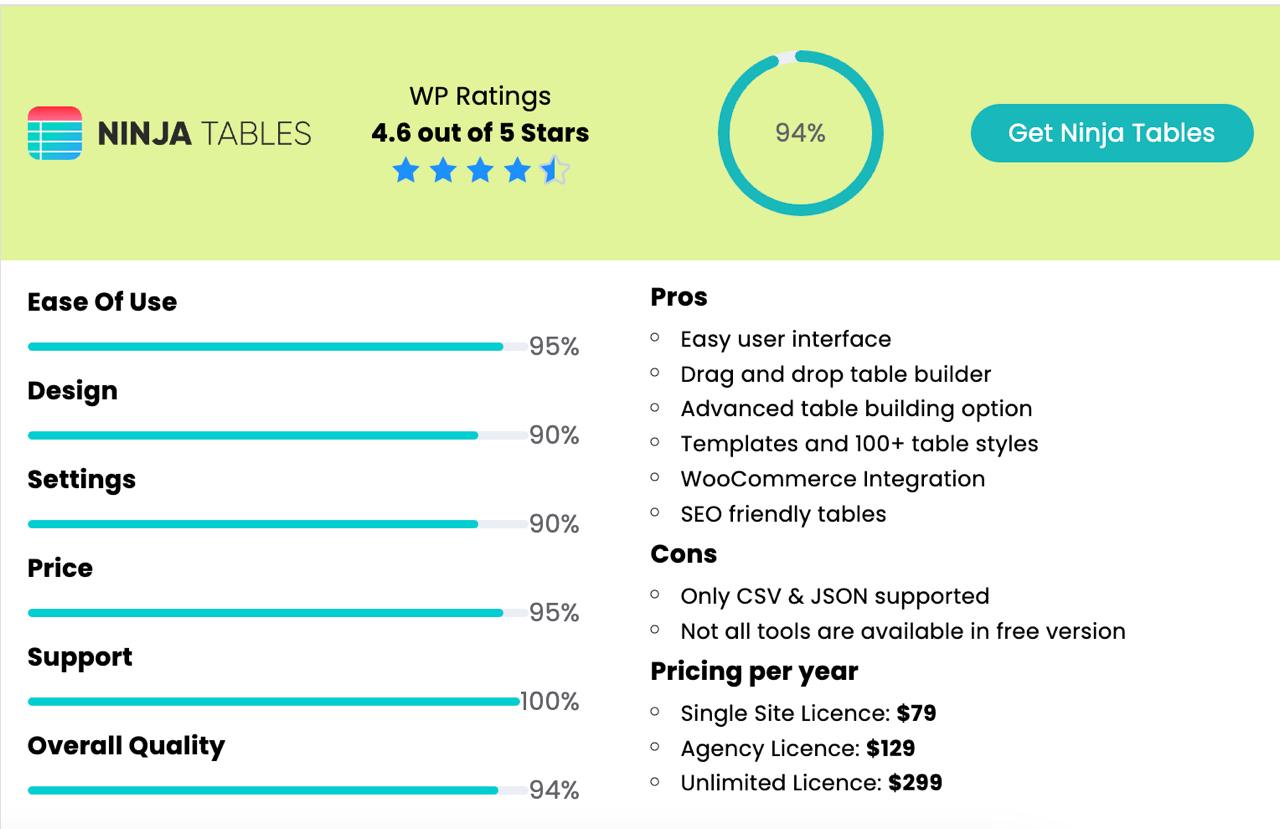
All plans include all Pro features, plugin updates for the license period, and priority support. A 14-day money-back guarantee applies to all purchases. The prices shown reflect a promotional discount; regular prices are listed as $79/$129/$299 annually. The discount applies to the first year on annual plans only.
Value note: The Agency plan at $103 per year for 20 sites is strong value if you manage client sites. Lifetime plans are worth considering for established sites where you expect to run the plugin long-term without annual renewal costs.
Pros and Cons
Pros
- Easy drag-and-drop builder for non-technical users
- Responsive tables with six configurable breakpoints
- WooCommerce product table integration (Pro)
- Google Sheets auto-sync removes manual CSV workflows (Pro)
- One-click TablePress importer for easy migration
- Clean admin interface with no aggressive upsell banners
- FluentCart and Fluent Forms data source support
- 14-day money-back guarantee
- Active development: eight releases in 2026 to date
- WCAG 2.1 AA accessibility improvements in 5.2.15
Cons
- Most differentiating features require a paid Pro upgrade
- Free version has no custom color schemes or design controls
- Documentation is primarily video-based; written docs are thin in places
- Padding and margin controls reported as limited by some users
- Support resolution rate was 3 of 6 recent tickets on WordPress.org at time of review
- Export reliability with very large datasets has had intermittent reported issues
Alternatives to Ninja Tables
TablePress: The most popular free WordPress table plugin. Its free version covers most common table needs with no Pro paywall. Pro add-ons are available for responsive features and advanced styling. TablePress has a lighter JavaScript footprint and broader compatibility, but fewer visual customization options and no WooCommerce or Google Sheets integration built in.
wpDataTables: A more advanced option for complex data management, SQL data sources, database connections, and chart generation. Heavier and more expensive than Ninja Tables, but better suited to analytical or business intelligence use cases.
WP Table Builder: A drag-and-drop table builder similar to Ninja Tables Simple Mode but with fewer data source integrations. Good for visually designed static tables on a tighter budget.
Tablesome: Has a generous free tier and native Gutenberg support. Fewer integrations than Ninja Tables Pro but no steep pricing wall for basic responsive table needs.
Final Verdict
Ninja Tables delivers on its core promise of fast, flexible table creation for WordPress. The drag-and-drop Simple Mode is one of the better table-building experiences I have tested: quick, uncluttered, and producing clean results without requiring code.
The free version is functional but closer to a preview than a fully capable tool. Most features worth recommending over a simpler alternative live behind the Pro upgrade. For a single site, $63 per year is competitive. The Agency plan at $103 for 20 sites is strong value for agencies.
If you run a WooCommerce store, manage multiple client sites with data-driven tables, or need Google Sheets sync, Ninja Tables Pro is worth the investment. If you only need simple static tables, start with the free version or consider TablePress first.
Score: 4.1 out of 5
FAQ
Is Ninja Tables free?
Yes. A free version is available on WordPress.org. It covers basic table creation and drag-and-drop editing. Advanced features like Google Sheets sync, WooCommerce product tables, custom filters, and conditional formatting require the Pro version.
What is the difference between Ninja Tables free and Pro?
The free version handles simple data tables with basic styling. Pro adds Google Sheets auto-sync, WooCommerce product tables, WordPress post tables, custom filters, conditional formatting, stackable responsive tables, multimedia support, frontend editing, column width control, and custom color schemes.
How much does Ninja Tables Pro cost?
Annual plans start at $63 per year for a single site, $103 per year for an Agency license covering 20 sites, and $239 per year for unlimited sites. Lifetime plans are available from $247 for a single site. All plans include a 14-day money-back guarantee.
Does Ninja Tables work with WooCommerce?
Yes, with Ninja Tables Pro. The WooCommerce integration lets you build product tables from your store catalog with filterable columns, product images, prices, and Add to Cart buttons. The table updates automatically when product data changes.
Can I import tables from TablePress?
Yes. Ninja Tables includes a one-click TablePress importer that pulls your existing tables into Ninja Tables format, making migration straightforward.
Is Ninja Tables responsive on mobile?
Yes. The plugin supports responsive design with six configurable breakpoints. The stackable table mode reflows rows vertically on small screens so mobile readers see data clearly without horizontal scrolling.
Does Ninja Tables support Google Sheets?
Yes, in the Pro version. You can connect a published Google Sheet and configure auto-sync so the table on your site stays updated whenever the sheet changes.
What is the money-back guarantee?
Ninja Tables offers a 14-day money-back guarantee on all Pro plans with no questions asked.
How is Ninja Tables different from TablePress?
TablePress has a stronger free version and a lighter performance footprint. Ninja Tables Pro offers more visual customization, better responsive controls, and integrations with WooCommerce, Google Sheets, Fluent Forms, and FluentCart that TablePress does not cover out of the box.
Does Ninja Tables slow down my site?
The plugin is designed to be lightweight. Using the DataTables rendering engine (available since version 5.2.8) and enabling pagination for large datasets helps keep load times reasonable. The team claims tables load fast even with large row counts.